
Preproduction
Success Doesn’t Just Happen
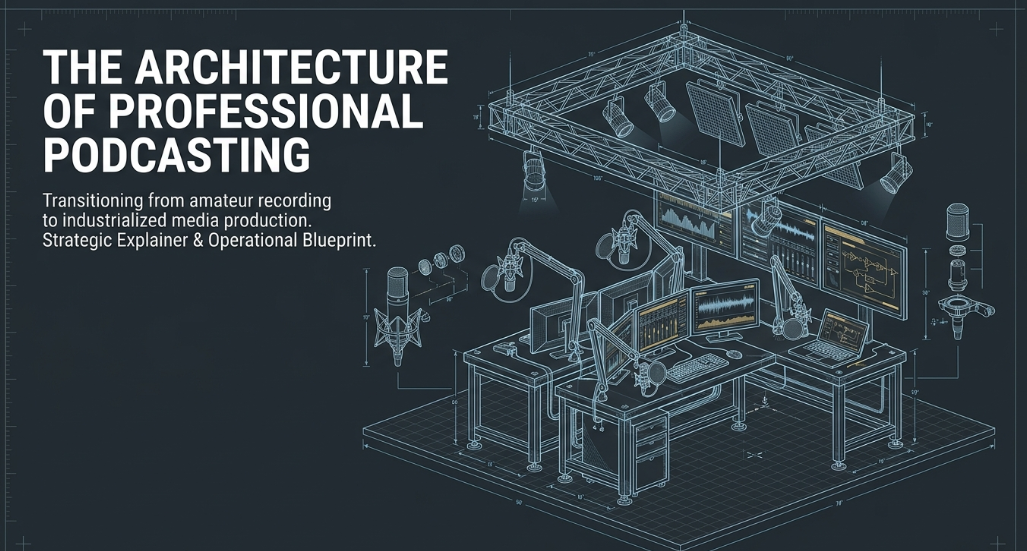
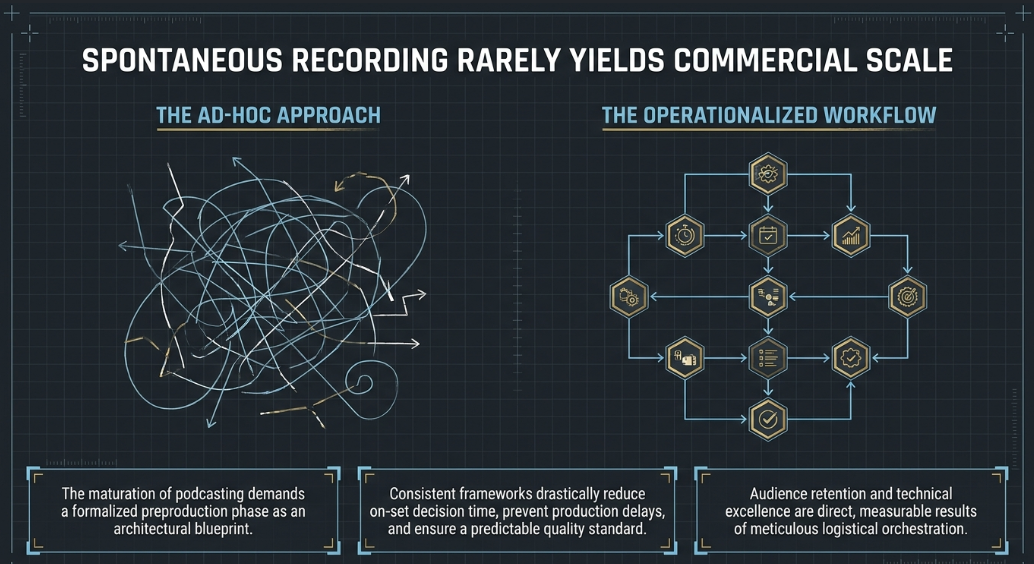
The maturation of the podcasting industry has fundamentally altered the paradigm of digital audio and video content creation. What was once a medium characterized by informal, ad-hoc recording sessions has evolved into a highly industrialized sector of global media consumption. At the professional level, the notion that compelling content can organically manifest without rigorous logistical orchestration is a fallacy. Spontaneous recording without prior planning rarely yields sustainable audience engagement, commercial viability, or cross-platform scalability.1 Instead, a formalized preproduction phase acts as the architectural blueprint for the entire enterprise, ensuring that every subsequent technical and creative decision aligns meticulously with the overarching strategic objectives of the broadcast. Establishing consistent frameworks during this phase dramatically reduces decision-making time on set, prevents costly production delays, and maintains a high, predictable standard of quality across multiple episodes.1
Media professionals increasingly recognize that the foundation of a successful podcast lies in this rigorous preparation, transitioning the project from a mere conceptual outline into an operationalized media workflow.2 This structured approach is designed to systematically prevent the common pitfalls that plague amateur productions, such as inconsistent publishing schedules, mismatched technical standards across different camera angles or audio tracks, and incoherent narrative arcs that fail to retain listener attention. By viewing preproduction as an indispensable phase rather than a bureaucratic administrative hurdle, producers can implement standardized taxonomies, centralized reporting mechanisms, and highly calibrated cross-platform tracking systems.
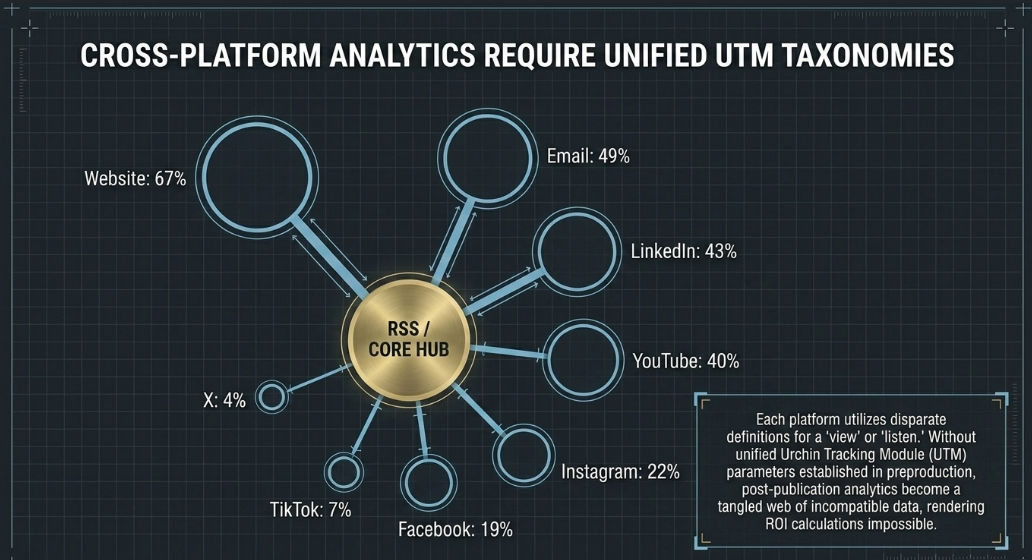
The necessity for these centralized tracking systems becomes evident when analyzing the fragmentation of modern audience distribution. Modern podcast consumption is not localized to a single RSS feed; it is dispersed across a multitude of digital touchpoints. Current platform distribution metrics indicate a highly varied landscape: dedicated websites drive 67% of engagement, followed by email newsletters at 49%, LinkedIn at 43%, YouTube at 40%, Instagram at 22%, Facebook at 19%, TikTok at 7%, and X (formerly Twitter) trailing at 4%.1 Because each of these platforms reports metrics differently—using disparate definitions for what constitutes a "view," "listen," or "engagement"—cross-platform tracking requires a unified taxonomy and the consistent application of Urchin Tracking Module (UTM) parameters.1 Without this preproduction foresight, post-publication analytics become a tangled web of incompatible data, rendering it impossible to accurately measure return on investment or audience growth. Consequently, the phrase "success doesn't just happen" serves as a foundational axiom in modern digital broadcasting, reflecting the reality that audience retention and technical excellence are the direct, measurable results of meticulous logistical and creative orchestration.
Making the Go/No Go Decision
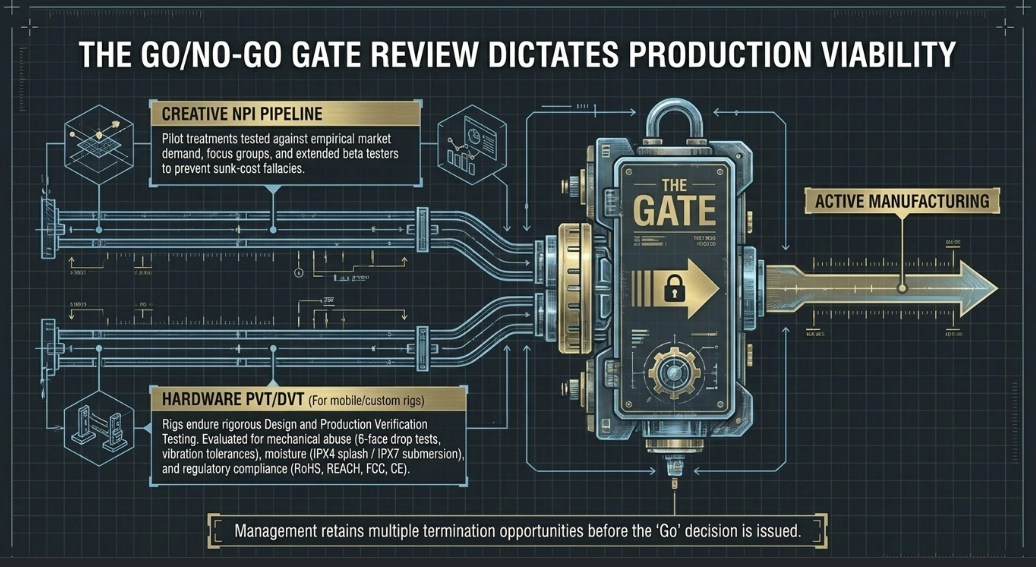
In the context of professional media production, the development of a new video podcast must be subjected to rigorous gate reviews, drawing heavily upon methodologies traditionally utilized in commercial new product introduction (NPI) pipelines.4 The "Go/No Go" decision represents a critical, high-stakes juncture where executive producers, financial backers, and key stakeholders objectively evaluate the performance potential and creative viability of a concept before committing substantial capital and operational resources.1
This decision-making framework often utilizes established project management philosophies, such as the Waterfall approach—characterized by discrete, sequential steps and milestones—or the more iterative Agile product development process.4 During the evaluation phase, the business case for the proposed podcast is heavily scrutinized against empirical market demand, audience fit, and the strategic value of either acquiring existing intellectual property or developing entirely original concepts from scratch.4 Management evaluates the prototype—which in the podcasting realm typically takes the form of a pilot episode or a highly developed show treatment—under simulated "real world" conditions, testing it against focus groups or beta testers who might even consume the content over an extended evaluation period.
The gate review process culminates in a formal presentation where the production team delivers pre-defined deliverables to management. This objective evaluation mechanism prevents emotional attachment or sunk-cost fallacies from driving continued investment into fundamentally flawed concepts. Thresholds are established to enable standardized, objective performance evaluation, ensuring that decisions are driven by empirical data and strategic alignment rather than subjective preference.1 Management typically retains multiple opportunities to terminate the project before committing to a public launch.2
Furthermore, if the podcast relies on custom hardware configurations—such as proprietary mobile recording rigs, specialized action camera setups, or remote broadcasting kits—these physical assets must undergo their own rigorous "Go/No Go" testing akin to hardware Design Verification Testing (DVT) and Production Verification Testing (PVT).6 Mobile podcasting setups, which may be deployed in unpredictable field environments, are evaluated for mechanical abuse survivability, including 6-face drop tests, tumble tests, vibration tolerances, and varying degrees of water resistance (such as IPX4 splash resistance or IPX7 submersion).6 They must also clear regulatory and safety compliance checks, such as RoHS, REACH, FCC, and CE certifications, particularly if the production company plans to commercialize the recording setups.6 Only when both the creative content and the technical hardware pass their respective verification thresholds does the executive team issue the final "Go" decision, transitioning the project from development into active manufacturing and operationalization.
Creative Development
Once a project successfully navigates the gate review process and receives executive approval, creative development takes precedence. This phase translates the theoretical core concept into an executable, episodic production format. It involves defining the specific topical boundaries of the podcast and establishing a highly reliable, structured formula that audiences can anticipate, trust, and habitually consume. A highly structured run-of-show is critical for maintaining narrative momentum and preventing the broadcast from devolving into unstructured, meandering dialogue.
For instance, a narrative or historical podcast might be divided into strict, timed sections to enforce discipline: a setup segment to introduce the core story; a deep-dive analysis focusing on a specific micro-topic within that story; a contextual segment detailing historical or industry relevance; and a concluding section dedicated to editorial opinions, forecasting future trends, or exploring the current status of the subjects discussed.7 Adhering strictly to a temporal formula within these defined sections ensures that the pacing remains tight, the editing process is streamlined, and viewer retention algorithms—particularly on platforms like YouTube—are maximized by preventing mid-episode audience drop-off.7
Beyond narrative architecture, creative development encompasses the strategic, psychological integration of audience engagement mechanisms, most notably calls to action (CTAs). For commercial, branded, or non-profit podcasts, poor CTA placement or misaligned messaging can severely undermine the narrative effectiveness and emotional resonance of the episode.1 The development phase dictates that CTAs must not be jarring interruptions; rather, they must be seamlessly woven into the script. Best practices indicate that producers should use specific impact language that connects the listener's contribution or engagement directly to a tangible outcome, vehemently avoiding generic directives.1 For example, in non-profit storytelling, instead of utilizing a blunt, transactional phrase like "Donate now," the script should be developed to state, "Your $25 gift can provide a child with a month of clean water".1 This specificity bridges the psychological gap between the audience and the objective, converting passive engagement into active participation.
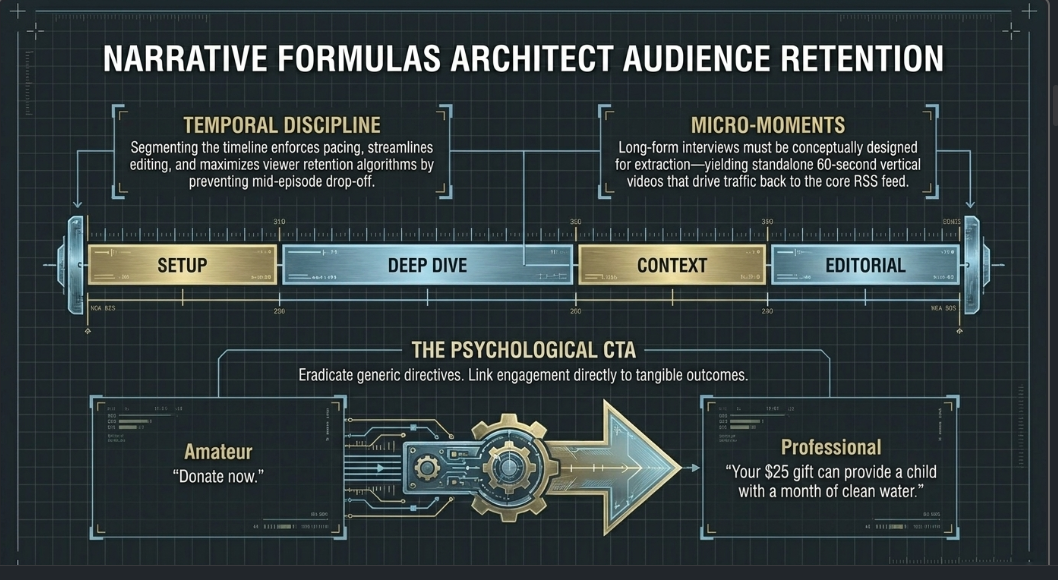
Cross-platform tracking and distribution strategies must also be baked into the creative DNA of the show from its inception. Because platforms yield vastly different engagement rates, the creative formatting must account for how content will be segmented and serialized. A three-hour long-form interview must be conceptually designed with "micro-moments" in mind—segments that can be easily excised as standalone 60-second vertical videos for platforms with shorter attention spans, while still driving traffic back to the primary website or RSS feed.1 In this way, the creative development phase serves as the critical bridge between artistic storytelling and algorithmic optimization, ensuring the content is both compelling to human listeners and highly indexable by digital distribution networks.2
Determining Production Needs
Determining production needs requires a granular, comprehensive assessment of the physical, technical, and human resources required to execute the finalized creative vision. This step acts as the operational translation layer between the written script and the physical set.2 The primary determinant that dictates the scale of these needs is whether the podcast will be distributed strictly as an audio-only experience or as a hybrid audio-video production. Introducing visual acquisition to a podcast exponentially increases the complexity, cost, and footprint of the workflow.9
If the production is slated to be an in-person, multi-host video podcast, the spatial requirements of the studio must be carefully calculated. A facility must accommodate not only the seating arrangement for the talent but also the extensive footprint of multi-camera setups, heavy C-stands for overhead lighting, sound-dampening acoustic treatments, and the physical presence of the production crew.9 Needs assessment involves dictating the precise number of discrete camera angles required—typically establishing a wide master shot, isolated close-ups for each host and guest, and potentially overhead or profile specialty angles.12
Human capital requirements are a equally critical component mapped out during this phase. Producers must objectively evaluate the technical proficiency of their talent to determine whether the hosts can self-operate the equipment (often referred to as a "self-service" or "dry hire" model) or if the production necessitates the deployment of dedicated sound engineers, videographers, and live-switching operators.9 High-profile corporate podcasts, branded content, and productions featuring celebrity guests typically dictate the presence of onsite technicians to monitor audio levels, manage multi-camera 4K switching capabilities, and troubleshoot equipment failures in real-time, thereby completely offloading technical burdens from the hosts and allowing them to focus entirely on the conversation.
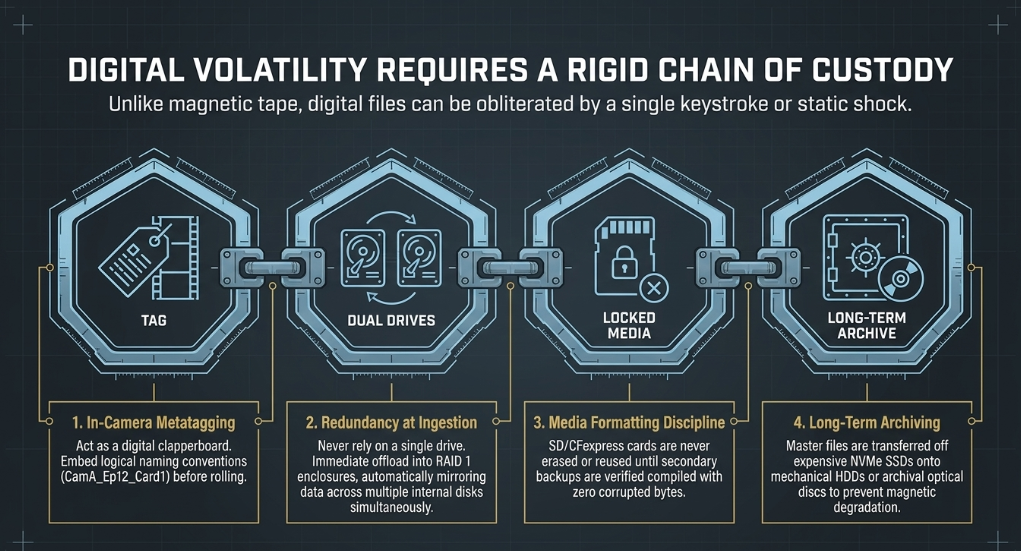
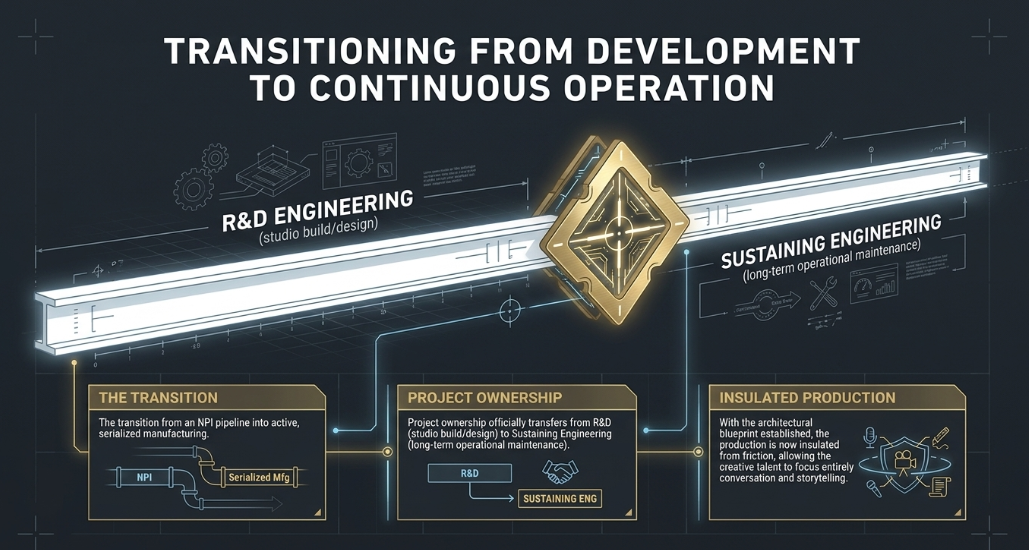
Finally, post-production needs must be established before the first camera rolls. This includes calculating required server storage capacity for massive video files, establishing editing turnaround timelines, defining the software suite required (e.g., specific Non-Linear Editors or DAWs), and detailing the asset delivery formats necessary for the final upload.13 Larger production companies will also use this time to begin the transfer of project ownership from Research and Development (R&D) Engineering—who designed the studio or remote rig—over to Sustaining Engineering, ensuring long-term operational maintenance of the podcasting infrastructure.6
Budgeting Guidelines
A comprehensive, realistic budgeting strategy is the lifeblood of any professional media endeavor, essential for sustaining long-term podcast production without compromising technical quality.8 Budgeting generally falls into two primary macroeconomic categories: capital expenditure (CapEx), which involves purchasing equipment and permanently building out a proprietary studio space, and operational expenditure (OpEx), which revolves around renting existing studio space, hiring freelance personnel, and utilizing peer-to-peer equipment sharing.
For productions opting to rent established, professional studio spaces to avoid massive upfront CapEx, current market rates provide a clear framework for budgeting. In major production hubs like London, the market is highly segmented into tiers based on equipment capabilities, aesthetic value, and engineering support:
Dry Hire (Room Only): This is ideal for producers who already own their cameras and microphones but lack a soundproofed, acoustically treated environment. The budget required for dry hire typically ranges between £50 and £90 per hour.9
Audio-Only Standard Hire: If the studio provides the broadcast microphones and audio interfaces, self-service options span from £30 (budget facilities) to £84 (premium, highly treated facilities) per hour.9 If the session requires an audio engineer, rates average £85 per hour, escalating to £120 for top-tier corporate facilities.9
Audio and Video Hire: The integration of multi-camera 4K setups—utilizing broadcast-grade cameras like the Sony FX6 or FX3—drastically alters the budgetary landscape. Self-service A/V rates average £100 to £138 per hour.9 Fully engineered video sessions, which represent the pinnacle of professional podcasting, range from £100 to £190 per hour, with ultra-premium suites exceeding £170 per hour.9
When engineering support is not bundled into the base rental price, technicians represent a significant variable cost. Operators typically charge an additional £24 to £60 per hour, which must be factored into the baseline budget to prevent cost overruns.9 Furthermore, budgeting must account for ancillary fees, including Value Added Tax (VAT), minimum booking durations (studios often mandate a two-hour minimum), and punitive overtime fees if sessions exceed their allotted schedule.9
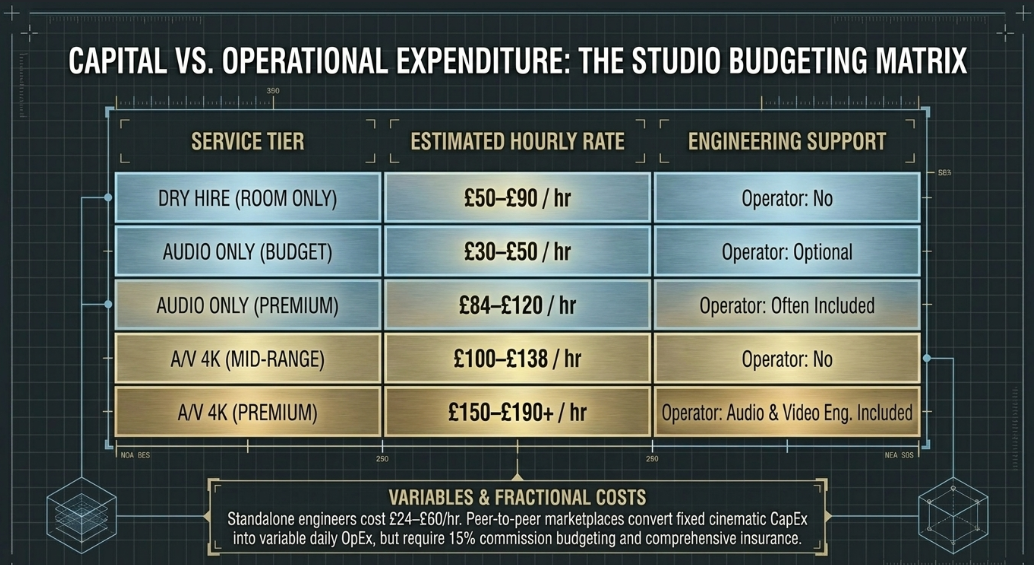
For decentralized or location-based podcasts that do not operate out of a fixed studio, equipment rental platforms provide highly flexible financial alternatives to purchasing expensive cinematic gear outright. Traditional commercial rental houses (such as VMI, Cameraworks, and The Kit Room in London) supply meticulously maintained, broadcast-grade equipment but require formalized accounts and comprehensive production insurance.16 Conversely, the rise of peer-to-peer rental marketplaces like Hygglo (formerly Fat Llama) or Wedio allows producers to rent specific items directly from other creators.18 This allows producers to source specialized gear—such as motorized sliders, unique vintage lenses, or specific wireless audio transmitters—on a highly fractional, day-to-day basis, effectively converting fixed capital costs into variable daily operating expenses.18 However, when utilizing these peer-to-peer networks, producers must accurately budget for the platform commissions (which typically hover around 15%) and ensure the equipment is fully insured against theft or damage.20
Production: Lighting and Sound
Lighting on a Deadline and Budget
In the visual hierarchy of a video podcast, professional lighting consistently outranks camera resolution in dictating the perceived quality and professionalism of the broadcast.21 A high-end, Netflix-approved cinema camera will yield muddy, amateurish results in poorly lit environments characterized by mixed color temperatures and harsh shadows. Conversely, an entry-level mirrorless camera, or even a flagship smartphone, can produce stunning, broadcast-quality visuals if the lighting is meticulously controlled and shaped.22 When operating under strict deadlines and tight budgets, deploying rapid, efficient lighting setups is essential for maintaining production momentum.
The most budget-friendly and time-efficient configuration is the one-light setup. This foundational approach involves placing a single, powerful key light slightly above or directly in front of the subject to illuminate the entire scene.21 To prevent the resulting image from appearing overly flat, and to mitigate harsh, unflattering shadows across the host's facial features, this single light source must be aggressively diffused using a softbox or umbrella.21 The primary advantage of a one-light system is its rapid deployment—it is perfect for solo content creators, beginner podcasters, or teams who must set up and strike their studio within a highly limited rental window or a small residential room.21
While a single light can lack the depth of a multi-point system, producers can utilize natural light hacks—such as positioning the subject relative to a large window—alongside inexpensive, small continuous LED accents to elevate a low-budget scene without requiring extensive rigging or specialized grip equipment.23 In editing, flat and even lighting is generally preferred over highly dramatic, contrast-heavy lighting (chiaroscuro). Flat light keeps exposure within a narrow mathematical range, allowing colorists to make global adjustments across an entire timeline rather than executing tedious, shot-by-shot fixes.
Recommended Lighting Instruments
The selection of lighting instruments must prioritize three critical factors: output stability, color temperature accuracy (measured in Kelvin), and thermal management. A standard professional setup categorizes lights into specific, functional roles: the Key Light (providing primary illumination), the Fill Light (mitigating shadow density), and the Background or Room Light (creating spatial depth).12
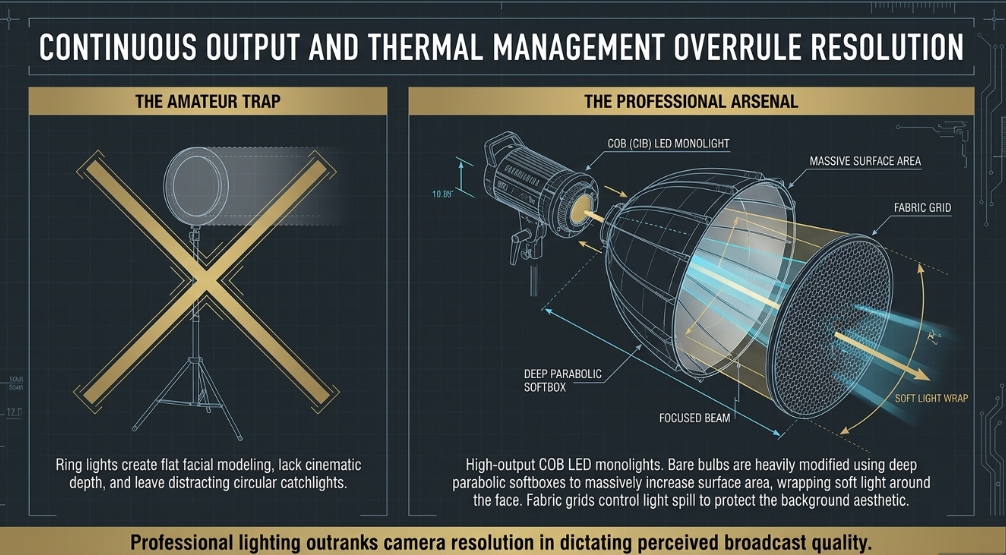
While cheap LED ring lights are incredibly popular among entry-level creators for their low cost and even frontal illumination, professional productions quickly outgrow them. Ring lights fail to create cinematic depth, often result in flat, uninteresting facial modeling, and produce distinct, sometimes distracting circular catchlights in the subjects' eyes.22 Instead, professional videographers rely heavily on high-output LED monolights, frequently referred to as COB (Chip-on-Board) lights.
Key Lights: Instruments such as the Amaran 100D (or 100dS), the compact Godox ML60II Bi-Colour LED, and the more powerful Godox LA150Bi or LA300Bi are considered industry standards for podcast studios.21 These units provide immense, continuous power that can be dialed in accurately to match the ambient color temperature of the room (for instance, matching 5600K daylight to blend seamlessly with window light).22
Fill and Background Lights: To inject color contrast and separate the subject from the background wall, producers deploy less powerful, dimmable bi-color LED panels or RGB tube lights. Instruments like the Godox LE150R RGB LED Panel or consumer-adapted smart lights like the Philips Hue Gradient series are excellent for painting backgrounds with complementary colors.21
Modifiers: A bare LED COB bulb emits harsh, highly specular light that is deeply unflattering to human skin tones. To achieve the soft, wraparound light necessary for long-form talking-head formats, heavy physical modification is required. Deep parabolic softboxes equipped with internal diffusion baffles, or lantern-style softboxes (such as the Aputure Light Dome II or the Aputure Lantern), are essential.21 These modifiers massively increase the surface area of the light source, thereby drastically softening the transition line between highlights and shadows on the speaker's face.21 Furthermore, fabric grids (honeycombs) are frequently attached to the front of these softboxes to control light spill, ensuring the key light illuminates only the subject without inadvertently washing out the meticulously designed background.21
Lighting Diagrams
The spatial geometry of lighting—often rigorously mapped out in preproduction blueprints and diagrams—dictates both the visual aesthetic of the show and the post-production efficiency of the editing team. These configurations scale significantly in complexity based on the number of subjects present on camera.12
The Solo Setup (1-Person): The foundational architecture for a solo podcast relies on the classic photographic lighting triangle. The key light is offset at a 30° to 45° angle from the camera's central axis, positioned slightly above the talent's eye level and angled downward to simulate natural overhead lighting.12 A soft fill light is positioned on the opposing side to wrap the illumination around the face and control contrast ratios, while a subtle backlight (or hair light) separates the talent's shoulders and head from the rear environment.12 Standardization is key here; maintaining flat, predictable light ensures visual consistency across dozens of episodes.
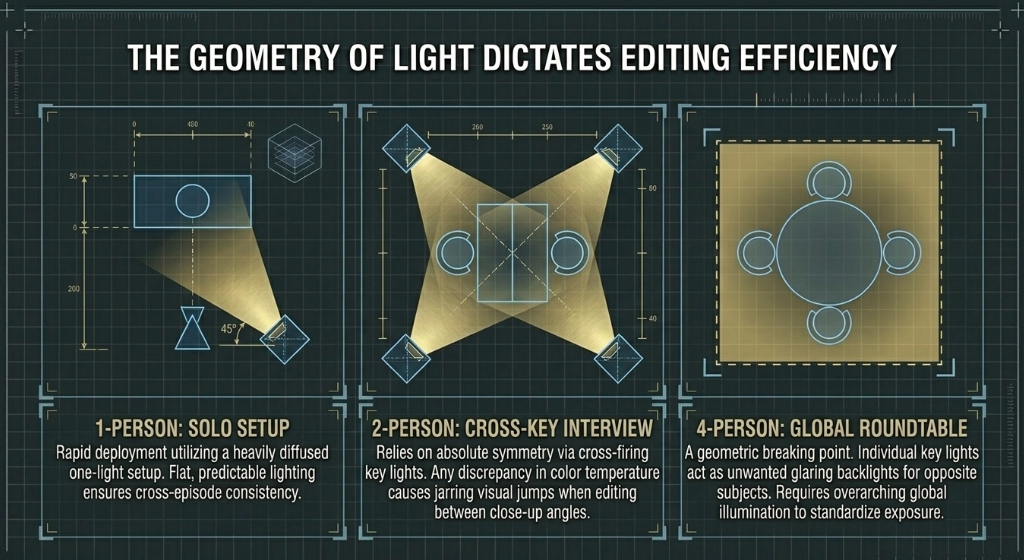
The Interview Setup (2-Person): When scaling production to accommodate two people, the lighting diagram must prioritize absolute symmetry. Typically, a two-light setup is utilized where two identical key lights are cross-fired, each illuminating the opposite host across the table.21 This cross-key technique ensures both speakers are evenly lit while strategically keeping the bulky lighting stands out of the wide establishing camera shot.12 Matching the color temperature and exposure levels precisely between these two sources is paramount; any discrepancies will result in jarring visual jumps every time the editor cuts between the two close-up camera angles, destroying the illusion of a seamless conversation.12
Multi-Subject Setups (3 to 4-Person): Expanding to a three-person arrangement introduces what cinematographers consider a "breaking point" in lighting complexity. The potential for mismatched exposure and color temperature increases exponentially. Small differences in these elements become highly visible, threatening to pull the viewer's psychological focus away from the dialogue.12 While a professional, studio-level three-point setup per seat is ideal for cinematic separation, it requires immense floor space and power distribution.21
For four-person setups, the physical seating layout dictates the lighting diagram entirely. A linear "Panel Layout"—where subjects sit side-by-side facing the cameras—is significantly easier to light consistently. This layout is also far more amenable to automated, AI-driven multi-camera switching software, as camera coverage and lighting are designed around clear directional priority.12 Conversely, a circular "Roundtable Layout" presents severe geometric challenges. In a circle, a key light intended for one subject inherently acts as an unwanted, glaring backlight or spill light for the person seated directly across from them.12 In these roundtable scenarios, producers abandon individualized key lights in favor of overarching global illumination—often achieved via massive overhead softboxes or by bouncing powerful lights directly off a white ceiling—to standardize exposure across the entire group, producing footage that cuts cleanly.12
Table 2: Comparison of standard podcast lighting configurations based on subject count and complexity.12
Capturing Good Audio
Audio fidelity is the absolute, non-negotiable core of any podcast production. If visual elements fail—due to a dead battery, missed focus, or corrupted memory card—a podcast remains functionally viable; if the audio fails, the content is fundamentally unconsumable.25 Capturing pristine audio requires a flawless synergy between acoustic environmental control, proper hardware selection, and precise microphone technique. Attempting to fix substandard audio via heavy noise reduction plugins in Digital Audio Workstations (DAWs) like Adobe Audition or Audacity is a flawed strategy; it often results in robotic, degraded vocal artifacts that fatigue the listener.25 Therefore, capturing a pure, unadulterated signal at the source is the primary objective of the sound engineer.
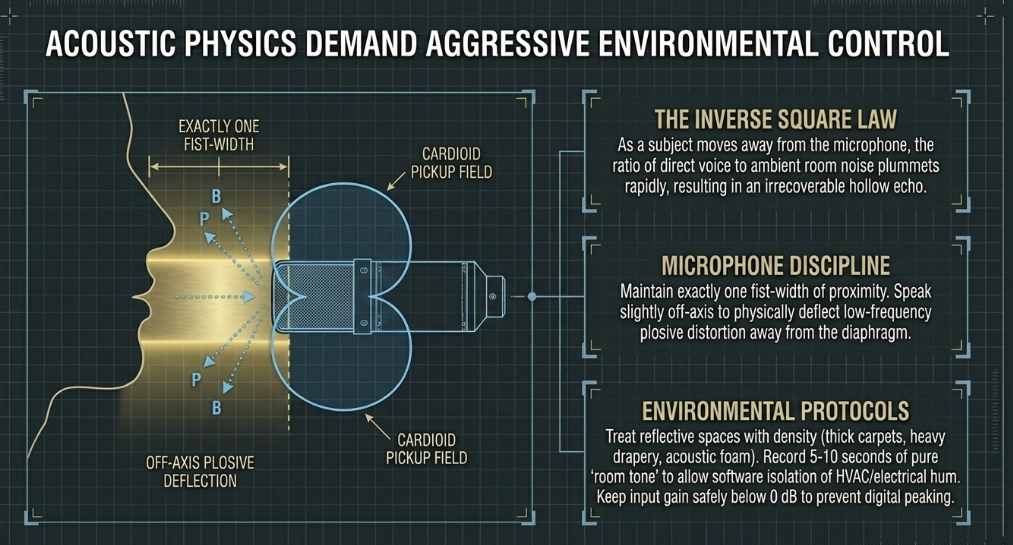
Acoustic Treatment: The physics of sound dictates that hard, parallel surfaces in a room—such as bare drywall, hardwood floors, and glass windows—will cause audio waves to reflect continuously. This creates reverberation (echo) and a hollow, distant auditory profile that immediately flags a production as amateur.27 To deaden the sound environment, producers must aggressively treat the recording space using sound-absorbing materials. While purpose-built commercial studios employ high-density acoustic foam, fiberglass panels, and heavy bass traps in the corners, budget-conscious solutions can be highly effective.26 These include laying down thick carpets, hanging heavy draperies over windows, or utilizing mattress foam and thick packing blankets to minimize acoustic bounce.26 Portable isolation booths—small, U-shaped acoustic foam enclosures designed to encircle the microphone—can absorb immediate vocal reflections, though their efficacy in highly reverberant rooms is limited compared to treating the macro environment.26
Microphone Technique: The specific selection of the microphone dictates its physical placement and the talent's behavioral interaction with it. Professional podcasts overwhelmingly favor Cardioid Dynamic broadcast microphones (such as the ubiquitous Shure SM7B or the Rode PodMic).7 The cardioid polar pickup pattern is highly directional; it is engineered to capture sound explicitly from the front of the capsule while aggressively rejecting ambient noise, computer fan hum, and room reflections originating from the sides and rear.7 Conversely, using omnidirectional microphones in an untreated room will result in disastrous audio quality.
Optimal microphone technique requires the talent to remain extremely close to the capsule—typically hovering exactly one fist-width away.7 Because of the inverse square law of acoustics, as the subject moves even slightly away from the microphone, the ratio of their direct voice to the room's ambient noise plummets rapidly, resulting in quiet, echoing audio that is difficult to normalize in post-production.26 Furthermore, speakers must be explicitly directed to speak slightly across the microphone (off-axis) rather than directly into the center of the grille.26 This vital technique prevents sharp, explosive bursts of air generated by consonant sounds (known as plosives, particularly words starting with 'P' and 'B') from striking the internal diaphragm and causing irrecoverable low-frequency distortion.7 Shock mounts and external pop filters provide mechanical and physical barriers to further mitigate table vibrations and plosive air blasts.7
Recording Best Practices: To avoid audio bleed—a phenomenon where one host's microphone inadvertently picks up the voice of another host or a remote caller—all participants must monitor the session using closed-back studio headphones or earbuds.27 This ensures that caller audio is not broadcast out of a laptop speaker and recaptured by the live microphones. Recording levels must be rigorously monitored by the engineer; the input gain on the interface should be staged conservatively so that the loudest vocal peaks remain safely below 0 dB. Exceeding 0 dB results in digital peaking and distortion, which destroys the audio file permanently.7 Whether recording via a hardware interface or browser-based tools like Cleanfeed.net or Zoom, software integrity is key.27 Finally, operators should record five to ten seconds of pure "room tone" (ambient silence) before the actual conversation begins.26 This distinct audio print provides a baseline noise profile, allowing post-production software to isolate and seamlessly subtract the inherent HVAC or electrical hum of the room from the vocal tracks without damaging the human voice.
Production: Videography
Camera Considerations
The visual acquisition phase of a video podcast requires selecting imaging devices that perfectly align with the production's specific format, budget constraints, and logistical mobility. The modern podcasting landscape is highly democratized, utilizing a wide spectrum of camera technologies—from basic desktop webcams to high-end cinema systems—each presenting unique operational characteristics and limitations.28
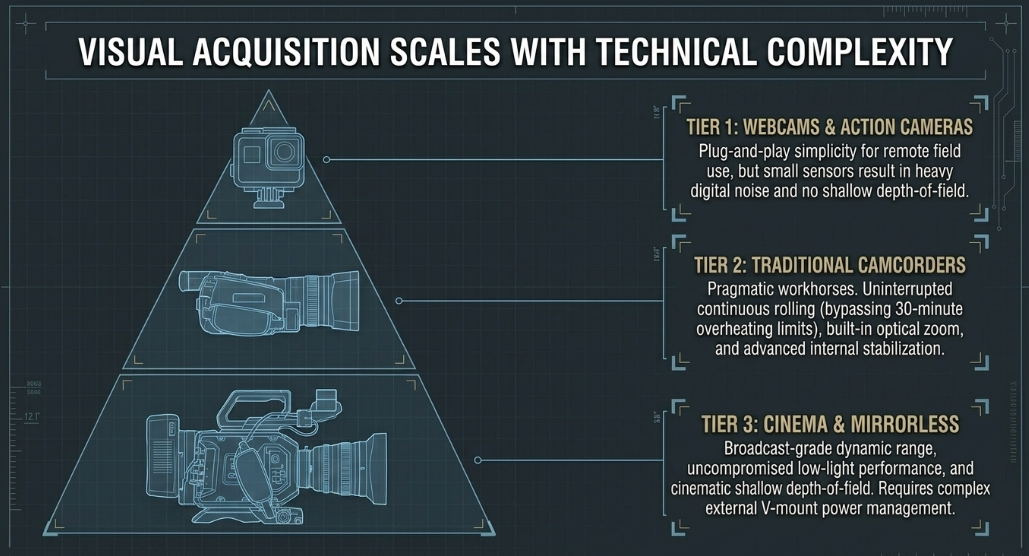
Webcams and Action Cameras: For remote interviews, solo desktop setups, or highly portable field scenarios, external USB webcams (such as the Logitech StreamCam) and rugged action cameras (such as the GoPro HERO12) offer unparalleled plug-and-play simplicity.29 They excel in live-streaming integration and require virtually no technical expertise to operate. However, they suffer from incredibly small sensor sizes, which leads to poor low-light performance, heavy digital noise in shadows, and an inability to achieve a cinematic, shallow depth of field (the blurry background effect that isolates the subject).29
Camcorders: Traditional camcorders, like the Sony FDR-AX43, are highly favored as pragmatic workhorses for long-form podcasting.30 Their primary architectural advantage lies in superior thermal management and the circumvention of artificial recording time limits. Unlike many consumer photography cameras that overheat or stop recording after 30 minutes, camcorders are designed to roll continuously for hours.29 They offer built-in, smooth optical zoom and advanced internal image stabilization mechanisms, making them robust tools for uninterrupted studio sessions or live event coverage.29
Mirrorless and Cinema Cameras: To achieve the premium, shallow depth-of-field visual aesthetic that is highly prevalent in top-tier, viral video podcasts, producers must utilize large-sensor mirrorless and digital cinema cameras. The Sony FX cinema line (including the FX3, the Super-35mm FX30, and the broadcast-grade FX6) alongside the Alpha mirrorless series (such as the a7S III and a6700) currently dominate this space.11 These cameras provide extraordinary dynamic range, uncompromised low-light capability, and the ability to mount interchangeable, high-quality optical glass. Standard lens pairings for podcasting include ultra-wides (like the Sigma 10-18mm f2.8 or Sony 16-35mm) for sweeping establishing shots or operating in incredibly tight studio spaces, and standard mid-range zooms (like the Sigma 24-70mm f2.8) for tight, flattering portrait framing of the hosts.31 However, deploying large-sensor cameras necessitates a vastly more complex technical workflow. They require external power management solutions—such as high-capacity V-mount batteries rigged via dummy adapters—to prevent battery depletion during exhaustive, two-to-three-hour conversational recordings.31
Choosing an Acquisition Format
The digital acquisition format—the underlying mathematical codec used to compress, encode, and store visual data—dictates both the visual fidelity of the captured image and the computational burden placed on the post-production editing suite. The term "codec" is a portmanteau of "encode" and "decode"; it represents the algorithm that packages the raw video data into a recognized container file (such as.MOV,.MP4, or.MXF).33 Video podcasting generally forces producers to navigate the complex trade-offs between three primary codec categories: highly compressed delivery formats (H.264), intermediate editing formats (Apple ProRes), and uncompressed raw data.
H.264 / H.265 (Delivery and Highly Compressed Acquisition): H.264 is the most ubiquitous video codec globally, operating primarily as the standard delivery format for online platforms like YouTube, Vimeo, and overarching streaming architectures.33 However, to save memory card space, many consumer and prosumer cameras also default to using it as their primary acquisition format.35 The defining characteristic of H.264 is its use of inter-frame compression (specifically Long GOP, or Group of Pictures). This means the codec does not save a complete, distinct image for every single frame of video (e.g., 24 or 30 frames per second). Instead, it saves a few primary "keyframes" and mathematically predicts the motion of the pixels in the intermediate frames.38
Advantages: Exceptional storage efficiency. H.264 yields incredibly small file sizes, which is highly advantageous for long-form podcast recordings where terabytes of data can accrue rapidly over a multi-hour session.35
Disadvantages: It is severely processor-intensive. When an editor scrubs the timeline in an NLE, the computer's CPU and GPU must mathematically reconstruct the missing, predictive frames on the fly, leading to sluggish, stuttering playback and system crashes.38 Furthermore, in scenes with heavy, unpredictable motion or complex visual elements (such as drone footage over water, intricate LED background screens, or rapid camera movements), the H.264 algorithm struggles to track pixel shifts. This causes the image to break down into a "blocky mess" of highly visible compression artifacts.38
Apple ProRes (Mezzanine and High-Fidelity Acquisition): Developed by Apple, ProRes serves as the undisputed industry-standard intermediate (mezzanine) and high-end capture codec in professional motion picture, commercial, and broadcast environments.13 Unlike H.264, ProRes utilizes intra-frame compression (All-I), meaning every single frame of the video is saved as a complete, independent, fully rendered image.38
Advantages: It is visually lossless and heavily optimized for hardware acceleration on major Non-Linear Editors (NLEs) like Premiere Pro, Final Cut Pro, and DaVinci Resolve. Because the computer does not have to expend processing power computing predictive frames, ProRes timelines playback effortlessly, drastically speeding up the post-production workflow.13 The ProRes 422 variant is widely considered the optimal balance of data and visual quality for standard filming. The much heavier ProRes 4444 variant stores immense color depth, including an alpha channel for transparency, enabling robust, artifact-free color grading operations and visual effects compositing without image degradation.33
Disadvantages: Massive file sizes. Recording a three-hour multi-camera podcast in ProRes 422 requires vast arrays of expensive SSD storage and high-speed media cards, drastically increasing the capital expenditure of the production.16
To bridge this gap in modern workflows, if cameras shoot in heavily compressed acquisition formats or massive Raw formats, editors often transcode the original footage into ProRes Proxy files (a highly compressed, low-resolution mezzanine variant) to ensure perfectly smooth editing on less powerful computers. Upon picture lock, they reconnect the timeline to the original high-resolution files for the final, pristine color grade and subsequent H.264 export for web delivery.
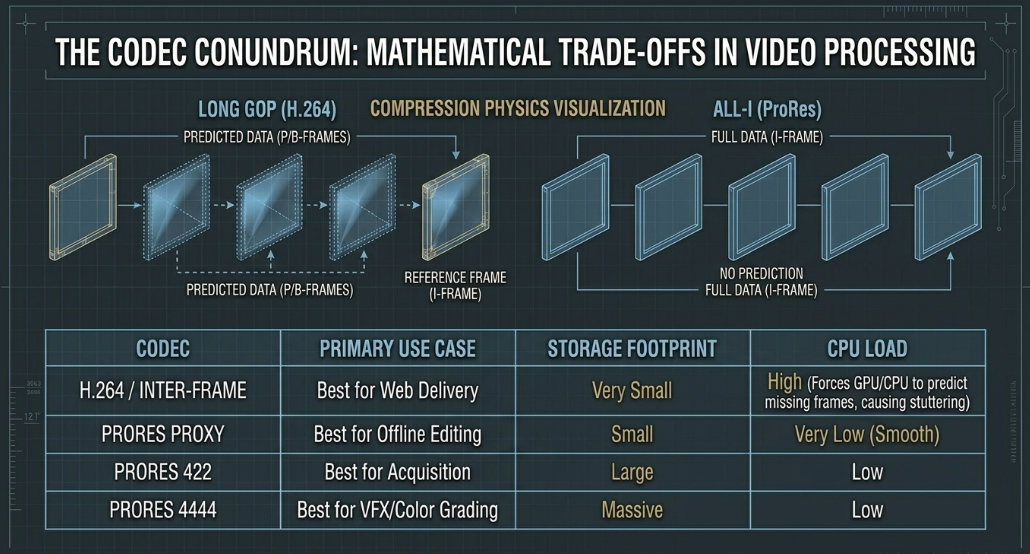
Table 3: Comparison of standard video codecs detailing their compression physics and operational use cases.13
Camera Support Options
The physical stabilization of cameras is a critical, often overlooked aspect of videography, particularly for video podcasts which feature extended, unbroken takes requiring static, locked-off framing. Camera support options must provide absolute rigidity to prevent micro-jitters, which subconsciously distract viewers and can cause automated motion tracking or AI-framing tools to fail catastrophically in post-production.
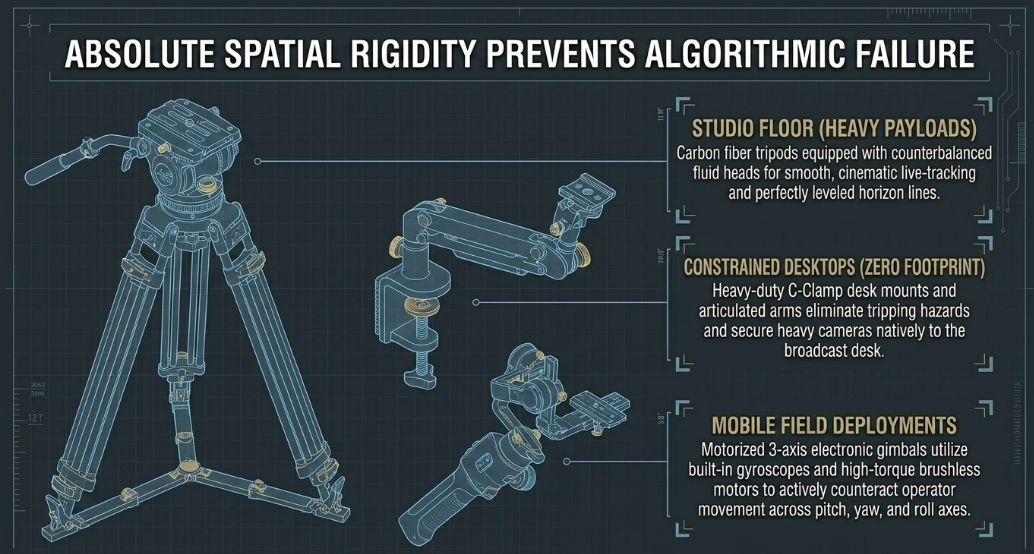
The foundational support system is the traditional tripod. A robust aluminum or carbon fiber tripod, such as the widely used Manfrotto MT190XPRO4 or the travel-friendly Manfrotto Befree, frees the operator's hands, allows them to manage audio or lighting, and ensures a perfectly leveled horizon line.28 For heavier digital cinema camera payloads rigged with external monitors and V-mount batteries, fluid-head tripods like the Magnus VT-4000 are essential. These heads offer counterbalanced, fluid resistance, allowing for completely smooth, cinematic panning and tilting if a camera operator is live-tracking a moving subject across the set.28
In space-constrained podcast studios, the large footprint of sprawling tripod legs can quickly become a severe tripping hazard or obstruct carefully placed lighting stands. In these restrictive environments, alternative support mechanisms are deployed. Heavy-duty C-Clamp desktop mounts (such as those manufactured by Neewer) allow heavy cameras and microphones to be securely bolted directly to the edge of the broadcasting desk or table, utilizing virtually zero floor space.28 For highly adaptable or localized angles where traditional mounting is impossible, articulated supports like the Joby GorillaPod 3K provide flexible mounting options, capable of wrapping tightly around structural beams or resting stably on uneven surfaces to capture unique perspectives.
When the podcast production transitions from the studio to a mobile environment—such as dynamic field interviews, walking tours, or behind-the-scenes documentary coverage—producers rely heavily on motorized, 3-axis electronic gimbals.31 Gimbals utilize built-in gyroscopes and high-torque brushless motors to actively counteract the operator's bodily movement across the pitch, yaw, and roll axes. This active stabilization results in perfectly steady, Steadicam-like fluid motion that dramatically elevates the production value of location shoots, keeping the host perfectly centered in the frame while walking.28
Tapeless Acquisition
The paradigm of professional video acquisition has undergone a total, irreversible transition from linear magnetic tape formats to tapeless, file-based workflows. This historical shift from capturing linear analog or digital tape to writing binary digital files directly onto solid-state drives (SSDs), CFexpress, or high-speed SD cards was driven universally by the relentless industry demand for post-production speed and efficiency.2
Under older tape-based workflows, footage had to be ingested into non-linear editing systems (NLEs) in real-time; a three-hour podcast required exactly three hours simply to digitize before a single edit could be made.40 Tapeless acquisition obliterates this bottleneck. It allows editors to ingest hundreds of gigabytes of data in a fraction of the time, immediately dragging digital clips from a card reader directly into the NLE timeline.40 It also empowers on-set operators with profound operational advantages: the ability to instantaneously review footage without tedious mechanical rewinding, and the ability to immediately delete compromised or false-start takes, thereby preserving expensive memory card space.40
However, tapeless acquisition introduces severe, systemic risks regarding data volatility. A physical video tape represented an immutable, physical hard copy unless exposed to heavy magnetism or physically destroyed; a digital file, conversely, can be entirely obliterated in a fraction of a second by a single accidental keystroke, a corrupted card partition, or a static electrical shock during transfer.40 Consequently, rigorous, unforgiving data management protocols are mandatory for professional podcasts.
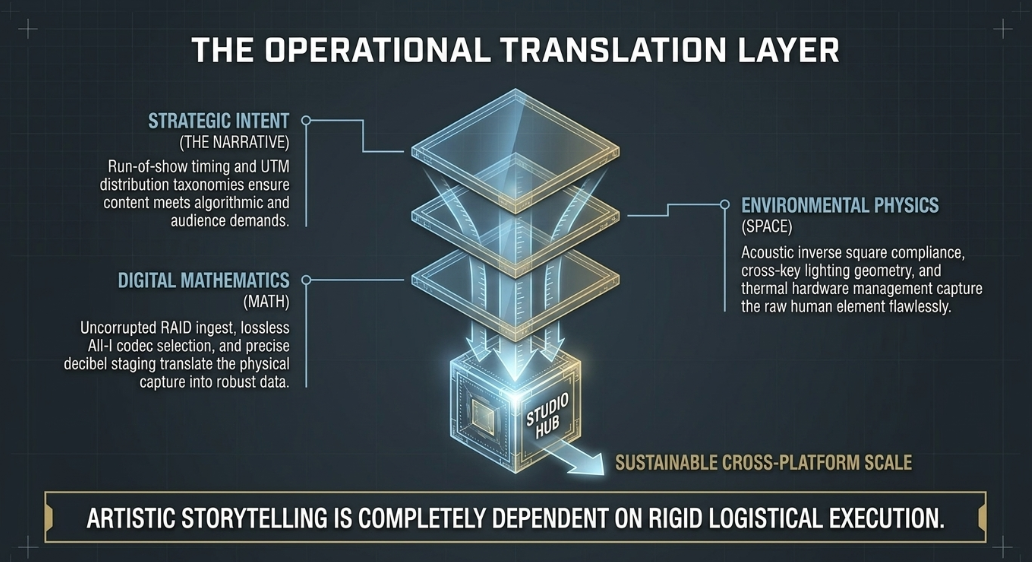
These procedures dictate treating digital files with the same chain-of-custody reverence as physical film negatives:
In-Camera Metatagging: Operators must utilize the camera's internal software to meticulously label clips, establish logical naming conventions (e.g., CamA_Ep12_Card1), and embed crucial metadata before the recording begins, essentially mimicking the vital organizational function of a physical clapperboard slate.40
Redundancy at Ingestion: Transferring raw footage to a single hard drive at the end of a shoot represents an unacceptable point of failure. Best practices mandate the immediate offloading of media to at least two distinct geographical locations or separate physical drives.40 Professional setups frequently employ RAID (Redundant Array of Independent Disks) enclosures. When configured correctly (such as in a RAID 1 mirror), these arrays automatically duplicate the data across multiple internal drives simultaneously during the initial ingest, protecting against mechanical hard drive failure.40
Media Formatting Discipline: An absolute rule of tapeless production is that an SD card or CFexpress card must never be formatted, erased, or reused until the Digital Imaging Technician (DIT) or lead editor explicitly verifies that the secondary and tertiary backups have successfully compiled with zero corrupted bytes.40
Long-Term Archiving: Once the podcast is published and the project is closed, the raw acquisition files and the final master exports are moved off of fast, expensive NVMe solid-state editing drives. To guarantee long-term asset preservation against magnetic degradation, data rot, or accidental erasure, these massive files are archived onto high-capacity, slower mechanical hard drives (HDDs) or burned onto permanent optical discs (such as archival-grade Blu-ray or HD DVD formats) to ensure the historical integrity of the production.
Works cited
Video Production Guide By William - Blog, accessed May 14, 2026, https://williammbrownok.weebly.com/
Producing video podcasts : a guide for media professionals - Purdue, accessed May 14, 2026, https://purdue.primo.exlibrisgroup.com/discovery/fulldisplay?docid=alma99170205243601081&context=L&vid=01PURDUE_PUWL:PURDUE&lang=en&adaptor=Local%20Search%20Engine&tab=Everything&query=sub%2Ccontains%2CInternet%20videos&mode=advanced
Producing Video Podcasts: A Guide for Media Professionals - Barnes & Noble, accessed May 14, 2026, https://www.barnesandnoble.com/w/producing-video-podcasts-richard-harrington/1128129153
New Product Introduction (NPI) | Definitive Guide - TCGen, accessed May 14, 2026, https://www.tcgen.com/new-product-introduction/
Executive Production Course Free - Valid Cert - Elevify, accessed May 14, 2026, https://www.elevify.com/en-jm/courses/business-and-economics/management/executive-production-course-87fa5
Pre-Production Hardware Testing Methods - Fictiv, accessed May 14, 2026, https://www.fictiv.com/articles/pre-production-hardware-testing-methods
How to make the sound of my podcast more compelling and "pro"? - Reddit, accessed May 14, 2026, https://www.reddit.com/r/podcasting/comments/1f5o59p/how_to_make_the_sound_of_my_podcast_more/
Professional web video : plan, produce, distribute, promote, and, accessed May 14, 2026, https://discovered.ed.ac.uk/discovery/fulldisplay?vid=44UOE_INST%3A44UOE_VU2&tab=Everything&docid=alma9925331737602466&lang=en&context=L&isFrbr=true
How much does it cost to rent a podcast studio London?, accessed May 14, 2026, https://www.finchley.co.uk/finchley-learning/how-much-does-it-cost-to-rent-a-podcast-studio-london
Podcast Studio Hire London & Manchester | From £84/hr, accessed May 14, 2026, https://outsetstudio.com/podcast-studio-hire/
Podcast Studios In Central London - Podshop, accessed May 14, 2026, https://www.podshoponline.co.uk/services/podcast-studio
The Complete Video Podcast Blueprint: 1–4 Person Setups, Camera ..., accessed May 14, 2026, https://cutback.video/blog/the-complete-video-podcast-blueprint-1%E2%80%934-person-setups-camera-angles-lighting-diagrams
The Ultimate Guide to Common Video Codecs | EditShare, accessed May 14, 2026, https://editshare.com/resources-guide-common-codecs-mediasilo/
Producing video podcasts : a guide for media professionals - Northeastern University, accessed May 14, 2026, https://onesearch.library.northeastern.edu/discovery/fulldisplay?docid=alma9952685632201401&context=L&vid=01NEU_INST:NUL&lang=en&adaptor=Local%20Search%20Engine&tab=Everything&query=creator%2Ccontains%2CRHED%20Pixel.%2CAND&mode=advanced&offset=10
The 16 Best Podcast Studios for Hire in London | Tagvenue UK, accessed May 14, 2026, https://www.tagvenue.com/hire/podcast-studios/london
VMI 4K Camera Rental, Broadcast Hire | Alexa, RED, C300 III Hire London, accessed May 14, 2026, https://vmi.tv/
Video & Film Equipment Hire in London (2026), accessed May 14, 2026, https://www.lambdafilms.co.uk/film-equipment-hire-london/
Film & Camera Equipment Rental/Hire in London: A Comprehensive Guide (2025), accessed May 14, 2026, https://www.herenow.film/trimtab/film-equipment-hire-london
Rent Ray Ban Meta Glasses 2025 from Owais , London Bridge & West Bermondsey, Southwark for £6 - 21/day, accessed May 14, 2026, https://hygglo.com/uk/i/857-ray-ban-meta-glasses-2024
Fat Llama Review: Renting Out Your Cameras for Extra Cash - Nature TTL, accessed May 14, 2026, https://www.naturettl.com/fat-llama-review/
Lighting Setups for Podcast Studios – Hypop, accessed May 14, 2026, https://www.hypop.com.au/blogs/blogs/lighting-setups-for-podcast-studios
Best Podcast Lighting Setup Budget to Pro + Exact Placement Tips - YouTube, accessed May 14, 2026, https://www.youtube.com/watch?v=JeNr4_3S23A
Full Guide To Lighting Your YouTube & Video Podcast Studio, accessed May 14, 2026, https://www.youtube.com/watch?v=hCqk9kCiHNs
The Best Podcast Lighting Setup (From Budget to Pro) - PSS Creative Media, accessed May 14, 2026, https://pss.media/blog/the-best-podcast-lighting-setup-from-budget-to-pro
3. Beginner's Guide to Capturing Great Audio for your Podcast - Clean Cut Audio, accessed May 14, 2026, https://www.cleancutaudio.com/post/3-beginners-guide-to-capturing-great-audio-for-your-podcast
Recording Environment: 11 Tips for Capturing Quality Audio When You Don't Have a Studio - Sarah Mikutel, accessed May 14, 2026, https://sarahmikutel.com/how-to-podcast/podcast-recording-environment-studio
Chapter 4: Best Practices for Recording – Tools for Podcasting, accessed May 14, 2026, https://saintpeters.pressbooks.pub/toolsforpodcasting/chapter/chapter-4-best-practices-for-recording/
Everything you need for a video podcast setup - Videomaker, accessed May 14, 2026, https://www.videomaker.com/how-to/shooting/camera-equipment/everything-you-need-for-a-video-podcast-setup/
Best Podcast Cameras: Top Picks for Video Podcasting (2026), accessed May 14, 2026, https://thepodcastconsultant.com/blog/podcast-cameras
Best Video Podcasting Equipment For Beginners | Hurrdat Media, accessed May 14, 2026, https://hurrdatmedia.com/podcasting/video-podcasting-equipment/
My Entire Video Podcast Studio Fits in 3 Small Bags! - YouTube, accessed May 14, 2026, https://www.youtube.com/watch?v=6gU2p-8bdrY
How a local podcast studio near me boosts my content's appeal., accessed May 14, 2026, https://www.finchley.co.uk/finchley-learning/visual-podcast/how-a-local-podcast-studio-near-me-boosts-my-contents-appeal
ProRes vs H.264: What's The Difference? - FILMPAC, accessed May 14, 2026, https://filmpac.com/prores-vs-h-264-whats-the-difference/
Comparison of video container formats - Wikipedia, accessed May 14, 2026, https://en.wikipedia.org/wiki/Comparison_of_video_container_formats
Video Editing Codecs Explained - MacSales.com, accessed May 14, 2026, https://eshop.macsales.com/blog/74918-video-editing-codecs-explained/
Video Editing Codecs Explained - OWC, accessed May 14, 2026, https://www.owc.com/blog/video-editing-codecs-explained
ProRes vs H.264 Explained: Which Codec Makes Your Film Look Better? - YouTube, accessed May 14, 2026, https://www.youtube.com/watch?v=Q_QDbfiujLA
Prores vs h264 vs h265 and IPB vs ALL-I... How good are they actually? - EOSHD.com, accessed May 14, 2026, https://www.eoshd.com/comments/topic/46562-prores-vs-h264-vs-h265-and-ipb-vs-all-i-how-good-are-they-actually/
The Video Podcast Equipment Guide For Every Budget - StreamYard, accessed May 14, 2026, https://streamyard.com/blog/video-podcast-equipment
What to Consider When Going Tapeless – Student Filmmakers ..., accessed May 14, 2026, https://studentfilmmakers.com/what-to-consider-when-going-tapeless/














