
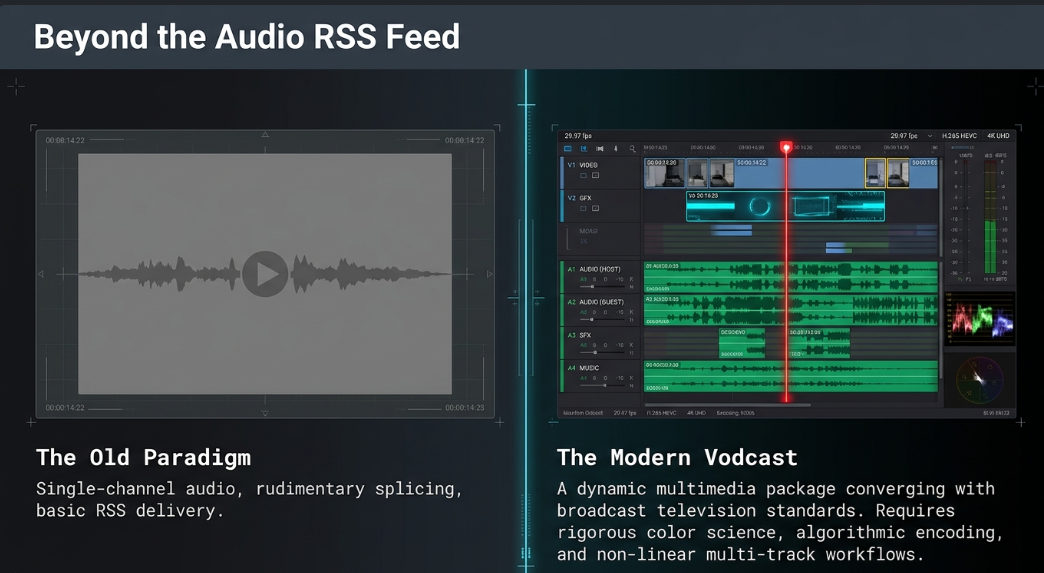
The post-production of podcasts has evolved from rudimentary audio splicing into a highly sophisticated, multi-disciplinary process encompassing advanced digital video editing, motion graphics, color science, and stringent audio normalization standards. As the medium converges with broadcast television and digital streaming architectures, post-production professionals must navigate an increasingly complex landscape of cross-platform specifications and nonlinear workflows. The modern podcast is no longer strictly an audio file delivered via RSS feed; it is a dynamic multimedia package requiring rigorous technical precision. The following analysis examines the complete pipeline of contemporary podcast post-production, evaluating the methodologies and technical standards required to deliver broadcast-quality content.
Acquiring Additional Sources
A highly produced podcast relies heavily on a rich tapestry of supplementary media. The integration of external visual and auditory elements transforms static studio recordings into engaging multimedia experiences that capture and retain audience attention. The acquisition, management, and deployment of these assets require both refined aesthetic judgment and strict adherence to specific technical specifications.
Working with B Roll
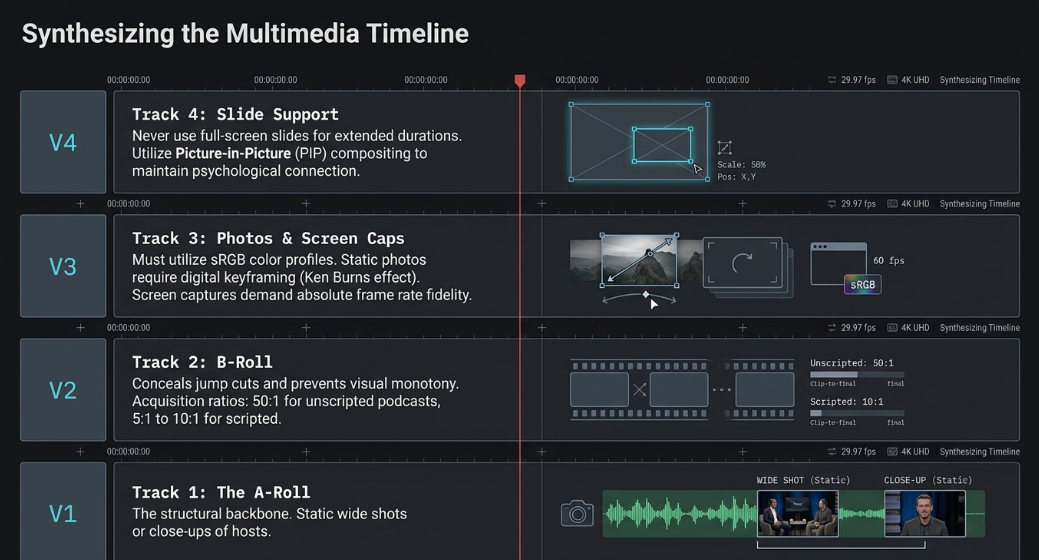
In the lexicon of video podcasting, the primary camera angle—often a static wide shot capturing the hosts or a dedicated close-up of an individual speaker—is referred to as the A-roll.1 The A-roll delivers the vast majority of the narrative content and serves as the structural backbone of the video.1 However, relying exclusively on an uninterrupted A-roll often results in visual monotony, prompting audience disengagement. To counteract this, post-production workflows incorporate B-roll, which consists of supplementary footage designed to add visual interest, visually represent concepts, and smoothly cover continuity errors or jump cuts introduced during the editing process.1 In an educational, investigative, or documentary-style podcast, B-roll serves to establish geographical locations, showcase specific actions or emotions, and highlight intricate details that mere spoken words cannot fully encapsulate.1
The successful acquisition of B-roll demands strategic foresight during the principal photography phase, as the post-production editor can only work with the media provided. Industry professionals universally recommend capturing significantly more footage than initially deemed necessary.1 Unscripted podcast content often requires a filming ratio of 50:1 or higher, whereas meticulously scripted content may operate effectively on a ratio between 5:1 and 10:1.1 Technical best practices during acquisition dictate the utilization of natural lighting whenever feasible, as B-roll environments are frequently dynamic and do not permit complex, multi-point lighting setups.1 Lens selection is equally critical to the final aesthetic: wide focal lengths are optimal for establishing broad locations and crowd dynamics, while long telephoto lenses, utilized with a shallow depth of field, are preferred for isolating specific details and separating subjects from distracting backgrounds.1 During the post-production phase, non-linear video editing software allows for the seamless layering of these supplementary clips over the primary A-roll, utilizing cutaways and transitions to mask abrupt timeline edits and maintain continuous narrative fluidity.
Working with Photos
Photographic assets serve as powerful visual anchors within a video podcast narrative, offering historical context or clarifying data. Integrating still images, however, requires careful attention to color space, resolution mapping, and digital formatting. Images must generally be acquired or converted to appropriate color profiles—typically sRGB for web and digital delivery—to ensure accurate color reproduction across varied consumer displays.4 When introducing static photographs into a high-motion video timeline, editors frequently employ digital motion techniques, such as the Ken Burns effect, to introduce subtle, keyframe-driven panning and zooming.5 This technique prevents the visual stagnation that occurs when a dynamic video suddenly cuts to a completely static digital image.
Furthermore, the aspect ratio of the acquired photographs rarely matches the standard 16:9 widescreen video format required by major podcasting and streaming platforms.6 Consequently, editors must utilize cropping techniques, background blurring (often achieved by duplicating the image, scaling it to fill the frame, and applying a Gaussian blur behind the primary image), or graphic overlays to elegantly frame the imagery within the video canvas.6 This avoids the introduction of jarring black bars, commonly known as pillarboxing (vertical black bars) or letterboxing (horizontal black bars), which can detract from the perceived production value of the podcast.6
Working with Screen Captures
For educational, technical, and analytical podcasts, screen captures are an indispensable source of visual information. Integrating these digital recordings into a post-production workflow requires specialized software and strict adherence to specific recording parameters to maintain fidelity. Applications such as Snagit or Camtasia allow podcast creators to record onscreen processes while automatically generating editable visual guides, numbered step-by-step annotations, and cursor highlights.7
A critical technical consideration when acquiring and editing screen captures is the preservation of frame rate consistency.5 Utilizing dedicated tools that allow for lossless screen capture prevents the severe degradation, blurred text, and stuttering video playback that are often associated with rudimentary or free screen grabbing utilities.5 When editing "screen life" content, the pacing strategy differs significantly from traditional video assembly; the editing rhythm must be dictated by the speed of digital interactions rather than physical camera movement or human dialogue pacing.5 Post-production editors must focus intently on the choreography of the digital cursor and the specific timing of software window transitions.5 A cursor that lingers too long on a static screen can swiftly kill viewer engagement.5 Advanced post-production workflows frequently utilize digital crop and zoom tools to simulate dynamic camera movements within the screen capture, enlarging and highlighting specific user interface elements or data points exactly as they are mentioned in the accompanying audio track.
Working with Speaker Support/Slides
The integration of presentation slides into video podcasts bridges the gap between traditional academic or corporate lectures and modern digital media consumption. To maintain a strong psychological connection with the audience, it is heavily advised against utilizing full-screen slide presentations for extended durations. Instead, post-production professionals employ picture-in-picture (PIP) layouts, allowing the viewer to simultaneously observe the presenter's facial expressions and nonverbal cues alongside the complex slide data.10
Acquiring and integrating slides can be achieved through either live switching during the recording or post-production compositing. Live streaming and recording software, such as OBS Studio, Producer by BoxCast, or Ecamm Live, enables creators to route external monitors via HDMI connections and share the display natively within the recording as a composite video file.10 Conversely, during the post-production phase, slides that have been exported as high-resolution image sequences can be layered onto the video timeline.7 Modern non-linear editors provide automated multicam synchronization capabilities, allowing editors to treat the slide presentation as a distinct, isolated "camera angle".13 This methodology enables rapid, precision switching between a full-screen presenter shot, a full-screen slide for detailed data analysis, and a composite PIP layout, dynamically reacting to the complexity of the information being conveyed at any given moment.9 To ensure maximum legibility across diverse viewing devices, slides must be designed cleanly, completely avoiding the visual clutter that quickly becomes unreadable when downscaled for mobile smartphone consumption.7
Motion Graphics
Motion graphics serve as the digital packaging and branding framework of a video podcast, providing context, structural organization, and aesthetic polish. These visual elements range from complex introductory title sequences (intros) and animated channel logos to lower thirds and social media overlays.15 A lower third is a foundational graphic overlay placed in the lower region of the video screen—historically known as the "title-safe area"—which is utilized to display essential contextual information such as a speaker's name, professional title, or relevant statistics without obscuring the primary subject's face.16
The architecture of an effective, professional motion graphic relies on a cohesive integration of five core elements: typography, color palette, graphic shapes, animations, and structural layout.17 In high-end post-production environments, these motion graphics are frequently pre-authored in specialized compositing software, such as Adobe After Effects or Apple Motion, and exported as Motion Graphics Templates (MOGRT files) featuring embedded alpha channels to preserve background transparency.18 These templates grant the primary video editor the flexibility to modify text fields, adjust the duration of the animation, and alter specific brand colors directly within the primary timeline without needing to continuously re-render the underlying animation sequence.18 When acquiring and applying motion graphics, restraint and moderation are imperative; an excessive, continuous deployment of animated visual elements, swooshing sound effects, and complex transition wipes can overwhelm the viewer's cognitive load and distract from the podcast's core narrative.
Technical Issues for Podcasting Graphics
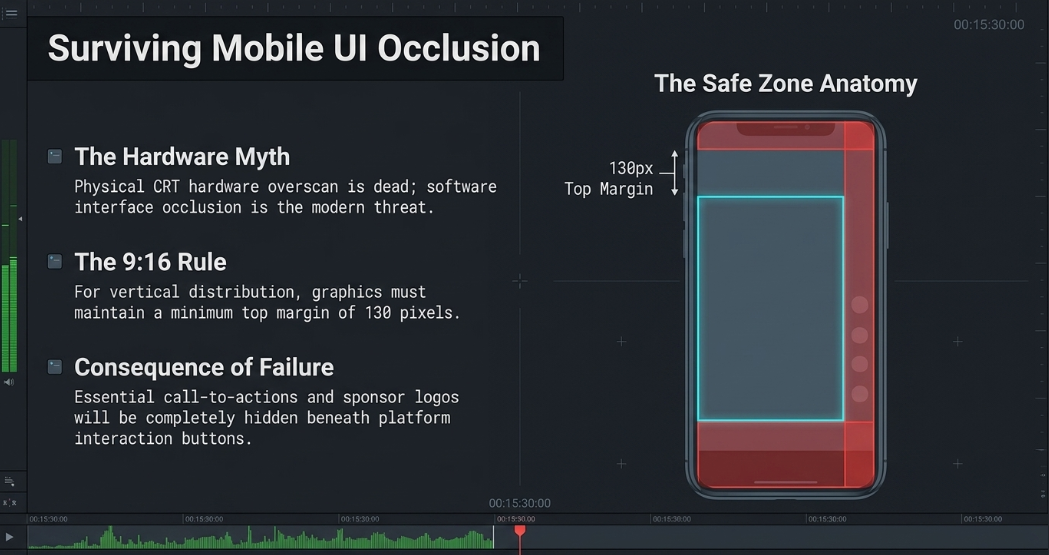
The deployment of on-screen graphics introduces several severe technical pitfalls related to display hardware and digital user interface limitations. The most prominent historical and contemporary issue in graphic placement is the concept of "safe zones." Originating from the era of cathode ray tube (CRT) televisions, the standard "Title Safe Area" dictates that critical text and graphics must reside strictly within the inner 80% of the screen to prevent cropping caused by hardware overscan.19 While modern flat-panel displays and computer monitors have largely mitigated physical hardware overscan, safe zones remain critically important today due to the proliferation of software interface overlays.19
On platforms heavily utilized for short-form video podcast distribution, such as TikTok, Instagram Reels, and YouTube Shorts, the functional safe zone is defined as the unobstructed area remaining after the application's proprietary user interface—including closed captions, profile names, interaction buttons, and progress bars—is overlaid onto the video playback.21 For a standard vertical 9:16 video (1080x1920 pixels), graphic designers must maintain a top margin of at least 130 pixels and keep focal points strictly centered to avoid catastrophic occlusion by UI elements.21 Failure to rigorously adhere to these evolving safe zones frequently results in essential call-to-action prompts or sponsor logos being hidden entirely beneath a platform's "Like" or "Share" buttons, nullifying the graphic's value.22
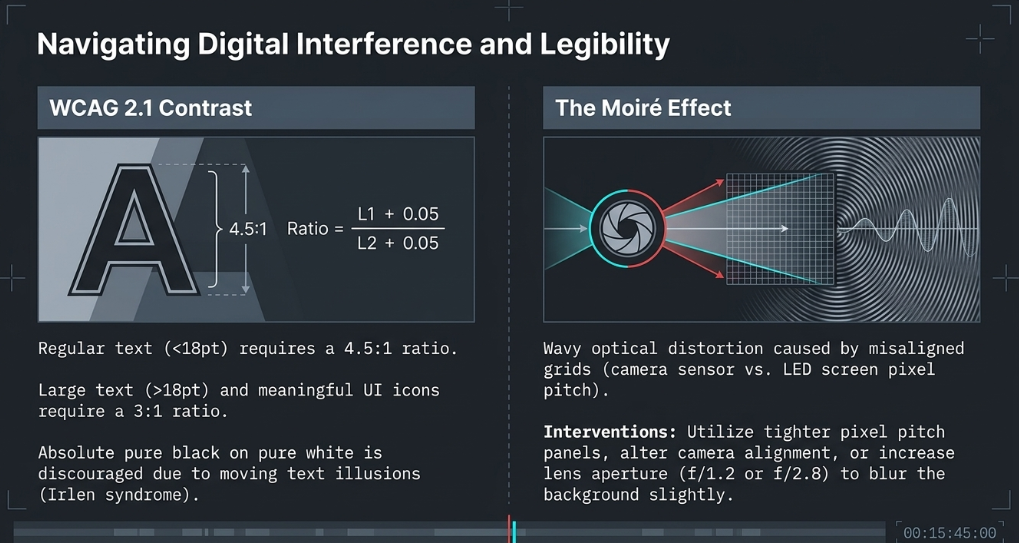
A secondary, highly disruptive technical issue is the Moiré effect. This optical distortion manifests as wavy, shimmering lines, moving ripples, or strange geometric patterns when a video podcast is recorded against an LED video wall or screen.24 The phenomenon occurs due to interference between two misaligned digital grids: the physical pixel pitch of the LED screen and the digital sensor grid of the recording camera.24 Resolving Moiré requires precise technical interventions: utilizing panels with a tighter pixel pitch, increasing the camera's lens aperture (such as f/1.2 or f/2.8) to create a shallow depth of field that subtly blurs the background screen out of focus, adjusting the camera angle to alter grid alignment, or utilizing advanced post-production software algorithms to smooth the interference patterns.
Graphic Design Issues for Video Podcasts
Graphic design for podcasts extends far beyond mere visual aesthetics; it is heavily governed by strict accessibility standards, digital color science, and platform-specific metadata requirements. To ensure that content is legible for all audiences, including those with visual impairments, post-production designs must adhere to established color contrast guidelines. The Web Content Accessibility Guidelines (WCAG) 2.1 dictate specific luminance contrast ratios that must be maintained across all digital assets.27
Achieving these precise mathematical ratios requires calculated palette selection. While maximum contrast is technically achieved through pure black text on a pure white background, this combination is often discouraged; stark absolute contrast can cause visual blurring, moving text illusions, or physical discomfort for viewers with Irlen syndrome.30 Furthermore, graphic designers must ensure that color is not the sole vehicle utilized for conveying meaning.30 Interactive elements or emphasis must be denoted by typography changes, underlining, or specific iconography alongside color shifts to accommodate individuals with color vision deficiencies who cannot distinguish certain hues.28
Additionally, static podcast artwork (the cover art distributed to RSS feeds) must meet rigorous specifications. Major platforms require artwork to be delivered in a 3000 x 3000 pixel square, rendered at a minimum of 72 DPI, utilizing the RGB color space.32 Files must be heavily compressed (often under 500KB) using JPEG or PNG formats, avoiding complex, unreadable text that vanishes when the artwork is dynamically scaled down to fit mobile interfaces.32
Music for Podcasts
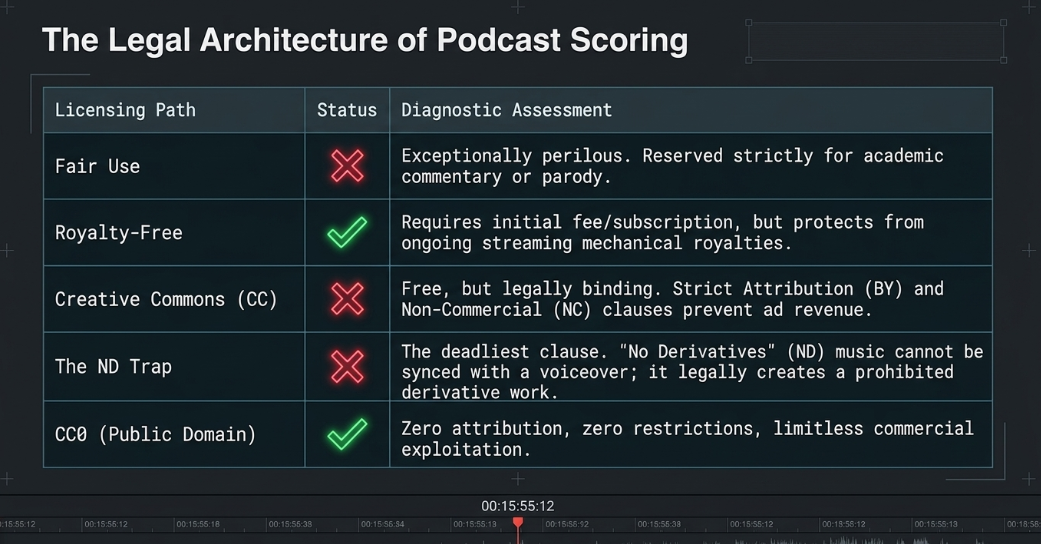
The auditory landscape of a podcast relies heavily on musical scoring to establish pacing, define transitions, and cultivate emotional resonance. However, the acquisition and deployment of music is fraught with complex, highly litigious copyright laws and licensing models. Utilizing copyrighted, commercial music under the assumption of "Fair Use" is exceptionally perilous. The Fair Use defense is legally narrow, generally reserved strictly for direct academic commentary, criticism, or parody, leaving the podcast entirely vulnerable to automated platform takedowns, demonetization, and severe legal liability.35
Podcast producers navigate this minefield via three primary, legally sound licensing models. The first and most common is Royalty-Free music, which requires a one-time purchase or an ongoing subscription fee to a curated library (such as Epidemic Sound, Artlist, Soundstripe, or APM Music).35 The term "royalty-free" is frequently misunderstood; it indicates that the creator is liberated from paying ongoing mechanical or performance royalties each time the podcast is streamed, not that the music is inherently free of initial monetary cost.35 These libraries offer massive catalogs and vital legal indemnification, though many operate on non-exclusive models, meaning the same track may appear in competing podcasts.37
The second path is Creative Commons (CC) licensing. While genuinely free of monetary cost, CC licenses impose extremely strict, binding conditions.35 Almost all CC licenses require strict Attribution (BY), and many include a Non-Commercial (NC) clause, strictly prohibiting the music's use in any podcast that generates revenue via sponsorships, dynamic ad insertion, or affiliate links.35 Crucially, podcast editors must meticulously avoid any music carrying a No Derivatives (ND) license.35 Legally, syncing a piece of music with a spoken voiceover constitutes the creation of a "derivative work," thereby immediately violating the ND license terms.35
The final, and safest, category for zero-budget or highly risk-averse productions is CC0 (Public Domain) music.38 Sourced from repositories like Musopen or specific Unminus libraries, CC0 music requires absolutely no attribution and carries no usage restrictions, allowing for limitless commercial and derivative exploitation.
Editing Considerations
The fundamental methodology of assembling a podcast has been completely revolutionized by decades of staggering technological advancement in digital editing software. Understanding the architectural history of these tools provides critical context for evaluating modern software selection matrices and executing highly complex multi-track workflows.
The Evolution of Nonlinear Editing
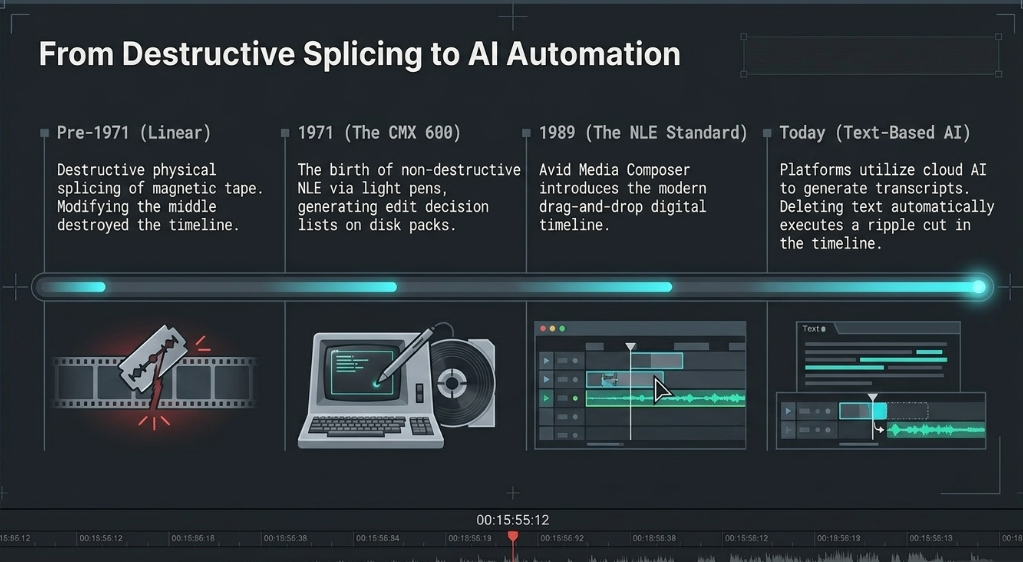
Before the advent of modern digital infrastructure, media editing was an entirely linear, physical process. Film and broadcast editors physically spliced magnetic tape and celluloid film on massive reel-to-reel machines.39 This was an inherently destructive and laborious process that lacked the flexibility to easily insert or extract clips mid-sequence; modifying the middle of a sequence required disturbing the entire chronological timeline.39
The paradigm irrevocably shifted toward non-linear editing (NLE)—defined by the revolutionary ability to access any specific part of source material instantaneously and edit in a completely non-destructive workflow 40—in 1971 with the creation of the CMX 600.40 Developed as a joint venture between the broadcasting giant CBS and Memorex, the CMX 600 cost nearly a million dollars and consisted of massive disk pack drives, the size of washing machines, capable of storing only 30 minutes of low-resolution, black-and-white analog video.39 Driven by a DEC PDP-11 computer operating at speeds 1000 times slower than modern consumer PCs, the editor interacted with the machine via a light pen on a dual-monitor console to generate early edit decision lists (EDLs).39
Throughout the 1980s, post-production institutions developed hybrid random-access systems utilizing banks of LaserDiscs and VCRs.41 Lucasfilm's EditDroid, demonstrated in 1984, introduced foundational modern UI concepts, including the digital timeline and dedicated clip bins.41 The true digital software revolution, however, occurred in 1989 with the introduction of the EMC2, the first fully-digital NLE that recorded to specialized optical disks, followed closely by the monumental release of Avid Media Composer.39 Avid ran natively on Macintosh architecture and introduced the modern timeline interface where clips could be dragged, spliced, and layered non-destructively.39 However, data storage remained a critical bottleneck; early NLEs were hard-capped at approximately 50GB of storage due to OS limitations, restricting their use to short-form commercial media until 1993, when a Disney R&D team developed a workaround utilizing external hard drive arrays that allowed Avid systems to access terabytes of footage, finally enabling long-form cinematic and broadcast editing.39
Today, the democratization of software has made sophisticated NLEs like Adobe Premiere Pro, Apple Final Cut Pro, and DaVinci Resolve the industry standard for both Hollywood blockbusters and independent basement podcasts.43 The current, bleeding-edge frontier of NLE evolution is the deep integration of Artificial Intelligence (AI). Platforms such as Simon Says have transformed the laborious rough-cut phase by utilizing cloud-based AI to generate highly accurate text transcripts of the source media in minutes.39 Editors can now perform "text-based editing" within an Assemble platform, where highlighting, deleting, or assembling text paragraphs automatically executes corresponding ripple cuts in the video timeline, fundamentally altering the speed and methodology of podcast assembly.
NLE Selection Criteria
Selecting the appropriate NLE for podcast post-production requires evaluating a complex matrix of technical specifications, workflow efficiency, hardware compatibility constraints, and the sheer volumetric output of the content being processed.13
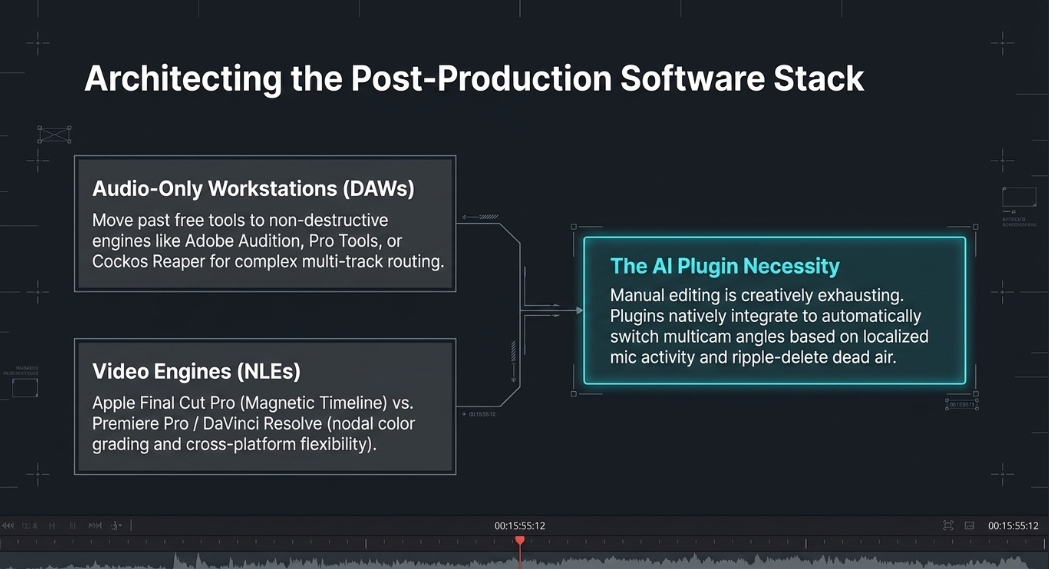
For audio-only podcasts, digital audio workstations (DAWs) like Audacity or Apple's GarageBand serve as highly accessible entry points, offering multitrack routing and basic equalization interfaces.46 However, free software often lacks the non-destructive, real-time preview capabilities required for complex professional mixing—a critical gap that forces professionals to utilize robust, non-destructive DAWs like Cockos Reaper, Adobe Audition, or Pro Tools.46
For video podcasts, the NLE selection criteria expand dramatically. The chosen software must possess robust multicam editing capabilities, highly effective audio noise reduction algorithms, and heavily optimized rendering engines.13 Apple Final Cut Pro is frequently favored by high-volume macOS users due to its proprietary Magnetic Timeline—which automatically closes silences and maintains clip synchronization when assets are rearranged—and its aggressive background rendering capabilities.13 Adobe Premiere Pro and Blackmagic DaVinci Resolve offer unparalleled cross-platform flexibility, advanced nodal color grading panels, and deep, native integration with complex motion graphics engines.43
A paramount criterion in modern NLE selection is the availability and compatibility of AI automation plugins. Because manual podcast editing is a mechanical, deeply exhausting process that stifles creative energy—requiring an editor to endlessly hunt for silences and switch camera angles—professional workflows increasingly rely on third-party AI extensions.13 Plugins such as AutoCut, AutoPod, and FireCut natively integrate with Premiere Pro and DaVinci Resolve to automatically switch multicam video angles based on localized microphone activity, detect and ripple-delete dead air, and excise filler words.13 These tools effectively reduce what was once hours of manual timeline slicing into mere seconds of automated computation.13 When assessing overall ease of use, post-production professionals must conduct rigorous side-by-side performance metrics tracking export times, interface intuitiveness, and audio processing fidelity to determine the optimal software for their specific studio infrastructure.
Technical Considerations During Editing
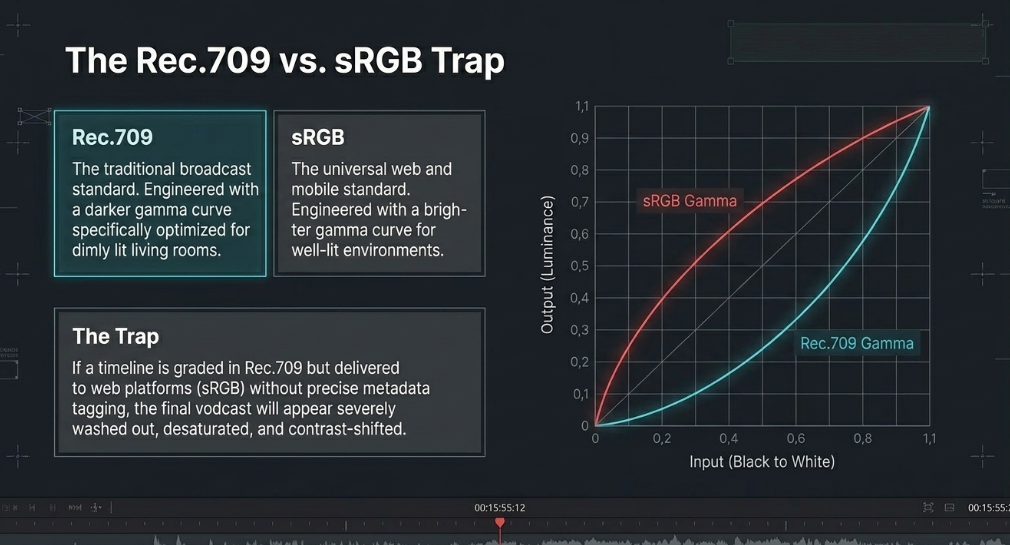
During the active editing phase, the underlying technical architecture of the timeline must be configured with absolute accuracy to prevent catastrophic, highly visible errors during final delivery. A primary, often misunderstood concern for video podcasts is color space management. Digital displays and software applications interpret numerical color values differently depending on their target environment. The standard color space for traditional television broadcast is Rec.709, whereas sRGB is the dominant, universal standard for computer monitors, mobile devices, and web-based streaming platforms.4
While sRGB and Rec.709 technically share identical primary color coordinates (the exact same red, green, and blue endpoints), they utilize fundamentally different gamma transfer functions.4 sRGB utilizes a brighter gamma curve specifically optimized for viewing in well-lit environments, whereas Rec.709 is designed with a slightly darker gamma curve suitable for dimly lit living rooms.52 If a video timeline is graded within a Rec.709 project space but viewed on an sRGB display without the proper metadata tagging, the final image may appear severely washed out, contrast-shifted, or desaturated.53 Consequently, editors must ensure their NLE color management settings, physical monitor calibration, and final export tags are perfectly aligned with the intended digital delivery platform (which, for podcasts, is almost exclusively sRGB for web streaming).53
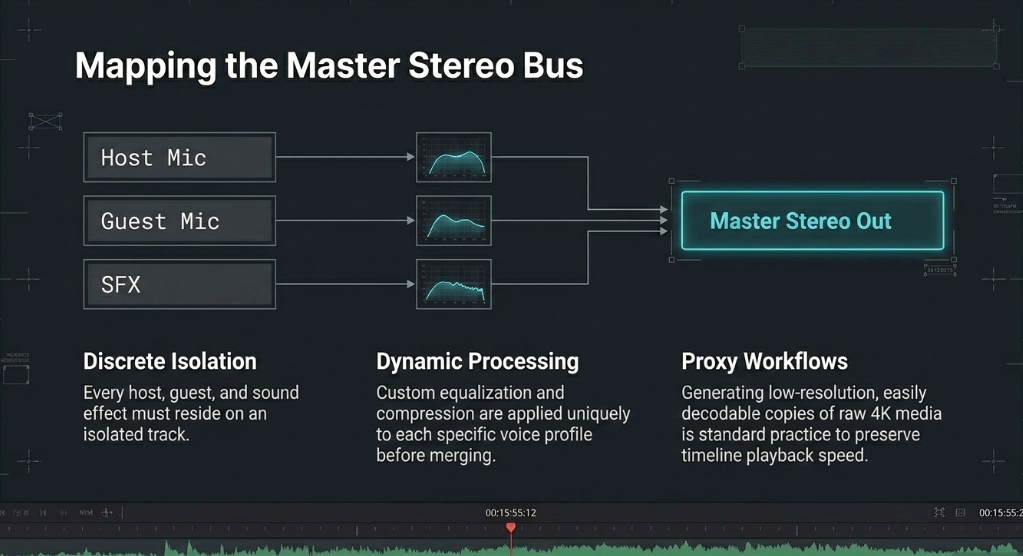
A secondary, equally critical technical consideration is the handling of complex multi-track audio routing and synchronization. A standard, professionally recorded video podcast will feature discrete, isolated audio tracks for each host, independent guest feeds, digital sound effects, and stereo musical beds.13 These discrete channels must be mapped accurately within the NLE's dedicated audio mixer (such as the Fairlight page in DaVinci Resolve) to allow for independent dynamic processing—applying custom equalization and compression to each specific voice—before being bussed to a master stereo output track.50 Utilizing proxy workflows—generating lower-resolution, easily decodable copies of the raw camera media—is also standard practice during this phase to drastically improve timeline playback performance, specifically when applying processor-intensive AI noise reduction or dynamic zoom techniques across multiple hours of high-resolution 4K footage.
Encoding the Podcast
Once the creative edit is finalized and the color grade is locked, the massive compilation of raw media must be prepared for mass digital distribution. This requires translating massive, uncompressed timeline data into lightweight, highly streamable files—a highly mathematical process that constantly balances severe file size constraints against the demand for pristine perceptual fidelity.
The Challenge of Encoding
The central, unavoidable challenge of encoding is the inherent limitation of global digital bandwidth and consumer storage capacity. Uncompressed audio and video files require prohibitive amounts of digital storage; a single gigabyte of data may only hold mere seconds of raw, uncompressed high-definition video.56 Therefore, all media files must be compressed. The science of encoding relies on a fundamental distinction between lossless and lossy compression architectures.57 Lossless compression algorithms (such as FLAC for audio) repackage the digital data highly efficiently without permanently discarding any original information, yet they still result in file sizes that are generally too large for rapid web streaming.57
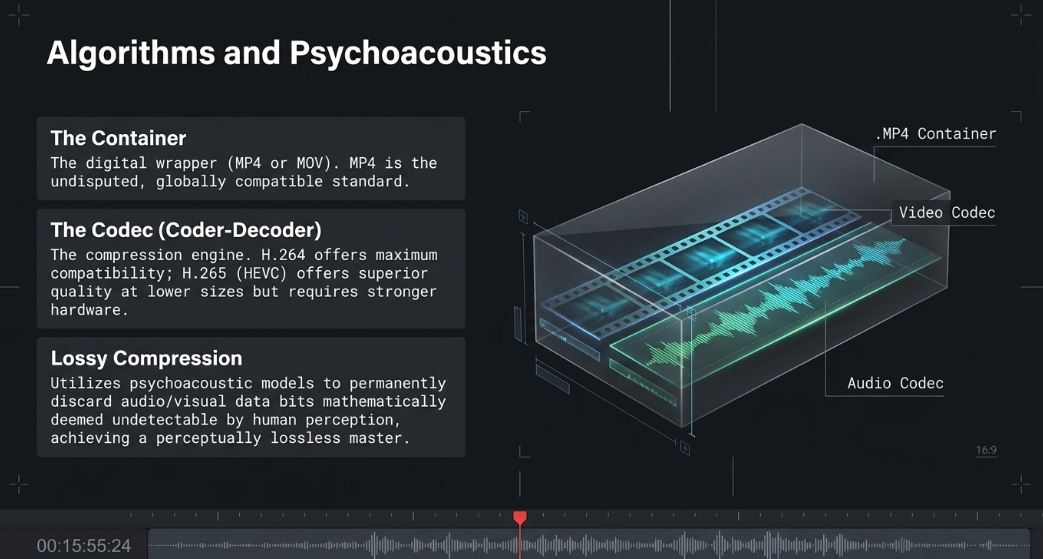
Because true lossless video compression is entirely impractical for web streaming, modern post-production relies heavily on lossy compression.59 Lossy compression utilizes complex psychoacoustic models and advanced visual algorithms to actively identify and permanently discard data bits deemed undetectable by human perception.57 This includes stripping out audio frequencies beyond the normal threshold of human hearing, sounds that are naturally masked by louder concurrent sounds, or redundant pixels in a static video background.57 The ultimate objective of lossy compression is achieving a "perceptually lossless" output: a file that is mathematically compromised to shrink its digital footprint, yet remains visually and acoustically indistinguishable from the pristine master file to the end consumer.
Determining Delivery Format
The architecture of a final, deliverable podcast file involves two distinct, highly specific components: the container and the codec. The container format (represented by familiar file extensions like.MP4,.MOV, or.WAV) acts as a digital wrapper or envelope that holds the synchronized audio, video, and metadata tracks together.6 Inside this container resides the actual media data, which has been mathematically compressed by a specific codec (Coder-Decoder).6
For video podcasts, the globally accepted, undisputed container standard is MP4, heavily favored for its universal compatibility across nearly all hardware decoders and software platforms, though the Apple-native MOV container is also widely accepted.6 Legacy containers such as AVI or FLV are actively discouraged by major platforms due to inefficiencies and lack of modern device support.6 The video data itself is predominantly encoded using the H.264 (Advanced Video Coding) codec, which currently offers the widest cross-platform playback compatibility.6 However, the newer H.265 (HEVC - High-Efficiency Video Coding) codec is rapidly gaining traction; it provides vastly superior visual quality at significantly lower file sizes, though it requires more modern, dedicated processing power on the user's device to decode smoothly.6 For audio tracks embedded within these video containers, AAC (Advanced Audio Coding) is the prevailing industry standard, offering superior sonic fidelity compared to legacy MP3 formats at equivalent bitrates.58
Delivering Podcasts with Apple Compatibility (and Spotify)
Major streaming platforms enforce stringent, and occasionally conflicting, specification matrices to ensure uniform playback quality across their vast ecosystems. Understanding the precise algorithmic demands of industry leaders like Apple Podcasts and Spotify is mandatory for professional distribution.
Audio Specifications
Apple Podcasts categorizes its audio requirements based on the specific delivery method: subscriber-only premium uploads (processed via Apple Podcasts Connect) versus standard, free RSS feed distribution.58
Apple strongly advocates for the AAC codec (housed within an MP4 container) for RSS distribution, noting that it allows for more accurate timeline seeking and superior streaming efficiency compared to the aging MP3 format.58
Video Specifications
With the industry pivoting aggressively toward "vodcasts" (video podcasts), the visual encoding specifications are equally demanding. Apple recently introduced advanced video capabilities leveraging HTTP Live Streaming (HLS) technology, which allows the platform to dynamically execute adaptive bitrate adjustments based on the user's immediate network conditions, ensuring smooth playback on both Wi-Fi and cellular connections.63
What About Alternate Delivery? Technical Loudness Standards (LUFS)
The explosive proliferation of digital audio platforms has catalyzed the establishment of incredibly strict loudness normalization standards. Prior to the adoption of these standards, the music and broadcast industries suffered from the "Loudness War," a period where producers excessively compressed dynamic range to make their individual tracks subjectively louder than competitors.64 Today, platform algorithms actively combat this practice. If a podcast is delivered significantly louder than platform specifications, the platform's playback engine will simply apply a negative gain reduction, rendering the audio both quieter and structurally lifeless compared to highly dynamic, properly mastered tracks.64 Conversely, if audio is delivered too quietly, the platform will apply artificial gain, bringing up the noise floor and introducing unwanted hiss.65
The industry-standard metric utilized to govern this normalization is LUFS (Loudness Units relative to Full Scale), which mathematically measures perceived human loudness over time rather than instant electrical voltage peaks.66
Integrated LUFS represents the average loudness calculated over the entire duration of the program.66
True Peak (dBTP) measures the absolute highest inter-sample digital peak, accurately predicting the clipping distortion that might occur during the digital-to-analog conversion or during lossy codec transcoding.66
If audio is encoded without leaving sufficient headroom (the safety gap between the highest volume peak and the absolute digital limit of 0 dBFS), the transcoding process to lossy formats like Ogg/Vorbis or AAC can introduce severe distortion artifacts.68
While specific targets vary slightly between audio-first and video-first platforms, engineering a well-balanced master file averaging between -16 and -14 LUFS, coupled with a strict True Peak limit of -1.0 dBTP, ensures pristine compliance across nearly all major distribution vectors.58 To achieve this consistent target, post-production editors utilize dynamic range compression to gently reduce the disparity between the loudest bursts of laughter and the softest conversational whispers, ensuring vocal intelligibility without crushing the organic life and natural dynamics out of the performance.
Compression Tools and Encoding Advice
Translating high-resolution timeline exports into delivery-compliant files requires specialized transcoding software capable of manipulating deep codec settings. While proprietary tools like Adobe Media Encoder or Apple Compressor are deeply integrated into their respective NLE ecosystems, many professionals rely on dedicated, open-source transcoders such as Handbrake or FFmpeg for final delivery compression.71 Handbrake offers a highly accessible graphical interface allowing users to deploy complex x264 and x265 encoding presets, effectively shrinking massive video exports—such as those captured losslessly via OBS or exported as heavy ProRes files—by up to 90% without visible visual degradation.72
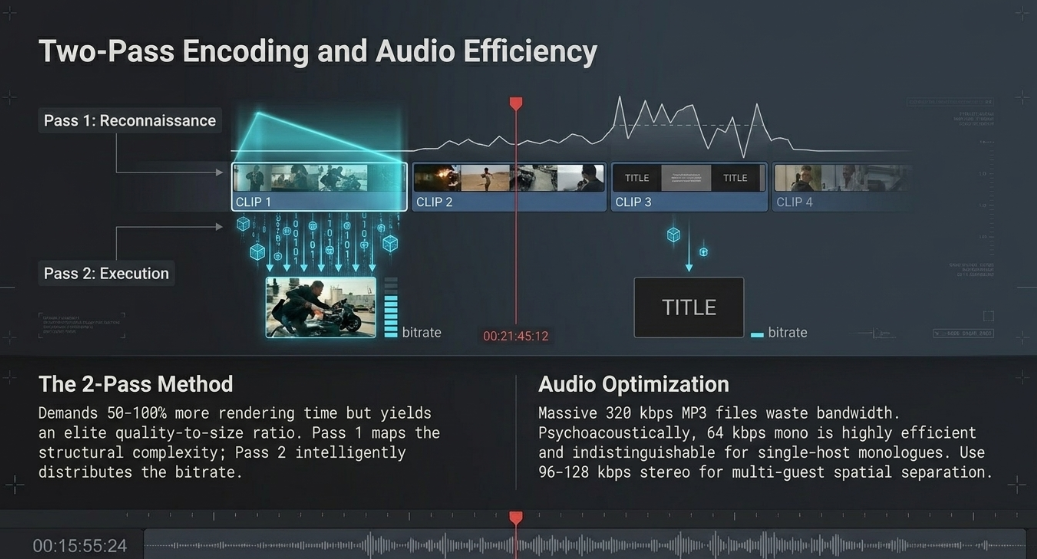
A paramount encoding technique for preserving maximal visual fidelity while minimizing file size is the implementation of 2-pass encoding.56 In a standard 1-pass encode, the software compresses the video chronologically, guessing data requirements on the fly, which can lead to inefficient data distribution. In a 2-pass workflow, the software's first pass operates strictly as reconnaissance; it scans the entire video file to create a mathematical map of simple, static scenes (like presentation slides) versus complex, high-motion scenes.56 The second pass then executes the actual compression, utilizing the structural map to intelligently distribute high bitrates to the complex frames while aggressively starving the static frames of redundant data.56 While this methodology requires 50% to 100% more computational processing time, it provides a vastly superior quality-to-size ratio and is highly recommended for archiving long-form, hour-plus podcast webinars where visual clarity is paramount.
Simple Techniques for Better Compression
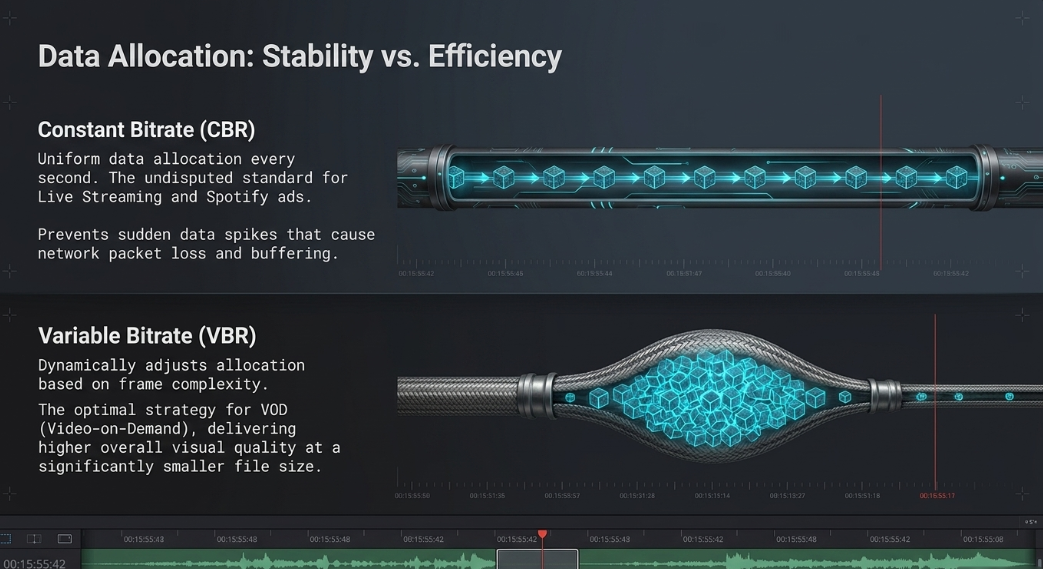
The most fundamental decision an encoding engineer must make is the selection of the bitrate allocation strategy: Constant Bitrate (CBR) versus Variable Bitrate (VBR).77
Constant Bitrate (CBR) forces the encoder to utilize a strictly uniform amount of data across every second of the video, regardless of the scene's visual complexity.79 Because the data output remains highly predictable and stable, CBR is the undisputed standard for real-time live streaming.77 If a live podcast were to utilize variable data rates, sudden bursts of high-motion visual complexity could trigger massive data spikes, choking the upload bandwidth, inducing network packet loss, and causing immediate buffering for the audience.80 Consequently, platforms like Spotify explicitly require CBR encoding for uploaded video ads to guarantee playback stability across widely varying consumer cellular networks.6
Variable Bitrate (VBR), conversely, dynamically adjusts the data allocation moment-to-moment based on the specific needs of the frame being analyzed.77 Fast motion, camera pans, and complex transitions receive dense data packets to prevent blocky artifacts, while simple, static talking-head scenes are heavily compressed to save space.79 VBR typically delivers significantly higher overall visual quality at a smaller total file size compared to CBR.77 For standard Video-on-Demand (VOD) podcast uploads to YouTube or RSS host providers, VBR (specifically utilizing Constant Quality or RF values, such as CQ 24) is the optimal strategy for maximizing storage efficiency without sacrificing the viewer experience.59
Furthermore, optimizing audio compression techniques directly influences the overall digital footprint of the podcast. Exporting podcast dialogue as massive 320 kbps MP3 files yields rapidly diminishing returns that waste server bandwidth.82 Psychoacoustic research demonstrates that the vast majority of consumers, especially those listening on standard earbuds or automotive sound systems, cannot distinguish spoken-word audio encoded at 192 kbps from 96 kbps.82 Therefore, for a single-host monologue podcast, an audio bitrate of 64 kbps mono is highly efficient and virtually indistinguishable from higher bitrates; for multi-guest interviews where spatial separation is required, 96 kbps to 128 kbps stereo provides excellent clarity while preserving vital storage space.82 Adjusting these parameters with technical precision ensures that the podcast remains accessible to international audiences with strict bandwidth data limits, fulfilling the ultimate goal of efficient, high-quality digital distribution.
Works cited
Video Best Practices, accessed May 14, 2026, https://toolkit.baruch.cuny.edu/wp-content/uploads/sites/11/2021/06/Multimedia-Video-Best-Practices-Presentation.pdf
Important Video Production Terms: The Professional Glossary - TechSmith, accessed May 14, 2026, https://www.techsmith.com/blog/important-video-production-terms/
Video Production | Gamma, accessed May 14, 2026, https://gamma.app/docs/Video-Production-38s1b70utpqp3ky
How to Choose the Right Video Color Space - Richard Lackey, accessed May 14, 2026, https://www.richardlackey.com/choosing-video-color-space/
Screen Life Filmmaking Techniques for Creators and Businesses Using Remote Recording Tools - PodcastVideos.com, accessed May 14, 2026, https://www.podcastvideos.com/articles/screen-life-filmmaking-techniques-remote-tools/
Video specs - Spotify Support, accessed May 14, 2026, https://support.spotify.com/us/creators/article/video-specs/
How to Make Effective and Engaging Video Lectures - TechSmith, accessed May 14, 2026, https://www.techsmith.com/blog/video-lecture-tips/
Automatically Create a Step-by-Step Guide (Step Capture) | Snagit Tutorial - TechSmith, accessed May 14, 2026, https://www.techsmith.com/learn/tutorials/snagit/step-capture/
Dynamic Zoom Edits in Riverside for Polished Podcasts - Cristi Cotovan, accessed May 14, 2026, https://cotovan.com/post/dynamic-zoom-edits-riverside-polished-podcasts/
How to Live Stream Picture-in-Picture Video in a PowerPoint Slideshow | BoxCast, accessed May 14, 2026, https://www.boxcast.com/blog/how-to-live-stream-picture-in-picture-video-in-slideshow
How to Create a Picture in Picture Video - YouTube, accessed May 14, 2026, https://www.youtube.com/watch?v=ERnQFmVB7zM
Podcast Visuals: Boost Engagement with Screen Sharing & Graphics - YouTube, accessed May 14, 2026, https://www.youtube.com/shorts/RZ5-Lh2lSO8
Best Podcast Editing Software for Podcasters using Final Cut Pro - Cutsio, accessed May 14, 2026, https://cutsio.com/blog/best-podcast-editing-software-for-podcaster-using-fcp
Podcast Editing Workflow Every Beginner Needs to Know! Davinci Resolve - YouTube, accessed May 14, 2026, https://www.youtube.com/watch?v=ugvLdtDbaQE
Lower Thirds Editable Video Templates - Envato, accessed May 14, 2026, https://elements.envato.com/video-templates/lower+thirds
How to make a lower third graphic for your video. - Adobe, accessed May 14, 2026, https://www.adobe.com/creativecloud/video/discover/lower-third-graphics.html
Guide to Lower Thirds Design: Examples & Best Practices - Vimeo, accessed May 14, 2026, https://vimeo.com/blog/post/what-is-lower-thirds
Lower Third Templates for Videos - UW–Madison brand, accessed May 14, 2026, https://brand.wisc.edu/resource/lower-third-templates-for-videos/
What Is Title Safe? Why It Still Matters in Modern Video Production - Venera Technologies, accessed May 14, 2026, https://www.veneratech.com/blogs/what-is-title-safe-and-why-it-still-matters-in-modern-video-production
Yes, Title Safe Still Matters – Especially for Online Video, accessed May 14, 2026, https://eks.tv/title-safe-still-matters/
Understanding the Safe Zone in TikTok, Instagram, and YouTube Videos - Ramdam for Creators, accessed May 14, 2026, https://creators.ramd.am/creator-school/understanding-the-safe-zone
Why Social Media Safe Zones for Videos Matter - pepperit, accessed May 14, 2026, https://www.pepperit.com.au/why-social-media-safe-zones-for-videos-matter/
Staying in the Safe Zone: Social Media Image and Video Specifications for 2025, accessed May 14, 2026, https://designsensory.com/insights/social-media-safe-zone/
How to Fix the Moiré Effect on LED Screens - Lumina Event Lighting, accessed May 14, 2026, https://www.luminaeventlighting.com/post/how-to-fix-the-moire-effect-on-led-screens/
Why Does My Video Wall Look Bad On Camera? – Overcoming the Moiré Effect, accessed May 14, 2026, https://www.springtree.net/audio-visual-blog/overcoming-the-moire-effect/
Understanding & Solving the Moiré Effect on LED Screens - Front Porch Media, accessed May 14, 2026, https://frontporch.media/understanding-solving-the-moire-effect-on-led-screens/
Making Color Usage Accessible | Section508.gov, accessed May 14, 2026, https://www.section508.gov/create/making-color-usage-accessible/
Understanding Success Criterion 1.4.3: Contrast (Minimum) | WAI - W3C, accessed May 14, 2026, https://www.w3.org/WAI/WCAG21/Understanding/contrast-minimum
Understanding WCAG 2 Contrast and Color Requirements - WebAIM, accessed May 14, 2026, https://webaim.org/articles/contrast/
Accessibility for visual designers | Digital.gov, accessed May 14, 2026, https://digital.gov/guides/accessibility-for-teams/visual-design
Accessibility for Graphic Designers - Web Design System | The University of Texas at Dallas, accessed May 14, 2026, https://wds.utdallas.edu/digital-accessibility/designers/
The Ultimate Podcast Graphics Guide for New Podcasters | Articles on Podchaser, accessed May 14, 2026, https://www.podchaser.com/articles/podcast-insights/the-ultimate-podcast-graphics-guide-for-new-podcasters
How to Design Podcast Artwork That Converts Browsers into Subscribers - propodcastsolutions.com, accessed May 14, 2026, https://propodcastsolutions.com/podcast-artwork-design-principles-for-maximum-impact/
Apple Video and Audio Asset Guide, accessed May 14, 2026, https://help.apple.com/itc/videoaudioassetguide/en.lproj/static.html
Find the Perfect Podcast Intro Music: Your Ultimate 2025 Guide | NearStream Official, accessed May 14, 2026, https://www.nearstream.us/blog/podcast-intro-music-guide
Soundstripe: Best Royalty Free Music for Video, Podcast, Film, TV, & Ads, accessed May 14, 2026, https://www.soundstripe.com/
9 Essential Music Libraries for Sync in 2025 - - That Pitch, accessed May 14, 2026, https://thatpitch.com/blog/music-libraries-for-sync/
13 Best Places to Find Royalty-Free Music For Podcasts [2026] - Riverside, accessed May 14, 2026, https://riverside.com/blog/free-music-for-podcasts
The History of Non-Linear Editing - Simon Says, accessed May 14, 2026, https://www.simonsaysai.com/blog/the-history-of-non-linear-editing
Non-Linear Editing Systems — a timeline. | by deroche.design - Medium, accessed May 14, 2026, https://medium.com/@derochedesign/non-linear-editing-systems-a-timeline-26087b16e55f
Non-linear editing - Wikipedia, accessed May 14, 2026, https://en.wikipedia.org/wiki/Non-linear_editing
A Slice of NLE Editing History - Avid Community, accessed May 14, 2026, https://community.avid.com/forums/t/57618.aspx
Video Post Production Workflow: Our Ultimate Guide (Step-by-Step) - Simon Says, accessed May 14, 2026, https://www.simonsaysai.com/blog/video-post-production-workflow
Non-Linear Editing Systems - Meegle, accessed May 14, 2026, https://www.meegle.com/en_us/topics/entertainment/non-linear-editing-systems
Podcast Editing Tools Comparison: Choose the Best Editor For Your ..., accessed May 14, 2026, https://thepod.fm/resources/blog/podcast-editing-tools-comparison
Popular Audio Editing Software for Beginners to Explore in 2025 - Lucid Samples, accessed May 14, 2026, https://www.lucidsamples.com/blog/popular-audio-editing-software-for-beginners-to-explore-in-2025
EQ and Compression for Podcasters (Who Have Never Used Them Before) - Medium, accessed May 14, 2026, https://medium.com/@drew.arigadas/eq-and-compression-for-podcasters-who-have-never-used-them-before-206500b1562c
How To EDIT PODCASTS In SECONDS (Premiere Pro & Davinci Resolve Plugin Comparison) - YouTube, accessed May 14, 2026, https://www.youtube.com/watch?v=bHJ7EZ1vwHo
4 Best AI Podcast Editors Compared: Selects, Descript, Autopod, and More - Cutback, accessed May 14, 2026, https://cutback.video/blog/4-best-ai-podcast-editors-compared-selects-descript-autopod-and-more
How I Edit Podcasts in DaVinci Resolve (Fast + Easy Workflow) - YouTube, accessed May 14, 2026, https://www.youtube.com/watch?v=QC6KHm09ErY
What are the Different Color Spaces and Which is Best for My Field of Work? - BenQ, accessed May 14, 2026, https://www.benq.com/en-us/knowledge-center/knowledge/what-are-the-color-spaces.html
Is srgb same as rec.709 ? : r/colorists - Reddit, accessed May 14, 2026, https://www.reddit.com/r/colorists/comments/1d34kv5/is_srgb_same_as_rec709/
You're not a TV... Deliver accurate color for web in sRGB. - YouTube, accessed May 14, 2026, https://www.youtube.com/watch?v=1JeIx1Omaig
Rec 709 for broadcast and sRGB for web? Do I deliver 2 videos? - Adobe Community, accessed May 14, 2026, https://community.adobe.com/questions-529/rec-709-for-broadcast-and-srgb-for-web-do-i-deliver-2-videos-55512
Davinci Resolve Audio Post Workflow: Pro Tips You NEED to Know! - YouTube, accessed May 14, 2026, https://www.youtube.com/watch?v=jazMwtaaStk
How to Reduce Video File Size: Easy Tips to Compress Videos - MEDIAL, accessed May 14, 2026, https://www.medial.com/post/how-to-reduce-video-file-size-easy-tips-to-compress-videos
Audio Compression and EQ for Podcasters | Enhance Your Sound - Listen2It, accessed May 14, 2026, https://www.getlisten2it.com/blog/audio-compression-and-eq-for-podcasters-enhance-your-sound/
Audio requirements - Apple Podcasts for Creators, accessed May 14, 2026, https://podcasters.apple.com/support/893-audio-requirements
How to Compress Video Without Losing Quality (2026) - Moonb, accessed May 14, 2026, https://www.moonb.io/blog/compress-a-video
Understanding Audio Data Compression: MP3s, AACs, and more, accessed May 14, 2026, https://www.uaudio.com/blogs/ua/understanding-audio-data-compression
Start a Podcast on Spotify & Apple Podcasts: Ultimate Guide | NearStream Official, accessed May 14, 2026, https://www.nearstream.us/blog/how-to-start-podcast-spotify-apple-podcasts-ultimate-guide
Podcast Ad Specs & Requirements - Spotify Advertising, accessed May 14, 2026, https://ads.spotify.com/en-US/ad-specs/podcast-ad-specs/
Apple introduces a new video podcast experience on Apple Podcasts, accessed May 14, 2026, https://www.apple.com/newsroom/2026/02/apple-introduces-a-new-video-podcast-experience-on-apple-podcasts/
Understanding the Loudness War in Mastering in 2025 | iMusician, accessed May 14, 2026, https://imusician.pro/en/resources/blog/mastering-and-the-loudness-war-an-update
Podcast Loudness Standards 2026: Spotify, Apple, YouTube Requirements, accessed May 14, 2026, https://sone.app/blog/podcast-loudness-standards-2026-spotify-apple-youtube
A Guide to podcast Compression and Loudness - Reddit, accessed May 14, 2026, https://www.reddit.com/r/podcasting/comments/nlrlp5/a_guide_to_podcast_compression_and_loudness/
How to master for streaming platforms: normalization, LUFS, and loudness - iZotope, accessed May 14, 2026, https://www.izotope.com/en/learn/mastering-for-streaming-platforms
Why Mastering for Streaming is Different in 2025 - Lost Stories Academy, accessed May 14, 2026, https://www.loststoriesacademy.com/blogs-and-tutorials/why-mastering-for-streaming-is-different-in-2025
Loudness normalization on Spotify, accessed May 14, 2026, https://support.spotify.com/us/artists/article/loudness-normalization/
Best Podcast Compression/Settings.... - Sound Design Stack Exchange, accessed May 14, 2026, https://sound.stackexchange.com/questions/8965/best-podcast-compression-settings
What is the best Handbrake settings for compression? - Reddit, accessed May 14, 2026, https://www.reddit.com/r/handbrake/comments/1sk1w3p/what_is_the_best_handbrake_settings_for/
Video Compression – Step-by-Step Handbrake Tutorial - EngageMedia, accessed May 14, 2026, https://engagemedia.org/help/video-compression-step-by-step-handbrake-tutorial/
Make your videos smaller without killing the quality - YouTube, accessed May 14, 2026, https://www.youtube.com/watch?v=YcqkpE2jekM
Video Compression using Handbrake: Installation and Usage Guide - OTTVerse, accessed May 14, 2026, https://ottverse.com/install-and-compress-videos-using-handbrake/
How to make video podcast file sizes smaller with Handbrake 🎥 - YouTube, accessed May 14, 2026, https://www.youtube.com/watch?v=GRL-_3r_jQY
Video Bitrates and Export Myths - Frame.io Insider, accessed May 14, 2026, https://blog.frame.io/2024/02/26/video-bitrates-and-export-myths/
CBR vs VBR: Which Bitrate is Best for Low-Latency Streaming? - Ant Media Server, accessed May 14, 2026, https://antmedia.io/cbr-vs-vbr/
CBR vs VBR: Constant and Variable Bitrate Differences - Wowza, accessed May 14, 2026, https://www.wowza.com/blog/cbr-vs-vbr
CBR or VBR? What You Should Use When Exporting Videos - YouTube, accessed May 14, 2026, https://www.youtube.com/shorts/1ZQA1aknwYM
CBR vs VBR: Difference, Pros & Cons (2026 Guide), accessed May 14, 2026, https://www.digitalsamba.com/blog/cbr-vs-vbr
Compression for long Podcast Files pre transfer to video editor. : r/VideoEditing - Reddit, accessed May 14, 2026, https://www.reddit.com/r/VideoEditing/comments/112si94/compression_for_long_podcast_files_pre_transfer/
How to Create Smaller Podcast Files That Don't Skimp on Audio Quality - RSS.com, accessed May 14, 2026, https://rss.com/blog/compress-podcast-audio-files/
PQT – Audio File Size vs Quality - The Podcasters' Studio, accessed May 14, 2026, https://thepodcastersstudio.com/pqt-audio-file-size-vs-quality/











