
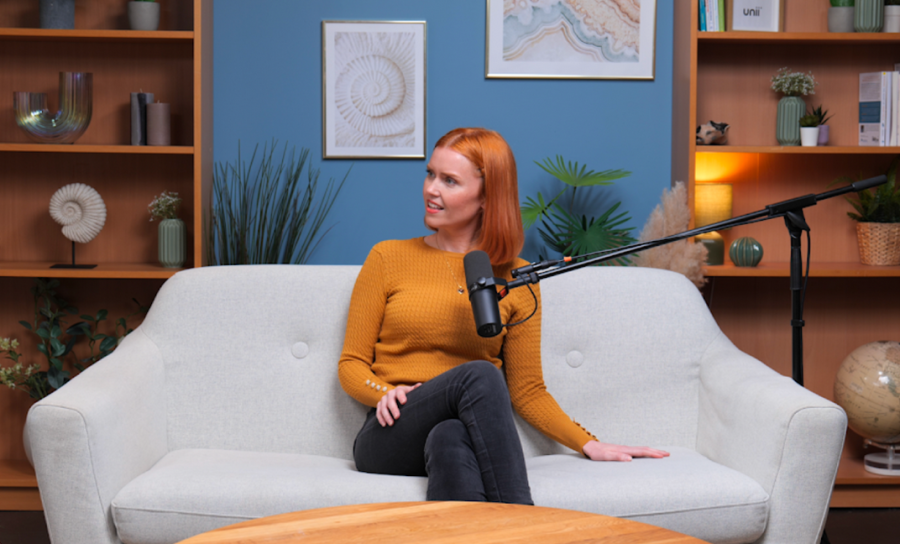
A visual podcast combines the conversational structure of podcasting with a deliberate video production. That means the recording environment has to support two jobs at the same time: capture clear, consistent audio and create video that is practical to watch, edit and distribute.
A professional visual podcast studio brings those systems together in one space. The aim is not simply to place cameras around a podcast table; it is to coordinate audio, framing, lighting, the set, recording and post-production so the different parts work together.
What Is a Visual Podcast Studio?
A visual podcast studio is a recording space designed for both spoken-word audio and video. It combines the acoustic needs of a podcast room with the camera, lighting and set requirements of a video production.
A typical visual-podcast environment may bring together:
· a controlled recording room
· podcast microphones and multi-track audio recording
· one or more cameras
· lighting suitable for faces and the set
· a background or physical set designed to work on camera
· recording or switching systems for the video feeds
· technical support where required
· post-production after the recording
Audio Podcast vs Visual Podcast
An audio podcast only needs to communicate through sound. A visual podcast adds another layer: viewers can also see expressions, body language, the relationship between guests and the physical environment.
The addition of video does not make audio-only podcasting obsolete, and it does not mean every show needs an elaborate film set. The right format depends on where the programme will be distributed, how the audience consumes it and what the production team wants to create.
Video also creates additional production decisions: how many angles to record, how the participants will be lit, what the background should look like, whether the episode will be switched live or edited later, and how the files will be delivered.
Why Audio Quality Still Matters
Video does not replace the need for good audio. A visual podcast still depends on voices being clear, intelligible and consistent throughout the conversation.
That means microphone choice, positioning, room control and separate recording tracks remain important. For a client, the practical question is whether the studio can record every participant cleanly while also running the video production.
|
Finchley example Finchley Studios uses Shure SM7B microphones for podcast recording and operates fully soundproof professional recording spaces. These are real examples of how the audio side of a visual production is planned alongside the cameras. |
Cameras and Camera Angles
Camera count should follow the format rather than an arbitrary rule. A solo programme can work with one camera. A host-and-guest interview may benefit from separate views of each speaker, while a wider shot can show the relationship between everyone in the room.
Multiple angles give the editor more choices, but more cameras also add setup, monitoring and file-management work. The goal is to capture useful coverage rather than maximise the number of cameras.
|
Finchley example Finchley Studios can use up to three Panasonic cameras for visual podcast production. Depending on the show, this can support a wider view and closer angles of individual speakers without suggesting that every podcast requires three cameras. |
Lighting for Visual Podcasts
Lighting helps the camera see faces consistently and gives the set visual depth. In a controlled studio, the production team can shape the light rather than relying entirely on changing daylight or standard room lighting.
A simple setup may use one main light with additional fill or background lighting where needed. More complex arrangements can be built around the set and the desired style. For someone hiring a studio, the useful question is whether the lighting is suitable and controllable for the people and background being recorded.
Sets, Backgrounds and Branding
The background becomes part of the programme once a podcast is filmed. Furniture, colour, depth, practical lights and screens can all influence how the show feels on camera.
Different programmes need different environments. A relaxed interview may suit a lounge-style set; a business discussion may work better in a more structured space. Brands may also want room for subtle visual identity without allowing logos or props to overwhelm the conversation.
When evaluating a studio, consider whether the set works for your guest count, camera positions and overall tone rather than choosing a room from photographs alone.
Multi-Camera Recording and Switching
When several cameras are used, the production needs a plan for how those feeds will be handled. One option is to record each angle separately and choose the cuts later in post-production. Another is to switch between cameras during the recording and create a live programme feed.
Neither approach is automatically better. Separate recordings give the editor more freedom later; live switching can create a useful first cut during the session. Some productions use both approaches.
The Level 2 decision is simply to understand that multi-camera video introduces an additional recording workflow beyond the audio tracks.
Remote Guests in a Visual Podcast
A remote contributor can be included in a visual podcast, but their audio and video have to be integrated into the studio workflow. The host needs to hear the remote guest clearly, and the production needs a usable recording of the remote contribution.
|
Finchley example Finchley Studios supports remote guests. If a programme includes an off-site contributor, that requirement should be discussed in advance so the audio and video routing can be prepared for the session. |
Live Streaming a Podcast
A recorded visual podcast can be edited before publication. A live-streamed podcast is different because the audience receives the programme in real time.
That makes advance preparation more important: the cameras, audio, graphics or remote guests need to be ready before the broadcast begins, and the network connection becomes part of the production system.
|
Finchley example Live streaming is available at Finchley Studios. It is best treated as a planned production requirement rather than something added after a standard recording has already been configured. |
Live Streaming Studios in London
Post-Production for Visual Podcasts
After recording, a visual podcast may need several layers of post-production. The exact workflow depends on the intended deliverables.
· choosing or refining camera cuts
· editing the conversation
· balancing and cleaning the audio
· matching the appearance of different camera angles
· adding titles, names or other graphics
· adding captions where required
· creating shorter clips for other platforms
|
Finchley example Editing and post-production are available at Finchley Studios. Clients can therefore choose between taking the recorded material for their own edit or continuing the project into post-production. |
Podcast Studio Pricing in London
What Happens in a Visual Podcast Session?
The exact process varies by studio and production, but a typical session has a simple sequence.
|
1. Arrival and orientation |
The client and guests enter the facility and get familiar with the room or set. |
|
|
2. Positioning |
Participants are seated or positioned for the chosen camera angles and microphones. |
|
|
3. Technical checks |
Audio, camera framing and lighting are checked before the main recording begins. |
|
|
4. Recording |
The conversation is captured, with technical monitoring where an engineer has been booked. |
|
|
5. Handover or post-production |
The recorded material is prepared for the next stage according to the agreed workflow. |
|
|
Finchley example New podcast clients at Finchley Studios are normally given a studio tour when they arrive. Engineering support is optional, so the level of technical operation can be matched to the production. |
|
|
Visual Podcast Studio vs Home Setup
A home setup can produce an excellent visual podcast. For many independent creators, it provides convenience, control and a space that is always available.
A professional studio becomes useful when a production needs more room, several participants, repeatable lighting, multiple cameras, a controlled recording environment or technical support that would be inconvenient to recreate for each episode.
The choice is therefore not 'professional equals good, home equals bad'. It is a question of what the production requires and which environment makes that workflow practical.
Home Studio vs Professional Podcast Studio
What Should You Check Before Hiring a Visual Podcast Studio?
A short pre-booking check should cover the factors that actually affect the recording:
· Is the room suitable for the number of hosts and guests?
· Does the set or background fit the programme's visual style?
· How many camera angles can the studio support for this format?
· Is the audio setup suitable for every speaker?
· Is lighting already available and controllable?
· Is an engineer available if your team does not want to operate the session?
· Can remote guests or live streaming be supported if required?
· What recordings or edited deliverables will you receive afterwards?
Understanding the Full Visual Podcast Workflow
This Level 2 guide intentionally stays broad. A complete visual-podcast workflow can go much deeper into pre-production, shot planning, camera positioning, lighting, switching, recording and post-production.
Use the dedicated Visual Podcast Studio Guide when you want the more detailed production workflow rather than the overview provided here.
Frequently Asked Questions
What is a visual podcast?
A visual podcast, often called a video podcast, records the conversation in video as well as audio so the audience can watch the hosts and guests as well as listen.
How many cameras do I need for a video podcast?
There is no universal number. One camera can suit a simple show, while two or three angles can give an interview or panel more editing options. The format should determine the camera count.
Do video podcasts need professional lighting?
Not always. Natural light or a simple setup can work in some environments. Controlled studio lighting is useful when you need consistent exposure and a repeatable look across a session or series.
Can I livestream a podcast from a studio?
Yes, where the studio supports live production. Tell the facility in advance because live delivery requires a different workflow from a normal record-and-edit session.
Can remote guests appear in a video podcast?
Yes, if the studio can integrate remote audio and video into the recording. This should be planned before the session.
Is video editing included?
It depends on the package. Some bookings supply recorded files only, while others offer editing and post-production separately or as part of a managed service.
Can I record a good video podcast at home?
Yes. A home setup can be suitable for many creators. A studio becomes more useful when the project needs controlled space, multiple cameras, repeatability or technical support.
Do I need an engineer?
Not necessarily. An experienced team may operate a studio independently. An engineer can be useful when the host wants someone else to manage the technical side of a multi-camera or more complex production.














