

Technical Foundations of Digital Audio Capture
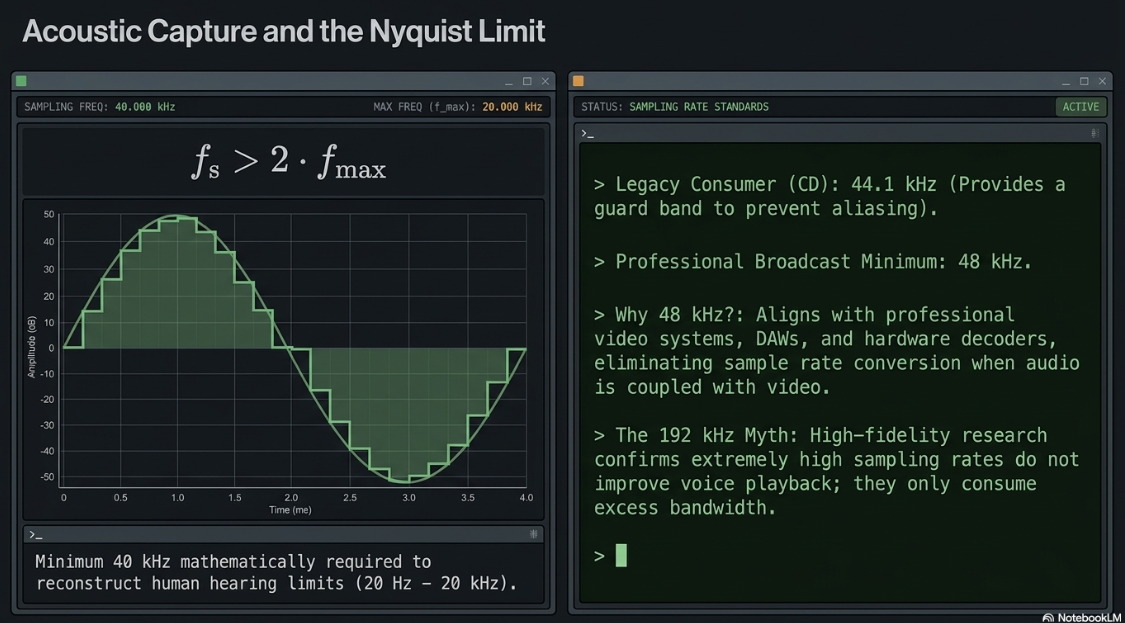
Digital audio recording begins with the transformation of continuous analog acoustic waves into discrete digital representations through Pulse-Code Modulation (PCM)1. The fidelity of this digital replication depends on two primary metrics: sample rate and bit depth2. The sample rate, measured in Hertz (Hz), represents the frequency with which the analog signal's amplitude is measured per second2. According to the Nyquist-Shannon sampling theorem, to prevent aliasing and accurately reconstruct a signal, the sampling rate must be at least twice the highest frequency component of the analog signal:

Because human hearing is limited to an approximate frequency range of 20 Hz to 20 kHz, a minimum sampling rate of 40 kHz is mathematically necessary. The standard consumer audio rate of 44.1 kHz, originally established for Red Book CDs, provides a sufficient guard band to prevent aliasing2.
Within professional podcasting and broadcast environments, 48 kHz has emerged as the de-facto minimum standard5. This standard aligns with professional video systems, digital audio workstations (DAWs), and modern hardware decoders, eliminating the need for downsampling or sample rate conversion when audio is coupled with video4.
Working at higher rates, such as 96 kHz, is common in professional music production2. However, high-fidelity research confirms that extremely high sampling rates, such as 192 kHz, do not improve voice playback quality2. Instead, they consume excess storage and bandwidth2.
Bit depth defines the resolution of each individual sample, specifying the number of binary bits allocated to describe the amplitude of the waveform2. The dynamic range—the ratio between the loudest undistorted signal and the quietest noise floor—is mathematically linked to bit depth4. The quantization noise level relative to full scale (dBFS) can be estimated using the standard formula:

Where 
The industry standard for professional recording is 24-bit depth, which delivers a dynamic range of 144.5 dBFS2. This extended range allows engineers to record at conservative levels, maintaining sufficient headroom to prevent clipping while keeping the noise floor inaudible2.
For critical environments, 32-bit float recording is increasingly utilized2. Unlike fixed-point integers, 32-bit float uses a mantissa and an exponent, enabling a dynamic range exceeding 1500 dB2. This architecture renders the signal virtually unclippable during capture, as signals exceeding 0 dBFS can be attenuated in post-production without losing digital data4.
The raw data throughput of uncompressed PCM audio, known as the bit rate, is calculated as:

Where 


For beginners, starting with a simpler 16-bit/44.1 kHz configuration in free software tools like Audacity allows for immediate experimentation6. This provides a practical baseline to hear the subtle differences in frequency detail and noise floor before transitioning to advanced broadcast standards6.
WAV vs MP3: Lossless Architecture and Psychoacoustic Compression Mechanics
WAV is an uncompressed, lossless audio format that preserves the exact recording data of the digital signal8. This format is the standard for professional recording, editing, and archiving8. The primary limitation of WAV is its massive file size, which makes it impractical for consumer streaming and download distribution10.
To overcome this, lossy compression formats like MP3 (MPEG-1 Audio Layer III) are used to reduce file sizes by up to 90%8. This reduction is achieved by permanently removing spectral information that the human brain cannot easily resolve, relying on a perceptual model of human hearing1.
The human ear does not perceive all frequencies with equal sensitivity, a phenomenon illustrated by equal-loudness contours12. The MP3 encoder utilizes these perceptual limits through a series of structured stages:
Spectral Analysis: The encoder analyzes the incoming continuous PCM stream to distinguish between critical auditory information and inaudible components12. Frequencies are mapped to establish localized sound pressure levels12.
Polyphase Quadrature Filtering (PQF): The incoming audio signal is split into 32 distinct sub-bands12. This sub-band division models how the human ear resolves sounds across different frequencies12.
Modified Discrete Cosine Transform (MDCT): The sub-band signals are transformed from the time domain into the frequency domain12. The MDCT uses an overlapping windowing function to minimize block boundary errors, such as transient distortions or "clicks" at frame boundaries12.
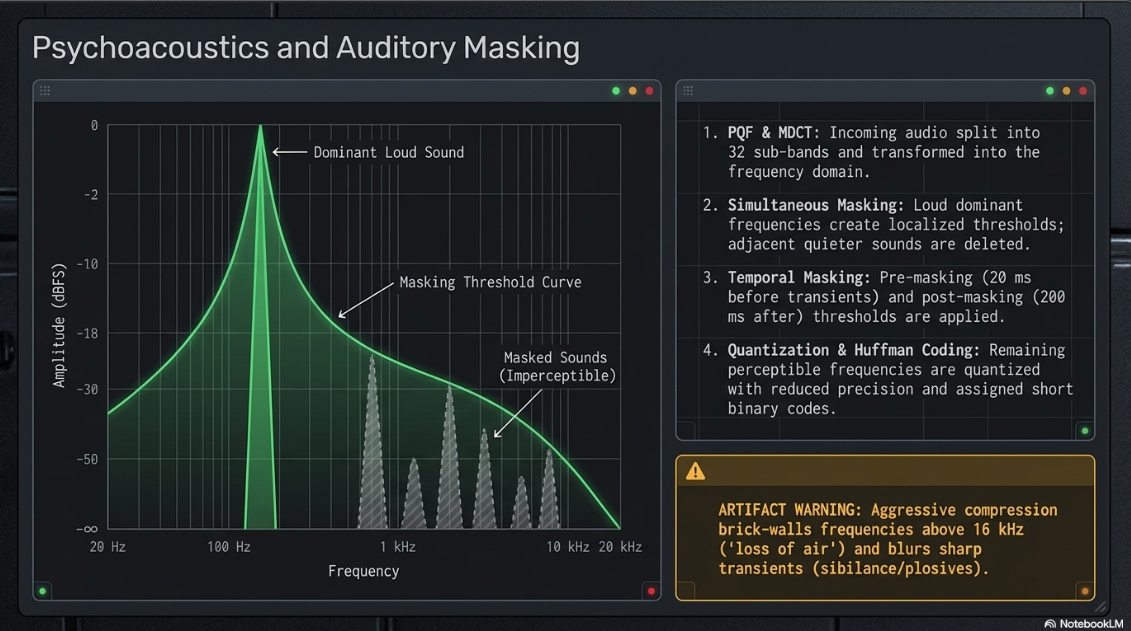
Application of the Psychoacoustic Model (Auditory Masking): The core of MP3 compression lies in auditory masking, which occurs in two dimensions:
Simultaneous Masking (Frequency Masking): A loud, dominant sound at a specific frequency creates a localized hearing threshold curve1. Any quieter sounds falling below this threshold in adjacent frequencies are masked and discarded by the algorithm1.
Temporal Masking (Time Masking): Human hearing requires recovery time after a loud sound. Pre-masking (occurring roughly 20 ms before a sudden transient) and post-masking (occurring up to 200 ms after a sound stops) are analyzed, and signals below these temporal thresholds are removed.
Quantization and Entropy Coding: Frequencies determined to be perceptible are quantized with reduced precision, mapping them to optimized step sizes to fit within the target bit rate12. This data is then compressed using Huffman coding, a lossless statistical algorithm that assigns shorter binary codes to frequently occurring values12.
Frame Assembly: The compressed spectral data is packaged into sequential MP3 frames, each consisting of a 4-byte header containing synchronization and metadata information, followed by the encoded audio payload12.
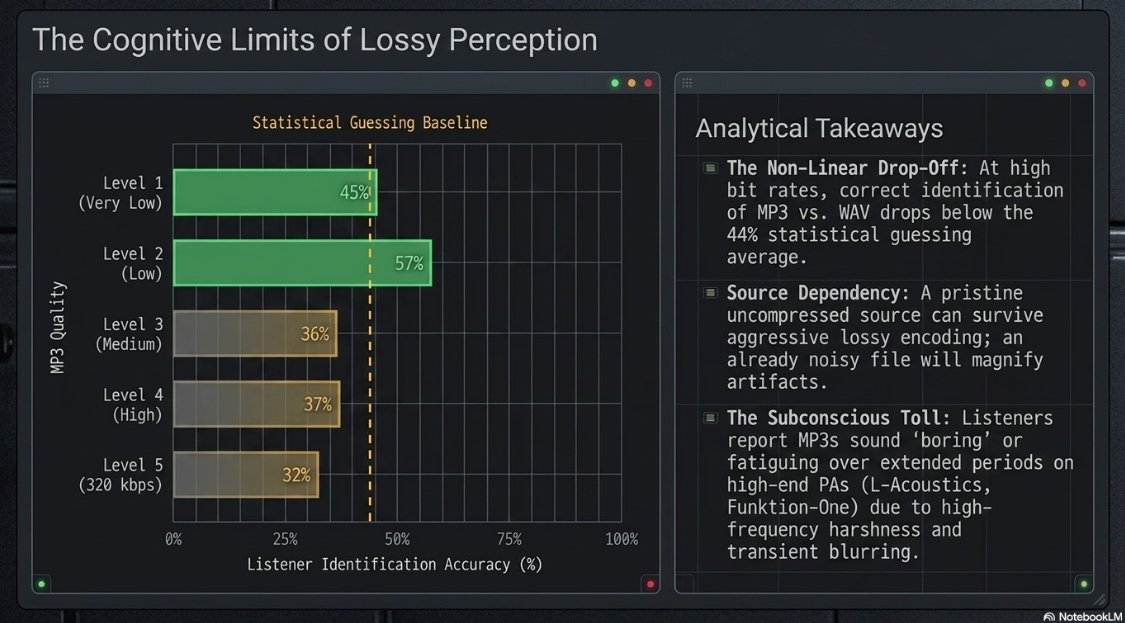
This lossy compression significantly impacts the resulting audio quality1. In high-quality MP3 encodings (320 kbps), these compromises are largely imperceptible to casual listeners in typical environments8. However, double-blind listening tests indicate that as bit rates decrease, compression artifacts become increasingly audible8.
Common artifacts of aggressive lossy compression include high-frequency roll-off, where frequencies above 16 kHz to 18 kHz are brick-walled and discarded8. This loss of high frequencies removes the perceived "air" and openness of a voice8.
Additionally, transient smoothing occurs as sharp, fast-attack sounds (such as vocal sibilance, plosives, and percussion) are blurred14. Phase accuracy is also compromised, narrowing the stereo field and causing localized panning to sound collapsed or unstable9.
Double-Blind Audibility Testing and Cognitive Implications
Historically, the audiophile community has debated the audibility of MP3 compression compared to uncompressed WAV masters11. In a series of controlled double-blind listening tests conducted to evaluate listener discrimination across different compression levels, researchers discovered that most listeners cannot reliably distinguish between WAV and high-bitrate MP3s8.
This data indicates a non-linear relationship between bitrate and user perception12. As compression quality increases, the correct identification rate drops below statistical guessing, averaging just 44% across all tests12.
A clean, uncompressed source is critical15. If a recording is high-quality, it can be compressed to lower bit rates (such as 96 kbps or 64 kbps) without significant perceived quality loss for the average listener16.
However, professional audio engineers working with acoustic music can consistently identify lossy compression, whereas audiophiles using high-end playback systems show highly variable results ranging from 19% to 82% accuracy12.
Furthermore, even if a listener cannot consciously tell uncompressed and compressed files apart in an A/B test, research indicates a subconscious cognitive impact12. Listeners often report that compressed MP3 tracks sound less engaging or "boring" over extended periods compared to uncompressed WAV files, which retain full dynamic range and harmonic integrity1.
For high-end sound reproduction systems, such as L-Acoustics, Lambda Labs, or Funktion-One PA systems, the subtle distortions of lossy compression become more apparent14. At high sound pressure levels (SPL), the human ear becomes more sensitive to high-frequency harshness and transient blurring14. Under these conditions, the tight bass, clean transients, and stable stereo field of uncompressed WAV or AIFF files are readily apparent, whereas MP3s can sound compressed, loose, and fatigue-inducing14.
Post-Production Engineering: Headroom, Gain Staging, and Mastering
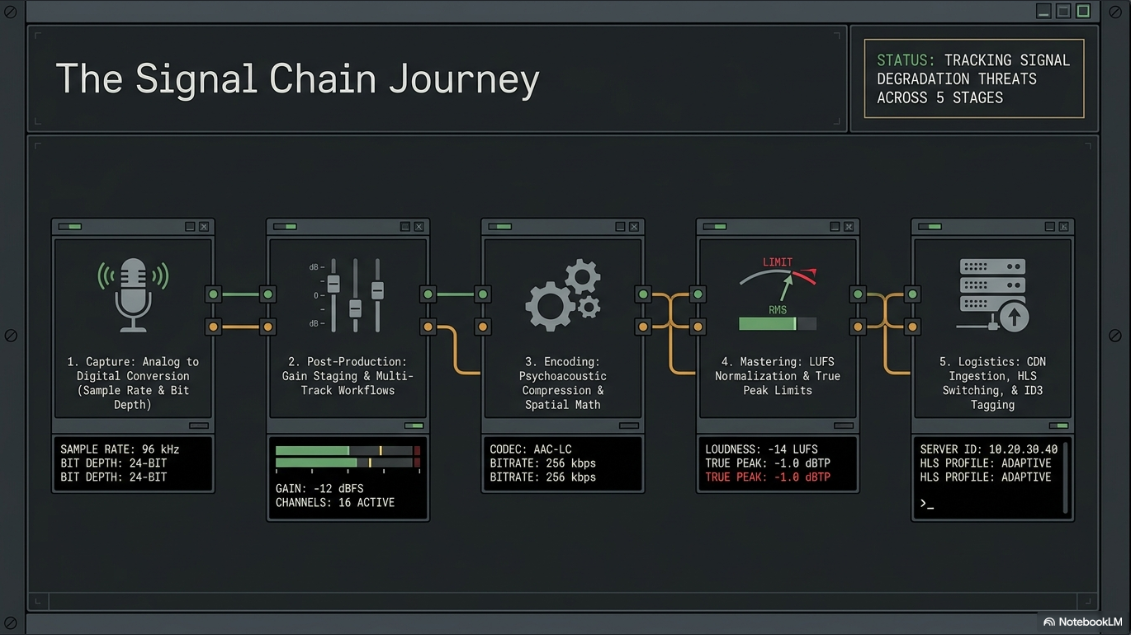
To achieve professional broadcast quality, engineers must maintain strict amplitude standards throughout the recording and mastering stages7. Proper gain staging ensures that vocal signals remain clean, intelligible, and free from digital clipping7.
During raw multitrack recording, the standard practice is to calibrate the microphone input gain so that voice peaks sit between -12 dBFS and -6 dBFS on the channel meter7. Recording "hot" (peaking above -3 dBFS) is a common amateur error7. Because digital systems have an absolute ceiling of 0 dBFS, recording too close to this limit risks digital clipping, which produces harsh, harmonic distortion7.
Conversely, recording too quietly forces the engineer to apply excessive makeup gain in post-production, which amplifies the system's analog noise floor and introduces hiss7.
During the mastering stage, upsampling is often used to maintain signal integrity during heavy processing4. Many digital signal processors—such as saturation, harmonic distortion, and brick-wall limiters—are non-linear4. These processes generate high-frequency harmonics that can easily exceed the Nyquist frequency (
If these harmonics exceed this limit, they fold back into the audible spectrum as aliasing distortion, which degrades the clarity of the high-end4. To prevent this, mastering engineers often upsample the project to a "double" rate (such as 96 kHz)4. This gives the generated harmonics room to extend without aliasing4.
While many modern plugins use internal oversampling to address this issue, stacking multiple oversampling plugins can increase CPU load and introduce phase shifts4. Upsampling the entire session remains a reliable way to avoid these cumulative issues4.
At the end of the mastering chain, the session must be downsampled back to the target distribution rate using high-quality sample rate conversion algorithms4. To evaluate the quality of different DAW conversion algorithms, engineers can consult independent database resources like Infinite Wave4.
During the final export, engineers must also manage dithering19. When converting a high-resolution session (such as 24-bit or 32-bit float) to a lower bit depth (such as 16-bit for CD distribution), rounding errors can introduce quantization distortion2. Dithering adds a controlled, low-level noise to mask this distortion and preserve low-level signal detail4.
However, when delivering files to a digital distributor, the master should be exported as a 24-bit WAV file without dithering19. This allows the distributor's downstream systems to handle any necessary dithering or bit-reduction during transcode generation19.
Multi-Track Workflows, File Sizes, and Generational Loss Prevention
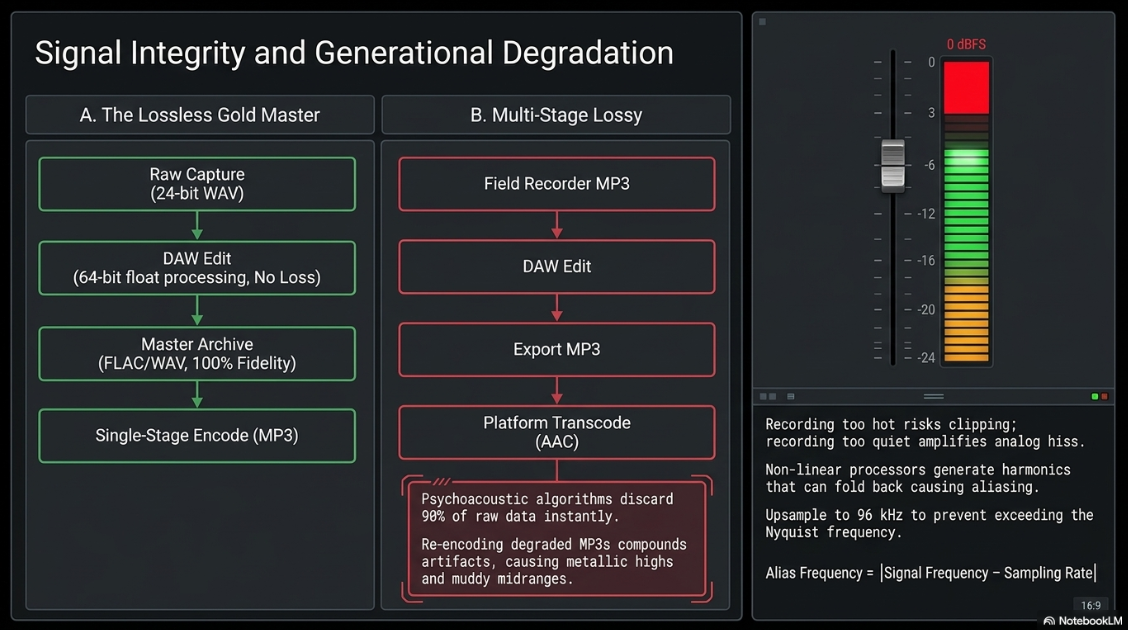
For professional podcast production, selecting the appropriate file format at each stage of the workflow is critical to maintaining audio quality. A primary concern in digital audio workflows is generational loss: the progressive degradation of audio quality that occurs every time a lossy file is decoded, processed, and re-encoded8.
[Raw Multitrack Capture] ----> (WAV / 24-bit / 48 kHz) [Lossless]
|
v
[Editing & Dynamic Processing] -> (WAV Working Sessions) [No Loss]
|
v
[Archival Master Export] ------> (FLAC or WAV Master) [100% Fidelity]
|
v
[Distribution Compression] ----> (MP3 / 128 kbps Mono) [Single Stage Lossy]
|
v
[Platform Transcoding] --------> (AAC or Ogg Vorbis Stream) [Generational Loss Risk]
When remote interview software or a field recorder saves audio directly as an MP3, psychoacoustic algorithms immediately discard up to 90% of the raw data8. If that MP3 is then imported into a DAW, edited, and exported again as an MP3 for upload, the encoder analyzes an already degraded file8. It treats existing compression artifacts as part of the original signal and applies another round of lossy quantization8.
By the time the podcast host and streaming directories (such as Spotify or Apple Podcasts) apply their own transcoding for end-user playback, the audio has undergone three or more generations of lossy compression19. This compounding effect produces audible phase cancelations, a metallic or "watery" high-end, and a muddy midrange8.
To prevent generational loss, a professional podcast workflow must remain entirely lossless until the final distribution export8. The standard workflow should follow these steps:
Lossless Capture: Record multi-track audio using uncompressed WAV at a minimum of 24-bit/48 kHz (or 32-bit float where supported)4.
Lossless Editing and Processing: Execute all editing, noise reduction, equalization, and dynamic compression within the DAW using lossless WAV files8. All internal processing within modern DAWs is calculated using high-precision 64-bit floating-point math, preserving complete signal fidelity4.
Lossless Gold Master: Export the finalized, leveled mix as an uncompressed WAV or a lossless FLAC master file to preserve a perfect archive of the production8.
Single-Stage Distribution Encoding: Generate the compressed distribution MP3 or AAC directly from the lossless gold master, ensuring that lossy compression is applied only once prior to hosting upload21.
Managing file sizes is also a practical necessity due to hosting and platform limits23. For example, the podcast host Beehiiv enforces a strict maximum file limit of 500 MB per episode23.
Furthermore, Acast and Apple Podcasts historically recommended keeping downloaded file sizes below 150 MB to prevent mobile devices from blocking downloads over cellular connections, which can trigger an "episode unavailable" error10.
These size differences demonstrate why uncompressed WAV files are unsuitable for direct consumer distribution, making lossy encoding to MP3 or AAC necessary before uploading to a host10.
Spatial Configuration: Mono, Stereo, and Joint Stereo Optimization
Choosing the appropriate channel configuration is a critical decision in podcast post-production, directly impacting file sizes, hosting costs, and consumer playability24.
Mono (single-channel) audio delivers identical signal information to both ears28. For standard talk shows, interviews, and solo spoken-word content, mono is the ideal configuration23. Spoken voice does not naturally contain wide spatial attributes, so collapsing a multi-mic conversation to a centered mono image provides a highly natural, focused listening experience28.
Furthermore, mono distribution eliminates the "one-earbud" problem28. Many consumers listen to podcasts with a single earbud while multitasking or commuting21. If an interview show is mixed in wide stereo (such as with the host panned left and the guest panned right), a single-earbud listener will lose half of the conversation28. Mono ensures that the entire mix is delivered to either ear28.
Stereo (two-channel, Left/Right) configuration is reserved for high-production-value podcasts, such as audio dramas, immersive storytelling, and shows featuring prominent stereo music beds or environmental field recordings28.
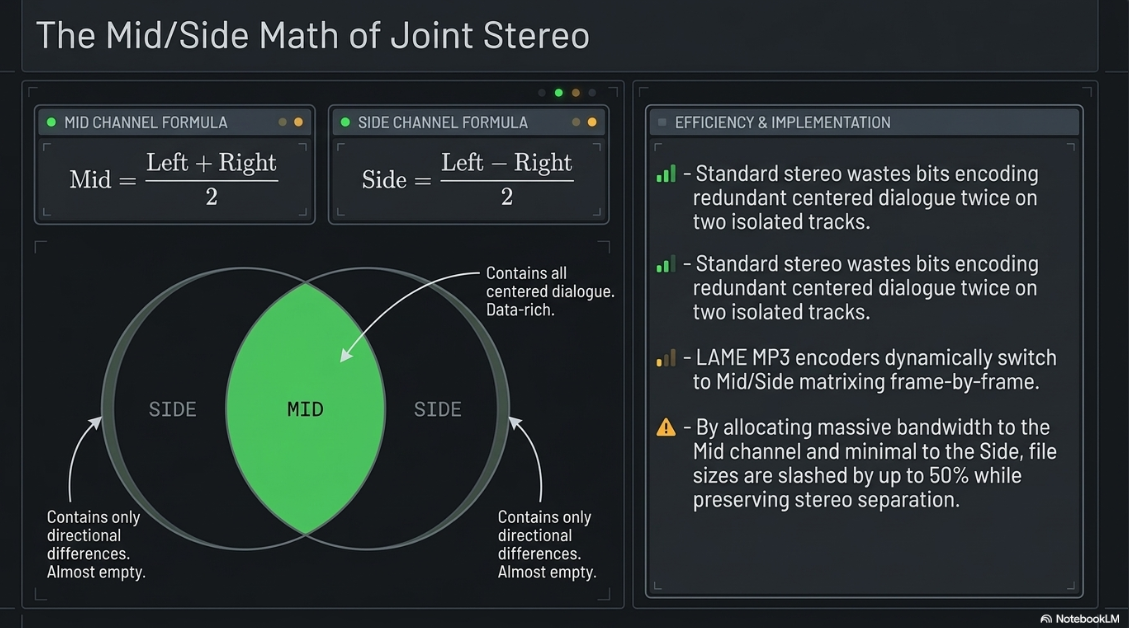
However, standard stereo encoders process the left and right channels as completely independent streams35. If the channels contain similar information (such as centered dialogue with a music bed), standard stereo encoding wastes valuable bits encoding the redundant information twice, resulting in larger file sizes33.
Additionally, collapsing a poorly mixed stereo file containing phase discrepancies into mono can trigger phase cancellation28. This causes overlapping frequencies to cancel each other out, making the final mono mix sound thin, hollow, or muddy28.
Joint Stereo solves this inefficiency by optimizing the compression of two-channel files33. Rather than treating the left and right channels as isolated files, joint stereo encoders analyze the relationship between them33. This is typically achieved through Mid/Side (M/S) matrix encoding33:


The Mid channel carries all audio common to both channels (centered content, such as main vocals), while the Side channel carries the directional differences33. Because the vast majority of podcast audio is centered, the Side channel contains very little data37.
The encoder allocates most of the available bit rate to the Mid channel, while utilizing minimal bandwidth for the Side channel37. This allows a joint stereo file to achieve near-lossless stereo separation at lower bit rates with a file size up to 50% smaller than a standard stereo file33.
The LAME MP3 encoder, the open-source industry standard, uses intelligent frame-by-frame switching, dynamically selecting between standard Left/Right and Mid/Side encoding based on the spatial complexity of each individual frame to ensure maximum fidelity and efficiency37.
This is distinct from cheaper, older compression modes like Intensity Stereo or Parametric Stereo, which combine high frequencies into a single mono channel33. Those older methods use basic psychoacoustic panning approximations that can introduce audible phase shifts and spectral imbalance33.
For spoken-word podcasts, mono encoding at 64 kbps or 96 kbps yields a file size of approximately 0.5 MB to 0.7 MB per minute, providing excellent voice clarity with minimal bandwidth consumption23. For stereo music-heavy shows, joint stereo at 128 kbps to 160 kbps provides the optimal balance of acoustic width and efficient file delivery10.
However, engineers using Blubrry PowerPress should note that the platform issues metadata warnings if files are uploaded in pure mono format34. To guarantee compatibility across all legacy web players and hardware decoders, PowerPress recommends exporting files in Joint Stereo34. Even when the input is a mono file, encoding it as Joint Stereo results in an identical file size to pure mono because there are no left-to-right channel differences to encode34.
For ultra-low bitrate applications, such as long-form archival speech, engineers can reduce the sample rate to 22.05 kHz and export in mono at 32 kbps40. According to the Nyquist theorem, a 22.05 kHz sample rate can reproduce frequencies up to 11 kHz40.
This is sufficient for human voice intelligibility and helps keep file sizes minimal40. However, dropping below 32 kbps can introduce severe, metallic artifacts, which should be avoided15.
Loudness Standards, Dynamic Range Metering, and Normalization Gates
Before the introduction of loudness normalization, producers competed in "the loudness wars," heavily limiting their tracks to be as loud as possible41. This excessive limiting crushed transient detail and caused severe listener ear fatigue41.
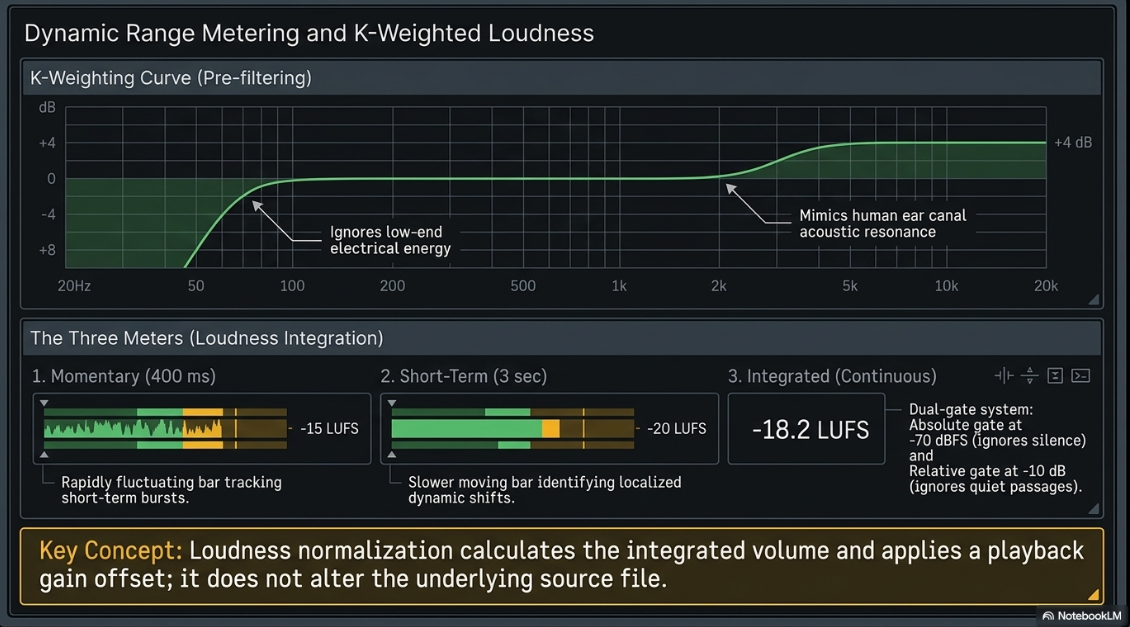
Today, streaming and podcast platforms utilize automated loudness normalization to match all tracks to a target volume17. This leveling process does not alter the underlying audio files; rather, the platforms calculate the integrated volume of the file and apply a gain offset during playback41.
To measure perceived loudness, the audio industry developed the LUFS (Loudness Units relative to Full Scale) standard, also known as LKFS (Loudness K-weighted relative to Full Scale)43. Unlike peak meters that measure instant voltage levels, or RMS meters that measure average electrical energy over brief periods, LUFS scales are calibrated to match human frequency perception41.
This is achieved via K-weighting, which applies a two-stage filter: a high-pass filter at 80 Hz to roll off low-frequency energy (which carries high electrical energy but low perceived loudness), and a +4 dB high-shelf filter starting at 2 kHz to mimic the acoustic resonance of the human ear canal13.
[K-Weighting Filter Scheme]
+4 dB -----------------------------------/---------- [High-Shelf Filter]
/ (Boosts frequencies above 2 kHz)
0 dB -------------------------------- /
/
-4 dB -----------\-------------------/
\ [High-Pass Filter]
\ (Cuts low bass below 80 Hz)
Loudness is evaluated over three distinct time windows:
Momentary LUFS: A fast, immediate measurement calculated over a sliding 400 ms window, highlighting short-term level bursts43.
Short-Term LUFS: An average measurement over a sliding 3-second window, useful for identifying localized shifts in dynamics43.
Integrated LUFS: A continuous measurement calculated over the entire duration of the audio program43. Integrated LUFS is the industry standard for platform delivery compliance43. It employs a dual-gate system: an absolute gate at -70 dBFS to ignore absolute silence, and a relative gate set 10 dB below the current average to exclude quiet passages from the final calculation13.
Alongside LUFS, engineers must monitor True Peak (measured in dBTP)17. Traditional sample peak meters only measure individual digital samples17. However, during Digital-to-Analog (D/A) conversion, the reconstruction filter interpolates smooth curves between these samples, creating inter-sample peaks that can exceed 0 dBFS and cause digital clipping17. True Peak meters oversample the digital signal (typically by 


A key technical detail in podcast mastering is the discrepancy between mono and stereo loudness targets29. Apple Podcasts and the broader podcast industry standard is -16 LUFS for stereo configurations44.
However, when a mono file is played back on stereo systems, the identical signal is routed to both speakers, acoustically summing and increasing the output by approximately 3 dB38.
To compensate for this summing effect, professional engineers master mono podcast mixes to -19 LUFS29. This ensures that the mono file translates to a perceived volume of -16 LUFS on stereo playback devices, preventing sudden volume jumps when listeners switch shows30.
Engineers can also use the ITU-R BS.1770 gating thresholds to make their podcasts sound slightly louder on streaming platforms13. By raising the volume of very quiet passages so they sit just above the relative -10 dB gate threshold, those sections are included in the overall integrated LUFS calculation13. This artificially lowers the measured average loudness (integrated LUFS) of the track13.
As a result, when the platform's normalization algorithm analyzes the file, it applies less attenuation, allowing the loud sections (like choruses or vocal hooks) to play back at a higher relative volume13.
To manage these targets, engineers use dedicated metering software, such as iZotope Insight 2, NUGEN Audio VisLM, or the free Youlean Loudness Meter19. For automated leveling, platforms like Auphonic or specialized plugins like the APU Loudness Leveler can be integrated into the mastering chain30.
The APU Loudness Leveler is particularly useful because it applies real-time leveling only when the signal drifts from the target46. Additionally, its Tail Guard mode prevents the leveler from boosting low-level noise, breath sounds, or room tone during pauses, maintaining a natural dynamic range46.
Ingestion, Transcoding, and Playback Delivery Infrastructures
Once a podcast's RSS feed is updated, platforms do not simply copy and stream the raw file; instead, they ingest, analyze, and deliver it through specialized delivery architectures42.
Podcast Hosting Transcoding
Standard podcast hosting platforms (such as Simplecast or Acast) act as primary storage and distribution servers30. If a user uploads an uncompressed WAV or large M4A file, the host's ingest pipelines transcode the file10.
For example, Simplecast transcodes uncompressed uploads down to a standard 128 kbps MP330. To maintain complete control over the encoding quality, dynamic range, and high-frequency filtering, engineers should upload high-quality, pre-encoded MP3s30.
If the uploaded MP3 is at or below 128 kbps, hosting providers typically bypass transcoding, distributing the original file without further lossy compression30.
Apple Podcasts HLS Video and Audio-Switching
With the expansion of video podcasting, Apple Podcasts utilizes HTTP Live Streaming (HLS) technology52. HLS breaks down media into small, sequential chunks and serves them via an M3U8 index file, dynamically adapting streaming quality (e.g., transcoding 720p video down to 480p or 240p) in real time based on the user's network connection53.
If a creator includes both a high-quality audio MP3 and an HLS-compatible video file in their RSS feed, Apple's playback engine defaults to the video file's embedded AAC audio track for all users, completely ignoring the standalone MP352.
This ensures seamless, frame-accurate switching when a listener flips their screen from video to audio-only mode52. Therefore, post-production teams must master the audio track embedded within the video container to the exact same rigorous loudness standards (-16 LUFS, -1 dBTP) as the standalone MP3 to prevent jarring volume jumps52.
Furthermore, when submitting subscriber audio directly through Apple Podcasts Connect (rather than via an RSS feed), Apple enforces strict format restrictions25. Apple Podcasts Connect will not accept single-channel (mono) WAV or FLAC files25. If a mono recording is used, it must be exported as a two-channel file with identical left and right channels to pass Apple's verification checks25.
Spotify Media Delivery Infrastructure
Unlike video platforms that use adaptive bit rate streaming protocols (such as MPEG-DASH or HLS), Spotify's audio streaming delivery relies on a custom media player SDK that fetches fixed-size, encrypted byte ranges (typically ~512 kB chunks) over standard HTTPS/TCP connections51.
The Spotify client coordinates playback by issuing HTTP GET requests with precise Range headers to regional Content Delivery Networks (CDNs), such as Fastly51. The CDN returns an HTTP 206 Partial Content status, delivering the requested byte blocks directly into the client's local cache51.
This range-request architecture avoids the packaging overhead of segment-manifest streaming models, allowing Spotify to quickly prefetch and buffer the upcoming track to deliver near-instantaneous playback51.
During the initial ingestion of an RSS feed, Spotify analyzes the integrated LUFS level of the podcast audio but does not modify the stored file42. The file remains unchanged on Spotify's CDNs to preserve its original data structure41.
Loudness normalization is applied dynamically on the playback device during decoding42. If a user selects Spotify's "Loud" playback profile, the client activates an integrated brick-wall limiter with a 5 ms attack time and 100 ms release time to bring quieter files up to -11 LUFS without digital clipping, introducing a slight risk of dynamic distortion42.
For other platforms, such as YouTube Music, uploaded files are transcoded into the Opus format at multiple bitrates, with normalization applied to target a standard -14 LUFS21.
Metadata Integration, ID3 Tagging, and Asset Management Standards
ID3 tagging is the standard format for embedding metadata directly into MP3 files, ensuring that episode information, artwork, and technical tracking remain permanently coupled with the audio asset1.
The ID3 standard has evolved through several iterations, each placing and formatting metadata differently within the binary file:
ID3v1 / v1.1: Appended strictly to the final 128 bytes of the audio file58. It features fixed-length fields limited to 30 characters for title, artist, and album, making it obsolete for modern digital distribution58.
ID3v2.3 (Widely Adopted Standard): Placed at the very start of the binary file, preceding the first frame of audio data58. This front-loaded structure allows streaming players to read and render the title, description, and embedded artwork immediately upon initiation, without downloading the entire file58. ID3v2.3 utilizes 4-character frame identifiers (e.g., TIT2 for title, TPE1 for lead artist), supports Unicode text strings, and allows embedded high-resolution artwork58. This version is preferred for podcasting due to its broad compatibility with legacy hardware and automotive infotainment decoders58.
ID3v2.3+ (Enhanced Edition): Extends the ID3v2.3 standard to support chapter markers and synchronized slideshow images, which are highly useful for structured podcast episodes58.
ID3v2.4 (Latest Specification): Allows metadata frames to be stored at either the start or the end of the file58. It supports native UTF-8 character encoding and allows multi-value text frames separated by null bytes58. However, if ID3v2.4 tags are appended to the end of a file, they must precede any legacy ID3v1 tags to prevent file-parsing errors in older decoders58.
A major challenge in podcast metadata management is tagging Advanced Audio Coding (AAC) files58. Raw .aac files are structured as an Audio Data Transport Stream (ADTS)58. Incorporating standard ID3 tags directly into a raw ADTS stream breaks the bitstream syntax, causing decoding errors or audible digital pops during playback58.
To resolve this, the raw AAC audio must be encapsulated within a container format, such as MPEG-4 Part 14 (.m4a or .mp4)25. This encapsulation reorganizes the continuous binary stream into clean index blocks, interleaving metadata and audio packets without breaking player compatibility58.
Engineers can execute this encapsulation losslessly (without re-compressing the audio) using the command-line utility ffmpeg58:
ffmpeg -i input.aac -c:a copy output.m4a
Simply renaming the file extension from .aac to .m4a is a critical error58. This action does not rewrite the underlying binary container structure, resulting in a corrupted, unreadable file extension58.
For AIFF files, the format natively supports recording information within structured text chunks58. However, some engineers embed custom 'ID3 ' chunks (using a space padding character)58. Because these custom chunks are not recognized by the official AIFF specification, they can be stripped or deleted when the file is processed through modern digital audio editing software58.
Best Practices for Metadata and Embedded Assets
Embedded Artwork Specifications: Standard podcast directories (like Apple Podcasts) require external cover art to be a square JPEG or PNG between


Localization Standards: In international workflows using ID3v2.3 or ID3v2.4, localized text tags should include the standard three-letter ISO 639-2 country and language codes to ensure proper character rendering across various operating systems58.
Decoder Protection (Synchronization Avoidance): Because MP3 players identify playable audio frames by scanning for a specific 11-bit sequence (the frame sync pattern, consisting of all binary ones), any embedded metadata image containing a matching binary sequence could trigger a sync error, causing the decoder to play the image as audio58. Professional ID3 tagging software implements a "synchronization avoidance scheme" that modifies the metadata's bit patterns to prevent false trigger events, ensuring stable playback across all decoding devices58.
Unique Asset Identifiers: For robust media asset management, every master file should be tagged with at least one unique identifier, such as a stable Global Unique Identifier (GUID) in the RSS enclosure tag58. This minimal tag ensures the audio asset remains linked with its corresponding metadata records in the Content Management System (CMS)58.
RSS Core Elements: When submitting a podcast feed to directories, the RSS XML document must contain valid tags62. These include the Title, Description, Cover Art URL, Language, Category, Author, and Explicit ratings to pass validation checks59.
Synthesis and Operational Recommendations for Broadcast Compliance
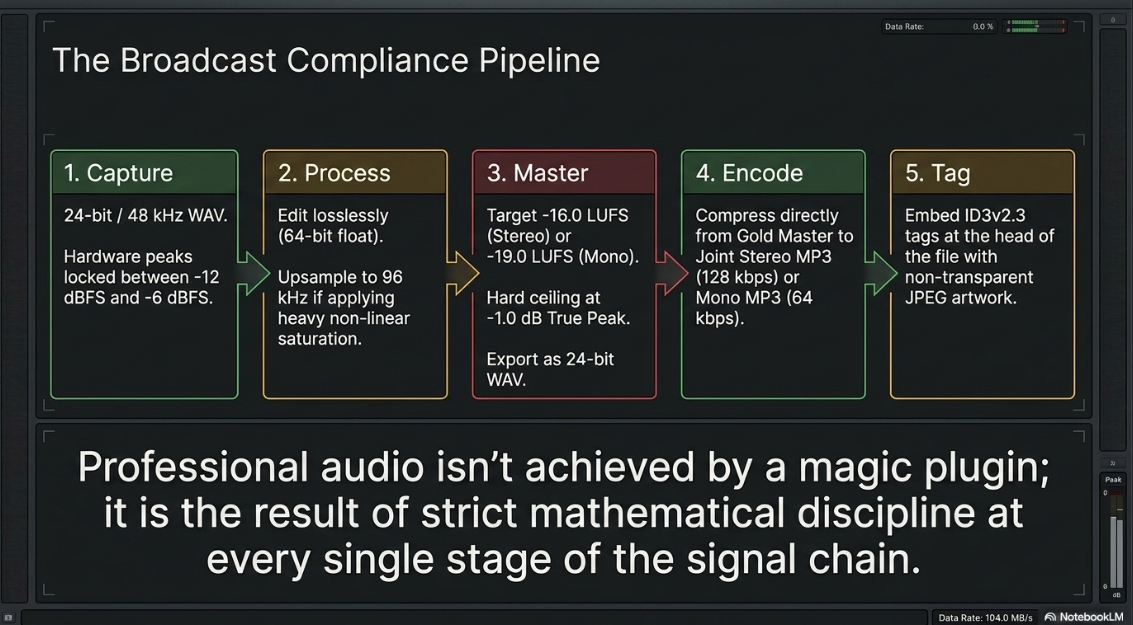
To ensure maximum fidelity, delivery efficiency, and compliance with modern streaming platforms, engineering teams should standardize on the following operational pipeline:
1. Recording Stage
Capture all multi-track files as uncompressed, lossless WAV files at 24-bit/48 kHz4. Keep peaks between -12 dBFS and -6 dBFS to maintain sufficient digital headroom and avoid distortion7. Avoid lossy compression during recording, as it introduces permanent artifacts and compromises post-production processing8.
2. Editing and Processing Stage
Perform all spectral editing, noise reduction, and level adjustments within a lossless working session8. If non-linear saturation or limiting is required, consider working in a session upsampled to 96 kHz to avoid aliasing and fold-back harmonics4. If converting formats, avoid dithering to 16-bit, and export the intermediate master as a 24-bit WAV file19.
3. Mastering Stage
Apply integrated loudness targeting using professional metering software19. For stereo podcasts, target -16.0 LUFS with a maximum True Peak limit of -1.0 dBTP to align with Apple and Spotify specifications17. For mono voice podcasts, target -19.0 LUFS with a maximum True Peak of -1.0 dBTP to compensate for the 3 dB summing effect during playback on stereo devices29.
4. Export Configuration
For speech-only programs, export the file in mono using Constant Bit Rate (CBR) MP3 at 64 kbps or 96 kbps28. For music-rich programs, export in Joint Stereo using CBR at 128 kbps or 160 kbps10. Avoid Variable Bit Rate (VBR) formats, as they can cause playback tracking errors in older consumer decoders23.
5. Metadata Integration
Embed metadata using the ID3v2.3 tag format58. Place the tags at the front of the file to enable faster loading and immediate artwork rendering for streaming users58. If distributing files in the AAC format, encapsulate the raw ADTS stream within a valid .m4a or .mp4 container before tagging to prevent digital pops and decoding errors58. Ensure all embedded images are progressive JPEGs with no alpha channels to guarantee compatibility with all playback systems58.
Works cited
WAV vs MP3 Understanding the Differences and Choosing the Right Format - Enveu, https://www.enveu.com/blog/wav-vs-mp3
Bit Depth vs. Sample Rate: The Pro Audio Quality Master Guide - BOYA, https://www.boyamic.com/blogs/microphone-bit-depth-explained
Sample Rate - Podcast Glossary - Story Ninety-Four, https://storyninetyfour.com/podcast-glossary/sample-rate
What sample rate and bit depth should I use? · Notes · Resoundsound Mastering, https://resoundsound.com/notes/sample-rate-bit-depth/
Digital audio basics: audio sample rate and bit depth - iZotope, https://www.izotope.com/community/blog/digital-audio-basics-sample-rate-and-bit-depth
Why Your Podcast Sounds Amateur (5 Audio Specs Explained), https://www.podcaststudioglasgow.com/podcast-studio-glasgow-blog/the-5-audio-specs-that-separate-professional-from-amateur-podcasts
WAV vs MP3: Which Audio Format is Better? - Cryo Mix, https://cryo-mix.com/blog/posts/which-is-better-mp3-or-wav
What is the difference between mp3 and wav? Best format for you | SimpleClean Blog, https://simpleclean.app/blog/what-is-the-difference-between-mp-3-and-wav
The Best Audio File Formats for Your Podcast - Acast, https://www.acast.com/en-gb/blog/best-audio-file-formats-for-podcasts
WAV vs MP3: Can You Really Hear the Difference? - Recordbuilds, https://recordbuilds.com/wav-vs-mp3/
WAV or MP3: Most of you can't hear the difference - TRPTK, https://trptk.com/blog/wav-or-mp3-most-of-you-can-t-hear-the-difference
Mastering for Spotify, Apple Music & More – the Loudness of the Pros | HOFA-College, https://hofa-college.de/en/blog/mastering-for-spotify-apple-music-more-the-loudness-of-the-pros/
MP3 vs AIFF and WAV - LYDUDLEJNING.net, https://lydudlejning.net/en/mp3-vs-aiff-and-wav
What settings to use for an internet podcast? - Audacity Forum, https://forum.audacityteam.org/t/what-settings-to-use-for-an-internet-podcast/27966
What Bit Rate Should I Export My Podcast Episode As? | by Aaron Dowd - Medium, https://medium.com/simplecast/what-bit-rate-should-i-use-5a5d835fd0f3
Podcast Loudness Standards 2026: Spotify, Apple, YouTube Requirements, https://sone.app/blog/podcast-loudness-standards-2026-spotify-apple-youtube
A Massively Oversimplified Guide to Loudness - The Simplecast Blog, https://blog.simplecast.com/a-massively-oversimplified-guide-to-loudness
Mastering for Streaming — LUFS Targets for Spotify & Apple Music, https://veniamastering.studio/blog/technical-mastering-guide-for-spotify-and-streaming/
Editing in MP3 is bad? - Newbie Advice appreciated : r/podcasting - Reddit, https://www.reddit.com/r/podcasting/comments/iuek8n/editing_in_mp3_is_bad_newbie_advice_appreciated/
WAV vs MP3: Choose the Best File for Your Podcast - Zencastr, https://zencastr.com/blog/wav-vs-mp3-podcast-file-type
MP3, AAC, WAV, or WebM? The Creator's Guide to Audio File Formats | Podsplice, https://podsplice.com/mp3-aac-wav-or-webm-the-creators-guide-to-audio-file-formats
Audio file guidelines for podcast uploads | beehiiv Help, https://www.beehiiv.com/support/article/41323776364823-audio-file-guidelines-for-podcast-uploads
The Definitive Guide to Audio Formats for Podcasts - Podbean Blog, https://blog.podbean.com/the-definitive-guide-to-audio-formats-for-podcasts/
Audio requirements - Apple Podcasts for Creators, https://podcasters.apple.com/support/893-audio-requirements
Create an episode - Apple Podcasts for Creators, https://podcasters.apple.com/support/825-how-to-create-an-episode
Audio Trimming for Podcasts | theproductguy.in, https://theproductguy.in/blogs/audio-trimmer-podcasts/
Mono vs Stereo for Podcasts: Which to Export - Quickreel.io, https://quickreel.io/blog/mono-vs-stereo-podcast
QUESTION: Exporting or rendering your podcast to mp3 or wav - Reddit, https://www.reddit.com/r/podcasting/comments/hiu2yb/question_exporting_or_rendering_your_podcast_to/
Audio Encoding Tips & Best Practices - Simplecast, https://help.simplecast.com/hc/en-us/articles/21953657868445-Audio-Encoding-Tips-Best-Practices
MP3 vs WAV – What is the Best File Format for Podcasts? - Captivate.fm, https://www.captivate.fm/learn-podcasting/mp3-vs-wav
Mono Vs Stereo Podcast Audio Quality - Which is Better? - The Podcasting University, https://thepodcastinguniversity.com/mono-vs-stereo-podcast-audio/
Joint Stereo vs Stereo: What's the Difference & Which is Best - Riverside, https://riverside.com/blog/joint-stereo-vs-stereo
Should You Podcast in Mono or Stereo?, https://theaudacitytopodcast.com/tap059-should-you-podcast-in-mono-or-stereo/
The Difference Between Joint Stereo and Stereo - The Simplecast Blog, https://blog.simplecast.com/the-difference-between-joint-stereo-and-stereo
Difference between joint stereo and stereo - Async, https://async.com/blog/difference-between-joint-stereo-and-stereo/
What is the difference between Joint Stereo and Stereo? - Audacity Forum, https://forum.audacityteam.org/t/what-is-the-difference-between-joint-stereo-and-stereo/36030
Mono Stereo or Joint Stereo? : r/podcasts - Reddit, https://www.reddit.com/r/podcasts/comments/4g90yh/mono_stereo_or_joint_stereo/
Joint Stereo vs Stereo · audacity audacity · Discussion #4940 - GitHub, https://github.com/audacity/audacity/discussions/4940
Choosing Bit Rates for Podcasts - Richard Farrar, https://www.richardfarrar.com/choosing-bit-rates-for-podcasts/
Mastering Loudness Targets for Streaming: Spotify, Tidal, Apple Music and More - Mat Leffler-Schulman, https://matlefflerschulman.com/mastering-articles/loudness-targets-and-mastering-for-streaming-platforms
Loudness normalization on Spotify, https://support.spotify.com/us/artists/article/loudness-normalization/
What are LUFS? Complete Guide for Music, Podcasts & Broadcast | NUGEN Audio, https://nugenaudio.com/what-are-lufs/
Podcast Loudness Standard: Perfecting Your Sound in 2026 - Descript, https://www.descript.com/blog/article/podcast-loudness-standard-getting-the-right-volume
Loudness (LUFS) | Podcasting Articles - Audio Audit, https://audioaudit.io/articles/podcast/loudness-lufs
Spotify Loudness Target - APU Software, https://apu.software/spotify-loudness-target/
HOW LOUD SHOULD YOUR PODCAST BE? LUFS AND DB EXPLAINED, https://content.sport-social.co.uk/blog/how-loud-should-your-podcast-be
Why Setting the Correct LUFs for Your Podcast is Crucial: A Guide for Podcasters, https://www.podcaststudioglasgow.com/podcast-studio-glasgow-blog/why-setting-the-correct-lufs-for-your-podcast-is-crucial-a-guide-for-podcasters
How to Upload and Publish a Podcast on Spotify and Apple - Transistor, https://transistor.fm/how-podcast-works/
How to Get Your Podcast on Spotify and Apple Podcasts (2026 Step-by-Step) | Autozy Blog, https://autozy.co/blog/how-to-get-your-podcast-on-spotify-and-apple
Spotify Streaming, Packets, What Moves on the Wire - freight.cargo.si, https://freight.cargo.site/m/W2536787598511091894191000167579/Spotify-Streaming--Packets--and-How-It-Differs-from-DASHHLS-3.pdf-1.pdf
How does apple and spotify handle video and audio files for the listener/viewer if mp3 is slightly different? : r/podcasting - Reddit, https://www.reddit.com/r/podcasting/comments/1t00pvv/how_does_apple_and_spotify_handle_video_and_audio/
Publish Video Podcasts to Apple Podcasts - Captivate.fm, https://www.captivate.fm/publish-video-podcasts-to-apple-podcasts
Apple Podcasts HLS Frequently Asked Questions - Captivate Help and Support, https://help.captivate.fm/en/article/apple-podcasts-hls-frequently-asked-questions-1n8fmpg/
Media Delivery API - Spotify for Developers, https://developer.spotify.com/documentation/commercial-hardware/implementation/guides/media-delivery
How Spotify Aligned CDN Services for a Lightning Fast Streaming Experience, https://engineering.atspotify.com/2020/02/how-spotify-aligned-cdn-services-for-a-lightning-fast-streaming-experience
How do services like Spotify or Google Play Music actually stream their music? - Reddit, https://www.reddit.com/r/compsci/comments/5tlqu5/how_do_services_like_spotify_or_google_play_music/
Standards: Audio - ID3 Metadata Tagging - The Broadcast Bridge, https://www.thebroadcastbridge.com/content/entry/21824/standards-id3-metadata-tagging
Podcasting for Business in 2026: A Practical Starter Guide - Chesley Software, https://chesleysoftware.com/podcasting-for-business-in-2026-a-practical-starter-guide/
How to Start a Podcast: Complete Step-by-Step Guide [2026] - Buzzsprout, https://www.buzzsprout.com/blog/how-to-start-a-podcast
Publishing audio episodes in Spotify for Creators, https://support.spotify.com/us/creators/article/publishing-audio-episodes/
Spotify Uploading Podcast: Complete Guide for 2026, https://podcastmonkey.co/blogs/news/spotify-uploading-podcast














