

Theoretical Foundations of Dialogue Equalization
In professional podcast post-production, the primary objective of spectral processing is to establish highly intelligible, natural, and warm dialogue that translates consistently across diverse consumer playback systems1. Unlike music production, which often demands hyperreal, highly polished, and heavily colored vocal tracks to compete with dense instrumentation, podcast editing requires a focus on vocal preservation, transient clarity, and long-term acoustic consistency2. To achieve this, post-production specialists must master the technical and artistic application of equalizers (EQ), utilizing them as both corrective scalpels and creative sweetening tools5.
The post-production workflow is strictly split into corrective (subtractive) and creative (additive or sweetening) processes6. Subtractive EQ, often referred to as technical EQ, focuses on surgical repairs: removing low-end rumble, taming room resonances, neutralizing boxiness, and attenuating harsh nasality5. Conversely, creative EQ, or sweetening, is applied to shape the overall tone, enhance intelligibility, and impart a professional, broadcast-ready sheen6. Understanding the exact frequency zones of the human voice, their physical origins, and how different EQ topologies affect the phase and dynamics of the signal is critical to executing a high-end podcast mix.
The human voice is a highly complex acoustic source spanning a wide frequency range, requiring substantial corrective carving to fit within a modern broadcast envelope10. Vowels primarily occupy the low-to-mid range of to , providing fundamental warmth and body, whereas consonants reside in the upper-mid region of to , dictating speech articulation and intelligibility10. Managing this spectral distribution requires a detailed understanding of the critical frequency zones of dialogue2.
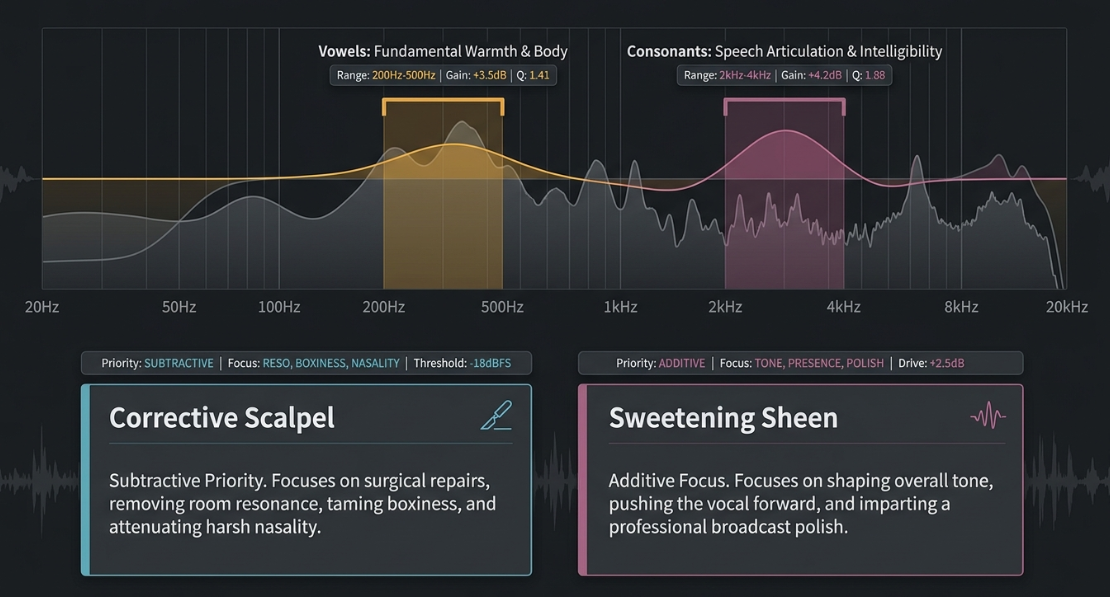
The voice classifications of speakers alter EQ priorities significantly11. Sopranos require meticulous high-pass filtering and high-mid containment, whereas deep basses exhibit rich, fundamental resonances that must be protected or carefully trimmed to prevent low-end muddying of the mix11. A gender-specific spectral boundary often dictates that female dialogue can be high-passed more aggressively, up to or even in non-treated spaces, and cleared of low-frequency clutter below 2. Male dialogue, conversely, exhibits fundamental chest resonance down to that must be preserved to prevent a thin, wispy, digital quality2.
The Signal Chain Architecture and the EQ-Compressor-EQ Sandwich
The sequencing of equalizers within the dialogue signal chain directly dictates how downstream dynamic processors behave1. In professional environments, dialogue editing begins with rigorous offline processes using specialized software like iZotope RX to eliminate plosives, mouth clicks, and broad background noises before any real-time effects are engaged18.
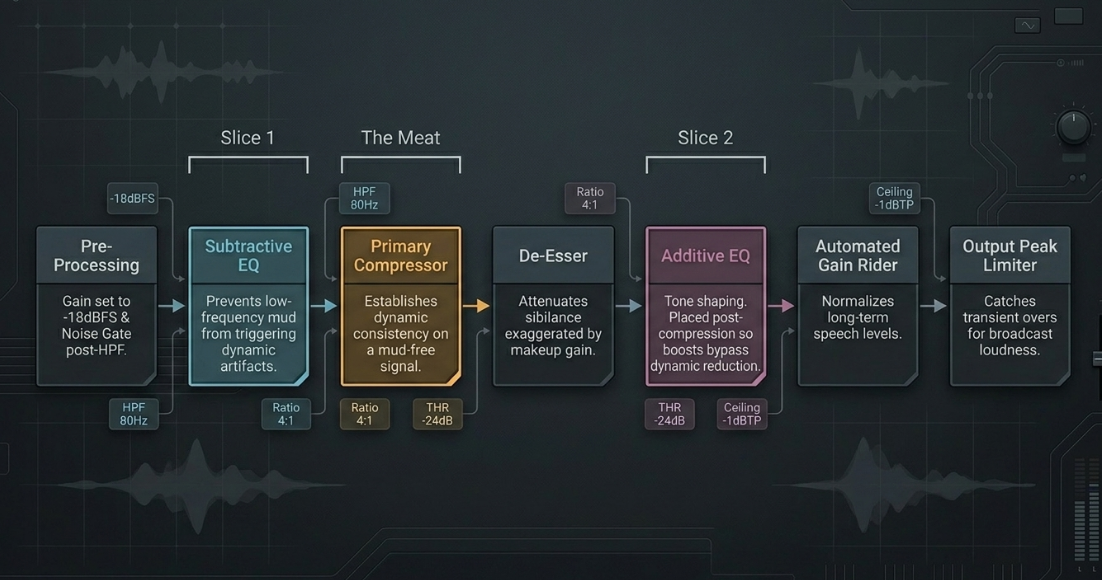
Once this offline restoration is complete, the remaining real-time processors are organized into the industry-standard template of the "sandwich" technique7. This method places a corrective, subtractive EQ before the primary compressor and an additive, sweetening EQ immediately after it7.
1. Pre-Processing Gain Staging and Gating
Before any spectral processing occurs, the dialogue should be gain-staged so that the average signal levels sit around to ensure optimal plugin headroom and nonlinear emulation behavior21. A noise gate or expander is positioned early to attenuate background noise, spill, and headphone bleed between active phrases13.
Placing the gate after a clean high-pass filter but before any compression ensures it triggers on a clear signal envelope, making the threshold predictable and preventing the gate from "chattering" on sub-harmonic rumble or low-frequency thumps13.
2. The Subtractive EQ (The First Slice of Bread)
The subtractive EQ acts as a technical cleanup tool7. It is placed before the compressor to prevent low-frequency mud and subsonic rumble from hitting the compressor's side-chain detector9. Low frequencies contain disproportionately high kinetic energy; if a raw, un-equalized signal is fed into a compressor, the compressor will overreact, pulling down the entire volume of the vocal and causing pumping artifacts every time a low-frequency thump or plosive occurs7.
The subtractive phase typically utilizes a steep high-pass filter () set between and to remove sub-fundamental rumble, and a narrow parametric notch filter (high value) to sweep, isolate, and extract narrow acoustic resonances and ringing room modes2.
3. Dynamic Control and Automated Volume Levelers
Once the signal is cleansed of unwanted frequencies, it passes to the compressor9. The compressor smooths out volume inconsistencies across the dialogue track1. Because it is receiving a balanced, mud-free signal, the compressor acts transparently, responding only to the musical dynamics of the actual voice9.
To complement the compressor, professional post-production strips often feature automated volume levelers like Waves Vocal Rider16. Vocal Rider acts as an automated fader, riding the gain up and down to normalize long-term speech levels without the harmonic coloration or transient distortion associated with heavy compression18.
When configured at the end of the chain, it serves as a level stabilizer, while placing it prior to the compressor feeds a highly consistent envelope into the dynamic processor, minimizing the load on the compressor21.
4. De-essing
A de-esser is placed after the primary compressor13. Compression naturally reduces the dynamic range of the vocal, which amplifies quieter details, including high-frequency sibilance, through makeup gain7.
Placing the de-esser after the compressor ensures that any newly exaggerated "s" and "t" sounds are dynamically controlled before the final sweetening stage13.
5. The Additive EQ (The Second Slice of Bread)
With the dynamics flattened and sibilance under control, the creative EQ is introduced9. This stage is used to polish and shape the tone, adding a gentle high-shelf boost () for air, or a broad bell boost at to push the vocal forward in the mix9.
Because the compressor precedes this EQ, any boosts made here will not trigger dynamic gain reduction, resulting in a much smoother, consistent high-end response7.
Mathematical and Algorithmic Comparisons of Modern Spectral Processors
The evolution of digital signal processing has introduced highly complex equalizers that behave dynamically, departing from the static filters of early digital audio workstations26. Understanding the differences between these modern topologies requires a deep dive into their architectural and phase characteristics27.
Dynamic Equalization versus Multiband Compression
While static equalizers apply a fixed level of attenuation or boost across the timeline, modern podcast post-production relies heavily on dynamic processors to resolve spectral issues that occur intermittently26. Two primary tools dominate this domain: Dynamic Equalizers and Multiband Compressors27.
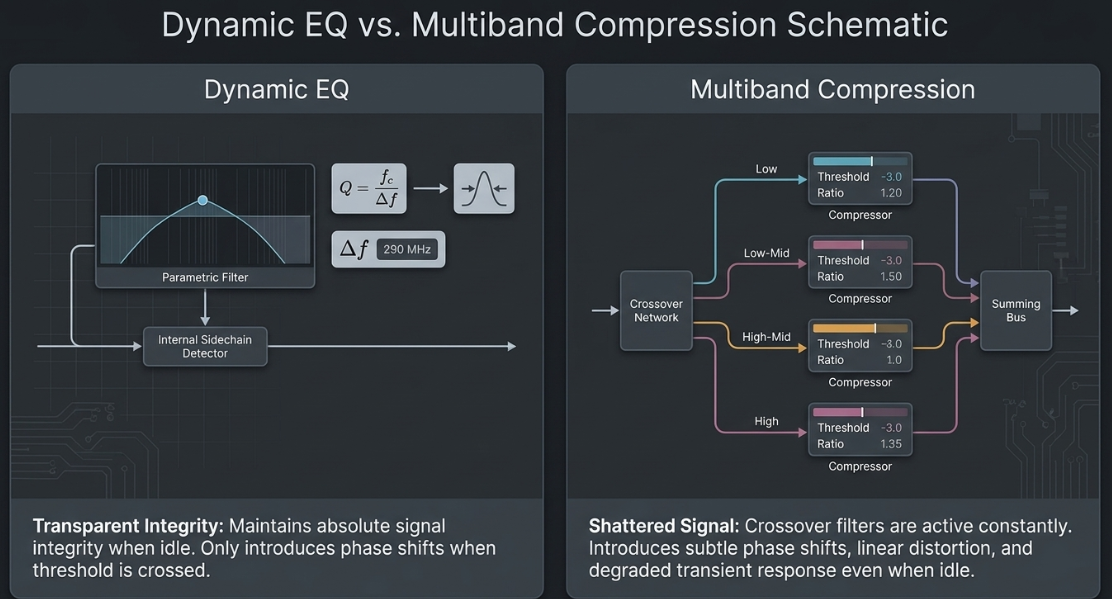
A dynamic EQ utilizes a unified signal path where the equalizer band is modeled as a traditional parametric filter whose gain is modulated by an internal sidechain detector26. The filter bandwidth () is mathematically defined by the relationship between the center frequency () and the half-power bandwidth ():
This parametric filter only engages and introduces phase shifts and attenuation when the signal in that specific band crosses the designated threshold27.
Conversely, a multiband compressor splits the incoming audio signal into discrete, adjacent frequency bands using a crossover network of steep high-pass and low-pass filters27. Each band is routed through its own independent compressor before being summed back together27.
These crossover filters are active constantly, which can introduce subtle phase shifts, linear distortion, and crossover coloration at the boundary frequencies even when the compressor is not actively reducing gain27.
This can degrade the overall transient response of the dialogue27. In contrast, a dynamic EQ maintains absolute signal integrity when idle, making it a much more transparent tool for surgical vocal repairs27.
Dynamic EQ:
Input Signal ➔ [Unified Signal Path (No Crossovers)] ➔ [Dynamic Filter Gain Modulated by Sidechain] ➔ Output
Multiband Compressor:
Input Signal ➔ [Crossover Network Splits Signal into Fixed Bands] ➔ [Independent Compressor per Band] ➔ [Recombination Bus] ➔ Output
Minimum Phase versus Linear Phase Equalization
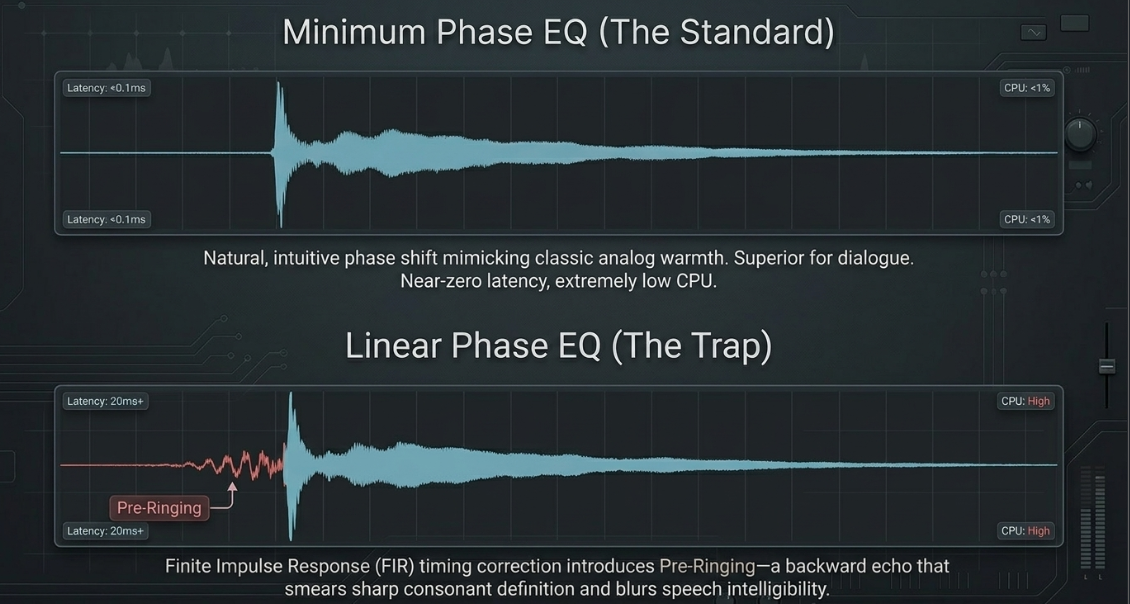
Standard digital EQ plugins operate on minimum phase principles28. To alter the amplitude of a specific frequency, these equalizers naturally delay the signal in that frequency band by a tiny, frequency-dependent amount, causing a phase shift28.
This phase shifting is a defining characteristic of "musical" analog coloration, contributing to the warmth and body of classic hardware emulations28. The primary advantages of minimum phase EQs are near-zero latency, extremely low CPU consumption, and a natural, intuitive sound28.
Linear phase equalizers utilize Finite Impulse Response (FIR) filters and complex digital signal processing to ensure that all frequencies pass through the equalizer with identical timing, completely avoiding phase distortion28. This is achieved by introducing a significant lookahead buffer and shifting the entire processed audio backward in time to align all frequencies perfectly28.
However, this temporal correction introduces a severe trade-off known as pre-ringing28. The digital time-shifting process can generate a low-level, backwards echo or acoustic artifact directly preceding sharp transients28.
This pre-ringing smears the transient attack of words, making consonants sound soft, blurred, or unnatural28. Because human speech is highly transient and relies on sharp consonant definition for clarity, standard minimum phase EQ is almost always the superior choice for dialogue mixing10.
Next-Generation Real-Time DSP: Adaptive Resonance and Psychoacoustic Modelling
To expedite post-production workflows and resolve complex acoustic problems, mixing engineers have turned to next-generation DSP tools37. These tools depart from traditional parametric modeling, using complex mathematical algorithms to analyze and correct the spectral balance of a track in real time38.
Traditional Parametric EQ:
Input ➔ [Static Filter Curve (Manually Adjusted)] ➔ Output
Adaptive FFT Resonance Suppressor (soothe2):
Input ➔ [FFT Spectral Analysis] ➔ [Dynamic Detection of Resonant Peaks] ➔ [Transparent Non-Phase-Shifting Attenuation] ➔ Output
1. oeksound soothe2
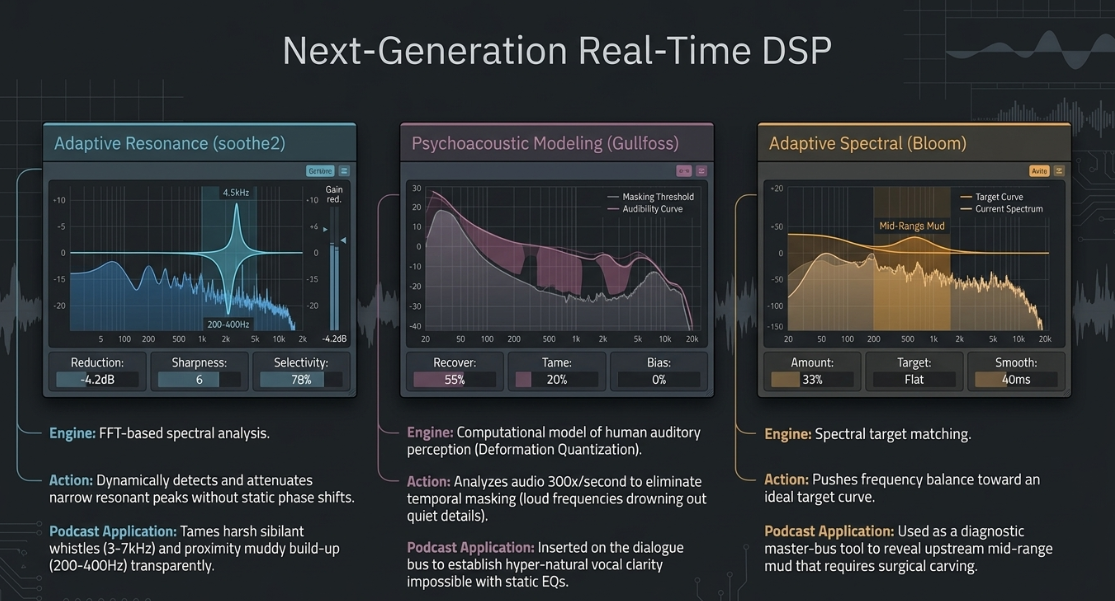
Commonly mistaken for an automatic equalizer, soothe2 is an adaptive resonance reducer that operates in the Fast Fourier Transform (FFT) spectral domain38. It analyzes the incoming signal in real time, identifies narrow frequency bands that exhibit unpleasant resonance, and dynamically attenuates them without introducing the phase-shift characteristics of traditional parametric filters38.
In dialogue post-production, soothe2 is exceptionally powerful for taming harsh, sibilant vocal peaks in the region, and mitigating the proximity-induced muddy build-up around when a speaker gets too close to the microphone14. Setting the mix control to a lower value () allows the engineer to utilize aggressive suppression settings while maintaining a natural vocal character38.
2. Soundtheory Gullfoss
Gullfoss utilizes a highly proprietary, real-time computational model of human auditory perception based on the physics of Deformation Quantization38. Rather than matching a static EQ curve, Gullfoss analyzes the audio spectrum over 300 times per second to identify and eliminate temporal masking—the phenomenon where loud, dominant frequencies drown out quieter, high-detail frequencies38.
It works by using two main parameters: "Recover," which boosts masked details, and "Tame," which attenuates dominating frequencies38. When inserted on a dialogue bus or a full mix, Gullfoss acts as a real-time spectral balancing tool, clarifying dialogue and making the voice sound more natural and present in a way that is impossible to achieve with standard static EQs38.
3. oeksound Bloom
Positioned as an adaptive spectral processor, Bloom analyzes the frequency balance of a mix and pushes it toward an ideal spectral target curve3. It serves as an invaluable diagnostic tool; by temporarily increasing the processing amount on the master bus, the engineer can easily identify frequency imbalances3.
If turning up Bloom suddenly makes the low-midrange clearer, it indicates that the individual dialogue tracks have excessive mud that must be carved out with surgical parametric EQs upstream3.
Acoustic Resonances, Room Modes, and Physical Microphone Interactions
The acoustic quality of the recording environment directly dictates the amount of corrective EQ required in post-production11. In small, untreated home studios or bedroom setups, parallel walls and hard boundaries generate standing waves49. These acoustic phenomena reflect waves back and forth, creating constructive and destructive interference patterns known as room modes49.
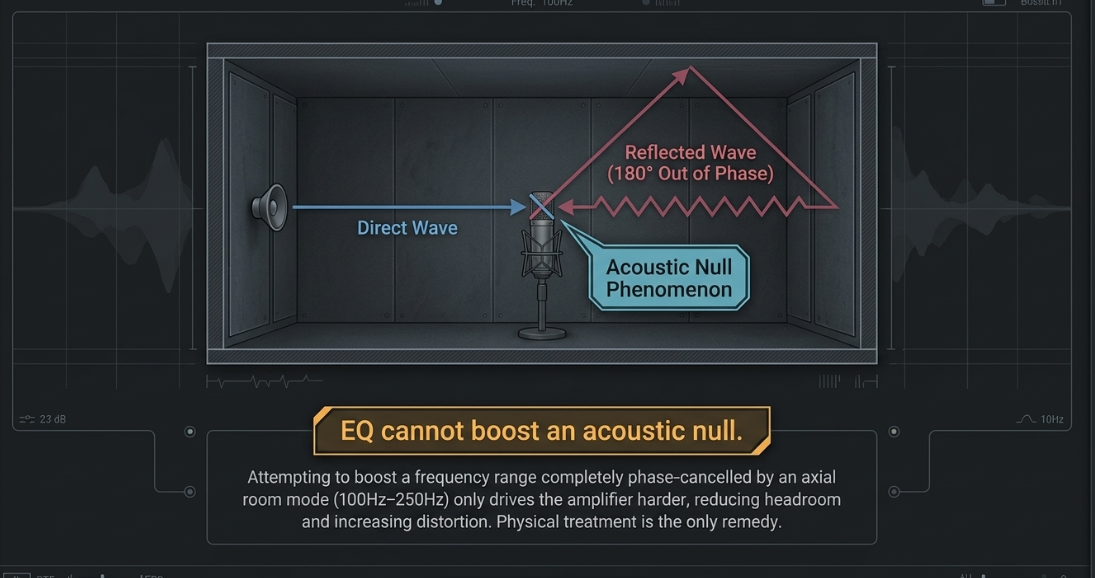
Axial room modes, which occur between two parallel surfaces, are the strongest and most problematic, producing severe frequency peaks and nulls in the low-mid register ()51. Standard small-room geometries frequently suffer from a strong acoustic resonance between and due to low ceiling heights, as well as flutter echoes—high-frequency metallic ringing caused by sound bouncing rapidly between reflective parallel walls50.
To survive these acoustic issues, podcasters frequently turn to high-end broadcast microphones like the Shure SM7B18. The SM7B is highly regarded in untreated spaces not because of its raw sound, which actually sounds quite muffled out of the box, but because of its dynamic, moving-coil capsule design53.
Dynamic microphones have a lower sensitivity and tighter cardioid polar pattern than condenser microphones53. This forces the speaker to talk very close to the capsule (typically away), which naturally boosts the signal-to-noise ratio (SNR) and allows the direct voice to overpower the ambient room reflections53.
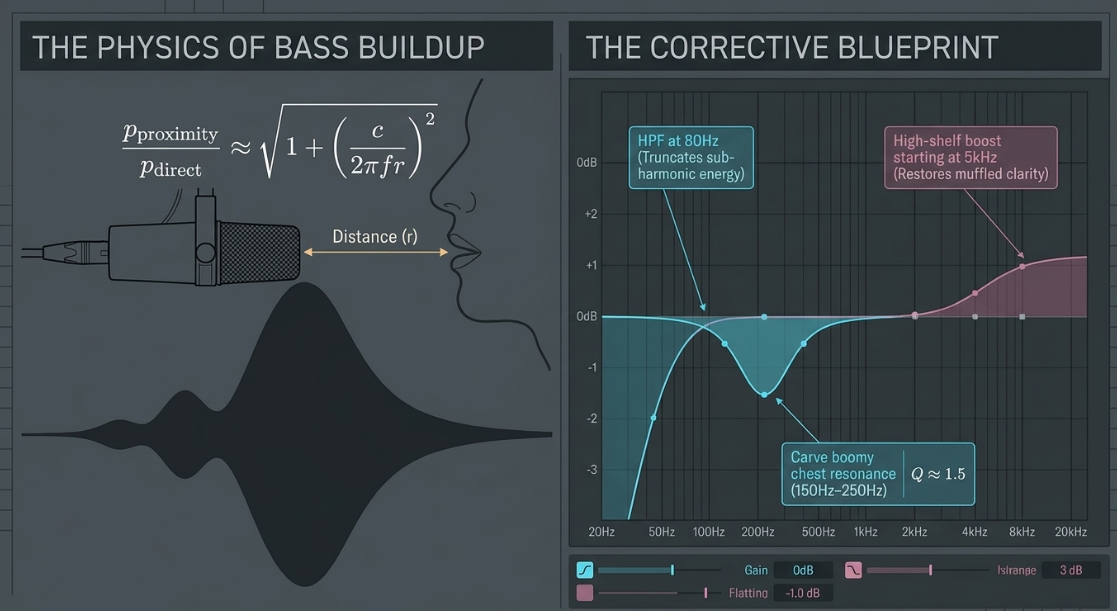
However, close proximity to a cardioid dynamic microphone triggers a severe proximity effect, causing a massive, artificial boost in the bass and low-mid frequencies ()15. This low-frequency boost is mathematically modeled by the pressure gradient microphone equation, demonstrating how proximity-induced bass rise is inversely proportional to both frequency () and the distance from the source ():
In this equation, represents the speed of sound55. When is exceptionally small (such as talking away from an SM7B), the low-frequency pressure gradient term dominates, creating massive, artificial boominess15.
To counteract this physical proximity-effect build-up, the engineer must apply specific corrective equalization15:
High-Pass Filtering: Applying a steep high-pass filter at to truncate the artificial, muddy sub-harmonic energy and clear space for fundamental clarity2.
Low-Mid Carving: Applying a broad bell cut of between and with a medium bandwidth () to strip away the boomy chest resonance and restore natural vocal balance9.
High-End Restoration: Since thick foam windscreens muffle high-frequency details, a gentle high-shelf boost ( at and above) is required during the creative sweetening phase to inject clarity, presence, and intelligibility back into the voice15.
Acoustic Null Phenomenon (Room Modes):
Direct Wave ➔ ➔ ➔ ➔ [Microphone]
Reflected Wave ➔ (180° Out of Phase) ➔ [Microphone] ➔ Comb Filtering (Severe Null)
[Note: EQ cannot boost an acoustic null; physical treatment is required]
It is important to note that while EQ can tame the amplitude peaks of modal resonances, it cannot physically reconstruct frequencies that have been cancelled out by acoustic nulls50. Attempting to boost a frequency range that has been completely phase-cancelled by a room mode will only drive the amplifier harder, reducing headroom and increasing distortion without actually restoring the lost tone50. Physical acoustic treatment remains the only true remedy for modal nulls50.
Multi-Microphone Management: Match EQ, Sidechain Interlock, and Routing Topology
Managing multi-microphone podcast environments requires advanced routing and digital signal processing to resolve cross-talk, room bleed, and microphone discrepancies between speakers48.
1. Match EQ and Speech Realignment
Integrating remote guests who are recording on vastly different microphone models (such as a host on an SM7B versus a guest on a thin-sounding laptop mic) can create severe tonal inconsistencies54. Match EQ algorithms work by capturing a long-term average frequency spectrum from a high-quality reference track and applying a highly complex, multi-band compensation curve to the target track to match its spectral profile44.
Specialized post-production tools like iZotope Dialogue Match analyze and match the EQ profile, the ambient noise floor, and the room reverberation characteristics using deep-learning models, making a remote guest sound as if they are sitting in the same physical room as the host60.
2. Multi-Channel Sidechain Routing in Reaper 7
Implementing Match EQ or sidechained dynamic processing in a DAW like Reaper can introduce routing challenges45. Because Reaper allows an unlimited number of channels per track, inserting a plugin like FabFilter Pro-Q 3 can cause the software to treat sidechain sends on channels 3 and 4 as a four-channel surround signal rather than a separate stereo sidechain detector45.
To force Reaper to route the sidechain correctly:
The engineer opens the instance of Pro-Q 3 on the target track and opens the 'Plug-in pin connector' window45.
Clicking the 'I/O' button, the engineer selects "Request VST3 bus channel count" and sets it strictly to "Stereo"45.
This forces the plugin to restrict its main input to channels 1 and 2, allowing channels 3 and 4 to be treated as a true external sidechain detector45.
Alternatively, if DAW-level routing is restricted, the engineer can leverage FabFilter's internal communication network, allowing different instances of Pro-Q 3 across different tracks to share real-time spectrum data and execute Match EQ or dynamic sidechaining directly within the plugin GUI45.
Reaper 7 Multichannel Routing:
[Host Reference Track] ➔ Route Send ➔ [Channels 3 & 4 of Target Track]
↓
[Target Track Input (Ch 1 & 2)] ➔ [Pro-Q 3 (Forced Stereo Mode)] ➔ Treatments
↑
[Sidechain Detector Listens to Ch 3 & 4]
3. Cross-Gate Sidechaining and Music Bus Ducking
In multi-host environments, bleed from Speaker A into Speaker B's microphone can create comb filtering and phase cancellation48. To eliminate this, the engineer can insert a compressor on Speaker B's channel that is sidechained to Speaker A's track, so that whenever Speaker A is talking, Speaker B's channel is automatically ducked, attenuating the ambient room bleed48.
Furthermore, to integrate intro music or background underscores without masking the spoken word, the engineer should utilize dynamic sidechain ducking60. By routing the dialogue bus as an external sidechain to a dynamic EQ or multiband compressor placed on the music track, the music can be dynamically attenuated strictly in the region (the core range of human speech intelligibility and presence)48.
This ensures that whenever a host speaks, the music dips in the exact frequencies that clash with the voice, maintaining vocal clarity without causing the entire music track to pump or drop in volume48.
Tonal Calibration and Long-Term Spectral Consistency
To prevent ear fatigue and ensure that an entire podcast series maintains a consistent tonal signature across several months of releases, post-production teams must establish an objective reference standard64.
1. Pink Noise Calibration
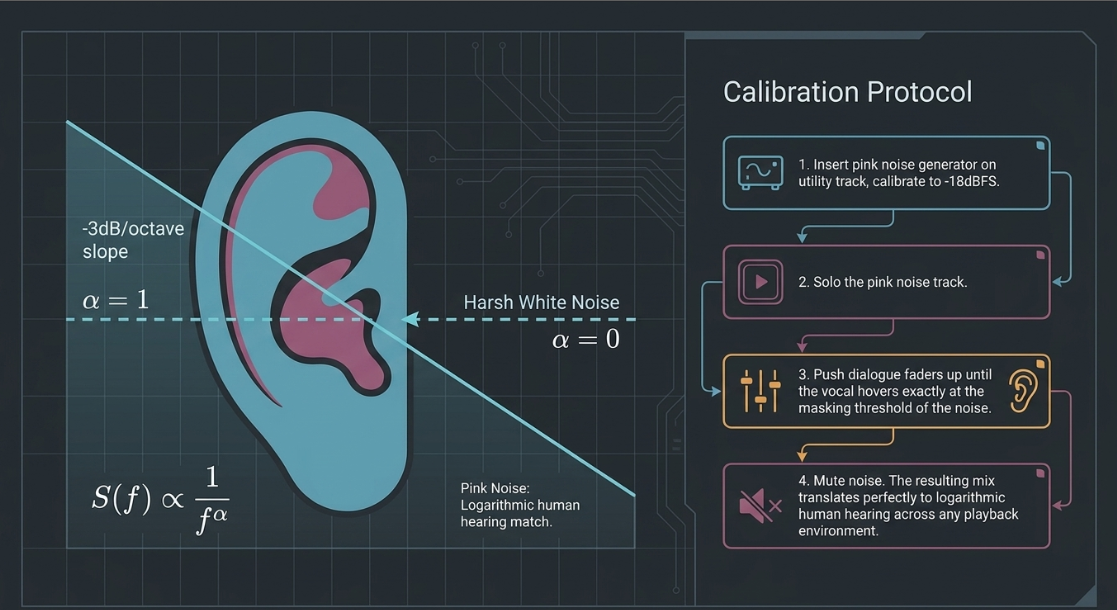
Pink noise represents a perfectly balanced frequency spectrum, containing equal energy per octave67. Because human hearing is logarithmic, pink noise sounds natural and balanced across the entire audible spectrum67.
The power spectral density of pink noise is inversely proportional to frequency:
In this equation, , representing a slope of 67. In contrast, white noise has a flat power spectral density where , making it sound piercingly bright to the human ear22.
Power Spectral Density (PSD):
White Noise (α = 0): Flat across all frequencies
Pink Noise (α = 1): Drops at -3dB per octave
[Note: Pink noise approximates the C-weighting curve of human hearing] [cite: 65, 68, 69]
To establish an objective level balance using pink noise:
The engineer inserts a pink noise generator on a spare utility track in the DAW, calibrating its output level to a standardized volume, such as or 22.
The pink noise track is soloed70.
The engineer brings up the dialogue tracks one by one, raising each fader until the vocal is barely audible, hovering right at the masking threshold of the pink noise68.
Once the noise generator is muted, the resulting static volume balance of the dialogue tracks will be exceptionally accurate, clean, and translated perfectly across different playback environments68.
2. Tonal Balance Target Auditing
While pink noise provides a volume benchmark, engineers use tonal balance meters like iZotope Tonal Balance Control 3 to audit the final spectral envelope72. This software measures the average frequency distribution of the podcast mix and displays a real-time target zone based on the analysis of thousands of commercial broadcast releases72.
By comparing the podcast's current curve against this target, the engineer can make precise, corrective master-bus EQ adjustments, ensuring that the final file possesses the correct distribution of lows, mids, and highs before it is distributed to streaming platforms73.
Works cited
How to mix vocals - Dynaudio, https://dynaudio.com/magazine/2023/august/how-to-mix-vocals
EQ for Podcasting | Podigy, https://www.podigy.co/podcasters-eq
Tips To Help Your Mix Translate - Sound On Sound, https://www.soundonsound.com/techniques/tips-help-your-mix-translate
Do you EQ your vocals? : r/podcasting - Reddit, https://www.reddit.com/r/podcasting/comments/d276h5/do_you_eq_your_vocals/
Corrective vs. Creative Equalization: Differences and When to Use Each - MixAcademia, https://www.mixacademia.com/equalization/corrective-vs-creative-equalization-differences-and-when-to-use-each/
Corrective EQ vs Sweetening EQ – The Difference You Need To Know, https://insidetherecordingstudio.com/2022/09/30/the-difference-between-corrective-eq-and-sweetening-eq-what-you-need-to-know/
Should I EQ Before or After Compression? - Boris FX, https://borisfx.com/blog/eq-before-or-after-compression-best-for-mix/
Corrective EQ vs Creative EQ: The Right Way to Use Both - Adrian Milea, https://adrianmilea.com/corrective-eq-vs-creative-eq/
EQ vs Compression When to Use A Definitive Mixing Guide - SFX Engine, https://sfxengine.com/blog/eq-vs-compression-when-to-use
A Guide to Audio Processing and FX For Podcasting (AU) - RØDE, https://rode.com/en-au/about/news-info/a-guide-to-audio-processing-and-fx-for-podcasting
Vocal EQ cheat sheet: how to mix & EQ Vocals (2024) - 343 Labs, https://www.343labs.com/vocal-eq-cheat-sheet/
6 Vocal EQ Areas You Need To Know About - Audio Issues, https://www.audio-issues.com/music-mixing/need-to-know-frequency-areas-of-the-vocal/
Vocal Chain Order: What Plugin Goes First? (2026), https://vocalpresets.com/blog/vocal-chain-order
How to EQ Harsh Vocals to Smooth Them Out - Music Guy Mixing, https://www.musicguymixing.com/eq-harsh-vocals/
How do I sound less "podcast-y" with my Shure SM7B : r/audioengineering - Reddit, https://www.reddit.com/r/audioengineering/comments/zm1x7r/how_do_i_sound_less_podcasty_with_my_shure_sm7b/
Jason Sheesley – PES 188 - Podcast Engineering School, https://podcastengineeringschool.com/jason-sheesley-pes-188/
Vocal Chain, Simplified - Musiciangoods, https://musiciangoods.com/en-us/blogs/mixing-mastering/vocal-chain
Pro Audio: Plugins and Processing Tips for Mixing Podcasts - MacSales.com, https://eshop.macsales.com/blog/66337-plugins-processing-tips-for-mixing-podcasts/
Podcast Audio Plugins – The Big List, https://podcastengineeringschool.com/podcast-audio-plugins/
Noise Floor and Dialogue Help : r/sounddesign - Reddit, https://www.reddit.com/r/sounddesign/comments/1snclb7/noise_floor_and_dialogue_help/
The Perfect Vocal Chain Order - Music Guy Mixing, https://www.musicguymixing.com/vocal-chain/
Mixing with Pink Noise: Get the PERFECT Volume Balance - Mastering.com, https://mastering.com/pink-noise/
Proper order of plug-ins on a vocal chain/vocal track? : r/audioengineering - Reddit, https://www.reddit.com/r/audioengineering/comments/v5es8u/proper_order_of_plugins_on_a_vocal_chainvocal/
Best Vocal Frequencies To EQ - Mix & Master My Song, https://mixandmastermysong.com/best-vocal-frequencies-to-eq/
14 Best EQ Plugins for Mixing (+ Mix Tips) - Pro Audio Files, https://theproaudiofiles.com/eq-plugins/
Laboring to understand dynamic eq's. - SOS FORUM, https://www.soundonsound.com/forum/viewtopic.php?t=86309
Why and When to Use Dynamic EQ in a Mix? - Boris FX, https://borisfx.com/blog/why-and-when-to-use-dynamic-eq-in-a-mix/
Linear Phase EQ vs Normal EQ: Which to Use? - Boris FX, https://borisfx.com/blog/linear-phase-eq-vs-normal-eq-compared/
What do you think are the real advantages of using a multiband compressor compared to a good dynamic EQ? : r/audioengineering - Reddit, https://www.reddit.com/r/audioengineering/comments/1fmus4o/what_do_you_think_are_the_real_advantages_of/
Dynamic eq vs mb compression : r/audioengineering - Reddit, https://www.reddit.com/r/audioengineering/comments/1uj4xjj/dynamic_eq_vs_mb_compression/
Best EQ Plugins for Mixing in 2026 - Complete Guide - Output, https://output.com/blog/best-eq-plugins
Dynamic EQ vs. Dynamic Compression : r/audioengineering - Reddit, https://www.reddit.com/r/audioengineering/comments/1fp0zza/dynamic_eq_vs_dynamic_compression/
Linear Phase EQ: Beginners Guide - Produce Like A Pro, https://producelikeapro.com/blog/linear-phase-eq/
Understanding Linear Phase Filters: A Complete Guide, https://purchase.andlight.dk/andlight-news/understanding-linear-phase-filters-a-complete-guide-1767647510
"Myths About Measurements" Discussion Thread - Page 9 - Audio Science, https://forum.headphones.com/t/myths-about-measurements-discussion-thread/24879?page=9
What is an EQ feature that you want badly but developer don't care? : r/audioengineering, https://www.reddit.com/r/audioengineering/comments/1tlmedo/what_is_an_eq_feature_that_you_want_badly_but/
HoRNet TotalEQ MK2 – Visual Equalizer Plugin, https://www.hornetplugins.com/plugins/hornet-totaleq-mk2/
You're Wrong About Soothe2, Gullfoss, and Bloom : r/audioengineering - Reddit, https://www.reddit.com/r/audioengineering/comments/1esd5xw/youre_wrong_about_soothe2_gullfoss_and_bloom/
Gullfoss Master edition unveiled - Sound On Sound, https://www.soundonsound.com/news/gullfoss-master-edition-unveiled
How useful is Soothe2, and is it a plugin that many people are using? : r/edmproduction, https://www.reddit.com/r/edmproduction/comments/18qij0p/how_useful_is_soothe2_and_is_it_a_plugin_that/
Best EQ plugins: Mix, create, repair, and master with these 13 amazing equalizers, https://www.musicradar.com/news/best-eq-plugins
Top 10 Equalizer Plugins: Mixing & Mastering - Sage Audio, https://www.sageaudio.com/articles/top-10-equalizer-plugins-mixing-mastering
Best EQ Plugins for Mixing & Mastering, https://www.masteryourtrack.com/post/fav-eq-plugins-for-mixing
Top 8 Best Mix And Mastering Software | 2026 Verified Picks - ZipDo, https://zipdo.co/best/mix-and-mastering-software/
Q. How do I use the match EQ facility in FabFilter Pro-Q when working in Reaper?, https://www.soundonsound.com/sound-advice/q-how-do-use-match-eq-facility-fabfilter-pro-q-in-reaper
How much magic to put on a podcast? : r/audioengineering - Reddit, https://www.reddit.com/r/audioengineering/comments/10rw2ym/how_much_magic_to_put_on_a_podcast/
134: Is AI Mixing and Mastering Any Good? An In-Depth Chat with Bobby Owsinski - Apple Podcasts, https://podcasts.apple.com/gb/podcast/134-is-ai-mixing-and-mastering-any-good-an-in-depth/id1551795483?i=1000649668943
Anyone have a good work flow for mixing podcasts they'd like to share? - Reddit, https://www.reddit.com/r/audioengineering/comments/bsaxqu/anyone_have_a_good_work_flow_for_mixing_podcasts/
Podcast Studio Design Guide | Professional Studio Planning - Sound Zero, https://sound-zero.com/podcast-studio-design-guide/
Home Studio Acoustics – A Guide to Better Mixes and Better Recordings, https://musiccityacoustics.com/blogs/mca-blog/home-studio-acoustics-a-guide-to-better-mixes-and-better-recordings
The Studio Design Trick You Can't Ignore: Focus on Width, Not Height, https://www.soundproofyourstudio.com/blog/why-the-length-to-width-ratio-matters-more-than-the-height-in-home-studio-design
Acoustics are for Everybody | Going to 11, https://www.goingto11.com/the-small-room-scenario/
What Mic Does Joe Rogan Use? (And Why We Use Rode Procasters at The Podcast Studio Glasgow), https://www.podcaststudioglasgow.com/podcast-studio-glasgow-blog/what-microphone-does-joe-rogan-use-and-why-dynamic-mics-matter-more-than-brand-names
Am I missing something major with the Shure SM7B? It sounds exactly the same as my other (much cheaper) mic. : r/podcasting - Reddit, https://www.reddit.com/r/podcasting/comments/153n9fe/am_i_missing_something_major_with_the_shure_sm7b/
Is the SM7B (and even dynamics in general) really any better for background noise than other mics? - Reddit, https://www.reddit.com/r/audioengineering/comments/164xcf8/is_the_sm7b_and_even_dynamics_in_general_really/
Microphone budget king for voice acting/podcasting? - Audio Science Review (ASR) Forum, https://www.audiosciencereview.com/forum/index.php?threads/microphone-budget-king-for-voice-acting-podcasting.61646/page-2
REVIEW WHAT'S THE BEST PODCAST MICROPHONE: Shure SM7B, MV7X, EV RE20, Warm Audio WA-44 - High on Technology, http://www.highontechnology.tech/2025/05/review-whats-best-podcast-microphone.html
Room Correction: A Primer - Acoustic Frontiers LLC, https://acousticfrontiers.com/blogs/articles/room-correction-a-primer
EQ Matching Plugin – Match reference EQ settings Automatically - Accentize, https://www.accentize.com/eq-match-plugin/
How to Fix 8 Common Podcast Audio Issues - iZotope, https://www.izotope.com/community/blog/how-to-fix-8-common-podcast-audio-issues
Logic Match EQ - What To Know & Where To Buy | Equipboard, https://equipboard.com/items/logic-match-eq
Mixing Essentials - Sound On Sound, https://www.soundonsound.com/techniques/mixing-essentials
Creative tips to make the dialogue cut through the mix : r/AudioPost - Reddit, https://www.reddit.com/r/AudioPost/comments/1lqjuvk/creative_tips_to_make_the_dialogue_cut_through/
How to Use Reference Tracks the Right Way - A Complete Guide - MixMaster Pro, https://mixmasterpro.io/articles/referencetracks
Keep Your Mixes Consistent by Using a Reference - Passive Promotion, https://passivepromotion.com/keep-your-mixes-consistent-by-using-a-reference/
How to Use Vocal Mixing AI for Free: A Step-by-Step Producer Guide - MixMaster Pro, https://mixmasterpro.io/articles/how-to-use-vocal-mixing-ai-for-free-a-step-by-step-producer-guide
Mixing To A Pink Noise Reference - Sound On Sound, https://www.soundonsound.com/techniques/mixing-pink-noise-reference
Pink Noise - The secret technique for volume mixing - Top Music Arts, https://topmusicarts.com/blogs/news/pink-noise-the-secret-technique-for-volume-mixing
Using EQ Matching and References to Create Great-Sounding Tracks - Lars Lentz Audio, https://larslentzaudio.wordpress.com/2022/02/14/using-eq-matching-to-create-great-sounding-tracks/
Audio EQ balance with pink noise? - Creative COW, https://creativecow.net/forums/thread/audio-eq-balance-with-pink-noiseae/
Pink Noise Mixing Technique. A New Approach? : r/TechnoProduction - Reddit, https://www.reddit.com/r/TechnoProduction/comments/193yql4/pink_noise_mixing_technique_a_new_approach/
iZotope Tonal Balance Control 3 lets you use any song as a reference – including from Spotify and YouTube - Mixdown Magazine, https://mixdownmag.com.au/news/izotope-tonal-balance-control-3-lets-you-use-any-song-as-a-reference-including-from-spotify-and-youtube/
How to Get the Most Value from Your Reference Tracks - Avid, https://www.avid.com/resource-center/how-to-get-the-most-value-from-your-reference-tracks
How To Use Reference Tracks When Mastering, https://www.masteringthemix.com/blogs/learn/how-to-use-reference-tracks-when-mastering














