
The optimization of professional podcast production requires a comprehensive understanding of digital audio theory, psychoacoustic coding efficiency, and the strict distribution standards enforced by global streaming directories1. Historically considered a casual hobbyist medium, podcasting has evolved into a highly standardized broadcast ecosystem2. Delivering an optimal listening experience across environments—ranging from quiet living spaces to noisy commuter transit—demands rigorous compliance with professional audio specifications1. This report analyzes the mathematical foundations of digital audio capture, the engineering differences between major compression codecs, the mechanics of signal truncation and dithering, and the perceptual loudness standards defined by the International Telecommunication Union (ITU) and the Audio Engineering Society (AES)3.
Digital Audio Theory: Sample Rates and Mathematical Precision
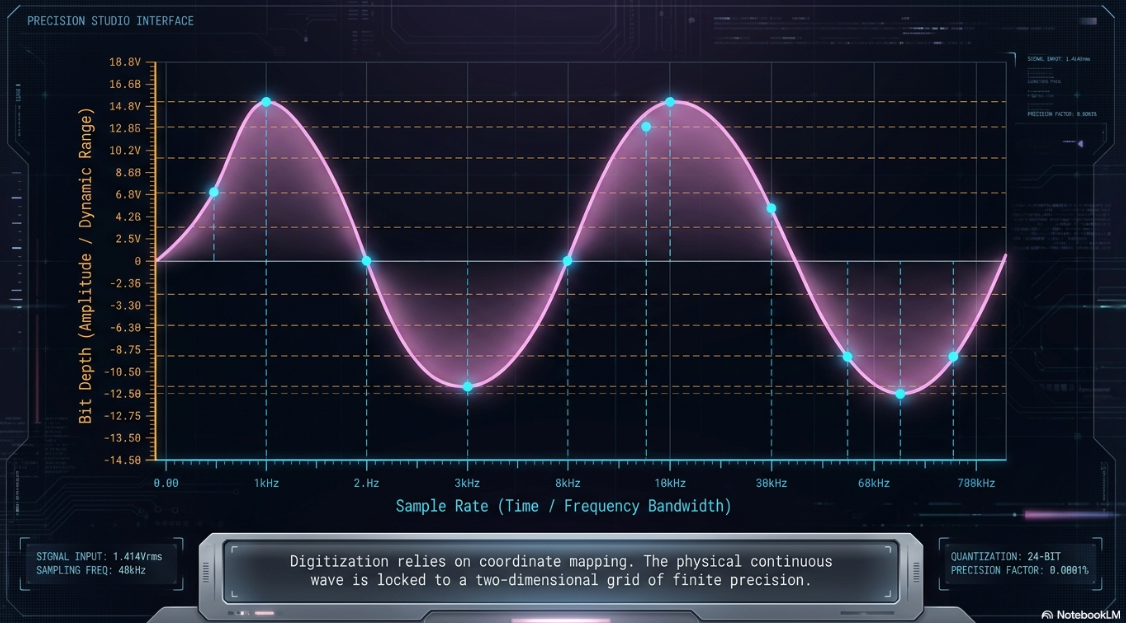
The digitization of continuous analog sound waves relies on the coordinate mapping of physical waveforms onto a two-dimensional grid: the horizontal axis of time, governed by the sample rate, and the vertical axis of amplitude, governed by the bit depth10.
The Sampling Axis and the Nyquist-Shannon Theorem
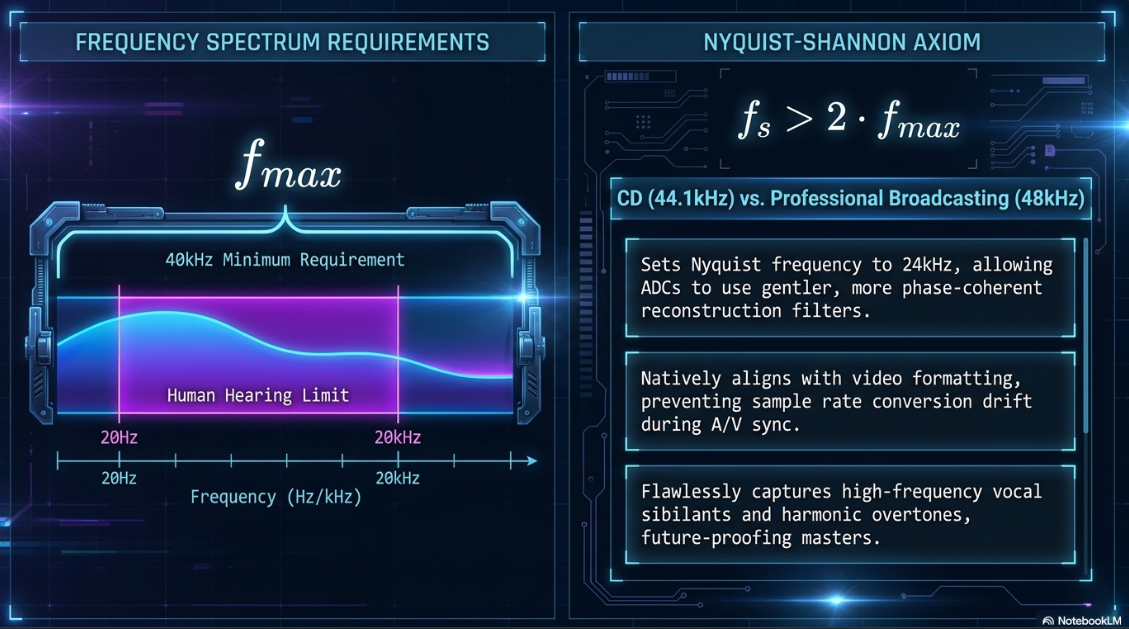
The sample rate defines the frequency bandwidth that can be digitally captured and reconstructed13. This boundary is established by the Nyquist-Shannon sampling theorem, which dictates that to accurately reconstruct a signal without aliasing, the sampling frequency () must be greater than twice the highest frequency component () present within the incoming analog signal13:
Given that the nominal range of human hearing is bounded between and 13, a minimum sample rate of is mathematically required to preserve the entire audible spectrum14. The CD standard of satisfies this condition, providing a small safety margin to accommodate anti-aliasing filters11.
However, in professional video production, broadcasting, and modern podcasting, the industry standard is standardized at 11. Recording at sets the Nyquist frequency to , allowing analog-to-digital converters (ADCs) to employ gentler, more phase-coherent reconstruction filters13. Furthermore, because video formats natively execute audio at , recording at this rate prevents sample rate conversion errors during the synchronization of audio with video elements13. While the fundamental frequencies of the human voice sit primarily between and 13, a sample rate captures the high-frequency vocal sibilants and harmonic overtones cleanly, future-proofing the master recording13.
Amplitude Resolution, Headroom, and 32-Bit Float Architecture
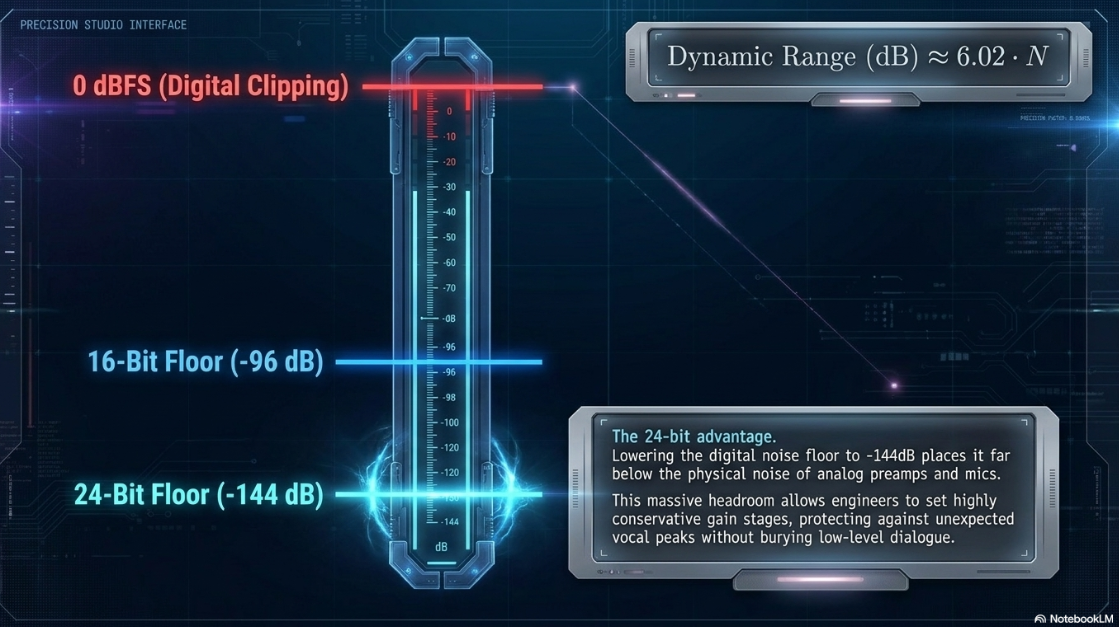
Bit depth determines the vertical precision of the digital grid, establishing the dynamic range and the digital quantization noise floor of the system10. The relationship between bit depth () and the theoretical dynamic range is calculated as:
A standard 16-bit configuration yields of dynamic range11. This resolution is sufficient for consumer playback but highly restrictive during recording11. In contrast, a 24-bit recording increases the dynamic range to 11. This wide range lowers the digital noise floor to approximately —far below the physical noise floor of analog preamplifiers, microphone capsules, and recording environments11. This massive headroom allows engineers to set conservative gain stages, protecting the system from clipping during unexpected vocal peaks while keeping low-level dialogue well above the noise floor13.
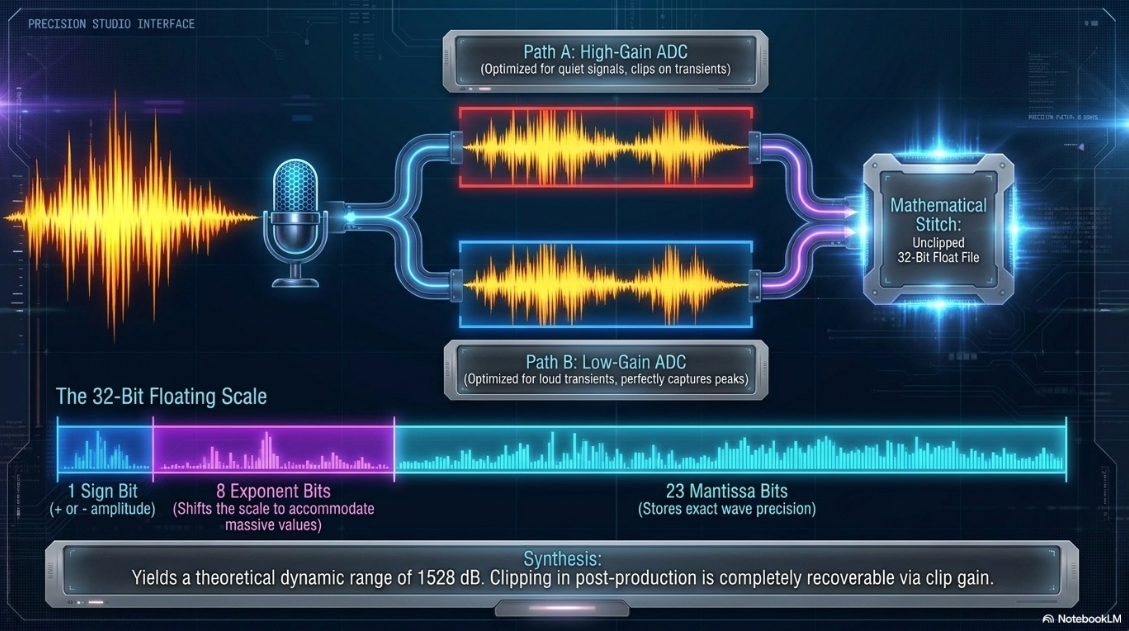
For unpredictable recording environments—such as live event panels, multi-host field interviews, or dynamic roundtables—32-bit floating-point technology offers exceptional utility13. Unlike standard fixed-point (integer) audio formats that map samples onto a uniform, rigid scale, 32-bit floating-point utilizes a dynamic, moving binary scale19. A 32-bit floating-point audio sample allocates its 32 bits into three specific components19:
1 Sign Bit: Indicates whether the amplitude of the sample is positive () or negative ()19.
8 Exponent Bits: Represent the overall scale of the floating-point number, dynamically shifting the binary point to accommodate tiny fractions and massive values19.
23 Mantissa Bits: Store the actual precision of the waveform's shape within its current scale19.
This architectural structure allows 32-bit float audio to achieve a theoretical dynamic range of approximately , spanning from to 18. Real-world 32-bit float recorders implement this using a dual-ADC design19. The incoming analog signal is sent simultaneously to two separate converters19. A high-gain converter is optimized to cleanly capture quiet signals, while a parallel low-gain converter handles loud transients19. The hardware combines these two streams into a single 32-bit float file19.
The primary advantage is the elimination of digital clipping at the converter stage19. If a recorded signal peaks above , the mathematical representation remains intact19. The editor can simply reduce the clip gain in post-production to recover the unclipped waveform19.
However, this technology is not a universal solution for poor engineering19. If the physical microphone capsule is mechanically overloaded by extreme sound pressure levels, or if the analog preamplifier is overdriven before reaching the ADC, the resulting analog distortion is permanently printed into the file19. Additionally, rapid transitions between ADCs can occasionally introduce transient artifacts or noise tails19.
Audio Codecs and Container File Formats: AAC vs. MP3
For distribution, uncompressed master formats are too large for streaming and must be encoded using lossy audio codecs7. Modern compression relies on psychoacoustic modeling to discard raw digital data that the human auditory system cannot perceive15.
Psychoacoustic Masking and Coding Efficiency
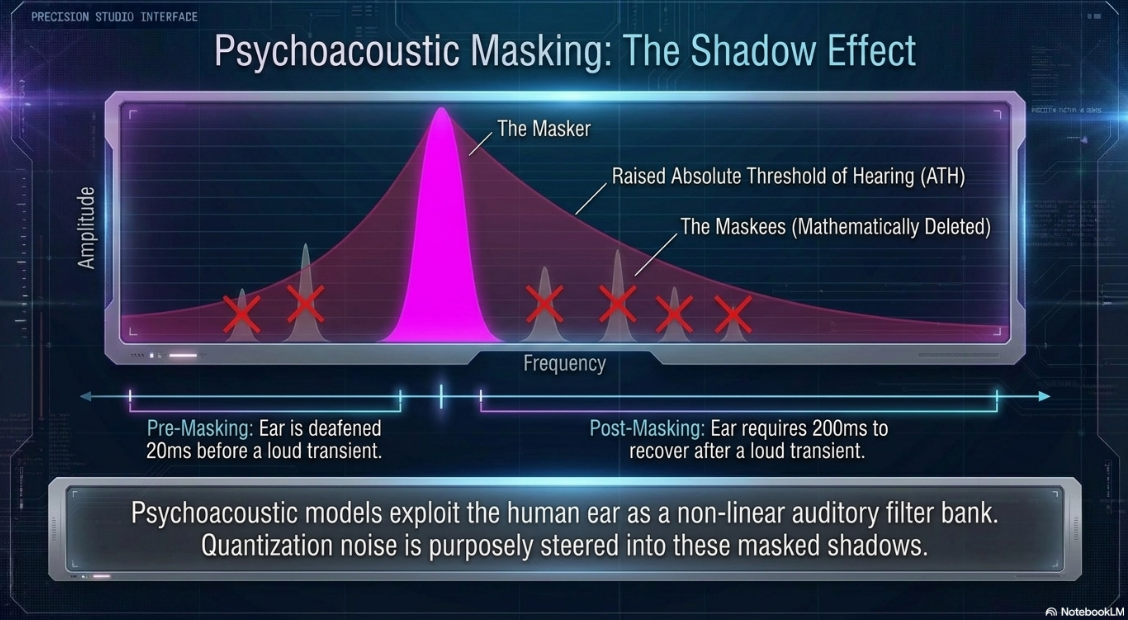
Psychoacoustic models exploit the inherent limitations of the human ear, which behaves as a nonlinear auditory filter bank15. This process uses two primary psychoacoustic masking mechanisms15:
Simultaneous (Spectral) Masking: Occurs when a high-amplitude sound (the masker) overlaps in time with a quieter sound (the maskee) at a nearby frequency15. The masker raises the Absolute Threshold of Hearing (ATH) across a critical band25. Frequencies within this raised threshold are discarded, and quantization noise is steered into these masked areas25. Low frequencies mask high frequencies more effectively than the reverse27.
Temporal Masking: Explains auditory masking across time15. Pre-masking (backward masking) occurs when a quiet signal precedes a transient blast by 15. Post-masking (forward masking) occurs when a quiet signal follows a loud transient, persisting for up to or more as the auditory system recovers25.
While MPEG-1 Layer III (MP3) remains common due to historical compatibility, Advanced Audio Coding (AAC) is the superior standard for modern digital distribution7.
The table below contrasts the technical specifications and structural features of these two codecs7.
AAC achieves higher coding efficiency than MP3 due to several factors:
Optimal Block Lengths: AAC uses block lengths of or samples for stationary signals, which yields better frequency resolution than MP3’s -sample blocks36. For sharp transients, AAC switches to smaller or -sample blocks, preventing pre-echo artifacts and localizing transient noise far better than MP3’s -sample limit36.
Superior High-Frequency Encoding: MP3 struggles with frequencies above 36. In contrast, AAC encodes these high frequencies cleanly, making it ideal for shows with complex sound design, music beds, or high-fidelity vocal recordings36.
High Efficiency Profiles (HE-AAC): HE-AAC v1 combines standard AAC with Spectral Band Replication (SBR)23. The lower and mid-range frequencies are encoded normally, while high frequencies are discarded and replaced with a metadata stream23. During decoding, the player uses this metadata to reconstruct the high-frequency spectrum23. HE-AAC v2 adds Parametric Stereo, allowing clean, full-spectrum stereo imaging at bitrates as low as 23.
Dynamic Ad Insertion (DAI) and Distribution Constraints
Despite the technical advantages of AAC, the podcast industry continues to rely heavily on MP336. This persistence is driven by dynamic ad insertion (DAI) pipelines34. Modern ad-stitching servers expect MP3 files with Constant Bitrate (CBR) encoding17 to stitch advertisements into episodes in real-time34. Uploading Variable Bitrate (VBR) files or AAC formats can disrupt these automated stitching engines or break ID3 metadata mapping36, forcing engineers to choose between technical audio quality (AAC) and monetization infrastructure (MP3)17.
To balance audio quality against bandwidth and file size constraints, specific target bitrates should be selected based on content structure7:
Voice-Only or Dialogue Content: Mastered in mono at to CBR17. Converting a stereo voice file to mono cuts the data rate and file size in half without sacrificing speech intelligibility17.
Complex Sound Design or Music Beds: Mastered in stereo at to CBR17. This provides a wide, phase-coherent stereo field and preserves high-frequency transients17.
High-Fidelity Master Deliverables: Mastered in stereo at to CBR29. This matches standard uncompressed masters for high-end playback setups29.
Word Length Reduction and Dithering Architecture
Dithering is a critical process when exporting digital audio to a lower bit depth, such as converting 32-bit float project sessions down to 24-bit or 16-bit integer formats41.
The Mechanics of Truncation and Quantization Noise
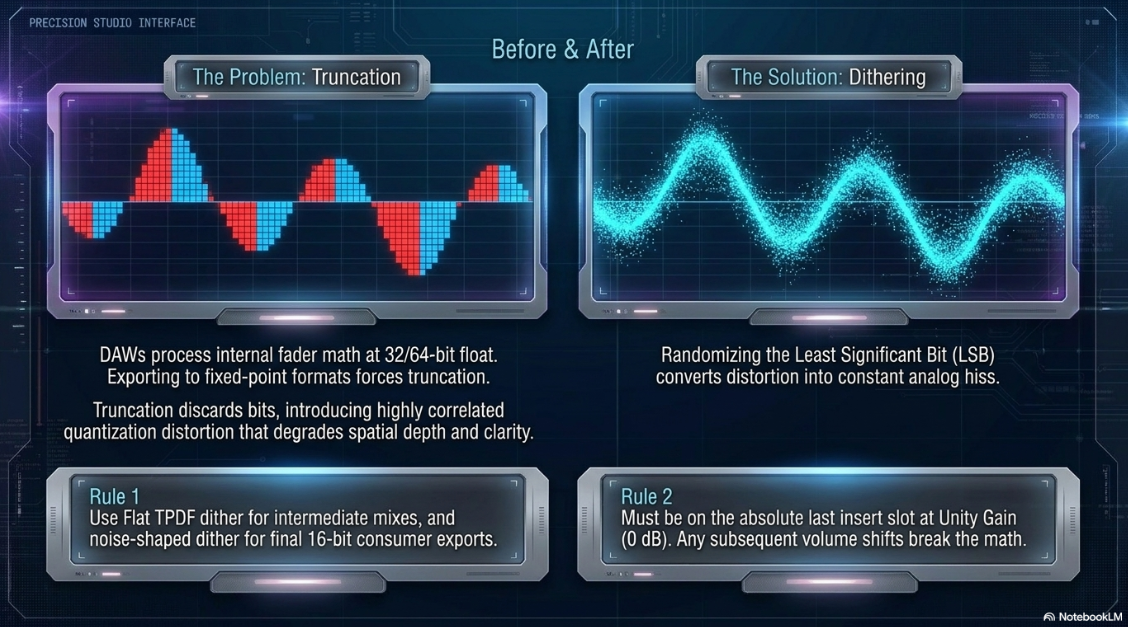
When reducing word length, the extra bits of data must be discarded41. If a DAW simply truncates these bits, it introduces quantization distortion41. This distortion correlates directly with the source waveform, converting quiet passages into harsh, square-like waves11.
Quantization distortion degrades spatial depth, blurs the stereo field, introduces phase shifts, and reduces perceived clarity41. To prevent this, the engineer must add a low-level randomized noise signal—dither—before truncation41. This noise randomizes the least significant bit (LSB), converting correlated distortion into a constant, analog-like hiss41.
The Practical Application of Dither in Post-Production
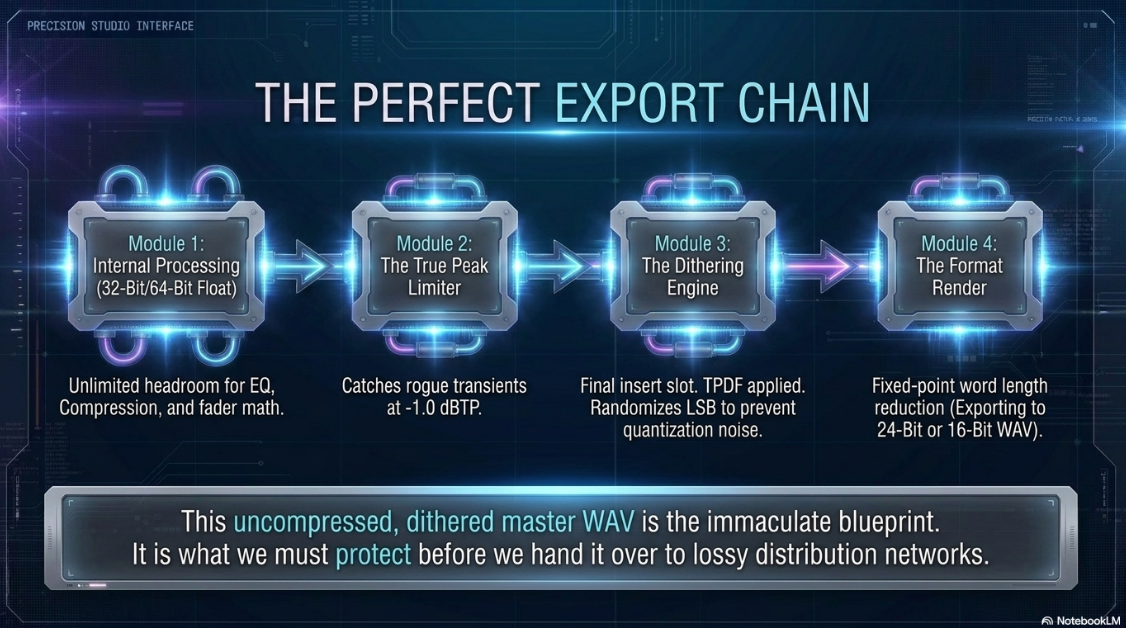
Modern DAWs process audio internally using 32-bit or 64-bit floating-point math41. Any processing—including fader movements, panning, or VST plug-ins—shifts the audio into a floating-point resolution41. Exporting this project to a fixed-point 24-bit integer file constitutes a word length reduction, making dither necessary41.
When exporting intermediate mixes for mastering, engineers should apply a standard Triangular Probability Density Function (TPDF) flat dither41. TPDF dither adds flat noise without spectral shaping, preserving the master file for downstream processing41. High-end, noise-shaped dither—which EQ-filters the dither noise into high-frequency regions where human hearing is less sensitive41—should be applied only once, during the final export to 16-bit consumer formats41.
The dithering plugin must be inserted on the absolute last slot of the master fader signal chain41. Additionally, the master fader must remain at unity gain ()43. Any gain changes applied after the dither stage will alter the dither values, reintroducing quantization distortion41.
Loudness Standards, Normalization Algorithms, and Psychoacoustics
To prevent sudden volume changes between different tracks and episodes, streaming and distribution networks use loudness normalization1.
The ITU-R BS.1770 Gated Loudness Measurement Pipeline
Loudness Units relative to Full Scale (LUFS), also referred to as Loudness K-weighted relative to Full Scale (LKFS), is the international standard for measuring perceived loudness1. These units are mathematically synonymous and conform to the ITU-R BS.1770 and EBU R128 standards6.
Unlike peak or Root Mean Square (RMS) metering, LUFS accounts for the nonlinear frequency sensitivity of human hearing over time1. The ITU-R BS.1770 integrated loudness algorithm executes the following sequence9:
K-Weighting Filtration: Applies a two-stage filter to the incoming signal8. First, a high-pass filter at removes low-end rumble48. Second, a high-shelf filter starting at emphasizes the mid-to-high frequency range where human hearing is most sensitive46.
Block Power Measurement: Divides the signal into -second blocks with a overlap, calculating the mean-square power for each segment47.
Dual-Gating System: Applies two gates to ensure the measurement represents the active content45. The absolute gate discards any block quieter than (excluding digital silence)47. The relative gate then discards blocks that fall below the average loudness calculated up to that point47. This prevents introductory pauses or background ambient sections from skewing the final measurement47.
Channel Summation: Integrates the remaining blocks to output a single, average value representing the perceived loudness of the entire file4.
Loudness Range (LRA) measures the dynamic variations of the program over time8. To calculate LRA, the algorithm uses longer, -second blocks with a overlap ( seconds)47. It applies an absolute gate at and a strict relative gate at to filter out background pauses47. The resulting distribution of short-term measurements is sorted, and the difference between the 10th and 95th percentiles is returned in Loudness Units (LU)47. A narrow LRA (e.g., ) indicates a heavily compressed vocal mix8.
The Mono-vs.-Stereo Playback Build-Up Anomaly
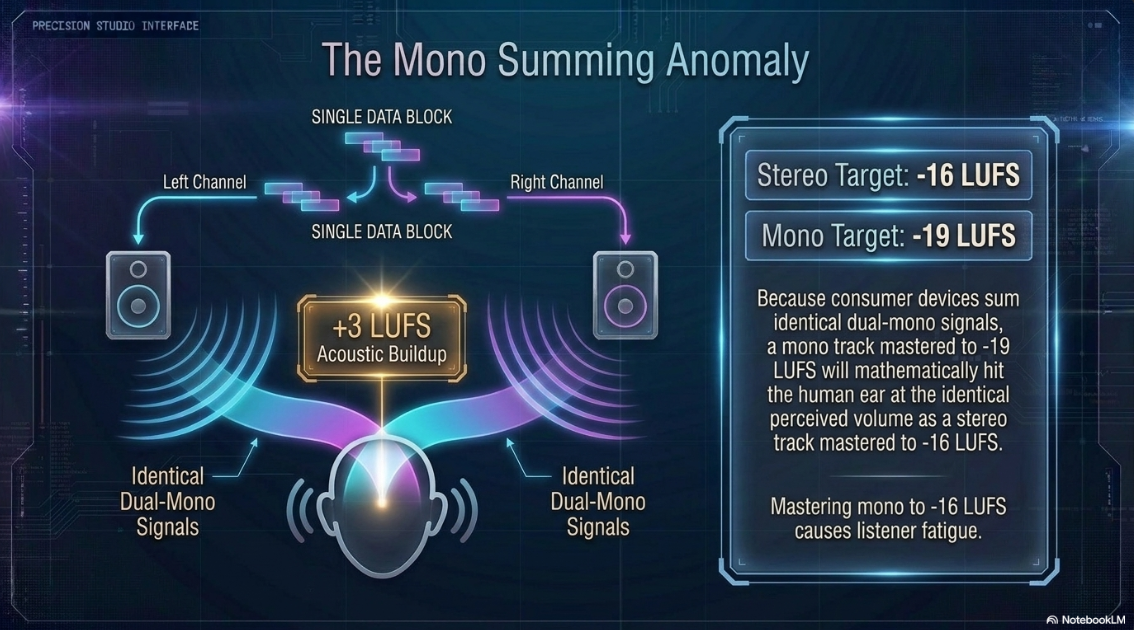
A common technical error in podcast mastering is failing to adjust targets between mono and stereo files6. The industry standard target for stereo podcast mixes is 6. However, the correct target for mono podcast mixes is 5.
This difference stems from the "dual-mono" summing process of consumer playback devices52. When a mono file is played, the hardware routes the identical signal to both the left and right playback channels52. When these identical signals are reproduced by stereo speakers or headphones, they sum acoustically, creating a buildup in perceived volume52. To compensate for this dual-channel duplication, a mono track must be mastered at 5. When summed on playback, it will match the perceived loudness of a stereo file mastered to 5. If a mono file is mastered to and played back on a stereo system, it will sound twice as loud as a standard stereo file, leading to listener fatigue1.
Additionally, when converting stereo assets to mono, engineers must monitor phase correlation54. Applying "stereo widening" effects can cause out-of-phase elements to cancel out when summed to mono, making instruments or background music disappear entirely54.
AES TD1008 Recommendations
The Audio Engineering Society (AES) published the TD1008 guidelines to establish consistent loudness standards across streaming services3. These recommendations focus on several key areas:
Perceived Loudness Balances: Human listeners perceive speech as louder than music when both are matched to the same integrated loudness56. To compensate, TD1008 recommends speech-predominant content be targeted at and popular music at 3.
Album vs. Track Normalization: Track normalization adjusts every song to the same level, which can disrupt the artistic flow of an album56. Instead, TD1008 prefers album-wide normalization56. This approach measures the loudest track on an album, scales it to a target of , and applies the same gain offset to the remaining tracks to preserve their relative levels56.
Mixed-Format Programs and Interstitials: For programs that mix speech and music (such as sports broadcasts or variety shows), the target should sit between and 57. Interstitials, advertisements, and virtual assistant voice prompts are anchored at to prevent sudden volume spikes3.
Platform Requirements, Workflows, and Metadata Architecture
To ensure consistent distribution, the podcast's RSS feed, metadata, and audio files must comply with the requirements of major platforms7.
RSS Feed and Metadata Standards
Podcast distribution relies on the Really Simple Syndication (RSS) 2.0 specification33.
The table below outlines the core tag structure and technical delivery rules required for validation32.
Comparative Platform Target Reference
The table below catalogs the specific loudness targets, peak limits, and behaviors of major streaming platforms1.
DAW Loudness Normalization Workflows
To achieve these targets, the final master file should be processed through the loudness normalization tools of a DAW2.
The table below outlines the step-by-step workflows for popular software suites6.
Conclusions
Professional podcast mastering is a disciplined engineering process that balances technical standards with real-world distribution limits1. Capturing source audio at preserves clean vocal detail, provides essential safety headroom, and aligns natively with modern video formats13. During post-production, applying standard flat TPDF dither before word length reduction prevents quantization distortion from degrading the spatial clarity of the mix41.
To ensure consistent volume across platforms without triggering streaming limiters, engineers should master stereo files to an integrated target of with a ceiling1. For mono files, the target must be adjusted to to compensate for the acoustic summing buildup that occurs on stereo consumer systems5. While AAC is the superior codec for modern web streaming7, maintaining a Constant Bitrate (CBR) MP3 format remains necessary for episodes distributed through dynamic ad-stitching pipelines17. Following these technical specifications ensures the original artistic intent translates clearly to any playback device1.
Works cited
Podcast Loudness Standards 2026: Spotify, Apple, YouTube Requirements, https://sone.app/blog/podcast-loudness-standards-2026-spotify-apple-youtube
Why Setting the Correct LUFs for Your Podcast is Crucial: A Guide for Podcasters, https://www.podcaststudioglasgow.com/podcast-studio-glasgow-blog/why-setting-the-correct-lufs-for-your-podcast-is-crucial-a-guide-for-podcasters
Streaming Audio Loudness Guidelines Explained - Radio World, https://www.radioworld.com/tech-and-gear/tech-tips/streaming-audio-loudness-guidelines-explained
Podcasting Levels: Tips and Standards for Publishing | B&H eXplora, https://www.bhphotovideo.com/explora/pro-audio/tips-and-solutions/podcasting-levels-tips-and-standards-for-publishing
How to Normalize Audio for Podcasts & YouTube | Loudness Guide | AI JingleMaker, https://www.aijinglemaker.com/blog/how-to-normalize-audio-for-podcasts-and-youtube-loudness-standards-explained-
HOW LOUD SHOULD YOUR PODCAST BE? LUFS AND DB EXPLAINED, https://content.sport-social.co.uk/blog/how-loud-should-your-podcast-be
Audio requirements - Apple Podcasts for Creators, https://podcasters.apple.com/support/893-audio-requirements
LUFS Meter — Broadcast Loudness Measurement - Studio Six Digital, https://studiosixdigital.com/lufs-meter/
Loudness Basics - AES - Audio Engineering Society, https://aes.org/resources/audio-topics/loudness-project/loudness-basics/
Bit Depth vs. Sample Rate: The Pro Audio Quality Master Guide - BOYA, https://www.boyamic.com/blogs/microphone-bit-depth-explained
Which Bit Depth and Sample rate should you select? | "For New Users" Series, https://protoolsanswers.com/samplerateandbitdepth/
Sample Rate and Bit Depth Explained - MicroPicked, https://micropicked.com/guides/sample-rate-bit-depth-explained/
Digital audio basics: audio sample rate and bit depth - iZotope, https://www.izotope.com/community/blog/digital-audio-basics-sample-rate-and-bit-depth
Psychoacoustics - Wikipedia, https://en.wikipedia.org/wiki/Psychoacoustics
Why Your Podcast Sounds Amateur (5 Audio Specs Explained), https://www.podcaststudioglasgow.com/podcast-studio-glasgow-blog/the-5-audio-specs-that-separate-professional-from-amateur-podcasts
Audio file guidelines for podcast uploads | beehiiv Help, https://www.beehiiv.com/support/article/41323776364823-audio-file-guidelines-for-podcast-uploads?utm_source=evaboot.com/blog/how-to-find-decision-makers-in-a-company
What is 32-bit Float Recording? | TASCAM - International, https://tascam.jp/int/feature/32-bit_float
Demystifying 32-Bit Float Audio: How It Works, and When It Doesn't | BOOM Library, https://www.boomlibrary.com/blog/demystifying-32-bit-float-audio/
Do Most Podcasters Actually Need 32-Bit Float? - One Minute Podcast Tips - Be a Better Podcaster in Just 60 Seconds, https://easypodcasttips.com/episode/32-bit-float
VO Studio Tech: What do We Get With 32 Bit? - JustAskJimVO -, https://justaskjimvo.studio/32-bit-recording/
No, you don't need 32-bit float recording, and I'll tell you why - SoundGuys, https://www.soundguys.com/32-bit-float-explained-158383/
Understanding AAC+ vs. MP3 (2026 Edition) - Radio.co, https://www.radio.co/blog/understanding-aac-vs-mp3
The Definitive Guide to Audio Formats for Podcasts - Podbean Blog, https://blog.podbean.com/the-definitive-guide-to-audio-formats-for-podcasts/
Psychoacoustic Masking in Audio Processing - Emergent Mind, https://www.emergentmind.com/topics/psychoacoustic-masking
Psychoacoustics, https://icg.isy.liu.se/courses/TSBK38/material/lect10.pdf
Psychoacoustic Overview - Masking Effect - Ircam, https://support.ircam.fr/docs/AudioSculpt/3.0/co/Masking%20Effect%20Intro.html
REAL-TIME PSYCHOACOUSTIC FREQUENCY MASKING COMPENSATION FOR AUDIO SIGNALS WITH OVERLAPPING SPECTRA - AIR Unimi, https://air.unimi.it/retrieve/648a665b-e5ca-4aeb-abbb-79d139b8b0b0/SMC2024_paper_id126.pdf
Audio and video compression guidelines on Djpod, https://djpod.com/help/compression
MP3, AAC, WAV, or WebM? The Creator's Guide to Audio File Formats | Podsplice, https://podsplice.com/mp3-aac-wav-or-webm-the-creators-guide-to-audio-file-formats
Apple Podcast Audio Standards: Bit Rate, LUFS & Compliance Guide (2026), https://www.latenightim.com/apple-podcast-audio-standards/
Spotify Uploading Podcast: Complete Guide for 2026, https://podcastmonkey.co/blogs/news/spotify-uploading-podcast
Spotify Podcast Delivery Guidelines | PDF | Metadata - Scribd, https://www.scribd.com/document/616423940/Spotify-Podcast-Delivery-Specification-v1-6
Podcast audio formats & processing - iono.fm, https://support.iono.fm/docs/podcast-publish-supported-formats
Choose Audio Bitrate Settings - Triton Digital, https://help.tritondigital.com/docs/audio-bitrate-settings
MP3 vs. AAC (.m4a) with Allan Tépper – PES 120 - Podcast Engineering School, https://podcastengineeringschool.com/mp3-vs-aac-m4a-with-allan-tepper-pes-120/
AAC versus MP3 for Podcasts - Columbia Center for Teaching and Learning, https://ccnmtl.columbia.edu/podcasting/articles/aac_versus_mp3_for_podcasts_1.html
What Bit Rate Should I Export My Podcast Episode As? | by Aaron Dowd - Medium, https://medium.com/simplecast/what-bit-rate-should-i-use-5a5d835fd0f3
Apple Podcasts Requirements - Blubrry Podcasting, https://blubrry.com/support/website-documentation/itunes-requirements/
Audio Quality Guidelines for podcast episodes - Support - RSS.com, https://help.rss.com/en/support/solutions/articles/44002371360-audio-quality-guidelines-for-podcast-episodes
Yes, you should dither to 24-bit - Old Cottage Audio, https://oldcottageaudio.co.uk/yes-you-should-dither-to-24-bit/
Best Dither, Sample-Rate and Bit-Depth for Masters? - SOS FORUM, https://www.soundonsound.com/forum/viewtopic.php?t=87172
I don't get 16 vs 24-bit and when to dither? : r/audioengineering - Reddit, https://www.reddit.com/r/audioengineering/comments/1j4si97/i_dont_get_16_vs_24bit_and_when_to_dither/
Loudness normalization on Spotify, https://support.spotify.com/us/artists/article/loudness-normalization/
Loudness metering – MiRA, https://doc.flux.audio/mira/Metering_Loudness.html
Demystifying Loudness - Boom Box Post, https://www.boomboxpost.com/blog/2025/11/06/demystifying-loudness-specifications
integratedLoudness - Measure integrated loudness and loudness range - MATLAB - MathWorks, https://www.mathworks.com/help/audio/ref/integratedloudness.html
Mastering for Spotify, Apple Music & More – the Loudness of the Pros | HOFA-College, https://hofa-college.de/en/blog/mastering-for-spotify-apple-music-more-the-loudness-of-the-pros/
HoRNet ELM 128 MK2 Released, https://www.hornetplugins.com/hornet-elm128-mk2-is-available-now/
Adjusting loudness to match across the file | Audition - Adobe Help Center, https://helpx.adobe.com/ca/audition/using/match-loudness.html
Netflix Sound Mix Specifications & Best Practices v1.6, https://partnerhelp.netflixstudios.com/hc/en-us/articles/360001794307-Netflix-Sound-Mix-Specifications-Best-Practices-v1-6
How to normalize audio items in Reaper using the new SWS extension (v2.14.0.3), https://melodiefabriek.com/sound-tech/normalize-audio-items-reaper-using-the-new-sws-extension/
Podcast Loudness Standard: Perfecting Your Sound in 2026 - Descript, https://www.descript.com/blog/article/podcast-loudness-standard-getting-the-right-volume
Export MP3 settings - Podcasting - Audacity Forum, https://forum.audacityteam.org/t/export-mp3-settings/63047
Mastering Clarity, Punch & Atmosphere: Advanced DnB Mix & Master Techniques for UK Producers in 2025, https://drumandbassuk.com/news/article/advanced-dnb-mixing-mastering-2025-uk
Streaming Loudness - AES Recommendations 2021, and why you should care, https://productionadvice.co.uk/td1008/
Recommendations for Loudness of Internet Audio Streaming and On-Demand File Playback, https://www.aesmelbourne.org.au/wp-content/uploads/2022/12/Melbourne-AES-loudness-presentation-final.pdf
Overview of feed requirements - PRX – Help Desk, https://help.prx.org/hc/en-us/articles/360023748473-Overview-of-feed-requirements
How to Upload a Podcast to Apple Podcasts [2026] - Buzzsprout, https://www.buzzsprout.com/blog/submit-apple-podcasts
How to Upload Your Podcast To Spotify - Rev, https://www.rev.com/blog/how-to-upload-podcast-spotify
How To Upload Your Podcast To Spotify - HappyScribe, https://www.happyscribe.com/blog/how-to-upload-your-podcast-to-spotify-step-by-step-guide
LUFS Loudness Standards for 50+ Platforms - Free Lookup - Dan Murtagh, https://danmurtagh.com/lufs-loudness-standards
Perfect YouTube Audio Levels: Creator's Technical Guide, https://pureaudioinsight.com/blogs/content-production/perfect-youtube-audio-levels-creators-technical-guide
Audio file formats for Spotify, https://support.spotify.com/us/artists/article/audio-file-formats/
Bob Katz on AES TD1008: Current recommendation is to set loudness normalization at -16 LUFS to -20 LUFS for streaming services, but the industry is working towards standardizing to -24 LUFS as consumer products improve to align it with existing broadcast, radio and video production standards : r/musicproduction - Reddit, https://www.reddit.com/r/musicproduction/comments/1qg5ukr/bob_katz_on_aes_td1008_current_recommendation_is/














