
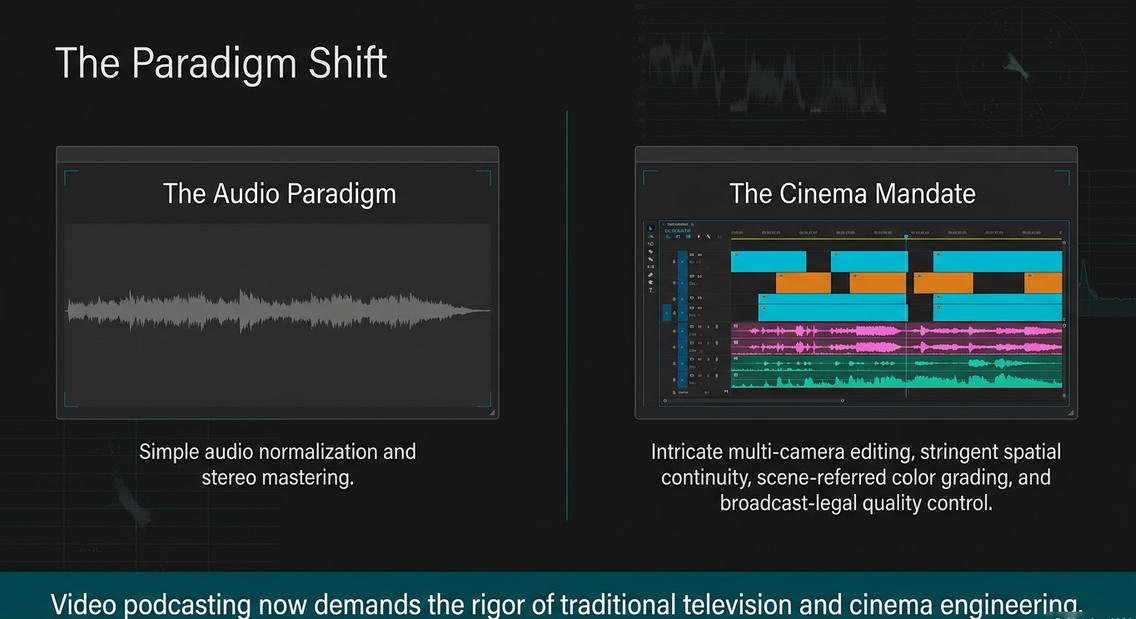
The convergence of traditional broadcasting and digital podcasting has catalyzed a paradigm shift in multimedia post-production. As podcasts increasingly adopt video formats to capture broader audiences, the requisite post-production workflows have scaled in complexity, demanding the rigor of television and cinema engineering. What once involved simple audio normalization and stereo mastering now requires an intricate pipeline encompassing multi-camera video editing, stringent continuity management, scene-referred color grading, and broadcast-legal quality control.
This comprehensive report evaluates the dual pillars of modern video podcast engineering based on established industry paradigms. The first section dissects the grammar and mechanics of cutting—exploring shot complexity, continuity rules, and the structural taxonomy of edits. The second section examines the highly technical realm of color correction and finishing, analyzing color management science, luminance manipulation, memory color psychology, and strict adherence to European Broadcasting Union (EBU) standards. Through this rigorous analysis, the underlying mechanisms that govern professional post-production workflows are illuminated.
Cutting
The editorial process is fundamentally an exercise in narrative architecture and spatial manipulation. An editor does not merely remove errors; the editor constructs an immersive psychological experience by synthesizing disparate visual and auditory elements. The methodology applied during the cutting phase directly dictates the pacing, emotional resonance, and informational clarity of the final podcast episode.
Chapter One – Editing Basics
A Little Editing History
The evolution of film and video editing—from the physical cutting and splicing of celluloid emulsion film to the manipulation of digital non-linear editing (NLE) timelines—has drastically accelerated the speed of post-production while expanding the creative possibilities available to engineers.1 Historically, the destructive nature of physical film editing demanded meticulous premeditation before a single cut was executed. The advent of digital NLEs transformed editing into a non-destructive, iterative process, allowing engineers to construct multiple versions of a timeline simultaneously and instantly recall archived media.1
What Factors May Impact Your Editing Choices?
Editorial decisions are not made in a vacuum; they are heavily influenced by several converging variables. The primary tools and software utilized establish the immediate technical boundaries.2 Furthermore, the project type and genre dictate the pacing and rhythm. For instance, a narrative documentary podcast requires a vastly different editorial cadence than a live-switched, multi-camera comedic interview. Additionally, the degree of audience manipulation is a critical factor; aggressive, rapid-fire editing forces the audience into a heightened state of anxiety or excitement, whereas protracted, unbroken takes allow the audience to passively observe and absorb the spatial reality of the scene in real-time.1
The Basic Edit Transitions
The grammar of film editing relies on fundamental transition mechanics to guide the viewer through time and space. The instant cut represents real-time continuity, while the dissolve, wipe, and fade manipulate temporal and thematic perception.2 These transitions function as the psychological connective tissue of the motion picture experience, signaling shifts in location, the passage of hours, or the thematic linking of discrete conversational concepts.2
Stages of the Editing Process
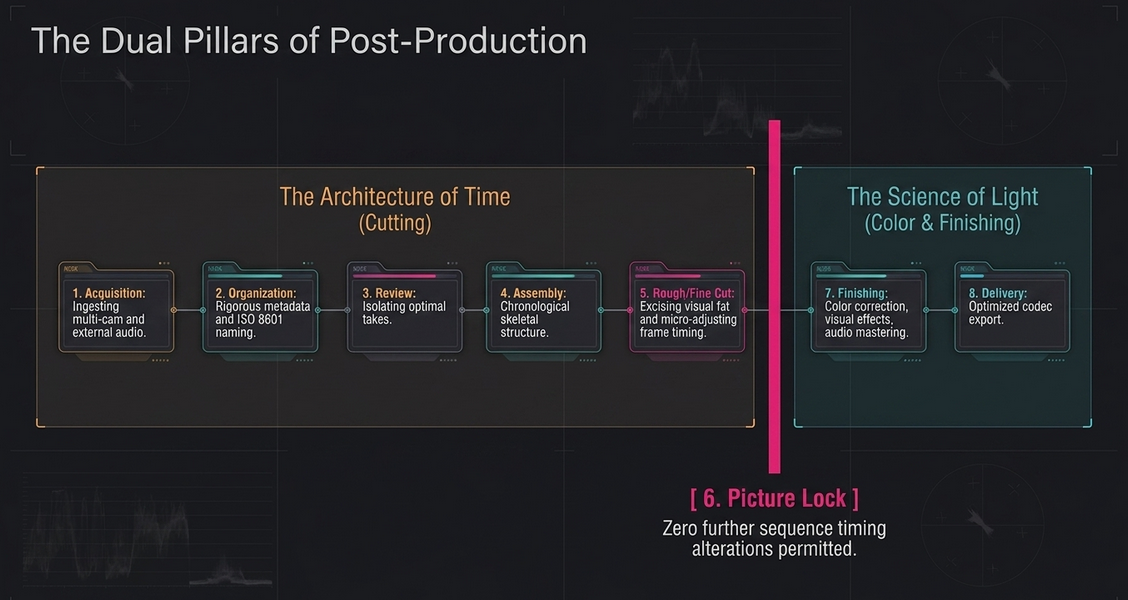
Regardless of the software or medium utilized, the editing workflow adheres to a structured, linear progression to prevent data mismanagement and creative bottlenecks.1
Acquisition: The ingestion of all recorded media, encompassing multi-camera video files, external audio recordings, and graphics.1
Organization: The meticulous logging, tagging, and structuring of raw data. Without rigorous metadata management and sensible file-naming conventions (such as ISO 8601 formatting), the efficiency of the entire pipeline degrades.2
Review and Selection: The critical evaluation of all footage to isolate optimal takes, identify errors, and pull stringouts.2
Assembly: The preliminary arrangement of selected clips into a chronological sequence, forming the skeletal structure of the narrative.1
Rough Cut: A refined version of the assembly where pacing is established, redundant material ("visual fat") is excised, and the narrative flow is tested.1
Fine Cut: A highly polished iteration where micro-adjustments to frame timing are made, ensuring seamless transitions and emotional beats.1
Picture Lock: The critical milestone where no further alterations to the sequence timing or clip duration will occur. This is a prerequisite before initiating color grading or audio mixing to prevent synchronization failure.1
Finishing, Mastering, and Delivery: The finalization of visual effects, color correction, and audio mastering, followed by exporting the media into optimized codecs for various distribution platforms.2
End of Chapter One Review
The foundational stages of post-production establish an uncompromising architectural framework. A failure to execute proper organization during acquisition invariably corrupts the later stages of fine cutting and mastering, generating cascading inefficiencies throughout the workflow.
Chapter Two – Understanding the Footage
A profound understanding of the raw material is required before a single cut is executed. The visual language of a video podcast is built upon a standard nomenclature of shot sizes and an understanding of shot complexity.
Basic Shot Types and Shot Descriptions
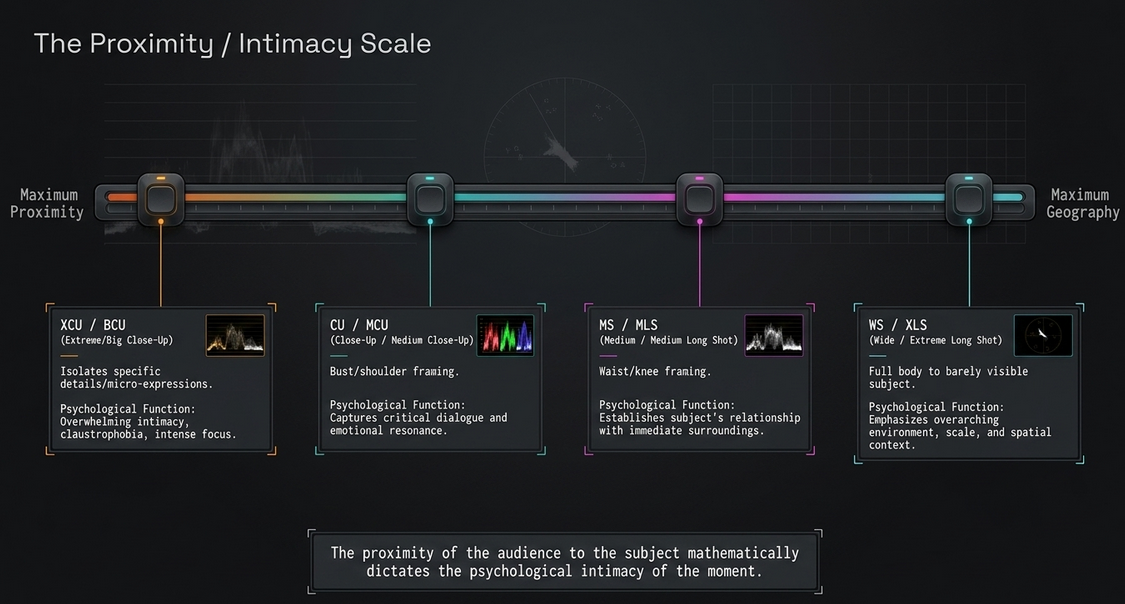
The proximity of the audience to the subject dictates the psychological intimacy of the moment. The following classifications define the fundamental spatial grammar of the edit.3
Increasing Shot Complexity
Beyond the fixed scale of a shot, an editor evaluates footage based on mechanical and spatial complexity.2
Simple Shots involve no lens, camera, or mount movement; the frame is entirely static, and any dynamism relies solely on internal subject action.2
Complex Shots incorporate basic camera axis movement, such as a pan (horizontal pivot), a tilt (vertical pivot), or a zoom from a fixed tripod.2 These shots introduce new spatial information to the viewer sequentially without displacing the viewer's absolute position.
Developing Shots represent the highest echelon of visual complexity. Here, the entire camera apparatus moves through space via a dolly, pedestal, tracking vehicle, or crane.2 A developing shot fundamentally alters the physical and spatial relationship between the subject and the background, creating parallax and deep three-dimensional immersion.
Reviewing the Footage — Selecting the Best Shots
The review phase demands intense technical scrutiny. An editor acts as the final gatekeeper, discarding compromised media to protect the integrity of the project.
What Could Make or Break a Shot?
Several technical factors completely determine a shot's viability.
Focus: This is the singular technical factor that cannot be artificially synthesized or corrected during post-production. Soft-focus footage contains no latent data to recover; it is an irreparable technical flaw that instantly breaks audience immersion, as the human visual system biologically rejects unsharp imagery.3
Audio Quality: The signal-to-noise ratio is paramount. Distorted, clipped, or heavily reverberant audio severs the viewer's connection to the subject, often rendering otherwise visually pristine takes unusable.4
Exposure and Color Temperature: While sophisticated color grading can rescue minor underexposure or white balance shifts, severe chromatic clipping or crushed blacks permanently destroy pixel data.4
Framing and Composition: A well-composed shot adheres to the rule of thirds, providing appropriate headroom and looking room. Shots with distracting objects intersecting the subject's head, or those where the subject is awkwardly cut off at the frame edge, are discarded to maintain aesthetic professionalism.4
Screen Direction: The visual trajectory of a subject's movement across the frame must be logical. If a subject exits the frame moving right, they must enter the subsequent frame from the left to preserve geographic continuity.4
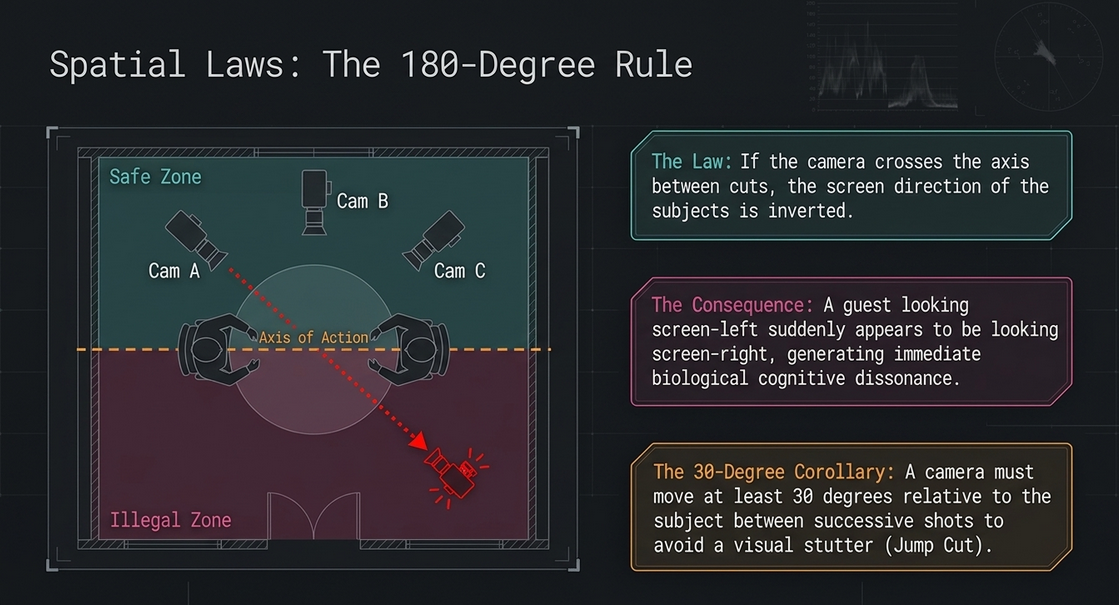
180 Degree Rule/Axis of Action: This is the most critical spatial law in dialogue editing. It is an imaginary line drawn between two interacting subjects.4 If the camera crosses this line between cuts, the screen direction of the subjects is inverted; a guest looking screen-left will suddenly appear to be looking screen-right.4 This spatial violation generates immediate cognitive dissonance.3
30 Degree Rule: This rule dictates that a camera must move at least 30 degrees relative to the subject between successive shots of that same subject.4 Cutting between two cameras placed too closely together results in a jump cut—a jarring visual stutter that disrupts the temporal flow.4
Matching Angles and Matching Eye-Line: Editors ensure that camera elevation and subject eye-lines are consistently maintained across cuts, keeping subjects appearing to look across the screen directly at one another to simulate realistic interaction.4
Continuity of Action and Continuity of Dialogue: An editor must meticulously track physical movements and spoken words. A subject holding a coffee cup in their left hand in a wide shot cannot suddenly hold it in their right hand in the subsequent close-up.4 Similarly, overlapping dialogue must be perfectly matched to mouth movements to maintain sync.
Performance: Ultimately, the emotional truth of the subject's performance supersedes minor technical flaws. If a take contains a profound emotional revelation but slightly flawed framing, the editor will frequently prioritize the performance to serve the narrative.
Be Familiar with All of the Footage
An editor cannot construct a cohesive architecture without cataloging every available brick. Total familiarity with the raw media allows the editor to serendipitously recall a fleeting reaction shot or insert cut that can salvage a disjointed sequence.4
So How Does All of This Help You?
Mastery of shot typology and continuity rules prevents the viewer from noticing the artificial construction of the video. It enables the engineer to seamlessly stitch disparate moments in time into a fluid, uninterrupted psychological reality.4
End of Chapter Two Review
The thorough assessment of raw material is the baseline for all subsequent creative decisions. By enforcing strict continuity and spatial mapping, the editor guarantees that cognitive dissonance never disrupts the narrative flow.
Chapter Three – When to Cut and Why?
Editing is fundamentally an act of purposeful omission. A cut should never occur arbitrarily; it is executed because the current shot has exhausted its utility.3
What Factors Help Make a Transition a Good Edit?
An effective transition fulfills a specific structural or emotional mandate.2
Information: The primary axiom of professional cutting is that a new shot must introduce new information. Cutting to a slightly different angle of the same subject without a shift in emotional intensity or narrative focus is structurally redundant.2
Motivation: An edit must be driven by an internal or external catalyst. This could be a subject turning their head (internal motivation) prompting a cut to what they are looking at, or a sudden loud noise off-screen (external motivation) forcing a reactive cut.2
Shot Composition and Camera Angle: Edits that punch in linearly (e.g., from a Medium Shot directly to a Close-Up) without altering the camera angle generate jump cuts. Effective transitions alter both composition and angle simultaneously to mask the temporal splice.
Continuity
The illusion of real-time requires the meticulous alignment of temporal variables across the edit point.2
Continuity of Content: The physical elements within the frame—wardrobe, props, set dressing—must remain identical across the splice.2
Continuity of Movement: If a subject is in motion, the velocity, trajectory, and momentum of that motion must map perfectly into the incoming shot.2
Continuity of Position: The geographical placement of subjects relative to their environment must remain static unless a developing shot actively transitions them.2
Continuity of Sound: Ambience and dialogue pacing must flow uninterrupted. An abrupt drop in room tone across a cut shatters the illusion of continuous time.2
Sound
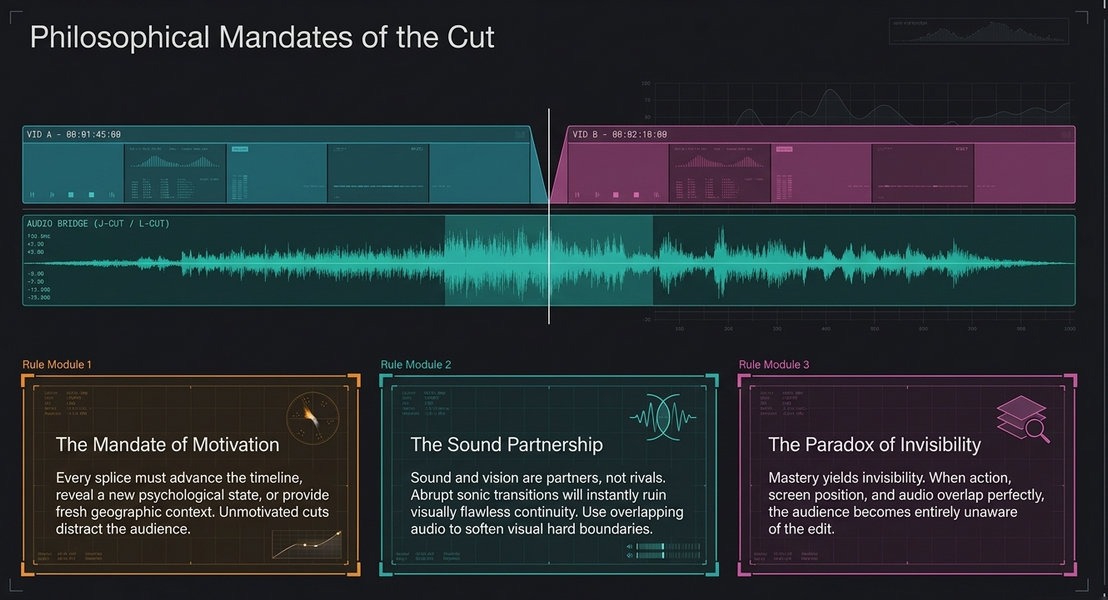
Sound is highly influential in masking visual transitions. The strategic application of overlapping audio (J-cuts and L-cuts) creates a psychological bridge that softens the hard boundary of the visual edit, making the mechanics of the cut invisible.2
Is There a Right or Wrong Reason for a Cut?
While avant-garde cinema frequently breaks these rules for disorienting psychological effects, in standard broadcast and video podcasting, an unmotivated cut that violates continuity is objectively wrong, as it distracts the audience from the content.2
End of Chapter Three Review
Every edit is an assertion of control over the viewer's attention. By mastering the motivations behind the cut, editors ensure that their manipulation of time and space serves the overarching narrative rather than calling attention to the editing itself.
Chapter Four – Transitions and Edit Categories
Transitions are the visual verbs that connect the nouns of raw footage.
The Cut: The instantaneous displacement of one image by another. It represents real-time continuity and is the most common and invisible transition in editing.2
The Dissolve: The gradual fading out of one image while simultaneously fading in another. Dissolves carry immense psychological weight, universally interpreted by the viewer as a passage of time, a change in location, or a thematic connection (a simile) between two disparate visual elements.2
The Wipe: A transition where one image physically translates across the screen to reveal the next. Often utilized for stylized, graphic, or highly energetic shifts.2
The Fade: A gradual transition to or from a solid color (typically black or white). It serves to demarcate major structural sections of a narrative, acting as a definitive conclusion to a sequence or scene.2
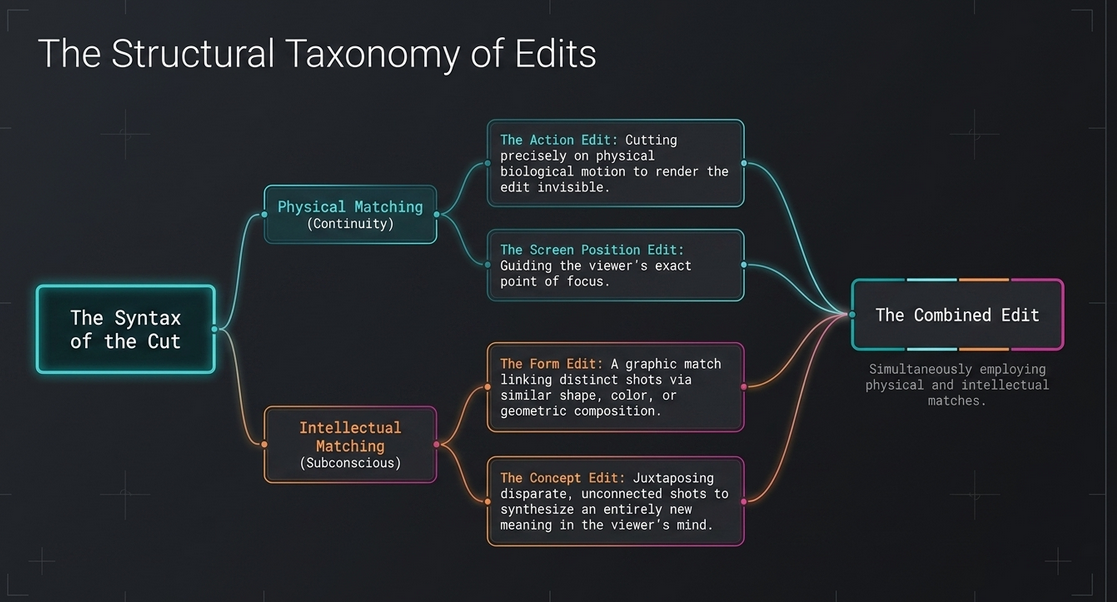
The Five Major Categories of Edit Types
To navigate the complexities of visual storytelling, editors categorize cuts based on their specific structural purpose. The following categories define the grammatical syntax of video editing 2:
Will I Be Quizzed on Any of This?
While theoretical terminology is rarely spoken aloud in a dark edit bay, the internalization of these concepts is mandatory. The vocabulary allows engineers to rapidly diagnose structural failures in a sequence and apply the correct theoretical solution.2
End of Chapter Four Review
Transitions and edit categories form the syntactic structure of motion pictures. Deploying a dissolve where a cut is required, or failing to match screen position during a critical action, introduces syntactic errors that confuse the audience.
Chapter Five – General Practices for Editors
The philosophy of editing transcends software mechanics; it requires an overarching discipline regarding the synthesis of image and sound.3
Sound and Vision are Partners and not Rivals: An editor must never prioritize the visual cut at the expense of auditory continuity. Audio frequently carries the emotional subtext of a scene, and abrupt sonic transitions will instantly ruin visually flawless continuity.3
A New Shot Should Contain New Information: Redundancy is the enemy of pacing. Every splice must advance the timeline, reveal a new psychological state, or provide fresh geographic context.3
There Should Be a Reason for Every Edit: The timeline must be defensible. If an editor cannot articulate the specific narrative or rhythmic motivation for a cut, the cut should be removed.3
Observe the Action Line: The 180-degree rule remains absolute. Inverting spatial geography disorients the audience and destroys the subconscious architectural map of the scene.3
Select the Appropriate Form of Edit: The choice between an action edit and a concept edit dictates how the audience internalizes the sequence. The transition must mathematically align with the emotional intent of the scene.3
The Better the Edit, the Less It Is Noticed: The ultimate paradox of the editing profession is that mastery yields invisibility. When action, screen position, and audio overlap perfectly, the audience becomes entirely unaware that an edit has occurred, allowing them to remain fully immersed in the narrative.3
Editing Is Creating: The editor is not merely assembling a puzzle with a predetermined picture; they are actively writing the final draft of the story using visual and auditory media.3
End of Chapter Five Review
The general practices of editing demand a disciplined adherence to motivation, invisibility, and the symbiotic relationship between sound and image.
Chapter Six – Working Practices
Beyond the theory of the cut, the physical and mechanical working practices of the editor define their long-term efficacy. This includes maintaining rigorous digital hygiene, routinely backing up project files, mapping keyboard shortcuts to accelerate NLE navigation, and understanding the physical endurance required to operate in dark, isolated suites for extended periods.4 The ability to organize timelines efficiently, color-code tracks, and manage proxy media ensures that the technological apparatus never impedes the creative flow.4
End of Chapter Six Review
The operational mechanics of the edit bay dictate the speed at which an editor can iterate. Inefficient working practices throttle creativity and lead to catastrophic data loss.
Chapter Seven – The Final Cut: Additional Editing Topics You Are Bound to Encounter
As the edit nears completion, several advanced structural concepts must be managed.
Additional Editing Terms
Parallel Editing: Also known as cross-cutting, this involves intercutting between two or more simultaneous narrative sequences occurring in different locations. It is utilized to build intense suspense or draw thematic parallels between disparate events.2
Montage: A rapid succession of shots used to compress time, convey a vast amount of information quickly, or visually represent a thematic progression. It relies heavily on concept and form edits rather than spatial continuity.3
Multi-camera Editing: For video podcasts featuring multiple participants, multiple cameras record the same chronological event simultaneously. Modern NLEs allow editors to group these parallel tracks into a composite "multi-cam sequence," enabling the editor to switch dynamically between wide shots and close-ups in real-time, preserving perfect temporal integrity.3
Sync Sound and Counting Time: The foundational requirement for multi-camera workflows is absolute synchronicity.2 Engineers utilize universal timecode generators and slate claps to mathematically lock the visual frames to the external audio recordings. If synchronization fails, a devastating mismatch occurs where the visual movement of a host's mouth no longer aligns with the spoken audio.2
Making Your Way into the World of Editing
Tools vs. Skills: While mastering specific NLEs (Avid Media Composer, Adobe Premiere, DaVinci Resolve) is essential, true editorial value lies in the cognitive skill of storytelling. Software platforms evolve; the grammar of the cut remains permanent.3
Digital Workflow: Modern post-production relies on highly complex digital pipelines, managing massive 4K or RAW data payloads via proxy generation, cloud collaboration, and networked storage infrastructure.3
The Role of an Assistant Editor: In professional environments, the burden of the initial workflow stages—acquisition, organization, transcoding, and syncing—falls to the Assistant Editor.3 The assistant manages the digital pipeline, ensures all media is accurately digitized, and provides the lead editor with a stable, error-free environment to execute the creative cut.15
In Conclusion
The cutting phase of post-production is an exhaustive convergence of spatial geometry, temporal psychology, and narrative architecture.
End of Chapter Seven Review
By mastering the syntax of the edit, the deployment of transitions, and the rigorous management of digital workflows, the editor sets the stage for the final aesthetic polish.
Color & Finishing
Once picture lock is achieved, the post-production pipeline transitions from structural assembly to visual and auditory finishing. The color correction phase is not merely an aesthetic enhancement; it is a highly technical engineering process designed to normalize disparate camera sensors, maximize dynamic range, invoke psychological responses, and ensure the signal mathematically complies with stringent broadcast distribution limits.
COLOR CORRECTION WORKFLOWS
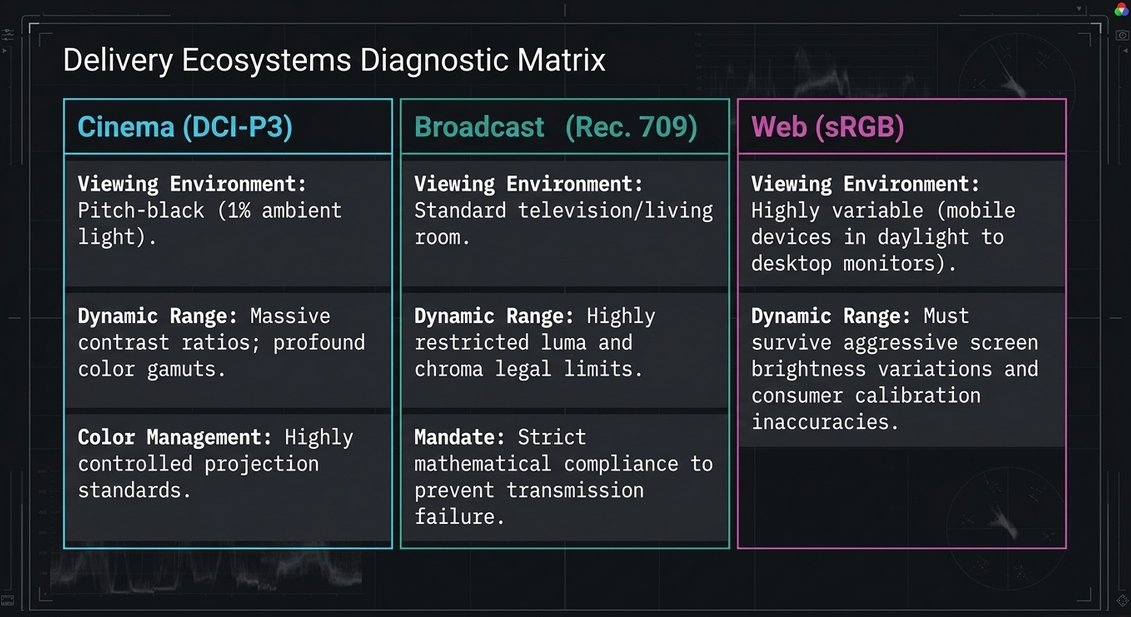
Are You Grading for Cinema, Broadcast, or the Web? The target delivery platform dictates the mathematical boundaries of the color grade. Cinema projection (DCI-P3) allows for massive contrast ratios and profound color gamuts in pitch-black environments. Broadcast television (Rec. 709) enforces highly restricted luma and chroma legal limits to prevent transmission failure. The Web utilizes sRGB standards, requiring grades that can survive the highly variable brightness and calibration inaccuracies of consumer mobile devices and desktop monitors.21
Where Colorists Fit In The colorist operates at the exact intersection of art and engineering, tasked with interpreting the director's aesthetic intent while simultaneously policing the mathematical legality of the digital signal.22
Before the Shoot: Choosing a Recording Format The flexibility of the color grade is entirely dependent on the acquisition codec. Utilizing heavily compressed, 8-bit 4:2:0 H.264 formats limits the colorist's ability to push contrast or isolate hues without introducing severe digital artifacting. Conversely, acquiring in 10-bit or 12-bit RAW or Log formats preserves massive amounts of dynamic range, ensuring deep data retention in the highlights and shadows.22
Digital Dailies: The Start of Postproduction The color pipeline often begins on set with the creation of dailies. A Digital Imaging Technician (DIT) applies temporary, non-destructive Lookup Tables (LUTs) to the flat Log footage, allowing the director and editor to view a normalized image during the structural edit without baking the destructive color decisions into the raw media.22
Round-Trip Workflows In modern post-production, the NLE timeline is exported via an XML or AAF file into dedicated finishing software (e.g., DaVinci Resolve). The colorist links this timeline back to the original, high-fidelity camera media, grades the footage, and then "round-trips" the finalized, rendered clips back to the NLE for final titling and export.
SETTING UP A COLOR CORRECTION ENVIRONMENT
Understanding Display-Referred Color Management Historically, the industry relied on Display-Referred Color Management.25 Under this paradigm, the grading software has no mathematical understanding of the camera's original color space. The colorist visually adjusts the image to look accurate solely based on the output of a calibrated broadcast monitor.25
(Note: Scene-Referred Color Management) Modern workflows increasingly utilize Scene-Referred Color Management. Here, the software mathematically maps the specific input color space of each camera into a universal timeline working space, allowing the engineer to seamlessly output to multiple different delivery standards (SDR, HDR) from a single master timeline.22
Choosing a Display and Display Calibration The grading environment is sacred. The suite must utilize meticulously calibrated reference monitors capable of accurately reproducing the target color gamut (e.g., Rec. 709 or Rec. 2020). Using hardware probes and calibration software, the monitor is repeatedly profiled to eliminate color drift caused by panel aging.26
Setting Up a Color Correction Suite and Configuring a Grading Theater The physical room must conform to strict viewing standards. This includes applying 6500K (D65) bias lighting behind the monitor to establish a neutral optical baseline for the colorist's eyes. The room's surround illumination is rigorously controlled, often limited to a dim 1% ambient light level in high-end mastering suites, preventing the colorist's pupil dilation from corrupting their contrast judgment.27
Other Hardware for Color Correction Colorists utilize specialized, tactile control surfaces featuring dedicated trackballs and rotary rings. These panels allow the engineer to manipulate shadows, midtones, and highlights simultaneously, relying on muscle memory to drastically increase the speed and precision of the grade.
PRIMARY CONTRAST ADJUSTMENTS
The color correction workflow always begins with primary adjustments—global modifications applied to the entirety of the frame.
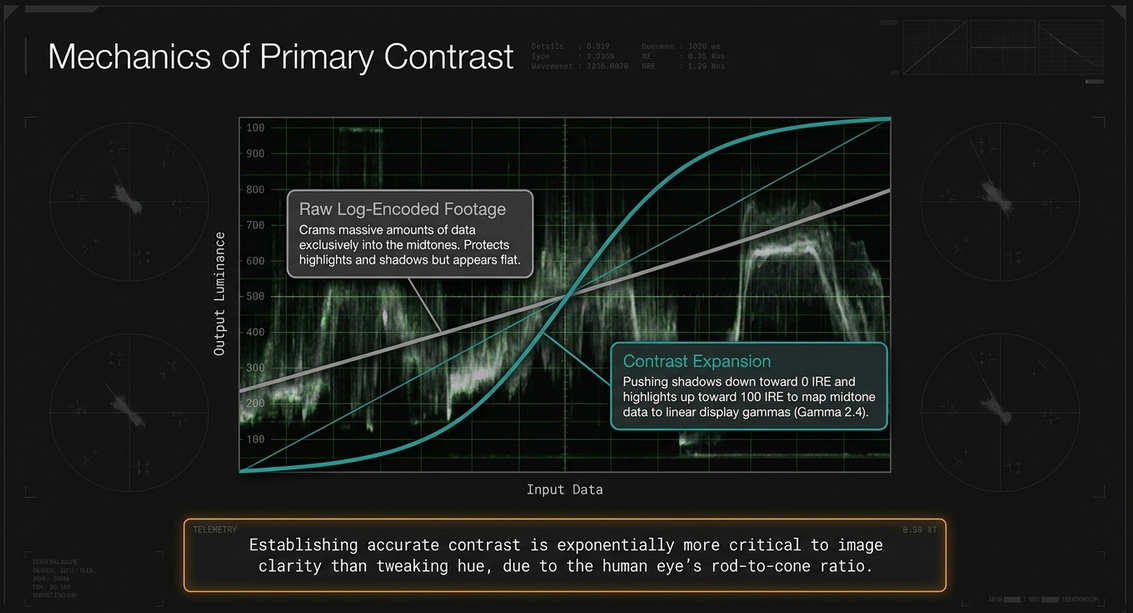
How We See Color Human biological perception heavily favors luminance (brightness and contrast) over chrominance (color). The eye contains vastly more rods (which detect light intensity) than cones (which detect color), meaning establishing accurate contrast is exponentially more critical to image clarity than tweaking hue.27
Luminance and Luma Luminance refers to the absolute physical measurement of light, whereas Luma (Y') represents the encoded, mathematically weighted brightness signal in a digital video file.27
Evaluating Contrast Using Video Scopes Colorists never rely solely on their eyes; they rely on objective mathematical instruments. The Waveform Monitor graphs the exact luma values across the horizontal axis of the image, allowing the colorist to objectively identify crushed blacks or clipped highlights.23
Controls to Adjust Contrast Engineers utilize Lift (shadows), Gamma (midtones), and Gain (highlights) controls to physically stretch or squash the signal waveform.23
Expanding and Compressing Contrast Log-encoded or flat footage requires contrast expansion—pushing the shadows down toward 0% and the highlights up toward 100% to utilize the full dynamic range of the display. Conversely, over-exposed footage requires contrast compression to bring illegal highlights back into broadcast-safe territories.27
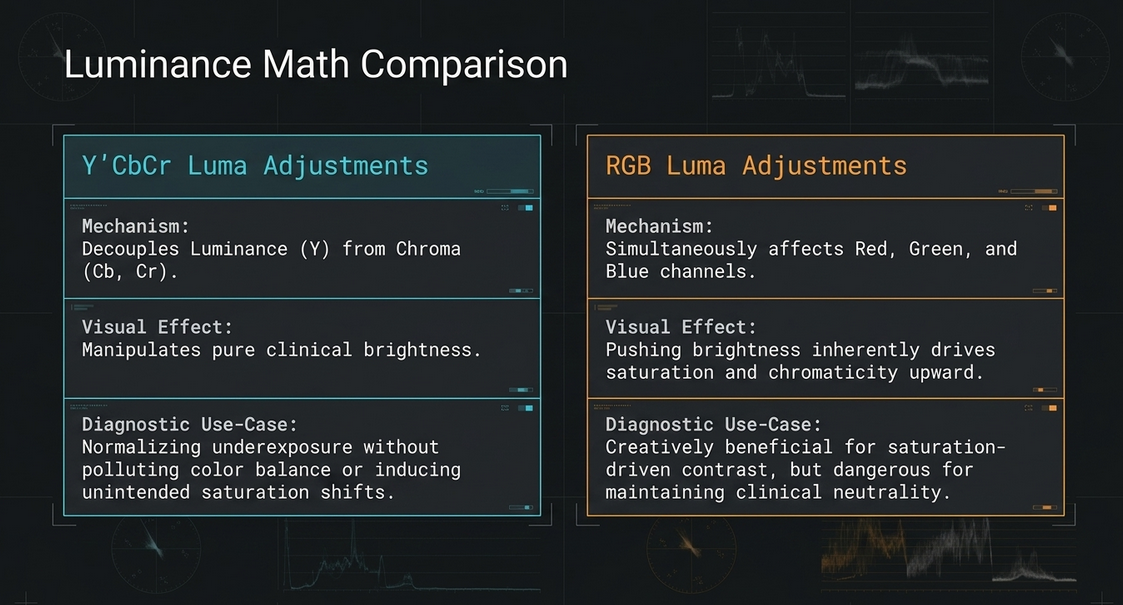
Y’CBCR Luma Adjustments vs. RGB Luma Adjustments A critical technical distinction in contrast correction is the specific mathematical color space in which the luma adjustment occurs.27
Y’CbCr Adjustments: Operating within the Y’CbCr space completely decouples the luminance (Y) channel from the chroma (Cb, Cr) channels.27 Adjusting contrast here manipulates pure brightness without inducing aggressive, unintended saturation shifts, making it highly effective for normalizing underexposure without polluting the color balance.27
RGB Luma Adjustments: Modifying contrast in the RGB color space simultaneously affects the red, green, and blue channels. Pushing the RGB channels higher to increase brightness inherently drives saturation and chromaticity upward, which can be creatively beneficial but dangerous for maintaining clinical neutrality.27
Redistributing Midtone Contrast and Adjusting Log-Encoded Contrast Log formats cram massive amounts of data into the midtone ranges. Engineers use specific Log contrast wheels or S-curves to stretch the midtones, mapping the data properly to linear display gammas (like Gamma 2.4).27
Setting Appropriate Highlights and Shadows The darkest pixels should graze the 0 IRE line, and the brightest specular highlights (like the sun reflecting off chrome) should peak precisely at the 100 IRE threshold.23
Working with High Dynamic Range (HDR) Media HDR grading expands the peak brightness from the standard 100 nits to 1,000 or even 10,000 nits. This requires entirely specialized PQ or HLG transfer functions to map the massive volume of light data without blinding the viewer.27
Contrast and Perception, Contrast During Exhibition
The ambient light of the final viewing environment drastically alters perceived contrast. Media graded for a dark cinema theater will appear entirely washed out and dark when viewed on a mobile device in broad daylight.
Dealing with Underexposure and Dealing with Overexposure Severe underexposure forces the colorist to aggressively push the shadows, which frequently introduces heavy digital noise and grain that must subsequently be treated with spatial noise reduction algorithms.
PRIMARY COLOR ADJUSTMENTS
Once contrast is established, global color balance is addressed.
Color Temperature and What Is Chroma? Color temperature adjusts the global balance along the warm (orange) to cool (blue) axis, correcting improper camera white balance.27 Chroma refers specifically to the intensity and purity of the color signal, independent of its brightness.27
Analyzing Color Balance and Using Color Balance Controls The RGB Parade scope allows the colorist to view the distinct red, green, and blue waveforms side-by-side. If a shot of a neutral gray wall shows the blue waveform significantly elevated above the red and green, the shot possesses an unwanted blue color cast.23 The colorist uses color wheels to drive the opposing color (adding yellow/orange) until the three waveforms align perfectly, achieving true neutrality.23
Using Log Color Controls and Color Temperature Controls Log color wheels differ from standard lift/gamma/gain wheels by operating within highly specific, mathematically restricted luminance bandwidths, allowing for surgical color shifts in the deep shadows without affecting the lower midtones.27
Using Color Curves and Saturation Adjustments Custom RGB curves provide infinite control points to manipulate color and contrast non-linearly.23 Saturation controls uniformly increase or decrease the vibrancy of all colors in the spectrum.27
Understanding and Controlling Color Contrast Color contrast utilizes opposing colors on the color wheel (e.g., teal and orange) to create visual separation. Pushing the shadows into cool teal while maintaining warm orange highlights heavily accentuates depth and separates subjects from the background.
HSL QUALIFICATION AND HUE CURVES
Where primary corrections affect the entire image, secondary corrections isolate specific elements within the frame.
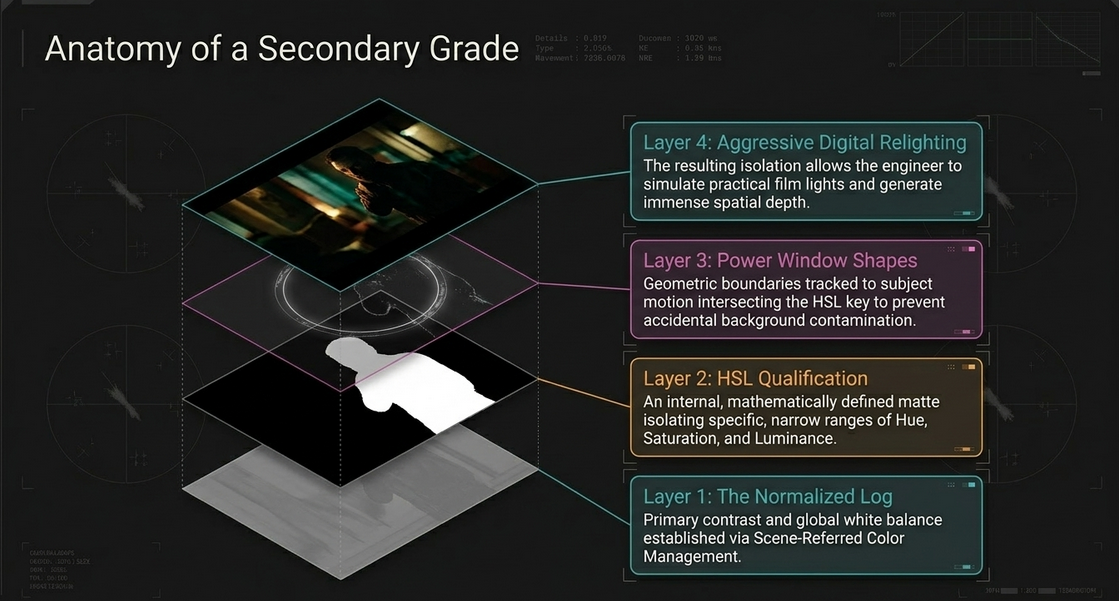
HSL Qualification in Theory An HSL Qualifier generates an internal, mathematically defined matte by sampling specific, narrow ranges of Hue, Saturation, and Luminance.29 Once the colorist pulls a key (e.g., isolating a subject's red shirt), subsequent adjustments apply exclusively inside that designated matte.29
Individual Qualifier Controls and A Basic HSL Qualification Workflow The standard workflow involves 23:
Utilizing an eyedropper tool to sample the target color.
Enabling a high-contrast matte view to see the isolated pixels.
Expanding or narrowing the individual Hue, Saturation, and Luma tolerances to capture the entire object.
Applying blur or feathering to the matte edges to prevent digital tearing or "chatter."
Executing the specific color or contrast shift on the isolated area.
Tips for Using and Optimizing HSL Qualifications Always pull a key on a pristine, noise-free signal. Pre-blurring the signal feeding the keyer, or utilizing spatial denoise before qualification, creates a significantly cleaner and more stable matte.27
Different Ways of Using HSL Qualifiers and Hue Curve Adjustments Hue vs. Hue or Hue vs. Saturation curves offer a faster, less destructive alternative to hard HSL keys, allowing the colorist to gently bend specific colors (e.g., shifting magenta toward true red) via a continuous spline curve without creating harsh matte boundaries.27
Other Types of HSL Adjustments and Advanced Keyers 3D Keyers map pixel data in three-dimensional color space, allowing for vastly more accurate isolation of complex subjects against similarly colored backgrounds.27
SHAPES
To prevent an HSL qualifier from accidentally affecting unintended areas of the frame that share the same color values, engineers use Shapes (Power Windows or Masks).28
Shape UI and Controls
Shapes act as geometric boundaries (circles, polygons, or custom linear curves) drawn directly over the image.
Highlighting Subjects and Creating Depth By isolating a subject's face with a circular shape, the colorist can subtly raise the exposure, drawing the viewer's eye directly to the host's expression. Conversely, utilizing an inverted shape to aggressively darken the peripheral walls creates an artificial vignette, generating immense spatial depth.28
Shapes + HSL Qualifiers Intersecting a Shape with an HSL Qualifier limits the color key to a specific physical area, preventing a red shirt key from accidentally selecting a red stop sign in the background.28
Aggressive Digital Relighting Through complex combinations of shapes and extreme contrast adjustments, a colorist can simulate the effect of practical film lights (like a dramatic slash of light across a wall) that were entirely absent on the physical set.28
Shapes and Motion Because podcasts are a temporal medium, subjects inevitably move. Every shape applied to a subject must be tracked utilizing sophisticated point or planar tracking algorithms to ensure the mask follows the subject's physical motion flawlessly.28
ANIMATING GRADES
Grade Animation Controls Compared Changes in practical exposure or artificial lighting during a shot require the colorist to utilize keyframes to dynamically animate the color grade over time.28
Correcting Changes in Exposure and Correcting Hue Shifts If a cloud passes over the sun during an outdoor podcast recording, the image will rapidly darken. The colorist must place a keyframe before the shift and a keyframe after, animating the exposure gain upward to counteract the darkening environment, rendering the exposure shift completely invisible.28
Grade Transitions Using Through Edits and Dissolves When grading a sequence that utilizes cross-dissolves, the color grade must smoothly interpolate between the two clips, requiring careful keyframe management to prevent jarring color pops mid-transition.28
Artificial Lighting Changes and Creative Grade Animation Grade animation is also used creatively, such as slowly dimming the background lights over a ten-minute monologue to subconsciously heighten the emotional intensity.28
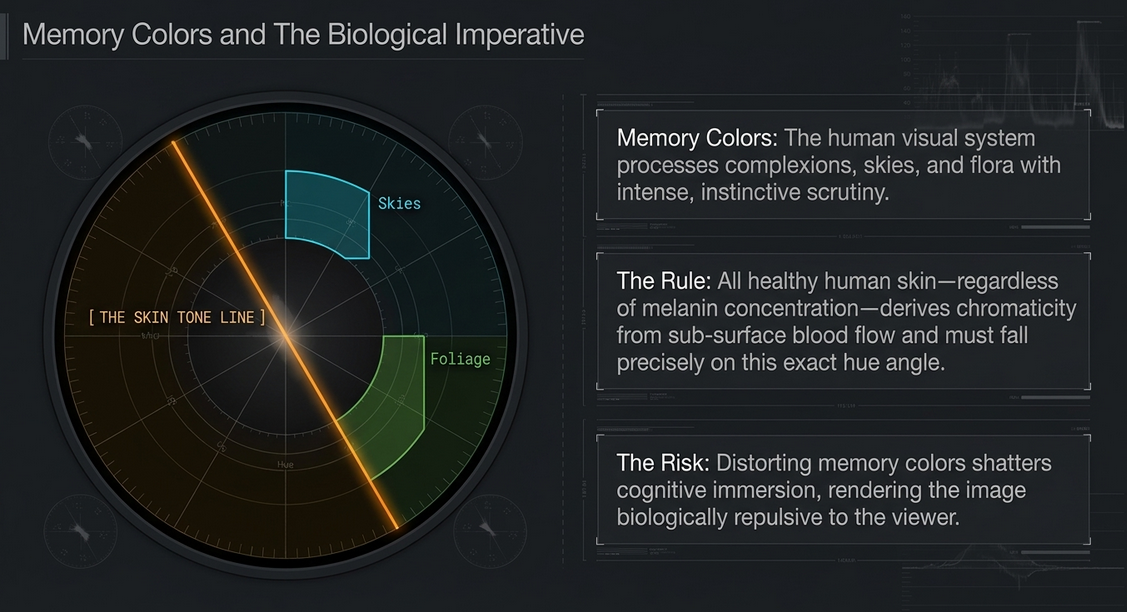
MEMORY COLORS: SKIN TONE, SKIES, AND FOLIAGE
What Are Memory Colors? One of the most complex psychological challenges a colorist faces is the rendering of Memory Colors.28 Evolutionary biology dictates that the human visual system processes specific hues—complexions, blue skies, and green flora—with intense, instinctive scrutiny.28 The brain's object-recognition pathways use color to rapidly identify elements, and humans possess deeply ingrained conceptual knowledge of how these specific elements ought to look.28 If a color grade distorts these memory colors, cognitive immersion shatters and the image appears repulsive.28
Ideals for Skin Tone In professional grading, skin tones are mathematically targeted using the Vectorscope.28 The vectorscope contains a specific graticule axis universally known as the "skin tone line".28 Because all human skin—regardless of ethnicity or melanin concentration—derives its sub-surface chromaticity from the blood flowing beneath the epidermis, all healthy human complexions fall along this identical narrow hue angle in the orange/red vector.28
Techniques for Adjusting Complexion Using Secondaries Colorists use HSL qualifiers and shapes to isolate faces, view the vectorscope trace, and rotate the hue parameter specifically until the trace aligns perfectly with this memory color ideal line, ensuring healthy, naturalistic complexions.28
Ideals for Skies and Ideals for Foliage Similar targeting protocols are applied to push foliage into healthy, organic greens (avoiding sickly, neon yellows) and skies into accurate cyan-blues (avoiding muddy purples), preventing the uncanny valley effect.
SHOT MATCHING AND SCENE BALANCING
Color Timing and Strategies for Working with Clients Once the hero shots are established, the meticulous process of shot matching begins. The colorist must ensure that every subsequent camera angle mathematically and aesthetically matches the hero shot, maintaining a continuous visual reality.23 Client supervision is critical during this phase, requiring the colorist to manage expectations and clearly communicate technical limitations.28
How to Begin Balancing a Scene and How to Match One Shot to Another The colorist utilizes split-screen comparison tools, visually anchoring the blacks, aligning the white points, and verifying the midtone color balances between Camera A and Camera B.23
Recycling Grades and Scene Matching in Action To accelerate the workflow, grades applied to Camera A are saved as stills or LUTs and instantly recycled (pasted) onto every other instance of Camera A in the timeline, requiring only minor micro-adjustments for shifting light.23
QUALITY CONTROL AND BROADCAST SAFE
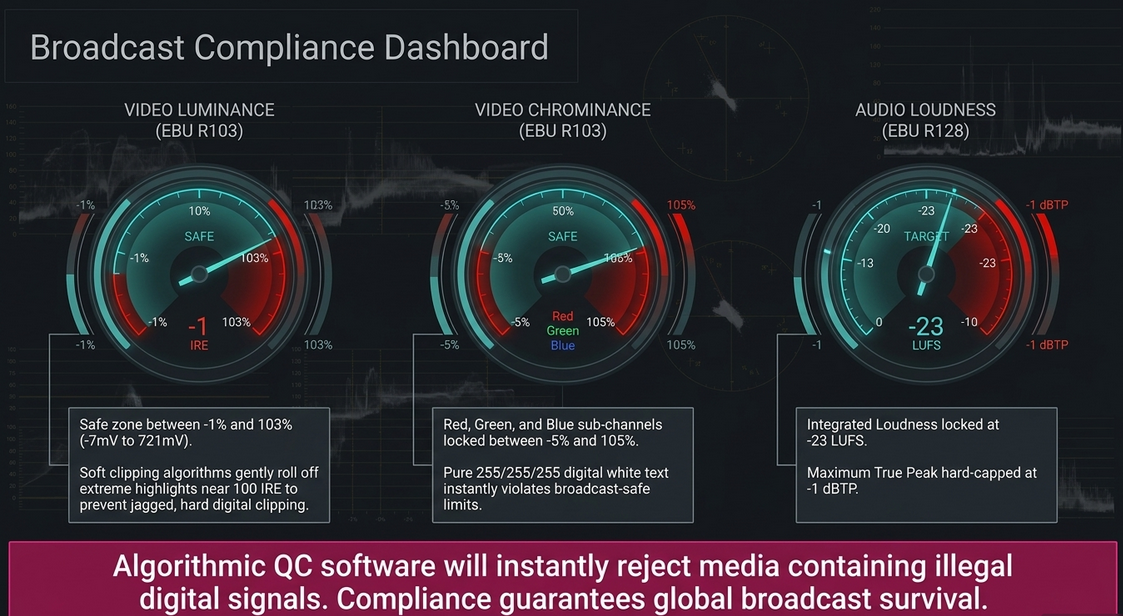
The final and arguably most rigid stage of video podcast post-production is Quality Control (QC) and legalization. Content distributed via broadcast television, OTT streaming platforms, or high-end web platforms is subjected to automated, algorithmic QC software (e.g., Vidchecker) that will instantly fail and reject media containing illegal digital signals.33
Grading for Film Output vs. Video Signal Standards and Limits Film projection possesses vast dynamic tolerance, but digital video broadcast relies on rigid electrical and digital limits.34 The European Broadcasting Union's recommendation EBU R103 defines the strict mathematical tolerances for digital video signals to prevent gamut clipping and catastrophic data loss.33
Under ITU-R BT.709-5 and EBU R103 standards, the signal must not overshoot specific limits 33:
Luminance (Y): Brightness must be maintained between -1% and 103% (approximately -7mV to 721mV).33 Absolute white levels must not exceed 100%, and absolute black must not fall below 0%.34
Chrominance (RGB): The Red, Green, and Blue sub-channels must remain between -5% and 105% (approximately -35mV to 735mV).33
Quality Control Issues That Affect Colorists Signals that exceed these ranges are termed "out of gamut".34 EBU R103 permits a microscopic tolerance, allowing rejection algorithms to pass the file only if less than 1% of the active picture area exhibits these illegal gamut errors.33
Six Structured Steps to Legalizing Your Picture To enforce these limits, colorists implement a highly structured legalization protocol at the very end of their node tree or timeline.23 This involves 23:
Monitoring and Legalizing Saturation in Detail: Identifying intensely saturated colors that push chroma levels into illegal, un-broadcastable territories.23
RGB Color Space Legality and the RGB Parade Scope: Continuously monitoring the RGB Parade to identify offending peak transients across the specific color channels.23
Soft Clipping for Luma and RGB: Utilizing sophisticated soft clipping algorithms to gently roll off the extreme highlights of the Luma and RGB channels. This gradually compresses the data near the 100 IRE limit, preventing the harsh, jagged visual artifacts associated with hard digital clipping.23
Other Video Scope Options for Broadcast Gamut Monitoring: Utilizing specialized gamut warning scopes that flash or highlight localized pixels on the monitor when they violate EBU limits.29
Creating Graphics and Animation with Legal Values: Ensuring that all purely digital elements—such as lower-thirds, text, and intro animations—are mathematically generated within the 0-100 IRE boundaries, as pure digital 255/255/255 white instantly violates broadcast safe levels.29
Applying a Final Video Limiter: Applying a universal limiting effect as an overarching adjustment layer to mathematically lock the video parameters within absolute broadcast-safe thresholds.23
Broadcast-Safe Settings in Grading and Editing Applications Modern platforms (Avid Media Composer, Adobe Premiere Pro, and Final Cut Pro) feature built-in broadcast-safe rendering constraints, ensuring the final output codec clamps data to legal YUV boundaries.23
Audio Loudness Limits (EBU R128) Simultaneously, the podcast's audio mix is subjected to rigorous loudness normalization standards. To combat the heavily compressed, fatiguing audio of the past, the EBU R128 standard mandates that audio is measured using LUFS (Loudness Units relative to Full Scale), an algorithm that mimics human auditory perception.37
To pass broadcast specification, the audio engineer must master the podcast timeline to exact R128 targets 33:
Integrated Loudness: -23 LUFS (± 0.5 LU tolerance) across the entire program.33
Maximum True Peak: -1 dBTP, providing an absolute maximum ceiling for instantaneous audio peaks to prevent digital-to-analog converter clipping.33
PREVIEW: COLOR CORRECTION LOOK BOOK
Tints, Color Washes, Undertones, and Vibrance With structural integrity and mathematical legality secured, the final creative sheen is applied. Colorists deploy stylized tints, cinematic color washes, and targeted vibrance to establish the overarching mood, embedding specific thematic undertones into the deep shadows to finalize the aesthetic identity of the video podcast.23
In Conclusion
The post-production engineering of a video podcast is an exhaustive, uncompromising convergence of psychological theory and strict mathematical compliance. An editor does not simply compile footage; they command the complex syntax of visual language. Through the strategic application of shot typologies, continuous spatial mapping via the 180-degree rule, and the deliberate categorization of editing transitions, the editor builds a seamless, immersive cognitive reality.
Simultaneously, the finishing and coloring pipeline acts as the ultimate technical gatekeeper. Scene-referred color management ensures deep data preservation, while precise manipulations of contrast in mathematically isolated color spaces extract maximum dynamic range. By weaponizing human psychology through the strict maintenance of memory colors on the vectorscope, colorists prevent the visual rejection of the image. Finally, the relentless enforcement of EBU R103 video gamut tolerances and EBU R128 audio loudness targets guarantees that the podcast transcends amateur creation, resulting in a legalized, broadcast-ready product capable of surviving the uncompromising quality control systems of the global media landscape.
Works cited
Grammar of the Edit, accessed April 30, 2026, https://api.pageplace.de/preview/DT0400.9781351803557_A30452754/preview-9781351803557_A30452754.pdf
Grammar of the Edit, accessed April 30, 2026, http://avsinclair.weebly.com/uploads/8/3/5/8/8358998/grammar_of_the_edit.pdf
Grammar of the Edit [5 ed.] 2023004917, 9781032190150, 9781032190112, 9781003257349 - DOKUMEN.PUB, accessed April 30, 2026, https://dokumen.pub/grammar-of-the-edit-5nbsped-2023004917-9781032190150-9781032190112-9781003257349.html
Grammar of the Edit, accessed April 30, 2026, https://api.pageplace.de/preview/DT0400.9781000914269_A46476810/preview-9781000914269_A46476810.pdf
Here Is Your Ultimate Post-Production Workflow Guide - MASV, accessed April 30, 2026, https://massive.io/workflow/post-production-workflow/
Film Editing: Techniques and History | PDF | Video - Scribd, accessed April 30, 2026, https://www.scribd.com/document/534848547/8-26-21
Christopher J. Bowen - Grammar of The Edit - Routledge (2018) | PDF | Video - Scribd, accessed April 30, 2026, https://www.scribd.com/document/843888235/Christopher-J-Bowen-Grammar-of-the-Edit-Routledge-2018
FACULTY OF ONE YEAR DIPLOMA IN FILM EDITING SRI DEV SUMAN UTTARAKHAND UNIVERSITY BADSHAHITHAUL(TEHRI GARHWAL), accessed April 30, 2026, https://www.sdsuv.ac.in/images/Syllabus/Upload/IN4774678DIPLOMA%20IN%20FILM%20EDITING.pdf
Global Visual Effects Pipelines: An Interview with Hannes Ricklefs - Media Fields Journal, accessed April 30, 2026, http://mediafieldsjournal.org/global-visual-effects/2011/2/28/global-visual-effects-pipelines-an-interview-with-hannes-ric.html
Film Studies, accessed April 30, 2026, https://tucdc.edu.np/upload_file/files/post/1638937669_1271255219_Film%20Studies%20(First-Second%20Year).pdf
Self-Assessment Report - BNU, accessed April 30, 2026, https://www.bnu.edu.pk/prospectus/BA_(Hons)_in_Social_Sciences_with_Major_in%20Theatre,_Film_&_Television.pdf
Editing Theory, accessed April 30, 2026, http://www.tlu.ee/~rajaleid/Basic_Editing_MA_2022/Editing_Theory_Fall_2022.pdf
major categories of edit types by Mariz Caspe on Prezi, accessed April 30, 2026, https://prezi.com/tg3srf7bmd9y/major-categories-of-edit-types/
Grammar of the edit - Singapore University of Social Sciences, accessed April 30, 2026, https://search.library.suss.edu.sg/discovery/fulldisplay/alma99376249004926/65SUSS_INST:SUSS
'Earth to Echo' Editor Carsten Kurpanek Reveals His Journey Breaking into Feature Editing, accessed April 30, 2026, https://nofilmschool.com/2014/07/earth-echo-editor-carsten-kurpanek-journey-breaking-into-editing
Grammar of the edit in SearchWorks catalog, accessed April 30, 2026, https://searchworks.stanford.edu/view/13215636
Edit Your 2 Person Video Podcast (1 Camera 3 Scenes) - YouTube, accessed April 30, 2026, https://www.youtube.com/watch?v=9H7itfichRg
Edit Podcasts Like a PRO! CapCut Multi-Cam Editing Tutorial - YouTube, accessed April 30, 2026, https://www.youtube.com/watch?v=dumGc0TzCpY
Editing video podcasts with multiple 4K camera angles - Nono Martínez Alonso, accessed April 30, 2026, https://nono.ma/editing-video-podcasts-with-multiple-4k-camera-angles
7 Managing Editor Interview Questions and Answers - Himalayas, accessed April 30, 2026, https://himalayas.app/interview-questions/managing-editor
Display Referred vs. Scene Referred Color Management, accessed April 30, 2026, https://www.steakunderwater.com/VFXPedia/__man/Resolve18-6/DaVinciResolve18_Manual_files/part282.htm
DAVINCI RESOLVE 18 - The Colorist Guide to - Blackmagic Design, accessed April 30, 2026, https://documents.blackmagicdesign.com/UserManuals/DaVinci-Resolve-18-Colorist-Guide.pdf?_v=1670313610000
The Complete 2024 Premiere Pro Color Correction Guide - Frame.io ..., accessed April 30, 2026, https://blog.frame.io/2024/08/25/complete-2024-premiere-pro-color-correction-guide/
This Podcast Editing Workflow Saves Hours Every Week - YouTube, accessed April 30, 2026, https://www.youtube.com/watch?v=yoDqhHoxEOY
Automatic Colour Change - Blackmagic Forum • View topic, accessed April 30, 2026, https://forum.blackmagicdesign.com/viewtopic.php?f=21&t=211259
DaVinci Resolve 12 First Look: Resolve Color Management - Mixing Light, accessed April 30, 2026, https://mixinglight.com/color-grading-tutorials/davinci-resolve-12-first-look-resolve-color-management/
Color Correction Handbook Overview | PDF | Cinematography | Zip (File Format) - Scribd, accessed April 30, 2026, https://www.scribd.com/document/923171037/Color-Correction
Color Correction Handbook, Second Edition - Pearsoncmg.com, accessed April 30, 2026, https://ptgmedia.pearsoncmg.com/images/9780321929662/samplepages/0321929667.pdf
COLOR CORRECTION HANDBOOK - Pearsoncmg.com, accessed April 30, 2026, https://ptgmedia.pearsoncmg.com/images/9780321713117/samplepages/0321713117.pdf
Spears & Munsil Ultra HD Benchmark (2023 Edition) User's Guide, accessed April 30, 2026, https://www.biaslighting.com/pages/spears-munsil-ultra-hd-benchmark-2023-edition-user-guide
COLOR CORRECTION WITH - Blackmagic Design, accessed April 30, 2026, https://documents.blackmagicdesign.com/UserManuals/DaVinci-Resolve-15-Color-Correction.pdf
Color Correction Handbook: Professional Techniques for Video and Cinema, accessed April 30, 2026, https://www.pearson.de/media/muster/toc/toc_9780133435542.pdf
UK & ROI Broadcast Specifications and Requirements - Extreme Reach Help Center, accessed April 30, 2026, https://helpcenter.xr.global/hc/en-us/articles/26187208167060-UK-ROI-Broadcast-Specifications-and-Requirements
Vidchecker QC Failure - Chroma/Luma Levels - Welcome to our Help Desk - Clearcast, accessed April 30, 2026, https://help.clearcast.co.uk/en/article/vidchecker-qc-failure-chroma-luma-levels
EBU R 103 - Video Signal Tolerance in Digital Television Systems, accessed April 30, 2026, https://tech.ebu.ch/docs/r/r103.pdf
r 103 - video signal tolerance in digital television systems version 2.0 - EBU, accessed April 30, 2026, https://tech.ebu.ch/files/live/sites/tech/files/shared/r/r103v2_0.pdf
EBU R 128 - Wikipedia, accessed April 30, 2026, https://en.wikipedia.org/wiki/EBU_R_128
LUFS: How to Mix Audio to Broadcast Specification EBU R128, accessed April 30, 2026, https://soundguy.london/lufs-loudness-and-levels/














