
Chapter One – Editing Basics
The post-production lifecycle of a professional video podcast represents a highly sophisticated intersection of data management, non-linear editing (NLE) mechanics, signal processing, and narrative architecture. As the medium of podcasting evolves from its origins as a purely auditory broadcast format into complex, multi-camera visual productions, the editor's traditional role has fundamentally expanded. The modern podcast editor must operate simultaneously as a video engineer, an audio mixing technician, a database manager, and a creative director.1 The baseline requirement for operating within this demanding environment is the selection, deployment, and mastery of enterprise-grade software ecosystems that can handle the massive computational loads of synchronized, high-resolution multi-camera arrays.
The industry standard for professional post-production centers heavily on three primary non-linear editing platforms: DaVinci Resolve Studio, Adobe Premiere Pro, and Final Cut Pro.3 DaVinci Resolve Studio is frequently prioritized for its Hollywood-grade color science and advanced node-based compositing, while Premiere Pro integrates seamlessly with Adobe Audition, offering an unparalleled ecosystem for dynamic audio-visual roundtripping.3 Final Cut Pro remains a staple in macOS environments, prized for its magnetic timeline and rendering efficiency.3 Concurrently, the landscape of dedicated Digital Audio Workstations (DAWs) features industry stalwarts like Avid Pro Tools and Apple Logic Pro, alongside highly customizable software like Reaper, which allows advanced editors to construct Python-based automation scripts for complex rendering pipelines.3 For specific, streamlined dialogue editing, tools like Hindenburg and text-based processors such as Descript have revolutionized the structuring phase by allowing editors to manipulate audio-visual timelines directly through AI-generated transcriptions.3
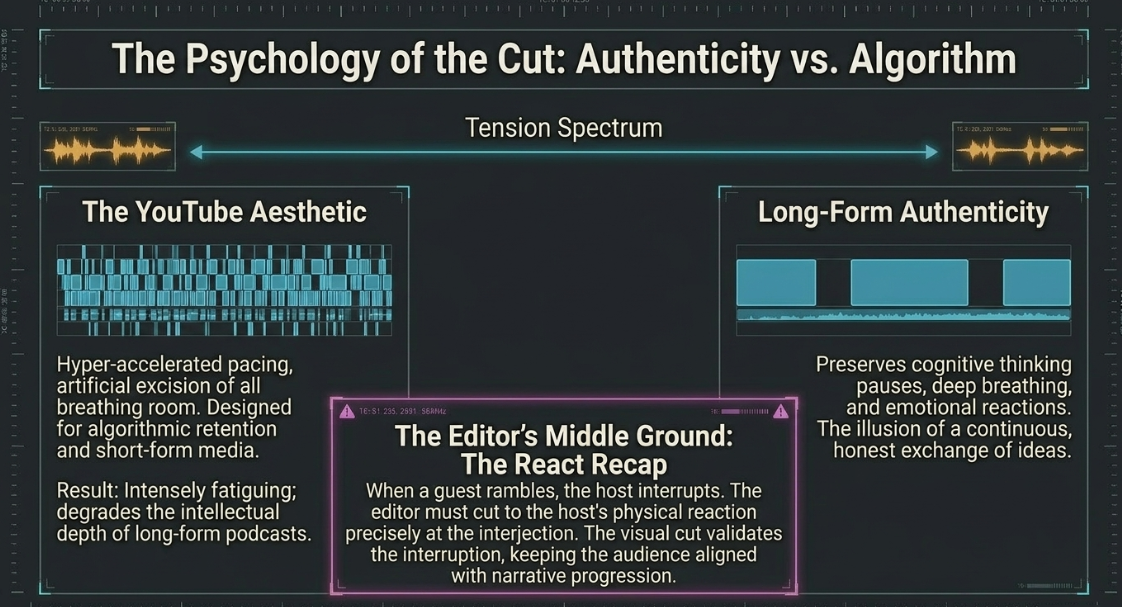
The foundational layer of the post-production pipeline relies entirely on the rigorous organization of media assets before a timeline is ever generated. Effective editing begins long before the software is launched; it starts in the pre-production and production phases. Utilizing clear scripts, episode outlines, and meticulously logged timecodes during the physical recording session can eliminate upwards of four hours of redundant searching during the subsequent editing phase.1 When raw footage is finally ingested into the NLE, the initial operation is the creation of the "rough cut." The rough cut operates strictly as an editorial triage mechanism.1 During this preliminary phase, the editor systematically removes obvious factual mistakes, off-topic tangents, false starts, and severe technical anomalies.1 The primary objective here is not aesthetic polish, but rather the establishment of narrative cohesion and raw structural integrity.
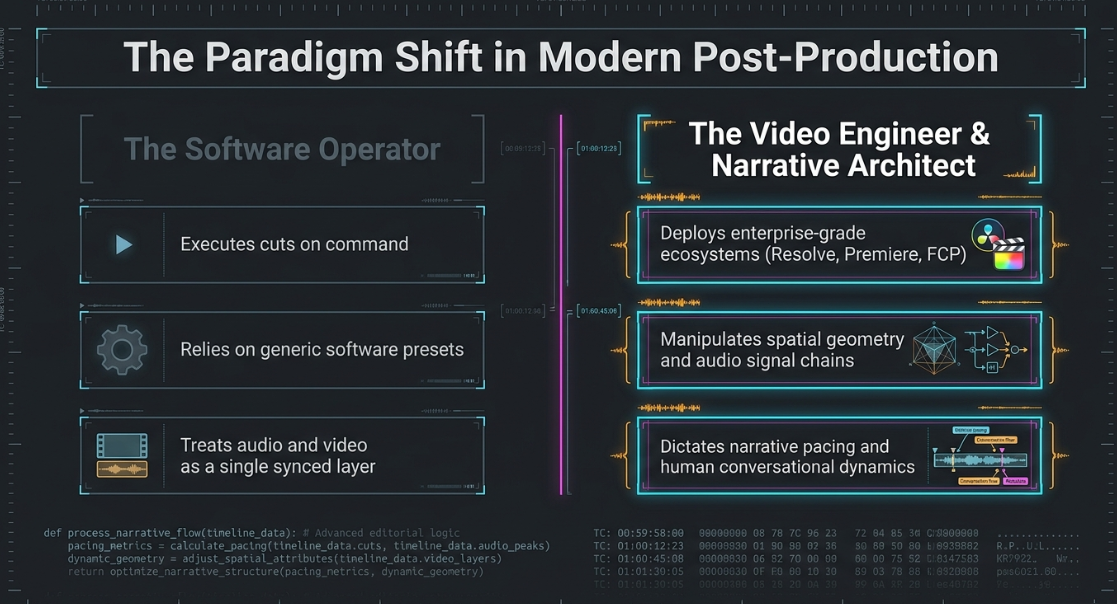
Following the assembly of the rough cut, the process advances to the highly nuanced "fine cut." The fine cut is fundamentally concerned with the micro-dynamics of human conversation. The editor addresses the overall pacing of the dialogue, the conversational flow, and the precise elimination of excessive filler words or unmotivated silences that might disrupt the listener's engagement and retention.1 However, this tightening process requires immense psychological precision; cutting real distractions is mathematically necessary, but leaving natural pauses, breathing room, and the host's inherent personality intact is what prevents the dialogue from sounding robotic, over-processed, or artificially accelerated.6 Over-editing, characterized by excessive, unmotivated cuts, is a common pitfall that instantly degrades the production from a professional broadcast down to an amateur status.1
This systematic progression from raw ingest to structural assembly and finally to micro-editing forms the baseline workflow for any professional studio. Furthermore, the modern workflow integrates the heavy utilization of advanced timeline markers and metadata notes within the NLE software. These tools are deployed to flag critical, unresolved moments—such as a visual glitch requiring later compositing, or a complex audio phase issue—ensuring that required revisions are explicitly tracked and not forgotten during the dense timeline assembly process.1 Finally, the editor applies the concluding layer of polish: inserting branded intro and outro sequences, leveling sponsor read breaks, placing sound effects (SFX), and ensuring that audio fades in and out cleanly without abrupt, jarring pops.
Chapter Two – Understanding the Footage
Modern video podcasts predominantly utilize multi-camera configurations to capture various dynamic angles of the hosts and guests, thereby necessitating that the video engineer possesses a comprehensive, mathematical understanding of spatial resolution, frame rates, digital scaling, and multi-track synchronization mechanics. A primary technical parameter established during the pre-production phase that heavily dictates the editor's downstream capabilities is the choice of recording resolution—typically alternating between 1080p (FHD) and 4K (UHD) capture standards.
The integration of 4K source footage into a 1080p native timeline is a standard professional practice that provides immense flexibility for post-production reframing.8 This capability is absolutely critical for creating visual variety out of otherwise static, locked-off interview setups. When a native 4K asset is deposited onto a 1080p timeline, the NLE must scale the footage down to approximately 50% just to fit the entire optical frame within the viewing monitor.10 This massive surplus of spatial resolution allows the editor to artificially "punch in" or digitally zoom into the image frame to simulate a secondary, closer camera angle without degrading the final 1080p output.9
The mathematical limits of this digital scaling are dictated entirely by the optical sharpness of the original capture lens, the sensor's noise floor, and the presence of fine geometric detail within the image. Generally, an editor can scale a high-quality 4K image within a 1080p timeline up to 110% or 120% beyond its native 100% boundary before optical softening, blurring, or pixelation becomes perceptible to the end viewer.10 If the human subject's features—specifically the sharpness of the eyes or the texture of the skin—begin to deteriorate, the editor may apply a fractional amount of artificial sharpening to mask the degradation.10 For more extreme scaling requirements, editors frequently deploy AI-driven upscaling tools, such as Topaz Video AI or Adobe After Effects' Detail-Preserving Upscale algorithms, which utilize neural networks to extrapolate and hallucinate missing pixel data, allowing for massive resizing matrices without the traditional artifact breakdown.
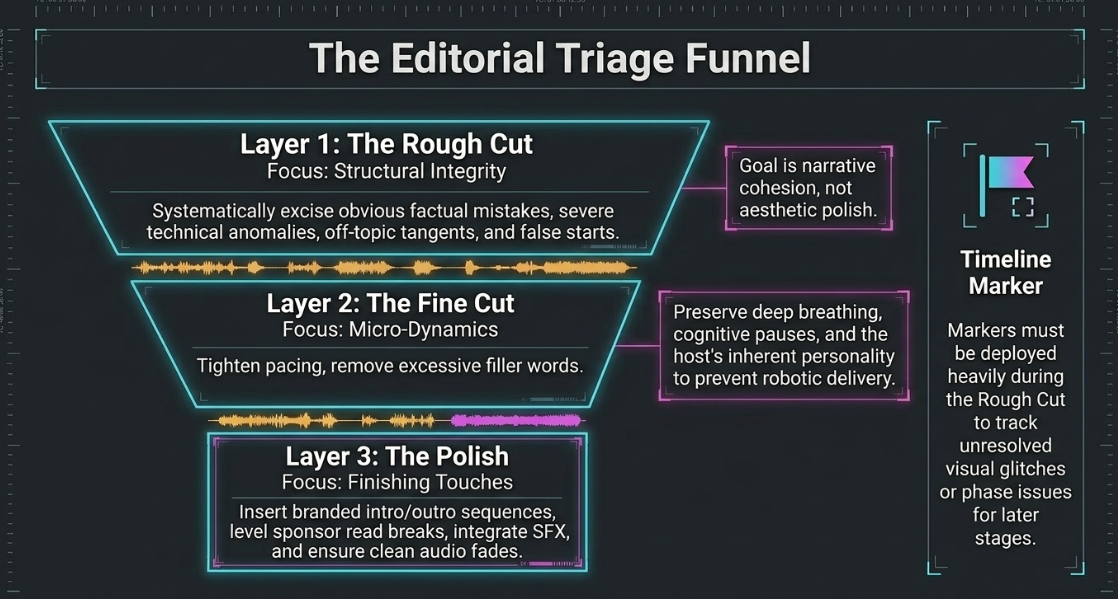
Furthermore, downsampling 4K footage to a 1080p export yields significant mathematical advantages in chroma subsampling geometry. A consumer or prosumer 4K file captured at an 8-bit or 10-bit 4:2:0 color sampling rate, when properly downscaled to a 1080p container, effectively condenses its color information, mathematically yielding a simulated 4:4:4 chroma sampling profile.9 This denser, richer color data significantly improves the precision of subsequent high-end post-production operations, such as HSL (Hue, Saturation, Luminance) qualifications, complex green-screen chroma keying, and 3D camera tracking.9
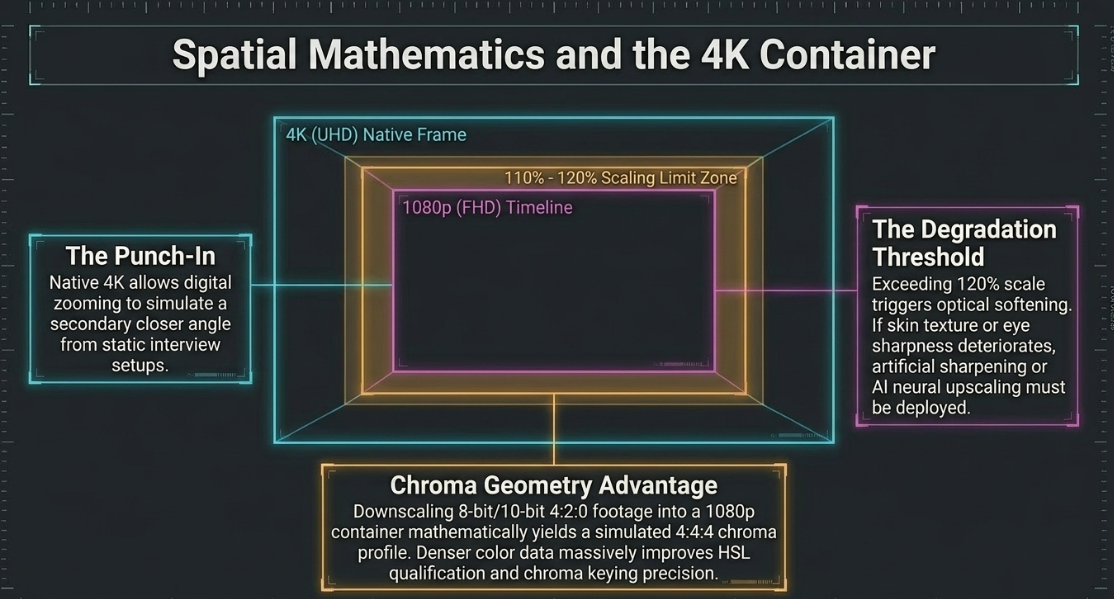
Beyond spatial resolution, the synchronization of multi-camera arrays is the mechanical prerequisite for seamless, non-linear cutting. Precise syncing is the cornerstone of professional playback.1 While manual synchronization can be achieved by visually aligning waveforms to a physical clapperboard or a sharp hand clap at the commencement of recording, enterprise-level environments rely heavily on automated, machine-driven syncing algorithms.1 The absolute most precise method involves matching synchronized timecode that has been generated by hardware master clocks (such as Tentacle Syncs or Ambient Lockits) attached to every device during the physical production.1 If all cameras and external audio recorders share an identical, continuous timecode feed, the NLE can instantly, automatically generate a perfectly aligned multicam sequence with zero drift.11
In the absence of a synchronized hardware timecode infrastructure, modern NLE platforms like Adobe Premiere Pro and DaVinci Resolve utilize advanced audio waveform analysis algorithms. These algorithms cross-reference the low-quality "scratch" audio recorded by the internal camera microphones against the high-fidelity tracks captured by the primary external field recorder, mathematically aligning the peaks and valleys to lock the media together.1 Occasionally, if minor phasing occurs due to internal camera processing latency or physical distance discrepancies between the microphones, the editor may need to disengage the timeline's "snap" function and manually nudge the video tracks by a fractional margin of sub-frames to achieve absolute, frame-accurate lip-sync.11
Before any of these technical manipulations can occur, the video engineer must also understand the psychological barriers that frequently stall podcast production. The invisible mental walls of imposter syndrome and the "procrastination loop" often prevent creators from even recording the raw materials.14 Recognizing that these are emotional rather than technical problems allows producers to overcome the resistance to launch, ensuring that the editor actually receives the raw footage required to begin the workflow.
Chapter Three – When to Cut and Why?
The mechanical execution of a digital cut within an NLE is a simplistic keystroke, but the psychological and narrative motivation behind that keystroke dictates the ultimate success or failure of the podcast's narrative delivery. The complex decision of exactly when to switch camera angles or excise dialogue must be deeply grounded in an understanding of human conversational dynamics, audience attention span neurology, and established visual grammar.
The most engaging, authentic podcast interviews maintain the powerful illusion of a continuous, uninterrupted, and honest exchange of ideas.15 The natural rhythms of human speech—including deep breathing, cognitive thinking pauses, and spontaneous emotional reactions—must be meticulously preserved by the editor to maintain this vital authenticity.15 If an editor is forced to heavily truncate a statement, it is a far more honest and professionally accepted practice to leave a brief, noticeable pause before the cut, signaling to the audience that the guest is not being maliciously edited mid-sentence and that the cut represents a natural break in the flow.15
However, the rapid rise of digital consumption across mobile platforms has demonstrably altered audience attention metrics. Peer-reviewed research conducted by Dr. Gloria Mark at the University of California Irvine has indicated that human attention spans on digital screens have severely contracted over the past decade.16 This neurological shift has led post-production directors and editors to favor significantly shorter film shots, faster pacing, and far more frequent cuts.16 This phenomenon has birthed a highly specific "YouTube aesthetic" defined by the aggressive use of rapid jump cuts that artificially excise all natural breathing and cognitive pauses, creating a highly accelerated, unnaturally dense delivery of information.16 While this style is undeniably effective for maintaining algorithmic retention in short-form, high-dopamine media, this aggressive approach can be intensely fatiguing and deeply detrimental to the long-form, thoughtful nature of a professional video podcast, where intellectual depth is the primary commodity.
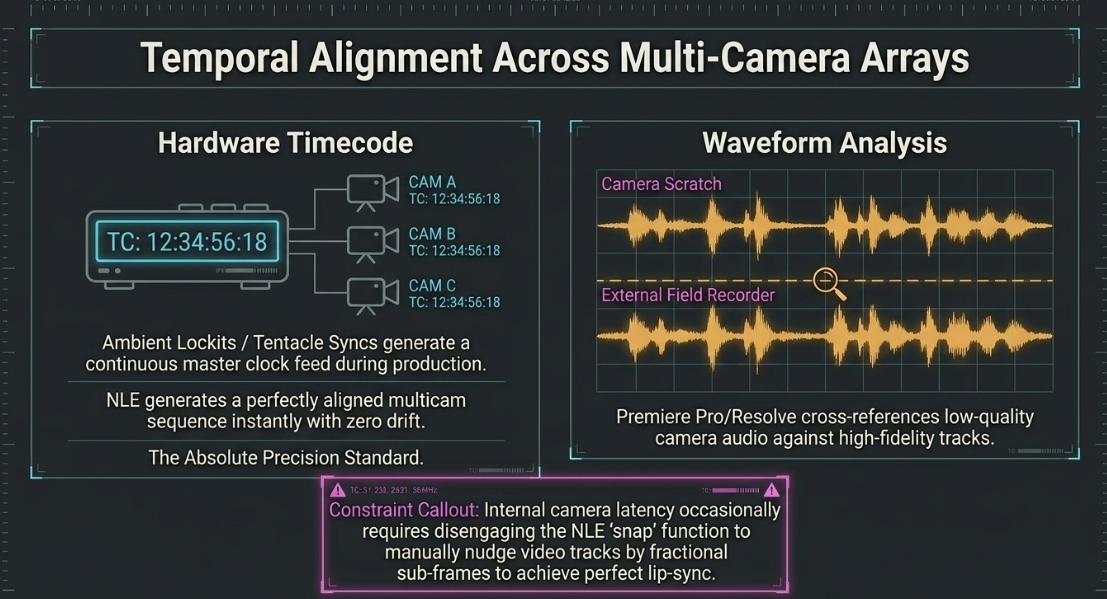
Instead of relying on chaotic jump cuts, professional editors utilize cutting as a deliberate tool for narrative control and pacing. For example, when interviewing guests who tend to ramble extensively due to on-camera nervousness, the host may employ a "React Recap" technique, verbally interrupting the tangent with an energetic reaction to redirect the conversation back to the core topic.17 The video editor must critically analyze these specific moments and deliberately cut to the host's physical reaction shot precisely as they interject. This visual cut validates the interruption, signaling to the audience that the pivot is intentional and keeping the viewer securely aligned with the narrative progression.17 Conversely, arbitrary and overly aggressive editing designed solely to force a complex, philosophical discussion into an arbitrary corporate time limit is heavily criticized by sophisticated audiences, as it visibly undermines the intellectual depth expected from the medium.15
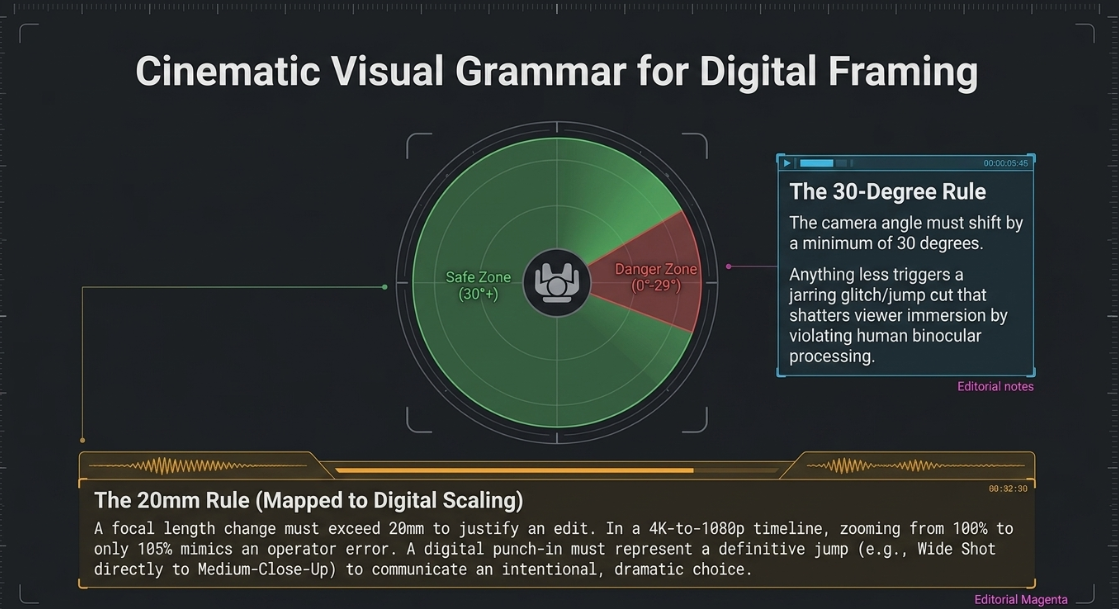
When executing artificial digital punch-ins (as discussed in Chapter Two) or switching between physical camera angles of the exact same subject, the editor must strictly adhere to established cinematic visual grammar to prevent severe psychological disorientation. The "30-degree rule" is a fundamental, foundational principle of continuous film editing, stating that the camera angle must shift by a minimum of 30 degrees relative to the subject between successive shots.18 If the physical angle changes by a smaller, insufficient margin, the resulting transition appears as a jarring glitch—a jump cut—which shatters the viewer's immersion and draws unwarranted attention to the artificiality of the filmmaking process.18 This rule is deeply rooted in the human binocular experience; a 30-degree shift provides just enough spatial disparity for the human brain to process the new image as a completely distinct, valid perspective rather than a mere stutter or error in the visual continuum.18
This 30-degree principle operates in tandem with the "20mm rule," which dictates that a change in lens focal length between consecutive cuts should be at least 20mm to justify the edit.18 In the modern context of a 4K-to-1080p digital punch-in, if an editor scales the footage by an insufficient percentage (for example, zooming from 100% to only 105%), it will trigger the exact same jarring, glitch-like effect as a minor physical camera movement.20 Therefore, when creating a digital close-up in the timeline, the punch-in must be substantially different—typically representing a definitive jump from a wide shot directly to a medium-close-up. This bold scaling change clearly communicates to the audience that the sudden change in perspective is a highly intentional, dramatically motivated choice rather than an operator error.19 While legendary French New Wave directors like Jean-Luc Godard famously utilized intentional jump cuts in films like Breathless (1960) to purposefully create feelings of frantic energy, unease, and disorientation, modern podcast editors generally avoid them unless specifically aiming for that avant-garde, chaotic aesthetic.
Chapter Four – Transitions and Edit Categories
To seamlessly manipulate the flow of complex conversation, mask structural narrative edits, and dictate the rhythm of the broadcast, video engineering relies heavily on specific split-edit techniques, most notably the J-cut and the L-cut. These sophisticated edits uncouple the synchronized audio and video tracks, allowing them to transition at distinctly different intervals. By decoupling the sensory inputs, the editor softens the severe psychological impact of a hard, straight cut, effectively simulating the natural, staggered way human beings perceive sound and vision in real-world environments.
The Mechanics and Application of Split Edits
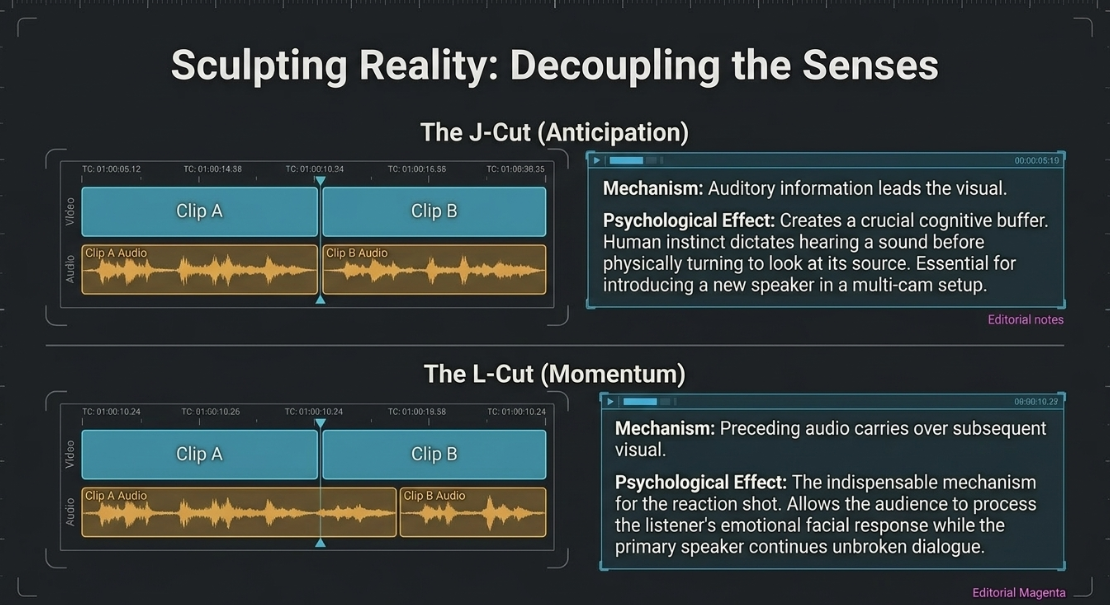
In a J-cut, the auditory sensory information leads the visual information. By allowing the viewer to hear a speaker's voice, a sudden burst of laughter, or an environmental sound effect before actually cutting to the corresponding visual frame, the editor provides the viewer's brain with a crucial cognitive buffer.22 This buffer signals that a transition is imminent, smoothing out the pacing. J-cuts are universally applied when introducing a new character or speaker in a multi-cam setup, as natural human instinct dictates hearing a sudden sound before physically turning one's head to look at its source.23 Furthermore, J-cuts are highly effective for shifting from a quiet, intimate scene into a loud, chaotic environment, letting the ambient noise bleed in early to prevent a jarring sonic shock.
Conversely, an L-cut allows the audio from the preceding clip to persist and carry over the visual of the new clip. In professional video podcasting, the L-cut is the primary, indispensable mechanism for executing a reaction shot.23 As the primary speaker continues their unbroken dialogue, the video track cuts away to the listener's facial reaction. This allows the audience to visually process the emotional impact of the statement—whether it be agreement, shock, or amusement—without ever interrupting the crucial auditory flow of the speaker's sentence.23 To execute these split edits efficiently within NLEs like Premiere Pro or Final Cut Pro, editors rely on the "Ripple Edit" and "Rolling Edit" tools, frequently holding modifier keys (such as Alt or Option) to temporarily un-link the audio and video tracks, allowing them to drag the edit points independently to create the required overlap.22 Advanced editors will further refine these transitions by keyframing the audio levels, adding subtle "riser" sound effects, or even ending on a completely blank, black video clip to utilize negative visual space for dramatic tension.
B-Roll Integration and Narrative Frameworks
Beyond the technical manipulation of split edits, the insertion of supplementary contextual footage, known as B-roll, is a critical macro-strategy for masking heavy structural edits and maintaining long-term visual engagement. In interview-style video podcasts, prolonged, static "talking head" configurations will eventually induce severe viewer fatigue.26 Overlaying high-quality B-roll provides a necessary visual break while simultaneously acting as a physical band-aid to cover up choppy jump cuts in the primary host footage.1
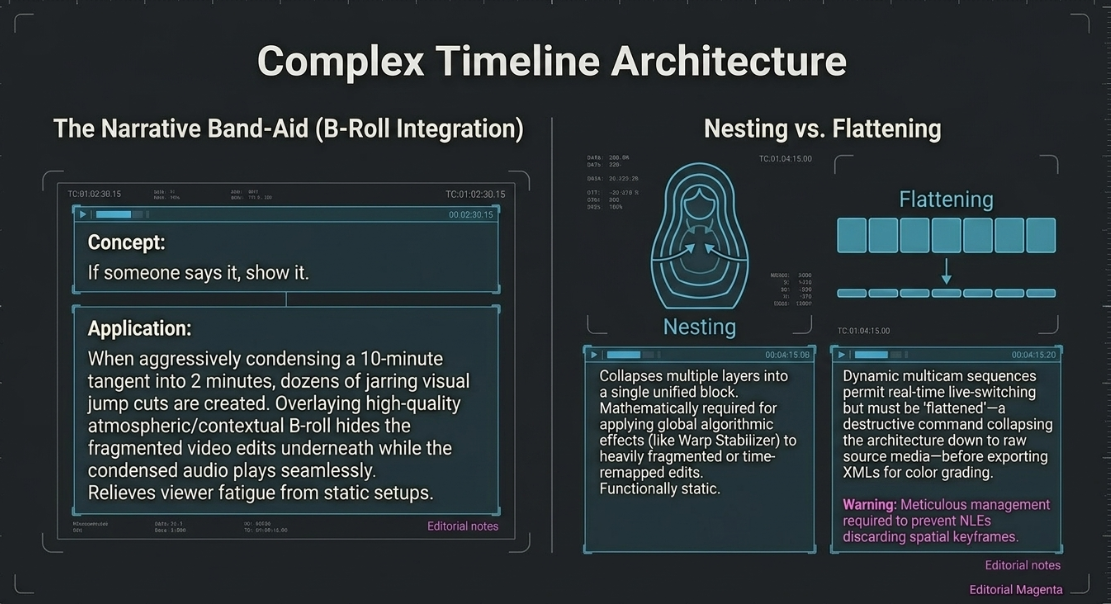
If an editor needs to aggressively condense a guest's rambling 10-minute explanation into a tight 2-minute summary, they will inevitably create dozens of jarring visual jump cuts. By placing a continuous piece of relevant B-roll over that compromised timeline segment, the editor entirely hides the fragmented video edits underneath, while the newly condensed audio plays seamlessly beneath the B-roll.26 A foundational rule of B-roll implementation is literal visual reinforcement: "If someone says it, show it." For instance, if a guest is discussing the culinary intricacies of a specific pizza, the editor must overlay establishing, atmospheric, or cutaway shots of that pizza to anchor the viewer's attention.28
Furthermore, the integration of B-roll allows the editor to step into the role of a creative director, actively shaping the overarching narrative arc. Editors structure podcast episodes utilizing established dramatic frameworks, such as the "Hero’s Two Journeys" model, ensuring that the dialogue progresses logically through phases of discovery, internal conflict, and final resolution.1 The pacing of the edits will drastically shift depending on the genre; a true-crime podcast will utilize slower, suspenseful L-cuts with atmospheric B-roll, whereas a business strategy podcast will demand concise, high-energy jump cuts to maximize information density.
Advanced Timeline Architecture: Nesting vs. Flattening
The architectural management of these incredibly dense, multi-layered timelines requires advanced routing techniques within the NLE, specifically demanding a mastery of "Nesting" and "Multicam" processing capabilities.
In Adobe Premiere Pro, a nested sequence operates conceptually like a "Russian doll".29 It collapses multiple distinct layers of video, graphics, and audio into a single, unified block that sits cleanly on the primary timeline.29 Nesting is highly advantageous—and often mathematically required—for applying global algorithmic effects to heavily fragmented edits. For example, if an editor attempts to apply a "Warp Stabilizer" effect to a clip that also has time-remapping (speed changes) applied, the NLE will return a core processing error. The workaround is to nest the time-remapped clip first, and then apply the stabilizer to the nested container.29 Nesting is also routinely used to group complex picture-in-picture layouts or to apply a master audio effect, such as a dialogue echo that smoothly fades out over a transition.29
However, nested sequences are functionally static relative to their internal cuts. Multicam sequences, while technologically similar under the NLE's hood (acting as specialized sequences with complex audio/video routing parameters), function as dynamic source clips.12 They permit real-time, live-switched angle changes during playback and strict synchronization retention.30 Once a multicam edit is fully locked and approved, the sequences must often be "flattened." Flattening is a destructive command that collapses the complex multicam architecture back down to the original, base-level raw source media clips on a single track.31 Flattening is an absolutely necessary precursor for exporting XMLs for final color grading in DaVinci Resolve or round-tripping to external compositing software. However, the flattening process requires meticulous management, as older NLE versions occasionally discard spatial transform keyframes (such as custom zoom or position values) during the collapse, destroying the editor's carefully crafted digital punch-ins.
Chapter Five – General Practices for Editors
The core, overriding mandate of a professional video editor during the finishing phases is rigorous quality control. A flawless narrative structure and brilliant pacing are easily, instantly derailed by the presence of persistent background noise, harsh audio frequencies, or glaring visual artifacts. In professional post-production, the foundational rule is immutable: technical repair must always precede creative enhancement.6
Audio Engineering and the Signal Chain
The audio processing workflow follows a strict, sequential signal chain architecture designed to mathematically isolate the human voice, repair physical acoustic damage, and balance dynamics for broadcast. A standard professional hardware setup feeding this chain often includes dynamic broadcast microphones like the Shure SM7B or MV7X, running through high-end interfaces like the Zoom PodTrak or Apogee Ensemble.32
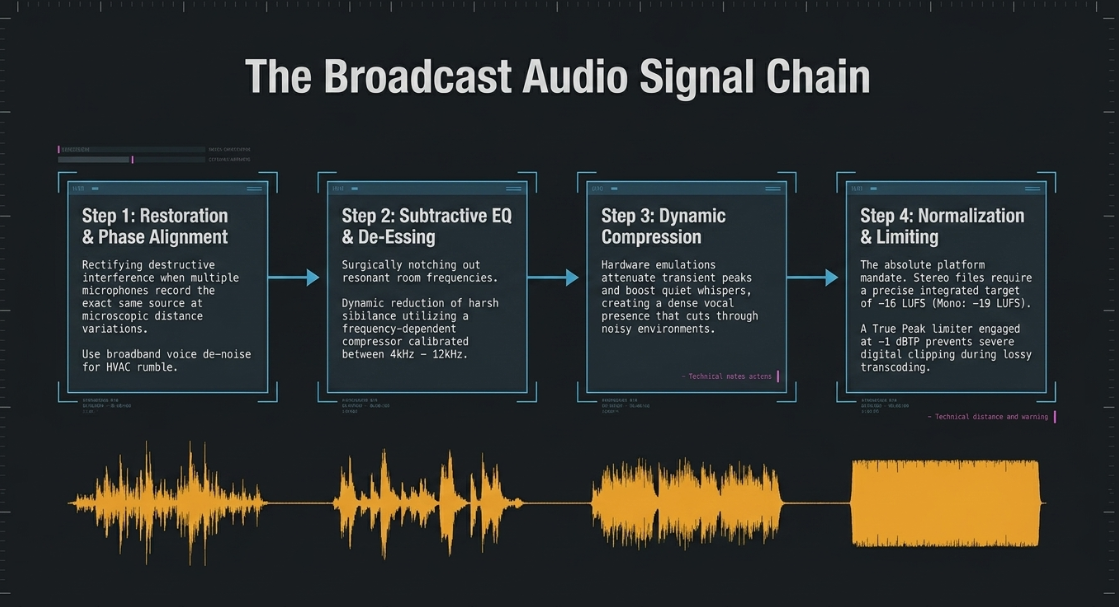
Restoration and Phase Alignment: Before any equalization is applied, editors must rectify phase cancellation issues. Phase refers to the position of a sound wave in time, measured across a 360-degree cycle.34 When multiple microphones record the exact same acoustic source (e.g., two hosts sitting in close physical proximity), the microscopic distance variations cause the sound waves to arrive at the individual microphone capsules at marginally different times.34 If these slightly offset tracks are summed to mono—which occurs routinely when listeners use smartphone speakers, single Bluetooth devices, or club sound systems—the misaligned waveforms will destructively interfere with one another.34 This destructive interference causes the audio to sound incredibly thin, weak, hollow, or in severe cases, entirely muted.34 Dedicated phase alignment plugins (such as Sound Radix Auto-Align) or manual, sample-accurate waveform nudging must be deployed to guarantee phase coherence.36 Following phase correction, broadband noise reduction tools, such as iZotope RX 11 Voice De-Noise or Dialogue De-reverb, are utilized to surgically eliminate persistent room hum, HVAC rumble, and electrical hiss without degrading the core vocal frequencies.5
Subtractive Equalization (EQ) and De-essing: Once the track is clean, subtractive EQ is applied to surgically notch out problematic, resonant room frequencies and low-end rumble.6 Subsequently, a de-esser is placed in the signal chain. A de-esser is a highly specific, frequency-dependent compressor that dynamically reduces the volume of harsh sibilant sounds (the sharp, piercing 'S', 'Sh', and 'T' consonants).33 The editor must carefully calibrate the threshold, sensitivity, and cut-off frequency (typically sitting anywhere between 4kHz and 12kHz) to match the specific host's unique vocal profile.39 Over-processing with a de-esser will instantly result in the host sounding as though they have a severe lisp.39 Software tools like Lindell 902 or DigitalFishPhones SpitFish are common solutions for this process.33
Dynamic Compression and Normalization: Following EQ, dynamic range compression is applied using emulations of classic hardware like the API 2500, LA3A, or SSL Buss Compressor.33 Compressors mathematically attenuate the loudest transient peaks and boost the softest, quietest whispers, creating a dense, rich, and consistent vocal presence that cuts through noisy listening environments (like cars or trains).39 Finally, the master output bus must be normalized to meet strict, non-negotiable platform loudness standards. Streaming platforms require audio to hit a precise integrated target of -16 LUFS (Loudness Units relative to Full Scale) for stereo files, or -19 LUFS for mono files.6 Furthermore, a True Peak limiter (such as the bx_True Peak Limiter) must be engaged to maintain a strict -1 dBTP ceiling, preventing severe digital distortion and clipping from occurring when platforms like Spotify or Apple Podcasts apply their proprietary lossy transcoding compression.6
Visual Artifact Mitigation
In the realm of modern video podcasts, particularly those recorded in high-end studios utilizing large LED volume walls, massive television monitors, or complex RGB lighting panels, editors frequently encounter two devastating visual artifacts: Moiré patterns and light flicker.
Moiré Patterns: Moiré is a severe optical interference pattern that occurs when the high-frequency, geometric pixel grid of a background LED screen visually interacts and conflicts with the Bayer array pixel grid on the camera's internal sensor.40 This clash produces strange, pulsating, rainbow-colored concentric bands across the footage. If the camera operator failed to mitigate this on set (typically by using a wider aperture like f/1.8 to create a shallow depth of field, optically blurring the screen out of focus), the editor must fix it in post-production.40 In DaVinci Resolve Studio, editors can isolate the affected background area using an AI-tracked Magic Mask or Power Window.42 Once isolated, the editor switches the node into the Y'UV color space and applies targeted Gaussian blurring strictly to the U and V (color) channels.41 This highly advanced technique mathematically destroys the false rainbow aliasing geometry without entirely destroying the underlying luminance (Y) detail, preserving the perceived sharpness of the image.41 Alternatively, Chromatic Aberration removal tools or heavy color noise reduction algorithms can be applied to the masked region.41 In Premiere Pro, editors often duplicate the layer, mask the moiré, apply a 2-3% blur, and blend the opacity to 80% to mask the banding.
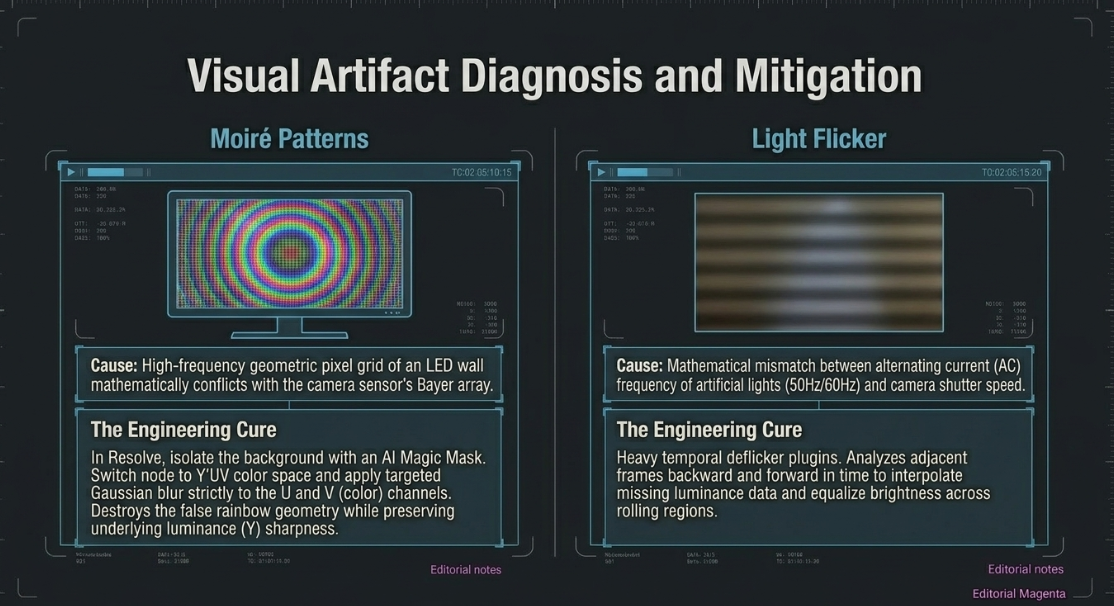
Light Flicker: Flicker results from a mathematical mismatch between the alternating current (AC) frequency of standard artificial lights (which pulse at 50Hz in Europe/Asia or 60Hz in North America) and the camera's chosen shutter speed and frame rate.43 When footage contains rolling, horizontal dark shadow bands, it indicates a severe synchronization failure. While hardware fixes involve matching the shutter speed to an exact integer multiple of the AC frequency (e.g., shooting at 1/60th or 1/120th of a second in a 60Hz environment) or utilizing mechanical shutters and anti-flicker camera modes, editors must often rescue compromised footage.43 To achieve this, editors employ heavy temporal deflicker plugins, such as Digital Anarchy's Flicker Free.47 These advanced plugins analyze multiple adjacent frames backward and forward in time to interpolate the missing luminance data, equalizing the brightness values across the affected rolling regions to artificially smooth out the exposure.
Chapter Six – Working Practices
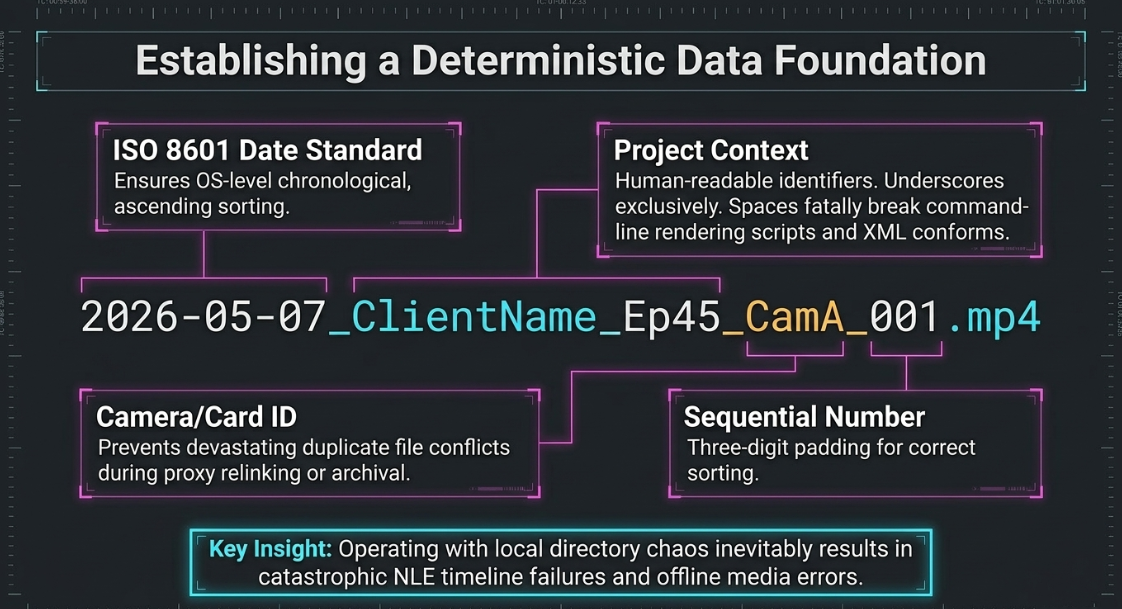
As professional post-production inherently involves managing massive, multi-terabyte datasets and navigating complex, multi-stakeholder feedback loops, a video engineer's daily working practices must be aggressively systematized. Operating with chaos in the local file directory inevitably results in catastrophic NLE timeline failures, offline media errors, and massive financial efficiency losses.48
File Naming and Folder Architecture
A highly deterministic, standardized folder structure dictates that all incoming assets are immediately sorted into discrete, heavily labeled categories (e.g., Video, Audio, Motion Graphics, Project Files, Exports) within a localized master directory before the editing software is even opened.50
File naming conventions must be logically consistent, easily human-readable, and efficiently machine-sortable. The industry standard dictates the strict utilization of the ISO 8601 date format (YYYY-MM-DD) placed at the absolute beginning of the filename to ensure chronological, ascending sorting by any computer operating system.48 Filenames should exclusively utilize half-width alphanumeric characters, eschewing all traditional spaces in favor of underscores or hyphens.50 Spaces and special characters (e.g., <, >, |,!, $) are strictly prohibited, as they can fatally break command-line rendering scripts, cloud transfer protocols, and XML conforms.48 Furthermore, camera raw files must be uniquely and individually named. Permitting generic, camera-default names like CLIP001.mp4 or C0001.mxf from multiple formatted memory cards invites devastating duplicate file conflicts when the NLE attempts to automatically relink offline media during proxy workflows or long-term archiving.
The Client Revision Pipeline
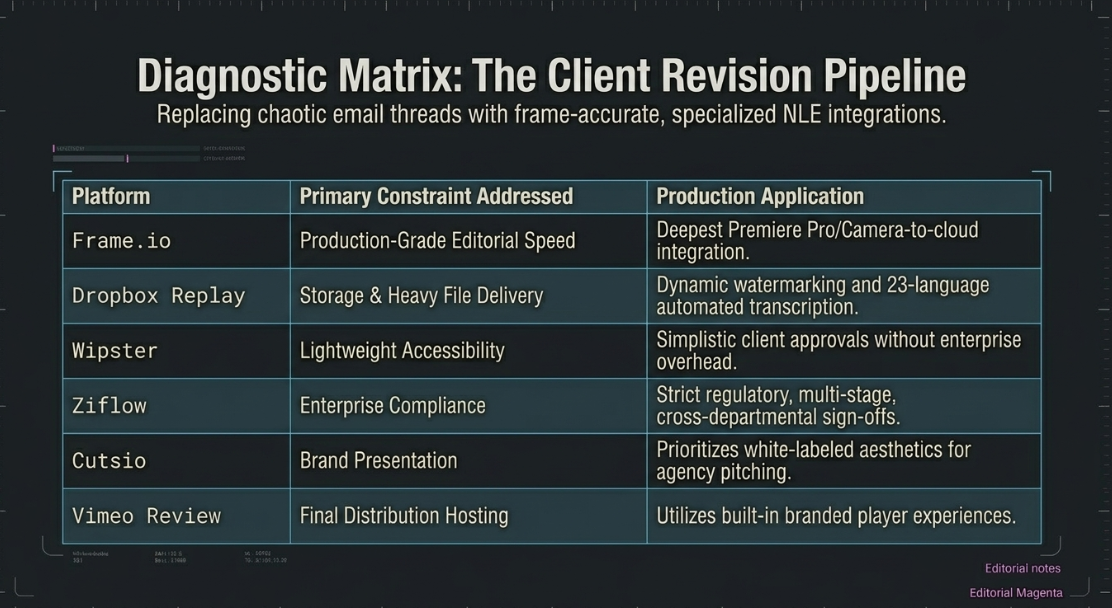
The traditional, archaic method of receiving timecoded feedback via disjointed, massive email threads is fundamentally flawed, consistently leading to misinterpretations, version-control chaos, and workflow bottlenecks.53 When a client simply writes "the transition feels off at 12 minutes," the editor lacks the granular data to execute the fix.53 The modern workflow demands the integration of dedicated video review platforms that centralize all stakeholder feedback into frame-accurate, time-coded markers that integrate directly into the NLE timeline interface.
Platform selection is not merely about feature bloat; it is a critical exercise in identifying the specific bottleneck in the production pipeline.54
By fully embedding one of these specialized tools into the daily workflow, stakeholders can annotate and draw directly on the frozen video frame, entirely eliminating the ambiguity of text-based descriptors and cutting approval times significantly.53
Chapter Seven – The Final Cut: Additional Editing Topics You Are Bound to Encounter
The final, high-stakes stages of video engineering focus exclusively on mastering the complex timeline file for its specific distribution endpoints. A technically pristine, emotionally engaging timeline will instantly fail upon upload if the final export specifications contravene the rigid ingestion parameters of platforms like YouTube, Spotify, or broadcast television networks.
Broadcast Safe Limits and Color Legalization
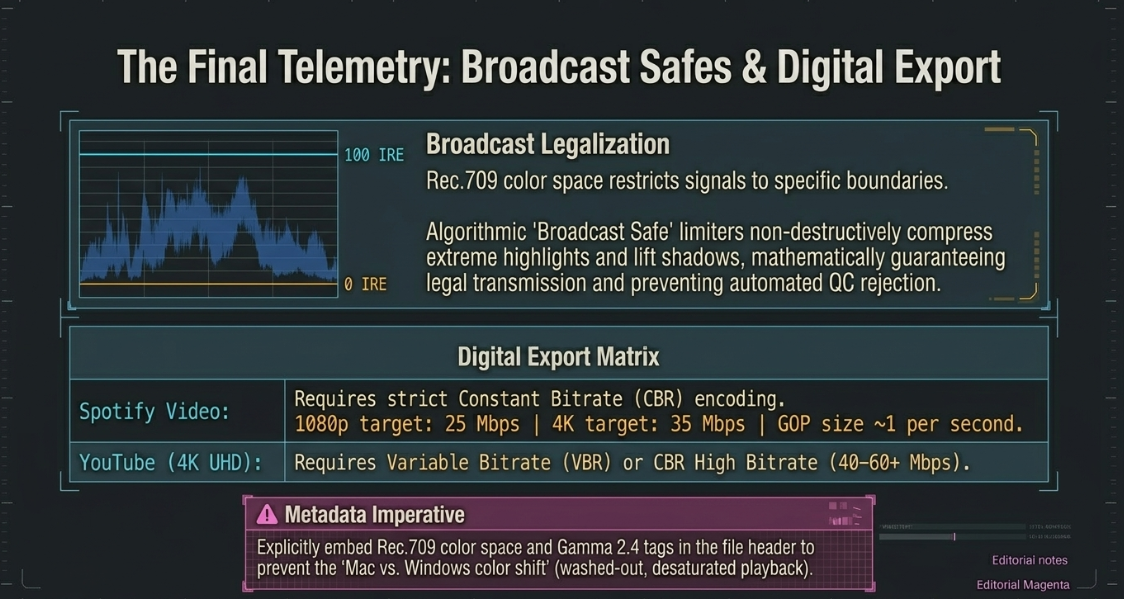
If the podcast (or a segmented commercial cut) is destined for traditional television broadcast or premium VOD networks, the color space must adhere strictly to rigid, heavily monitored luminance and chrominance thresholds. The industry-standard Rec.709 color space restricts luma (brightness) and chroma (color saturation) signals to specific IRE (Institute of Radio Engineers) boundaries. If the highlight whites exceed 100 IRE or the deep blacks drop below 0 IRE, the video signal is officially considered "illegal" and will immediately fail automated network Quality Control (QC) scanners.58 Even minor, momentary graphical spikes into "super-white" territory (100-109% usage in the YCbCr color space) will trigger absolute rejections from playout servers, which are notoriously finicky.58
To automatically mitigate this risk, video engineers employ "Broadcast Safe" limiters, such as Boris FX Continuum's Broadcast Safe filter.59 This software applies an algorithmic, mathematically hard ceiling and floor to the video signal. It non-destructively compresses extreme, illegal highlights and slightly lifts crushed shadows, mathematically guaranteeing the exported file remains safely within legal transmission ranges without requiring the editor to manually re-grade every single shot.59
Export Specifications: YouTube and Spotify
For pure digital distribution, the primary engineering concern is managing algorithmic data compression via bitrates. Platforms utilize incredibly complex, proprietary transcoding algorithms to deliver video at various qualities depending on the end-user's local internet bandwidth. When exporting a master 16:9 aspect ratio file for Spotify Video Podcasts or YouTube, the editor must deliberately select between Constant Bitrate (CBR) and Variable Bitrate (VBR) encoding. For optimal ingestion without macro-blocking artifact generation, the parameters are highly specific.
Furthermore, editors must ensure that the correct color metadata tags (specifically Rec.709 color space and Gamma 2.4) are deeply embedded within the exported file header. Failure to tag the file correctly often results in the notorious "Mac vs. Windows color shift," an error where YouTube's ingestion engine misinterprets the gamma curve of the file, rendering the uploaded video severely washed out, desaturated, and lacking all intended contrast.63 To eliminate guesswork, editors often utilize tools like MediaInfo to analyze their source camera files, allowing them to manually enter matching bitrate numbers into the NLE export page rather than relying on generic "Best" presets.
Short-Form Repurposing Strategy and Safe Zones
Finally, a video podcast edit is rarely considered complete upon the export of the master long-form file. In 2026, audience discoverability and algorithmic growth are driven almost exclusively by the strategic deployment of short-form vertical video clips (YouTube Shorts, TikTok, Instagram Reels).64 The final, mandatory working practice requires the editor to mine the long-form timeline for highly retentive, 30- to 60-second micro-clips.
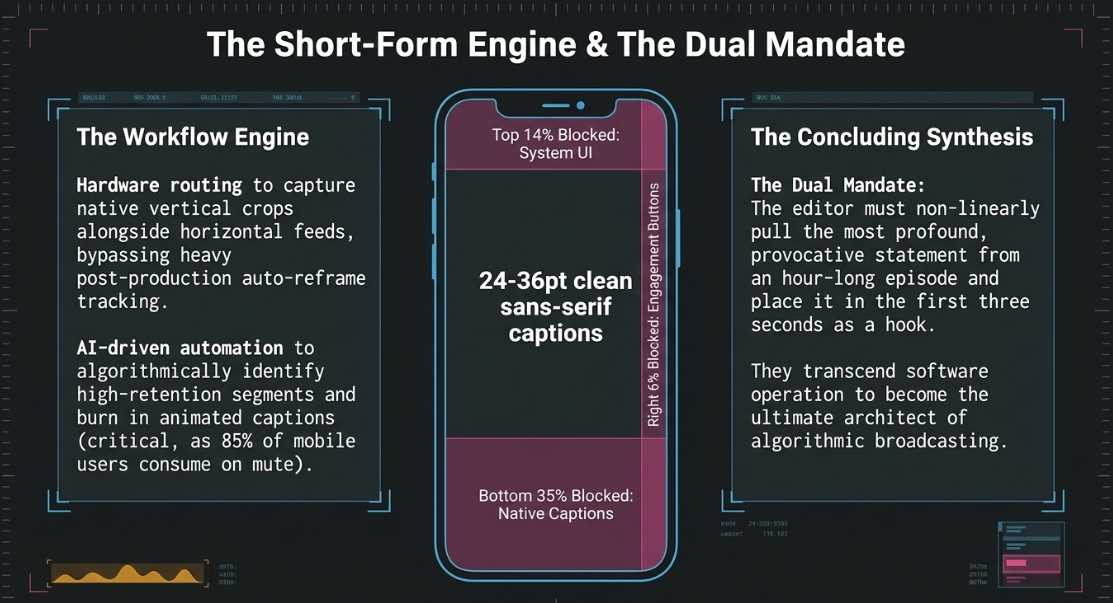
The strategy for generating viral short-form clips requires fundamental architectural reframing. Because the aspect ratio shifts radically from horizontal 16:9 to vertical 9:16, editors must utilize auto-reframe tracking algorithms or painstaking manual panning to keep the primary speaking subject centered in the frame.3 To bypass this heavy post-production burden, forward-thinking creators utilize hardware/software solutions, such as Ecamm's Dual Mode or Riverside's advanced routing, to simultaneously record a native, intentional vertical crop directly alongside the horizontal feed during the live production.61
Furthermore, the narrative of the clip must be aggressively restructured. The editor must construct a powerful "hook"—the most provocative, controversial, or interesting statement of the entire hour-long episode—and place it within the absolute first three seconds of the video to arrest the viewer's rapid scrolling behavior.64 This often requires non-linear restructuring, pulling a profound concluding thought to the front of the timeline to serve as the hook.66 To exponentially expedite this tedious process, AI-driven automation tools (e.g., OpusClip, Riverside AI) are increasingly deployed. These systems algorithmically analyze the transcript to identify high-retention segments, automatically execute the 9:16 crop, insert relevant AI-generated B-roll, and burn in animated, high-contrast captions.3
The inclusion of animated captions is absolutely paramount for vertical media, as research indicates up to 85% of mobile users consume short-form video on mute; professional captions have been shown to increase video completion rates by up to 40%.3 When formatting these graphical lower thirds and captions, editors must adhere to strict platform "Safe Zones" to prevent critical text from being permanently obscured by the application's native interface buttons.
The typography for these captions must be instantly readable, utilizing clean sans-serif fonts (like Helvetica Neue or Open Sans) sized between 24 and 36pt, and maintaining a strict contrast ratio of at least 4.5:1 (e.g., bright white text heavily shadowed or placed on a solid black bounding box).70
By successfully mastering intricate asset organization, advanced multi-cam spatial mathematics, psychological pacing methodologies, aggressive technical signal repair, and the complex telemetry of final digital distribution, the podcast video editor transcends the role of a simple software operator. They evolve into a highly specialized video engineer, ensuring the podcast consistently meets the rigorous, unforgiving quality standards of the modern digital broadcasting ecosystem.
Works cited
Video Podcast Editing Guide: Master the Essentials in 2026 ..., accessed May 7, 2026, https://podcastmonkey.co/blogs/news/video-podcast-editing
The 22 Best Video Podcast Editing Tools (2025) - Podsqueeze, accessed May 7, 2026, https://podsqueeze.com/blog/video-editing-tools-for-podcasters/
The Ultimate Guide to Video Podcast Software - OpusClip Blog, accessed May 7, 2026, https://www.opus.pro/blog/the-ultimate-guide-to-video-podcast-software
Video Podcast Editing: A Step-By-Step Guide - YouTube, accessed May 7, 2026, https://www.youtube.com/watch?v=NHS6xGui9k4
What software does everybody use post-production? : r/podcasting - Reddit, accessed May 7, 2026, https://www.reddit.com/r/podcasting/comments/1pu4j11/what_software_does_everybody_use_postproduction/
Podcast Editing Workflow 2025: A Simple Guide to Clean Studio ..., accessed May 7, 2026, https://www.podcastvideos.com/articles/podcast-editing-workflow-2025/
How to edit a podcast: a complete guide for 2025 | LucidLink, accessed May 7, 2026, https://www.lucidlink.com/blog/podcast-editing
How much can you scale/zoom in a 4K footage in a 4K timeline. Note client requires a 4K export. I just want to know if there's a holy grail/magic percentage scale before losing quality. Or do I just eye it out? : r/editors - Reddit, accessed May 7, 2026, https://www.reddit.com/r/editors/comments/132idit/how_much_can_you_scalezoom_in_a_4k_footage_in_a/
Punching in 4k footage on a 4k timeline vs. 1080p timeline - what's the difference? : r/editors - Reddit, accessed May 7, 2026, https://www.reddit.com/r/editors/comments/krvtyx/punching_in_4k_footage_on_a_4k_timeline_vs_1080p/
How much can you zoom in on 4K footage in a 1080P timeline? - Adobe Premiere Pro, accessed May 7, 2026, https://creativecow.net/forums/thread/how-much-can-you-zoom-in-on-4k-footage-in-a-1080p/
Best way to create a Synched Podcast out of this? Multi Camera Sequence? - Reddit, accessed May 7, 2026, https://www.reddit.com/r/premiere/comments/1jhba29/best_way_to_create_a_synched_podcast_out_of_this/
Edit Using Multicam Sequences for Video Podcasts | Video Foundations Challenge, accessed May 7, 2026, https://www.youtube.com/watch?v=FkiRo8CGAy8
Learn to Synchronize Multiple Camera Podcast Editing manually on Premiere Pro- NO MULTICAM - YouTube, accessed May 7, 2026, https://www.youtube.com/watch?v=c8-miBb78-k
Your Brain Is Sabotaging Your Podcast (Here's How to Fight Back) - YouTube, accessed May 7, 2026, https://www.youtube.com/watch?v=Kq4wpgdvYc0
ELI5: Why do interviewers abrubtly cut off their subjects even with abundant video storage and editing options nowadays? - Reddit, accessed May 7, 2026, https://www.reddit.com/r/explainlikeimfive/comments/1ahyl04/eli5_why_do_interviewers_abrubtly_cut_off_their/
Speaking of Psychology: Why our attention spans are shrinking, with Gloria Mark, PhD, accessed May 7, 2026, https://www.apa.org/news/podcasts/speaking-of-psychology/attention-spans
Interrupting: a powerful tool for podcast hosts | by Saron Yitbarek | Medium, accessed May 7, 2026, https://medium.com/@saronyitbarek/interrupting-a-powerful-tool-for-podcast-hosts-31eb65061dca
30-degree rule - Wikipedia, accessed May 7, 2026, https://en.wikipedia.org/wiki/30-degree_rule
30 degree rule - Filmmakers Academy, accessed May 7, 2026, https://www.filmmakersacademy.com/glossary/30-degree-rule/
Prevent Jarring Edits using the 30° Degree Rule - YouTube, accessed May 7, 2026, https://www.youtube.com/watch?v=Sud_wMH7L18
The 30 Degree Rule in Filmmaking | Kaicreative | Tips - YouTube, accessed May 7, 2026, https://www.youtube.com/watch?v=1K8EUc98VoQ
J cuts vs L cuts examples in video editing - Adobe, accessed May 7, 2026, https://www.adobe.com/africa/creativecloud/video/discover/j-cut-and-I-cut.html
Smoother and More Cinematic L-cuts and J-cuts in Video Editing - Boris FX, accessed May 7, 2026, https://borisfx.com/blog/l-and-j-cuts-smoother-more-cinematic/
J Cuts & L Cuts Explained "The Editing Technique That Makes Videos Flow" - YouTube, accessed May 7, 2026, https://www.youtube.com/watch?v=wIw9CA-M0Ic
How to Edit Video with the J-Cut and L-Cut - PAVILION | DINFOS Online Learning, accessed May 7, 2026, https://pavilion.dinfos.edu/How-To/Article/2286253/how-to-edit-video-with-the-j-cut-and-l-cut/
What is B-Roll? How to Use B-Roll in Interviews & Documentaries - NearStream, accessed May 7, 2026, https://www.nearstream.us/blog/ultimate-guide-to-b-roll-video-footage-in-interviews-documentaries
You NEED B-Roll in your Interview Videos! - YouTube, accessed May 7, 2026, https://www.youtube.com/watch?v=QiYTjUiwIkU
B-Roll: The Secret Sauce of Any Great Video - TechSmith, accessed May 7, 2026, https://www.techsmith.com/blog/b-roll-secret-sauce-great-video/
Nested Sequences Explained: The Game-Changer Every Editor Needs - YouTube, accessed May 7, 2026, https://www.youtube.com/watch?v=3UfHm_uHbmE
Nesting vs Multicam Questions : r/premiere - Reddit, accessed May 7, 2026, https://www.reddit.com/r/premiere/comments/1ruhuc9/nesting_vs_multicam_questions/
View topic - Better multicam flattening options. - Blackmagic Forum, accessed May 7, 2026, https://forum.blackmagicdesign.com/viewtopic.php?uid=16&f=33&t=185302&start=0
Ultimate Video Podcast Setup For 2025 - Beginner To Advanced - YouTube, accessed May 7, 2026, https://www.youtube.com/watch?v=7ZcSOMcDG10
My Podcast Recording and Mixing Signal Chain from Start to Finish (2023) - YouTube, accessed May 7, 2026, https://www.youtube.com/watch?v=keahw7qT-K0
Fixing phase issues - Sonarworks Blog, accessed May 7, 2026, https://www.sonarworks.com/blog/learn/fixing-phase-issues
8 Tips for Fixing Phase Problems in your Mix | Blog - Waves Audio, accessed May 7, 2026, https://www.waves.com/tips-for-fixing-phase-problems-in-your-mix
What is Out of Phase Audio and How to Fix it : r/WeAreTheMusicMakers - Reddit, accessed May 7, 2026, https://www.reddit.com/r/WeAreTheMusicMakers/comments/mrfng3/what_is_out_of_phase_audio_and_how_to_fix_it/
HOW TO FIX PHASE ISSUES IN YOUR RECORDINGS - YouTube, accessed May 7, 2026, https://www.youtube.com/watch?v=UbXLABUxyDg
How to Fix 8 Common Podcast Audio Issues - iZotope, accessed May 7, 2026, https://www.izotope.com/en/learn/how-to-fix-8-common-podcast-audio-issues
A Guide to Audio Processing and FX For Podcasting (US) - RØDE, accessed May 7, 2026, https://rode.com/en-us/about/news-info/a-guide-to-audio-processing-and-fx-for-podcasting
Understanding and Reducing the Moiré Effect on LED Displays - Insane Impact, accessed May 7, 2026, https://www.insaneimpact.com/blog/how-to-remove-the-moire-effect-from-led-display
How to Remove Moire from Video Projected on LED Screen in DaVinci Resolve (Studio 17) | 4 Methods - YouTube, accessed May 7, 2026, https://www.youtube.com/watch?v=NumMJPJ8Yb8
Fixing Moire in Video: A Beginner's Guide | Morie Blog, accessed May 7, 2026, https://removemoire.com/blog/fix-moire-in-video
Dealing with Flicker in Video (Flicker Free Shutter Speeds) - YouTube, accessed May 7, 2026, https://www.youtube.com/watch?v=QM_183Ppwcc
Flicker mitigation for video? : r/microscopy - Reddit, accessed May 7, 2026, https://www.reddit.com/r/microscopy/comments/1sbcmcz/flicker_mitigation_for_video/
How to reduce camera flickering (e.g. horizontal banding, partial or total discoloration of an image) - Sony Asia Pacific, accessed May 7, 2026, https://www.sony-asia.com/electronics/support/articles/00122281
Fixing Flickering in Camera Module Footage: A Comprehensive Guide, accessed May 7, 2026, https://www.aiusbcam.com/news/774586599429210209.html
How to fix FLICKERING FOOTAGE once and for all in post! - YouTube, accessed May 7, 2026, https://www.youtube.com/watch?v=ufCjOjKyIYc
Video File Naming Convention & Best Practices - MASV, accessed May 7, 2026, https://massive.io/file-transfer/video-file-naming-convention/
Video File Naming Best Practices for a Smooth Post-Production Workflow - Avid, accessed May 7, 2026, https://www.avid.com/resource-center/video-file-naming-best-practices-for-a-smooth-post-production-workflow
Video File Folder Structure [Editor's Naming Conventions & Best Practices], accessed May 7, 2026, https://www.dockbuddy.app/en/blog/video-file-folder-structure
Optimal file naming and folder structure for video projects - Mediacloud.ai, accessed May 7, 2026, https://www.mediacloud.ai/whats-the-best-way-to-structure-and-name-files-for-creative-projects/
The correct way to name files : r/editors - Reddit, accessed May 7, 2026, https://www.reddit.com/r/editors/comments/1ne6taq/the_correct_way_to_name_files/
8 Best Video Review Platforms for Teams in 2026 | Fastio, accessed May 7, 2026, https://fast.io/resources/video-review-platform/
Best Video Review Software for Production Teams (2026) - Shade, accessed May 7, 2026, https://shade.inc/blog/best-video-review-for-video-production
10 Best Video Sharing Tools for Agencies (2026 Comparison) - Cutsio, accessed May 7, 2026, https://cutsio.com/blog/10-best-video-sharing-tools-for-agencies
Dropbox Replay vs. Frame.io: Which is Best?, accessed May 7, 2026, https://www.dropbox.com/compare/frame-io
I tested 8 Frame.io alternatives for media review – here's what I found. : r/editors - Reddit, accessed May 7, 2026, https://www.reddit.com/r/editors/comments/1jvvvm8/i_tested_8_frameio_alternatives_for_media_review/
Tutorials on Broadcast Safe : r/colorists - Reddit, accessed May 7, 2026, https://www.reddit.com/r/colorists/comments/1hetkhz/tutorials_on_broadcast_safe/
How to be Broadcast Safe with Boris FX Continuum for Avid Media Composer - YouTube, accessed May 7, 2026, https://www.youtube.com/watch?v=uHU2ckAQp2Q
Video specs - Spotify Support, accessed May 7, 2026, https://support.spotify.com/us/creators/article/video-specs/
Why and how to start a video podcast on Spotify, accessed May 7, 2026, https://creators.spotify.com/resources/create/how-to-start-a-video-podcast-on-spotify
4K 60fps for YouTube - Best export settings to use in 2025? - Adobe Community, accessed May 7, 2026, https://community.adobe.com/questions-729/4k-60fps-for-youtube-best-export-settings-to-use-in-2025-1419874
The PERFECT DaVinci Resolve Export Settings for YouTube 4K & HD, accessed May 7, 2026, https://www.youtube.com/watch?v=RDrsXa75Ijk
Record Your Podcast + Clips at the Same Time (No Extra Work) - YouTube, accessed May 7, 2026, https://www.youtube.com/watch?v=RVzzXqA4Fy8
Podcast Growth Tactics That Work in 2025 — Hooks, Clips, and Guests that Convert | Live Caller - YouTube, accessed May 7, 2026, https://www.youtube.com/watch?v=jOc8x33SMpc
The Ultimate Guide For Creating Podcast Clips That Go Viral On Shorts In 2025 - Fame.so, accessed May 7, 2026, https://www.fame.so/post/ultimate-podcast-clip-guide
Your First Podcast Livestream: 3 Setups (Solo to Multi-Cam) - YouTube, accessed May 7, 2026, https://www.youtube.com/watch?v=gsYS4RtxEos
Edit Your Podcast in Under 1 Hour Using AI [My Full Workflow] - YouTube, accessed May 7, 2026, https://www.youtube.com/watch?v=3Hj_PXC6bnU
Video Podcast Editing Made Simple: Full Tutorial for Beginners - YouTube, accessed May 7, 2026, https://www.youtube.com/watch?v=lo2T9eMFKNA
Best Practices for Video Caption Design: Font, Color, and Placement Tips - OpusClip Blog, accessed May 7, 2026, https://www.opus.pro/blog/video-caption-design-placement
Stay Within Safe Zones – TikTok, Facebook and Instagram Reels/Stories, accessed May 7, 2026, https://houseofmarketers.com/guide-to-safe-zones-tiktok-facebook-instagram-stories-reels/
What Is a Lower Third? A Creator's Guide for 2026 - Klap, accessed May 7, 2026, https://klap.app/blog/what-is-a-lower-third











