
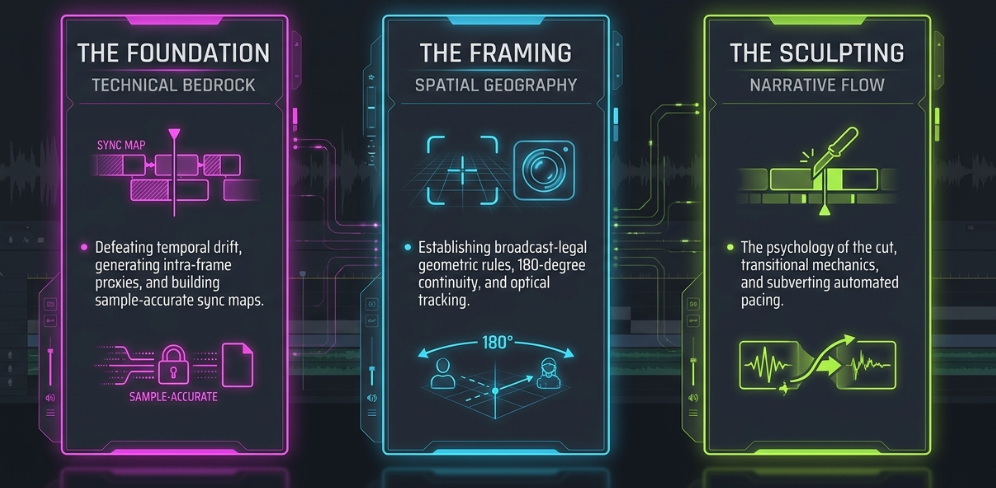
The transition of digital podcasts from simple, spoken-word audio files into highly engineered, multi-camera visual broadcasts has aligned the technical requirements of the medium with traditional television and cinema engineering1. The modern post-production pipeline demands a comprehensive understanding of non-linear editing (NLE) mechanics, strict spatial and continuity rules, frame-accurate synchronization architectures, and high-performance digital asset management (DAM)1.
The technical framework of post-production is divided into two primary disciplines: narrative cutting and color finishing1. This report analyzes Phase One—the cutting workflow—focusing on the stages of the editing process, the spatial and psychological taxonomy of the footage, and the technical protocols required to establish a seamless, broadcast-legal narrative structure1.
Technical Framework of the Post-Production Editorial Pipeline
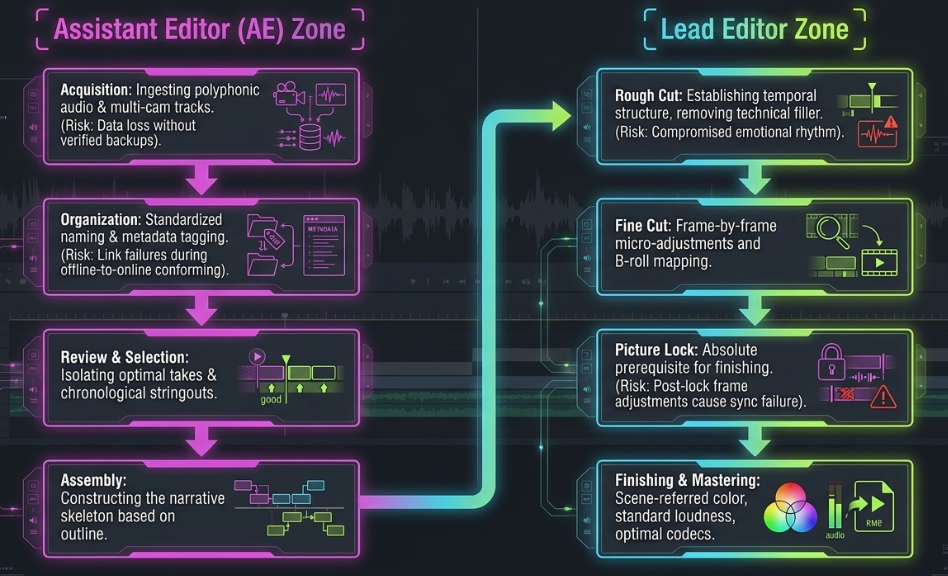
An editorial pipeline requires a linear, systematic workflow to manage high-volume media assets and prevent technical bottlenecks1. A failure to execute proper organization during the initial stages of post-production introduces cascading inefficiencies that disrupt fine cutting, color grading, and final mastering1.
To maintain operational efficiency throughout this pipeline, the role of the Assistant Editor (AE) is critical1. The AE manages the technical stages—including acquisition, organization, transcoding, synchronization, and proxy generation—ensuring the lead editor receives an error-free timeline optimized for narrative sculpting1.
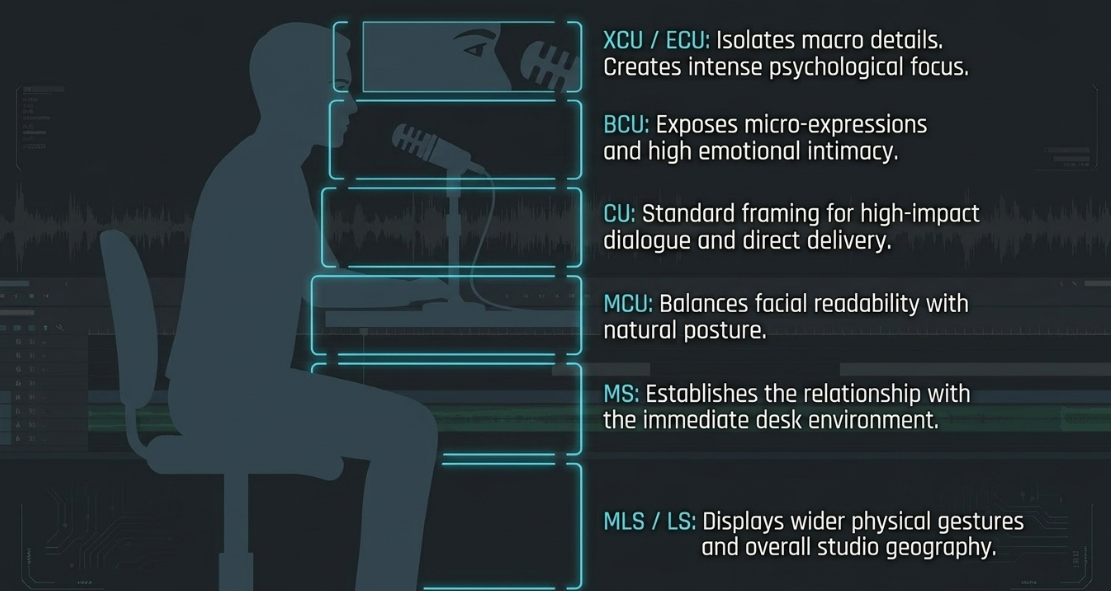
Spatial Taxonomy and Psychological Functions of Studio Shot Sizes
A professional multi-camera video podcast relies on a standardized grammar of shot sizes to direct viewer attention, control conversational pacing, and establish the spatial geography of the studio1.
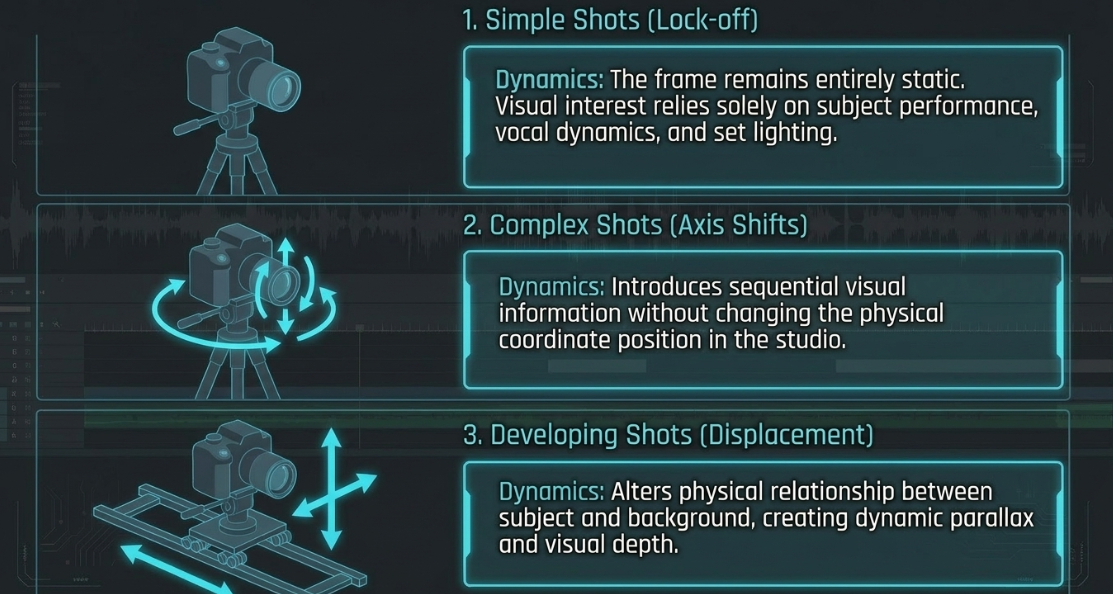
Technical Classifications of Shot Complexity
Beyond shot size, video engineers analyze raw footage based on mechanical and optical complexity during production1. This categorization dictates the technical parameters of the edit, influencing NLE system requirements, tracking, and composition matching1.
Technical and Continuity Criteria for Footage Evaluation
When reviewing multi-camera footage, the video engineer must apply strict geometric, technical, and spatial standards to maintain a professional broadcast aesthetic1. Shots that fail to meet these parameters must be corrected or flagged for omission1.
Total familiarity with the raw media is essential for a professional edit1. An editor cannot construct a cohesive narrative architecture without cataloging every available frame of footage1. This thorough knowledge allows the editor to locate fleeting reaction shots, insert cuts, or silent gestures that can salvage a disjointed sequence or enhance a critical conversational beat1. Ultimately, mastery of shot sizes, complexity levels, and continuity rules prevents the viewer from noticing the artificial construction of the video, seamlessly blending separate moments in time into a continuous visual narrative1.
Taxonomy of Non-Linear Edit Categories
The grammar of film and video editing relies on fundamental transition mechanics to guide the viewer through time and space1. These transitions serve as the connective tissue of the edit, allowing the engineer to stitch together disparate conversational concepts1.
NLE Metadata Management and Multi-Camera Synchronization
Managing multi-camera setups with numerous media files requires standardized organizational workflows within the NLE17. Before beginning an edit, the media must be organized to prevent database errors and playback performance issues4.
1. Ingest and Metadata Labeling
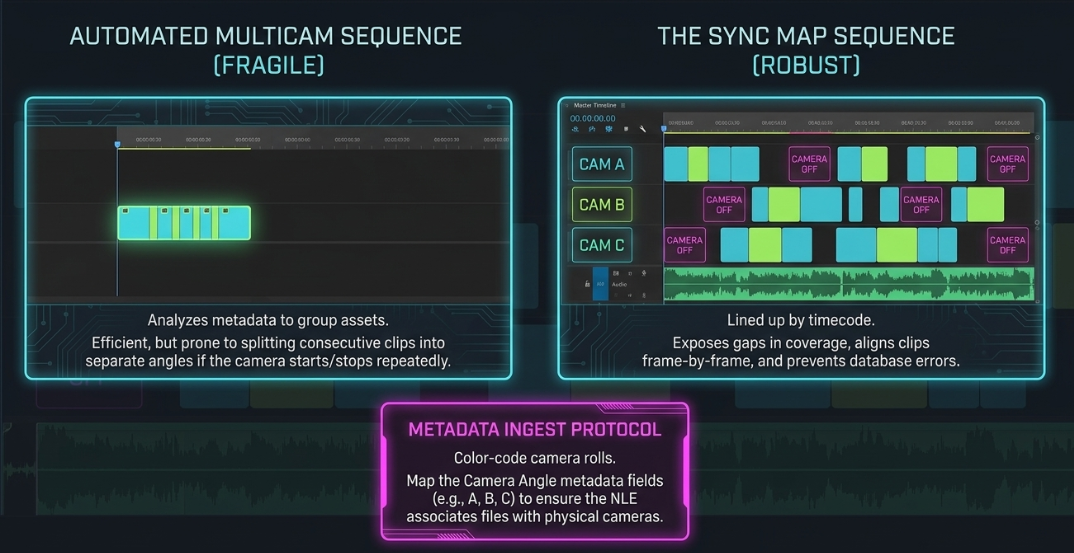
The organization process begins with color-coding raw camera rolls to establish a clear visual structure17. After importing assets, the editor can use keyboard shortcuts such as "Bin from Selection" (Shift + Command + B by default in Premiere Pro) to group footage into structured bins17.
To organize the assets, the editor can right-click the project bin columns and add the "Video Usage" and "Camera Angle" metadata fields17. By selecting all clips from a specific camera and typing a corresponding identifier (e.g., "A", "B", "C") in the "Camera Angle" field, the NLE can associate these files with their respective physical cameras17.
[ Project Bin ]
|-- Bin: Cam_A (Labeled Purple) -> Metadata: Camera Angle "A"
|-- Bin: Cam_B (Labeled Blue) -> Metadata: Camera Angle "B"
|-- Bin: External_Audio -> Metadata: Track Assignment "Mix"
2. Sync Map Architectures vs. Automated Multicam Sequences
To synchronize a multi-camera shoot, the editor can choose between two primary methods17:
Automated Multicam Sequence: The NLE analyzes clip metadata and groups the assets into a single multicam clip21. While efficient, this method can treat consecutive clips from the same camera as separate angles if the camera was started and stopped repeatedly during recording18.
Sync Map Sequence: A single master timeline where all video and audio files from a shoot are lined up based on timecode17. By selecting all assets, choosing "Create Multi-Camera Source Sequence," ticking "Create Single Multi-Camera Source Sequence," and setting track assignment to "Camera Angle," the NLE builds a structured timeline where each physical camera has its own dedicated video track17.
This sync map allows the editor to check the daily shooting logs, align clips frame-by-frame, and identify gaps in coverage by inserting placeholder text layers (e.g., "Camera Off") between takes17.
3. Waveform Sync Calibration and Track Slipping
When shoots lack shared hardware timecode, the editor must rely on audio waveform analysis to synchronize the tracks4. In DaVinci Resolve or Premiere Pro, clips can be grouped into a multicam clip and opened as a sequence to reveal the sync map tracks21.
If the automated sync contains sub-frame offsets due to internal clock drift, the editor can manually slip the tracks21. By zooming into the waveforms of a synchronized sound source (such as a slate clap or a hand clap), the editor can drag individual tracks left or right to align the audio waveforms21.
4. Sample-Accurate Editing with Audio Time Units
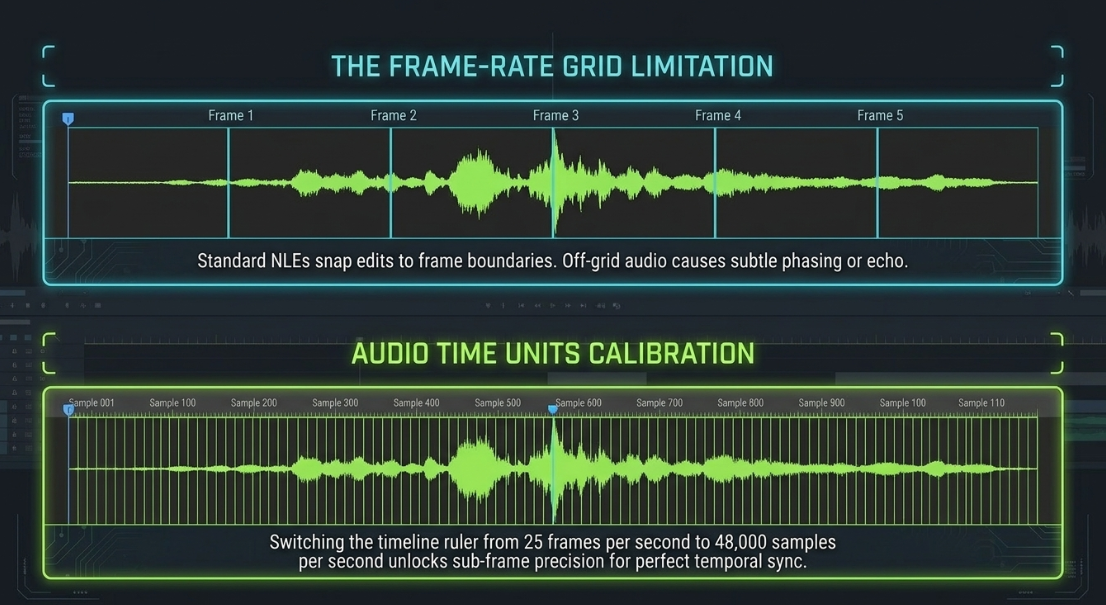
Standard NLE timelines restrict edits to frame boundaries (e.g., 1/25 or 1/30 of a second)24. When aligning external audio tracks, this frame-rate grid can prevent perfect synchronization, resulting in a subtle echo or phasing effect24.
To bypass this limitation, the editor can click the program monitor wrench icon and select "Show Audio Time Units"24. This changes the timeline ruler from frames to individual audio samples (e.g., 48,000 samples per second)24. The editor can then slip the audio track with sub-frame precision, ensuring absolute alignment with the video scratch tracks18.
Technical Mitigation of Variable Frame Rates and Audio Drift
Mismatches in recording formats can introduce visual and audio sync issues during the edit25. Resolving these anomalies requires adjusting variable frame rates and reconciling mismatched sample rates25.
1. Reconciling Variable Frame Rates (VFR)
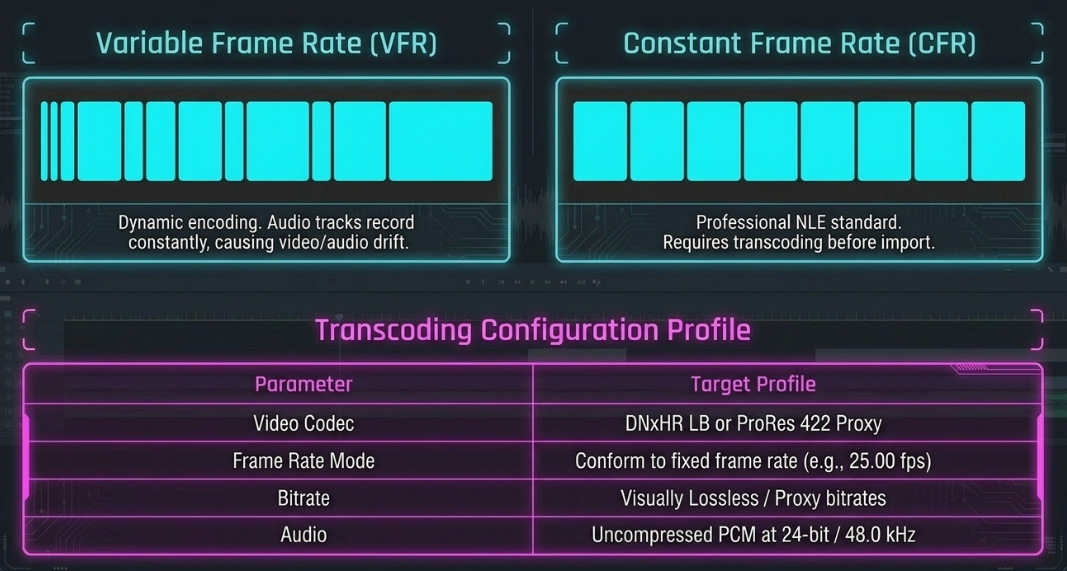
Many consumer-grade capture devices, smartphones, and screen-recording programs (e.g., OBS) capture footage using Variable Frame Rates to reduce file sizes and processing overhead25. Instead of recording a fixed number of frames per second, the encoder dynamically shifts the frame rate based on the visual complexity of the scene25.
Professional NLEs are designed to process Constant Frame Rates (CFR)25. When a VFR file is imported, the NLE attempts to map the variable frames onto a fixed timeline grid25. Because the audio track continues to record at a constant speed, the audio and video gradually drift apart over time25. To fix this issue, VFR footage must be transcoded to a Constant Frame Rate before importing it into the project25.
2. Reconciling Sample-Rate Mismatches and Clock Drift
Audio signals are digitized by taking periodic snapshots of the sound wave27. To prevent digital aliasing, the sample rate must be at least double the upper limit of human hearing, leading to the establishment of two common standards34:
44.1 kHz: The standard for music CDs and consumer audio platforms27.
48.0 kHz: The professional standard for film, television, and video production27.
If a field recorder captures audio at 44.1 kHz while the video cameras are set to 48.0 kHz, placing both files on a 48.0 kHz timeline can cause the external audio to play at an incorrect speed27. This mismatch leads to a progressive sync drift over time27.
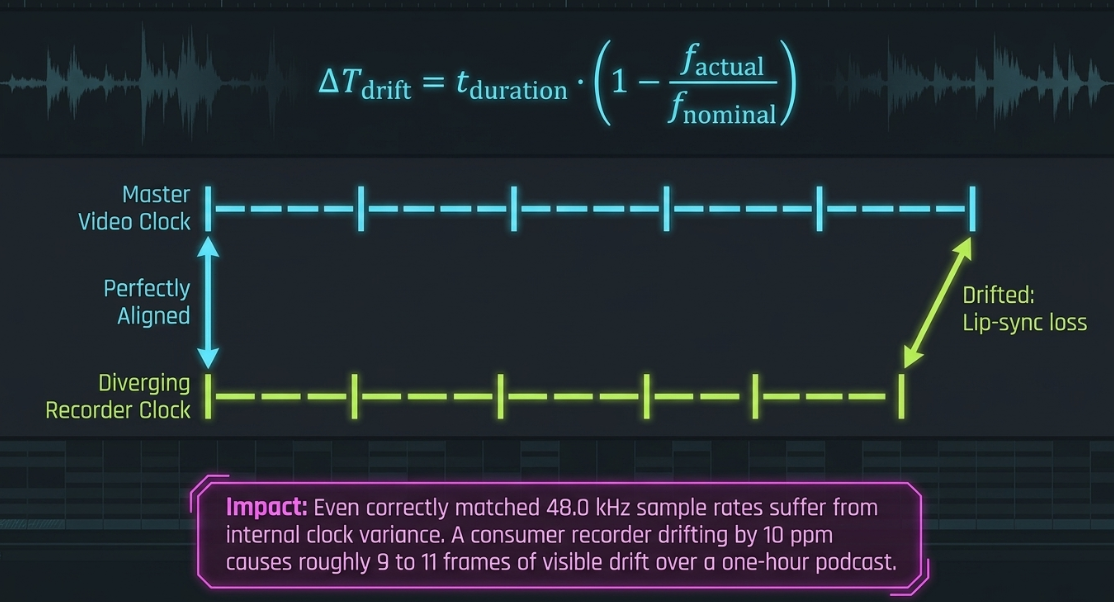
Even when sample rates are correctly matched, independent recording devices will exhibit clock drift because their internal crystal oscillators operate at slightly different speeds24. This drift accumulates over long recordings, leading to noticeable lip-sync errors27.
The mathematical relationship governing cumulative drift is expressed as:

For example, a consumer-grade recorder with a clock variance of 


Linear Temporal Audio Drift:
Timeline: |----|----|----|----|----|----|----|----| (Master Video Clock)
Audio: |---|---|---|---|---|---|---|---| (Diverging Recorder Clock)
^ ^
Aligned Drifted (Lip-sync loss)
To resolve clock and sample-rate drift in post-production, editors can apply the following corrective measures:
Manual Splice and Nudge: At regular intervals (e.g., every 30 to 40 minutes), the editor cuts the audio track during a moment of silence and nudges the remaining segment to realign it with the video reference24.
Fairlight Elastic Wave / Time Stretch: In the audio workspace, the editor can apply time-stretching tools to compress or expand the audio track to match the video timeline without altering the pitch of the speakers' voices27.
Intermediate Proxy Workflows and Performance Optimization
High-resolution video formats (such as 4K RAW or high-bitrate Log files) utilize complex temporal codecs that require significant processing power to decode during real-time editing1. To maintain smooth playback and accurate editing control, professional post-production workflows utilize intermediate proxy files19.
The Pitfalls of Long-GOP Proxy Codecs
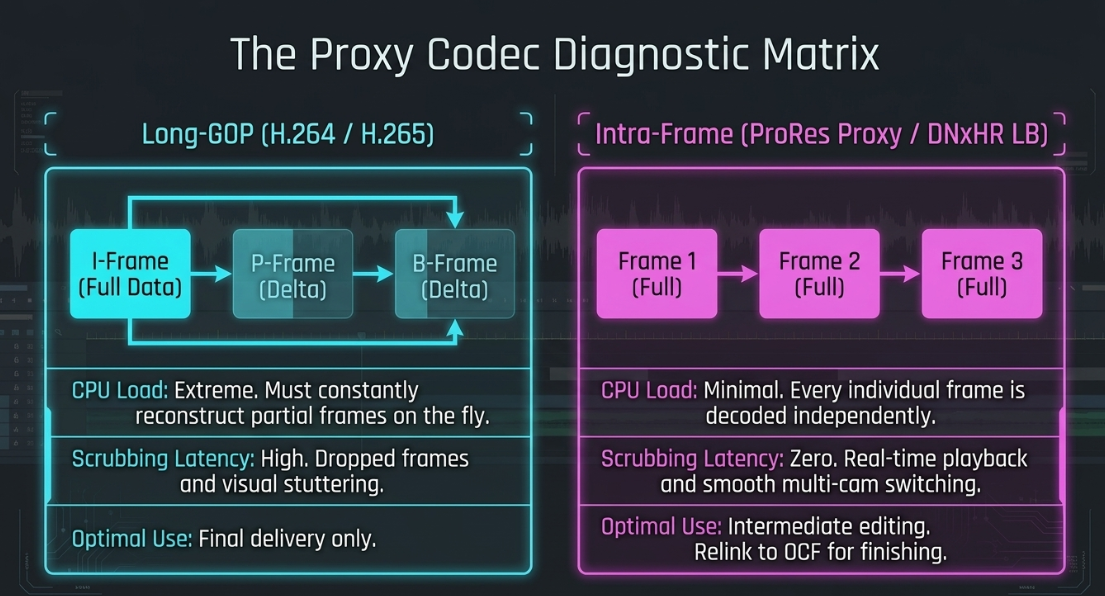
Using delivery codecs like H.264 or H.265 for editing proxies is a common post-production error39. These formats utilize long-GOP (Group of Pictures) temporal compression to minimize file sizes33. This compression method does not record every individual frame of video39. Instead, it records a complete frame (an Intra-frame or I-frame) and then calculates only the changes that occur in the subsequent frames (Predicted or Bi-directional frames, known as P-frames and B-frames)39.
When scrubbing the timeline, performing quick cuts, or switching camera angles in a multicam sequence, the computer’s CPU must constantly decode and reconstruct these partial frames39. This processing overhead results in lag, dropped frames, and visual stuttering19.
Long-GOP Temporal Compression (H.264 / H.265):
[ I-Frame (Full Data) ] ---> [ P-Frame (Delta Only) ] ---> [ B-Frame (Delta Only) ]
*Requires intense CPU decoding to reconstruct frames on the fly.*
Intra-Frame Editing Compression (ProRes Proxy / DNxHR LB):
[ Frame 1 (Full Data) ] ---> [ Frame 2 (Full Data) ] ---> [ Frame 3 (Full Data) ]
*Each frame is decoded independently, ensuring smooth scrubbing and playback.*
Selecting Professional Intra-Frame Proxy Codecs
To optimize editing performance, post-production workflows use intra-frame intermediate codecs that encode every frame independently33.
Apple ProRes 422 Proxy: Highly optimized for macOS environments and Apple hardware, providing smooth decoding and real-time playback at low bitrates19.
Avid DNxHR LB (Low Bandwidth): A highly efficient, cross-platform codec optimized for Windows and collaborative post-production environments33.
By transcoding high-resolution source files into lightweight (e.g., 1080p or 720p) ProRes or DNxHR proxies, editors can maintain smooth playback and precise control over multicam timelines19. Once the edit is finalized, the NLE relinks the timeline to the original camera files (OCF) for color grading, finishing, and final export1.
Automated Multi-Camera Switching and Dialogue Pacing
Modern post-production pipelines often use automation tools and plugins (such as AutoPod, Cutback, and Premiere Assistant) to accelerate the initial multi-camera rough cut10. However, relying solely on automated tools can negatively affect the visual pacing and emotional flow of a podcast10.
1. Volume-Threshold Switching vs. Context-Aware AI
Most basic automated switching tools rely on simple volume-threshold detection42. When a speaker's microphone input exceeds a set decibel level, the software automatically cuts to that camera angle42. This volume-based approach introduces several editing issues:
Crosstalk and Interruptions: If a listener laughs, coughs, or briefly agrees (e.g., saying "yeah"), the software will instantly cut to them, creating a jarring, rapid-fire visual style16.
The Reaction Shot Deficit: Volume-based tools can only switch to the active speaker16. They cannot identify key visual reactions from the listener—such as an eye roll, a nod of agreement, or a look of surprise—which are essential for capturing the emotional nuance of a conversation11.
More advanced AI tools (such as Cutback) analyze facial expressions and conversational context to produce more natural, visually balanced cuts42. However, these tools still require manual adjustment by a professional editor to establish proper conversational rhythm10.
2. Establishing Pacing with J-Cuts and L-Cuts
To create a natural visual flow, editors use split edits—such as J-cuts and L-cuts—to offset the video and audio edit points4.
The J-Cut (Audio Pre-Lap): The audio of the upcoming speaker plays before the video cut occurs4. The viewer hears the new speaker’s voice while still looking at the person who was just talking16. This technique mirrors natural face-to-face interaction, where a listener's ears adjust to a new voice before they turn their head to look at the speaker16.
The L-Cut (Video Lead): The video transitions to a new shot while the audio from the previous shot continues to play underneath4. This technique is highly effective for showing reaction shots, allowing the viewer to observe a speaker's facial expressions as another person continues to speak8.
Using a combination of automated rough-cutting tools10 and manual split-edit refinement4 allows post-production teams to save significant time on the initial edit10 while preserving the artistic pacing, visual continuity, and emotional depth of the conversation10.
Works cited
Video Engineering in a Professional Podcast Post-Production - Finchley Studios, https://www.finchley.co.uk/finchley-learning/visual-podcast/video-engineering-in-a-professional-podcast-post-production
Video Execution of a Professional Podcast - Finchley Studios, https://www.finchley.co.uk/finchley-learning/visual-podcast/video-execution-of-a-professional-podcast
Frequently Asked Questions | PBCore Metadata Standard, https://pbcore.org/faqs
Video Podcast Editing Guide: Master the Essentials in 2026, https://podcastmonkey.co/blogs/news/video-podcast-editing
Mastering Podcast Editing and Post-Production: Your Ultimate Guide - Podigy, https://www.podigy.co/mastering_podcast_editing_and_post-production_your_ultimate_guide
Podcast Post-Production: Why It Matters More Than You Think - Flexwork Studios, https://flexworkstudios.com/podcast-post-production/
Video File Naming Convention & Best Practices - MASV, https://massive.io/file-transfer/video-file-naming-convention/
Fine cuts: Making your video screen-ready - Descript, https://www.descript.com/blog/article/fine-cuts-making-your-video-screen-ready
Video Post Production Workflow: Our Ultimate Guide (Step-by-Step) - Simon Says AI, https://www.simonsaysai.com/blog/video-post-production-workflow
Video Editing for Podcasters — Multi-Cam, AutoPod, Repurposing | Mark Studios, https://www.markstudios.com/for-podcasters
Building a Simple Multicam Podcasting Kit - CVP.com, https://cvp.com/resources/articles/insights/building-a-simple-multicam-podcasting-kit
What Goes Into a Professional Podcast Production Workflow? - Red 11 Media, https://www.red11media.com/blog/-professional-podcast-production-workflow
Does anyone here use Descript to edit a multicam video podcast successfully? What's your work flow? - Reddit, https://www.reddit.com/r/Descript/comments/1qz56ea/does_anyone_here_use_descript_to_edit_a_multicam/
Audio Engineering in a Professional Podcast Post-Production - Finchley Studios, https://www.finchley.co.uk/finchley-learning/visual-podcast/audio-engineering-in-a-professional-podcast-post-production
DISCUSS: Log color spaces now available in interpret footage - Adobe Community, https://community.adobe.com/announcements-732/discuss-log-color-spaces-now-available-in-interpret-footage-312912/index1.html
An AI does your Multi-Cam Podcast edit (like Autopod), except you give it rules - Reddit, https://www.reddit.com/r/premiere/comments/160lm0i/an_ai_does_your_multicam_podcast_edit_like/
Creating a MultiCam with Timecode in Premiere Pro, https://www.filmeditingpro.com/creating-a-multicam-with-timecode-in-premiere-pro/
Best way to create a Synched Podcast out of this? Multi Camera Sequence? - Reddit, https://www.reddit.com/r/premiere/comments/1jhba29/best_way_to_create_a_synched_podcast_out_of_this/
The Ultimate Guide to Proxy Workflows for Enterprise Teams - MASV, https://massive.io/workflow/guide-to-proxy-workflows/
Premiere Pro - Create Multicam From Angles with multiple clips / batch edit metadata : r/editors - Reddit, https://www.reddit.com/r/editors/comments/d386l4/premiere_pro_create_multicam_from_angles_with/
Multi-Camera Editing Resyncing Fixing Sync - Blackbird Support, https://support.blackbird.video/support/solutions/articles/44002407022-multi-camera-editing-resyncing-fixing-sync
Multicam Editing in Premiere - Emerson College Technology & Media, https://support.emerson.edu/hc/en-us/articles/21709300593563-Multicam-Editing-in-Premiere
View topic - Multicam + audio sync questions - Blackmagic Forum, https://forum.blackmagicdesign.com/viewtopic.php?f=3&t=223856
Audio recorded at wrong sample rate - Adobe Community, https://community.adobe.com/questions-729/audio-recorded-at-wrong-sample-rate-1354053
Variable frame rate conversion - Insite - Workcast, https://insite.workcast.com/variable-frame-rate-conversion
Why Your Screen Recording Audio is Out of Sync (And How to Fix Audio Drift Forever), https://medium.com/@andrew_best/why-your-screen-recording-audio-is-out-of-sync-and-how-to-fix-audio-drift-forever-a6738c729f52
How to Fix Audio Sync Issues in Video Podcasts (2026 Guide), https://www.podcaststudioglasgow.com/podcast-studio-glasgow-blog/how-to-fix-audio-sync-issues-in-video-podcasts
VFR and CFR - Game Video Production - Endgame Viable, https://endgameviable.com/post/2025/02/game-videos-vfr-and-cfr/
Frame rate - HandBrake Documentation, https://handbrake.fr/docs/en/latest/technical/frame-rates.html
How to fix Variable Frame Rate with h.264 video - Adobe Community, https://community.adobe.com/questions-729/how-to-fix-variable-frame-rate-with-h-264-video-1413041
Converting VFR to CFR with HandBrake - Adobe Community, https://community.adobe.com/questions-729/converting-vfr-to-cfr-with-handbrake-1423110
Will using Handbreak to transcode a variable frame rate video before loading it into premiere pro lower its quality? - Reddit, https://www.reddit.com/r/premiere/comments/sqcghr/will_using_handbreak_to_transcode_a_variable/
How to choose a proxy codec - Video Post-Production Workflow Guide | Frame.io, https://workflow.frame.io/guide/proxy-codecs
Audio Execution for a Professional Podcast - Finchley Studios, https://www.finchley.co.uk/finchley-learning/visual-podcast/audio-execution-for-a-professional-podcast
DNxHR 360p Proxy preset for editing : r/kdenlive - Reddit, https://www.reddit.com/r/kdenlive/comments/ixri5s/dnxhr_360p_proxy_preset_for_editing/
Audio - Video keep going out of sync - DVXuser.com, https://www.dvxuser.com/threads/audio-video-keep-going-out-of-sync.259464/
Sync trouble on podcast audio - tentacle sync? : r/videography - Reddit, https://www.reddit.com/r/videography/comments/1oqgmia/sync_trouble_on_podcast_audio_tentacle_sync/
Audio Video Sync Issue - Adobe Community, https://community.adobe.com/questions-529/audio-video-sync-issue-56968
[HowTo] Speed up your 4k Workflow with Proxies SUPER EASY : r/premiere - Reddit, https://www.reddit.com/r/premiere/comments/b61sb0/howto_speed_up_your_4k_workflow_with_proxies/
Why limit DNxHR codec options for proxy transcoding? - Avid Community, https://community.avid.com/forums/t/203029.aspx
Multicam Podcasts / Studio recordings: the correct angle chosen for the correct speaker | Eddie AI | Your AI assistant video editor, https://help.heyeddie.ai/en/articles/10548843-multicam-podcasts-studio-recordings-the-correct-angle-chosen-for-the-correct-speaker
AI Multicam Podcast Editor for Premiere Pro - Cutback, https://cutback.video/premiere-assistant/features/multicam
10 Must-Know Types of Video Cuts for Every Editor in 2026 - Descript, https://www.descript.com/blog/article/learn-the-10-best-video-cuts-every-pro-editor-should-know














