
The Evolution and Scope of the Video Podcast Engineer
The discipline of podcast production has undergone a fundamental architectural shift over the past decade, transitioning from decentralized, audio-only broadcasts to highly sophisticated, multi-camera digital video productions. This evolution has catalyzed the emergence of a specialized role within the media industry: the Video Podcast Engineer. Operating at the complex intersection of traditional broadcast engineering, digital cinematography, and high-fidelity audio mixing, the video podcast engineer architects workflows that deliver premium visual fidelity without compromising the intimate, audio-first nature of the medium1.
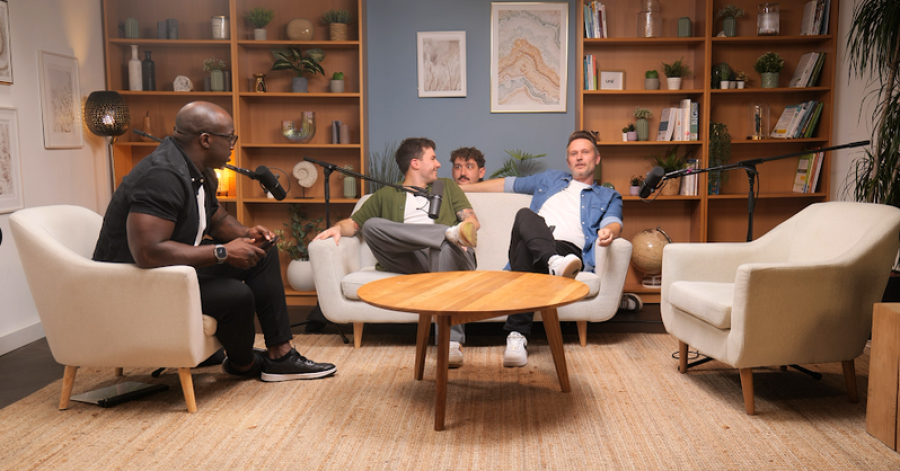
In modern, high-end studio environments, the technical expectations for video podcasts parallel those of broadcast television and commercial filmmaking. Facilities in global media hubs, such as Dean St. Studios, Podshop, and Premiere Podcast Studios in London, deploy infrastructures featuring multiple ultra-high-definition (UHD) cinema cameras, including the Sony FX6, Sony FX9, and Blackmagic Studio Camera 4K Pro G23. These visual assets are paired with broadcast-quality dynamic microphones, such as the Shure SM7B, and sophisticated lighting modifiers from manufacturers like Aputure5. Furthermore, high-end studios are increasingly integrating immersive audio formats, with mixing and mastering performed in dedicated 9.1.4 PMC Dolby Atmos suites3.
For the video engineer, the primary challenge in this environment lies in managing the immense computational and organizational overhead generated by these hardware configurations. A standard two-hour interview recorded with three 4K cinema cameras and four isolated audio tracks yields hundreds of gigabytes of continuous, synchronized data. The post-production phase, specifically the cutting and editing process, demands a rigorously structured methodological approach. If the foundational synchronization protocols are flawed, the subsequent editing stages—from multicam switching and narrative pacing to audio sweetening, color grading, and proxy relinking—will inevitably collapse under the weight of accumulating technical errors8.
The video engineer's core responsibilities span the entirety of the production pipeline. They encompass the ingestion of media, the navigation of complex codecs and container formats, the initial color correction and optimization of footage for digital platforms, the deployment of multicam editing sequences within Non-Linear Editors (NLEs), and the ultimate handoff to specialized audio engineers utilizing Digital Audio Workstations (DAWs) like Avid Pro Tools1. This report exhaustively examines the engineering principles, hardware integrations, and software workflows that define professional video podcast post-production.
Pre-Edit Engineering: The Physics of Synchronization and Drift Management
The absolute prerequisite for editing any multi-camera video podcast is perfect temporal synchronization between all visual and auditory assets. In professional workflows, audio is captured using a "dual-system" methodology. High-fidelity audio is recorded onto a dedicated field recorder or mixer—such as a Sound Devices MixPre or Rodecaster Pro—rather than relying on the highly compressed, low-quality preamplifiers built into the video cameras11. Unifying these disparate, independently generated files within an NLE requires exact temporal alignment. When this alignment fails, engineers experience "drift"—a phenomenon where audio and video progressively lose synchronization over time.
The Mathematics of Audio-Video Drift
Drift is arguably the most pervasive and insidious enemy in podcast post-production. A recording that appears flawlessly synchronized at the one-minute mark may be several seconds out of sync by the sixtieth minute. Engineering a drift-free workflow requires an intimate understanding of the three primary technical failures responsible for temporal divergence: variable frame rates, sample rate mismatches, and hardware clock oscillator deviations.
Variable Frame Rate (VFR) Versus Constant Frame Rate (CFR)
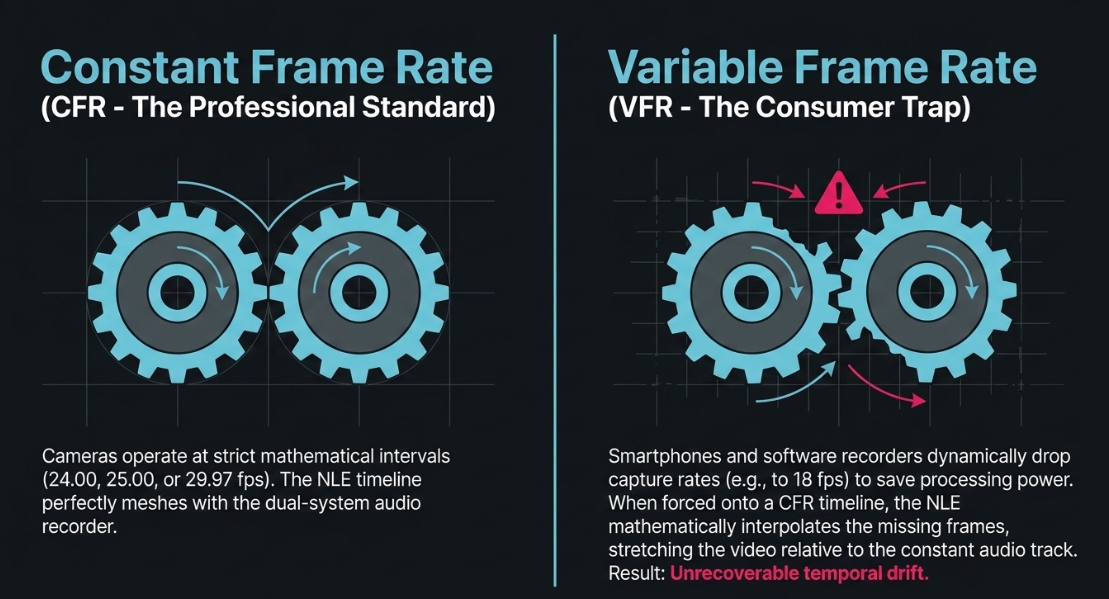
Digital video is fundamentally a sequence of still images played in rapid succession. Professional NLE systems, including Adobe Premiere Pro, DaVinci Resolve, and Apple Final Cut Pro, operate on a strict Constant Frame Rate (CFR) timeline infrastructure11. These systems expect media to conform exactly to standard broadcast intervals, such as 24.00, 25.00, or 29.97 frames per second11.
However, many modern capture devices—most notably smartphones, consumer webcams, and software-based screen recorders—utilize a Variable Frame Rate (VFR) architecture15. VFR systems are designed to conserve processing power and minimize file size by dynamically altering the frame capture rate based on the visual complexity of the scene15. If a podcast guest stops moving, the camera algorithm may drop the capture rate to 18 frames per second, accelerating back to 30 frames per second only when significant motion resumes16.
The separate dual-system audio recorder, however, continues capturing data at a constant, unyielding mathematical rate. When a VFR video file is forced onto a CFR timeline in an NLE, the software attempts to mathematically interpolate the missing frames. This interpolation causes the video timeline to stretch or compress relative to the constant audio track, resulting in severe, progressive drift16.
The definitive engineering solution requires transcoding all VFR footage into a CFR format prior to importing the media into the NLE. Engineers utilize encoding tools, such as HandBrake, to conform the media to a rigid frame interval, mathematically interpolating or discarding frames to create a stable 25.00 fps or 29.97 fps file11. Alternatively, browser-native recording platforms, which anchor all capture streams to a unified internal master clock, bypass the VFR hardware limitations entirely, capturing discrete tracks at a locked CFR16.
Audio Sample Rate and Nyquist Mathematical Divergence
Digital audio is captured by measuring analog sound wave voltages at specific, microscopic intervals, known as the sample rate. The two dominant standards in media production are 44.1 kHz, which was originally defined by the Compact Disc specification, and 48 kHz, which serves as the universal standard for video and broadcast production19.
These sampling rates are dictated by the Nyquist-Shannon sampling theorem, which states that to accurately reproduce a sound, the sample rate must be at least twice the highest frequency of the desired signal20. Because human hearing tops out around 20 kHz, both 44.1 kHz and 48 kHz provide sufficient bandwidth to avoid audible aliasing—a type of distortion where high frequencies fold back into the audible spectrum19.
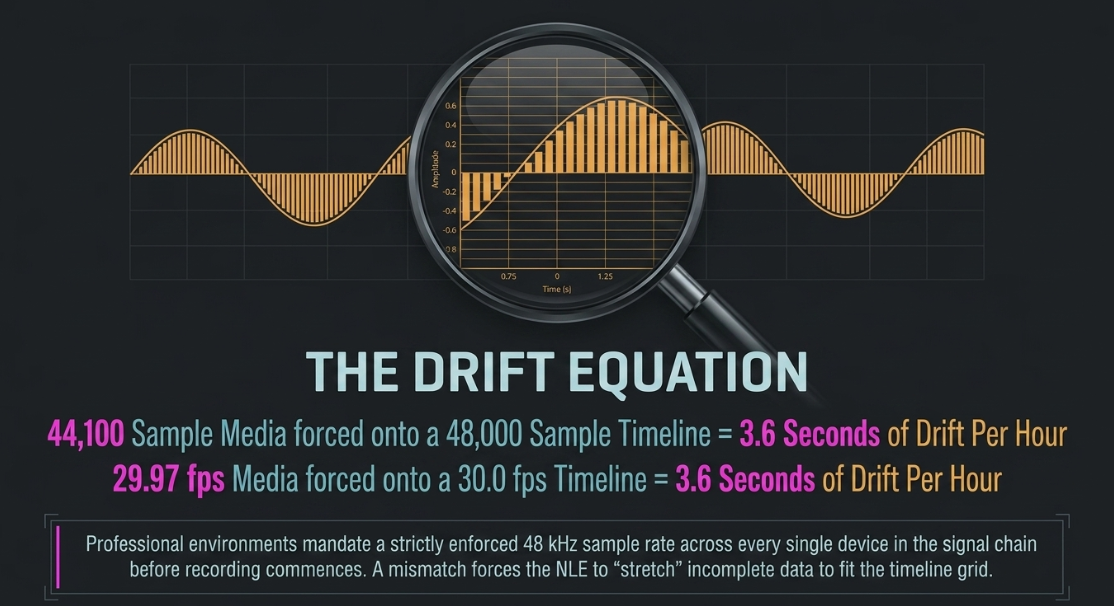
The temporal drift occurs when mismatched sample rates are introduced into the same timeline. If a microphone interface is inadvertently configured to 44.1 kHz, but the video cameras and the NLE project settings are operating at 48 kHz, a significant mathematical divergence manifests16. Because 48,000 discrete samples represent exactly one second of time on the NLE timeline, an imported file containing only 44,100 samples per second will be interpreted as incomplete, causing the software to stretch the audio to fit the timeline.
The mathematics of this mismatch are substantial. Over a one-hour recording, the discrepancy between 44.1 kHz and 48 kHz results in a progressive temporal drift of approximately 3.6 seconds11. Similarly, placing 29.97 fps (NTSC drop-frame standard) video on a 30.0 fps timeline creates an identical 3.6-second drift per hour11. To prevent this, professional podcast studios mandate a strictly enforced 48 kHz sample rate and matching frame rates across every single device in the signal chain before recording commences11.
Hardware Clock Oscillators and Parts Per Million (PPM) Error
Even in environments where frame rates and sample rates are perfectly matched across all devices, drift can still manifest due to microscopic imperfections in physical hardware components. Every digital recording device utilizes an internal quartz crystal oscillator to measure the passage of time24. These crystals vibrate at high frequencies to dictate the internal system clock, but they are inherently subject to environmental variables such as ambient temperature swings, power supply fluctuations, and manufacturing tolerances24.
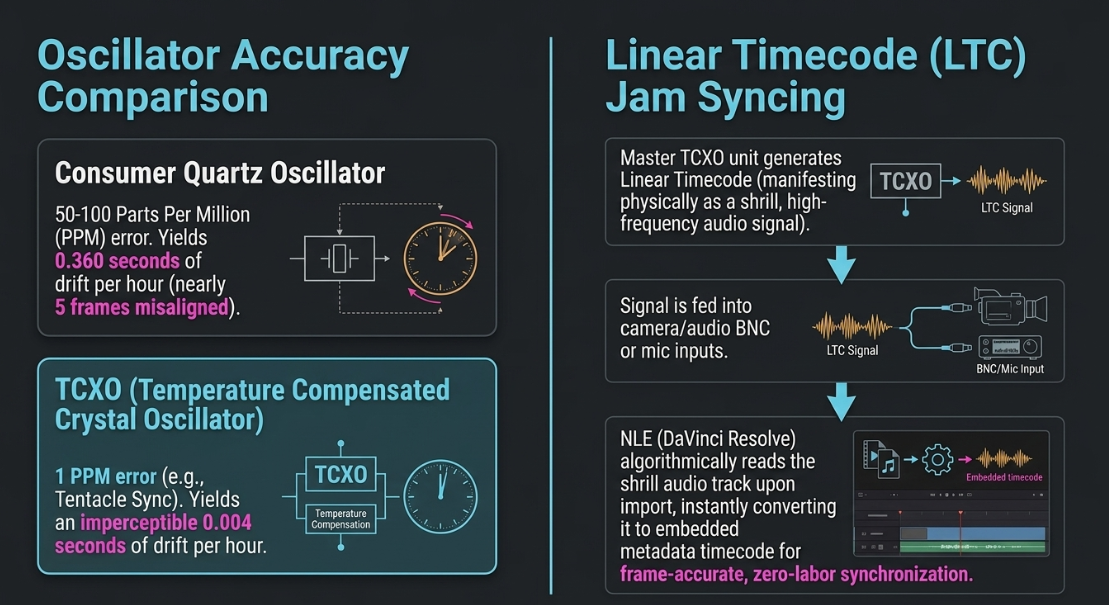
The deviation of a hardware clock's accuracy is measured in parts per million (PPM), denoting how many microseconds a clock gains or loses each second compared to an ideal, mathematically perfect reference source. Standard consumer electronics and budget field recorders typically feature oscillators with a tolerance ranging from 50 to 100 PPM23. A divergence of 50 PPM between a camera's internal clock and an external audio recorder results in a time error of 50 microseconds per second23. Over the course of a standard one-hour recording, a 50 PPM mismatch yields 0.180 seconds of drift, while a 100 PPM mismatch yields 0.360 seconds23.
While a fraction of a second may seem negligible, standard video plays at 24 or 25 frames per second, meaning a single frame lasts approximately 40 milliseconds. A 0.180-second drift translates to the audio being misaligned by nearly five frames, an easily perceptible error that destroys the illusion of synchronous speech23.
Linear Timecode (LTC) and Jam Syncing Architectures
To definitively eradicate the inherent inaccuracies of independent hardware oscillators, professional video engineers utilize centralized timecode systems. Timecode assigns a unique, precise digital address formatted as Hours:Minutes:Seconds:Frames to every single frame of video and fraction of audio across the entire production15.
In a modern podcast workflow, this synchronization is achieved through "jam syncing" via external timecode generators, such as the Tentacle Sync E system26. The master timecode unit generates a Linear Timecode (LTC) signal. LTC is uniquely fascinating because it physically manifests as an extremely shrill, high-frequency audio signal12. Timecode generator boxes are physically attached via Velcro or mounting brackets to every camera and audio recorder in the studio26. The master unit feeds the LTC audio signal into the audio auxiliary inputs, microphone jacks, or dedicated BNC sync ports of the respective recording devices12.
These timecode generators utilize highly advanced Temperature Compensated Crystal Oscillators (TCXOs). Unlike the 50 PPM consumer oscillators, TCXOs provide an accuracy of 1 PPM, reducing the maximum theoretical drift to an imperceptible 0.004 seconds per hour23. Because every device is receiving the exact same temporal timestamp driven by these highly accurate components, the NLE can instantly align the footage upon import. In software environments like DaVinci Resolve 17 and later, the engineer simply selects all media, and the software algorithmically reads the shrill LTC audio track, converting the audio signal into embedded metadata timecode12. This instantly snaps the multi-camera angles and high-fidelity audio into perfect, frame-accurate synchronization without relying on processor-intensive waveform amplitude analysis12.
Hardware Switching Versus Direct-To-Camera Workflows
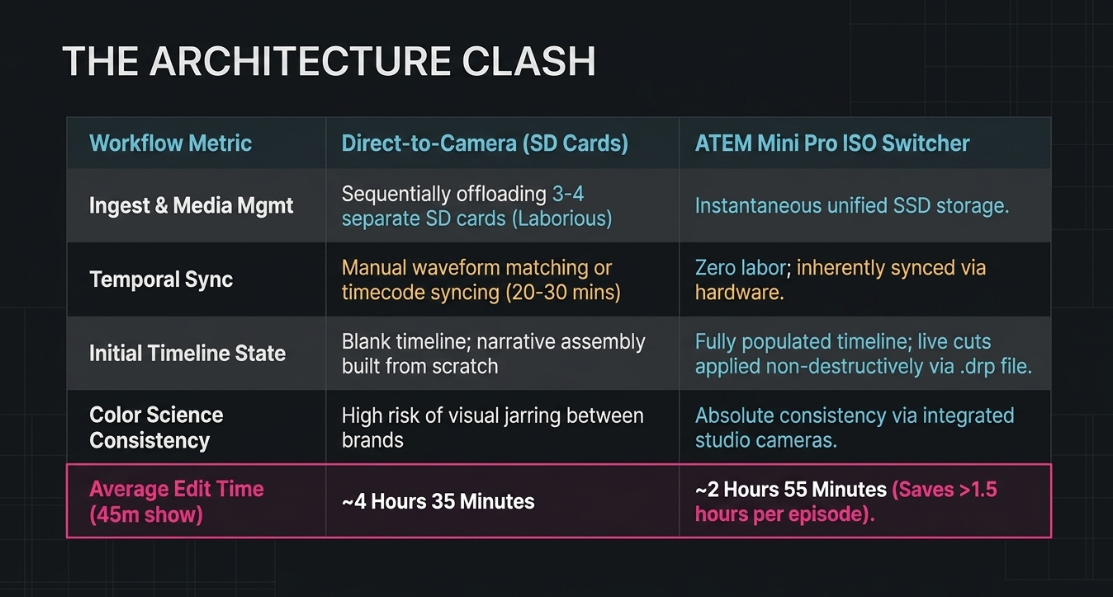
The architectural approach to recording the podcast dictates the entirety of the post-production timeline. The industry currently utilizes two primary methodologies: the traditional Direct-to-Camera workflow and the increasingly dominant hardware-switched ISO workflow.
The Direct-to-Camera Paradigm
The traditional approach to video podcast production involves recording direct-to-camera. In this paradigm, three independent mirrorless or cinema cameras are mounted on tripods, recording localized video directly to their internal SD cards or attached SSDs9. Audio is routed to a separate multi-track recorder.
Because there is no central mechanism connecting the devices, camera operators or engineers must manually trigger the recording on each unit, creating varying start times governed by human reaction delays. After the session concludes, the post-production engineer must endure a highly laborious ingestion process. Offloading three separate high-capacity SD cards containing 4K footage can easily consume 30 to 45 minutes9. Once ingested, the engineer must manually synchronize the files using clapperboard visual markers or audio waveform matching, adding another 20 minutes of foundational labor9.
Furthermore, budget studios frequently mix disparate camera brands (e.g., combining a Sony main camera with Canon and Panasonic secondary angles). Because different manufacturers utilize vastly different color science algorithms and sensor designs, the skin tones of the subjects will shift distractingly when cutting between the mismatched angles. Correcting this discrepancy requires extensive, tedious color matching in post-production, often adding an entire hour of labor to a single episode9.
The ATEM ISO Workflow Architecture
To drastically accelerate post-production efficiency, high-volume professional podcast studios have widely adopted live-switching hardware architectures, most notably utilizing the Blackmagic Design ATEM Mini Pro ISO or ATEM Mini Extreme ISO switchers6.
An ATEM ISO switcher acts as a centralized command hub. All cameras feed an uncompressed video signal via HDMI or SDI connections directly into the hardware switcher31. The high-fidelity audio mix from the XLR microphones is also routed into the unit. During the podcast recording, a technical director, or even the podcast host, utilizes the switcher's physical tactile buttons to perform a live edit, cutting between the wide establishing shots and the intimate close-ups in real-time based on the organic flow of the conversation31.
The critical engineering advantage of the "ISO" (Isolated) models is their capability to record multiple discrete streams simultaneously to a single, high-speed external solid-state drive (SSD) via a USB-C connection. The system records:
The "Program" feed (the live-switched video presentation with all cuts baked into a single file).
Isolated (ISO) feeds of every individual camera angle, recorded cleanly and continuously without any cuts.
Separate WAV audio tracks for every connected microphone input.
A highly detailed DaVinci Resolve Project file (.drp)9.
Post-Production Workflow Implications of ISO Recording
When the recording session concludes, the video engineer's workload is fundamentally transformed. There is no requirement to wait for multiple SD cards to offload, nor is there any need to manually synchronize footage or construct multicam sequences.
By simply opening the generated .drp file in DaVinci Resolve, the engineer is immediately presented with a fully populated, synchronized timeline. The live cuts performed manually by the director during the recording session are laid out on the timeline as non-destructive edit points31. If the live switcher operator cut to Camera 2 slightly too late, missing a crucial facial reaction, the editor can simply roll the edit point backward. Because the underlying ISO files were running continuously in the background, the NLE seamlessly reveals the hidden footage, allowing for infinite refinement9.
This workflow also facilitates massive resolution upscaling. While the ATEM Mini Pro ISO processes and records the live streams in 1080p HD, the NLE timeline can be instantly upgraded to 4K resolution13. The engineer achieves this by utilizing the internal Blackmagic RAW (BRAW) files recorded inside the cinema cameras themselves. DaVinci Resolve uses the synchronized timecode to automatically relink the 1080p proxy timeline directly to the 4K BRAW files, allowing for lossless zooming, cropping, and high-fidelity finishing13.
Comparative analysis of post-production labor economics across competing podcast video architectures9.
Multicam Architecture in Non-Linear Editors (NLEs)
For productions that do not utilize hardware switchers, the video engineer must rely entirely on the internal multicam functionality of the Non-Linear Editor. Multicam editing is a specialized software environment engineered to condense multiple synchronized video tracks into a single, manageable nested clip. This allows the editor to switch between angles in real-time during playback, mimicking the operations of a live television control room8.
Constructing the Multicam Sequence in Premiere Pro
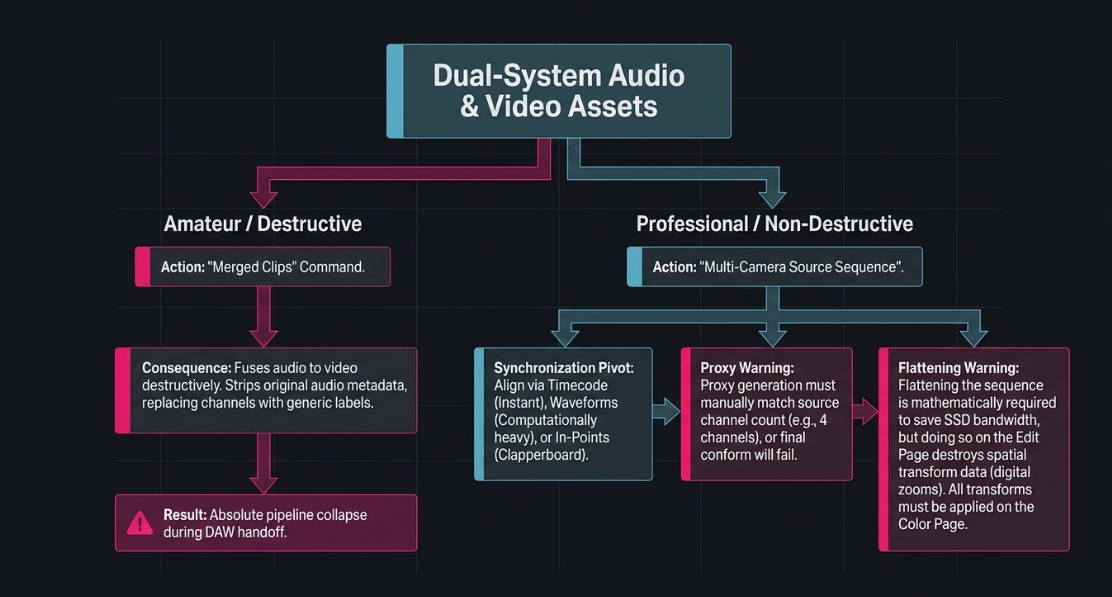
In Adobe Premiere Pro, the fundamental, non-negotiable rule of dual-system podcast editing is to strictly utilize "Multicam" sequences and actively avoid the "Merged Clips" function. While Merged Clips permanently fuse an external audio file to a video file, they do so destructively. The merging process strips the original audio metadata from the files, replacing crucial track names and channel configurations with generic, untraceable labels37.
This metadata destruction severely compromises the entire post-production pipeline when the final edit must be handed off to an audio engineer working in Pro Tools. Adobe officially advises against using Merged Clips for dual-system audio workflows, mandating the use of Multicam sequences to link external audio to video, even if the production only utilizes a single, static camera angle37.
To construct the architecture correctly, the engineer selects all raw video and audio assets in the Project Bin and initiates the "Create Multi-Camera Source Sequence" command. The software then requires a designated synchronization point to mathematically align the media35.
Timecode: The fastest and most accurate methodology, instantly aligning the clips by reading the embedded LTC or internal metadata timestamps36.
Audio Waveforms: The NLE algorithmically analyzes the amplitude peaks and valleys of the scratch audio recorded on the cameras and matches them against the waveforms of the high-fidelity audio recorder. While highly effective, this process is computationally intensive and frequently fails if the camera's internal audio is heavily distorted by loud environments or lacks distinct transient peaks8.
In-Points: The editor manually scrubs the footage to the exact frame where a physical clapperboard shuts on every camera, setting an "In" point. The software is then instructed to align all clips based on those manually designated frames36.
Once the Multi-Camera Source Sequence is successfully generated, it is dragged onto a standard editing timeline. By activating the Multi-Camera Monitor view, the editor can play the sequence and utilize the keyboard number pad (1, 2, 3, etc.) to punch between camera angles in real-time. The NLE automatically places a razor cut and swaps the active video track at the exact millisecond the key is pressed, transforming a playback session into an active editing session35. Any subsequent adjustments to these live cuts can be precisely refined using the Rolling Edit tool, which shifts the cut point forward or backward without altering the overall duration of the sequence35.
Proxy Generation and Channel Mapping
Working with massive 4K video files from multiple angles simultaneously places an extreme burden on even the most powerful computer processors, leading to dropped frames, stuttering playback, and software crashes. To mitigate this, video engineers employ proxy workflows. Proxies are low-resolution, highly compressed replicas of the original 4K media (typically generated in formats like ProRes Proxy or H.264)37.
The NLE allows the editor to seamlessly toggle between the heavy 4K files and the lightweight proxies with a single button press. However, generating proxies requires strict attention to audio channel mapping. In DaVinci Resolve, the default proxy generation setting routinely compresses the audio down to just two stereo channels39. If a video engineer is working with a camera that recorded four channels of audio, and the proxies are generated with only two channels, the NLE will fail to relink the media properly during the final conform process, destroying the audio layout. Engineers must manually configure the proxy generation settings to exactly match the source channel count to prevent catastrophic failure during the final online conform39.
The Necessity and Perils of Flattening the Edit
After the creative cut is locked, the multicam sequence exists as a highly complex matrix of nested clips. In both Premiere Pro and DaVinci Resolve, a critical final engineering step is "flattening" the multicam sequence. Flattening collapses the nested hierarchy, replacing the multi-angle container with the actual underlying source media file for the active angle at every edit point8.
Flattening is mathematically necessary to optimize system resources. Unflattened multicam clips force the computer's solid-state drive to simultaneously read all camera streams during playback, even the angles that are hidden from the viewer, which rapidly exhausts system bandwidth40. Furthermore, flattening is an absolute technical requirement before exporting timeline data to specialized color grading software or audio post-production DAWs.
However, engineers operating within DaVinci Resolve must exercise extreme caution during the flattening process. A known architectural quirk within Resolve is that flattening a multicam clip will permanently discard any spatial transform data—such as digital zooming, panning, or reframing—that the editor applied on the Edit page42. If an editor spent hours digitally zooming into a 4K wide shot to create a faux close-up, flattening the timeline will revert all clips to their original, unzoomed state without warning42. To circumvent this destructive behavior, advanced colorists and engineers advise applying all transform sizing changes within the Color page's sizing panel, rather than the Edit page, as the Color page data is safely retained during the flattening operation42.
The Aesthetic Fundamentals of the Cut: Pacing and Narrative Flow
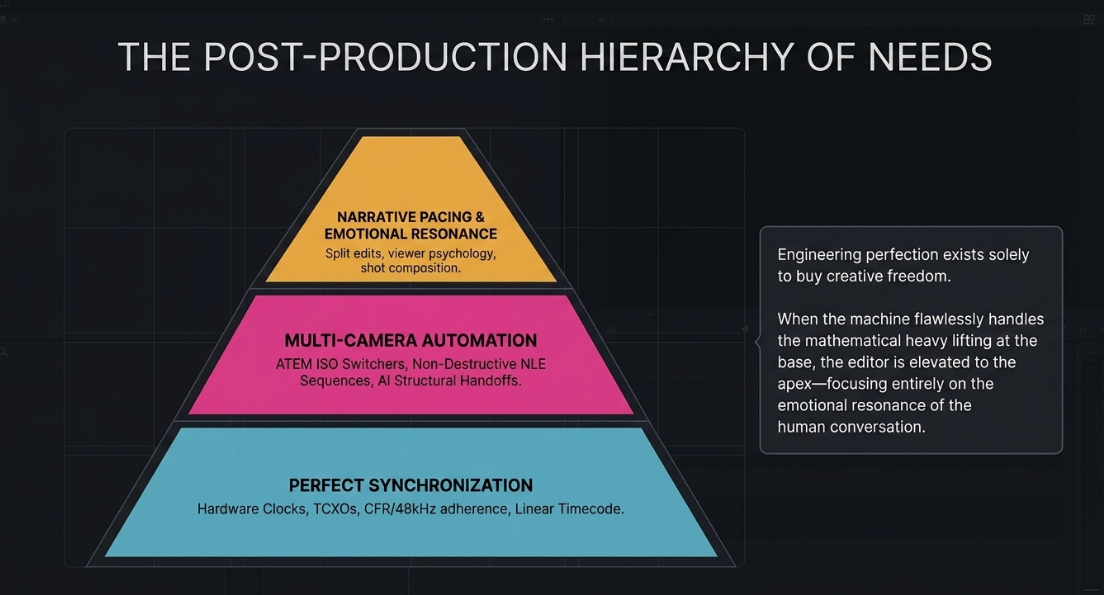
While synchronization mechanics and software architecture form the engineering baseline of the production, the actual cutting of a video podcast is a highly nuanced, aesthetic, and psychological process. Video editing is fundamentally the manipulation of viewer attention and emotional resonance. Unlike narrative fictional film, where editors construct reality from disjointed, non-sequential takes, podcast editing is the distillation and pacing of a continuous, real-time conversation.
The Philosophy of Pacing
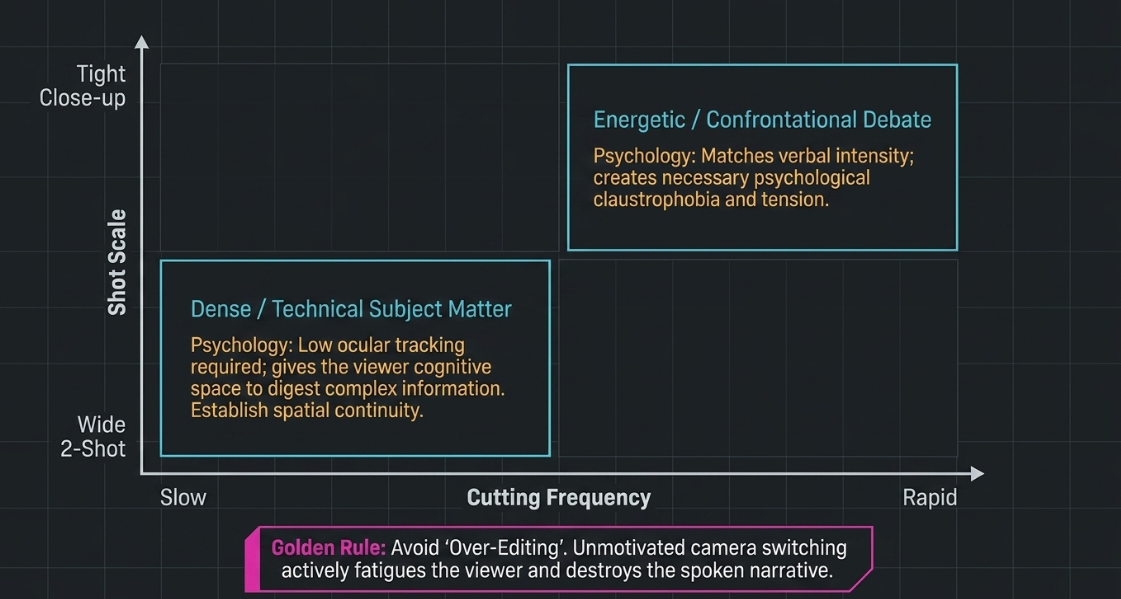
Pacing dictates the emotional atmosphere and intellectual retention of the podcast. An editor manipulates the audience's perception of time through the intersection of four specific variables: the frequency of the cuts, the scale of the shot composition, the volume of on-screen action, and the degree of camera movement44.
A highly technical, dense conversation regarding complex subject matter requires a slower editorial pace with minimal camera switching to allow the audience the cognitive space to digest the information. Conversely, an energetic, comedic debate benefits from rapid switching to match the verbal intensity44. However, the speed of the cut must always be balanced against the composition of the shot. Cutting rapidly between extreme, tight close-ups creates a sense of psychological claustrophobia and tension44. Cutting rapidly between wide establishing shots feels less visually aggressive because the subjects occupy a smaller percentage of the frame, requiring less ocular tracking from the viewer44.
A standard best practice in multi-camera podcast editing is to utilize the wide "two-shot" to establish spatial continuity and context at the beginning of a new topic, and then push into single close-ups as the conversation becomes more intimate, emotional, or confrontational45. Avoiding "over-editing" is paramount; excessive and unmotivated camera switching actively fatigues the viewer and distracts from the spoken narrative46.
Split Edits: The Mechanics of J-Cuts and L-Cuts
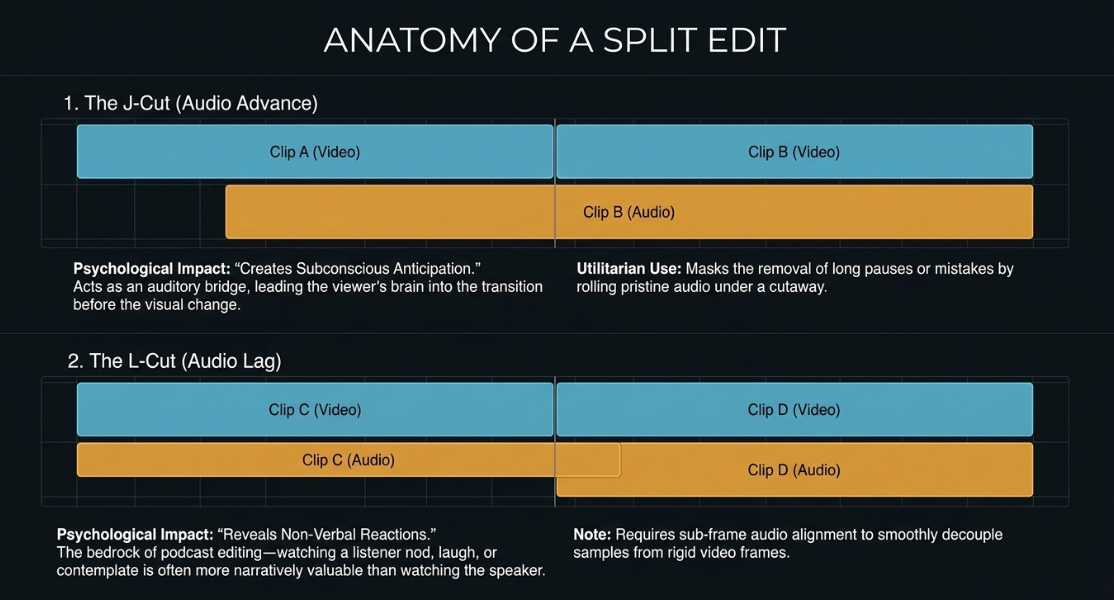
If a video editor relies exclusively on "hard cuts"—where the audio and the video switch to a new speaker simultaneously at the exact millisecond they begin talking—the conversation will feel robotic, disjointed, and highly unnatural48. Authentic human communication is characterized by interruptions, vocal overlaps, and crucial non-verbal reactions. To emulate this natural, organic rhythm, video engineers heavily employ split edits, specifically categorized as J-cuts and L-cuts48.
The J-Cut (Audio Advance): In a J-cut, the audio of the incoming speaker begins playing while the video remains visually locked on the current speaker. The graphical representation of this overlap on an NLE timeline resembles the letter "J"48. Psychologically, the J-cut acts as an auditory bridge, gently leading the viewer's brain into the transition before the visual change occurs49. Hearing a voice before seeing the speaker creates subconscious anticipation, ensuring that when the visual cut finally occurs, it feels highly motivated and seamless. J-cuts are also highly effective utilitarian tools for cleaning up messy dialogue. They allow the editor to mask the removal of long pauses, coughs, or mistakes by rolling the incoming pristine audio underneath a visual cutaway shot52.
The L-Cut (Audio Lag): Conversely, an L-cut occurs when the video cuts to a new subject, but the audio of the previous speaker continues playing over the new visual. The timeline shape resembles the letter "L"48. L-cuts are the absolute bedrock of conversational podcast editing because they allow the audience to see a character's silent, non-verbal reaction to what is being said48. In a podcast featuring a poignant revelation or a humorous anecdote, the visual information of the listener nodding, laughing, or contemplating is often far more narratively valuable than simply watching the person speaking49.
Executing these edits with precision often requires sub-frame audio alignment. While video frames are locked to strict intervals (e.g., 1/24th of a second), audio samples occur tens of thousands of times per second. Fine-tuning a vocal interruption or masking a digital audio click requires the engineer to detach the audio from the video grid and slide the audio track at the microscopic sub-frame level, a feature heavily utilized in DaVinci Resolve's Fairlight page and Adobe Premiere Pro's audio workspace15.
Algorithmic and Text-Based Editing (TBE) Pipelines
The most profound paradigm shift in podcast post-production over the last decade has been the introduction of artificial intelligence, Natural Language Processing (NLP), and algorithmic automation into the NLE ecosystem. Traditional timeline scrubbing—the tedious process of visually searching for gaps in the audio waveforms to identify silences, filler words, or mistakes—has been largely superseded by text-based and algorithmic editing models.
The Rise of Text-Based Video Editing
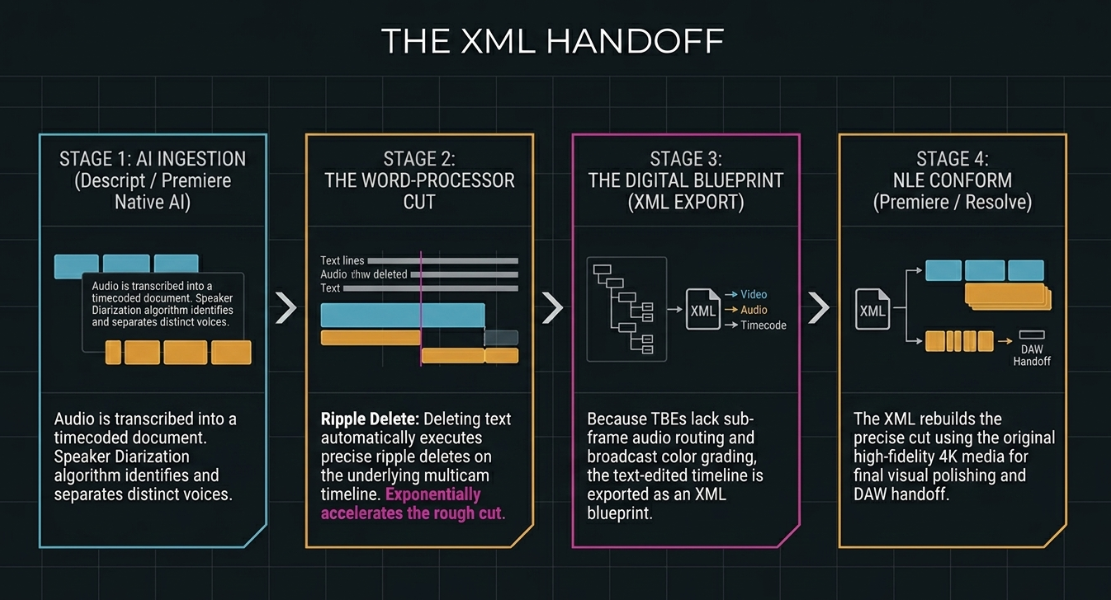
Text-based video editors, pioneered as standalone platforms by companies like Descript and recently integrated natively into Adobe Premiere Pro, flip the traditional editing interface completely upside down. Upon ingesting a media file, the software's AI engine transcribes the audio, generating a highly accurate, timecoded text document complete with speaker diarization (the algorithmic ability to identify and separate different voices)54.
Rather than manipulating clips on a horizontal timeline, the editor manipulates the text document exactly as they would a word processing file57. Deleting a sentence in the transcript automatically executes a corresponding ripple delete on the video and audio timeline, seamlessly joining the remaining footage55. This workflow accelerates the "rough cut" phase exponentially. Editors can visually scan the text to locate specific conversational topics, highlight and delete filler words ("um," "uh," "like") with a single automated keystroke, and effortlessly rearrange the structural flow of the episode by cutting and pasting paragraphs54.
While tools like Descript excel at rapid content distillation and feature advanced generative AI capabilities (such as synthesizing a cloned voice to seamlessly replace a misspoken word via the "Regenerate" tool), they frequently lack the granular color grading matrices, precise sub-frame audio routing, and complex visual effects compositing required for high-end broadcast delivery54. Consequently, a common, highly efficient engineering workflow involves performing the initial content assembly and dialogue cleanup in a text-based environment, and then exporting an XML file. This XML acts as a digital blueprint, migrating the refined cut into Premiere Pro or DaVinci Resolve for final visual polishing and color grading55.
AI Multicam Automation Software
For standard conversational podcasts, the mechanical process of switching cameras based on who is speaking is highly repetitive and mathematically predictable. A new class of sophisticated AI plugins has emerged to fully automate this multicam switching process directly within the NLE timeline.
Comparative landscape of AI-driven multicam switching tools for video podcast post-production58.
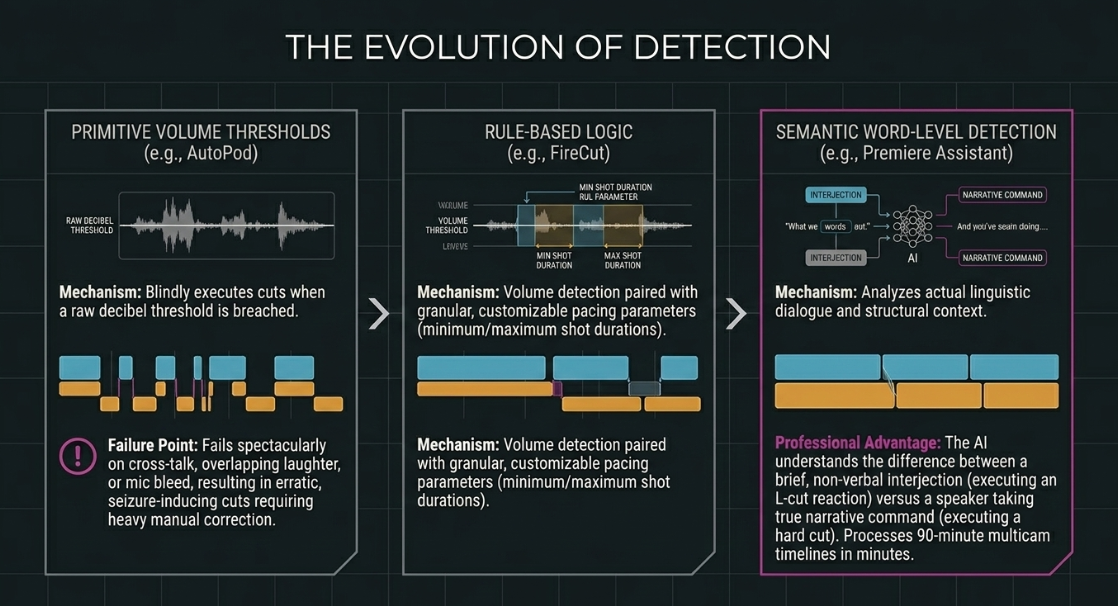
The algorithmic logic driving these automated tools varies significantly. Earlier iterations, such as the basic versions of AutoCut or AutoPod, analyze the raw decibel levels of the audio tracks. If Track 1 breaches a predetermined volume threshold, the software blindly executes a cut to Camera 161. While highly effective for perfectly isolated audio tracks recorded in pristine studio environments, this volume-based approach fails spectacularly when speakers laugh over one another, cough, or when background noise bleeds into an adjacent microphone. The software interprets this noise as speech, resulting in erratic, seizure-inducing camera switching that requires extensive manual correction61.
More advanced, next-generation tools, such as Premiere Assistant and PremiereCopilot, utilize semantic word-level detection60. By analyzing the actual linguistic content and structural context of the conversation, the AI understands when a speaker is offering a brief, non-verbal interjection (which warrants an L-cut reaction shot) versus actually taking command of the narrative flow (which warrants a hard cut to their dedicated camera angle)61. These sophisticated algorithms can autonomously process a complex 90-minute multicam podcast timeline in mere minutes, executing hundreds of mathematically precise cuts that an editor would otherwise spend hours performing manually, fundamentally altering the economics of post-production59.
Audio Post-Production Handoff and AAF Protocols
The final stage of video engineering before rendering the final asset for distribution is the crucial handoff to the audio post-production department. Because video editors focus primarily on narrative structure and visual pacing, the surgical fine-tuning of audio—comprising parametric equalization, dynamic range compression, algorithmic de-noising, and strict broadcast loudness compliance (measured in LUFS)—is typically routed to a dedicated audio engineer working in a specialized DAW like Avid Pro Tools2.
The digital bridge connecting the video NLE to the audio DAW is the Advanced Authoring Format (AAF) file. Unlike the older Open Media Framework (OMF) files, which routinely lose critical automation data and track naming conventions during transfer, the modern AAF is a highly complex metadata container. It successfully encapsulates the timeline architecture, translating the video editor's razor cuts, volume automation, track layouts, and specific clip names into a format that Pro Tools can perfectly interpret65.
However, improper AAF export settings are a notorious and frequent bottleneck in post-production pipelines. If a video engineer relies on the default export settings within Adobe Premiere Pro, the resulting file is almost universally unusable for the audio engineer, requiring hours of tedious manual triage to reconstruct the session65.
Rigid AAF Export Best Practices
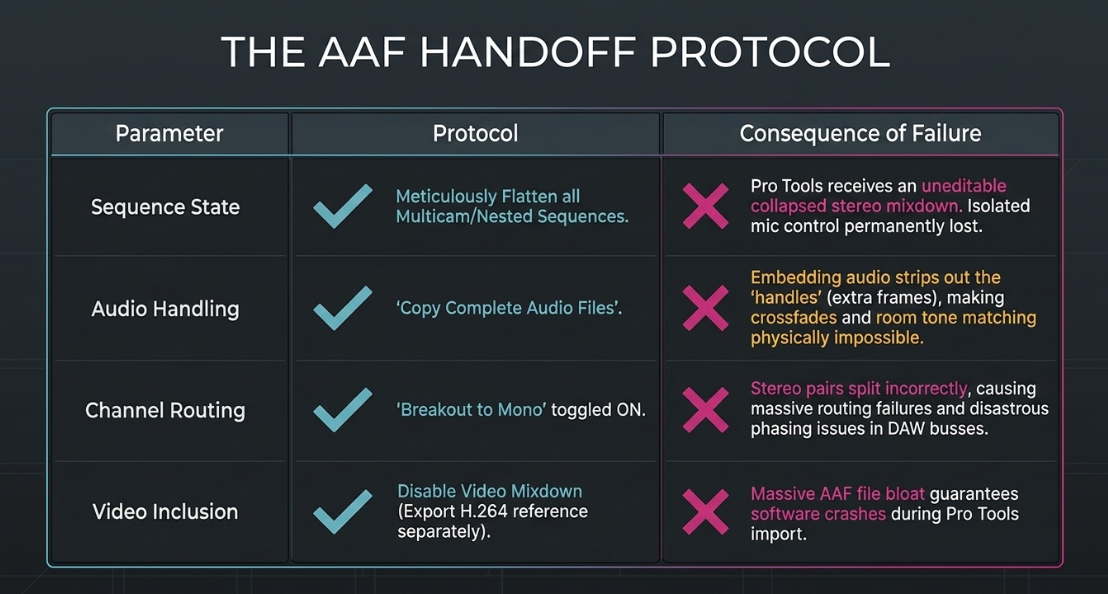
To ensure a pristine, error-free transition from the picture-lock phase to the final audio mix, video engineers must adhere to rigid, standardized AAF export protocols:
Flatten Multicam and Nested Sequences: Pro Tools is fundamentally incapable of reading Adobe's proprietary nested timelines or unflattened multicam clips. If an AAF is exported without flattening the timeline, Pro Tools will receive an uneditable, collapsed stereo mixdown of the nested audio. This permanently destroys the audio editor's ability to access the isolated microphone tracks, rendering professional mixing impossible65. All multicam sequences must be meticulously selected, enabled, and flattened to reveal the raw underlying WAV files on the timeline prior to export38.
Copy Complete Audio Files vs. Embedding: Within the export dialogue menu, the setting must be configured to "Copy Complete Audio Files" rather than "Embed Audio." Embedding audio destructively trims the audio files to the exact frame length of the visual cut65. An audio engineer requires "handles"—the extra ten to sixty frames of audio existing before and after a visual cut—to seamlessly crossfade background room tone and execute smooth, inaudible dialogue transitions65. Copying the complete files alongside the AAF ensures the audio department has uninhibited access to the full, uncompressed recording65.
Breakout to Mono: Premiere Pro defaults to placing stereo audio files on a single, consolidated track. Pro Tools, however, utilizes a fundamentally different track routing architecture. If stereo files are not separated prior to export, they will appear in Pro Tools as dual mono tracks (Audio 1.L and Audio 1.R) that fail to route correctly through the DAW's stereo processing busses65. Activating the "Breakout to Mono" toggle during export ensures that the timeline imports cleanly and routes correctly, preventing disastrous phasing issues and saving the audio team significant organizational labor65.
Disable Video Mixdown: The AAF should strictly serve as an audio metadata container. Baking a video mixdown directly into the AAF creates an unnecessarily massive file that frequently causes software crashing during the Pro Tools import sequence. Visual reference should always be exported separately as a low-bitrate H.264 or highly compressed Apple ProRes file, and then imported manually into the Pro Tools session for synchronous playback65.
Standard operating procedures and failure consequences for AAF export from Premiere Pro to Pro Tools65.
Works cited
Video Studio Engineer - Podcast House - BeBee, https://bebee.com/gb/jobs/video-studio-engineer-podcast-house-london-england--theirstack-688517747
Video Podcast Editor, MS NOW @ Versant - Teal, https://www.tealhq.com/job/video-podcast-editor_7ea1a4db19c61ca107a1874adb9bced7ed304
Podcasting Studio in London - Dean St. Studios, https://www.deanst.com/podcasting-studio-in-london/
Podshop: Podcast Production Companies | Podcast Editing, https://www.podshoponline.co.uk/
Video Podcast Production London | Professional Podcast Filming - Jon Collins, https://ukjoncollins.com/what/video-podcast-production/
Recordia Delivers Podcast Production Workflow with Blackmagic Design, https://www.blackmagicdesign.com/media/release/20260121-01
Podcast Studio Hire in Central London | Premiere Studios, https://premierepodcaststudios.com/podcast-studio-london/
Avoid These 5 Common Multicam Editing Mistakes in Premiere Pro (2026) - Cutback, https://cutback.video/blog/avoid-these-5-common-multicam-editing-mistakes-in-premiere-pro-(2025)
Why Recording Direct-to-Camera Is a podcast Post-Production Nightmare (And How to Avoid It), https://www.podcaststudioglasgow.com/podcast-studio-glasgow-blog/why-recording-direct-to-camera-is-a-podcast-post-production-nightmare-and-how-to-avoid-it
Versant Video Podcast Editor, MS NOW | SmartRecruiters, https://jobs.smartrecruiters.com/Versant3/744000131986830-video-podcast-editor-ms-now
How to Fix Audio Sync Issues in Video Podcasts (2026 Guide), https://www.podcaststudioglasgow.com/podcast-studio-glasgow-blog/how-to-fix-audio-sync-issues-in-video-podcasts
I'm struggling to maintain a seamless and easy workflow with my equipment, and I end up staying up all night editing and trying to sync audio together. This is a nightmare, please help. : r/videography - Reddit, https://www.reddit.com/r/videography/comments/18sp25f/im_struggling_to_maintain_a_seamless_and_easy/
Filming Podcasts using the BMC4K and Atem Mini Pro ISO : r/blackmagicdesign - Reddit, https://www.reddit.com/r/blackmagicdesign/comments/1512fbk/filming_podcasts_using_the_bmc4k_and_atem_mini/
Final Cut Pro for video podcasts, https://podcasters.apple.com/support/5587-final-cut-pro-video-podcasts
How to Sync Audio Video and Fix Common Drift Issues - Swiftia, https://swiftia.io/sync-audio-video/
Why Your Screen Recording Audio is Out of Sync (And How to Fix Audio Drift Forever), https://medium.com/@andrew_best/why-your-screen-recording-audio-is-out-of-sync-and-how-to-fix-audio-drift-forever-a6738c729f52
Help with audio sync : r/videography - Reddit, https://www.reddit.com/r/videography/comments/b7iw8e/help_with_audio_sync/
Why is my audio out of sync with video? It's probably Variable Frame Rate - TimeBolt, https://www.timebolt.io/blog/how-to-edit-variable-frame-rate-videos-and-fix-out-of-sync-audio-video
44.1khz vs 48khz: What is the Main Difference and Which Should I Use? - Boris FX, https://borisfx.com/blog/44-1khz-vs-48khz-what-is-the-main-difference/
Digital audio basics: audio sample rate and bit depth - iZotope, https://www.izotope.com/community/blog/digital-audio-basics-sample-rate-and-bit-depth
How problematic is resampling audio from 44.1 to 48 kHz? - Hacker News, https://news.ycombinator.com/item?id=46554255
People who claim to hear the difference between 44.1khz, 48khz, and 96khz: Please explain why and how? - Reddit, https://www.reddit.com/r/mixingmastering/comments/1pawrea/people_who_claim_to_hear_the_difference_between/
Fixing “Time Drift”: Why Is My Time Clock Always Wrong? - NGTECO, https://ngteco.com/blogs/workforce-insights/why-is-my-time-clock-wrong
An Analysis of Time Drift in Hand-Held Recording Devices - Protyposis.net, https://protyposis.net/files/mmm2015-timedrift-cameraready.pdf
Tentacle Sync gives timecode a good name - Dan McComb, https://www.danmccomb.com/tentacle-sync-gives-timecode-a-good-name/
TENTACLE SYNC Timecode Masterclass for DaVinci Resolve - Creative Video Tips, https://creativevideotips.com/tutorials/tentacle-sync-timecode-masterclass-for-davinci-resolve
These Will Save You HOURS of Editing: Tentacle Sync Workflow, https://www.keithknittel.com/articles/these-will-save-you-hours-of-editing-tentacle-sync-workflow
Music video clip workflow - Tentacle Sync Forum, https://forum.tentaclesync.com/home/question/music-video-clip-workflow/
What Is Holdover in Timing Systems? - SiTime, https://www.sitime.com/company/newsroom/blog/what-holdover-timing-systems
ATEM Mini | Blackmagic Design, https://www.blackmagicdesign.com/products/atemmini
Fast and Cost Effective Video Podcast Recording Setup - EnhanceAVL, https://enhanceavl.com/fast-and-cost-effective-video-podcast-recording-setup/
How To Use ATEM Mini Pro for Podcasters - Saspod, https://saspod.com/blog/post/how-to-use-atem-mini-pro-for-podcasters
ATEM Mini Pro ISO: Take your live edits right into DaVinci Resolve - RedShark News, https://www.redsharknews.com/atem-mini-pro-iso-take-your-live-edits-right-into-davinci-resolve
Premiere Pro Multicam Editing Explained: Tutorial with Image Steps - Motion Array, https://motionarray.com/learn/premiere-pro/premiere-pro-multicam-editing-tutorial/
Multicam Editing in Premiere - Emerson College Technology & Media, https://support.emerson.edu/hc/en-us/articles/21709300593563-Multicam-Editing-in-Premiere
Create Proxies with Merged Clips or Multicam clips - Adobe Community, https://community.adobe.com/questions-729/create-proxies-with-merged-clips-or-multicam-clips-1424551
AAF Export for Pro Tools - Adobe Community, https://community.adobe.com/questions-729/aaf-export-for-pro-tools-1392771
Audio Syncing with Proxies in Premiere : r/editors - Reddit, https://www.reddit.com/r/editors/comments/1rs8nr3/audio_syncing_with_proxies_in_premiere/
Davinci Resolve 20 CHANGED my MULTICAM workflow! - YouTube, https://www.youtube.com/watch?v=swVCGkdQ-Aw
How to "Flatten" Clips w/ Synced External Audio once they are in a timeline : r/davinciresolve, https://www.reddit.com/r/davinciresolve/comments/1pyusg7/how_to_flatten_clips_w_synced_external_audio_once/
Flattening multicam doesn't maintain Transform changes? - Blackmagic Forum, https://forum.blackmagicdesign.com/viewtopic.php?f=21&t=216272
Losing Attributes when flattening MultiCam TL - DaVinci Resolve - Creative COW, https://creativecow.net/forums/thread/losing-attributes-when-flattening-multicam-tl/
Master Pacing in Video Editing for Maximum Story Impact - Inside The Edit, https://www.insidetheedit.com/blog/pacing-in-video-editing
A Guide for Editing Your Video Podcast | B&H eXplora, https://www.bhphotovideo.com/explora/video/tips-and-solutions/a-guide-for-editing-your-video-podcast
Video Editing Techniques for Podcasts | PDF | Frame Rate - Scribd, https://www.scribd.com/document/887735366/Edit
Podcast Editing: How to Do It In 13 Steps (Tutorial & Free Guide) - Riverside, https://riverside.com/blog/podcast-editing
J cuts vs L cuts examples in video editing - Adobe, https://www.adobe.com/uk/creativecloud/video/discover/j-cut-and-l-cut.html
J-Cuts & L-Cuts - Film School - WeVideo, https://www.wevideo.com/blog/j-cuts-l-cuts
Using L-Cuts and J-Cuts in Video Editing - Why and How? - Vegas Pro, https://www.vegascreativesoftware.com/blog/l-cuts-and-j-cuts/
Smoother and More Cinematic L-cuts and J-cuts in Video Editing - Boris FX, https://borisfx.com/blog/l-and-j-cuts-smoother-more-cinematic/
A Video Editor's Guide to J Cuts and L Cuts - Soundstripe, https://www.soundstripe.com/blogs/a-video-editors-guide-to-j-cuts-and-l-cuts
REVIEW: Blackmagic Design DaVinci Resolve 12 - The Editor - Definition Magazine, https://definitionmagazine.com/reviews/review-blackmagic-design-davinci-resolve-12-the-editor/
Descript – AI Video & Podcast Editor | Free, Online, https://www.descript.com/
Descript vs Premiere Pro - Swell AI, https://www.swellai.com/blog/descript-vs-premiere-pro
How to produce content faster with text-based video editing - Vimeo, https://vimeo.com/blog/post/text-based-video-editing
Descript AI Review 2026: Best Video Editor? Honest Take, https://comparebestai.com/articles/top-descript-ai-review-2026
Non-Subscription Multi-Cam Podcast Editing options in Premiere Pro?, https://phantomeditor.video/blog/non-subscription-multicam-podcast-editing-premiere-pro
How to Automatically Edit a Podcast in Premiere Pro (It Takes MINUTES!) - YouTube, https://www.youtube.com/watch?v=h7vPja2Eufs
Podcast Multicam Autocut for Premiere | PremiereCopilot, https://www.premierecopilot.com/en/podcast
Best Multi-cam Editing Plugins for Premiere Pro Users in 2026 - Cutback, https://cutback.video/blog/best-multi-cam-editing-plugins-for-premiere-pro-users
4 Best AI Podcast Editors Compared: Selects, Descript, Autopod, and More - Cutback, https://cutback.video/blog/4-best-ai-podcast-editors-compared-selects-descript-autopod-and-more
Quickly Edit a Multicam Video with Autocut (2025), https://www.autocut.com/en/blogs/edit-multicam-video/
Workflow Tutorial Index Page - Mixing Light, https://mixinglight.com/tutorial-category/workflow/
How to Create a Pro Tools-Friendly AAF from Adobe Premiere Pro - Forte AI, https://www.forte-ai.com/blog/pro-tools-friendly-aaf-from-adobe-premiere
How to Deliver a Pro Tools-Ready AAF from Adobe Premiere | Dallas Audio Post, https://dallasaudiopost.com/how-to-deliver-a-pro-tools-ready-aaf-from-adobe-premiere/
Premiere does not let me flatten audio - Adobe Community, https://community.adobe.com/questions-729/premiere-does-not-let-me-flatten-audio-1401042
Help with exporting to AAF with multi-cam : r/editors - Reddit, https://www.reddit.com/r/editors/comments/wa4dbm/help_with_exporting_to_aaf_with_multicam/
Premiere Pro – Exporting AAF for Pro Tools - Vassar College WordPress, https://pages.vassar.edu/film-majors/premier-pro-exporting-aaf-and-omf-for-pro-tools/














