
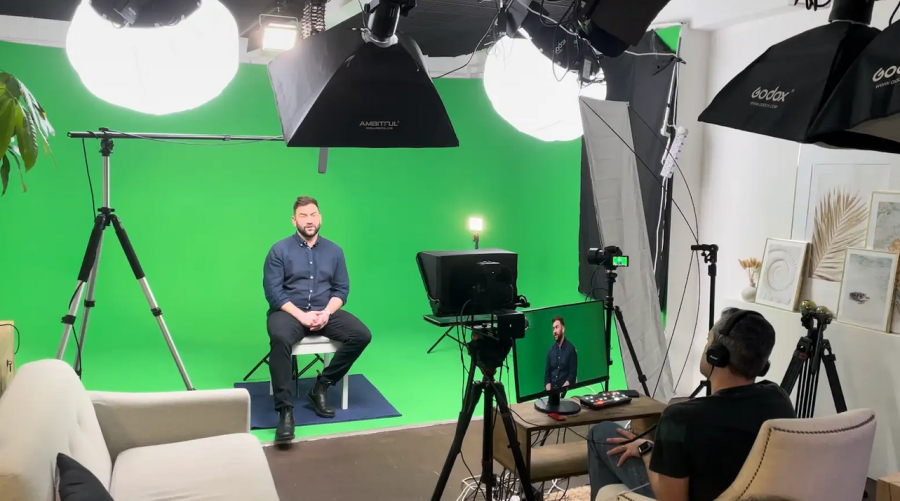
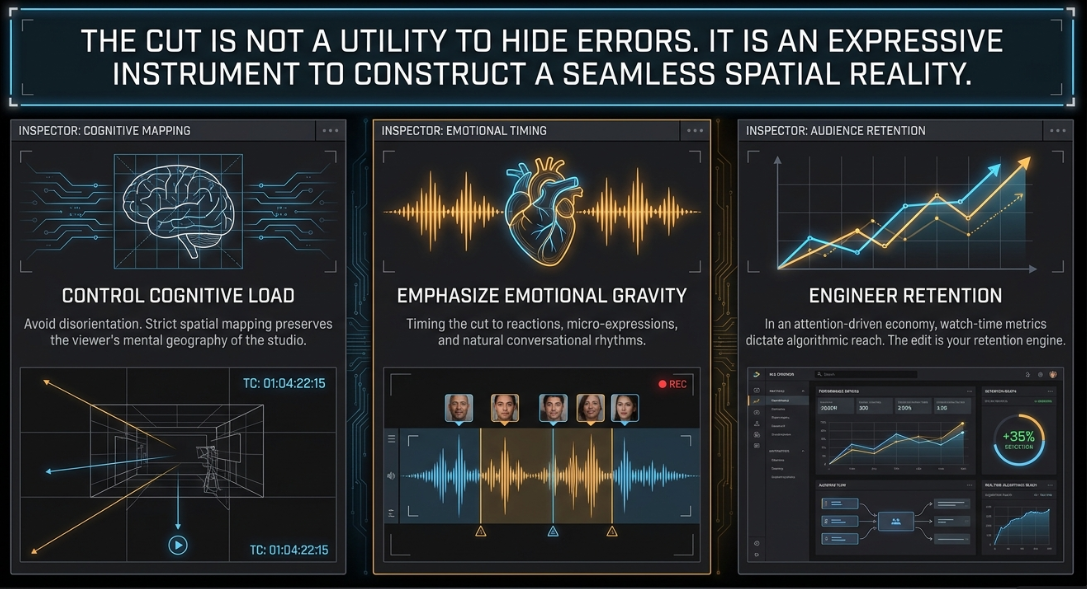
The visual podcast has evolved from a simple single-camera novelty into a highly sophisticated broadcast format that demands precise technical execution and a deep understanding of continuity editing1. In an attention-driven digital economy, where watch-time metrics on platforms like YouTube and Spotify directly dictate distribution and algorithmic reach, the editing of multi-camera footage is a critical tool for retaining audience engagement3. The post-production cut is not merely a utility to hide speaker errors or vocal pauses; it is an expressive instrument used to control cognitive load, emphasize emotional gravity, and construct a seamless spatial reality4. Professional video engineers must master both the physical configuration of the set and the technical principles of the non-linear timeline to create polished, high-impact shows4.
The Geometry and Spatial Grammar of the Multi-Camera Set
Spatial Mapping and the Conversational Axis
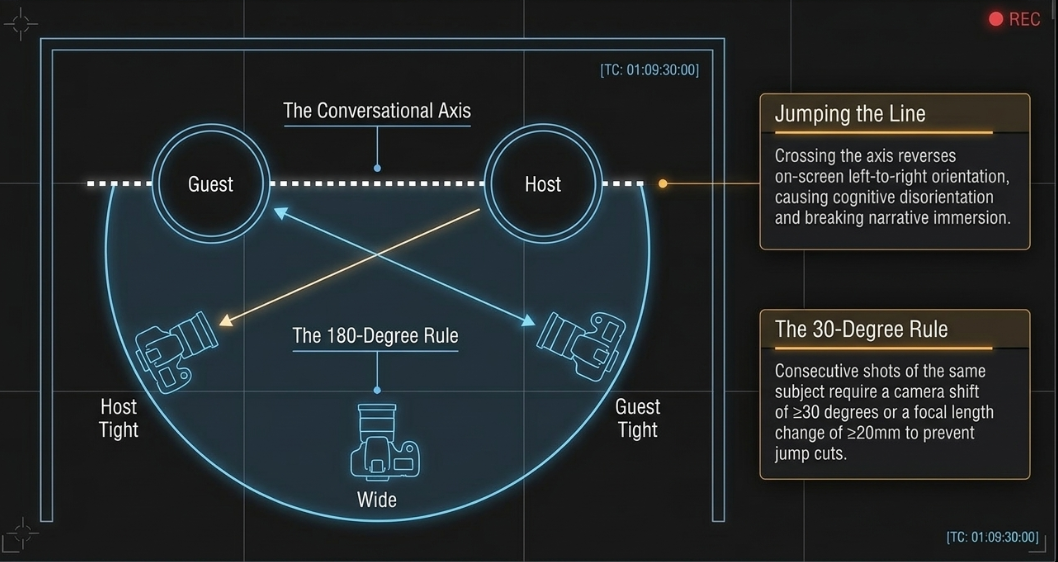
The visual grammar of a multi-camera talk show relies on strict geometric and spatial rules to preserve the viewer’s cognitive map of the conversation5. The foundation of this layout is the conversational axis, an imaginary straight line running directly between the host and the guest5. To maintain spatial continuity, all cameras must remain strictly on one side of this 180-degree line5.
Crossing the axis—known as "jumping the line"—reverses the on-screen left-to-right orientation of the participants8. If the host is positioned on the left side of the wide shot looking right, their individual close-up must preserve this rightward eyeline5. If a camera is placed across the line, the host will appear on screen looking left, violating spatial mapping and creating the illusion that they are turning away from the guest8. This reversal causes a subtle cognitive disorientation in the viewer, disrupting their immersion in the narrative flow6.
[Camera 2: Guest Tight Shot]
|
| (Guest Eyeline: Looks Right to Left)
v
(Guest) <=================================================> (Host)
^ Conversational Axis (180-Degree Line)
|
| (Host Eyeline: Looks Left to Right)
|
[Camera 1: Host Tight Shot]
\
\
\
[Camera 3: Wide Establishing Shot]
To prevent visual inconsistencies when cutting between close-ups and wide shots, production teams use symmetrical camera placements just off the conversational axis5. Eyelines are directed slightly off-camera toward the other person, creating an organic conversational feel without breaking continuity5.
To minimize any visual jar when cutting between angles, the 30-degree rule dictates that consecutive shots of the same subject must feature a camera position shift of at least 30 degrees, or a focal length change of at least 20mm10. Cuts that violate this rule fail to establish a new visual perspective, resulting in a jump cut that shatters the illusion of continuous time10.
Camera Formats, Optics, and Multi-Sensor Calibration
Achieving professional visual continuity across angles requires uniform imaging characteristics2. High-end podcast networks standardize their camera hardware to avoid mismatched color replication, differing contrast ratios, and inconsistent skin-tone processing2.
For example, The Diary of a CEO utilizes a matching multi-camera environment driven by Canon Cinema EOS C70 cameras and remote-controlled Pan-Tilt-Zoom (PTZ) cameras calibrated via the XC Protocol14. This setup allows the production team to adjust color matching, exposure, and movement from a single control unit14.
Similarly, The Joe Rogan Experience relies on high-definition systems like the Canon XF605 UHD 4K pro camcorders paired with Blackmagic Multi-Camera setups and ATEM switchers to ensure matching visual standards1.
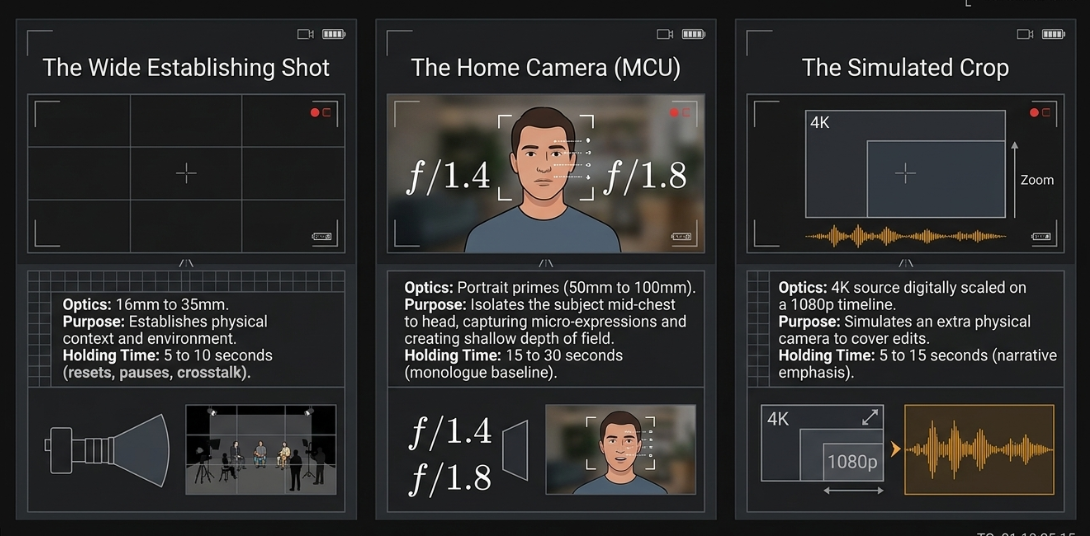
Optical selections are tailored to match the visual goals of each angle16. While wide shots require wider focal lengths (typically 16mm to 35mm) to capture the entire physical environment, individual close-ups utilize portrait-length lenses (50mm to 100mm)16. Prime lenses with fast, wide apertures (such as 

If a production has a limited number of physical cameras, editors can shoot in 4K resolution and digitally crop the feed to generate simulated close-up angles on a 1080p timeline, maintaining visual variety without adding extra camera bodies2.
The Strategic Value of the "Noddy's Take" and B-Roll Overlay
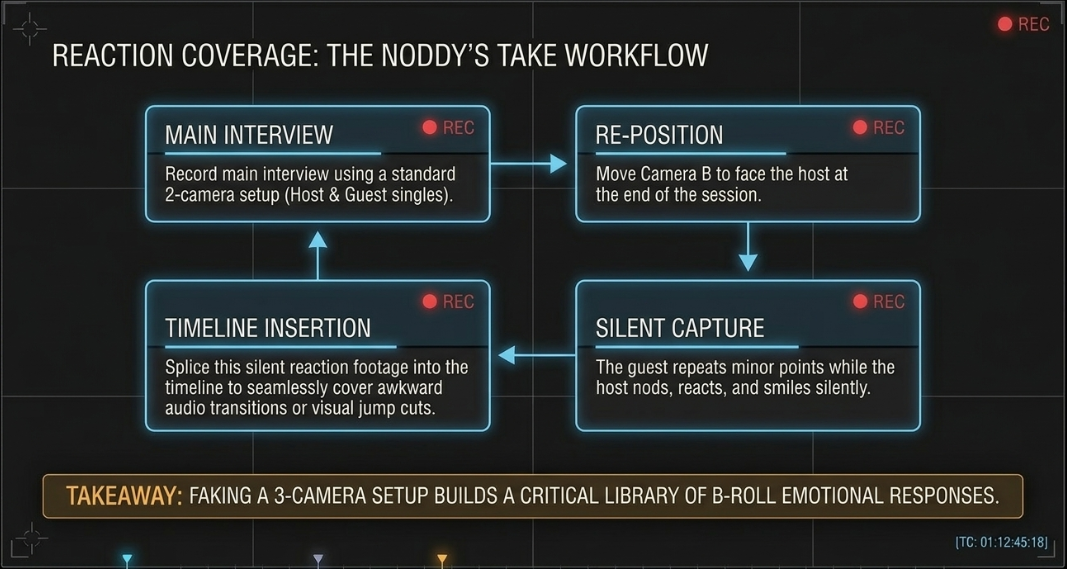
When a production is limited to two cameras, editors can use the "Noddy's take" to capture the reaction coverage needed for a dynamic edit20. This technique involves moving a camera to face the host at the end of a session, and having them listen and nod along while the guest repeats minor conversation points or details their morning routine21.
This footage provides a collection of silent reaction shots that the editor can splice into the timeline to hide awkward transitions or jump cuts when editing the main conversation3.
NODDY'S TAKE WORKFLOW SEQUENCE:
Step 1: Record main interview using 2-camera setup (Host & Guest single shots).
Step 2: Move Camera B to face the host.
Step 3: Host nods, reacts, and smiles silently while guest talks in the background.
Step 4: Use this reaction footage as insert edits to cover jump cuts in the main timeline.
In addition to reaction shots, incorporating relevant B-roll footage and motion graphics helps keep the presentation engaging16. When a speaker introduces a specific statistic, concept, or location, the editor cuts to corresponding B-roll or slides in an animated lower-third graphic22.
This visual reinforcement makes the content easier to follow, breaks up long talking-head segments, and provides natural transition points on the timeline22.
The Grammar of the Edit: Dialogue, Split Edits, and Reaction Timing
The Cognitive Role of the Split Edit
A common mistake in beginner multi-camera editing is the "robotic cut," where the video transitions to the next camera at the exact millisecond a new speaker's audio level rises23. This hard-cutting style creates a rigid visual rhythm that does not match the natural flow of human conversation24.
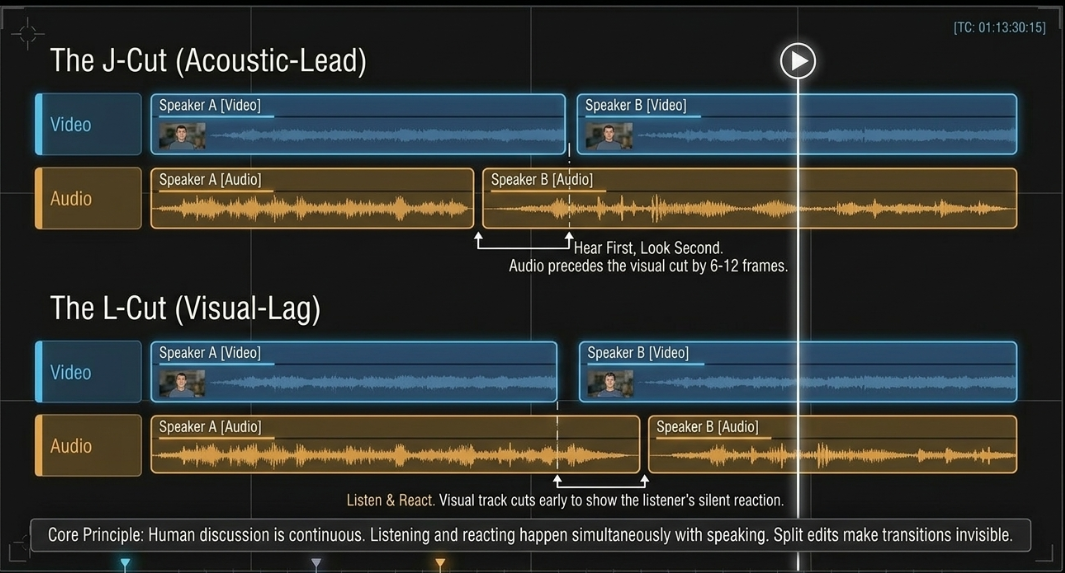
Human discussions are continuous; listening and reacting happen simultaneously with speaking1. To replicate this natural rhythm, professional editors use split edits—specifically J-cuts and L-cuts—to slide the audio and video transitions to different points in time25.
J-CUT TIMELINE GEOMETRY:
Video Track: [ Speaker A (Close-Up Frame) ] [ Speaker B (Close-Up Frame) ]
Audio Track: [ Speaker B (Dialogue Audio) ]
^---------------- J-Cut Offset (6–12 frames)
L-CUT TIMELINE GEOMETRY:
Video Track: [ Speaker A (Close-Up Frame) ] [ Speaker B (Close-Up Frame) ]
Audio Track: [ Speaker A (Dialogue Audio) ]
^- L-Cut Offset (6–12 frames)
In a J-cut, the incoming speaker’s audio begins playing before the video cuts to their close-up25. This matches human perception: when a new voice speaks in a room, the listener's hearing registers the sound a split-second before their eyes turn to focus on the speaker19.
Conversely, an L-cut carries the preceding speaker's audio over the visual cut, showing the listener's reaction to the statement before they begin speaking25. These techniques help hide the physical edit points, making camera transitions feel natural and invisible24.
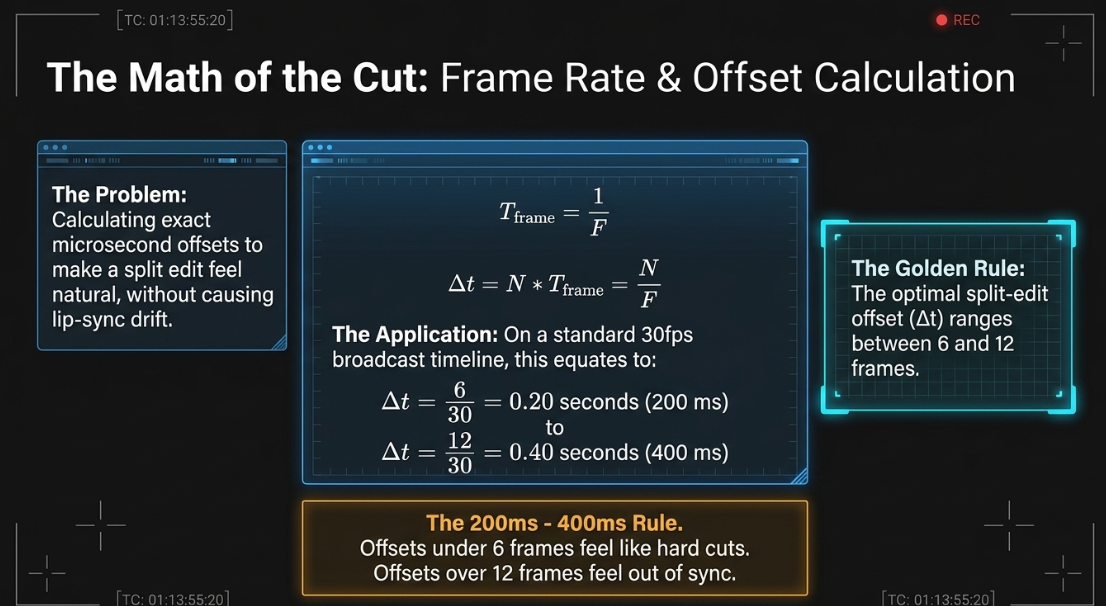
To compute the precise timing offsets for these split edits, editors work with the project frame rate19. Let 


For standard visual podcast delivery formats, this resolves to:
For


For


The duration of a split-edit offset (


In high-quality dialogue editing, the optimal split-edit offset (


Offsets shorter than 6 frames are barely registerable and can feel like a standard hard cut, while offsets exceeding 12 frames risk making the dialogue feel out of sync19.
The Operational Timing Formula of the Multi-Cam Cut
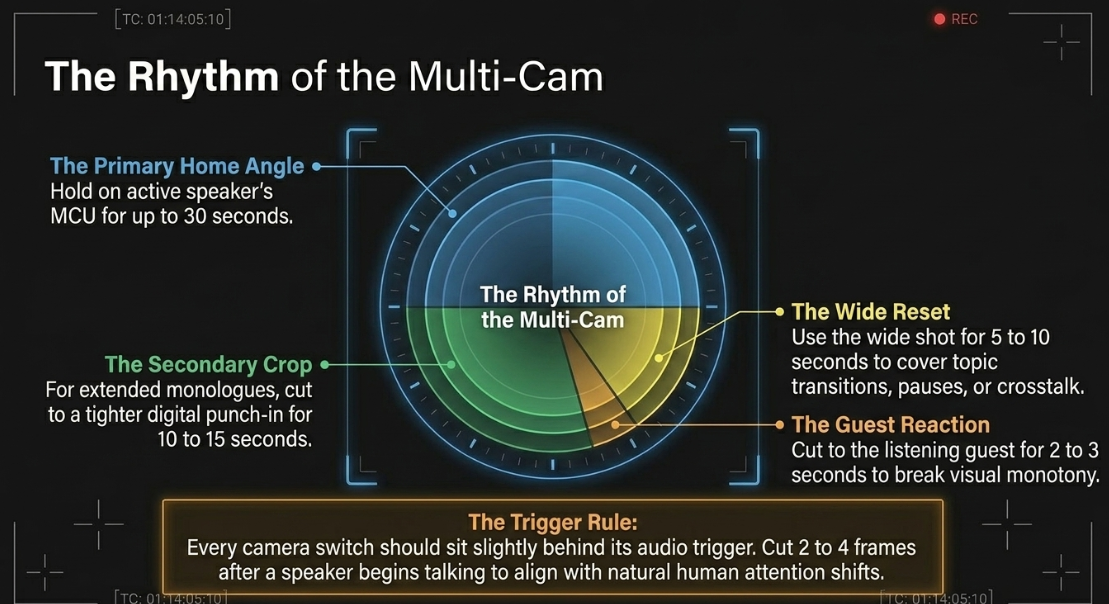
To maintain structured visual variety and prevent audience fatigue, editors use a hierarchical timing formula18. This strategy assigns a primary "home" camera to each speaker and uses secondary angles and wide shots for variety18:
The Primary Home Camera: When a participant is speaking, the cut stays on their primary close-up (home camera) for up to 30 seconds18.
The Guest Reaction Edit: To break up visual monotony, the editor cuts to a close-up of the listening guest for 2 to 3 seconds, then returns to the speaker's home camera18.
The Secondary Crop Angle: If a speaker continues talking for an extended period, the editor can cut from the main close-up to a secondary, tighter crop of the same person for 10 to 15 seconds before returning to the home angle18.
The Wide Transition Reset: The wide shot is used sparingly, typically for 5 to 10 seconds, to cover transitions between topics, pauses in dialogue, or moments of crosstalk18.
Crucially, every camera switch should sit slightly behind its audio trigger18. Cutting 2 to 4 frames after a speaker begins talking aligns with natural human attention, where visual focus shifts shortly after an auditory cue18.
In browser-based remote recordings (such as Riverside), editors use layout-switching rules28. Rather than cutting immediately when a speaker begins, both participants are shown on screen (side-by-side or wide shot) for a sentence or two before transitioning to a close-up29.
As the speaker wraps up their thought, the editor cuts back to the side-by-side layout just before they finish, letting the transition of attention breathe29.
Structural Pacing and Retention Engineering
Content-Driven Cutting Rates
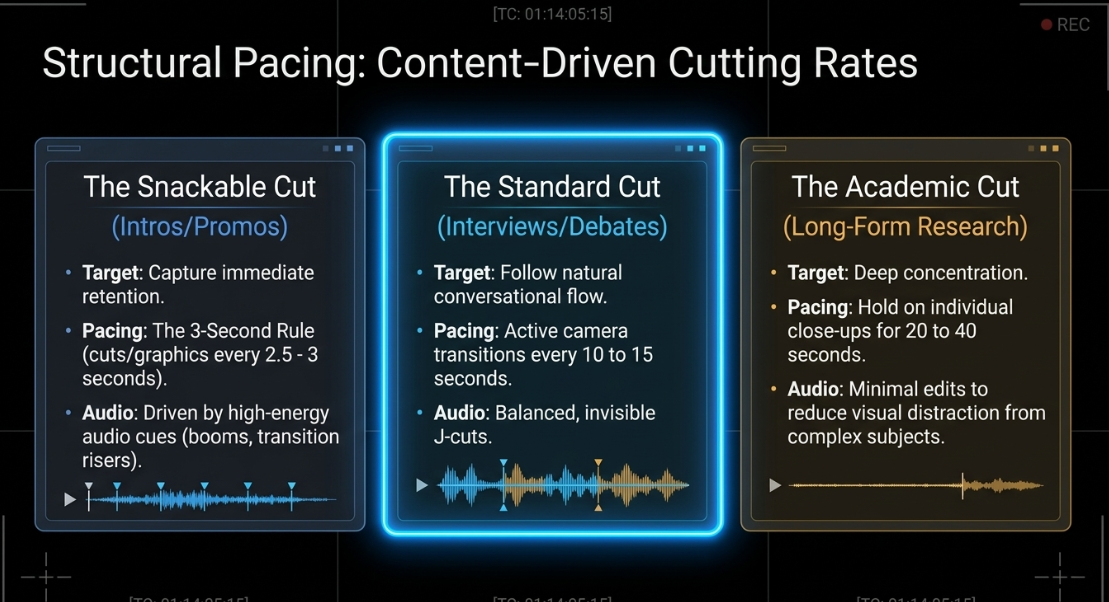
The frequency of visual cuts must match the overall tone and structure of the podcast16. Content-driven cutting rates are designed around the target audience's viewing expectations and attention limits16:
The Snackable, Fast-Paced Cut (Intros & Promos): Driven by retention metrics, these segments are designed to grab attention immediately30. The editing style utilizes the "3-second rule," cutting to a new angle or graphic every 2.5 to 3 seconds32. High-energy audio cues, such as boom or transition sound effects, are placed over cuts to keep momentum high32.
The Academic, Slow-Paced Cut (Long-Form Research): Applied to dense, intellectual conversations where deep concentration is required, such as the Lex Fridman Podcast16. This style holds on individual close-ups for 20 to 40 seconds3. Keeping edits to a minimum reduces visual distractions and allows the viewer to focus on the subject matter16.
The Standard Conversational Cut (Interviews & Debates): The camera follows the conversational flow, transitioning every 10 to 15 seconds18. This style keeps the visuals active without feeling overly frantic1.
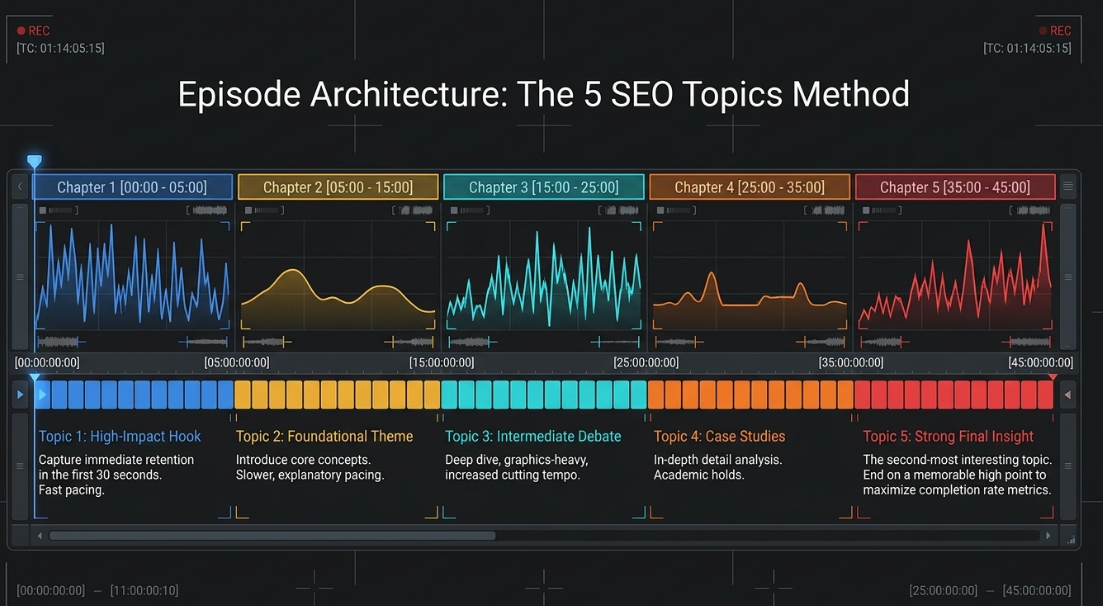
To maintain structure across long episodes, production teams use the "5 SEO Topics Method"34. The interview is organized into 5 broad thematic segments, each lasting 5 to 10 minutes34.
The show starts with the most compelling topic to capture the audience's attention during the crucial first 30 seconds34. The second-most interesting topic is saved for the end to finish on a high note, while the remaining segments are structured in the middle based on complexity and narrative flow34.
THE 5 SEO TOPICS PACING STRUCTURE:
[00:00 - 05:00] Topic 1: High-Impact Hook (Capture immediate retention)
[05:00 - 15:00] Topic 2: Foundational Theme (Introduce core concepts)
[15:00 - 25:00] Topic 3: Intermediate Debate (Deep dive, graphics-heavy)
[25:00 - 35:00] Topic 4: Case Studies / Details (In-depth analysis)
[35:00 - 45:00] Topic 5: Strong Final Insight (End on a memorable high point)
Digital Scaling and Visual Jump Cut Coverings
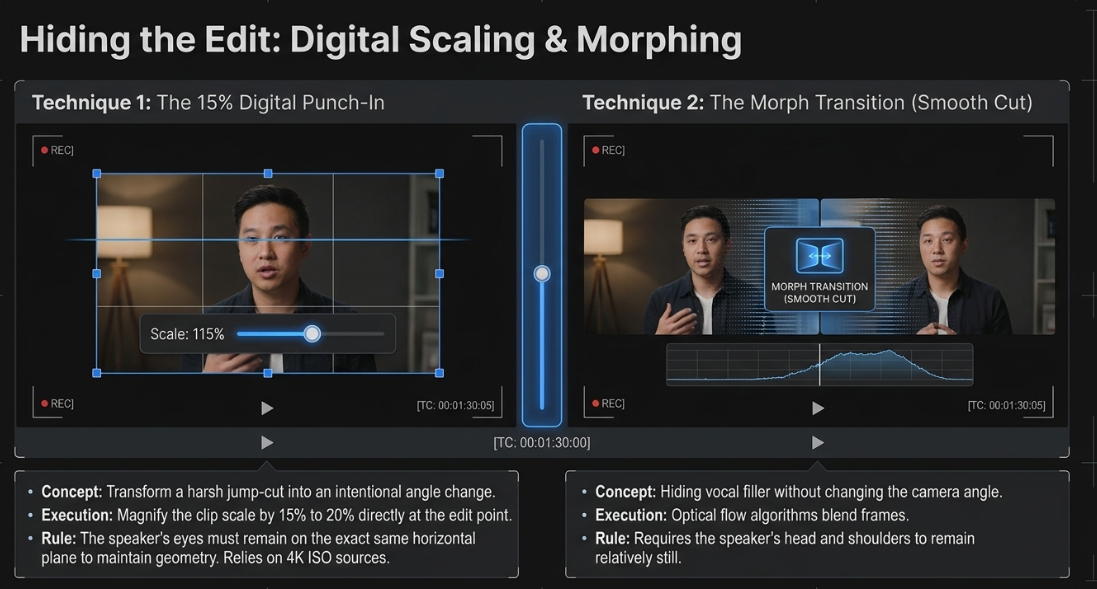
When editing long interviews down for clarity, removing filler words (such as "um" or "like") and stumbles can create jarring jump cuts on a single camera angle35. To hide these edits and keep the visual flow smooth, editors use digital punch-ins and software transitions18:
The 15% Digital Punch-In: At the edit point, the scale of the video track is increased by 15% to 20% on the timeline29. By magnifying the frame and keeping the speaker's eyes on the same horizontal plane, the jump cut is transformed into a clean close-up angle change29. This digital crop is highly effective when working with high-resolution 4K source footage, as it maintains image clarity on a 1080p timeline2.
The "Smooth Cut" Morph Transition: In DaVinci Resolve (or "Morph Cut" in Premiere Pro), specialized optical flow algorithms can blend the frames directly before and after an edit18. If the speaker's head and shoulders remain relatively still during the cut, the software seamlessly morphs the two positions together18. This technique is ideal for hiding minor vocal edits without needing to change camera angles18.
Technical Post-Production Architecture and NLE Platforms
Ingest, Transcoding, and the Frame.io Sync Standard
Modern video editing requires an organized and structured asset pipeline4. The first step in this process is establishing a consistent, logical folder structure to keep all media files organized4:
PROJECT ROOT DIRECTORY:
├── 01_Project_Files (Premiere Pro, DaVinci, or FCPX XMLs) [cite: 35]
├── 02_Raw_Footage (Original camera cards by camera angle)
│ ├── Cam_A_Host_ISO
│ ├── Cam_B_Guest_ISO
│ └── Cam_C_Wide_ISO
├── 03_Raw_Audio (24-bit 48kHz wav tracks per microphone)
├── 04_Assets (Branded elements, overlays, lower-thirds)
├── 05_Proxies (Low-bandwidth offline editing files)
└── 06_Deliverables (Final master exports and social media clips) [cite: 1, 35]
To optimize playback performance when editing heavy multi-camera sequences (such as 4K ProRes raw footage), editors generate proxy files38. Proxies are low-resolution, lightweight copies of the original camera footage38. The editor cuts the sequence using these proxy files to keep the system responsive, and then relinks to the high-resolution original files for color grading and final export38.
To sync multi-camera projects efficiently, production teams use built-in synchronization engines or timecode systems4. During recording, physical timecode generators or a clapperboard clap establish clear sync points4. In post-production, editors select the corresponding bins, right-click, and choose "Create Multi-Camera Source Sequence," using the audio waveforms or timecodes to align all camera angles automatically38.
Once synchronized, the multi-camera clip can be opened in timeline mode to correct any minor sync drift or frame misalignments42.
The Dialog Restoration Signal Chain
Audio quality is a critical factor in video podcast retention4. The raw vocal tracks must go through a structured signal chain to ensure clarity, presence, and consistent volume levels4:
High-Pass Filtering (HPF): A steep low-cut filter is applied at


Noise Gating: A gentle expander or noise gate is configured to attenuate silent gaps by


Subtractive EQ: Narrow parametric EQ cuts are used to pull out mud and boxy frequencies around


Sibilance Attenuation (De-essing): A dynamic de-esser targets harsh sibilant frequencies in the


Dynamic Compression: A dual-stage compressor is applied with a soft knee and a 2:1 or 3:1 ratio15. This compresses high vocal peaks by


Loudness Normalization: The final stereo mixdown is measured using loudness meters and normalized to meet digital streaming standards—typically between


Non-Linear Editing Platform Comparison
Different editing software platforms offer unique advantages depending on the specific post-production workflow and demands of the show4.
The Industrial Automation Landscape and AI Switching Parameters
AI-Driven Switching Engines
To help manage the time-intensive task of manual multi-camera switching, editors often use AI-driven automation plugins directly within their editing software51.
By analyzing the amplitude and presence of individual vocal tracks, these tools can generate an automated rough cut of a long conversation in minutes51.
AI MULTICAM SWITCHING ENGINE LOOP:
Input Track 1 (Host Mic) ----> \
Input Track 2 (Guest Mic) ----> [ AI Analysis: Voice Detection ] ---> Automated Multicam Sequence
Input Track 3 (Wide Cam) ----> / (Uses custom min/max hold times)
To configure these tools to switch camera angles naturally, editors adjust several key parameters53:
Minimum and Maximum Hold Times: The minimum shot duration (typically set to 2 to 4 seconds) prevents rapid, flashing cuts when speakers use quick verbal agreements like "yes" or "uh-huh"53. The maximum hold duration (set to 15 to 30 seconds) ensures the camera cuts to a reaction or wide shot during a long monologue to keep the visuals active3.
Sensitivity and Gate Thresholds: These settings adjust how easily the system registers soft speech or crosstalk53. Setting a high threshold prevents ambient microphone bleed (e.g., the guest’s voice leaking into the host's mic) from triggering accidental camera cuts53.
Wide Shot Frequency: This parameter defines how often the system defaults to the wide shot during periods of silence or simultaneous crosstalk53.
The Necessity of the Human Refining Pass
While automated camera switchers are excellent for generating a quick first-pass edit, they cannot match the emotional intuition and narrative understanding of a human editor52. Automated cuts are purely reactive, whereas human cutting is predictive and empathetic22.
An experienced editor will always watch down the automated timeline to adjust edit points and add intentionality47:
Adjusting Transition Frame Offsets: Automated systems default to hard cuts24. The human editor modifies these into smooth J-cuts and L-cuts, sliding the audio and video transitions by 6 to 12 frames to create a natural dialogue flow18.
Crosstalk Management: During fast-paced exchanges or interruptions, automated systems can struggle and cut rapidly between angles52. A human editor resolves this by holding on a wide shot or staying on the primary speaker’s close-up to let the interaction breathe1.
Silent Emotional Emphasis: An AI tool will never cut to a participant who is silent28. A human editor knows when to cut to a reaction shot of the listening guest—capturing a nod, smile, or look of surprise—to add emotional depth to the conversation3.
Repurposing and Vertical Social Media Formatting
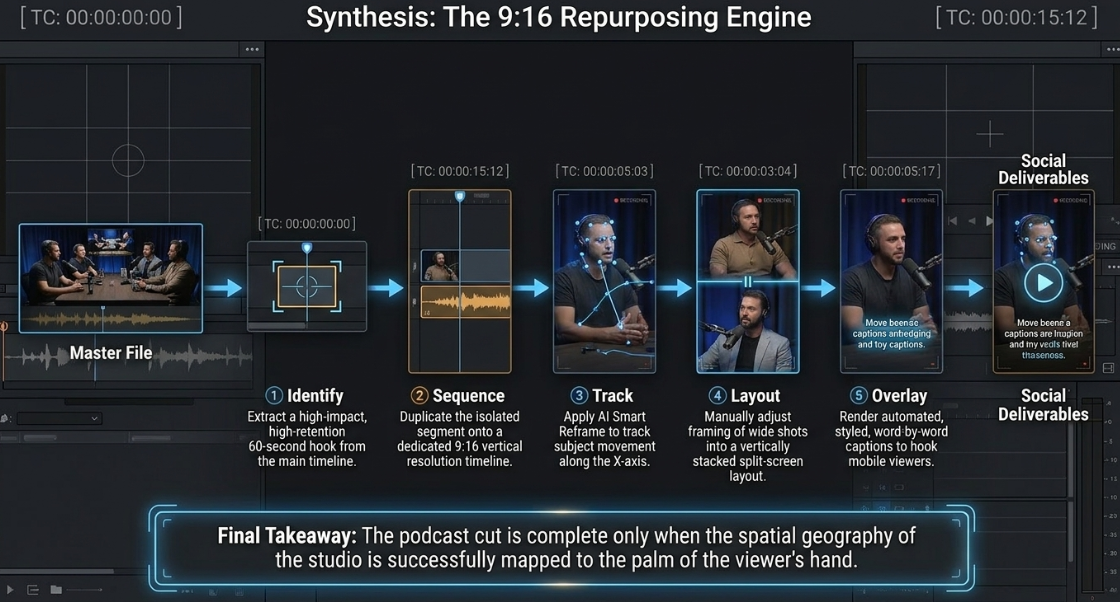
A key post-production requirement for modern video podcasts is the extraction of short-form vertical clips (9:16) for TikTok, Instagram Reels, and YouTube Shorts1. These clips act as powerful marketing hooks to drive new viewers to the full-length episodes3.
To extract these clips quickly, editors use automated resizing tools paired with manual framing adjustments41:
VERTICAL REFRAMING PIPELINE (16:9 to 9:16):
Step 1: Identify high-impact 60-second clip from the main timeline [cite: 57, 59].
Step 2: Duplicate the segment onto a dedicated 9:16 timeline vertical sequence.
Step 3: Apply AI Smart Reframe to track speaker movement and keep them centered [cite: 41, 54].
Step 4: Manually adjust framing of two-person wide shots into stacked or split-screen layouts.
Step 5: Overlay automated, styled word-by-word captions [cite: 54, 58].
To streamline this process in DaVinci Resolve, editors use the "Smart Reframe" tool41. This feature automatically tracks the active subject in the frame and adjusts the X-axis position to keep them centered in the vertical crop41.
For segments featuring dynamic exchanges, editors stack close-up tracks vertically on the timeline to create a split-screen view20. This layout allows viewers to see the host's reaction and the guest's response simultaneously, maximizing visual energy in a mobile-friendly format3.
Operational Directives for Professional Video Podcasting
To achieve consistent, high-retention visual results, video engineering and post-production teams should implement the following guidelines:
Maintain Symmetrical Studio Angles: Align the individual close-up cameras symmetrically on one side of the conversational axis5. Keep headroom, eyelines, and background styling consistent across all episodes to ensure automated editing tools and human cuts behave predictably5.
Utilize High-Resolution ISO Recording: Avoid relying solely on live-switched program cuts1. Record each camera angle and microphone source as an independent, isolated file (ISO)1. This preserves the clean, high-resolution source footage required for visual variety, digital crops, and optimized short-form vertical clips1.
Incorporate Split Edits as the Standard: Move away from hard cuts on dialogue transitions24. Standardize the use of 6-to-12 frame J-cuts and L-cuts to slide the audio and video edit points, creating a natural dialogue flow that replicates human attention18.
Follow the Structured Timing Hierarchy: Treat the active speaker's close-up as the "home" angle, holding it for up to 30 seconds18. Splicing in 2-to-3 second reaction shots of the listener helps maintain visual variety, while wide shots should be reserved for logical transition points, pauses, and crosstalk resets18.
Optimize Automated Workflows with a Manual Pass: Use AI multicam engines (such as AutoPod or Wraith) to handle the repetitive task of generating the initial rough cut38. Then, have an editor perform a manual refining pass to adjust transition timing, resolve rapid-switching issues during crosstalk, and insert silent reaction shots for emotional depth52.
Works cited
Multi-Camera vs Single-Camera Podcast Recording: What's the Difference?, https://www.podcaststudioglasgow.com/podcast-studio-glasgow-blog/multi-camera-vs-single-camera-podcast-recording-whats-the-difference
Building a Simple Multicam Podcasting Kit - CVP.com, https://cvp.com/resources/articles/insights/building-a-simple-multicam-podcasting-kit
Multi-Camera Podcast Setup: Why It Matters for Your Brand - Krisha Studio, https://www.krishastudio.com/multi-camera-podcast-setup-production/
Video Podcast Editing Guide: Master the Essentials in 2026, https://podcastmonkey.co/blogs/news/video-podcast-editing
The Complete Video Podcast Blueprint: 1–4 Person Setups, Camera Angles, & Lighting Diagrams - Cutback, https://cutback.video/blog/the-complete-video-podcast-blueprint-1%E2%80%934-person-setups-camera-angles-lighting-diagrams
The Invisible Editor: A Guide to Continuity Editing for Film and Video - Soundstripe, https://www.soundstripe.com/blogs/the-invisible-editor-a-guide-to-continuity-editing-for-film-and-video
Types of Video Editing: A Guide - Backstage, https://www.backstage.com/magazine/article/types-of-video-editing-75728/
180-degree rule - Wikipedia, https://en.wikipedia.org/wiki/180-degree_rule
How would you distinguish the type of editing between film editors and content creators?, https://www.reddit.com/r/VideoEditing/comments/kcf4l9/how_would_you_distinguish_the_type_of_editing/
30 degree rule - Filmmakers Academy, https://www.filmmakersacademy.com/glossary/30-degree-rule/
The 30-Degree Rule in Filmmaking: How to Maintain Continuity - EditMentor, https://editmentor.com/blog/the-30-degree-rule-in-filmmaking-how-to-maintain-continuity/
The 30-Degree Rule: A Trick All DPs and Editors Should Know | No Film School, https://nofilmschool.com/30-degree-rule-dps-editors
Jump Cut Definition: A Modern Creator's Guide - Klap, https://klap.app/blog/jump-cut-definition
Canon (UK) Ltd - Exhibitors, https://www.mpts.london/exhibitors/canon-uk-ltd
Joe Rogan Experience Podcast Equipment & Studio Setup(use this setup to become as popular as JRE /s), Great in-depth article on Young Jamie's set up - Reddit, https://www.reddit.com/r/podcasting/comments/9ru6gn/joe_rogan_experience_podcast_equipment_studio/
Building a Multi-Camera Video Podcast Setup | B&H eXplora, https://www.bhphotovideo.com/explora/video/tips-and-solutions/building-a-multi-camera-video-podcast-setup
Multicam 2-Person Video Podcast and Live Streaming Setup Gear Guide, https://pss.media/blog/multicam-2-person-video-podcast-and-live-streaming-gear
What it's like editing for The Diary Of A CEO : r/podcasting - Reddit, https://www.reddit.com/r/podcasting/comments/1tmirer/what_its_like_editing_for_the_diary_of_a_ceo/
Video Editing Techniques for Podcasts | PDF | Frame Rate - Scribd, https://www.scribd.com/document/887735366/Edit
Make the most of FCP X: 6 ways to maximize Multicam - Frame.io Insider, https://blog.frame.io/2016/10/06/6-ways-to-maximize-multicam-fcpx/
Shooting and Editing Interviews in Premiere Pro - Adobe, https://www.adobe.com/max/2024/sessions/shooting-and-editing-interviews-in-premiere-pro-s6609.html
How to Improve Your Video Podcast: 3 Production Techniques - Vicinity Studio, https://vicinity.studio/how-to-improve-your-video-podcast-3-production-techniques/
Premiere Workflow: What is the best way to do L and J cuts on multi-camera sequences?, https://www.reddit.com/r/VideoEditing/comments/uqk82g/premiere_workflow_what_is_the_best_way_to_do_l/
Top 10 Most Used Films Cuts in the Film Industry - Motion Array, https://motionarray.com/learn/post-production/films-cuts/
J cuts vs L cuts examples in video editing - Adobe, https://www.adobe.com/uk/creativecloud/video/discover/j-cut-and-l-cut.html
Smoother and More Cinematic L-cuts and J-cuts in Video Editing - Boris FX, https://borisfx.com/blog/l-and-j-cuts-smoother-more-cinematic/
What is L-Cut - Vizard.ai, https://vizard.ai/knowledge-base/video-production/what-is-l-cut
Multicam Podcasts / Studio recordings: the correct angle chosen for the correct speaker | Eddie AI | Your AI assistant video editor, https://help.heyeddie.ai/en/articles/10548843-multicam-podcasts-studio-recordings-the-correct-angle-chosen-for-the-correct-speaker
Dynamic Zoom Edits in Riverside for Polished Podcasts - Cristi Cotovan, https://cotovan.com/post/dynamic-zoom-edits-riverside-polished-podcasts/
Video Editor, The Diary Of A CEO - FlightStory - Teamtailor, https://flightstory.teamtailor.com/jobs/7712659-video-editor-the-diary-of-a-ceo
Video Editor, The Diary Of A CEO - FlightStory - Teamtailor, https://flightstory.teamtailor.com/jobs/7712918-video-editor-the-diary-of-a-ceo
4 Ways The Diary of A CEO Hooks Their Audience | by Andrew Ellis | Medium, https://iamandrewellis.medium.com/4-ways-the-diary-of-a-ceo-hooks-their-audience-f0723871f8e8
The 30 Best Video Podcasts in 2026 (Sorted by Format, Not Downloads) - Vidpros, https://vidpros.com/best-video-podcasts/
Master Podcast Episode Structure and Pacing: A How-To Guide - Podigy, https://www.podigy.co/podcast_episode_structure_and_pacing
Podcast editing guide (2026): how to edit a podcast like a pro | LucidLink, https://www.lucidlink.com/blog/podcast-editing
What is your workflow for editing your video podcast? How do you keep track of the major topics/moments in the podcast? - Reddit, https://www.reddit.com/r/podcasting/comments/1rjun6z/what_is_your_workflow_for_editing_your_video/
How to create effective jump cuts when video editing - RouteNote Licensing Blog, https://licensing.routenote.com/blog/how-to-create-effective-jump-cuts-when-video-editing/
Edit Podcasts & Interviews in Premiere Pro (2026 Guide) - Cutback, https://cutback.video/blog/how-to-edit-interviews-podcasts-like-a-pro-an-essential-guide-for-beginners
Video Post-Production Workflow Guide | Frame.io, https://workflow.frame.io/guide/
Editing video podcasts with multiple 4K camera angles - Nono Martínez Alonso, https://nono.ma/editing-video-podcasts-with-multiple-4k-camera-angles
Exporting Vertical from 16:9 : r/davinciresolve - Reddit, https://www.reddit.com/r/davinciresolve/comments/1u24w4q/exporting_vertical_from_169/
An Assistant Editor's Guide to Syncing Projects in Premiere Pro - Frame.io Insider, https://blog.frame.io/2023/04/10/editors-guide-syncing-premiere-pro-projects/
Podcast editing & audio quality: How to make your podcast sound professional, https://blog.nomono.co/podcast-editing-audio-quality
Mastering Podcast Editing and Post-Production: Your Ultimate Guide - Podigy, https://www.podigy.co/mastering_podcast_editing_and_post-production_your_ultimate_guide
What Mic Does Joe Rogan Use? (And Why We Use Rode Procasters at The Podcast Studio Glasgow), https://www.podcaststudioglasgow.com/podcast-studio-glasgow-blog/what-microphone-does-joe-rogan-use-and-why-dynamic-mics-matter-more-than-brand-names
Top 10 Best Video Podcast Editing Software of (2026 Review) - Worldmetrics, https://worldmetrics.org/best/video-podcast-editing-software/
Workflows for quick turnaround video podcast editing : r/editors - Reddit, https://www.reddit.com/r/editors/comments/1p11j90/workflows_for_quick_turnaround_video_podcast/
How to make Jump Cuts in Premiere Pro or DaVinci Resolve ? Step-by-Step Tutorial - AutoCut, https://www.autocut.com/en/blogs/tutorial-jump-cuts-premiere-pro/
How to use FCPX custom roles to organize a multicam sequence. - Frame.io Insider, https://blog.frame.io/2024/08/14/insider-tips-fcpx-multicam-sequence-organized-custom-roles/
Autopod vs Descript - Swell AI, https://www.swellai.com/blog/autopod-vs-descript
Autopod vs Adobe Podcast vs Podcastle – A Complete Guide for Marketing Leaders in 2026, https://genesysgrowth.com/blog/autopod-vs-adobe-podcast-vs-podcastle
Level Up Your Podcast Game: Top 5 Auto-Edit Tools - AIR Media-Tech, https://air.io/en/ai-tools/level-up-your-podcast-game-top-5-auto-edit-tools
Best AutoPod Alternative in 2026: Wraith Multi‑Cam Editor for Premiere Pro Podcasts, https://phantomeditor.video/blog/best-autopod-alternative-2026-multicam-editing-premiere-pro
Edit multi-cam podcasts faster with AutoCut, https://www.autocut.com/en/autocutpodcast/
AutoPod Review: AI Editing for Podcasts (Worth It?) - Vidpros, https://vidpros.com/autopod-review-ai-editing-for-podcasts-worth-it/
Editors in small scale multi-cam/podcasting, do the so-called “AI” cutting tools actually work?, https://www.reddit.com/r/editors/comments/1s0qebi/editors_in_small_scale_multicampodcasting_do_the/
What Is ISO Recording and Why Does It Matter for Video Podcasts?, https://www.podcaststudioglasgow.com/podcast-studio-glasgow-blog/what-is-iso-recording-and-why-does-it-matter-for-podcasts
Best AutoCut Agent for Podcast Clips in 2026 | Top 6 Tools Reviewed - CapCut, https://www.capcut.com/resource/top-6-autocut-agents-for-podcast
Podcast Video Editing Service in As Salimiyah - Simoprints, https://simoprints.com/podcast-video-editing-as-salimiyah/














