
The Jurisprudential Landscape of Third-Party Asset Acquisition in Video Podcasting
Modern post-production workflows for professional video podcasts are built on the strategic integration of third-party assets1. To establish visual variety, support editorial narratives, and maintain viewer engagement, production teams must regularly acquire external media, including stock footage, commercial music tracks, sound effects, B-roll, and graphic templates1. However, integrating these additional sources introduces significant legal liabilities1. Many podcasters unknowingly commit copyright infringement by incorporating unlicensed background music, intro tracks, movie screenshots, celebrity photos, or viral social media clips without explicit permission from the rights holders1.
To build a professional brand and protect a podcast's catalog, production teams must strictly adhere to intellectual property laws1. Intellectual property enforcement on digital distribution platforms is highly automated, and copyright violations can lead to platform-enforced content takedowns, automated audio muting, loss of monetization, or direct legal action1. Content creators often rely on the doctrine of "Fair Use" (under Section 107 of the United States Copyright Act of 1976) or "Fair Dealing" (under regional laws such as the United Kingdom's Copyright, Designs and Patents Act 1988) to justify the use of unlicensed material5. However, these legal frameworks are highly misunderstood and are often applied incorrectly in post-production environments1.
Fair Use is not a proactive shield or an automatic right that prevents an episode from being flagged or removed1. Instead, it is an affirmative legal defense that must be argued on a case-by-case basis in a court of law after a copyright infringement lawsuit has been initiated1. There are no simplified mathematical guidelines, such as the rumored "seven-second rule" or "thirty-second rule," that automatically qualify an unlicensed clip as fair game1. Whether a specific use qualifies as Fair Use depends on a highly context-specific judicial evaluation of four distinct statutory factors:



If a video podcast incorporates an unlicensed asset simply because it "sounds good" or fills a visual gap, that use is legally classified as infringement, not Fair Use1.
In contrast to the flexible, four-factor framework of US law, the United Kingdom's Fair Dealing framework is much narrower5. Under the Copyright, Designs and Patents Act 1988 (CDPA), Fair Dealing exceptions are strictly limited to specific statutory purposes, including criticism, review, quotation, news reporting, parody, caricature, and pastiche5. For a podcast to qualify for a Fair Dealing exception, the usage must be accompanied by a sufficient acknowledgment of the source, and the excerpted material must be directly connected to active criticism or review within the episode5.
The landmark case Time Warner Entertainment Co plc v Channel Four Television Corporation plc (1994) illustrates how these exceptions are applied9. In this case, Channel 4 produced a one-hour documentary about the film A Clockwork Orange and included approximately twelve minutes of footage from the film without a license9. The court discharged an interim injunction against the broadcast, ruling that the use was protected under the Fair Dealing exception for criticism and review9. The ruling was based on the high quality of the criticism and the clear connection between the specific clips used and the analytical commentary9.
If third-party material is used merely as background "wallpaper" to pad runtime or entertain the listener, the defense fails under both UK and US jurisdictions5. Overusing third-party clips from television programs, films, news broadcasts, radio, or other podcasts remains a common compliance pitfall5. If clips are too long, structurally unnecessary for the discussion, or used without meaningful analysis, courts consistently rule that the use constitutes copyright infringement5.
Visual copyright is enforced with similar stringency1. Podcast artwork and promotional materials often feature celebrity photos, paparazzi shots, movie screenshots, or generic images sourced from Google Search1. Because search engines index copyrighted images, these assets are almost always owned by a photographer or agency1. Using them without a license risks having the entire show pulled from major directories like Apple Podcasts or Spotify1.
To ensure long-term legal safety, production teams must obtain formal written permission when royalty-free alternatives are unavailable1. If an editor wants to use a segment from another creator's podcast or a song from a local artist, a verbal agreement or direct message (DM) is difficult to prove later1. Best practices require securing a formal, signed licensing contract, saving it as a PDF, and ensuring it specifies that usage rights are granted in perpetuity (forever) to prevent having to pull the episode down in the future1.
Additionally, under consumer protection laws, if a podcast blends commercial advertising, sponsorship, or paid promotion into its editorial content, the creators must ensure the commercial nature of the content is clearly recognizable to the audience5. Failing to disclose paid product integrations or sponsorships risks regulatory penalties and reputational damage5.
To provide a clear overview of these legal frameworks, Table 1 compares the legal requirements for US Fair Use and UK Fair Dealing.
Table 1: Legal Comparison of US Fair Use and UK Fair Dealing Frameworks
Evaluation of Commercial Audio Licensing Platforms and Whitelisting Operations
To establish a legally compliant post-production workflow, professional video podcasts rely on commercial licensing platforms for music and sound effects (SFX)5. However, these platforms operate under highly divergent licensing structures, pricing tiers, and platform-protection mechanisms11. Choosing the wrong provider can leave enterprise clients unprotected or cause automated copyright claims to disrupt monetization channels12.
A primary distinction in commercial music licensing is the difference between Performing Rights Organizations (PROs) and direct licensing platforms12. PROs (such as ASCAP, BMI, and SESAC in the United States) collect public performance royalties on behalf of songwriters and publishers14. When a platform like Musicbed licenses music from artists affiliated with a PRO, the music is classified as rights-managed rather than strictly royalty-free12. While a platform like Musicbed can clear sync rights for online video platforms, the publisher or composer still retains public performance rights15. If the video podcast is broadcast on television, streamed via over-the-top (OTT) networks, or distributed in international territories, the production company or network remains responsible for submitting detailed cue sheets and paying extra public performance royalties to local PROs12.
Conversely, platforms like Epidemic Sound operate on a direct licensing model12. Epidemic Sound owns 100% of the rights to both the sound recordings (master rights) and the underlying musical compositions (publishing rights)15. Because the catalog is entirely free of PRO-affiliated artists, the platform can issue direct, legally watertight licenses that cover synchronization, copying, distribution, public performance, and digital transmission across all distribution networks worldwide without any hidden fees or external PRO claims12. Epidemic Sound supports this model by offering clear compensation structures for its artists, including upfront commissions of 

For video editors, selecting a platform also requires evaluating content types, video resolutions, and legal protections:
Storyblocks: Features a library of over six million human-made assets (with a strict zero-generative-AI policy)18. All individual and business plans include access to video files up to


Artlist: Offers comprehensive subscription tiers (such as Artlist Max) that combine high-quality music, sound effects,

Envato Elements: A budget-friendly, multi-asset directory containing over 22 million digital assets, including templates, graphics, web themes, and music20. However, its licensing terms are highly restrictive, requiring users to manually register every downloaded file for a single, specific project19. Once a subscription is canceled, the creator can only continue using those assets within the projects registered during the active subscription period19.
Audiio: Appeals to independent editors by offering lifetime subscription options and a robust library of sound effects and music22. While its library is smaller than legacy competitors, its streamlined interface is designed for rapid music discovery23.
To compare these platforms systematically, Table 2 evaluates their licensing models, whitelisting capabilities, and legal protections.
Table 2: Feature Matrix of Commercial Audio Licensing Platforms
To protect creators from automated platform penalties, platforms rely on whitelisting (also referred to as safelisting or clearlisting)6. Platforms like YouTube use automated Content ID systems to scan uploaded videos against a database of acoustic fingerprints6. When a match is detected, the system may mute the video, block it, or redirect its ad revenue to the copyright holder6.
To prevent these automated claims, editors must connect their active social media profiles (YouTube, TikTok, Instagram, Facebook, Twitch) to their licensing accounts6. Under the Epidemic Sound and Artlist frameworks, any video published on a whitelisted channel during an active subscription remains cleared forever7. If a channel is not registered, Content ID will automatically issue a monetization claim6. Unlicensed videos are typically not taken down; instead, the licensing platform runs ads on them to generate revenue to pay its artists7. If a valid license is held, these claims can be quickly resolved by submitting the platform's license certificate or subscription invoice as proof of coverage6.
Creative Integration of Acquired Material: B-Roll, Narrative Pacing, and Social Exploitation
Acquiring stock footage and B-roll is an effective way to break up the monotony of talking-head shots, cover jump cuts, and add visual context to a discussion3. However, integrating these additional assets requires a clear understanding of composition, lighting, and pacing to ensure a cohesive final video3.
B-roll can be categorized into three distinct styles:
Natural (Candid/BTS): Unscripted footage that captures real, behind-the-scenes moments3. This style adds authenticity and helps build a personal connection with the audience3.
Planned: Scripted and planned shots used in reviews, tutorials, and product demonstrations to visually support the host's discussion3.
Creative: Dynamic shots—such as drone footage, slow-motion sequences, and timelapses—designed to add a cinematic feel to the podcast3.
To maintain visual consistency, acquired B-roll must match the composition and lighting of the primary studio shots (A-roll)3. Editors should look for assets that use consistent lighting directions, similar color temperatures, and matching shadow intensities to avoid jarring transitions3. Camera movement should also feel intentional3. Editors can use smooth horizontal tracking shots (simulating sliders) or dynamic panning shots to add depth and guide the viewer's eye3.
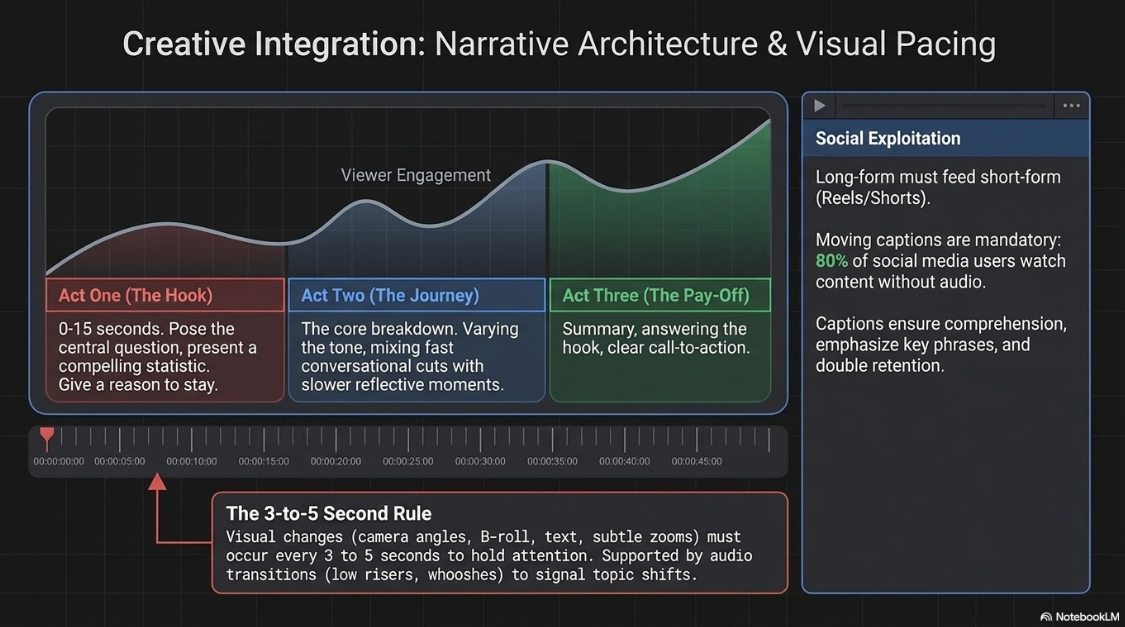
Pacing is the rhythmic structure that determines how quickly a story unfolds28. To maintain viewer engagement, professional editors often follow the 3-to-5 second visual shift rule28. This guideline suggests that a visual change should occur on screen every three to five seconds—whether by switching camera angles, introducing B-roll, adding on-screen text, or using subtle zooms—to hold the viewer's attention4.
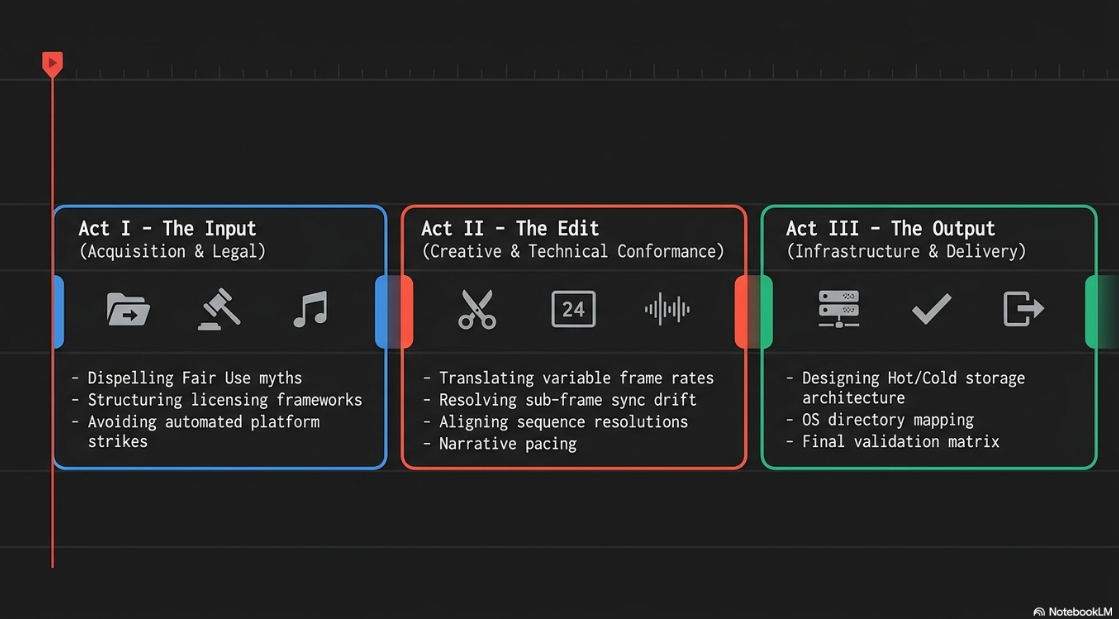
To support this visual pacing, podcasts are structured around a classic three-act narrative model:
Act One (The Hook): This phase establishes the episode's topic within the first

Act Two (The Journey): This is the core of the episode29. The information is broken down into structured, digestible sections29. The editor maintains engagement by varying the tone and speed of the edit, mixing fast-paced conversational sections with slower, more reflective moments29.
Act Three (The Pay-Off): The final act summarizes the key takeaways, answers the opening hook's question, and finishes with a clear call-to-action29.
Audio transitions and sound design are also critical tools for reinforcing this narrative flow4. Sound effects—such as low risers, soft impacts, or whooshes—are paired with visual transitions to signal a change in topic, providing a clean break for the viewer4.
Long-form podcast episodes are also used to generate short-form social media clips (Shorts, Reels, TikTok) to drive channel growth30. High-quality, well-framed social clips can achieve two to three times the engagement of poorly produced versions30.
Adding moving captions is a key requirement for short-form video30. Approximately 
Technical Conformance: Variable Frame Rates and Resolution Alignment
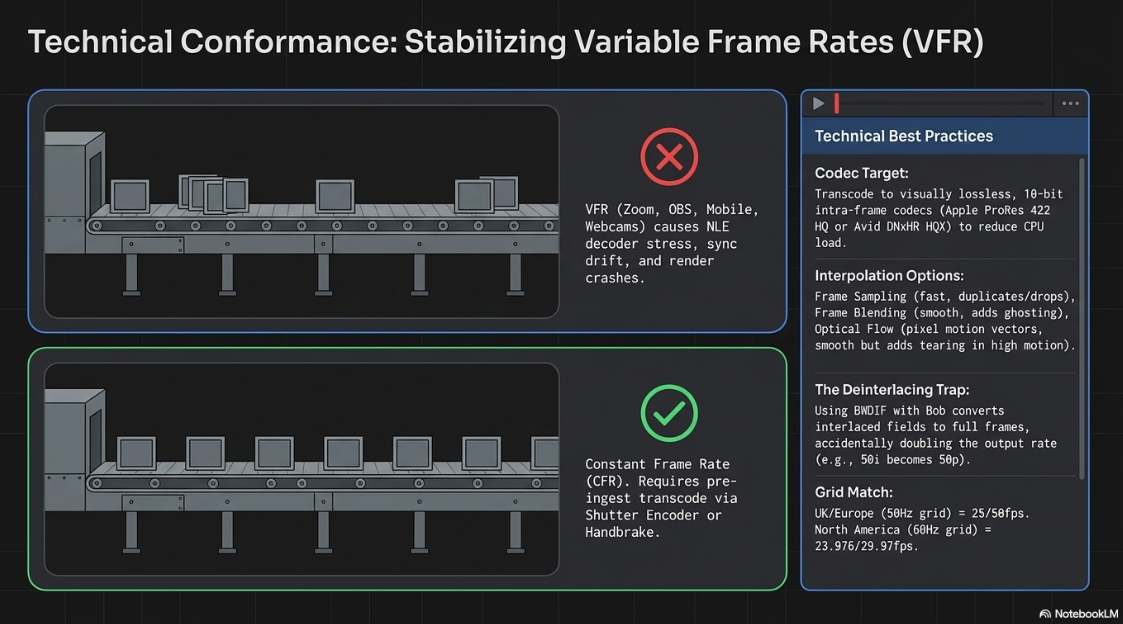
Integrating media from various cameras and online platforms introduces significant technical challenges31. Variable Frame Rate (VFR) video is commonly generated by webcams, mobile devices, screen recording software, and streaming platforms like Zoom or OBS33. While VFR is useful for reducing file sizes and managing network bandwidth, it is incompatible with professional non-linear editors (NLEs), which require a Constant Frame Rate (CFR)35.
If VFR files are imported directly into an editing timeline, the NLE struggles to decode the varying frame metadata35. This results in progressive audio-video synchronization drift, random audio dropouts, choppy playback, and system crashes during final export render passes35.
To prevent these issues, editors must conform VFR assets to a professional editing codec at a Constant Frame Rate before starting the edit31. While Adobe Media Encoder can handle standard transcodes, it often struggles to resolve complex VFR metadata over long files38. If the software cannot correctly analyze the VFR stream, it may encode the file at a non-standard average frame rate (e.g., 
To guarantee clean conformance, editors use dedicated transcoding tools like HandBrake or Shutter Encoder34. For high-end productions, transcoding to a visually lossless, 10-bit intra-frame editing codec—such as Apple ProRes 422 HQ or Avid DNxHR HQX—is standard practice31. This preserves maximum image quality and color depth while using uncompressed frames that reduce CPU processing loads during editing40.
During the conformance stage, editors must also choose how the software handles frame rate translation32. NLEs use three primary methods for frame rate interpolation:
Frame Sampling: The default, computationally fast method32. It duplicates or drops frames to match the target frame rate31. While useful for simple conversions, it can introduce stuttering in high-motion sequences32.
Frame Blending: Blends adjacent frames together to create new, intermediate frames32. This helps smooth out motion but can introduce visual ghosting or blurriness around fast-moving subjects32.
Optical Flow: Uses advanced motion estimation vector calculations to analyze pixel movement and generate entirely new frames32. This produces smooth results for slow-motion or simple speed changes, but can introduce visual tearing and edge artifacts in complex, high-motion scenes32.
Editors must also watch out for the "double-frame" trap when processing interlaced broadcast materials34. If a deinterlacing filter like "BWDIF with Bob" is applied during transcoding, it converts each interlaced field into a full frame34. This doubles the output frame rate (e.g., converting a 50i video to 50p), which can introduce sync issues and metadata errors if the timeline is not configured to match34.
When configuring timelines, editors must consider geographical electrical standards to avoid light flicker44. In regions with a 




Managing mixed video resolutions is also a critical consideration31. If a project combines equal amounts of 720p and 1080p footage, choosing a 720p sequence resolution is often preferred31. Upscaling 720p files to fit a 1080p timeline can look soft and pixelated31. In professional suites like DaVinci Resolve, editors can use the hardware-accelerated "SuperScale" feature to upscale lower-resolution stock footage cleanly44.
Additionally, in DaVinci Resolve, project frame rates must be configured before importing any media45. Once a clip is added to the media bin, the timeline frame rate is locked and cannot be modified, making early planning essential45.
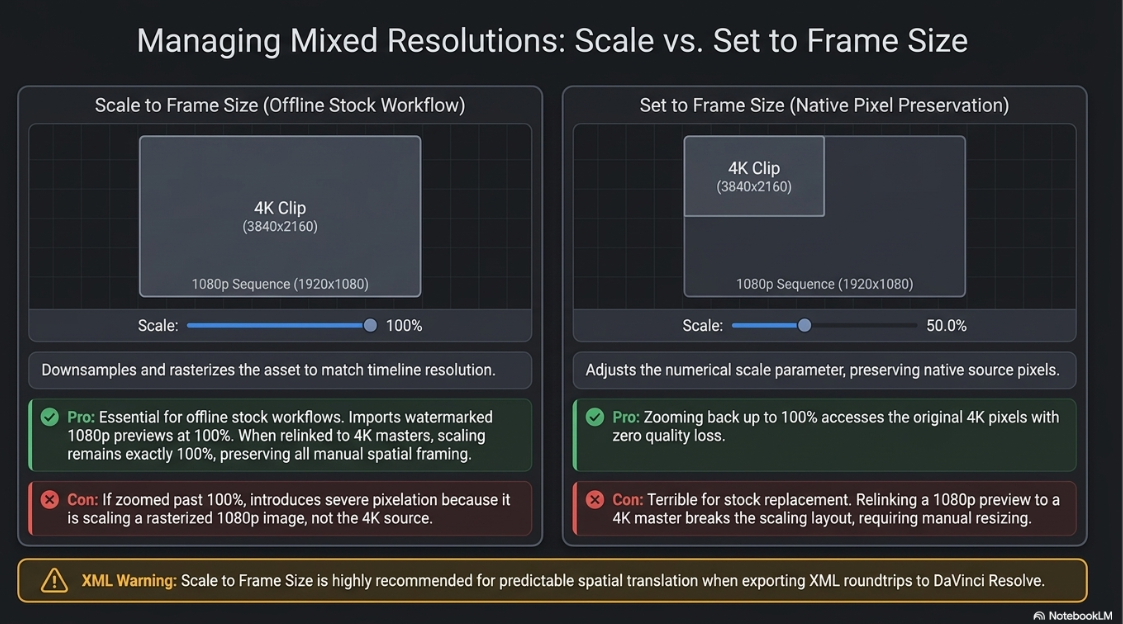
For stock footage workflows in Adobe Premiere Pro, editors must understand the difference between scaling commands when swapping low-resolution previews with high-resolution purchased masters46.
Scale to Frame Size: This command downsamples and rasterizes the asset to match the active sequence resolution48. If a 4K asset (




Set to Frame Size: This command adjusts the clip's Scale parameter in the Effect Controls panel to fit the sequence resolution, preserving the file's native pixels48. In the same scenario, "Set to Frame Size" scales the 4K asset down by changing its Scale parameter to


For offline stock workflows, "Scale to Frame Size" is highly effective46. During the offline edit, watermarked 1080p previews are imported and scaled using "Scale to Frame Size", which reads as 

If "Set to Frame Size" is used during the offline phase, relinking to a master file of a different resolution will break the scaling layout, requiring manual resizing for each clip46. However, "Scale to Frame Size" is not recommended when exporting projects to DaVinci Resolve via XML, as Resolve does not interpret Premiere's rasterization instructions correctly50. For XML round-tripping workflows, using "Scale to Frame Size" ensures more predictable spatial translation when conforming in Resolve50.
To compare these scaling options, Table 3 evaluates their technical details and workflow use cases.
Table 3: Scale to Frame Size vs. Set to Frame Size in Premiere Pro


Advanced Synchronization Dynamics: Clock Drift and Sample Rate Alignment
Even when video frame rates are stabilized, long-form podcast recordings often suffer from a phenomenon known as cumulative audio sync drift33. Over a one-hour episode, the audio track may gradually drift away from the video track, eventually becoming offset by several frames or seconds33.
This progressive drift is caused by two distinct technical issues: hardware-level clock mismatch and sample rate discrepancies33. When audio is captured on an external recorder (e.g., a dedicated audio interface like the Solid State Logic SSL2 MK2) while video is captured on cameras, each device relies on its own internal crystal oscillator to measure time33. Because these clocks are never in perfect alignment and lack a shared master clock (such as a hardware Word Clock or Genlock signal), they record time at slightly different speeds54. The clock inside a camera might record 

This physical clock mismatch causes the audio to drift progressively over time54. Additionally, sample rate mismatches aggravate this problem33. The broadcast television and professional video standard is 


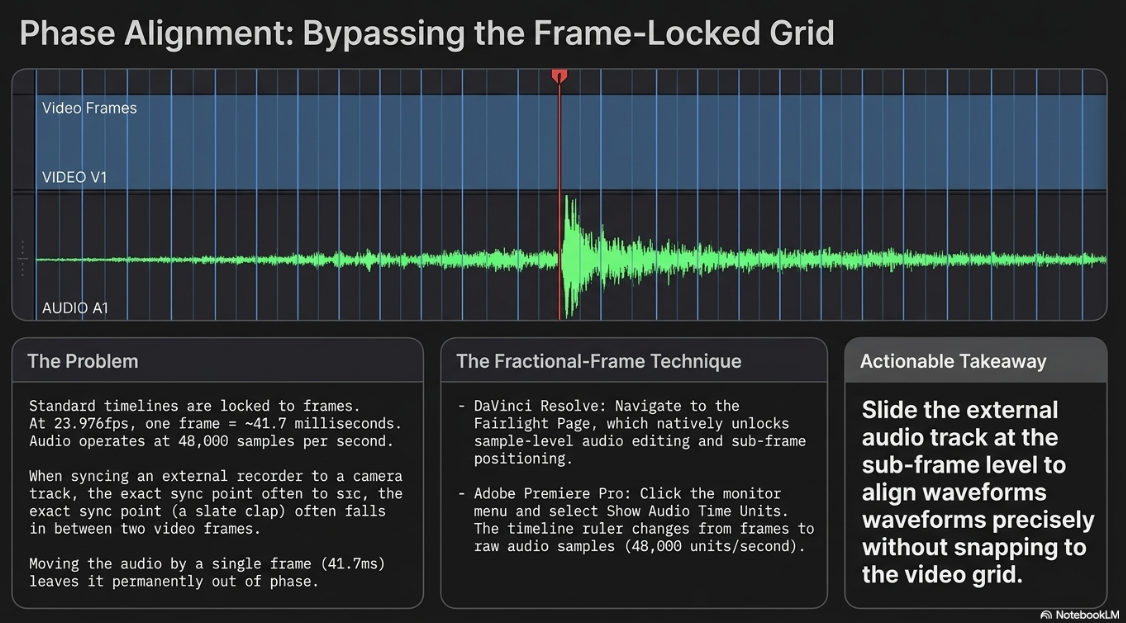
Another common issue is a fixed, non-cumulative sub-frame offset54. Standard NLE timelines operate on a frame-by-frame basis54. At a project rate of 



To resolve these synchronization issues, editors must employ specific conformance methodologies:
Fractional-Frame Synchronization Technique
To eliminate the initial sub-frame offset in DaVinci Resolve or Adobe Premiere Pro, editors must bypass the standard frame-locked timeline grid54. In DaVinci Resolve, navigate to the Fairlight Page, which permits sample-level audio editing and sub-frame positioning54. In Premiere Pro, click the three-dot menu on the Source or Program Monitor and select "Show Audio Time Units." This changes the timeline ruler from frames to raw audio samples (e.g., 
Mathematical Audio Time-Dilation Corrective Formula
When clock drift occurs over long timelines (e.g., an audio track running too fast or slow relative to the video), the editor must apply a precise time-stretching factor to the audio55. Rather than cutting and manually shifting the audio track every few minutes—which creates jarring jumps—the drift can be resolved by calculating the exact temporal expansion or compression ratio required33.
First, align the audio and video tracks at the exact first frame of the podcast using the fractional-frame technique54. Navigate to a clear synchronization point near the end of the timeline (e.g., a final slate clap, a sharp vocal plosive, or a distinct mouth closure)54. Measure the exact timestamp of this event on both the master video timeline (

The precise Time-Dilation Scaling Factor (

In an NLE, the editor selects the external audio clip, opens the speed/duration properties, and changes the speed percentage to match the calculated ratio:

For example, if a key sync event occurs at exactly 





Applying this precise speed adjustment scales the entire audio waveform, correcting the cumulative drift across the entire episode without introducing phase artifacts or pitch distortion31.
Professional Post-Production Storage, Assets, and Directory Architecture
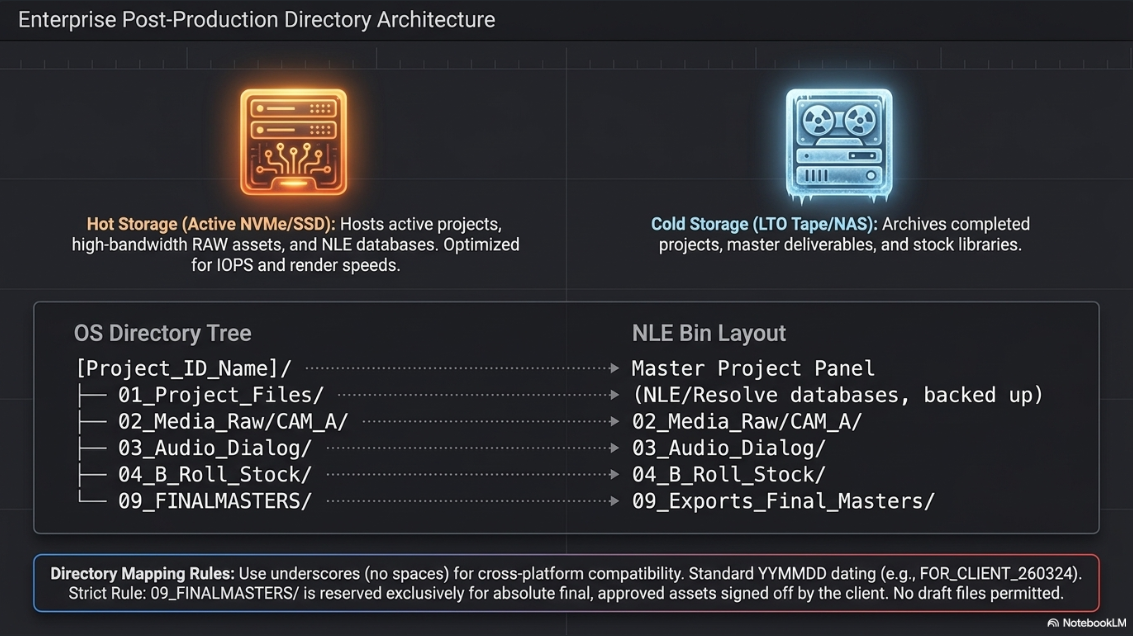
Maintaining a structured folder and directory system is essential for managing professional post-production assets58. Without a logical directory architecture, editors waste valuable time searching for missing media, relinking offline clips, and troubleshooting project-file errors60. A clean organization system ensures that projects are easy to navigate, allowing editors to collaborate smoothly and hand off timelines without errors60.
An enterprise post-production setup separates files into two primary locations: high-speed, active storage (Hot Storage) and long-term archive storage (Cold Storage)61.
Hot Storage (Active NVMe/SSD): This storage hosts all active projects and high-bandwidth assets, including raw video, audio, graphics, and NLE database files61. It is optimized for maximum read and write speeds to ensure smooth playback and fast render times.
Cold Storage (LTO Tape/Local NAS): This storage is used to archive completed projects, master deliverables, stock libraries, plug-ins, and archived raw media that are no longer actively being edited61.
To ensure compatibility across Windows, macOS, and Linux servers, folders are named using underscores instead of spaces (e.g., Project_Template_Hot_Storage)61. Additionally, confusing folder names like "Current", "Old", or "Finals" are removed to prevent version-control mistakes61. These are replaced with a dedicated "FOR & FROM" delivery directory, dated using a standardized format such as YYMMDD (e.g., FOR_CLIENT_260324) to simplify file tracking61.
For master deliverables, a separate "FINALMASTERS" directory is created61. This folder is reserved exclusively for the absolute final, approved assets signed off by the client61. Temporary drafts or version-control files (e.g., Draft_V1, Draft_V2) are kept in a separate working folder to keep the final masters folder clean and organized61.
To keep projects organized, the operating system's folder structure should mirror the project bin layout inside the editing software60. Table 4 illustrates an industry-standard directory template, showing how OS folders map to internal NLE bins.
Table 4: OS Directory Architecture and NLE Bin Mapping Template
Synthesized Post-Production Conformance Matrix and Recommendations
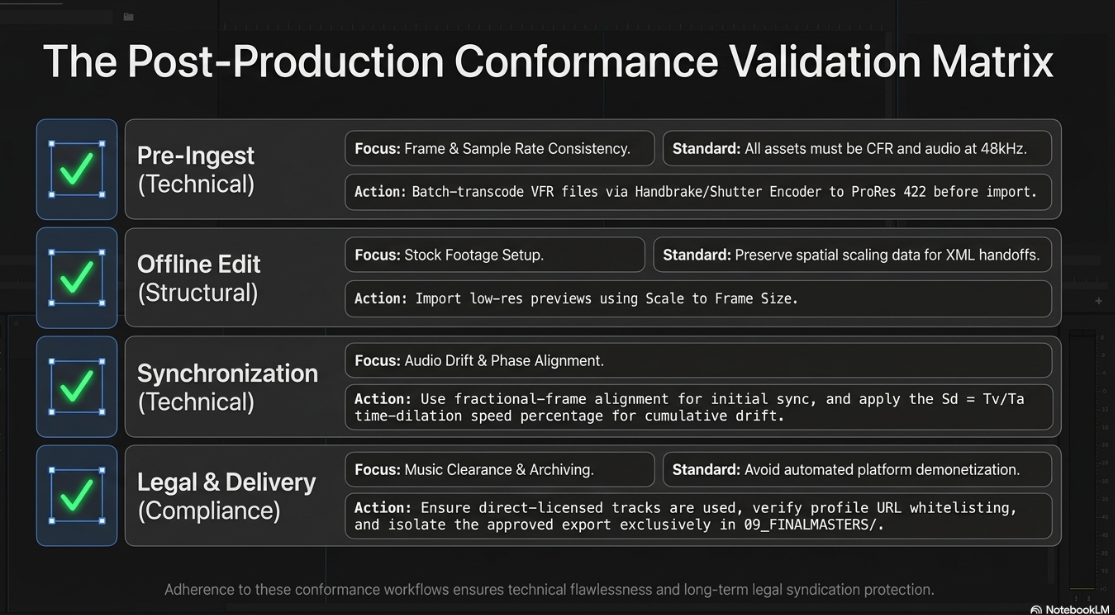
Executing a professional video podcast requires strict adherence to both technical standards and legal requirements1. A single mistake—such as an uncorrected frame rate mismatch or an unlicensed background music track—can lead to sync issues, demonetization, or legal liability1.
To help production teams maintain high standards, Table 5 provides a quick-reference checklist for both technical and legal validation before final delivery.
Table 5: Post-Production Conformance Validation Matrix



By implementing these conformance workflows and file management systems, video podcast production teams can consistently deliver high-quality, professional, and legally compliant content1. Using structured, repeatable steps for technical conformance, legal licensing, and asset organization helps minimize technical issues and ensures that the podcast's catalog is protected for long-term syndication1.
Works cited
What Every Podcaster Should Know About Copyright - Podbean Blog, https://blog.podbean.com/podcast-copyright-guide/
Code of Best Practices in Fair Use for Online Video - Center for Media and Social Impact, https://cmsimpact.org/code/code-best-practices-fair-use-online-video/
Elevating Your Videos with Compelling B-Roll Footage in 2025 | NearStream Official, https://www.nearstream.us/blog/how-to-elevate-video-with-b-roll-footage
Podcast Videos Engaging Audiences Through Clever Videography Editing - Finchley Studios, https://www.finchley.co.uk/finchley-learning/podcast-videos-engaging-audiences-through-clever-videography-editing
Copyright Pitfalls Every Podcaster Must Avoid - Berry Smith, https://www.berrysmith.com/news/copyright-pitfalls-every-podcaster-must-avoid/
Understanding copyright and Content ID claims - Artlist, https://help.artlist.io/hc/en-us/articles/29648852943901-Understanding-copyright-and-Content-ID-claims
Monetize content safely by licensing music - Epidemic Sound, https://www.epidemicsound.com/blog/avoid-copyright-claims-music-epidemic-sound-2/
Understanding Fair Use: A Guide for Podcasters | Jamie Taylor - RJJ Software, https://rjj-software.co.uk/blog/podcaster-questions/understanding-fair-use-a-guide-for-podcasters/
What's the deal with copyright in podcasts? - Farrer & Co, https://www.farrer.co.uk/news-and-insights/whats-the-deal-with-copyright-in-podcasts/
How to Avoid Copyright Infringement on a Podcast, https://copyrightalliance.org/how-to-avoid-copyright-infringement-on-podcasts/
Envato vs Artlist: Which Creative Platform Is Better?, https://elements.envato.com/learn/envato-vs-artlist
Epidemic Sound alternatives | How we compare, https://www.epidemicsound.com/how-it-works/how-we-compare/
How We Compare - Soundstripe, https://www.soundstripe.com/how-we-compare
ASCAP Music Licensing FAQs, https://www.ascap.com/help/ascap-licensing
Questions about Podcasts - RIAA, https://www.riaa.com/resources-learning/questions-about-podcasts/
Musicbed vs. Epidemic Sound: Which should you choose?, https://www.epidemicsound.com/blog/musicbed-vs-epidemic-sound/
Business music licensing — how does it work? - Epidemic Sound, https://www.epidemicsound.com/how-it-works/business-music-licensing/
Artlist vs Storyblocks: Which one is right for you?, https://www.storyblocks.com/resources/blog/artlist-vs-storyblocks-which-one-is-right-for-you
Storyblocks vs Envato Elements: Which one should you choose?, https://www.storyblocks.com/resources/blog/storyblocks-vs-envato-elements-which-one-should-you-choose
Envato Vs Artlist: Your Friendly Guide to Advanced Choices! - Footage Secrets, https://www.footagesecrets.com/buyers-guide/envato-vs-artlist/
12 Best Artlist Alternatives for Creators (2026) - Morphed, https://morphed.app/blog/artlist-alternatives
Audiio vs Epidemic Sound 2026 – Which Music Library Is Better for Creators? - Simon Songhurst, https://www.simonsonghurst.com/audiio-vs-epidemic-sound
Epidemic Sound vs. Audiio - cchound, https://www.cchound.com/epidemic-sound/epidemic-sound-vs-audiio/
Safelisting - How to avoid copyright claims - Epidemic Sound, https://www.epidemicsound.com/how-it-works/music-licensing/what-is-safelisting/
Still confused about EpidemicSound and ArtList licenses : r/editors - Reddit, https://www.reddit.com/r/editors/comments/o80jvq/still_confused_about_epidemicsound_and_artlist/
What is YouTube Content ID and how does it work? - Horus Music, https://www.horusmusic.global/what-is-youtube-content-id/
Epidemic music content ID claim : r/NewTubers - Reddit, https://www.reddit.com/r/NewTubers/comments/17iq6d4/epidemic_music_content_id_claim/
The Art of Pacing: How We Edit for Maximum Engagement - Motion Edits, https://motionedits.com/the-art-of-pacing-how-we-edit-for-maximum-engagement/
Crafting Compelling Scripts: The Key to Engaging Video and Podcast Content - Zu-Media, https://zu-media.co.uk/blog-post/crafting-compelling-scripts-engaging-video-podcast-content/
Podcast Clips Drive 40% of New Listeners: Professional Production Guide, https://www.podcaststudioglasgow.com/podcast-studio-glasgow-blog/podcast-clips-are-your-real-growth-engine-why-professional-production-matters-from-day-one
Recommendation for sequence resolution and frame rate settings? : r/premiere - Reddit, https://www.reddit.com/r/premiere/comments/14hm6bp/recommendation_for_sequence_resolution_and_frame/
Advice on a pretty extreme case of mixed frame rates? - Adobe Community, https://community.adobe.com/questions-729/advice-on-a-pretty-extreme-case-of-mixed-frame-rates-1400943
How to Fix Audio Sync Issues in Video Podcasts (2026 Guide), https://www.podcaststudioglasgow.com/podcast-studio-glasgow-blog/how-to-fix-audio-sync-issues-in-video-podcasts
Handbrake File Conversion - AA Productions, https://aaproductions.net/handbrake.htm
Variable frame rate conversion - Insite - Workcast, https://insite.workcast.com/variable-frame-rate-conversion
Frame rate - HandBrake Documentation, https://handbrake.fr/docs/en/latest/technical/frame-rates.html
How to fix Variable Frame Rate with h.264 video - Adobe Community, https://community.adobe.com/questions-729/how-to-fix-variable-frame-rate-with-h-264-video-1413041
Using Media Encoder to convert Variable frame rate video to Constant - Adobe Community, https://community.adobe.com/questions-506/using-media-encoder-to-convert-variable-frame-rate-video-to-constant-997008
does media encoder now fix variable frame rate material? - Adobe Community, https://community.adobe.com/questions-729/does-media-encoder-now-fix-variable-frame-rate-material-1398724
VFR TO CFR without quality loss : r/shutterencoder - Reddit, https://www.reddit.com/r/shutterencoder/comments/1gf8ulh/vfr_to_cfr_without_quality_loss/
Will using Handbreak to transcode a variable frame rate video before loading it into premiere pro lower its quality? - Reddit, https://www.reddit.com/r/premiere/comments/sqcghr/will_using_handbreak_to_transcode_a_variable/
Shutter Encoder — Documentation, https://www.shutterencoder.com/documentation/
Shutter Encoder - Convert VFR to CFR and upscale MPG to HD with FPS adjustment. : r/shutterencoder - Reddit, https://www.reddit.com/r/shutterencoder/comments/1soaz29/shutter_encoder_convert_vfr_to_cfr_and_upscale/
View topic - Working with different resolution and fps source clips - Blackmagic Forum, https://forum.blackmagicdesign.com/viewtopic.php?f=21&t=213525
Mixing Frame Rates in DaVinci Resolve - Part 1: Know Thy Frame rate - Frame.io Insider, https://blog.frame.io/2019/09/30/mixed-rates-resolve-part-1/
Any tips to quickly replace preview lo-res stock footage with hi-res final quickly in Premiere?, https://www.reddit.com/r/editors/comments/1cxdoiq/any_tips_to_quickly_replace_preview_lores_stock/
SET or SCALE to FRAME SIZE - Premiere Pro 2025 Tutorial - YouTube, https://www.youtube.com/watch?v=IRV-TkpvAV8
Set To Frame Size vs Scale To Frame Size - Adobe Community, https://community.adobe.com/questions-729/set-to-frame-size-vs-scale-to-frame-size-1423901
What is the difference between 'Set To Frame Size' and 'Scale To Frame Size'?, https://video.stackexchange.com/questions/22634/what-is-the-difference-between-set-to-frame-size-and-scale-to-frame-size
Scale to Frame Size vs Set to Frame Size in Premiere Pro - PremierePro.net, https://premierepro.net/scale-frame-size-vs-fit-frame-size/
SCALE TO FRAME SIZE VS SET TO FRAME SIZE - Adobe Premiere Pro - Filmmaking 101, https://www.youtube.com/watch?v=-ctqVd2atx0
Media SET or SCALE to Frame Size - Learning Premiere Pro 2024 - Episode 09 - YouTube, https://www.youtube.com/watch?v=sQLUFpXb0V8
Your audio is out of Sync because of THIS - YouTube, https://www.youtube.com/shorts/TpgDDO7IQaw
Gradual Audio Drift in 1-Hour Podcast — SSL2 MK2 (48kHz) + DaVinci Resolve (23.976fps), https://www.reddit.com/r/podcasting/comments/1kg2efp/gradual_audio_drift_in_1hour_podcast_ssl2_mk2/
Audio Video Sync Issue - Adobe Community, https://community.adobe.com/questions-529/audio-video-sync-issue-56968
What is Audio Drift?. & Why it's Terrible for Podcasts | by Zachariah Moreno | SquadCast, https://medium.com/squadcast-fm/what-is-audio-drift-1715dda7a89b
Audio Codecs and Sync Issues in Video – EncodeX Guide, https://encodex.se/guides/audio-codecs-sync.html
Video Post-Production Workflow Guide | Frame.io, https://workflow.frame.io/guide/
The ultimate guide to optimizing your post-production workflow - LucidLink, https://www.lucidlink.com/blog/post-production-workflow
How to organize video files for editing: a step-by-step guide - LucidLink, https://www.lucidlink.com/blog/how-to-organize-video-files-for-editing
The Only Post-Production Folder Structure You'll Ever Need - 2026 Edition! - The Post Flow, https://thepostflow.com/post-production/take-your-efficiency-to-the-next-level-with-a-professional-post-production-folder-structure/
How do you organize your editing workflow and files? : r/editors - Reddit, https://www.reddit.com/r/editors/comments/1tisecp/how_do_you_organize_your_editing_workflow_and/
The Art Of Organization: Download The Perfect Folder Structure For Filmmakers Here!, https://noamkroll.com/the-art-of-organization-download-the-perfect-folder-structure-for-filmmakers-here/
Color Space Transform from DR to Premiere Pro : r/davinciresolve - Reddit, https://www.reddit.com/r/davinciresolve/comments/1hz66lr/color_space_transform_from_dr_to_premiere_pro/
Tips For Matching Shots in DaVinci Resolve - Bullaki - Cambridge, https://bullaki.com/projects/videos/color-correction-tutorial/
LOG color workflow with effects in PPRO - Adobe Premiere Pro - Creative COW, https://creativecow.net/forums/thread/log-color-workflow-with-effects-in-ppro/














