
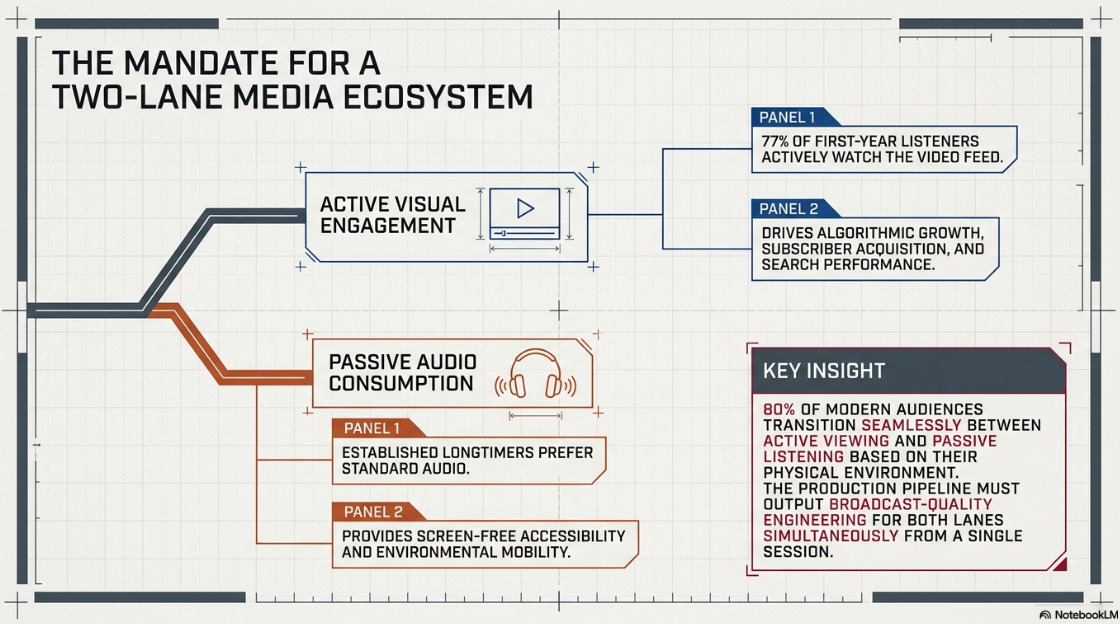
The digital media landscape has undergone a major shift, transforming the podcast from a simple spoken-word audio format into a highly engineered, multi-format digital ecosystem1. Visual engagement has transitioned from a supplementary asset to a core driver of audience growth and subscriber acquisition1. Comprehensive demographic analyses show that 77% of newer listeners, categorized as "First-Years," actively watch the video feed while listening, compared to the established habits of "Longtimers"1.
Because an estimated 80% of modern audiences transition between active viewing and passive listening based on their physical environment, media networks must construct "two-lane" shows1. This content model satisfies both the high visual engagement demanded by modern platform algorithms and the passive, screen-free accessibility of standard audio feeds1. For corporate brands and media networks, a professional video podcast acts as a central content engine that establishes authority, optimizes search engine performance, and generates marketing assets from a single production session1.
This shift requires post-production workflows that match the technical standards of traditional television and cinema engineering4. What once required basic audio leveling and stereo export has evolved into an intricate processing chain4. This guide details the technical requirements for encoding, processing, and distributing a professional video podcast.
Editing Frameworks and Spatial Continuity
The design of a video podcast begins with the structural decisions made during the editorial process4. Historically, physical film editing on celluloid emulsion required careful planning due to its destructive nature4. The advent of digital non-linear editing (NLE) systems turned editing into a non-destructive, iterative process4. This shift allows modern video engineers to develop multiple timeline versions and retrieve assets instantly4.
Editorial decisions are shaped by a mix of technical limits, project type, and the desired psychological effect on the audience4. The software interface and hardware configuration establish the immediate operational boundaries4. Pacing and rhythm are dictated by the show's genre4. A narrative documentary podcast requires a deliberate, structured cadence, whereas an interview-based talk show benefits from responsive cutting4.
Pacing also affects audience psychology4. Rapid editing keeps the viewer in a state of high attention, while extended, unbroken takes allow the audience to absorb the spatial reality of the scene4. The visual transition grammar provides the structure for this pacing4. Standard cuts represent real-time continuity, while dissolves, wipes, and fades manipulate temporal perception, signaling shifts in location, time, or thematic focus4.
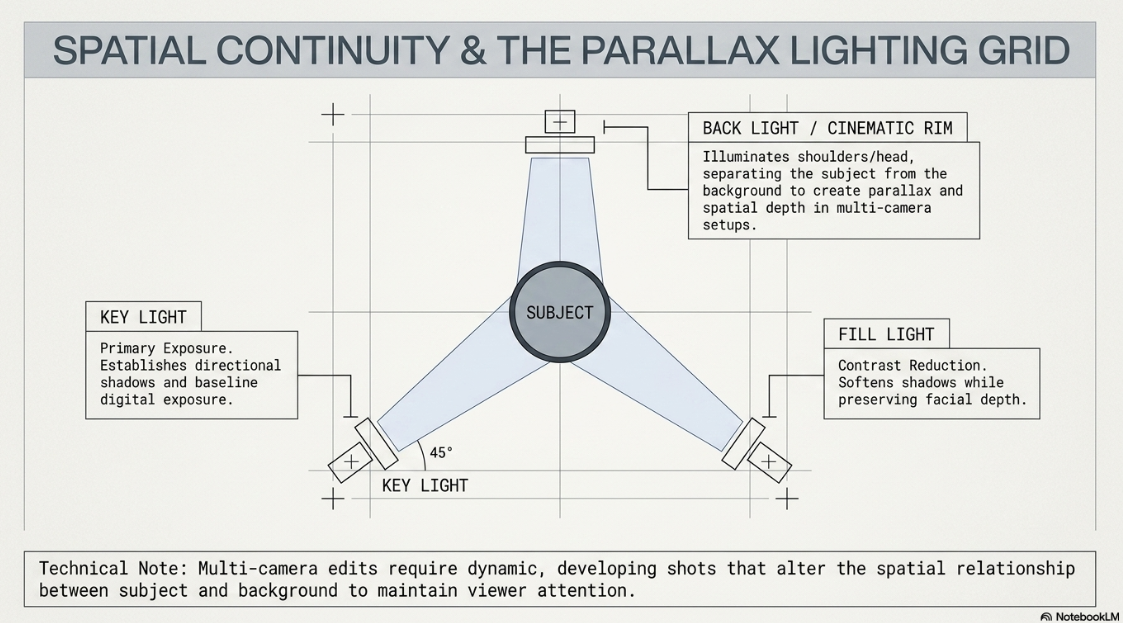
Spatial continuity is maintained through shot selection and camera placement4. Camera angles establish the physical relationship between the subjects and their environment4. To avoid visual monotony, multi-camera edits use dynamic, developing shots that alter the spatial relationship between the subject and the background4. This technique creates parallax and a sense of depth4.
The technical quality of every shot must be verified4. Cameras must capture clean, properly focused, and evenly exposed images4. The lighting setup must be designed to enhance the physical structure of the set and provide separation1.
+-------------------+
| Back Light |
| (Separation/ |
| Cinematic Rim) |
+-------------------+
|
v
+-----------+
| Subject |
+-----------+
^ ^
/ \
/ \
+-------------------+ +-------------------+
| Key Light | | Fill Light |
| (Primary Exposure | | (Softens Shadows/ |
| at 45 Degrees) | | Reduces Contrast)|
+-------------------+ +-------------------+
In this lighting configuration, the key light serves as the primary illumination source1. It is typically positioned at a 45-degree angle to the subject to establish directional shadows and define the scene's exposure1.
The fill light is placed on the opposite side of the key light at a lower intensity to soften shadows while maintaining facial depth1. The back light, or hair light, is positioned behind the subject outside the frame1. It illuminates the shoulders and the back of the head, creating a rim effect that separates the subject from the background1.
High-Fidelity Audio Mastering and Level Control
A professional video podcast relies on a high-fidelity audio post-production pipeline. Acoustic audio consists of kinetic mechanical wave energy traveling through a compressible medium, such as air, as alternating cycles of compression and rarefaction2. Transducers, such as a microphone diaphragm, translate this kinetic energy into an electrical signal2.
The baseline requirement of professional podcast engineering is the decoupling of the production file format from the final distribution format2. To preserve maximum fidelity, all tracking, editing, and signal processing must occur within a lossless, uncompressed Pulse-Code Modulation (PCM) ecosystem, specifically utilizing WAV or AIFF files2.
Sampling and Resolution Standards
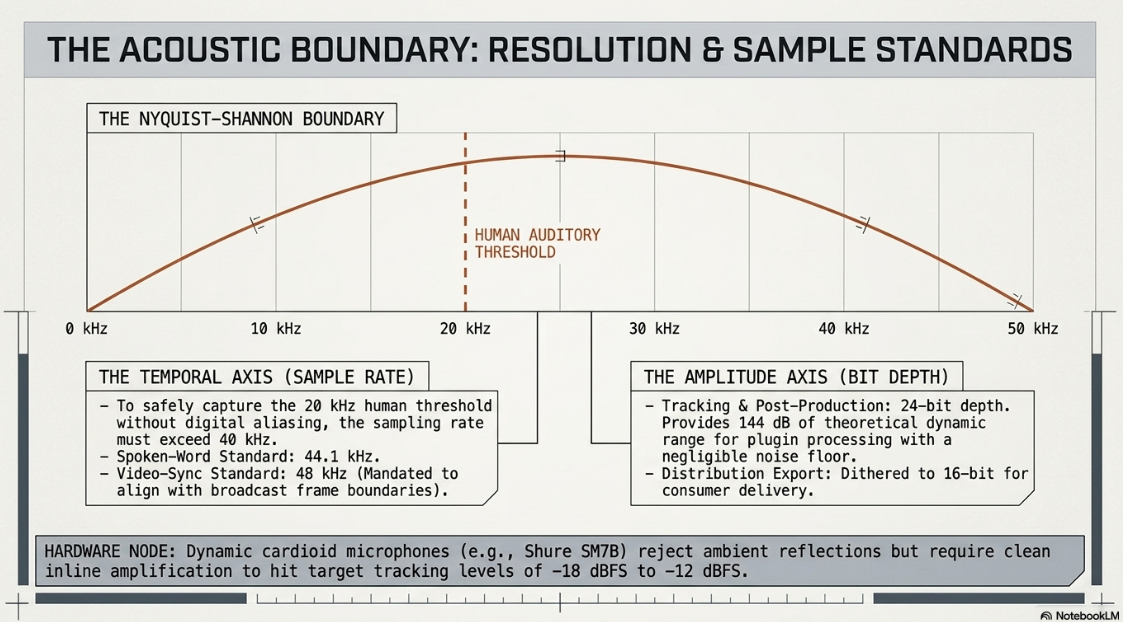
The temporal axis of digital audio is defined by the sample rate, which dictates the highest recordable frequency according to the Nyquist-Shannon sampling theorem2. Because the human auditory threshold extends to approximately 20 kHz, the sample rate must exceed 40 kHz to prevent digital aliasing2. The standard for spoken-word audio is 44.1 kHz, while 48 kHz is mandated for video-synchronized environments to align with standard broadcast frame boundaries2.
Altering the sample rate retroactively in a project can change playback speed and pitch, which can ruin the recording2. The amplitude axis is governed by bit depth, which establishes the dynamic range and signal-to-noise ratio2. Tracking and post-production processing are executed at a 24-bit depth to provide 144 dB of theoretical dynamic range, providing ample digital headroom and a negligible noise floor2. Only during final export is the master dithered down to a 16-bit format for consumer distribution2.



Professional capture environments prioritize dynamic cardioid microphones like the Shure SM7B over sensitive condenser models9. The dynamic capsule rejects room reflections and ambient noise, though it requires clean amplification from high-end preamps or dedicated inline boosters to prevent digital hiss9. During recording, levels must be actively monitored to peak between 

As the engineer stacks processing plugins—including spectral noise reduction, corrective equalization, and serial compression—the system's CPU bears a significant real-time digital signal processing (DSP) load2. Bouncing processed tracks to raw, uncompressed WAV files relieves this computational load, preventing playback stuttering and stability issues2.
Loudness Normalization and K-Weighting Metrics
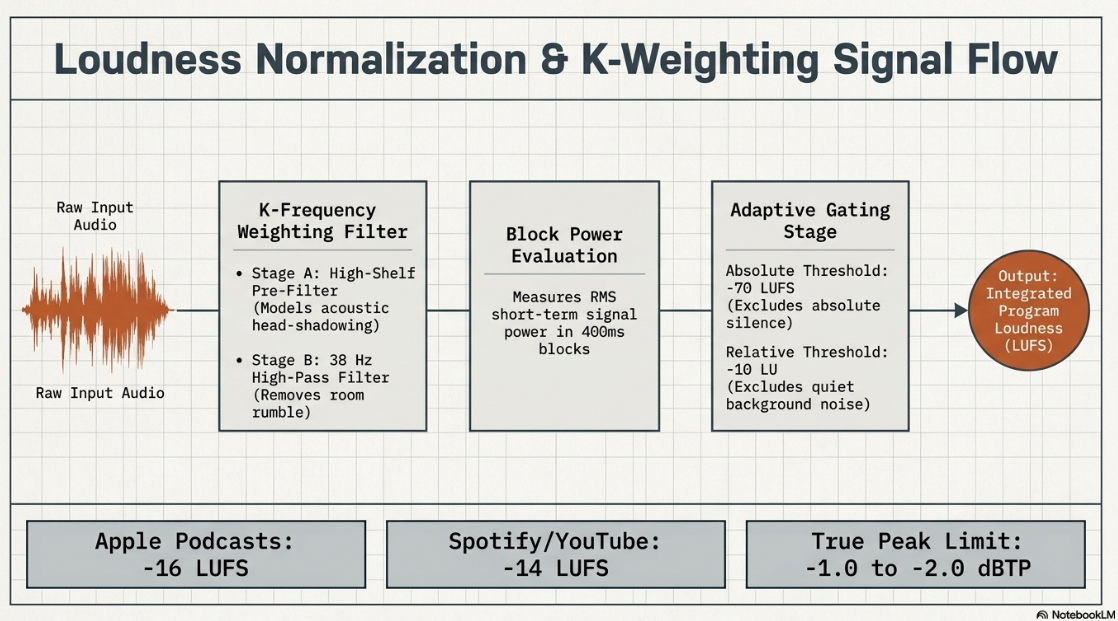
To ensure a consistent listening experience across different playback environments, audio masters must undergo loudness normalization based on Loudness Units relative to Full Scale (LUFS)1. Unlike peak meters, which only measure short-term electrical peaks, LUFS meters evaluate average signal power and frequency distribution over time11. This approach closely models how the human ear perceives loudness11. The measurement uses a psychoacoustic K-frequency-weighting filter, which applies a high-shelf pre-filter to model acoustic head-shadowing effects, followed by a 38 Hz high-pass filter to eliminate low-frequency rumble11.
Raw Input Audio Signal
|
v
+------------------------------------+
| K-Frequency Weighting: |
| Stage 1: High-Shelf Pre-Filter | --> Models acoustic head-shadowing
| Stage 2: 38 Hz High-Pass Filter | --> Removes low-frequency room rumble
+------------------------------------+
|
v
+------------------------------------+
| Block Power Evaluation: |
| RMS Measurement over 400ms Blocks | --> Computes short-term signal power
+------------------------------------+
|
v
+------------------------------------+
| Adaptive Gating Stage: |
| Absolute Threshold (-70 LUFS) | --> Excludes silent/noise passages
| Relative Threshold (-10 LU) | --> Excludes quiet background sections
+------------------------------------+
|
v
Integrated Program Loudness (LUFS) --> Final average loudness value
This filtered signal is measured in short RMS blocks, which are processed through an adaptive double-gating system to exclude silence and quiet background noise from the final average calculation11. True Peak levels must also be managed using a dedicated inter-sample limiter11. This prevents digital clipping when the file is converted into lossy formats like AAC or MP311.












When preparing files for distribution, the master must be checked for metadata errors16. Oversized embedded artwork can trigger "Metadata Block Size Exceeded" or "Invalid Sample Rate" errors on hosting platforms16. To prevent these errors, the embedded cover art must be a square image between 

Synchronicity Engineering and Clock Drift Mitigation
Maintaining long-term audio-visual synchronicity is a key challenge in video podcast post-production9. Over an hour-long recording, minor differences in hardware clocking or capture settings can cause noticeable desynchronization between the audio and video tracks20.
The Variable Frame Rate (VFR) Conflict
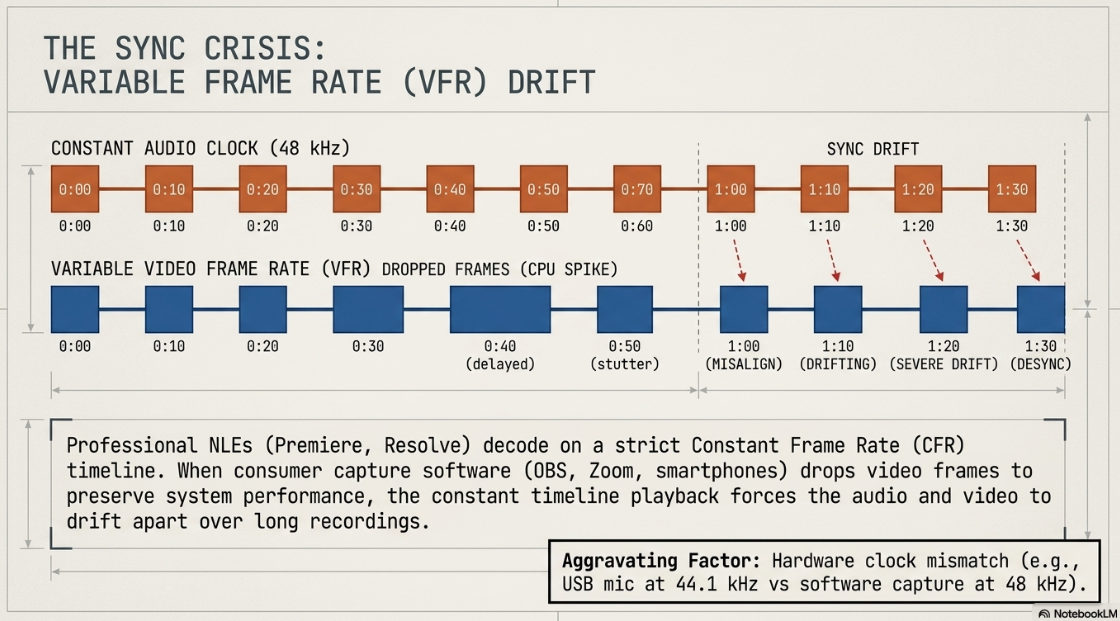
This desynchronization is frequently caused by the presence of Variable Frame Rate (VFR) video20. While professional cinema cameras record in strict Constant Frame Rates (CFR), consumer-grade capture systems—including smartphones, webcams, and software screen recorders like OBS, Zoom, or Loom—frequently adjust their frame capture rate20.
To prioritize system performance during CPU or GPU resource spikes, these devices drop video frames, dipping from 30 fps to 24 fps for brief intervals20. Meanwhile, the system's microphone continues recording at a constant audio sample rate20.
This process generates a VFR video file20. Professional editing platforms like Premiere Pro and DaVinci Resolve are designed to parse CFR media20. When forced to decode VFR footage, the NLE's constant timeline playback causes the video and audio tracks to gradually drift apart20. This issue is often worsened by two other factors:
The Sample Rate Mismatch: A clock mismatch occurs when a USB microphone records at 44.1 kHz while the capture software is configured to 48 kHz20. This mathematical discrepancy adds up to seconds of sync drift over a 60-minute recording20.
Buffer Bloat: Jitter on a crowded USB bus can cause variations in hardware timestamps, misaligning captured video frames with their corresponding audio samples20.
Methodologies for Resolving Sync Drift
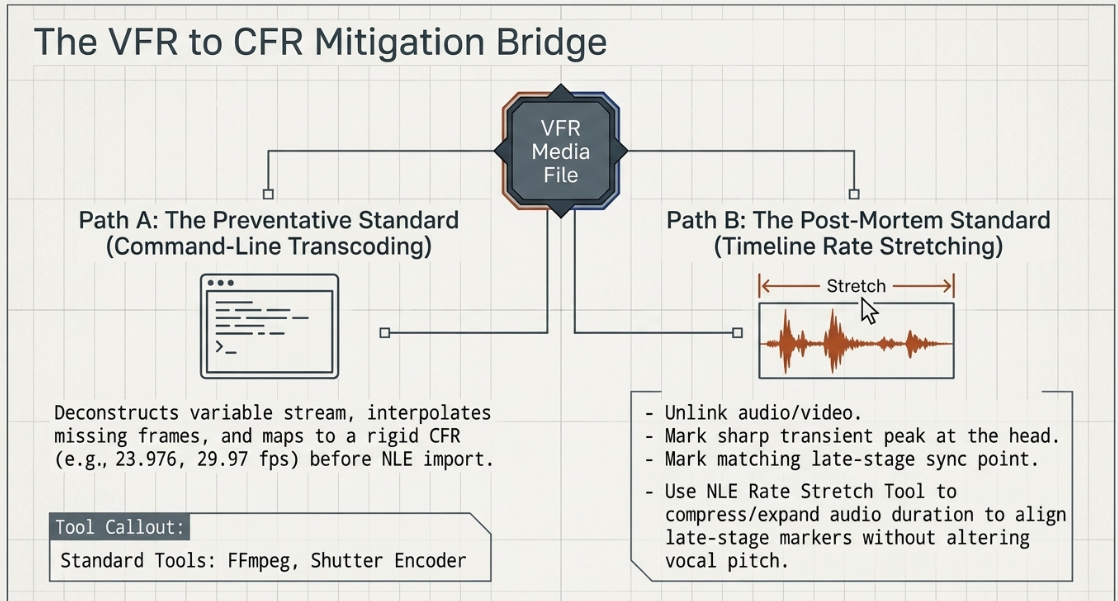
To recover a file affected by VFR drift, engineers utilize two standard post-production workflows:
1. Transcoding to Constant Frame Rate (The Preventative Standard)
The most robust solution is to normalize all VFR media before importing it into the NLE timeline21. This is accomplished using command-line tools like FFmpeg or GUI-based transcoders such as HandBrake or Shutter Encoder21. These tools deconstruct the variable video stream and interpolate missing frames, mapping the media to a strict CFR file (such as 23.976, 25, 29.97, or 30 fps) and aligning it with a constant audio clock22.
2. Timeline Rate Stretching (The Post-Mortem Standard)
If transcoding is not feasible, the editor can manually realign the audio and video tracks directly within the NLE timeline using rate stretching23:
Step I: Unlink the audio track from the video track within the active sequence23.
Step II: Zoom in to the head of the file and locate a clear, sharp transient peak (such as a clapper slate, physical clap, or plosive consonant sound)23. Place a sync marker on both the video frame and the corresponding audio transient23.
Step III: Navigate to the end of the timeline (typically at the 45-to-60-minute mark)20. Locate a matching late-stage sync point23. Place a second set of markers on the divergent video frame and audio transient23.
Step IV: Select the Rate Stretch Tool (designated by the keyboard shortcut R in Premiere Pro)23. Drag the tail of the audio clip to stretch or compress its duration, aligning the late-stage markers perfectly23. This adjusts the playback rate of the audio track to match the variable clock of the video without modifying the vocal pitch23.
Step V: Render the synchronized sequence and export it to an intermediate master codec, such as Apple ProRes, to lock in the synchronous boundaries before final delivery encoding23.
Multi-Platform XML Translation and Data Management
In complex collaborative workflows, projects are often transferred between different editing platforms26. For instance, a video may be edited in Premiere Pro, color-graded in DaVinci Resolve, and mastered in Final Cut Pro26. This is achieved by exporting an XML (Extensible Markup Language) document, which contains cut points, timing data, and scaling parameters across NLEs26.
Because XML files only transfer basic timeline instructions, non-standard assets—including text overlays, transitions, and effects templates—must be rendered out separately26. Text and graphic overlays are typically exported as lossless PNG sequences or high-quality video files with an alpha channel (such as Apple ProRes 4444) to allow for seamless reconstruction26.
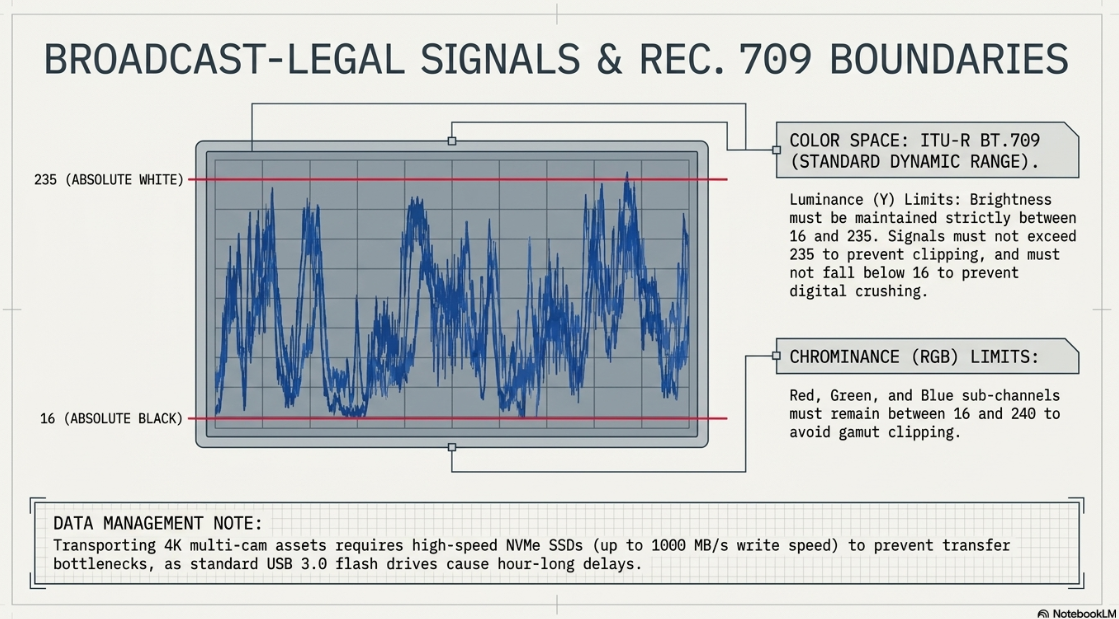
Managing high-resolution video assets also requires reliable storage workflows9. A typical two-hour multi-camera video podcast shot in 4K can generate between 100 GB and 300 GB of raw media9. Transferring this volume of data over standard USB 3.0 flash drives (which average 100 MB/s) can take nearly an hour, creating production bottlenecks9.
To minimize transfer times, post-production teams use high-speed NVMe SSDs (such as the Samsung T7 Shield), which write at speeds up to 1000 MB/s9. This reduces transfer times to a few minutes, protecting local drives and minimizing hosting upload delays9.
Color Grading, Luminance Standards, and macOS ColorSync Fixes
Professional video encoding requires strict adherence to color standards to ensure that the visual master graded on a reference monitor matches what the consumer views on their device4.
Broadcast-Legal Signal Restrictions
For SDR (Standard Dynamic Range) video distribution, the industry-standard color space is ITU-R BT.709 (Rec. 709)3. Under the ITU-R BT.709-5 and EBU R103 engineering standards, video signals must not overshoot specific legal limits to prevent digital clipping4:
Luminance (Y): Brightness levels must be strictly maintained between


Chrominance (RGB): The Red, Green, and Blue sub-channels must remain between


The macOS ColorSync Gamma Shift
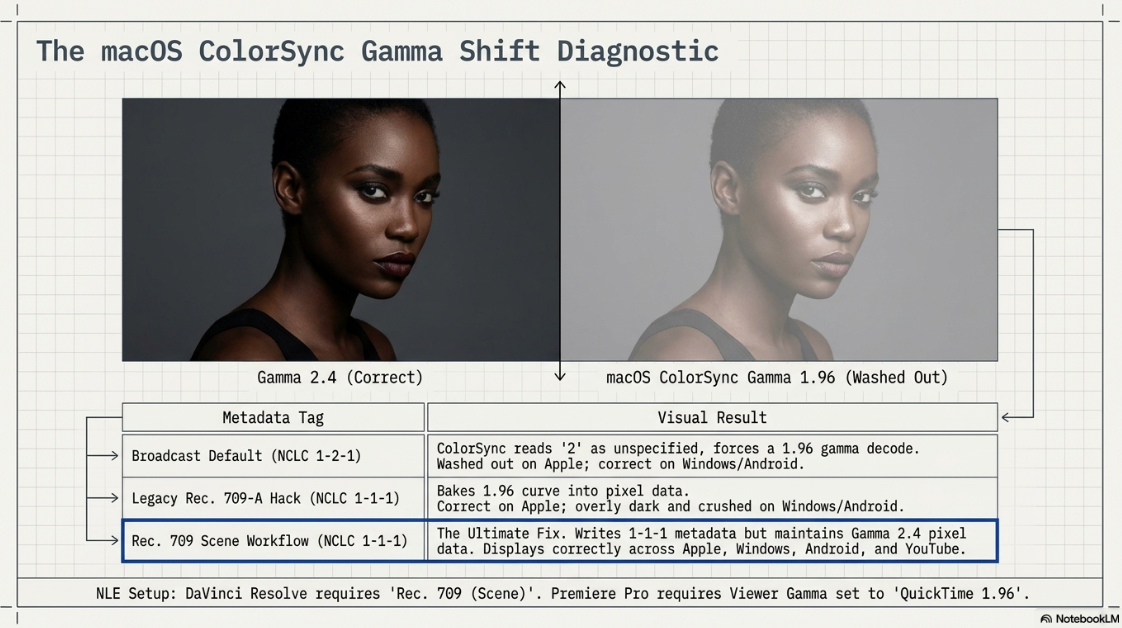
A major issue in digital video engineering is the "washed-out" or "gamma shift" phenomenon that occurs when exporting Rec. 709 video on Apple devices29. Standard broadcast displays operate at a reference gamma of 2.4 (governed by the ITU-R BT.1886 standard), while web-only configurations target a gamma of 2.229. However, Apple's ColorSync engine—which manages color display in macOS QuickTime Player, Safari, and Chrome—applies a display gamma curve of 1.96 for Rec. 709 media29.
This discrepancy is controlled by the NCLC metadata tags embedded within the exported video file's container29. These tags consist of three code points representing color primaries, transfer characteristics, and matrix coefficients29. When an editor exports standard Rec. 709 media, different tagging configurations determine how these code points are interpreted29:
Broadcast Default (Gamma 2.4 / NCLC 1-2-1): This configuration writes a 1-2-1 metadata tag29. The middle 2 is interpreted by ColorSync as "unspecified," causing macOS to ignore the extended metadata and force a ~1.961 gamma decode29. This results in a washed-out, low-contrast image on Apple devices, even though it displays correctly on Windows and Android systems29.
Legacy Rec. 709-A Hack (NCLC 1-1-1): Designed to match Apple's display characteristics, this configuration writes a 1-1-1 tag but bakes the 1.961 gamma curve directly into the pixel data29. While this looks correct on Apple devices, it causes the image to appear overly dark and crushed on Windows and Android displays, which make up a large portion of the market29.
Rec. 709 (Scene) Workflow (NCLC 1-1-1): This approach writes a 1-1-1 metadata tag while maintaining the standard Gamma 2.4 color data in the pixels29. It ensures that platforms like YouTube, Vimeo, Safari, Windows, and Android display the video correctly without applying unwanted color transformations29.
Setting Up Color Management inside Non-Linear Editors
To ensure consistent color rendering across different operating systems, editors configure color pipelines in their respective NLEs:
Implementing these workflows ensures that color grading remains consistent from the timeline to final distribution29.
Video Compression, Bitrates, and Platform Encoding Specifications
The final post-production stage is encoding the edited master into a distribution format that balances visual quality with bandwidth efficiency28.
Core Compression Mechanics: Codecs and Bitrate Control
Video compression relies on mathematical algorithms to reduce raw file sizes28. Codecs define how this information is compressed and decompressed38:
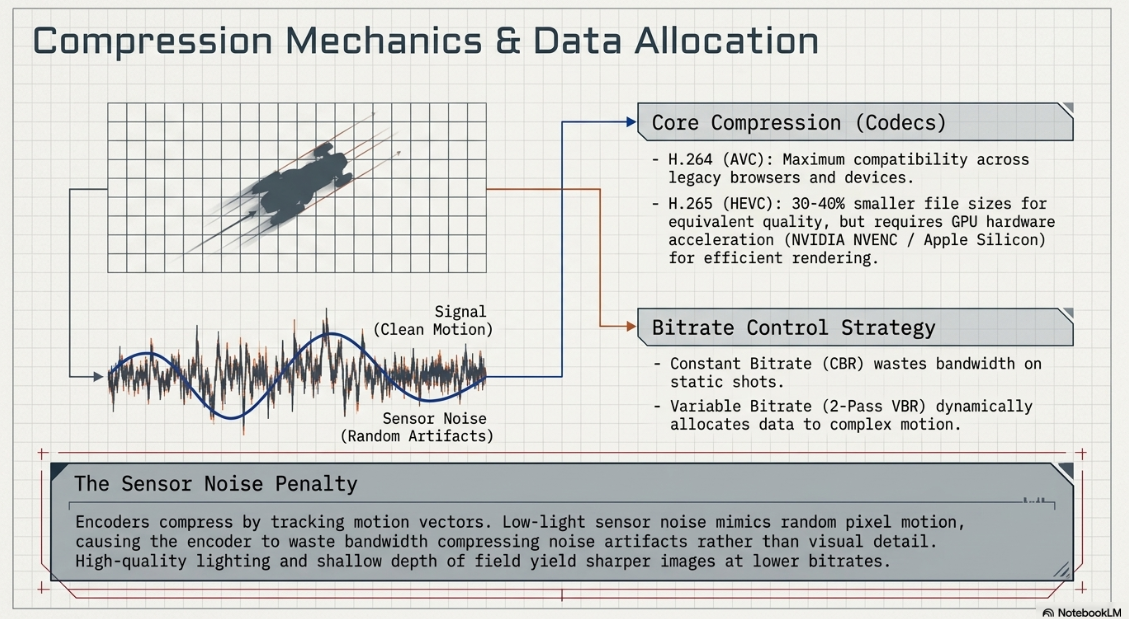
H.264 (Advanced Video Coding): The most widely compatible video compression standard, supported by nearly all streaming platforms, legacy web browsers, and media devices28. It provides stable quality at moderate bitrates28.
H.265 (HEVC - High Efficiency Video Coding): The successor to H.264, offering 30% to 40% better compression efficiency3. It delivers equivalent visual quality at much smaller file sizes3. However, it requires significantly more rendering power unless utilizing hardware-accelerated GPU encoders like NVIDIA NVENC or Apple Silicon Media Engines3.
Bitrate control methods also affect final file size and quality3:
Constant Bitrate (CBR): Encodes the entire file at a fixed data rate regardless of scene complexity36. While it provides predictable bandwidth usage, it can cause digital artifacts in high-motion scenes and wastes data on static shots36.
Variable Bitrate (VBR): Dynamically adjusts data distribution based on scene complexity3. In a video podcast, low-motion talk segments receive lower bitrates, while complex graphics or movement receive higher bitrates3. Using a 2-Pass VBR method improves data allocation but increases rendering times3.
In low-light scenes, camera sensor noise can degrade compression efficiency1. Encoders compress video by tracking motion vectors between frames1. The random pixel changes of sensor noise can be mistaken for actual motion, causing the encoder to waste bandwidth on compression artifacts rather than visual detail1.
Ensuring a well-lit studio environment and using a shallow depth of field helps focus data allocation on the speakers, producing a sharper image at lower bitrates1.










Managing final file sizes is also important for distribution28. Keeping video files under 1 GB helps prevent device storage issues, bandwidth strain, and playback buffering28.
To optimize web server performance, media files should be hosted on dedicated Content Delivery Networks (CDNs) rather than the main website server28. This prevents high traffic from slowing down web services when new episodes are released28.
Additionally, files must be named using standard protocols: restricting characters to standard English letters, numbers, and underscores or dashes while avoiding spaces or special characters like dollar signs or commas28. This ensures the files remain playable across different devices and systems28.
Adaptive Bitrate Delivery and the HLS Revolution
Historically, video podcasts were delivered over standard RSS feeds using a progressive download model1. This required users to download massive, multi-gigabyte files before playback could begin6.
The industry is transitioning to adaptive streaming using the HTTP Live Streaming (HLS) protocol (standardized as RFC8216)43. This protocol deconstructs video and audio files into short segments (typically 2 to 10 seconds long) and coordinates them via a master .m3u8 playlist manifest42.
+---------------------------------------+
| HLS Multivariant Playlist (.m3u8) |
+---------------------------------------+
|
+-------------------------------+-------------------------------+
| | |
v v v
+------------------+ +------------------+ +------------------+
| 1080p Video | | 720p Video | | Audio-Only |
| Playlist (.m3u8) | | Playlist (.m3u8) | | Rendition (.m3u8)|
+------------------+ +------------------+ +------------------+
| | |
[Seg_1.ts, 10s] [Seg_1.ts, 10s] [Audio_1.aac, 10s]
[Seg_2.ts, 10s] [Seg_2.ts, 10s] [Audio_2.aac, 10s]
[Seg_3.ts, 10s] [Seg_3.ts, 10s] [Audio_3.aac, 10s]
This architecture provides several benefits:
Adaptive Bitrate Adjustment: The player continuously monitors network speeds and switches between resolution rungs (such as 1080p, 720p, 480p, 360p, or 240p) to prevent buffering1.
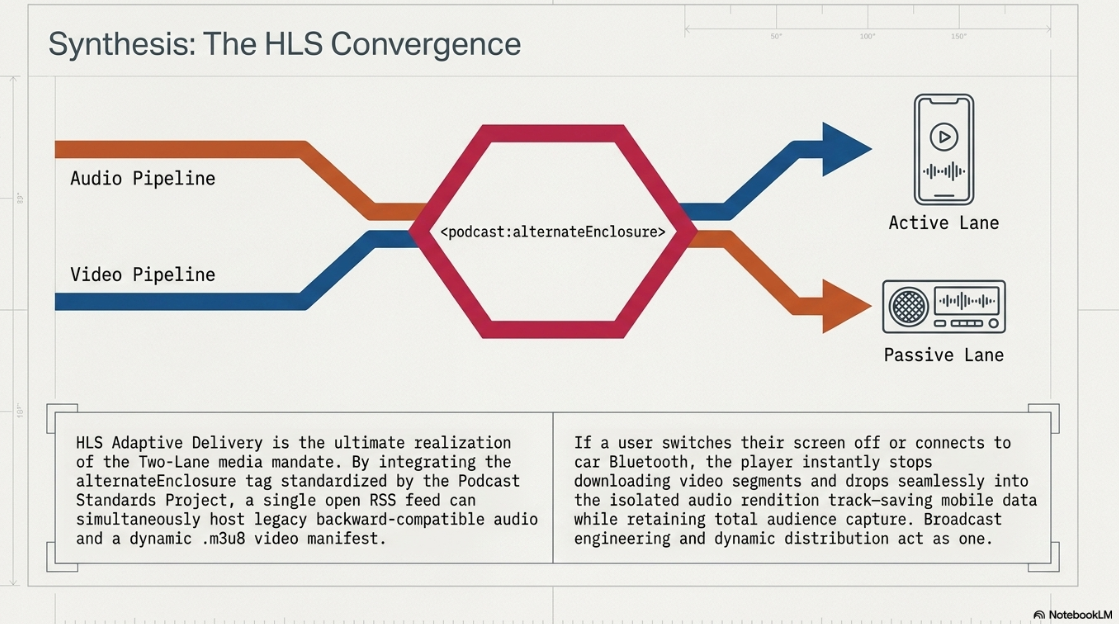
Dedicated Audio Renditions: HLS allows the audio track to be isolated as a separate stream45. If a listener switches the video feed off or connects their device to a car's Bluetooth system, the player stops downloading the video segments and streams only the audio track, saving mobile data1.
Consumption Analytics: Traditional RSS enclosures only track file downloads42. Because HLS streams media in continuous segments, hosting platforms can track exact engagement, pinpoint where listeners drop off, and log segment replays while maintaining the decentralized structure of open RSS42.
Platform-Specific Ingestion Pipelines
Platform-specific pipelines vary across the distribution landscape1:
Apple Podcasts: Apple utilizes a hybrid model where creators must partner with supported hosting platforms like Acast, ART19, Simplecast, or Omny Studio44. While metadata and episode details are pulled from the standard RSS feed, the host transmits the .m3u8 playlist directly to Apple’s APIs45. This enables features like offline downloads, chapter markers, and WebVTT subtitles43.
Spotify: Spotify does not ingest video via standard RSS40. Creators must upload video files directly through "Spotify for Creators"39. Spotify then transcodes the upload into internal adaptive streaming formats for distribution across its closed player ecosystem39.
Open RSS HLS Integration
To support HLS within open, decentralized podcast players like Fountain, TrueFans, and Pocket Casts, the Podcast Standards Project has standardized the alternateEnclosure tag6. This integration allows video podcasts to exist within a single RSS feed alongside standard audio enclosures, maintaining backward compatibility with legacy audio-only players6.
XML
<!-- Primary backward-compatible audio-only enclosure for legacy players -->
<enclosure url="https://media.hostingprovider.com/episodes/audio.mp3" length="27892766" type="audio/mpeg"/>
<!-- HLS adaptive streaming enclosure for video-enabled players -->
<podcast:alternateEnclosure type="application/x-mpegURL" length="0" bitrate="2500000" height="1080" lang="en" title="HD Video Stream" rel="alternate">
<podcast:source uri="https://streaming.hostingprovider.com/manifest/master.m3u8"/>
</podcast:alternateEnclosure>
By structuring feeds this way, creators can reach audiences across both closed streaming apps and open RSS platforms, ensuring consistent playback quality and accurate engagement metrics6.
Works cited
Video Execution of a Professional Podcast - Finchley Studios, https://www.finchley.co.uk/finchley-learning/visual-podcast/video-execution-of-a-professional-podcast
Audio Execution for a Professional Podcast - Finchley Studios, https://www.finchley.co.uk/finchley-learning/visual-podcast/audio-execution-for-a-professional-podcast
Best Export Settings for Premiere Pro (For Every Platform and Use Case - Hollyland Store, https://store.hollyland.com/blogs/creator-hub/best-export-settings-for-premiere-pro
Video Engineering in a Professional Podcast Post-Production - Finchley Studios, https://www.finchley.co.uk/finchley-learning/visual-podcast/video-engineering-in-a-professional-podcast-post-production
Finchley Learning | Video execution in a podcast, https://www.finchley.co.uk/video-execution-in-a-podcast
HLS Video Podcast Demo, https://podstandards.org/2025/06/28/hls-video-podcast-demo/
Video Editing 4K: A Guide to Export Settings and Formats - Finchley Studios, https://www.finchley.co.uk/finchley-learning/video-editing-4k-a-guide-to-export-settings-and-formats
Audio requirements - Apple Podcasts for Creators, https://podcasters.apple.com/support/893-audio-requirements
Your Local London Podcast Studio Solution: Professional Audio & Video Studio Facilities in the North - Finchley Studios, https://www.finchley.co.uk/finchley-learning/visual-podcast/your-local-london-podcast-studio-solution-professional-audio-video-studio-facilities-in-the-north
Start a Podcast on Spotify & Apple Podcasts: Ultimate Guide | NearStream Official, https://www.nearstream.us/blog/how-to-start-podcast-spotify-apple-podcasts-ultimate-guide
LUFS Meter — Broadcast Loudness Measurement - Studio Six Digital, https://studiosixdigital.com/lufs-meter/
Check Your Levels! A quick guide to LUF and why you need to know about it!, https://podcasterspodcast.com/check-your-levels-a-quick-guide-to-luf-and-why-you-need-to-know-about-it/
Loudness Basics - AES - Audio Engineering Society, https://aes.org/resources/audio-topics/loudness-project/loudness-basics/
5 Broadcast Audio Spec Sheet Terms Every Editor Must Understand - Frame.io Insider, https://blog.frame.io/2017/08/09/audio-spec-sheet/
Understanding LUFS: Broadcasting Standards for BBC and Apple Podcasts, https://www.finchley.co.uk/finchley-learning/visual-podcast/understanding-lufs-broadcasting-standards-for-bbc-and-apple-podcasts
Strategic Pre-Production for a Professional Podcast - Finchley Studios, https://www.finchley.co.uk/finchley-learning/visual-podcast/strategic-pre-production-for-a-professional-podcast
Apple Podcasts Requirements - Blubrry Podcasting, https://blubrry.com/support/website-documentation/itunes-requirements/
Blog | Podcast Standards Project, https://podstandards.org/blog/
Fix Screen Recording Audio Desync in 10 Minutes (OBS Drift Guide) | Medium, https://medium.com/@andrew_best/why-your-screen-recording-audio-is-out-of-sync-and-how-to-fix-audio-drift-forever-a6738c729f52
Looking for VFR (Variable Frame Rate) Problem Files – Help Us Improve Premiere's Editing Experience - Adobe Community, https://community.adobe.com/questions-729/looking-for-vfr-variable-frame-rate-problem-files-help-us-improve-premiere-s-editing-experience-1550759
How to fix videos with audio drift from variable frame rates - YouTube, https://www.youtube.com/watch?v=keA2Gyye-D0
How to Fix Audio Drift Over Time in Premiere Pro - Reddit, https://www.reddit.com/r/premiere/comments/1go2ae1/how_to_fix_audio_drift_over_time_in_premiere_pro/
How to Fix Audio De-Sync // Variable Frame Rate aka. VFR - YouTube, https://www.youtube.com/watch?v=1hhffmNIdcE
How to QUICKLY fix Audio Drift and Sync Issues in your video [Premiere Pro] - YouTube, https://www.youtube.com/watch?v=zhFLrwQFhfI
Exporting Premiere project to Resolve and FCPX : r/VideoEditing - Reddit, https://www.reddit.com/r/VideoEditing/comments/1j4vdkd/exporting_premiere_project_to_resolve_and_fcpx/
Recommended export settings for Final Cut Pro - MediaZilla Help Center, https://support.mediazilla.com/en/articles/5479775-recommended-export-settings-for-final-cut-pro
H.264 (mp4/m4v) tips - Blubrry Podcasting, https://blubrry.com/manual/creating-podcast-media/video-podcasting/h-264-mp4-m4v-tips/
r/colorists on Reddit: Rec.709 (Scene) fixes the Mac gamma shift - worth understanding why it actually works, https://www.reddit.com/r/colorists/comments/1sb6adk/rec709_scene_fixes_the_mac_gamma_shift_worth/
Avoid Gamma Shift from DaVinci Resolve to YouTube - Creative Video Tips, https://creativevideotips.com/tutorials/best-youtube-settings
QuickTime gamma shift [Prevent color shift on export from premiere on MACOS], https://community.adobe.com/feature-requests-730/quicktime-gamma-shift-prevent-color-shift-on-export-from-premiere-on-macos-1329454/index2.html
Gamma shift when using media players or YouTube - Adobe Community, https://community.adobe.com/questions-529/gamma-shift-when-using-media-players-or-youtube-60011
Premiere Pro: Is this the best Viewer Gamma setting for YouTube? - Reddit, https://www.reddit.com/r/editors/comments/1gb7ji8/premiere_pro_is_this_the_best_viewer_gamma/
Rec709-A and Quicktime Tags | Lift Gamma Gain - Colorist & Color Grading Forum, https://www.liftgammagain.com/forum/index.php?threads/rec709-a-and-quicktime-tags.18933/
[Day 25 of 30] Final Cut Pro Export Settings Explained for Beginners ◦ the nai project™ - YouTube, https://www.youtube.com/watch?v=8bekkaiqHxY
What Is Video Bitrate (And What Bitrate Should You Use)? (Update) - Wowza, https://www.wowza.com/blog/what-is-video-bitrate-and-what-bitrate-should-you-use
Video Quality Comparison for Various Codecs at Different Resolutions and Bitrates (Part 3), https://www.testdevlab.com/blog/h264-video-quality-comparison-resolutions-bitrates-part-3
HEVC (H.265) vs. AVC (H.264): What's the Difference? - BoxCast, https://www.boxcast.com/blog/hevc-h.265-vs.-h.264-avc-whats-the-difference
Video specs - Spotify Support, https://support.spotify.com/us/creators/article/video-specs/
Publishing videos - Spotify Support, https://support.spotify.com/us/creators/article/publishing-videos/
Technical Requirements for Uploading Podcasts to Prime VideoTechnical Requirements for Uploading Podcasts to Prime VideoTechnical Requirements for Uploading Podcasts to Prime Video - Finchley Studios, https://www.finchley.co.uk/finchley-learning/technical-requirements-for-uploading-podcasts-to-prime-videotechnical-requirements-for-uploading-podcasts-to-prime-videotechnical-requirements-for-uploading-podcasts-to-prime-video
HLS Streaming: The Future of Video Podcasts in RSS, https://podstandards.org/2025/05/27/a-new-paradigm-for-video-podcasts-hls-streaming/
Apple Podcasts Is Launching New Video Features, Looking to Keep Pace With YouTube and Spotify - Triton Digital, https://tritondigital.com/news-item/February-16-2026/apple-podcasts-is-launching-new-video-features-looking-to-keep-pace-with-youtube-and-spotify
Apple Podcasts Video: What It Means for Podcast Creators - The Podcast Studio Glasgow, https://www.podcaststudioglasgow.com/podcast-studio-glasgow-blog/apple-just-made-video-podcasting-non-negotiable
Apple Podcasts HLS streams: how they work - Podnews, https://podnews.net/article/apple-podcasts-hls-tech
Video in Apple Podcasts - all the details - Podnews, https://podnews.net/article/video-apple-podcasts-details
Entertainment & Media App Development Company | OTT & Streaming - Automely.ai, https://automely.ai/industries/entertainment-media














