
The Modern Video Podcast Hosting Ecosystem and Syndication Models
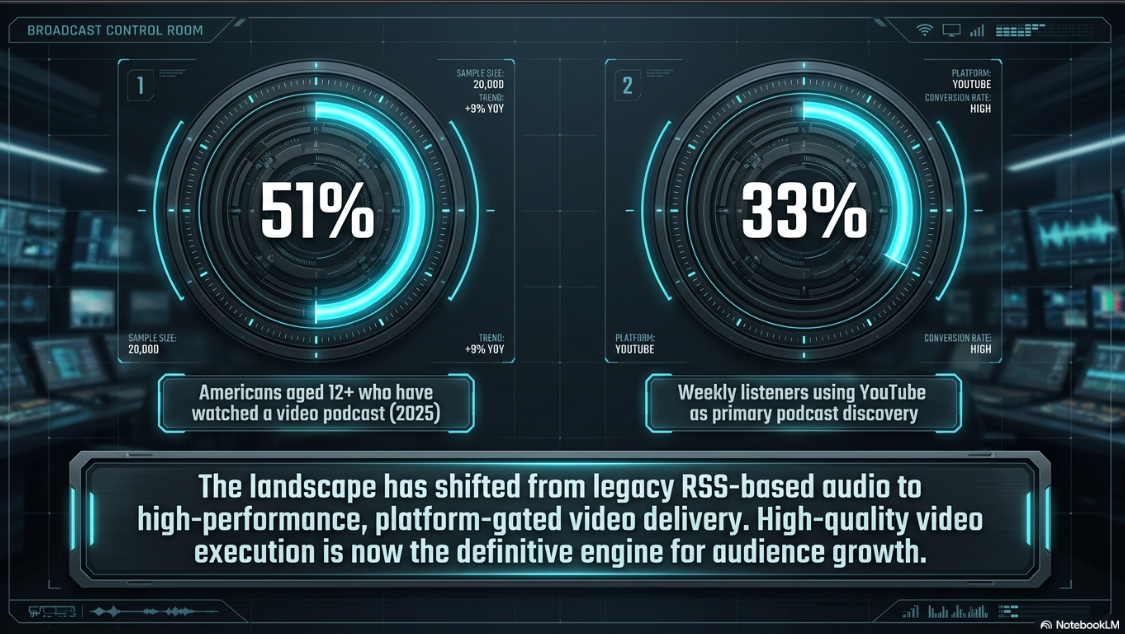
The video podcasting landscape is defined by a shift from legacy RSS-based file delivery to high-performance, platform-gated distribution architectures1. Historically, podcast syndication relied on standard RSS feeds using enclosure tags to point to static audio or video files2. While this decentralized model remains standard for audio distribution, the data demands of high-definition video streaming have led to a split in hosting infrastructure2. Enterprise networks and independent creators must now navigate a complex ecosystem of closed, platform-native engines, hybrid API-driven streaming setups, and traditional RSS hosts1.
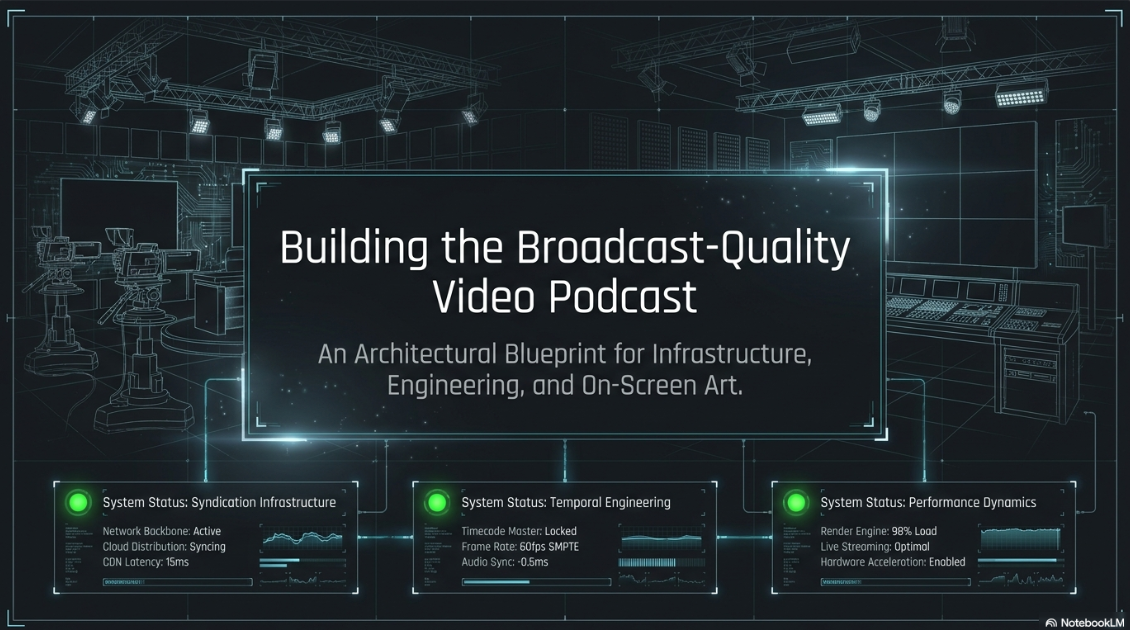
This evolution is driven by changing audience behaviors. Audience data from 2025 indicates that 51% of Americans aged 12 and older have watched a video podcast, with YouTube serving as the primary discovery platform for 33% of weekly podcast listeners5. This shift has made high-quality video execution essential for audience growth and retention1.
This hosting infrastructure is split into two main distribution styles1:
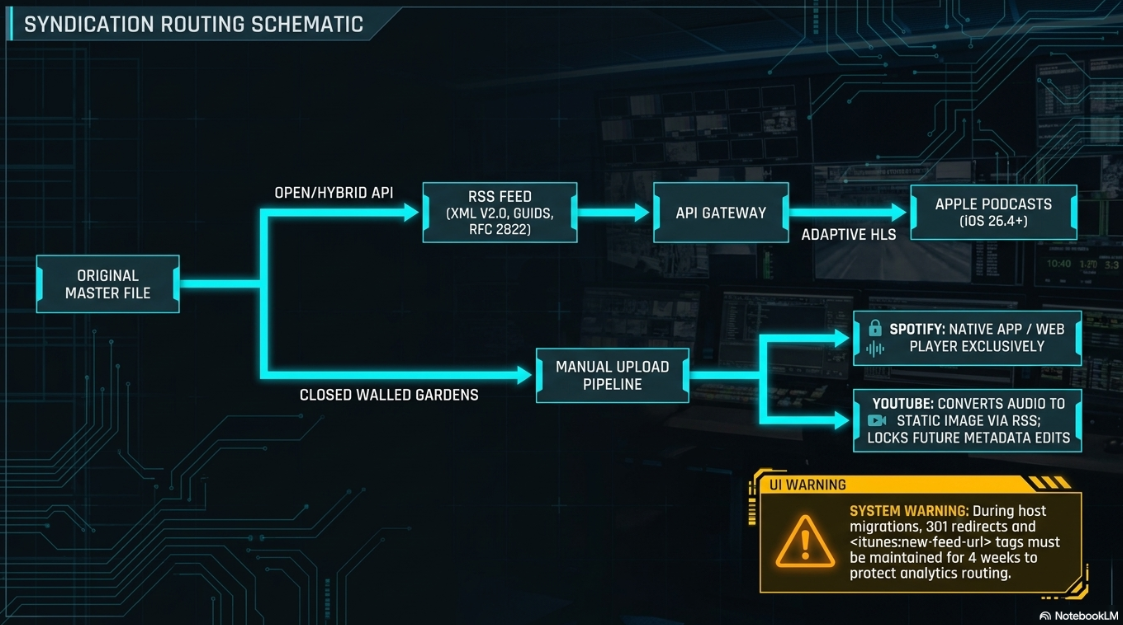
Closed Platform Syndication: Under this model, platforms act as their own hosting environments1. Spotify for Creators is free and includes built-in interactive features, but it locks the video files within Spotify’s apps1. If a show is syndicated to other directories, external platforms only receive an audio feed from the RSS source4. YouTube functions similarly, pulling content through RSS ingestion, converting it into a video with a static image, and hosting it on its own servers8. This isolates engagement metrics and monetization within YouTube Studio9.
Open and Hybrid API-Driven Syndication: Platforms like Captivate and Podbean bridge the gap between open standards and high-end video delivery by utilizing API integrations11. This approach avoids splitting download metrics across separate audio and video feeds11. With the launch of native video support in Apple Podcasts via iOS 26.4, hosting providers can use Apple’s API to deliver adaptive HTTP Live Streaming (HLS) directly to the app11. This allows users to switch between audio and video without losing their place in the episode11.
Open syndication relies on XML validation3. Under Apple's technical standards, a podcast RSS feed must use a valid XML version 2.0 declaration containing specified iTunes and content namespaces25. The feed must include stable Global Unique Identifiers (GUIDs) for every episode, clear pubDate timestamps following RFC 2822, and properly formatted single-enclosure tags3.
To support seamless transitions when migating hosts, producers should maintain a stable 301 redirect and implement the <itunes:new-feed-url> tag for at least four weeks to prevent duplication and protect analytics3.
Platform-Specific Ingestion Dynamics: YouTube and Spotify
Producers must configure their video files to meet the technical standards of each platform's ingestion engine1. Ingesting video onto YouTube or Spotify involves distinct processes for handling file metadata, transcoding audio, and displaying imagery1.
[ Original Master File ]
│
┌──────────────────────────┴──────────────────────────┐
▼ ▼
[ Spotify Ingestion Pipeline ] [ YouTube Ingestion Pipeline ]
- Direct upload or partner API - RSS audio-to-video conversion [cite: 8, 9]
- Video & audio must match duration - Generates static image video [cite: 8, 9]
- 1080p target at 25 Mbps CBR - Non-passthrough re-hosting
- Standard Rec.709 color space - In-app edits lock RSS changes
When connecting an RSS feed to YouTube, the ingestion tool in YouTube Studio reads the feed to create a static-image video for every episode8. This process converts the audio file using the show's default cover art as a static visual8. Some hosts, such as RSS.com, utilize proprietary engines like PodViz to convert audio into interactive videos directly inside the user dashboard before uploading18.
Because YouTube does not offer direct "passthrough" functionality, all imported video files are transcoded and hosted directly on YouTube’s servers9. Once uploaded, any manual edits made to titles or descriptions in YouTube Studio will block future metadata updates from the origin RSS feed, locking the video settings on YouTube26.
Additionally, if a producer uploads a corrected audio file to their hosting provider, YouTube will not automatically update the existing video8. Instead, the producer must manually trigger a re-upload in YouTube Studio, which sets the older video to private to preserve historical view data while publishing a new, updated video file8.
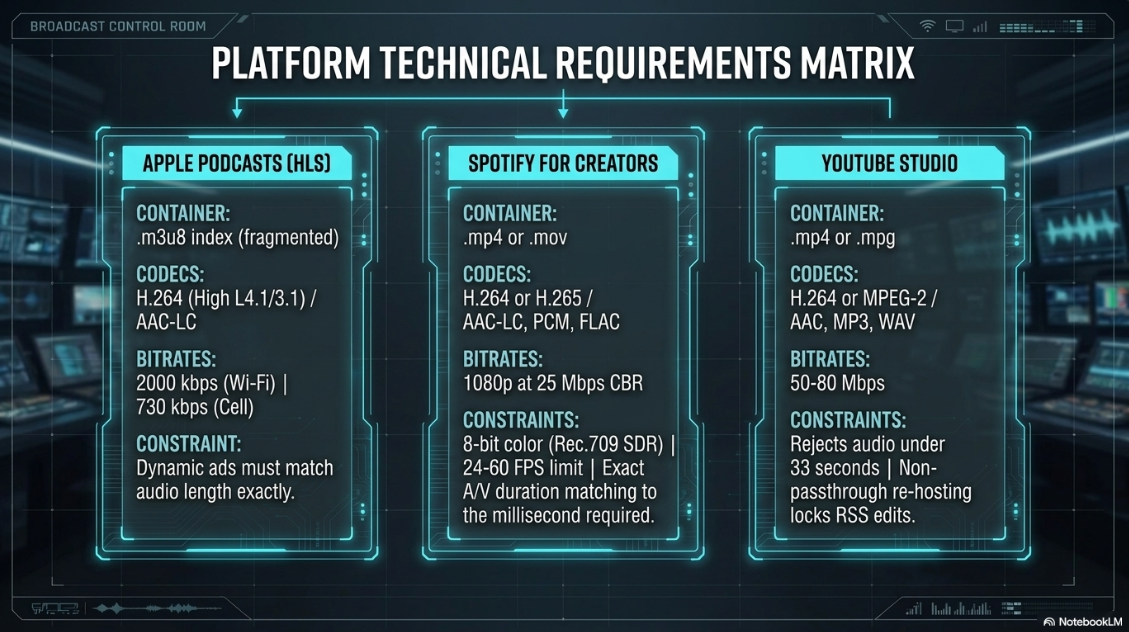
On Spotify for Creators, video publishing requires a strict track layout6. The video and audio tracks in the uploaded file must have the exact same duration6. If there is even a millisecond of discrepancy, the platform will flag a duration mismatch error during transcoding6. To resolve this, editors must place a blank visual slide at the end of the video track in their non-linear editing software to ensure both tracks align perfectly6.
Additionally, Spotify enforces specific rules for color metadata, requiring an 8-bit color depth with 4:2:0 chroma subsampling6. If a file is uploaded in wide color gamut formats (such as Rec. 2020 or Rec. 2100 HDR), the system will flag unrecognized color values or down-convert the files to standard Rec. 709 SDR6. Frame rates must be kept between 24 and 60 FPS6. Any files falling outside of this range will fail the upload validation process6.
Temporal Synchronization: Clocks, Timecode, and the Elimination of Drift
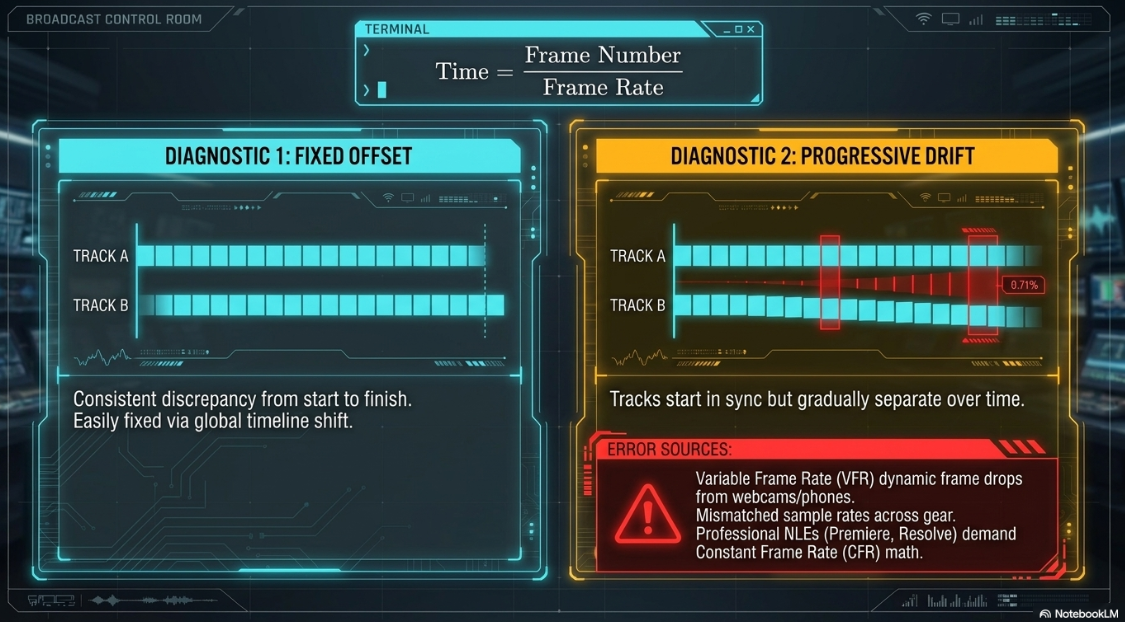
Audio-video synchronization issues can quickly ruin an otherwise professional video podcast30. In post-production, editors must distinguish between a fixed offset and progressive drift30:
Fixed Offset: This occurs when the audio is early or late by a consistent amount from start to finish30. This issue is easily resolved by shifting the audio track globally across the timeline30.
Progressive Drift: This occurs when the audio starts in perfect sync but gradually drifts further apart as the episode continues30.
Progressive drift is primarily caused by two issues: Variable Frame Rate (VFR) footage and mismatched audio sample rates30. VFR is common in footage captured with webcams, mobile phones, and screen recording tools30.
To save system resources and storage space, VFR capture software dynamically drops the frame rate during static scenes, such as when a speaker is still31. While consumer media players can adjust to these frame rate changes during playback, professional non-linear editors like DaVinci Resolve or Adobe Premiere Pro expect Constant Frame Rate (CFR) files31.
On a CFR timeline, frame positions are calculated using a strict, fixed formula31:

When a VFR file is placed on a CFR timeline, the editing software struggles to calculate the variable frame positions31. This causes the video frames to drift away from the constant audio track over long recordings31.
Timeline Layout Over Long-Form Sessions:
Start: [Audio Waveform] ──────────────────────────────────────────────────────────
[Video Frames ] ────────────────────────────────────────────────────────── (In perfect sync)
30 Mins: [Audio Waveform] ──────────────────────────────────────────────
[Video Frames ] ─────────────────────────────────── (VFR drops cause video to lag behind)
60 Mins: [Audio Waveform] ──────────────────────────
[Video Frames ] ─────────────── (Sync drift increases over time)
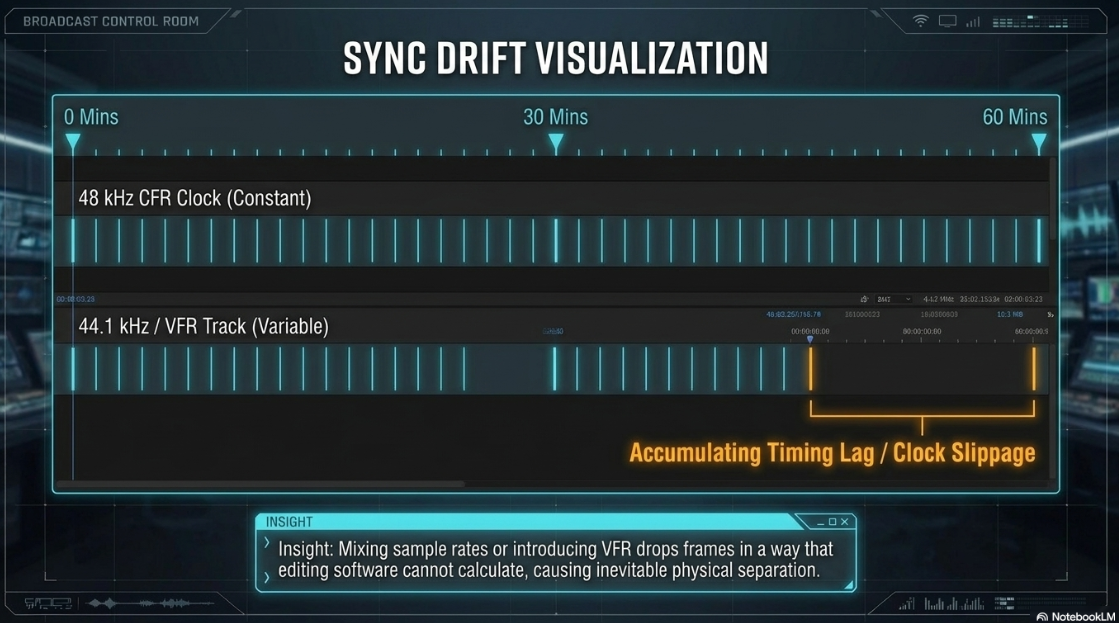
The second major cause of progressive drift is a sample-rate mismatch30. Professional video equipment and timelines are standardized at a 

At 


48.0 kHz Clock: |──|──|──|──|──|──|──|──|──|──|──|──|──|──|──|──|──|──| (48,000 samples/sec)
44.1 kHz Clock: |───|───|───|───|───|───|───|───|───|───|───|───|───| (44,100 samples/sec)
Clock Slippage: [ Accumulating Timing Lag across standard time units ]
To resolve these synchronization issues, producers can use several technical workarounds:
Pre-Edit Transcoding: Run any VFR files through Shutter Encoder or Handbrake before editing31. The footage must be re-encoded into a high-quality, constant frame rate format (such as Apple ProRes or high-bitrate H.264) matching the project's target frame rate31.
The Container Workaround: If VFR footage is causing issues inside Adobe Premiere Pro, renaming the file extension from .mp4 to .dif forces the import engine to treat the track as an uncompressed, constant stream, which can instantly resolve minor sync issues33.
Buffer Adjustments: Increasing the I/O Buffer Size to 2048 samples in the editing software's audio preferences allocates more RAM to real-time decoding, preventing the system from dropping frames during playback33.
Frame Blending: When export speeds are critical, using Adobe Media Encoder with Frame Blending enabled forces the rendering engine to generate intermediate frames, helping to keep VFR footage aligned with the master audio track34.
For multi-device setups, professional productions use external hardware timecode generators38. Following the Society of Motion Picture and Television Engineers (SMPTE) ST 12-1 standard, these devices use precision Temperature Compensated Crystal Oscillators (TCXO) to prevent clock drift38.
The generators are "jam-synced" to a master clock on set before being connected to the audio inputs of individual cameras and recorders38. This analog signal, known as Longitudinal Timecode (LTC), is recorded as an audio track38.
In post-production, editing software decodes the audio tones of the LTC track, turning the signal into accurate frame metadata to automatically align the video and audio tracks across all devices39.
Broadcast-Style Multi-Camera Geometry and Engineering
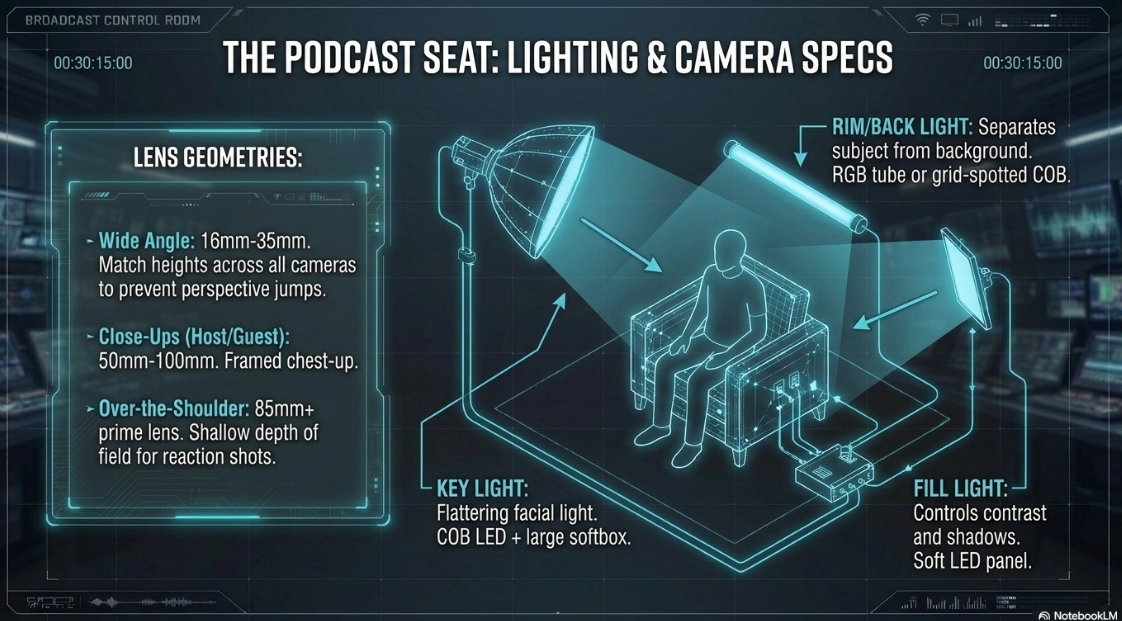
A professional multi-camera video podcast setup goes beyond a single wide shot, using multiple camera angles to control the focus, maintain visual energy, and create a dynamic pace42. Organizing these angles requires careful planning of camera placement, lens choice, lighting, and switching methods42.
To maintain visual consistency across cuts, all cameras should be positioned at matching heights and run with identical exposure and color profiles42. Mismatched camera placements (such as one high angle and one low angle) create distracting jumps in perspective42.
Additionally, producers must respect the 180-degree rule44. This rule states that all cameras must stay on one side of an imaginary line between the speakers44. Crossing this axis flips the characters' screen directions, confusing viewers about where they are sitting in the room44.
[ Set Background ]
Host ─── Guest
\ /
\ /
\ /
Conversational Axis: X─────────────────X
[ 180° Boundary Line - Keep Cameras Below ]
Camera 1 Camera 2 Camera 3
(Host Close-up) (Wide Angle) (Guest Close-up)
Lighting design is crucial for visual continuity43. Instead of dramatic, high-contrast lighting, a video podcast set should be lit evenly using a three-point lighting setup per seat43:
Key Light: A high-power, chip-on-board (COB) LED fixture paired with a large softbox, positioned at a 30-to-45-degree angle from the speaker, provides soft, flattering facial light43.
Fill Light: A soft LED panel on the opposite side of the key light controls contrast and softens harsh shadows43.
Back/Rim Light: An RGB LED tube or grid-spotted COB fixture behind the speaker illuminates their shoulders, separating them from the background and adding depth to the frame43.
[ Back / Rim Light ]
│
▼
[ Speaker Seat ]
▲ ▲
╱ ╲
╱ ╲
[ Key Light ] [ Soft Fill Light ]
(COB LED + Softbox) (LED Panel)
Producers must also decide on their recording and switching workflow42. This choice determines how the footage is captured and edited42:
Live Hardware Switching: Using switchers like the Blackmagic ATEM Mini Pro or RØDE VideoCaster, an operator cuts between camera angles in real time42. This outputs a finished "program mix" immediately, which significantly cuts down on post-production time42.
Isolated (ISO) Recording: This workflow records each camera angle separately to its own memory card or drive42. This gives editors complete flexibility to adjust cuts, use multi-cam editing in software like Premiere or DaVinci, and easily pull vertical clips for social media42.
Software-Based Switching: Platforms like Ecamm Live, vMix, or OBS allow producers to mix physical webcams, DSLR feeds via capture cards (such as the Elgato Cam Link 4K), and remote guest feeds into a single software dashboard45.
On-Camera Presentation Dynamics and Professional Hosting Delivery
While technical production quality is important, a video podcast's success relies heavily on the host's on-camera presence48. Recording video triggers a self-monitoring response that does not happen in normal conversation48.
Without immediate audience feedback, presenters can become overly self-conscious, focusing too much on their physical movements, hands, and facial expressions48. This cognitive overload often leads to a stiff, robotic delivery48.
[ Presentation Component ] ────► [ Target Behavior ] ────► [ Audience Perception ]
Postural Alignment Upright, Relaxed Authority & Confidence
Eye Contact Lens-focused Direct Engagement & Trust
Vocal Pacing ~150 words/minute Clarity & Intelligibility
Non-verbal Cues Nodding & Open Arms Warmth & Accessibility [cite: 51, 53]
To deliver a natural, engaging performance, hosts should focus on several key areas of body language and vocal control48:
Dressing for the Camera: The host's wardrobe should contrast with the set background to help them stand out51. Prioritizing solid, deep jewel tones (such as ruby red, emerald green, or sapphire blue) keeps the focus on the presenter51. Small, busy patterns, checks, or thin stripes should be avoided, as they interact with the camera sensor to create distracting moiré patterns51. Accessories should be kept minimal to prevent distracting reflections or microphonic rustling during recording51.
Framing and Camera Angles: To establish a professional, natural-looking frame, the camera lens should sit just above eye level51. This angle is universally flattering and avoids awkward upward views51. The host should sit about an arm's length from the screen to maintain natural proportions and prevent wide-angle lens distortion51. To keep the frame balanced, the host should leave three to four fingers of headroom (or position their eyes one-third of the way down from the top of the frame)51.
Body Language and Gestures: Maintaining an upright posture with relaxed shoulders projects authority and warmth, which account for up to 82% of a viewer's initial impression51. The host should keep their body language open and gesture naturally with their hands to add energy and emphasis51. If they are framed in a tight close-up, gestures should be kept smaller to stay within the frame50.
Intentional Lens Eye Contact: Building a connection with the viewer requires direct eye contact with the camera lens51. When presenting solo or reading notes, the host should look directly at the lens rather than checking a monitor or looking at a remote guest's video feed51. Tools like the Plexicam can help by hanging the camera directly over the screen, aligning the lens with the presenter's notes or video window55. To make eye contact feel natural, the host should glance away occasionally, looking down or to the side rather than up51.
Active Listening: Non-verbal communication is just as important when the host is not speaking53. Simple physical cues, such as nodding occasionally to show understanding and using subtle facial expressions, demonstrate active listening and maintain engagement53.
Physiological Vocal Preparation: To deliver a clear, resonant voice, hosts should do vocal warm-ups before recording49. Deep diaphragmatic breathing, drinking warm water to keep the throat hydrated, and gentle jaw massages help release muscle tension49. Lip trills, tongue trills, and humming stretch the vocal cords, ensuring a clear delivery without raspy tones49.
Pacing and the Value of Pauses: Under pressure, hosts often speak too quickly49. A professional conversational pace is approximately 150 words per minute49. Hosts should use intentional pauses to break up their delivery, giving the audience a moment to digest key points and keeping the pacing of the show dynamic49.
Using a glass-mounted teleprompter over the camera lens helps the host read intro hooks, sponsor scripts, and outros without losing eye contact with the audience56. The script should be formatted in clean bullet points rather than a word-for-word text block to keep the delivery feeling conversational, natural, and spontaneous59.
Post-Production Transition Chemistry: Split Edits and Auditory Transitions
A smooth, professional video podcast should feel like a natural conversation60. In real-life discussions, there is a natural rhythm of overlapping voices, interruptions, and non-verbal reactions62.
Cutting back and forth directly on the speaker's dialogue can look robotic and clinical61. Professional editors use split edits, specifically J-cuts and L-cuts, to smooth out these transitions60.
J-Cut (Hear it before you see it):
Visuals: [ Video Angle A (Speaker 1) ] [ Video Angle B (Speaker 2) ]
Audio: [ Speaker 1 Audio ] [ Speaker 2 Audio Starts Early ]
▲
(Audio Advance)
L-Cut (Visual cuts away while audio continues):
Visuals: [ Video Angle A (Speaker 1) ] [ Video Angle B (Speaker 2) ]
Audio: [ Speaker 1 Audio Continues Under Video Angle B ] [ B ]
▲
(Audio Under)
In a J-cut, the audio of the upcoming shot plays before the visuals cut over60. This is also known as an audio advance64. Subconsciously, hearing the next speaker's voice a split second before seeing them on screen draws the viewer's attention forward, making the visual cut feel natural and expected61.
In an L-cut, the video cuts to a new shot while the audio from the previous shot continues playing underneath60. This is highly effective for reaction shots, allowing the editor to cut to the host nodding or smiling while the guest continues speaking uninterrupted50.
[ Complete Rough Cut ]
│
▼
[ Strip Dead Air & Filler ]
│
▼
[ Identify 3-4 Key Conversational Nodes ]
│
┌────────────────────────┴────────────────────────┐
▼ ▼
[ Apply J-Cuts ] [ Apply L-Cuts ]
- Anchor quick replies - Embed reaction shots
- Keep offset <1.5 seconds - Smooth B-roll transitions
These split edits should be positioned at natural breathing points to maintain conversational continuity63.
When jumping ahead in time during a highly edited episode, a straight visual cut can feel abrupt and confusing66. Editors can use short auditory cues, such as a 3-to-7-second musical stinger, a clean whoosh, or a thematic sound effect, to bridge the gap66.
This subtle audio shift clears the listener's mental palate, signaling a change in topic, time, or location66.
When transitioning to pre-recorded segments, hosts should keep their vocal style consistent67. Sudden changes in tone, microphone quality, or pacing can make pre-recorded transitions feel jarring67.
Additionally, if a show uses dynamic ad insertion (DAI) in its HLS streams, producers must remember that Apple Podcasts prohibits unskippable ad flags (X-RESTRICT) to ensure a smooth, user-friendly listening experience23.
Metadata and Algorithmic Discovery Engineering
Technical distribution is only the first step; maximizing discoverability is crucial for a video podcast's long-term growth1. YouTube acts as a massive search engine, meaning metadata structure directly influences how content is ranked, suggested, and surfaced1.
To optimize this, producers must utilize structured video chapters and timestamp metadata within their descriptions68.
00:00 Introduction: The Evolution of Podcast Syndication
02:15 The Battle Between Open RSS and Closed API Hosting
05:40 Demystifying HTTP Live Streaming (HLS) for Mobile Playback
09:12 How to Set Up an API Key in Podcasts Connect
12:50 Analyzing the 50% Revenue Split on Dynamic In-App Ads
To ensure search engines recognize and apply these chapters, producers must follow a strict syntax68:
The Zero Marker: The list must begin with an absolute zero timestamp formatted exactly as 00:00 or 0:00, usually labeled as "Introduction" or the episode's hook68.
Ascending Chronology: Every timestamp must follow in strict chronological order moving down the description box68.
Threshold Minimums: The description must contain at least three distinct chapters, with each segment lasting at least ten seconds68.
Separation Syntax: Every timestamp must be separated from its text label by a single space, with colons separating the minutes and seconds72.
These structured timestamps provide major advantages68. First, they improve audience retention68. Giving viewers the ability to skip directly to the information they need prevents frustration and lowers bounce rates68.
Second, this structured data is indexed by search engine crawlers68. When indexed properly, Google can display individual chapters as "Key Moments" directly at the top of search engine results pages (SERPs)68. This drives organic traffic to the video by targeting specific search queries68.
While automated, machine-learning-driven chapters are convenient, they lack strategic keyword placement70. Manually writing timestamp descriptions allows producers to target high-value, search-relevant terms, significantly boosting discoverability68.
Conclusions and Strategic Recommendations
To execute a professional video podcast successfully, networks and creators must coordinate their technical hosting, video production, and presentation style1. Based on current hosting systems, synchronization protocols, multi-camera setups, and on-camera techniques, professional productions should implement the following recommendations:
Implement Hybrid Syndication: Choose a hosting provider that supports both open RSS and direct API connections1. This allows for seamless HLS video delivery to directories like Apple Podcasts while keeping absolute ownership of the show's primary metadata, RSS feed, and analytics11.
Establish a Hardware Sync Standard: Set every recording device, camera, and project template to a constant frame rate (CFR) and a matching

Optimize Multi-Camera Workflows: Position cameras to maintain matching heights and custom color profiles, and respect the 180-degree rule42. Use three-point lighting setups with COB and LED fixtures to separate the speaker from the background43. In the edit, apply J-cuts and L-cuts to keep transitions looking natural and conversational60.
Refine On-Camera Performance: Choose wardrobe and setups that contrast with the background, keeping the lens just above eye level and maintaining natural headroom51. Focus on the camera lens to simulate direct eye contact51, and use simple vocal warm-ups to speak with a clear, resonant voice at a pacing of approximately 150 words per minute49.
Write Search-Optimized Chapters: Manually write descriptive, keyword-rich video chapters in descriptions, following strict formatting guidelines68. This improves viewer retention and helps Google index key moments, boosting the podcast's search discoverability68.
Works cited
Best Video Podcast Platforms for Creators & Brands - Lower Street, https://lowerstreet.co/blog/video-podcast-platforms
Apple Podcasts Officially Embraces Video Podcasts Again - Rob Greenlee, https://robgreenlee.com/2026/02/18/apple-podcasts-officially-embraces-video-podcasts-again/
What is a podcast RSS feed? - TYX Studios, https://tyxstudios.com/blog/what-is-a-podcast-rss-feed
Podcast Hosting Platforms Compared: Buzzsprout vs Spotify vs RSS.com - 2026 Guide, https://www.podcaststudioglasgow.com/podcast-studio-glasgow-blog/podcast-hosting-platforms-compared-buzzsprout-vs-spotify-vs-rsscom-2026-guide
Best video podcast platforms - a practical guide for creators - Beamly, https://beamly.com/best-video-podcast-platforms/
Video specs - Spotify Support, https://support.spotify.com/us/creators/article/video-specs/
Podcast Hosting Platforms Compared: Pricing, Features & Reviews 2026 - RSS.com, https://rss.com/blog/best-podcast-hosting-platforms/
Deliver podcasts using an RSS feed - YouTube Help, https://support.google.com/youtube/answer/13525207?hl=en
YouTube RSS Ingestion - ART19, https://art19.zendesk.com/hc/en-us/articles/21942261555341-YouTube-RSS-Ingestion
Using Your Podcast RSS Feed for YouTube FAQs | Captivate Help and Support, https://help.captivate.fm/en/article/using-your-podcast-rss-feed-for-youtube-faqs-16svuam/
Publish Video Podcasts to Apple Podcasts - Captivate.fm, https://www.captivate.fm/publish-video-podcasts-to-apple-podcasts
How to Connect Your Show and Request Approval for Apple Podcasts HLS Video, https://help.captivate.fm/en/article/how-to-connect-your-show-and-request-approval-for-apple-podcasts-hls-video-1durvlt/
Apple Podcasts HLS Frequently Asked Questions - Captivate Help and Support, https://help.captivate.fm/en/article/apple-podcasts-hls-frequently-asked-questions-1n8fmpg/
Captivate launches Apple Podcasts video - Podnews, https://podnews.net/update/captivate-apple-video
The 13 Best Podcast Hosting Platforms in 2026, https://www.quillpodcasting.com/blog-posts/podcast-hosting-platform
Whats a good hosting alternative to Spotify for creators? : r/podcasting - Reddit, https://www.reddit.com/r/podcasting/comments/1sxi4do/whats_a_good_hosting_alternative_to_spotify_for/
How can I upload my video podcasts to Apple Podcasts? - Reddit, https://www.reddit.com/r/podcasting/comments/1uuasgv/how_can_i_upload_my_video_podcasts_to_apple/
How to Start a Podcast on YouTube - RSS.com, https://rss.com/blog/how-to-connect-your-podcasts-rss-feed-to-youtube/
YouTube RSS Ingestion Overview | Podcast.co Help Center, https://help.podcast.co/en/articles/7942251-youtube-rss-ingestion-overview
Setting Up Apple Podcasts HLS Video Streaming in Podbean, https://help.podbean.com/support/solutions/articles/25000035080-setting-up-apple-podcasts-hls-video-streaming-in-podbean
Captivate Announced as Day One Launch Partner for Apple's New HLS Video Release, https://www.captivate.fm/podcast-product-releases/hls-video-what-is-it-what-does-it-mean-for-your-podcast
Apple Video Podcasting, powered by HLS: what is it and what does it mean for your podcast? - Captivate.fm, https://www.captivate.fm/podcast-product-releases/captivate-updates/apple-video-podcasting-powered-hls-what-does-it-mean-for-your-podcast
How to publish video on Apple Podcasts, https://podcasters.apple.com/support/5593-how-to-publish-video
Apple introduces a new video podcast experience on Apple Podcasts, https://www.apple.com/uk/newsroom/2026/02/apple-introduces-a-new-video-podcast-experience-on-apple-podcasts/
Podcast RSS feed requirements - Apple Podcasts for Creators, https://podcasters.apple.com/support/823-podcast-requirements
Publish or disconnect episodes from an RSS feed on YouTube - Google Help, https://support.google.com/youtube/answer/13973017?hl=en-GB
Apple Podcasts HLS streams: how they work - Podnews, https://podnews.net/article/apple-podcasts-hls-tech
HLS video in podcasts, who's doing what?, https://livewire.io/hls-video-in-podcasts/
Video and audio formatting specifications - YouTube Help, https://support.google.com/youtube/answer/4603579?hl=en
How to Fix Audio Sync Issues in Video Podcasts (2026 Guide), https://www.podcaststudioglasgow.com/podcast-studio-glasgow-blog/how-to-fix-audio-sync-issues-in-video-podcasts
Variable Frame Rate (VFR) vs Constant Frame Rate (CFR) – EncodeX Guide, https://encodex.se/guides/vfr-vs-cfr.html
Fix Screen Recording Audio Desync in 10 Minutes (OBS Drift Guide) | Medium, https://medium.com/@andrew_best/why-your-screen-recording-audio-is-out-of-sync-and-how-to-fix-audio-drift-forever-a6738c729f52
Fixing VFR Audio Sync Issues in Adobe Premiere - Media Commons (PSU), https://mediacommons.psu.edu/2017/09/12/fixing-audio-sync-issues-in-adobe-premiere/
Audio drifts out of sync over time - Adobe Premiere Pro - Creative COW, https://creativecow.net/forums/thread/audio-drifts-out-of-sync-over-time/
MP4 Media Requirements - Insite - Workcast, https://insite.workcast.com/mp4-media-requirements
Video and audio compression guidelines - Vimeo Help, https://help.vimeo.com/hc/en-us/articles/12426043233169-Video-and-audio-compression-guidelines
Getting AVC VFR to CFR = lip sync challenges - Adobe Community, https://community.adobe.com/questions-729/getting-avc-vfr-to-cfr-lip-sync-challenges-1416788
Timecode Sync Guide: Prevent Sound Drift on Set - BlockReel DAO, https://blockreeldao.com/blog/timecode-sync-on-set-avoiding-drift-between-sound-and-camera
Mastering Timecode: Sync Your Audio and Video Like a Pro - PodcastVideos.com, https://www.podcastvideos.com/timecode-audio-video-sync-guide/
Why does my podcast audio go out of sync from the video over time? - Reddit, https://www.reddit.com/r/podcasting/comments/1s30as0/why_does_my_podcast_audio_go_out_of_sync_from_the/
Audio Sync Drift Ruining Your Videos? The Timecode Fix - YouTube, https://www.youtube.com/watch?v=-LgKoCuk3cI
Your Multi Camera Podcast Setup: A Pro-Level Guide, https://flexworkstudios.com/multi-camera-podcast-setup/
Building a Simple Multicam Podcasting Kit - CVP.com, https://cvp.com/resources/articles/insights/building-a-simple-multicam-podcasting-kit
The Complete Video Podcast Blueprint: 1–4 Person Setups, Camera Angles, & Lighting Diagrams - Cutback, https://cutback.video/blog/the-complete-video-podcast-blueprint-1%E2%80%934-person-setups-camera-angles-lighting-diagrams
Multicam 2-Person Video Podcast and Live Streaming Setup Gear Guide, https://pss.media/blog/multicam-2-person-video-podcast-and-live-streaming-gear
Budget Friendly Multi-Cam Setups for Podcasting, Streaming, and More | EMEET PIXY, https://www.youtube.com/watch?v=4999U5odKSI
Best Software for Multi-Camera Video Podcast Recording? - Reddit, https://www.reddit.com/r/podcasting/comments/1icyrqt/best_software_for_multicamera_video_podcast/
How to Look Confident on Camera: The Business Professional's Guide to On-Camera Presence | BIGVU, https://bigvu.tv/blog/look-confident-camera-business-professionals-guide-on-camera-presence/
Developing Your Podcasting Voice - Voice Power Studios, https://www.voicepowerstudios.com/blog/274-developing-your-podcasting-voice.html
Speaking On Camera: 3 Expert Tips For On-Camera Confidence - Project Charisma, https://projectcharisma.com/speaking-on-camera-communication-tips-for-podcasts-videos-explainers/
How to Look Good on Camera When Hosting a Webinar - Wistia Blog, https://wistia.com/learn/marketing/look-good-on-camera
Media Training: When there's a camera, where do you look?, https://www.buckleyschool.com/magazine/articles/media-training-when-theres-a-camera-where-do-you-look/
Video Interview Body Language Tips | Teleprompter.com, https://www.teleprompter.com/blog/video-interview-body-language-tips
The Body Language Expert: Stop Using This, It's Making People Dislike You, So Are These Subtle Mistakes! Your Resting Face Matters & How To Fix It! - Podcast Transcripts, https://podcasts.happyscribe.com/the-diary-of-a-ceo-with-steven-bartlett/the-body-language-expert-stop-using-this-it-s-making-people-dislike-you-so-are-these-subtle-mistakes-your-resting-face-matters-how-to-fix-it
Video podcasting: Maintaining eye contact with a simple camera setup with Dan Keldsen, https://motionagency.io/episode/video-podcasting-maintaining-eye-contact-with-a-simple-camera-setup-with-dan-keldsen/
Easy Guide to Using a Teleprompter | How They Work & Tips for Success - Moxie Institute, https://www.moxieinstitute.com/easy-guide-to-using-a-teleprompter-how-they-work-tips-for-success/
Anchoring and Teleprompters 101 - YouTube, https://www.youtube.com/watch?v=O3BqluVM_7c
All About Teleprompters for Video Podcasting (Including Tips!), https://popuppodcasting.ca/blog/teleprompter-tips-for-video-podcasting-zk8kf
Teleprompter for Interviews and Podcasts, https://teleprompter.pw/blog/teleprompter-for-interviews-and-podcasts-how-to-use-it-effectively/
J cuts vs L cuts examples in video editing - Adobe, https://www.adobe.com/uk/creativecloud/video/discover/j-cut-and-l-cut.html
What are J-cuts and L-cuts, and how do they work in video editing? - Epidemic Sound, https://www.epidemicsound.com/blog/j-cuts-and-l-cuts/
J-Cuts & L-Cuts - Film School - WeVideo, https://www.wevideo.com/blog/j-cuts-l-cuts
J Cut and L Cut Explained (2026): Smoother Dialogue Edits - CutFast, https://cutfa.st/blog/j-cut-l-cut-audio-transition-editing-cutfast-method-2026-en
How to Edit Videos: L-Cuts and J-Cuts - TechSmith, https://www.techsmith.com/blog/how-to-edit-videos-l-cuts-and-j-cuts/
Using L-Cuts and J-Cuts in Video Editing - Why and How? - Vegas Pro, https://www.vegascreativesoftware.com/blog/l-cuts-and-j-cuts/
How to do transitions? : r/podcasting - Reddit, https://www.reddit.com/r/podcasting/comments/sotcwh/how_to_do_transitions/
How to Transition Smoothly to Pre-Recorded Podcast Audio - Regen Media, https://www.regenmedia.co.uk/how-to-transition-smoothly-between-audio-thats-been-recorded-at-different-times/
The Strategic Guide to YouTube Chapters and Video Time Stamps for SEO Success, https://zubtitle.com/blog/the-strategic-guide-to-youtube-chapters-and-video-time-stamps-for-seo-success
Video Chapters - YouTube Help, https://support.google.com/youtube/answer/9884579?hl=en
YouTube Chapters: How to Use Them & Why They Matter (2026), https://humbleandbrag.com/blog/youtube-chapters
Optimize YouTube's Automatic Chapters for SEO - Fratzke Consulting, https://www.fratzkemedia.com/insights/optimize-youtube-chapters
How and why to add chapters to your YouTube videos - The Church of England, https://www.churchofengland.org/resources/digital-labs/blogs/how-and-why-add-chapters-your-youtube-videos














