

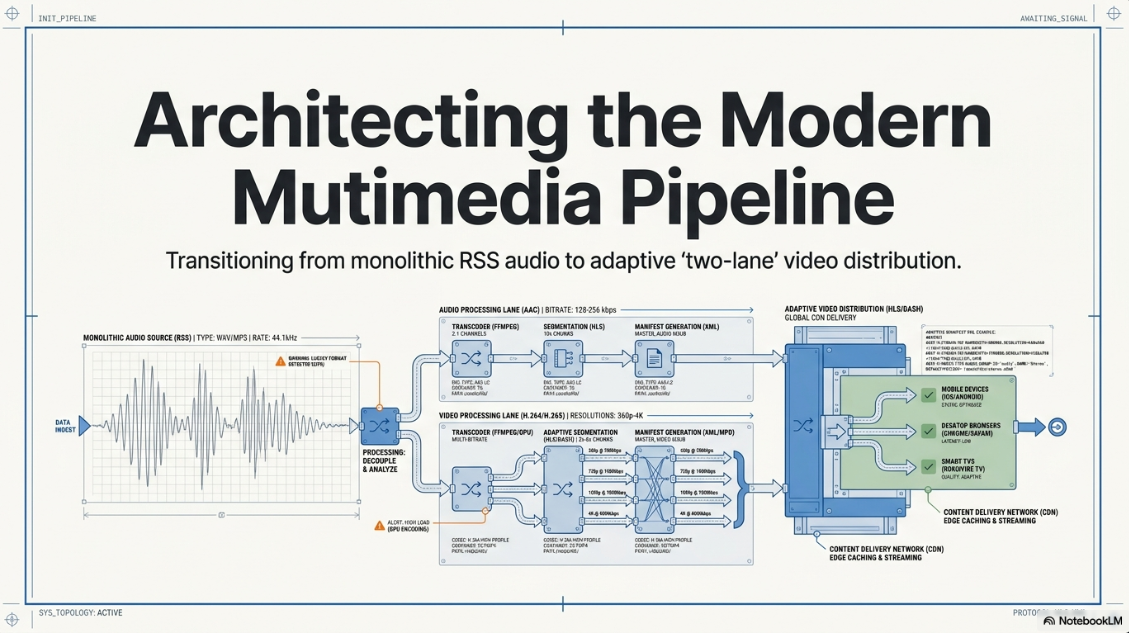
The modern digital media ecosystem has transformed podcasts from simple, spoken-word audio files into complex multimedia assets that require high-performance post-production and distribution pipelines1. To capture and maintain audience engagement, publishers must adopt a hybrid "two-lane" distribution strategy3.
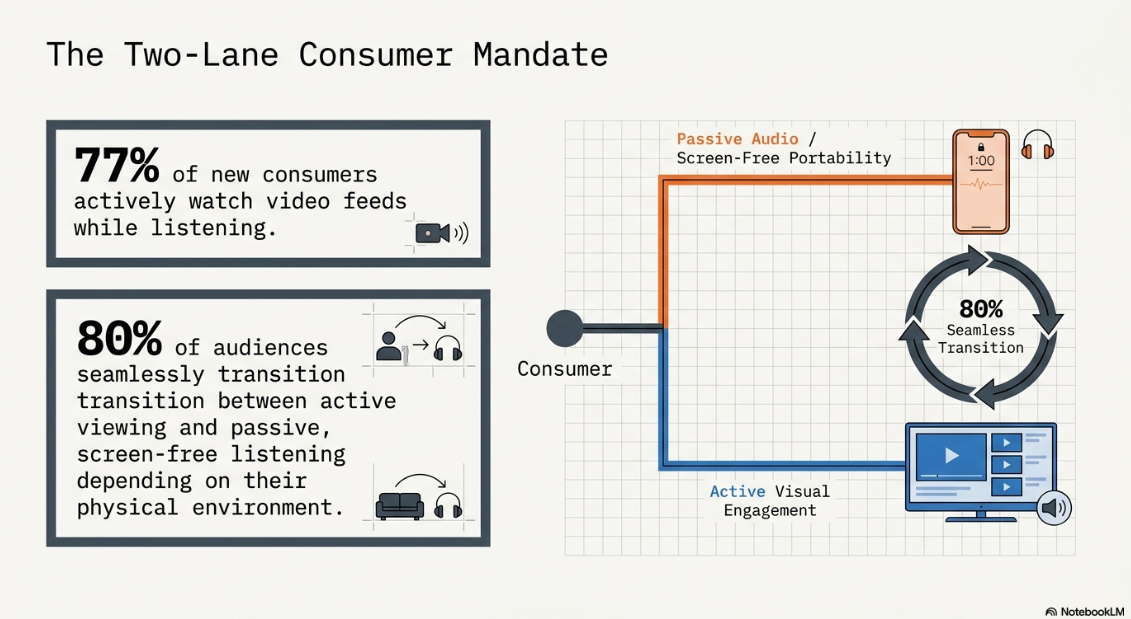
Data shows that 77% of new consumers actively watch video feeds while listening, and approximately 80% of audiences seamlessly transition between active viewing and passive listening depending on their immediate physical environment3. Consequently, delivery frameworks must satisfy the visual demands of platform algorithms while maintaining the screen-free portability of traditional audio RSS syndication3.
Architectural Foundations and the Corporate Infrastructure Warning
Executing a professional video podcast requires a clear separation between production formats and distribution standards4. It also requires a robust server infrastructure3.
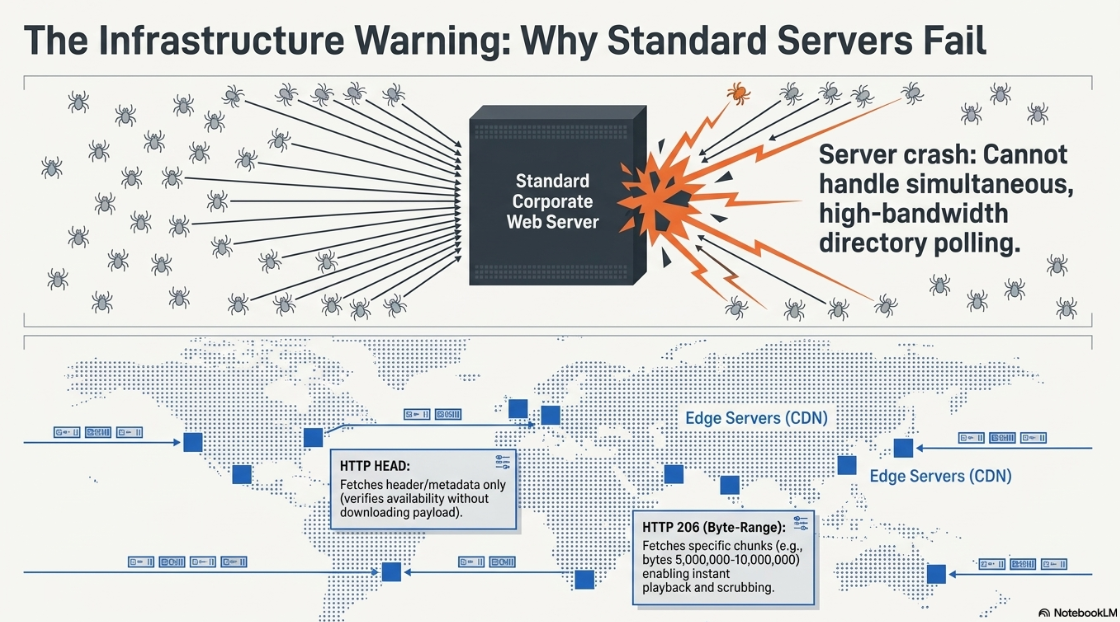
A common operational error made by organizations is attempting to host media files directly on standard corporate web servers3. Standard corporate servers are optimized for web page delivery, not concurrent, high-bandwidth media downloads3.
When a new episode is released, directory spiders, aggregators, and thousands of subscriber client applications simultaneously query the RSS feed3. This sudden spike in requests on a standard corporate web server inevitably causes severe bandwidth throttling, high overage fees, or complete server crashes3.
To prevent these infrastructure failures, media distribution networks must use professional hosting services that utilize global Content Delivery Networks (CDNs)3. These CDNs distribute and cache heavy media files across edge servers worldwide to ensure reliable delivery3.
Furthermore, to support streaming playback on major directories, the hosting server must be explicitly configured to handle specific HTTP request types3:
HTTP HEAD Requests: When a user scrolls past an episode, the client application issues a HEAD request to fetch only the file’s header3. This allows the app to verify file availability and read metadata without downloading the entire media asset3.
HTTP Byte-Range Requests (HTTP 206): To enable scrubbing and instant playback, the hosting server must support byte-range requests (returning an HTTP 206 partial content status)3. This configuration allows the media player to fetch specific chunks of the file (e.g., requesting only bytes 5000000-10000000) rather than downloading the entire asset from the beginning3.
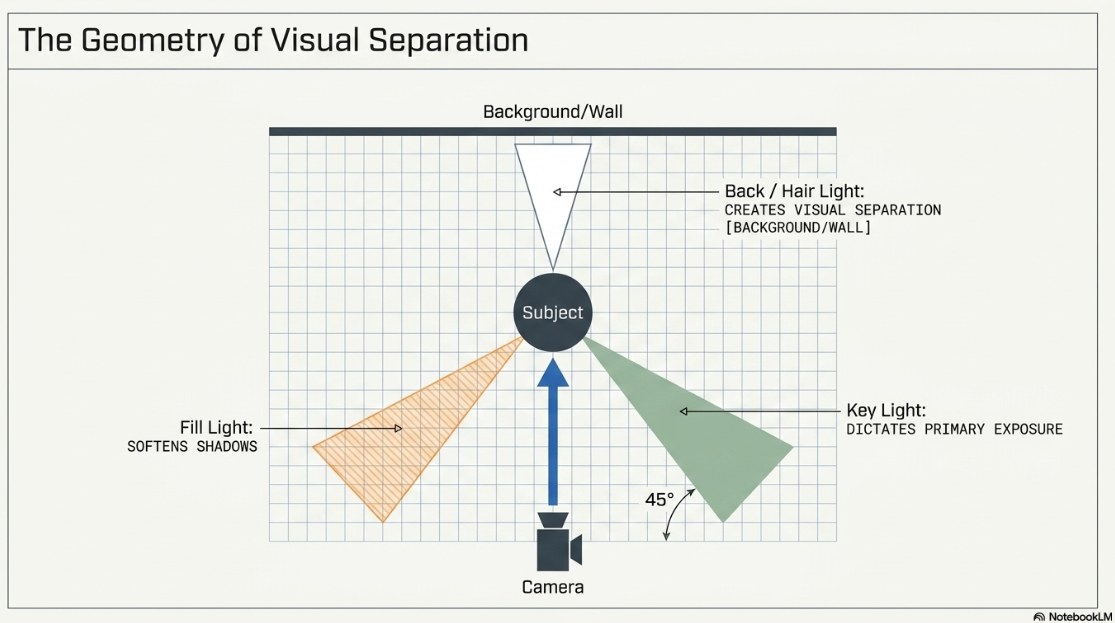
Before media reaches the hosting layer, it must go through structured pre-production and post-production workflows3. Visual aesthetics are established during recording using a classic three-point lighting setup to ensure clean, high-contrast imagery3.
[Background / Wall]
|
v
[Back / Hair Light]
(Creates separation)
|
v
[Key Light] --------------> [Subject] <-------------- [Fill Light]
(45-degree angle; (Opposite key;
dictates primary exposure) softens shadows)
^
|
[Camera]
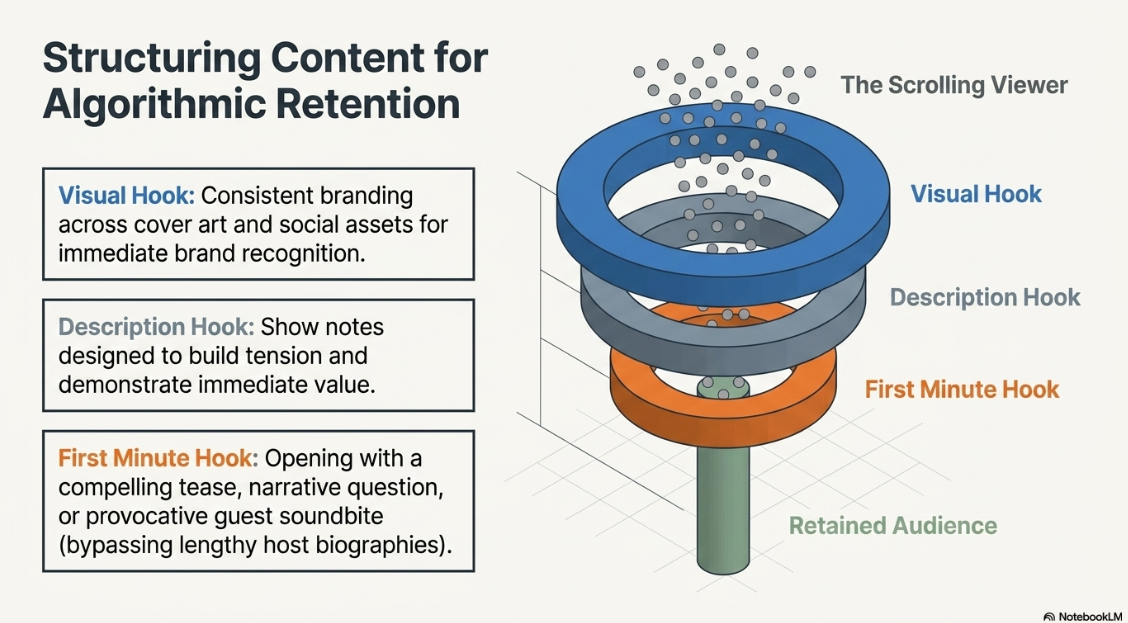
To optimize audience retention across scroll-based feeds, publishers must structure their content using three strategic hooks10:
The Description Hook: The episode’s show notes must be structured to immediately build tension and show the value of the episode to convince the user to click play10.
The First Minute Hook: The episode must open with a compelling tease, a key narrative question, or a provocative guest soundbite rather than a lengthy introduction or host biographies10.
The Visual Hook: Consistent visual branding across cover art and social assets is required to build immediate brand recognition10.
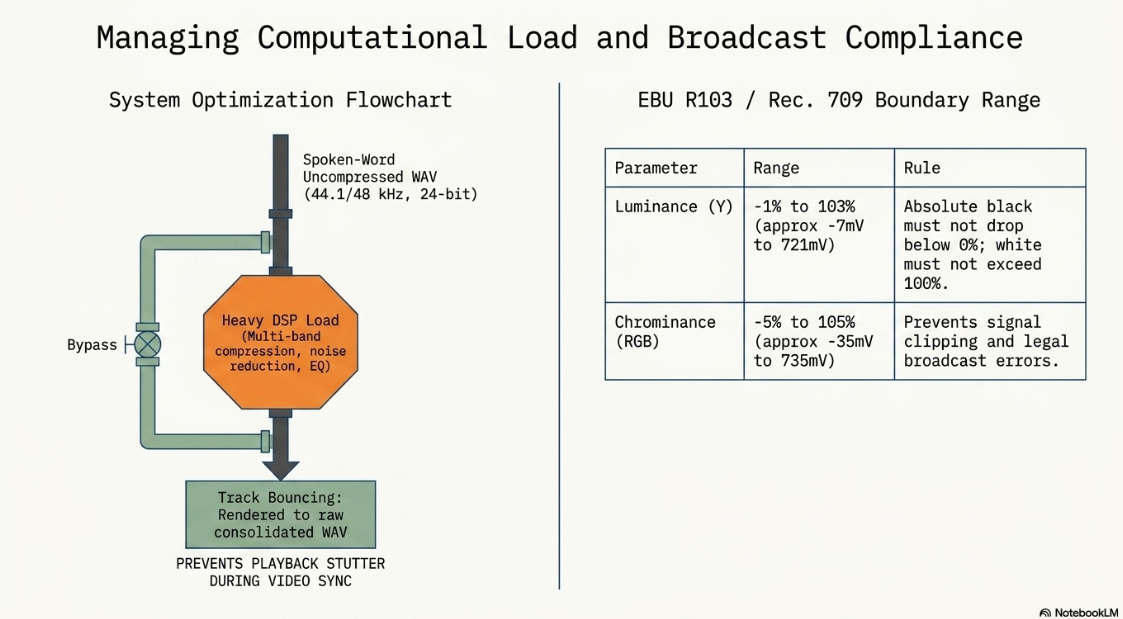
In post-production, engineers must configure their digital audio workstation (DAW) settings to capture clean speech and manage processing overhead4. Spoken-word tracking is typically captured as uncompressed WAV files at a sample rate of 44.1 kHz or 48 kHz with a 24-bit depth to maintain extensive headroom and a negligible noise floor4.
Because heavy real-time digital signal processing (DSP)—including multi-band compression, noise reduction, and surgical equalization—creates a heavy CPU load, engineers use "track bouncing"4. By rendering a heavily processed track down to a raw, consolidated WAV file, the system is relieved of active DSP calculations, preventing playback stuttering and system crashes during video synchronization4.
Furthermore, video engineers must ensure the final exported file complies with strict EBU R103 and Rec. 709 luminance and chrominance standards to prevent signal clipping and legal broadcast errors2.
Legacy RSS Feed XML Specifications and Cross-Platform Standardization
The open podcasting ecosystem is built on the XML-based RSS 2.0 specification5. Client applications periodically check ("poll") these structured documents to find new content updates5.
[Hosting Server]
(Hosts the RSS XML File)
^
| Updates Feed
|
[Publisher]
|
| Polls Feed
v
[Client App]
(Subscribes to URL / Fetches Assets)
The standard RSS format relies entirely on the <enclosure> tag to deliver media, using three mandatory attributes to define the file5:
XML
<enclosure url="https://media.example.com/episode42.mp4" length="565088900" type="video/mp4" />
To ensure a feed is compatible with major directories like Apple Podcasts and Spotify, publishers must structure their XML syntax carefully7. Standard character symbols must be escaped properly using XML character entities8.
For example, standard curly quotes or typographer quotes (’, ‘, “, ”) must be avoided and replaced with standard escaped ASCII values, using ' for a single quote and " for a double quote8.
Furthermore, categories must follow exact taxonomic formatting and casing rules, such as <itunes:category text="Kids & Family" />8.
Every episode entry must include a globally unique identifier (GUID) inside the <guid> tag6. Once published, the GUID must remain completely unchanged6. If a publisher modifies an episode's GUID, directories and client apps will treat it as a new episode, causing duplicate downloads and breaking listener analytics6.
Furthermore, publishers must provide accurate artwork that meets strict platform requirements6:
To verify show ownership during setup on Spotify or YouTube Studio, directories use the email address listed in the RSS feed to send an 8-digit verification code13.
Because most modern hosting platforms (including Captivate and RSS.com) hide the creator's email address by default to protect them from spam web-scraping, publishers must temporarily unhide their email address in their host settings13.
Once the verification handshake is complete, the email address can be re-hidden without disrupting distribution13.
When migrating a show to a new hosting provider, publishers must preserve their existing subscriber base by setting up a seamless feed redirect6. This requires a server-side HTTP 301 (Permanent) redirect configured at the old hosting provider to point directly to the new RSS feed URL6.
Additionally, for Apple Podcasts, publishers must add the <itunes:new-feed-url> tag pointing to the new feed destination6. Crucially, creators must avoid setting this tag to the Mirror URL displayed in Apple Podcasts Connect, as doing so can break the directory’s redirect logic6.
API-Driven Adaptive Streaming: Apple Podcasts HLS Protocols
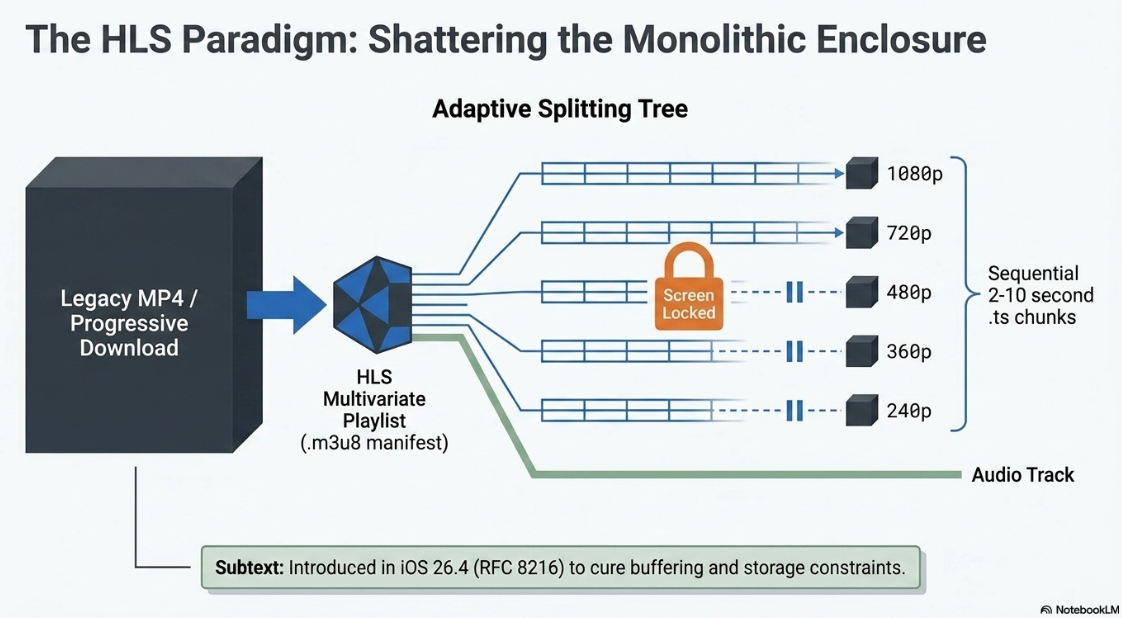
The release of iOS 26.4 in March 2026 introduced support for HTTP Live Streaming (HLS) within the Apple Podcasts app, moving away from legacy progressive-download RSS enclosures for video delivery17. Under the traditional RSS model, video podcasts required downloading large, monolithic MP4 files17. This often caused buffering issues and consumed significant device storage17.
HLS, standardized under RFC 8216, addresses these performance bottlenecks by breaking the video file into small, sequential chunks that typically range from 2 to 10 seconds in duration18. The client application downloads these segments sequentially18. This allows the player to dynamically adjust playback quality in real time based on network speed, ensuring smooth playback even on unstable connections17.
[HLS Multivariate Playlist (.m3u8)]
|
+------------------------+------------------------+
| |
[Video Streams] [Audio Rendition]
(H.264 / Multi-Bitrate) (AAC-LC / 128-160 kbps)
| |
+---> 1080p Segment (.ts / .m4s) +---> Uninterrupted
+---> 720p Segment (.ts / .m4s) Audio stream
+---> 480p Segment (.ts / .m4s) used when screen
+---> 360p Segment (.ts / .m4s) is locked/off
+---> 240p Segment (.ts / .m4s)
The underlying HLS delivery architecture requires hosting providers to generate a multivariate playlist (commonly delivered as a .m3u8 manifest file) via secure APIs17. This index file defines the various video resolution streams, their associated bitrates, and the location of the independent audio tracks17.
#EXTM3U
#EXT-X-VERSION:6
#EXT-X-INDEPENDENT-SEGMENTS
# Audio Rendition
#EXT-X-MEDIA:TYPE=AUDIO,GROUP-ID="audio-aac",NAME="Stereo Audio",DEFAULT=YES,AUTOSELECT=YES,LANGUAGE="en",URI="audio/stereo.m3u8"
# Video streams with linked audio
#EXT-X-STREAM-INF:BANDWIDTH=5500000,AVERAGE-BANDWIDTH=4900000,RESOLUTION=1920x1080,FRAME-RATE=29.97,CODECS="avc1.64002a,mp4a.40.2",AUDIO="audio-aac"
video/1080p/index.m3u8
#EXT-X-STREAM-INF:BANDWIDTH=3200000,AVERAGE-BANDWIDTH=2800000,RESOLUTION=1280x720,FRAME-RATE=29.97,CODECS="avc1.640020,mp4a.40.2",AUDIO="audio-aac"
video/720p/index.m3u8
#EXT-X-STREAM-INF:BANDWIDTH=1500000,AVERAGE-BANDWIDTH=1200000,RESOLUTION=854x480,FRAME-RATE=29.97,CODECS="avc1.4d401f,mp4a.40.2",AUDIO="audio-aac"
video/480p/index.m3u8
#EXT-X-STREAM-INF:BANDWIDTH=800000,AVERAGE-BANDWIDTH=600000,RESOLUTION=640x360,FRAME-RATE=29.97,CODECS="avc1.4d401e,mp4a.40.2",AUDIO="audio-aac"
video/360p/index.m3u8
#EXT-X-STREAM-INF:BANDWIDTH=400000,AVERAGE-BANDWIDTH=300000,RESOLUTION=426x240,FRAME-RATE=29.97,CODECS="avc1.4d4015,mp4a.40.2",AUDIO="audio-aac"
video/240p/index.m3u8
The target specifications for HLS video encoding are detailed in the table below:
Separating the audio into a distinct "rendition" track is a key design feature of HLS21. When a listener locks their screen or backgrounds the Apple Podcasts application, the operating system stops downloading video segments and fetches only the lightweight audio track21. This design choice prevents playback from stuttering or resetting18.
To enable this seamless switching, the audio track inside the HLS stream must match the video's audio perfectly in duration and composition18. Because Apple Podcasts exclusively plays the HLS audio rendition on compatible devices running iOS 26.4 or later, the traditional MP3 file listed in the RSS enclosure is bypassed entirely by those clients21. The raw MP3 remains necessary only as a fallback for older devices, the web player, or smart home appliances like the Apple HomePod21.
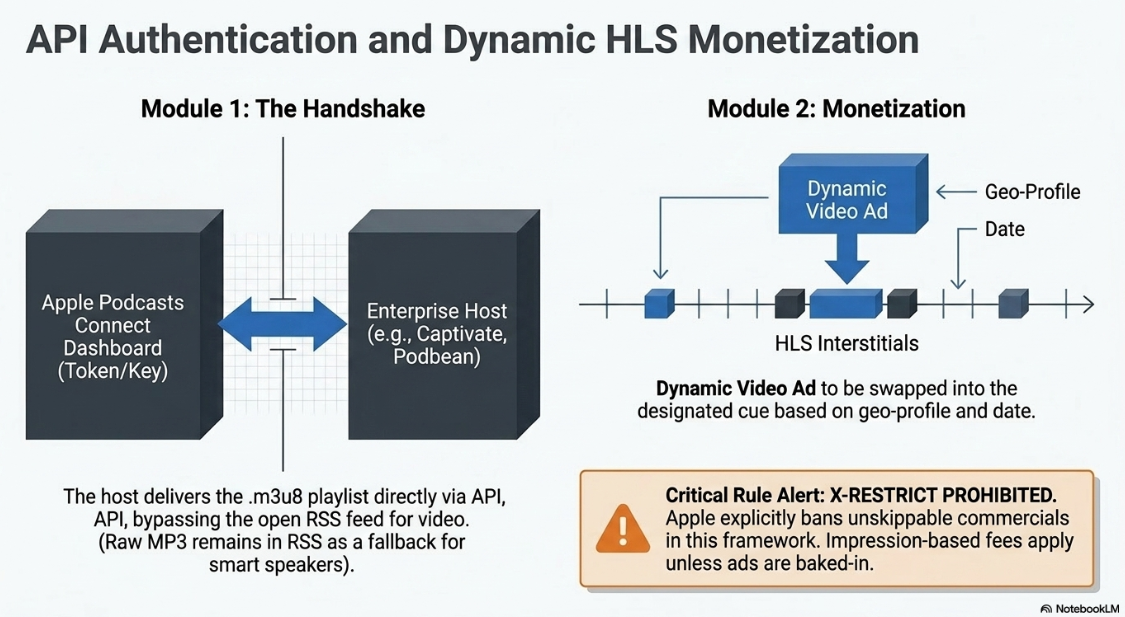
This migration to HLS introduces a centralized, API-driven publishing workflow that creates a structural division in the podcasting ecosystem24. Rather than relying solely on open RSS feeds, publishers must generate an API key from their Apple Podcasts Connect dashboard and share it with a supported hosting provider24.
This key establishes an authenticated handshake, allowing the host to publish the multivariate HLS playlist directly to Apple's directory on the creator's behalf25. Because HLS video encoding and segment delivery require significant server infrastructure and storage bandwidth, smaller hosting providers and self-hosted creators face high operational barriers18.
At launch, Apple limited this capability to a select group of enterprise hosting partners—including Acast, Amazon's ART19, Omny Studio, and Simplecast—though providers like Captivate, Podbean, and RSS.com have since expanded access via specialized video add-ons22.
+------------------------+ Secure API Handshake +------------------------+
| Apple Podcasts Connect | <============================> | Supported Host (e.g., |
| (Dashboard) | (Token/Key Authentication) | Captivate, Podbean) |
+------------------------+ +------------------------+
| |
| Transmits Metadata | Delivers HLS Playlist
v v
+----------------------------------------------------------------------------------+
| Apple Podcasts App |
| - Reads Metadata (Show Title, Episode Details) via Main RSS |
| - Fetches Adaptive Video Segments (.ts) via API-derived HLS Manifest |
+----------------------------------------------------------------------------------+
This API integration also transforms monetization through Native Dynamic Video Ad Insertion (DAI)17. Under the legacy RSS model, video advertisements had to be hard-coded ("baked-in") directly into the MP4 file, preventing publishers from updating campaigns post-release17. The HLS framework solves this by leveraging HLS Interstitials, which allow hosting providers and ad networks to dynamically swap video ads at designated cues based on the listener's geographic profile and the playback date17.
Although the HLS interstitial specification supports the X-RESTRICT attribute—which is used in streaming television to prevent viewers from skipping or scrubbing past commercials—Apple Podcasts explicitly prohibits this setting21. Thus, video ads in Apple Podcasts remain fully skippable21.
To monetize the bandwidth costs of this streaming infrastructure, Apple introduced an impression-based fee targeting participating ad networks utilizing dynamic insertion in HLS video17. Standard shows utilizing baked-in sponsorship messages are exempt from these platform fees, allowing independent creators to retain direct sponsorship revenues17.
Platform-Specific Video Ingest: Spotify API and YouTube Closed Syndication
Spotify's architecture for video podcasts replaces traditional, decentralized progressive downloads with an API-driven delivery model32. The platform provides two ingestion paths for video creators32:
Direct Host Integration (API-Driven): When video publishing is enabled, the hosting provider (such as Podigee) transitions the show from RSS delivery to Spotify's Video API32. The existing RSS submission is removed, and Spotify manages all metadata, analytics, and segment delivery through direct API handshakes32. If a creator later disconnects this API integration, Spotify does not automatically restore RSS tracking; the publisher must contact the host's support to manually revert the show to RSS ingestion32.
Hybrid RSS/Direct Ingestion: For hosts that do not support native video API delivery (such as beehiiv), the platform continues to fetch the audio-only version of the episode via the standard RSS feed33. To enable video, the creator must log in to Spotify for Creators and manually upload a corresponding MP4 file for that episode33. Spotify's ingestion engine then replaces the audio-only experience with the uploaded video file for Spotify users33. Listeners on other platforms continue to receive the standard audio-only version from the RSS feed, preventing duplicate listings33.
For video delivery on Spotify, media files must comply with precise encoding standards35:
Unlike traditional podcast directories, YouTube does not support a "passthrough" architecture39. Instead, the platform runs a completely closed ingestion loop39. When a creator connects their podcast RSS feed via YouTube Studio, YouTube's ingestion servers parse the feed solely to fetch the content39. The platform downloads the raw audio files and re-hosts them on Google's own servers39.
+------------------+ RSS Ingestion +-------------------+ Static Video +-----------------+
| Creator Host | ====================> | YouTube Studio | ===================> | YouTube Servers |
| (Audio Feed/MP3) | (Audio Download) | Ingestion Engine | (Generates MP4 from | (Re-hosts Media |
+------------------+ +-------------------+ audio + cover art) | No Redirects) |
+-----------------+
|
v
YouTube Player &
YouTube Music App
This closed architecture has several technical implications39:
Analytics Isolation: Because YouTube does not query the host server when an episode is played, standard host-side metrics cannot track YouTube views16. All performance and engagement data must be retrieved from YouTube Studio16.
Asynchronous Updates: If a creator changes the title, description, or show notes in their main RSS feed, the updates do not automatically sync to YouTube16. The creator must log in to YouTube Studio and manually trigger a feed refresh16. If a creator edits episode details directly within YouTube Studio, YouTube blocks future RSS metadata updates for that episode to prevent overwriting manual changes15.
Manual Audio Replacement: If an updated audio file is uploaded to the hosting provider, YouTube does not automatically re-ingest the file16. The creator must navigate to YouTube Studio, open the episode’s video options, and execute the "Re-upload from RSS feed" command15. This process creates a new video, sets the previous version to private (retaining existing views and comments), and maps the incoming audio over the artwork16.
Feed Volume Constraints: During setup, creators can choose to ingest all existing episodes, episodes published since a specific date, or only future episodes15. YouTube initially imports these episodes as private videos39. Once the ingestion is complete, the creator must manually click "Publish" to make them live15.
Academic Pedagogical Integration and the PFT Implementation Model
As podcasting has matured, higher education institutions have integrated the medium into their curricula to develop digital communication and audio-visual production skills42. In Open Distance and e-Learning (ODeL) environments—such as the University of South Africa (UNISA)—podcasts are used as critical support technologies to reduce transactional distance and improve student retention44.
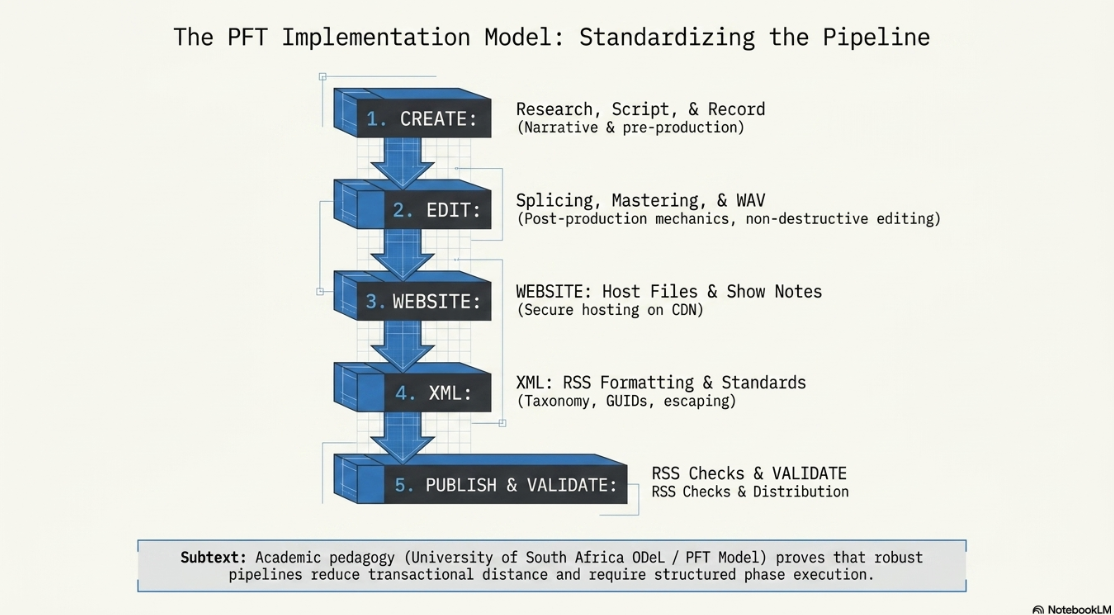
In these academic environments, educators use structured models to teach the technical stages of podcast creation46. A primary framework is the Podcast for Teachers (PFT) model, which breaks the podcasting lifecycle into five distinct phases46:
+---------------------------------------+
| 1. CREATE: Research, Script, & Record |
+---------------------------------------+
|
v
+---------------------------------------+
| 2. EDIT: Splicing, Mastering, & WAV |
+---------------------------------------+
|
v
+---------------------------------------+
| 3. WEBSITE: Host Files & Show Notes |
+---------------------------------------+
|
v
+---------------------------------------+
| 4. XML: RSS Formatting & Standards |
+---------------------------------------+
|
v
+---------------------------------------+
| 5. PUBLISH & VALIDATE: RSS Checks |
+---------------------------------------+
These academic programs teach students how to manage the technical and operational demands of professional production42:
Narrative & Pre-Production: Courses like Audio Storytelling teach students how to structure narrative pacing, design visual branding, and script content effectively42.
Post-Production Mechanics: Students learn how to record high-quality tracks, sync multi-camera video, and use non-destructive digital editing systems2.
Feeds & Distribution: In advanced modules like From Pitch to Product, students learn how to host media files, generate valid RSS feeds, and secure distribution across major directories42.
By studying these structured models, students gain the technical skills required to navigate the complexities of professional media distribution42.
Conclusions and Actionable System Recommendations
Modern video podcast delivery has transitioned from simple, decentralized RSS audio files to complex, multi-lane syndication networks3. To achieve broad reach and ensure platform compatibility, publishers must implement a hybrid distribution framework3.
Standard web feeds must be built on clean XML architecture with escaped characters and structured GUID metadata to ensure reliable cross-platform syndication6. For video delivery, publishers should leverage API-driven adaptive HLS streaming for Apple Podcasts and configure native integrations for Spotify and YouTube25.
Additionally, hosting environments must be optimized to support dynamic ad insertion and bandwidth usage limits to prevent unexpected overage fees17. By combining these open RSS standards with modern, platform-specific APIs, creators can maximize discoverability, safeguard their infrastructure, and retain full ownership of their content3.
Works cited
Finchley Learning | Video Engineering in a Podcast Post-Production, https://www.finchley.co.uk/video-engineering-in-a-podcast-post-production
Video Engineering in a Professional Podcast Post-Production - Finchley Studios, https://www.finchley.co.uk/finchley-learning/visual-podcast/video-engineering-in-a-professional-podcast-post-production
Video Execution of a Professional Podcast - Finchley Studios, https://www.finchley.co.uk/finchley-learning/visual-podcast/video-execution-of-a-professional-podcast
Audio Execution for a Professional Podcast - Finchley Studios, https://www.finchley.co.uk/finchley-learning/visual-podcast/audio-execution-for-a-professional-podcast
What is a podcast RSS feed? - TYX Studios, https://tyxstudios.com/blog/what-is-a-podcast-rss-feed
Podcast RSS Feeds 101: A Beginners Guide - Captivate.fm, https://www.captivate.fm/learn-podcasting/podcast-rss-feeds
Podcast RSS feed requirements - Apple Podcasts for Creators, https://podcasters.apple.com/support/823-podcast-requirements
Finchley Learning | Video execution in a podcast, https://www.finchley.co.uk/video-execution-in-a-podcast
Strategic Pre-Production for a Professional Podcast - Finchley Studios, https://www.finchley.co.uk/finchley-learning/visual-podcast/strategic-pre-production-for-a-professional-podcast
What Is an RSS Feed and How It Powers Your Podcast - Podbean Blog, https://blog.podbean.com/what-is-an-rss-feed-podcasting-guide/
How to create a podcast RSS feed - Transistor, https://transistor.fm/podcast-rss-feed/
Finding and enabling your RSS feed - Spotify Support, https://support.spotify.com/us/creators/article/finding-and-enabling-your-rss-feed/
How to Upload Your Podcast to Spotify in 2026 | RSS.com, https://rss.com/blog/how-to-upload-a-podcast-to-spotify/
Publish or disconnect episodes from an RSS feed on YouTube - Google Help, https://support.google.com/youtube/answer/13973017?hl=en-GB
Using Your Podcast RSS Feed for YouTube FAQs | Captivate Help and Support, https://help.captivate.fm/en/article/using-your-podcast-rss-feed-for-youtube-faqs-16svuam/
Apple Podcasts HLS Update 2026 Guide for Native Video Streaming and Monetization, https://www.podcastvideos.com/apple-podcasts-hls-video-technical-guide-2026/
Apple Podcasts HLS Frequently Asked Questions - Captivate Help and Support, https://help.captivate.fm/en/article/apple-podcasts-hls-frequently-asked-questions-1n8fmpg/
HLS Video Podcast Demo, https://podstandards.org/2025/06/28/hls-video-podcast-demo/
Podcast-Standards-Project/hls-video: HLS video in alternateEnclosure spec - GitHub, https://github.com/Podcast-Standards-Project/hls-video
Apple Podcasts HLS streams: how they work - Podnews, https://podnews.net/article/apple-podcasts-hls-tech
Publish Video Podcasts to Apple Podcasts - Captivate.fm, https://www.captivate.fm/publish-video-podcasts-to-apple-podcasts
HLS video in podcasts, who's doing what?, https://livewire.io/hls-video-in-podcasts/
Apple Podcasts Officially Embraces Video Podcasts Again - Rob Greenlee, https://robgreenlee.com/2026/02/18/apple-podcasts-officially-embraces-video-podcasts-again/
How to publish video on Apple Podcasts, https://podcasters.apple.com/support/5593-how-to-publish-video
How to Connect Your Show and Request Approval for Apple Podcasts HLS Video, https://help.captivate.fm/en/article/how-to-connect-your-show-and-request-approval-for-apple-podcasts-hls-video-1durvlt/
Apple Podcasts Video: What It Means for Podcast Creators - The Podcast Studio Glasgow, https://www.podcaststudioglasgow.com/podcast-studio-glasgow-blog/apple-just-made-video-podcasting-non-negotiable
How can I upload my video podcasts to Apple Podcasts? - Reddit, https://www.reddit.com/r/podcasting/comments/1uuasgv/how_can_i_upload_my_video_podcasts_to_apple/
New: Podbean Now Supports Apple Podcasts HLS Video, https://blog.podbean.com/hls-support-on-podbean/
Apple Podcasts Adds Native Video Support in Upcoming iOS Update, https://www.podcastvideos.com/apple-podcasts-video-support-ios-update/
Apple Podcasts Is Launching New Video Features, Looking to Keep Pace With YouTube and Spotify - Triton Digital, https://tritondigital.com/news-item/February-16-2026/apple-podcasts-is-launching-new-video-features-looking-to-keep-pace-with-youtube-and-spotify
Publishing Video Podcast to Spotify - Podigee Knowledge Base, https://help.podigee.com/article/606-publishing-video-podcast-to-spotify-spotify-video
How to publish a video podcast episode to Spotify | beehiiv Help, https://www.beehiiv.com/support/article/41155221993367-how-to-publish-a-video-podcast-episode-to-spotify?via=bg
Upload your video podcasts to Spotify, https://creators.spotify.com/features/video
Video specs - Spotify Support, https://support.spotify.com/us/creators/article/video-specs/
Publishing videos - Spotify Support, https://support.spotify.com/us/creators/article/publishing-videos/
Video Podcasting on Spotify: A Complete Guide for Creators - CoHost, https://cohostpodcasting.com/resources/video-podcasting-on-spotify
Spotify Music Video Specifications & Guidelines - Symphonic Help Desk, https://support.symdistro.com/hc/en-us/articles/44700016253453-Spotify-Music-Video-Specifications-Guidelines
Deliver podcasts using an RSS feed - YouTube Help, https://support.google.com/youtube/answer/13525207?hl=en
YouTube RSS Ingestion - ART19, https://art19.zendesk.com/hc/en-us/articles/21942261555341-YouTube-RSS-Ingestion
YouTube RSS Ingestion Overview | Podcast.co Help Center, https://help.podcast.co/en/articles/7942251-youtube-rss-ingestion-overview
MA Podcasting - Master's degree - City St George's, University of London, https://www.citystgeorges.ac.uk/prospective-students/courses/postgraduate/podcasting
Using Podcasts to support Communication Skills Development: A Case Study for Content Preferences among Postgraduate Research Students, https://arrow.tudublin.ie/cgi/viewcontent.cgi?article=1029&context=ltcart
(PDF) Investigating the use of podcasts in an open, distance and e-learning environment, https://www.researchgate.net/publication/342132981_Investigating_the_use_of_podcasts_in_an_open_distance_and_e-learning_environment
Investigating the use of podcasts in an open, distance and e-learning environment, https://journals.ufs.ac.za/index.php/pie/article/view/4312
Chapter 4: The Pft Model of Podcasting - Emerald Insight, https://www.emerald.com/books/monograph/20568/chapter/106444444/The-Pft-Model-of-Podcasting
Producing Video Podcasts: A Guide for Media Professionals, https://www.barnesandnoble.com/w/producing-video-podcasts-richard-harrington/1128129153
Video on Apple Podcasts, https://podcasters.apple.com/video-apple-podcasts














