
4K Video Editing Techniques Every Content Creator Should Know (London Edition)
Creating cinematic, scroll-stopping content in London isn’t just about owning a great camera — it’s about what happens after you press record. In a city filled with noise, tight schedules, and fierce creative competition, mastering 4K video editing is what separates amateurs from professionals.
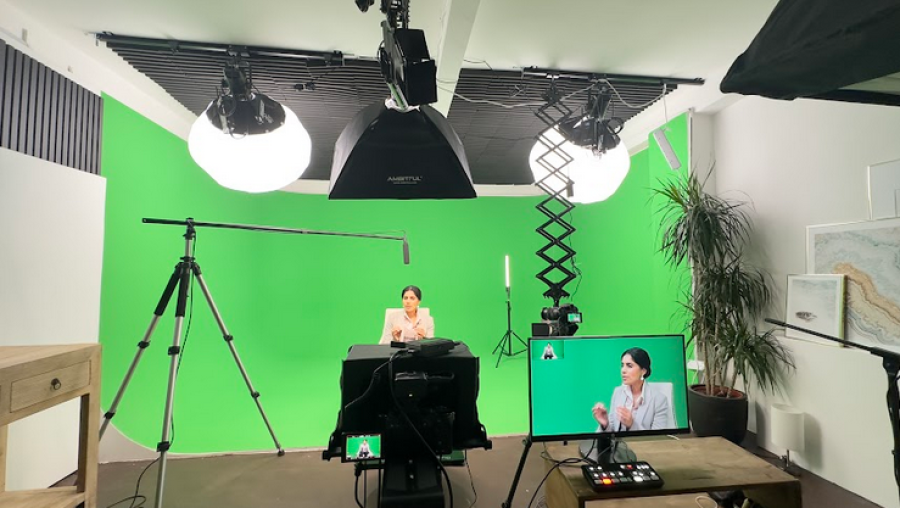
Whether you’re recording in a high-end Podcast studio, filming brand content in a Video studio, or producing interviews in a professional recording studio, your post-production workflow determines how premium your final content feels.
This deep-dive guide breaks down the most powerful 4K video editing techniques used by professional creators across London — and how a professional studio environment makes each one easier, faster, and better.
Why 4K Editing Matters More in London’s Creator Economy
London creators face unique challenges:
- 🚦 Distractions and urban noise pollution
- 🚇 Travel time limiting reshoots
- 💷 High competition for brand deals
- 🎥 Expectations for broadcast-level quality
High-resolution footage allows you to:
- Crop without losing quality
- Stabilise shaky shots
- Repurpose content for social platforms
- Deliver ultra-sharp professional visuals
But only if it’s edited properly.
Let’s dive into the techniques that elevate your content.
1. Master Proxy Workflows for Smooth 4K Editing
Editing native 4K footage can bring even powerful machines to a crawl. That’s why professionals use proxy editing.
What Are Proxies?
Lower-resolution versions of your footage that:
- Edit smoothly on any computer
- Automatically relink to full 4K for export
- Save hours of lag and crashes
Why Studios Make This Easier
Professional studios often provide:
- High-speed SSD storage
- Optimised editing stations
- Pre-configured proxy workflows
Benefits for London Creators
- Faster turnaround for clients
- Less hardware frustration
- More time creating — less time troubleshooting
2. Use Colour Grading to Create a Premium Cinematic Look
4K footage captures incredible detail — but without professional colour work, it often looks flat.
Colour Correction vs Colour Grading
Correction:
- Fix white balance
- Adjust exposure
- Balance skin tones
Grading:
- Create mood
- Enhance brand identity
- Achieve cinematic style
Studio Advantage
A professional Video studio usually offers:
- Controlled lighting setups
- Consistent colour temperatures
- Neutral backgrounds
This makes grading far easier and more accurate.
Why It Matters for Podcasts & Vodcasts
Great colour:
- Makes hosts look healthier
- Improves viewer retention
- Signals premium production
3. Reframe Shots Without Losing Quality
One of 4K’s biggest superpowers is digital reframing.
What You Can Do
- Punch into close-ups from wide shots
- Create dynamic camera movement in post
- Format for TikTok, YouTube Shorts, Instagram Reels
Perfect for London Podcasters
In a multi-camera Podcast studio setup:
- Shoot wide once
- Edit multiple angles later
- Save time and equipment
Real-World Use
Turn one recording session into:
- Long-form podcast episode
- Social media clips
- Highlight reels
- YouTube videos
4. Apply Professional Stabilisation Techniques
Even tripod shots can pick up subtle shake — especially in busy London environments.
Modern Stabilisation Tools Can:
- Remove micro-jitters
- Smooth handheld movement
- Create cinematic floating shots
Studio Benefit
Controlled studio spaces mean:
- Less vibration from traffic
- Stable floors
- Better initial capture
Which equals cleaner stabilisation with no quality loss.
5. Use High-Quality Audio Sync & Enhancement
In London’s urban environment, clean audio is gold.
Professional Editing Includes:
- Multi-track syncing
- Noise reduction
- EQ and compression
- Loudness standardisation
Why a Recording Studio Matters
Professional recording studios provide:
- Acoustically treated rooms
- Broadcast microphones
- No sirens or construction noise
Which means:
✔ Less audio repair
✔ More natural sound
✔ Faster editing
6. Organise Your 4K Projects Like a Pro
Messy timelines kill productivity.
Professional Workflow Structure:
- Folder hierarchy by shoot date
- Separate audio/video bins
- Colour-labelled clips
- Versioned exports
Benefits for London Creators
- Faster revisions
- Easier client feedback
- No lost files
This is especially important when working across multiple studio sessions.
How Professional Studios Solve London Creator Pain Points
|
London Problem |
Studio Solution |
|
Traffic noise |
Soundproofed rooms |
|
Small flats |
Spacious controlled environments |
|
Poor lighting |
Professional lighting grids |
|
Slow editing |
High-performance workstations |
|
Limited angles |
Multi-camera setups |
|
Inconsistent quality |
Broadcast-level standards |
Why 4K Editing Works Best in a Professional Studio Environment
When you combine high-resolution footage with a dedicated creative space, you unlock:
🎙 Podcast Studio Advantages
- Crisp audio with minimal post-repair
- Multi-angle recording for dynamic edits
- Lighting optimised for skin tones
🎥 Video Studio Benefits
- Cinematic lighting control
- Perfect framing for reframing in post
- Clean backgrounds
🎚 Recording Studio Perks
- Acoustic treatment
- Broadcast-ready sound
- Faster editing turnaround
Frequently Asked Questions
Is 4K video necessary for podcasts?
Not mandatory — but highly recommended. It allows cropping, stabilising, and multi-format content creation without quality loss.
Does 4K require expensive computers?
Not if you use proxy workflows properly — which professional studios often pre-configure.
Why not record at home?
London homes often suffer from:
- Noise pollution
- Poor acoustics
- Limited space
- Inconsistent lighting
Studios eliminate all of this.
How long does 4K editing take?
With proper workflows and studio-quality footage:
- Short clips: hours
- Full
episodes: 1–2 days
Much faster than fixing poor home recordings.
Is studio hire in London worth the cost?
Yes — because you save on:
- Reshoots
- Audio cleanup
- Equipment purchases
- Editing time
Most creators actually reduce overall production costs.
Final Thoughts: Elevate Your Content the Professional Way
4K video editing isn’t just a technical upgrade — it’s a quality upgrade.
When paired with a professional Podcast studio, premium Video studio, or fully equipped recording studio, you get:
✅ Cleaner footage
✅
Better audio
✅
Faster editing
✅
Higher viewer retention
✅
Stronger brand perception
In London’s competitive creator scene, quality wins.
🎯 Ready to Create Broadcast-Level Content in London?
If you’re serious about upgrading your content:
- Tour a professional studio
- Experience true soundproofing
- Work with cinematic lighting
- Edit with high-performance systems
📩 Book a studio session or tour today and transform how your content looks, sounds, and performs.














