
Video editing apps are evolving faster than ever, reshaping how creators—from solo podcasters to full-fledged video studios—turn raw footage into polished, platform-ready content. As the lines blur between podcast studio, video studio, and recording studio workflows, the tools you use during and after your session in a London podcast studio or London video studio can make the difference between forgettable audio and a multi-format hit list. This deep-dive explores the key trends in video-editing apps in 2026, how they interact with real-world production spaces, and why where you record (for example, a premium Finchley studio versus a generic podcast studio London) increasingly matters—not just for sound but for your entire editing pipeline.
How video-editing apps are changing podcast production
Over the past few years, podcast studios have quietly become video studios. Listeners now expect video podcasts, YouTube clips, Instagram reels, and TikTok-style snips from the same session that used to be just a mono audio file. To keep up, editing apps are shifting from pure cut-and-trim tools into multi-format content engines [Wendy House Podcasts] [Lower Street]. Features like auto-captions, multi-track timelines, AI-generated intros, and cloud-collaboration boards mean that a single session in a recording studio London can be turned into dozens of clips with minimal manual work [Beverly Boy Productions] [Metricool]. For podcasters renting a podcast studio London, this translates into fewer hours in post and more time to focus on scripting, guests, and distribution.
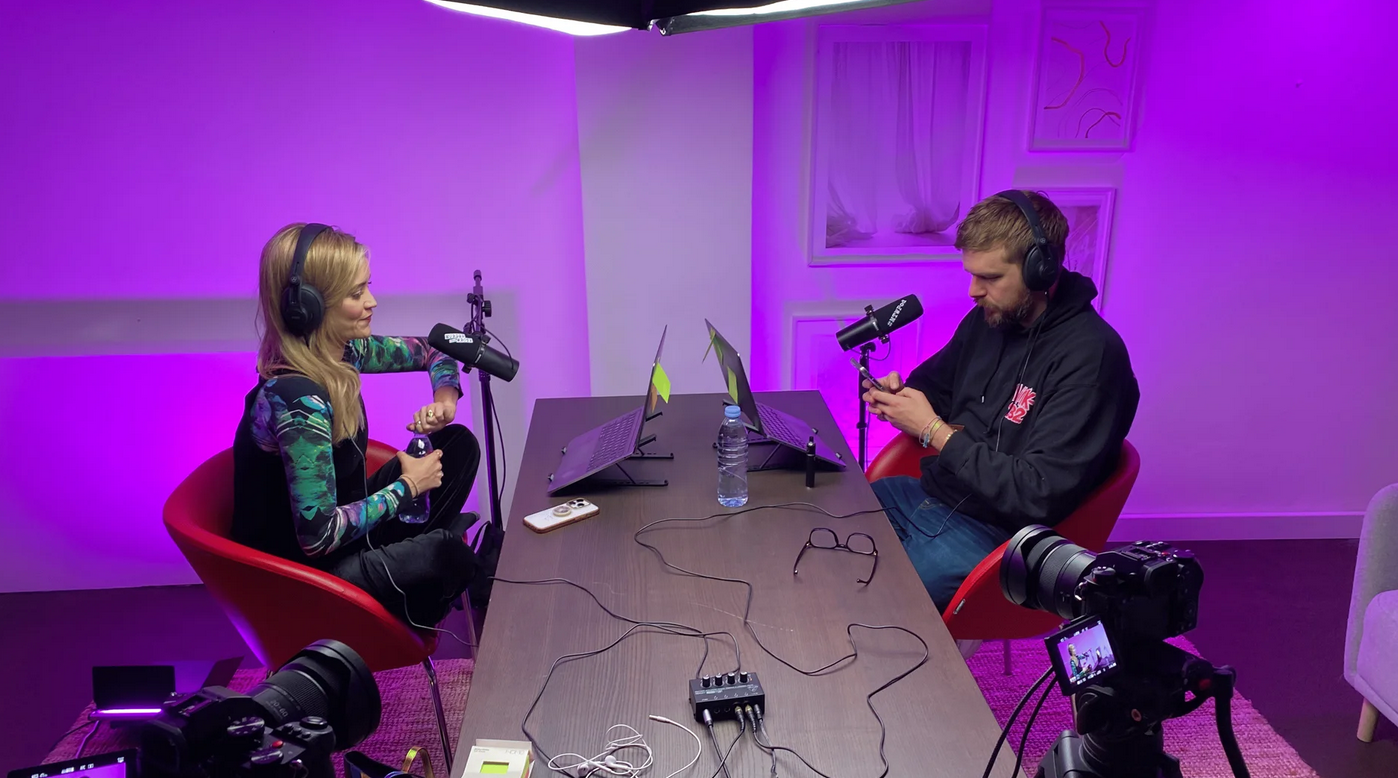
See the 'Murder They Wrote' podcast setup used by Laura Whitmore and Iain Stirling from BBC at Finchley Studio (Gathering setup). Watch Murder They Wrote at BBc sound , Spotify , Apple podcasts , Youtube , Instagram , Amazon music
AI-driven editing and automation
One of the most visible trends in 2026 is the rise of AI-first video editors like CapCut, Descript, and cloud-based editors that auto-generate subtitles, isolate voice from background noise, and suggest cuts based on speech patterns. These tools are especially useful for podcast-to-video workflows, where hours of dialogue can be restructured into social-friendly clips by editing text instead of waveforms [Metricool]. For a London podcast studio or London video studio, this means that a clean, well-recorded interview can be turned into a reel pack (TikTok, Instagram, YouTube Shorts) in a fraction of the time. AI-driven color correction (for example, DaVinci Resolve's AI-assisted grading) also reduces the need for manual color-matching when multiple cameras are used in a video studio London environment [Lower Street] [Beverly Boy Productions] [Metricool]. The practical takeaway: if your recording studio offers clean audio and multiple camera angles, AI-editing apps can amplify the value of that session exponentially.
Mobile-first and cloud-based workflows
In 2026, mobile video editing is no longer the "lesser option" for quick TikTok cuts ; it has become a core part of many creators' workflows. Apps like CapCut and Clipchamp let you cut, add music, and export polished clips directly from a phone or tablet, which is ideal for creators who want to publish straight after a session in a London podcast studio [Beverly Boy Productions] [Metricool]. At the same time, cloud-based editors (browser-based platforms such as FlexClip or Clipchamp) enable teams to collaborate on edits remotely. This matters for podcast studios that also function as video studios: a producer can be in the studio, an editor can be remote, and both can work on the same timeline without needing high-end hardware locally [The Podcast Host] [Beverly Boy Productions]. For a London recording studio that markets itself as a content studio London, cloud-and-mobile workflows are now a competitive differentiator rather than a luxury [Wendy House Podcasts].
From single-format studios to multi-format content spaces
Search behaviour around studios in London is shifting. People still look for "podcast studio London" and "video studio London", but the expectations behind those searches are changing [Tagvenue] [Wendy House Podcasts]. Today's creator wants a single production session to deliver:
High-quality audio for the podcast feed,
Clean video for YouTube or IG Live,
Multi-camera shots for B-roll and social cuts,
Short-form clips repurposed for TikTok and Instagram [Lower Street] [Wendy House Podcasts].
This trend is why podcast studios are evolving into content studios and influencer studios. A London podcast studio that only offers basic audio gear and a single fixed camera will struggle to compete with video studio London spaces that support multi-camera workflows, lighting rigs, and at-least 4K capture [Banuba] [Lower Street]. In short, the studio's tech stack is now as important as the editing apps you use afterward.
Why where you record affects how you edit
Not all podcast studios London are built the same, and the room's physical setup has a direct impact on how efficiently apps can help you. For example:
A well-treated acoustic space reduces background noise and reverb, which makes AI-driven noise reduction and vocal isolation in apps like Descript or CapCut work more reliably [Metricool].
Consistent, flat lighting and multiple camera angles in a video studio mean editors can swap between cuts without fighting overexposed shots or mismatched white balance [Lower Street].
A studio that records to 4K or high-bitrate video gives you more flexibility in post, especially when you want to zoom in for close-up social clips without losing quality [Wendy House Podcasts] [Lower Street].
This is why thoughtful creators increasingly treat the recording studio as part of the editing stack, not just a place to capture sound.
London podcast studio vs Finchley studio: a practical comparison
To illustrate these trends, it helps to compare a generic London podcast studio offering with a purpose-built space such as Finchley Studio (often described as a podcast studio London and video studio London hybrid) [Finchley Studio] [Finchley Studio] [Tagvenue].
1. Technical setup and audio quality
Many podcast studios London focus primarily on audio, with basic acoustics and a single high-quality mic setup. They are perfectly suited for voice-only recording but may lack multi-camera rigs or professional lighting [TYX Studios] [Banuba]. In contrast, Finchley Studio positions itself as a premium space that combines 4K video, professional acoustics, and flexible camera setups [Finchley Studio] [Finchley Studio] [Wendy House Podcasts]. This allows you to record a single podcast session that can be edited into YouTube episodes, social clips, and branded interviews—without needing to re-record. For video-editing apps, this means:
Fewer "fix-it-in-post" problems (noise, poor lighting, mismatched angles),
Smoother multi-track editing because you already have multiple camera feeds and clean audio [Metricool] [Lower Street].
2. Room layout and workflow
Typical London podcast studios often prioritise ease of booking and central location (for example, Zone 1 spaces like Fitzrovia or Soho), but may have limited space, parking, or on-set flexibility [Tagvenue] [TYX Studios]. They can feel more like "cubicle" environments, which works well for solo interviews but less so for multi-camera or influencer-style shoots. Finchley Studio, located in the Finchley Central area, markets itself around flexibility, pro acoustics, and practical perks such as free parking, which makes it easier for guests and crew to arrive and set up without disruption [Finchley Studio] [Finchley Studio] [Tagvenue] [Banuba]. The studio's layout is designed to support both audio-only and video-first workflows, aligning with the trend toward content studio London-style spaces rather than purely audio-focused rooms.
3. Integration with professional editing services
One of the more subtle but powerful differences is what happens after the session. Many podcast studios London assume you or your team will handle all editing in-house using tools such as Adobe Premiere Pro, Filmora, or DaVinci Resolve [Lower Street]. Finchley Studio, however, offers in-house editing services tailored to content recorded in their space [Finchley Studio]. This includes:
Basic cutting and trimming for podcasts and video podcasts,
Advanced color correction and sound design,
Delivery-ready files for platforms like YouTube, Spotify Video, and TikTok.
This integration means you can use the studio both as a recording studio London and a light-to-medium-touch post-production partner, or still leverage powerful editing apps (for example, DaVinci Resolve or CapCut) for final tweaks, but without the full-time overhead of in-house editing [Metricool] [Lower Street]. In essence, Finchley Studio tries to bridge the gap between the "studio as a room" model and the "studio as a full-stack content partner" model that many creators now want [Finchley Studio] [Banuba].
How modern apps integrate with studio-specific workflows
Understanding the interplay between editing apps and studio design helps you choose the right tools for your London podcast studio or London video studio workflow [Lower Street] [Wendy House Podcasts]. Here are three concrete examples:
1. From raw audio to video podcast with Descript
Descript lets you edit video by editing a transcript, which is ideal for podcast-to-video workflows. In a podcast studio London with clean audio and B-roll shot during the same session, you can [Metricool]:
Import the main audio/video,
Delete filler words and pauses by editing text,
Then drop in B-roll clips and zooms to match the new edited timeline [Metricool].
If your recording studio records in 4K or high bitrate, you retain enough quality to zoom in for social clips, which apps like Descript can then auto-align to your edited text [Lower Street] [Metricool].
2. TikTok-ready cuts with CapCut and DaVinci Resolve
CapCut is frequently used by short-form creators because of its AI-assisted tools, auto-captions, and social-optimised templates. In a video studio London that shoots multiple camera angles and clean audio, you can [Metricool]:
Export a vertical-oriented cut from your main timeline,
Run it through CapCut for auto-captions and background noise reduction,
Publish almost immediately to TikTok or Instagram [Beverly Boy Productions] [Metricool].
For more complex projects, DaVinci Resolve offers deeper colour grading and audio processing, which complements the multi-camera and multi-format workflows encouraged by modern content studios London [Finchley Studio] [Lower Street].
3. Browser-based editing for remote collaboration
Platforms like Clipchamp and cloud-based editors let you assemble first-cuts from a browser, even if you're not on the same local machine as the studio. This is useful if [The Podcast Host] [Beverly Boy Productions]:
You record at a London recording studio but your editor works remotely,
You want quick client feedback on social-friendly edits before doing a deeper polish in DaVinci Resolve or Adobe Premiere Pro [Tagvenue] [Lower Street].
When your podcast studio London or video studio London exports cleanly organised media (named folders, consistent resolution, and separate audio stems), these browser-based tools behave much more predictably [The Podcast Host] [Wendy House Podcasts].
Choosing the right studio for your editing workflow
As editing apps become smarter, the "best" podcast studio or recording studio is no longer the one with the shiniest logo; it is the one whose setup and service model align with your post-production workflow [Wendy House Podcasts] [Lower Street]. Here's how to think about it:
If you mainly want clean audio and light-touch editing, a standard podcast studio London can be sufficient, especially if you handle all post-production yourself [TYX Studios] [Wendy House Podcasts].
If you want multi-format output (long-form podcast, YouTube video, short-form clips) and smoother AI-assisted editing, a more integrated space such as Finchley Studio—with 4K capture, flexible camera setups, and optional in-house editing—can cut your overall delivery time significantly [Finchley Studio] [Tagvenue] [Finchley Studio].
Neither option is "wrong," but the smarter move is to match your studio choice to the apps you plan to use [Banuba] [Metricool].
Booking Finchley Studio for your next session
If you're looking for a podcast studio London that doubles as a video studio London and supports modern, app-driven workflows, Finchley Studio is a strong option. It combines professional acoustics, 4K video capabilities, and flexible booking to suit everything from solo interviews to multi-camera shoots [Finchley Studio] [Tagvenue] [Finchley Studio]. You can view rates, check availability, and book your session directly through their booking page:
Whether you're an independent podcaster, a corporate content team, or a video-first creator, pairing a well-equipped recording studio with AI-assisted editing apps can turn a single session into a full content calendar [Wendy House Podcasts] [Metricool].











