
Image Credit: Riva Blu
Creating a high-end beauty masterclass inspired by Charlotte Tilbury requires meticulous planning, top-quality filming, and powerful post-production tools. When you aim for a luxurious aesthetic, every detail matters—from the choice of studio and lighting to the camera setup and editing workflow. In this article, we explore how to film a beauty masterclass that embodies the signature elegance of Charlotte Tilbury and recommend the best laptops for editing high-quality videos. This guide is designed for beauty professionals, influencers, and content creators who want to produce polished, professional content that stands out in a competitive digital landscape.
Setting the Stage for a Luxury Beauty Masterclass
Achieving a premium look in your beauty masterclass begins with choosing the right filming environment. A dedicated studio space offers complete control over lighting, sound, and background, ensuring that the final video is consistent and professional. For those in London, renting a professional space can elevate your content to a new level. A studio like Finchley Studio provides an ideal setting with state-of-the-art equipment and dedicated spaces tailored for beauty and lifestyle content.
Filming in a professional studio offers numerous advantages. The controlled environment guarantees consistent lighting, which is essential for capturing the soft-focus glow and rich color tones associated with luxury beauty videos. In addition, a soundproofed space minimizes ambient noise, ensuring clear audio that enhances the viewer’s experience. For a customizable backdrop, the studio offers a green screen option through its Green Screen Studio, allowing you to add custom branding or elegant digital backgrounds in post-production.
Essential Equipment for Filming a Beauty Masterclass
The success of your masterclass depends largely on the quality of your equipment. Using high-resolution cameras, professional lighting, and top-notch audio equipment is crucial to capture the finest details of makeup application and product demonstration.
A high-quality camera is essential for recording every nuance of your tutorial. Models such as the Sony A7S III, Canon EOS R5, and Panasonic Lumix GH6 are excellent choices. These cameras offer exceptional low-light performance, high dynamic range, and the ability to record in 4K or even 8K resolution, ensuring every detail is crisp and vibrant. For the best results, set your camera to a shallow depth of field so that your subject is in sharp focus while the background remains softly blurred, drawing the viewer’s attention directly to the makeup techniques being demonstrated.
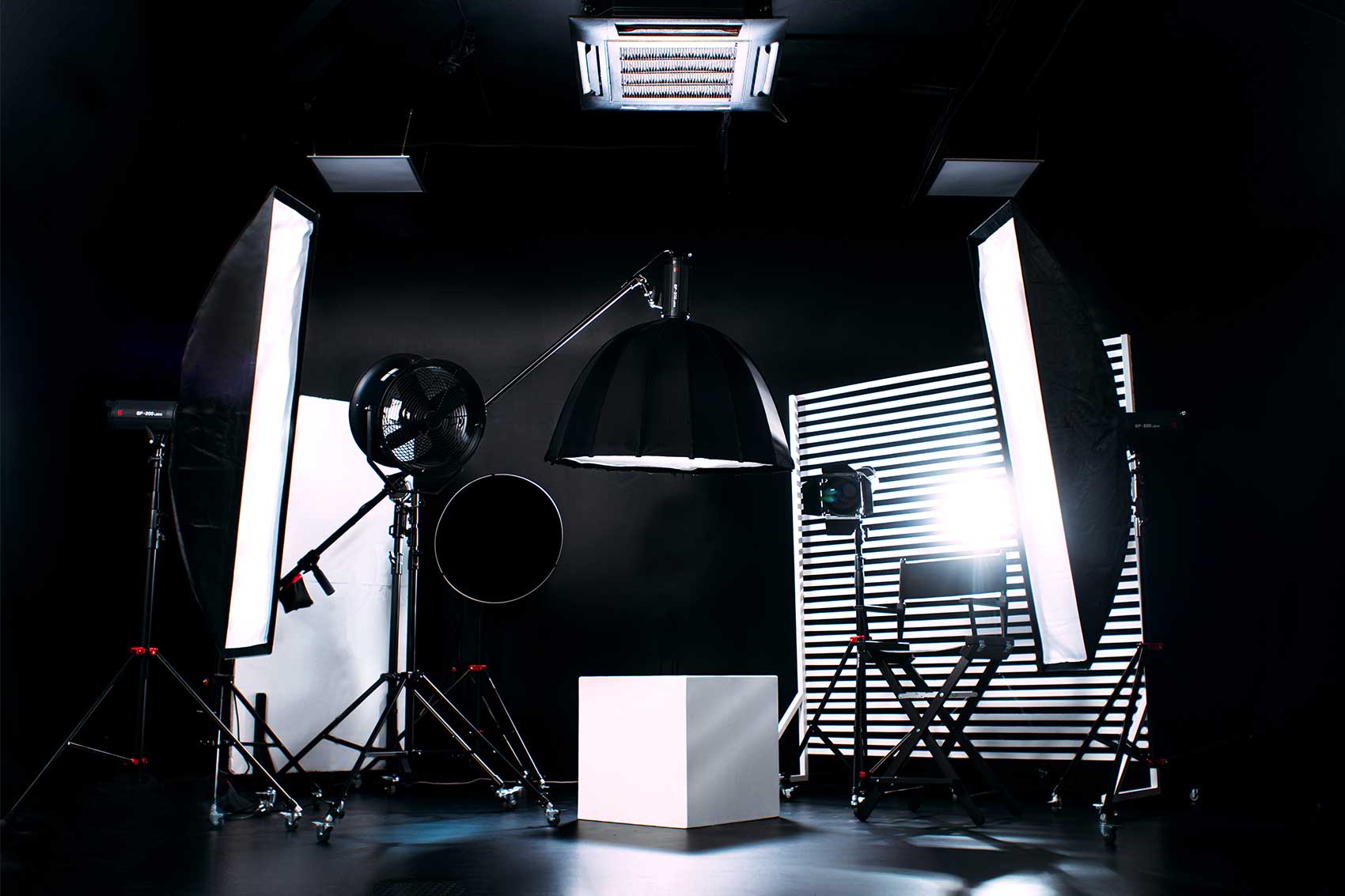
Lighting is another critical component of a high-end beauty masterclass. To achieve the signature soft-focus glow seen in Charlotte Tilbury’s videos, it is important to use professional lighting techniques. A combination of ring lights, softbox lights, and LED panel lights can create a warm and even illumination. Position a key light at a 45-degree angle in front of your subject, supplemented by a fill light to soften shadows and a backlight to add depth by separating the subject from the background. Additionally, using a reflector to bounce light can further enhance the natural glow on the face, resulting in a flawless, luxurious appearance.
High-quality audio is just as important as stunning visuals. For clear and professional audio, consider using a wireless lavalier microphone such as the Rode Wireless GO II or a high-end studio microphone like the Shure SM7B. These devices capture clear dialogue and minimize background noise, ensuring that every word of your tutorial is heard clearly. Recording audio separately and synchronizing it during post-production can also enhance the overall quality of your content.
Filming Techniques to Enhance Your Beauty Masterclass
When filming a Charlotte Tilbury-style masterclass, it is essential to focus on capturing both the big picture and the minute details. Use multiple camera angles to add visual interest and provide viewers with different perspectives. A primary camera should capture a straight-on shot to establish a direct connection with the audience, while a secondary camera can be used for close-up shots to highlight intricate makeup techniques. An overhead camera is ideal for demonstrating product application and creating a detailed view of the process.
Smooth camera movements such as slow pans or zoom-ins can further enhance the cinematic feel of your video. Using professional equipment available at Finchley Studio allows you to incorporate these techniques with ease. For beauty tutorials, it is especially important to capture every detail—from the brush strokes to the blending of colors—to ensure that viewers can learn and replicate the techniques accurately.
The Best Laptops for Editing High-Quality Beauty Videos
After filming your masterclass, the next critical step is post-production. Editing transforms raw footage into a refined, visually stunning video that embodies the luxury of a high-end beauty brand. The right laptop plays a crucial role in this process, as it must be powerful enough to handle intensive editing tasks, color grading, and rendering high-resolution footage.
MacBook Pro 16" (M3 Pro/M3 Max)
For creators who prefer macOS, the MacBook Pro 16" equipped with the M3 Pro or M3 Max chip is an excellent choice. This laptop is renowned for its Liquid Retina XDR display, which offers exceptional color accuracy and brightness—essential for precise color grading that brings out the best in beauty content. The powerful M3 Max processor ensures smooth handling of 4K or 8K video editing, making it an ideal tool for professional editors working with applications such as Final Cut Pro, Adobe Premiere Pro, or DaVinci Resolve. Its long battery life and robust performance make it a top choice for editing on the go.
Dell XPS 17
For Windows users, the Dell XPS 17 is a premium alternative that delivers outstanding performance. This laptop features a 17-inch 4K UHD+ display that provides an immersive editing experience with superb color accuracy and detail. Powered by an Intel Core i9 processor and an NVIDIA RTX 4070 GPU, the Dell XPS 17 is capable of handling complex video edits and high-resolution footage with ease. Its superior heat management system ensures that the laptop remains cool during long editing sessions, making it ideal for creators who demand reliability and performance.
ASUS ProArt Studiobook 16
The ASUS ProArt Studiobook 16 is specifically designed for creative professionals who require exceptional color accuracy. With its OLED 4K HDR display, this laptop delivers true-to-life colors that are critical for beauty video editing, where accurate skin tones and makeup hues are paramount. The inclusion of NVIDIA RTX 4080 graphics ensures smooth performance even when working with complex effects and 4K footage. Additionally, features like the ASUS DialPad allow for precise control over color adjustments, making it a favorite among beauty content creators.
Razer Blade 16
For those who need a balance between power and portability, the Razer Blade 16 offers a sleek design and robust performance. Its mini LED display supports 4K at 120Hz, ensuring a high-quality editing experience with fluid motion and excellent brightness. The Intel Core i9 processor and high-end GPU provide the necessary horsepower to handle demanding video editing tasks, making the Razer Blade 16 an excellent choice for on-the-go creators who refuse to compromise on quality.
Lenovo Legion Pro 7i
For creators looking for a more budget-friendly option without sacrificing performance, the Lenovo Legion Pro 7i is an excellent choice. It is equipped with a high-performance Intel Core i9 processor and an NVIDIA RTX 4080 GPU, ensuring that even resource-intensive editing tasks run smoothly. The high refresh rate display delivers smooth playback, which is essential when working with high-definition video. This laptop offers a competitive balance of performance and price, making it an attractive option for emerging beauty content creators.
Advanced Editing Techniques for a Luxurious Finish
Once your footage is loaded onto a high-powered laptop, the editing process begins. Advanced editing techniques can transform your masterclass into a polished, professional video that exudes luxury and sophistication.
Color Grading for a Signature Glow
Color grading is perhaps the most important step in achieving the luxurious look of a Charlotte Tilbury-style masterclass. Use professional software such as DaVinci Resolve or Final Cut Pro to fine-tune skin tones and create a consistent color palette throughout your video. Adjust the highlights, midtones, and shadows to create a soft, warm glow that enhances the natural beauty of your subject. A subtle vignette effect can be added to draw the viewer’s attention directly to the face, emphasizing the makeup and overall presentation.
Smooth Transitions and Visual Effects
Cinematic editing is all about smooth transitions that maintain the flow of the narrative. Techniques such as cross dissolves, gentle fades, and creative cutaways can help create a seamless viewing experience. For instance, when transitioning from a close-up of a makeup application to a wide shot of the overall look, a slow fade can provide an elegant transition. Incorporate text overlays to highlight key product names or makeup tips, ensuring that the viewer receives important information without distraction. Advanced effects, when used sparingly, can elevate the overall production value and give your masterclass that polished, cinematic finish.
Audio Enhancement for Professional Sound
In parallel with visual enhancements, audio quality is critical for creating a professional masterclass. Use software tools like Adobe Audition to remove any background noise and ensure that the dialogue is crisp and clear. Adding subtle background music that complements the luxury aesthetic can further enhance the viewer’s experience. Adjusting the audio levels so that they remain consistent throughout the video is essential, especially when switching between different shots or scenes.
Exporting and Uploading Your Masterclass to YouTube
After editing, the final step is to export your video in the highest quality possible. For a beauty masterclass, it is recommended to export at 4K resolution to preserve every detail of your makeup techniques and luxurious visuals. Use settings that optimize the video for YouTube, such as an H.264 codec in an MP4 container, ensuring a balance between quality and file size. High bitrate settings (around 50 Mbps) are ideal for smooth playback, and maintaining the original frame rate (24 or 30 frames per second) will preserve the cinematic feel of your content.
Marketing and Monetization Strategies
A professionally produced beauty masterclass not only enhances your brand but also opens doors for monetization. Once your video is uploaded, use strategic marketing techniques to reach your target audience. Optimize your YouTube title, description, and tags with relevant keywords to increase visibility. Share snippets of your masterclass on social media platforms like Instagram, TikTok, and LinkedIn to generate buzz. Engage with your audience by responding to comments and encouraging viewers to subscribe for more high-quality content.
In addition to advertising revenue from YouTube, consider partnering with beauty brands for sponsorships or affiliate marketing. Collaborations can further enhance the credibility of your masterclass while providing additional income streams. Many creators have successfully leveraged their high-quality content to attract lucrative brand deals, turning their passion into a profitable business.
The Advantage of a Professional Studio Experience
Image Credit: Youtube/Charlotte Tilbury Beauty
For those who wish to take their production to the next level, filming in a professional studio is invaluable. Finchley Studio offers a range of services and spaces that can transform your masterclass. With specialized sets such as the Dialogue Room for intimate interviews and the Lounge Studio for group discussions, you have options that cater to various production needs. For a more dynamic background, the Green Screen Studio lets you insert custom digital environments in post-production.
The studio also provides access to Video Editing Services that guarantee a refined final product, tailored specifically for beauty content. From color grading and sound design to motion graphics and transitions, expert editors at Finchley Studio work closely with creators to ensure every video looks and sounds impeccable.
Location and Accessibility
Finchley Studio is conveniently located in London, making it an accessible option for content creators. The studio is just two minutes from Finchley Central, offers one free parking space per booking, and is adjacent to Travelodge London Finchley. You can easily find the studio on Google Maps, Apple Maps, and Bing Maps. For a fun, memorable address, you can also use What 3 Words.
Social Media and Community Engagement
To further expand your reach, it is important to engage with your audience across social media. Follow and promote Finchley Studio on Instagram, YouTube, TikTok, LinkedIn, and X (Twitter). Engaging with a community of fellow content creators and professionals can provide valuable feedback and networking opportunities that enhance the quality of your content.
Trusted by Industry Leaders
Many prominent brands and institutions trust Finchley Studio for their podcast and video production needs. Renowned organizations such as BBC and Lloyds Bank regularly record their content at Finchley Studio. These endorsements underline the studio's commitment to high-quality production and its ability to meet the rigorous demands of professional content creation.
Reviews and Testimonials
The reputation of your production studio can play a vital role in your decision-making process. Finchley Studio has earned stellar reviews from numerous satisfied clients. You can read customer feedback on Google Reviews and Trust Pilot to gain insights into the exceptional service and state-of-the-art facilities available.
Bringing It All Together
Creating a Charlotte Tilbury-style beauty masterclass involves a comprehensive approach. From the initial planning and filming stages to post-production and final export, every step is critical in achieving a polished, cinematic result. With the right equipment, techniques, and a dedicated studio environment like Finchley Studio, you can produce high-quality videos that captivate and inspire your audience.
Investing in a powerful laptop such as the MacBook Pro 16”, Dell XPS 17, ASUS ProArt Studiobook 16, Razer Blade 16, or Lenovo Legion Pro 7i will enable you to handle complex editing tasks with ease. Coupled with advanced editing techniques like precise color grading, smooth transitions, and professional audio enhancements, your final product will not only be visually stunning but also reflect the luxury and professionalism that your audience expects.
Finchley Studio stands ready to assist you in every aspect of your production. Whether you need a perfectly lit Dialogue Room for intimate tutorials, a versatile Lounge Studio for group discussions, or the advanced capabilities of the Green Screen Studio for creative digital backdrops, Finchley Studio offers a complete solution for every content creator.
Final Thoughts and Next Steps
The journey to creating a high-end beauty masterclass is challenging but incredibly rewarding. With meticulous planning, top-tier equipment, and expert editing, you can achieve a look that mirrors the elegance of Charlotte Tilbury’s iconic tutorials. If you are ready to elevate your content, consider booking a session at Finchley Studio to take advantage of its professional facilities and expert services.
Enhance your production with professional video editing services, and experience the difference that a dedicated studio environment makes in your final output. To learn more about how Finchley Studio can help bring your creative vision to life, visit their website or reach out to the team directly.
Book your session today at Finchley Studio and transform your beauty masterclass into a luxurious, cinematic experience that your audience will love.














