
Section I: The Blueprint for Success: Strategic Pre-Production
The outcome of a professional podcast recording session is determined long before anyone steps into the acoustically treated environment of a London studio. A flawless recording is not a product of chance or on-the-spot inspiration; it is the direct result of meticulous, strategic pre-production. This foundational work transforms a simple conversation into a compelling, valuable, and purposeful piece of content. The financial and creative success of the most expensive part of the process—the paid studio session—is almost entirely dependent on the quality of the least expensive part: the upfront planning. A professional London studio charges a significant hourly rate, and any time wasted due to a lack of direction is a direct financial loss.1 Furthermore, a lack of a clear plan is a primary cause of rambling, unstructured content that requires substantially more time and effort in post-production to edit into a coherent narrative.4 This creates a clear causal chain: thorough pre-production leads to an efficient recording session, which in turn reduces post-production time and cost, ultimately yielding a higher return on the studio investment and a superior final product.6

1.1 Defining the Episode's Core Objective
The first step in planning is to move beyond a general topic to establish a sharp, journalistic objective for the episode. This involves asking a critical question: "What is the story I want to tell with this podcast episode?".7 This approach forces a shift from a vague theme to a specific narrative goal, providing a clear focus that guides the entire conversation. For example, instead of a topic like "social media marketing," a core objective might be "to tell the story of how a specific brand used a niche social media platform to double its revenue in six months." This clarity ensures the conversation remains purposeful and delivers tangible value.
This objective must also be reasonably achievable within a single recording session.7 It is essential to scope the narrative to fit the allotted studio time, preventing the need to rush or leave critical points unexplored. A well-defined objective also necessitates a clear understanding of the target listener for that specific episode. By creating an "avatar" of the ideal listener—considering their age, profession, and interests—the content can be tailored to address their specific problems and curiosities.9 This audience-centric approach ensures that every question asked and every point made serves the ultimate goal of delivering value to the listener.
1.2 Crafting the "Rundown": Your Session's Roadmap
With a clear objective, the next step is to create a comprehensive outline, often referred to in the industry as a "rundown" or "rundown sheet".6 This document is far more than a simple list of bullet points; it is the session's architectural plan, a structured roadmap that guides the host, guest, and engineer from start to finish. A professional rundown is a key tool for maintaining structure and confidence during the recording.5
A comprehensive rundown should include several key components:
Segment Timing: Allocate specific time blocks for each part of the show, such as the introduction, main discussion segments, sponsor messages or ad reads, and the outro. This ensures the episode adheres to its target length.
Talking Points & Key Questions: List the primary topics and crucial questions that must be addressed to fulfill the episode's objective.7 This prevents critical information from being missed and keeps the conversation on track.
Cues for Media: Clearly mark the points in the script where intro/outro music, transitional sound effects (bumpers), or pre-recorded segments should be inserted.6
Links and Resources: Compile a list of all URLs, book titles, company names, and other resources that will be mentioned. This ensures accuracy and provides a ready-made list for the show notes.6
Creators can choose between a word-for-word script or a detailed plan with bullet points. A full script is beneficial for complex topics or for hosts who may feel nervous, but it carries the risk of sounding stilted and unnatural. A detailed rundown with bullet points, however, provides structure while allowing for a more spontaneous and conversational delivery, letting the host's personality shine through.5
Image Credit: Finchley Studio
1.3 Scheduling and Logistics
Effective logistical planning is the framework that supports the entire production process. A consistent publishing schedule—whether weekly, bi-weekly, or monthly—is fundamental, as it dictates the rhythm of recording, editing, and promotion.9 This consistency builds a habit with the audience, who learn when to expect new content.
A critical strategy for maintaining this consistency and avoiding "podfade"—the common phenomenon of a podcast ceasing production due to creator burnout—is to record episodes in batches.12 By recording multiple episodes over one or two studio days, a creator can build a buffer of content. This stockpile provides flexibility, reduces the pressure of a constant production cycle, and ensures the publishing schedule can be maintained even during busy periods or unforeseen disruptions.
To manage this process, an editorial calendar is an indispensable tool. Using platforms like Google Calendar, Trello, or Notion, creators can map out episode topics, guest bookings, recording dates, and launch dates weeks or even months in advance.16 This long-term view allows for strategic planning, such as aligning episode topics with seasonal events or industry trends, and transforms the podcast from a series of disconnected episodes into a cohesive and strategic content channel.
Section II: The Art of Collaboration: Mastering Guest Management
A successful interview-based podcast hinges on the quality of its guests and the dynamic between the host and guest. Professional guest management is an art that reframes the guest from a passive interviewee into an active, prepared, and confident collaborator. This shift in mindset is crucial for unlocking a conversation that is not just informative, but truly dynamic and valuable. The process begins with deep research and extends through post-publication promotion, treating the guest as a partner at every stage. An empowered, prepared guest is more relaxed, articulate, and insightful, which directly elevates the quality of the final content and extends its reach.
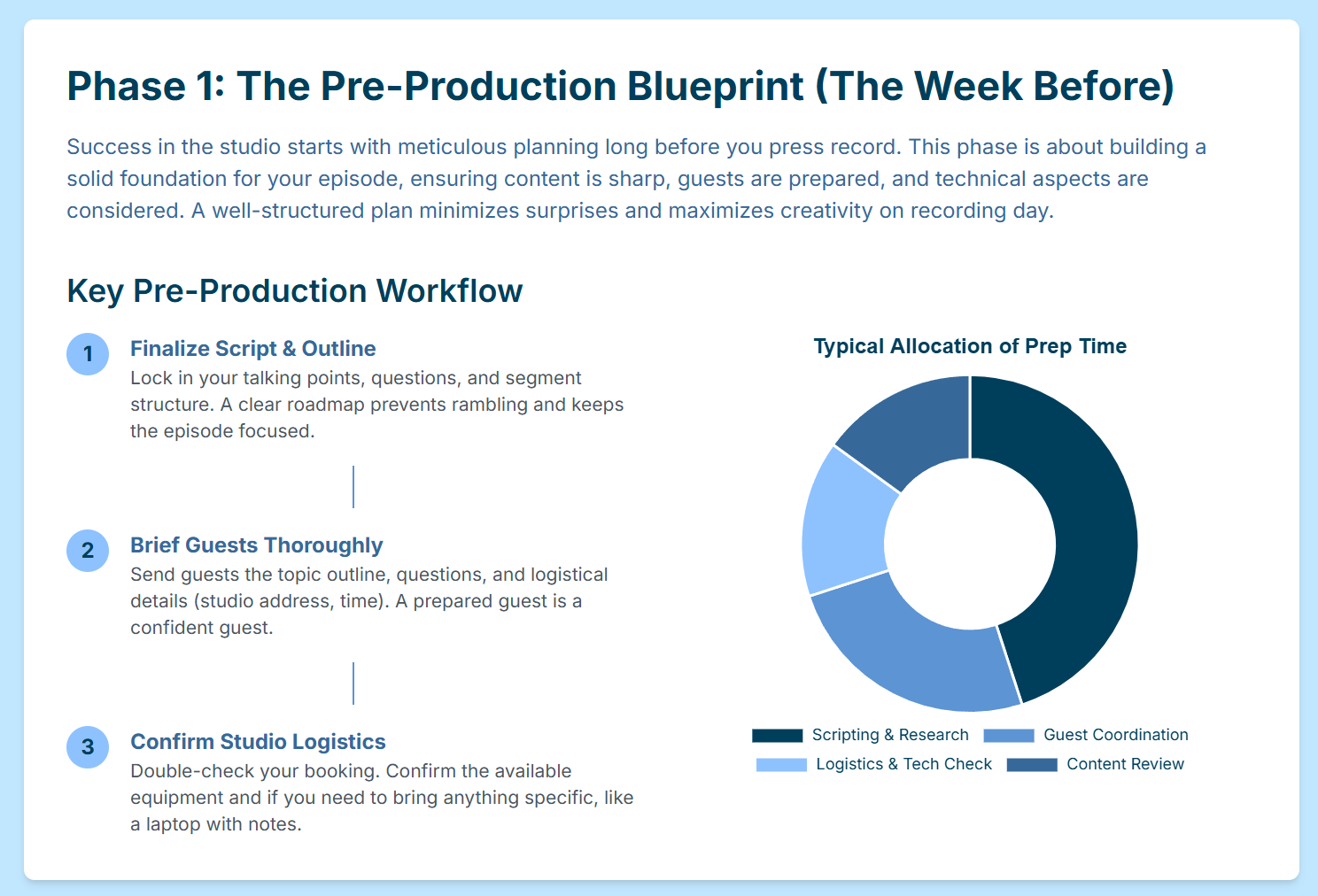
Image Credit: Finchley Studio
2.1 Research and Vetting
The guest management process begins well before an invitation is ever sent. Deep, thorough research on a potential guest is non-negotiable. This involves a comprehensive review of their professional and public profile, including their LinkedIn page, social media activity, published articles or books, and, most importantly, their appearances on other podcasts.7 Listening to at least one of their previous interviews is a critical step.20 This provides invaluable insight into their speaking style, their cadence, common anecdotes they may rely on, and the types of questions they have answered before.
This deep research serves two primary functions. First, it allows the host to craft a highly personalized and compelling invitation that demonstrates genuine interest in the guest's specific expertise. Second, it equips the host to formulate unique, insightful questions that go beyond the surface level, prompting fresh perspectives and stories that the guest may not have shared elsewhere.22 This preparation shows respect for the guest's time and expertise and lays the groundwork for a conversation that is engaging for the guest, the host, and the audience.
2.2 The Professional Briefing
Once a guest has accepted the invitation, they must be equipped with a comprehensive briefing document. This document is a cornerstone of professional production, ensuring the guest arrives at the studio feeling prepared, confident, and aligned with the episode's goals.
A professional guest briefing document should contain the following elements:
Logistical Confirmation: Clearly state the confirmed date, time, and full address of the London studio, along with a contact name and number for the day of the recording.10
Episode Objective and Vision: Share the "big idea" or the central story that the episode aims to tell. This collaborative act secures the guest's buy-in on the vision and allows them to prepare relevant examples, data, and stories that support the narrative.7
Audience Profile: Provide a concise description of the podcast's target audience. Knowing whether they are speaking to beginners or advanced experts in a field allows the guest to tailor the complexity and depth of their answers appropriately.20
Technical and Format Guidance: State explicitly whether the session will be audio-only or will include video capture. Remind the guest to wear headphones, which is essential for preventing audio from their headphones bleeding into their microphone and creating echo.7 Briefly explain the show's format and structure, such as the expected recording length and any recurring segments.23
In this same communication, it is efficient to request the assets needed for the show notes and promotion in advance. This includes asking for their preferred professional bio, a high-resolution headshot, and any social media handles or website links they wish to have featured.6
Image Credit: Finchley Studio
2.3 Pre-Session Communication
Consistent and clear communication in the lead-up to the recording day is vital for a smooth experience. Immediately after the booking is confirmed, a calendar invitation containing all the logistical details from the briefing document should be sent to the guest.11 This ensures the event is formally in their schedule and serves as a quick reference point.
A confirmation email or message should be sent one to two days before the scheduled recording.6 This simple step helps prevent last-minute cancellations or no-shows and provides an opportunity to address any final questions the guest might have. On the day of the recording, it is a best practice to allocate 10 to 15 minutes before the official recording begins for off-air conversation.10 This time is used to build rapport, run a final check of their microphone levels and headphone setup, and establish a relaxed and comfortable vibe, which is essential for a natural and flowing conversation.7
2.4 Post-Session Protocol
The collaborative relationship with a guest should extend beyond the recording session. Immediately after the recording concludes, a thank-you message should be sent. Once the episode is edited and scheduled for publication, the guest should be notified of the go-live date.
On the day of publication, a follow-up email is crucial for maximizing the episode's reach. This email should provide the guest with everything they need to easily share the episode with their own network. This includes:
A direct link to the published episode on major platforms.
Pre-written social media posts that they can copy and paste or adapt.
Custom-designed graphics or audiograms featuring their headshot and a key quote from the episode.6
By making it effortless for the guest to promote their appearance, the host effectively turns the guest into a marketing partner, amplifying the episode's reach to a new and relevant audience. This final step completes the collaborative cycle and demonstrates a high level of professionalism that encourages future cooperation.
Section III: Priming the Instrument: Personal Preparation for Peak Performance
In a professional studio environment, the human voice and body are the primary instruments. Achieving a flawless recording requires more than just high-quality microphones and soundproofing; it demands that the host and guests are physically and physiologically prepared to perform at their best. Peak performance is not accidental. It is the result of actively managing a "Performance Triangle" of three interconnected elements: Vocal Readiness, Dietary Discipline, and Physical Presence (Wardrobe). A weakness in one area inevitably compromises the others. For instance, consuming dairy can create mucus that undermines vocal warm-ups, and wearing uncomfortable clothing can create physical distractions that break mental focus and lead to a less confident vocal delivery. Therefore, preparing for a studio session requires a holistic approach: the voice must be prepared like a singer's, the diet managed like an athlete's, and the wardrobe chosen like a television presenter's.
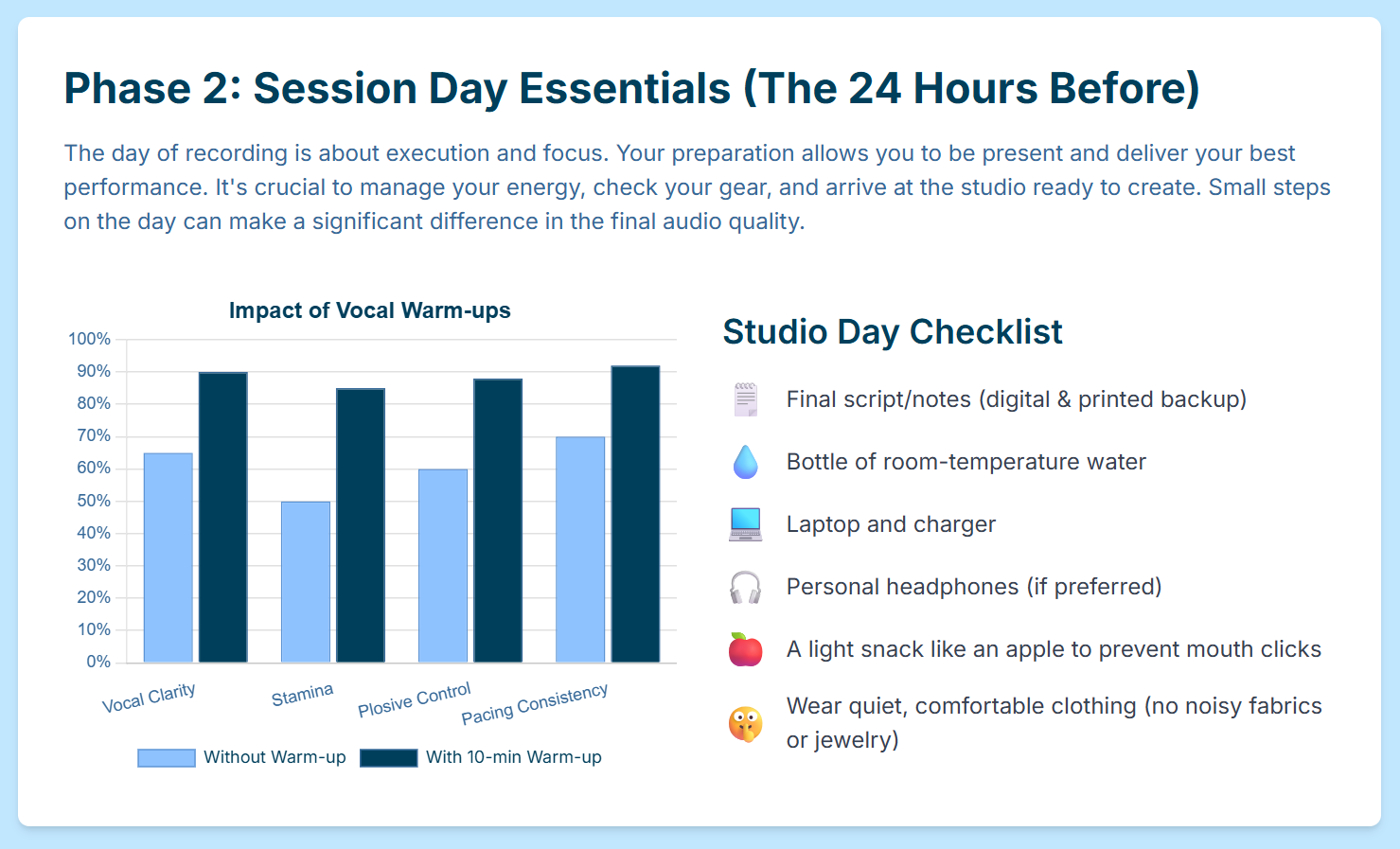
Image Credit: Finchley Studio
3.1 Vocal Readiness: The Podcaster's Warm-Up
The voice is a muscular system that benefits greatly from a dedicated warm-up routine. Engaging in a series of exercises before a recording session can significantly improve vocal clarity, stamina, and control.
Physical Warm-ups: Preparation begins with the body. The ability to speak with power and control is directly linked to breath support. Simple physical stretches can prepare the body for this task. Side stretches, performed by raising the arms overhead and leaning gently to each side, help to expand the rib cage and increase lung capacity.24 Bending forward at the waist can also release tension in the back and diaphragm. Crucially, maintaining good posture—sitting or standing upright with shoulders rolled back—is essential for allowing air to travel effectively to the lungs, which directly impacts the volume and confidence of the voice.25
Breathing Exercises: Most people engage in shallow "chest breathing," especially when nervous. For vocal work, "diaphragmatic breathing" or "belly breathing" is the correct technique. This involves inhaling deeply so that the abdomen expands, engaging the diaphragm muscle for powerful and controlled exhalation. This technique prevents vocal strain and promotes a more relaxed state.25 Another key practice is to prioritize breathing through the nose rather than the mouth. Nasal breathing naturally warms and moistens the air before it reaches the vocal cords, preventing them from drying out during a long session.25
Vocal Exercises: A series of targeted exercises will warm up the specific muscles used for speech.
Jaw and Lips: Loosen facial muscles by performing exaggerated yawns and stretching the mouth wide open. Practice over-enunciating words to activate the lips and jaw.24
Resonance and Pitch: Gentle humming and lip trills (blowing air through loosely closed lips to create a buzzing sound) are excellent for warming up the resonators in the face and sinuses. Performing vocal scales, such as saying "ah" while gliding from a low to a high pitch and back down, warms up the full vocal range.24
Diction and Agility: Reciting tongue twisters like "Red leather, yellow leather" or "Unique New York" primes the tongue and mind for clear and rapid speech, improving overall articulation and reducing stumbles.24
3.2 Dietary Discipline: Fueling for Vocal Clarity
What one consumes in the hours leading up to a recording session has a direct and significant impact on vocal quality. Certain foods and drinks can create physiological responses that hinder performance, while others can provide the clean energy needed for a strong delivery. It is recommended to avoid problematic items for at least three hours prior to recording.27
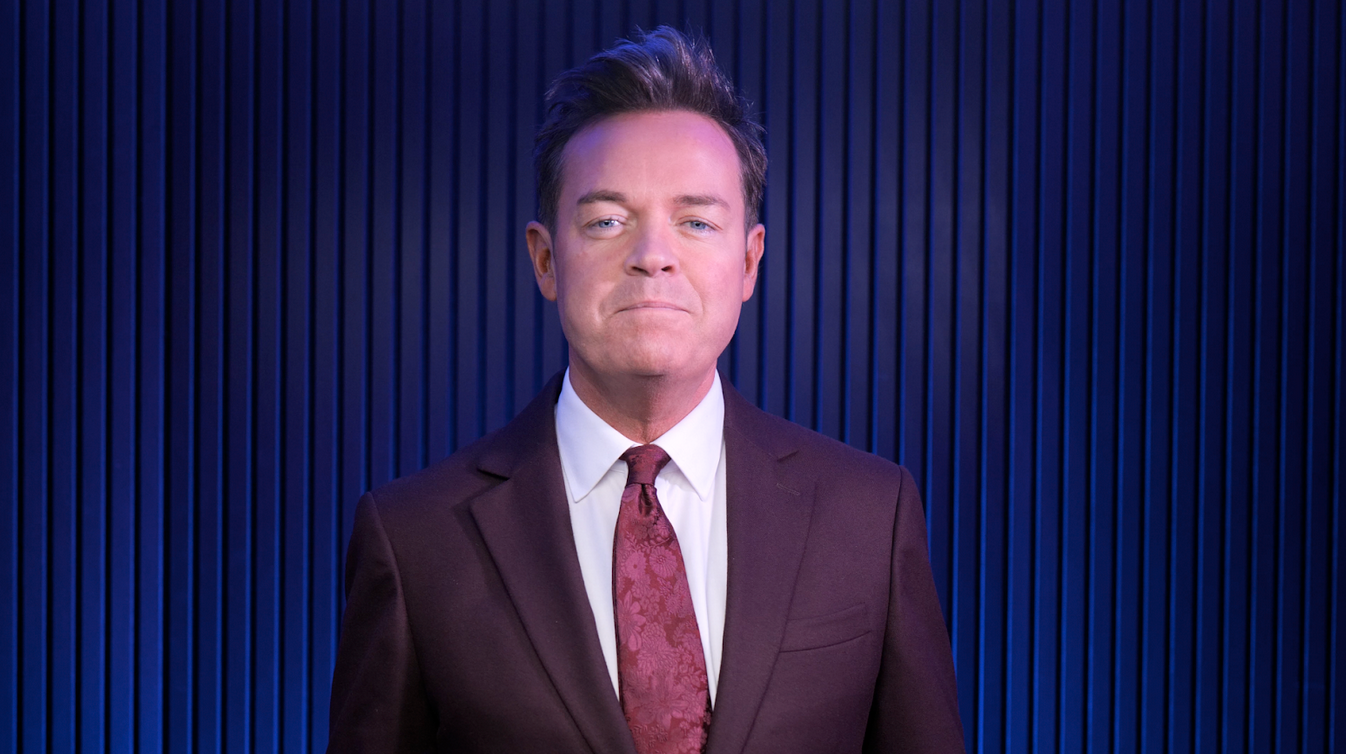
Image Credit: Finchley Studio
Foods and Drinks to AVOID:
Dairy Products (milk, cheese, yogurt): Dairy is notorious for increasing the production of thick mucus (phlegm) in the throat, which can cloud the voice, inhibit vocal flexibility, and lead to disruptive throat-clearing.27
Caffeine and Alcohol: Both substances are diuretics, meaning they cause the body to lose water, leading to dehydration. Dehydrated vocal folds become dry and are more susceptible to strain and damage. These substances can also constrict the muscles in the throat.27
Sugary, Fried, and Spicy Foods: Processed sugars can contribute to phlegm. Fried, greasy, or highly acidic and spicy foods are common triggers for acid reflux, a condition where stomach acid irritates the esophagus and vocal cords, causing discomfort and vocal impairment.27
Carbonated and Ice-Cold Drinks: The carbonation in sodas can lead to bloating and burping, which is disruptive during a recording. Very cold drinks can cause the muscles in the throat to constrict, reducing flexibility just when it is needed most.27
What to Consume:
Hydration: The single most important element is hydration. Sipping room temperature water throughout the day leading up to and during the session is paramount for keeping vocal cords lubricated and healthy.23
Voice-Friendly Foods: Opt for foods that provide sustained energy without causing adverse vocal effects. Good choices include lean proteins like grilled chicken or fish, steamed vegetables, and non-acidic fruits such as bananas and melons.30 These foods are easy to digest and do not promote mucus production or acid reflux.
3.3 Wardrobe for the Studio: Dressing for Audio and Visual Success
Clothing choices for a studio session must be considered from both an acoustic and a visual perspective, especially as video becomes an increasingly standard component of podcasting.
For Audio Purity: Sensitive studio microphones will pick up even the slightest sounds. Therefore, wardrobe choices must prioritize silence.
Fabrics: Avoid noisy materials like stiff polyester, nylon, or windbreaker-style fabrics that rustle, crinkle, or squeak with movement.33 Soft, breathable fabrics like cotton, soft blends, and well-worn denim are ideal choices as they are acoustically silent.36
Jewelry and Accessories: Leave any noisy jewelry at home. Dangling earrings, layered necklaces that can touch, or stacks of bracelets that clank together will create distracting sounds that are difficult and time-consuming to remove in post-production.33 Even zippers and large buttons can create unwanted noise.
For On-Camera Professionalism (Video Podcasts): When the session is being filmed, visual considerations become equally important.
Colors: Solid, muted colors are the safest and most professional choice. Jewel tones, pastels, earth tones, and especially shades of blue translate very well on camera.38 It is best to avoid pure white, which can be too bright and cause camera exposure issues, and solid black, which can absorb light and obscure detail.35 Bright reds should also be avoided as they can "bleed" and look oversaturated on camera.41
Patterns: Avoid clothing with fine, tight patterns such as thin stripes, small checks, or herringbone. These patterns can create a distracting visual distortion on screen known as a "moiré" effect.34
Logos: Do not wear clothing with prominent logos or branding, unless it is the logo of the podcast or company being promoted. External logos are a visual distraction and provide free advertising for other brands.35
Fit and Comfort: Above all, wear clothes that are well-fitting, wrinkle-free, and comfortable. Physical discomfort is often visible through posture and facial expressions and can serve as a mental distraction, detracting from the performance.34
Section IV: Navigating the London Studio Landscape: Selection and Due Diligence
Choosing a podcasting studio in London is not a simple transaction but a strategic partnership decision. The city offers a diverse and competitive market, with options ranging from world-class, full-service facilities to accessible, self-service creative hubs. The right studio aligns with a creator's technical proficiency, brand image, and production workflow, becoming a seamless extension of their team. The wrong choice, however, can introduce significant friction, unforeseen costs, and technical frustrations. A beginner creator booking a "Bring Your Own Producer" (BYOP) studio without understanding the implications may be overwhelmed, while an experienced producer might overpay for a full-concierge service they do not need. Therefore, a thorough assessment of one's own capabilities and needs must precede the evaluation of any studio.
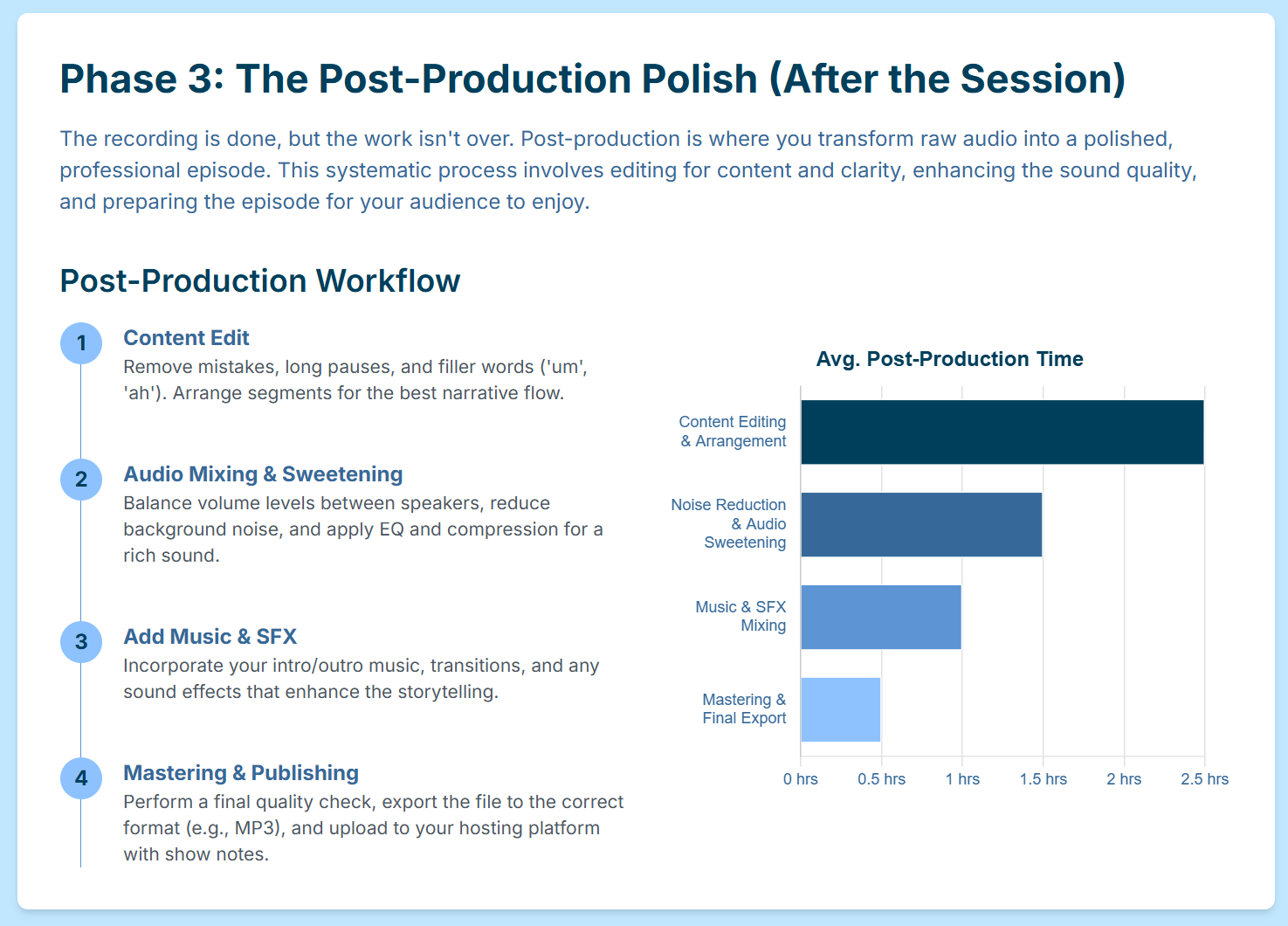
Image Credit: Finchley Studio
4.1 Understanding the London Market Tiers
The London podcast studio market can be broadly categorized into three tiers, each catering to different needs and budgets.
Tier 1: Full-Service/Concierge Studios: These are premium facilities that offer a complete, end-to-end production experience. Examples include Dean St. Studios in Soho, Spiritland Studios in King's Cross, and Podcast House in Farringdon.3 They are characterized by their prime central locations, inclusion of a dedicated on-site engineer as a standard part of the package, and access to the highest-end equipment and advanced services like Dolby Atmos mixing.44 These studios are ideal for corporate clients, major brands, and high-profile creators who require a seamless, hassle-free, and broadcast-quality experience from start to finish.
Tier 2: Professional Self-Service & Assisted Studios: This tier represents a large and popular segment of the market, offering a balance of professional quality and creator autonomy. Studios like London Podcast Studios in Whitechapel, Podshop in Shoreditch, and Acast's facility in Hoxton fall into this category.2 They provide broadcast-quality equipment, multiple themed sets, and are located in vibrant creative hubs. However, their operational models often vary, with some providing a technician to assist with setup and others operating on a "Bring Your Own Producer" (BYOP) basis.47 These studios are perfectly suited for experienced creators and production teams who have the technical knowledge to run their own session but require a professional environment and equipment.
-
Tier 3: Creative & Boutique Spaces: This category includes a wide array of visually unique and often more affordable options, frequently found on platforms like Peerspace or through location agencies.49 These spaces might be converted printworks, industrial lofts, or even lifestyle locations like a grooming club.49 While they can provide a distinctive aesthetic backdrop, particularly for video podcasts, they require greater due diligence regarding their acoustic properties and the level of technical support available. These are best for creators who are prioritizing a specific visual style and are prepared to manage the technical aspects of the recording more independently.
4.2 Key Questions to Ask Before Booking
To ensure a studio is the right strategic fit, it is essential to conduct thorough due diligence before making a booking. The following questions will help clarify the services, costs, and technical capabilities of any potential studio.
Billing & Rates: "What is your hourly rate, and what is the distinction in cost between an audio-only and an audio-and-video session? Does the billed time include setup and breakdown, or is that separate? What is your cancellation policy and what are the associated fees?".51
Personnel: This is arguably the most critical area to clarify. "Is a dedicated sound engineer or studio technician included in the hourly rate? If so, what is their specific role during the recording—are they actively mixing and monitoring, or just there for setup and troubleshooting? If not, is this a 'Bring Your Own Producer' facility?".1
Technology & Equipment: "Could you provide a list of your standard microphone and camera models (e.g., Shure SM7B, Neumann U87, Sony FX3, Canon C70)? Do you provide isolated multi-track recording for each participant as a standard practice? What Digital Audio Workstation (DAW), such as Pro Tools or Reaper, do you operate on?".44
Deliverables: "In what file formats will I receive the final raw recordings (e.g., WAV for audio, MP4 for video)? How will these files be delivered to me (e.g., via a cloud link like WeTransfer or Dropbox, or do I need to bring a hard drive)? What is your standard turnaround time for delivering these files after the session concludes?".2
Environment and Logistics: "Are your recording rooms fully soundproofed and acoustically treated to professional standards? Is it possible to arrange an in-person tour or view a virtual tour of the space before booking? What on-site amenities are available for hosts and guests, such as a waiting area, refreshments, Wi-Fi, and parking?".1
4.3 Comparative Analysis Table of London Studios
To provide a clear, at-a-glance overview of the options available, the following table compares a selection of London's podcast studios based on key decision-making criteria. Rates are indicative and subject to change; direct inquiry is always recommended.
Section V: The Session Itself: A Conductor's Guide to a Flawless Recording
On the day of the recording, all the strategic pre-production and logistical planning culminates in the session itself. This is the phase where execution is paramount. Acting as the conductor of the session, the host is responsible for managing the technology, performance, and flow to ensure a pristine capture of audio and video. The single most significant technical advantage of a professional studio is its ability to provide clean, isolated multi-track recordings for every participant. This capability is the fundamental prerequisite for a professional post-production workflow. In a single-track recording, where all voices are mixed together, it is impossible to fix common issues like one person coughing over another's speech.10 Multi-track recording, however, gives an editor complete control to independently process each voice, adjust levels, and remove noise, which is the dividing line between amateur and professional production.5
5.1 The Final "Pre-Flight" Check
A smooth session begins with a methodical pre-flight check upon arrival at the studio. It is advisable to arrive early to allow ample time for these crucial steps without feeling rushed.
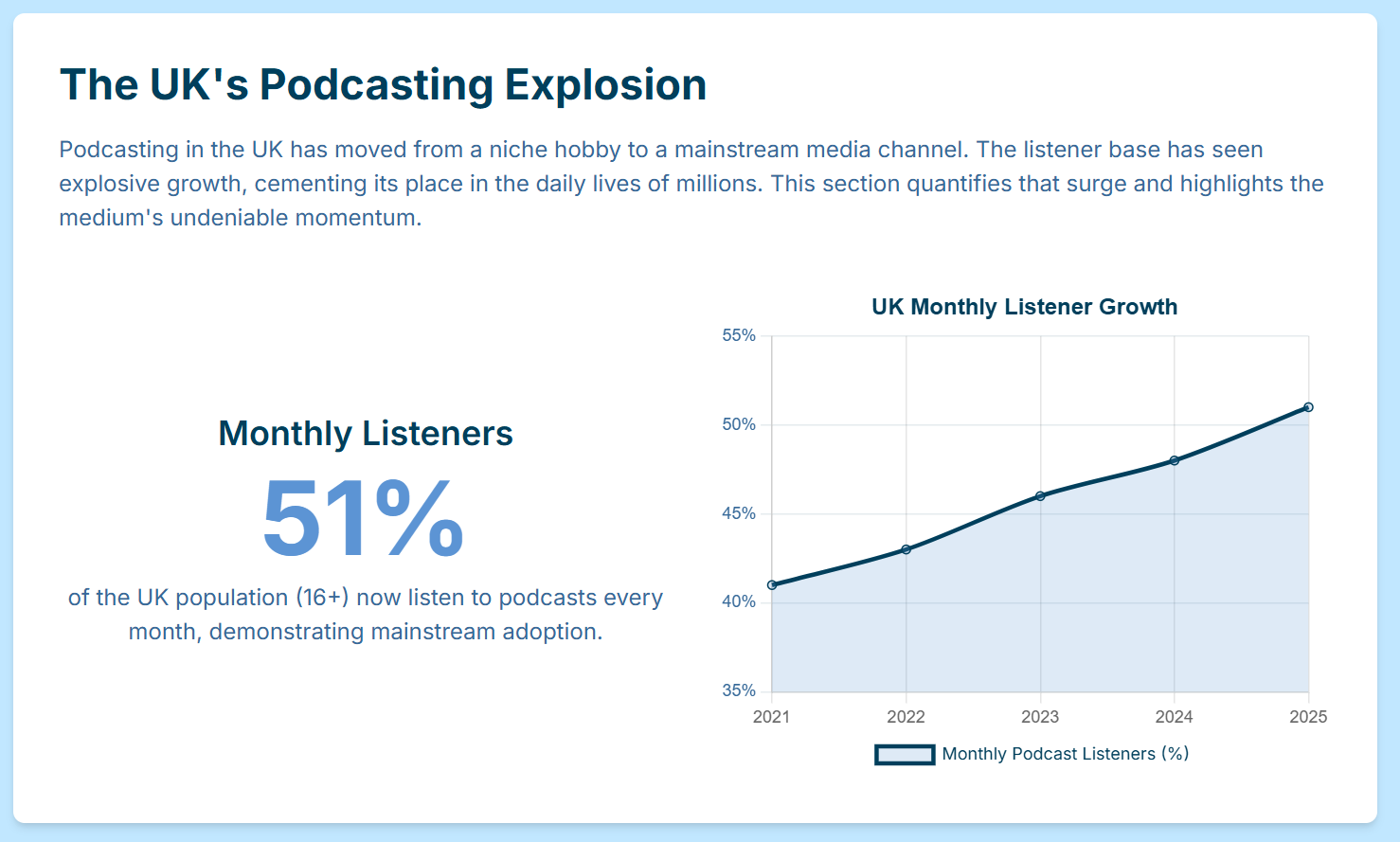
Image Credit: Finchley Studio
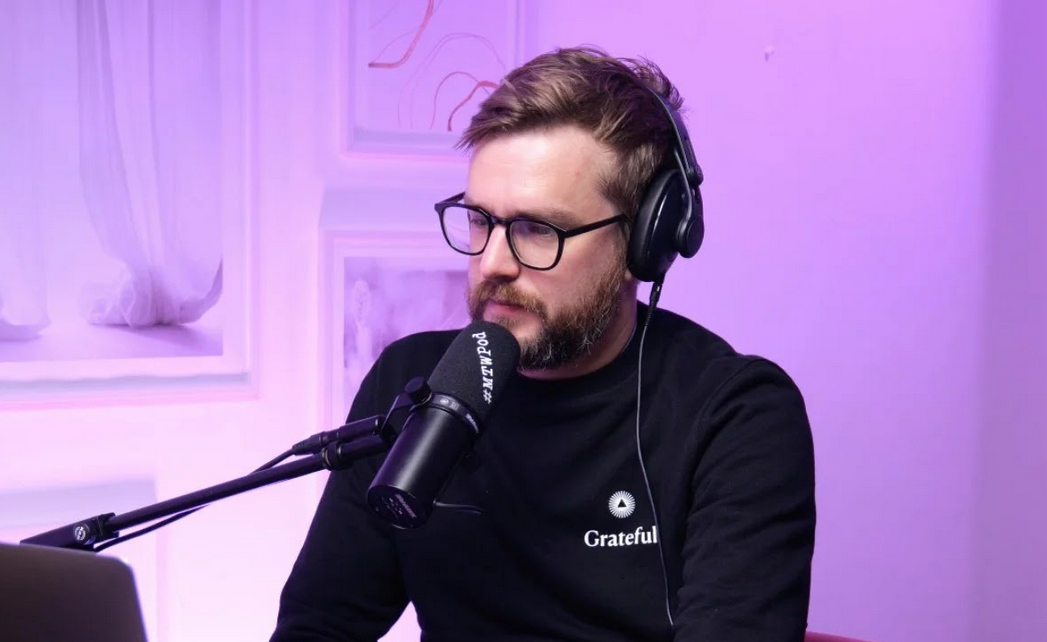
System and Document Check: Upon arrival, confirm with the on-site engineer that all equipment—microphones, headphones, cameras, and recorders—is connected, powered on, and functioning correctly.6 Load all necessary digital documents, such as the rundown, scripts, and links to be mentioned, onto a laptop or tablet for easy access during the recording.6
Test Recording and Level Check: Before the guest settles in, conduct a brief test recording. This is the opportunity to work with the engineer to set the correct recording levels for all participants and resolve any technical issues, such as a faulty cable or incorrect headphone mix.7 Identifying and fixing problems at this stage is far more efficient than discovering them mid-conversation.
Create a "Noise Profile": A vital professional technique is to record 5 to 10 seconds of complete silence in the room with all microphones active. This captures the room's unique ambient noise floor—the subtle hum of air conditioning or equipment fans. This "room tone" or "noise profile" is an invaluable tool for the post-production process, as it allows noise-reduction software to precisely identify and remove this specific background noise from the entire recording without affecting the quality of the voices.32
5.2 Mastering Microphone Technique
How a speaker interacts with the microphone is one of the most critical factors in achieving high-quality audio. Proper technique is a skill that dramatically reduces the need for corrective work in post-production.
Setting Levels: The recording level, or gain, must be set correctly. The engineer will manage this, but the goal is for a normal speaking voice to produce peaks on the audio meter that fall between -12dBFS and -10dBFS (decibels relative to full scale).5 If the level is too high (in the "red"), the audio will clip and distort, which is irreparable. If it is too low, the volume will have to be boosted in post-production, which will also amplify the underlying noise floor.5
Proximity and Placement: Consistency is key. Speakers should maintain a constant distance from the microphone, typically about 4 to 6 inches, or roughly the width of a hand.20 Speaking directly into the microphone capsule can cause issues; instead, it is better to speak slightly off-axis, or across the top of the microphone. This helps to reduce the impact of plosives.20 It is also important to manage vocal dynamics in relation to the microphone: if a speaker anticipates getting louder (e.g., laughing or making an emphatic point), they should lean back slightly. Conversely, if they are going to speak more quietly, they should lean in slightly closer.5
Controlling Plosives and Sibilance:
Plosives: These are the distracting, low-frequency pops caused by bursts of air from consonants like "p" and "b." A physical pop filter placed between the speaker and the microphone is the primary defense against plosives.5 Speakers can also practice articulating these sounds with less force to minimize the air blast at the source.5
Sibilance: This refers to the harsh, hissing sound that can occur with "s," "sh," and "z" sounds. While sibilance is primarily addressed in post-production using a de-esser tool, being mindful not to over-emphasize these sounds during recording can be helpful.5
Body Language and Environmental Noise: Microphones are sensitive to all sounds, not just voices. It is crucial to remain relatively still during recording. Avoid tapping fingers on the desk, rustling papers, or swiveling in a squeaky chair.32 If using a paper script, pages should be lifted and turned silently rather than shuffled.
5.3 Managing the Session Flow
As the host, it is essential to conduct the session with confidence and control, guiding the conversation while managing the technical and procedural aspects of the recording.
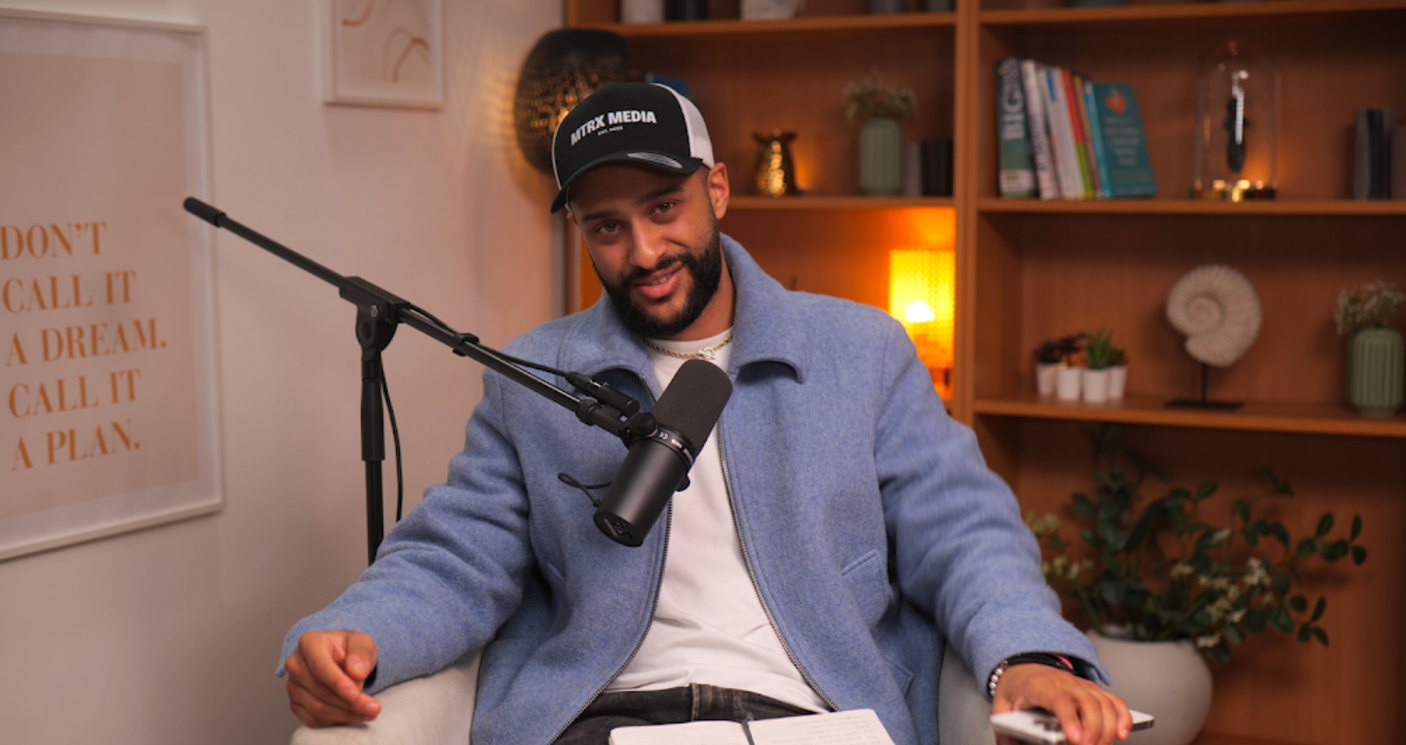
Image Credit: Finchley Studio
Start Recording Early: It is a wise practice to hit the record button as soon as the guest is connected and the pre-session chat begins.59 This warm-up period often contains some of the most natural and authentic interactions, which can be used in the final edit or as promotional content.
Obtain Oral Release: At the very beginning of the formal recording, it is a legal and professional best practice to obtain a clear, on-the-record oral release from all guests. This can be a simple statement such as, "Just to confirm for the recording, do I have your permission to record this conversation and to use and distribute the recording in all media, worldwide, in perpetuity?" This recorded consent is crucial for protecting the right to publish the content.6
Take Timestamped Notes: During the recording, keep a notepad handy. If a mistake is made, a speaker stumbles, or a particularly powerful quote is delivered, jot down the corresponding timestamp from the recording software or device.6 These notes will save an immense amount of time in post-production, allowing the editor to navigate directly to key moments that need to be fixed or highlighted.
Energy and Pacing: The host sets the tone for the entire session. It is important to maintain a positive energy level and to smile while speaking, as this warmth and enthusiasm are audible in the voice.20 The host must also act as the timekeeper, gently guiding the conversation to ensure all the key points from the rundown are covered within the allotted time.
Section VI: Beyond the Booth: A Professional Post-Production Workflow
The work of creating a flawless podcast episode does not end when the recording stops. The post-production phase is where the raw material captured in the studio is refined, polished, and transformed into a professional, broadcast-quality product. This process is heavily influenced by a modern reality of content creation: the convergence of audio and video. In today's landscape, the line between an audio podcast and a video podcast has effectively disappeared. The rise of platforms like YouTube for podcast consumption, coupled with the demand for short-form video clips for social media promotion, means that all recorded content should be considered a potential video asset.55 Therefore, a modern, flawless session strategy must be video-aware from the outset. This means always opting for video recording if the budget allows, as the additional cost is an investment in future marketing materials. This video-first mindset should inform guest briefings, wardrobe choices, and studio selection, ensuring the content's value and longevity are maximized.2
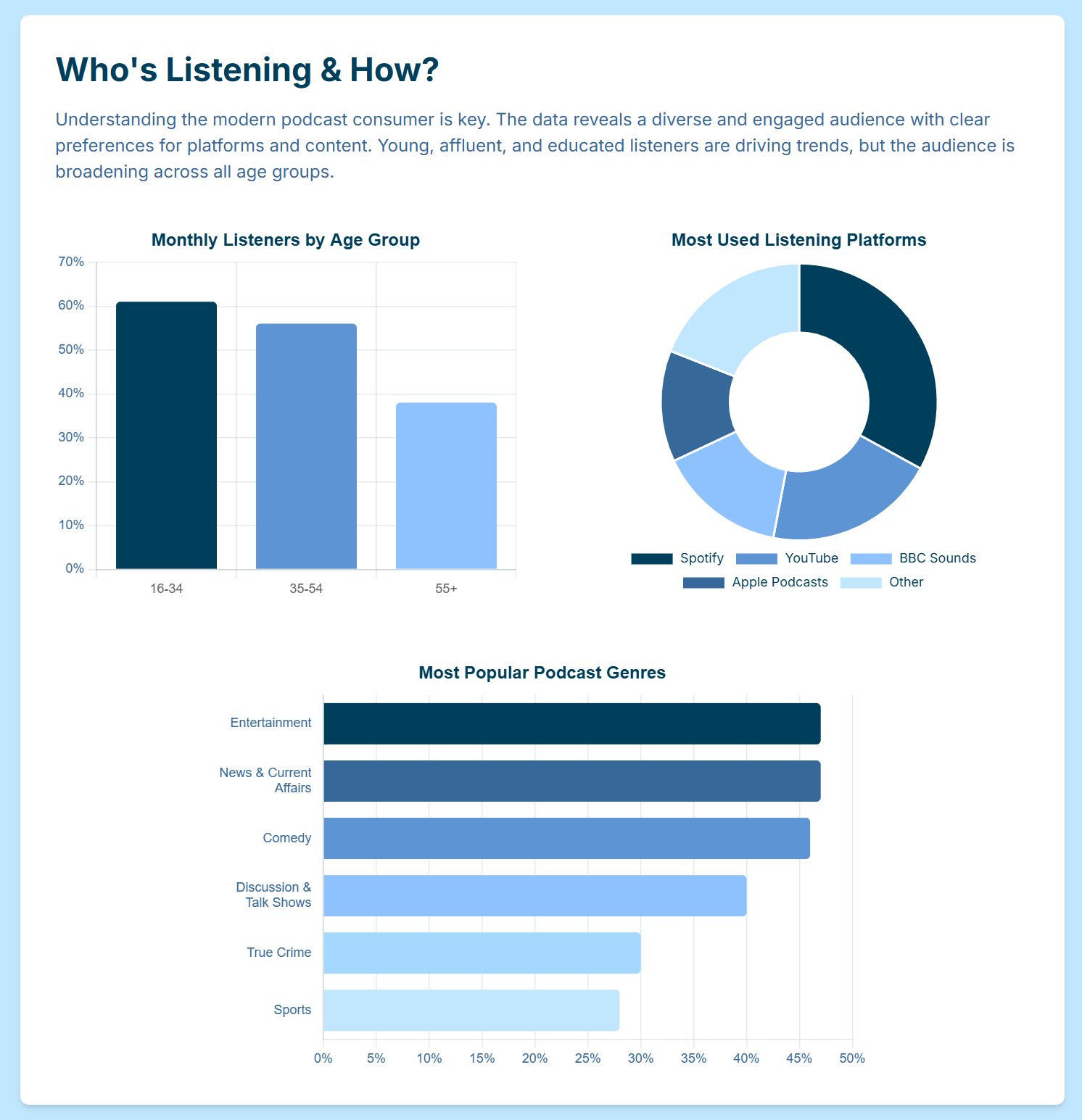
Image Credit: Finchley Studio
6.1 File Management and Organization
A professional workflow begins with rigorous organization. Immediately after the recording session, the raw files should be obtained from the studio. The first step is to rename all files using a clear and consistent naming convention, such as YYYY-MM-DD_EpisodeTitle_GuestName_RAW.wav, and create immediate backups in at least two separate locations (e.g., a local hard drive and a cloud storage service).6
Next, a dedicated project folder should be created for the episode. This folder should contain a logical structure of subfolders to keep all assets organized, for example:
01_RAW_AUDIO
02_RAW_VIDEO
03_PROJECT_FILES (for the editing software)
04_ASSETS (for music, sound effects, logos)
05_EXPORTS (for final versions)
This disciplined approach to file management prevents confusion and saves significant time throughout the editing process.62
6.2 The Editing Process: A Two-Pass Approach
Effective editing is best approached systematically. A two-pass methodology allows the editor to focus on different aspects of the production sequentially, leading to a more thorough and efficient result.
Pass 1: The Content Edit: The first pass is dedicated entirely to the narrative and structure of the episode. It is beneficial to listen to the entire raw recording at least once before making any cuts to get a holistic sense of the conversation.63 The editor then focuses on shaping the story by trimming unnecessary preamble, removing long tangents, cutting out mistakes or false starts, and arranging the remaining segments to create the most logical and engaging flow.4 This is the creative stage where the raw conversation is sculpted into a coherent and compelling episode.
Pass 2: The Technical Edit (Audio Cleanup): After the content structure is locked, the second pass focuses on the technical quality of the audio. This is a more granular process that involves:
Removing Distractions: Precisely cutting out verbal fillers like "ums," "ahs," and "you knows," as well as long, unnatural pauses and distracting noises such as coughs, clicks, or paper rustles.8
Noise Reduction: Using the "noise profile" or "room tone" recorded at the beginning of the session, specialized software can be used to remove the consistent background hum without degrading the vocal quality.60
Equalization (EQ): EQ is used to shape the tonal balance of the voices. This can involve reducing boomy low frequencies, cutting out nasal mid-range frequencies, and adding a slight boost to higher frequencies to enhance clarity and presence.8
Compression: Compression is applied to even out the dynamic range of the audio—that is, the difference between the loudest and quietest parts. This makes the volume level more consistent and gives the voice a more powerful, "in-your-face" professional sound.8
De-Essing: A de-esser is a specialized tool used to target and reduce the harsh, hissing sounds of sibilance (strong "s" sounds), making the audio more pleasant to listen to.5
6.3 Mixing and Mastering
Once the individual audio tracks have been edited and cleaned, they must be combined into a cohesive whole.
Mixing: The mixing stage involves balancing the volume levels of all the different audio elements in the episode. The host's voice, the guest's voice, the intro and outro music, and any sound effects or ad reads are all adjusted so that they sit together harmoniously.8 A common mistake is to have the background music be too loud, which can make the speech difficult to understand. In a professional mix, the music should support and enhance the mood without ever competing with the dialogue.
Mastering: Mastering is the final step in the audio post-production chain. The fully mixed episode is processed as a single file to bring its overall loudness up to the industry standard for podcast distribution. This is measured in LUFS (Loudness Units relative to Full Scale). The current standard is typically around -16 LUFS for stereo podcasts. Mastering ensures that the episode will have a consistent volume level when played on platforms like Spotify or Apple Podcasts, providing a seamless experience for the listener who may be moving from one podcast to another.8
6.4 Video Post-Production (If Applicable)
For video podcasts, the post-production process includes several additional steps that run parallel to the audio workflow.
Synchronization and Editing: The multi-track audio files must be perfectly synchronized with the corresponding video files from each camera angle. The video editor then cuts between the different camera angles to create a visually dynamic experience, often switching to the person who is currently speaking or showing a wider shot for interactions.
Color Grading: Each camera may capture color slightly differently. Color grading is the process of adjusting the color, contrast, and brightness of the video footage to create a consistent, professional, and visually appealing look across the entire episode.1
Graphics and Branding: This is the stage where branding elements are added. This can include an animated intro/outro sequence, lower-third graphics that display the names and titles of the speakers, and the podcast's logo placed subtly on the screen.1
Creating Social Media Assets: From the final edited video, the editor will create multiple short, engaging clips (typically 30-90 seconds) designed for promotion on social media platforms like Instagram, TikTok, and LinkedIn. These clips are a powerful tool for driving viewership to the full episode.3
Section VII: The Ultimate Pre-Flight Checklist: Your Comprehensive Guide
This checklist consolidates all the critical preparation and execution steps from the preceding sections into a single, actionable tool. It is designed to be used for every recording session to ensure that no detail is overlooked, paving the way for a consistently flawless and professional production.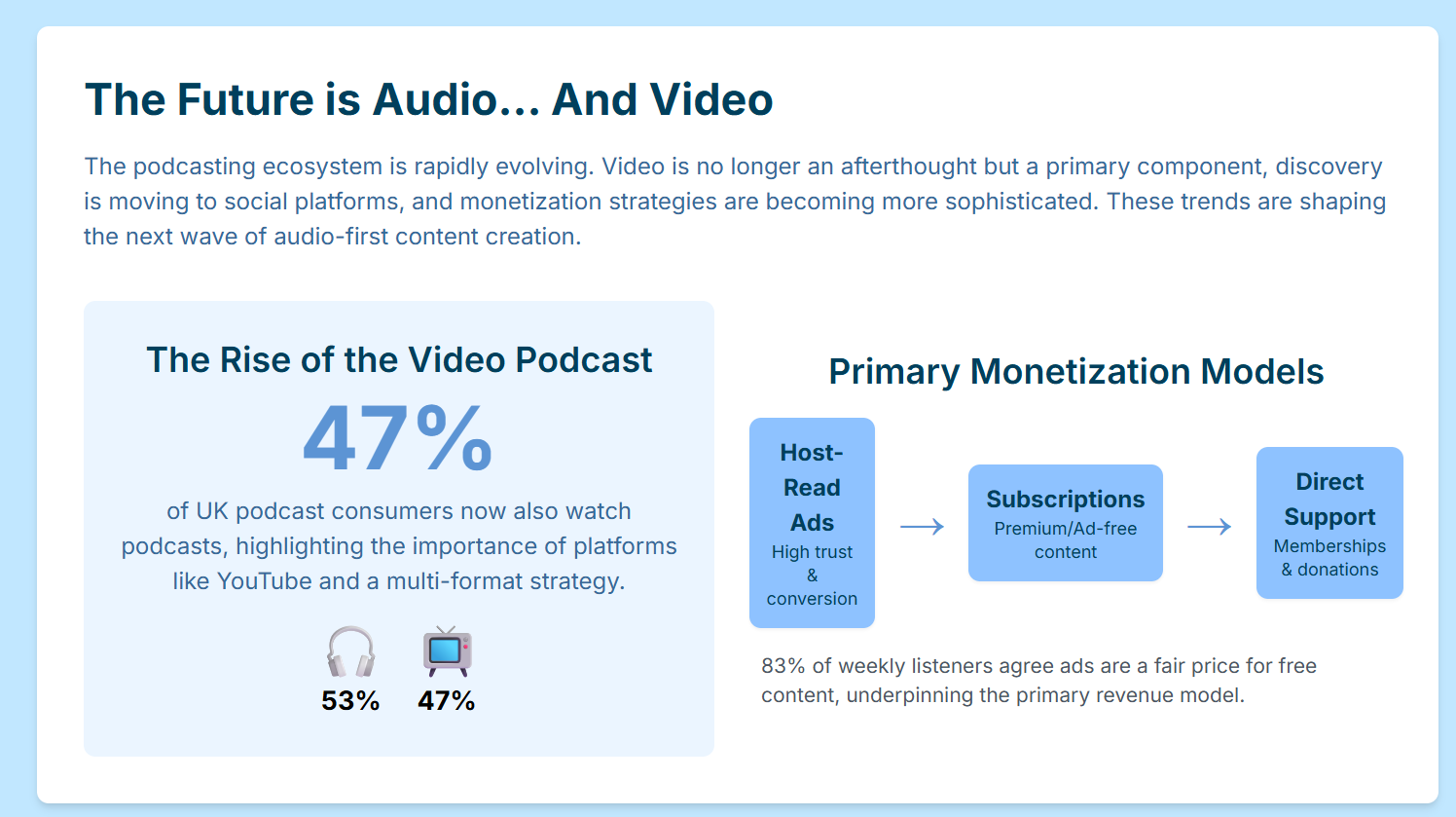
Image Credit: Finchley Studio
[ ] Episode Objective Defined: A clear, single-sentence goal for the episode is written down. [ ] Target Listener Avatar Identified: The specific audience for this episode is understood. [ ] Detailed Rundown/Script Created: A comprehensive plan with segments, timings, and key questions is complete. [ ] Guest Researched and Vetted: In-depth research on the guest, including listening to prior interviews, is finished. [ ] Guest Booked & Calendar Invite Sent: The guest is confirmed and has received a calendar invitation with all logistical details. [ ] Guest Briefing Document Sent: The guest has received a full briefing on the episode objective, audience, and technical requirements. [ ] Studio Booked and Confirmed: The London studio session is booked, and a confirmation has been received. [ ] Confirm Session with Guest(s): A final confirmation email or message has been sent to and acknowledged by the guest. [ ] Confirm Session with Studio: The booking has been re-confirmed with the studio staff. [ ] Finalize and Share Rundown: The final version of the rundown is shared with all participants, including the guest and studio engineer. [ ] Perform Vocal Warm-ups: Daily vocal exercises are being performed to prepare the voice. [ ] Plan Wardrobe: An outfit that is both acoustically silent and visually appropriate for video has been selected and is clean and wrinkle-free. [ ] Prepare Personal Kit: All items listed in the "Day of Recording" section below are gathered and packed. Essentials: [ ] Laptop/Tablet with rundown, notes, and links loaded.66 [ ] Pen and paper for taking timestamped notes.59 [ ] Reusable water bottle with room temperature water (no ice).23 [ ] Smartphone (to be set to Do Not Disturb during recording).59 [ ] Portable hard drive for file transfer (if required by the studio). Comfort & Performance: [ ] An extra layer of clothing (e.g., hoodie, flannel shirt), as studio control rooms can be cold.68 [ ] Comfortable shoes, as you may be standing for an extended period.36 [ ] Light, non-messy, voice-friendly snacks. [ ] Arrive Early: Arrive at the studio with enough time to complete all pre-flight checks without rushing. [ ] Meet the Engineer: Greet the on-site engineer and briefly discuss the session plan and rundown. [ ] Test All Equipment: Personally test your microphone and headphones to ensure they are functioning correctly and the headphone mix is comfortable. [ ] Perform Level Checks: Have the engineer check and set the recording levels for all speakers. [ ] Record Room Tone: Ask the engineer to record at least 10 seconds of room silence for the noise profile. [ ] Silence Devices: Ensure all personal electronic devices, including phones and smartwatches, are set to Do Not Disturb or Airplane Mode. [ ] Hit Record Early: Start the recording before the formal conversation begins to capture the natural warm-up chat. [ ] Obtain Oral Release: Get a clear, on-the-record verbal consent from all participants to record and distribute the conversation. [ ] Note Timestamps: Actively take notes of any errors, highlights, or potential social media clips with their corresponding timestamps. [ ] Maintain Mic Technique: Remain conscious of your distance from the microphone and vocal dynamics throughout the session. [ ] Manage Energy and Flow: As the host, confidently guide the conversation according to the rundown and maintain a positive energy level. [ ] Confirm Recording Stop: Verbally confirm with the engineer that the recording has been successfully stopped and saved. [ ] Thank Participants: Thank the guest(s) and all on-site studio staff for their time and contribution. [ ] Confirm File Delivery: Clarify the process, format, and expected timeline for receiving the raw audio and video files with the engineer. [ ] Back Up Files: As soon as the raw files are received, create at least one backup on a separate drive or cloud service. Podcast Studio For Hire in Central London | Shoreditch, accessed September 18, 2025, https://premierepodcaststudios.com/ London Podcast Studio | Podcast Recording From £69/hr!, accessed September 18, 2025, https://www.londonpodcaststudios.co.uk/ Podcast House | Podcast Recording Studio in Central London, UK for Audio & Video, accessed September 18, 2025, https://www.podcasthouse.uk/ How to Start a Podcast: Complete Step-by-Step Guide [2025] - Buzzsprout, accessed September 18, 2025, https://www.buzzsprout.com/blog/how-to-start-a-podcast 5 Common Podcast Mistakes and How to Avoid Them - InSync, accessed September 18, 2025, https://www.sweetwater.com/insync/common-podcast-mistakes-and-how-to-avoid-them/ Podcast Pre-flight checklist, accessed September 18, 2025, http://firemark.com/wp-content/uploads/2013/08/Podcast-Preflight-Checklist.pdf How to prepare before hosting your first podcast episode - Motion, accessed September 18, 2025, https://motionagency.io/how-to-prepare-before-hosting-your-first-podcast-episode/ Podcast Post-Production Routine: Elevate Your Audio Game - Boomcaster, accessed September 18, 2025, https://www.boomcaster.com/podcast-post-production-routine-elevate-your-audio-game/ Podcast Checklist and Launch Template - Assemble, accessed September 18, 2025, https://www.onassemble.com/template-library/podcast-checklist-and-launch-template How to Start a Podcast: 15-Step Checklist - Umbrex, accessed September 18, 2025, https://umbrex.com/resources/podcast-checklist/ Guide to Podcast Pre-Production > DINFOS Pavilion > Checklist, accessed September 18, 2025, https://pavilion.dinfos.edu/Checklist/Article/3065788/guide-to-podcast-pre-production/ Best Day, Time, and Frequency to Release a Podcast - Resonate Recordings, accessed September 18, 2025, https://resonaterecordings.com/general/when-to-release-your-podcast/ What's the Best Day of the Week to Release a Podcast Episode?, accessed September 18, 2025, https://www.thepodcasthost.com/business-of-podcasting/best-day-of-week/ How Often Should I Release a Podcast? Frequency & Schedules, accessed September 18, 2025, https://www.thepodcasthost.com/planning/episode-frequency/ The Perfect Podcast Schedule for Your Audience: 5 Quick Tips - Marketing Insider Group, accessed September 18, 2025, https://marketinginsidergroup.com/social-media/the-perfect-podcast-schedule-for-your-audience-5-quick-tips/ How to Schedule a Podcast [Incl. Free Podcast Planning Template] - Riverside, accessed September 18, 2025, https://riverside.com/blog/how-to-schedule-a-podcast Podcast Editorial Calendar Template | Ausha Resources, accessed September 18, 2025, https://www.ausha.co/resources/podcast-editorial-calendar-template/ Podcast Calendar - Clariant Creative Agency, accessed September 18, 2025, https://www.clariantcreative.com/hubfs/downloads/Podcast-Schedule-Template-CCA.xlsx Podcast Interview Preparation: How to Find, Invite & Prep Guests [Free Guide] - Riverside, accessed September 18, 2025, https://riverside.com/blog/podcast-interview-preparation Read This Before Your Next Podcast Guest Interview - Author Media, accessed September 18, 2025, https://www.authormedia.com/read-this-before-your-next-podcast-guest-interview/ Advice from 30 Podcast Hosts About How to be a Good Podcast Guest - PodMatch, accessed September 18, 2025, https://podmatch.com/blog/advice-from-30-podcast-hosts-about-how-to-be-a-good-podcast-guest Podcast Interview Checklist: How to Prepare for Guests - Amplify by MatchMaker.fm, accessed September 18, 2025, https://amplify.matchmaker.fm/podcast-interview-checklist/ I'm going to be a guest on a podcast..kinda nervous. Tips on how not to be? - Reddit, accessed September 18, 2025, https://www.reddit.com/r/podcasting/comments/1iir1rh/im_going_to_be_a_guest_on_a_podcastkinda_nervous/ What Are The Best Vocal Warm Ups for Voice Actors? - Voices.com, accessed September 18, 2025, https://www.voices.com/blog/vocal-warm-ups/ 7 Effective Voice Exercises for Podcasters - Podcasting Hacks, accessed September 18, 2025, https://podcastinghacks.com/effective-voice-exercises-for-podcasters/ Helpful warm-ups : r/podcasts - Reddit, accessed September 18, 2025, https://www.reddit.com/r/podcasts/comments/4cb3tv/helpful_warmups/ The Singer's Diet: 20 Things Vocalists Should and Shouldn't Eat ..., accessed September 18, 2025, https://flypaper.soundfly.com/play/singers-diet-20-things-singers-shouldnt-eat-show/ cherylportermethod.com, accessed September 18, 2025, https://cherylportermethod.com/foods-to-avoid-before-singing/#:~:text=Skip%20dairy%2C%20caffeine%2C%20spicy%20food,singing%20to%20clear%20them%20out. The Ultimate List of Foods Singers Should Avoid Eating - NOLA School of Music, accessed September 18, 2025, https://nolaschoolofmusic.com/blog/the-master-list-of-foods-singers-should-avoid-eating Foods to Avoid Before Singing for Clear Voice Performance - Cheryl Porter, accessed September 18, 2025, https://cherylportermethod.com/foods-to-avoid-before-singing/ What Can I Eat Before Singing? - Throga - The Vocal Gym, accessed September 18, 2025, https://throga.com/what-can-i-eat-before-singing/ 22 Podcast Recording Tips for Polished Episodes and High-Quality Audio - Castos, accessed September 18, 2025, https://castos.com/podcast-recording-tips/ Costumes on the Radio: What to Wear When You're Acting in a Fiction Podcast, accessed September 18, 2025, https://blog.simplecast.com/costumes-on-the-radio-what-to-wear-when-youre-acting-in-a-fiction-podcast On-Camera Attire: Essential Do's and Don'ts for Your Professional Video Production Shoot, accessed September 18, 2025, https://www.lapseproductions.com/on-camera-attire-guide-for-video-production-shoot/ What Not to Wear: A Guide to Dressing for Success when Filming Marketing Videos, accessed September 18, 2025, https://www.socialnicole.com/what-not-to-wear-a-guide-to-dressing-for-success-when-filming-marketing-videos/ 4 Wardrobe Tips for the Recording Studio - Backstage, accessed September 18, 2025, https://www.backstage.com/magazine/article/wardrobe-tips-recording-studio-11888/ What to wear and bring to a recording studio session as an artist? |, accessed September 18, 2025, https://zoomrecordingstudio.com/blog/what-to-wear-and-bring-to-a-recording-studio-session-as-an-artist/ How to Dress for A Video Podcast - C47 Films, accessed September 18, 2025, https://c47films.com/how-to-dress-for-a-video-podcast/ Been called for a recording session - what do I wear ? : r/musicians - Reddit, accessed September 18, 2025, https://www.reddit.com/r/musicians/comments/1bs9a68/been_called_for_a_recording_session_what_do_i_wear/ Clothing Tips for Recording | Office of Interactive E-Learning ..., accessed September 18, 2025, https://www.unmc.edu/elearning/ezstudio/clothing-tips.html 12 Tips For What To Wear On Camera | - Early Light Media, accessed September 18, 2025, https://earlylightmedia.com/12-tips-for-what-to-wear-on-camera/ What to Wear (and What to Skip) for a Video Shoot - Storyteller Studios, accessed September 18, 2025, https://storytellerstudios.com/our-philosophy/what-to-wear-and-what-to-skip-for-a-video-shoot What To Wear When Filming A Video - Video Marketing Made Easy Podcast - Video Supply, accessed September 18, 2025, https://www.videosupply.com/podcast/what-to-wear-when-filming-a-video Podcasting Studio in London - Dean St. Studios, accessed September 18, 2025, https://www.deanst.com/podcasting-studio-in-london/ London Podcast Studio | Studio Hire in King's Cross, accessed September 18, 2025, https://spiritlandproductions.com/studio/ TYX Studios | Podcast, Music & Photography Studios in London, accessed September 18, 2025, https://tyxstudios.com/ Acast Studios London, accessed September 18, 2025, https://www.acast.com/en/acast-studios-london Podcast Studios In Central London - Podshop, accessed September 18, 2025, https://www.podshoponline.co.uk/services/podcast-studio Affordable Podcast Locations in London 2025 | SL - Silverstein Locations, accessed September 18, 2025, https://www.silversteinlocations.com/journal/affordable-podcasto-locations-in-london-2025 36 Best Podcast Studios for Hire in London, England - Peerspace, accessed September 18, 2025, https://www.peerspace.com/uk/spaces/gb/london--england/podcast-studio Things to check while hiring Podcast Studio - MIX Recording Studio, accessed September 18, 2025, https://mixrecordingstudio.com/blog/things-to-check-while-hiring-podcast-studio/ I am opening up a podcast studio - advice pls - Reddit, accessed September 18, 2025, https://www.reddit.com/r/podcast/comments/1bwsc0u/i_am_opening_up_a_podcast_studio_advice_pls/ What are some questions you ask the first time you go to a recording studio? : r/audioengineering - Reddit, accessed September 18, 2025, https://www.reddit.com/r/audioengineering/comments/naxdo1/what_are_some_questions_you_ask_the_first_time/ 13 Questions to Ask a Podcast Production Company Before You Hire Them, accessed September 18, 2025, https://onestonecreative.net/13-questions-to-ask-a-podcast-production-company/ Podcast Studio Hire | London | Equipment & Engineer included, accessed September 18, 2025, https://podcaststudiohire.co.uk/ The Benefits of Multi-Track Recording in Podcasts, accessed September 18, 2025, https://podcasts.apple.com/qa/podcast/the-benefits-of-multi-track-recording-in-podcasts/id1743494068?i=1000662495132 25 Tips for Podcast Recording & Production (For Studio-Quality Audio) - YouTube, accessed September 18, 2025, https://www.youtube.com/watch?v=iha40Iyq4jo Podcast Equipment Checklist - MACKIE, accessed September 18, 2025, https://mackie.com/en/blog/all/podcast_equipment_checklist.html PODCAST RECORDING CHECKLIST, accessed September 18, 2025, http://podcastperformancecoach.com/wp-content/uploads/2016/04/Podcast-Pre-Record-Checklist.pdf Guide to Podcast Post-Production > DINFOS Pavilion > Checklist, accessed September 18, 2025, https://pavilion.dinfos.edu/Checklist/Article/3066300/guide-to-podcast-post-production/ Guide to Podcast Production > DINFOS Pavilion > Checklist, accessed September 18, 2025, https://pavilion.dinfos.edu/Checklist/Article/3065888/guide-to-podcast-production/ Mastering Podcast Editing and Post-Production: Your Ultimate Guide - Podigy, accessed September 18, 2025, https://www.podigy.co/mastering_podcast_editing_and_post-production_your_ultimate_guide Podcast Editing: How to Do It In 11 Steps (Tutorial & Free Guide) - Riverside, accessed September 18, 2025, https://riverside.com/blog/podcast-editing What's your Podcast post production routine? - Reddit, accessed September 18, 2025, https://www.reddit.com/r/podcasting/comments/1auwdjt/whats_your_podcast_post_production_routine/ Complete Post Production Guide For Creators (Audio & Video) - Riverside, accessed September 18, 2025, https://riverside.com/blog/post-production Complete Essential Podcast Equipment List For 2024 - PodKick, accessed September 18, 2025, https://www.podkick.com/blog/podcast-essential-equipment iRonick Media - ☑️Podcast Recording Checklist, accessed September 18, 2025, https://ironickmedia.com/podcast-recording-checklist/ 6 Things I Bring To Every Recording Session - Bobby Owsinski's Music Production Blog, accessed September 18, 2025, https://bobbyowsinskiblog.com/6-things-recording-session/Phase 1: Pre-Production (1-2 Weeks Before)
Phase 2: Final Prep (1-3 Days Before)
Phase 3: Day of Recording (Items to Bring)
Phase 4: In-Studio Pre-Flight
Phase 5: During Recording
Phase 6: Post-Recording Wrap-Up
You’ve made the excellent decision to invest in a professional recording session at a podcasting studio London. The acoustically perfect room, the broadcast-quality equipment, and the expert support are all in place. But the technical quality is only half the battle. A truly flawless session is a partnership between the studio's environment and your own creative preparedness.
To ensure you get the absolute most out of your investment, preparation is key. Here’s how to prepare for a session that runs smoothly and results in your best possible content.
## 1. Master Your Content: The Creative Prep
A professional studio is a performance space, not a rehearsal room. Arriving with a clear and well-structured plan is the single most important thing you can do to ensure a flawless session.
Outline Everything: Don't try to wing it. Have a detailed outline for your episode, including your introduction, key talking points, specific questions for your guests, and a clear outro. Knowing your structure inside and out allows you to speak with confidence and clarity.
Brief Your Guests Thoroughly: A prepared guest is a relaxed and engaging guest. A week before your session, send them a clear brief with the main topics and some of the key questions you’ll be asking. This gives them time to formulate their thoughts and leads to a much more insightful conversation.
Do a Practice Run: Read your script or talking points out loud at home. This simple step helps you identify any awkward phrasing and get a feel for the natural flow and timing of the episode.
## 2. Nail the Logistics: The Practical Prep
A smooth session is one where all the practical details are handled in advance, so there are no last-minute stresses.
Confirm All Details: The day before, send a final confirmation to your guests with the studio address, the exact time of the booking, and key travel information. Highlighting the studio's easy access (for example, our location just a two-minute walk from Finchley Central) can put a guest at ease.
Prepare Your Tech: Ensure any device you're bringing for notes (laptop, tablet) is fully charged. Crucially, bring a portable hard drive with plenty of free space (we recommend at least 250GB for a 4K video session) to take your files home.
Plan Your On-Camera Attire: If you're recording video, what you wear matters. Avoid busy patterns (like fine stripes), all-black or all-white outfits, and any noisy jewellery that could be picked up by the microphones.
## 3. Get in the Right Headspace: The Mental Prep
Your energy and mindset on the day will directly impact the quality of your performance.
Arrive Early and Relax: Plan to arrive at the studio 10-15 minutes before your session begins. This gives you time to settle in, have a glass of water, and get comfortable in the environment, whether it’s our intimate Dialogue Room or the sophisticated Blackwood Studio.
Trust the Engineer: When you record at a professional studio like Finchley Studio, you are in expert hands. During the sound check, listen to the on-site engineer’s advice. Let them worry about the technology so you can focus entirely on your content.
Warm Up Your Voice: Your voice is your primary instrument. Do a few simple vocal warm-ups before the session to ensure you sound clear and confident from the very first take.
By preparing your content, logistics, and mindset, you can walk into the studio ready to create a truly flawless recording.
A Flawless Experience Awaits at Finchley Studio
Now that you know how to prepare, it's time to book a studio that matches your level of professionalism. At Finchley Studio, we provide the perfect stage for your well-prepared performance. Our commitment to a seamless experience is why organisations like the BBC and Lloyds Bank trust us with their productions. See what our clients are saying in our Google reviews and on Trustpilot.
We offer a diverse range of meticulously designed sets to suit any show:
Dialogue Room
Lounge Studio
CEO Set
Blackwood Studio
The Brick Studio
Gathering Studio
Blackout Set
White Infinity Cove
Green Screen Cove
Giant Green Screen
To complete your flawless workflow, our professional Video Editing Service can take your perfect raw footage and create a polished final product. The team at Finchley Studio is here to ensure your vision is realised perfectly.
Ready to create your best-ever recording?
Book your session now!
Find Us Easily: Our studio is conveniently located just a two-minute walk from Finchley Central on the Northern Line and adjacent to the Travelodge London Finchley. We offer one free parking space per booking.
Google Maps
Apple Maps
what3words: orders.yards.jokes
Stay Connected: Follow our journey and see behind-the-scenes content on our social media channels:
Have questions? Check our FAQ or get in touch directly.
WhatsApp: +447587827200
Phone: +447587827200
Email: [email protected]
Works cited











