
Section 1: The Blueprint: Pre-Production Mastery (Weeks Before Your Session)
The success of a professional podcast recording session is not determined by spontaneous brilliance on the day but is forged in the meticulous preparation undertaken weeks in advance. The quality of the final audio and video is a direct, predictable outcome of the rigour applied during the pre-production phase. This initial stage rests on three foundational pillars: finalising the content, coordinating the talent, and preparing the assets. Mastering these elements transforms a potentially stressful event into a smooth, professional, and highly productive creative process.
1.1. Finalising Your Content: From Idea to Record-Ready Outline
A common misconception among new podcasters is that a conversational style requires no script. This is a fallacy, particularly when operating within the time-bound, cost-intensive environment of a professional studio. Even the most casual-sounding podcasts benefit immensely from a well-defined structure.1 A clear plan prevents the conversation from meandering, ensures all critical points are addressed, and, most importantly, respects the listener's time and attention.2 An unstructured session often leads to rambling, which necessitates heavy editing in post-production, thereby increasing overall costs.
The industry-standard tool for this is the "rundown" or detailed outline.3 This document is the architectural blueprint for the episode. A comprehensive rundown should be prepared and shared with all participants well in advance of the recording date. Its key components include:
A Fully Scripted Introduction: The first 30-60 seconds are critical for hooking a listener. The introduction should be scripted to ensure it is engaging, concise, and clearly communicates the episode's value proposition.2
Bulleted Talking Points: For each segment of the show, a list of bullet points or specific questions should be outlined. This provides a clear path for the conversation without making it sound robotic or overly rehearsed.1
Logical Segues: Note the transitions between different topics to ensure the episode flows naturally from one point to the next.
Technical Cues: Clearly mark where any pre-recorded segments, advertisements, musical interludes, or sound effects are to be inserted. This is vital information for the studio engineer.3
A Scripted Outro: The conclusion should be as polished as the introduction. A scripted outro ensures a strong finish and includes a clear call-to-action, such as asking listeners to subscribe, leave a review, or visit a website.4
Alongside the rundown, all supporting research must be finalised. Any statistics, quotes, or factual data points mentioned in the episode should be compiled into a readily accessible document.1 This ensures accuracy and allows for a smooth, confident delivery of information without the need to search for details during the recording.
Image Credit: Finchley Studio
1.2. Coordinating Your Talent: Managing Co-Hosts and Guests with Professionalism
Effective talent coordination is the cornerstone of a professional production. The way co-hosts and guests are managed before they even set foot in the studio directly impacts their comfort, confidence, and, ultimately, their performance on the microphone. This process begins with a clear and comprehensive briefing.
A non-negotiable element of this process is the creation of a Pre-Session Briefing Packet. This document, typically a shared Google Doc or a well-formatted PDF, should be sent to all participants at least one week before the session. It serves as a single source of truth and demonstrates a high level of professionalism. The packet must include:
Logistical Details: Provide the full studio address, including a what3words link for precise location 6, and clear instructions on public transport or parking.7 Specify an arrival time that is at least 15-20 minutes prior to the booked session start time to allow for settling in without rushing.8 Include a contact number for the host or producer for any day-of issues.
Session Overview: Reiterate the episode's main topic and objective. Include a high-level version of the rundown or key talking points so guests understand the conversational arc.5 Provide an accurate estimate of the total recording duration to manage expectations.5
Practical & Technical Guidance: Advise participants on what to wear, specifically requesting they avoid noisy clothing like leather jackets, rustling fabrics, or clinking jewellery that can be picked up by sensitive microphones.1 Remind everyone to silence their mobile phones completely before entering the recording booth.8 A simple reminder to bring a bottle of water can also significantly improve vocal performance.1
Clear Expectations: Outline what is expected from them during the recording. This creates a comfortable and predictable environment, allowing guests to focus on the conversation rather than the process.13
Scheduling should be handled efficiently using tools like Calendly or Doodle to avoid prolonged email exchanges.15 Once a time is agreed upon, send a calendar invitation immediately. A final confirmation email should be sent 24 hours before the session to minimise the risk of no-shows or last-minute confusion.3
To further enhance in-studio chemistry, it is highly recommended to schedule a brief, informal 10-15 minute pre-call with guests a few days before the recording. This call is not a rehearsal but an opportunity to build rapport, answer any final questions, and align on the episode's goals. This simple step ensures that the conversation in the studio begins with a foundation of familiarity and comfort, leading to a more natural and engaging final product.4 This entire preparatory sequence—from the detailed briefing packet to the rapport-building call—initiates a powerful chain reaction. When talent feels prepared and respected, their performance becomes more confident and relaxed.1 This elevated performance translates directly into a more professional-sounding podcast, which in turn builds listener trust and enhances the authority of the brand.
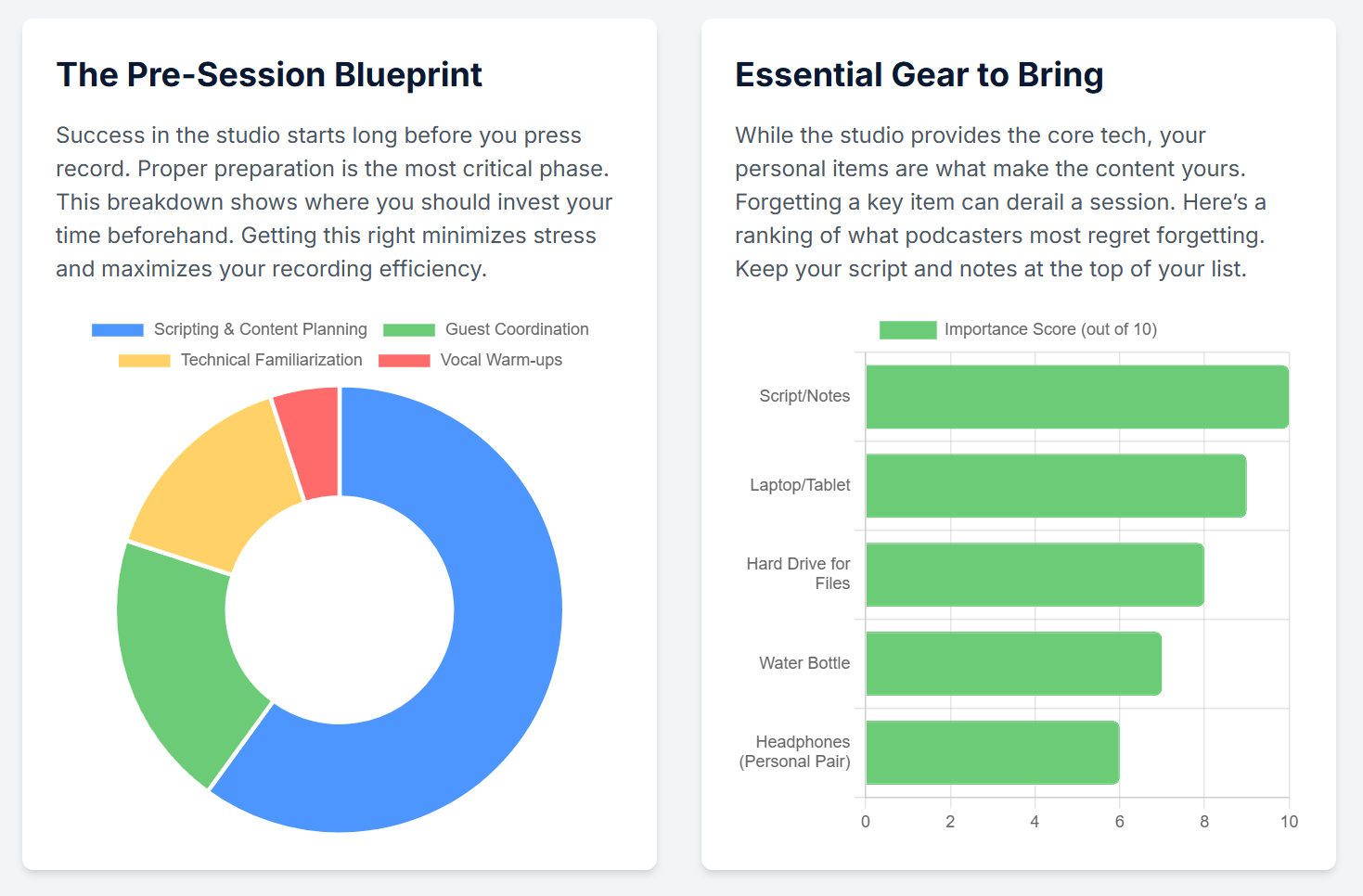
Image Credit: Finchley Studio
1.3. Preparing Your Brand Assets: Ensuring Technical Readiness
Walking into a studio with disorganised or incorrectly formatted files wastes valuable, paid time. All audio and visual assets must be prepared and consolidated for a seamless handover to the studio engineer.
Audio Files: Consolidate all intro/outro music, jingles, and sound effects into a single, clearly labelled folder.
Format: These files should be exported in a high-quality, uncompressed format, such as a WAV file. While MP3s are common for distribution, they are a compressed format. Providing the engineer with WAV files offers maximum flexibility for mixing and mastering.1
Delivery: Have this folder ready on a USB drive or a portable hard disk. Do not rely on cloud services, which can be slow or unreliable on an unfamiliar network.1
Visual Assets (for Video Podcasts): Many London studios offer screens within the set to display branding during a video recording.7
Logo: Prepare a high-resolution logo file, ideally a PNG with a transparent background, formatted to standard video dimensions (e.g., 1920x1080 pixels).
Lower Thirds: Have a document with the correctly spelled names and titles of all participants ready for the engineer or video technician.
Backup Strategy: Technology can be unpredictable. In addition to the primary USB drive, bring a laptop containing local copies of all scripts, notes, and asset files. This personal backup is a crucial safety net.1
Section 2: The London Landscape: Selecting and Booking Your Studio (1-2 Weeks Before)
London boasts a dynamic and competitive market for podcast studios, with options catering to every budget, style, and technical requirement. For a first-time podcaster, navigating this landscape can be daunting. The key to making the right choice lies in understanding the fundamental differences between the available service models and asking targeted questions before committing to a booking.
2.1. Decoding London's Studio Offerings: Self-Service vs. Full-Service
The London market is broadly divided into two categories, and choosing between them is the single most important decision for a first session.
The Self-Service / "Plug-and-Play" Model:
Description: These studios provide a professional, acoustically treated room equipped with high-quality, user-friendly gear like the RØDECaster Pro and industry-standard microphones. The expectation is that the user will operate the equipment themselves or bring their own producer.19 While a studio assistant might offer a brief induction on how to use the gear, they are not present to manage the recording itself.20
Examples: This model is popular with chains like Pirate Studios 6 and is offered as a primary option by venues like Acast Studios 19 and Outset Studio.20
Pricing: This is the more affordable entry point, with hourly rates typically ranging from approximately £30 to £84.19
The Full-Service / Engineered Model:
Description: Booking a full-service session means a dedicated on-site sound engineer or producer is included for the duration of the recording. This professional handles all technical aspects, including microphone setup, setting correct audio levels (gain staging), managing the recording software, and sometimes even performing live video switching between multiple cameras.25
Examples: Studios like Premiere Podcast Studios 26, Jukebox Studios 25, and Podcast Studio Hire 22 often operate on this model.
Pricing: The inclusion of professional expertise commands a higher price, with typical hourly rates for audio and video starting from £70 and rising to £150 or more.9
For a novice, the lower price of a self-service studio can be tempting, but this presents a significant risk. The success of a recording depends on managing technical nuances like gain staging to prevent audio distortion (clipping), proper mic placement to avoid plosives, and eliminating mic bleed.12 A single unmanaged technical error can render an entire recording unusable. The cost of a wasted session—encompassing the studio fee, the time of all participants, and the loss of creative momentum—far exceeds the initial cost saving. Therefore, paying a premium for an engineered session should not be viewed as a luxury but as an essential insurance policy. It transfers the technical risk from the inexperienced user to a trained professional, dramatically increasing the likelihood of a successful, high-quality outcome. The choice is not between "cheap" and "expensive," but between "high-risk" and "low-risk."
2.2. The Booking Process Demystified: Critical Questions to Ask
Before finalising any booking, it is crucial to get written confirmation on several key points. An email is preferable as it provides a record of the agreement.
"Is a sound engineer included for the entire duration of my session?" Clarify this point explicitly. Some studios may offer an engineer for the initial setup only, leaving the host to manage the recording itself.9 For a first session, an engineer's presence throughout is vital.
"Is setup time and file transfer time included in my booked hours, or should I book additional time?" This is a frequent source of unexpected costs. Transferring large video files can take 15 minutes or longer, and this time can eat into the recording slot or incur extra charges.9
"In what format will I receive the audio files?" Confirm that the studio will provide separate, multitrack WAV files for each microphone. Receiving a single, pre-mixed stereo file severely limits the ability to edit and mix individual voices in post-production, which is an essential part of creating a professional sound.9
"What is your cancellation or rescheduling policy?" Unforeseen circumstances can arise, and understanding the policy in advance is important.
-
"Can you accommodate remote guests via a phone or video dial-in?" If the session involves a remote participant, confirm the studio has the capability and if it incurs an additional cost. Many professional studios offer this service.7
Image Credit: Finchley Studio
2.3. A Comparative Snapshot of London Podcast Studios
To aid in the decision-making process, the following table synthesizes information from various London-based studios, providing a clear, at-a-glance comparison of their offerings, pricing, and ideal use cases.
Table 1: London Podcast Studio Comparison Guide
Section 3: The Go-Bag: Final Preparations (The Day Before)
The 24 hours leading up to the session are about final checks and methodical packing. A well-prepared "go-bag" and clear final communications ensure a calm and confident arrival, allowing all mental energy to be focused on the creative task at hand.
3.1. Assembling Your Session Kit: A Comprehensive Pack List
This checklist covers all essential items needed for a smooth session.
Technical Essentials:
Formatted Hard Drive or USB Stick: A high-speed external drive, preferably a Solid State Drive (SSD), with sufficient free space is mandatory for receiving the raw audio and video files. It is wise to confirm the required file system format with the studio beforehand; exFAT is generally the most compatible choice for both Mac and Windows systems.1
Laptop and Charger: The laptop should contain locally saved copies of all scripts, rundowns, research notes, and asset files.1 Do not rely on accessing files from the cloud, as studio Wi-Fi can be unpredictable.
Personal Headphones: While studios provide professional headphones 31, using a personal, familiar pair can enhance comfort, especially during longer recording sessions.1
Content & Personal Items:
Printed Scripts/Outlines: Bring enough physical copies of the rundown for every participant, plus one for the engineer. Relying solely on screens can introduce risks like battery failure or distracting keyboard clicks.
Water and Light Snacks: Hydration is paramount for maintaining vocal clarity and preventing audible mouth clicks.1 Avoid sugary drinks, which can cause phlegm, and heavy meals that can induce lethargy.
Quiet Clothing: A final reminder to wear soft, non-rustling fabrics like cotton or wool. Remove any watches, bracelets, or necklaces that could make noise.1
Branding/Props: Any physical items, such as books, products, or branded merchandise, that are intended to be featured in the video recording should be packed and ready.1
3.2. Final Confirmation Protocol
A final, brief communication serves as a crucial last check. Send a short email or text message to all participants (co-hosts and guests) and, if appropriate, to the studio's main contact. This message should simply reconfirm the meeting time and location. This simple action can prevent costly misunderstandings and ensures everyone is aligned for the following day.3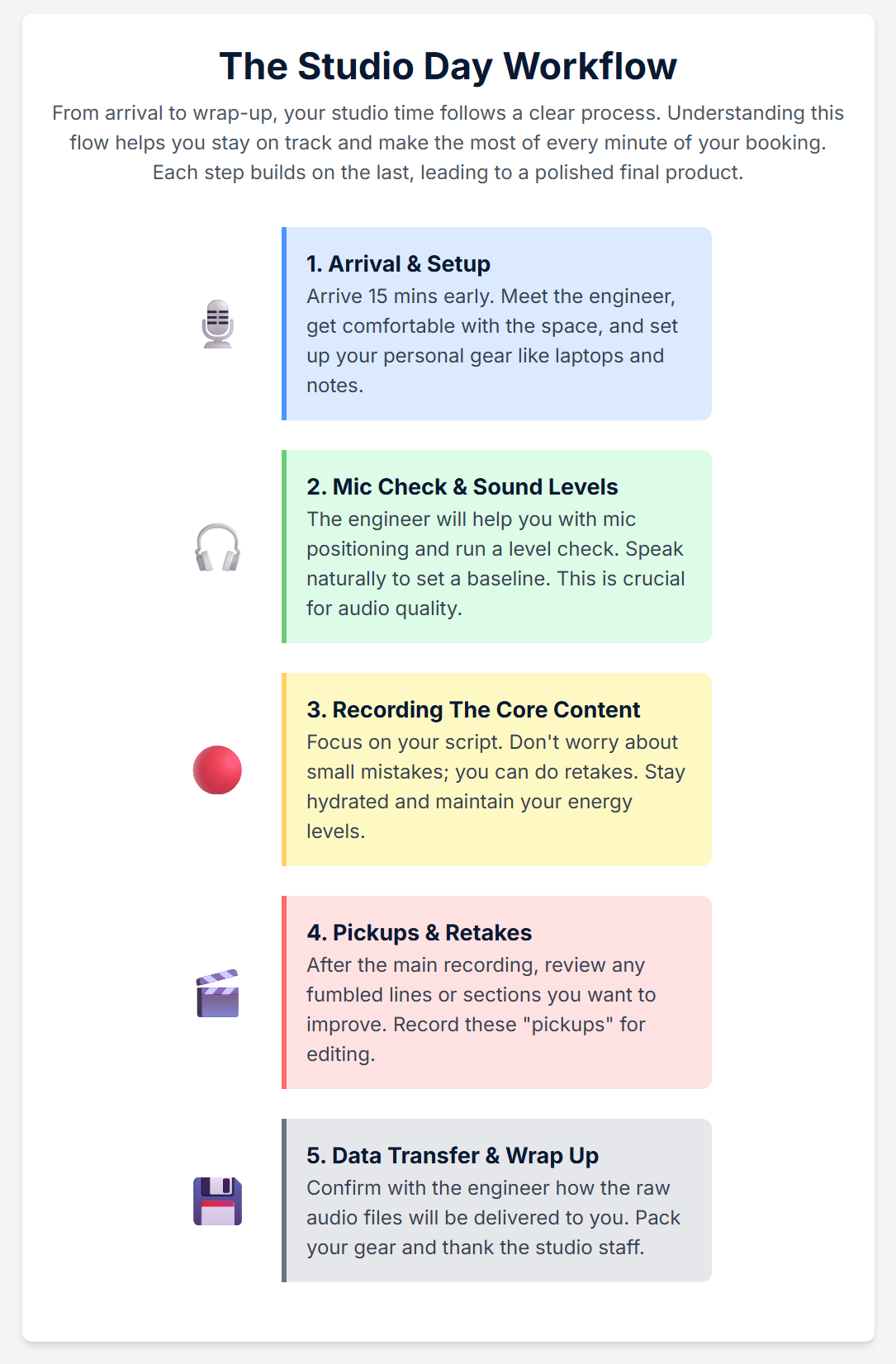
Image Credit: Finchley Studio
Section 4: In the Booth: Executing a Flawless Recording Session (On the Day)
With meticulous preparation complete, the day of the session is about execution. The focus shifts from logistics to performance, conversation, and creativity. Adhering to professional etiquette and employing correct microphone technique will ensure the highest quality recording and make the most of the investment in studio time.
4.1. Arrival, Setup, and the Engineer Briefing
Professionalism begins at the studio door.
Studio Etiquette: Arrive on time for the scheduled booking—not significantly early, as the studio may be in use.8 Treat the space, the equipment, and the staff with respect.34 Do not bring unannounced friends or colleagues, as studios are workplaces, not social venues.34 Keep all food and drinks away from the mixing desk and recording equipment to prevent accidental damage.35
The Golden Conversation: The first five minutes spent with the on-site engineer are the most important of the session. This is the moment to transfer all the planning into their hands.
Hand over the USB drive containing intros, outros, and any other audio assets.
Provide them with a printed copy of the rundown and briefly walk them through the episode's structure.
Communicate any specific technical requirements or creative elements, such as a remote guest dial-in or a particular sound effect cue.
The Soundcheck: This is a non-negotiable step. The engineer will ask each person to speak into their microphone at their normal, conversational volume for 30-60 seconds.4 This is not a mere formality; it allows the engineer to set the input gain level for each voice. Proper gain staging is critical to prevent audio from being too quiet (introducing noise when amplified) or too loud, which causes clipping—a harsh, irreparable distortion.30
Recording a "Noise Profile": Following the level check, the engineer will ask for 5-10 seconds of absolute silence in the room. This records the ambient sound of the space, including any subtle hums from air conditioning or equipment. This "noise profile" is an invaluable tool in post-production, allowing an editor to easily identify and remove the room's unique background noise from the vocal tracks.12
4.2. Professional Microphone Technique: The Art of Mic Discipline
Proper microphone technique is not merely about sounding good; it is a form of risk management. Every technical flaw captured in the recording—a plosive, a clip, an off-mic voice—creates a problem that must be fixed in post-production. These fixes cost time and money, with editing services in London starting from £50-£90 per hour.25 Some issues, like severe clipping, cannot be fixed at all. Therefore, every moment spent practicing good mic discipline in the studio is a direct investment that yields a cleaner raw recording, which in turn leads to a faster, less expensive post-production process and a more professional final product.
Proximity is Key: The distance from the mouth to the microphone is the most critical variable. A consistent distance must be maintained throughout the recording. A good starting point is one fist's length, or approximately 3-5 inches (8-12 cm), away from the microphone.13 This proximity engages the "proximity effect," where bass frequencies are boosted, creating the warm, intimate "radio voice" sound. Moving further away will make the voice sound thinner and capture more of the room's reverberation.30 Consistency is the primary goal.
Positioning and Angle (On-Axis vs. Off-Axis): Do not speak directly into the front of the microphone (on-axis). This position aims a direct blast of air at the microphone's diaphragm, causing plosives—the explosive 'p' and 'b' sounds. The professional technique is to position the microphone slightly to the side and angled towards the mouth, at roughly a 30-degree angle (off-axis). This allows the voice to be captured clearly while the air blast from plosives travels past the microphone.39 Even with this technique, a pop filter remains an essential accessory.33
Vocal Consistency and Dynamics: Speak at a natural, consistent volume as established during the soundcheck.30 Be mindful of vocal dynamics. If anticipating a loud laugh or a shouted exclamation, consciously lean back from the microphone slightly. This simple movement can prevent the audio from clipping and save the take.30
Minimizing Extraneous Noise: Be aware of physical habits. Avoid tapping fingers on the desk, rustling papers, or swiveling in a creaky chair.12 If needing to turn a page of a script, do so slowly and silently while another person is speaking.

Image Credit: Finchley Studio
4.3. Session Management and Etiquette
Once recording begins, effective communication and discipline among participants are key.
Non-Verbal Communication: For shows with co-hosts, establishing simple, non-verbal cues can prevent interruptions and create a smoother flow. A raised finger can signal a desire to speak next, while a circular "wrap it up" motion can indicate it's time to move to the next topic. This allows for seamless conversational management without a word being spoken.42
Active Listening: When not speaking, it is important to remain silent and engaged. Avoid making audible affirmations like "uh-huh," "yeah," or "right." While natural in conversation, these interjections can overlap with the main speaker's dialogue and are very difficult to remove cleanly in post-production.12 A silent nod is the best way to show agreement and engagement.
Taking Breaks: For any session scheduled to last longer than 60-90 minutes, plan for a short 5-10 minute break. This allows everyone to stretch, rehydrate, and mentally reset, which helps maintain high energy levels and focus throughout the entire recording.12
Section 5: The Aftermath: Post-Recording Essentials
The recording may be complete, but a few critical steps remain before leaving the studio. These final actions are crucial for securing the recorded material and setting the stage for a smooth post-production workflow.
5.1. Securing Your Raw Files: The All-Important Handover
The cardinal rule of any studio session is this: do not leave without the raw files.
File Transfer: Politely wait for the engineer to complete the process of transferring all raw audio and video files from the studio's recording system to the provided external hard drive.1
Verification Protocol: Before disconnecting the drive, perform a quick verification. Open one or two audio and video files on a laptop to ensure they are not corrupted and play back correctly. Crucially, confirm that the audio files are individual, separate tracks for each microphone, not a single combined file.
Immediate Backup: The very first action upon returning to a home or office should be to create a second complete copy of the raw files. This backup should be on a separate physical drive or uploaded to a secure cloud storage service. This redundancy protects against data loss due to drive failure or theft.
5.2. Navigating Post-Production: What Happens Next?
The raw files are the foundation upon which the final episode is built. Understanding the next steps is key to transforming them into a polished product.
Understanding the Services: Post-production typically involves three stages:
Editing: This is the structural phase of removing mistakes, "ums" and "ahs," long pauses, and tightening the overall narrative flow.3
Mixing: This is the sonic balancing act. The engineer adjusts the volume levels of each track (voices, music, sound effects), applies processing like EQ and compression to enhance vocal clarity, and ensures all elements sit together harmoniously.3
Mastering: This is the final polish. The mixed episode is processed to achieve a consistent, professional loudness level that meets the standards of platforms like Spotify and Apple Podcasts.3
Studio vs. Third-Party Options: Many London studios offer in-house post-production services, which can be a convenient, one-stop solution.25 The alternative is to hire a freelance podcast editor or production company. While potentially more cost-effective, this requires vetting and managing another relationship.
Providing Editing Notes: To streamline the editing process and reduce costs, it is helpful to provide the editor with notes. If a mistake was made during recording, making a loud clap or a verbal cue like "edit note" creates a clear visual spike in the audio waveform. Noting the timestamp of these moments provides a roadmap for the editor, saving them significant time.3
5.3. Closing the Loop with Your Guests and Co-Hosts
Professional courtesy extends beyond the recording session and is vital for building long-term relationships.
The Thank You: Send a personalised thank-you email to all guests and co-hosts within 24 hours of the session. Acknowledge their contribution and thank them for their time.14
Setting Expectations: In the email, provide an estimated release date for the episode. This manages their expectations and keeps them informed.
Empowering Promotion: When the episode is scheduled to go live, follow up with a final email. This should include the direct link to the episode and, crucially, a "promo kit" to make sharing as easy as possible. This kit can include pre-written social media posts, custom quote graphics, audiogram clips, or short video excerpts. By removing the friction of content creation, there is a much higher likelihood that guests will promote the episode to their own audiences, significantly amplifying its reach.3 This final step transforms a guest from a one-time participant into a valuable promotional partner.
Booking your first session at a professional podcasting studio is a huge step towards elevating your content. Congratulations! While it’s exciting, it can also feel a little daunting. What should you bring? How should you prepare?
Don’t worry. This ultimate checklist will guide you through everything you need to do before, during, and after your first session at a podcasting studio London, ensuring it's a smooth, creative, and highly productive experience.
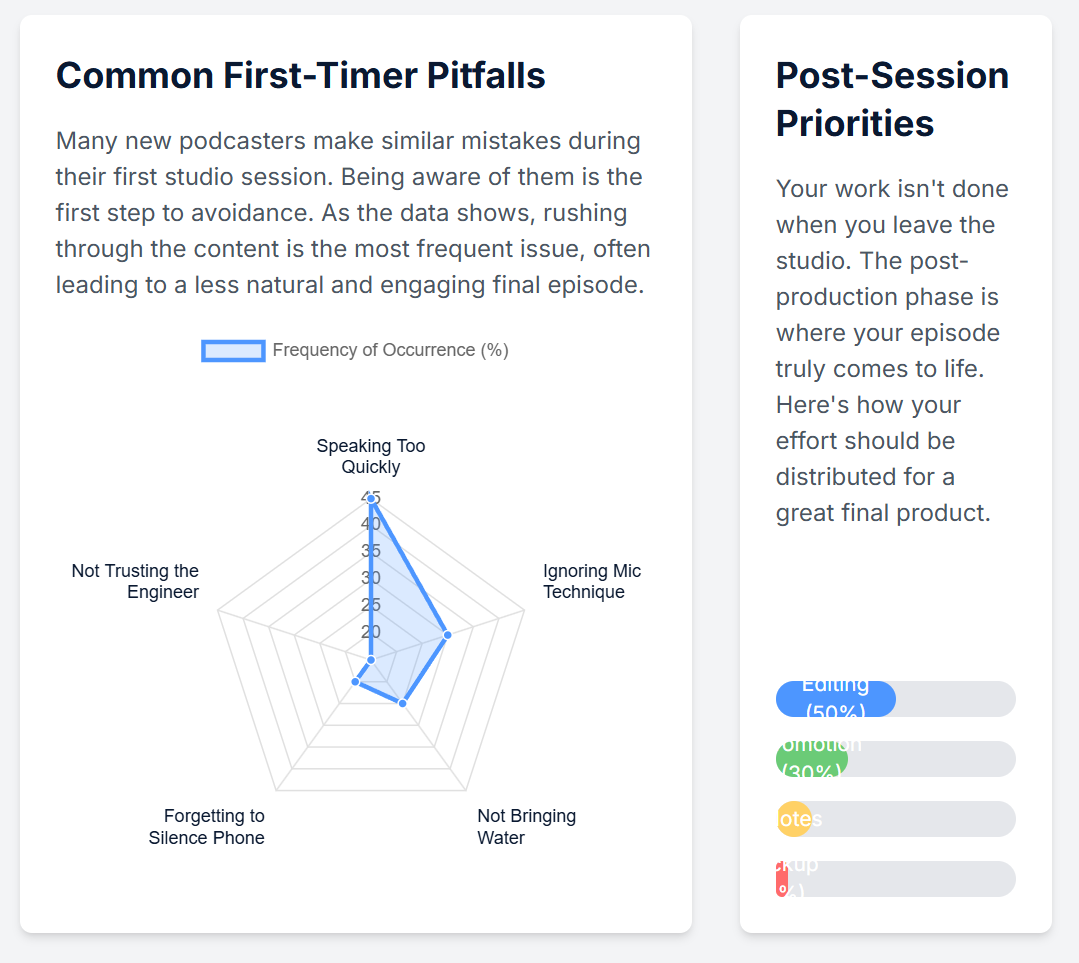
Image Credit: Finchley Studio
## ☑️ Before You Go: The Preparation Phase
Proper planning is the key to a stress-free recording day.
[ ] Finalise Your Content Outline: Whether it’s a full script or a list of talking points, have your content structure ready. Plan your intro, outro, and key questions for your guests. Don't try to wing it on the day.
[ ] Confirm with Your Guests: Send a confirmation email to your guests a day or two before the session. Include the studio address, your meeting time, and travel details. A studio with easy transport links, like our location near Finchley Central, makes this much easier for everyone.
[ ] Review Your Booking Details: Double-check your confirmation email for the exact start time, duration, and the specific studio set you booked (e.g., the Lounge Studio or Dialogue Room).
[ ] Plan Your Outfit (for video): To look your best on camera, avoid busy patterns like fine stripes, logos from brands who aren't sponsoring you, and noisy jewellery that could be picked up by the microphones. Solid, bold colours usually work best.
[ ] Get a Good Night's Sleep: Arrive feeling rested, hydrated, and ready to perform at your best.
## ☑️ What to Bring: Your Session Toolkit
Arrive with everything you need to make the session a success.
[ ] Your Notes: Bring your laptop, tablet, or a physical notebook with your episode outline and research.
[ ] A Portable Hard Drive: This is essential! You will need it to take your raw audio and video files home. Ensure it has plenty of free space—we recommend at least 250GB for a typical 4K video session.
[ ] Any Branded Props: If you want to customise the set, bring your branded mugs, notebooks, or a small roller banner.
[ ] Water: While studios usually provide refreshments, having your own bottle of water on hand is always a good idea.
[ ] Your Phone (Set to Silent!): A simple but crucial reminder to prevent any unwanted interruptions.
## ☑️ During Your Session: Making the Most of Your Time
You’re prepared and you’ve arrived. Now it's time to record.
[ ] Arrive a Little Early: Aim to get to the studio 10-15 minutes before your session starts. This gives you time to settle in, meet the team, and get comfortable without feeling rushed.
[ ] Trust the Engineer: The on-site technician is your technical co-pilot. Listen to their advice during the sound check on things like microphone placement—they are there to make you sound and look your best. It’s a key benefit of recording at a professional studio like Finchley Studio.
[ ] Focus on the Sound Check: Don't mumble through it. Speak at your normal, full-volume presentation voice so the engineer can set perfect audio levels for you.
[ ] Relax and Perform: The technical side is completely handled. Your only job is to focus on your content and have a great conversation.
[ ] Confirm You Have All Your Files: Before you leave, double-check with the engineer that all the final raw audio and video files have been successfully transferred to your hard drive.
By following this checklist, you'll walk into your first studio session feeling confident and prepared, ready to create your best content yet.
Your First Session, Made Easy at Finchley Studio
Ready to put this checklist into action? At Finchley Studio, we specialise in making every creator's studio experience, especially their first one, as seamless and supportive as possible. Our commitment to a welcoming and professional environment is why organisations like the BBC and Lloyds Bank trust us with their productions. See what our clients are saying in our Google reviews and on Trustpilot.
We offer a diverse range of meticulously designed sets to match any podcast's brand and style:
Our professional Video Editing Service can take your raw files and create a polished final product, simplifying your workflow. The team at Finchley Studio is here to ensure your vision is realised perfectly.
Ready to book your first professional session?
Find Us Easily: Our studio is conveniently located just a two-minute walk from Finchley Central on the Northern Line and adjacent to the Travelodge London Finchley. We offer one free parking space per booking.
what3words: orders.yards.jokes
Stay Connected: Follow our journey and see behind-the-scenes content on our social media channels:
Have questions? Check our FAQ or get in touch directly.
WhatsApp: +447587827200
Phone: +447587827200
Email: [email protected]
Works cited
Podcast Recording Checklist:Essential for Successful Session, accessed September 18, 2025, https://www.crazistudio.com/podcast-recording-checklist-studio-rental/
How to Start a Podcast: Complete Step-by-Step Guide [2025], accessed September 18, 2025, https://www.buzzsprout.com/blog/how-to-start-a-podcast
Podcast Pre-flight checklist, accessed September 18, 2025, http://firemark.com/wp-content/uploads/2013/08/Podcast-Preflight-Checklist.pdf
How to prepare before hosting your first podcast episode - Motion, accessed September 18, 2025, https://motionagency.io/how-to-prepare-before-hosting-your-first-podcast-episode/
Podcast Guest Checklist - The Communications Group, accessed September 18, 2025, https://www.comgroup.com/blog/podcast-guest-checklist
Camden North London Podcast Studios | Podcast Recording Studios, accessed September 18, 2025, https://pirate.com/en/podcast-studios/london-camden/
London Podcast Studio | Podcast Recording From £69/hr!, accessed September 18, 2025, https://www.londonpodcaststudios.co.uk/
Podcast etiquette - The Podcast Space, accessed September 18, 2025, https://www.thepodcastspace.com/resources-for-podcasters/podcast-etiquette
Podcast Studio in London, Podcast Studio Hire London - Podshop, accessed September 18, 2025, https://www.podshoponline.co.uk/services/podcast-studio
Recording Studio Etiquette: Essential Do's and Don'ts for Podcasters - Finchley Studios, accessed September 18, 2025, https://www.finchley.co.uk/finchley-learning/recording-studios-etiquette-dos-and-donts-for-podcasters
How to Ensure Top-Quality Podcast Guest Audio Remotely - YouTube, accessed September 18, 2025, https://www.youtube.com/watch?v=OyPJLMiwF1c
Podcast Recording Tips for Polished, Professional Episodes | Castos, accessed September 18, 2025, https://castos.com/podcast-recording-tips/
How to Prepare Your Podcast Guests for Recording | Tips for an Excellent Conversation, accessed September 18, 2025, https://www.launchpod.media/how-to-prepare-your-podcast-guests-for-recording
How To Manage Your Next Podcast Guest - YouTube, accessed September 18, 2025, https://www.youtube.com/watch?v=Ic8xa1SqtxY
How to Podcast With A Co-Host - The Simplecast Blog, accessed September 18, 2025, https://blog.simplecast.com/ladies-doing-stuff
Checklist: How to Be a Great Podcast Guest, accessed September 18, 2025, https://www.thepodcastspace.com/resources-for-podcasters/checklist-how-to-be-a-great-podcast-guest
Free Online Podcasting Scheduling System - Koalendar, accessed September 18, 2025, https://koalendar.com/scheduling-software-for/podcasting
How to Maximize Your Time at a Podcast Recording Studio, accessed September 18, 2025, https://weeditpodcasts.com/how-to-maximize-your-time-at-a-podcast-recording-studio/
Acast Studios London, accessed September 18, 2025, https://www.acast.com/en/acast-studios-london
London Podcast Studio from £84/hr | Shoreditch - Outset Studio, accessed September 18, 2025, https://outsetstudio.com/podcast-studio-london/
7 podcast studios in London for your next recording - Fallow, Field & Mason, accessed September 18, 2025, https://www.fallowfieldmason.com/blog/8-podcast-studios-in-london-for-your-next-recording
13 Podcast Studios In London For Hire - DesignMyNight, accessed September 18, 2025, https://www.designmynight.com/london/blog/podcast-studios-london
Podcast Studio London Bridge | From £84/hr | Outset Studio, accessed September 18, 2025, https://outsetstudio.com/london-podcast-studio-in-central-london/
Podcast Studio London, Hire Podcast Room From 30/hr | Nostars, accessed September 18, 2025, https://nostars.uk/podcast/
Rates | Recording Studios | Podcast Studios | Jukebox Studios London, accessed September 18, 2025, https://www.jukeboxstudios.co.uk/rates
Podcast Studio For Hire in Central London | Shoreditch, accessed September 18, 2025, https://premierepodcaststudios.com/
Podcast Studio Hire | London | Equipment & Engineer included, accessed September 18, 2025, https://podcaststudiohire.co.uk/
Podcast House | Podcast Recording Studio in Central London, UK for Audio & Video, accessed September 18, 2025, https://www.podcasthouse.uk/
10 Best Podcast Studios London to Hire in 2025 - Saspod, accessed September 18, 2025, https://saspod.com/blog/post/best-podcast-studios-london
The Complete Guide to Microphone Technique for Podcasters - Buzzsprout, accessed September 18, 2025, https://www.buzzsprout.com/blog/mic-technique-podcasting
Podcast Equipment Checklist - MACKIE, accessed September 18, 2025, https://mackie.com/en/blog/all/podcast_equipment_checklist.html
Anyone with a Podcast studio in London UK? - Reddit, accessed September 18, 2025, https://www.reddit.com/r/podcasting/comments/1gmz6rm/anyone_with_a_podcast_studio_in_london_uk/
11 Essential Items for Podcasting - Best Buy, accessed September 18, 2025, https://www.bestbuy.com/discover-learn/11-essential-items-for-podcasting/pcmcat1646763586891
Recording Studio Etiquette: 7 Unspoken Rules To Follow - Omari MC, accessed September 18, 2025, https://www.omarimc.com/recording-studio-etiquette/
What is Proper Recording Studio Etiquette? - University of Silicon Valley, accessed September 18, 2025, https://usv.edu/blog/what-is-proper-recording-studio-etiquette/
Podcast Room Setup Guide (Checklist + Ideas) DIY Pro Studio at Home - Talks.co, accessed September 18, 2025, https://talks.co/p/podcast-room-setup/
audient.com, accessed September 18, 2025, https://audient.com/tutorial/podcast-mic-technique/#:~:text=For%20the%20majority%20of%20podcasts,away%2C%20directly%20into%20the%20diaphragm.
Microphone Tips and Tricks for Podcasting - PreSonus, accessed September 18, 2025, https://www.presonus.com/blogs/technical/microphone-tips-and-tricks-for-podcasting
How to Start a Podcast: Step-by-Step Guide & Free Checklist - Riverside, accessed September 18, 2025, https://riverside.com/blog/how-to-start-a-podcast
Proper Microphone Techniques & Placement Explained - Lower Street, accessed September 18, 2025, https://lowerstreet.co/blog/microphone-techniques
How to Record a Podcast Like a Pro (The Easy Way) - Riverside, accessed September 18, 2025, https://riverside.com/blog/how-to-record-a-podcast
The When, Why, & How of Working With a Podcast Co-Host, accessed September 18, 2025, https://blog.podcast.co/inspire/podcast-co-host
Podcast Etiquette: Dos And Don'ts Of A Great Podcast, accessed September 18, 2025, https://www.theaudiocafe.co.uk/blog/podcasts/podcast-etiquette-dos-and-donts-of-a-great-podcast/
From Solo to Scaled: How a Podcast Producer Can Build the Right Podcast Team - Libsyn, accessed September 18, 2025, https://libsyn.com/blog/from-solo-to-scaled-how-a-podcast-producer-can-build-the-right-podcast-team/











