
Introduction to the Modern Podcasting Ecosystem and the Interface Mandate
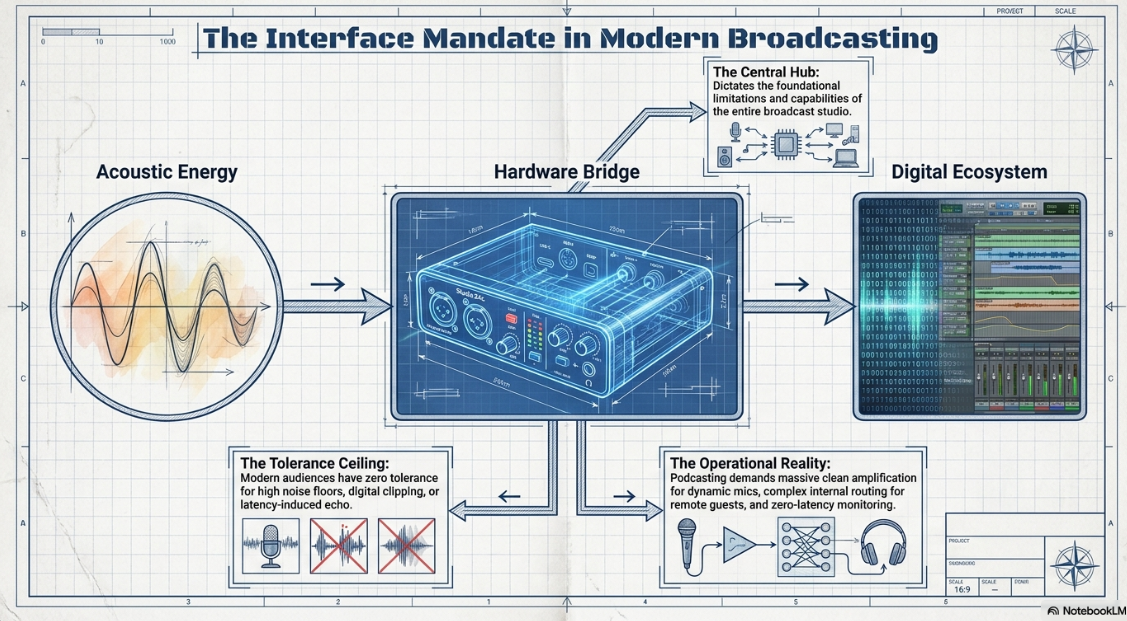
The landscape of digital broadcasting and professional podcasting has undergone a radical transformation, evolving from a lo-fi independent hobbyist medium into a highly competitive, high-fidelity industry. In this contemporary environment, the audience's tolerance for sub-optimal audio—characterized by high noise floors, digital clipping, latency-induced echo, or poor frequency response—is virtually nonexistent. At the exact center of any modern podcasting signal chain is the audio interface, the critical hardware bridge responsible for translating acoustic energy into digital data. The selection of this device dictates the fundamental limitations and capabilities of the entire broadcast studio.
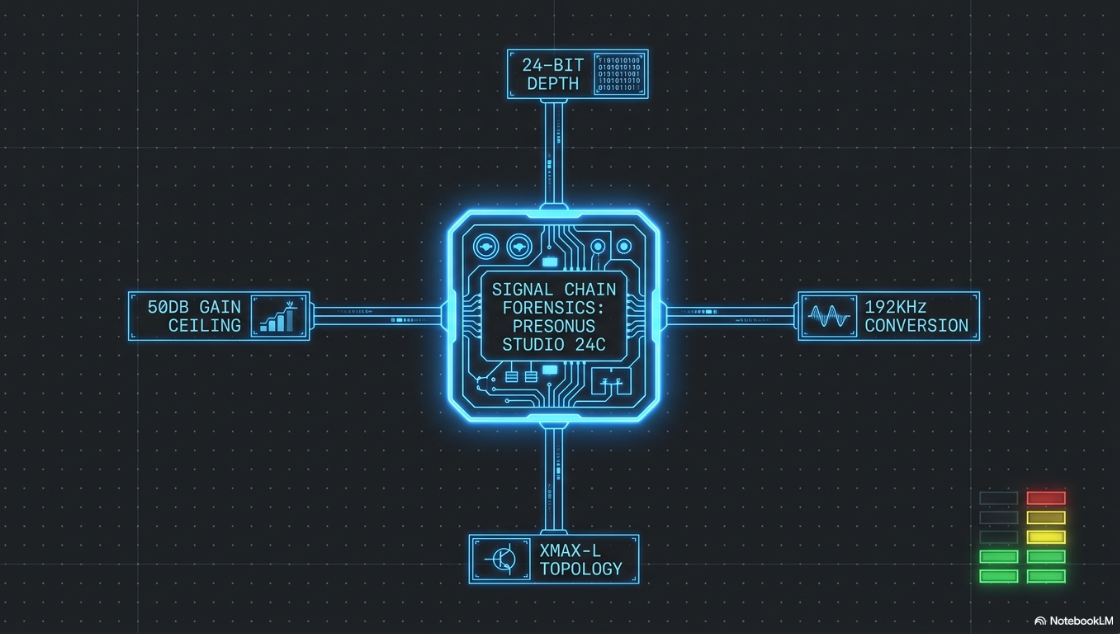
The PreSonus Studio 24c has emerged as a prominent and highly debated contender in the entry-to-mid-tier audio interface market1. Designed as a compact, 2-in/2-out USB-C bus-powered device, it promises ultra-high-definition audio recording operating at up to 24-bit depth and 192 kHz sample rates, paired with a rugged, road-ready chassis and an unusually comprehensive software suite1. However, the engineering demands of professional podcasting differ significantly from standard musical production. Podcasters rely heavily on low-sensitivity dynamic broadcast microphones that require immense clean amplification, demand latency-free monitoring for multi-person interviews, and require complex internal digital routing to integrate remote guests via software applications seamlessly.
This report provides an exhaustive, forensic analysis of the PreSonus Studio 24c, evaluating its preamplifier architecture, digital conversion fidelity, headphone amplification capabilities, software routing, and overall viability as the central hub of a professional podcasting studio. By contextualizing its technical specifications against the operational realities of spoken-word broadcasting and comparative market alternatives, this document serves as a definitive guide for studio architects, audio engineers, and digital content creators seeking to optimize their signal chains.
Physical Topography, Component Architecture, and System Integration
The physical construction and operational topography of an audio interface dictate its usability during live recording sessions, where visual feedback and tactile control are paramount. The PreSonus Studio 24c is engineered with a strict focus on durability and immediate hardware control, distinguishing it from the plastic-enclosed interfaces often found in the budget tier of audio equipment.
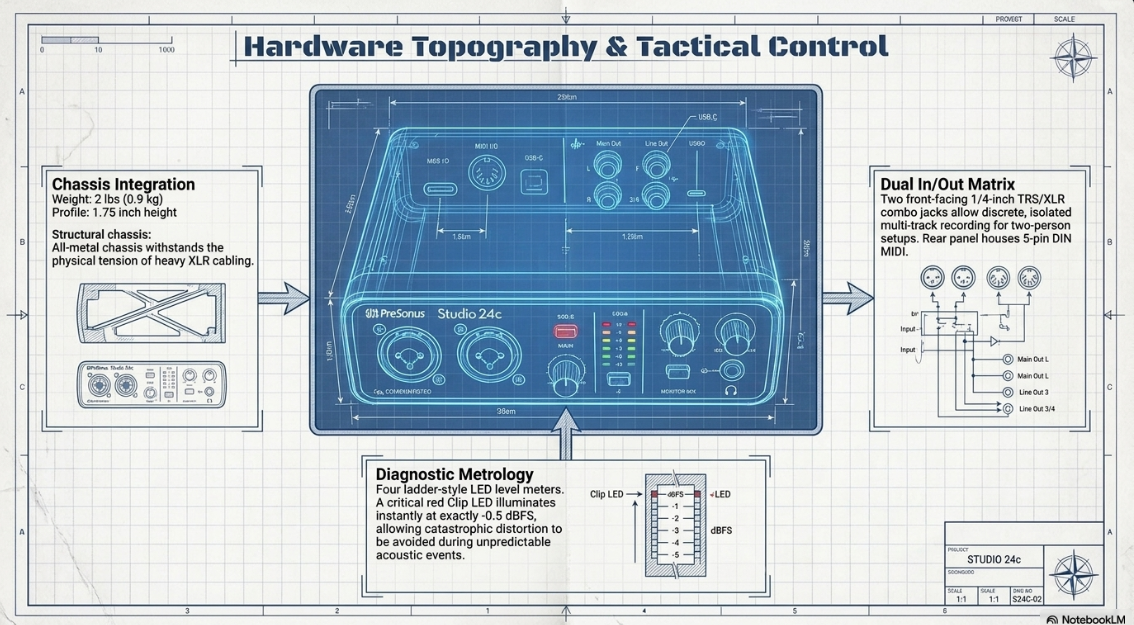
The Studio 24c is housed in a road-rugged, all-metal chassis featuring robust metal rotary knobs, ensuring high durability against the physical rigors of mobile podcasting setups or the daily wear and tear of desktop studio environments1. Weighing exactly two pounds (0.9 kg) and measuring 1.75 inches (44 mm) in height, 7 inches (180 mm) in width, and 5.5 inches (144 mm) in depth, the unit maintains a sufficiently low profile while providing the necessary mass to remain stable on a desktop when subjected to the weight and tension of heavy XLR cables1.
The front panel is populated with two combined microphone, instrument, and line inputs utilizing female ¼-inch TRS and XLR combo jacks1. This dual-input configuration serves as the baseline requirement for a standard two-person, in-studio podcast interview, allowing two dedicated microphones to be recorded to discrete, isolated tracks. The metering system on the front panel is a particularly notable inclusion. PreSonus has equipped the 24c with four ladder-style LED level meters, dedicating two specifically to the input channels and two to the main outputs1. The input meters feature a critical red "Clip" LED that illuminates immediately when the input signal reaches -0.5 dBFS7. In the highly unpredictable acoustic environment of a podcast—where a host might suddenly laugh, shout, or strike the desk—highly visible hardware metering is an invaluable asset for maintaining optimal gain staging and preventing catastrophic digital distortion before the analog-to-digital converters overload.
The rear panel houses the primary connectivity array required for studio integration. This includes two balanced ¼-inch TRS main outputs intended for studio monitors, a single ¼-inch stereo headphone output for host monitoring, and 5-pin DIN MIDI In and Out ports1. While MIDI connectivity is generally superfluous for pure spoken-word podcasting, it provides significant utility for creators who utilize external synthesizers, sound modules, or physical control surfaces to trigger sound effects or musical interludes during a live broadcast1.
Data transfer and power delivery are managed entirely through a single USB-C port, utilizing the USB 2.0 protocol1. The interface operates as a class-compliant device on macOS environments (requiring macOS version 10.13 or later) and utilizes a dedicated low-latency ASIO driver for Windows systems (requiring Windows 10 64-bit or later), with both platforms requiring a minimum of 4 GB of RAM and 200 MB of storage space for the Universal Control software installation1.
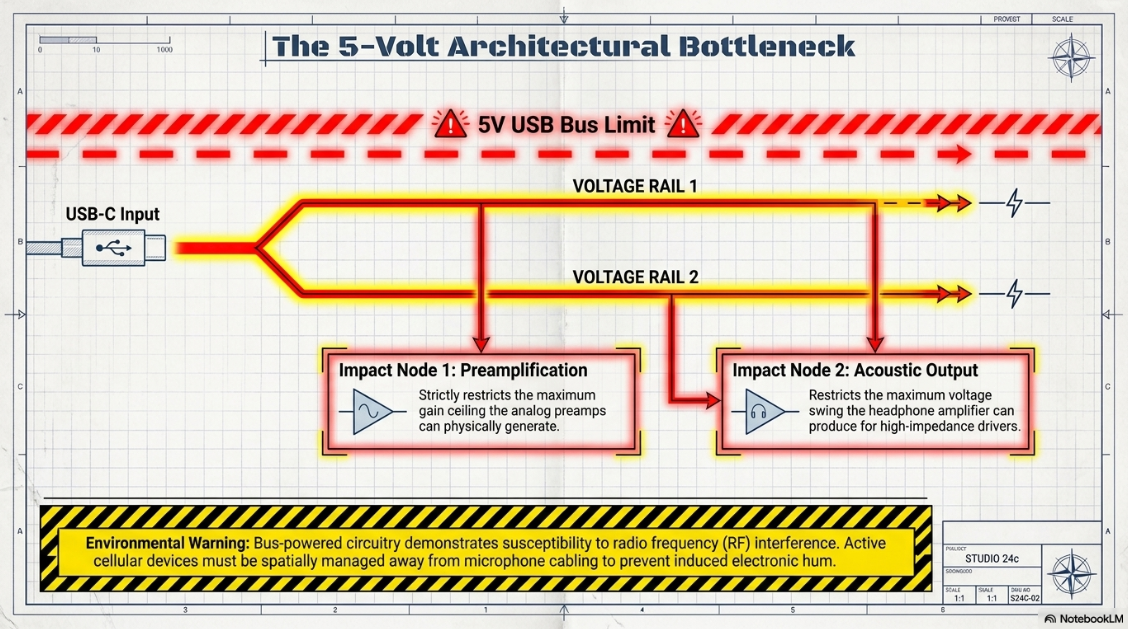
The bus-powered nature of the Studio 24c is a double-edged sword. While it maximizes portability and eliminates the clutter of an external wall-wart power supply, relying entirely on the 5-volt USB bus places strict physical limitations on the internal voltage rails of the interface1. These architectural voltage limitations directly impact the maximum gain the preamplifiers can generate and the maximum voltage the headphone amplifier can swing, creating specific operational bottlenecks that must be navigated in a professional podcasting context. Furthermore, field reports from audio engineers indicate that the bus-powered circuitry can occasionally be susceptible to radio frequency (RF) interference; placing active cellular devices in close proximity to the interface or microphone cables has been observed to induce audible distortion or electronic hum into the analog signal path, necessitating careful spatial management of mobile devices during a recording session10.
Preamplifier Topology: The XMAX-L Architecture and Bus Power Constraints
The preamplifier is arguably the most vital hardware component in a spoken-word signal chain. Its primary function is to capture the microscopic electrical voltage generated by a microphone capsule and amplify it up to a robust, usable line level without introducing internal electrical noise, altering the frequency response, or creating harmonic distortion. The design of the preamplifier dictates the foundational clarity of the voice recording.
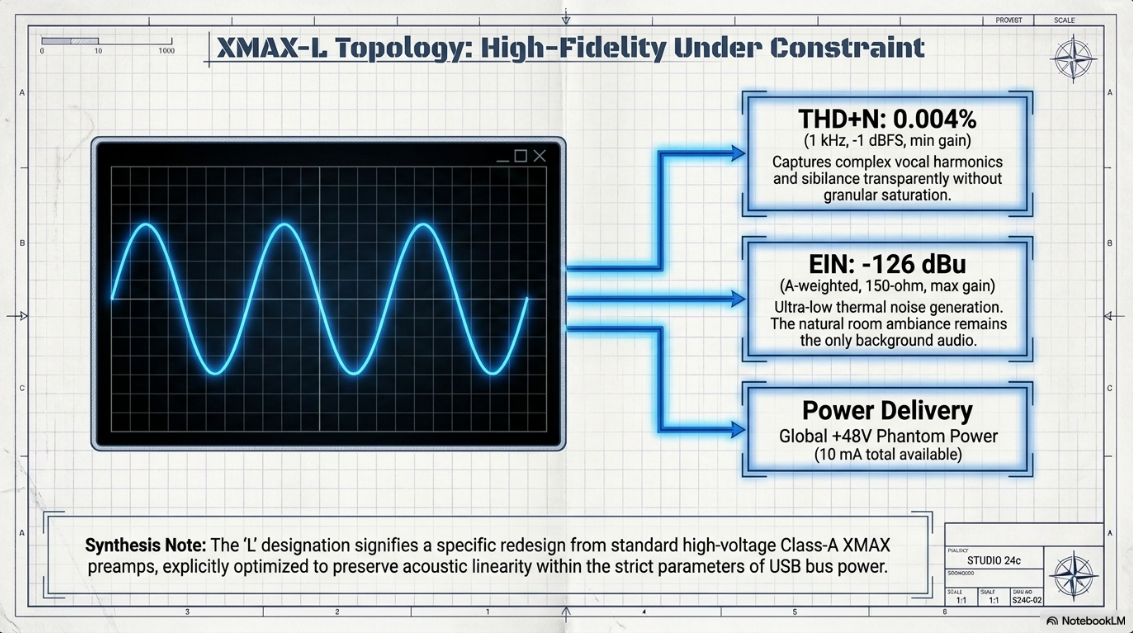
PreSonus integrates its proprietary XMAX-L solid-state microphone preamplifiers into the Studio 24c1. It is crucial for studio architects to understand the distinction between the XMAX-L preamplifiers and the standard PreSonus XMAX preamplifiers found in their larger, wall-powered rackmount interfaces. Standard Class-A XMAX preamplifiers operate on high-voltage rails, providing immense headroom and massive gain capabilities. The "L" in the XMAX-L designation signifies an architecture specifically redesigned and optimized to deliver the highest possible performance within the strict 5-volt and limited current parameters of USB bus powering7.
Despite these power constraints, the acoustic benchmarks of the XMAX-L preamplifiers demonstrate high precision and linearity. The preamplifiers boast a Total Harmonic Distortion plus Noise (THD+N) rating of just 0.004%, measured at 1 kHz, -1 dBFS at minimum gain1. This ultra-low distortion specification ensures that the complex vocal harmonics, subtle sibilance, and delicate breath noises of a podcast host are captured entirely naturally and transparently, devoid of the harsh, granular saturation that often plagues lower-tier preamplifiers1.
Equally critical for broadcast applications is the Equivalent Input Noise (EIN) specification, which stands at -126 dBu (A-weighted, 150Ω, maximum gain)1. EIN is the standard acoustic metric for measuring the internal "hiss" generated by the physical components of the preamplifier's own electrical circuitry. When a preamplifier is turned up to its maximum capacity, the internal components generate thermal noise. A rating of -126 dBu places the Studio 24c firmly in professional territory, indicating that the interface itself will not introduce a noticeable hiss floor into the recording, allowing the natural ambiance of the room to remain the only source of background audio1.
The interface features global +48V phantom power, activated via a front-panel button that illuminates blue when engaged1. This supplies the necessary 48 volts of direct current to power the active electronics inside condenser microphones or active direct injection (DI) boxes. However, the true test of an interface in the podcasting domain relies on its interaction with passive dynamic microphones.
The Dynamic Microphone Gain Paradigm in Broadcast Environments
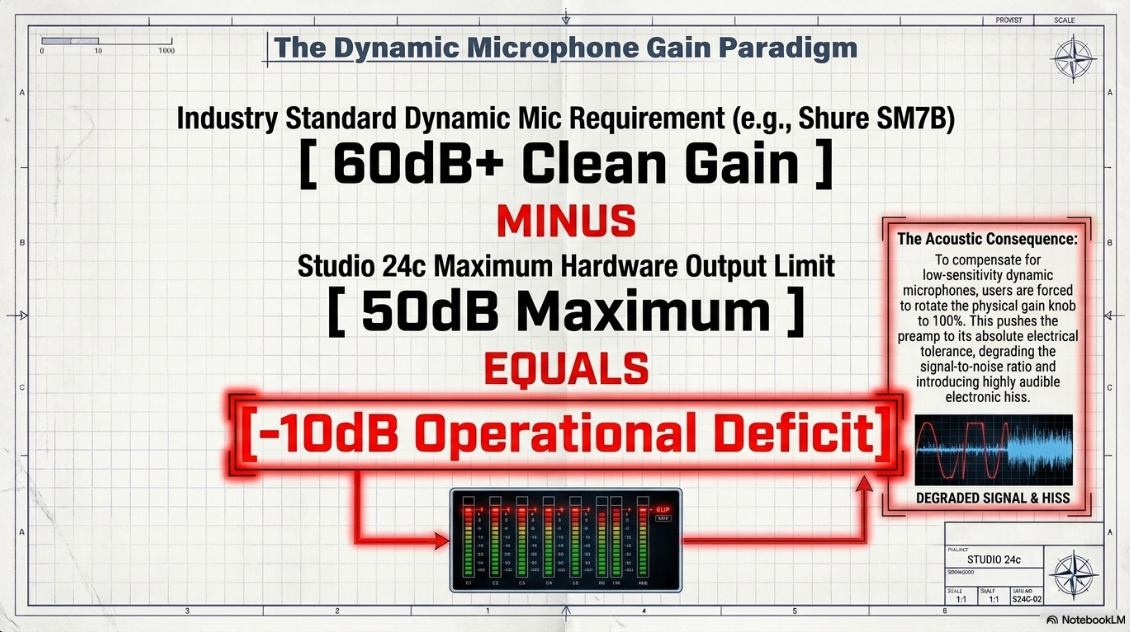
While the XMAX-L preamplifiers exhibit excellent sonic purity and a highly competitive noise floor, their operational limits reveal the most significant bottleneck of the Studio 24c for professional podcasting: the maximum gain ceiling. The interface provides a maximum of 50 dB of variable gain for its microphone inputs1.
The professional broadcasting and podcasting industries rely almost exclusively on low-sensitivity dynamic microphones. Industry-standard models such as the Shure SM7B, the Electro-Voice RE20, and the Rode Procaster are favored precisely because their heavy moving-coil designs and low electrical sensitivity naturally reject background room noise, HVAC rumble, and the untreated acoustic reflections of an average home studio or office10.
This acoustic rejection, however, demands massive electrical amplification to compensate. The ubiquitous Shure SM7B, for instance, requires a minimum of 60 dB of clean gain simply to reach an optimal digital recording level (typically targeting between -12 dBFS to -18 dBFS) for a normal spoken-word performance14. Similarly, the Rode Procaster requires approximately 53 dB of gain when the speaker is positioned a standard five inches away from the microphone capsule at a conversational volume12. Even standard live-vocal dynamic microphones like the Shure SM58 require immense gain, forcing users to speak directly against the grille to achieve a usable signal amplitude16.
Because the PreSonus Studio 24c mathematically tops out at 50 dB of gain, it is fundamentally incapable of driving a stock Shure SM7B to standard broadcast levels on its own1. If a podcaster attempts to connect one of these industry-standard dynamic microphones directly to the Studio 24c, they will be forced to rotate the physical gain knob to its absolute maximum position (100%)16. Operating any preamplifier at its absolute maximum electrical tolerance invariably degrades the signal-to-noise ratio; the preamp begins to amplify its own thermal noise alongside the audio signal, introducing an audible electronic hiss that renders the resulting audio unsuitable for professional publication16.
To successfully deploy the PreSonus Studio 24c in a high-end podcast environment utilizing low-sensitivity dynamic microphones, the integration of an active inline preamplifier—commonly referred to in the industry as a "mic activator"—is strictly mandatory10. Devices such as the Cloud Microphones Cloudlifter CL-1, the Triton Audio FetHead, or the sE Electronics Dynamite resolve this gain deficit entirely10.
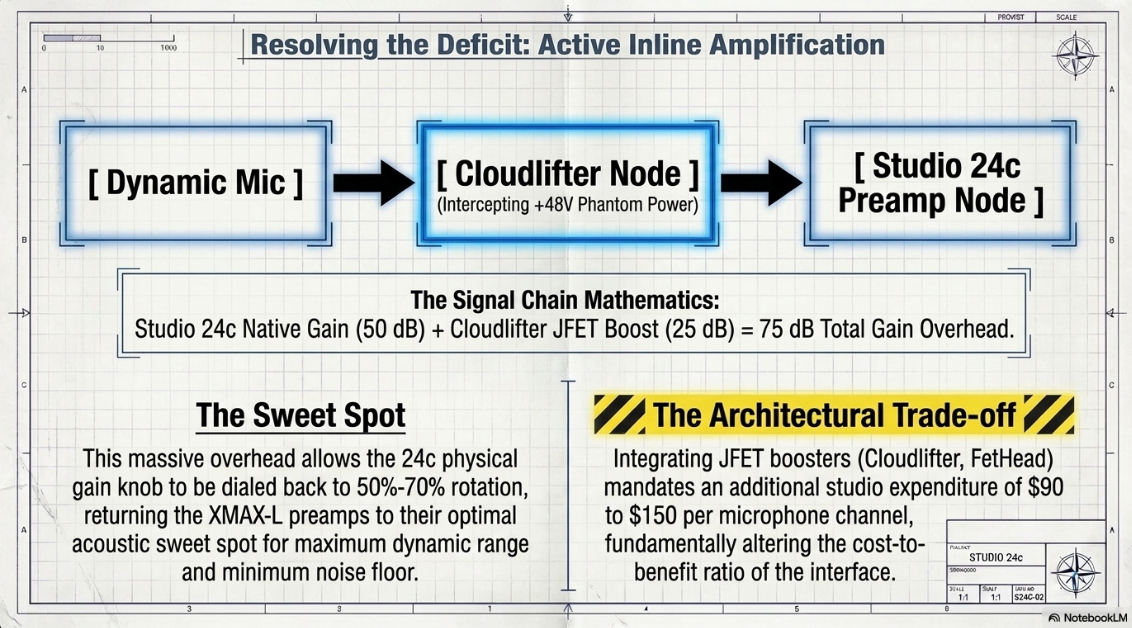
These active devices utilize the +48V phantom power provided by the Studio 24c1. While passive dynamic microphones do not inherently use phantom power, an inline booster intercepts this 48-volt current to power an internal JFET (Junction-Gate Field-Effect Transistor) circuit, which generates an ultra-clean, transparent gain boost before the signal ever travels down the cable to hit the audio interface's preamplifier10. The Cloudlifter CL-1, for example, provides up to +25 dB of transparent gain10. When paired with the Studio 24c, the signal chain mathematics transform favorably:
Studio 24c Maximum Gain (50 dB) + Cloudlifter JFET Boost (25 dB) = 75 dB of Total Available Gain.
This immense total gain overhead allows the podcaster to dial back the physical gain knob on the Studio 24c to a comfortable 50% to 70% of its rotation16. This practice keeps the XMAX-L preamplifiers firmly within their acoustic "sweet spot," where they operate with maximum linearity, maximum dynamic range, and the absolute minimum noise floor16. While this architectural workaround solves the acoustic problem entirely, it fundamentally alters the cost-to-benefit ratio of the Studio 24c. A studio architect must factor in the additional expenditure of $90 to $150 per microphone channel for the required inline boosters12. Consequently, if a studio intends to run multiple dynamic microphones, the aggregate cost of the interface plus the necessary activators often eclipses the cost of purchasing a higher-tier interface that possesses sufficient native gain out of the box.
High-Resolution Digital Conversion and Nyquist Principles
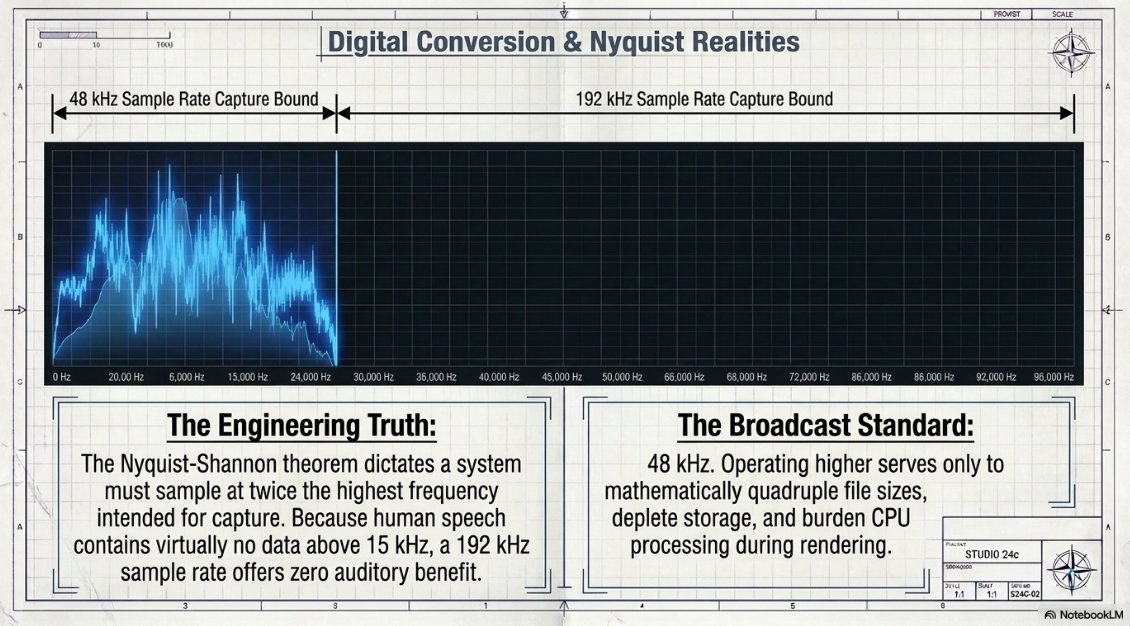
Once the analog microphone signal is properly amplified, it must be digitized for the computer. The analog-to-digital (ADC) converters are responsible for sampling the continuous electrical wave and converting it into binary data. The Studio 24c boasts high-quality converters capable of operating at resolutions up to 24-bit and supporting sample rates of 44.1, 48, 88.2, 96, 176.4, and an ultra-high-definition 192 kHz1.
While audio marketing frequently emphasizes the maximum 192 kHz capability, it is essential to understand the underlying physics of digital audio through the lens of the Nyquist-Shannon sampling theorem. The theorem states that a digital system must sample at twice the rate of the highest frequency it intends to capture. Therefore, a 192 kHz sample rate is capable of capturing acoustic frequencies up to 96 kHz. Given that the absolute maximum threshold of human hearing is roughly 20 kHz, and the human voice contains virtually no acoustic information above 15 kHz, recording a spoken-word podcast at 192 kHz offers zero discernible auditory benefit1. Recording at such excessive sample rates serves only to mathematically quadruple file sizes, rapidly deplete hard drive storage, and place an unnecessary processing burden on the computer's CPU during editing and rendering operations. For professional podcasting, setting the hardware to a sample rate of 48 kHz is the established broadcast standard, ensuring perfect fidelity of the human voice while maintaining efficient file management12.
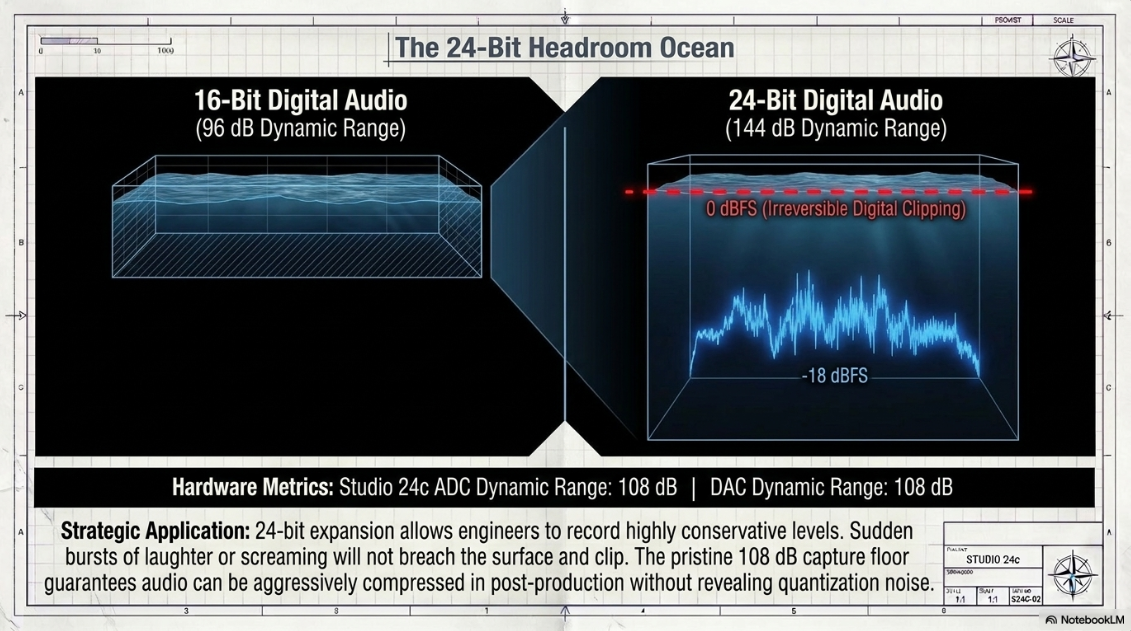
Conversely, the 24-bit depth resolution of the Studio 24c is a highly critical and beneficial specification1. Bit depth dictates the dynamic range of the digital file—the difference between the loudest possible peak and the quietest detail before encountering digital quantization noise. A 16-bit digital audio file (CD quality) possesses a theoretical dynamic range of 96 dB. A 24-bit digital file expands this theoretical limit to a massive 144 dB. This expanded digital headroom is a lifesaver in podcast production. It allows audio engineers to record the host's voice at highly conservative levels (averaging around -18 dBFS to -12 dBFS) to absolutely guarantee that sudden bursts of laughter, screaming, or percussive table strikes do not cause the audio to breach 0 dBFS and result in irreversible digital clipping7. Because the noise floor of a 24-bit file is pushed down to -144 dB, the conservative recording can later be safely amplified and normalized in post-production using heavy compression and limiting without revealing any digital quantization noise or artifacting.
The true, practical measure of a converter's quality is its actual, measured dynamic range within the circuit, rather than its theoretical digital maximum. The Studio 24c features an ADC dynamic range of 108 dB and a DAC dynamic range of 108 dB1.
A dynamic range of 108 dB is highly respectable, indicating a clean, precise conversion process that is perfectly adequate for capturing the nuances of the human voice1. However, when placed in a comparative market context, it sits slightly below the class-leading metrics of its direct competitors. For instance, interfaces like the MOTU M2 utilize premium ESS Sabre32 DAC technology to achieve a staggering 120 dBA dynamic range on their outputs and 115 dBA on their inputs19. Nevertheless, for the final delivery destination of a podcast—which is universally compressed into lossy 128 kbps or 192 kbps MP3 or AAC formats by distribution platforms like Apple Podcasts or Spotify—the 108 dB capture provided by the Studio 24c remains acoustically pristine and will never serve as the limiting factor in the audience's listening experience1.
Acoustic Monitoring, Impedance Matching, and Latency Eradication
Accurate headphone monitoring is an absolute necessity during a podcast recording session. It ensures that the hosts maintain proper microphone technique (proximity effect), allows them to identify ambient room noise or technical issues in real-time, and provides the audio feed required to converse with remote guests. The Studio 24c accommodates this with a single ¼-inch stereo headphone output situated on the rear panel1.
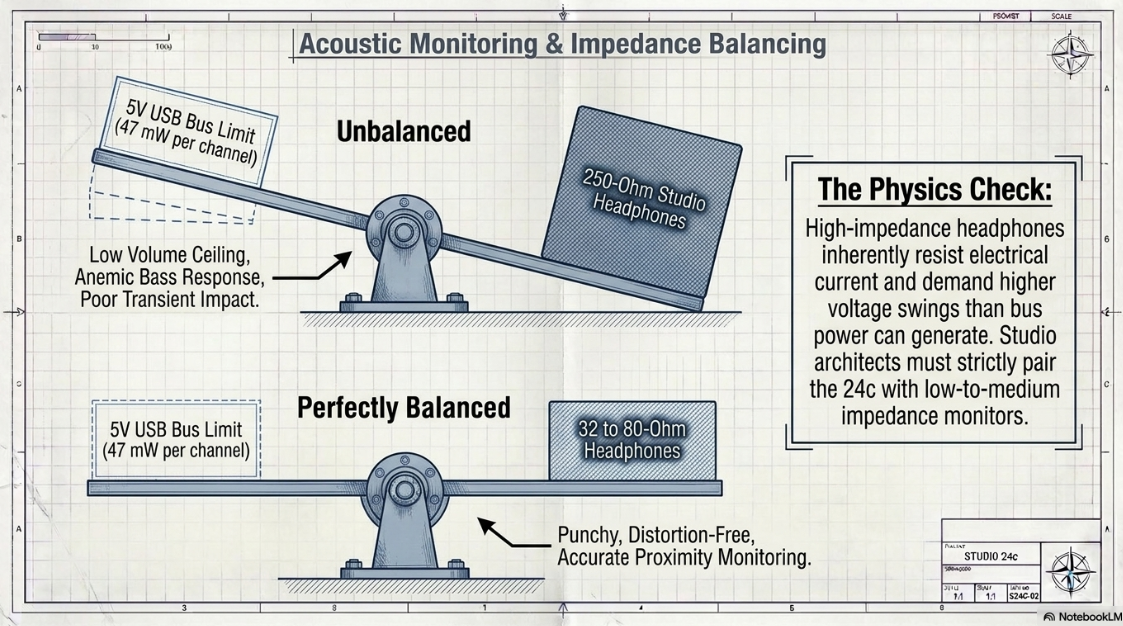
The integrated headphone amplifier delivers a maximum power output of 47 mW per channel into a 56Ω load1. It boasts an impressive, flat frequency response of 20 Hz to 20 kHz (±0.5 dBu), a dynamic range of 83 dB (A-weighted, 56Ω load), and a low THD+N of 0.01% (measured at 1 kHz, 0 dBFS, loaded)1. PreSonus officially lists the acceptable impedance working range of the amplifier as spanning from 32Ω up to 300Ω1.
While the technical specifications claim support for up to 300 ohms, the physics of acoustic amplification require a highly nuanced understanding of impedance matching to achieve professional results. Professional broadcast and podcast studios frequently utilize high-impedance, closed-back studio monitors—such as the ubiquitous Beyerdynamic DT 770 Pro 250-ohm model—because the higher mass of the voice coil generally delivers an exceptionally flat frequency response, precise transient detail, and superior acoustic isolation from the microphone21.
However, high-impedance headphones inherently resist electrical current. They require significantly higher voltage swings from the amplifier to drive the speaker cone to a given volume level compared to low-impedance consumer headphones. Because the Studio 24c is entirely constrained by the 5-volt limitation of USB bus power, its headphone amplifier physically cannot generate the high-voltage swing required to drive heavy 250-ohm drivers to their full acoustic potential1. Podcasters plugging a 250-ohm studio headphone into the Studio 24c will inevitably experience a low overall volume ceiling, a lack of transient impact (snappy consonants), and a severely anemic bass response, making it difficult to judge the proximity effect of the microphone accurately21.
To optimize the critical monitoring experience with the Studio 24c, audio engineers are strongly advised to pair the interface exclusively with low-to-medium impedance studio headphones, specifically those rated between 32Ω and 80Ω22. Studio staples such as the 32-ohm or 80-ohm variants of the Beyerdynamic DT 770 Pro, or the Audio-Technica ATH-M50x (which operates at 38 ohms), will pair perfectly21. This precise impedance matching ensures that the 47 mW amplifier can deliver loud, punchy, distortion-free monitoring to the host's ears1.
To combat the distracting psychological phenomenon of latency—the slight, disorienting delay caused by audio traveling into the computer, being processed by the software buffer, and returning to the headphones—the Studio 24c features a dedicated analog "Mixer" knob on the front panel1. This intuitive control blends the direct analog input signal (the live microphone) with the computer's digital playback stream1. By rotating the knob toward the input side, the podcaster hears their own voice instantaneously in the analog domain, completely bypassing the digital conversion process and ensuring a seamless, echo-free speaking experience that is crucial for maintaining speech fluency during long broadcasts1.
Virtual Audio Routing: Loopback Architecture and Broadcast Workflows
One of the most complex engineering challenges in modern podcast production is establishing a "mix-minus" routing setup. This is strictly required when recording remote guests over VoIP software (such as Zoom, Skype, Riverside, or Discord) while simultaneously recording high-resolution local audio into a DAW without causing destructive feedback loops or echo for the remote participant.
PreSonus addresses this complex routing requirement natively via its Universal Control software daemon, which enables a powerful virtual audio routing mechanism known as "Loopback"7. This feature allows the user to capture the audio output of one digital application running on the computer and route it directly into the input of another application24.
It is of paramount importance for studio integrators to note a critical platform discrepancy regarding this feature. Because the Studio 24c operates as a class-compliant Core Audio device on Apple hardware, the native Universal Control Loopback feature is exclusive to Windows operating systems7. Mac users purchasing this interface will find the Loopback feature absent from the control panel and must rely on purchasing third-party virtual audio cables (such as Rogue Amoeba's Loopback application or the open-source BlackHole software) to achieve identical routing24.
For Windows-based podcasters, the Universal Control software offers two distinct, highly functional Loopback modes:
Merge Loopback with 1/2: In this basic mode, the audio from the computer (e.g., the remote Zoom caller, or a YouTube video) is mathematically summed and merged directly with the live analog audio entering hardware inputs 1 and 224. While useful for simple, live-streamed gaming or basic VoIP calls, this mode is generally destructive for professional podcast post-production, as the local host and the remote guest are permanently baked together into a single audio file, eliminating the ability to apply independent volume adjustments, EQ, or compression to the different speakers24.
Dedicated Loopback Inputs: This is the preferred, professional operational mode for podcasting. When selected, the computer's playback audio (the remote guest's voice) is routed to a dedicated virtual stereo pair—specifically recognized by the DAW as driver inputs 3 and 424.
Utilizing the "Dedicated Loopback Inputs" mode, the audio engineer configures the recording session as follows to achieve a flawless remote interview:
Track 1 (Local Host): Input source set to Hardware Input 1 (The physical microphone).
Track 2 (Remote Guest): Input source set to Virtual Inputs 3 and 4 (The Loopback stream capturing the Zoom application)24.
The user must then route the output of the VoIP software to interface Outputs 1 and 2, while routing the output of the recording DAW to Outputs 3 and 4. This specific architecture prevents the remote guest from hearing an echo of themselves, effectively creating a perfect digital "mix-minus" environment entirely within the hardware drivers, negating the need for an expensive external physical mixing console24.
Software Ecosystem: Post-Production via Studio Magic
The value proposition of an audio interface extends beyond its physical components, and the Studio 24c distinguishes itself via an extraordinarily comprehensive bundled software ecosystem1. PreSonus includes a perpetual license for Studio One Artist, a highly capable, industry-standard DAW2. For podcasters, Studio One Artist is highly advantageous; its intuitive drag-and-drop workflow is perfectly suited for the rapid timeline assembly, razor editing, and crossfading required to edit long-form conversational content2.
Furthermore, the interface includes the "Studio Magic Plug-in Suite," a curated collection of premium third-party VST plugins that dramatically expand the user's post-production capabilities1. For a podcast producer, this suite provides immense, broadcast-grade mixing power that would otherwise cost hundreds of dollars to acquire independently4.
The inclusion of the Brainworx bx_opto compressor allows editors to surgically level out the dynamic range of a conversational podcast, ensuring that quiet whispers and loud laughter sit evenly at the required LUFS (Loudness Units relative to Full Scale) target for Spotify and Apple Podcasts4. The Maag Audio EQ2 is a legendary hardware emulation that can be used to impart a professional broadcast "sheen" and crisp presence to the upper frequencies of a muffled dynamic microphone, enhancing vocal intelligibility4. Additionally, tools like the SPL Attacker transient shaper can be used creatively to tame harsh plosives ("P" and "B" sounds), while the Lexicon MPX-i Reverb can be applied sparingly to simulate room ambiance if the dry recording feels unnaturally claustrophobic4. The total acoustic control afforded by the Studio Magic Suite represents a massive advantage for creators building a studio from scratch4.
Comprehensive Market Analysis: The Sub-$200 Interface Landscape
To accurately assess the Studio 24c's viability as a podcasting interface, it must be forensically evaluated against its direct competitors in the highly saturated sub-$200 market tier.
PreSonus Studio 24c vs. Focusrite Scarlett 2i2 (4th Gen)
The Focusrite Scarlett 2i2 (4th Gen) is widely considered the industry benchmark for entry-level interfaces17. For podcasters specifically, the 4th Generation Scarlett holds a massive, undeniable hardware advantage: its preamplifiers deliver a maximum of 69 dB of clean gain26. This 19 dB advantage over the Studio 24c (which provides only 50 dB) means the Scarlett can drive gain-hungry dynamic microphones like the Shure SM7B natively, completely eliminating the need for an expensive inline Cloudlifter12. Furthermore, the Scarlett features modern "Auto Gain" and "Clip Safe" DSP functionalities, which automatically analyze the host's voice to set the optimal recording level and digitally manipulate the signal to prevent distortion during sudden loud noises—advanced features that are entirely absent on the purely analog preamplifiers of the Studio 24c20.
PreSonus Studio 24c vs. MOTU M2
The MOTU M2 represents the audiophile's choice within this specific price bracket. It utilizes premium ESS Sabre32 DAC technology to achieve an industry-leading 120 dBA dynamic range on its outputs, significantly outperforming the 108 dB provided by the Studio 24c19. The M2 also features a stunning, full-color LCD screen for ultra-precise, granular visual metering, which is a significant upgrade over the 4-segment LEDs on the PreSonus chassis19. However, similar to the 24c, the MOTU M2 preamplifiers top out at approximately 60 dB of gain, which remains borderline for low-sensitivity dynamic microphones, and it notably lacks the comprehensive software bundle that makes the PreSonus so attractive to first-time studio builders19.
PreSonus Studio 24c vs. Audient EVO 4 and iD4 MkII
Audient targets both entry-level content creators and seasoned professionals with the EVO 4 and iD4 interfaces. The EVO 4 is a highly compact, plastic-enclosed, podcast-friendly interface featuring a "Smartgain" algorithm, which listens to the user's voice for 20 seconds and automatically sets the perfect gain levels20. It provides 58 dB of clean gain—enough to comfortably drive most dynamic microphones, though an SM7B might still prefer a slight inline boost20. The larger iD4 MkII utilizes massive, Class-A console-grade microphone preamplifiers derived directly from Audient's large-format analog recording consoles17. These preamplifiers are highly regarded in the industry for their sonic purity and analog warmth, generally considered acoustically superior to both the Focusrite Scarlett and PreSonus XMAX-L designs in terms of raw audio fidelity17.
PreSonus Studio 24c vs. Focusrite Vocaster Two
While the Studio 24c is marketed as a generalist interface equally suited for music production and guitar tracking, the Focusrite Vocaster Two is an interface engineered exclusively from the ground up for content creators and spoken-word podcasters18. The Vocaster boasts a massive 70 dB of gain (specifically tailored to accommodate the SM7B natively), built-in digital vocal enhancement DSP offering one-click "Clean," "Warm," "Bright," and "Radio" EQ profiles, and automatic gain staging18. Crucially for podcasting, it features a dedicated TRRS connection on the rear panel, allowing a host to plug a smartphone directly into the interface to seamlessly record live phone calls into the podcast mix, alongside a dedicated output for routing audio directly into a DSLR camera for video podcasts18. For a user exclusively focused on spoken-word podcasting without any intention of recording musical instruments, the Vocaster's highly specific feature set heavily outclasses the traditional musical architecture of the Studio 24c26.
Intra-Brand Alternative: PreSonus Studio 26c
It is highly relevant for studio architects to note that for a nominal price increase, PreSonus offers the slightly larger Studio 26c. Unlike the 50 dB limit of the 24c, the Studio 26c preamplifiers provide a massive 70 dB of native gain and a superior converter dynamic range of 114 dB12. This completely eliminates the 24c's primary bottleneck, allowing podcasters to drive gain-hungry dynamic microphones natively without external hardware12. For any podcaster committed to the PreSonus ecosystem—perhaps due to the seamless Studio One integration—the 26c is unequivocally the superior long-term hardware investment over the 24c.
Strategic Conclusions and Deployment Recommendations
Deploying the PreSonus Studio 24c as the central hub of a professional podcasting studio requires a meticulous understanding of its distinct engineering advantages and its architectural limitations.
The Studio 24c excels profoundly in its physical durability, superior software integration, and the acoustic purity of its XMAX-L preamplifiers1. The metal chassis provides excellent road-readiness, while the inclusion of the Studio One Artist DAW and the comprehensive Studio Magic Suite provides an immediate, professional-grade post-production environment that easily justifies the cost of admission for beginners seeking an all-in-one software solution4. Furthermore, the Windows-native Loopback capabilities via Universal Control provide the exact virtual digital routing necessary for complex remote-interview setups, eliminating the need for external mixing boards24.
However, the Studio 24c possesses two critical hardware bottlenecks dictated by its reliance on 5-volt bus power that studio architects must proactively overcome: Firstly, the 50 dB gain ceiling dictates that the interface cannot independently drive industry-standard dynamic broadcast microphones (such as the Shure SM7B or Rode Procaster) to acceptable recording levels without introducing severe preamplifier noise1. Podcasters deploying this interface must budget an additional $100 to $150 per microphone for an inline active preamplifier (such as a Cloudlifter CL-1) to achieve the necessary 60 to 70 dB of clean gain required for professional broadcast standards10. Secondly, peaking at 47 mW into 56Ω, the headphone output physically lacks the voltage necessary to accurately drive high-impedance (250-ohm) reference headphones1. Podcasters must ensure their headphone ecosystem consists of lower-impedance models (specifically between 32Ω to 80Ω) to guarantee adequate monitoring volume and accurate transient response22.
If a podcaster is willing to integrate a mic activator and utilize low-impedance headphones, the PreSonus Studio 24c will deliver pristine, transparent, high-definition vocal recordings capable of competing with any top-tier broadcast. However, for content creators seeking a streamlined, "all-in-one" hardware solution that requires no supplementary outboard gear, competing modern interfaces offering 69 dB to 70 dB of native gain out of the box—such as the Focusrite Scarlett 2i2 (4th Gen), the Focusrite Vocaster, or PreSonus's own Studio 26c—represent a more economically efficient and operationally simple path to broadcast-quality audio12.
Ultimately, the PreSonus Studio 24c is a meticulously crafted piece of audio hardware that demands an equally meticulous understanding of gain staging, impedance matching, and digital signal flow to extract its absolute maximum potential in a spoken-word environment.
Works cited
PreSonus Studio 24c Audio Interface - Knight Sound & Lighting, https://goknight.com/presonus-studio-24c-audio-interface/
PreSonus Studio 24c 2x2 USB-C /24-bit/192kHz with 2 Mic inputs and Studio One Artist, https://www.markertek.com/product/pre-studio-24c/presonus-studio-24c-2x2-usb-c-24-bit-192khz-with-2-mic-inputs-and-studio-one-artist
PreSonus Studio 24c review - MusicRadar, https://www.musicradar.com/reviews/presonus-studio-24c-review
PreSonus Studio 24C 2x2 USB-C Audio Interface - Long & McQuade, https://www.long-mcquade.com/129576/Pro-Audio-Recording/Audio-Interfaces/Presonus/Studio-24C-2x2-USB-C-Audio-Interface.htm
Studio 24C 2x2 Audio/MIDI Interface Bundle with Zoom Podcast Mic - Adorama, https://www.adorama.com/presonus-studio-24c-usb-c-audio-interface-zoom-podcast-mic-bundle/p/prsst24cb
PreSonus Studio 24C Audio Interface - Huss Licht & Ton, https://www.huss-licht-ton.de/product_info.php/en/PreSonus-Studio-24C-Audio-Interface/info/32364.html
PreSonus Studio 24c, 2-In/2-Out, 192 kHz, USB-C audio interface with software bundle including Studio - Manuals.plus, https://manuals.plus/m/73245b59e135f1b216bc75fe5ea8cbb5e7a99cc41adfa65523090255e616e223.pdf
PreSonus Studio 24c USB-C Audio Interface - What To Know & Where To Buy | Equipboard, https://equipboard.com/items/presonus-studio-24c-usb-c-audio-interface
PreSonus Revelator io44 USB-C Audio Interface With Fender Studio Pro (6-Month Demo), https://www.guitarcenter.com/PreSonus/Revelator-io44-USB-C-Audio-Interface-1500000367863.gc
Cloudlifter CL-4 Mic Activator - Ultra-Clean Microphone Preamp Gain - Desertcart, https://www.desertcart.ae/products/2918487-cloud-microphones-cloudlifter-cl-4-mic-activator-ultra-clean-microphone
PreSonus Studio 24c Product Review - Frieve, https://audioreview.frieve.com/products/en/presonus-studio-24c/
PreSonus Studio 26c USB Audio Interface Review - GameSpace.com, https://gamespace.com/all-articles/news/presonus-studio-26c-usb-audio-interface-review/
PreSonus Revelator Dynamic USB Microphone For Recording Streaming Podcasting - Music Village, https://musicvillageusa.com/products/presonus-revelator-dynamic-usb-recording-microphone
Buying the Shure SM7B, what other components do I need to hook it up? - Reddit, https://www.reddit.com/r/podcasting/comments/1awreok/buying_the_shure_sm7b_what_other_components_do_i/
Interface Audio : Guide Complet pour Choisir le Meilleur Modèle - Artistes Festival, https://artistesfestival.com/archive/guide-complet-interface-audio/
I just purchased my Studio 24c : r/StudioOne - Reddit, https://www.reddit.com/r/StudioOne/comments/oxs7yf/i_just_purchased_my_studio_24c/
Best audio interface 2026: For home recording and more - MusicRadar, https://www.musicradar.com/news/the-best-audio-interfaces
Focusrite Vocaster One review - MusicRadar, https://www.musicradar.com/reviews/focusrite-vocaster-one
Comparing PreSonus IOSTATION 24C vs Focusrite 2i2 vs MOTU M2 vs ... - B&H, https://www.bhphotovideo.com/c/compare/PreSonus_IOSTATION_24C_vs_Focusrite_2i2_vs_MOTU_M2_vs_PreSonus_Studio_24c/BHitems/1538083-REG_1479275-REG_1514482-REG_1453382-REG
Best audio interfaces for for studios, bedrooms and podcasters in 2025 - MusicTech, https://musictech.com/guides/buyers-guide/best-audio-interfaces-for-studios-bedrooms-podcasters/
How To Set Up A Home Recording Studio For Beginners - gearnews.com, https://www.gearnews.com/home-recording-studio/
Motu M2 Review (Audio Interface) | Page 8, https://www.audiosciencereview.com/forum/index.php?threads/motu-m2-review-audio-interface.19911/page-8
Best mixing headphones in the £200-300 range? : r/mixingmastering - Reddit, https://www.reddit.com/r/mixingmastering/comments/t6h41t/best_mixing_headphones_in_the_200300_range/
Studio 24c - Business profile for presonusmusic.com provided by Network Solutions, https://pae-web.presonusmusic.com/downloads/products/pdf/Studio_24c_OwnersManual_EN_26052020.pdf
Best Audio Interface for Home Studio 2026 | 7 Picks - Musiciangoods, https://musiciangoods.com/el-gr/blogs/mixing-mastering/best-audio-interface-for-home-studio
Which Audio Interface for Podcasting? Here's 4 from Focusrite and Rode, https://thegrowthagency.co.uk/news/which-audio-interface-for-podcasting-heres-4-from-focusrite-and-rode
Best Audio Interfaces UK (2026) – Top Picks for Singing, Recording & Home Studios, https://thevocalcoachlondon.com/voice-shop-audio-interfaces/
Should I get a Presonus Studio 24c or a Focusrite Scarlett Solo 3rd Gen? - Reddit, https://www.reddit.com/r/homerecordingstudio/comments/ksh40t/should_i_get_a_presonus_studio_24c_or_a_focusrite/











