

The Acoustic and Digital Foundations of Podcast Production
The transformation of podcasting from an esoteric medium of amateur broadcasting into a multibillion-dollar global industry has necessitated a rigorous standardization of audio engineering practices. For an audio production to compete in the contemporary digital marketplace, it must adhere to strict technical specifications that govern file formats, bitrates, sample rates, channel configurations, and loudness normalization. The convergence of these technical parameters directly dictates the end-user experience, influencing not only the clarity and intelligibility of the spoken word but also the efficiency with which audio files are distributed across cellular networks and content delivery networks.
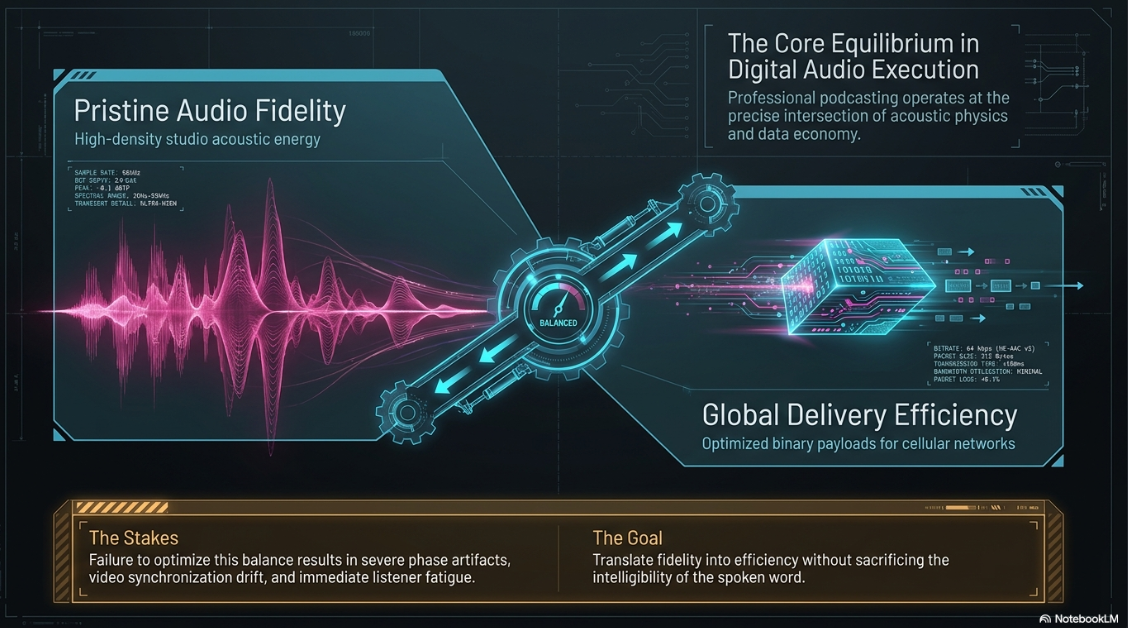
Navigating the labyrinth of digital audio execution requires a profound understanding of how acoustic energy is translated into binary data, manipulated within digital audio workstations such as Audacity, and ultimately decoded by consumer playback devices. A critical tension exists in podcast production between preserving pristine audio fidelity and minimizing file sizes for optimized streaming. This delicate equilibrium is struck through strategic, highly informed decisions regarding lossy versus lossless data compression, spatial channel allocation, and stringent adherence to international broadcasting loudness standards, specifically those measured in Loudness Units relative to Full Scale.
The underlying technical architecture of a podcast determines its compatibility across universal platforms such as Apple Podcasts, Spotify, and YouTube Music. A failure to understand the second-order implications of improper sample rate conversion or aggressive dynamic range compression can result in severe phase artifacts, synchronization drift in video simulcasts, and listener fatigue. This analysis provides an exhaustive examination of the technical frameworks required for professional podcast audio execution, with a specialized focus on optimizing recording, mixing, and exporting workflows within Audacity.
Architectures of Audio File Formats: Uncompressed, Lossless, and Lossy
The selection of an audio file format is not a static decision but a fluid strategy that changes depending on the specific phase of the production lifecycle. The workflow of a professional podcast requires distinct file architectures for the recording, post-production, archival, and final distribution stages. Audio file formats are broadly categorized into three distinct domains: uncompressed, lossless compressed, and lossy compressed data streams.
Uncompressed Data Streams: The Production Mandate
During the recording and editing phases, maintaining the highest possible data density is paramount. Uncompressed formats store audio data exactly as it was captured by the analog-to-digital converter, ensuring that no acoustic information is discarded. Pulse-Code Modulation is the standard method used to digitally represent sampled analog signals1. The most ubiquitous container for Pulse-Code Modulation audio is the Waveform Audio File Format, universally recognized by the .wav extension1.
Waveform Audio File Format files preserve every nuance, transient, and frequency response captured by the microphone, serving as an identical digital replica of the source audio2. Because these files do not utilize data compression algorithms, they demand significant storage capacity, frequently consuming tenfold the size of a standard distribution file3. The primary advantage of editing in an uncompressed format is that it provides the digital audio workstation with complete data sets. This allows algorithms for equalization, dynamic compression, and noise reduction to operate efficiently without amplifying the digital artifacts that are inherently present in compressed audio2. Uncompressed files handle editing and processing better because they retain all original data, whereas processing audio in a lossy format inevitably amplifies encoding artifacts2. Furthermore, premium platforms like Apple Podcasts Connect natively demand uncompressed formats for subscriber audio, mandating that high-fidelity sources be uploaded in this format to bypass secondary degradation1.
Lossless Compression: Archival and High-Fidelity Delivery
While uncompressed files are vital for active production, they are highly inefficient for long-term storage. The Free Lossless Audio Codec represents an intermediate architecture that bridges the gap between uncompressed fidelity and storage economy1. The codec utilizes mathematical compression algorithms to reduce the file size of an uncompressed recording by approximately fifty to sixty percent without discarding a single bit of original audio data3. The mechanism functions similarly to a digital ZIP archive designed specifically for acoustic data, perfectly reconstructing the original waveform upon playback without sacrificing studio fidelity3.
The Free Lossless Audio Codec is highly recommended for archival workflows where the producer cannot afford any lossy step but requires smaller files than standard uncompressed formats5. It allows producers to store master copies of episodes in pristine quality while consuming significantly less hard drive space6. While highly efficient, this format is not universally supported by legacy consumer playback hardware, restricting its utility as a primary mass-market distribution format2. However, Apple Podcasts Connect does accept these files for premium subscriber audio alongside uncompressed formats, provided the audio is formatted according to strict sampling specifications1.
Lossy Compression: The Syndication Standards
To distribute podcasts globally over variable internet bandwidths, the audio industry relies almost exclusively on lossy compression algorithms. These sophisticated codecs utilize complex psychoacoustic models to analyze the audio signal and permanently discard data that the human ear is mathematically unlikely to perceive, a phenomenon known in acoustic physics as auditory masking2. While this process results in a permanent technical degradation of the audio, it reduces file sizes by up to ninety percent, enabling seamless streaming and rapid downloads3.
The MPEG-1 Audio Layer III format, universally known as MP3, remains the undisputed standard for podcast syndication4. Despite being developed in 1993, its near-universal compatibility across every digital device, operating system, media player, and podcast aggregator guarantees that the file will play reliably for any listener worldwide3. The architecture is highly effective for spoken-word content, offering near-universal compatibility, fast transfers, and reliable metadata support3. However, MP3 permanently discards audio data and can introduce high-frequency roll-off, phase issues, and inter-sample clipping3. When files are repeatedly compressed and decompressed in a lossy format, worsening artifacts such as warbling, rasping, crackling, or ringing may suddenly appear3. Furthermore, MP3 files rely on ID3v1 and ID3v2 metadata tagging systems to embed episode titles, show notes, and cover art directly into the audio file's binary header, a critical requirement for proper display in RSS feeds2.
Advanced Audio Coding, frequently delivered within an M4A or MP4 container, was designed directly as the technological successor to the aging MP3 standard3. This format utilizes more advanced filter banks and superior quantization coding rules, delivering noticeably better clarity and high-frequency preservation than an MP3 at identical file sizes3. Because of its superior mathematical efficiency, it is the default processing standard for Apple platforms, modern YouTube streaming, and professional broadcast workflows3. Apple Podcasts strongly recommends delivering RSS feed audio in this format, specifically within an MP4 container, due to its optimal streaming efficiency and accurate seeking capabilities1. A 192 kilobits per second Advanced Audio Coding file frequently exhibits the warmth and clarity of a 256 kilobits per second MP3, yielding a twenty to thirty percent reduction in required bandwidth10.
Containers Versus Codecs and Video Cross-Compatibility
A frequent source of technical confusion arises from the distinction between audio codecs and file containers. A codec is the mathematical algorithm used to encode and compress the audio, while the container is the structural wrapper that holds the encoded audio data and its associated metadata5. For instance, M4A and Advanced Audio Coding are often discussed interchangeably, but they are technically distinct: M4A is the Apple-designed container, while Advanced Audio Coding is the codec residing inside it5.
When podcasting workflows intersect with video production, container formats become increasingly complex. The dominant video container is MP4, which typically houses Advanced Audio Coding for the audio track and H.264 or H.265 for the video track5. Apple's proprietary MOV container functions similarly to MP4, while WebM is an open-source container utilized by Google Meet and browser-based tools, typically utilizing lossy audio algorithms like Opus or Vorbis5. Ogg Vorbis is an open-source, patent-free lossy format that uses a variable bitrate model to handle complex acoustic transients efficiently3. It is widely used across the gaming industry and serves as a core delivery format for platforms like Spotify3.
Format Optimization for Machine Transcription
The proliferation of artificial intelligence transcription services has introduced a new variable into file format selection. Audio and video transcription tools accept a wide range of formats by extracting the audio track first, meaning the container choice matters less than the underlying audio clarity5. For speech recordings intended for transcription, an MP3 at 192 kilobits per second in mono is the practical default, providing small files, universal support, and sufficient accuracy5. Transcription models typically resample the audio internally to 16 kilohertz, rendering ultra-high sample rates unnecessary for the transcription phase5. A one-gigabyte video file and a fifty-megabyte audio file carrying identical dialogue will produce identical transcripts; however, the audio-only format is vastly more efficient for upload speeds and cloud processing5.
Parameter Optimization: Sample Rates, Bit Depths, and Bitrate Dynamics
Beneath the overarching file format lies the foundational mathematics of digital audio sampling. The resolution, frequency response, and data density of a podcast are rigidly governed by the sample rate, bit depth, and bitrate chosen during the recording and export workflows.
The Mathematics of Sample Rates and Video Synchronization
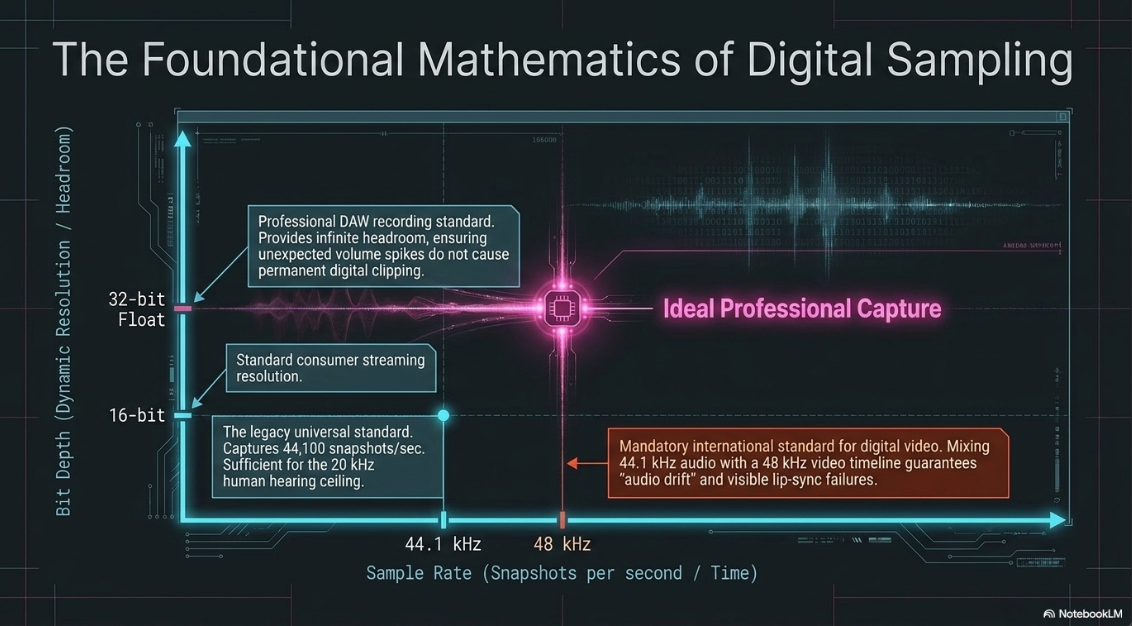
Digital audio is not a continuous waveform; rather, it is a rapid series of digital snapshots taken of an analog electrical signal every second10. The sample rate dictates exactly how many of these snapshots are captured per second, measured in Hertz or kilohertz12. According to the fundamental principles of digital audio, a sample rate must be at least twice the highest frequency intended to be recorded to prevent digital aliasing. Because human hearing generally reaches its ceiling at 20 kilohertz, a sample rate of 44.1 kilohertz, which captures 44,100 snapshots per second, is mathematically sufficient to reconstruct the entire spectrum of human hearing5.
For audio-only podcasts, 44.1 kilohertz remains the universal standard, deeply integrated into consumer playback systems as a legacy of the Compact Disc specification1. However, an increasingly vital consideration arises for podcasts that feature a video component, such as a simulcast on YouTube or Spotify video. The international standard for digital video production relies strictly on a 48 kilohertz sample rate, capturing 48,000 snapshots per second10. If an audio track is recorded at 44.1 kilohertz and subsequently aligned with a 48 kilohertz video file on a nonlinear editing timeline, a phenomenon known as audio drift will inevitably occur10. Because the digital clocks driving the audio and video are fundamentally misaligned, the audio will slowly fall out of synchronization with the visual data. By the conclusion of a standard thirty-minute podcast, the speaker's vocalizations will visibly mismatch their lip movements10. Therefore, 48 kilohertz must strictly be adopted whenever video synchronization is required10.
Bit Depth and the Digital Noise Floor
Bit depth controls the dynamic resolution of each individual audio snapshot, determining the theoretical noise floor and the available dynamic range before digital distortion, known as clipping, occurs. Most consumer platforms stream 16-bit audio, but capturing audio at 24-bit or 32-bit float during the recording and editing phases is standard professional practice1. A 32-bit float environment within a digital audio workstation like Audacity effectively provides infinite headroom9. If a guest unexpectedly shouts and drives the analog signal far above zero decibels relative to full scale, the audio information is mathematically preserved rather than permanently destroyed. This allows the editor to simply reduce the gain in post-production to restore a clean, unclipped waveform9.
Bitrate Allocation Strategies
While sample rate determines the frequency response and bit depth determines dynamic range, bitrate defines the data density of the compressed file during playback, measured in kilobits per second2. A high bitrate creates a dense file that closely mimics a lossless master, while a low bitrate aggressively pixelates the sonic image, introducing phase artifacts characteristic of highly compressed digital media10. If the bitrate drops below functional thresholds, the resulting audio degenerates into a bubbly, gargling, honky presentation that severely limits intelligibility and listener enjoyment16.
The optimization of bitrates requires balancing server storage limits, listener cellular bandwidth constraints, and perceived audio quality. For the MP3 format, the architectural ceiling is 320 kilobits per second3. However, utilizing the maximum bitrate for a spoken-word podcast is a severe misallocation of digital resources. The human ear cannot reliably distinguish a human voice reproduced at 320 kilobits per second from the same voice at 192 kilobits per second, rendering the excess data wasteful10.
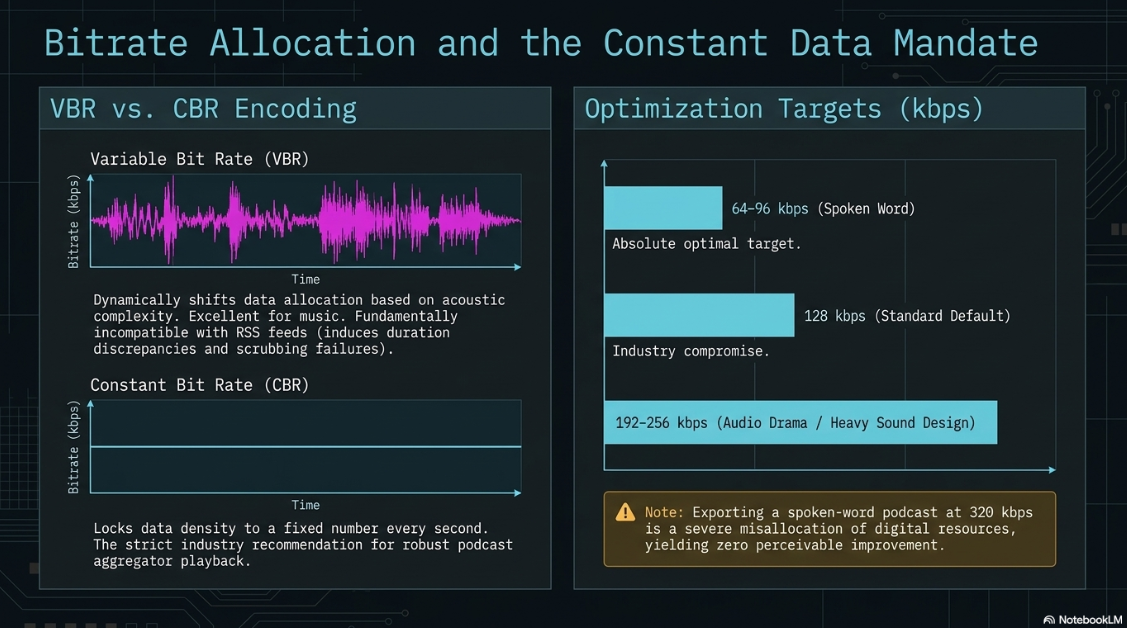
Industry standards recommend specific bitrate ranges based on content typology. For speech-only, long-form conversational podcasts, a range of 64 to 96 kilobits per second in mono is the absolute optimal target7. This density delivers intelligible audio while guaranteeing that the file sizes remain exceptionally small, permitting rapid downloads on limited mobile data connections9. A setting of 128 kilobits per second serves as an industry compromise, performing exceptionally well for voice work and basic audio monitoring, and is widely considered the safest default for standard syndication3. Conversely, bitrates spanning 192 to 256 kilobits per second are reserved strictly for highly produced narrative podcasts, audio dramas, or shows containing dense stereophonic musical arrangements where stereo imaging and crisp transient preservation are critical2.
Encoding Modes: Constant, Variable, and Average Bitrates
When exporting a lossy file, encoding algorithms offer different operational modes to allocate data. Variable Bit Rate processing dynamically shifts the bitrate depending on the momentary complexity of the audio14. During a moment of profound silence, the variable algorithm drops the bitrate down to nearly zero, whereas during a dense musical introduction, it allocates maximum bandwidth14. This process yields highly optimized, smaller files with excellent sound quality, and is particularly favored for music distribution where dynamic complexity fluctuates wildly14. Average Bit Rate encoding functions similarly, attempting to maintain a target data rate across the entire file while allowing some minor fluctuations19.
However, for podcast syndication via RSS feeds, Constant Bit Rate encoding is strictly recommended by industry hosting platforms and playback systems2. This mode locks the data density to a fixed number, ensuring that exactly 128 kilobits are processed every second regardless of acoustic complexity14. While slightly less space-efficient than variable algorithms, Constant Bit Rate guarantees robust stability across streaming protocols. Variable files can frequently cause playback errors in podcast aggregator applications, leading to inaccurate duration reporting, scrubbing failures, or buffer stuttering when streaming over inconsistent internet connections2.
The Spatial Domain: Stereophonic versus Monaural Configuration
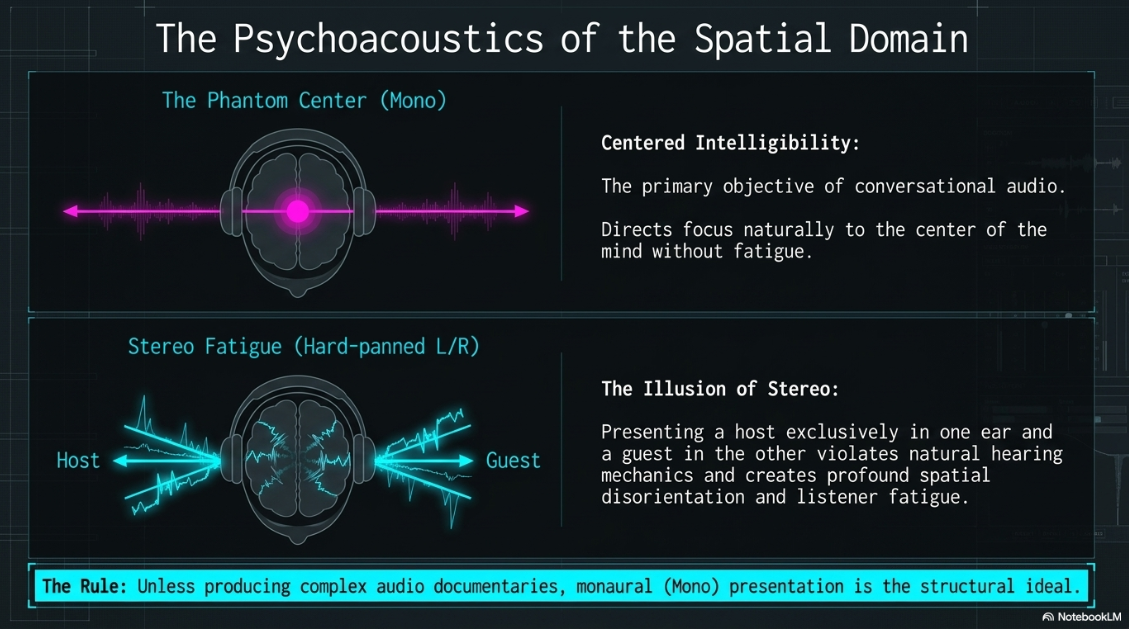
One of the most profound, yet systematically misunderstood, decisions in digital audio execution is channel configuration. A monaural audio file utilizes a single audio channel, projecting a phantom center image where the sound appears to originate from a single, unified point7. A stereophonic file utilizes two discrete channels—left and right—creating a wide soundstage capable of demonstrating directionality, depth, perspective, and spatial separation12.
Psychoacoustics of the Phantom Center
The human auditory system relies on infinitesimal time and intensity differences between the left and right ears to localize sound sources in three-dimensional space. In music production, stereo separation is mandatory to isolate instrumentation and create an immersive, realistic soundscape21. However, the medium of podcasting operates under entirely different psychoacoustic paradigms. In a standard interview or monologue, presenting the host exclusively in the left ear and the guest exclusively in the right ear creates a profoundly disorienting and fatiguing experience for headphone users. For spoken-word dialogue, the primary objective is centered intelligibility, which is natively achieved through a monaural presentation17.
Stereo configurations in podcasting are justifiable only under highly specific conditions: when utilizing complex sound design for an audio documentary, true-crime thriller, or horror podcast, or when heavily featuring stereophonic music tracks17. For the vast majority of conversational podcasts, the spatial information provided by a stereo field adds zero narrative value and introduces significant technical detriments13.
Bitrate Economics of Channel Allocation
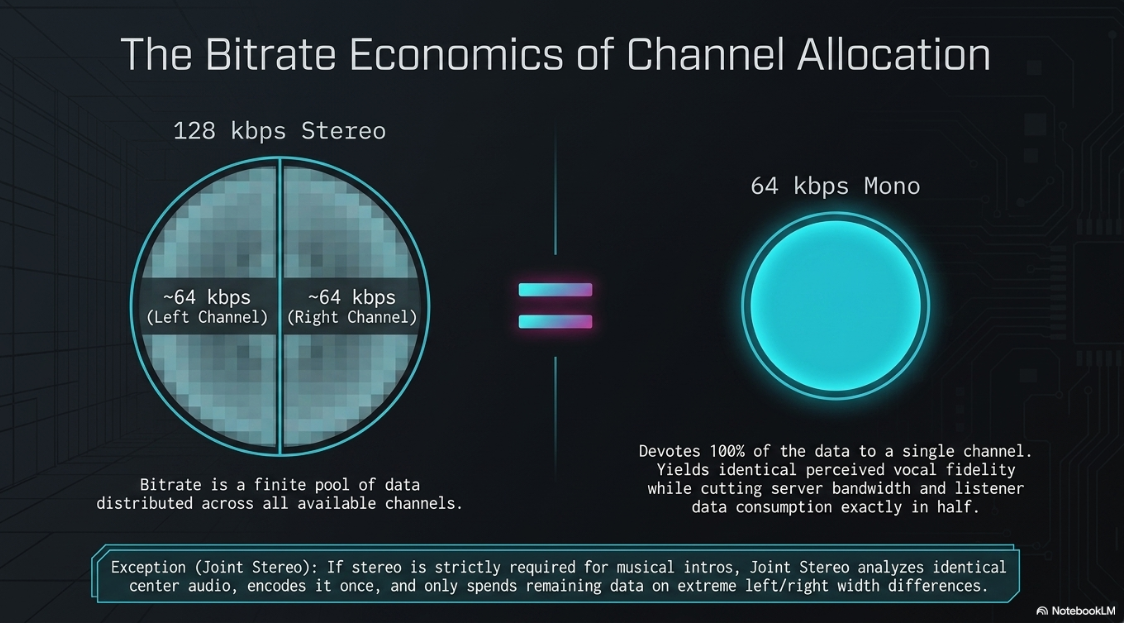
The mathematical relationship between channel configuration and bitrate fundamentally favors monaural formatting for digital efficiency. Bitrate measures the total data allocated to the entire file per second. If a podcast is exported as a 128 kilobits per second stereo file, that pool of data must be divided across the two channels, resulting in roughly 64 kilobits of resolution for the left channel and 64 kilobits for the right channel16.
Conversely, if that same podcast is exported as a 128 kilobits per second mono file, all 128 kilobits are devoted exclusively to the single audio channel, significantly increasing the mathematical fidelity of the vocal recording16. Consequently, an audio engineer can export a mono file at 64 kilobits per second and achieve identical perceived vocal fidelity as a 128 kilobits per second stereo file, while simultaneously cutting the total file size exactly in half7. This fifty percent reduction in file size is paramount in the podcasting industry. Hosting providers frequently impose strict monthly data upload limits or bandwidth caps21. Furthermore, listeners utilizing restrictive cellular data plans benefit immensely from the rapid download speeds of a thirty-megabyte mono episode compared to a sixty-megabyte stereo equivalent9.
Joint Stereo Processing and Phase Relationships
In digital environments like Audacity, microphones are frequently captured as dual mono tracks, where a single microphone's signal is wastefully duplicated across the left and right channels22. The presence of two identical tracks in a dual mono configuration within a stereo container offers absolutely no sonic benefit; it merely wastes data capacity and forces the lossy encoding algorithm to allocate precious bits to redundant information24. When both sides of a dual mono file are inadvertently inverted in phase, they can counteract each other and drastically reduce the perceived volume of the audio file25.
To circumvent these inefficiencies when a stereo export is strictly required for musical elements, Joint Stereo encoding can be utilized. The Joint Stereo algorithm analyzes the left and right channels, isolates the identical audio that forms the center image, encodes it once, and then encodes only the unique difference signals for the extreme left and right sides14. This optimization prevents the lossy encoder from wasting bandwidth on duplicate dialogue26. At bitrates of 160 kilobits per second and below, Joint Stereo processing significantly improves the sound quality of the converted audio26. However, if phase relationships between multiple microphones were not managed properly during the physical recording phase, Joint Stereo processing can introduce severe phase artifacts and comb filtering3. A rigorous professional guideline demands listening to the stereo mix collapsed to a mono downmix prior to export. This ensures that the phase relationships are clean and will not fall apart if the encoder aggressively utilizes Joint Stereo processing3.
Loudness Normalization and Dynamic Range Control
The historical "loudness wars," wherein audio was aggressively compressed to be louder than competing content, severely degraded dynamic range and auditory comfort. Modern digital broadcasting relies entirely on intelligent loudness normalization. For a podcast listener, inconsistent volume is the fastest catalyst for audience abandonment. If an audience member must constantly manipulate their physical volume dial to decipher a whispered anecdote and subsequently protect their ears from a thunderous laugh or explosive intro music, the audio execution has failed fundamentally27.
Deciphering the LUFS Algorithm
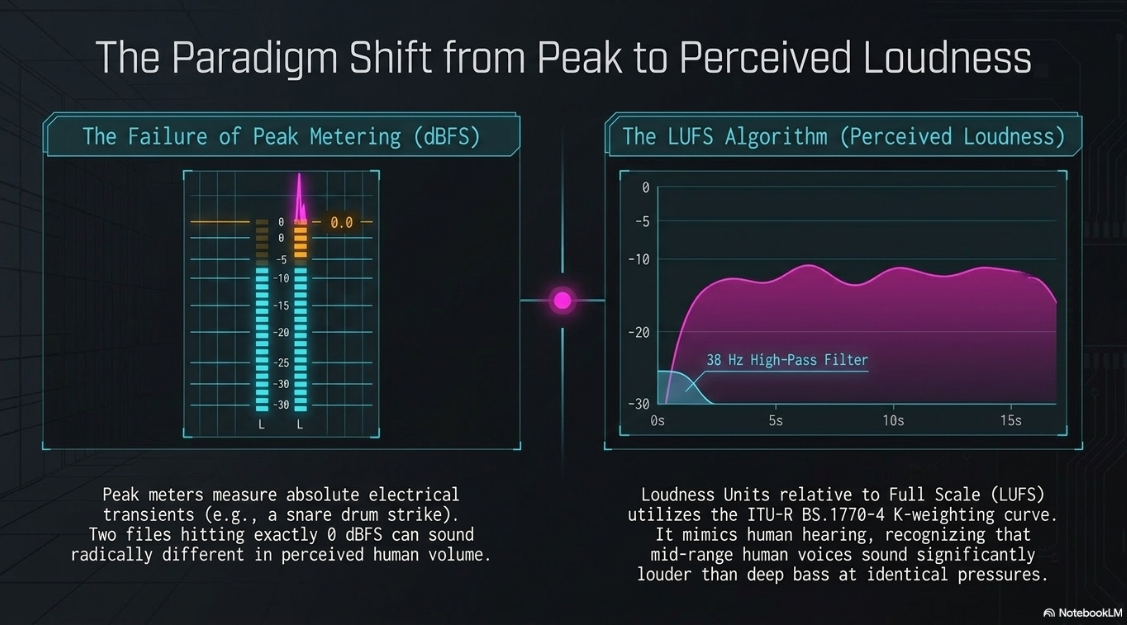
Traditional digital metering evaluates the absolute electrical peak of a waveform, known as Decibels relative to Full Scale10. Peak metering is fundamentally flawed for judging human auditory perception. A momentary high-frequency transient, such as a snare drum strike or a hard consonant vocalization, registers extremely high on a peak meter but contains very little sustained acoustic energy10. Two completely different audio signals can register the exact same peak decibel level but exhibit radically different perceived loudness based on the density and frequency spectrum of the material12.
To solve this discrepancy, the broadcasting industry adopted Loudness Units relative to Full Scale, interchangeably referred to as LKFS10. This metric represents the perceived loudness of audio averaged over time, utilizing complex algorithms like the ITU-R BS.1770-4 K-weighting curve10. This curve utilizes a two-stage biquad filter, incorporating a high-shelf pre-filter and a high-pass filter at 38 Hertz, to approximate equal-loudness perception30. It mimics human hearing sensitivity, recognizing that mid-range frequencies where the human voice resides sound significantly louder to the ear than deep bass frequencies at identical physical pressures12.
Loudness measurement occurs across three distinct temporal windows:
Momentary Loudness: A 400-millisecond sliding window evaluating instantaneous perceived volume, used to spot brief peaks or dips30.
Short-Term Loudness: A 3-second sliding window that smooths out immediate variations, useful for monitoring overall program level30.
Integrated Loudness: A gated measurement averaged across the entire duration of the audio file30.
Integrated Loudness is the definitive number that streaming platforms and broadcasters use to judge compliance30. The algorithm utilizes an absolute gate at -70 LUFS to ignore profound silence, and a relative gate, typically set at -10 Loudness Units below the ungated mean, to ignore long stretches of ambient room tone or pauses30. This ensures that the final loudness score reflects only the actual programmatic content rather than dead air30. Furthermore, the Loudness Range metric evaluates the difference between the quietest and loudest Short-Term measurements, typically spanning the 10th to 95th percentile. A high Loudness Range indicates wide dynamic range, while a low score indicates heavily compressed material30.
True Peak Metering and Inter-Sample Clipping
While Loudness Units govern the average perceived volume, True Peak oversees the absolute ceiling of the digital signal. Standard digital peak meters calculate the volume of individual, discrete samples. However, when the digital data is converted back into an analog sound wave by a consumer Digital-to-Analog Converter, the continuous analog wave interpolating between two maximum digital samples can physically arc higher than the digital samples themselves. This phenomenon is known as inter-sample clipping3.
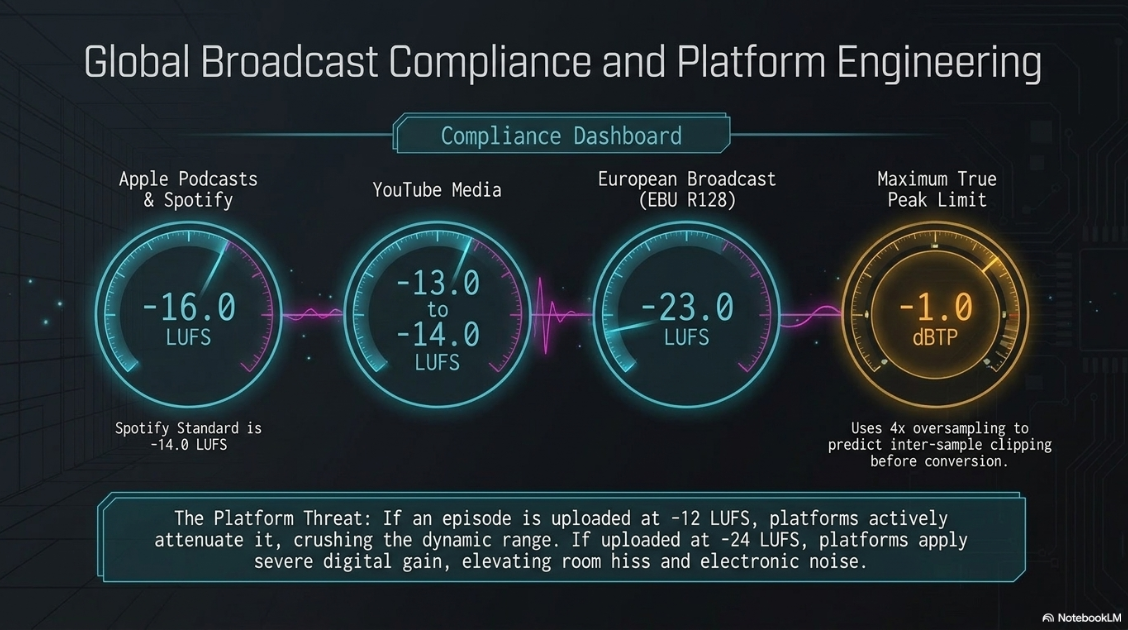
True Peak meters utilize oversampling, typically four times the base rate, to mathematically predict and measure these analog peaks before they occur in the analog domain30. Professional broadcasting standards mandate a generous headroom ceiling of -1.0 or -1.5 True Peak to prevent inter-sample clipping from degrading the audio during the destructive lossy encoding process1. If an audio file hits exactly zero decibels relative to full scale, the heavy mathematical strain placed on the lossy encoder's reconstruction filters will invariably result in harsh, digital distortion artifacts3. By managing high-frequency energy and setting generous True Peak limits, producers prevent encoders from introducing phase artifacts or dropping details to stay within the target bitrate3.
Global Broadcast Standards and Platform Compliance
Digital content distributors utilize LUFS algorithms to seamlessly normalize the playback level of varying media. If a podcast is submitted at an excessively loud -12 LUFS, platforms like Apple Podcasts or Spotify will actively attenuate the audio downward to meet their target standard, stripping the content of its carefully engineered dynamic range and making it sound flat10. Conversely, if an episode is uploaded at an anemic -24 LUFS, platforms will apply severe digital gain, simultaneously elevating the underlying noise floor, room reverberation, and electronic hiss10. At the ideal target, platforms bypass additional processing, preserving the producer's original intent10.
A critical bifurcation in standards occurs based on channel configuration. The mathematical sum of a dual-channel stereo mix results in a three decibel increase in acoustic energy over a single-channel mono mix24. As a result, the perceived equivalent of a -16 LUFS stereo mix is a -19 LUFS mono mix9. Many legacy tools require the user to explicitly target -19 LUFS for mono audio to achieve parity with stereo broadcast standards9. Modern digital audio workstations compensate for this discrepancy using specialized settings to align the math internally24.
Advanced Audio Execution Workflows in Audacity
The theoretical frameworks of sample rates, channel configuration, and perceived loudness must be seamlessly translated into mechanical execution within a digital audio workstation. Audacity provides a robust, open-source architecture capable of executing professional podcast delivery, provided the engineer navigates its specific routing matrices and effect modules with precision.
Resolving Channel Matrices and Panning Assignments
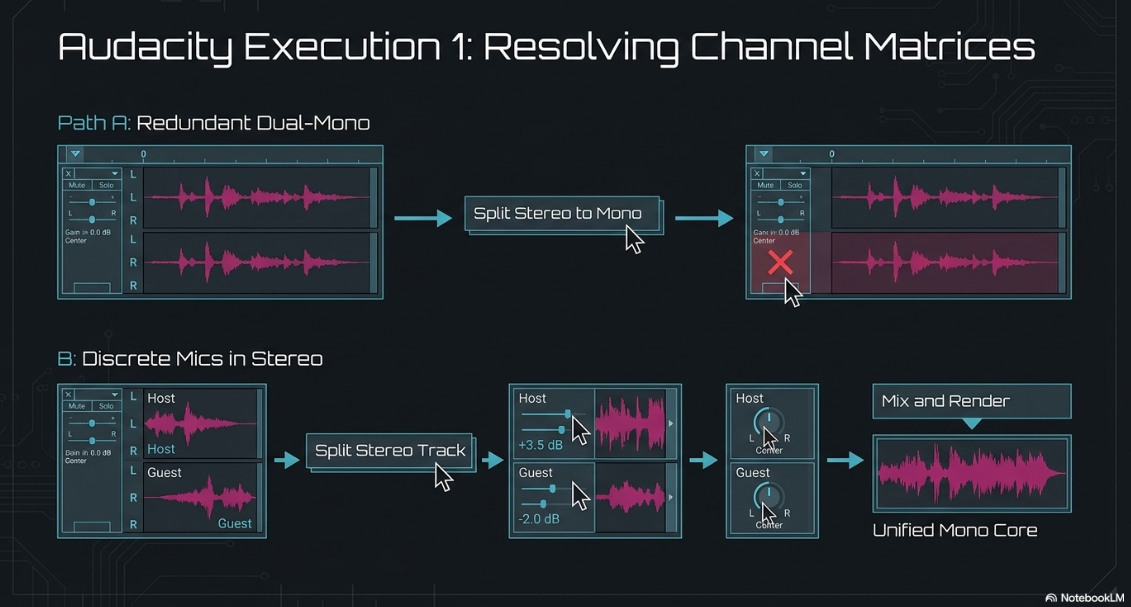
Audacity natively operates in stereo when standard multi-channel interfaces are connected, which frequently results in dual mono recordings where a single microphone's signal is wastefully duplicated across the left and right channels, or where one host is hard-panned left and another is hard-panned right21. Before dynamic processing occurs, these matrices must be resolved into centered, mono channels.
If a single voice was recorded onto a stereo track, yielding identical left and right channels, the conversion must be executed to save data and ensure proper processing. The execution involves navigating to the Track Control Panel situated on the left side of the waveform. Accessing the Track Name Drop-Down Menu and selecting the "Split Stereo to Mono" command separates the interlocking channels into two independent mono tracks23. Closing the redundant second track using the graphical "X" button preserves a clean, single-channel mono source23.
If the recording features two discrete microphones recorded simultaneously into a stereo format, mixing them directly risks poor balance. The engineer must access the Track Drop-Down Menu and select the "Split Stereo Track" command33. This fractures the file into independent "Left" and "Right" tracks that remain panned to the far left and right. After adjusting the individual gain sliders to balance the volumes between the two speakers, the panning assignments must be converted from Left/Right to Mono via the Track Drop-Down Menu22. Finally, highlighting both tracks and navigating to the "Mix and Render" command combines the two balanced elements into a single, unified mono track, effectively neutralizing the artificial panning while preserving the edited amplitude balance23. The "Mix and Render" command permanently renders to the waveform all real-time transformations, including track gain and panning, replacing the selected tracks with a new unified entity23. Alternatively, the "Mix Stereo Down to Mono" command mathematically averages the left and right channels into one track without rendering real-time transformations16.
Non-Destructive Editing and Zero-Crossing Management
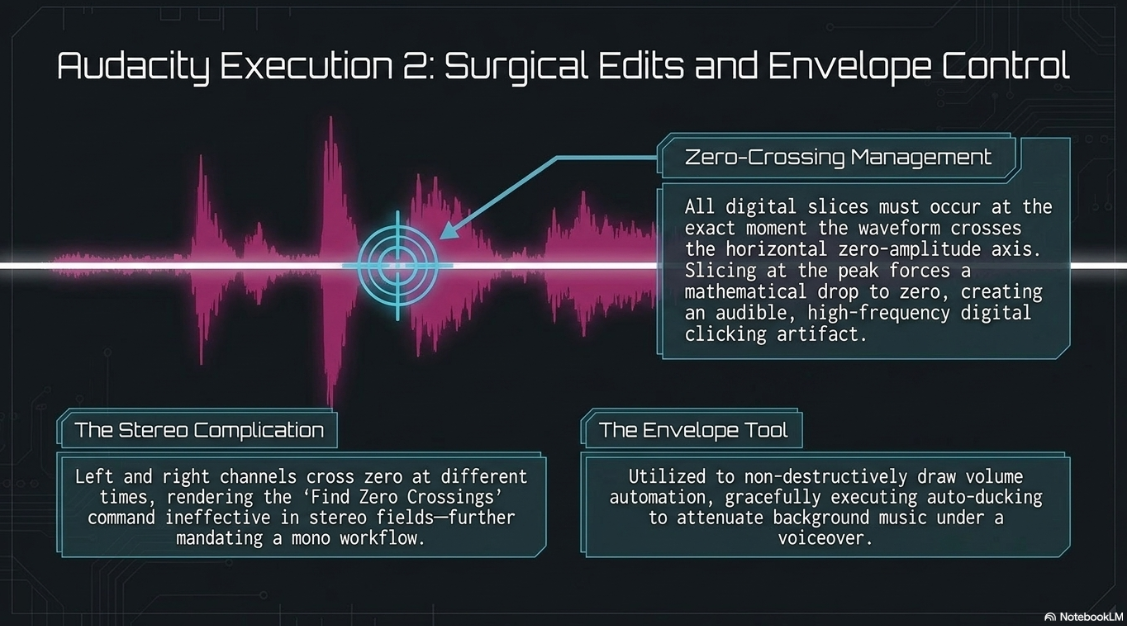
Prior to final dynamic control, the audio must be meticulously edited to remove errant noise, elongated pauses, and conversational filler. The Selection Tool within Audacity facilitates highlighting specific regions for attenuation or removal36. When slicing digital audio, cuts must strictly be executed at the zero-crossing point, the exact moment the waveform crosses the horizontal axis representing zero amplitude. If an edit occurs at the peak of a waveform, the sudden mathematical drop to zero will create an audible, high-frequency click or popping artifact36. In stereo tracks, zero crossing points may be in entirely different locations on the left and right channels, complicating edits; therefore, relying on the "Find Zero Crossings" command in stereo fields will not completely mitigate artifacts36. This reinforces the necessity of resolving audio to a mono configuration prior to granular editing. The Envelope Tool is also utilized to non-destructively draw volume automation, gracefully attenuating background music when a voiceover is introduced, a technique known as auto-ducking15.
Implementing the Loudness Normalization Effect
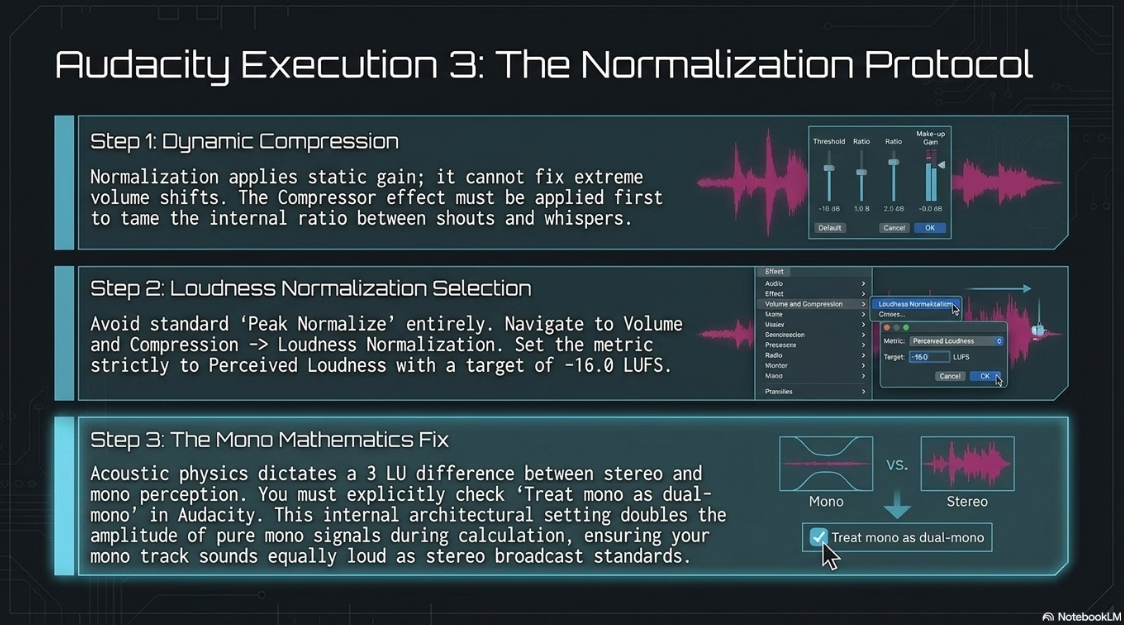
Before normalization occurs, extreme dynamic range must be addressed. Normalization simply applies a static mathematical gain adjustment to the entire file; it does not change the internal ratio between the loudest shout and the quietest whisper37. Therefore, severe dynamic shifts must be tamed using Audacity's Compressor effect to reduce the dynamic range prior to overall amplification37. Only after the dialogue is dynamically controlled should final loudness normalization be applied.
Audacity features two distinct normalization paradigms: Peak Normalization and Loudness Normalization38. The standard "Normalize" effect is a peak normalization tool that merely detects the single highest transient in the file and amplifies the entire waveform linearly until that single peak hits a designated target37. This rudimentary approach completely ignores the actual perceived density of the audio and fails entirely to meet broadcast LUFS standards38.
By comparison, the Loudness Normalization effect calculates the perceived loudness of the selected audio using the EBU R128 standard algorithm and applies gain or reduction so a desired loudness level is reached24. The correct implementation workflow requires selecting the entire completed audio track and navigating to the Volume and Compression menu to access Loudness Normalization15. Ensuring the normalization metric is set to "Perceived Loudness" rather than Root Mean Square is critical24. The platform target, such as -16.0 LUFS for Apple Podcasts, must be entered into the parameter field32.
When normalizing a stereo track where the left/right balance has already been curated, the "Normalize stereo channels independently" box must remain disabled24. Checking this box would artificially disrupt the stereo image by adjusting the left and right channels to different overall amplitudes24. Furthermore, the "Treat mono as dual-mono" parameter serves a vital mathematical function. As previously established, standard acoustic physics dictates a three Loudness Unit difference between stereo and mono perception. By leaving "Treat mono as dual-mono" enabled, the algorithm internally doubles the amplitude of pure mono signals during the calculation phase24. This software architecture ensures that mono tracks sound equally loud as dual-mono or stereo tracks on all known audio drivers that ignore pan law24. Following Loudness Normalization, verifying that the True Peak does not exceed -1.0 dBFS is the final mandatory step before export31.
Configuring the Export Dialog and Metadata Integration
The final stage of execution dictates how the meticulously processed uncompressed data is transformed into a lightweight delivery payload. Exporting converts the project into a finished audio file playable on standard media players by mixing down the entire project into a single compressed file14. Within the Export Audio dialog, the destination format is selected, typically targeting MP3 Files for universal compatibility14. Older versions of Audacity required the manual installation of the LAME encoder library to process MP3s, though modern iterations include this functionality natively14.
The Bit Rate Mode must be assigned to Constant14. While Variable Bit Rate offers excellent quality for music, it induces duration discrepancies and scrubbing failures in mobile podcast aggregators16. The Constant mode guarantees a continuous, predictable data stream, rendering the exact same amount of data every second14. The Preset mode, defaulting to Standard Quality, acts as a hybrid but is generally avoided in favor of strict Constant control for spoken word18.
For a mono spoken-word podcast, the bitrate parameter should be manually established between 64 kilobits per second and 96 kilobits per second9. If delivering a heavily produced stereo show containing music, the quality should be elevated to 128 or 192 kilobits per second14. Settings exceeding 192 kilobits per second, such as the "Insane" 320 kilobits per second preset, are a detrimental waste of bandwidth that offer no discernible improvement to dialogue reproduction10.
The Channel Mode dictates spatial rendering. If the project architecture was routed to a single track, selecting Mono forces the encoder to concentrate all available bandwidth into the single stream, maximizing acoustic resolution14. If exporting a two-channel stereo file, selecting Joint Stereo enables the encoder to deploy Mid/Side processing, analyzing the left and right channels for identical information, encoding it once, and applying the remaining data exclusively to the stereo width differences14.
Upon finalizing these technical parameters, Audacity invokes the ID3 Metadata Tag editor25. This is not an optional phase for professional syndication. The engineer must embed the Podcast Title as the Album Name, Episode Title as the Track Name, Artist or Host Name, Year, and the explicit Genre of 'Podcast' directly into the MP3 header9. This metadata acts as data about data, ensuring episodes display correctly in all podcast player apps, allowing Apple Podcasts to extract identifying information and embedded episode artwork successfully9.
Strategic Conclusions for Professional Syndication
Audio execution for professional podcasting operates at the precise intersection of acoustic physics, data economy, and strict broadcast compliance. The failure to optimize any singular variable—whether retaining a bloated uncompressed file for distribution, broadcasting a heavily dynamic interview without Loudness Normalization, or wasting critical server bandwidth on an excessively dense stereophonic file—will measurably impact audience retention, server overhead costs, and platform compatibility.
A rigorously executed podcast will capture source audio at an uncompressed 24-bit or 32-bit float resolution at 44.1 kilohertz, or 48 kilohertz if synchronized to visual media1. During the editing process, monaural microphone sources must be painstakingly stripped of phantom stereo matrices and routed purely as mono tracks to prevent data redundancy and phase cancellation23. Dynamic range must be constrained prior to the application of EBU R128 Loudness Normalization, targeting -16.0 LUFS with a strict True Peak limitation of -1.0 dBFS to secure uncorrupted, distortion-free translation across all hardware platforms and digital-to-analog converters24.
Finally, the completed mix must be algorithmically packaged into a Constant Bit Rate MP3 or Advanced Audio Coding file. Utilizing a highly efficient 64 or 96 kilobits per second mono configuration for spoken-word content guarantees pristine voice fidelity while dramatically reducing physical storage demands, accelerating content delivery network propagation, and respecting the cellular bandwidth limitations of the modern consumer7. Embedding robust ID3 metadata serves as the final seal of syndication compliance9. By strictly adhering to these mechanical protocols within Audacity, audio engineers guarantee an immersive, transparent, and seamlessly integrated listener experience devoid of technical friction.
Works cited
Audio requirements - Apple Podcasts for Creators, https://podcasters.apple.com/support/893-audio-requirements
Best Podcast Audio Formats 2026 | MP3, WAV, AAC - Work Management, https://work-management.org/marketing/podcast/best-podcast-audio-formats/
MP3 Audio Guide: Format, Compression, Uses, and Quality - ACE Studio, https://acestudio.ai/blog/mp3-audio-file-format/
Audio Formats Explained - Blubrry Podcasting, https://blubrry.com/manual/creating-podcast-media/audio/audio-formats/
Transcription File Formats Explained: A 2026 Input Guide - ConvertAudioToText, https://convertaudiototext.com/blog/transcription-file-formats-explained
The Best Audio File Formats for Your Podcast - Acast, https://www.acast.com/en-gb/blog/best-audio-file-formats-for-podcasts
MP3 (MPEG Layer 3) Tips for Podcasting, https://blubrry.com/manual/creating-podcast-media/audio/mp3-mpeg-layer-3-tips/
Podcast File Formats: Which Type Dominates in 2026 - Descript, https://www.descript.com/blog/article/understanding-podcast-file-formats-which-is-best
Audio Encoding Tips & Best Practices - Simplecast, https://help.simplecast.com/hc/en-us/articles/21953657868445-Audio-Encoding-Tips-Best-Practices
Screen Recording and Podcast Audio — These 4 Numbers Make You Sound PRO - Medium, https://medium.com/@andrew_best/screen-recording-and-podcast-audio-these-4-numbers-make-you-sound-pro-7e0f8d95c407
Audio Formats for Podcasts: Which One is Best?, https://blog.podcast.co/create/audio-formats-for-podcasts
Part 1: General Audio Terms - The Self-Recording Band, https://theselfrecordingband.com/general-audio-terms/
Audio Quality Guidelines for podcast episodes - Support - RSS.com, https://help.rss.com/en/support/solutions/articles/44002371360-audio-quality-guidelines-for-podcast-episodes
Audacity How to Save as MP3 - Swell AI, https://www.swellai.com/blog/audacity-how-to-save-as-mp3
Audacity - Software Training for Students, https://sts.doit.wisc.edu/manuals/audacity/
What settings to use for an internet podcast? - Audacity Forum, https://forum.audacityteam.org/t/what-settings-to-use-for-an-internet-podcast/27966
What Bit Rate Should I Export My Podcast Episode As? | by Aaron Dowd - Medium, https://medium.com/simplecast/what-bit-rate-should-i-use-5a5d835fd0f3
MP3 Export Options - Audacity Manual, https://manual.audacityteam.org/man/mp3_export_options.html
How to Save Files as MP3 on Audacity - Swell AI, https://www.swellai.com/blog/how-to-save-files-as-mp3-on-audacity
Overview of Audio Editing with Audacity | PDF - Scribd, https://www.scribd.com/document/781078056/class-12-it-ch3
Mono Vs Stereo Podcast Audio Quality - Which is Better? - The Podcasting University, https://thepodcastinguniversity.com/mono-vs-stereo-podcast-audio/
Audacity Normalize: How to Adjust Your Audio Loudness? - CapCut, https://www.capcut.com/resource/audacity-normalize
Tracks Menu: Mix - Audacity Manual, https://manual.audacityteam.org/man/tracks_menu_mix.html
Loudness Normalization - Audacity Manual, https://manual.audacityteam.org/man/loudness_normalization.html
How to Export Audacity File as MP3 - Buzzsprout, https://www.buzzsprout.com/blog/how-to-export-audacity-file-as-mp3
Audio properties of presets in Compressor - Apple Support, https://support.apple.com/guide/compressor/audio-properties-cpsr06e514a7/mac
I need some podcasting advice - total newbie here - Reddit, https://www.reddit.com/r/podcasting/comments/1sf6am4/i_need_some_podcasting_advice_total_newbie_here/
Loudness and Dialogue Intelligibility = Better Listening - Radio World, https://www.radioworld.com/tech-and-gear/tech-tips/loudness-and-dialogue-intelligibility-better-listening
5 Broadcast Audio Spec Sheet Terms Every Editor Must Understand - Frame.io Insider, https://blog.frame.io/2017/08/09/audio-spec-sheet/
LUFS Meter — Broadcast Loudness Measurement - Studio Six Digital, https://studiosixdigital.com/lufs-meter/
How to Get Perfect Podcast Volume with LUFs: 3 Guided Methods | Cleanvoice AI, https://cleanvoice.ai/blog/lufs-for-podcast/
Splitting Stereo tracks to isolate vocals - Windows - Audacity Forum, https://forum.audacityteam.org/t/splitting-stereo-tracks-to-isolate-vocals/41353
Stereo Track to Mono Not Working - Windows - Audacity Forum, https://forum.audacityteam.org/t/stereo-track-to-mono-not-working/43324
Vocoder - Audacity Manual - Huihoo, https://docs.huihoo.com/audacity/2.0.3/man/vocoder.html
FAQ:Editing - Audacity Manual, https://manual.audacityteam.org/man/faq_editing.html
How to Normalize Audio in Audacity - Swell AI, https://www.swellai.com/blog/how-to-normalize-audio-in-audacity
Loudness Normalization | Audacity Support, https://support.audacityteam.org/audio-editing/loudness-normalization
How to Make Audacity Files Into MP3 2023 Tutorial - CrumplePop, https://crumplepop.com/how-to-make-audacity-files-into-mp3/











