
The Evolution of Podcast Production Ecosystems
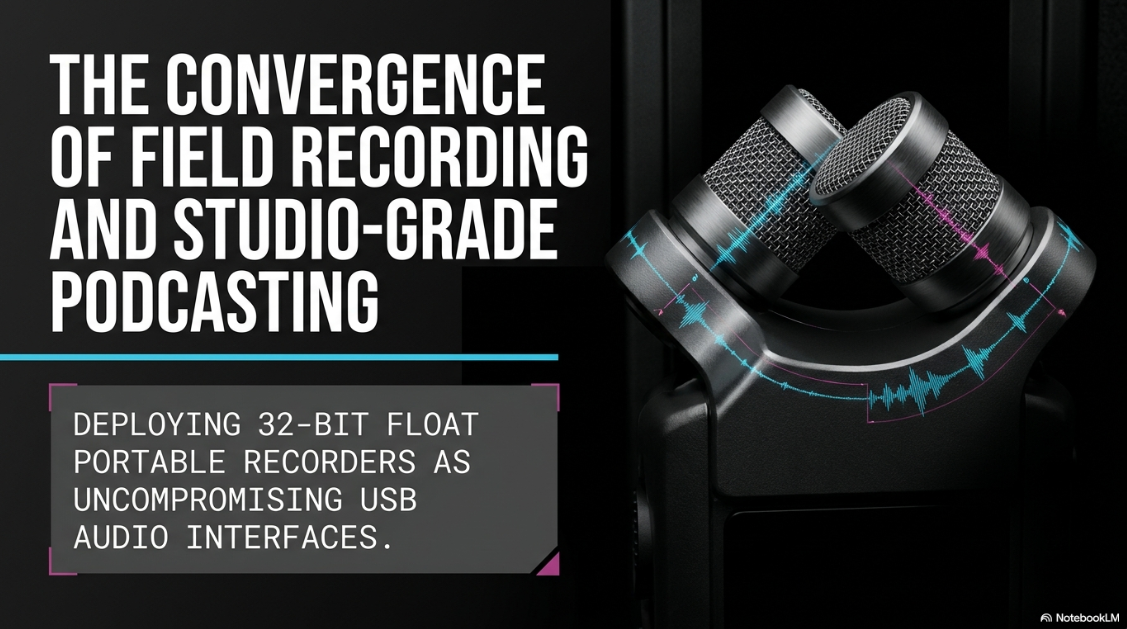
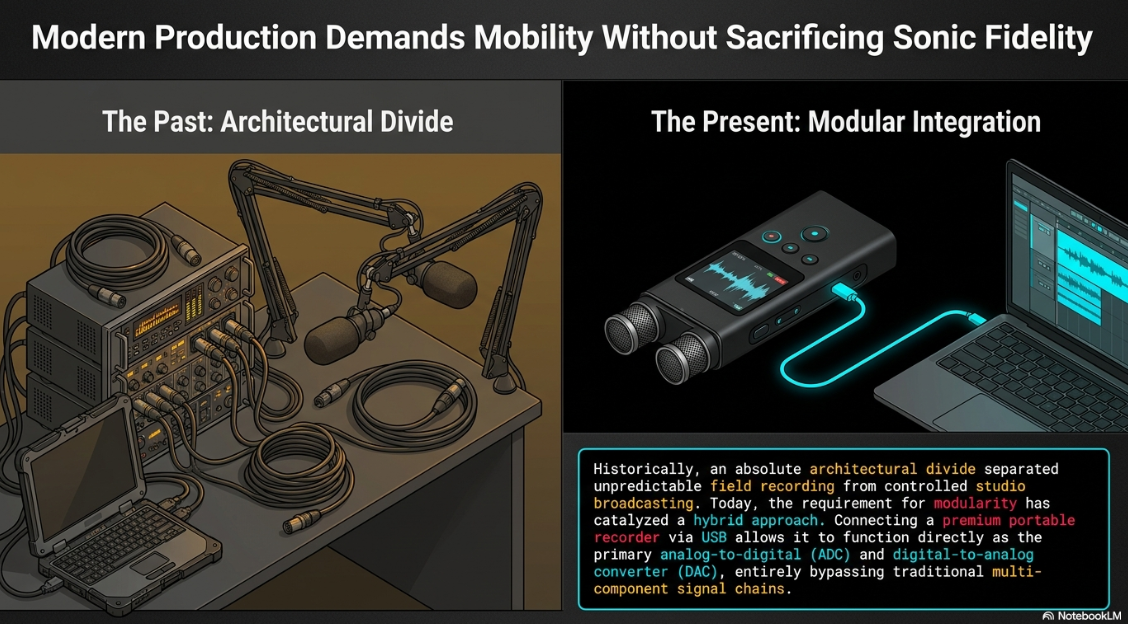
The landscape of professional audio production has undergone a radical transformation over the past decade. Historically, the architectural divide between field recording and studio broadcasting was absolute. Field engineers relied on rugged, battery-powered multitrack recorders to capture unpredictable environmental audio, while studio producers utilized desktop audio interfaces, outboard preamps, and dedicated broadcast dynamic microphones to capture controlled vocal performances1. However, the contemporary requirements of digital content creation—particularly podcasting—demand a hybrid approach. Modern podcasting necessitates mobility, modularity, and uncompromising sonic fidelity3. This paradigm shift has catalyzed the development of advanced portable audio recorders that double as high-resolution USB audio interfaces, bridging the gap between location sound gathering and studio-grade broadcast production5.
The integration of built-in microphone capsules with standalone interface capabilities presents a unique proposition for professional podcasters. By leveraging devices from manufacturers such as Zoom and Tascam, creators can bypass traditional multi-component signal chains1. Instead of transporting a laptop, a heavy desktop audio interface, XLR cables, cumbersome microphone stands, and external broadcast microphones, a producer can now utilize a single compact device7. When deployed in a studio or temporary recording environment, connecting these recorders via USB allows them to function directly as the primary analog-to-digital converter (ADC) and digital-to-analog converter (DAC) for a Digital Audio Workstation (DAW)4.
This comprehensive analysis explores the technical, acoustic, and operational methodologies of utilizing the integrated microphones of high-end portable recorders as USB audio interfaces for professional podcasting. It details the acoustic science behind built-in condenser capsules, the revolutionary impact of 32-bit floating-point audio architecture, comparative hardware analysis, the logistical landscape of professional equipment sourcing, and the requisite digital signal processing (DSP) workflows to achieve broadcast-compliant loudness standards.
Technical Foundations of USB Audio Interface Integration
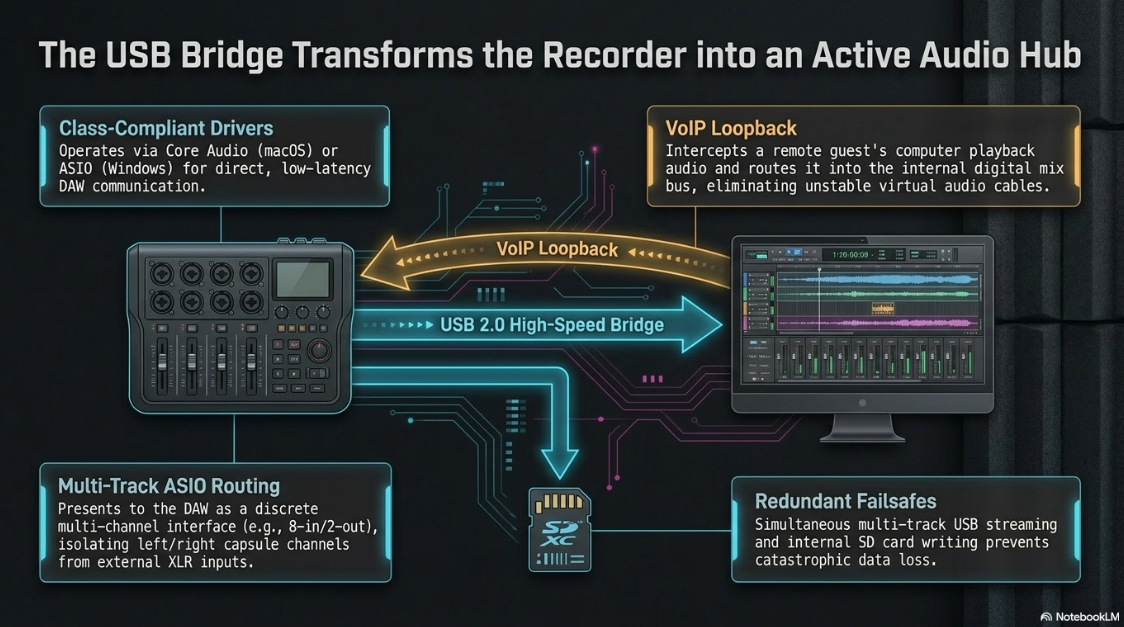
When a portable recorder is tethered to a host computer via USB (typically USB-C or Micro-B, operating on the USB 2.0 High-Speed protocol), it transitions from a passive mass storage device into an active Audio Stream Input/Output (ASIO) or Core Audio peripheral3. In this mode, the internal DSP of the recorder routes the analog signal captured by the built-in microphones directly through its analog-to-digital converters and transmits the digital data stream to the computer, bypassing the need for an external audio interface4.
USB Class Compliance and Driver Architecture
Most modern professional recorders are designed as USB class-compliant devices. This infrastructure implies they utilize the native audio drivers of the host operating system—Core Audio on macOS and iOS, and Windows Audio Session API (WASAPI) or generic USB Audio Class drivers on Windows architectures11. For optimal performance, particularly on Windows machines where system-level audio mixing can introduce latency and sample rate conversion artifacts, manufacturers often provide dedicated ASIO drivers14. These drivers facilitate a direct, low-latency communication path between the hardware and the DAW, ensuring that real-time monitoring and recording remain synchronous15.
When operating in audio interface mode, these devices support sophisticated routing configurations. For instance, a sophisticated unit like the Zoom H6essential or Tascam Portacapture X8 might operate in a "Multi-Track Mode," presenting itself to the DAW as a multi-channel interface (e.g., 6-in/2-out or 8-in/2-out)5. This allows the host application to record the left and right channels of the built-in microphone capsule on discrete tracks, alongside any external XLR inputs, providing the post-production engineer with complete isolation over each audio source5.
Loopback Functionality for Remote Podcasting
A critical feature for modern, decentralized podcast production is the USB Loopback function. When conducting remote interviews via Voice over IP (VoIP) applications, the loopback feature intercepts the computer's playback audio (the remote guest's voice) and routes it back into the recorder's internal digital mix bus11. This architectural design allows the DAW to simultaneously record the local host's voice via the built-in microphones and the remote guest's voice via the USB return on separate, time-aligned tracks8. This eliminates the requirement for complex, CPU-intensive virtual audio cable software, significantly stabilizing the recording environment.
Furthermore, premium devices enable simultaneous redundant recording. The Zoom H5studio and Tascam Portacapture series allow the user to stream multi-track audio over USB to the computer while simultaneously writing a backup file directly to the internal microSD/SDXC card9. This redundancy is a cornerstone of professional field audio, ensuring that digital dropouts, software crashes, or USB cable disconnections do not result in catastrophic data loss during a high-profile interview4.
Acoustic Principles of Built-in Microphone Capsules
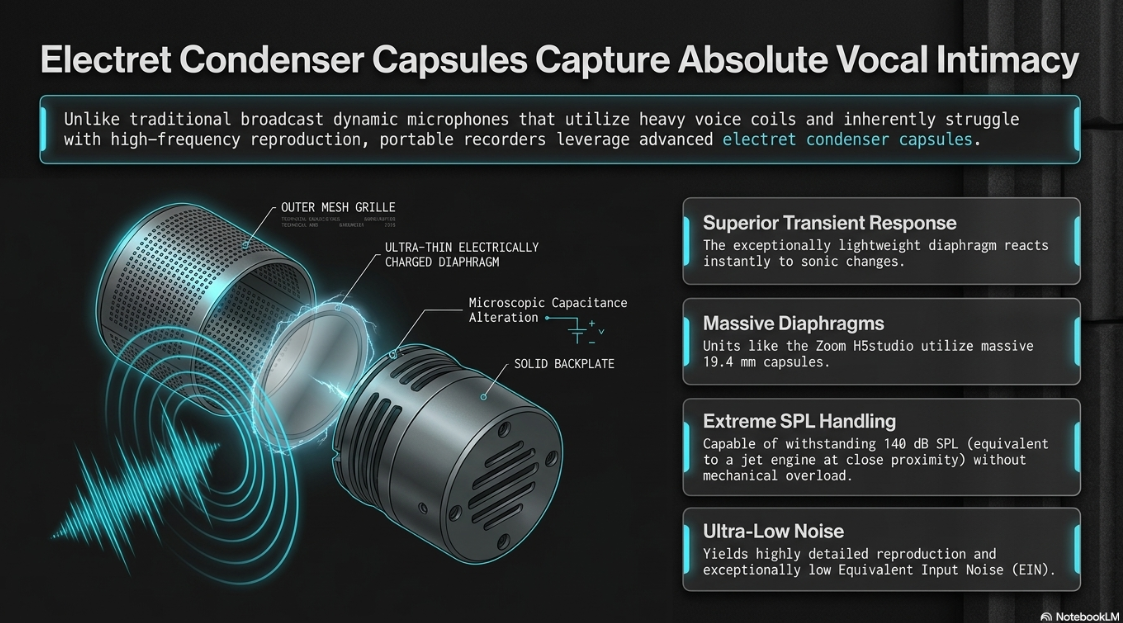
The acoustic capture mechanism of a portable recorder relies on integrated or interchangeable microphone capsules. Unlike the heavy dynamic microphones traditionally favored in broadcast studios (such as the Shure SM7B, Electro-Voice RE20, or RØDE Procaster), which utilize heavy voice coils and magnets, the built-in microphones on portable recorders are invariably electret condenser capsules2.
Transducer Mechanics and Diaphragm Sizing
Condenser microphones operate on the fundamental principle of electrostatic capacitance. A lightweight, electrically charged diaphragm sits parallel to a fixed, solid backplate. Sound waves hitting the diaphragm alter the microscopic distance between the two plates, dynamically changing the capacitance and generating an electrical signal4. Because the diaphragm is exceptionally light, condenser capsules exhibit a superior transient response and a much wider, flatter frequency response compared to dynamic microphones, which inherently struggle with high-frequency reproduction19.
The diameter of the diaphragm significantly dictates the acoustic characteristics, signal-to-noise ratio, and maximum sound pressure level (SPL) capabilities. Manufacturers have engineered increasingly large capsules to emulate studio microphone fidelity.

Larger diaphragms, such as the 19.4 mm units on the H5studio, generally yield a lower Equivalent Input Noise (EIN) and capture lower frequencies with greater warmth, rendering a highly detailed vocal reproduction ideal for intimate podcasting18. Furthermore, these robust capsules are engineered to withstand extreme sound pressure levels, with 140 dB SPL equating to the acoustic energy of a jet engine taking off at close proximity, ensuring that sudden bursts of laughter or shouting will never mechanically overload the capsule19.
Stereophonic Configurations: X-Y versus A-B
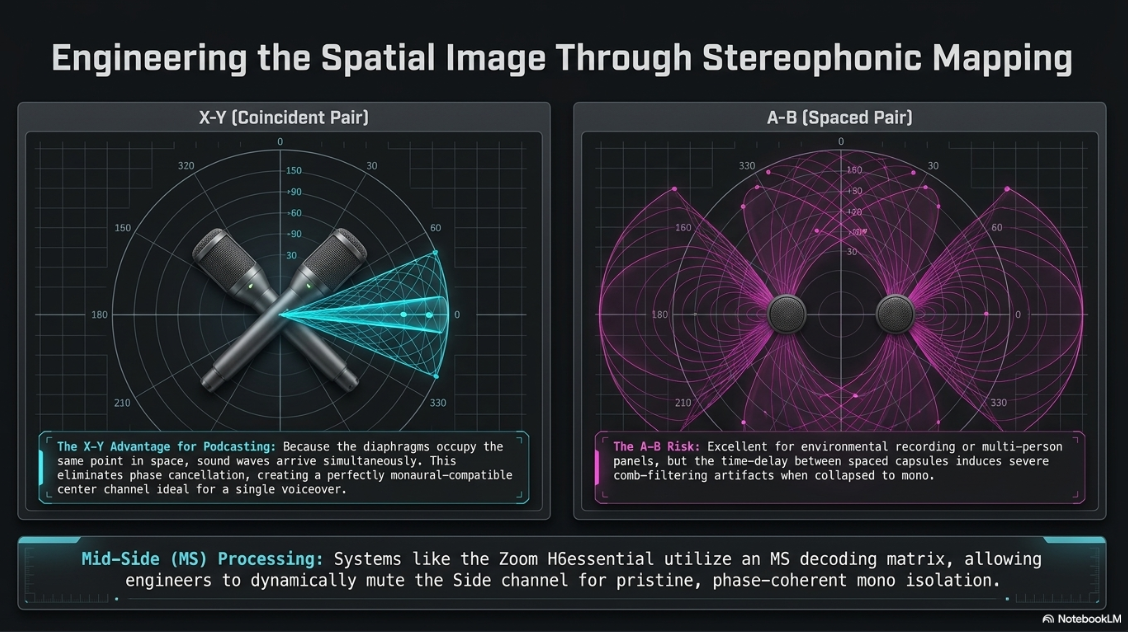
Most high-end portable recorders provide adjustable capsules that allow the user to select between two primary stereophonic recording techniques: X-Y (coincident) and A-B (spaced pair)3. Understanding the physical properties of these configurations is vital for a podcaster seeking to optimize spatial imaging.
X-Y (Coincident Pair) Configuration: In the X-Y configuration, two directional (unidirectional/cardioid) microphone capsules are angled at 90 to 120 degrees, with their diaphragms stacked as close together as physically possible, occupying the same point in acoustic space3.
Acoustic Principle: Because the capsules are nearly entirely coincident, sound waves from any direction arrive at both diaphragms at precisely the same time. This intensity-based stereo relies entirely on volume differences between the left and right capsules, effectively eliminating phase cancellation issues19.
Podcasting Application: X-Y focuses on the "sweet spot" in the center of the stereo image. For a solo podcaster speaking directly into the recorder, X-Y produces a tight, punchy center channel with minimal phase variance, ensuring monaural compatibility when mixed down for broadcast3.
A-B (Spaced Pair) Configuration: In the A-B configuration, the two capsules are physically spaced apart, facing forward or angled slightly outward3.
Acoustic Principle: This technique relies on both time-of-arrival differences and intensity differences between the two capsules to create a wide, immersive stereo image.
Podcasting Application: A-B captures a much wider audio space, incorporating more of the room's natural reverberation and ambient characteristics3. While excellent for environmental field recording, ASMR content, or capturing a live multi-person panel discussion across a large table, A-B is generally contraindicated for a single voiceover. The time-delay between the capsules can induce severe comb-filtering artifacts when the stereo signal is collapsed to mono3.
Mid-Side (MS) Processing and Mono Summing
To achieve the standard broadcast podcast aesthetic, the stereo file captured by the built-in microphones is frequently summed to mono in the DAW. A mono mix ensures the podcaster's voice is perfectly centered in the listener's headphones, which is the unyielding industry standard for spoken-word audio26. Advanced recorders natively allow the user to convert the microphone capsule input to mono at the hardware level before the signal is digitized and sent over USB, simplifying the digital routing11.
Some modular systems, such as the Zoom H6essential, offer specialized, interchangeable MS (Mid-Side) capsules6. Mid-Side recording utilizes a forward-facing unidirectional "Mid" microphone and a bi-directional (figure-8) "Side" microphone, positioned perpendicularly6. Through a mathematical decoding matrix—which can be applied either internally within the recorder or post-recording via a plugin—the engineer can dynamically adjust the stereo width. For podcasting, simply muting or discarding the "Side" channel leaves a pristine, phase-coherent mono track from the "Mid" microphone, offering an elegant solution for creators who wish to bypass stereo summing altogether6.
The 32-Bit Floating-Point Revolution: Eradicating Gain Staging
Perhaps the most disruptive technological advancement in modern audio interfaces and field recorders is the transition from 16-bit and 24-bit fixed-point resolution to 32-bit floating-point audio encoding4. This innovation fundamentally alters the workflow of podcast production by entirely eliminating the concept of input gain staging during the recording phase, acting as an absolute safety net for unpredictable audio environments9.
The Mathematical Limitations of Fixed-Point Audio
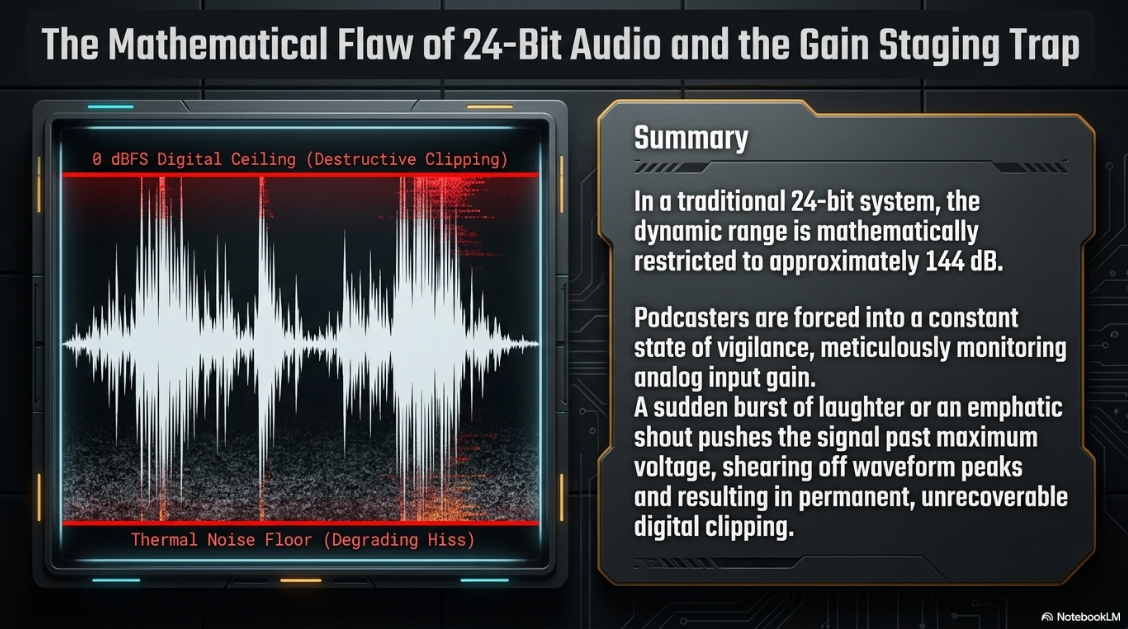
In digital audio systems, bit depth determines the dynamic range—the mathematical ratio between the absolute noise floor and the digital ceiling (0 dBFS, or Decibels Full Scale).
A 16-bit system yields

A 24-bit system yields

In a traditional 24-bit workflow, the podcaster must meticulously adjust the analog input gain prior to recording. If the gain is set too low, the signal rests dangerously close to the thermal noise floor of the preamps; increasing the volume in post-production will amplify a noticeable, degrading hiss10. If the gain is set too high, an unexpected loud noise (such as sudden laughter, a cough, or an emphatic shout) will push the analog signal past the maximum voltage threshold of the ADC. The converter will register all excess amplitude as absolute maximum, shearing off the peaks of the sound wave and resulting in permanent, destructive digital clipping4.
The Mechanics of 32-Bit Float and Dual A/D Converters
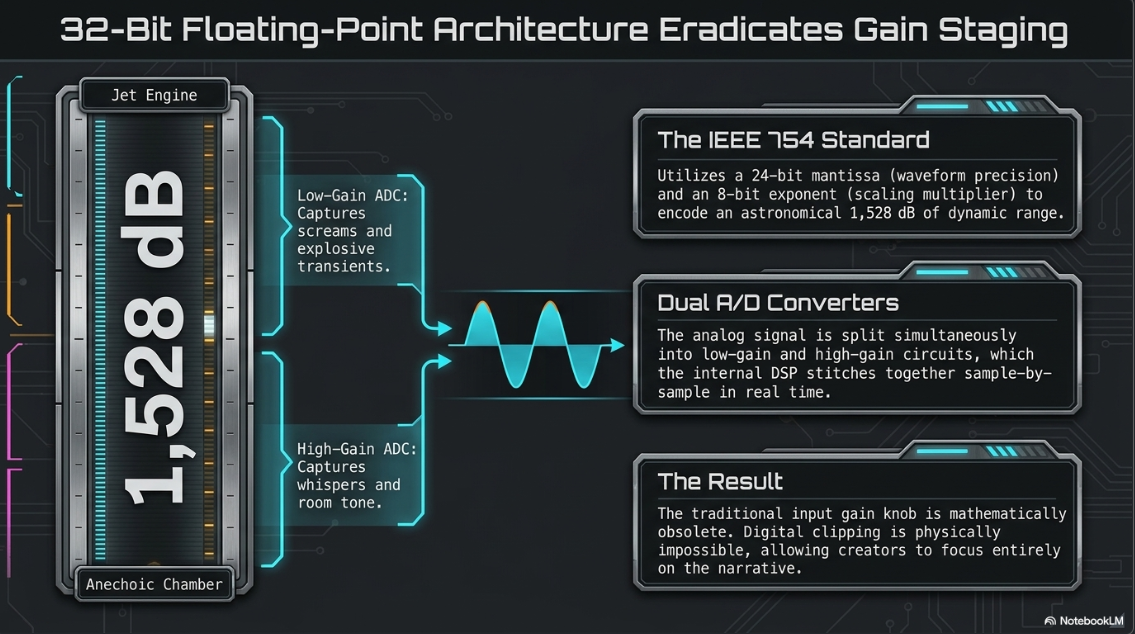
The 32-bit float architecture utilizes a radically different mathematical encoding approach governed by IEEE 754 standards. It allocates 24 bits for the mantissa (which dictates the precision of the waveform) and 8 bits for the exponent (the multiplier or scaling factor)12. This floating decimal point allows the digital file to encode an astronomical dynamic range of approximately 1,528 dB—a theoretical span that exceeds the physical difference between the absolute silence of an anechoic chamber and the loudest sound wave physically possible within Earth's atmosphere.
To capture this immense dynamic range at the analog stage before digitization, engineers utilize Dual A/D Converter circuits10. The analog signal from the microphone capsule is split and fed simultaneously into two separate analog-to-digital converters:
High-Gain ADC: Optimized specifically for low-level signals. It captures whispers, quiet speech, and room tone with immense detail and an ultra-low noise floor, far exceeding standard preamps.
Low-Gain ADC: Optimized specifically for high-level signals. It possesses massive headroom and can capture screams or explosive transients without any electrical saturation or clipping.
The internal DSP of the recorder analyzes the incoming signal sample-by-sample, in real time, and seamlessly stitches the outputs of these two converters together. The resulting 32-bit float data stream is then transmitted over the USB bus to the DAW, or written to the SD card5.
Workflow Implications and Post-Production Freedom
When operating a 32-bit float recorder in audio interface mode, the traditional input gain knob is rendered mathematically obsolete11. The podcaster can simply press record without conducting a preliminary soundcheck to set levels. If the incoming audio waveform appears massively distorted and squared-off (clipped) within the DAW interface, the data is not actually destroyed. Because the 32-bit float file encodes amplitude values far above 0 dBFS, the editor simply applies a negative clip gain reduction in the software, and the pristine, unclipped waveform is visually and sonically restored with absolute fidelity4. Conversely, a whisper recorded at seemingly imperceptible levels can be boosted by +60 dB in the DAW without raising the digital noise floor.
This provides a fail-safe mechanism for unscripted podcasts, on-location interviews, and highly dynamic environments, allowing producers to focus entirely on content delivery and narrative rather than technical monitoring9.
Comparative Analysis of Industry-Leading Hardware
The professional audio market is currently populated by several flagship devices that excel as portable podcasting hubs and USB interfaces. The competition is primarily dominated by Tascam and Zoom, each offering distinct modular and integrated solutions tailored to different tiers of the production market.
Tascam Portacapture Series (X8 and X6)
Tascam’s Portacapture series is engineered around an application-driven graphical user interface, accessed via a full-color capacitive touchscreen, akin to modern smartphone operating systems5. The built-in "Launcher" system features dedicated preset modes, including a "Podcast" app that instantly optimizes routing, mix-minus, and processing for spoken word, accommodating up to four people5.
Capsule Architecture: The flagship X8 features massive 14.6 mm detachable condenser microphones, which can be manually unscrewed and reversed to switch between A-B and True X-Y configurations4.
Audio Interface Capabilities: The X8 functions as an 8-in/2-out driverless USB audio interface, transmitting 32-bit float audio directly to the computer at high-resolution sample rates up to 192 kHz4. The more compact X6 functions as a 6-in/2-out interface capped at 96 kHz5.
Preamp Fidelity: The physical XLR/TRS combo jacks utilize Tascam’s proprietary HDDA (High Definition Discrete Architecture) preamps, providing an impressively low Equivalent Input Noise (EIN) of

DSP and Wireless Sync: Both devices offer comprehensive onboard processing, including EQ, compression, limiting, and noise gates. Crucially for video-podcasting, they support wireless timecode synchronization via an optional AK-BT1 Bluetooth adapter, allowing them to slave to Atomos devices or smart cameras, ensuring audio-video sync is flawless in post-production4.
Zoom Essential and Studio Series
Zoom has heavily invested in the 32-bit float paradigm across their entire product stack, systematically replacing older 24-bit models (like the ubiquitous original H6) with the modern "Essential" and "Studio" architectural lines6.
Zoom H6essential: This 6-track recorder features the newer 3.0 capsule system and operates entirely in 32-bit float. Its default XYH-6e capsule is designed for highly directional X/Y stereo imaging6. It functions as a multichannel USB audio interface for PC, Mac, and iOS, and includes groundbreaking built-in accessibility features—specifically, audible menu navigation in multiple languages, making it a critical tool for visually impaired producers23.
Zoom H5studio: Designed specifically for professional content creators demanding absolute pristine capture, it features oversized 19.4 mm X/Y microphones capable of handling an extreme 140 dB SPL18. It utilizes Zoom's premium F-series preamps, which offer a staggering -127 dBu EIN18. The H5studio allows the user to simultaneously stream multi-track 32-bit audio over USB while recording a backup directly to the internal microSDXC card18.
Zoom H4essential & H2essential: The H4essential offers a highly portable 4-track setup with X-Y mics, omitting deep menu diving in favor of tactile thumbwheel control12. The H2essential introduces a unique front/rear recording capability, allowing two podcasters sitting across from each other to record into a single stationary handheld device, relying on the 32-bit float architecture to seamlessly manage the differing vocal volumes of the two speakers13.
Comprehensive Hardware Specification Matrix


Data aggregated from manufacturer technical specifications and industry distribution reviews.
[cite: 4, 5, 6, 9, 12, 19, 27, 28]
Navigating the Professional Retail and Rental Ecosystem
For professional podcasters, production agencies, and studio integrators, the procurement of this specialized equipment relies on a robust network of dedicated professional audio retailers and rental houses. The distinction between consumer electronics stores and pro-audio vendors is critical; the latter provides essential post-sales support, technical consultation, and access to esoteric accessories required for seamless workflow integration.
The UK Pro-Audio Vendor Landscape
In the United Kingdom, several premier vendors serve as the backbone for location sound and studio podcasting procurement:
Pinknoise Systems: Based in Gloucester, Pinknoise Systems is a globally recognized specialist in field recording and location sound. They supply highly specialized gear, ranging from the Zoom H6essential to flagship cinema recorders like the Sound Devices 888 and Sonosax SX-R4+6. Their expertise ensures that podcasters can source exact accessories, such as Rycote shock mounts, URSA straps, and specialized timecode cables, which are critical when integrating portable recorders into larger video podcast rigs33.
KMR Audio: Operating London's largest pro-audio showroom, KMR Audio focuses heavily on studio integration and high-end outboard gear, alongside portable solutions32. They provide lifetime technical support and bespoke consultations, serving high-end clients from Abbey Road Institute alumni to top-tier commercial facilities like Baltic Studios35.
Richmond Film Services: A legacy institution based in Shepperton Studios, Richmond Film Services has provided broadcast-quality sound equipment to the film and television industry for over 25 years33. They offer extensive rental inventories and full workshop facilities for bespoke cable construction, essential for routing complex USB and analog signal paths between field recorders and stationary studio consoles33.
Westend DJ: Catering to the creator economy, Westend DJ bridges the gap between DJ equipment and podcasting gear, offering immediate stock of popular hybrid mixers (like the Alto TrueMix and Mackie ProFX) alongside comprehensive microphone solutions from Shure and RØDE35.
Rental Economies and Tiered Studio Ecosystems
For independent podcasters or agencies requiring multi-city recording setups, peer-to-peer rental networks like Hygglo have emerged alongside traditional hire companies39. Podcasters can rent top-tier field recorders (from Zoom H-series to Sound Devices) on a day-rate basis, allowing access to premium 32-bit float technology without the capital expenditure of ownership39. Hireacamera and The Kit Room similarly provide comprehensive audio-for-video packages tailored for podcast shoots40.
Furthermore, analyzing the equipment rosters of premium London podcast studios reveals how portable and hybrid gear scales within commercial environments:
Tier 1 (Accessible Self-Service): Studios like Pirate Studios rely heavily on robust, integrated solutions like the RØDECaster Pro paired with dynamic RØDE Procaster microphones, prioritizing durability and ease of use without an engineer20.
Tier 2 (Pro-Sumer/Agency): Facilities such as Premiere Podcast Studios and Podshop Studios upgrade to Shure SM7B or MV7 microphones running into digital mixers (Midas 32R) or Zoom F-series recorders, integrated with Sony mirrorless cameras (A7IV)20.
Tier 3 (Broadcast Grade): Premium spaces like Acast Studios and Spiritland Productions utilize flagship digital consoles (Studer ONAIR), Beyerdynamic M88 microphones, and Canon C70 cinema cameras, representing the apex of capital investment20.
High-end portable recorders like the Zoom H5studio or Tascam Portacapture X8 frequently operate in Tier 1 and Tier 2 environments as primary interfaces, or in Tier 3 environments as indispensable, redundant backup recorders2.
Environmental Acoustics and Signal Mitigation
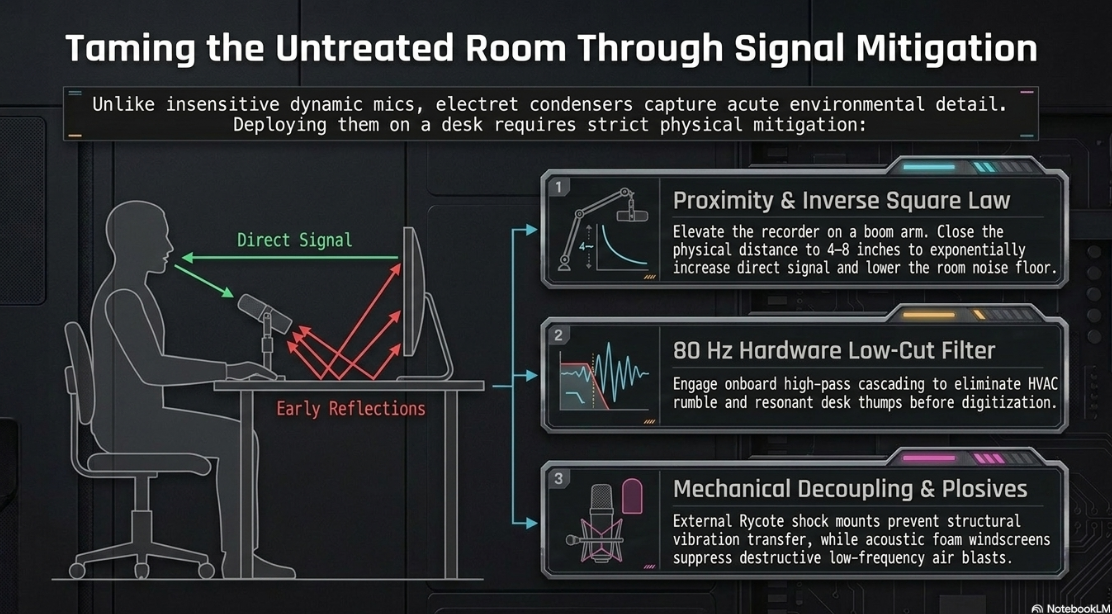
When a portable recorder is deployed in a studio or home office to act as a desktop USB interface, the physics of sound propagation present distinct challenges compared to traditional, dedicated broadcast setups. Studio environments generally utilize close-mic techniques with dynamic microphones (e.g., Shure SM7B) positioned 2 to 4 inches from the speaker's mouth. Dynamic microphones are highly insensitive to off-axis noise, requiring significant acoustic energy to physically move their internal heavy voice coils2.
Conversely, the built-in electret condenser capsules on portable recorders are acutely sensitive2. When positioned on a standard desktop stand (typically 12 to 24 inches from the speaker), the microphones will inevitably capture not only the direct sound of the voice but also the early reflections bouncing off the desk surface, computer monitors, and bare walls1. This creates a high ratio of reverberant-to-direct sound, leading to a "hollow" or "roomy" sonic signature that detracts from professional intimacy1.
Acoustic Mitigation and Physical Positioning Strategies
To combat environmental noise and acoustic reflections while utilizing a portable recorder as an audio interface, several critical hardware and placement strategies must be implemented:
Proximity and Inverse Square Law: The recorder must be mounted on a boom arm or low-profile, weighted mic stand to elevate it off the desk, breaking the immediate reflective boundary layer1. The speaker must close the physical distance to the capsules (ideally to within 4 to 8 inches) to exponentially increase the direct signal level. This forces a lower overall makeup gain requirement in post-production, which proportionately lowers the noise floor of the room.
Hardware Low-Cut Filtering: HVAC rumble, passing traffic noise, and resonant desk thumps primarily exist in the sub-100 Hz frequency spectrum. Recorders like the Tascam DR-07X and Zoom H-series offer switchable hardware low-cut (high-pass) filters, typically cascading at 40 Hz, 80 Hz, or 120 Hz3. Engaging the 80 Hz filter cleans up low-frequency mud before the signal reaches the ADC, preserving dynamic headroom and increasing vocal intelligibility.
Mechanical Decoupling: Condenser capsules are highly susceptible to handling noise and low-frequency structural vibrations transmitted through a desk19. While professional recorders utilize rubberized shockmounts internally to decouple the capsules from the chassis (as seen in the Zoom H5 architecture), external mechanical isolation via specialized Rycote shock mounts is highly recommended for permanent podcast installations to prevent keyboard typing or table bumps from ruining a take19.
Plosive Protection: Condenser microphones suffer from massive low-frequency distortions when struck by concentrated blasts of air from plosive consonants (P, B, T sounds). A high-quality acoustic foam windscreen (or a "deadcat" for extreme drafts) is an absolute necessity when using built-in capsules at close range for voiceover work1.
Digital Audio Workstation (DAW) Integration and Signal Routing
The translation of the pristine hardware signal into a polished digital product relies on effective DAW integration. Popular DAWs such as Avid Pro Tools, Apple Logic Pro, Cockos Reaper, and Ableton Live view modern 32-bit float portable recorders identically to standard rackmount audio interfaces, provided the correct initialization protocols are followed8.
Setting Up the Audio Engine
Driver Initialization: Upon connecting via USB-C, the device is placed into "Audio Interface Mode." Within the DAW's playback engine preferences, the recorder is selected as the primary Input and Output device11.
Buffer Size and Latency Management: For podcasting, round-trip latency is slightly less critical than in live musical performance, unless the host is monitoring their own voice with software effects applied (e.g., software compression or reverb)15. Setting a hardware buffer size of 128 or 256 samples provides a highly stable workflow without unnecessarily taxing the computer's CPU15. For true zero-latency monitoring, the user should utilize the Direct Monitoring function, plugging closed-back headphones directly into the 3.5mm headphone output of the recorder10. This allows the user to monitor the analog signal before it reaches the ADC, rather than monitoring the delayed software return from the DAW10.
Track Routing and Summing: The DAW track is created and assigned to Inputs 1 and 2 (representing the Left and Right channels of the built-in microphone array)8. For a solo podcast, standard practice involves creating a mono track and setting the input to either Input 1 (Left) or a hardware-summed mono channel, ensuring absolute center-panning and avoiding the phasing issues inherent to collapsing a wide stereo field8.
Bit-Depth Configuration: Crucially, the DAW session parameters must be explicitly set to a 32-bit floating-point bit depth upon creation42. If the session is accidentally instantiated at 24-bit, the incoming 32-bit data stream will be truncated at the DAW's input stage. This permanently destroys the ultra-high dynamic range and clipping immunity afforded by the dual ADC hardware, rendering the primary advantage of the modern recorder moot42.
Post-Production: Dynamics, Spectral Balancing, and Broadcast Compliance
The post-production workflow for a podcast captured on a 32-bit float portable interface revolves around dynamic range compression, spectral balancing (EQ), and strict adherence to streaming platform loudness targets. Because 32-bit float architecture prevents digital clipping during the tracking phase, the entire onus of dynamic control falls squarely on the mix engineer in post-production23.
Normalization and Gain Staging
The initial step in processing a raw 32-bit float voiceover file is clip normalization. Because there was no analog gain stage to set during recording, the waveform may visually appear either miniscule (a flat line) or massively clipped (solid block) upon import4. The engineer uses the DAW's clip gain function to normalize the audio to a standard reference level (e.g., peak normalization to -6 dBFS). This mathematical scaling adjusts the mantissa values without introducing truncation distortion, creating a visually workable waveform and providing optimal gain staging for all subsequent plugins2.
Dynamic Range Compression and Spectral Balancing
Spoken word audio is inherently highly dynamic, containing whispers, normal speech, and explosive laughter. To ensure the listener does not have to constantly adjust the volume in their car or headphones, this dynamic range must be tightly compressed.
Subtractive EQ: Prior to compression, a digital parametric equalizer (such as FabFilter Pro-Q 3 or the stock DAW EQ) is utilized to aggressively high-pass the vocal below 60 Hz to eliminate any remaining mechanical rumble15. Problematic room resonances—often manifesting around 250 Hz to 400 Hz as "boxiness" resulting from desktop reflections—are identified using narrow Q-bands and surgically attenuated15.
Compression: A digital compressor plugin is applied to automatically catch transient peaks and raise the level of the softer consonant sounds. A typical podcast vocal compression setting utilizes a moderate ratio (e.g., 3:1 or 4:1), a fast attack time (under 5ms to instantly clamp down on sudden laughter), a moderate release time (to prevent aggressive, unnatural "pumping"), and 3 to 6 dB of makeup gain to restore overall volume5.
De-Essing: Condenser capsules are exceptionally accurate at capturing high-frequency detail, which can unpleasantly exaggerate sibilance (sharp "S" and "T" sounds) between 5 kHz and 8 kHz19. A dedicated De-Esser plugin acts as a highly frequency-dependent compressor, instantly attenuating these harsh transients without dulling the overall presence and clarity of the voice.
Metering and Loudness Standards
The final, non-negotiable phase of the podcasting workflow is achieving strict broadcast compliance. Unlike early internet audio, modern streaming platforms (Apple Podcasts, Spotify, Amazon Music) enforce rigorous loudness standards to ensure consistency across all uploaded content. Audio loudness is not measured by peak amplitude, but by perceived average loudness over time, calculated in LUFS (Loudness Units relative to Full Scale)15.
For a stereo podcast format, the universal standard target is -16 LUFS Integrated15. For a mono podcast format, the target shifts to -19 LUFS Integrated15. Additionally, the True Peak (the mathematically interpolated inter-sample peak that exists between digital samples) must not exceed -1.0 dBTP44. This headroom is required to prevent digital distortion during the lossy encoding process when the platform converts the WAV file to AAC or MP343.
To achieve this exacting standard, the engineer places a brickwall look-ahead limiter at the very end of the master stereo bus to catch any rogue transients that survived the compression stage. This is followed by a dedicated loudness metering plugin, such as iZotope Insight44. Using the comprehensive displays within Insight—which include momentary, short-term, and integrated LUFS numerical readouts alongside a 3D spectrogram and loudness history graph—the engineer rides the final output gain until the entire episode averages precisely at the target loudness, ensuring a professional, radio-ready final product44.
Strategic Outlook
The era of strictly delineating between "studio gear" and "field gear" has conclusively ended. The current generation of portable audio recorders, equipped with massive 32-bit floating-point processing capabilities, dual A/D converters, large-diaphragm condenser arrays, and robust driverless USB protocols, represents the absolute vanguard of decentralized podcast production hardware4.
By entirely eliminating the restrictive requirement of analog gain staging, accommodating deep, flawless integration with professional DAWs, and providing the pristine acoustic clarity of built-in condenser capsules, these hybrid devices democratize high-fidelity broadcast engineering. When paired with a strategic understanding of environmental acoustics, proper microphone placement, and modern LUFS mastering standards, the deployment of a high-end portable recorder in USB interface mode yields an uncompromisingly professional sonic footprint that effortlessly matches, and frequently exceeds, traditional, stationary desktop interface solutions.
Works cited
How to Build a Portable Podcasting Kit | B&H eXplora, https://www.bhphotovideo.com/explora/pro-audio/tips-and-solutions/how-to-build-a-portable-podcasting-kit
Portable Podcast Setup: Essential Gear Guide for Field Recording, https://thepodcastconsultant.com/blog/portable-podcast-setup
DR-07X | 2-Channel Portable Handheld Recorder With USB Interface - TASCAM, https://tascam.com/us/product/dr-07x
Portacapture X8 | 8-Channel 32-Bit Float Portable Audio Field Recorder | TASCAM, https://tascam.com/us/product/portacapture_x8
Tascam Portacapture X8 | 32-Bit Float Portable Audio Recorder, https://www.tascam.eu/en/portacapture_x8
ZOOM H6ESSENTIAL Handheld Portable Recorder - Pinknoise Systems, https://pinknoise-systems.co.uk/products/zoom-h6e
Podcasting/Voice Work - Portable Recorder as Audio Interface over Stationary Box : r/audioengineering - Reddit, https://www.reddit.com/r/audioengineering/comments/rbzayk/podcastingvoice_work_portable_recorder_as_audio/
Setting up Your USB Mic / Audio Interface the Right Way - Podcast Movement Seminar, https://www.youtube.com/watch?v=0hlvQK-ShZ4
Zoom H5studio | Portable 32-bit Float Recorder for Creators - Soundium, https://soundium.com/products/zoom-h5studio
H5studioOperation Manual - ZOOM, https://zoomcorp.com/manuals/h5studio-en/
H6essentialOperation Manual - ZOOM, https://zoomcorp.com/manuals/h6essential-en/
H4essentialOperation Manual - ZOOM, https://zoomcorp.com/manuals/h4essential-en/
H2essentialOperation Manual - ZOOM, https://zoomcorp.com/manuals/h2essential-en/
Looking for a portable field recorder and audio interface that measures well., https://www.audiosciencereview.com/forum/index.php?threads/looking-for-a-portable-field-recorder-and-audio-interface-that-measures-well.55905/
How to Choose Audio Production Gear Like Cool & Dre, https://electronics.alibaba.com/buyingguides/cool-dre-producers-what-tech-helps-their-workflow
Tascam Portacapture X8 – Thomann UK, https://www.thomann.co.uk/tascam_portacapture_x8.htm
The Ultimate Guide to Audio Interfaces | Octaton, https://www.octaton.com/blog/the-ultimate-guide-to-audio-interfaces
Portable audio recorders | Handheld recorders - Juno, https://www.juno.co.uk/dj-equipment/handheld-recorders/
Zoom H5studio Portable Recorder at Gear4music, https://www.gear4music.com/Recording-and-Computers/Zoom-H5studio-Portable-Recorder/72RI
Podcast Studio London Professional Equipment - Finchley Studios, https://www.finchley.co.uk/finchley-learning/podcast-studio-london-professional-equipment
PRO AUDIO - Manuals.plus, https://manuals.plus/m/dcc7aa6f7f0202b3d1700cf0426ddc5dace1cdb0d4e53dde00917dd3bb48123e.pdf
PRO AudiO, https://www.bhphotovideo.com/FrameWork/Product_Resources/monthlyPDF/Summer2013/ProfessionalAudio.pdf
Zoom H6essential Portable Recorder - What To Know & Where To Buy | Equipboard, https://equipboard.com/items/zoom-h6essential-portable-recorder
Top rated Audio recorders for 2026 on Galaxus, https://www.galaxus.be/en/s1/producttype/toplist/rating/audio-recorders-2126
Tascam Portacapture X8 High Resolution Adaptive Multi-Recorder - Andertons Music Co., https://www.andertons.co.uk/tascam-portacapture-x8-high-resolution-adaptive-multi-recorder/
Podcast Solutions - NIBM eHub, https://nibmehub.com/opac-service/pdf/read/Podcast%20Solutions%20_%20the%20complete%20guide%20to%20audio%20and%20video%20podcasting.pdf
Zoom H4essential - Sound On Sound, https://www.soundonsound.com/reviews/zoom-h4essential
Tascam DR-40XP | Portable Four-Track Digital Audio Recorder and USB Audio Interface, https://www.tascam.eu/en/dr-40xp
Tascam Portacapture X8 Multi-track Handheld Recorder - AVShop.ca, https://www.avshop.ca/recording/recorders/portable-recorders/tascam-portacapture-x8-multi-track-handheld-recorder
Tascam Portacapture X6 – Thomann UK, https://www.thomann.co.uk/tascam_portacapture_x6.htm
Field Recorders - Pinknoise Systems, https://pinknoise-systems.co.uk/collections/field-recorders
Distributors & Dealers - buy | SCHOEPS Microphones, https://schoeps.de/en/buyrent/buy/uk-republic-of-ireland.html
Sound Equipment Hire from Richmond Film Services, https://www.richmondfilmservices.co.uk/
Pinknoise Systems Location Sound Experts, https://pinknoise-systems.co.uk/
KMR Audio: Recording Studio Equipment | Best Pro Audio in London, https://kmraudio.com/
Inside The Miloco Pro Audio Gear Showcase 2022 - Audio Media International, https://audiomediainternational.com/inside-the-miloco-pro-audio-gear-showcase-2022/
Music Production Alumni | Abbey Road Institute Graduates, https://abbeyroadinstitute.co.uk/alumni/
Podcasting Equipment - Westend DJ, https://westenddj.co.uk/collections/podcasting
Sound Recorder in London | Hygglo, https://hygglo.com/uk/category/8880-sound-recorder/london
Audio Equipment Hire London | Film & Production Sound Gear | The Kit Room, https://www.thekitroom.co.uk/kit/sound
audio recorder hire and rental - Hireacamera, https://www.hireacamera.com/audio/recorders-monitoring/
Installing Pro Tools Intro: A Free DAW For Music Production, https://www.levelsmusicproduction.com/blog/installing-pro-tools-intro-a-free-daw-for-music-production
Just bought a 'MOTU M2' for my mic.. but it has no Clipping?? : r/microphone - Reddit, https://www.reddit.com/r/microphone/comments/1sjgrp1/just_bought_a_motu_m2_for_my_mic_but_it_has_no/
iZotope Insight - Sound On Sound, https://www.soundonsound.com/reviews/izotope-insight











