

The maturation of podcasting from a niche, amateur medium into a multibillion-dollar global industry has necessitated a rigorous standardization of audio engineering practices. A professional podcast is no longer judged solely by its content; its sonic fidelity, loudness consistency, and metadata hygiene are equally critical arbiters of quality. As audiences increasingly consume long-form audio across diverse environments—from high-fidelity studio monitors to heavily noise-polluted commuter environments using entry-level earbuds—the mathematical and technical parameters governing digital audio capture, processing, and distribution have become rigid.
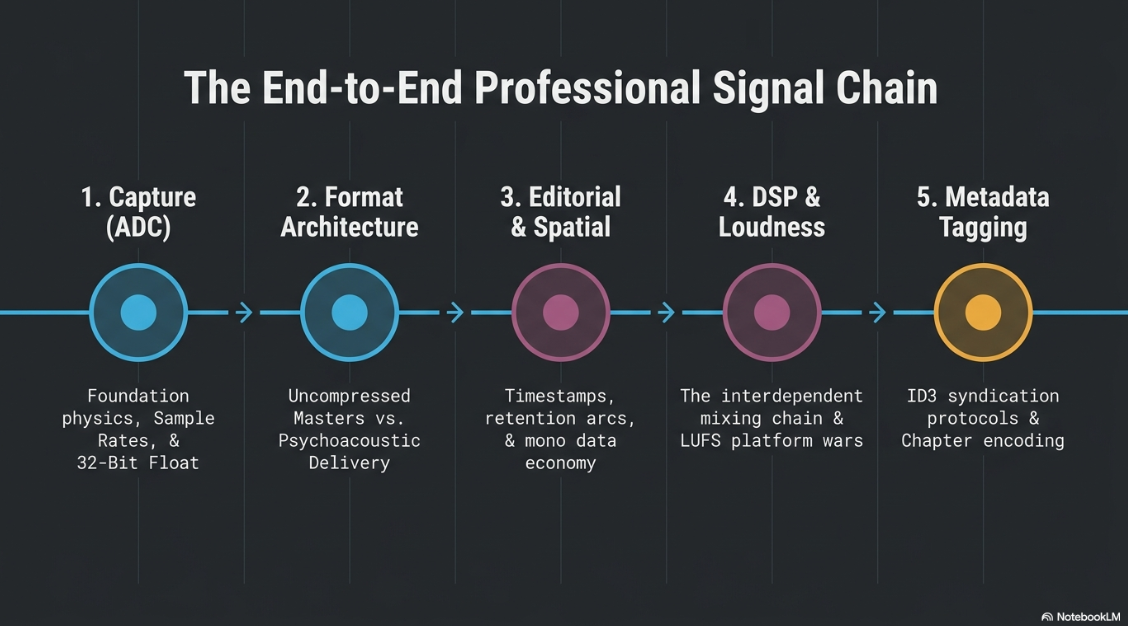
This report evaluates the end-to-end technical lifecycle of a professional podcast. It examines the foundational physics of bit depth and sample rates, delineates the architectural differences between uncompressed and compressed file formats, explores the psychometric implications of mono versus stereo spatial environments, dissects the editorial and digital signal processing (DSP) chains, and decodes the labyrinth of global loudness normalization standards and metadata encoding.
The Foundations of Digital Audio Capture: Sample Rate and Bit Depth
The journey of professional audio begins with the analogue-to-digital converter (ADC), which translates the continuous analogue waveform of a human voice into discrete digital data. The fidelity of this translation is governed by two primary axes: the sample rate, which operates in the time domain, and the bit resolution, which operates in the amplitude domain.
Sample Rate Parity
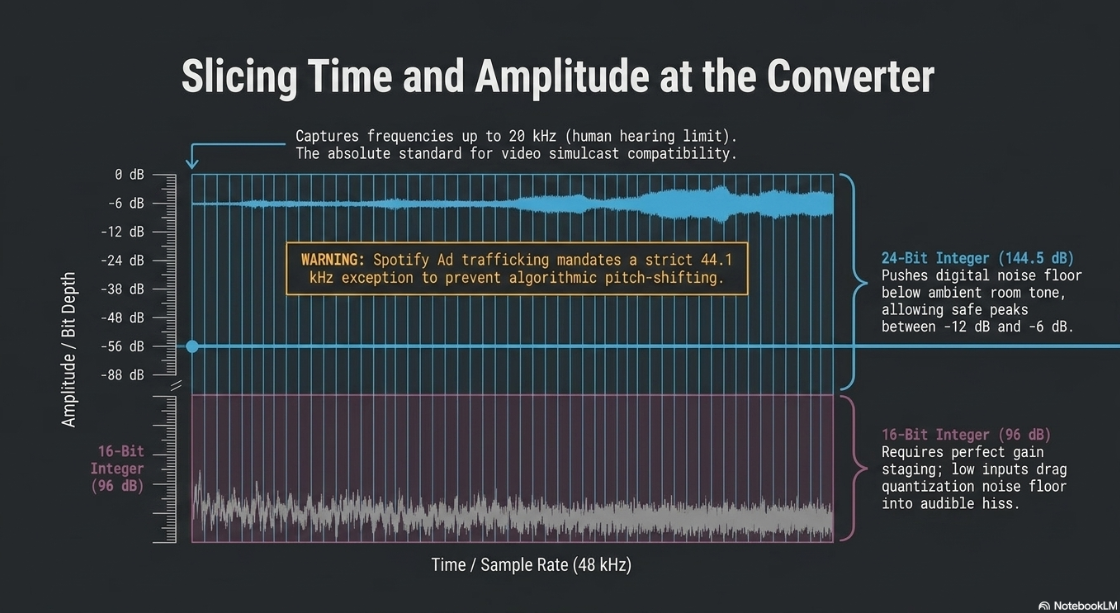
The sample rate dictates how many times per second the incoming audio signal is measured. The Nyquist-Shannon sampling theorem states that to accurately reproduce a frequency, the sample rate must be at least twice the highest frequency present in the signal. Because human hearing generally tops out at 20 kHz, 44.1 kHz (CD quality) and 48 kHz have become the ubiquitous standards for consumer audio1.
For contemporary podcasting, capturing and editing at a 48 kHz sample rate is the industry baseline1. A 48 kHz sample rate ensures sufficient frequency bandwidth for speech while aligning seamlessly with video production standards, which is vital as video podcasts simulcast on platforms like YouTube dominate the modern market1. Exporting at the wrong sample rate runs the risk of inducing pitch-shifting or playback speed anomalies, particularly when distributing audio advertisements to platforms like Spotify, which explicitly mandates 44.1 kHz for its ad trafficking architecture5.
The Evolution of Bit Depth: 16-bit, 24-bit, and 32-bit Float
Where the sample rate slices time, bit depth measures amplitude, determining the dynamic range and the noise floor of the recording. Bit depth essentially defines the number of discrete steps available to quantify the loudness of a specific sample, functioning like the hash marks on a ruler6.
A 16-bit integer resolution provides 2^16, or 65,536 discrete values6. The mathematical dynamic range is calculated as 20 multiplied by the base-10 logarithm of the discrete values, yielding approximately 96 dB of dynamic range6. While 96 dB is sufficient for final delivery, recording at 16-bit leaves very little margin for error. If the input gain is staged too low during the recording process, subsequent amplification during post-production will drag the quantization noise floor into the audible spectrum, resulting in a persistent, irrecoverable hiss that degrades the production quality2.
A 24-bit integer resolution provides 2^24, or 16,777,216 possible values, expanding the dynamic range to approximately 144.5 dB6. This represents a 50% increase in storage requirement compared to 16-bit files, but it pushes the digital noise floor far below the ambient acoustic noise of even the quietest recording studios9. Recording at 24-bit allows engineers to leave substantial headroom—typically peaking between -12 dB and -6 dB—without fearing noise floor amplification during the mixing phase1. Consequently, 24-bit audio remains the undisputed standard for highly controlled studio environments1.
The Paradigm Shift of 32-bit Floating Point
The most significant recent advancement in field recording and podcasting hardware is the introduction of 32-bit floating-point bit resolution. While standard 16-bit and 24-bit systems utilize fixed-point integer mathematics, 32-bit float utilizes a scientific notation framework in binary7.
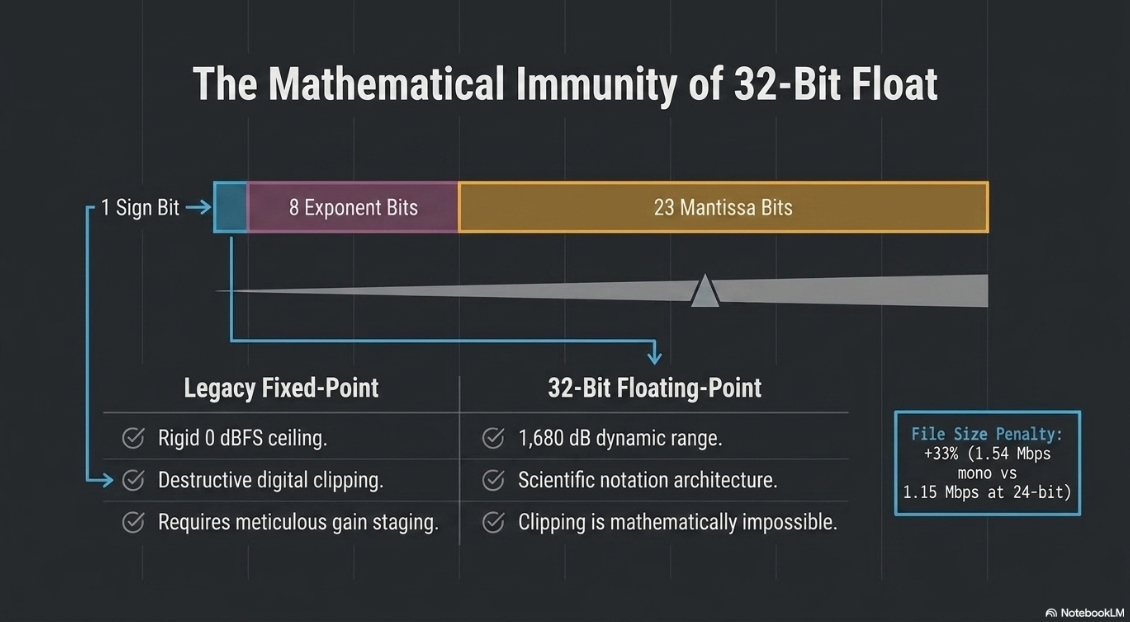
A 32-bit float word allocates its data distinctly: it utilizes one sign bit to indicate positive or negative amplitude, eight bits for the exponent, and twenty-three bits for the mantissa, representing the significant digits6. This structure functions like a moving anchor on a digital scale, allowing the mathematical representation to shift dynamically to accommodate exceedingly minuscule or astronomically massive acoustic values12. The result is a theoretical dynamic range of roughly 1,680 dB, which surpasses the dynamic range of the entire physical universe8.
In practical hardware implementation, modern 32-bit float recorders, such as the Sound Devices MixPre or Zoom F-series, utilize a dual ADC design. One high-gain converter optimizes for quiet, whispered signals, while a low-gain converter simultaneously captures loud transients, such as shouting or sudden laughter12. The microprocessor seamlessly stitches these discrete data streams into a single 32-bit float file.
The implications for professional podcasting are profound. Firstly, signals that exceed 0 dBFS (decibels relative to full scale) are mathematically preserved rather than flattened and destroyed by digital clipping. In the digital audio workstation (DAW), a blown-out, clipped waveform can simply be attenuated to reveal perfectly preserved audio data6. Secondly, gain-staging independence is achieved. Because the 32-bit float file possesses 770 dB of headroom above 0 dBFS and massive resolution below it, the act of actively riding the preamplifier gain during capture becomes practically obsolete7.
This mathematical immunity comes at the cost of storage bandwidth. A 48 kHz mono file requires 768 kbps at 16-bit, 1.15 Mbps at 24-bit, and 1.54 Mbps at 32-bit float, representing roughly a 33% file size penalty over 24-bit audio9. Furthermore, exporting from 32-bit down to lower bit depths for final distribution requires the application of proper dithering to maintain audio integrity7. For remote interviews, on-location documentary capture, or unpredictable roundtable discussions where setting perfect input gain is impossible, 32-bit floating-point recording fundamentally eliminates the risk of ruined takes8.
Uncompressed vs. Compressed File Formats: The Workflow Architecture
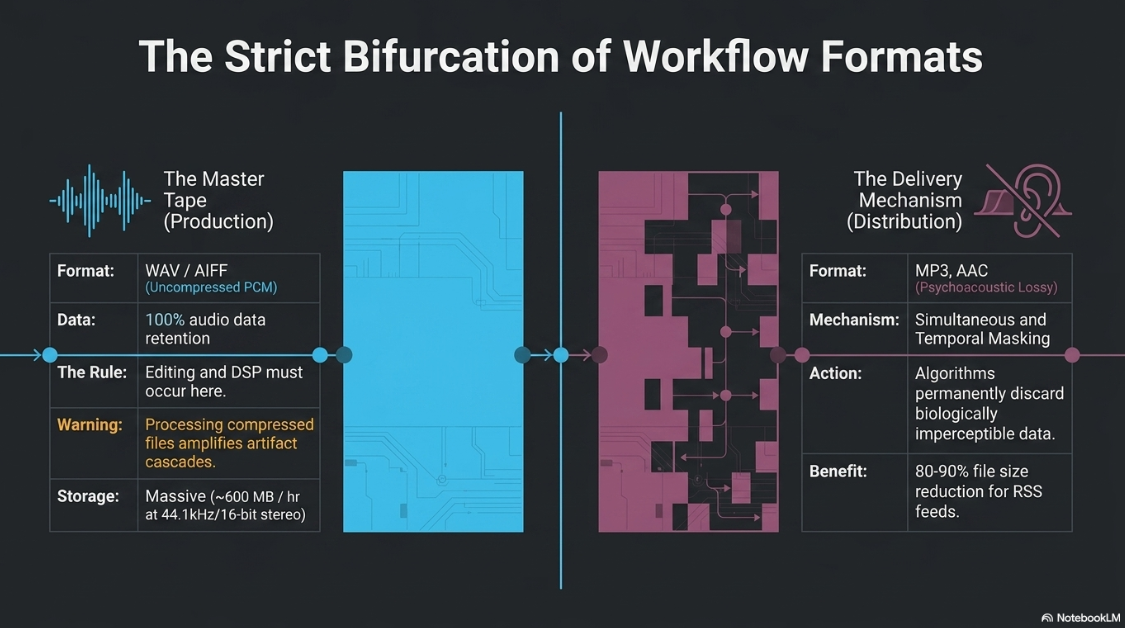
A pervasive error among amateur audio producers is conflating the format used for distribution with the format required for production. A professional workflow demands a strict bifurcation between uncompressed master formats and compressed delivery formats1. Furthermore, a critical distinction must be drawn between audio codecs, which dictate the mathematical compression, and audio containers, which serve as wrappers holding the data13.
The Master Tape: Uncompressed and Lossless Formats
Uncompressed audio formats, principally WAV (Waveform Audio File Format) and AIFF (Audio Interchange File Format), store Pulse Code Modulation (PCM) data exactly as it is captured by the ADC1. Every sample, harmonic nuance, and transient detail is preserved without destructive data discarding1.
In a professional podcasting ecosystem, WAV serves as the definitive source of truth, functioning as the digital equivalent of the analog master tape13. It is imperative that recording, editing, and digital signal processing occur exclusively in an uncompressed format1. The primary drawback of WAV is file size; a single hour of 44.1 kHz, 16-bit stereo audio occupies over 600 MB of storage, rendering it entirely impractical for RSS feed distribution or mobile network streaming1. Attempting to execute complex DSP—such as aggressive equalization, compression, or spectral noise reduction—on a pre-compressed file will drastically amplify the digital artifacts left behind by the codec, resulting in a swishy or underwater sonic characteristic1.
Lossless compression codecs, such as FLAC (Free Lossless Audio Codec) and ALAC (Apple Lossless Audio Codec), offer a middle ground. These formats operate similarly to ZIP files, utilizing specialized audio algorithms to reduce file sizes without discarding any perceptual data1. While excellent for archiving, their lack of universal playback support among consumer podcast applications precludes their use as primary distribution formats1.
The Delivery Mechanisms: Lossy Compressed Formats
Lossy compression algorithms achieve massive file size reductions—often 80% to 90%—by utilizing complex psychoacoustic models. These algorithms identify and permanently discard audio data that the human auditory system is biologically incapable of perceiving, leveraging phenomena known as simultaneous masking and temporal masking1.
MP3 (MPEG-1 Audio Layer III)
Despite its age, MP3 remains the undisputed, universal fallback format for podcast syndication. Every podcast player, hosting service, and smart speaker globally supports MP3 ingestion1. Notably, the licensing patents enforcing MP3 distribution expired in December 2017, fully democratizing the codec15.
Bitrate defines how many kilobits of data are allocated per second of audio (kbps). Professional delivery strictly demands Constant Bitrate (CBR) encoding rather than Variable Bitrate (VBR). VBR dynamically adjusts the data rate based on the complexity of the audio, which notoriously breaks timestamp seeking, scrubbing, and chapter marker synchronization in podcast playback applications1. For spoken-word content, 128 kbps in stereo or 64 to 96 kbps in mono represents the mathematically optimal balance between fidelity and bandwidth1. If a show features rich sound design or music, 192 kbps is frequently mandated1.
AAC (Advanced Audio Coding) / M4A
AAC was developed as the technological successor to MP3, possessing vastly superior encoding mathematics. It achieves noticeably better transient response and high-frequency retention at the exact same bitrate as an MP3, or identical quality at a substantially smaller file size1. Advanced iterations, such as HE-AAC (High-Efficiency AAC), utilize spectral band replication—where high frequencies are removed and algorithmically calculated from lower frequencies—to deliver transparent audio at bitrates as low as 32 kbps to 64 kbps, though this is heavily patented15.
A vital second-order insight regarding AAC involves generational loss. When an audio file is uploaded to platforms like YouTube Music or Spotify, the platform transcodes, or re-compresses, the file into its native delivery codecs2. Re-encoding an MP3 file permanently degrades the audio. However, AAC survives re-encoding pipelines far better than MP3. Starting with an AAC master upload provides the proprietary streaming algorithms with a significantly higher-quality baseline from which to compress, yielding fewer artifact anomalies for the end listener13.
Opus and WebM
Opus is a highly advanced, open-source codec heavily utilized in modern real-time communication (WebRTC) and remote recording platforms. It offers staggering efficiency, with a 96 kbps Opus file sounding subjectively identical to a 160 kbps MP3 while cutting file sizes by roughly 40%2.
For podcasters and video creators recording remote sessions or screen captures via WebM containers, Opus is the premier capture codec13. Furthermore, for hosting providers managing massive data egress costs, migrating internal delivery structures to Opus yields massive infrastructure savings. At a scale of 100,000 downloads, dropping from a 160 kbps MP3 to a 96 kbps Opus file reduces server bandwidth from 6.7 terabytes to 4.0 terabytes2. However, major platforms like Apple Podcasts explicitly ignore Opus files embedded in RSS enclosures, isolating it as a backend capture and storage format rather than a direct-to-consumer podcast distribution format2.
The Spatial Domain: Monaural vs. Stereophonic Strategies
The decision to encode and export a podcast in mono (monaural) versus stereo (stereophonic) represents a critical juncture in data resource allocation and listener psychoacoustics.
In a mono audio file, all sonic information is housed within a single channel. When played back on a stereo system, such as headphones or dual car speakers, the identical signal is routed equally to the left and right transducers21. The human brain interprets this identical dual-arrival time as a phantom center—a sound originating directly inside the center of the listener's head21.
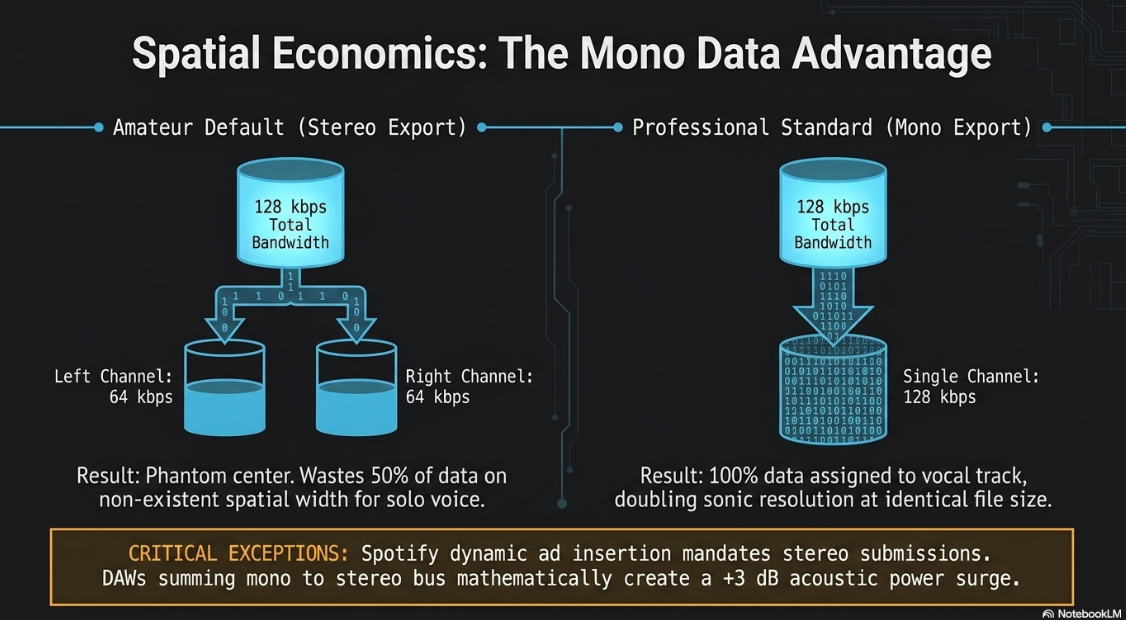
For dialogue-centric podcasts consisting of solo monologues, interviews, or news roundups, the human voice is inherently a point-source emitter. There is no spatial width to a single person speaking, rendering stereo encoding unnecessary. Bouncing an interview podcast in mono is standard professional practice because it optimizes bitrate economics1. A 128 kbps stereo MP3 must divide its data payload, allocating roughly 64 kbps to the left channel and 64 kbps to the right. Conversely, a 128 kbps mono MP3 allocates the entire 128 kbps budget to the single vocal track, effectively doubling the sonic resolution of the voices while maintaining the exact same file size1. Alternatively, a producer can export a mono file at 64 kbps, achieving acceptable speech fidelity while cutting hosting costs and listener download times in half2.
Stereo files become mandatory the moment the podcast relies on spatial mixing, sound-rich documentary design, binaural immersive storytelling, or heavy musical emphasis1. Dynamic ad insertion requires strict adherence to stereo formatting. Spotify’s advertising specifications explicitly mandate stereo submissions for podcast ads. If an advertisement containing music or sound effects is folded down into mono, phase cancellation can flatten the spatial mix, making the advertisement sound crowded, narrow, and disjointed compared to the surrounding content5.
An easily overlooked consequence of mixing mono and stereo assets within a digital audio workstation concerns loudness metering anomalies. DAWs fundamentally process mono audio items in a dual mono mode during stereo bus routing, sending the signal to both left and right outputs simultaneously. Mathematically, doubling identical signals results in a +3 dB increase in acoustic power22. If an engineer normalizes a mono vocal track to an integrated target of -23 LUFS, and subsequently normalizes a stereo music track to -23 LUFS without engaging dual-mono compensation in their metering plugins, the mono track will playback noticeably louder in the final mix22. Advanced loudness normalization software circumvents this by calculating the summed output, ensuring spatial discrepancies do not ruin the balance of the final export22.
Editorial Workflows and Project Organization
A dependable post-production workflow separates amateur efforts from studio-grade productions. A professional setup begins prior to the edit, heavily relying on data management and structural consistency3.
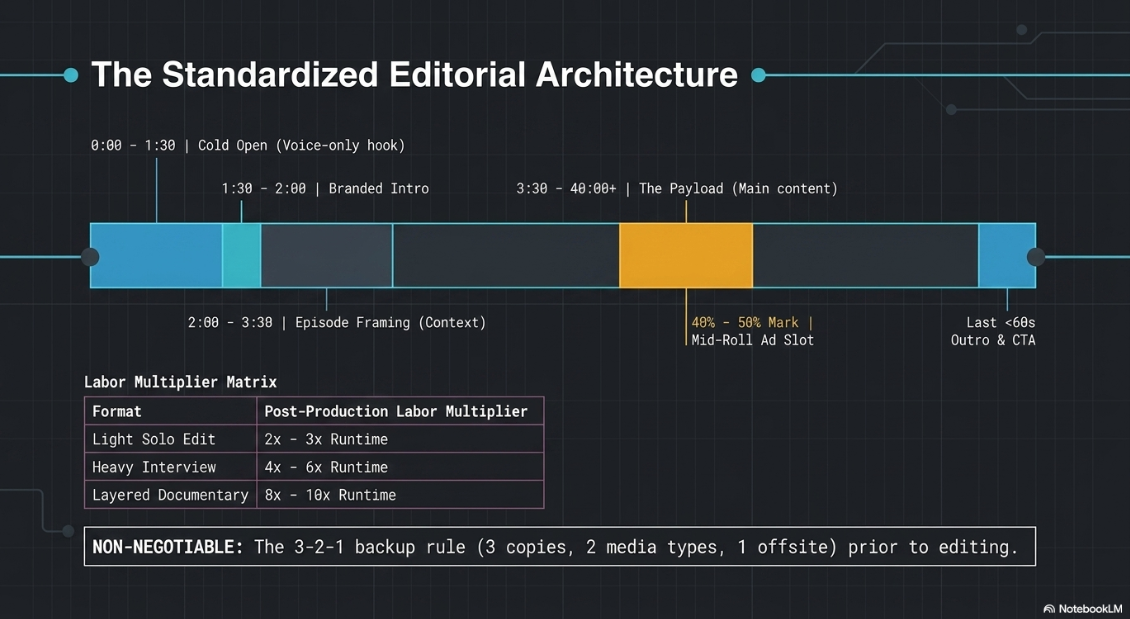
Data hygiene is maintained through logical naming conventions (e.g., ShowName_Season_Episode_Guest_Date_Take.wav) and coherent folder structures that compartmentalize media, project files, music, sound effects, and final exports3. The 3-2-1 backup rule—three copies of the data, on two different media types, with one offsite—is foundational to prevent catastrophic data loss during the editorial process3.
The Standardized Podcast Episode Structure
A professional episode follows a highly structured narrative arc, optimized for listener retention and advertiser integration. While adaptable, a standard template relies on specific timestamps18:
Cold Open (0:00 - 1:30): A compelling, unedited voice-only hook isolated from the interview to arrest listener attention immediately. Listeners heavily skip long, drawn-out intros18.
Branded Intro (1:30 - 2:00): Theme music, show title, and host identification18.
Episode Framing (2:00 - 3:30): The host provides context, explaining what the episode covers and its contemporary relevance18.
Main Content / The Payload (3:30 - 40:00+): The primary monologue or interview18.
Mid-Roll Ad Slot: Placed at a natural conversational break, typically 40% to 50% through the runtime18.
Key Takeaway and Outro: A rapid recap of actionable insights, followed by calls-to-action (CTAs) for subscriptions and show notes, strictly kept under 60 seconds18.
The Seven-Stage Editing Pipeline
Executing this structure requires a methodical editing pipeline, preventing redundant labor and ensuring maximum pacing efficiency14.
The process begins with a pre-edit review, where the editor identifies strong sections, flags unusable tangents, and creates a paper edit14. The second stage is the rough cut, commonly referred to as a top and tail edit. Here, dead air, false starts, and off-topic chatter are ruthlessly excised14. Modern workflows increasingly utilize AI-driven text-based editing platforms, such as Descript, to identify filler words and verbal clutter. However, manual oversight is critical; aggressive AI removals often truncate natural breaths or eliminate conversational hesitations that signal authenticity and intent3.
Editorial labor scales dramatically based on the format. A light edit on a solo show requires two to three times the episode runtime. A heavily edited interview takes four to six times the runtime to tighten meandering answers. A layered, documentary-style production can easily consume eight to ten times the final runtime in post-production labor24.
The Post-Production Digital Signal Processing (DSP) Chain
Clean source audio is merely the raw material; digital signal processing shapes it into a polished, fatigue-free listening experience3. The sequential order of operations in the mixing chain is not arbitrary; processing modules are highly interdependent, and an incorrect signal path will result in cascading audio degradation23.
1. High-Pass Filtering (HPF)
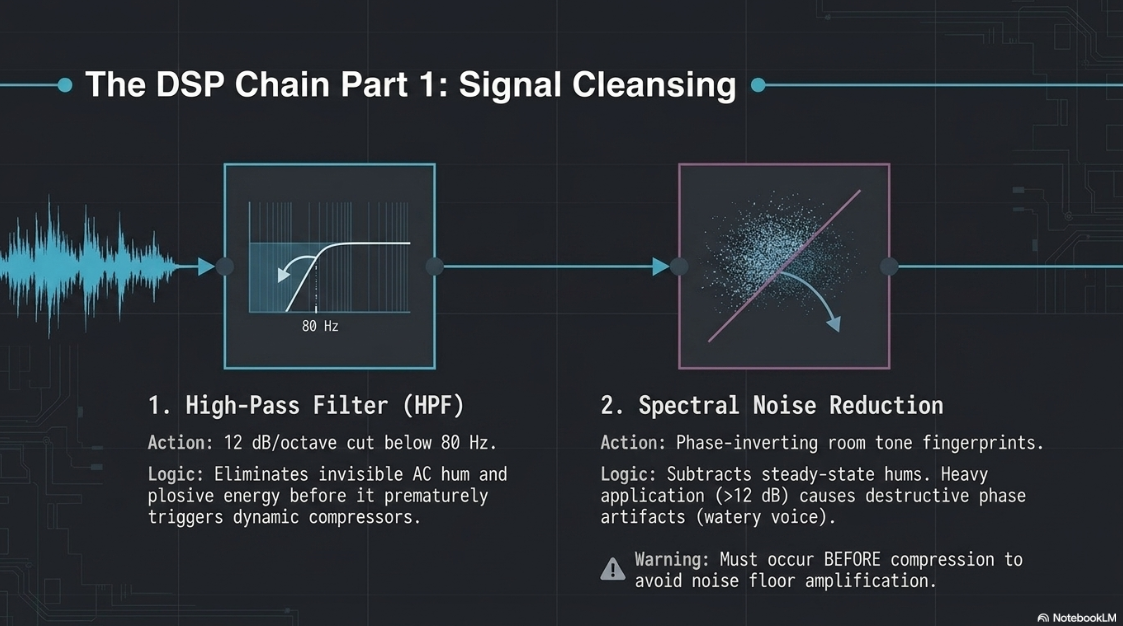
The absolute first step on any vocal track is the application of a high-pass filter, typically set with a 12 dB per octave slope between 80 Hz and 120 Hz3. The human voice contains virtually zero intelligible data below 80 Hz. However, microphones routinely capture low-frequency rumble, air conditioning hum, and explosive plosive energy (the bursts of air hitting the mic capsule)3. While low-frequency rumble is often inaudible on standard consumer earbuds, it represents massive acoustic energy. If not filtered out immediately, this invisible energy will trigger the compressor prematurely, causing the entire vocal track to pump unnaturally every time a plosive occurs. Removing it frees up essential digital headroom25.
2. Spectral Noise Reduction
Prior to dynamic enhancement, persistent background noise must be mitigated using tools like iZotope RX 11 or built-in DAW spectral processors18. These algorithms capture a localized noise profile from a silent portion of the room tone, subsequently phase-inverting or subtracting this specific frequency fingerprint from the recording to eliminate steady-state hums and computer fans18.
Noise reduction must be applied gently, reducing the noise floor by a maximum of 6 to 12 dB. Heavy-handed application results in destructive phase artifacts, giving the voice a watery or robotic characteristic25. Crucially, this must occur before compression; otherwise, the compressor will amplify the noise floor, making it exponentially harder for the algorithm to separate the noise from the voice25.
For creators lacking specialized engineering knowledge, artificial intelligence tools like Adobe Podcast Enhance or Riverside Magic Audio can automate this process3. Adobe's algorithms resynthesize the voice to eliminate room echo and background noise. However, free-tier limitations (such as 500 MB upload caps and the inability to adjust processing strength) often result in over-processed audio, making professional parametric tools superior for precision work3.
3. Subtractive and Additive Equalization (EQ)
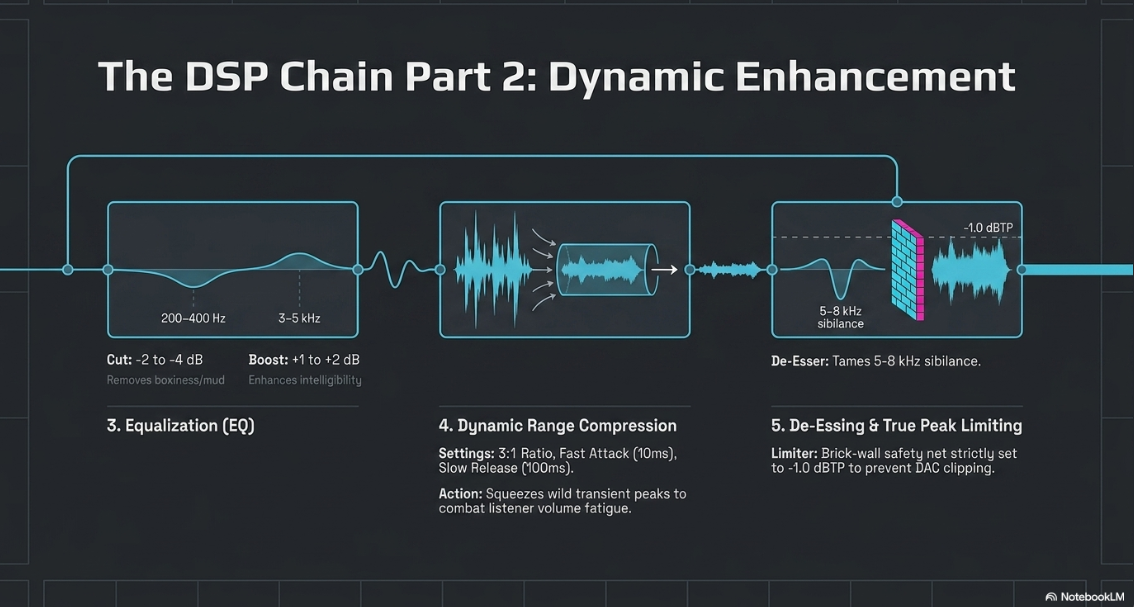
Equalization shapes the tonal balance of the voice to ensure clarity across all playback devices3. Most untreated home studios induce severe low-mid frequency build-up, resulting in a boxy, muddy, or muffled vocal tone. A gentle, wide attenuation of -2 dB to -4 dB in the 200–400 Hz region opens up the voice and restores natural clarity25.
Conversely, the human ear is biologically most sensitive to the 3 kHz to 5 kHz range, which governs speech intelligibility and consonant articulation21. A subtle additive boost of +1 to +2 dB in this presence region ensures the podcast cuts through ambient environmental noise when consumed on low-quality smartphone speakers or earbuds25.
4. Dynamic Range Compression
Unprocessed human speech is wildly dynamic, oscillating between whispers and loud laughter. Uncompressed podcasts require listeners to constantly ride their volume dials, leading to severe listener fatigue in noisy environments4. A compressor reduces this dynamic range by automatically turning down the loudest parts of the signal that exceed a designated threshold4.
Professional spoken word thrives on moderate compression. A ratio of 3:1 or 4:1 is standard. The threshold is typically set between -18 dB and -24 dB, targeting a consistent 3 dB to 6 dB of gain reduction23. Envelope shaping is critical; attack times must be relatively fast (e.g., 10 milliseconds) to catch sudden transient spikes, with a release time (e.g., 100 milliseconds) slow enough to avoid a pumping sensation as the gain returns to normal, preserving a musical, natural cadence23.
5. De-Essing and True Peak Limiting
As a direct consequence of additive EQ and compression, harsh sibilant frequencies—the high-pitched whistling on "S" and "Sh" syllables—are frequently exacerbated3. A de-esser acts as a highly specialized frequency-dependent compressor that zeroes in on the 5 kHz to 8 kHz band, engaging only when a sudden spike of sibilant energy occurs to reduce fatigue without inducing an artificial lisp25.
The final safety net in the signal chain is a brick-wall limiter, which prevents the digitized audio from clipping the Digital-to-Analog Converter upon playback4. The limiter ceiling is strictly set to -1.0 dBTP (True Peak) or -2.0 dBTP for platforms like Amazon Music and Spotify advertising4. A limiter should not be used as a primary volume booster; if it is registering more than 2 to 3 dB of gain reduction, the preceding compression stage was improperly staged4.
Loudness Normalization: Navigating LUFS Standards
Historically, digital audio was metered via peak levels (dBFS) or RMS (Root Mean Square). Neither accurately reflects human hearing. A high-frequency sine wave and a sub-bass frequency can register identical peak dBFS levels, yet the human ear will perceive the high-frequency wave as exponentially louder due to psychometric sensitivities21. Furthermore, hyper-compressed audio sounds significantly louder than dynamic audio, even if both peak at identical amplitudes, fueling listener fatigue commonly known as Loudness War Syndrome21.
To standardize global communications media, the International Telecommunication Union established the ITU-R BS.1770 standard, introducing the Loudness Unit relative to Full Scale (LUFS), also known interchangeably as LKFS20.
The Mechanics of LUFS and True Peak Measurement
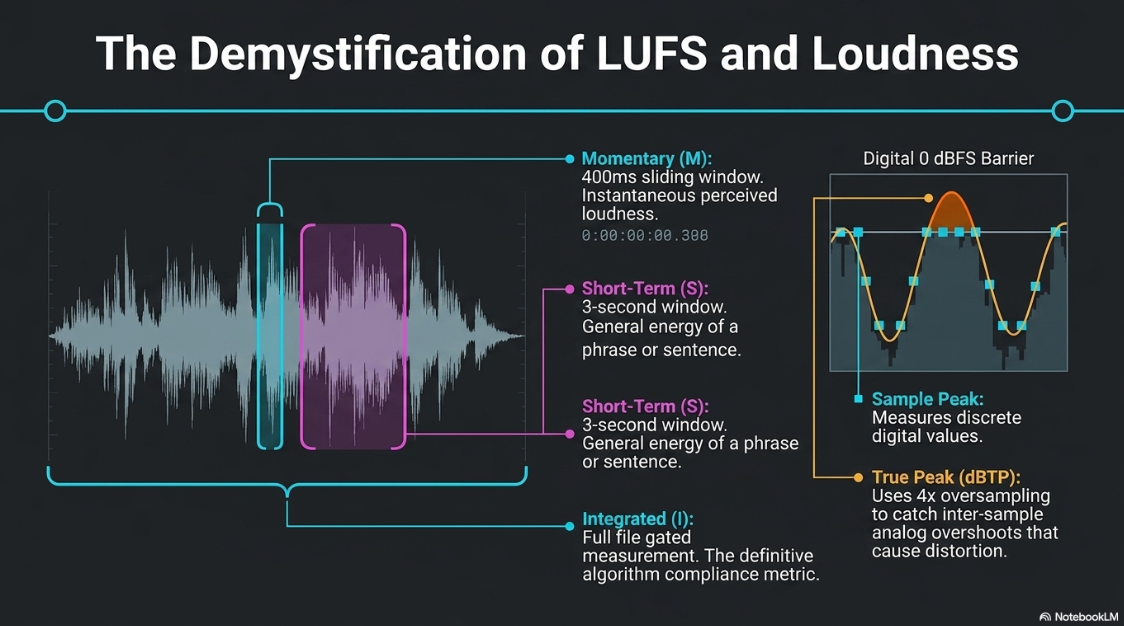
LUFS incorporates K-frequency weighting, which mathematically filters the audio to mimic the biological frequency response of the human ear21. Dedicated broadcast-standard plugins, such as the Youlean Loudness Meter or StudioSixDigital LUFS Meter, display distinct temporal parameters to analyze the mix27:
Momentary (M): Measured over a 400-millisecond sliding window. Tracks immediate, instantaneous perceived loudness to identify brief peaks or dips27.
Short-Term (S): Measured over a 3-second sliding window. Smooths out momentary spikes to show the general energy of the current phrase or sentence27.
Integrated (I): A gated measurement calculated over the entirely of the audio file. This single numerical value dictates whether an entire episode meets distribution platform compliance10.
Loudness Range (LRA): Represents the statistical difference between the 10th and 95th percentiles of Short-Term measurements. A low LRA indicates a heavily compressed file, while a high LRA indicates wide dynamics29.
Simultaneously, engineers must monitor True Peak (dBTP). Traditional digital meters measure Sample Peak—the highest value registered by an individual digital sample. However, when the digital waveform is reconstructed back into continuous analog sound by consumer playback devices, the curve drawn between two high-level samples can actually overshoot the 0 dBFS barrier, causing inter-sample clipping4. True Peak meters use 4x oversampling algorithms to anticipate and measure these inter-sample peaks, ensuring the audio never distorts upon rendering29.
The Platform Algorithm Wars
Major tech conglomerates have deployed automated Loudness Normalization algorithms on their platforms to ensure seamless playback without jarring volume jumps between episodes or advertisements. Failing to master audio to these exact specifications results in the platform algorithms actively altering, degrading, or penalizing the podcast4.
Broadcast television standards in Europe (EBU R128) and the United States mandate an integrated loudness of -23 LUFS or -24 LUFS22. However, podcasts mastered to -24 LUFS fail dramatically on mobile devices, which lack the requisite internal amplifier gain to push the audio to an audible level in noisy environments like public transit4. Consequently, the AES TD1004 streaming recommendation elevated the floor, establishing -16 LUFS as the absolute podcasting standard10.
Platform-specific ingestion architectures vary wildly in how they enforce these metrics.
Strategic Mastery: The -16 LUFS vs. -14 LUFS Paradox
A deep analysis of algorithmic behavior reveals a complex mastering paradox. Apple Digital Masters dictates -16 LUFS, while Spotify and YouTube dictate -14 LUFS4.
If a producer masters a podcast to -16 LUFS, YouTube will strictly refuse to turn it up, leaving the video podcast perceptually quieter than competing YouTube content20. Concurrently, Spotify will artificially boost the -16 LUFS master to -14 LUFS. If the track lacks sufficient peak headroom, Spotify's aggressive internal limiter will engage, introducing platform-level distortion and raising the underlying noise floor, effectively destroying the audio engineer's careful mix4.
Conversely, if a producer masters at -14 LUFS, Apple Podcasts will gently attenuate the file down to -16 LUFS. Because Apple only applies negative gain adjustment without active limiting, the file's dynamic range and transient punch remain perfectly preserved4.
The defining insight for delivery mechanics rests on the fact that negative algorithmic attenuation is harmless to audio fidelity (simply turning the fader down), but positive algorithmic boosting causes catastrophic damage by triggering limiters and exacerbating noise floors. Therefore, the modern consensus for omni-channel podcast distribution leans toward an integrated target of -14 LUFS with a -1.0 dBTP ceiling2. This master survives Spotify and YouTube ingestion flawlessly while scaling down elegantly on Apple hardware2. Alternatively, dedicated audio-only RSS feeds that predominantly service Apple users remain strictly optimized for -16 LUFS5.
The Payload of Syndication: ID3 Metadata Tagging Standards
Audio files do not exist in a vacuum; they must communicate their identity, origin, and structural layout to parsing engines across thousands of diverse RSS aggregators, smart speakers, and digital dashboards. This is achieved via ID3 metadata tagging—a structured data chunk embedded directly into the MP3 container format19.
The ID3 specification has evolved through multiple iterations. ID3v1 tags were strictly placed at the tail end of the file, rendering them highly inefficient for modern web streaming, as the player had to download the entire file before identifying the metadata19. To resolve this, ID3v2 shifted the metadata block to the front of the file, allowing instant identification19.
ID3v2.3 vs. ID3v2.4: The Protocol War
The ID3 specification is an informal container standard that relies heavily on backward compatibility. The two prevailing protocols in podcasting are ID3v2.3 and ID3v2.4, and the nuances between them dictate global app compatibility32.
Published as the dominant standard in the late 1990s, ID3v2.3 introduced four-character frame identifiers (e.g., TIT2 for Title, TPE1 for Artist) and established the protocol for embedding binary image data for specific podcast episode artwork directly into the file19. It remains the de facto baseline for podcasting metadata worldwide32.
Published in late 2000, ID3v2.4 introduced sweeping technical improvements. It natively supported UTF-8 text encoding, which is essential for international character sets, allowed multiple data values (such as multiple genres) to be separated by a null byte rather than a slash, and permitted the tag to be stored at either the beginning or the end of the file32. Crucially, v2.4 altered how frame sizes were calculated. In v2.3, certain flag configurations caused false synchronizations where a decoder would mistake metadata for the start of an audio frame36. Version 2.4 fixed this by dropping the highest bit of the byte, shifting the frame size calculation from 32-bit down to 28-bit to prevent playback havok36.
Despite v2.4 being technically superior, the global podcast ecosystem remains deeply fragmented. Many mobile podcast clients, vintage in-car infotainment systems, and localized RSS ingestion engines rely on outdated parsing libraries that fail to decode ID3v2.4 frame sizes correctly, resulting in blank titles, missing artwork, and broken feeds34. Because ultimate compatibility is the overriding goal of podcast syndication, ID3v2.3 remains the safest, most widely recommended metadata format for MP3 export. Dedicated podcast authoring software routinely forces a downgrade back to v2.3 to ensure cross-platform safety when handling imported audio33.
The Role of Chapter Markers and Enhanced Playback
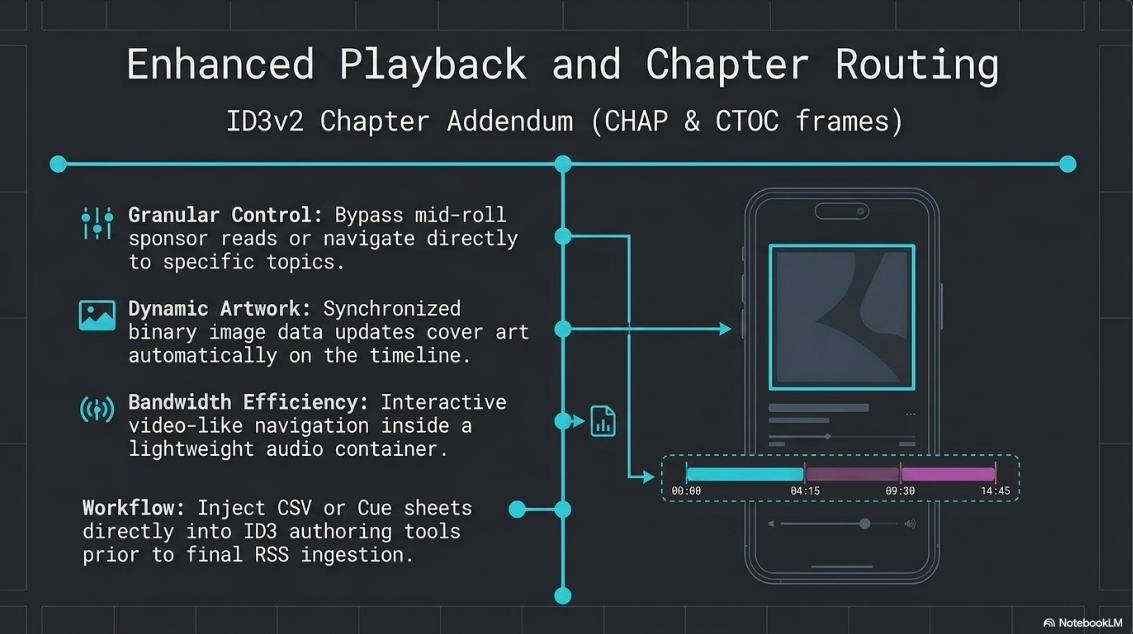
The ID3v2 Chapter Addendum, published in 2005, introduced the CHAP (Chapter) and CTOC (Table of Contents) frames32. This revolutionized long-form podcasting by allowing creators to embed precise timestamps within a single MP3 file. Supported widely by modern clients like Apple Podcasts, Overcast, Pocket Casts, and Player FM, chapters allow listeners to navigate directly to specific topics, bypass sponsor reads, and view synchronized dynamic artwork that changes as the timeline progresses32.
Producers can rapidly construct these markers by importing CSV files or Cue sheets directly into ID3 authoring tools, streamlining the distribution workflow35. When correctly executed within an ID3v2.3 wrapper, these enhanced podcast mechanics provide massive listener retention benefits by granting the audience granular control over the timeline, without requiring the massive file sizes associated with proprietary video formats32.
Works cited
Best Podcast Audio Formats 2026 | MP3, WAV, AAC - Work Management, https://work-management.org/marketing/podcast/best-podcast-audio-formats/
WAV vs MP3: Choose the Best File for Your Podcast - Zencastr, https://zencastr.com/blog/wav-vs-mp3-podcast-file-type
Podcast editing guide (2026): how to edit a podcast like a pro | LucidLink, https://www.lucidlink.com/blog/podcast-editing
Podcast Loudness Standards 2026: Spotify, Apple, YouTube Requirements, https://sone.app/blog/podcast-loudness-standards-2026-spotify-apple-youtube
Podcast ad minimum requirements | Spotify Advertising, https://ads.spotify.com/en-CA/guide-to-creating-audio-ads/podcast-ads-minimum-requirements/
24-Bit vs. 32-Bit Float Recording: Which to Use and When? - WaveInformer, https://waveinformer.com/2025/12/20/24-bit-vs-32-bit-float-recording/
ELI 5 regarding 32bit float vs 24bit please? : r/audioengineering - Reddit, https://www.reddit.com/r/audioengineering/comments/1bdlfzq/eli_5_regarding_32bit_float_vs_24bit_please/
What is 32-bit Float Recording? | TASCAM - International, https://tascam.jp/int/feature/32-bit_float
32-Bit Float Files Explained - Sound Devices, https://www.sounddevices.com/32-bit-float-files-explained/
Why Your Podcast Sounds Amateur (5 Audio Specs Explained), https://www.podcaststudioglasgow.com/podcast-studio-glasgow-blog/the-5-audio-specs-that-separate-professional-from-amateur-podcasts
Demystifying 32-Bit Float Audio: How It Works, and When It Doesn't | BOOM Library, https://www.boomlibrary.com/blog/demystifying-32-bit-float-audio/
MP3, AAC, WAV, or WebM? The Creator's Guide to Audio File Formats | Podsplice, https://podsplice.com/mp3-aac-wav-or-webm-the-creators-guide-to-audio-file-formats
Digital Audio Editing Workflow: A Step-by-Step Guide - Journalism University, https://journalism.university/audio-podcast/digital-audio-editing-step-by-step/
Audio File Formats and Bitrates for Podcasts - Auphonic Blog, https://auphonic.com/blog/2011/07/13/audio-file-formats-podcasts/
Which audio file format should I use for my podcast? - Acast Learning Center, https://learn.acast.com/en/articles/3505536-which-audio-file-format-should-i-use-for-my-podcast
What Bit Rate Should I Export My Podcast Episode As? | by Aaron Dowd - Medium, https://medium.com/simplecast/what-bit-rate-should-i-use-5a5d835fd0f3
Podcast Editing Workflow 2026 (Step-by-Step Guide + Tools & Costs) - NextMedia London, https://nextmedia.london/podcast-editing-workflow-2026/
Standards: Audio - ID3 Metadata Tagging - The Broadcast Bridge, https://www.thebroadcastbridge.com/content/entry/21824/standards-id3-metadata-tagging
LUFS Loudness Standards for 50+ Platforms - Free Lookup - Dan Murtagh, https://danmurtagh.com/lufs-loudness-standards
Part 1: General Audio Terms - The Self-Recording Band, https://theselfrecordingband.com/general-audio-terms/
How to normalize audio items in Reaper using the new SWS extension (v2.14.0.3), https://melodiefabriek.com/sound-tech/normalize-audio-items-reaper-using-the-new-sws-extension/
Audio Editing for Podcasts: A Pro Workflow (2026) | Get Up Productions, https://getupproductions.com/audio-editing-for-podcasts/
How to Edit Audio for Podcast: A Pro Workflow - Podmuse, https://www.podmuse.com/post/edit-audio-for-podcast
Podcast Audio Mixing: The Complete Production Guide (2026) | Ruah Creative House, https://ruahcreativehouse.org/blog/podcast-audio-mixing/
The Battle with LUFS - Hänz Nobe - Medium, https://hanznobe.medium.com/the-battle-with-lufs-223bc162d367
LUFS In Audio Explained: What You Need to Know - Production Music Live, https://www.productionmusiclive.com/blogs/news/what-is-lufs
Loudness (LUFS) | Podcasting Articles - Audio Audit, https://audioaudit.io/articles/podcast/loudness-lufs
LUFS Meter — Broadcast Loudness Measurement - Studio Six Digital, https://studiosixdigital.com/lufs-meter/
Check Your Levels! A quick guide to LUF and why you need to know about it!, https://podcasterspodcast.com/check-your-levels-a-quick-guide-to-luf-and-why-you-need-to-know-about-it/
Worldwide Loudness Delivery Standards - RTW Audio, https://www.rtw.com/blog/rtw-knowledge-base-1/worldwide-loudness-delivery-standards-4
ID3 - Wikipedia, https://en.wikipedia.org/wiki/ID3
ID3 Metadata for MP3, Version 2 - Library of Congress, https://www.loc.gov/preservation/digital/formats/fdd/fdd000108.shtml
Time for ID3v2.4? Future-proof, Less risky *Tag*-reading? Batch-Convert tips? - RadioDJ, https://www.radiodj.ro/community/index.php/topic,16588.0.html
Frequently Asked Questions - Podcast Chapters, https://chaptersapp.com/faq/
Are the ID3v2.4 frame flags really completely different from ID3v2.3? - Stack Overflow, https://stackoverflow.com/questions/76073117/are-the-id3v2-4-frame-flags-really-completely-different-from-id3v2-3











