
Introduction to Digital Audio Latency in Broadcast Environments
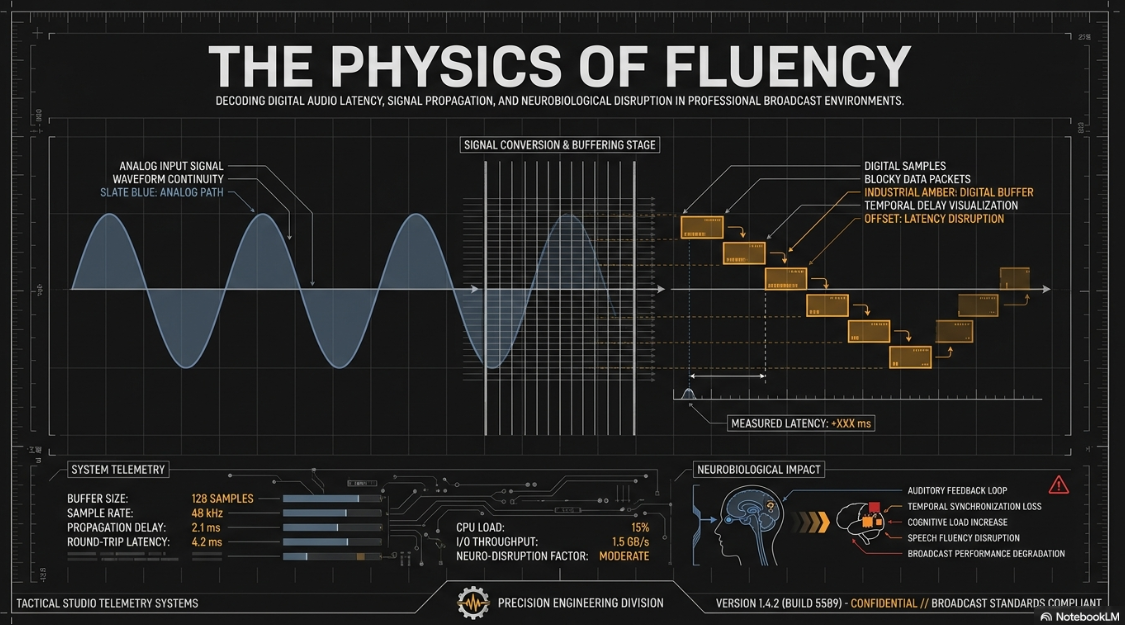
In the contemporary landscape of professional podcasting and digital broadcasting, the preservation of an uninhibited, natural communicative flow is a foundational requirement. Central to this objective is the meticulous management of audio latency, defined as the temporal delay between the generation of an acoustic signal—such as a spoken word entering a microphone capsule—and its eventual reproduction through a monitoring system, typically a presenter’s studio headphones1. While the digital transition in audio processing enables unprecedented control, routing flexibility, and noise reduction, it inherently introduces latency through digital-to-analog and analog-to-digital conversions, memory buffer stages, software driver interactions, and computational processing1.
In highly interactive broadcast environments, the impact of latency extends far beyond theoretical technical specifications; it directly influences the physiological and psychological performance of the speaker. For a podcast host wearing closed-back studio headphones, monitoring their own voice in real-time is an absolute critical requirement for maintaining cadence, pitch, and conversational rhythm. When this auditory feedback is delayed, the human brain is forced into a state of cognitive dissonance, attempting to reconcile the immediate physical sensation of bone-conducted vocalization with the delayed acoustic signal arriving electronically at the eardrum4. Depending on the severity of this temporal displacement, the consequences range from imperceptible tonal coloration of the audio to severe speech disruption, induced stammering, and a complete inability to maintain fluent articulation4.
Consequently, selecting the correct audio interface and establishing an optimized digital signal chain are paramount for any professional studio installation. The hardware and software protocols—spanning Universal Serial Bus (USB), Thunderbolt, Peripheral Component Interconnect Express (PCIe), and Audio over Internet Protocol (AoIP)—determine the baseline latency capabilities of the system7. Furthermore, the complex mathematical interplay between digital buffer sizes, sample rates, and proprietary driver architectures dictates whether a host system can consistently achieve the sub-10 millisecond round-trip latency required for professional monitoring without introducing catastrophic digital artifacts like buffer underruns, pops, or clicks3. This report provides an exhaustive examination of digital audio latency, unraveling the psychoacoustic and neurobiological thresholds of human perception, the computational mechanics of digital audio workstations (DAWs), bus protocol bandwidths, and a comparative market analysis of industry-standard audio interfaces utilized in high-end podcast execution.
The Physics and Neurobiology of Auditory Perception
Understanding how the human brain perceives delayed audio is the critical first step in establishing operational thresholds for podcasting equipment. The audibility and physiological impact of latency vary dramatically depending on the specific duration of the delay, ranging from subtle phase interference at microscopic delays to severe cognitive and motor-function disruption at macroscopic delays1. To accurately assess subjective audio quality in relation to latency impairments, researchers frequently employ the MUSHRA (Multiple Stimuli with Hidden Reference and Anchor) methodology, a double-blind test that compares processed audio against an unprocessed, zero-latency reference12.
Phase Cancellation and Comb Filtering (0 to 15 Milliseconds)
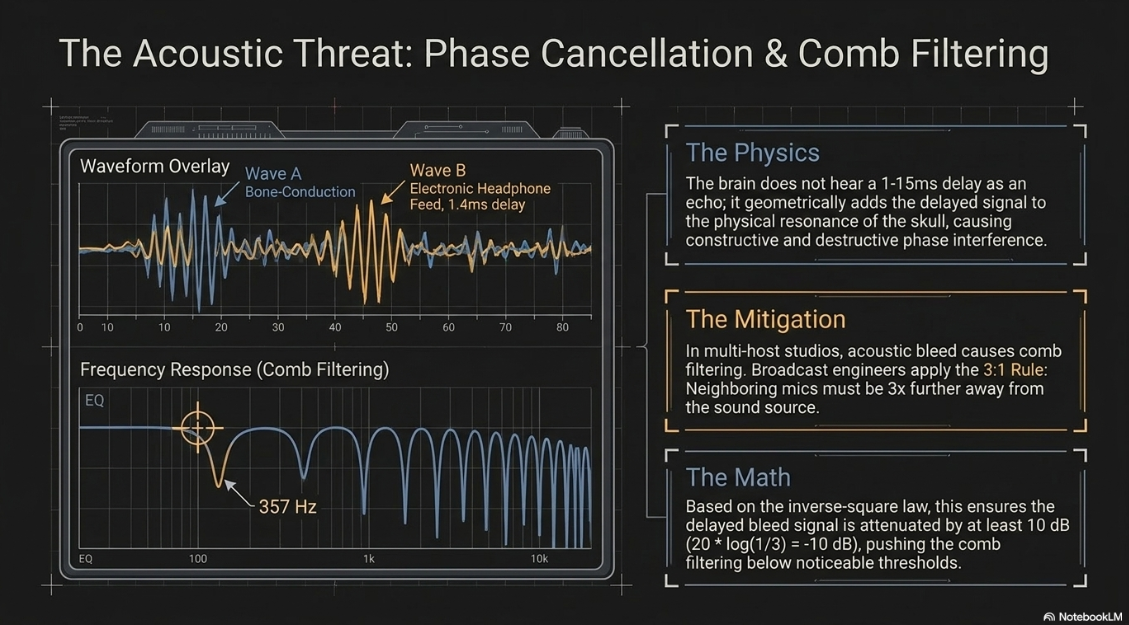
When a podcast host speaks into a microphone while simultaneously monitoring their voice through closed-back headphones, they are effectively processing two distinct signals: the immediate, bone-conducted resonance of their own voice vibrating through their skull and jaw, and the electronically routed signal arriving at their ears via the audio interface. If the electronic signal is delayed by a fraction of a millisecond to approximately 15 milliseconds, the brain does not perceive it as a distinct, separate echo6. Instead, the delayed signal acoustically and neurologically adds to the original signal, resulting in constructive and destructive phase interference6.
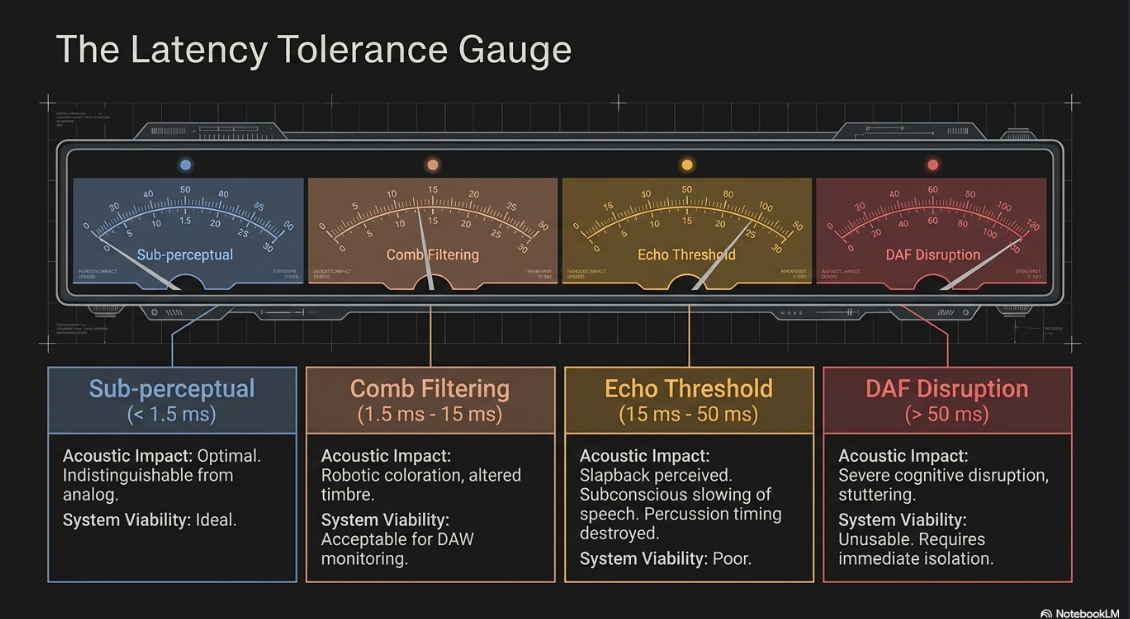
This phenomenon is classified as comb filtering, so named because the resulting frequency response graph features deep, regular, repeating notches that closely resemble the teeth of a hair comb6. At a 1 millisecond delay, the timbre of the voice becomes highly colored and unnatural, often described in psychoacoustic literature as hollow, metallic, or "robotic"6. As the delay increases toward 10 or 15 milliseconds, the comb filter notches move lower in the frequency spectrum, drastically altering the fundamental formants and characteristics of human speech. Research utilizing computer simulations and real-world hearing devices indicates that individuals with normal hearing thresholds below 1.5 kHz are highly adept at discriminating sound coloration due to delays of 1 millisecond or shorter13. Conversely, when applying these findings to professional audio interfaces, a device introducing a theoretical total latency of just 1.4 milliseconds can result in comb filtering starting at frequencies as low as 357 Hz, fundamentally altering the warmth and presence of a broadcaster's voice12.
In a multi-host podcast studio, comb filtering presents a severe acoustic threat when multiple microphones remain open simultaneously. If Host A's voice acoustically bleeds into Host B's microphone, the audio interface receives the identical voice signal at two distinct times due to the physical distance the sound waves must travel between the microphones6. To mitigate this acoustic latency, broadcast engineers stringently adhere to the 3:1 rule: a neighboring microphone must be at least three times further away from the sound source than the primary microphone. Based on the inverse-square law of sound propagation, this distance ensures the delayed bleed signal is attenuated by at least 10 dB6. The mathematical formula (20 * log(1/3) ≈ -10 dB) dictates that this attenuation pushes the comb filtering effect below the threshold of noticeable acoustic disruption6. Psychoacoustic studies further corroborate this, establishing the general rule that any delayed sound arriving within the first 15 milliseconds must be attenuated by 15 dB to remain psychoacoustically invisible, while reflections within 20 milliseconds require a 20 dB reduction6.
The Echo Threshold and Variable Tolerance (15 to 50 Milliseconds)
Psychoacoustic studies reveal that as a delay surpasses the 15-to-20-millisecond threshold, the human brain's temporal integration mechanism begins to break down6. The listener transitions from perceiving a single, tonally colored sound to recognizing two distinct, consecutive auditory events6. Between 20 and 50 milliseconds, latency becomes consciously noticeable as a slight echo or slapback1.
The tolerance for this delay is highly stimulus-dependent. For transient-heavy, percussive instruments, a 10-millisecond delay is often cited as the absolute maximum tolerable limit, as the disconnect between the physical kinetic strike and the auditory response destroys rhythmic timing15. However, for human speech, the threshold is slightly more variable. Brief sounds, such as clicks or rapid consonant bursts, result in echo detection thresholds between 5 and 10 milliseconds, while continuous running speech generally results in noticeably higher thresholds between 30 and 50 milliseconds13. Despite this, professional voiceover artists and podcasters who rely heavily on precise headphone monitoring to modulate their intonation, pitch, and pacing find that even a 15-millisecond delay feels overwhelmingly sluggish4. This subtle temporal disconnect often causes a subconscious tendency to artificially slow down the speech rate, as the brain waits for the auditory feedback to synchronize with the motor action4. Furthermore, studies evaluating perceived disturbance utilizing a 7-point rating scale demonstrate that normal-hearing listeners rate delays of 10 milliseconds as significantly more disturbing than delays of 2 or 4 milliseconds when monitoring their own voice13.
Neuroimaging, Delayed Auditory Feedback, and Cognitive Disruption (>50 ms)
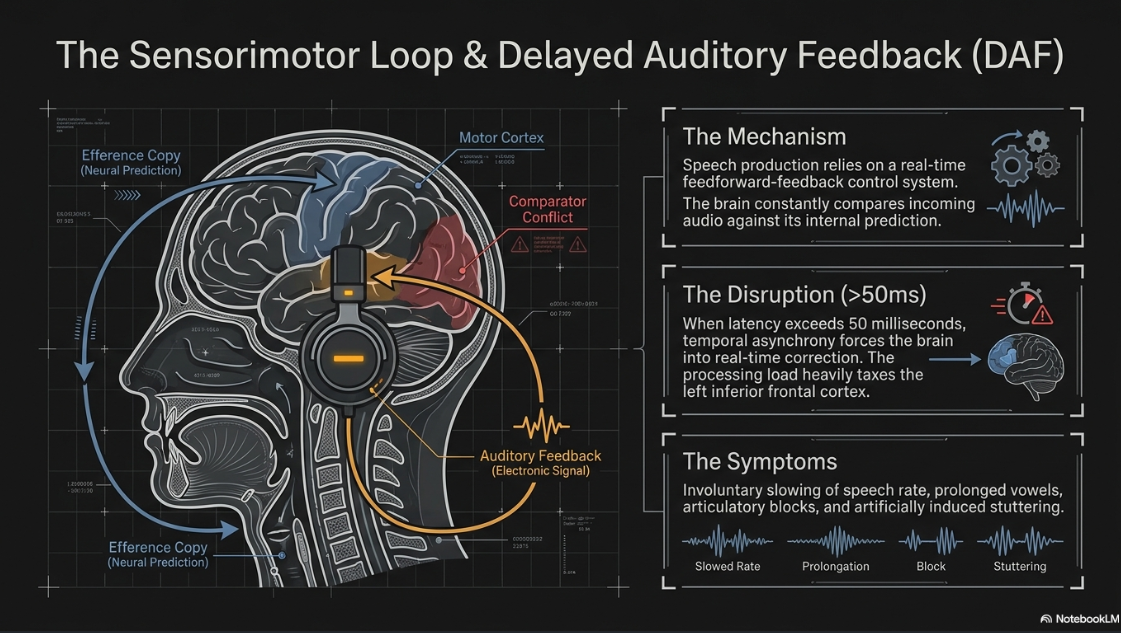
When audio latency exceeds 50 milliseconds and ventures toward the 100 to 200-millisecond range, it triggers a severe, debilitating neurological phenomenon known as Delayed Auditory Feedback (DAF)4. Speech production is governed by a highly complex sensorimotor loop, operating as a feedforward-feedback control system4. When the brain issues a motor command to the vocal cords and articulators, an efference copy generates a neural prediction of the expected sensory consequence4.
The brain continuously monitors and compares the incoming sensory input with this internal prediction. If a temporal mismatch occurs due to systemic audio latency, auditory comparator mechanisms located in the posterior superior temporal gyrus (pSTG), as well as somatosensory comparators in the supramarginal gyrus (SMG), detect a critical error4. Under DAF conditions, this temporal asynchrony forces the brain to attempt real-time corrective measures. Speakers will involuntarily slow their speech rate, drastically prolong vowels, reset syllables, or suffer complete articulatory blocks—artificially inducing symptoms identical to clinical stuttering4.
Functional and diffusion-weighted Magnetic Resonance Imaging (fMRI) studies of participants subjected to DAF reveal that susceptibility to this disruption is linked to increased activation in left-hemisphere speech motor homologues and larger volumes in the right long segment of the arcuate fasciculus, a white-matter pathway connecting auditory and motor speech regions4. Within the first 400 milliseconds of initiating speech under these conditions, processing advances from the left inferior frontal cortex (responsible for articulatory programming) to the left lateral central sulcus and dorsal premotor cortex (motor preparation), heavily taxing the brain's neural resources as it attempts to resolve the sensorimotor discrepancy18. Consequently, any podcasting hardware or software configuration that introduces latency approaching or exceeding 50 to 100 milliseconds is fundamentally unusable for live monitoring, as it will actively and neurologically destroy the host's ability to speak fluently1.
The Mechanics of the Digital Audio Signal Chain
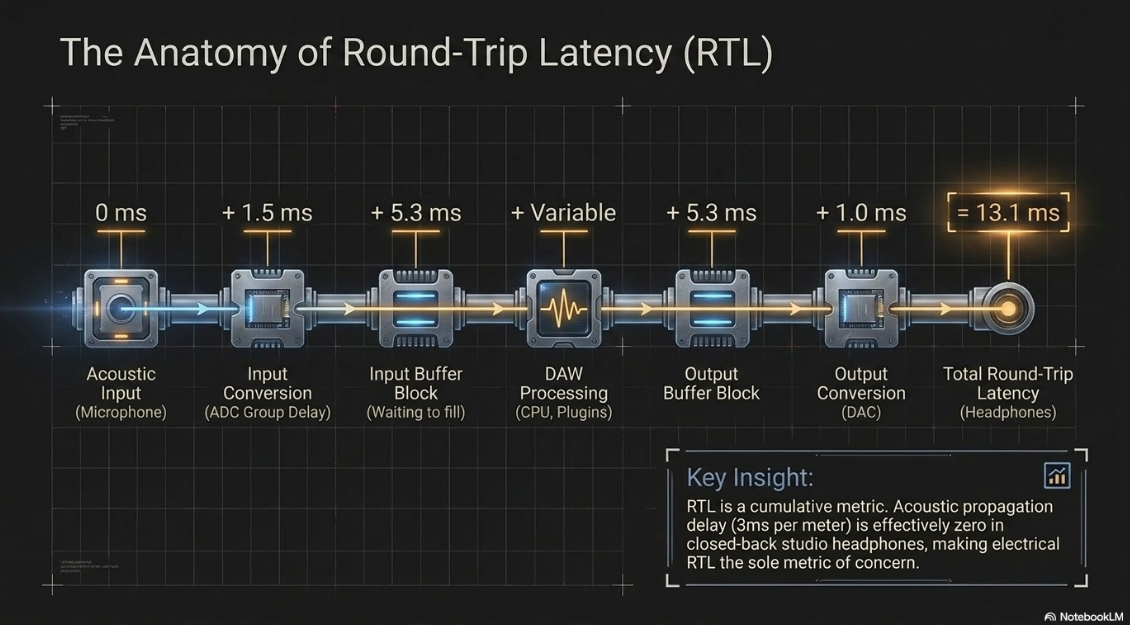
Audio latency is not a monolithic, singular occurrence; rather, it is a cumulative metric resulting from a series of discrete micro-delays introduced at every stage of the digital signal path. This continuous chain, referred to in the industry as Round-Trip Latency (RTL), represents the absolute lower temporal bound required for an analog signal to be digitized, processed by a computer, and converted back into analog audio for playback3. The signal chain is segmented into input latency, processing latency, transmission latency, and output latency1.
Input Conversion (ADC) and Group Delay
The input stage commences the moment acoustic energy strikes the microphone diaphragm, converting atmospheric sound pressure into an analog electrical voltage. This analog transmission travels through copper cabling at a fraction of the speed of light, introducing negligible delay measured strictly in microseconds1. However, upon reaching the audio interface, the signal encounters the Analog-to-Digital Converter (ADC). The ADC samples the continuous analog voltage at a specific temporal rate (e.g., 48,000 times per second) and bit depth (e.g., 24-bit) to map the continuous signal into discrete digital data1.
The analog-to-digital conversion process is not instantaneous. To prevent high-frequency artifacts (frequencies exceeding the Nyquist limit) from folding back into the audible spectrum—a phenomenon known as digital aliasing—the hardware must utilize anti-aliasing filters23. Modern delta-sigma converters employ aggressive oversampling followed by digital decimation filters that introduce a fixed mathematical group delay. Depending on the architecture of the ADC chipset, this initial conversion typically adds between 0.5 to 1.5 milliseconds of unavoidable latency to the signal path1. For instance, a commercial audio processor sampling at 48kHz may utilize an ADC with a group delay of 37 samples, which translates to a specific, measurable time cost before the data even reaches the computer12.
Processing Buffers and Sample Rate Mathematics
Once digitized, the audio data is transferred via a hardware bus to the host computer's Central Processing Unit (CPU). Because modern operating systems are tasked with managing thousands of concurrent background processes, they cannot process audio on a continuous, sample-by-sample basis without catastrophic inefficiency1. Therefore, the data is collected into temporary memory caches known as buffers1. The audio interface driver waits until a buffer block (e.g., 128 samples) is entirely full before handing the entire packet to the Digital Audio Workstation (DAW) or podcasting software for processing10.
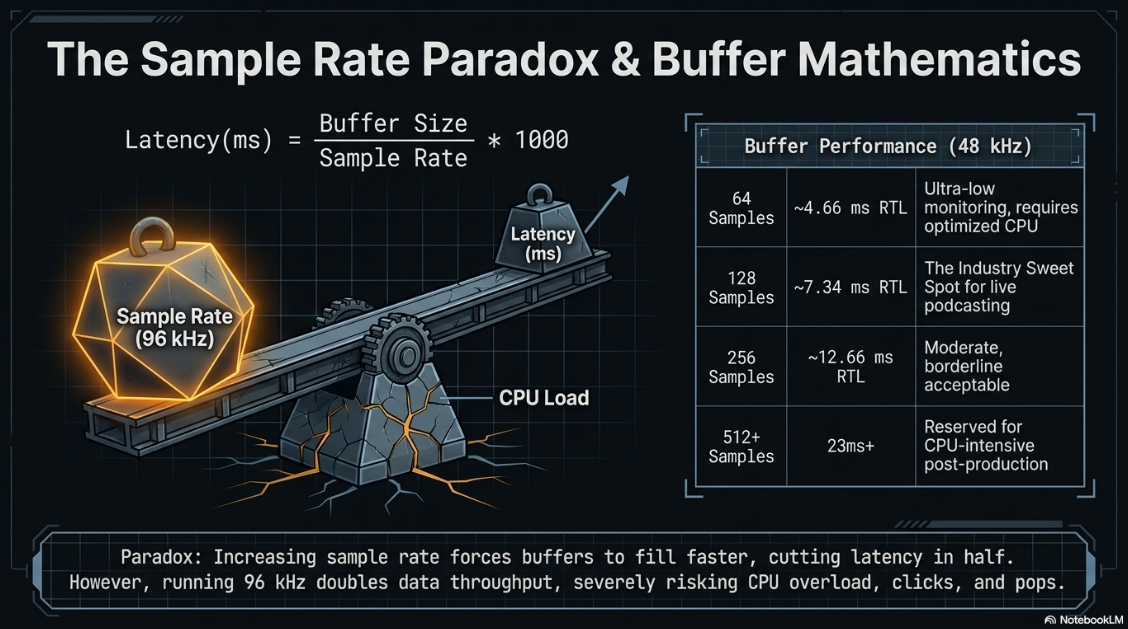
This buffering stage represents the most significant, variable, and user-controllable source of latency in a modern broadcast system. The formula for calculating pure buffer latency is deterministic, defined by dividing the buffer size by the sample rate3:

Because digital audio routing requires a buffer on the input stage and an identical buffer on the output stage, the resulting value must be multiplied by two to ascertain the total software delay11. When added to the hardware ADC and DAC conversion times (roughly 1 to 2 milliseconds total), the true Round-Trip Latency is revealed3.
Paradoxically for many entry-level engineers, increasing the sample rate actually decreases latency for any given buffer size11. For example, a 256-sample buffer at 44.1 kHz results in a 5.8 millisecond one-way delay. Increasing the sample rate to 96 kHz forces the buffer to fill up more than twice as fast, dropping the one-way buffer latency to just 2.67 milliseconds11. However, recording at 96 kHz or 192 kHz (which is primarily recommended for cinematic sound design) doubles or quadruples the data throughput22. This drastically increases the computational load on the CPU, severely raising the likelihood of system overloads and audio dropouts (clicks and pops), making ultra-high sample rates an impractical solution for standard, long-form spoken-word podcasting10.
If the DAW applies Digital Signal Processing (DSP)—such as algorithmic equalization, compression, or noise gating—additional processing latency is introduced1. Specifically, dynamic plugins like "look-ahead" limiters, which analyze the waveform slightly ahead of real-time to catch peak transients perfectly, add significant, unavoidable delay to the processing chain3. While modern DAWs utilize Automatic Delay Compensation to keep all recorded tracks perfectly time-aligned for playback, this feature cannot retroactively remove latency from a live monitoring feed; it simply delays all other tracks to match the slowest plugin in the chain25.
Output Conversion (DAC) and Acoustic Propagation
After the host computer finishes processing the audio block, the data is placed into the output buffer and transmitted back across the hardware bus to the audio interface. Here, the Digital-to-Analog Converter (DAC) reconstructs the continuous analog waveform from the digital numerical samples1. Similar to the ADC stage, the DAC utilizes interpolation and reconstruction filters that introduce a minor group delay, typically around 1 millisecond3. Finally, the analog signal is amplified by a headphone preamplifier and sent to the podcaster's headphones.
When observing the physical propagation of sound through the atmosphere, every additional meter of physical distance between a loudspeaker and a listener's ear adds approximately 3 milliseconds of acoustic delay, predicated on the speed of sound traveling at roughly 343 meters per second1. To illustrate, a guitarist standing 3.43 meters (11.25 feet) away from their amplifier experiences a natural 10-millisecond delay purely from the physics of sound propagation15. However, in a professional podcasting scenario where the host utilizes closed-back studio headphones or in-ear monitors (IEMs), the acoustic distance between the driver and the eardrum is reduced to millimeters, rendering acoustic propagation delay virtually non-existent (effectively zero milliseconds)24. Consequently, the electrical and computational RTL remains the sole metric of concern for the recording engineer.
Driver Architectures and Operating System Bottlenecks
The theoretical mathematics of sample rates and buffer sizes are strictly governed and ultimately constrained by the efficiency of the software drivers facilitating communication between the operating system (OS) and the audio hardware.
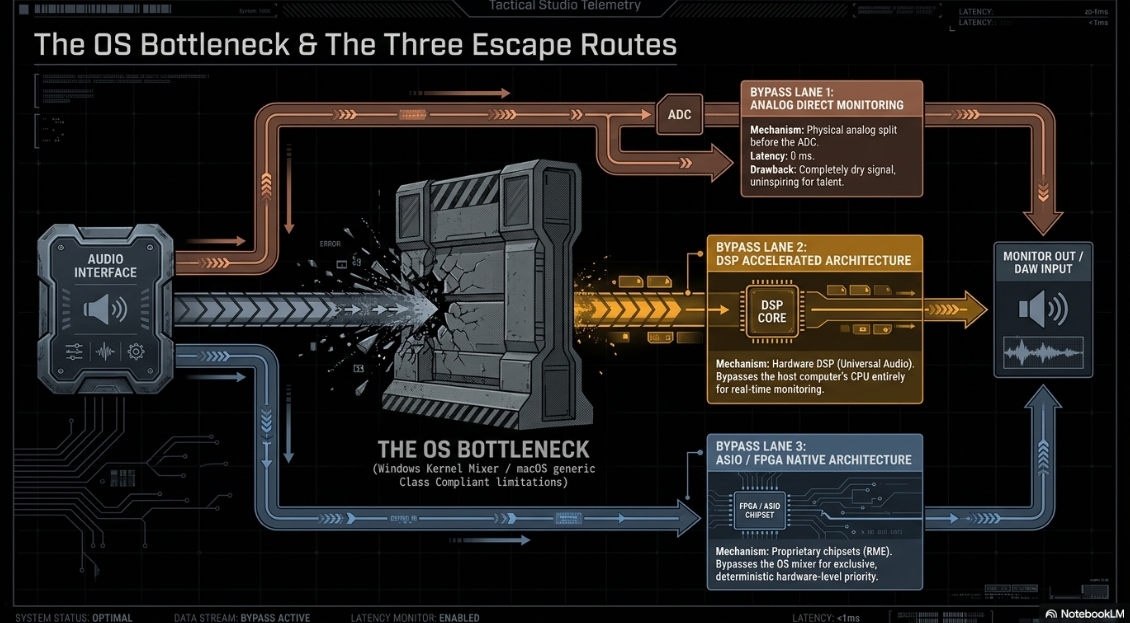
On Windows-based systems, default WDM (Windows Driver Model) or WASAPI drivers route audio through the complex Windows Kernel Mixer. This OS-level intervention allows multiple applications to share the soundcard simultaneously, but it injects massive, unpredictable latencies routinely ranging from 30 to 100 milliseconds regardless of DAW settings3. Professional broadcast environments mandate the strict use of ASIO (Audio Stream Input/Output) drivers, a protocol that fundamentally bypasses the Windows OS mixer entirely, granting the DAW exclusive, direct access to the audio hardware to achieve sub-10 millisecond performance2.
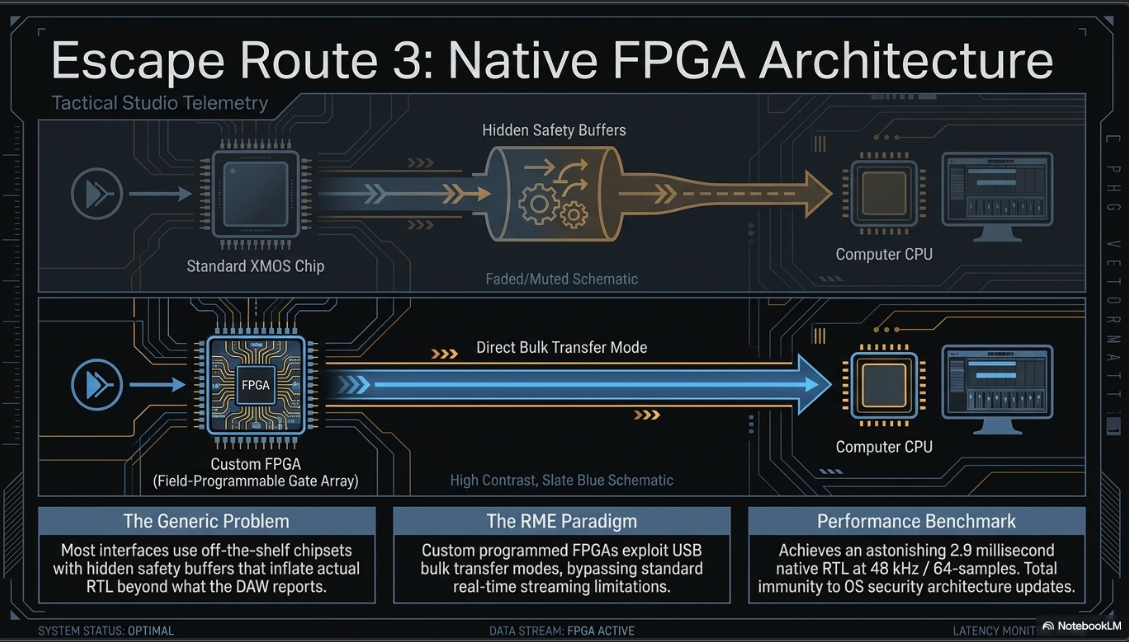
On Apple systems, the native macOS CoreAudio framework is highly optimized for multimedia and low latency, allowing many standard USB interfaces to operate seamlessly in "Class Compliant" mode without requiring third-party drivers2. However, relying on generic Class Compliant drivers sacrifices ultimate performance. Apple's recent locked-in security architecture for macOS drivers has made it increasingly difficult to achieve undisturbed, ultra-low latencies at the OS level27. Consequently, proprietary drivers meticulously crafted by high-end interface manufacturers (such as RME) generally achieve significantly tighter optimizations, lower latencies, and higher channel counts than generic OS-level implementations8. The vast majority of consumer and mid-tier USB interfaces utilize off-the-shelf XMOS chipsets. While manufacturers design custom control panel software, the low-level code relies on standard XMOS libraries, which often include hidden "safety buffers" that artificially inflate actual RTL beyond the mathematical values reported to the DAW8.
Hardware Bus Protocols and Bandwidth Dynamics
The physical conduit through which digital audio data travels from the interface to the host computer dictates the bandwidth ceiling and latency stability of the system. A pervasive fallacy in consumer audio is the assumption that higher bandwidth protocols natively equate to faster audio transmission and inherently lower latency7.
The USB Paradigm
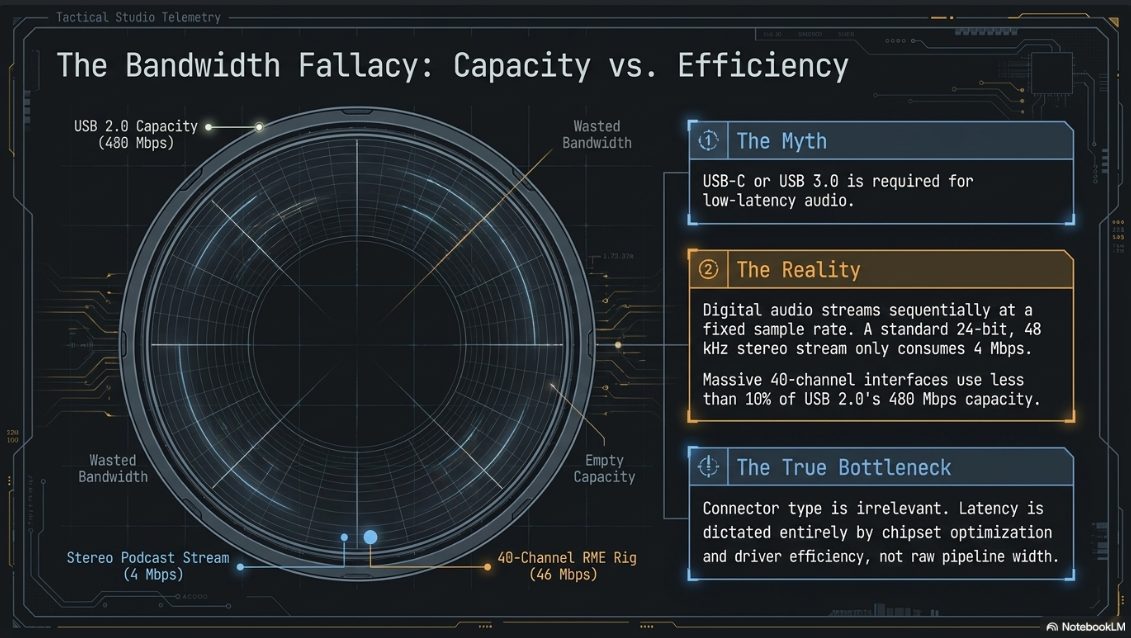
USB 2.0 provides a theoretical bandwidth of 480 Mbps, while USB 3.0 provides 5 Gbps, and USB 4.0 scales up to 20 Gbps7. To contextualize these figures within audio engineering, the formula to calculate raw audio bandwidth is: Sample Rate × Bit Depth × Number of Channels7. Therefore, transmitting a standard 24-bit, 48 kHz stereo audio stream requires approximately 2.3 Mbps of bandwidth7.
A standard two-input podcasting interface (such as the ubiquitous Focusrite Scarlett 2i2) requires roughly 4 Mbps to transmit and receive its full channel count7. Even massive, professional 40-channel interfaces like the RME Fireface UCX II require only 46 Mbps at maximum capacity7. This proves that even vast multichannel configurations consume less than 10% of USB 2.0’s 480 Mbps capacity7.
Therefore, upgrading an interface from a USB 2.0 connection to a USB 3.0 or USB-C (Thunderbolt notwithstanding) connection does not inherently decrease audio latency, because digital audio data streams sequentially at a fixed sample rate rather than in instantaneous, massive burst-transfer blocks7. The determining factor in USB latency is not the connector type, but rather the chipset and driver efficiency. Elite manufacturers bypass XMOS entirely; for instance, RME utilizes proprietary Field-Programmable Gate Array (FPGA) chips, allowing them to exploit USB bulk transfer modes rather than standard real-time streaming modes, achieving latencies over USB 2.0 that rival or exceed internal PCIe cards7.
Thunderbolt and PCIe Integration
Thunderbolt interfaces (spanning Thunderbolt 2, 3, and 4) offer a distinct, fundamental architectural advantage over standard USB protocols: they interface directly with the host computer's Peripheral Component Interconnect Express (PCIe) lanes7. This direct hardware coupling bypasses the OS USB host controller, allowing the audio device to communicate with the CPU and system memory with the same priority and speed as an internal graphics card or NVMe storage drive20.
The primary advantage of Thunderbolt and PCIe architectures is timing determinism8. USB latency can fluctuate dynamically based on CPU traffic, power management, and background tasks polling the USB controller. In contrast, Thunderbolt and PCIe deliver consistent, unyielding timing stability, making them the preferred choice for massive studio setups running extensive parallel processing8. A benchmark Thunderbolt device, such as the Universal Audio Apollo Twin X, leverages this architecture to operate at ultra-low buffer sizes (e.g., 32 samples), delivering a native round-trip latency of roughly 4.2 milliseconds without suffering from the audio dropouts that plague lesser USB devices under identical loads26.
Audio over IP (AoIP) and Networked Podcasting Environments
As podcasting studios evolve into complex, multi-room broadcast facilities, Audio over IP (AoIP) protocols—most notably Audinate's Dante and the open-standard AES67—have gained massive prominence. Dante allows hundreds of uncompressed, high-resolution audio channels to route over standard off-the-shelf Gigabit Ethernet networks, replacing bulky analog copper snakes with lightweight Cat5e/Cat6 cabling1.
However, introducing a network topology into the signal chain creates entirely new vectors for transmission latency1. The latency of a Dante system depends heavily on the chosen interface method. Using software like Dante Virtual Soundcard (DVS) to route audio directly into a computer’s standard Ethernet port relies entirely on the operating system’s network stack. This inherently adds a mandatory baseline of at least 4 milliseconds of latency9. When this 4ms network delay is combined with the DAW's ASIO buffer sizes, the round-trip latency can easily push past 8 to 10 milliseconds, making it borderline for critical monitoring9.
For critical live monitoring environments where latency is treated as absolute religion, broadcast engineers must utilize dedicated hardware Dante PCIe cards (such as the Yamaha accelerator) or specialized Dante-to-USB interfaces like the RME Digiface Dante9. These hardware accelerators feature onboard DSP that completely bypasses the OS network stack, reducing the Dante network transit time to an astonishing 0.25 to 1.0 milliseconds, enabling a total system RTL of roughly 2 to 3 milliseconds9. Deploying Dante effectively demands meticulous IT management. Network switches (such as the Cisco SG350) must be carefully configured, requiring strict Quality of Service (QoS) packet prioritization for audio traffic and precise IGMP snooping configurations to prevent multicast network congestion from causing catastrophic audio dropouts2.
Zero-Latency Monitoring and DSP-Accelerated Architectures
Given the inherent computational difficulties of balancing CPU load and buffer sizes to achieve sub-10 millisecond latency via native DAW processing, audio hardware manufacturers have developed specialized architectures designed to bypass the host computer entirely for monitoring purposes19.
Analog Direct Monitoring
The most rudimentary and ubiquitous solution is Direct Monitoring, found on nearly all budget and mid-tier USB interfaces3. This architecture employs a physical analog split inside the interface circuitry. The audio signal is routed directly from the microphone preamplifier to the headphone output before it ever reaches the analog-to-digital converter19.
Because the monitored signal never enters the digital domain, the latency is absolute zero (effectively constrained only by the speed of electrons through a copper trace)3. The significant operational disadvantage of this approach is that the podcast host hears a completely "dry" signal19. They cannot hear software equalization, compression, or the noise gates applied inside the DAW. For podcasters who rely on the polished, radio-ready sound of a heavily compressed voice to guide their energetic delivery, direct monitoring can feel sterile, quiet, and uninspiring, negatively impacting their performance.
DSP-Accelerated Monitoring Environments (Universal Audio)
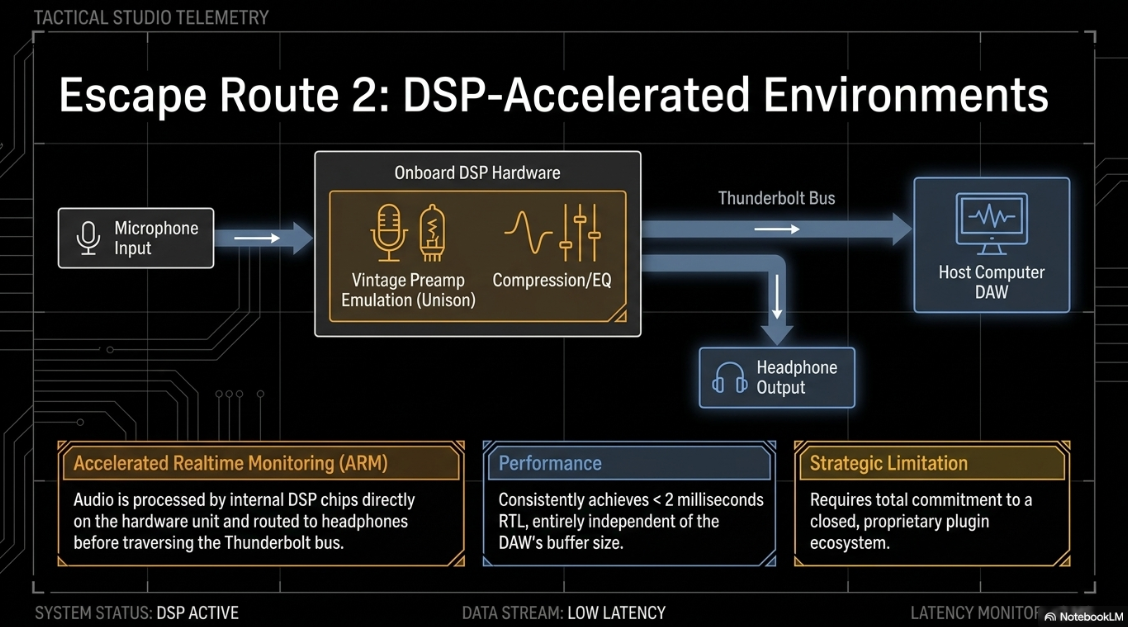
To resolve the psychological limitations of dry analog monitoring, companies like Universal Audio have pioneered DSP-accelerated audio interfaces. The Apollo series interfaces feature internal DSP processing chips that host proprietary, high-quality plugins (EQ, compression, reverb) directly on the hardware unit itself25.
Using the UAD Console software, input signals are processed through these plugins and routed directly to the headphone mix before the signal is passed across the Thunderbolt bus to the host computer's DAW25. This ecosystem is marketed as Accelerated Realtime Monitoring (ARM)35. Because the processing occurs on a dedicated, highly optimized chip rather than traversing the OS to the computer's CPU, the round-trip latency remains consistently below 2 milliseconds, entirely independent of the DAW's buffer size35. Furthermore, UA's proprietary "Unison" technology allows software plugins to digitally communicate with the hardware, actively reconfiguring the physical input impedance and gain staging of the analog microphone preamp. This creates highly accurate, near-zero latency emulations of vintage broadcast hardware (such as Neve or API consoles) that respond dynamically to the microphone's output26.
Standalone Podcast Consoles and Internal Latency Constraints
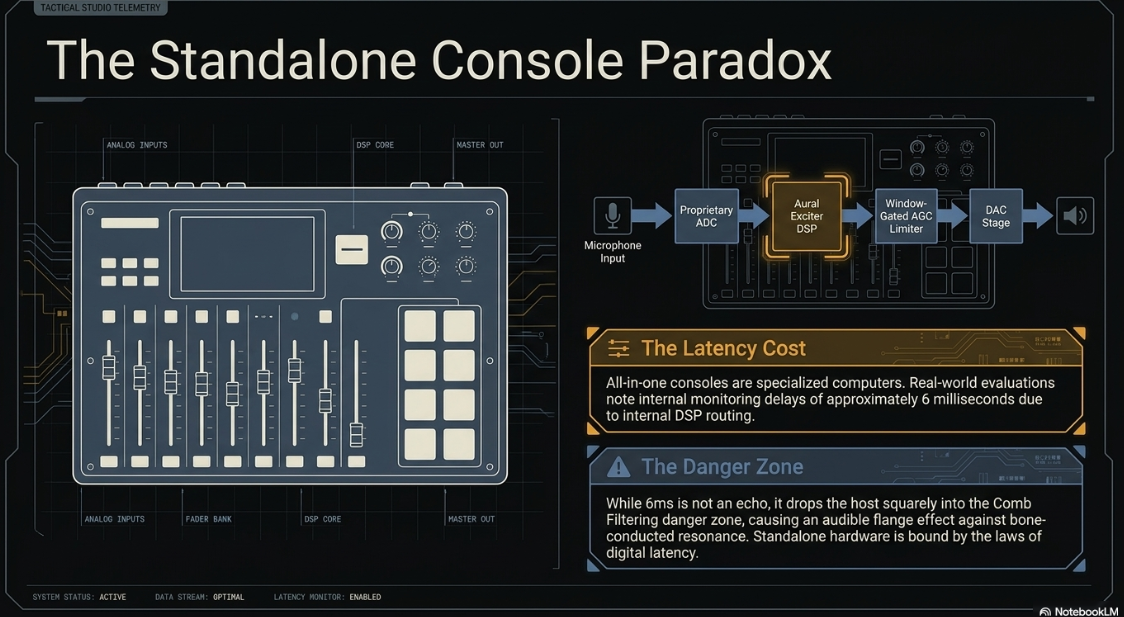
The massive surge in podcasting as a medium has given rise to all-in-one production consoles, most notably the RØDECaster Pro II. These devices integrate a digital mixer, multi-track recorder, programmable sound pads, and DSP effects (such as the Aural Exciter, noise gates, and limiters) into a single chassis, aiming to completely eliminate the need for a DAW during recording38.
However, a critical industry insight often overlooked by consumers is that these consoles are essentially specialized digital computers, possessing their own internal ADC/DAC stages and proprietary DSP routing engines. Unlike a traditional analog mixer, passing an analog signal through a fully digital console invariably introduces latency. Audio professionals evaluating the RØDECaster Pro II have noted internal monitoring delays of approximately 6 milliseconds out of the box40. While 6 milliseconds falls safely beneath the threshold of a perceived echo, it rests squarely in the comb-filtering danger zone. When a host speaks, the 6ms delayed headphone signal interacts with the immediate bone-conducted resonance in their skull, resulting in an audible, distracting "flange" or phase-cancellation effect40. Although firmware updates (such as version 1.0.3) have attempted to optimize this DSP routing to decrease the delay, this phenomenon highlights a foundational reality: even standalone hardware solutions are bound by the laws of digital latency40. Aggressive digital processing—such as 5-band ultra-low-latency processing structures and intelligent window-gated AGC (Automatic Gain Control) limiters utilized in broadcast—requires buffering time that ultimately reaches the host's ears40.
Emerging Trends: AI-Driven Latency Mitigation and Advanced DSP
As the podcasting industry matures, the integration of Artificial Intelligence and Machine Learning into the DSP chain is pushing the boundaries of what is computationally possible within strict latency constraints.
Advanced Deep Neural Networks (DNN) are currently being deployed for real-time speech enhancement and noise suppression42. Traditional audio-block processing suffers from intrinsic algorithmic latency dictated by the output block size. However, utilizing asymmetric Short-Time Fourier Transform (STFT) windowing schemes paired with low-complexity DNNs (such as ULCNet), engineers can disentangle algorithmic latency from the time-frequency uncertainty principle42. This allows real-time noise suppression to execute with an astonishingly low algorithmic latency of just 11 milliseconds, making it viable for live integration into multimedia and podcasting streams42.
Furthermore, researchers are exploring real-time AI-based stutter correction and prosody-preserving speech editing systems intended to replace crude DAF therapies43. By utilizing quantized, on-device TinyML inference engines, 1D depthwise-separable CNN frontends, and non-autoregressive FastSpeech voice cloning pipelines, these systems can selectively replace dysfluent segments of speech while preserving the speaker's natural pitch and rhythm43. Crucially, to remain imperceptible and avoid disrupting the speaker's flow, these advanced AI architectures must complete their semantic correction and voice synthesis with a total system latency strictly below 100 milliseconds, operating without any cloud-based round-trip delays43. As these technologies trickle down into consumer podcasting interfaces, the definition of real-time DSP will fundamentally shift.
Empirical Measurement of System Latency
To verify manufacturer claims and diagnose systemic issues, broadcast engineers rely on empirical measurement methodologies. While DAW software attempts to report latency based on buffer mathematics, hidden hardware buffers frequently render these numbers inaccurate22.
The most accurate objective measurement is an analog loopback test. By physically routing the analog output of the interface directly back into its analog input, engineers can play a transient spike (such as a click track) and measure the exact sample difference between the original file and the recorded return22. Advanced diagnostic tools, such as the audiostreamer object in MATLAB, automate this process. By setting the object to full-duplex mode and querying the ASIO or CoreAudio driver, the measureLoopbackLatency function generates an exact measurement in milliseconds22. For instance, a MATLAB test operating at 96 kHz with a 128-sample buffer may objectively reveal a true RTL of 2.9688 ms22. These tools also utilize the getUnderrunCount function to ensure that the CPU is not dropping audio frames to achieve these speeds, ensuring the measurement represents a stable, usable configuration22.
Market Analysis: Interface Selection and UK Retail Dynamics
The selection of an audio interface for a professional podcast studio depends heavily on the specific requirements of the production, the required channel count, and the tolerance for complex software routing. An analysis of the current UK retail market—aggregating data from major distributors such as Thomann, Andertons, Scan, and Rubadub—reveals clear stratifications based on component quality, driver architecture, and latency performance45.
Comprehensive Comparative Market Analysis
The High-End Dichotomy: DSP vs. Native Power
In commercial podcast studios where uncompromised reliability and elite latency performance are mandatory, purchasing decisions generally funnel into two distinct philosophies: Universal Audio’s DSP-heavy ecosystem and RME’s driver-centric native engineering.
Universal Audio’s Apollo Twin X, available in various configurations on the UK market from £540 on the used market (eBay) up to £1,439 for new Heritage Editions (Thomann), completely offloads the monitoring latency burden from the host computer47. By utilizing the UAD Console, engineers can apply heavy vocal compression and equalization with a total system latency of less than 2 milliseconds35. The primary drawback is the reliance on a closed, proprietary plugin environment; users must invest heavily in UAD DSP plugins to maximize the hardware's potential38.
Conversely, the RME Babyface Pro FS (retailing between £626 and £799 via outlets like Scan and Rubadub) is universally lauded as the benchmark for native driver stability14. Rather than relying on third-party USB controllers, RME programs their own FPGA chips8. Despite running on older USB 2.0 architecture, the Babyface Pro FS consistently outperforms modern Thunderbolt interfaces in raw, native RTL benchmarks. At a broadcast standard 48 kHz sample rate and a 64-sample buffer, the Babyface Pro FS delivers an astonishingly low 2.9 millisecond Round-Trip Latency (Input: 1.667ms, Output: 2.167ms)14. This falls comfortably below the 3-millisecond threshold of human perception, allowing podcasters to monitor their voices natively through complex DAW chains without perceiving any comb filtering14. Furthermore, RME’s proprietary drivers are renowned for their total immunity to macOS security architecture updates and DPC latency spikes on Windows 11, solidifying the unit as a failure-proof, decade-long investment for commercial broadcast14.
Strategic Recommendations for Podcasting Environments
To synthesize the complex technical realities of audio latency into an actionable execution plan for a professional podcast, engineers must adopt a rigorous, holistic approach to system optimization:
Isolation of Delay Builders: If high audio latency is detected during a recording session, the fastest path to resolution is isolation. Engineers should eliminate variables sequentially: bypassing Bluetooth headsets (which intrinsically add substantial wireless codec processing delay), verifying the absence of heavy background CPU applications, and disabling lag-inducing DAW enhancements such as spatial audio algorithms or look-ahead limiters2.
Buffer Optimization Protocol: The host system should be standardized at a 48 kHz sample rate, as this provides the optimal balance between high-fidelity frequency response and mathematical buffer efficiency3. The buffer size should be initiated at 128 samples. If the host computer’s CPU exhibits instability (evidenced by dropouts or underruns), the engineer must either increase the buffer to 256 samples (and rely strictly on hardware direct monitoring) or upgrade the CPU3.
Strategic Routing for Real-Time Processing: For environments demanding heavy, real-time vocal processing (e.g., dynamic EQ, broadcast compression, de-essing), the integration of DSP-accelerated interfaces (like the Apollo series) or highly optimized proprietary hardware (like RME) is virtually mandatory. This avoids the physiological disruption of comb filtering and Delayed Auditory Feedback that occurs when standard interfaces attempt to route audio natively through complex DAW plugins14.
Networked Audio Management: If the studio scales to utilize Dante or AES67 for multi-room routing, reliance on Virtual Soundcards (DVS) should be entirely eliminated for active tracking. Dedicated PCIe accelerators must be deployed to keep network latency beneath the 1-millisecond threshold, ensuring multi-host conversations do not suffer from lag-induced overlapping and conversational breakdown1. Furthermore, strict hardware redundancy and QoS networking protocols must be established on all Cisco or comparable switching infrastructure33.
Conclusion
The execution of a flawless professional podcast relies intrinsically on the mastery of digital audio latency. As demonstrated, the temporal delay between acoustic generation and headphone reproduction is not merely a technical artifact to be managed by IT personnel; it is a potent neurobiological variable that directly impacts human physiology, speech fluency, and auditory perception. Delays as brief as 1 to 15 milliseconds induce destructive comb filtering and tonal coloration, completely altering the perceived warmth of a broadcast voice. As latency creeps past 20 milliseconds, rhythmic timing breaks down, and latencies exceeding 50 milliseconds trigger Delayed Auditory Feedback, neurologically debilitating a host's ability to articulate by short-circuiting the brain's sensorimotor feedforward loop.
Navigating these physiological thresholds demands a rigorous, uncompromising understanding of digital architectures. The mathematical interplay between sample rates and buffer sizes dictates the baseline latency of the host computer, but the true bottleneck often lies in hardware bus protocols and OS driver efficiency. While USB 2.0 possesses ample bandwidth for massive multitrack podcasting, generic drivers inevitably introduce unacceptable safety buffers, making proprietary engineering—such as RME’s FPGA-driven USB architecture or Universal Audio’s Thunderbolt-based DSP ecosystem—essential for professional real-time monitoring.
Ultimately, minimizing Round-Trip Latency to the sub-5 millisecond range is the gold standard for acoustic transparency. By meticulously managing A/D conversion times, optimizing buffer sizes utilizing ASIO or dedicated CoreAudio drivers, and selecting elite hardware interfaces capable of deterministic data transfer, broadcast engineers can render the digital infrastructure effectively invisible to the talent. This precise engineering ensures that the natural rhythm, emotional resonance, and high-fidelity nuance of human conversation are preserved without compromise.
Works cited
What Is Audio Latency? Meaning, Causes, Measurement & How to Reduce It, https://sponcomm.com/info-detail/audio-latency
Audio Latency: What is It and How Can You Reduce It? - Mondo Media Solutions, https://mmsproav.com/blog/what-is-audio-latency-and-how-can-you-reduce-it/
Buffer Size vs. Audio Latency Explained - JEM Productions, https://jemproductions.fi/guides/audio-latency-explained/
Individual differences in speech monitoring: Functional and structural correlates of delayed auditory feedback | PNAS, https://www.pnas.org/doi/10.1073/pnas.2530123123
Aberrant auditory processing and atypical planum temporale in developmental stuttering, https://www.neurology.org/doi/10.1212/01.WNL.0000142993.33158.2A
The basics about comb filtering (and how to avoid it) - DPA Microphones, https://www.dpamicrophones.com/mic-university/audio-production/the-basics-about-comb-filtering-and-how-to-avoid-it/
3 Reasons Why I'm Switching Back To USB | USB vs Thunderbolt Audio Interfaces, https://audiouniversityonline.com/usb-vs-thunderbolt/
Audio interfaces in 2024: USB vs Thunderbolt - PRW - Tapatalk, https://www.tapatalk.com/groups/prorecordingworkshop/audio-interfaces-in-2024-usb-vs-thunderbolt-t19416127.html
RME DIGIFACE DANTE AVANTIS - Allen & Heath Forums, https://forums.allen-heath.com/t/rme-digiface-dante-avantis/29774
What is audio buffer size and what settings should I use? - Scuffham Amps, https://www.scuffhamamps.com/support/faq/getting-started/what-is-audio-buffer-size-and-what-settings-should-i-use
What is Latency in Audio: Demystifying Latency and Buffer in DAWs | SoundBoost.ai, https://soundboost.ai/blog/essential-audio-know-how-demystifying-latency-and-buffer-in-dawsessential-audio-know-how
The Effects of Latency on Live Sound Monitoring, https://boseperformer.com/images/7/7b/AES_Latency.pdf
Individual Differences Underlying Preference for Processing Delay in Open-Fit Hearing Aids, https://pmc.ncbi.nlm.nih.gov/articles/PMC11638989/
RME Babyface Pro FS Review: Is It Worth It in 2026?, https://proaudioreserve.com/blogs/news/rme-babyface-pro-fs
How to deal with audio latency - Blog - elysia.com, https://www.elysia.com/how-to-deal-with-audio-latency/
Topic: Babyface pro FS latency review with VST (amazing) - RME User Forum, https://forum.rme-audio.de/viewtopic.php?id=33818
Predicting Upcoming Stuttering Events from Three-Second Audio: Stratified Evaluation Reveals Severity-Selective Precursors, and the Model Deploys Fully On-Device - arXiv, https://arxiv.org/html/2604.27279v1
Single word reading in developmental stutterers and fluent speakers - Oxford Academic, https://academic.oup.com/brain/article/123/6/1184/441937
How an Audio Interface Can Reduce Latency, https://proaudioreserve.com/blogs/news/audio-interface-reduce-latency
Spatial Audio: On a Budget - AudioTechnology, https://www.audiotechnology.com/features/spatial-audio-on-a-budget
The Best Audio Interfaces for Music Production in 2026: A Complete Buyer's Guide, https://developdevice.com/blogs/news/best-audio-interface-for-music-production-2026
Measure Audio Latency - MATLAB & Simulink - MathWorks, https://www.mathworks.com/help/audio/ug/measure-audio-latency.html
Audio Execution for a Professional Podcast - Finchley Studios, https://www.finchley.co.uk/finchley-learning/visual-podcast/audio-execution-for-a-professional-podcast
Audio latency, buffer size and sample rate explained - Gig Performer®, https://gigperformer.com/audio-latency-buffer-size-and-sample-rate-explained
Why am I Getting Latency in my DAW Sessions? - Universal Audio Support, https://help.uaudio.com/hc/en-us/articles/360050596812-Why-am-I-Getting-Latency-in-my-DAW-Sessions
Universal Audio Apollo Twin MkII, https://www.soundonsound.com/reviews/universal-audio-apollo-twin-mkii
Logic Pro + RME Babyface Pro FS + M1 Max = Low Latency Audio Heaven - Reddit, https://www.reddit.com/r/Logic_Studio/comments/tztd69/logic_pro_rme_babyface_pro_fs_m1_max_low_latency/
USB Audio Interfaces - Ardour, https://discourse.ardour.org/t/usb-audio-interfaces/102154
Do Thunderbolt audio interfaces really have lower latency than USB2.0/FW400? - SOS FORUM, https://www.soundonsound.com/forum/viewtopic.php?t=46525
Best audio interface 2026: For home recording and more - MusicRadar, https://www.musicradar.com/news/the-best-audio-interfaces
RME Digiface Dante USB3 vs Dante PCI-E card in a thunderbolt chassis - Reddit, https://www.reddit.com/r/livesound/comments/mq3fxn/rme_digiface_dante_usb3_vs_dante_pcie_card_in_a/
Aes67 latency with interface box or go dante pcie ? : r/livesound - Reddit, https://www.reddit.com/r/livesound/comments/1mq3hiu/aes67_latency_with_interface_box_or_go_dante_pcie/
5 things you should know about the Dante Virtual Soundcard - Jochen Schulz, https://www.jochenschulz.me/en/blog/dante-virtual-soundcard-disadvantages
Dante and/or MADI setup with H9000 - Eventide Audio, https://www.eventideaudio.com/forums/topic/dante-and-or-madi-setup-with-h9000/
Accelerated Realtime Monitoring (ARM) in Apollo Mode - Universal Audio Support, https://help.uaudio.com/hc/en-us/articles/360041440692-Accelerated-Realtime-Monitoring-ARM-in-Apollo-Mode
Universal Audio with Cakewalk?, https://discuss.cakewalk.com/topic/5540-universal-audio-with-cakewalk/
Using a Universal Apollo twin as a standalone mic pre? - Page 1 - SOS FORUM, https://www.soundonsound.com/forum/viewtopic.php?t=79393&start=24
10 Best Audio Interfaces for Podcasting 2025 - Sounds Debatable, https://soundsdebatable.com/audio-interfaces-podcasting/
The essential new audio interfaces and mixers of 2023 - MusicRadar, https://www.musicradar.com/news/the-essential-interfaces-for-2023
Can't believe, but the new Rodecaster Pro II doesn't have real time monitoring : r/rode, https://www.reddit.com/r/rode/comments/vdw9mz/cant_believe_but_the_new_rodecaster_pro_ii_doesnt/
SOURCEBOOK 2025 - Broadcast Supply Worldwide, https://bswusa.com/content/BSW_2025SB.pdf
Low Complexity Neural Networks for Speech Enhancement on Consumer Products - Low Latency and Full-Band Content, https://projekter.aau.dk/projekter/files/784378428/smc_msc_giac.pdf
Real-Time AI-Based Stutter Correction and Prosody-Preserving Speech Editing System (TinyML-Enabled, Offline) - ResearchGate, https://www.researchgate.net/publication/403951793_Real-Time_AI-Based_Stutter_Correction_and_Prosody-Preserving_Speech_Editing_System_TinyML-Enabled_Offline
Has anyone here ever done a latency test on Dante Digiface vs DVS on Mac OS? - Reddit, https://www.reddit.com/r/livesound/comments/15m2tqi/has_anyone_here_ever_done_a_latency_test_on_dante/
RME Audio Interfaces | guitarguitar, https://www.guitarguitar.co.uk/rme/recording/audio-interfaces/
RME Babyface Pro FS - 24-Channel USB Audio Interface - Rubadub, https://rubadub.co.uk/products/rme-babyface-pro
Audio Interfaces - Thomann, https://www.thomann.co.uk/dante_2_audio_interfaces1.html
RME Babyface Pro FS - PriceRunner, https://www.pricerunner.com/pl/713-3060979/Studio-Equipment/RME-BabyFace-Pro-FS-Compare-Prices
Universal Audio Pro Audio/MIDI Interfaces for sale - eBay UK, https://www.ebay.co.uk/b/bn_91566772
RME - Andertons Music Co., https://www.andertons.co.uk/browse/brands/rme/
Choosing the Best Recording Interface for Any Budget - InSync - Sweetwater, https://www.sweetwater.com/insync/choosing-the-best-recording-interface-for-any-budget/
Best Audio Interfaces for Singing & Vocal Recording UK (2026), https://thevocalcoachlondon.com/best-audio-interfaces/
7 Best Audio Interfaces for the Home Studio in 2026 - The AirGigs Music Production Blog, https://blog.airgigs.com/2026/05/7-best-audio-interfaces-for-the-home-studio-in-2026/
Best Audio Interfaces for Electronic Music Producers (2025) - - SYNTHO, https://syntho.com/2025/10/29/best-audio-interface-electronic-music/
My computer is solid. Do I need Apollo or should I get a different interface and buy UA plugin suite? : r/universalaudio - Reddit, https://www.reddit.com/r/universalaudio/comments/1godq3z/my_computer_is_solid_do_i_need_apollo_or_should_i/











