
The Architecture of Modern Digital Broadcasting
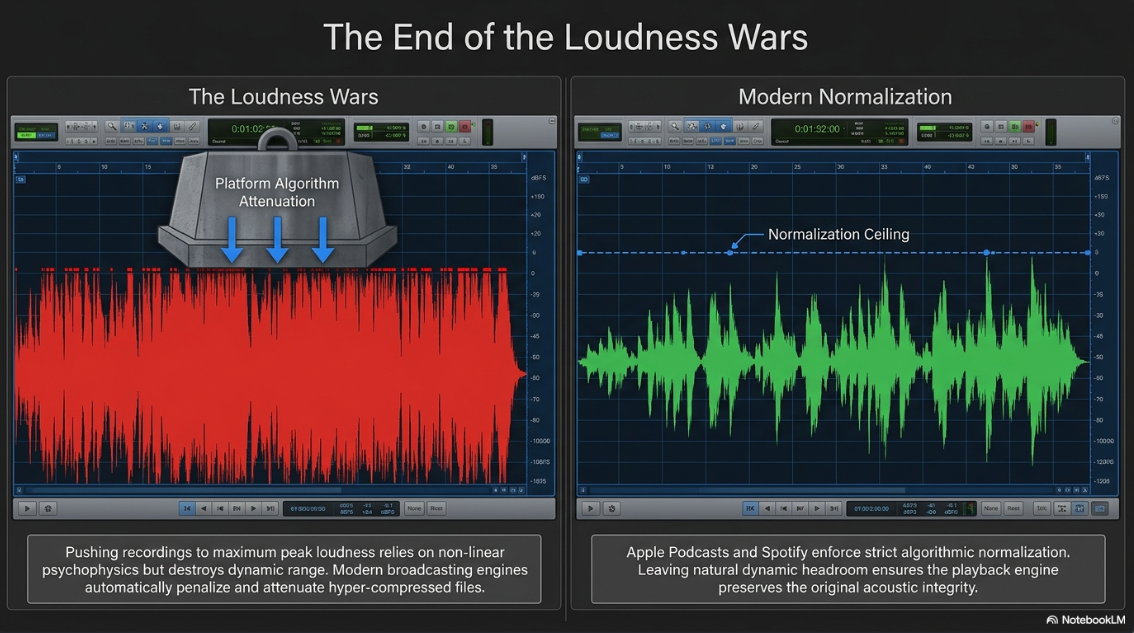
The transition of podcasting from a peripheral, highly compressed medium into a central pillar of global digital broadcasting has fundamentally redefined the technical expectations placed upon spoken-word audio production. In the early digital era, audio distribution was severely constrained by low-bandwidth infrastructure and rudimentary digital-to-analog converters, resulting in a landscape dominated by low-fidelity compression. Concurrently, the industry was heavily influenced by the "Loudness Wars," a production paradigm in which mastering engineers employed severe hyper-compression and aggressive peak limiting to render recordings as loud as digitally possible1. This approach exploited the non-linear psychophysics of human hearing, taking advantage of a cognitive bias where listeners inherently perceive louder acoustic signals as sonically superior1. However, hyper-compression intercalated a range of undesirable artifacts into the signal, including non-linear distortion, absolute loss of dynamic range, and eventual listener fatigue1.
Contemporary digital broadcasting platforms, notably Apple Podcasts and Spotify, have rendered the "louder is better" methodology entirely obsolete through the deployment of rigorous loudness normalization algorithms3. In the modern distribution ecosystem, an audio file that is hyper-compressed to achieve maximum peak loudness will automatically be attenuated by the streaming platform's playback engine3. Consequently, professional podcast execution requires a profound understanding of the underlying mathematics of digital audio, the psychoacoustic principles governing lossy compression, and the precise software configurations required to process and bounce files effectively. This report provides an exhaustive technical analysis of digital audio architecture, psychoacoustic masking, loudness standards, and the meticulous execution required to properly export broadcast-ready files using Audacity.
The Mathematical Foundations of Digital Audio
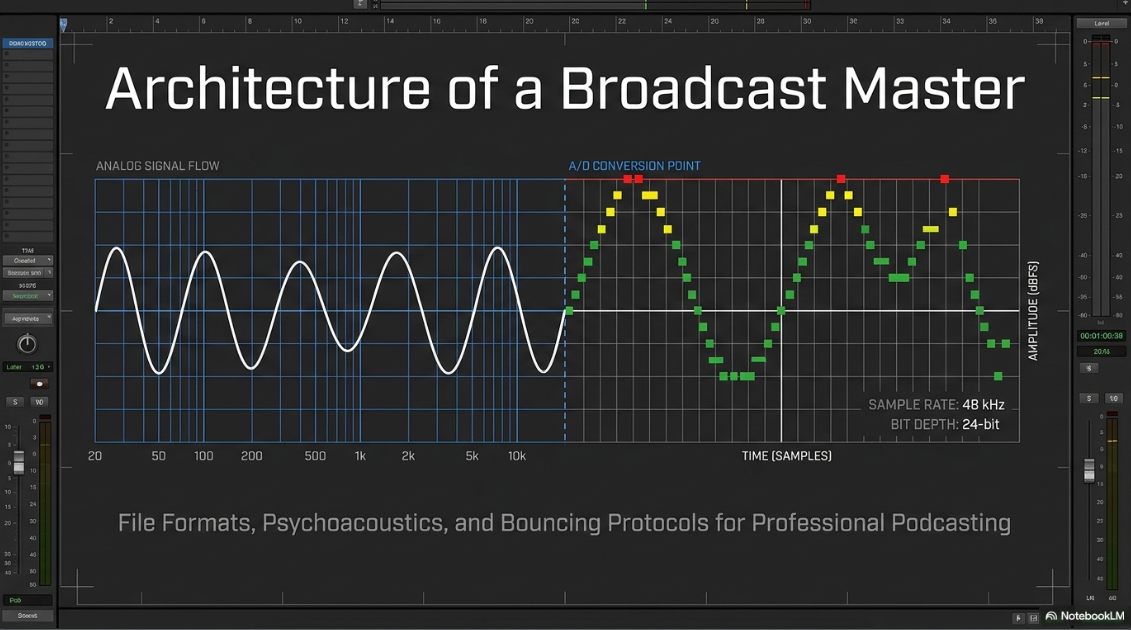
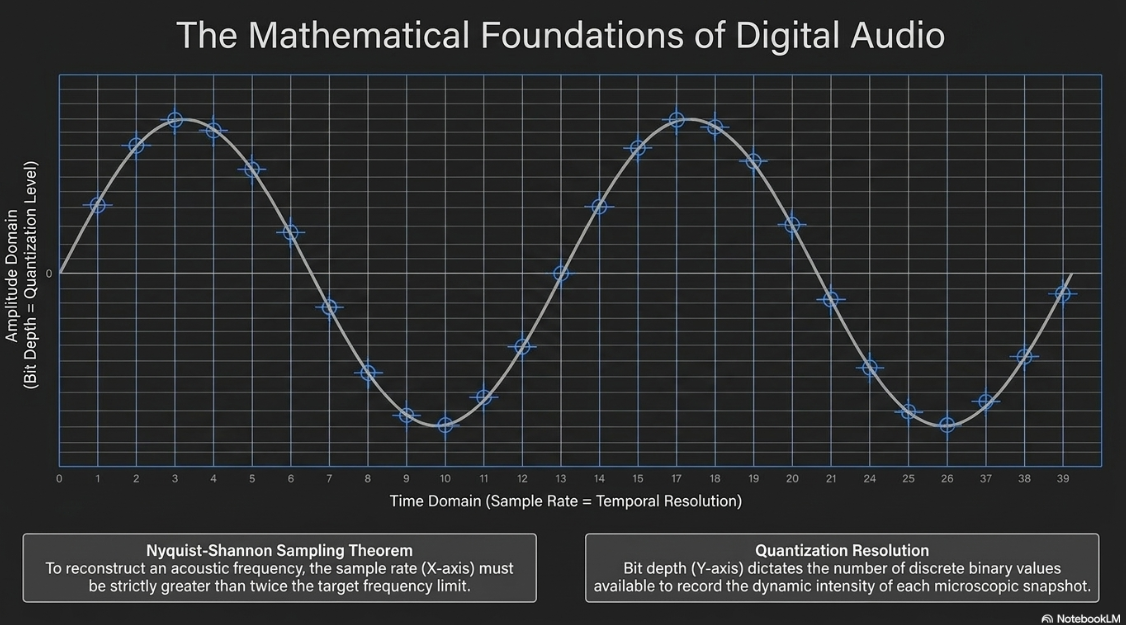
The conversion of continuous analog acoustic waves into discrete digital information requires measurement across two primary axes: the time domain and the amplitude domain. These two dimensions are dictated by the sample rate and the bit depth, respectively, which together form the foundational quality of the raw recording6.
The Time Domain: Sample Rate and Frequency Response
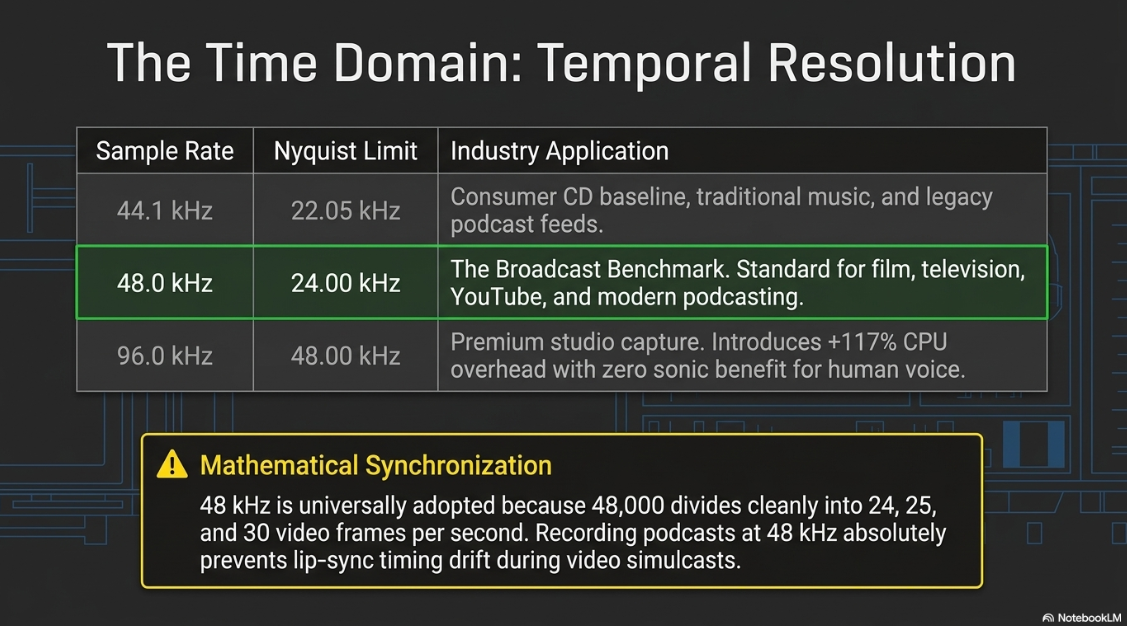
The sample rate, measured in Hertz (Hz) or kilohertz (kHz), defines the temporal resolution of the audio signal, determining exactly how many discrete snapshots of an analog waveform are captured every second6. The selection of a sample rate directly governs the maximum frequency response, or bandwidth, that the resulting digital file is physically capable of reproducing. This relationship is mathematically defined by the Nyquist-Shannon sampling theorem, which dictates that to faithfully capture and reconstruct a specific acoustic frequency, the sample rate must be strictly greater than twice that target frequency, a threshold known as the Nyquist limit6.
The human auditory system is nominally capable of perceiving sound frequencies ranging from 20 Hz to 20,000 Hz (20 kHz), though the upper threshold typically decreases with biological aging, often falling closer to 16 kHz in adults8. Therefore, a digital sample rate must exceed 40 kHz to encompass the entirety of the human hearing spectrum.
The compact disc standard of 44.1 kHz (44,100 snapshots per second) provides a Nyquist limit of 22.05 kHz, which comfortably exceeds the upper threshold of human perception and is entirely adequate for capturing the nuances of the human voice6. However, the 48 kHz standard has become the strict benchmark for professional video production, television broadcasting, and modern podcasting6. The ubiquitous adoption of 48 kHz is rooted in temporal synchronization rather than acoustic fidelity. The value of 48,000 divides cleanly into all major video frame rates, including 24 frames per second (cinema), 25 fps (PAL), and 30 fps (NTSC)6. This exact mathematical divisibility allows for frame-accurate synchronization between audio samples and video frames, wholly preventing timing drift over long-form programming6.
Given the increasing prevalence of video simulcasts in the podcasting industry, establishing a baseline recording and processing sample rate of 48 kHz guarantees synchronization and prevents complex resampling errors during post-production13. While higher sample rates, such as 96 kHz, offer vast ultrasonic bandwidths, they are practically unnecessary for standard spoken-word podcasts, as they substantially increase central processing unit (CPU) overhead and storage requirements without providing any discernible acoustic benefits for voice reproduction6. Attempting to synchronize 44.1 kHz audio with a 48 kHz video timeline will inevitably result in noticeable drift, causing the subject's lips to move out of phase with the audio track16.
The Amplitude Domain: Bit Depth and Quantization Resolution
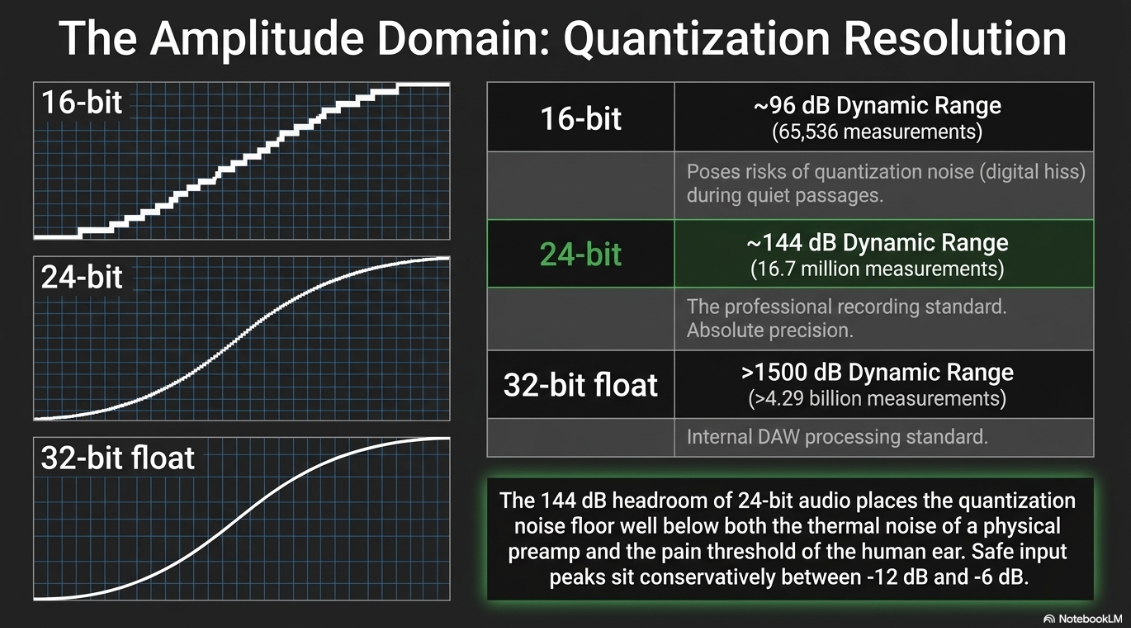
While the sample rate dictates temporal precision, the bit depth dictates the amplitude precision of each individual sample. Bit depth represents the quantization level of the audio, meaning the number of discrete binary values available to record the dynamic intensity, or loudness, of the sound wave at any given microsecond6. Each additional bit of depth exponentially increases the available measurement values and subsequently adds approximately 6 decibels (dB) of dynamic range to the digital noise floor12.
When an analog acoustic signal is digitized, the true amplitude of the continuous wave rarely aligns perfectly with a discrete digital value. The analog-to-digital converter must therefore round the amplitude to the nearest available binary value, an inevitable systemic imperfection known as quantization error12. In 16-bit audio environments, this rounding error is relatively large, resulting in "quantization noise"—a low-level digital hiss that becomes audibly apparent during very quiet passages or when the audio is heavily compressed and amplified in post-production7. Graphically, a low bit-depth waveform appears as jagged, blocky steps, akin to a low-resolution digital photograph12.
Operating at 24-bit resolution provides over 16.7 million discrete steps for measuring amplitude, pushing the quantization noise floor down to an absolute value of -144 dB12. This is far below the thermal noise generated by any physical microphone preamplifier and entirely beyond the 120 dB pain threshold of the human ear12. This vast dynamic range provides audio engineers with massive headroom, allowing vocal recordings to be captured safely at conservative levels—such as peaking between -12 dB and -6 dB—without any risk of analog hiss creeping in, while completely eliminating the risk of digital clipping at the input stage13. Recording vocals "hot" (pushing the input gain above -3 dB) in a 24-bit environment provides zero sonic benefit and drastically increases the likelihood of catastrophic digital distortion13.
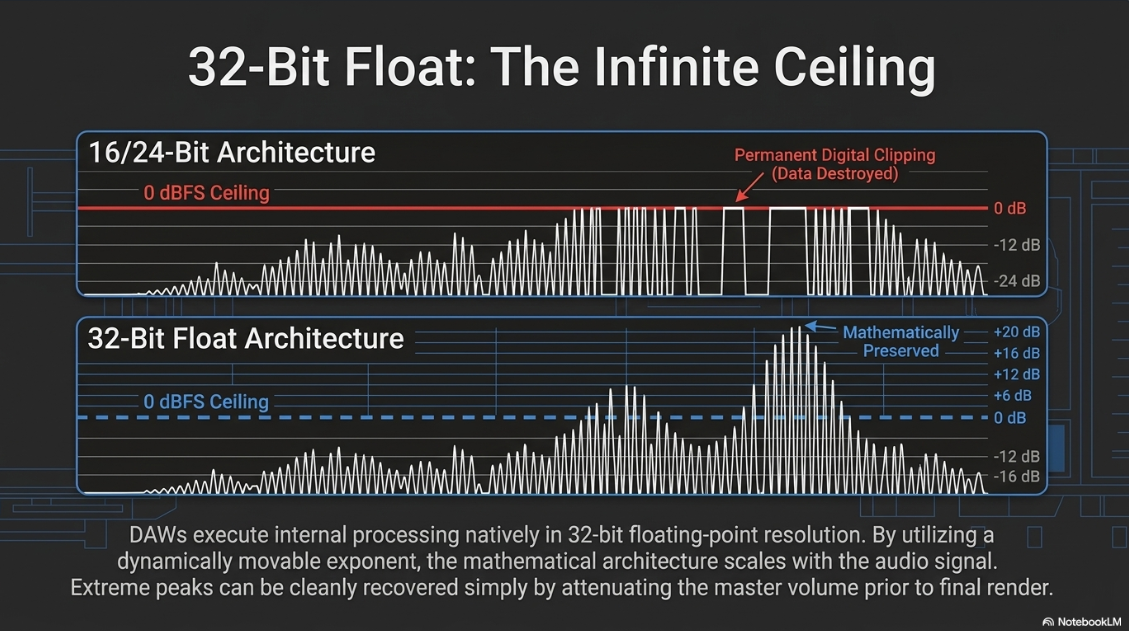
Furthermore, modern Digital Audio Workstations (DAWs) like Audacity execute their internal mathematical processing natively at 32-bit floating-point resolution15. The floating-point architecture utilizes a movable exponent that scales dynamically with the audio signal14. Consequently, if an audio track's gain is pushed well above the 0 dBFS (Decibels relative to Full Scale) ceiling via an equalizer or volume envelope, the data is not permanently clipped or destroyed14. As long as the audio remains within the 32-bit floating-point ecosystem, extreme signal peaks can be cleanly recovered simply by attenuating the master volume before the final render14.
The Physics of File Storage and Uncompressed Media
Capturing pristine audio at high sample rates and deep bit depths requires immense data storage. The mathematical formula for calculating the exact file size of uncompressed digital audio is: 
For example, a three-minute stereo song recorded at the consumer CD standard of 16-bit/44.1 kHz calculates as 
Uncompressed and Lossless Formats
Before delving into compression, it is crucial to understand the archival formats. Waveform Audio File Format (WAV) and Audio Interchange File Format (AIFF) store raw, uncompressed Pulse Code Modulation (PCM) data21. Developed by Microsoft and IBM in 1991, WAV remains the undisputed industry backbone for recording, editing, and mastering, offering a bit-for-bit perfect representation of the analog-to-digital converter's output with zero processing overhead or compression artifacts21. The only functional difference between the two is that AIFF, developed by Apple, does not natively embed timestamp data, making WAV the superior choice for synchronization-critical video workflows20.
To reduce archival storage footprints without sacrificing fidelity, audio engineers rely on Lossless Compressed Formats, such as Free Lossless Audio Codec (FLAC) and Apple Lossless Audio Codec (ALAC)20. These codecs utilize data-packing algorithms mathematically similar to ZIP file document compression20. They reduce the physical file size by 40% to 60% by finding temporal redundancies in the binary data, but critically, they do not discard any acoustic information21. When a FLAC file is decoded by a media player, it reconstructs an exact, bit-for-bit identical replica of the original WAV file20. While FLAC is considered the absolute gold standard for high-fidelity archiving and audiophile streaming platforms, its lack of native playback support in certain legacy ecosystems (including older iOS devices) often forces creators back to WAV for universal software compatibility25.
Psychoacoustics and the Mechanics of Lossy Compression
To achieve the drastic file size reductions required for podcast RSS distribution, the industry relies on lossy audio compression algorithms. Modern lossy codecs, such as MP3, AAC, and Ogg Vorbis, do not simply truncate digital data arbitrarily23. They achieve 80% to 90% file size reductions by exploiting the physiological and psychological limitations of the human auditory system through a scientific framework known as psychoacoustics9.
The Human Auditory System and Masking
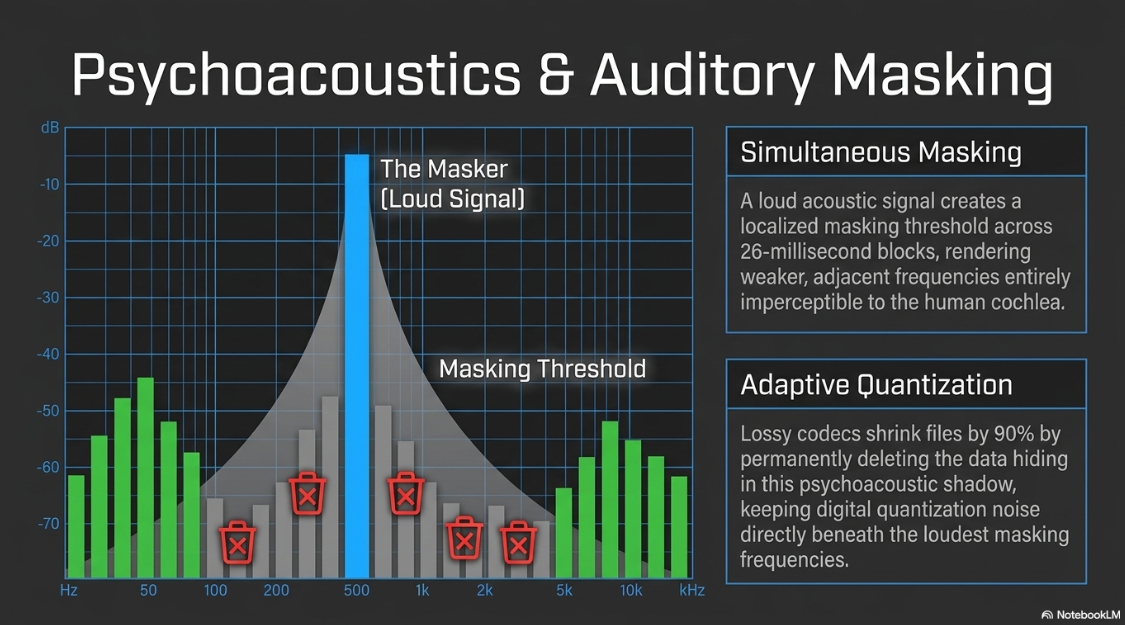
Psychoacoustics is the branch of psychophysics that studies the perception of sound, specifically how the human inner ear and neurological pathways process complex acoustic waveforms9. The cochlea processes audio highly non-linearly, functioning as a biological frequency analyzer that integrates acoustic energy over specific critical bands, mapped along the Bark scale27. When multiple sounds occur simultaneously, the auditory system integrates this energy, and strong acoustic signals can render weaker, adjacent signals entirely imperceptible to the human brain27. This phenomenon is called auditory masking, and it dictates exactly what audio data can be safely deleted by a computer algorithm9.
The algorithms rely on distinct masking thresholds:
Absolute Threshold of Hearing (ATH): This represents the lowest sound pressure level that a human ear can detect in a perfectly silent environment across the frequency spectrum. Any audio signal naturally occurring below the ATH is immediately discarded by a lossy encoder9.
Simultaneous (Spectral) Masking: This occurs when a loud sound (the masker) and a quiet sound (the maskee) are played at the exact same time and share a close frequency proximity9. For example, a loud bass drop will completely mask the subtle low-frequency hum of an air conditioner. The masking threshold is strongest at the exact frequency of the loud sound and falls off logarithmically as frequencies move further away, modeled via specific spreading functions in the Bark domain27.
Temporal Masking: This phenomenon dictates that a loud sound obscures a quieter sound that happens immediately before (backward masking) or immediately after (forward masking) the primary sound9. The human neural response to a sudden acoustic trauma takes tens of milliseconds to fully recover, creating a temporal shadow where subsequent quiet sounds are simply not registered by the brain27.
Lossy Audio Compression Models in Practice
Advanced audio codecs leverage these psychoacoustic principles by applying a filter bank to break the input audio signal into narrow frequency components, typically operating in blocks of approximately 26 milliseconds17. In parallel, a sophisticated psychoacoustic model calculates a quantitative masking threshold for that exact block of time, determining a localized curve of inaudibility based on the ATH and the present maskers27.
Once the mathematical masking threshold is established, the encoder executes adaptive quantization in the frequency domain17. The algorithm completely discards audio data representing frequencies that fall beneath the masking threshold, as the human brain would not have perceived those sounds regardless28.
Furthermore, because reducing the bit rate inherently introduces quantization noise, the encoder intelligently shapes this resulting digital noise, placing it directly beneath the loudest masking frequencies in the spectrum17. This ensures that the degradation introduced by the compression is kept strictly below the masking threshold, rendering the file perceptually transparent to the human ear17. At high bitrates, such as 320 kbps, the vast majority of listeners cannot distinguish a lossy MP3 or AAC file from an uncompressed WAV file in blind clinical trials20. However, because lossy compression permanently removes data, transcoding one lossy file into another (e.g., uploading an MP3 to a platform that re-encodes it into Ogg Vorbis) compounds the quantization noise beyond the masking threshold, leading to rapid, highly audible sonic degradation30.
Delivery Formats for Podcasting
While uncompressed WAV files represent the internal working format for a podcast studio, the final delivery required by content aggregators requires specific encoding protocols to balance acoustic fidelity against bandwidth costs22.
The Apple Podcasts Ecosystem
Apple Podcasts enforces strict standards for audio distribution. For direct native uploads to Apple Podcasts Connect (distinct from RSS distribution), the platform accepts uncompressed WAV or FLAC files, provided they are delivered as stereo files and configured at either 16-bit or 24-bit resolution22. The metadata blocks attached to these files are heavily policed; Apple's infrastructure will automatically reject files if the embedded cover art exceeds file size limits, if variable data blocking strategies are detected, or if the sample rate listed in the metadata does not match the actual audio payload31.
For the vast majority of podcasts distributed via traditional third-party RSS feeds, Apple strongly advocates for the AAC format encapsulated in an MP4 container (often labeled as .m4a), explicitly preferring it over the older MP3 format22. The AAC codec was engineered as the direct technological successor to MP3, featuring a substantially more advanced psychoacoustic model, a wider array of sample frequencies, and a superior filter bank23. At identical bitrates, AAC delivers demonstrably fewer artifacts and greater transient response than MP323.
For spoken-word mono podcasts distributed to Apple, the recommended bit rate is 64 kbps (CBR - Constant Bit Rate) to 128 kbps4. For stereo content, Apple recommends 128 kbps to 256 kbps4. Delivering a 192 kbps AAC stereo file is widely considered the optimal "sweet spot" in professional podcasting, providing pristine, transparent vocal warmth without the file sizes blooming beyond reasonable download limits16.
Spotify Audio Architecture
Spotify’s delivery infrastructure is built entirely differently, prioritizing high-fidelity master uploads which their backend server processing systems then transcode for consumer streaming. For podcast creators utilizing Spotify for Podcasters, the platform mandates a minimum sample rate of 44.1 kHz, though 48 kHz is fully supported32. If a native 24-bit master exists, Spotify expressly requires the 24-bit file rather than a dithered 16-bit down-conversion32. Furthermore, Spotify specifically warns against manually upsampling files (e.g., converting a 44.1 kHz file to 96 kHz before upload), as it provides no sonic benefit and interferes with their ingestion algorithms30.
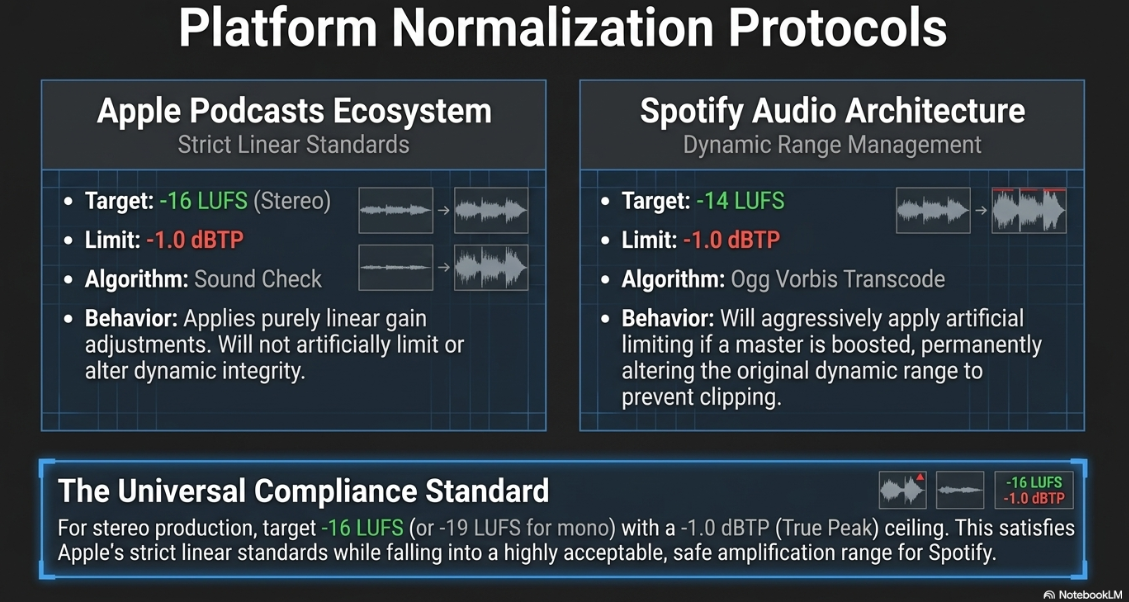
Internally, Spotify transcodes these high-resolution uploaded masters into the open-source Ogg Vorbis codec25. Ogg Vorbis offers highly efficient variable bit rate compression that competes directly with AAC in terms of quality-to-size ratios25. Because Spotify will inevitably apply its own lossy Ogg Vorbis encoding, it is an industry best practice for creators to deliver the highest quality file possible (WAV or FLAC) directly to the host, ensuring that the psychoacoustic data stripping occurs only once at the final distribution endpoint, rather than cascading through multiple layers of compression21. In cases where advertising assets are directly trafficked to Spotify's ad network, the platform strictly requires a 192 kbps minimum bit rate, stereo formatting, a maximum file size of 50 MB, and precise loudness limits to ensure the commercial insertion remains cohesive with the overarching program33.
Loudness Normalization: Mastering to LUFS Standards
The most critical post-production standard in modern audio broadcasting is loudness normalization. A podcast could be impeccably recorded at 24-bit/48 kHz and bounced as a pristine AAC file, but if it fails to comply with modern loudness metrics, it will either be heavily attenuated by streaming algorithms or cause severe digital distortion on the listener's device3.
The Transition from dBFS to LUFS
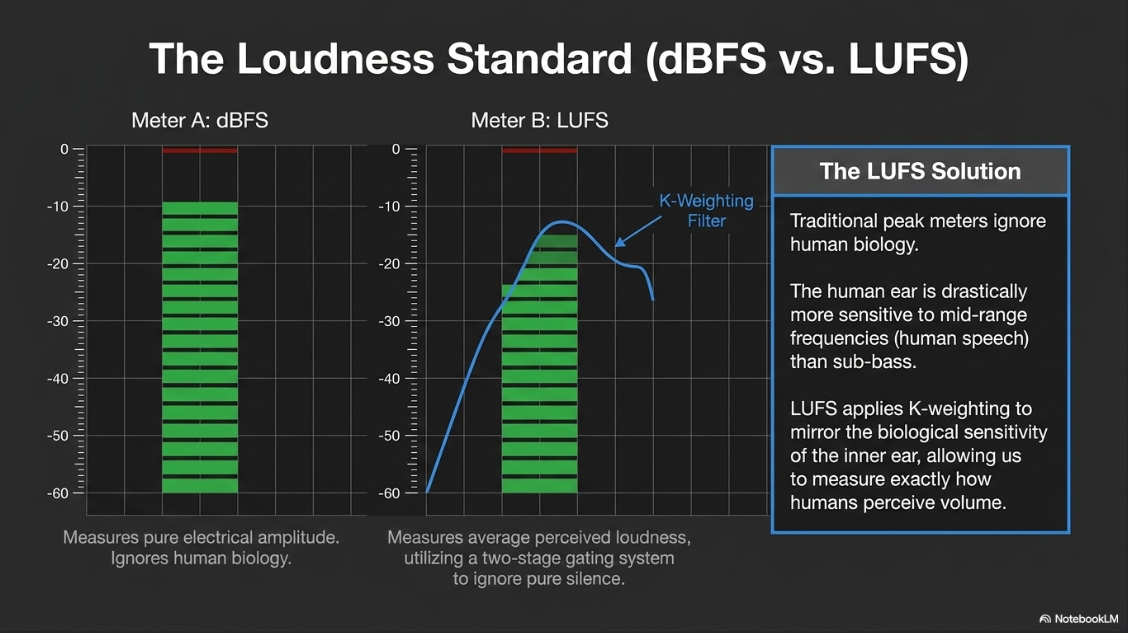
In the digital domain, the absolute ceiling for signal amplitude is 0 dBFS2. Any signal pushed beyond 0 dBFS results in catastrophic digital clipping, as the system runs out of binary values to represent the waveform, severing the peaks of the sound wave into harsh square waves12. Traditional audio metering relied on Peak and Root Mean Square (RMS) meters to gauge electrical signal levels below this 0 dBFS ceiling2. However, standard decibel meters measure purely physical electrical amplitude; they fail to account for the biological reality of human hearing5.
The human ear is highly non-linear in its frequency response, being drastically more sensitive to mid-range frequencies (approximately 2 kHz to 4 kHz, the exact frequency range where human speech resides) than it is to deep sub-bass frequencies5. Consequently, a bass-heavy track and a vocal-heavy track could register the exact same mathematical peak on a traditional dBFS meter, yet the vocal track would be perceived by a human listener as substantially louder5.
To solve this disparity, international broadcasting unions developed the LUFS (Loudness Units relative to Full Scale) standard, formalized in the ITU-R BS.1770 and EBU R128 publications4. LUFS applies a specific algorithmic filter, known as K-weighting, to the audio signal before measuring its amplitude4. K-weighting physically rolls off the low frequencies and artificially boosts the critical 2-4 kHz mid-range, directly mirroring the physiological sensitivity of the human cochlea5. As a result, LUFS provides a psychoacoustic measurement that accurately represents how loud an audio file will actually sound to a human listener5.
Integrated, Short-Term, and True Peak Metrics
To ensure strict quality control, the ITU-R BS.1770 standard dictates that three distinct measurements must be monitored concurrently during the mastering phase:
Integrated Loudness (LUFS): This represents the average perceived loudness calculated over the entire duration of the audio file, from the first second to the final second5. To prevent long sections of total silence from skewing the mathematical average, the algorithm employs a relative two-stage gating system (e.g., dropping signals below a 10 LU and 70 LU threshold) that pauses the measurement when the audio drops into silence2. Integrated LUFS is the primary metric utilized by streaming platforms to normalize overall audio volumes5.
Short-Term and Momentary Loudness: Short-term loudness calculates the K-weighted average over a rolling 3-second time window, while Momentary loudness utilizes an aggressive 400-millisecond window2. These metrics are vital for quality control, allowing the audio engineer to spot individual sections of a podcast (such as a sudden shout or a loud musical transition) that spike aggressively above the integrated average5.
Maximum True Peak (dBTP): Standard digital peak meters only measure the highest discrete sample value present in the digital file. However, during the Digital-to-Analog (D/A) conversion process inside consumer hardware, or during lossy encoding (e.g., compressing to MP3), the reconstructed continuous analog waveform can actually peak significantly higher than the digital samples themselves5. These are called inter-sample peaks. True Peak metering intentionally oversamples the digital signal to predict and measure the continuous analog waveform, ensuring that these hidden inter-sample peaks do not exceed 0 dBFS and cause distortion in the final playback2.
Platform-Specific Normalization Behaviors
Streaming services universally enforce LUFS targets to ensure that a listener does not have to reach for their volume dial when transitioning between different pieces of content4. If a submitted podcast master deviates from the platform's target, algorithmic normalization is applied.
For stereo podcast production, aiming for a master target of -16 LUFS with a Maximum True Peak of -1.0 dBTP satisfies Apple’s strict internal standards and places the audio in a highly acceptable range for Spotify, which will gently amplify the file without inducing heavy limiting4. For mono podcast masters, the target is traditionally offset to -19 LUFS37. Failing to leave at least 1 decibel of True Peak headroom (-1.0 dBTP) practically guarantees that clipping and harmonic distortion will occur when the file is inevitably transcoded into lossy AAC or Ogg formats by the end distributor5.
System Configuration and Hardware Integration in Audacity
Audacity is a highly capable open-source digital audio workstation, but achieving broadcast-compliant results requires navigating significantly beyond its default settings and utilizing specific workflows for hardware integration, sample rate conversion, and dithering10.
Hardware and Interface Alignment
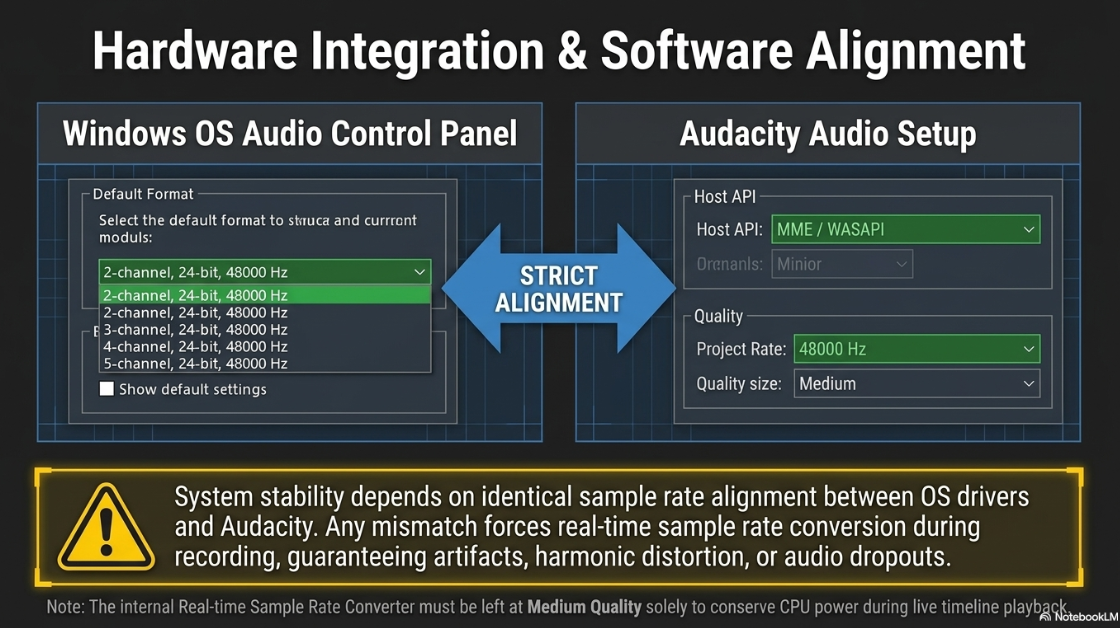
The stability of the audio environment depends on the seamless integration of the operating system's audio drivers with Audacity's host API. In Windows environments (e.g., Windows 11), it is critical that the underlying OS audio settings match the DAW settings40. Users must navigate to the Windows System Sound control panel, access the Advanced properties for both the recording (input) and playback (output) devices, and ensure they are locked to the target sample rate and bit depth (e.g., 2 channel 24-bit, 48,000 Hz)40. In Audacity, setting the Audio Host to MME (Multimedia Extensions) is the standard baseline, though WASAPI may be used for lower latency40. Any mismatch between the Windows system sample rate and the Audacity project sample rate will force the system to perform real-time sample rate conversion, which can introduce artifacts or dropouts40.
Quality Preferences and Dithering Operations
Before importing audio or initiating a recording, the underlying mathematical architecture of the DAW must be optimized via the Edit > Preferences > Quality menu42.
To preserve maximum fidelity, the Default Sample Format must be locked to 32-bit float18. Because Audacity executes all internal mixing, fading, and effect processing at 32-bit float, extreme precision is achieved, and clipping is mathematically prevented18. However, this poses a challenge upon export. When exporting a final broadcast master at a lower bit depth (such as a 16-bit WAV file), the software must perform extreme numerical rounding to fit the 32-bit floating values into standard 16-bit integers19. If Audacity simply truncated the numbers, the resulting quantization errors would manifest as harsh, unnatural harmonic distortion during the quietest parts of the recording19.
To mitigate this, Audacity applies a mathematical process known as dithering. Dither is the intentional introduction of randomized, low-level noise to the audio signal immediately prior to quantization42. By adding this microscopic noise floor, the algorithm statistically randomizes the rounding errors, effectively trading highly objectionable harmonic distortion for a smooth, analog-style noise floor that rests comfortably beneath the absolute threshold of human hearing (peaking around -80 dB for 16-bit exports, and -130 dB for 24-bit exports)19.
Audacity offers several specific Dither algorithms for High-quality Conversion:
None: Shuts off dithering completely. This is only recommended if the audio is remaining at 32-bit float upon export, or if the user is performing zero processing (e.g., purely cutting and pasting an existing 16-bit file without altering the gain or applying EQ)19.
Rectangle: Adds uniform noise but inserts zero noise during moments of absolute digital silence (zero amplitude samples)19.
Triangle: Concentrates less noise in the higher frequencies compared to shaped dither. It suffers marginally less degradation if an audio file is erroneously dithered multiple times by an inexperienced user42.
Shaped: The default and most mathematically optimal setting for high-quality audio42. Shaped dither utilizes psychoacoustic weighting, concentrating the randomized dither noise strictly into the uppermost ultrasonic frequency ranges where human ears are fundamentally least sensitive42.
For professional podcast bouncing, the High-quality Dither setting should universally be set to Shaped, ensuring that bit-depth down-conversions are sonically transparent40.
Furthermore, Audacity requires configuration of its Sample Rate Converters. The "Real-time Sample Rate Converter" is utilized solely for live playback processing within the software and should be left at "Medium Quality" to conserve CPU power and prevent playback stuttering18. Conversely, the "High-quality Sample Rate Converter," which processes the final mathematical rendering of the bounced file, must be permanently set to "Best Quality (Slowest)"18.
Pre-Export Processing and Editing Workflow
Before bouncing the final file, the raw spoken-word audio requires conditioning to meet the previously established LUFS targets and eliminate unwanted noise44.
Noise Profile Extraction: If the recording environment featured consistent ambient hum (e.g., an HVAC system), a noise profile must be established. The engineer highlights a 2-second segment of absolute silence (room tone) and selects Effect > Noise Reduction > Get Noise Profile11. The entire track is then selected, and the Noise Reduction algorithm is applied, subtracting the precise frequency footprint of the room tone from the vocal recording35.
Loudness Normalization: Rather than using the legacy Normalize or Amplify effects—which strictly adjust amplitude based on peak dBFS levels without regard for human perception—the engineer must utilize Audacity's Loudness Normalization effect41.
The user selects Effect > Volume and Compression > Loudness Normalization39.
The processing mode is set to "Perceived Loudness" rather than "RMS"39.
The target is manually inputted (e.g., -16.0 LUFS for stereo content)39.
Crucially, if the podcast consists of a single mono microphone track, the engineer must enable the "Treat mono as dual-mono" setting within the dialog. Because hardware audio drivers ignore standard stereo pan laws, a pure mono signal played through a stereo device requires internal amplitude doubling during the calculation to sound equally as loud as a native stereo file. Activating this feature ensures the software's math aligns with final listener perception39.
True Peak Limiting: Because loudness normalization raises the average level of the entire track, sharp transient peaks (e.g., explosive consonant sounds or laughter) will frequently breach the -1.0 dBTP ceiling5. A final compression or limiter pass is required to gently suppress any peaks exceeding -1.0 dB to prevent clipping during the final bounce4.
The Export Phase: Bouncing the Master File
Once the podcast is edited, cleansed of noise, and normalized to -16 LUFS, it must be exported (bounced) from the 32-bit float DAW environment into distribution-ready file formats5.
To safeguard the absolute fidelity of the project, industry best practice mandates an initial bounce to an uncompressed 24-bit WAV file13. This is achieved by selecting File > Export Audio and choosing the WAV format44. This uncompressed master serves as the permanent archival copy, completely insulated from psychoacoustic degradation, and is the ideal format to upload to advanced podcast hosts (like Spotify for Podcasters) that prefer to handle their own backend transcodings25.
For manual distribution via standard RSS enclosures or direct web delivery, the producer must bounce a lossy AAC or MP3 file. Because Audacity relies on external libraries for advanced encoding, the workflow requires specific configurations and an awareness of historical software bugs:
MP3 Export: Audacity integrates native MP3 encoding. The engineer selects Export as MP3 and configures the bit rate10. A Constant Bit Rate (CBR) of 128 kbps (for stereo) is heavily recommended to ensure maximum hardware compatibility and predictable stream buffering across diverse mobile networks4. Variable Bit Rate (VBR) may offer marginal space savings but can cause timeline seeking errors in certain legacy podcast applications4.
AAC Export via FFmpeg: Because Apple heavily favors the AAC format for its superior psychoacoustic efficiency, bouncing to AAC is optimal for RSS podcasts16. Audacity utilizes the external FFmpeg library to execute AAC exports48. The user must select Custom FFmpeg Export in the export dialog, choose the MP4 container format, and select the libvo_aacenc codec48. The target bit rate can then be set to 192 kbps, yielding a file that possesses the acoustic warmth and clarity of a massive WAV file at a fraction of the distribution cost16.
Audio engineers must remain vigilant regarding documented software limitations within Audacity's export ecosystem. Historically, exporting via FFmpeg's native AAC encoder on Linux systems occasionally produced severely degraded audio or truncated the final 3,000 samples of a file if the libfaac library was utilized48. Furthermore, attempting to use the external Nero AAC encoder via Audacity's command-line interface on multi-core CPUs has been known to freeze the application entirely, requiring users to limit the DAW to a single CPU core during the bounce48. Finally, engineers should be aware that certain metadata attributes, such as Artist and Year tags, or album artwork, can occasionally be stripped or improperly encoded during FFmpeg exports depending on the specific library version deployed, necessitating a final metadata verification pass before the file is uploaded to an RSS host46.
During the export process, the High-quality Sample Rate Converter (set to Best Quality) and the High-quality Dither (set to Shaped) mathematically intervene, downsampling and applying psychoacoustic noise precisely as the audio is written to the hard drive, resulting in a pristine, broadcast-ready file stripped of internal DAW artifacts18.
Works cited
UNDERSTANDING THE EXCESSIVE USE OF HYPER- COMPRESSION IN MUSIC PRODUCTION - Open Research Newcastle, https://openresearch.newcastle.edu.au/ndownloader/files/54399563
Loudness Normalization - Logic Pro GEM, http://logicprogem.com/Logic-Pro-X-Tutorials/Entries/2017/6/23_Loudness_Normaization.html
Apple Podcast Audio Standards: Bit Rate, LUFS & Compliance Guide (2026), https://www.latenightim.com/apple-podcast-audio-standards/
LUFS Loudness Standards for 50+ Platforms - Free Lookup - Dan Murtagh, https://danmurtagh.com/lufs-loudness-standards
Sample rate explained: Best kHz for clean recordings - ACE Studio, https://acestudio.ai/blog/what-is-audio-sample-rate/
Sample Rate vs Bit Depth: What You Need to Know - Remasterify, https://blog.remasterify.com/sample-rate-vs-bit-depth-what-you-need-to-know/
Sample Rate, Bit Depth, and Buffer Size Explained - Focusrite, https://support.focusrite.com/hc/en-gb/articles/115004120965-Sample-Rate-Bit-Depth-and-Buffer-Size-Explained
Psychoacoustics - Wikipedia, https://en.wikipedia.org/wiki/Psychoacoustics
Audacity How to Export as MP3 - Swell AI, https://www.swellai.com/blog/audacity-how-to-export-as-mp3
Audacity - Vivero Fellow - Grinnell College, https://vivero.sites.grinnell.edu/trainings/audacity/
Bit Depth vs. Sample Rate: The Pro Audio Quality Master Guide - BOYA, https://www.boyamic.com/blogs/microphone-bit-depth-explained
Why Your Podcast Sounds Amateur (5 Audio Specs Explained), https://www.podcaststudioglasgow.com/podcast-studio-glasgow-blog/the-5-audio-specs-that-separate-professional-from-amateur-podcasts
Which Bit Depth and Sample rate should you select? | "For New Users" Series, https://protoolsanswers.com/samplerateandbitdepth/
What sample rate and bit rate do you record at? : r/podcasting - Reddit, https://www.reddit.com/r/podcasting/comments/d5hhkf/what_sample_rate_and_bit_rate_do_you_record_at/
Screen Recording and Podcast Audio — These 4 Numbers Make You Sound PRO - Medium, https://medium.com/@andrew_best/screen-recording-and-podcast-audio-these-4-numbers-make-you-sound-pro-7e0f8d95c407
Lossy audio compression: principles, methods, misconceptions - Tonestack.net, https://www.tonestack.net/articles/digital-audio-compression/lossy-audio-compression-primer.html
Quality Preferences - Audacity Manual - Huihoo, https://docs.huihoo.com/audacity/2.0.3/man/quality_preferences.html
change dither to none? in quality settings? - Windows - Audacity Forum, https://forum.audacityteam.org/t/change-dither-to-none-in-quality-settings/30777
The Differences Between Audio Formats: MP3, FLAC, WAV, AIFF, M4A & OGG - LALAL.AI, https://www.lalal.ai/blog/difference-between-audio-formats-mp3-flac-wav-aiff-m4a-ogg/
Best Audio Formats for Recording, Mastering & Distribution - MasteringBOX, https://www.masteringbox.com/learn/audio-formats
Audio requirements - Apple Podcasts for Creators, https://podcasters.apple.com/support/893-audio-requirements
Audio File Formats Explained: Choosing the Best Audio Format - Murf AI, https://murf.ai/blog/audio-formats
Audio file format - Wikipedia, https://en.wikipedia.org/wiki/Audio_file_format
Audio File Formats Explained: WAV, FLAC, MP3, AAC, OGG (2025) | Feedtracks Blog, https://feedtracks.com/blog/audio-file-formats-explained-wav-flac-mp3-aac-ogg
Beginner's Guide To Audio File Types (And Which To Use) - Sonos, https://www.sonos.com/en/blog/audio-file-types
Psychoacoustic Masking in Audio Processing - Emergent Mind, https://www.emergentmind.com/topics/psychoacoustic-masking
Chapter 14, https://www.cs.rutgers.edu/~elgammal/classes/cs443/slide14_short.pdf
Lecture 8 audio compression | PPT - Slideshare, https://www.slideshare.net/slideshow/lecture-8-audio-compression-12048739/12048739
Mastering for Streaming — LUFS Targets for Spotify & Apple Music, https://veniamastering.studio/blog/technical-mastering-guide-for-spotify-and-streaming/
Understanding LUFS: Broadcasting Standards for BBC and Apple Podcasts, https://www.finchley.co.uk/finchley-learning/visual-podcast/understanding-lufs-broadcasting-standards-for-bbc-and-apple-podcasts
Audio file formats for Spotify, https://support.spotify.com/us/artists/article/audio-file-formats/
Podcast ad minimum requirements | Spotify Advertising, https://ads.spotify.com/en-CA/guide-to-creating-audio-ads/podcast-ads-minimum-requirements/
Audio ad specs & requirements - Spotify Advertising, https://ads.spotify.com/en-GB/ad-specs/audio-ad-specs/
Audacity: File Processing - Scribl, https://www.scribl.com/guides/how-to-record-an-audiobook/audio-file-processing-with-audacity
Loudness metering – MiRA, https://doc.flux.audio/mira/Metering_Loudness.html
Workshop: LUFS Lautheit für Musik, Filmton, Podcast und Gaming - AMAZONA.de, https://www.amazona.de/workshop-lufs-lautheit-fuer-musik-filmton-podcast-und-gaming/
LUFS targets per platform in 2026: Spotify, Apple Music, YouTube, https://www.forasoft.com/learn/audio-for-video/articles-audio/lufs-targets-per-platform-2026
HOW LOUD SHOULD YOUR PODCAST BE? LUFS AND DB EXPLAINED, https://content.sport-social.co.uk/blog/how-loud-should-your-podcast-be
Installing and configuring Audacity on Windows 11 - Audio-Technica, https://www.audio-technica.com/en-gb/support/installing-and-configuring-audacity-on-windows-11
Normalize - Audacity Manual, https://manual.audacityteam.org/man/normalize.html
Dither - Audacity Manual, https://manual.audacityteam.org/man/dither.html
Quality Preferences - Audacity Manual, https://manual.audacityteam.org/man/quality_preferences.html
Basic Recording, Editing and Exporting - Audacity Manual, https://manual.audacityteam.org/man/basic_recording_editing_and_exporting.html
Loudness Normalization - Audacity Manual, https://manual.audacityteam.org/man/loudness_normalization.html
How to Edit Audio for Free: Beginner's Step-by-Step Guide (with Videos) - Audiodrome, https://audiodrome.net/edit-audio/
Audacity 2.1.0, https://support.audacityteam.org/additional-resources/changelog/older-versions/audacity-2.x/audacity-2.1.0
Audacity 2.0.0, https://support.audacityteam.org/additional-resources/changelog/older-versions/audacity-2.x/audacity-2.0.0
Audacity 2.0.6, https://support.audacityteam.org/additional-resources/changelog/older-versions/audacity-2.x/audacity-2.0.0/audacity-2.0.6











