

The proliferation of mobile computing has fundamentally disrupted traditional broadcast audio engineering. Modern smartphones possess processing capabilities that rival or exceed dedicated desktop digital audio workstations from a decade ago. However, relying on a smartphone as the primary hub for professional podcast production introduces a complex array of acoustic, digital, and environmental challenges. While the device's central processing unit and solid-state storage are more than capable of handling high-resolution audio, the integrated hardware—specifically the analog-to-digital converters (ADCs) and micro-electro-mechanical systems (MEMS) microphones—imposes strict limitations on signal fidelity1. Consequently, achieving studio-grade audio execution on a smartphone requires decoupling the acoustic acquisition phase from the device's internal hardware, relying instead on external transduction, specialized software capable of bit-perfect data transfer, and rigorous post-production spectral repair.
The Strategic Viability: When to Utilize a Smartphone
Before addressing the technical hurdles of mobile audio execution, it is necessary to establish the operational contexts where a smartphone serves as an appropriate primary recording device. The decision to forgo a traditional desktop or dedicated hardware setup in favor of a mobile device generally aligns with four distinct production scenarios3.
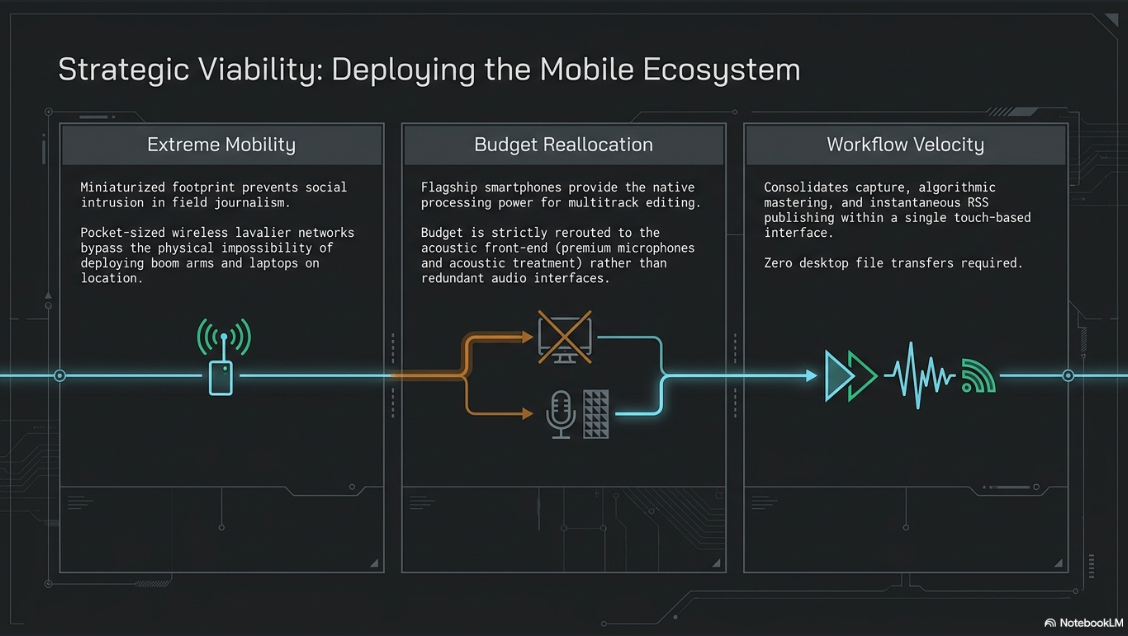
The primary catalyst for smartphone recording is the need for extreme mobility. Field journalists, remote interviewers, and podcasters recording on location benefit immensely from the miniaturized footprint of a mobile ecosystem3. A smartphone combined with a compact wireless lavalier network fits inside a pocket, enabling high-fidelity capture in environments where deploying a laptop, audio interface, and boom arm would be socially intrusive or physically impossible3. In these on-the-go scenarios, the speed and simplicity of the setup frequently outweigh the nuanced benefits of a traditional studio configuration3.
Financial constraints represent a secondary driver. For entry-level creators or independent productions operating with strict budget limitations, leveraging an existing smartphone eliminates the need for expensive multi-channel interfaces and heavy computing hardware3. The processing power required to record and edit multitrack audio is inherently available on flagship devices, allowing budget allocations to be redirected strictly toward the acoustic front end, such as external microphones and acoustic treatment3.
Furthermore, the smartphone ecosystem caters to creators who prioritize workflow simplicity. The integration of recording, editing, and distribution into a single touch-based interface reduces the technical friction that often stalls podcast production3. Modern mobile applications allow a host to record an episode, apply algorithmic mastering, and directly publish to RSS feeds or streaming platforms without the file ever traversing a desktop file system7. Therefore, recording on a smartphone is highly viable when mobility, budget, and operational simplicity are the paramount objectives, provided the producer implements rigorous external hardware protocols to bypass the device's physical limitations.
The Physics and Limitations of Embedded MEMS Microphones
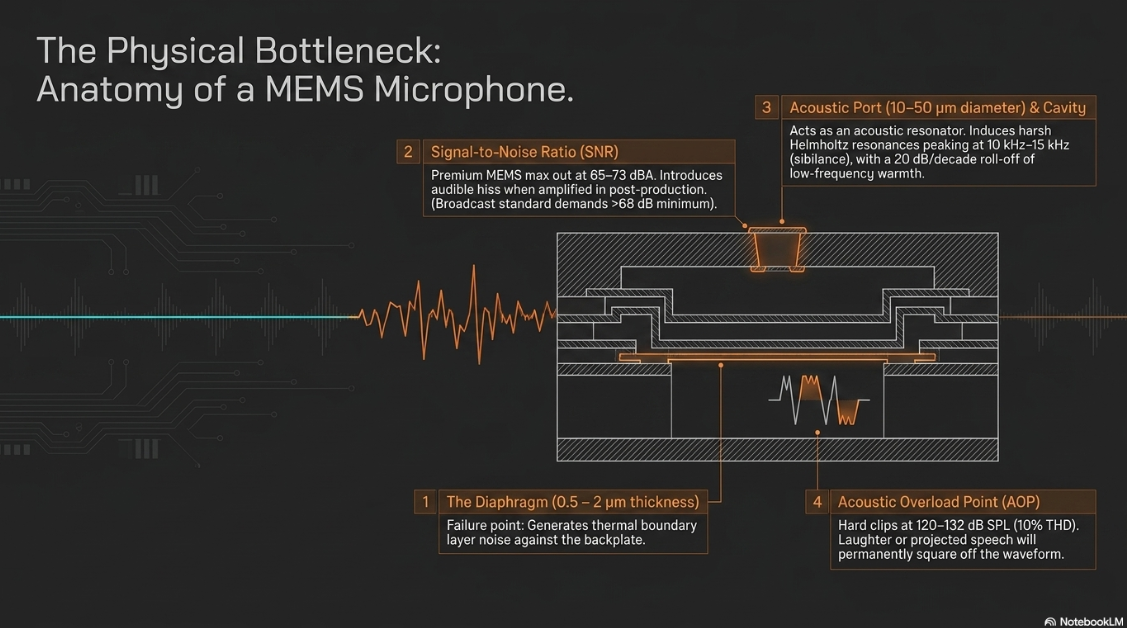
To understand why a smartphone's internal microphone is insufficient for professional podcasting, one must examine the physical and acoustic realities of Micro-Electro-Mechanical Systems (MEMS) technology. At the core of a capacitive MEMS microphone is a highly miniaturized silicon diaphragm, typically measuring between 0.5 and 2 µm in thickness, suspended over a rigid, perforated backplate to form a variable capacitor2.
When incident acoustic pressure waves deflect this microscopic diaphragm, the capacitance modulates. An integrated application-specific integrated circuit (ASIC) and preamplifier then convert this modulation into a low-noise analog voltage or a pulse-density modulated (PDM) digital stream2. While this technology represents a marvel of miniaturization, it introduces inherent acoustic compromises that disqualify it from professional solo voice broadcasting.
Signal-to-Noise Ratio (SNR) and Thermal Noise
The noise floor of a MEMS microphone is fundamentally constrained by thermal noise generated through heat exchange at the isothermal boundaries of the back cavity. As the physical package size of the microphone decreases to fit within a modern smartphone chassis (often as small as 3.76 × 2.95 × 1.7 mm), this thermal boundary layer noise inevitably increases2.
The current state-of-the-art SNR for premium MEMS microphones hovers between 65 and 73 dBA, although some experimental dual-membrane designs push this to 72 dBA by minimizing fluidic damping losses2. While sufficient for telecommunications and basic voice recognition, an SNR in the mid-60s introduces an audible hiss that becomes highly problematic during the compression and amplification stages of podcast post-production10. For premium voice capture, professional broadcast engineers typically demand a much higher SNR (typically above 68 dB) to preserve subtle speech details and transient consonants without elevating the background noise floor10. When relying solely on internal smartphone microphones, the low SNR increases the audible noise floor, which degrades the perceived audio quality in quiet scenes or when the speaker moves off-axis10.
Frequency Response and Helmholtz Resonances
The acoustic port design of a smartphone introduces physical anomalies to the microphone's frequency response. The arrays of fine ports, typically 10 to 50 µm in diameter, combined with the diaphragm-backplate gap and a cavity volume of just 50 to 200 pL, act as an acoustic resonator2. This microscopic geometry frequently induces unwanted Helmholtz resonances, typically peaking between 10 kHz and 15 kHz2.
These high-frequency resonances artificially color the human voice, inducing harsh sibilance that falls into the upper harmonic registers. The acoustic frequency response of a MEMS device in the low-frequency band behaves as a single-pole high pass filter, dictated by the resistance of the acoustic leak and the compliance of the back volume11. The result is an amplitude response with a 20 dB per decade slope, heavily rolling off low-frequency vocal warmth11. Furthermore, the packaging geometry and the physical chassis of the smartphone itself cause diffraction effects that alter free-field sensitivity depending on the angle of acoustic incidence12.
The Acoustic Overload Point (AOP)
The Acoustic Overload Point (AOP) dictates the maximum sound pressure level (SPL) a microphone can withstand before the total harmonic distortion (THD) exceeds a defined limit, often 10%10. Most smartphone MEMS microphones feature an AOP between 120 dB SPL and 132 dB SPL2. While this prevents catastrophic clipping during environmental events like sirens, a relatively low AOP combined with a high noise floor results in a heavily compressed dynamic range10. If a podcast host projects too loudly or laughs directly into a smartphone's internal MEMS microphone, transient peaks will clip at the hardware level, creating a harsh square-wave distortion that no digital post-processing can salvage10.
Digital Audio Architecture and Operating System Bottlenecks
Beyond the physical limitations of the MEMS transducer, the operating system (OS) architecture of the smartphone dictates how audio is sampled, processed, and written to memory. This introduces severe digital bottlenecks, particularly within the Android ecosystem, where hardware fragmentation necessitates aggressive software-level audio mixing.
Sample Rate Constraints and Nyquist Limitations
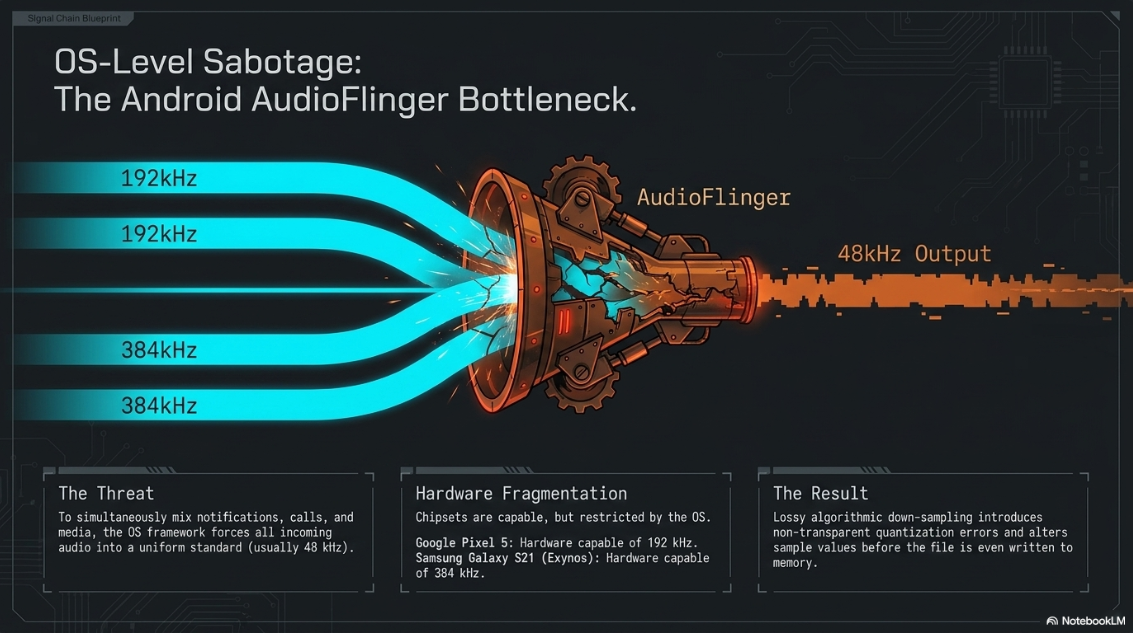
In accordance with the Nyquist-Shannon sampling theorem, a digital sampling rate must be at least twice the highest frequency of the recorded analog signal to prevent aliasing. Because the limits of human hearing extend to roughly 20 kHz, a sampling rate of 44.1 kHz (Compact Disc standard) or 48 kHz (digital video standard) is theoretically sufficient for vocal reproduction1. Consequently, the vast majority of smartphone manufacturers intentionally lock the built-in analog-to-digital converter (ADC) and digital-to-analog converter (DAC) at a maximum sampling rate of 48 kHz to conserve battery life, mitigate computational load, and reduce internal storage costs1. While modern chipsets are capable of vastly superior rates, the OS implementations strictly govern this ceiling.
Data reflecting theoretical hardware capabilities before OS-level resampling limitations are applied1.
Android's AudioFlinger and Resampling Degradation
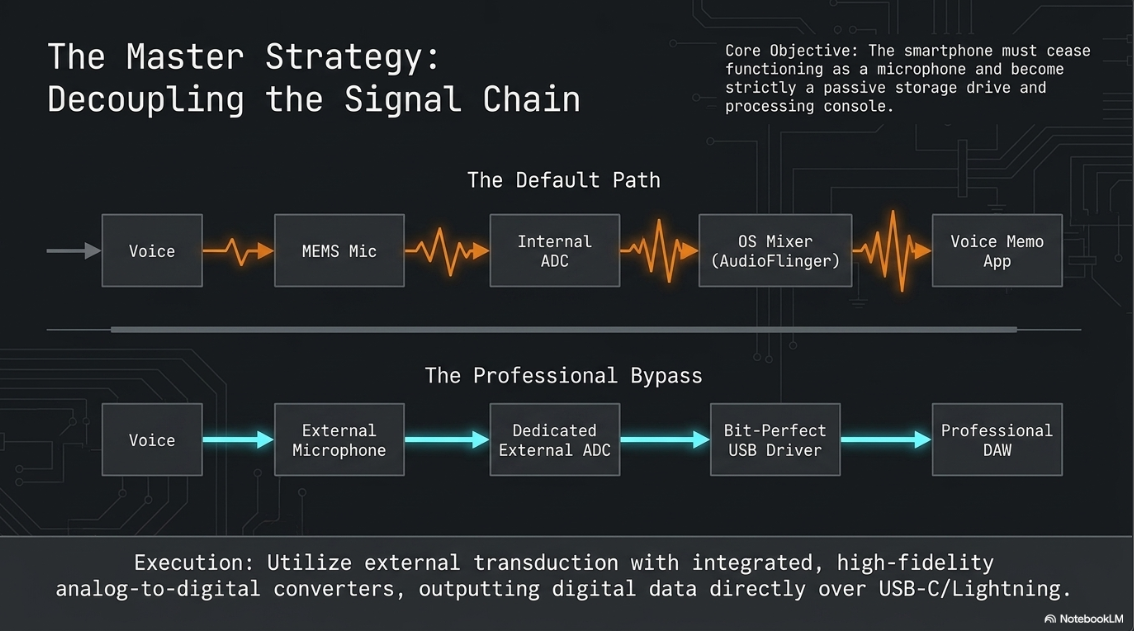
The most insidious threat to audio fidelity on a mobile device is OS-level resampling. In Android operating systems, a framework component known as "AudioFlinger" acts as the central mixer for all device audio13. Because a smartphone must simultaneously handle background notifications, alarm tones, media playback, and incoming calls, AudioFlinger forcefully resamples all incoming and outgoing audio to a uniform standard—usually 48 kHz—so these varied streams can be mathematically summed13.
If a podcaster connects a high-end external USB microphone capable of recording at 96 kHz, AudioFlinger intercepts that pristine digital stream, applies a rudimentary and often lossy algorithmic down-sampling, and outputs a 48 kHz file. This non-transparent digital signal processing (DSP) modification introduces quantization errors and alters sample values before the file is even saved13.
The Necessity of Bit-Perfect Acquisition
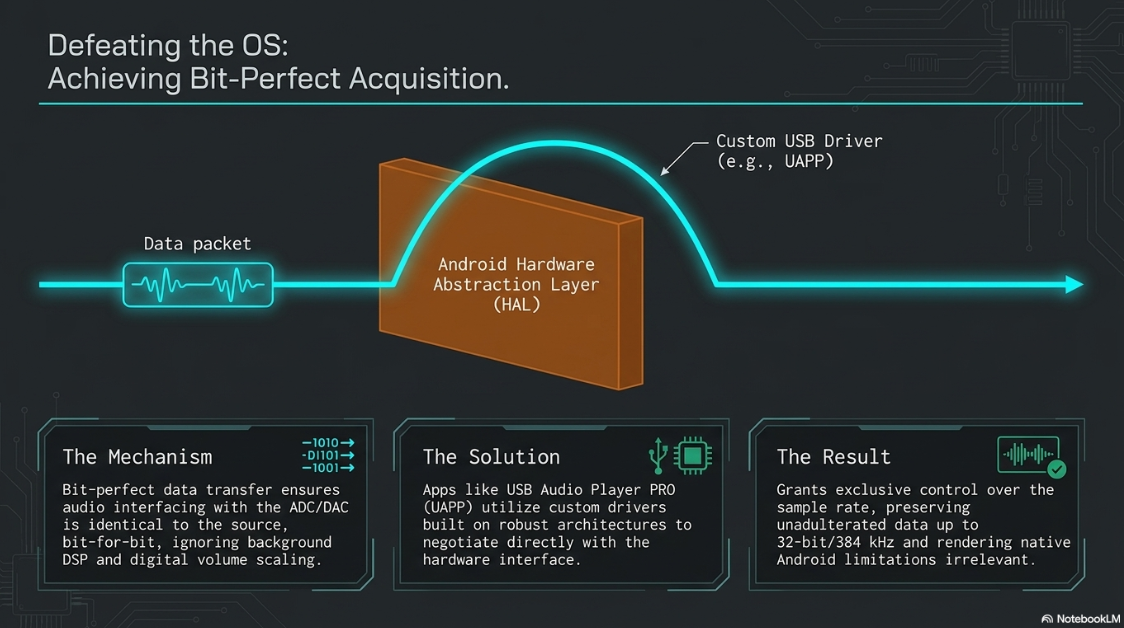
To circumvent OS-level degradation, professional recording on a smartphone requires software capable of achieving "bit-perfect" data transfer. Bit-perfect playback or recording ensures that the audio data interfacing with the DAC or ADC is identical to the source, bit for bit, bypassing OS mixers, digital volume scaling, dithering, and background DSP entirely13.
On Android, specialized applications like USB Audio Player PRO (UAPP) feature custom-developed USB audio drivers that bypass the Android Hardware Abstraction Layer (HAL) and AudioFlinger entirely15. When an external USB microphone or DAC is connected, this software directly negotiates with the hardware interface, granting exclusive control over the sample rate13. Software operating on robust architectures (such as Rust for state management and Zig for realtime audio callbacks) requests the track's exact native sample rate directly from the audio API, refusing to silently resample13. This allows the smartphone to serve merely as a passive storage drive for unadulterated, high-resolution audio data up to 32-bit/384 kHz, effectively rendering the Android operating system's inherent limitations irrelevant15.
External Transduction: Selecting the Optimal Gear
Given the physical constraints of MEMS transducers and the internal ADC bottlenecks, executing a professional podcast on a smartphone strictly necessitates the use of external audio hardware3. Analog lavalier microphones utilizing a 3.5mm TRRS jack rely on the smartphone’s internal preamp and ADC, thereby inheriting the high noise floor and dynamic limitations of the device's internal circuitry1. True professional setups bypass the internal ADC entirely by utilizing external microphones with integrated, high-fidelity converters that output digital data directly over USB-C or Lightning protocols20.
Desktop-Style USB Microphones
For studio-style setups where the smartphone is docked on a tripod or stand to act as the primary recording hub, USB-equipped dynamic and condenser microphones offer the most direct upgrade path19.
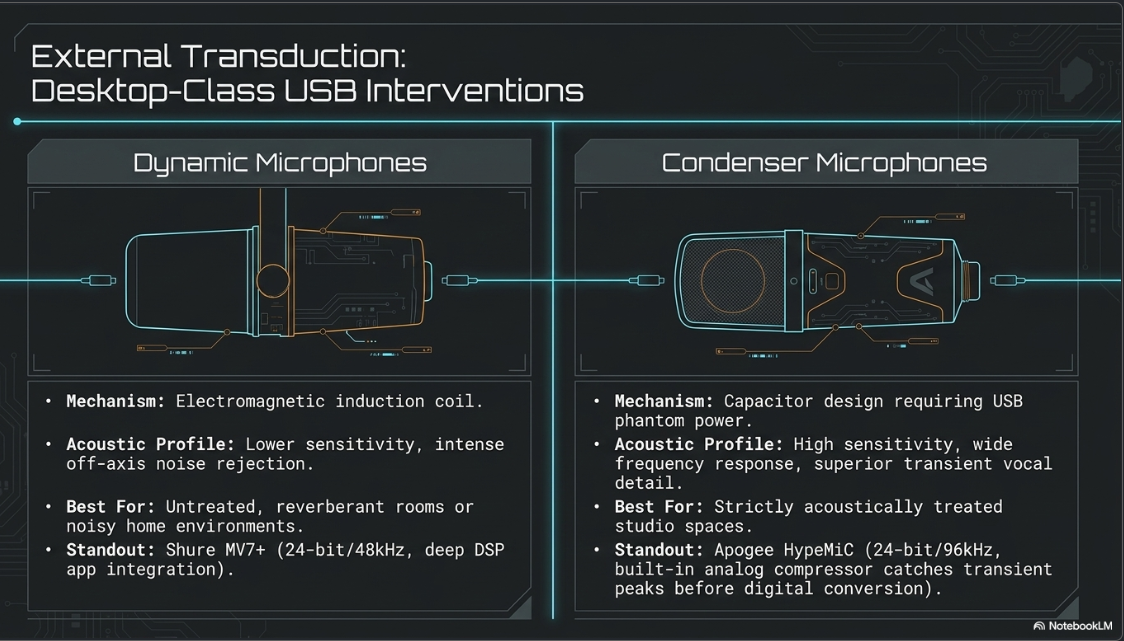
Dynamic microphones are structurally rugged, relying on an electromagnetic induction coil. Because they are inherently less sensitive, they exhibit excellent off-axis noise rejection, making them the superior choice for untreated, reverberant rooms or noisy environments typical of home recording20. Condenser microphones, conversely, utilize a capacitor design requiring phantom power (provided via the USB connection). They offer a wider frequency response and superior transient detail, making voices sound exceptionally crisp and intimate20. However, their high sensitivity means they will indiscriminately capture air conditioning hums, traffic, and room reverberation, restricting their use strictly to acoustically treated spaces23.
The Shure MV7+, for instance, provides a cardioid polar pattern and internal A/D resolution, capturing broadcast-quality warmth while rejecting ambient room tone20. Furthermore, microphones that connect directly into proprietary companion apps (such as the ShurePlus MOTIV app) unlock manual adjustments for distance, tone, and digital gain staging that generic recording apps cannot access24. The Apogee HypeMiC offers a unique advantage by incorporating a built-in analog compressor, catching loud vocal peaks in the analog domain before they reach the internal ADC, completely eliminating the risk of digital clipping21.
Wireless Lavalier Networks and 32-Bit Float Recording
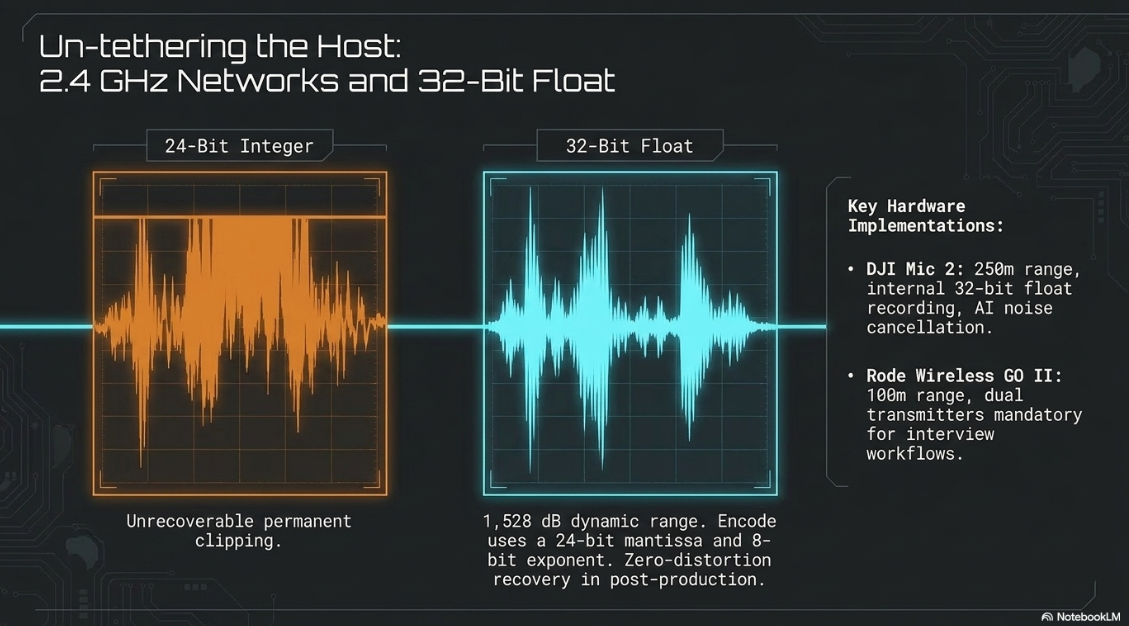
For mobile journalists, on-location interviews, and video podcasts, tethering multiple subjects to a smartphone via rigid USB cables is impractical. In these scenarios, compact wireless microphone systems operating on the 2.4 GHz spectrum have revolutionized mobile podcasting5. These systems utilize a miniature receiver that plugs directly into the smartphone’s USB-C or Lightning port, actively communicating with compact transmitter units clipped to the talent22.
The most critical technological advancement in this sector is the implementation of 32-bit float internal recording within the transmitters5. In standard 16-bit or 24-bit integer recording, an unexpected loud sound will exceed the maximum digital value, resulting in permanent, unrecoverable clipping25. In a 32-bit float system, the digital signal is encoded using a 24-bit mantissa to define the waveform and an 8-bit exponent to define the amplitude scale. This yields an astronomical dynamic range of approximately 1,528 dB. If a signal "clips" during field recording, the podcaster can simply reduce the gain during post-production to recover the pristine waveform with zero distortion.
For solo vloggers, a single transmitter system is sufficient, whereas dual-transmitter systems are mandatory for interview formats, allowing the smartphone to capture two separate audio streams simultaneously22. Wired lavaliers, such as the Rode Lavalier GO, remain relevant for static seated interviews, utilizing professional-grade omnidirectional capsules that interface directly with wireless transmitters for superior acoustic capture25.
Software Ecosystems: Mobile DAWs and Recording Applications
To successfully capture and edit high-quality audio on a smartphone, the device's default "voice memo" applications must be discarded. Serious producers rely on professional multitrack environments and dedicated podcasting platforms tailored to mobile interfaces6.
Non-Destructive Multitrack Editing: Ferrite Recording Studio
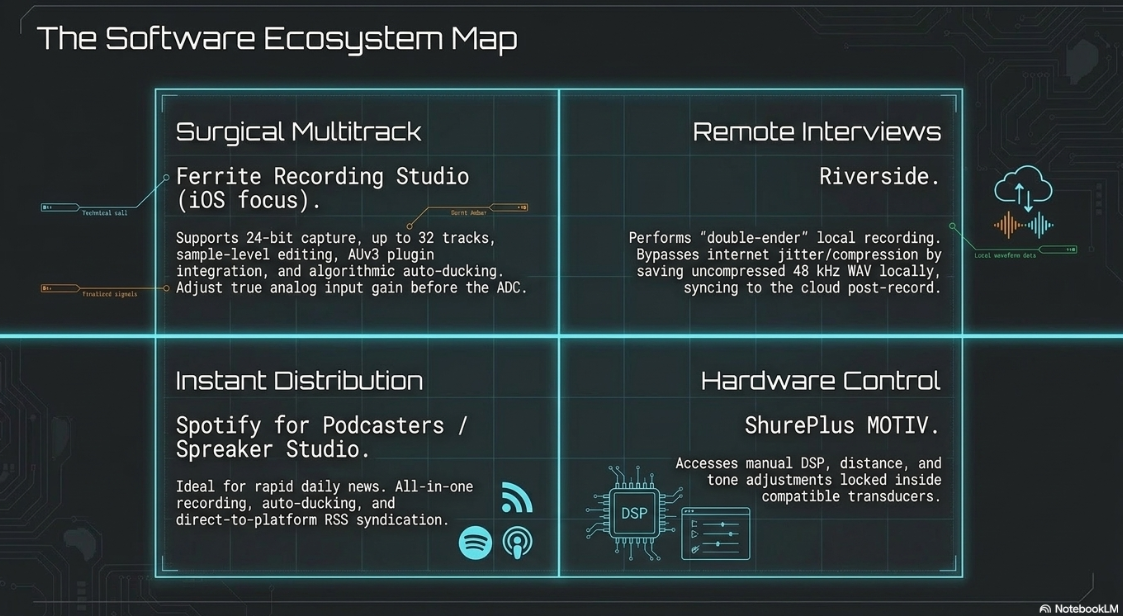
For users operating within the iOS ecosystem, Ferrite Recording Studio has established itself as the premier non-destructive multitrack editor4. Engineered specifically for broadcast journalism and mobile podcasting, Ferrite supports 24-bit audio capture and can accommodate up to 8 simultaneous microphone channels if routed through a compatible class-compliant USB audio interface4.
Ferrite bridges the complex gap between desktop digital audio workstations and mobile touch workflows. It features automated ducking (algorithmically lowering the volume of background music when speech is detected), silence removal (tightening awkward pauses without manual splicing), and comprehensive mixing capabilities across up to 32 individual tracks4. The application allows users to edit audio at the sample level, applying crossfades, volume automation, and panning26.
Crucially, Ferrite allows for the integration of AUv3 (Audio Unit v3) plugins, meaning third-party professional effects can be utilized directly within the app's signal chain26. A critical distinction for mobile engineers using apps like Ferrite is the handling of gain. The software can adjust digital track volume post-recording, but this merely scales the recorded digital data—amplifying the noise floor equally along with the signal29. True analog input gain control must be adjusted via the physical dials on the external microphone or USB interface prior to the signal hitting the ADC to ensure an optimal signal-to-noise ratio is captured at the source29. The app is also highly optimized for accessibility, supporting VoiceOver, reduced motion, and large text interfaces for visually impaired creators27.
Remote Interview Platforms and Distribution
When hosting guests remotely via a smartphone, standard teleconferencing apps (e.g., Zoom, Microsoft Teams) apply aggressive data compression and internet-reliant dynamic bitrate scaling, resulting in digital artifacts, dropped syllables, and robotic phasing6. Dedicated remote podcasting software, such as Riverside, circumvents this entirely by performing "double-ender" recordings6.
Riverside uses the smartphone app to record uncompressed, 48 kHz WAV audio and up to 4K video locally on the host’s and guest’s respective internal storage drives6. This means the final files are completely immune to internet latency, jitter, and bandwidth-induced compression6. Once the recording finishes, the high-resolution local files are uploaded to the cloud and synced synchronously.
For creators who prioritize frictionless distribution, platforms like Anchor (now Spotify for Podcasters) and Spreaker Studio provide all-in-one solutions3. These applications allow users to record audio directly on the device, perform rudimentary waveform trimming, insert pre-loaded soundboards and music beds, and instantaneously distribute the finalized file to major syndicators via an RSS feed7. While they lack the granular control of Ferrite, they are optimal for hobbyists or daily news updates where speed is prioritized over surgical audio engineering.
Environmental Acoustics and Spatial Optimization
Regardless of the external hardware or software utilized, raw acoustic capture is heavily dictated by the physical environment. Audio professionals widely operate under the consensus that up to 90% of perceived sound quality is dictated by the physical recording environment rather than the transducer itself6.
Mitigating Reverberation and Room Dynamics
When sound waves leave a podcaster's mouth, they travel spherically. The direct sound hits the microphone first, followed milliseconds later by reflections bouncing off walls, ceilings, and desks. Hard surfaces (glass, tile, concrete) reflect sound with minimal kinetic energy loss, creating dense reverberation (room echo) that renders the voice distant, metallic, and difficult to comprehend3.
If a dedicated soundproof studio is unavailable, mobile podcasters must actively seek or create "soft" rooms6. Soft materials—such as thick carpets, heavy curtains, couches, or even a walk-in closet filled with hanging clothing—act as broadband acoustic absorbers3. These materials convert the kinetic energy of the sound wave into trace amounts of heat, neutralizing reflections and drastically increasing the ratio of direct-to-reflected sound, thereby improving audio clarity3. Rooms like kitchens, bathrooms, and unfurnished offices must be strictly avoided6.
The Proximity Effect and Physical Isolation
To maximize the ratio of direct vocal sound to ambient room reflection, the physical distance between the sound source and the transducer must be meticulously controlled. Following the inverse square law of acoustics, doubling the distance from the sound source causes the sound pressure level to drop by approximately 6 dB.
The optimal distance for podcasting on a directional microphone is typically 20 to 30 centimeters (8 to 12 inches)6. Placing the microphone too close induces extreme low-frequency buildup (the proximity effect) and excessive plosive distortion19. Conversely, placing the microphone too far away necessitates a higher preamp gain, which subsequently amplifies the system's noise floor and the proportion of room reverberation present in the signal19.
Furthermore, physical isolation of the smartphone is paramount. A phone resting flat on a table will capture every structural vibration, table bump, or finger tap through the microphone's chassis3. The device, or the external microphone, must be mounted on a specialized tripod, smartphone stand, or boom arm to mechanically decouple it from resonant surfaces3. Finally, placing the smartphone in Airplane Mode is a critical operational protocol prior to pressing record; this disables cellular and Wi-Fi transceivers, preventing radio-frequency (RF) interference artifacts from bleeding into the analog audio pathways, while also halting notifications that can ruin a take3.
Post-Production: Spectral Repair and Dynamic Shaping
Raw audio captured via a smartphone in field environments—even with excellent external microphones—is rarely ready for broadcast. The post-production signal chain requires a sequence of corrective and enhancing processes to meet modern listener expectations.
Phase One: Algorithmic Noise Reduction and Spectral Repair
Before tonal shaping can occur, disruptive artifacts must be removed. Historically, this required meticulous spectral editing—visually painting out frequencies on a spectrogram. Today, AI-driven tools perform hyper-accurate algorithmic repair, highly beneficial for mobile recordings that often feature unpredictable background noise31.
Tools like iZotope RX isolate the human voice from complex background soundscapes using machine learning to build a noise profile, successfully attenuating steady-state hums (like air conditioning) and transient clicks (saliva sounds) without degrading the vocal fundamental31. Adobe Podcast relies on a cloud-based AI that aggressively targets echo and room reverberation. While highly effective for severely degraded internal smartphone audio, its aggressive synthesis can occasionally introduce robotic artifacts or muffle the start of vocal phrases in otherwise clean audio, necessitating careful use of its blend slider33. Auphonic functions as an automated mastering engineer, analyzing the entire audio file to perform adaptive loudness leveling, noise gating, and automatic filtering35. It targets standard broadcast loudness specifications (e.g., -16 LUFS for stereo podcasts), ensuring consistent perceived volume across disparate recording environments32.
Phase Two: Equalization (EQ) and Tonal Shaping
Equalization is the process of adjusting the amplitude of specific frequency bands to correct acoustic flaws and enhance vocal clarity23. Human speech is complex; the fundamental resonance originates deep in the chest, while intelligibility relies on high-frequency transient articulation generated by the tongue and teeth. When applying EQ to a podcast, professional consensus heavily favors subtractive EQ (cutting frequencies) over additive EQ (boosting)36. Boosting frequencies artificially raises the noise floor and frequently excites unpleasant room resonances36.
The tonal shaping protocol generally follows these stages:
The High-Pass Filter (HPF): The most essential step in vocal EQ is the implementation of a high-pass filter. An HPF attenuates all frequencies below a set threshold while allowing higher frequencies to pass unaffected23. Because the fundamental frequency of the human voice rarely dips below 80 Hz, applying an HPF at 80 Hz with a steep roll-off slope (-12 or -16 dB per octave) immediately eliminates low-frequency structural rumble, traffic noise, HVAC hum, and the low-frequency energy of explosive "plosive" consonants36.
Controlling Mud and Boominess (80 Hz – 250 Hz): The 80 Hz to 120 Hz range dictates the rich timbre of the voice36. However, the 200 Hz to 240 Hz range can introduce dense "boominess" or a muddy characteristic. A slight subtractive cut here can untangle a dense mix, particularly when attempting to balance the perceived loudness of male and female co-hosts36.
Taming Room Reflections (300 Hz – 1 kHz): This mid-range block is where the physical reflections of an untreated room are most obvious36. A wide, gentle attenuation in this spectrum can trick the psychoacoustic perception of the listener, simulating a tighter, more intimate acoustic environment36.
Enhancing Intelligibility (2 kHz – 3 kHz): This range governs articulation and clarity36. If a subject is mumbling or utilizing a dark-sounding dynamic microphone, a minor boost in this range can push the voice forward in the mix, as human hearing is highly optimized to perceive frequencies in this band (similar to standard telephony limits of 3.4 kHz)36.
Sibilance Control (4 kHz – 7 kHz): The upper midrange is where sharp consonants ("S," "T," "Sh") reside38. While these frequencies provide the presence of a professional broadcast, they easily become grating. Rather than heavily EQing this area, engineers utilize a specialized dynamic EQ known as a De-esser. A de-esser compresses only the specific narrow frequency band where sibilance occurs, triggering exclusively when the offending "S" sound exceeds a threshold, thereby preserving the high-frequency air of the vowels23.
Phase Three: Dynamic Range Compression
Unprocessed speech possesses a massive dynamic range; a whisper is nearly inaudible, while a burst of laughter can shatter the digital ceiling. A compressor functions as an automated volume control that reduces the amplitude of the loudest parts of the waveform (peaks), allowing the entire track to be uniformly amplified via makeup gain without introducing digital clipping23.
For spoken word broadcasting, subtle compression creates a punchy, polished presence38. The standard approach requires setting a threshold slightly below the speaker's average speaking volume, utilizing a moderate ratio between 2:1 and 4:138. This mathematically dictates that for every 4 dB the signal attempts to cross the threshold, the compressor only permits 1 dB of output38. To preserve natural enunciation, the compressor must employ a fast attack time, clamping down on transients rapidly without squashing the natural lifecycle of the syllable38. When paired with spectral repair and subtractive EQ, appropriate compression ensures the final file exported from the smartphone rivals the consistency of a traditional studio broadcast.
Works cited
PowerPhone: Unleashing the Acoustic Sensing Capability of Smartphones - PMC, https://pmc.ncbi.nlm.nih.gov/articles/PMC12765216/
MEMS Microphones: Capturing Precision in Modern Audio Systems, https://puiaudio.com/news/mems-microphones-capturing-precision-in-modern-audio-systems/
Easy to use tips to record a podcast on a smartphone!, https://thepodcastinguniversity.com/record-a-podcast-on-a-smartphone/
Ferrite Recording Studio - Wooji Juice, https://www.wooji-juice.com/products/ferrite/
Best Wireless Microphones 2026 – Tested & Compared, https://soundandgo.com/en/wireless-microphone-test-microphones-in-comparison/
How To Record a Podcast On Your Phone - Simple Guide - Music Radio Creative, https://producer.musicradiocreative.com/how-to-record-a-podcast-on-your-phone/
Podcast Studio - Apps on Google Play, https://play.google.com/store/apps/details?id=com.spreaker.android.studio
How to Record a Podcast with Your Phone | BLOG - mojogear, https://mojogear.co.uk/blogs/blog/how-to-record-a-podcast-with-your-phone
Editorial for the Special Issue on Micromachined Acoustic Transducers for Audio-Frequency Range - MDPI, https://www.mdpi.com/2072-666X/16/1/67
Factors to consider when choosing a MEMS microphon... - Infineon Developer Community, https://community.infineon.com/t5/Knowledge-Base-Articles/Factors-to-consider-when-choosing-a-MEMS-microphone/ta-p/1210049
FREQUENCY RESPONSE AND LATENCY OF MEMS MICROPHONES: THEORY AND PRACTICE - Knowles, https://www.knowles.com/docs/default-source/default-document-library/frequency-response-and-latency-of-mems-microphones---theory-and-practice.pdf?sfvrsn=4
performance of a new mEMS measurement microphones and its potential application - National Physical Laboratory, https://projects.npl.co.uk/dreamsys/images/IoA-Spring2008-MEMS-microphone.pdf
Bit-Perfect Audio on Android: Myth vs Reality - Echobox, https://ombs.io/guides/bit-perfect-playback-android/
AM gives real bit perfect via USB DAC on Android Phone (Samsung S22, Hiby FC3) - Reddit, https://www.reddit.com/r/AppleMusic/comments/1lzp3kw/am_gives_real_bit_perfect_via_usb_dac_on_android/
USB Audio Player PRO – Apps on Google Play, https://play.google.com/store/apps/details?id=com.extreamsd.usbaudioplayerpro&hl=en_GB
USB Audio Player PRO - eXtream Software Development, https://www.extreamsd.com/index.php/products/usb-audio-player-pro
Apple Music with 'Bit Perfect' Playback finally possible on Android smartphones via USB Audio Player Pro! | The Indian Audiophile Forum, https://www.theindianaudiophileforum.com/c/announcements-new-launches/apple-music-with-bit-perfect-playback-finally-possible-on-android-smartphones-via-usb-audio-player-pro
Bit perfect usb output on Android - Roon Labs Community, https://community.roonlabs.com/t/bit-perfect-usb-output-on-android/11017
How To Record a Podcast on Your Phone In a Few Simple Steps - RØDE, https://rode.com/en-au/about/news-info/how-to-record-a-podcast-on-your-phone-in-a-few-simple-steps
Best podcasting microphones 2026: My top picks, with demos - MusicRadar, https://www.musicradar.com/news/best-podcasting-microphones
The Best USB Microphones for 2026 - PCMag UK, https://uk.pcmag.com/audio-recording/116655/the-best-usb-microphones
Upgrade Your Audio: A Guide to Choosing a Wireless Lavalier Microphone in 2026 - Joybuy, https://www.joybuy.co.uk/blog/wireless-lavalier-microphone-2026-guide/iKtsvAoZ
How to Get the Best Audio Quality Out of Your Podcast - RØDE, https://rode.com/en-gb/about/news-info/how-to-get-the-best-audio-quality-out-of-your-podcast
First time podcasting - what apps to use on iPhone or iPad? - Reddit, https://www.reddit.com/r/podcasting/comments/1ecwerp/first_time_podcasting_what_apps_to_use_on_iphone/
Best Lavalier Microphone for Podcasting: Clip-On Mics That Actually Sound Good, https://podcastsetuplab.com/best-lavalier-microphone/
Ferrite Recording Studio - Wooji Juice, https://www.wooji-juice.com/products/ferrite/in-depth
Ferrite Recording Studio - App Store - Apple, https://apps.apple.com/gb/app/ferrite-recording-studio/id1018780185
Ferrite Recording Studio - App Store, https://apps.apple.com/cz/app/ferrite-recording-studio/id1018780185
Ferrite Recording Studio - App Store - Apple, https://apps.apple.com/lt/app/ferrite-recording-studio/id1018780185
Podcast Equipment & Apps: Top Tools, Setup Tips & Best Practices - Maono, https://www.maono.com/blogs/news/podcast-equipment-apps-top-tools-setup-tips-best-practices
How to clean up audio and remove background noise - iZotope, https://www.izotope.com/community/blog/how-to-clean-up-audio-and-remove-background-noise
The 12 Best Audio Cleaning Software Tools for 2026 | SimpleClean Blog, https://simpleclean.app/blog/best-audio-cleaning-software
Adobe Podcast | AI audio recording and editing, all on the web, https://podcast.adobe.com/en
Best AI Noise Removal Tools (2026) - Dupple, https://dupple.com/learn/best-ai-noise-removal-tools
Auphonic, https://auphonic.com/
EQ for Podcasting | Podigy, https://www.podigy.co/podcasters-eq
How to Use a High-Pass Filter in Your Mix - AutoTune, https://www.antarestech.com/blog/the-basics-of-using-high-pass-filter-in-your-mix
A Guide to Audio Processing and FX For Podcasting (GB) - RØDE, https://rode.com/en-gb/about/news-info/a-guide-to-audio-processing-and-fx-for-podcasting











