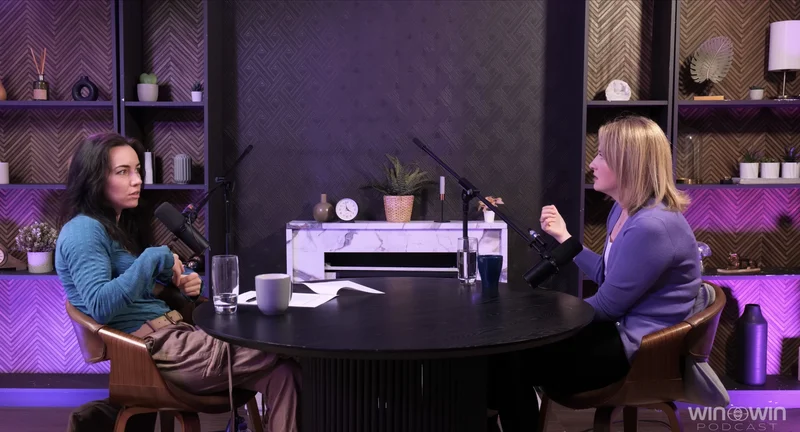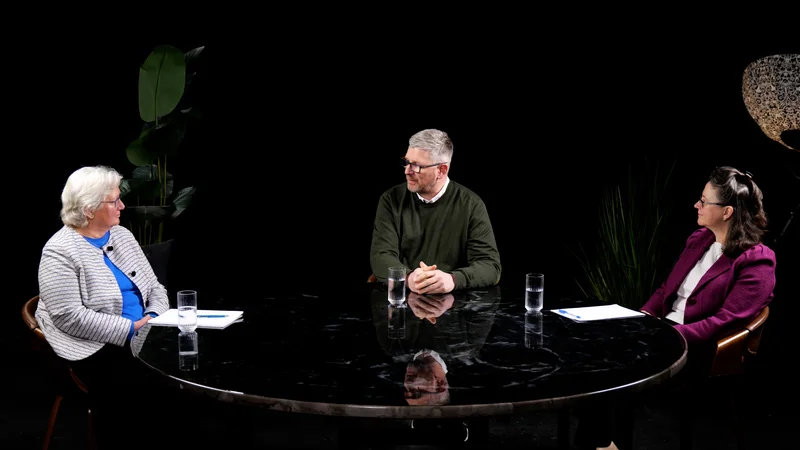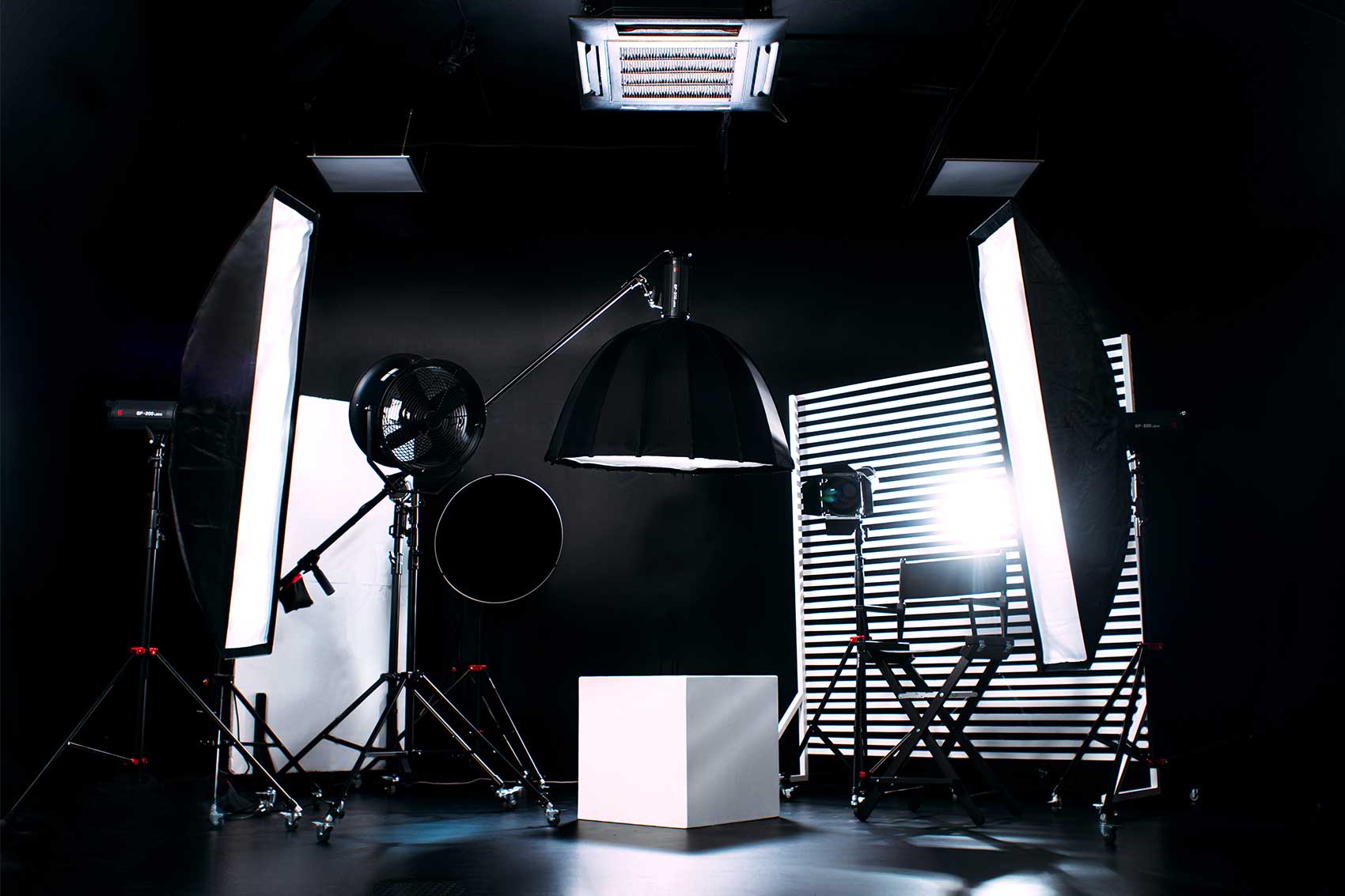
Introduction: Beyond the Basics - A Strategic Framework for Studio Selection
Booking a professional podcast studio in London is no longer a simple logistical task; it is a critical production decision with profound financial and creative implications. The proliferation of studios across the city, from affordable self-service rooms to full-service production houses, presents a landscape of opportunity fraught with potential for costly errors. This report provides a strategic playbook for content creators, designed to mitigate risk, optimize budgets, and maximize the return on investment from a studio session.
The modern podcasting ecosystem has evolved significantly. The shift from audio-only formats to high-production video podcasts (VODcasts) for platforms like YouTube and Spotify has fundamentally altered the criteria for studio selection.1 This evolution raises the stakes for creators; a successful session requires not just a quiet room, but a technically proficient and visually compelling environment. Consequently, the potential for error—from misjudging acoustics to misunderstanding complex pricing structures—has grown in tandem.
This analysis deconstructs the most common and critical mistakes made when booking a podcast studio in London. It moves beyond a superficial checklist to provide a deep, evidence-based framework for decision-making. The report is structured to guide the creator through the entire booking lifecycle, dissecting five core areas of potential failure: Foundational Oversights in due diligence, Technical Traps in evaluating the recording environment, Financial Fumbles in budgeting and contracts, Operational Gaffes in session management, and Post-Session Disasters related to asset delivery. By understanding not just what these mistakes are, but why they occur and how to strategically avoid them, creators can transform a studio booking from a necessary expense into a powerful asset for producing exceptional content.
Part I: Foundational Oversights: Errors in Pre-Booking and Due Diligence
The most damaging mistakes often occur before a booking is even made. Inadequate research and a failure to conduct thorough due diligence can lock a creator into a suboptimal environment, wasting time, money, and creative energy. These foundational oversights set the stage for a cascade of problems that are difficult, if not impossible, to rectify on the day of recording.
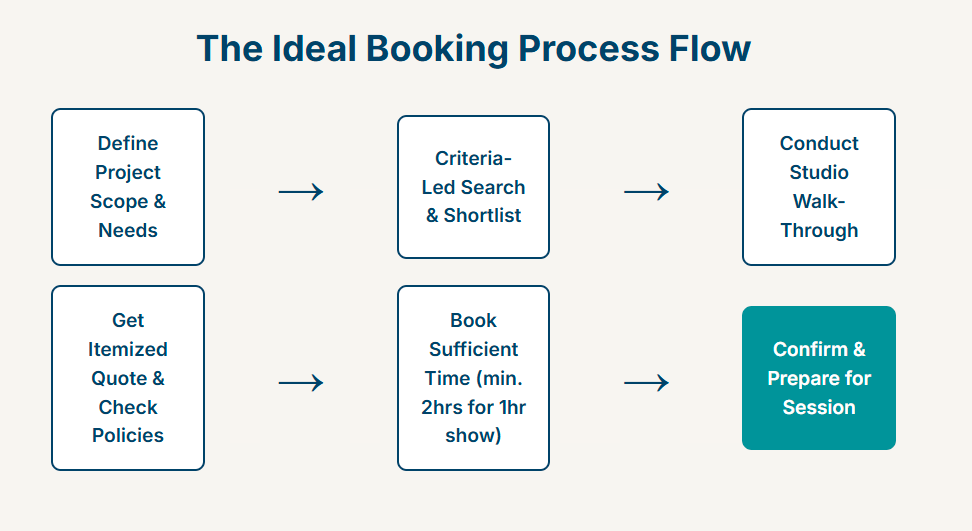
The Mistake of Superficial Scouting
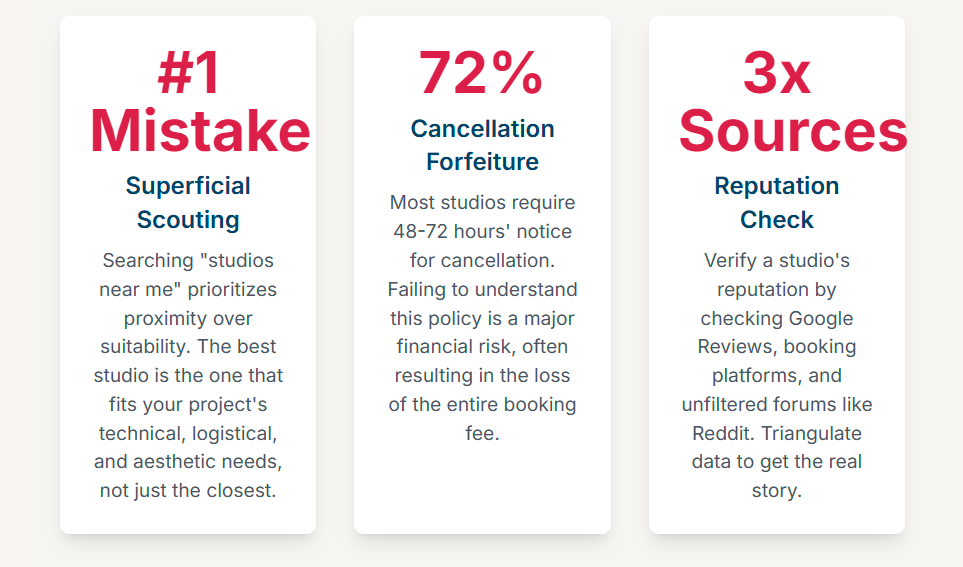
The initial search for a studio is a pivotal moment that dictates the quality of all subsequent options. A common error is to begin with a geographically constrained, unspecific search query like "podcast studios near me".3 This approach incorrectly prioritizes proximity over suitability, a decision that can severely compromise the final product.
The "best" studio is not necessarily the closest; it is the one that most precisely aligns with the project's unique technical, logistical, and budgetary requirements.3 A more strategic approach begins with an internal audit of the project's needs. Before initiating any search, a creator must define their core parameters: the number of hosts and guests, the necessity of video recording, the level of on-site technical support required, and the desired aesthetic.4 Only with this clear brief can a creator conduct a criteria-led search, filtering the vast London market for studios that are genuinely fit for purpose. For example, a studio in a less central but well-equipped location like West London might offer superior value and a more relaxed atmosphere compared to a more expensive, cramped space in Soho.6
The Mistake of Ignoring Location as a Logistical Lynchpin
A studio's physical location is not a trivial detail; it is a logistical lynchpin that directly impacts the quality of the recording session. Studios consistently highlight their proximity to major transport links (such as Tube stations in Finchley, Shoreditch, or Kennington) and the availability of parking as key selling points for a reason.2
A poorly chosen location introduces friction for everyone involved, especially guests. A difficult journey can cause stress, fatigue, and lateness, all of which negatively affect a guest's energy and performance on the microphone. This wastes valuable, paid-for studio time and can diminish the quality of the conversation. The experience of a guest begins with the invitation and the journey, not with the first question. A studio that is easy to find and access signals professionalism and respect for a guest's time, particularly when dealing with high-profile individuals.3
Furthermore, the surrounding area matters. For longer recording sessions, the proximity of amenities like cafes and restaurants for breaks is a practical consideration that contributes to the comfort and stamina of the host and guests.8 The choice of location is therefore a strategic variable in performance management and risk mitigation. Selecting a studio near a major transport hub like London Bridge or King's Cross is an investment in the smooth execution of the session and the quality of the resulting content.9
The Mistake of Underestimating Reputation and Reviews
In the digital marketplace, reputation is a tangible asset. Neglecting to thoroughly investigate a studio's track record is a significant oversight. Multiple sources strongly advise a two-pronged approach: consulting aggregated online reviews on platforms like Google and Trustpilot, and seeking direct, word-of-mouth recommendations from fellow podcasters.7
These reviews should be treated as raw operational intelligence, not mere testimonials. A pattern of complaints regarding poor audio quality, unhelpful staff, or opaque billing practices is a major red flag. Unfiltered platforms like Reddit can be particularly revealing. One user's stark warning about a specific studio, citing "echo & hiss on the low grade mics" and "inexperienced staff," provides a level of granular, technical detail that is far more instructive than a generic five-star rating.12 This type of feedback points to specific, recurring failures that are likely to affect future clients.
When analyzing reviews, creators should look for specifics. Positive reviews that mention a particularly helpful engineer by name, praise the effectiveness of the soundproofing, or note the efficiency of the file transfer process are indicators of a well-run facility.13 The most reliable assessment comes from triangulating data from multiple sources: the studio's curated website, third-party booking platforms like Tagvenue, and the candid, unfiltered discussions found on community forums.12
The Mistake of Skipping the Critical Walk-Through
Marketing materials are designed to present a studio in the best possible light. Professional photography can make a small, poorly maintained room appear spacious and modern. For this reason, it is a critical error to book a studio without first conducting a physical or virtual inspection. As one source advises, a creator must "check the recording studio by yourself before signing up with them".3 Recognizing this need, many London studios now offer in-person viewings or comprehensive virtual 3D tours.16
This pre-booking visit serves two functions. First, it is a verification exercise. It allows the creator to assess the true size and condition of the room, gauge the ambient noise level from adjacent spaces or external traffic, evaluate the quality of the set design, and inspect the state of the equipment.8 It is the only reliable way to confirm that the reality of the space matches its promotional materials.
Second, and more importantly, the visit is a due diligence interview. It provides a direct interface with the studio's on-site staff. This is an opportunity to ask pointed, technical questions about their workflow, such as, "How do you manage multi-track recording for a four-person video podcast?" or "What is your standard procedure for file transfer at the end of a session?" The confidence, clarity, and detail of their answers are a direct proxy for their professionalism and technical competence. A hesitant or vague response is a significant warning sign. The walk-through, therefore, is not a passive viewing but an active investigation into the operational integrity of the studio.
Part II: The Technical Traps: Misjudging the Sonic and Visual Environment
Beyond foundational due diligence, a creator must be able to accurately assess the technical suitability of a studio. The quality of the final podcast is inextricably linked to the physics of the recording space and the specifications of the equipment used. Misjudging these technical elements is a common trap that leads to subpar audio and video, regardless of the quality of the content itself.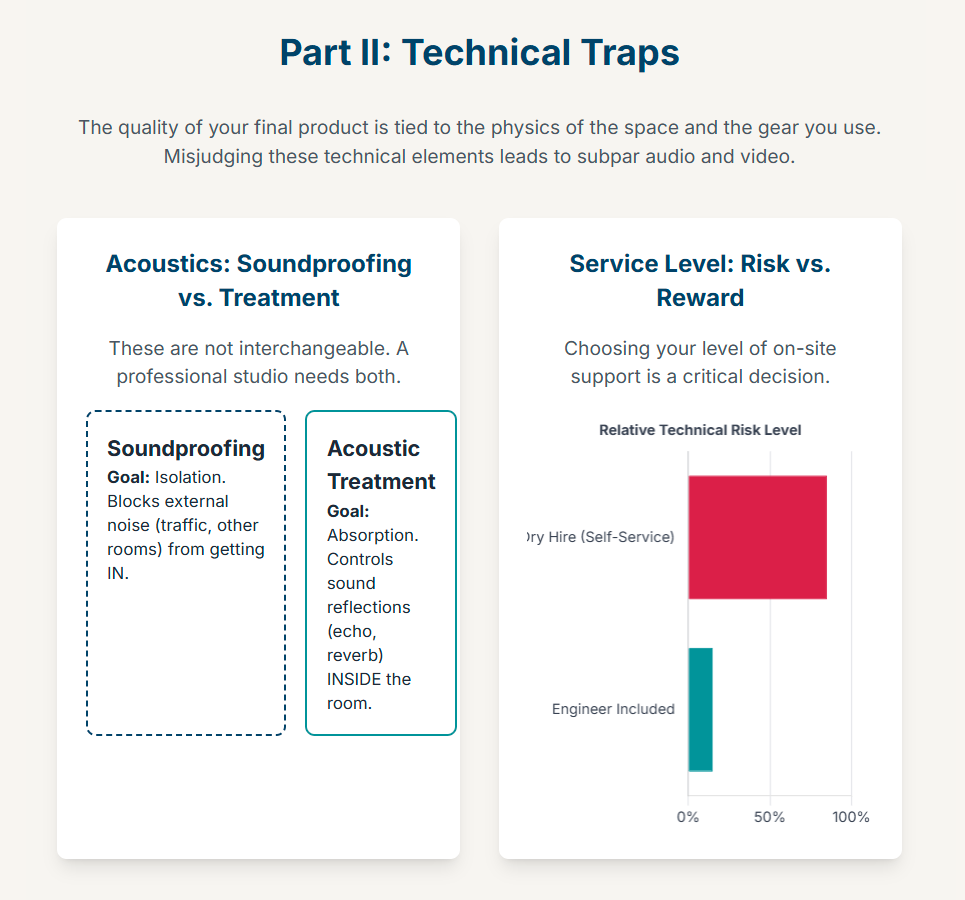
The Mistake of the Acoustics Illusion: Soundproofing vs. Acoustic Treatment
Perhaps the most critical and widely misunderstood technical concept is the distinction between soundproofing and acoustic treatment. These are not interchangeable terms; they describe two different solutions to two different problems, and a professional recording environment requires both.8
Soundproofing is about isolation. It is the process of blocking external sounds from entering the recording space. This is achieved through mass and density—thick walls, double-glazed windows, and sealed doors that prevent noise from traffic, construction, or adjacent rooms from bleeding onto the recording.1
Acoustic Treatment is about absorption and diffusion. It is the process of controlling how sound behaves inside the room. This is achieved using materials like acoustic panels, bass traps, and diffusers to absorb unwanted sound reflections, preventing echo (reverberation) and creating a clear, warm, and controlled vocal sound.1
The mistake lies in assuming one implies the other. A creator might book a heavily soundproofed studio in a busy area, only to find the recording is unusable due to harsh echoes bouncing off untreated parallel walls. Conversely, a beautifully treated room can be rendered worthless if it is not adequately soundproofed against the noise of a busy street outside. Some studios are transparent about this, stating they are "acoustically treated and not fully soundproof," a crucial piece of information that requires the creator to assess the ambient noise level of the location.18
During a studio visit, a simple but effective test for acoustic treatment is to stand in the middle of the room and clap your hands sharply. A clean, deadened sound indicates good treatment. A metallic ringing or a lingering echo (known as "flutter echo") indicates poor treatment that will negatively impact vocal clarity.8 The creator should ask the studio staff directly: "What specific soundproofing measures are in place, and what forms of acoustic treatment have you installed to manage internal reflections?".1
The Mistake of Misinterpreting the Equipment List
A studio's equipment list is a key data source, but it can be misleading to those unfamiliar with the specifications. Studios in London often list industry-standard gear, such as Shure SM7B, Shure MV7, or Rode Procaster dynamic microphones; Rodecaster Pro or ZOOM PodTrak P8 mixing consoles; and Sony A-series or FX-series cameras for video.5
The error is to accept these brand names at face value without understanding their suitability for a specific format. For example, a dynamic microphone like the Shure SM7B is a broadcast industry standard, excellent for rejecting room noise and ideal for multi-person conversational podcasts.23 A condenser microphone, such as the Rode NT2A, is far more sensitive, capturing more detail but also more ambient room sound, making it better suited for a solo voiceover artist in a highly controlled vocal booth.2 The presence of an all-in-one podcast production console like the Rodecaster Pro is generally a positive sign, indicating a modern, user-friendly setup designed specifically for podcasting.5
The equipment list provides a coded signal about the studio's primary function and target clientele. A facility offering high-end Neumann U87 condenser microphones and complex Avid ProTools software is likely a music recording studio first and foremost.5 While offering exceptional quality, this setup may be overly complex and expensive for a straightforward conversational podcast. In contrast, a studio advertising a setup of four Rode Procaster microphones and a Rodecaster Pro console is clearly and purposefully catering to the mainstream podcaster, offering a reliable balance of high quality and operational simplicity.18 Understanding these nuances allows a creator to match the studio's technical offering to their own needs and budget.
The Mistake of Under-planning for the VODcast Variable
The decision to produce a video podcast (VODcast) exponentially increases the technical complexity of a studio booking. The mistake is to focus narrowly on the camera model while neglecting the two elements that have a far greater impact on the final image: lighting and set design.1
A high-end 4K camera can produce a poor image in a badly lit room, while a more modest camera can look excellent with professional lighting. London studios catering to VODcasters offer multi-camera setups (typically three or four angles) and professional lighting rigs, often with adjustable bi-color LED panels and creative RGB options.5
The visual background is equally important. A plain, uninspired wall or a generic office setting can undermine the professionalism of the content. Leading studios offer customizable sets, different furniture arrangements (e.g., "Fireside" vs. "Desk" setups), and options to display a podcast's branding, such as a wall-mounted TV screen for logos.9 When evaluating a studio for video, a creator should request to see recent test footage or examples of work shot in the space. This footage should be scrutinized for lighting quality—are there harsh shadows on the speakers' faces?—and the visual appeal of the set.
The Mistake of Assuming Peripherals are Included
The success of a recording often hinges on small, inexpensive but essential pieces of equipment. Pop filters (to reduce plosive "p" and "b" sounds), stable microphone stands or boom arms (to minimize handling noise), and high-quality headphones for every participant are fundamental requirements for a professional recording.20
A critical technical feature that is often overlooked is the capability for multi-track recording. This means each microphone is recorded to its own separate audio file. This is an essential feature of modern podcast mixers like the Rodecaster Pro and Zoom PodTrak P8.18 Recording in multi-track is non-negotiable for professional post-production, as it allows an editor to adjust the volume, apply noise reduction, and edit the audio of each speaker independently. Receiving only a single, pre-mixed stereo file severely limits these options.
The mistake is to assume these peripherals and capabilities are standard. A creator should compile a personal technical checklist based on their project's needs and confirm, in writing, that every item will be provided before finalizing the booking.5 A crucial question to ask is: "Does your standard hire fee include multi-track recording, providing separate WAV files for each microphone at the end of the session?".18
Part III: Financial Fumbles: Navigating London's Podcast Studio Pricing
The London podcast studio market features a wide and often confusing array of pricing structures. Navigating this landscape without a clear understanding of the underlying business models can lead to significant budget overruns. Financial mistakes typically stem from misinterpreting headline rates, being caught unaware by additional fees, and overlooking critical contractual clauses.
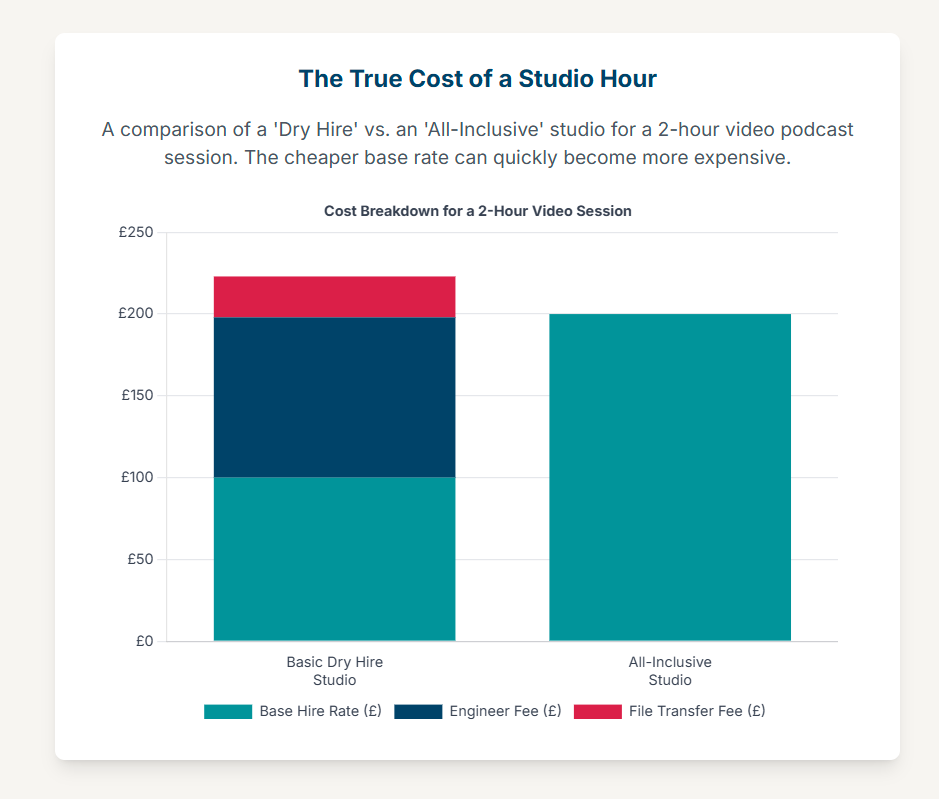
The Mistake of Misunderstanding the Rate Card
Studios in London employ several pricing models, each suited to different types of creators and projects.2
Hourly Rates: This is the most common model, ideal for one-off recordings. Rates can range from as low as £10-£30 per hour for a basic audio-only room to £150 per hour or more for a fully-equipped, multi-camera video studio.3
Package Deals / Day Rates: Many studios offer discounted rates for half-day (typically 4 hours) or full-day (typically 8 hours) bookings. These can provide significant savings for creators recording multiple episodes in a single session.3
Memberships: For prolific creators who record regularly, some studios offer monthly or annual memberships. These provide a set number of studio hours per month at a reduced rate, along with other potential perks like marketing support or networking events.9
The primary error is to select a studio based solely on the lowest advertised hourly rate. A £30 per hour "dry hire" (space and basic equipment only, with no technical support) can quickly become more expensive than a £100 per hour package that includes a dedicated audio engineer.3 The time lost to troubleshooting technical issues or correcting mistakes in a dry hire scenario can easily outweigh the initial savings. The choice of pricing model must be aligned with the creator's production frequency and technical autonomy.
The Mistake of Ignoring the Anatomy of Hidden Costs
The advertised base hire fee is often just the entry point. A host of additional fees, or "add-ons," can substantially increase the total cost of a session. The mistake is not in the existence of these fees, but in the failure of the creator to inquire about them and secure a comprehensive, itemized quote before booking.
The structure of these add-on fees often reveals the studio's business model. A studio with a low base rate and a long list of expensive add-ons operates on a "budget airline" model, where the initial price is attractive but the final cost is much higher. Conversely, a studio with a higher, all-inclusive rate is selling a premium, predictable service. Understanding this allows a creator to choose a model that aligns with their budget and tolerance for financial uncertainty.
Common add-on costs in the London market include:
On-Site Engineer/Operator: This is one of the most significant additional costs, typically ranging from £24 to £49 per hour, and sometimes more.9 Some studios include this in their standard rate, which represents a major value proposition.29
File Transfer: If a creator does not bring their own compatible hard drive, studios may charge a fee of £25 to £45 for cloud-based file transfer.5
Overtime: Running over the booked time is expensive. Studios often charge by the minute for overtime, at a punitive rate that can be significantly higher than the standard hourly fee.18
Specific Equipment Hire: While a standard setup is included, specialized equipment often costs extra. For example, additional cameras can be £20 per hour each, and a teleprompter can be £29 per hour.18
Post-Production Services: Editing, mixing, mastering, and the creation of social media clips are almost invariably priced separately. These services can easily double or triple the cost of the recording session itself.22
The following table provides a comparative analysis of pricing structures across a sample of London studios to illustrate the importance of looking beyond the headline rate.
Table 1: Comparative Cost Analysis of London Podcast Studios
Note: Prices are subject to change and VAT. This table is for illustrative purposes based on available data and should be verified with the studios directly.
The Mistake of Overlooking Contractual Clauses
The booking confirmation and terms of service constitute a binding agreement. A frequent and costly mistake is failing to read and understand the clauses related to cancellations and rescheduling. The industry standard in London is quite strict: studios typically require a minimum of 48 to 72 hours' notice to cancel or reschedule a booking. Failure to provide this notice usually results in the forfeiture of the entire booking fee.16 Given the unpredictable nature of scheduling, especially with guests, understanding this policy is essential for financial risk management. Before making any payment, a creator should obtain the cancellation policy in writing and factor this risk into their planning.
Part IV: Operational Gaffes: Mismanaging Session Time and On-Site Support
Once a studio is booked, the focus shifts to execution. Operational mistakes made on the day of recording can be just as costly as foundational or financial errors. These gaffes typically revolve around the mismanagement of time, a misunderstanding of the level of support included, and poor communication with on-site staff.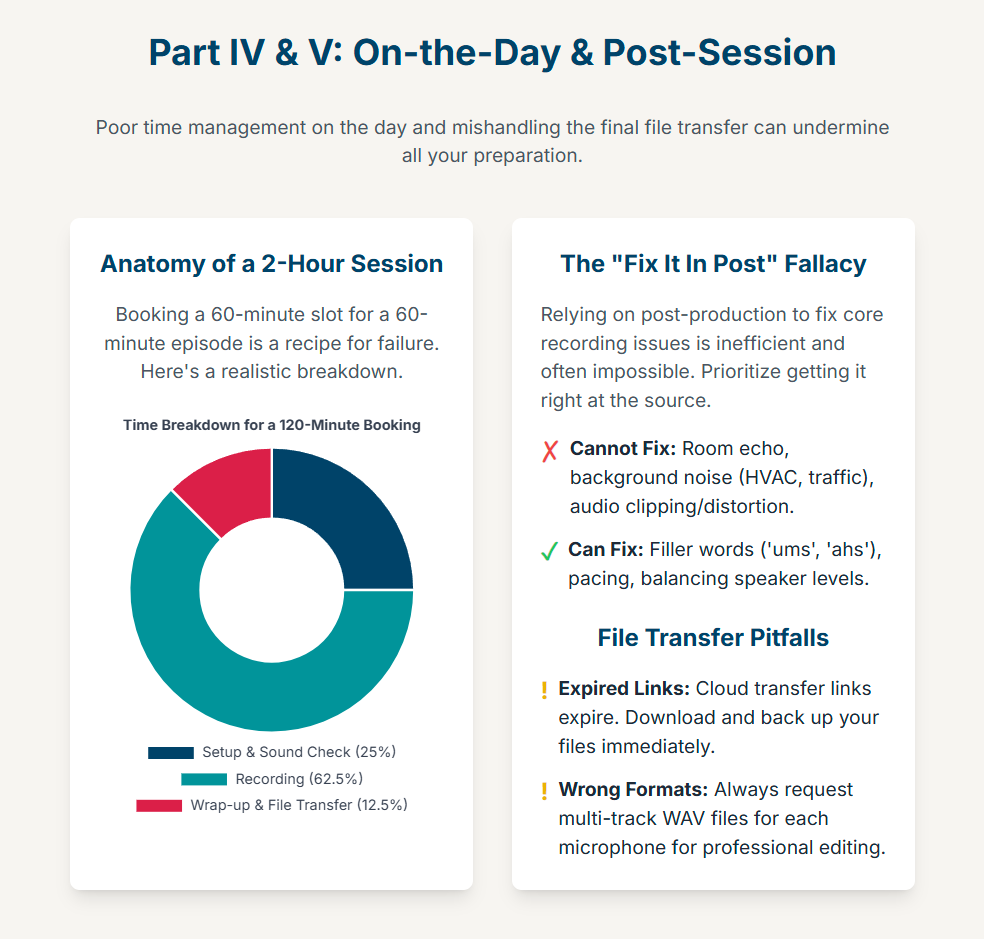
The Mistake of the Time Miscalculation
The single most common operational error is underestimating the amount of time required for a session. A creator's booked time is their only time; the clock starts ticking from the moment of access and does not stop until the session is fully wrapped and files are transferred.22
Booking a 60-minute slot for a 60-minute episode is a recipe for failure. A realistic schedule for a one-hour recording must account for several non-recording activities:
Setup (15-30 mins): This includes the arrival of host and guests, settling in, arranging notes or props, and conducting thorough sound checks for every participant.
Recording (60-75 mins): The actual recording may involve false starts, pauses, or re-takes, often extending beyond the planned content length.
Wrap-up & File Transfer (15-30 mins): This is a critical and often-forgotten buffer. The process of transferring large audio and, especially, 4K video files from the studio's system to a hard drive can take a significant amount of time. File transfers for 4K video can take 30 minutes or more.18
Therefore, a standard one-hour episode realistically requires a booking of at least two hours. Some studios recognize this and provide a complimentary 30-minute setup period before the paid booking time begins, which is a significant value-add and a key feature to look for.18 Before booking, a creator should draft a detailed run-of-show for the session, allocate time to each segment, and ask the studio explicitly: "Does the booked time include setup and file transfer, or is any buffer period provided?"
The Mistake of Confusing Dry Hire vs. Full Service
The level of on-site technical support is the most consequential service-level decision a creator will make.35 The London market offers a spectrum of support, from completely self-service "dry hire" studios to "full-service" bookings that include dedicated technical staff.
Dry Hire / Self-Service: The studio provides the space and equipment, but the creator is responsible for operating everything. A staff member may provide a brief orientation at the start, but is not present for the duration of the session.5 This is the cheapest option but carries the highest risk for those who are not technically proficient.
Engineer/Technician Included: The booking includes a dedicated audio engineer or technician who manages all technical aspects of the recording: setting up microphones, monitoring audio levels, troubleshooting issues, and managing the recording process.29 This allows the creator to focus entirely on their content and the conversation.
Full Production Service: This goes beyond technical support. A full-service agency or studio provides a Podcast Producer who oversees the entire project—from creative development, research, and scripting to guest booking, on-site direction, and post-production management.36 This is the most comprehensive and expensive option, effectively outsourcing the entire production workflow.40
The mistake is to opt for dry hire purely to save money without an honest self-assessment of one's technical skills and capacity to multitask under pressure. For a solo creator or a small team, managing a multi-person conversation while simultaneously monitoring audio levels, checking camera angles, and directing guests is an immense cognitive load. It almost invariably leads to a decline in the quality of the hosting and an increase in technical errors. The fee for an engineer—typically £30-£49 per hour—should not be viewed as a cost, but as an insurance policy against a failed session and an investment in the quality of the final content.30
The Mistake of Poor On-Site Communication
Studio staff, including engineers and receptionists, are a valuable resource, but they are not mind-readers. A failure to clearly and proactively communicate specific needs is a common gaffe that can derail a session.
This communication must begin during the booking process. The studio needs to be informed of any non-standard requirements, such as the need for a multi-camera setup, a specific background or set configuration, the integration of a remote guest via video call, or the use of a teleprompter.7 Arriving on the day and expecting these resources to be available without prior notice is likely to lead to disappointment and wasted time.
On the day of the session, communication with the on-site engineer is vital. Creators should not hesitate to ask for guidance on microphone technique, to point out any perceived audio issues during the recording, or to request adjustments to headphone levels.7 A good engineer is a collaborator whose expertise can significantly enhance the final product. Treating them as a passive button-pusher is a waste of a valuable asset.
Part V: The Final Hand-Off: Avoiding Post-Session Disasters
The recording may be complete, but several critical steps remain. Errors made during the final hand-off of the recorded assets can undermine all the work that has gone before. These post-session disasters typically arise from a misplaced faith in post-production and a failure to manage the logistics of file transfer.
The Mistake of the "Fix It in Post" Fallacy
A dangerous and widespread misconception in content creation is the belief that technical problems in a recording can simply be "fixed in post-production." While modern editing software is powerful, it is not magic. An over-reliance on post-production to solve problems that should have been addressed during recording is a fundamental error that leads to increased costs, delayed timelines, and a compromised final product.1
The quality of a podcast is determined overwhelmingly by the quality of the source recording. Post-production editing is effective for removing filler words ("ums," "ahs"), tightening pacing, and balancing levels between speakers. However, it is largely ineffective at removing core acoustic problems. Issues like excessive room echo (reverberation), background noise from an HVAC system or external traffic, or audio distortion (clipping) from a poorly set microphone are baked into the source file and are extremely difficult, if not impossible, to remove without creating unnatural-sounding artifacts.1
Attempting to salvage a poor recording is a time-consuming and expensive process that rarely yields professional results. The most efficient and cost-effective workflow is to invest time and resources in getting the recording right at the source. This means choosing a studio with excellent acoustics, using high-quality equipment correctly, and having a skilled engineer monitor the recording in real-time.1
The Mistake of the File Transfer Bottleneck
The final step of a studio session—the transfer of the recorded audio and video files—is a critical logistical checkpoint fraught with potential for catastrophic error. The files are the sole product of the session; mishandling their transfer can result in a total loss of work.
Studios in London typically use one of two methods for file delivery:
Cloud Transfer: Files are uploaded to a service like WeTransfer or Google Drive and a download link is sent to the client, typically within 24 to 72 hours.16
Direct Hard Drive Transfer: The client brings their own external hard drive, and the files are transferred directly at the end of the session.22
Several mistakes can occur at this stage:
Expired Links: Cloud transfer links almost always have an expiry date, after which the files are permanently deleted from the studio's servers. A common error is for the creator to forget to download and back up the files before this deadline, resulting in irreversible data loss.16
Incompatible Hardware: For direct transfers, the creator is responsible for providing a suitable hard drive. Bringing a drive that is too slow, too small, or incorrectly formatted can make it impossible to complete the transfer within the booked session time. Some studios specify minimum read/write speeds (e.g., at least 1000 MB/s) to handle large 4K video files.22
Incorrect File Formats: A creator must specify the required file formats. For audio, this means requesting individual, multi-track WAV files for each microphone, not a single, merged MP3 or stereo WAV file. Receiving the wrong format can severely hamper the post-production process.18
To avoid these pitfalls, the file delivery method, format, and timeline must be clarified in writing before the booking is confirmed. If bringing a hard drive, its specifications should be checked with the studio for compatibility. Crucially, the time required for file transfer must be factored into the total booking duration to avoid incurring overtime charges or having to leave before the transfer is complete.
Part VI: Synthesis and Strategic Recommendations: A Pre-Booking Master Checklist
To synthesize the preceding analysis into an actionable tool, this final section provides a master checklist. This checklist is designed to guide a content creator chronologically through the entire process of booking and utilizing a podcast studio in London, helping to prevent the critical errors detailed in this report.
Pre-Booking Due Diligence
[ ] Define Project Scope: Have I clearly defined my technical needs (audio-only vs. video, number of guests, multi-track recording requirement, desired aesthetic)? 4
[ ] Assess Logistics: Have I researched the studio's location and confirmed its accessibility (public transport, parking) for myself and all confirmed guests? 7
[ ] Verify Reputation: Have I read reviews from at least three different types of sources (e.g., Google Reviews, a booking platform like Tagvenue, an unfiltered forum like Reddit)? 7
[ ] Conduct Inspection: Have I completed a physical or virtual tour of the studio space? 3
[ ] Test Acoustics: During the inspection, did I perform a hand-clap test to check for audible echo or reverberation? 8
[ ] Interview Staff: Have I asked the on-site staff specific technical questions about their equipment and workflow to gauge their expertise? 44
[ ] Confirm Equipment: Have I received a detailed list of the standard equipment included and confirmed it meets my needs (e.g., dynamic mics for a panel show, multi-track capable mixer)? 5
[ ] VODcast Planning: If recording video, have I reviewed sample footage and confirmed the quality of the lighting, set design, and branding options? 1
The Booking Process
[ ] Obtain Itemized Quote: Have I received a full, written quote that itemizes the base hire fee and all potential add-on costs (engineer, file transfer, specific equipment, overtime rates, VAT)? 22
[ ] Calculate True Cost: Have I calculated the total estimated cost for my required session length and service level, rather than just comparing headline hourly rates?
[ ] Confirm Policies in Writing: Have I read and understood the studio's cancellation and rescheduling policy? 16
[ ] Book Sufficient Time: Have I booked a slot that is long enough to accommodate setup, sound checks, the full recording, and file transfer (e.g., at least 2 hours for a 1-hour episode)? 18
[ ] Clarify Support Level: Have I explicitly confirmed whether the booking is a self-service dry hire or includes an on-site engineer for the duration of the session? 17
Session Day Execution
[ ] Prepare Hardware: If using a personal hard drive for file transfer, have I confirmed it meets the studio's specifications (speed, capacity, format) and brought it with me? 22
[ ] Create a Run-of-Show: Have I prepared a timed schedule for the session to keep the recording focused and on track? 7
[ ] Communicate with Engineer: Have I briefed the on-site engineer on the session plan, format, and any specific technical requirements? 7
[ ] Monitor in Real-Time: Am I (or the engineer) using headphones to actively monitor the audio during recording to catch any issues as they happen? 18
Post-Session Hand-Off
[ ] Verify Files On-Site: Before leaving the studio, have I confirmed that all files have been transferred successfully and are in the correct format (e.g., separate multi-track WAVs)? 18
[ ] Download Cloud Files Immediately: If using a cloud service, have I downloaded all files and created at least one backup as soon as the link is received, noting the expiry date? 16
-
[ ] Review Recording Promptly: Have I listened back to the raw recording with the engineer to identify any major issues or note sections that will require specific attention in post-production? 7
In the thriving media ecosystem of London in 2025, deciding to record in a professional studio is a powerful step towards creating high-calibre content. However, the process of booking the right studio is more nuanced than simply picking a location from a map. Many creators, both new and experienced, fall into common traps that can lead to wasted time, unexpected costs, and a final product that doesn’t meet their vision.
To ensure your investment pays off, here are the most common mistakes to avoid when booking a podcast studio London.
Mistake #1: Focusing on Aesthetics Over Acoustics
It’s easy to be captivated by a studio’s stylish set design or slick promotional photos. But if the room isn't properly soundproofed and acoustically treated, the most beautiful backdrop in the world won't save your audio. Many repurposed office spaces or untreated rooms are prone to echo, reverb, or intrusive noise from London traffic and neighbouring businesses.
How to avoid it: Ask direct questions. Is the studio soundproofed? Is it acoustically treated for spoken word? A reputable studio will be proud of its audio environment. At a purpose-built facility like Finchley Studio, the acoustic quality is a primary feature, not an afterthought.
Mistake #2: Not Clarifying What’s Included in the Price
One of the biggest sources of frustration is a mismatch between expectation and reality. You might assume the advertised hourly rate includes an audio engineer, only to find yourself alone with complex equipment. Or perhaps you expected 4K video, but the standard package only offers 1080p.
How to avoid it: Before you book, get a clear confirmation of all deliverables. Ask specifically:
Is a technician or engineer included to manage the recording?
What specific microphones and cameras are part of the package?
Is setup time included, or does the clock start the moment you walk in?
How are the final files delivered to you?
Mistake #3: Underestimating How Much Time You Need
A classic error is booking a 60-minute slot to record a 60-minute episode. This leaves no room for error or preparation. You need buffer time to settle in, conduct sound checks, have a pre-show chat with your guest to build rapport, and potentially re-do a segment if needed. Rushing leads to stressed performances and mistakes.
How to avoid it: As a rule of thumb, book at least 50% more time than your intended recording length. For a one-hour podcast, a two-hour booking is ideal. This creates a relaxed, professional environment where creativity can flourish. Also, be aware that some larger studios require a minimum booking of a half-day.
Mistake #4: Ignoring Location and Accessibility
You may find a studio with a tempting price in a remote corner of the city, but this can be a costly mistake. If the location is difficult to reach via public transport or has no parking, you risk yourself or your guests arriving late, stressed, and flustered. That negative energy can easily spill over into the recording.
How to avoid it: Check the studio's proximity to a tube or train station. Confirm if they offer on-site parking. A studio that is easy for everyone to get to ensures the session starts on time and on a positive note.
Mistake #5: Having No Post-Production Plan
Walking out of the studio with pristine, professional-quality audio and video files is a great feeling. But if you don't have the skills or, more importantly, the time for post-production, those files may never become a finished episode. Editing, mixing, and colour grading are specialised skills that are crucial for a polished final product.
How to avoid it: Ask the studio if they offer in-house editing services. A studio that provides an end-to-end solution—from recording to final edit—can be an invaluable partner, saving you time and ensuring your content gets published.
By sidestepping these common pitfalls, you can ensure your studio session is a smooth, productive, and valuable investment in your podcast's success.
Elevate Your Podcast at Finchley Studio
Now that you know the potential pitfalls, the next step is choosing a studio partner that provides clarity, quality, and comprehensive support. At Finchley Studio, we are dedicated to providing a seamless production experience. We understand the high standards of modern creators, which is why leading organisations like the BBC and Lloyds Bank trust us with their recording needs. But don't just take our word for it—see what other creators are saying in our Google reviews and on Trustpilot.
We offer a diverse range of meticulously designed sets to perfectly match your brand's aesthetic. Explore our spaces:
Dialogue Room: An intimate space perfect for one-on-one interviews and small group discussions.
Lounge Studio: A relaxed and comfortable setting for casual conversations with up to 5 participants.
CEO Set: A premium, sleek backdrop for executive interviews, masterclasses, and expert talks.
Blackwood Studio: A sophisticated and modern set with a striking black wood finish for a cinematic feel.
The Brick Studio: A versatile warehouse space with authentic brick walls for an industrial-chic aesthetic.
Gathering Studio: A professional environment designed for larger roundtable discussions and corporate panels.
Blackout Set: A fully controlled dark space for dramatic, high-contrast visuals and creative projects.
White Infinity Cove: A seamless, edge-free backdrop for clean and minimalist product or fashion shoots.
Green Screen Cove: A pre-lit curved studio for immersive special effects and virtual backgrounds.
Giant Green Screen: One of London's largest green screens for ambitious film, TV, and commercial productions.
To provide an end-to-end solution, our professional Video Editing Service can transform your raw footage into polished, engaging content ready for any platform. The team at Finchley Studio is here to ensure your vision comes to life seamlessly.
Ready to make a smart investment in your podcast? See why creators rate Finchley Studio as their go-to production space.
Find Us Easily: Our studio is conveniently located just a two-minute walk from Finchley Central on the Northern Line and adjacent to the Travelodge London Finchley. We offer one free parking space per booking.
what3words: orders.yards.jokes
Stay Connected: Follow our journey and see behind-the-scenes content on our social media channels:
Have questions? Check our FAQ or get in touch directly.
WhatsApp: +447587827200
Phone: +447587827200
Email: [email protected]
Works cited
5 Common Mistakes In Professional Podcast Studio Design ..., accessed August 28, 2025, https://sound-zero.com/5-common-mistakes-in-professional-podcast-studio-design/
Podcast Studio London: A Comprehensive Guide for Beginners, accessed August 28, 2025, https://www.finchley.co.uk/finchley-learning/podcast-studio-london-a-comprehensive-guide-for-beginners
The Ultimate Guide to Podcast Studios in London | Startups of London, accessed August 28, 2025, https://startupsoflondon.com/the-ultimate-guide-to-podcast-studios-in-london/
The Ultimate Guide to Renting a Podcast Studio - HotPatch, accessed August 28, 2025, https://www.hotpatch.com/blog/the-ultimate-guide-to-renting-a-podcast-studio/
10 Best Podcast Studios London to Hire in 2025 - Saspod, accessed August 28, 2025, https://saspod.com/blog/post/best-podcast-studios-london
West London Podcast Studios: A Hidden Gem for Creators, accessed August 28, 2025, https://luxepodlondon.com/west-london-podcast-studios-a-hidden-gem-for-creators/
Podcast Studio London: Booking Tips and Tricks - Finchley Studios, accessed August 28, 2025, https://www.finchley.co.uk/finchley-learning/podcast-studio-london-booking-tips-and-tricks
Choosing the Right Space for Your Podcast - London Media Lounge, accessed August 28, 2025, https://londonmedialounge.co.uk/choosing-the-right-space-for-your-podcast/
7 podcast studios in London for your next recording - Fallow, Field & Mason, accessed August 28, 2025, https://www.fallowfieldmason.com/blog/8-podcast-studios-in-london-for-your-next-recording
Best Podcasting Studios in London | Our Picks for 2025 - TYX Studios, accessed August 28, 2025, https://tyxstudios.com/blog/best-podcast-studios-in-london
Making the Most of a Podcast Studio London on a Budget, accessed August 28, 2025, https://www.finchley.co.uk/finchley-learning/making-the-most-of-a-podcast-studio-london-on-a-budget
What is the best podcast studio for hire in London Uk? - Reddit, accessed August 28, 2025, https://www.reddit.com/r/podcasting/comments/k22js7/what_is_the_best_podcast_studio_for_hire_in/
The 16 Best Podcast Studios for Hire in London | Tagvenue UK, accessed August 28, 2025, https://www.tagvenue.com/hire/podcast-studios/london
Pirate Studio UK : r/Beatmatch - Reddit, accessed August 28, 2025, https://www.reddit.com/r/Beatmatch/comments/19bzmg4/pirate_studio_uk/
Anyone with a Podcast studio in London UK? - Reddit, accessed August 28, 2025, https://www.reddit.com/r/podcasting/comments/1gmz6rm/anyone_with_a_podcast_studio_in_london_uk/
Frequently Asked Questions — Podcast Studio Hire, accessed August 28, 2025, https://podcaststudiohire.co.uk/faq
Podcast Recording Studio London | Shoreditch Hoxton | From £84/hr, accessed August 28, 2025, https://outsetstudio.com/podcast-studio-london/
FAQs — London Podcast Studio | The Home of Podcasting!, accessed August 28, 2025, https://www.londonpodcaststudios.co.uk/podcast-studio-recording-faqs
The Ultimate Checklist for Designing Acoustically-Optimised Podcast Studios - Sound Zero, accessed August 28, 2025, https://sound-zero.com/acoustically-optimised-podcast-studios/
A Beginners Guide: Exploring Podcast Studio Hire Near You - Sharesy, accessed August 28, 2025, https://www.sharesy.com/blog/a-beginners-guide-exploring-podcast-studio-hire-near-you
Podcast Studio Equipment | Premiere Podcast Studios, London, accessed August 28, 2025, https://premierepodcaststudios.com/equipment/
Podcast Studio in London, Podcast Studio Hire London - Podshop, accessed August 28, 2025, https://www.podshoponline.co.uk/services/podcast-studio
Podcast Equipment Checklist - MACKIE, accessed August 28, 2025, https://mackie.com/en/blog/all/podcast_equipment_checklist.html
Podcast Studio London - Hire Podcasting Rooms, accessed August 28, 2025, https://www.podcaststudioinlondon.co.uk/
London Podcast Studio | Podcast Recording From £69/hr!, accessed August 28, 2025, https://www.londonpodcaststudios.co.uk/
Podcast studios in London for hire - Tutti Space, accessed August 28, 2025, https://www.tutti.space/lists/hire-podcast-studio-london
How Much Does It Cost To Hire A Podcast Studio In London - Select Recording Studios Hub, accessed August 28, 2025, https://selectrecordingstudios.co.uk/hub/how-much-does-it-cost-to-hire-a-podcast-studio-in-london/
Podcast Studio Membership | Qube London, accessed August 28, 2025, https://www.theqube.com/membership/podcasters
Podcast Studio Pricing | Affordable Rates at Podcast Room, accessed August 28, 2025, https://podcast-room.com/pricing/
Bookings & Pricing — London Podcast ... - London Podcast Studio, accessed August 28, 2025, https://www.londonpodcaststudios.co.uk/london-podcast-studio-hire-bookings
Podcast-prices - Brixton Hill Studios Recording, accessed August 28, 2025, https://brixtonrecording.com/podcast-prices/
www.londonpodcaststudios.co.uk, accessed August 28, 2025, https://www.londonpodcaststudios.co.uk/london-podcast-studio-hire-bookings#:~:text=Our%20podcast%20studios%20are%20designed,ph)%20at%20check%2Dout.
London Podcast Studios | Podcast Recording From £80/hr! - TYX Studios, accessed August 28, 2025, https://tyxstudios.com/podcast-studio-london
Acast Studios London, accessed August 28, 2025, https://www.acast.com/en/acast-studios-london
DIY Podcast vs. Hiring a Podcast Recording Studio - London Media Lounge, accessed August 28, 2025, https://londonmedialounge.co.uk/diy-vs-hiring-podcast-studio/
Roles: Podcast Producer - Radio Academy, accessed August 28, 2025, https://www.radioacademy.org/careers/roles/podcast-producer/
www.radioacademy.org, accessed August 28, 2025, https://www.radioacademy.org/careers/roles/podcast-producer/#:~:text=Podcast%20Producers%20help%20clients%20and,to%20get%20on%20with%20it.
Podcast Producer: What Is It? and How to Become One? - ZipRecruiter, accessed August 28, 2025, https://www.ziprecruiter.com/career/Podcast-Producer/What-Is-How-to-Become
What Does a Podcast Producer Do? - Podkick, accessed August 28, 2025, https://www.podkick.com/blog/what-does-a-podcast-producer-do
Full-service podcast production: what does it include?, accessed August 28, 2025, https://produceyourpodcast.com/what-do-we-mean-by-full-service-podcast-production/
9 Reasons Why You Should Hire a Podcast Production Agency for ..., accessed August 28, 2025, https://www.quillpodcasting.com/blog-posts/podcast-agency-for-internal-podcasts
Benefits of Hiring a Full-Service Podcast Agency - Boomcaster, accessed August 28, 2025, https://www.boomcaster.com/benefits-of-hiring-a-full-service-podcast-agency/
How Does a Full Service Podcast Agency Work? | JAR Audio, accessed August 28, 2025, https://jarpodcasts.com/full-service-podcast-agency/
www.finchley.co.uk, accessed August 28, 2025, https://www.finchley.co.uk/finchley-learning/tips-for-first-time-users-of-a-podcast-studio-london#:~:text=Ask%20Questions%3A%20Don't%20be,on%20sound%20quality%20and%20setup.
Podcast Engineering: A Career Path in the Booming Audio Industry, accessed August 28, 2025, https://future-school.in/blogs/podcast-engineering-a-booming-industry-for-sound-engineers/