Introduction: Beyond the Audio — The Visual Revolution in Podcasting
The contemporary podcasting landscape is undergoing a profound transformation. Once a medium defined exclusively by audio, it has evolved into a visually-driven ecosystem where platforms like YouTube, Instagram, and Twitch dictate audience expectations.1 For creators and brands in a competitive market like London, the transition to high-quality video is no longer a forward-thinking choice but a competitive imperative. In this new paradigm, where visual appeal directly correlates with audience engagement and growth, mastering advanced production techniques is paramount. This report provides a comprehensive strategic and technical guide to one of the most powerful tools in a video podcaster's arsenal: the green screen.
This technology, formally known as chroma key compositing, is a visual effects process that involves filming a subject against a solid-colored background—typically a specific shade of green or blue—and then digitally removing that color in post-production. This process renders the background transparent, allowing a creator to layer their subject onto any virtual background, image, or video they can conceive.2 Far from being a complex effect reserved for Hollywood blockbusters, chroma keying has become an accessible and indispensable tool for content creators seeking to achieve a professional, broadcast-quality aesthetic. This guide will deconstruct the entire green screen workflow, from strategic planning and pre-production to in-studio execution and post-production compositing, with a specific focus on leveraging the professional podcast studio infrastructure available in London. It will frame the use of a green screen not merely as an aesthetic enhancement, but as a strategic asset for building a powerful brand, maximizing audience engagement, and achieving unparalleled production efficiency.
Section 1: The Strategic Imperative of Chroma Key for Podcasters
Adopting green screen technology is a strategic decision that yields significant returns in brand equity, audience engagement, and operational efficiency. It fundamentally alters the production calculus, transforming the background from a passive backdrop into an active, controllable asset. For the ambitious podcaster, understanding these strategic advantages is the first step toward unlocking the full potential of their video content.
1.1 Achieving Broadcast-Level Professionalism and Consistency
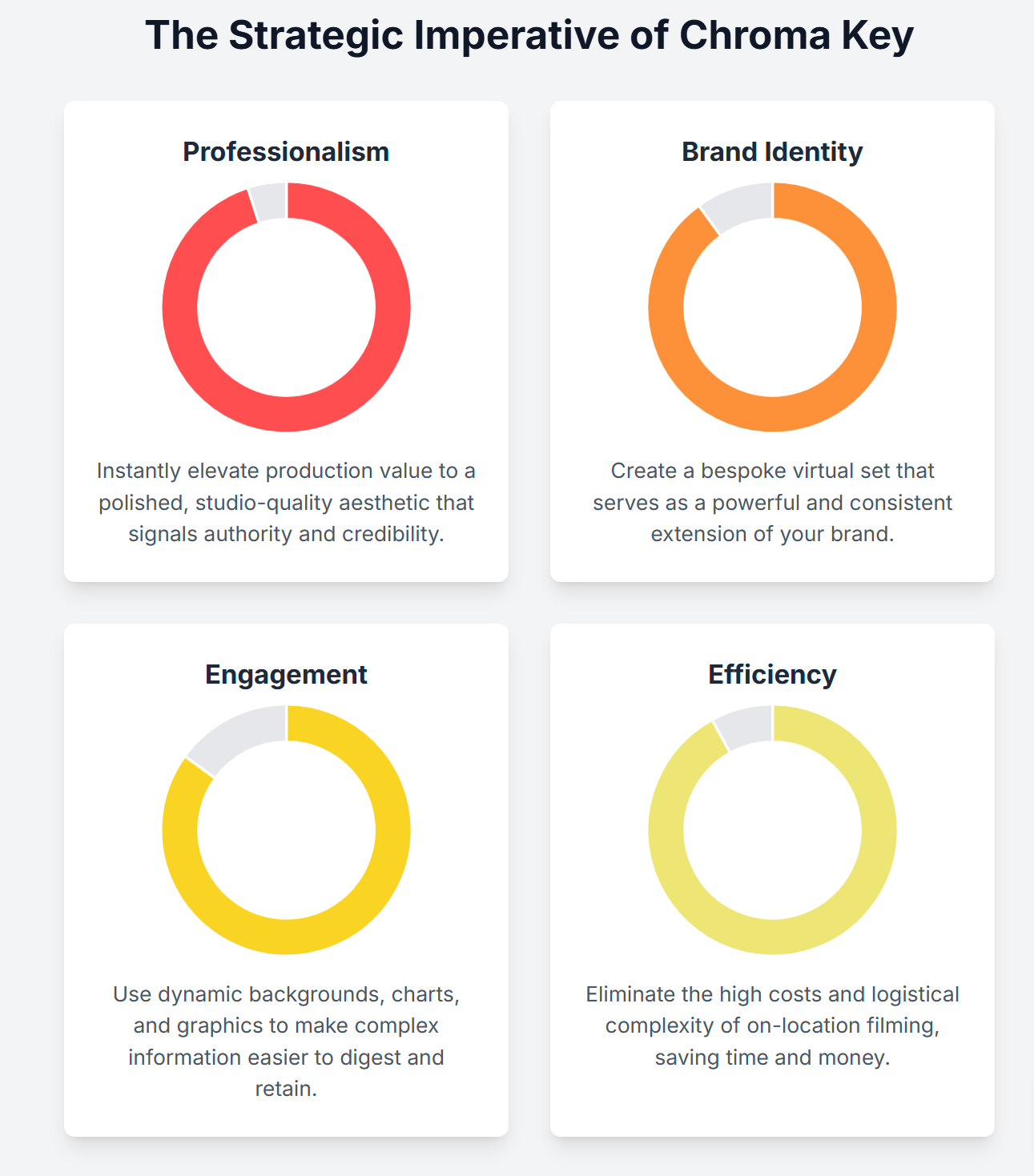
The most immediate and discernible benefit of using a green screen is the instant elevation of production value. It provides a polished, studio-quality aesthetic that signals authority and credibility to the viewer.5 In a media landscape saturated with content filmed in home offices or makeshift setups, a professionally produced virtual environment immediately distinguishes a podcast from its competitors. This controlled visual setting is a hallmark of professional broadcasting, and its adoption allows independent creators to compete on a more level playing field with established media corporations. The technology effectively democratizes access to the high production values that audiences have come to expect from premium content.
A key component of this professionalism is the elimination of visual distractions. A cluttered, uninspiring, or inconsistent background can draw the viewer's attention away from the host and the core conversation.7 By replacing a physical environment with a clean, custom-designed virtual set, the focus remains squarely on the speakers and their message, enhancing the clarity and impact of the content.7 This level of control also removes the element of chance inherent in on-location filming. In a controlled studio environment, there are no "surprises" such as fluctuating natural light, intrusive background noise, or unexpected interruptions from passersby, ensuring a consistently professional output for every recording.9 Furthermore, the ability to use the exact same virtual set for every episode, regardless of where or when it is filmed, creates a powerful sense of visual continuity. This consistency is a critical element of brand building, establishing a recognizable visual signature that reinforces the podcast's identity over time.9
1.2 Cultivating a Powerful and memorable Brand Identity
Beyond a generic professional look, a green screen offers unparalleled opportunities for strategic brand integration. The most potent application of this is the creation of a virtual branded set. This allows a podcaster to design a bespoke digital environment that serves as a powerful extension of their brand identity, incorporating specific logos, color palettes, and thematic design elements that resonate with their target audience.1 The background is no longer just a space; it becomes a statement.
This consistent visual branding is a crucial tool for building brand recognition in a fragmented digital media environment. When short clips or highlights from the podcast are shared across social media platforms, the branded virtual set ensures that the content is instantly identifiable.9 This constant reinforcement of the visual brand helps to build equity and memorability in the minds of the audience. The background itself becomes a marketing asset. This capability can be extended to create new revenue streams beyond traditional advertising. The virtual space can be used to feature a sponsor's logo, product imagery, or even a fully sponsor-themed background as part of a premium advertising package. This transforms the background from a production cost into a monetizable asset, offering a direct return on the investment in green screen technology and providing sponsors with a more integrated and visually compelling form of promotion than a simple verbal ad-read.
1.3 Maximising Viewer Engagement and Information Retention
A green screen empowers a creator to make the background an active and integral part of the storytelling process. For podcasts that deal with complex topics, data, or educational content, this is a transformative capability. Instead of relying solely on verbal explanations, the host can display relevant charts, graphs, images, video clips, or key statistics directly in the background as they speak.6 This visual reinforcement makes complex information significantly easier for the audience to digest and retain. Studies have shown that training materials that incorporate engaging visual effects are recalled more effectively than standard lecture-style presentations, a principle that applies directly to educational podcasting.11
The potential for engagement extends beyond static images. A green screen allows for the integration of dynamic and interactive elements that can create a more participatory experience for the audience. A podcaster could display live social media comments or questions from viewers, conduct real-time polls with the results appearing on screen, or use animated graphics to emphasize a key point or add a touch of humor.6 This level of interactivity fosters a stronger sense of community and connection between the creator and their audience, making viewers feel like active participants rather than passive consumers. By making the content more visually dynamic and informative, a green screen helps to hold the audience's attention, a critical factor for success on platforms like YouTube where viewer retention is a key metric.1
1.4 Unlocking Creative Freedom and Production Efficiency
The fundamental creative advantage of chroma key technology is its ability to transcend physical limitations. Without leaving the controlled environment of a London studio, a podcaster can transport their audience to any conceivable location—a bustling city street, a serene natural landscape, a futuristic command center, or a fantastical world from fiction.7 This opens up limitless possibilities for thematic episodes and creative storytelling, allowing the visual environment to perfectly match the tone and subject matter of the conversation.
This creative freedom is coupled with profound gains in production efficiency and cost-effectiveness. On-location filming is a logistically complex and expensive undertaking, involving costs for travel, accommodation, equipment transport, location permits, and crew. It is also subject to unpredictable variables like weather and public interference.9 Green screen production eliminates these costs and variables entirely, streamlining the entire process into a single, controlled studio session.12 This not only saves a significant amount of money but also dramatically reduces the time required for production. Furthermore, the technology offers remarkable flexibility in post-production. If a background needs to be changed or an updated graphic needs to be inserted, it can be done digitally without requiring a full reshoot of the talent, saving invaluable time and resources in a fast-paced content creation cycle.13
Section 2: Pre-Production Blueprint: Setting the Stage for a Flawless Shoot
A successful green screen production is determined long before the cameras start rolling. Meticulous pre-production is the most critical phase of the entire workflow. Errors made in wardrobe, makeup, or asset preparation can lead to hours of frustrating and often imperfect fixes in post-production. A disciplined approach to this stage is non-negotiable for achieving a professional and believable final composite.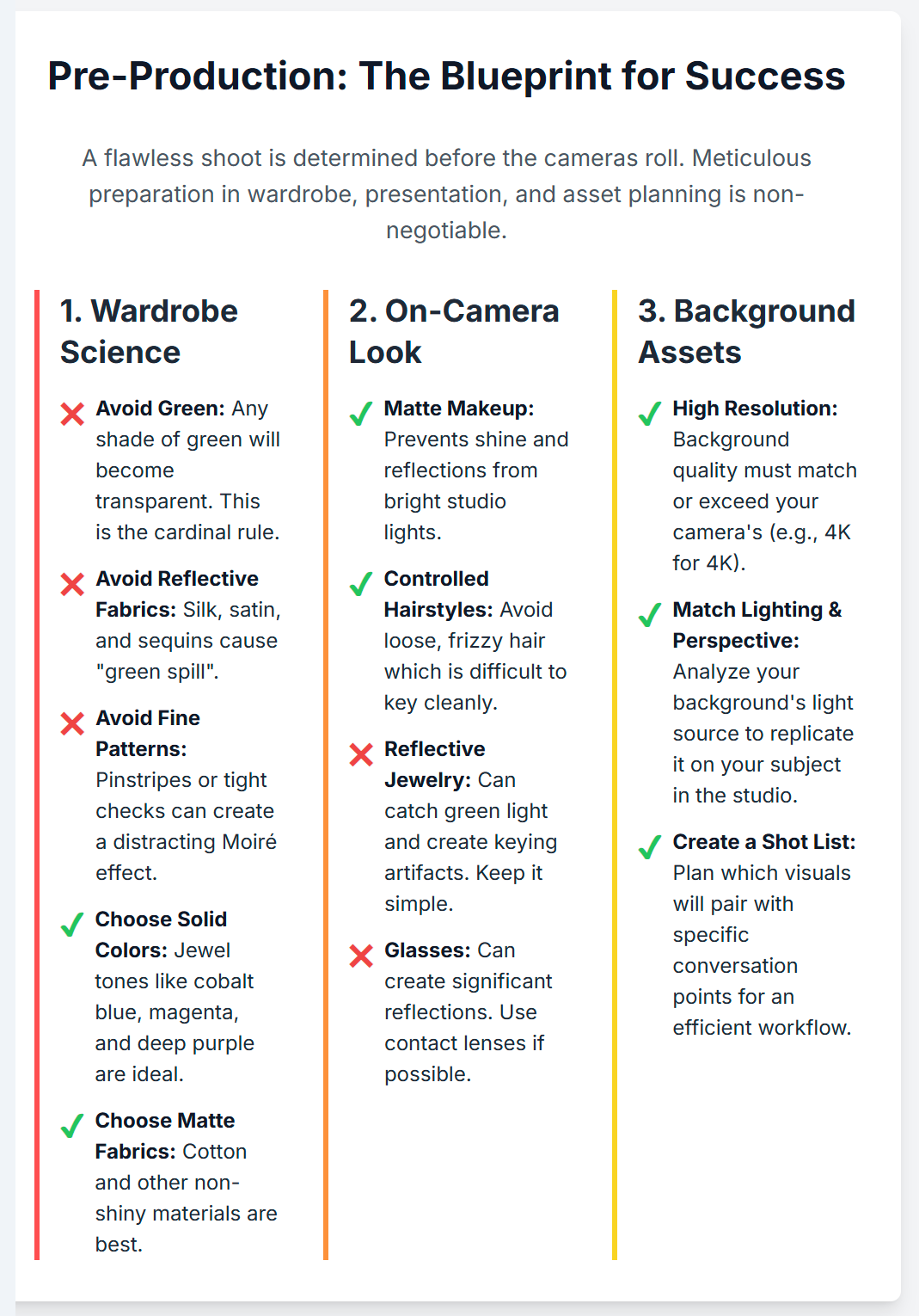
2.1 The Science of Wardrobe: What to Wear and What to Avoid
The interaction between clothing and the chroma key process is governed by strict technical rules. Adhering to these guidelines is the single most important contribution the on-camera talent can make to the success of the shoot.
The Cardinal Rule: No Green
The foundational principle of green screen wardrobe is absolute: no green. Any clothing, accessory, or even a subtle green tint in a pattern will be interpreted by the keying software as part of the background and will be rendered transparent.15 This applies to all shades of green, from bright lime to dark olive or khaki. Wearing green will result in parts of the subject's body appearing invisible or having the background projected onto them, an effect that is impossible to fix cleanly in post-production.
Beyond Green: Problematic Colors and Fabrics
While green is the primary color to avoid, other materials and colors can also cause significant issues:
Reflective Materials: Shiny fabrics such as silk, satin, sequins, and some polyesters are highly problematic. They can catch the bright green light illuminating the screen and reflect it back onto the subject, creating a phenomenon known as "green spill".16 This green halo around the subject is very difficult to remove and is a tell-tale sign of amateur production. Matte fabrics like cotton are always the superior choice.18
White and Black: Pure white clothing should be avoided as it can be difficult to expose correctly and is highly reflective, often bouncing green light from the floor onto the wearer.15 Solid black can also be challenging, as it can absorb too much light, causing the keying software to struggle with defining the edges of the subject, leading to a "crumbly" or noisy matte.15 Safer alternatives include off-white, light grey, or deep charcoal.17
The Moiré Effect: Patterns to Avoid
Fine, high-contrast patterns are a significant challenge for digital cameras. Patterns like thin pinstripes, tight checks, herringbone, or houndstooth can create a distracting, shimmering visual artifact known as the Moiré effect.15 This optical illusion is difficult to control and can ruin a shot. The safest approach is to stick to solid colors. If a pattern is essential for branding, it should be large-scale with low contrast between the colors.
Best Practices for Wardrobe
The ideal wardrobe for a green screen shoot consists of solid-colored, matte-finish clothing that provides a strong contrast against the bright green background. Jewel tones—such as cobalt blue, deep purple, magenta, and coral—are excellent choices as they are visually appealing and separate cleanly from the green channel.16 It is always advisable to bring at least two or three complete backup outfits to the studio in case one option proves problematic under the lights or in the event of an accidental spill.15 Following these technical wardrobe constraints has a secondary benefit: it naturally guides creators toward a visual style that audiences associate with professionalism. The avoidance of busy patterns and distracting fabrics results in a "production uniform" that appears clean, focused, and authoritative, inadvertently reinforcing the brand's quality.
2.2 On-Camera Presentation: Hair, Makeup, and Accessories
Just as with wardrobe, careful consideration must be given to hair, makeup, and accessories to ensure a clean key.
Makeup for the Key: The primary goal of makeup for a green screen shoot is to create a non-reflective, even surface. Bright studio lights can easily create shine on the face, which can reflect the green screen.16 Therefore, matte-finish makeup products are essential.17 Foundation should be used to create an even skin tone, which helps the keying software cleanly separate the face from the background. Any makeup with green or blue undertones, such as certain eyeshadows or eyeliners, must be avoided.16
Hair and Spill: Fine details are the ultimate test of a good chroma key, and hair is the most common point of failure. Loose, frizzy, or wispy hair is extremely difficult for the software to isolate from the green background.17 The software may struggle to key out the tiny green areas visible between individual strands of hair, resulting in a blocky or semi-transparent appearance. For this reason, smoother, more controlled hairstyles (e.g., tied back, styled with gel or hairspray) generally produce a cleaner result.15 It is also crucial that the talent is positioned far enough from the screen to prevent green light from reflecting onto their hair, which is particularly noticeable on lighter hair colors.16
Jewelry and Reflections: Accessories should be kept to a minimum. Large, shiny, or reflective pieces of jewelry can catch the green light and create distracting flashes or keying artifacts.15 Dangling items like charm bracelets or long necklaces can also create unwanted noise that interferes with the audio recording.18 Simple, non-reflective items like a watch with a leather strap or a simple wedding band are the safest options.15
Glasses: Eyeglasses present a significant challenge due to reflections. The lenses can act like mirrors, reflecting the green screen, studio lights, or camera operator directly into the lens. If possible, the talent should wear contact lenses.17 If glasses are unavoidable, the studio's lighting engineer will need to spend considerable time carefully adjusting the angle and position of the lights to minimize these reflections, which can compromise the ideal lighting setup for the rest of the scene.18
2.3 Planning Your Visuals: Sourcing and Preparing Background Assets
The choice of background is not just a creative decision; it is a technical one that must be made during pre-production. The background assets dictate how the subject must be lit and framed in the studio.
Resolution is Non-Negotiable: The quality of the background asset must match or exceed the quality of the camera recording. Using a low-resolution image or video behind a high-definition subject will immediately shatter the illusion and look unprofessional.10 If shooting in 4K, the background plate must also be at least 4K resolution.
Matching Perspective and Lighting: This is the most critical step for achieving a believable composite. Before arriving at the studio, the creator must analyze the chosen background assets to determine their inherent lighting characteristics. Key questions to answer are: Where is the primary light source coming from (e.g., a window on the left, the sun overhead)? What is the quality of the light (e.g., hard and direct, or soft and diffused)? What is the color temperature of the light (e.g., warm afternoon sun, cool office fluorescents)? This information must be communicated to the studio engineer so they can replicate this lighting setup on the subject in the studio. A failure to match the lighting direction, quality, and color will result in a subject who looks "pasted on" and disconnected from their environment.11
Creating a Visual Shot List: For podcasts with multiple segments or topics, it is useful to create a shot list that pairs specific conversation points with specific background visuals. This plan ensures that all necessary assets are sourced and prepared ahead of time and provides a clear roadmap for the post-production editor. This level of advance planning forces a more deliberate and strategic approach to the entire content creation process. Unlike a standard podcast which might be filmed in a single static set, a green screen production requires the creator to think like a director, considering the visual narrative and technical integration from the very beginning. This discipline can mature a creator's entire workflow, making them more intentional storytellers and more technically proficient producers.
Section 3: Mastering the In-Studio Craft: Technical Execution for a Perfect Key
The in-studio session is where pre-production planning is put into practice. Success in this phase hinges on a disciplined and technically precise approach to lighting, camera configuration, and subject placement. Understanding these core principles allows the creator to collaborate effectively with the studio engineer and ensure the capture of footage that is optimized for a clean and seamless chroma key in post-production.
3.1 The Art of Illumination: A Two-Part Process
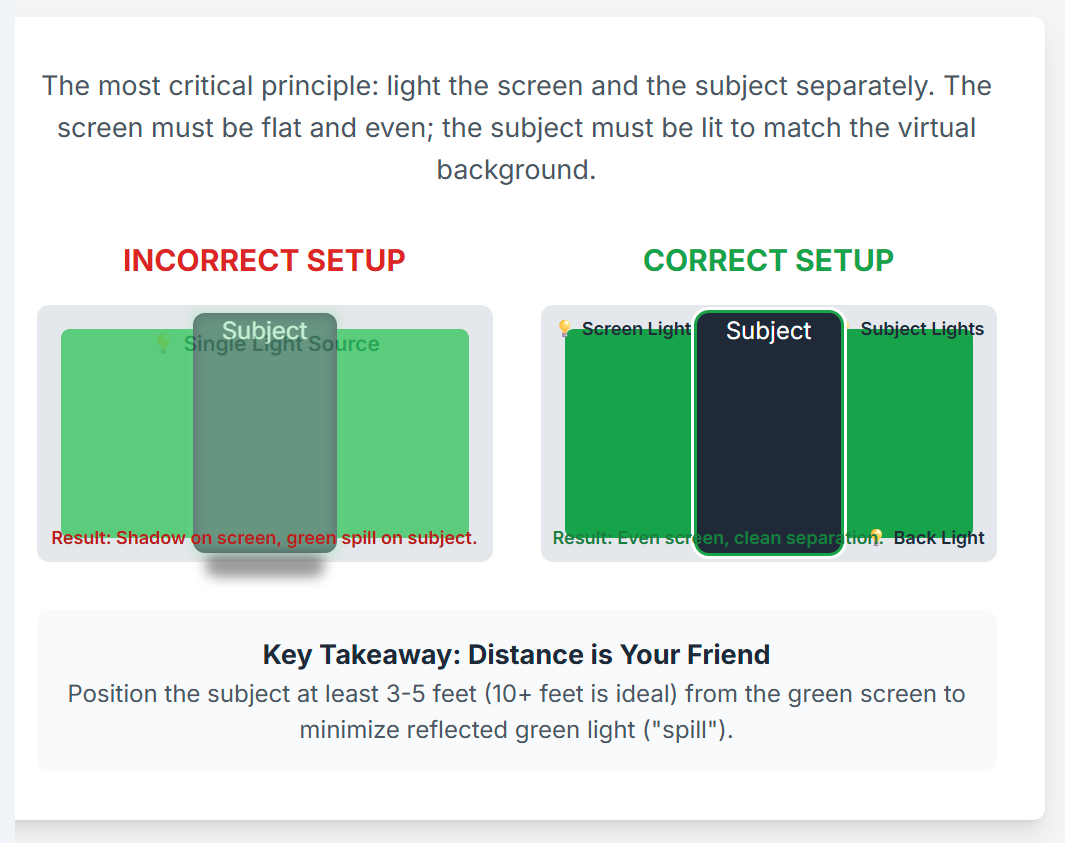
The single most important principle of green screen lighting is that the screen and the subject must be lit as two separate and independent entities.4 The objective for the screen is flat, even, featureless illumination. The objective for the subject is dimensional, motivated lighting that convincingly matches the intended virtual background. Attempting to light both with the same set of lights will inevitably lead to shadows on the screen and green spill on the subject, compromising the entire effect.
Lighting the Green Screen
The goal is to make the green screen a perfectly uniform canvas of color. This is achieved by using large, soft, and diffused light sources, such as large LED panels with softboxes, Kino Flo fluorescent banks, or overhead space lights.23 These fixtures create a broad, even wash of light that minimizes the risk of shadows and "hot spots" (areas that are significantly brighter than others). Any wrinkles, seams, or imperfections in the green screen fabric will catch the light and create subtle shadows, so the screen must be stretched taut and smooth.26
To verify the evenness of the illumination, studio engineers rely on technical monitoring tools. A waveform monitor is used to measure the luminance (brightness) of the image. A perfectly lit green screen will produce a thin, flat, horizontal line on the waveform, indicating a consistent level of brightness across the entire surface. This line should ideally sit at around 40-50 IRE (a standardized unit of video signal level).13 The camera's "zebra stripes" function can also be used as a visual aid; when set to the target IRE level, the stripes should appear uniformly across the entire screen.21
Lighting the Subject
Once the screen is perfectly and evenly lit, the crew can turn their attention to lighting the talent. This should be approached as a separate lighting setup, using standard cinematic techniques like a three-point system (key light, fill light, and back light) to shape the subject.23 The crucial consideration here is motivation. The lighting on the subject must be logically consistent with the lighting in the chosen virtual background. If the background plate is a bright, sunny outdoor scene, the key light on the subject should be hard, bright, and positioned high to mimic the sun. Conversely, if the background is a dimly lit interior, the lighting on the subject should be softer, with more contrast and shadow.11
A strong back light (also known as a rim light or hair light) is absolutely essential for high-quality green screen work. This is a light placed behind the subject, pointing toward them and out of view of the camera. It creates a subtle, bright outline around the subject's hair and shoulders. This has two critical functions: first, it creates a crisp, defined edge that helps the keying software cleanly separate the subject from the background; second, it actively counteracts green spill by overpowering the faint green light reflecting off the screen.24 For additional spill control, some lighting technicians will place a magenta-colored gel on the back light, as magenta is the complementary color to green and can help to neutralize any remaining spill on the subject's edges.26
3.2 Optimal Camera Configuration for Maximum Data Capture
The camera settings used during the shoot have a direct and profound impact on the quality of the final key. The goal is to capture as much clean, detailed information as possible for the post-production software to work with.
Shutter Speed: Minimizing Motion Blur: Motion blur is a significant obstacle for chroma keying. When a subject moves quickly, a standard shutter speed (like 1/50th of a second for 25fps video) will create a blurred edge. This blur contains a mix of pixels from the subject and the green background, which the software cannot cleanly separate. To combat this, a higher shutter speed, such as 1/100th or 1/125th, should be used.29 This creates a much crisper, more defined edge on moving objects, resulting in a significantly cleaner key. If a sense of motion blur is desired for creative reasons, it can be added back digitally in post-production with far more control.
Aperture and Depth of Field: While a very shallow depth of field (a blurry background) is often a desirable creative choice, for green screen work, a slightly deeper depth of field is often beneficial. Setting the aperture to f/4 or f/5.6 ensures that the entire subject is sharply in focus while also slightly softening the green screen itself. This can help to smooth out any minor imperfections or texture in the backdrop, making it easier to key.32
ISO: Keep it Low: ISO controls the camera sensor's sensitivity to light. High ISO settings, while useful in low-light situations, introduce digital "noise" or grain into the image. This noise contaminates the solid green of the background, making it much more difficult for the software to isolate a single, clean color to remove.30 The camera should be set to its native ISO (the setting at which it produces the cleanest image, often around ISO 800 for professional cinema cameras) and light levels should be adjusted accordingly.
Resolution and Codec: More Data is Better: Chroma keying is fundamentally a color-based process. Therefore, the more color information the camera can capture, the better the result will be. It is essential to record in the highest possible resolution (e.g., 4K) and with the highest-quality recording format (codec) available in the studio.6 Professional codecs like Apple ProRes 422 or higher are designed to preserve more color detail. They use a system called chroma subsampling, denoted by numbers like 4:2:2 or 4:4:4. A 4:4:4 codec records full color information for every pixel, resulting in the most accurate and detailed image, which is ideal for keying fine details like hair. A 4:2:2 codec is also excellent for green screen work. Consumer-grade cameras often use a 4:2:0 sampling, which discards a significant amount of color information to save file space, and will produce a noticeably inferior key.29
3.3 Subject and Camera Placement: The Geometry of a Clean Shot
The physical arrangement of the subject, camera, and screen within the studio space is a critical factor in controlling green spill and ensuring a successful shoot.
Distance is Your Friend: The most effective way to minimize green spill is to create physical distance between the subject and the green screen. The intensity of reflected light diminishes rapidly with distance. A minimum separation of 3-5 feet is required, but a distance of 10 feet or more is ideal.1 This physical separation is a key differentiator between professional and amateur results and underscores the need for a sufficiently large studio space.
Controlling Spill with Negative Fill: In addition to distance, "negative fill" can be used to absorb reflected light. This involves placing large black flags, drapes, or boards just out of the camera's frame on either side of the subject. These black surfaces absorb any green light that might be bouncing off the screen from the sides, preventing it from contaminating the subject.24 This technique also has the added benefit of increasing contrast on the subject, which can create a more pleasing and cinematic image.
Framing and Infinity Coves: The camera should be framed so that the green screen fills the entire background of the shot. If any part of the studio—lights, stands, or walls—is visible at the edges of the frame, it will have to be manually removed in post-production using a "garbage matte," which adds an extra, unnecessary step to the workflow.4 Many professional studios, such as Finchley Studio, feature a green screen "infinity cove" (or cyclorama). This is a curved surface where the floor seamlessly transitions into the wall, eliminating the hard line of a corner. This creates a smooth, edgeless background that is ideal for wide shots or shots involving movement, as it ensures the subject is always against a keyable surface.7
The stringent technical requirements for professional green screen production—the need for more space, more lighting fixtures, and higher-specification cameras—create a clear hierarchy in the London studio rental market. A budget-friendly offering in a small room with a basic lighting kit will produce a fundamentally lower-quality result than a large, purpose-built studio with professional equipment and an experienced crew. This allows creators to select a studio tier that aligns with their quality ambitions and budget, but it also means that the choice of studio is a direct choice about the potential quality of the final product.
Section 4: The Digital Alchemy: Post-Production and Chroma Key Compositing
The post-production phase is where the raw green screen footage is transformed into the final, polished composite. While modern editing software has made the technical process of chroma keying more accessible than ever, achieving a truly believable and seamless result still requires a methodical workflow and a keen artistic eye. The quality of the final key is a direct and unforgiving reflection of the quality of the in-studio production; post-production can refine good footage, but it cannot magically fix fundamental problems created on set.
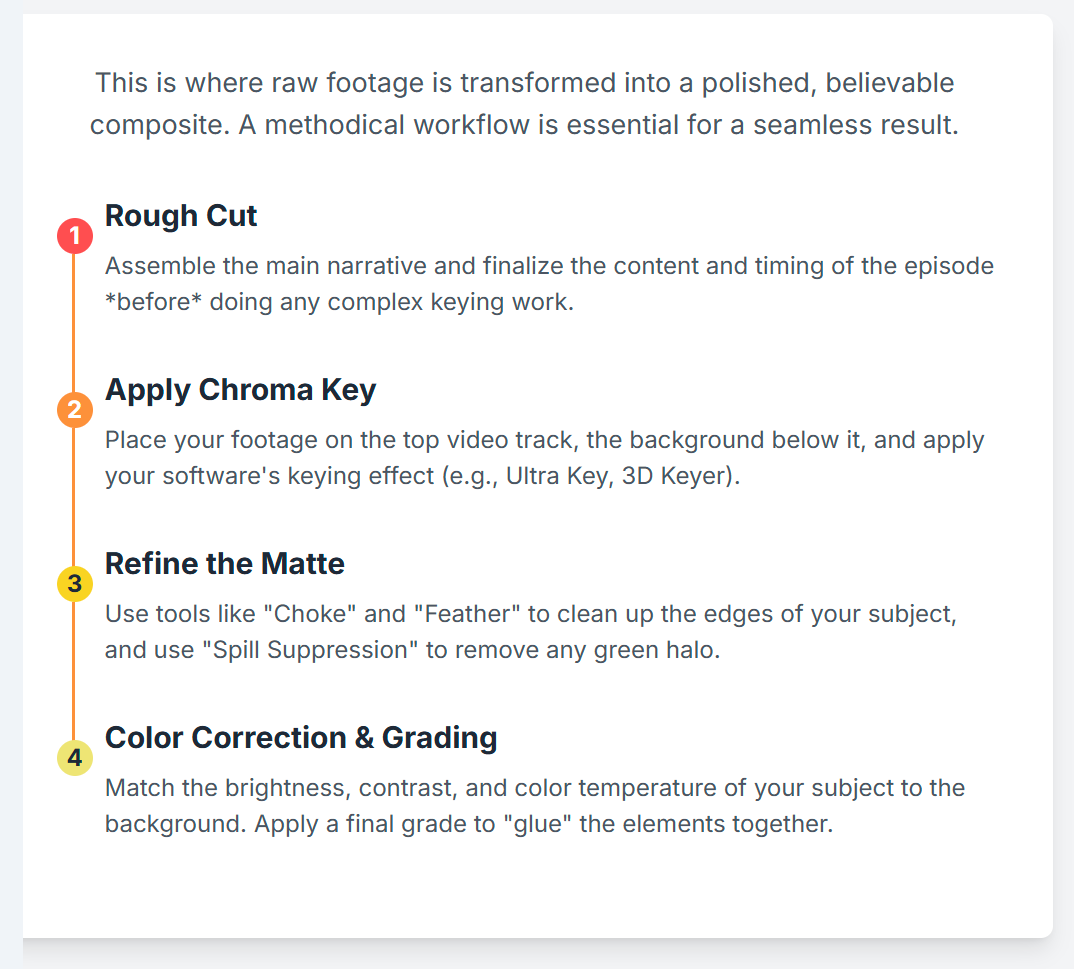
4.1 The Keying Process Demystified
The core process of removing the green background is consistent across major professional editing platforms like Adobe Premiere Pro, DaVinci Resolve, and Final Cut Pro.
Step 1: The Rough Cut: Before any detailed keying or color correction work begins, it is essential to perform a rough edit of the podcast. This involves assembling the main narrative, cutting out mistakes, and finalizing the content and timing of the episode. It is a highly inefficient use of time to perform complex and processor-intensive keying work on clips that will ultimately be removed from the final edit.4
Step 2: Applying the Chroma Key Effect: Once the edit is locked, the green screen footage is placed on a video track in the timeline, and the desired background image or video is placed on the track directly below it. The editor then applies the software's chroma keying effect to the top layer (the green screen clip). This effect is typically named "Ultra Key" in Adobe Premiere Pro, "3D Keyer" in DaVinci Resolve, or simply "Keyer" in Final Cut Pro.6
Step 3: Selecting the Key Color: The keying effect will include an eyedropper tool. The editor uses this tool to click on a section of the green screen in the footage. The software analyzes this selection and makes that specific color hue—and a range of similar hues—transparent. This "keys out" the background, revealing the background layer that was placed underneath.4 A well-lit, even green screen will often produce a reasonably clean key with this single click.
4.2 Refining the Composite: The Art of the Clean Key
The initial key is rarely perfect and requires careful refinement to create a clean and convincing separation between the subject and the new background. This is done by adjusting the parameters of the keying effect.
Matte Generation and Cleanup: The software creates a "matte," which is essentially a black-and-white mask where white represents the opaque subject and black represents the transparent background. The quality of this matte determines the quality of the key.
Edge Refinement: The edges of the matte are the most critical area. Editors use tools like "Feathering" to slightly soften the hard edge of the matte, helping the subject blend more naturally with the background. Tools labeled "Choke," "Shrink," or "Erode" are used to pull the edge of the matte slightly inward, which is highly effective at eliminating any thin green line or "halo" that may remain around the subject.22
Garbage Mattes: If the green screen did not cover the entire frame during the shoot, leaving studio lights or equipment visible at the edges, a simple "garbage matte" can be used. This involves drawing a rough mask around the main subject area to quickly remove these unwanted peripheral elements before the fine-tuning of the chroma key begins.4
Spill Suppression: This is a crucial step for achieving realism. "Spill" refers to the green light from the background that has reflected onto the subject, typically visible as a faint green tint on their skin, hair, or clothing edges. All professional keying software includes a dedicated "Spill Suppression" tool. This feature automatically identifies the specific green hue of the spill and neutralizes it by shifting its color towards its complement (magenta), effectively removing the unnatural green cast and making the composite far more believable.4
Testing and Review: A key that looks clean on a static frame may reveal imperfections during motion. It is essential to play the footage back in real-time and "scrub" through the timeline to check for issues like "chattering" or "boiling" edges, where the matte flickers or shifts unnaturally. The editor should also zoom in on complex areas like hair or semi-transparent objects to ensure the key is holding up and that no green spots are appearing during movement.22
4.3 Achieving Realism: The Final Polish
A technically clean key is only half the battle. The final and most artistic step is to blend the foreground and background elements together so they appear to exist in the same physical space. This is achieved through color correction and color grading.
Color Correction and Grading: The subject (shot in a studio) and the background (shot or created separately) will almost certainly have different color and light characteristics. The goal of color correction is to match these characteristics.
Matching Luminance: The first step is to match the brightness and contrast levels. The editor will adjust the black levels and white levels of both the foreground and background layers to ensure they are consistent. If the blacks in the background are crushed and dark, the blacks on the subject should be as well.
Matching Color: Next, the color balance must be matched. Using tools like color wheels or curves, the editor will adjust the hues and saturation of the subject to match the color temperature and overall color palette of the background. If the background is a warm, golden-hour scene, the subject's footage should be warmed up to match. If the background is a cool, sterile office, the subject should be graded to have a cooler, more neutral tone.22
Applying a Final Grade: Once the elements are matched, a final, overall color grade is often applied to the entire composite scene. This involves adding a consistent stylistic look (e.g., using a Look-Up Table or LUT) that "glues" the foreground and background together, making them feel as though they were captured by the same camera in the same environment.22
The increasing sophistication of keying tools, some of which are now augmented by artificial intelligence, is lowering the purely technical barrier to achieving a clean separation.35 However, this automation does not replace the need for artistic skill. As the technical task of removing the green becomes easier, the true differentiator for high-quality content shifts to the editor's artistic ability to light, color, and compose the final shot. The challenge is evolving from simply "can the green be removed?" to "can this composite be made to look real?".
Section 5: The London Landscape: A Curated Guide to Green Screen Podcast Studios
For a London-based podcaster, the theoretical knowledge of green screen production must be paired with practical, market-specific intelligence. The city offers a diverse range of studios, each with its own unique value proposition, pricing model, and level of service. Making an informed decision requires understanding these options and aligning them with the specific creative, technical, and budgetary needs of the project.
5.1 Navigating the Market: Understanding Your Options
The London studio market can be broadly categorized by its service models and key features.
Dry Hire vs. Wet Hire (Full Service): Understanding this distinction is the first step in narrowing down options.
Dry Hire: This model provides the physical space and often basic amenities like power and Wi-Fi. The client is expected to bring their own cameras, lighting, microphones, and crew. This option offers maximum control and can be cost-effective for experienced production teams who own or can rent their own equipment.37
Wet Hire / Full Service: This model provides an all-inclusive package. The studio comes with all necessary equipment (cameras, lights, mics) and, crucially, an on-site technician or senior engineer to operate it. Many full-service studios also offer post-production editing as an add-on. This is the ideal model for creators who want to focus on their performance and leave the technical complexities to a professional.33
Key Features to Look For:
Soundproofing: For a podcast, pristine audio is non-negotiable. Any reputable studio catering to podcasters will have fully soundproofed or at least heavily acoustically treated rooms to eliminate external noise.33
Infinity Cove: A green screen with a curved transition from the wall to the floor (a "cyc" or "cove") is a premium feature. It eliminates the hard shadow line of a corner, creating a seamless, infinite-looking background that is essential for full-body shots or any scene requiring movement.7
Pre-Lit Setups: Many studios offer pre-lit green screens, where the background is already evenly illuminated to the correct specification. This can save a significant amount of setup time and cost on the day of the shoot.33
On-Site Support: The value of having an experienced engineer present cannot be overstated, especially for those new to green screen. They can manage the complex lighting, ensure correct camera settings, and troubleshoot any technical issues that arise, allowing the creator to focus on their content.33
Amenities: Practical amenities contribute to a smooth production day. Look for facilities like dedicated changing rooms, makeup stations, client lounges or green rooms for breaks, and reliable high-speed Wi-Fi for any live-streaming or remote collaboration needs.37
5.2 London Green Screen Studio Comparison
To provide a clear overview of the market, the following table compares several prominent London studios that offer green screen facilities suitable for podcasting. This allows for a quick assessment based on location, features, pricing, and intended use case.
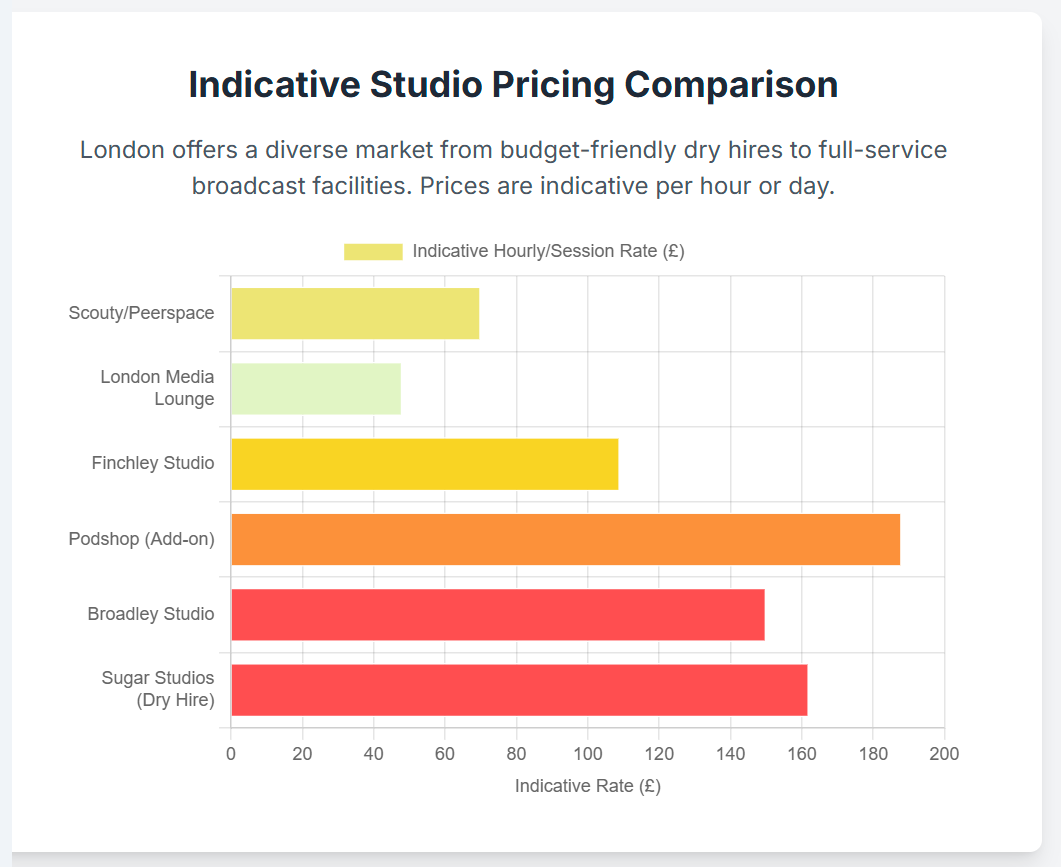
Table: Comparative Analysis of London Green Screen Podcast Studios
5.3 In-Depth Studio Profiles
While the table provides a broad overview, a deeper analysis of key players reveals the specific value proposition each offers to different types of creators.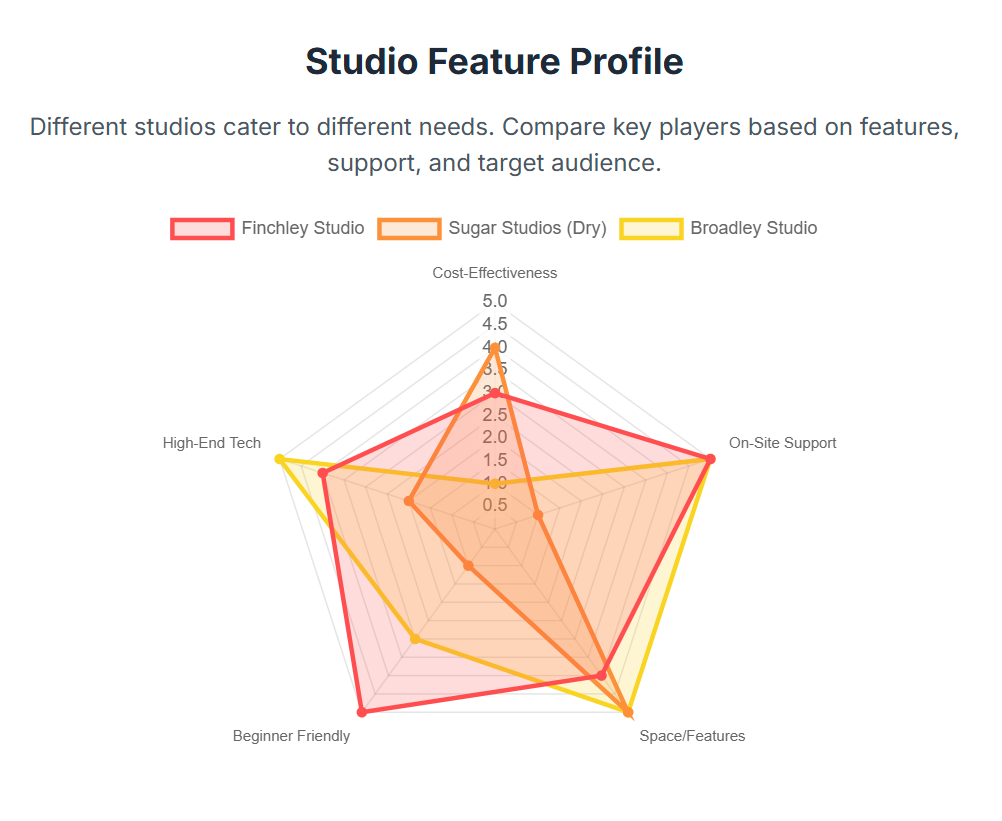
Profile: Finchley Studio (The All-in-One Professional Package)
Located in North London, Finchley Studio positions itself as an ideal partner for the content entrepreneur who values technical excellence but wants to focus on their creative performance. Their core offering is built around tiered, full-service packages (Gold and Platinum) that include a senior engineer to manage all technical aspects of the shoot.33 This is a significant value proposition, as it removes the technical burden from the creator. The studio features a pre-lit, soundproofed green screen infinity cove, which not only provides a seamless background but also saves considerable setup time. With 4K cameras, professional microphones, and support for remote interviews via platforms like Riverside, they offer a comprehensive, turnkey solution for producing high-quality, professional video podcasts.33
Profile: Broadley Studio (The Broadcast-Grade Powerhouse)
Situated centrally in Marylebone, Broadley Studio operates at the high end of the market, catering to broadcast, film, and major corporate clients.39 Their facilities are broadcast-grade, featuring large, wrap-around green screens, 4K multi-camera setups with fibre connectivity, and advanced virtual production capabilities powered by systems like Brainstorm and Mo-Sys camera tracking.39 They have produced BAFTA and Oscar-winning material, underscoring their position as a premium provider.39 For a podcaster with a significant budget, corporate backing, or the need for the absolute highest level of technical sophistication (including real-time 3D graphics), Broadley represents the "no compromise" option in London.39
Profile: Podshop (The Flexible Podcaster's Hub)
Podshop, with multiple locations including Shoreditch, is a facility designed specifically for podcasters. Their primary offerings are stylish, modern physical sets equipped with high-end audio and video gear.40 Their unique value proposition in the green screen market is flexibility; they offer a green screen backdrop as an optional, session-based add-on rather than as a dedicated studio space.48 This model is perfectly suited for an established podcaster who primarily records in a physical set but wants the creative option to produce occasional green screen episodes for special topics or interviews. It allows them to access the technology without committing to a dedicated green screen studio for every recording, making it a versatile and strategic choice.
Profile: Sugar Studios (The Creative Blank Canvas)
Located in Greenwich, Sugar Studios offers a different proposition: a large, high-quality space on a dry-hire basis.37 Their green screen studio is a substantial 5.9m x 8m room, providing ample space for more complex shoots involving multiple people or movement.37 As a dry-hire facility, they provide the space, lighting rigs, and power, but the client is expected to bring their own camera, sound equipment, and crew. This makes Sugar Studios the ideal choice for experienced production teams or creators who have their own Director of Photography and technical crew and require a large, flexible, and professionally maintained blank canvas to execute their vision.50 Amenities like extensive on-site parking and drive-in access further cater to professional crews with significant equipment needs.37
Conclusion: Integrating Green Screen into Your Long-Term Content Strategy
The decision to incorporate green screen technology into a podcast production is a strategic move that can profoundly enhance brand identity, audience engagement, and creative potential. However, realizing these benefits is contingent on a holistic understanding of the process, from creative conception to final digital composite. This guide has demonstrated that success is built upon three foundational pillars: a clear strategic vision, meticulous pre-production, and precise technical execution both in-studio and in post-production.
The strategic vision must come first; the technology is a tool to serve the content, not the other way around. Whether the goal is to establish a powerful branded set, visualize complex data, or transport the audience to new worlds, this objective must guide all subsequent decisions. The non-negotiable importance of pre-production cannot be overstated. Careful planning of wardrobe, makeup, and background assets is the single most effective way to ensure a smooth production and avoid costly, time-consuming fixes later. Finally, the technical craft—from the dual-lighting setup in the studio to the nuanced color grading in the edit—is what separates a seamless, believable composite from an artificial, unconvincing one.
For London-based creators, the path to mastering this technology is well-supported by a robust ecosystem of professional studios. By creating a reusable, high-quality branded virtual set, developing a standardized pre-production checklist, and fostering a strong working relationship with a trusted local studio, a podcaster can integrate green screen production into a sustainable and efficient long-term content workflow.
Looking forward, the skills and principles mastered in chroma key production serve as a gateway to the next frontier of content creation. The worlds of virtual production, real-time 3D environments rendered on LED walls, and immersive augmented reality experiences are rapidly evolving.12 By embracing and mastering green screen technology today, creators are not only elevating their current content but are also positioning themselves at the forefront of this visual revolution, acquiring the foundational knowledge needed to remain competitive and innovative in the visually-driven media landscape of tomorrow.
Maximising Your Content: Using a Green Screen at a Podcast Studio London
In the crowded digital arena of 2025, a successful podcast needs more than just compelling audio—it needs a powerful visual strategy. As video continues to dominate social media and streaming platforms, podcasters are increasingly becoming visual storytellers. One of the most versatile and impactful tools at your disposal is the green screen, and using one in a professional podcast studio London can unlock a universe of creative possibilities for your content.
Far from being a gimmick reserved for Hollywood blockbusters, chroma key technology (the technical term for green screening) is a practical and powerful asset for creators of all kinds. It allows you to replace a solid-coloured background with any digital image, video, or graphic you can imagine. Here’s how you can leverage it to elevate your podcast.
The Creative Freedom of a Green Screen
Why should a podcaster consider a green screen? The benefits go far beyond simple special effects. It's about enhancing your narrative and strengthening your brand.
Unleash Infinite Visuals: You are no longer confined to the four walls of a physical set. With a green screen, your backdrop can be anything. You could be broadcasting from a sleek, branded virtual studio, an animated data visualisation for a business podcast, or even the surface of Mars for a science discussion. This visual flexibility keeps your content fresh and engaging.
Strengthen Your Brand Identity: A green screen allows you to create a consistent, branded environment for every episode. Seamlessly integrate your logo, brand colours, and key messages into a custom virtual set. This professional polish reinforces your brand identity and makes your content instantly recognisable.
Elevate Your Storytelling: A green screen is a dynamic educational tool. Instead of just talking about a concept, you can show it. Display charts, maps, relevant video clips, or text highlights behind you as you speak. This technique transforms a monologue into an immersive presentation, making complex information easier for your audience to digest and remember.
The Professional Studio Advantage
While you can attempt a DIY green screen setup at home, the results are often plagued by technical issues. The key to a clean, believable composite lies in a controlled environment, which is where a professional studio makes all the difference.
The biggest challenge with chroma keying is lighting. The green screen must be lit perfectly evenly, with no shadows or bright spots, to be keyed out cleanly in post-production. This is incredibly difficult to achieve without professional equipment and expertise. Studios like Finchley Studio offer pre-lit green screen coves, which are purpose-built and calibrated for a perfect key every time. This saves you hours of frustrating trial-and-error and ensures a flawless final product.
Furthermore, professional studios provide high-quality 4K cameras that capture the necessary detail for a crisp composite, along with the physical space needed for dynamic shots. Attempting this in a small room with a wrinkled fabric screen simply can't compare. By using a dedicated facility, you are not just renting a screen; you are accessing an entire ecosystem of professional lighting, cameras, and technical support designed to make your creative vision a reality.
By stepping beyond the traditional podcast setup, you can create a more dynamic, visually striking, and memorable show. Utilising a green screen at a professional studio is a strategic investment in your content that will help you capture and hold your audience's attention.
Elevate Your Podcast at Finchley Studio
Now that you know what defines a professional recording space, the next step is finding a studio that delivers on all fronts. At Finchley Studio, we are dedicated to providing podcasters and content creators with the state-of-the-art facilities and expert support needed to produce exceptional content. We understand the nuances of high-quality production, which is why leading organisations like the BBC and Lloyds Bank trust us with their recording needs. But don't just take our word for it—see what other creators are saying in our Google reviews and on Trustpilot.
We offer a diverse range of meticulously designed sets to perfectly match your brand's aesthetic. Explore our spaces, including our purpose-built green screen facilities:
Green Screen Cove: A pre-lit curved studio for immersive special effects and virtual backgrounds.
Giant Green Screen: One of London's largest green screens for ambitious film, TV, and commercial productions.
Dialogue Room: An intimate space perfect for one-on-one interviews and small group discussions.
Lounge Studio: A relaxed and comfortable setting for casual conversations with up to 5 participants.
CEO Set: A premium, sleek backdrop for executive interviews, masterclasses, and expert talks.
Blackwood Studio: A sophisticated and modern set with a striking black wood finish for a cinematic feel.
The Brick Studio: A versatile warehouse space with authentic brick walls for an industrial-chic aesthetic.
Gathering Studio: A professional environment for larger roundtable discussions and corporate panels.
Blackout Set: A fully controlled dark space for dramatic, high-contrast visuals and creative projects.
White Infinity Cove: A seamless, edge-free backdrop for clean and minimalist product or fashion shoots.
To complement your recording, our professional Video Editing Service can transform your raw footage into polished, engaging content ready for any platform. The team at Finchley Studio is here to ensure your vision comes to life seamlessly.
Ready to take your podcast to the next level? See why creators rate Finchley Studio as their go-to production space.
Find Us Easily: Our studio is conveniently located just a two-minute walk from Finchley Central on the Northern Line and adjacent to the Travelodge London Finchley. We offer one free parking space per booking.
what3words: orders.yards.jokes
Stay Connected: Follow our journey and see behind-the-scenes content on our social media channels:
Have questions? Check our FAQ or get in touch directly.
WhatsApp: +447587827200
Phone: +447587827200
Email: [email protected]
Works cited
Podcast Video Editing: Engaging Visuals Using “Chroma Green Screen” - Finchley Studios, accessed August 28, 2025, https://www.finchley.co.uk/finchley-learning/podcast-video-editing-engaging-visuals-using-chroma-green-screen
Chroma Key: What It Is & Practical Tips - Riverside, accessed August 28, 2025, https://riverside.com/video-editor/video-editing-glossary/chroma-key
Chroma key - Wikipedia, accessed August 28, 2025, https://en.wikipedia.org/wiki/Chroma_key
How to use a green screen | How does a green screen work - Adobe, accessed August 28, 2025, https://www.adobe.com/creativecloud/video/discover/how-to-use-green-screen.html
www.finchley.co.uk, accessed August 28, 2025, https://www.finchley.co.uk/finchley-learning/podcast-video-editing-engaging-audiences-using-green-screening-effects#:~:text=Professional%20Quality%3A%20Green%20screen%20gives,visual%20appeal%20of%20your%20podcast.
Podcast Video Editing: Engaging Audiences Using Green Screening Effects - Finchley Studios, accessed August 28, 2025, https://www.finchley.co.uk/finchley-learning/podcast-video-editing-engaging-audiences-using-green-screening-effects
Why Green Screen Videography is Perfect for Engaging Podcast Videos - Finchley Studios, accessed August 28, 2025, https://www.finchley.co.uk/finchley-learning/why-green-screen-videography-is-perfect-for-engaging-podcast-videos
Green screen vs Non for one man pod. : r/podcasting - Reddit, accessed August 28, 2025, https://www.reddit.com/r/podcasting/comments/1f85u78/green_screen_vs_non_for_one_man_pod/
The Advantages of Filming With a Greenscreen - Pro Cyc, accessed August 28, 2025, https://www.procyc.com/the-advantages-of-filming-with-a-greenscreen
Podcast Video Editing: Boost Visual Appeal Using Chroma Key Green - Finchley Studios, accessed August 28, 2025, https://www.finchley.co.uk/finchley-learning/podcast-video-editing-boost-visual-appeal-using-chroma-key-green
10 Creative Green Screen Effects to Elevate Your Videos - Teleprompter.com, accessed August 28, 2025, https://www.teleprompter.com/blog/creative-green-screen-effects
Elevating Virtual Reality: The Benefits of Infinity Green Screens in Video Content Creation, accessed August 28, 2025, https://www.thepamediagroup.com/insights/elevating-virtual-reality-the-benefits-of-infinity-green-screens-in-video-content-creation/
All about Chroma Key and essential green screen footage knowledge - Solveig Multimedia, accessed August 28, 2025, https://www.solveigmm.com/blog/en/all-about-chroma-key-and-essential-green-screen-footage-knowledge/
Never use a Green Screen! - YouTube, accessed August 28, 2025, https://www.youtube.com/watch?v=C1fkkvTSQD4
Green Screen Clothing & Hair Guide | Broadley Studio, Marylebone, accessed August 28, 2025, https://www.broadley.tv/green-screen-clothing-and-hair-guide/
Green Screen Makeup and Wardrobe Considerations - Finchley Studios, accessed August 28, 2025, https://www.finchley.co.uk/finchley-learning/green-screen-makeup-and-wardrobe-considerations
Green Screen Wardrobe Tips - Richardson Dynamics, accessed August 28, 2025, https://richardsondynamics.com/green-screen-wardrobe-tips/
Green Screen Studio – You Are What You Wear | Premier Studios, accessed August 28, 2025, https://www.premier-studios.co.uk/green-screen-studio-you-are-what-you-wear
One Button-Green Screen Studio: Pre-Filming Advice, accessed August 28, 2025, https://ctl.uga.edu/wp-content/uploads/OBS-green-screen-studio-filming-advice2024.pdf
Enhancing Your Podcast with Green Screen Backgrounds - Finchley Studios, accessed August 28, 2025, https://www.finchley.co.uk/finchley-learning/enhancing-your-podcast-with-green-screen-backgrounds
3 Steps for the PERFECT 'Green Screen' Shoot - Dan Mears, accessed August 28, 2025, https://danmears.tv/green-screen/
How to Chroma Key a Green Screen in Post-Production - Finchley Studios, accessed August 28, 2025, https://www.finchley.co.uk/finchley-learning/how-to-chroma-key-a-green-screen-in-post-production
Green Screen Lighting: How to Ensure Your Backgrounds Pop - StudioBinder, accessed August 28, 2025, https://www.studiobinder.com/blog/green-screen-lighting-setup-techniques/
Green Screen Lighting: Top Tips for Studios | Broadley Studio, accessed August 28, 2025, https://www.broadley.tv/green-screen-lighting-tips-for-studios/
5 Tips For Lighting A Green Screen | News & Stories - Litepanels, accessed August 28, 2025, https://www.litepanels.com/en/applications/5-tips-for-lighting-a-green-screen/
Green Screen Podcast - What's the best lighting setup I can use with what I have? - Reddit, accessed August 28, 2025, https://www.reddit.com/r/cinematography/comments/1j8xex7/green_screen_podcast_whats_the_best_lighting/
How to Make & Use Green Screens for Videos | Easy Step-by-Step Tutorial - Riverside, accessed August 28, 2025, https://riverside.com/blog/how-to-make-a-green-screen-video
What are the most common green screen mistakes, and how can I avoid them?, accessed August 28, 2025, https://www.gearshift.tv/faqs/what-are-the-most-common-green-screen-mistakes--and-how-can-i-avoid-them-.cfm
What advice would you experts when it comes to shooting in front of a green screen and making it look good? - Reddit, accessed August 28, 2025, https://www.reddit.com/r/Filmmakers/comments/1gq9jpo/what_advice_would_you_experts_when_it_comes_to/
Shooting On Green Screen Part I - CINEMA FORTE, accessed August 28, 2025, https://www.cinemaforte.com/blog/shooting-on-green-screen-part-i
Best Guidelines For Shooting On Greenscreen? : r/Filmmakers - Reddit, accessed August 28, 2025, https://www.reddit.com/r/Filmmakers/comments/1kfcn23/best_guidelines_for_shooting_on_greenscreen/
10 Tips That Will Help You Green Screen like a Champion, accessed August 28, 2025, https://nofilmschool.com/tips-help-you-green-screen-champion
Green Screen Cove | Finchley Podcast Studio, accessed August 28, 2025, https://www.finch-ley.studio/services/green-screen
Using Green Screen in Video Production: Detailed Guide - MotionCue, accessed August 28, 2025, https://motioncue.com/green-screen-in-video-production/
Riverside: HD Podcast & Video Software | Free Recording & Editing, accessed August 28, 2025, https://riverside.com/
How to Make a Green Screen Video Instantly with Podcastle, accessed August 28, 2025, https://podcastle.ai/blog/how-to-make-a-green-screen-video/
Green Screen Studio London - Sugar Studios, accessed August 28, 2025, https://www.sugarstudios.co.uk/greenscreen-studio
Green Screen - London Media Lounge, accessed August 28, 2025, https://londonmedialounge.co.uk/green-screen/
Film & TV Studios for Hire - Green Screen, Live Streaming, accessed August 28, 2025, https://www.broadley.tv/
Podcast Studios In Central London - Podshop, accessed August 28, 2025, https://www.podshoponline.co.uk/services/podcast-studio
London Green Screen Studio Hire | Book Your Studio Today - Soundstage Studios, accessed August 28, 2025, https://soundstagestudios.co.uk/green-screen-studio/
Virtual Production Soho. - Film Studio - Ramaz Studios, accessed August 28, 2025, https://ramazstudios.com/virtual-production-soho-studio/
The 16 Best Green Screen Studios for Hire in London | Tagvenue UK, accessed August 28, 2025, https://www.tagvenue.com/hire/green-screen-studios/london
London Podcast Studio | Podcast Recording From £69/hr!, accessed August 28, 2025, https://www.londonpodcaststudios.co.uk/
Integrating Green Screen Technology into Your Podcast Studio London - Finchley Studios, accessed August 28, 2025, https://www.finchley.co.uk/finchley-learning/integrating-green-screen-technology-into-your-podcast-studio-london
Broadley Studio | Film and Photo - Hire Space, accessed August 28, 2025, https://hirespace.com/Spaces/London/190652/Broadley-Studio/Broadley-Studio/Film-And-Photo
TV Studio - Broadley Studio - Event Venue Hire - Tagvenue.com, accessed August 28, 2025, https://www.tagvenue.com/rooms/london/22341/broadley-studio/tv-studio
Podshop Studios - Podcast Recording Space - Event Venue Hire - Tagvenue.com, accessed August 28, 2025, https://www.tagvenue.com/rooms/london/65664/podshop-studios-podcast-recording-space/podcast-studio-1
Podshop: Podcast Production Companies | Podcast Editing, accessed August 28, 2025, https://www.podshoponline.co.uk/
The Big Space | Film and Photo | Sugar Studios, accessed August 28, 2025, https://hirespace.com/Spaces/London/191114/Sugar-Studios/The-Big-Space/Film-And-Photo
Podcast Studio & Video Studio - West London | Multiple Sets, accessed August 28, 2025, https://londonmedialounge.co.uk/
Podcast Studio (Green Screen) (SE London) - Scouty, accessed August 28, 2025, https://www.scouty.com/location/podcast-studio-green-screen-se-london-608ac6f74b9b9600171ca5a0
36 Best Green Screen Studios for Hire in London, England - Peerspace, accessed August 28, 2025, https://www.peerspace.com/uk/venues/gb/london--england/green-screen-studio
London Media Lounge | Film | Podcast | Green Screen | YouTube Studios in West London, London | Production | Peerspace, accessed August 28, 2025, https://www.peerspace.com/pages/listings/633c5784fbcb87000e172917
Green Screen studio in London - Scouty, accessed August 28, 2025, https://www.scouty.com/en-US/location/green-screen-studio-in-london-66337aefecf7870015ceea92?recommendedListingType=Similar
Infinity Cove | Film and Photo | Sugar Studios - Hire Space, accessed August 28, 2025, https://hirespace.com/Spaces/London/191402/Sugar-Studios/Infinity-Cove/Film-And-Photo
Sugar Studio - Wedding & Event Venue Hire - London - Tagvenue.com, accessed August 28, 2025, https://www.tagvenue.com/venues/london/15818/sugar-studio