
Theoretical Foundations of Dynamic Expansion
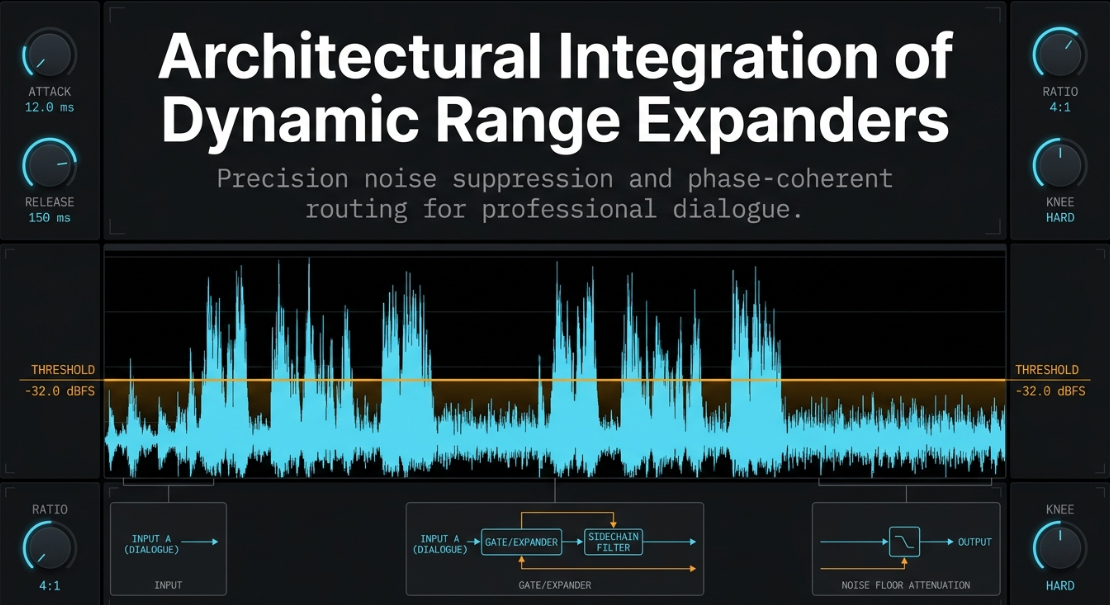
In professional dialogue processing, maintaining control over the dynamic range of a signal is a prerequisite for achieving broadcast-standard intelligibility and acoustic polish1. While dynamic range compression is widely deployed to reduce peak-to-average ratios by attenuating signals exceeding a designated threshold, dynamic expansion executes the inverse operation1. Expanders increase the dynamic range of an audio signal, providing a critical toolset for noise-floor suppression, signal-to-noise ratio enhancement, and transient reconstruction1.
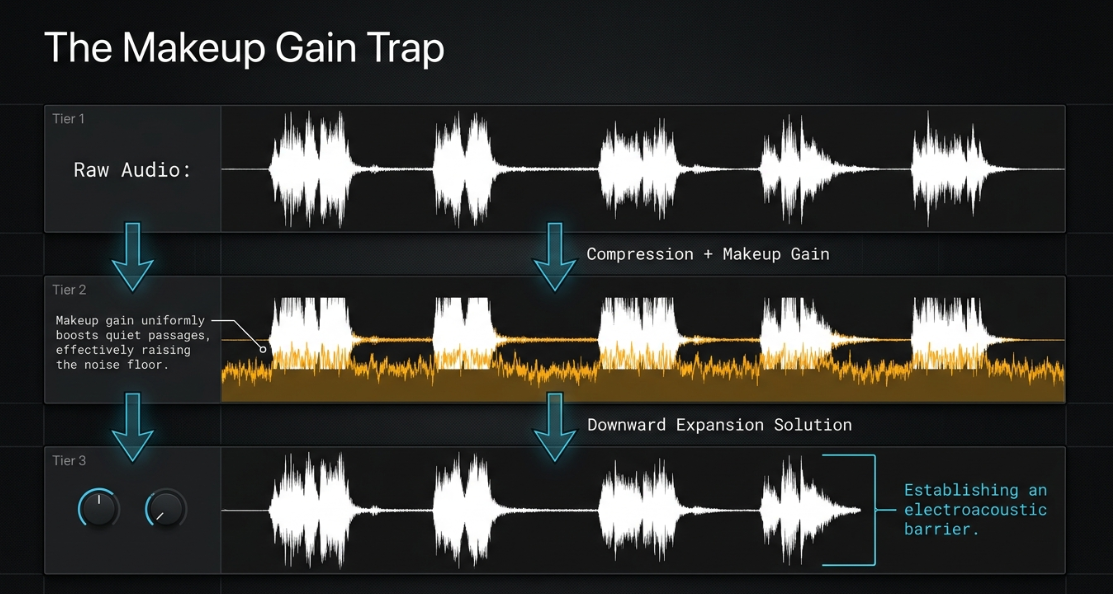
Dynamic range processing operates across four distinct operational quadrants4. Understanding these quadrants is essential for selecting the appropriate tool for specific audio defects4.
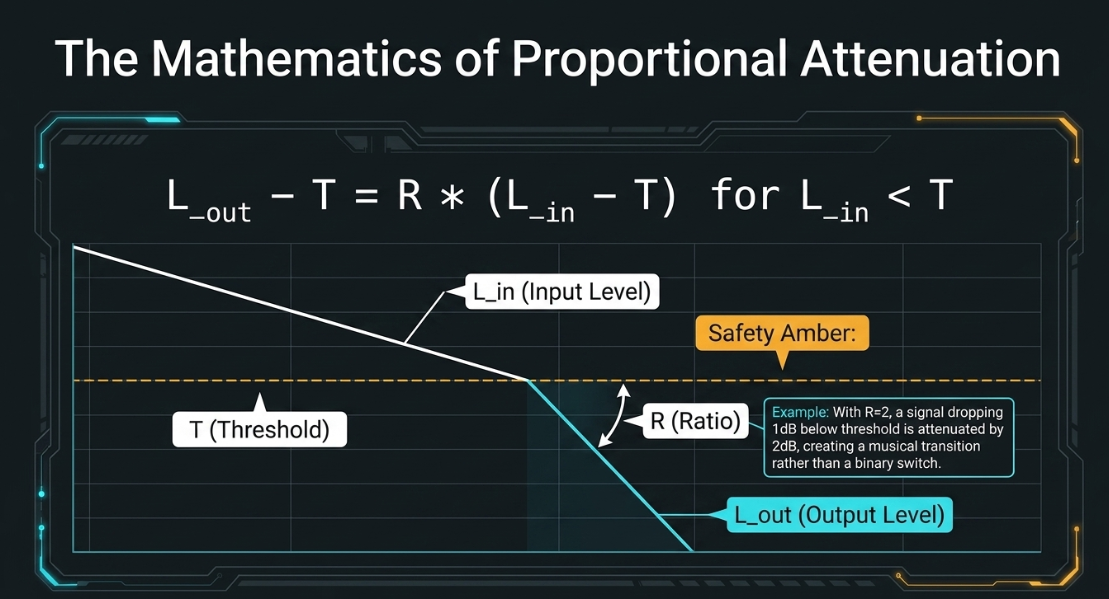
Downward expansion is the industry standard for transparent noise control8. While a standard noise gate operates as an aggressive, binary switch that abruptly mutes the signal below the threshold—often causing unnatural truncation of vocal decays—a downward expander applies a gradual, proportional attenuation dictated by a specific ratio3. The mathematical relationship governing downward expansion is expressed as:
In this equation, is the input signal level in decibels (dB), is the output signal level, is the threshold level, and is the expansion ratio factor9. With an expansion ratio factor where , every decibel of input reduction below the threshold is multiplied at the output9. For example, with a ratio of , if the input signal falls below the threshold, the output is attenuated by , creating a smoother, highly musical transition9.
Dynamic vs. Spatial Expansion: Psychoacoustic and Phase Realities
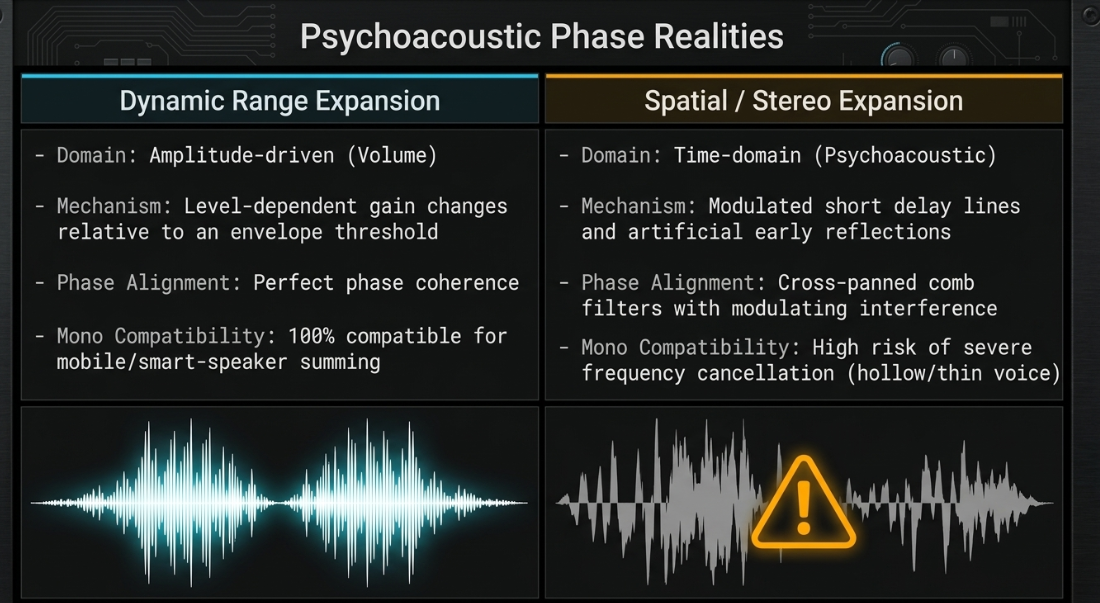
A critical distinction must be maintained between dynamic range expanders and spatial or stereo expanders to prevent destructive signal-chain configurations13. Dynamic range expanders are amplitude-based processors that operate strictly in the volume domain2. They monitor the signal's envelope and apply level-dependent gain changes relative to a threshold3.
Stereo expanders, such as the Xfer Dimension Expander, are psychoacoustic, time-domain processors designed to alter the perceived width of a stereo image13. These devices do not analyze signal level; instead, they generate artificial early reflections using modulated short delay lines13. This is often configured as cross-panned comb filters with modulating peaks and valleys of phase interference14.
In spoken-word post-production, mono compatibility is paramount13. Podcast distribution platforms heavily favor mono-summed vocal tracks or centered stereo fields to ensure consistent reproduction across mobile devices, smart speakers, and single-earbud monitoring. Applying a spatial/stereo expander to a vocal track under the assumption that it will expand the dynamic range introduces comb filtering and phase cancellation13. When summed to mono, the spatialized signal can suffer from severe frequency cancellations, making the voice sound hollow, thin, or entirely absent13. Dynamic range expanders, being purely amplitude-driven, maintain perfect phase coherence and mono compatibility, making them the only appropriate tool for managing background noise and voice dynamics9.
Electroacoustic Challenges in Dialogue Recording
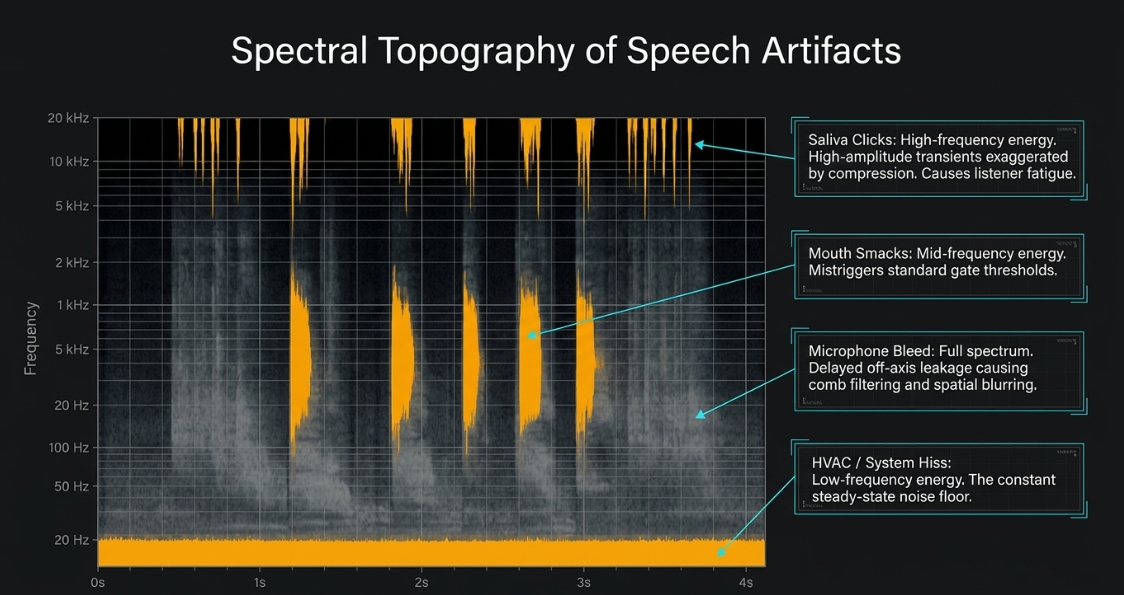
Spoken-word recordings are prone to environmental and physiological artifacts that degrade the listener's experience. The most prevalent electroacoustic challenges include:
Ambient Noise Floor and System Hiss: HVAC hum, computer fan noise, electrical ground loop interference, and preamplifier self-noise constantly occupy the lowest dynamic band of a recording1.
Microphone Bleed (Crosstalk): In multi-host recording environments where participants share the same physical space, each microphone captures not only its intended source but also the acoustic leakage from adjacent speakers21. This creates phase-related comb filtering and artificial room reverberation when the tracks are mixed16.
Physiological Artifacts: Saliva-induced mouth clicks, heavy breathing, lip smacks, and nasal air blasts are naturally occurring speech sounds that can become highly distracting18.
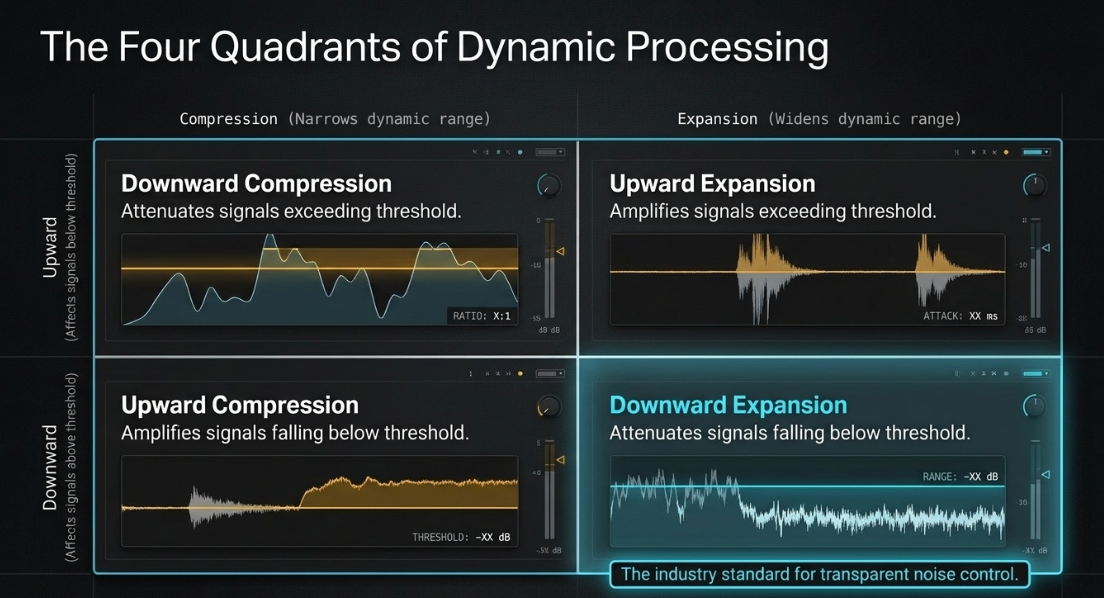
Dynamic compression, which is necessary to maintain a consistent vocal level, exacerbates these issues1. As a compressor reduces the amplitude of peak signals, the engineer applies makeup gain to bring the overall track level back to a target broadcast loudness (such as )18. This makeup gain uniformly boosts the quiet passages, effectively raising the noise floor, amplifying microphone bleed, and emphasizing mouth clicks18.
Implementing a downward expander before or after the compression stage allows the engineer to establish an electroacoustic barrier25. By applying targeted gain attenuation strictly to signals falling below the vocal range, the background noise is pushed down into inaudibility, neutralizing the magnifying effect of subsequent compression stages1.
[Raw Audio Signal]
│
├─► High-Amplitude Vocal Transients (Intended Speech)
├─► Mid-Amplitude Physiological Sounds (Breaths, Clicks) ──► Elevated by Compressor Makeup Gain
└─► Low-Amplitude Environmental Noise (HVAC, Fan, Bleed) ──► Surgical Target of Downward Expander
The spectral distribution of these artifacts must be understood to apply frequency-selective expansion effectively24. Saliva clicks and mouth pops are rapid, high-amplitude transients24.
Macro-Dynamic Settings: Algorithmic Specifications for Vocal Tracks
To configure a downward expander for transparent, artifact-free processing of podcast vocals, the operator must tune several interdependent parameters2. The target is to maximize noise attenuation without introducing pumping (audible changes in the background noise floor) or vocal truncation (clipping the beginning or ending of words)1.
Threshold
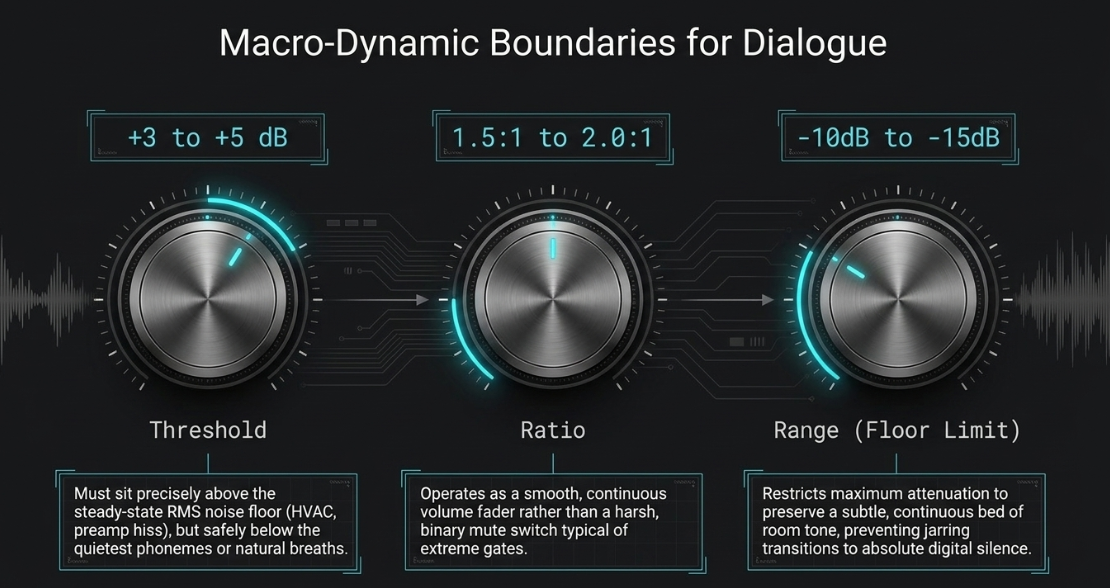
The threshold determines the level below which the expander begins to apply gain reduction3. For spoken word, the threshold must be set precisely above the steady-state noise floor (HVAC, preamp hiss) but below the quietest phonemes or natural breaths of the speaker20. A common starting point is measuring the RMS level of the room tone during a pause (using spectrum analysis tools) and setting the threshold to above that measured value20.
Ratio
The ratio dictates the slope of the gain reduction once the signal drops below the threshold2. Standard noise gates utilize extreme ratios ( or ), leading to a harsh, binary cutoff10. For natural dialogue, gentle ratios ranging from to are recommended9. This allows the expander to function as a smooth volume fader rather than an abrupt mute switch3.
Range / Floor Limit
The range control restricts the maximum amount of gain attenuation that the expander can apply3. Instead of allowing the signal to be pulled down to absolute silence (), which sounds unnatural and alerts the listener to the presence of processing, the range should be limited to between and 10. Limiting the attenuation range preserves a subtle, continuous bed of room tone, ensuring that the transition between speech and silence is not jarring to the human ear10.
Attack Time
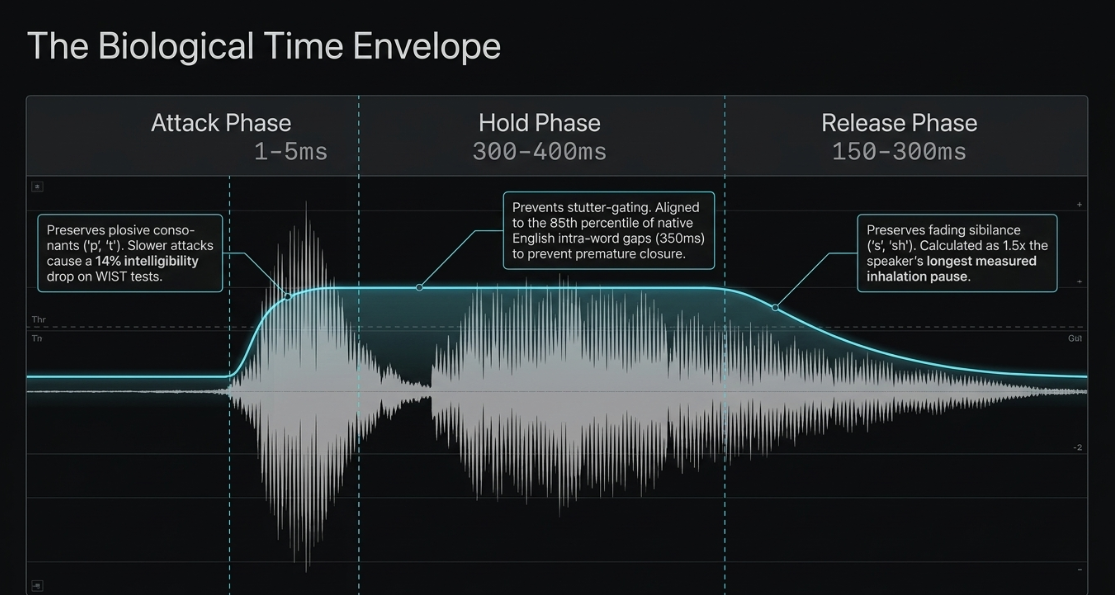
The attack parameter defines how rapidly the expander ceases gain reduction and returns to unity gain once the input signal exceeds the threshold2. For spoken word, an ultra-fast attack time ( to ) is mandatory20. Consonants and plosives (such as the "p" in "podcast" or "t" in "talk") possess rapid transient energy; a sluggish attack time will clip these initial transients, severely reducing speech intelligibility20. This is validated via Word Intelligibility by Syllable Tests (WIST), which indicate a intelligibility drop at attack times compared to only a drop at 20. However, the attack must not be set to absolute zero, as instantaneous VCA gain shifts can generate audible clicks or pops10.
Hold Time
Hold time specifies the duration for which the expander remains fully open after the signal has fallen below the threshold before initiating the release phase9. Incorporating a hold time of to is highly effective in preventing stutter-gating—a phenomenon where the processor rapidly toggles on and off during short pauses between syllables or trailing consonants20. This parameter should be aligned with the speaker's natural phrasing20.
Phonetic analysis reveals that native English speakers exhibit intra-word gaps of approximately to during natural conversation20. Setting the hold parameter to the 85th percentile of this range (typically ) prevents premature expander closure20. Neglecting this setting increases cognitive load on the listener by approximately , as measured via EEG and eye-tracking studies, due to the distracting nature of fragmented speech envelopes20.
Release Time
The release time controls the speed at which the expander transitions from unity gain to its maximum designated attenuation after the threshold is crossed and the hold time expires2. For vocal applications, a moderate-to-slow release time is preferred, typically between and 25. This ensures that the natural decay of the speaker's voice, particularly word endings with fading sibilance (such as "s" or "sh" sounds), is not prematurely clipped12.
For standard dialogue, the optimal release time can be calculated as times the speaker’s longest measured inhalation pause20. Since professional voice talent typically exhibits inhalation durations between and , a release time of to is structurally appropriate20. However, for fast-paced, highly technical, or scripted narration, this parameter should be compressed to to 20. This faster release has been shown to reduce perceived mental demand and listener fatigue by under NASA-TLX assessment standards20.
Lookahead
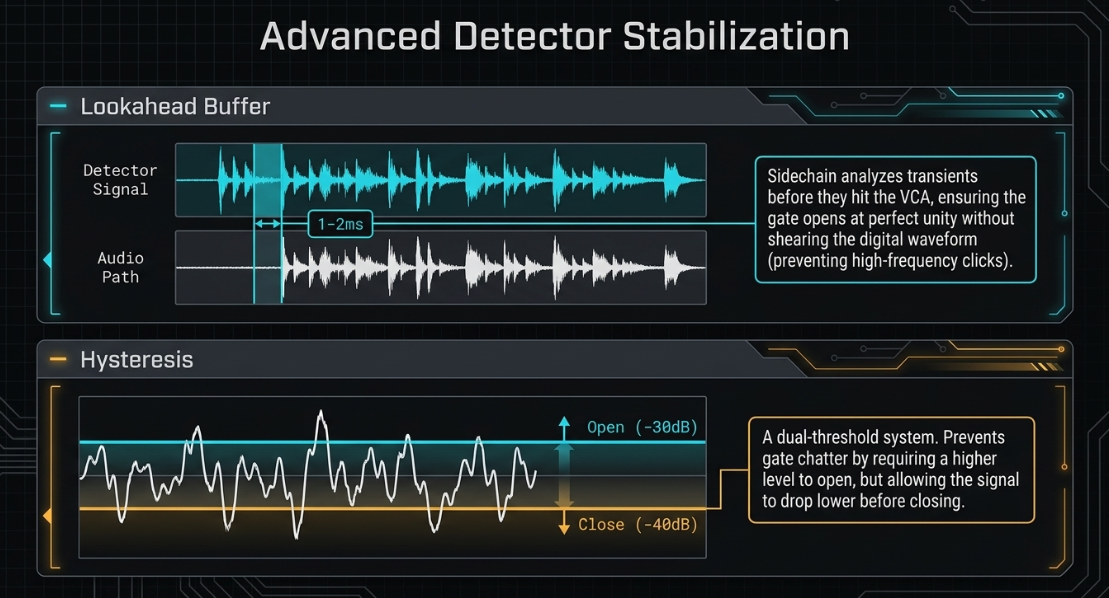
Lookahead delay instructs the plugin to buffer the incoming audio signal by a tiny increment (typically to ), enabling the sidechain detector to analyze transients before they reach the gain-reduction stage33. This allows the expander to open with perfect synchronicity at the very onset of a transient, maintaining complete transparency without requiring a compromised, click-inducing instant attack setting38.
Hysteresis
Hysteresis introduces a dual-threshold system: an "open" threshold and a "close" threshold36. By setting the open threshold higher (such as ) and the close threshold lower (such as ), the expander prevents gate chatter20. The signal must cross the higher threshold to open the expander, but the gate will not begin to close until the level drops below the lower close threshold36. This stabilizes the processor when dealing with highly dynamic, whispering, or fluctuating vocal performances1.
Dynamic Threshold Target Calibration
To optimize dialogue clarity, a dual-tier approach based on the physical speaking cadence of the hosts is highly effective25.
Technical Performance Evaluation Metrics
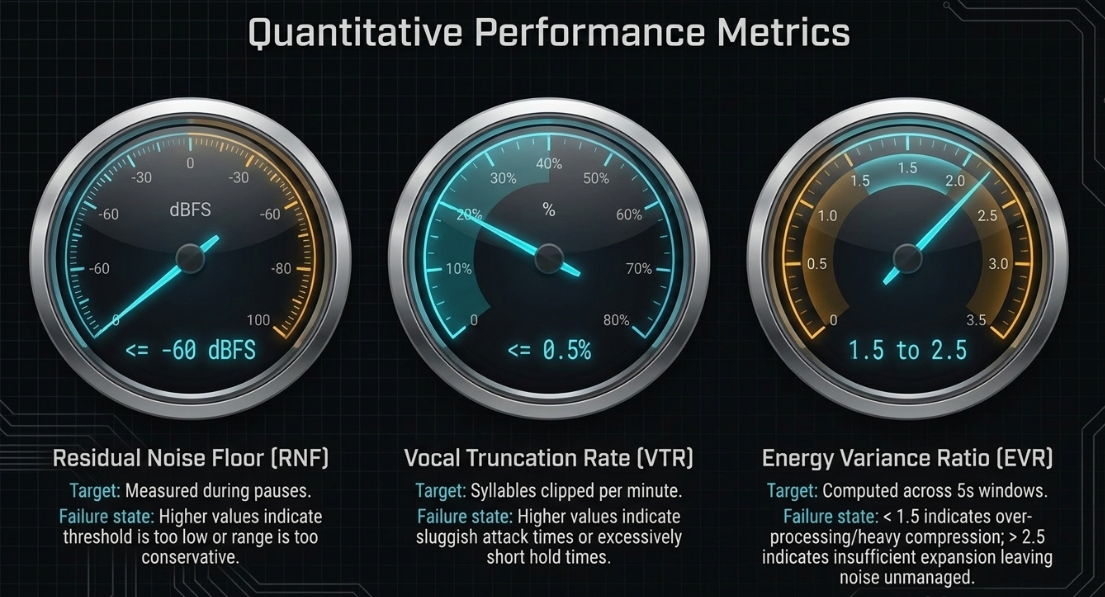
To evaluate whether the expander settings are achieving optimal noise reduction without degrading the vocal performance, engineers must monitor three quantitative metrics20:
Residual Noise Floor (RNF): Measured during pauses in speech, the target RNF must remain less than or equal to 20. An RNF reading higher than indicates that the expander's threshold is configured too low, or that the range control is too conservative to suppress the ambient noise floor20.
Vocal Truncation Rate (VTR): This metric measures the percentage of clipped or truncated syllables per minute of dialogue20. Analyzing the waveform using forced-alignment tools should yield a VTR of less than or equal to 20. A VTR exceeding indicates that the attack time is too slow or the hold time is too short, leading to clipped consonant onsets and truncated word endings20.
Energy Variance Ratio (EVR): Computed across windows during speech passages, the EVR measures the preservation of natural vocal dynamics20. The target range for a natural, uncompressed performance is to 20. An EVR below indicates over-processing (often due to excessive compression following the expander), whereas a ratio above indicates insufficient expansion, leaving background noise unmanaged during quiet vocal passages20.
Multi-Host Configurations: Crosstalk and Auto-Mixing
When editing a multi-host podcast recorded in a single, untreated or semi-treated room, microphone bleed can degrade the clarity of the mix22. If three hosts are speaking, Host A’s microphone will record Host A directly, but it will also capture a delayed, reverberant version of Host B and Host C speaking23. When all three faders are kept open, this crosstalk creates a muddy, phase-coherent build-up that washes out the stereo image and introduces comb filtering16.
To resolve this electroacoustic problem, engineers utilize one of three advanced processing methodologies:
Standard Multi-Channel Sidechain Ducking
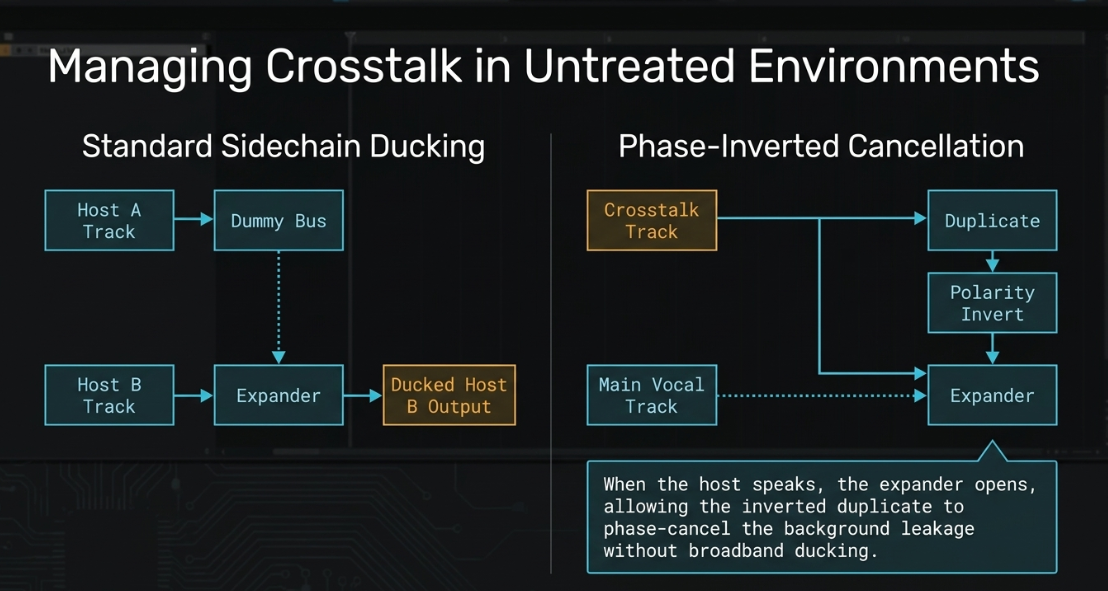
This routing technique involves using the vocal signal of one host to actively suppress the gain of another host's channel40. For a two-host setup, a dummy auxiliary send is created for Host A and routed to the sidechain input of an expander placed on Host B's channel40. When Host A speaks, their voice triggers the expander on Host B's track to apply a subtle ducking effect (such as of gain reduction)40. When Host A stops speaking, Host B's channel returns to its nominal gain structure40.
While highly effective, this setup becomes complex to route in sessions with three or more hosts, requiring nested auxiliary buses and multi-point sidechain matrices40.
Host A Vocal Track ─────► [Dummy Bus] ──(Sidechain Trigger)──► [Expander on Host B Track]
│
Host B Vocal Track ─────────────────────────────────────────────────────┴─► [Ducked Output]
To optimize the sidechain control signal, a frequency-specific ducking filter (such as Trackspacer) can be inserted on the target vocal channels41. Rather than ducking the entire broadband signal, this method uses a gate on a dummy vocal track to analyze the speaker's frequency envelope, then dynamically attenuates only the clashing frequency bands on the target channel41. This technique prevents the volume drops associated with broadband sidechaining41.
Phase-Inverted Cancellation Routing
When using an expander or gate that lacks an integrated external ducker algorithm, phase cancellation can be used to control signal levels10. The engineer creates a duplicate of the backing or crosstalk track and inverts its polarity10. An expander is placed on this duplicate track, keyed to the main vocal track sidechain10.
When the host speaks, the expander opens, allowing the polarity-inverted duplicate signal to pass through10. This phase-cancels the original crosstalk track, resulting in a clean attenuation of the background leakage10. When the host is silent, the expander closes, and the duplicate track is muted, allowing the original signal to pass without phase cancellation or comb-filtering artifacts10.
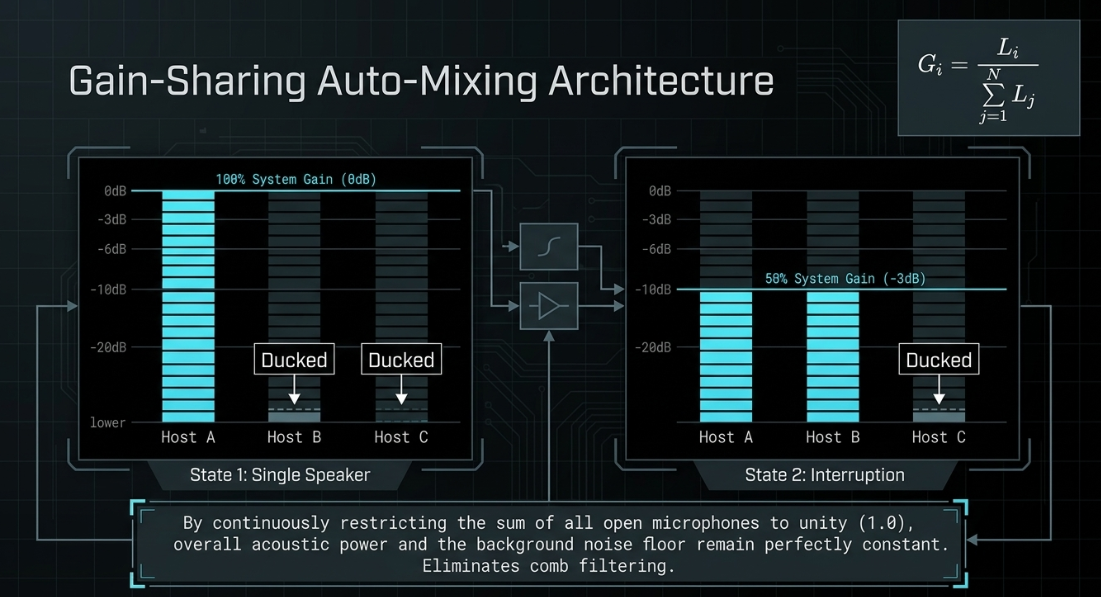
Gain-Sharing Auto-Mixing (The Dan Dugan Algorithm)
The industry standard for real-time multi-microphone management is the Dan Dugan gain-sharing algorithm43. Instead of utilizing independent thresholds that open and close like traditional expanders or gates—which inevitably causes distracting modulations of the background noise floor—the Dugan system operates on a continuous, mathematical gain-sharing principle43.
The system continuously measures the signal levels of all active microphone inputs and calculates the total system energy43. It then distributes the available gain across all channels such that the sum of the gains of all open microphones is mathematically restricted to unity ( relative level)43. The gain applied to any individual channel is calculated using the formula:
where is the level of channel , and is the total number of channels in the auto-mixing group43.
If only one host is speaking, that channel receives of the gain ( attenuation), while the inactive channels are automatically ducked to the noise floor45. If two hosts speak simultaneously or interrupt each other, the gain is distributed equally (each receiving of attenuation), ensuring that the overall acoustic power and the level of background noise remain perfectly constant43. This prevents the comb filtering, phasing issues, and ambient gating artifacts common in multi-mic dialogue mixes43.
Advanced Signal Chain Architecture and Integration
To ensure that dynamic expanders function transparently, their position within the post-production signal chain must be structurally optimized28. Placing an expander at the incorrect stage of processing can lead to unnatural gating artifacts, click generation, or inefficient compression1.
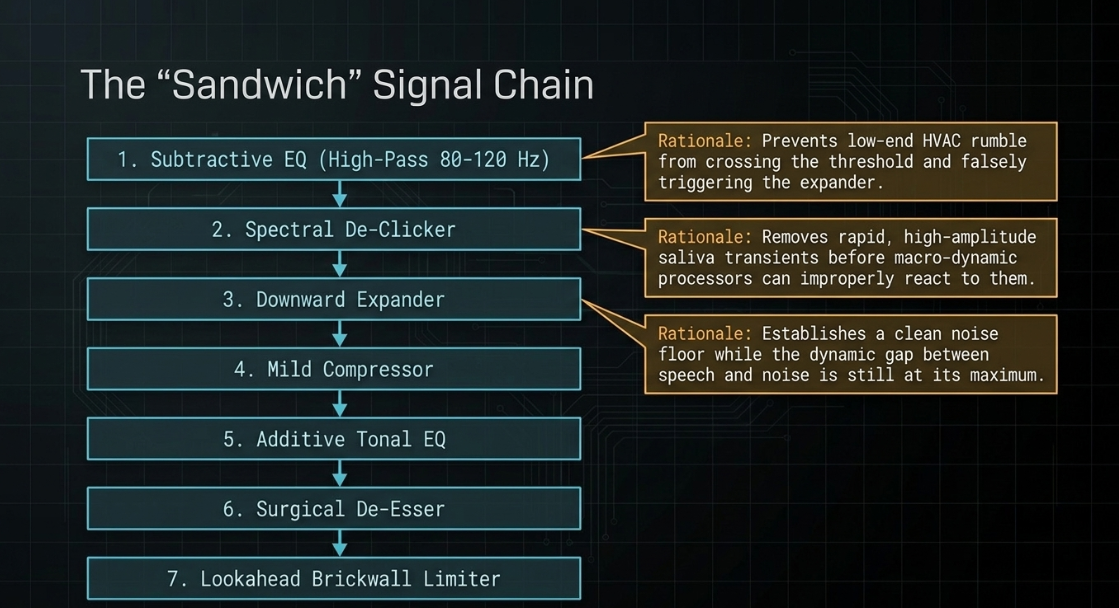
The "Sandwich" Signal Chain
The standard, highly optimized signal chain for professional dialogue processing is structured as follows:
[Raw Audio Input]
│
▼
1. Subtractive EQ (High-Pass Filter at 80-120 Hz) ◄── Prevents low-end rumble from triggering expander [cite: 29, 48]
│
▼
2. Spectral De-Clicker ◄── Removes mouth clicks before they are amplified
│
▼
3. Downward Expander ◄── Establishes clean noise floor and reduces bleed [cite: 9, 25]
│
▼
4. Mild Upward / Downward Compressor ◄── Levels out the macro-dynamics of speech [cite: 25, 26, 28]
│
▼
5. Additive / Tonal EQ ◄── Restores high-end presence and warmth [cite: 29, 47, 49]
│
▼
6. Surgical De-Esser ◄── Controls sibilance (5-10 kHz) [cite: 25, 28, 50]
│
▼
7. Lookahead Brickwall Limiter ◄── Final peak ceiling control for broadcast loudness [cite: 25, 26, 51]
Architectural Rationale
Subtractive EQ Pre-Expansion: Low-frequency rumble (such as foot taps, HVAC air movement, or mechanical vibrations below ) possesses high acoustic energy but contains no voice information48. If the expander is placed before a high-pass filter, these sub-bass frequencies will cross the threshold and open the expander, causing the noise floor to pump in sync with the rumble29. Placing a high-pass filter first ensures the expander's detector reacts only to meaningful vocal energy29.
De-Clicking Pre-Expansion and Pre-Compression: Saliva clicks and mouth pops are rapid, high-amplitude transients24. If they are sent into a compressor or an expander, they will trigger the detector circuits, causing the processors to clamp down or open inappropriately18. Running a spectral de-clicker first cleanses the signal, preventing these microscopic noises from steering the behavior of the macro-dynamic processors18.
Expansion Pre-Compression: A downward expander operates most transparently when the difference between speech and noise is at its maximum17. Compression narrows this dynamic gap2. If an expander is placed after a heavy compressor, the noise floor will have already been pulled up close to the vocal level, making it extremely difficult to set an effective threshold without clipping the trailing words or breaths1. Expanding first to suppress the noise, then compressing to smooth the vocal performance25.
Troubleshooting Digital Click Generation
A common technical issue in digital post-production is the generation of digital clicks or "popping" artifacts at the onset of words when using an expander34. This is typically caused by a mismatch in processing buffers or an excessively fast attack time10.
When the expander is closed, it applies attenuation9. If a vocal transient suddenly forces the expander to open instantly ( attack), the digital waveform is sheared, creating a discontinuous vertical step in the digital sample sequence35. In the digital domain, a sudden waveform discontinuity is reproduced as a high-frequency click or pop35.
To prevent this, engineers must:
Ensure the expander's attack time is slightly relaxed (between and )20.
Enable lookahead ( to ) to allow the gain-change envelope to smooth out20.
Ensure that the DAW and audio driver buffer sizes are matched at standard rates (such as at samples) to avoid buffer-underrun clicks being injected by real-time lookahead plugins21.
Automation Workflows and SWS Custom Actions in Reaper
When processing highly dynamic spoken word, automated templates can save time21. In Cockos Reaper, the SWS extension package allows engineers to create custom macro scripts21. These scripts combine silence stripping, ripple editing, crossfading, and automated gain adjustments into single key commands21.
[Determine Room Noise Floor via Spectral Analysis]
│
▼
[Apply Gate to "Dummy Track" only; mute Dummy Output]
│
▼
[Sidechain Gate Output to trigger secondary VST Expander on Main Vocal]
│
▼
[Engage SWS Macro: Trim Silence ──► Ripple Align Clips ──► Apply 50ms Crossfades]
This workflow prevents the unnatural, abrupt transitions that occur when hard gates are applied directly to a vocal channel9. By gating a dummy vocal track and using its output to key a frequency-specific expander on the main channel, the background noise is ducked while the primary vocal remains natural and unaffected41.
Professional Toolset Evaluation
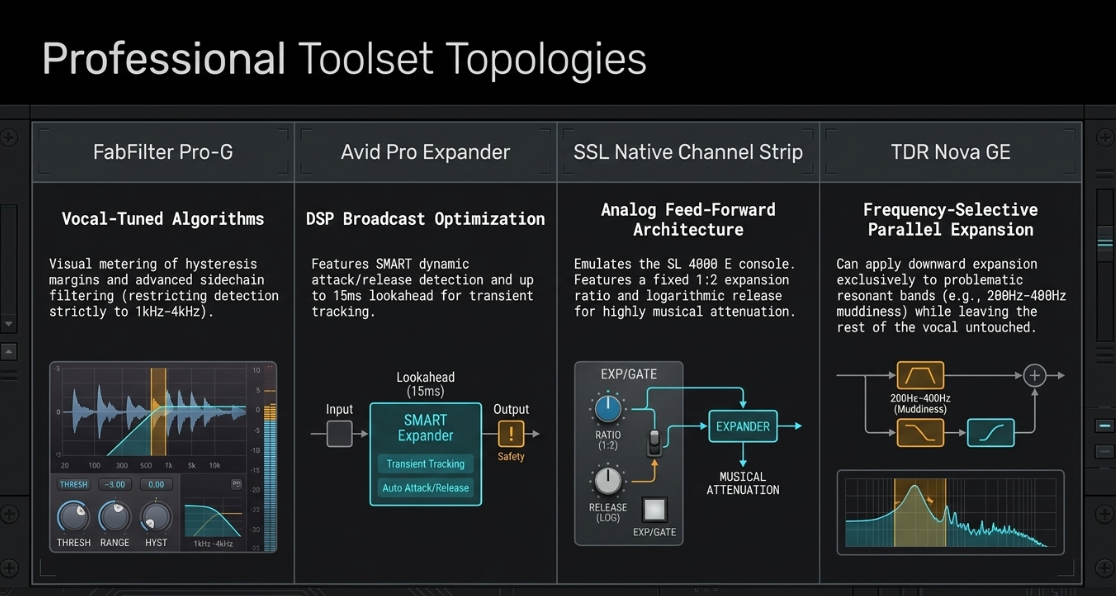
Several industry-standard dynamic expander plugins are utilized in professional podcast engineering, each offering distinct processing topologies and feature sets54.
FabFilter Pro-G
The FabFilter Pro-G is regarded as one of the most flexible and visually intuitive expander/gate plugins available56. It features five tuned algorithms, including a dedicated "Vocal" algorithm that automatically adjusts internal detection parameters for the human voice. The Pro-G offers highly visual real-time metering, showing the relationship between the incoming signal level, the threshold, the hysteresis margin, and the applied gain reduction. Its advanced sidechain routing section permits precise bandpass filtering, enabling the engineer to restrict the expander’s trigger detection strictly to the vocal mid-range ( to ), ignoring any low-end rumble or high-end hiss30.
Avid Pro Expander
Built specifically for Pro Tools environments and AAX DSP-optimized for large-scale broadcast workflows, the Avid Pro Expander is a highly surgical dynamic utility38. Based on the legacy console dynamics of the Avid System 5, it includes a proprietary "SMART" detection mode that dynamically alters attack and release times based on the complexity of the incoming waveform38. Notable features include a dedicated lookahead mode (up to ), an integrated PPM meter for precise transient tracking, and an advanced, highly musical "Upward Expansion" mode that can be used to re-emphasize transients in highly compressed dialogue38.
Solid State Logic (SSL) Native Channel Strip (Dynamics Section)
For engineers seeking the cohesive, classic sound of analog consoles, the SSL Native Channel Strip emulates the dynamics section of the legendary SL 4000 E and 9000 Series consoles58. The SSL expander operates using a feed-forward Class A VCA architecture with a logarithmic release curve59. It features a fixed expansion ratio when operating in expander mode, which provides a natural-sounding, highly musical attenuation curve59. The SSL gate/expander is prized for its simplicity and the speed with which an engineer can achieve consistent, professional results without endless manual automation60.
Tokyo Dawn Labs (TDR) Nova GE
While primarily a parallel dynamic equalizer, the TDR Nova GE (Gentleman's Edition) can configure each of its four bands to operate in downward or upward expansion30. This allows for frequency-selective expansion, making it a powerful utility for complex spoken-word repair30. For instance, if a podcast host has excessive low-mid frequency room resonance (muddiness around to ) that only occurs on specific vocal notes, the TDR Nova can be set to act as a downward expander only within that specific frequency band, leaving the rest of the vocal spectrum untouched when the host is speaking quietly.
Technical Engineering Conclusions
For professional podcast post-production, dynamic range expanders are essential tools that offer a level of control and transparency that traditional noise gates cannot match3. For solo or multi-host dialogue, dynamic expanders provide a precise, phase-coherent method for managing ambient noise, crosstalk, and mechanical bleed9.
To achieve professional broadcast quality, post-production engineers should implement the following systemic guidelines:
Prioritize Downward Expansion Over Gating: Always default to a downward expander with a gentle ratio () and a range limit () to preserve a natural noise floor and prevent choppy vocal tails9.
Sustain Rigid Signal Chain Architecture: Position the expander immediately after subtractive equalization (high-pass filter) and spectral de-clicking, but before any macro-dynamic compression18. This prevents low-end rumble from mistriggering the expander and ensures that the noise is suppressed before the compressor can amplify it18.
Deploy Auto-Mixing for Panel Discussions: In multi-host recordings with heavy crosstalk, replace independent gates and expanders with a gain-sharing auto-mixer (such as the Dan Dugan system) on the vocal bus43. This maintains constant system gain and eliminates comb-filtering without generating unnatural room-tone pumping43.
Incorporate Lookahead and Hysteresis: Protect plosive consonants and prevent gate chatter by utilizing expanders that support digital lookahead () and a hysteresis threshold offset ()20.
Strictly Avoid Spatial Expanders on Vocals: Never utilize stereo-widening spatial expanders on primary voice tracks13. These processors generate severe phase incoherence and comb filtering that destroy mono compatibility on modern playback devices13. Ensure that all dynamic processing is executed in the amplitude domain using dedicated dynamic range expanders9.
Works cited
Tame your podcast noise with Expansion, https://thepodsessions.com/tame-your-podcast-noise-with-expansion/
Audio dynamics 101: compressors, limiters, expanders, and gates - iZotope, https://www.izotope.com/community/blog/audio-dynamics-101-compressors-limiters-expanders-and-gates
Mixing with Expanders - Icon Collective, https://www.iconcollective.edu/mixing-with-expanders
Downward compression - upward comp. and expansion and gate - what is the difference?? : r/audioengineering - Reddit, https://www.reddit.com/r/audioengineering/comments/avbqzv/downward_compression_upward_comp_and_expansion/
Upward Compression: The Overlooked Mix Hack You've Been Missing | Blog - Waves Audio, https://www.waves.com/upwards-compresion-the-overlooked-mix-hack-youve-been-missing
Upward/downward Compression/Expansion explained : r/audioengineering - Reddit, https://www.reddit.com/r/audioengineering/comments/jdz5x5/upwarddownward_compressionexpansion_explained/
Expanding on compression: 3 overlooked techniques for improving dynamic range - iZotope, https://www.izotope.com/community/blog/expanding-on-compression-3-overlooked-techniques-for-improving-dynamic-range
What is Upward Compression - eMastered, https://emastered.com/blog/upward-compression
What is a noise gate? And what's an expander? - LEWITT Audio, https://www.lewitt-audio.com/blog/what-is-a-noise-gate-expander
Production Techniques Using Gates & Expanders, https://www.soundonsound.com/techniques/production-techniques-using-gates-expanders
A Podcaster's Guide To Noise Reduction | by Joe Nash - Medium, https://medium.com/@jowie/a-podcaster-s-guide-to-noise-reduction-e8cad9fc21f4
When do you use an expander? - SOS FORUM, https://www.soundonsound.com/forum/viewtopic.php?t=12444
Xfer Records Dimension Expander - What To Know & Where To Buy | Equipboard, https://equipboard.com/items/xfer-records-dimension-expander-plugin
SoundblasterX G6 - is it worth it? : r/SoundBlasterOfficial - Reddit, https://www.reddit.com/r/SoundBlasterOfficial/comments/v3b7ed/soundblasterx_g6_is_it_worth_it/
Tonverk: User Thread - Page 44 - Elektronauts, https://www.elektronauts.com/t/tonverk-user-thread/238631?page=44
Working With Mic Bleed - Sound On Sound, https://www.soundonsound.com/techniques/working-mic-bleed
Compression, Limiting, Expansion, and Gating Explained - Perfect Circuit, https://www.perfectcircuit.com/signal/compression-limiting-expansion-gating
How to Remove Mouth Clicks from Audio Online: Fix Lip Smacks, Saliva Clicks, and Pops, https://simpleclean.app/blog/remove-mouth-clicks-from-audio-online
How to Eliminate Mouth Noises and Clicks when Recording - Nic Redman, https://nicolaredman.com/how-to-eliminate-mouth-noises-and-clicks-when-recording/
How to Use a Noise Gate to Get Rid of Unwanted Noise in Audio - LifeTips, https://lifetips.alibaba.com/tech-efficiency/how-to-use-a-noise-gate-to-get-rid-of-unwanted-noise-in
The Complete Guide To Podcast Editing - Podigy, https://www.podigy.co/the-complete-guide-to-podcast-editing
Editing 2 people's mics in the same room : r/podcasting - Reddit, https://www.reddit.com/r/podcasting/comments/13p6xna/editing_2_peoples_mics_in_the_same_room/
Multitrack Clarity Redefined: Introducing our new Mic Bleed Remover - Auphonic, https://auphonic.com/blog/2025/10/08/mic-bleed-remover/
How to Remove Mouth Noise in Voice Over or Podcast Audio p.1, https://www.bryanhurtaudio.com/blog/remove-mouth-noise-voice-over-podcast-rx-1
Newbie Question: How to Use a Compressor for Spoken Word? - Reddit, https://www.reddit.com/r/livesound/comments/16kbzap/newbie_question_how_to_use_a_compressor_for/
EQ and Compression for Podcasters (Who Have Never Used Them Before) - Medium, https://medium.com/@drew.arigadas/eq-and-compression-for-podcasters-who-have-never-used-them-before-206500b1562c
Expander vs Noise Gate for Podcasting - Geeky Nerdy Techy, https://geekynerdytechy.com/expander-vs-noise-gate/
Which Comes First: EQ or Compressor? - iZotope, https://www.izotope.com/community/blog/eq-before-or-after-compression
Confused about correct order for audio filters on microphone? : r/audioengineering - Reddit, https://www.reddit.com/r/audioengineering/comments/1mkp0io/confused_about_correct_order_for_audio_filters_on/
EQ-Based Gating: The Smart Way to Leave Space in a Mix Without Killing the Music, https://www.makingascene.org/eq-based-gating-the-smart-way-to-leave-space-in-a-mix-without-killing-the-music/
How to Use a Gate: Perfect Dialog Settings in 5 Steps | Black Ghost Audio, https://www.blackghostaudio.com/blog/how-to-use-a-gate-perfect-dialog-settings-in-5-steps
Setting Up an Audio Compressor (Explained Simply) - Projet Home Studio, https://www.projethomestudio.fr/en/audio-compressor-settings/
The Best Noise Gate Settings for Vocals - Music Guy Mixing, https://www.musicguymixing.com/noise-gate-settings-for-vocals/
Expanders - especially in monitor world : r/livesound - Reddit, https://www.reddit.com/r/livesound/comments/1fn171b/expanders_especially_in_monitor_world/
Expander causing pops and clicks after upgrade to OBS 29?, https://obsproject.com/forum/threads/expander-causing-pops-and-clicks-after-upgrade-to-obs-29.163096/
Noise Gate in Logic Pro for iPad - Apple Support (QA), https://support.apple.com/en-qa/guide/logicpro-ipad/lpipbafe55dc/ipados
What is Hysteresis? - Pro Audio Files, https://theproaudiofiles.com/video/what-is-hysteresis/
Pro Expander - Dynamics Plugin - Avid, https://www.avid.com/plugins/pro-expander
How does lookahaed work on gate? : r/audioengineering - Reddit, https://www.reddit.com/r/audioengineering/comments/1j2pf3l/how_does_lookahaed_work_on_gate/
How to remove mic bleed in podcasting - side chain compression - YouTube, https://www.youtube.com/watch?v=Dj5tWtU_DvA
How I remove bleed from podcast recordings - Reddit, https://www.reddit.com/r/podcasting/comments/1pd3x78/how_i_remove_bleed_from_podcast_recordings/
Gate or Expander for two or more people? : r/podcasting - Reddit, https://www.reddit.com/r/podcasting/comments/1jbqls3/gate_or_expander_for_two_or_more_people/
Dan Dugan Automixer - Waves Audio, https://www.waves.com/mixers-racks/dugan-automixer
Podcast Editing: Phasing issue in Multitrack : r/audioengineering - Reddit, https://www.reddit.com/r/audioengineering/comments/1izjxkf/podcast_editing_phasing_issue_in_multitrack/
Dugan Speech – Automixer for eMotion LV1 - Waves Audio, https://www.waves.com/mixers-racks/dugan-speech
Waves Dugan Speech Automixer Software for eMotion LV1 and SuperRack - Moog Audio, https://fr.moogaudio.com/products/waves-dugan-speech-automixer
EQ Before or After Compression? - Berklee Online Take Note, https://online.berklee.edu/takenote/eq-before-or-after-compression/
Compress before or after EQ? : r/musicproduction - Reddit, https://www.reddit.com/r/musicproduction/comments/vszdu5/compress_before_or_after_eq/
How much magic to put on a podcast? : r/audioengineering - Reddit, https://www.reddit.com/r/audioengineering/comments/10rw2ym/how_much_magic_to_put_on_a_podcast/
Which order should I chain my pedals : r/Guitar - Reddit, https://www.reddit.com/r/Guitar/comments/1kn3e6q/which_order_should_i_chain_my_pedals/
Plugins for Streaming & Podcasting - Waves Audio, https://www.waves.com/plugins/streaming-podcasting
Expander Plugins - Equipboard, https://equipboard.com/c/expander-plugins
100 Plug-ins Every Engineer Should Try - Sound On Sound, https://www.soundonsound.com/reviews/100-plug-ins-every-engineer-should-try
Fabfilter Pro-G Tutorial - Everything You Need to Know - YouTube, https://www.youtube.com/watch?v=Yi5j9vtROlI
SSL Plug-ins - Solid State Logic, https://solidstatelogic.com/products/ssl-plug-ins
SSL Channel Strip Guide - Solid State Logic, https://solidstatelogic.com/channel-strip-guide
How do YOU use the SSL gate/expander? : r/audioengineering - Reddit, https://www.reddit.com/r/audioengineering/comments/1n2qg5q/how_do_you_use_the_ssl_gateexpander/














