
The Structural Post-Production Lifecycle and Spotting Methodologies
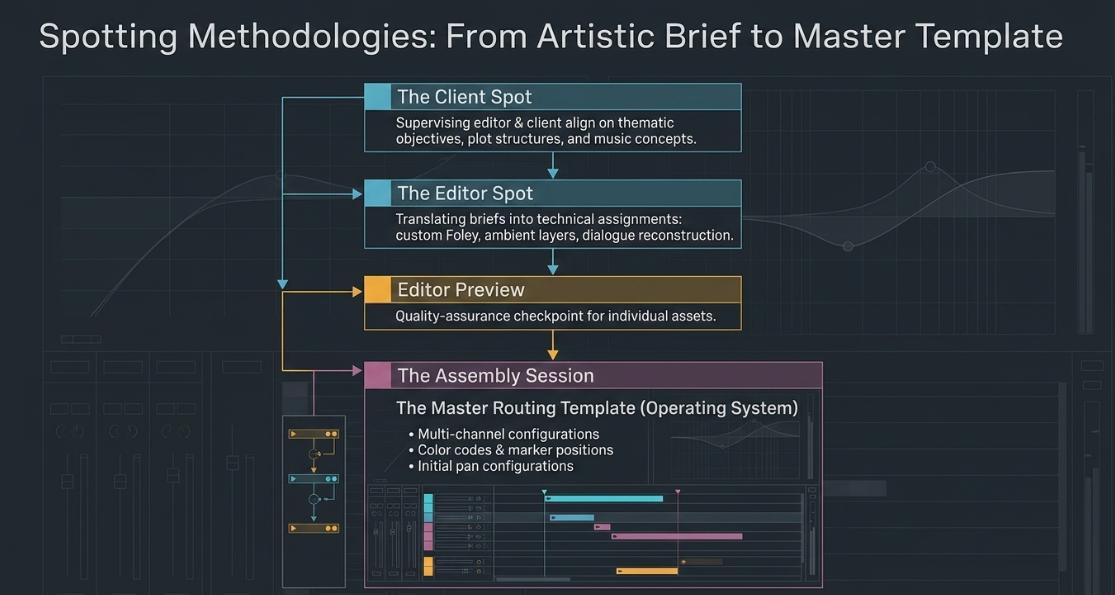
Professional podcast post-production operates as a highly technical, multi-phased lifecycle engineered to transform raw acoustic captures into clear, cohesive, and compelling audio assets1. This lifecycle begins with the spotting session, a collaborative evaluation phase where sound supervisors, directors, client producers, and mixing engineers analyze the rough cut of an episode3. The spotting phase is bisected into two distinct operations: the Client Spot and the Editor Spot4. During the Client Spot, the supervising sound editor and client review the master project to align on thematic objectives, clarify plot structures, identify performance deficiencies, and pitch sound design or musical concepts4. The Editor Spot translates these artistic briefs into actionable, technical assignments for the editorial department, detailing which elements require custom Foley recording, ambient layering, or specialized dialogue reconstruction4.
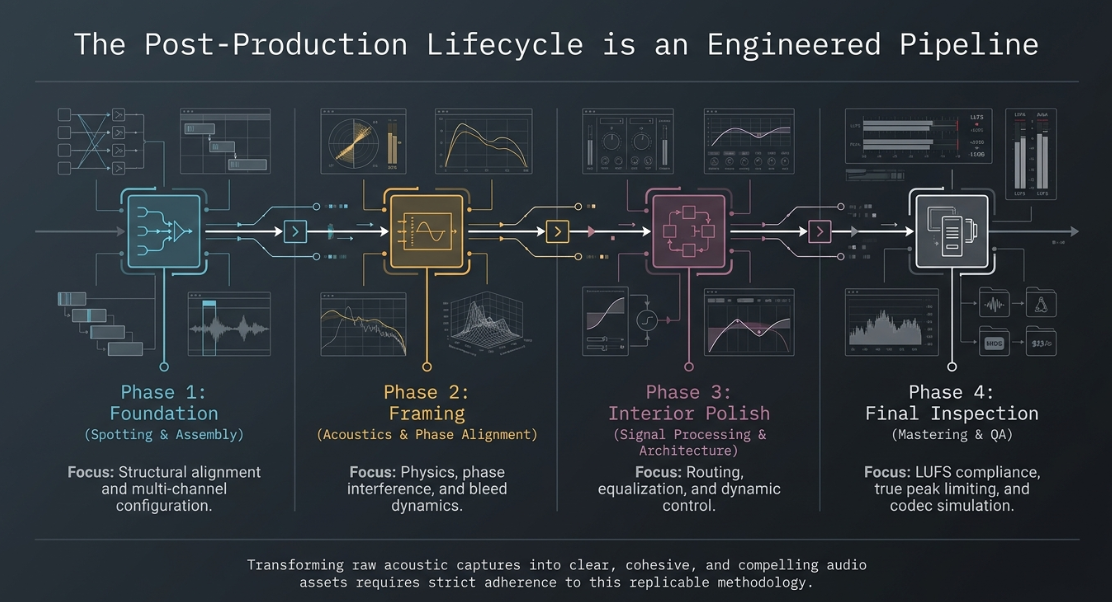
Once editorial tasks are defined, the session undergoes an Editor Preview—a quality-assurance checkpoint where the supervising editor reviews individual assets before importing them into the master timeline4. The subsequent step is the Assembly Session, a core phase where dialogue, sound effects, and Foley tracks are combined into a master routing template4. This template functions as the post-production facility’s operating system, aligning multi-channel configurations, color codes, marker positions, and initial pan configurations to streamline the final mixing stage4.
[Spotting Session: Client & Editor Spots]
│
▼
[Editor Preview]
│
▼
[Assembly Session]
│
▼
[Dialogue Editing] ───► [Noise & Hum Mitigation]
│
▼
[Sound Design] ──────► [Foley, ADR, & SFX Editing]
│
▼
[Post-Prod Mixing] ───► [Gain Staging, EQ, & Dynamics]
│
▼
[Mastering Suite] ────► [Loudness Normalization & True Peak Limiting]
│
▼
[Final Assessment] ───► [Codec Simulation & QA Release]
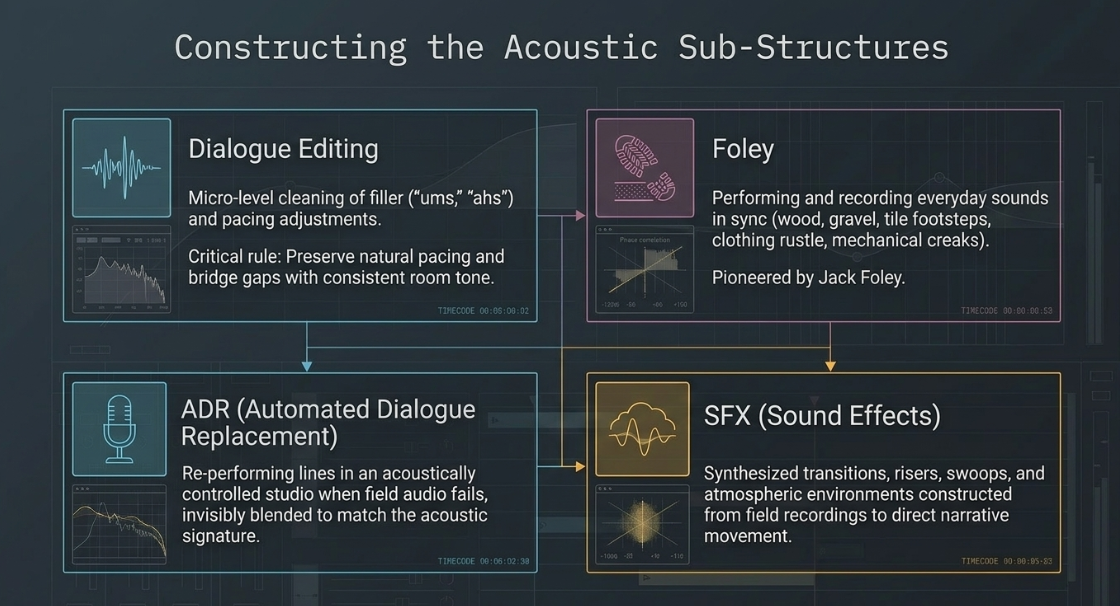
Within this pipeline, structural sound elements are categorized into dialogue, Foley, Automated Dialogue Replacement (ADR), and sound effects (SFX)3. Dialogue editing focuses on the micro-level cleaning, structural arrangement, and timing adjustments of speech3. Content editors prune distracting filler words such as "ums," "ahs," "likes," and "you-knows" while preserving the natural pacing and cadence of the speaker7. Pacing adjustments involve tightening gaps between speakers, smoothing over awkward silences, and inserting room tone to bridge edits2.
Foley recording—pioneered by Jack Foley—involves performing and recording everyday sounds in sync with the performance3. This includes footsteps on diverse substrates like wood, gravel, or tile, the rustle of clothing, physical impacts, and mechanical creaks3. When production audio is unsalvageable due to background noise or technical failures, ADR is deployed, requiring voice talent to re-perform lines in an acoustically controlled studio while watching the video timeline3. ADR mixers then blend these studio recordings with surviving field audio to create an invisible acoustic match3. SFX editors complete the soundscape, constructing designed elements like synthesized transitions, risers, swoops, whooshes, and atmospheric environments from field recordings or curated sound libraries to direct narrative movement3.
Phase Interferences, Bleed Dynamics, and Acoustic Science
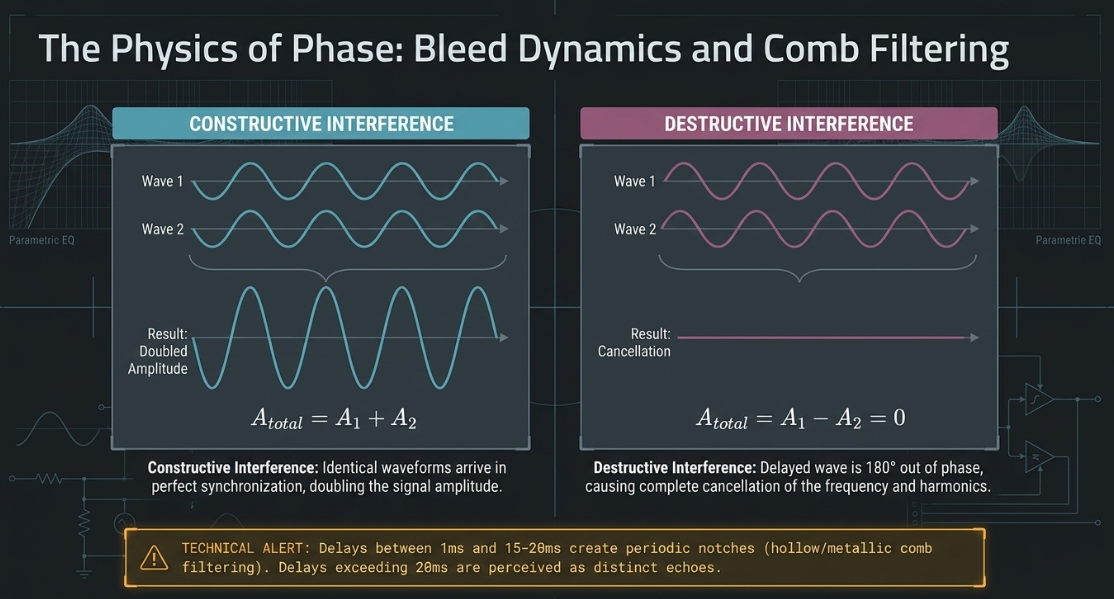
In multi-microphone spoken-word environments, the physical proximity of speakers introduces acoustic challenges, most notably microphone bleed and comb filtering9. Comb filtering occurs when a single sound source is captured by two or more microphones separated by a spatial distance, or when a microphone captures both the direct sound and a delayed acoustic reflection off a nearby surface9. This physical displacement introduces a time delay between the signals12. When these channels are summed to mono, phase interference occurs10.
Constructive interference is established when two identical waveforms arrive in perfect synchronization, doubling the signal amplitude12. This is mathematically expressed as:
[cite: 12]
Destructive phase interference occurs when the delayed wave is out of phase relative to the source, causing complete cancellation of the frequency and its corresponding harmonics:
[cite: 12, 13]
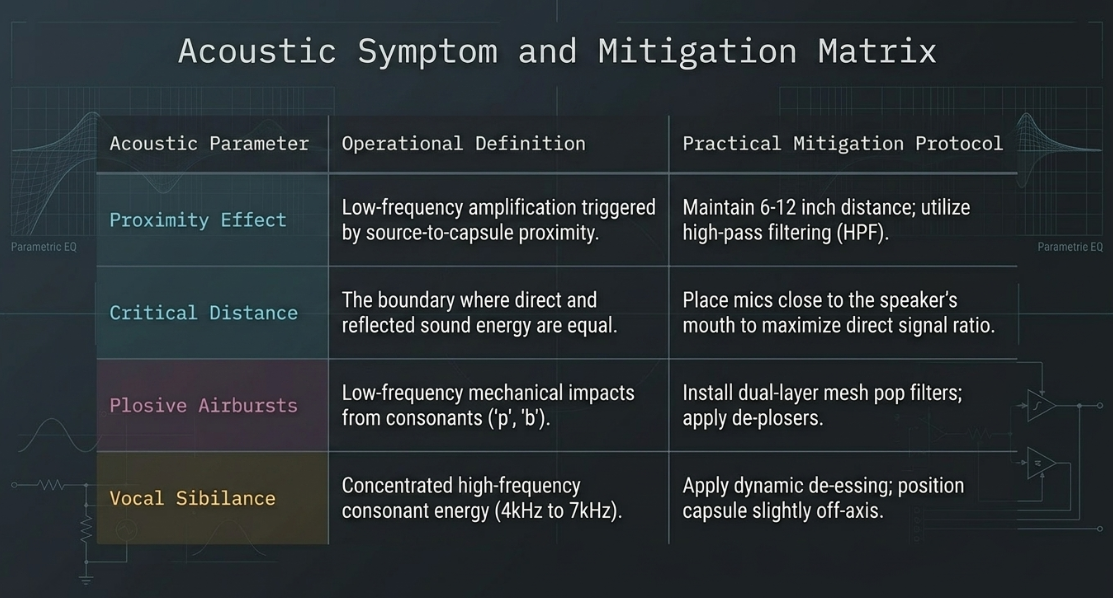
For delays between and , the summed frequency response exhibits a series of deep, periodic notches, creating a hollow, metallic sound9. Delays exceeding are perceived as distinct echoes12. This phase coloration is triggered by reflections off walls, ceilings, floors, tabletops, sheet music, or scripts near the microphone9. To minimize reflections, rooms must be treated with absorptive materials9. Additionally, the microphone must be positioned within the critical distance, where the ratio of direct-to-reflected sound energy is highly favorable12.
The proximity effect also influences the frequency spectrum14. Cardioid and directional microphones exhibit an increase in low-frequency response as the sound source moves closer to the capsule14. If a speaker is too close, the low-end frequencies overwhelm the vocal, leading to muddiness14. Conversely, if the speaker is too far away, the audio sounds thin, distant, and room-dominated14. Consistent vocal delivery requires maintaining a stable distance from the microphone, backed by the use of pop filters to deflect high-velocity airbursts from plosive consonants like "p" and "b"14.
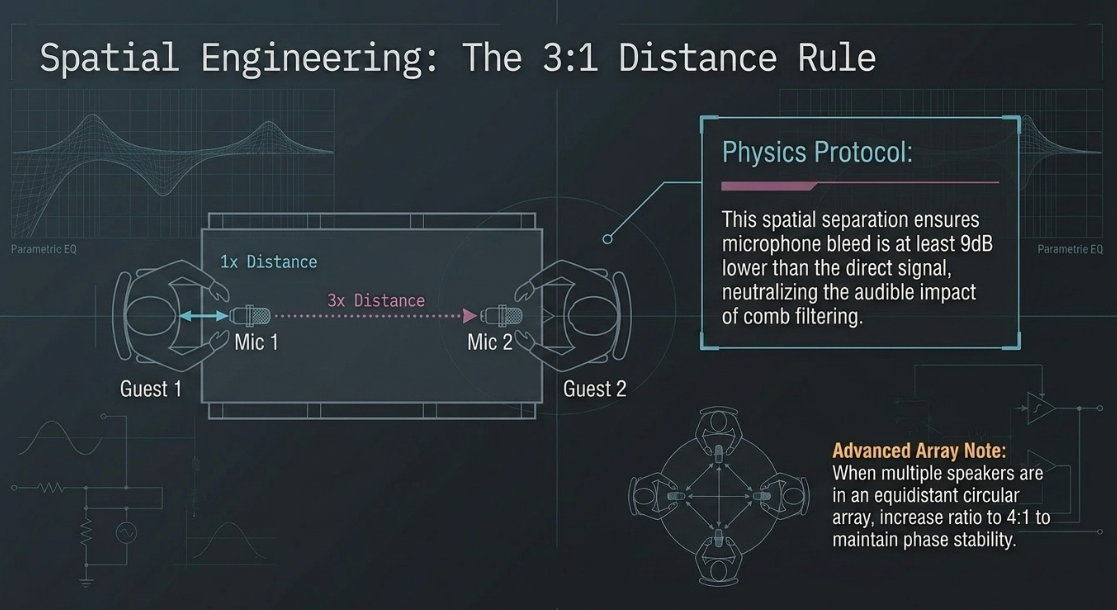
Acoustically, microphone bleed can be mitigated by applying the rule, which dictates that the physical distance between any adjacent microphone and a sound source must be at least three times the distance from that source to its primary microphone9. This spatial separation ensures that the bleed level is at least lower than the direct signal, minimizing the audible impact of comb filtering9. When multiple speakers are positioned in an equidistant circular array, this ratio should be increased to to maintain phase stability9.
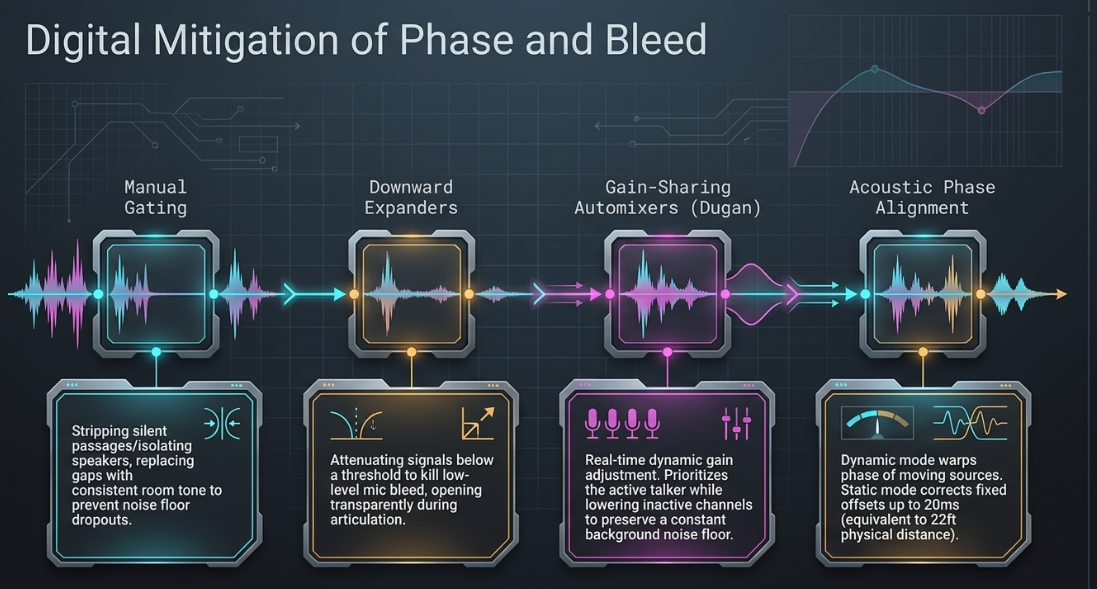
In post-production, engineers address bleed and phase issues using several specialized digital tools:
Manual Gate and Dialogue Editing: Editors manually strip silent passages or isolate speakers to ensure only one microphone channel is active at a time11. The empty spaces are filled with consistent background room tone to prevent sudden dropouts in the room's noise floor6.
Dynamic Expanders: Downward expanders attenuate signals that fall below a designated threshold11. This attenuates low-level microphone bleed during pauses while opening transparently when the primary speaker articulates11.
Automatic Gain-Sharing Automixers: Algorithms like the Dugan automixer dynamically adjust the gain of all open microphones in real-time11. By assessing active voice inputs, the system prioritizes the active talker while lowering inactive channels, preserving a consistent system gain and background noise floor11.
Acoustic Phase Alignment Plugins: Digital tools such as Sound Radix Auto-Align Post 2 analyze multiple tracks to correct phase discrepancies dynamically18. Static Mode corrects fixed time offsets of up to (representing physical distances up to ) for stationary setups18. Dynamic Mode continuously calculates and warps the phase relationship of moving sound sources18. This process incorporates a Spectral Phase Correction Module to resolve frequency-dependent phase shifts caused by differing acoustic filters or hardware preamps, preserving low-frequency energy19.
Spoken-Word Mixing Architecture and Signal Processing Chains
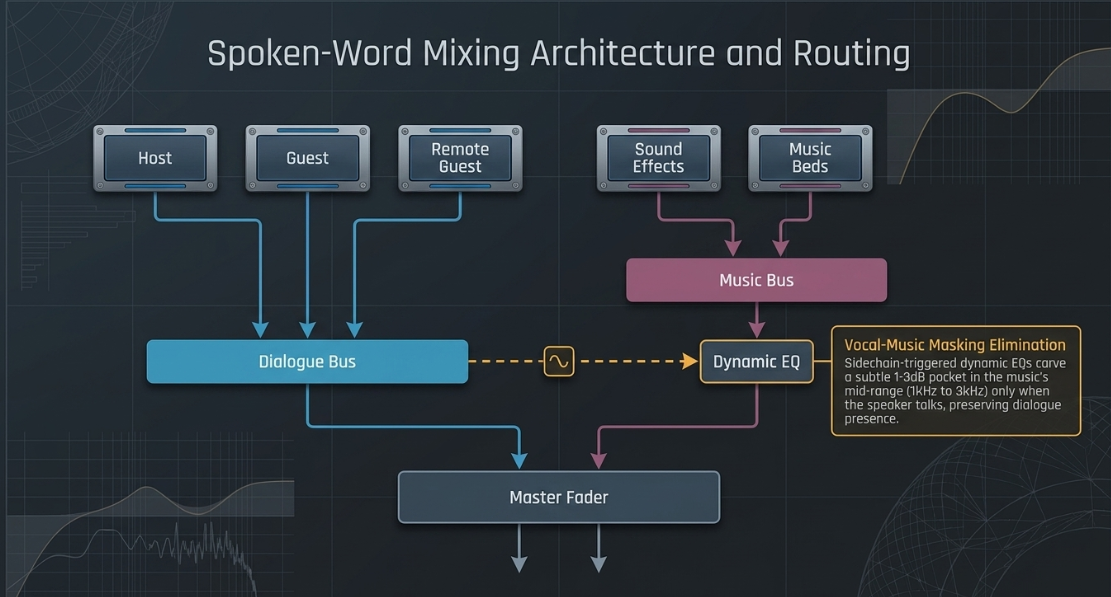
Professional spoken-word mixing requires a highly structured routing architecture1. Individual vocal channels (e.g., Host, Guest, Remote Guest) are processed with local corrective tools before being routed to a summed "Dialogue Bus"1. Auxiliary tracks like sound effects, intros, and music beds are grouped onto separate sub-buses1. This bus architecture allows the mixing engineer to apply global dynamic processing and shape the overall mix cohesively before routing the sum to the master fader1.
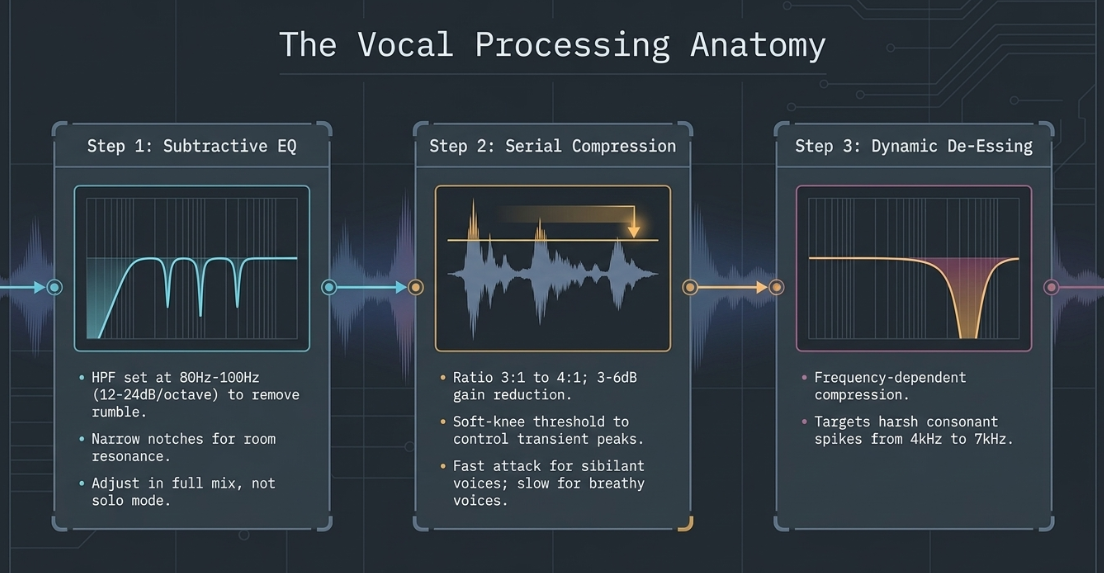
Subtractive equalization is the first step in the local signal chain1. High-pass filters (HPFs) are applied to all non-bass tracks to eliminate low-frequency rumble, physical handling noise, and DC offsets without altering the vocal's warmth1. Narrow parametric notches are then used to target specific room resonances and ringing frequencies1. Subtractive EQ is preferred over additive EQ because carving away problematic frequencies preserves headroom and maintains a more natural vocal character1. This corrective work is performed while listening to the full mix, as adjusting EQ in solo mode often leads to unnecessary boosts that introduce high-frequency harshness15.
Dynamic processing utilizes both serial and parallel compression1. Serial compression is applied directly to the vocal track using moderate ratios (such as to ) with soft-knee thresholds to control transient peaks while preserving natural performance dynamics1. Voice-specific settings are essential; fast, sibilant voices require fast attack and release times to control transient peaks, while soft, breathy speakers benefit from slower, smoother dynamic control1.
To introduce body and presence without over-compressing the main signal, parallel compression is applied1. The vocal bus is duplicated or routed to an auxiliary track where an aggressive compressor is inserted with a low threshold and fast attack times1. Blending this heavily compressed signal back into the dry mix introduces consistent density and low-mid warmth while keeping the primary vocal transients intact1.
Spectral processing tackles frequency-specific challenges1:
Vocal Sibilance Suppression: Sibilant consonants generate harsh energy spikes in the to band1. Dedicated de-essers, such as the FabFilter Pro-DS, act as frequency-dependent compressors, targetting these ranges to reduce harshness1.
Vocal-Music Masking Elimination: When a voiceover overlaps with a background music bed, spectral masking occurs1. Instead of relying solely on global gain ducking, engineers insert dynamic EQs or multi-band compressors on the music bus1. Using the dialogue bus as a sidechain trigger, these processors carve a subtle pocket in the music’s mid-range (typically to ) only when the speaker is talking, keeping the dialogue present without making the background music sound weak1.
Mastering Standards, Loudness Normalization, and Platform Specs
Audio mastering prepares the mixed program for final distribution2. The core objective of mastering is to achieve consistent playback levels across diverse consumer devices while maintaining the dynamic range and frequency balance of the mix30. Traditional peak-level meters measure only the highest instantaneous voltage sample, failing to capture how the human ear perceives loudness over time33.
Modern standards resolve this using K-weighted Loudness Units relative to Full Scale (LUFS, interchangeable with LKFS in North American standards), defined by the ITU-R BS.1770 standard29. The K-weighting curve filters the signal in two stages: a high-pass filter with a slope turning over at to simulate low-frequency insensitivity, and a high-shelf boost starting at to account for the acoustic head-shadowing effect of the human head34.
Loudness measurement is analyzed across three distinct temporal windows:
Momentary Loudness (): Integrates the K-weighted signal over a sliding window, providing real-time feedback on instantaneous transient spikes29.
Short-Term Loudness (): Measures loudness over a sliding window, smoothing out minor fluctuations to represent broader phrase-level variations29.
Integrated Loudness (): A gated measurement spanning the entire duration of the program29. It employs a dual-gate threshold: an absolute gate at to exclude silent passages, and a relative gate set below the ungated average to ignore quiet segments, ensuring the final reading represents only active foreground content29.
In podcasting, target loudness standards differ for stereo and mono files49. Because mono tracks route identical signals to both left and right speakers, the acoustic summation in the center of the stereo image creates a higher perceived volume than a stereo track at the same LUFS level42. To compensate, the industry standard dictates that a stereo podcast mix be mastered to with a maximum True Peak of 29. Conversely, a mono podcast mix must be mastered to at to maintain perceptual volume parity42.
Loudness targets vary across different video and audio formats52. Chris Curran, founder of the Podcast Engineering School, applies dual workflows depending on the final medium52. Curran, whose background includes engineering at elite facilities like The Hit Factory, Soundtrack Group, and Quad Recording for artists such as Foreigner, Jeff Buckley, and Biggie Smalls, targets a dynamic profile tailored to the destination format54. For video podcasts, Curran masters mono channels to and stereo channels to to maintain presence on video platforms52. For audio-only distribution, the target is set to for mono and for stereo52.
Mastering Workflows and Software Architecture
The digital audio workstation (DAW) market offers diverse software solutions, ranging from highly manual, professional mixing environments to automated, cloud-based processors8. Traditional DAWs like Avid Pro Tools, Apple Logic Pro, and Cockos Reaper provide precise, manual control over all parameters, supporting extensive plugin chains and deep multitrack editing8.
Specialized editors like Hindenburg Pro target speech-heavy workflows, featuring auto-leveling on import, a voice profiling system to automatically adjust vocal EQ, and integrated loudness-normalization encoders upon export8. On the automated front, tools like Alitu and Auphonic offer hands-off post-production8. Auphonic utilizes an adaptive leveler to balance dialogue and music, dynamic range compression to smooth speech volume, and automatic noise and reverb reduction28. These automatic web services are widely used for batch mastering and conforming projects directly to targeted LUFS standards59.
Professional mastering workflows require specific steps to ensure consistent results across different platforms:
Adobe Audition Match Loudness Workflow
To conform multiple audio files to a target standard in Adobe Audition, the practitioner utilizes the Match Loudness panel:
Open Match Loudness Panel: Navigate to Window > Match Loudness to open the interface49.
Import Audio Files: Drag the mixed audio files directly into the Match Loudness panel49.
Scan Loudness: Click the Scan icon to analyze the current Integrated Loudness and True Peak values of the source files49.
Set Loudness Target: In the settings menu, select ITU-R BS.1770-3 or EBU R12849. Set the Target Loudness to and the Maximum True Peak Limit to 49.
Run Processing: Click Run to apply linear gain changes or peak limiting to meet the target parameters49.
Export Master: Export the conformed file using File > Export > Export Multitrack Mixdown49.
Audacity Mastering Workflow
For a manual mastering workflow in Audacity, the following steps are applied:
Import and Selection: Load the final mix and highlight the entire track timeline using Ctrl+A or Cmd+A49.
Loudness Normalization: Navigate to Effect > Volume and Compression > Loudness Normalization49. Select Perceived Loudness and set the target to for stereo files or for mono files49. Disable Normalize stereo channels independently to preserve the stereo image49. Enable Treat mono as dual-mono if mastering a mono track49.
True Peak Limiting: Apply peak limiting via Effect > Normalize to set the True Peak ceiling to to prevent clipping49.
Export Configuration: Select File > Export > Export Audio. Configure the output to MP3 format with a constant bitrate of (the standard for spoken-word delivery) or export as a file at to preserve resolution30.
GarageBand Mastering Workflow
Because GarageBand lacks built-in advanced loudness metering, a custom mastering workflow using external plugins is required:
Export the Mix: Ensure the uncompressed mix has adequate headroom, peaking around 49. Export the mix as a file via Share > Export Song to Disk30.
Create Mastering Session: Import the exported WAV file into a blank GarageBand project and display the Master Track using Track > Show Master Track49.
Apply Dynamic Limiters: Insert a series of light limiters on the Master Track49. Using 3 to 4 limiters in series—each set to a gentle input gain and a output ceiling—smoothes transient peaks more transparently than driving a single limiter aggressively17.
Verify via Loudness Meter: Insert a compliant software meter, such as the free Youlean Loudness Meter, at the end of the master effects chain49. Play back the loudest passages of the file to verify that the Integrated Loudness stabilizes at and the True Peak stays below 49. Export the final master as a high-quality WAV or MP349.
Hindenburg Pro Automated Workflow
Hindenburg Pro automates the normalization process, streamlining the workflow:
Import and Alignment: Import raw recordings; Hindenburg automatically applies gain leveling based on the target vocal profile49.
Apply Edits and Vocal Profiling: Perform necessary cuts and apply the Voice Profiler to automatically balance EQ and vocal tone across all tracks49.
Loudness Targeting on Export: Navigate to File > Export49. Select the Podcast Loudness Target ( for stereo or for mono)49. Hindenburg automatically calculates the K-weighted loudness, applies transparent peak limiting, and encodes the file to the target spec in a single pass49.
The Final Quality Assessment and Translation Validation
The post-production cycle concludes with the Final Quality Assessment (QA), a crucial step to verify that the master translates clearly across diverse consumer playback environments2. Working long hours in a mixing suite introduces ear fatigue, skewing the engineer's perception of high-frequency detail and dynamic balance2. The QA process provides an objective check of the master before delivery2.
The validation workflow consists of several systematic steps:
Integrated LUFS Measurement: The engineer uses a calibrated meter (such as Nugen Audio VisLM, Waves WLM Plus, or Youlean Loudness Meter) to analyze the entire track from start to finish29. This confirms that the Integrated Loudness hits the target spec (e.g., for stereo, or for mono)29.
True Peak Ceiling Verification: The engineer verifies that no transient peaks exceed the platform limit (typically )29. If any peak exceeds this ceiling, the master is returned to the limiting stage30.
Codec Translation Simulation: Because streaming services compress files into lossy delivery formats (such as AAC at or Ogg Vorbis), the master must be simulated through these codecs prior to release30. This simulation checks for dynamic pumping, transient distortion, or high-frequency artifacts introduced by the compression algorithms30.
Multi-Device Listening Analysis: The engineer plays back the simulated master across a wide range of devices—including professional studio monitors, reference headphones, consumer earbuds, mobile phone speakers, and vehicle audio systems1. This ensures that dialogue remains intelligible and background music balances correctly, even on small speakers with limited frequency response1.
Dither and Bit-Depth Management: If the final master is downsampled from a working resolution to a file for specific distribution endpoints, the engineer applies high-quality dither30. Dithering adds low-level, randomized noise to mask harmonic distortion caused by quantization errors during bit-depth conversion, preserving detail in quiet passages30.
By combining physical acoustic principles, structured mixing architectures, and strict compliance with loudness metrics, engineers ensure that every production translates clearly to the listener1. This meticulous pipeline preserves the artistic intent of the creators, maintains structural consistency across episodes, and delivers a professional listening experience1.
Works cited
Audio Mixing Techniques for Pro-Level Podcasts & Video, https://flexworkstudios.com/audio-mixing-techniques/
Post Production in Audio: Editing and Mixing - Journalism University, https://journalism.university/audio-podcast/post-production-audio-editing-mixing/
Audio post-production: a complete guide to professional sound - LucidLink, https://www.lucidlink.com/blog/audio-post-production
Step-By-Step Audio Post-Production Workflow - Boom Box Post, https://www.boomboxpost.com/blog/2022/4/26/step-by-step-audio-post-production-workflow
Audio Post Production Workflow: Complete Guide - Forte AI, https://www.forte-ai.com/blog/audio-post-production-workflow-from-picture-handoff-to-final-mix
Audio Post-Production: Complete Guide, Techniques, and More - Boris FX, https://borisfx.com/blog/audio-post-production-complete-guide/
Ultimate Guide to Podcast Production (Part 2) - iZotope, https://www.izotope.com/community/blog/podcast-production-guide-part2
Best Podcast Software in 2026 and How to Pick the Right One for Your Show - Designrr, https://designrr.io/best-podcast-software/
The basics about comb filtering (and how to avoid it) - DPA Microphones, https://www.dpamicrophones.com/mic-university/audio-production/the-basics-about-comb-filtering-and-how-to-avoid-it/
Working With Mic Bleed - Sound On Sound, https://www.soundonsound.com/techniques/working-mic-bleed
Podcast Editing: Phasing issue in Multitrack : r/audioengineering - Reddit, https://www.reddit.com/r/audioengineering/comments/1izjxkf/podcast_editing_phasing_issue_in_multitrack/
Comb Filtering Explained: What Does a Comb Filter Sound Like? - Audio University, https://audiouniversityonline.com/comb-filtering-explained/
What is Comb Filtering - And How to Avoid It - Music Guy Mixing, https://www.musicguymixing.com/comb-filtering/
5 Common Podcast Mistakes and How to Avoid Them - InSync - Sweetwater, https://www.sweetwater.com/insync/common-podcast-mistakes-and-how-to-avoid-them/
Mix Mistakes - Sound On Sound, https://www.soundonsound.com/techniques/mix-mistakes
Discover top podcast software and podcast editing software. - Native Instruments, https://www.native-instruments.com/de/specials/komplete/podcasting-software/
Mix Prep and the Top 8 Mistakes You Should Avoid - Universal Audio, https://www.uaudio.com/blogs/ua/studio-basics-mastering-mistakes
Sound Radix Auto-Align Post - Barry Rudolph, https://www.barryrudolph.com/newtoys/toys18/soundradix_auto-align_post.html
Auto-Align Post 2 User Manual 2.2 - Sound Radix, https://assets.soundradix.com/downloads/Auto-Align%20Post%202.2.0%20User%20Manual.pdf
Sound Radix Auto-Align Post 2 at Gear4music, https://www.gear4music.com/Recording-and-Computers/Sound-Radix-Auto-Align-Post-2/4ZPY
Pro Tools delivers Auto-Align & Post ARA support - Avid, https://www.avid.com/resource-center/sound-radix-ara
Perfect Your Audio with These Essential Post-Production Plugins - Voodoo Sound, https://www.voodoosound.com.au/post/perfect-your-audio-with-these-essential-post-production-plugins
5 Common Mixing Mistakes And How You Can Fix Them, https://musicmixpro.co.uk/common-mixing-mistakes-and-how-to-fix-them/
FabFilter - Quality Audio Plug-Ins for Mixing, Mastering and Recording - VST VST3 AU CLAP AAX AudioSuite, https://www.fabfilter.com/
Plugins for Audio Post-Production: What the Pros Are Using, https://theproaudiofiles.com/post-production-plugins/
FabFilter vs. iZotope Plugins for Music Production - Produce Like A Pro Academy, https://producelikeapro.com/blog/fabfilter-vs-izotope/
What Are The Best DAW And Plugins For Editing Podcasts? - Tansy Aster Academy, https://tansyasteracademy.com/what-are-the-best-daw-and-plugins-for-editing-podcasts/
Features - Auphonic, https://auphonic.com/features?source=creativityf
LUFS Meter — Broadcast Loudness Measurement - Studio Six Digital, https://studiosixdigital.com/lufs-meter/
Mastering for Streaming: Your 2026 Platform Guide - SoundBridge, https://www.soundbridge.io/mastering-for-streaming-your-2026-platform-guide
The Art of Mixing and Mastering Audio for Video - Lightworks, https://lwks.com/blog/the-art-of-mixing-and-mastering-audio-for-video
Streaming Audio Loudness Guidelines Explained - Radio World, https://www.radioworld.com/tech-and-gear/tech-tips/streaming-audio-loudness-guidelines-explained
Mastering Loudness Targets for Streaming: Spotify, Tidal, Apple Music and More - Mat Leffler-Schulman, https://matlefflerschulman.com/mastering-articles/loudness-targets-and-mastering-for-streaming-platforms
Loudness Basics - AES - Audio Engineering Society, https://aes.org/resources/audio-topics/loudness-project/loudness-basics/
LUFS: The Key to Consistent Audio in the Streaming Era - Mediastream, https://www.mediastream.co/blog-es/lufs-the-key-to-consistent-audio-in-the-streaming-era
From (True) Peak via RMS to LUFS - Skippy Studio, https://skippystudio.nl/2021/02/from-true-peak-via-rms-to-lufs/
The Loudness Lookup - LUFS Standards for Every Platform - Dan Murtagh, https://danmurtagh.com/lufs-loudness-standards/
EBU Loudness Standard R-128 - WaveLab Cast - 2.0 - Steinberg Help, https://www.steinberg.help/r/wavelab-cast/2.0/en/wavelab/topics/wavelab_concepts/ebu_loudness_recommendation_r128__c.html
Loudness Control - RX 9 Help - Amazon S3, https://s3.amazonaws.com/izotopedownloads/docs/rx9/en/loudness/index.html
EBU R 128 - Wikipedia, https://en.wikipedia.org/wiki/EBU_R_128
EBU R128, Broadcast Loudness Target - APU Software, https://apu.software/ebu-r128-loudness-target/
Loudness Compliance Cheat Sheet, https://cdn.prod.website-files.com/64e8910adc5a63966a68acea/6a26c82b93653fc4bbdb9617_6a26c829e066fd5155c11ede_loudness-compliance-cheatsheet.pdf
Loudness metering – MiRA, https://doc.flux.audio/mira/Metering_Loudness.html
EBU addresses OTT loudness and Next Generation Audio progress in current projects, https://www.svgeurope.org/blog/headlines/ebu-addresses-ott-loudness-and-next-generation-audio-progress-in-current-projects/
Worldwide Loudness Delivery Standards - RTW Audio, https://www.rtw.com/blog/rtw-knowledge-base-1/worldwide-loudness-delivery-standards-4
New FCC Regulation Change | Telos Alliance, https://www.telosalliance.com/news/New-FCC-Regulation-Change
Streaming Loudness - AES Recommendations 2021, and why you should care, https://productionadvice.co.uk/td1008/
Recommendations for Loudness of Internet Audio Streaming and On-Demand File Playback, https://www.aesmelbourne.org.au/wp-content/uploads/2022/12/Melbourne-AES-loudness-presentation-final.pdf
HOW LOUD SHOULD YOUR PODCAST BE? LUFS AND DB EXPLAINED, https://content.sport-social.co.uk/blog/how-loud-should-your-podcast-be
LUFS: How to Mix Audio to Broadcast Specification EBU R128, https://soundguy.london/lufs-loudness-and-levels/
The Complete Guide to Auphonic for Podcasters - Buzzsprout, https://www.buzzsprout.com/blog/auphonic-for-podcasters
The Podcast Engineering Show | Podcast Guru, https://app.podcastguru.io/podcast/1079525975
Podcast Engineering School – Learn to Engineer and Produce Podcasts at a Professional Level, https://podcastengineeringschool.com/
Chris Curran - Podcast Editor Academy, https://www.podcasteditoracademy.com/chris-curran-2/
Chris Curran – Audio Engineer, Podcast Producer, https://podcastengineeringschool.com/chris-curran/
14 Best Podcast Editing Tools For Beginners in 2026 (Reviews + Costs) - Talks.co, https://talks.co/p/podcast-editing-tools/
Top 10 DAWs in 2026 and how to choose - iZotope, https://www.izotope.com/community/blog/best-daws
Best DAWs 2026: The best digital audio workstations for PC and Mac - MusicRadar, https://www.musicradar.com/news/the-best-daws-the-best-music-production-software-for-pc-and-mac
Audio Post Production Algorithms (Singletrack) — Auphonic Help 2026 documentation, https://auphonic.com/help/algorithms/singletrack.html
Auphonic: A full tutorial for newer podcasters! (It's my fave free tool post-pro tool) - Reddit, https://www.reddit.com/r/podcasting/comments/gnbf50/auphonic_a_full_tutorial_for_newer_podcasters_its/
The Best Digital Audio Workstations (DAWs) for 2026 - PCMag UK, https://uk.pcmag.com/recording/91889/the-best-audio-editing-software-for-2020
Top 7 DAWs for Podcasting - Smartsound Cloud, https://cloud.smartsound.com/blog/discover-the-top-7-daws-for-podcasting/
Matching loudness across multiple audio files - Adobe Help Center, https://helpx.adobe.com/uk/audition/using/match-loudness.html
Auphonic Media Mastering Settings - Blubrry Podcasting, https://blubrry.com/support/media-hosting-documentation/auphonic-settings/
Podcast mixing advice : r/podcasting - Reddit, https://www.reddit.com/r/podcasting/comments/1r102vc/podcast_mixing_advice/














