
Psychoacoustic Foundations and Hierarchical Session Architecture
In professional spoken-word post-production, establishing a clear hierarchical structure of narrative importance is paramount to ensuring content delivery1. Dialogue must maintain absolute supremacy across all spatial, temporal, and frequency domains, as speech is intended to be clearly differentiated from other mix elements to achieve maximum intelligibility1.
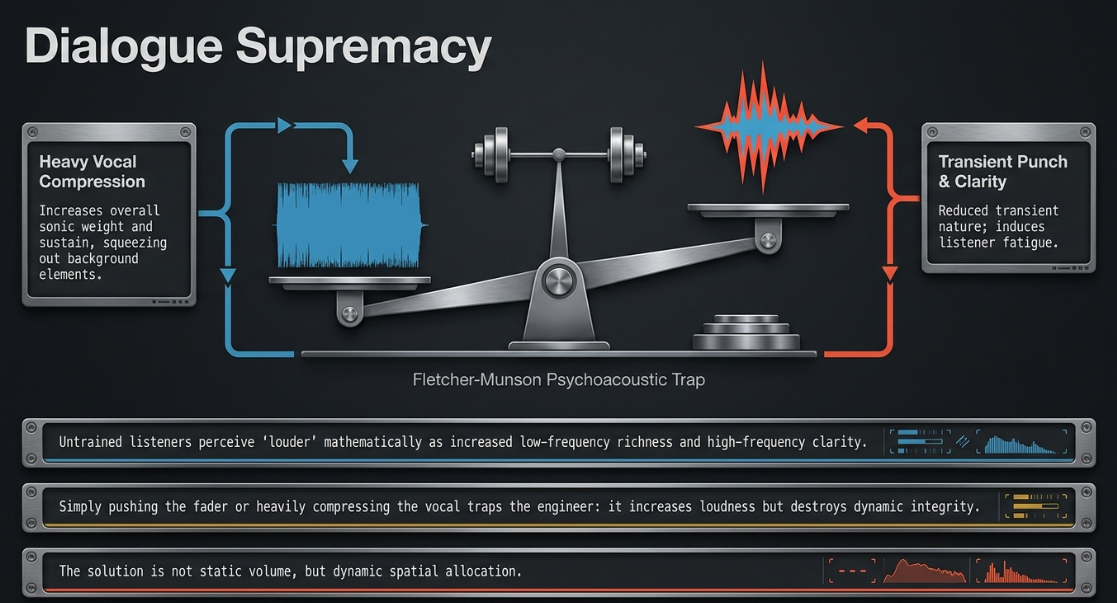
An fundamental psychoacoustic challenge in mixing is that an increase in monitoring volume mathematically results in an increased perception of low-frequency richness and high-frequency clarity, commonly explained by the Fletcher-Munson equal-loudness contours1. Untrained listeners will almost invariably select a louder mix as superior, even if its dynamic integrity has been severely compromised by over-compression1.
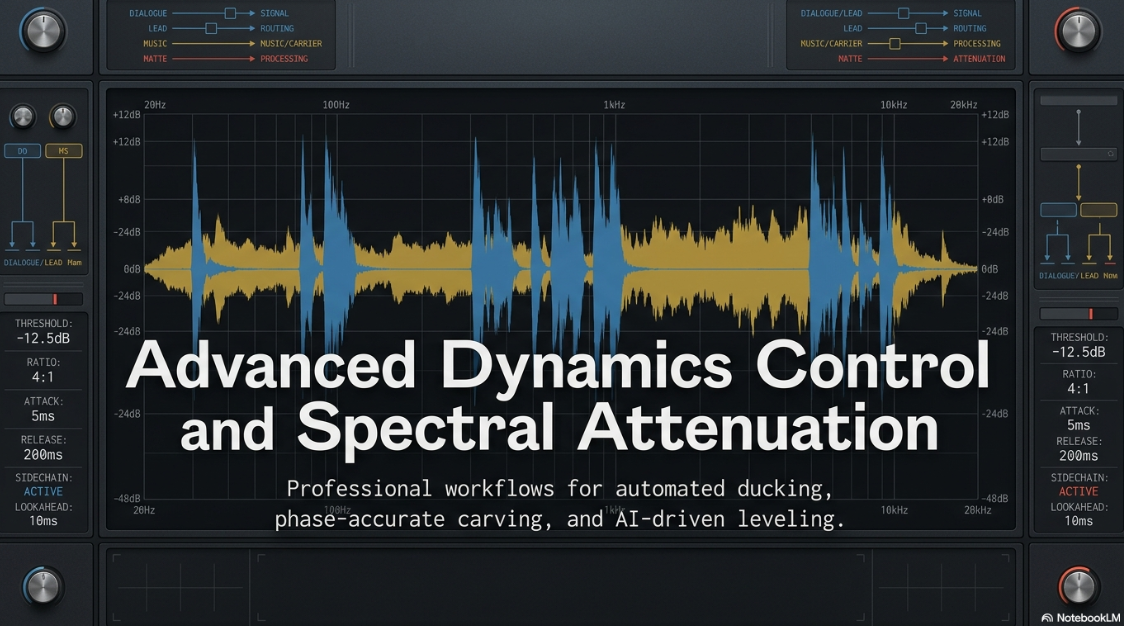
When heavy compression is applied to a voice to achieve loudness, it reduces its transient nature and increases its sustain1. This behavior increases the overall sonic weight of the voice, causing it to consume significantly more space in the mix and leaving less room for background elements1.
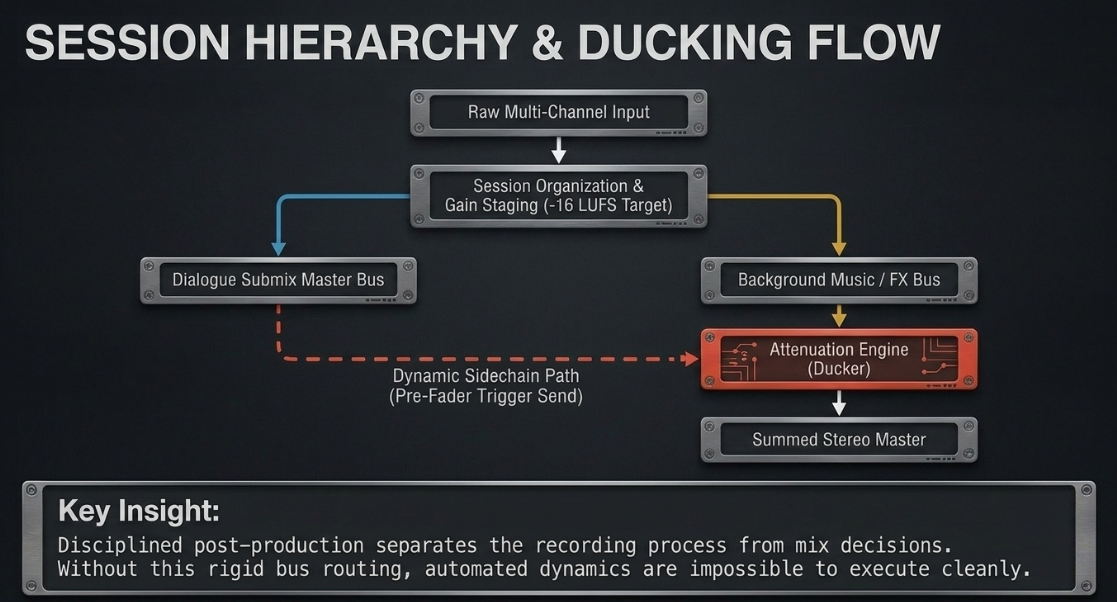
To manage these competing elements without inducing listener fatigue, professional mixing workflows separate the recording process from mix decisions3. A disciplined post-production workflow begins with rigid session organization3.
This includes labeling every source clearly, separating hosts, guests, music, ads, pickups, and room tone into dedicated tracks, and establishing gain staging standards3. This foundation ensures that dynamic decisions remain obvious and easy to execute3.
Raw Multi-Channel Input
│
▼
┌──────────────────────────────┐
│ Session Organization & │
│ Gain Staging (-16 LUFS Target) [cite: 3, 4]
└──────────────┬───────────────┘
│
▼
┌──────────────────────────────┐
│ Dialogue Submix Master Bus ├──────────┐ (Pre-Fader Trigger Send) [cite: 2, 5]
└──────────────┬───────────────┘ │
│ ▼
│ ┌────────────────────────┐
│ │ Dynamic Sidechain Path │ [cite: 2, 6, 7]
│ └───────────┬────────────┘
│ │
▼ ▼
┌──────────────────────────────┐ ┌──────────────────┐
│ Background Music / FX Bus │◄───┤ Attenuation │
│ (Carrier / "Duckee" Channel) │ │ Engine (Ducker) │ [cite: 2, 8, 9]
└──────────────┬───────────────┘ └──────────────────┘
│
▼
Summed Stereo Master
Technical Mechanisms of Broadband Sidechain Ducking
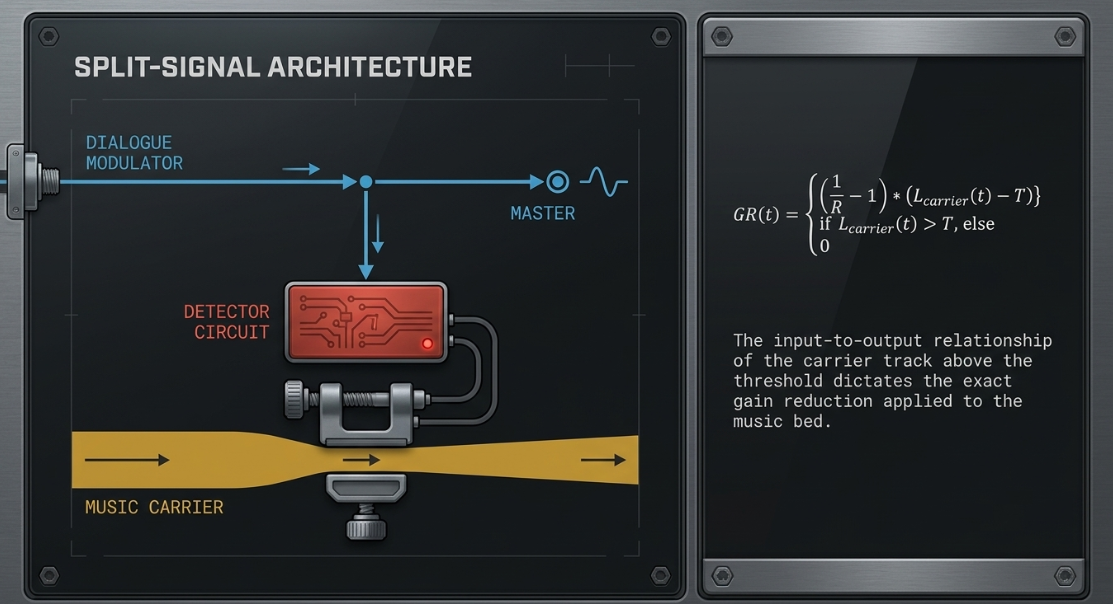
Traditional sidechain ducking relies on a split-signal architecture where a modulator track (the primary vocal) dynamically controls the amplitude of a carrier track (such as a music bed or environmental background)2. The modulator's signal path is routed to the sidechain detector circuit of a compressor placed on the carrier track, causing the background audio to drop in volume whenever the speaker talks2.
The reduction in gain applied to the carrier signal is mathematically defined by the compressor's threshold, ratio, and time constants1. The input-to-output relationship of the carrier track above the threshold can be calculated using the standard compression formula:

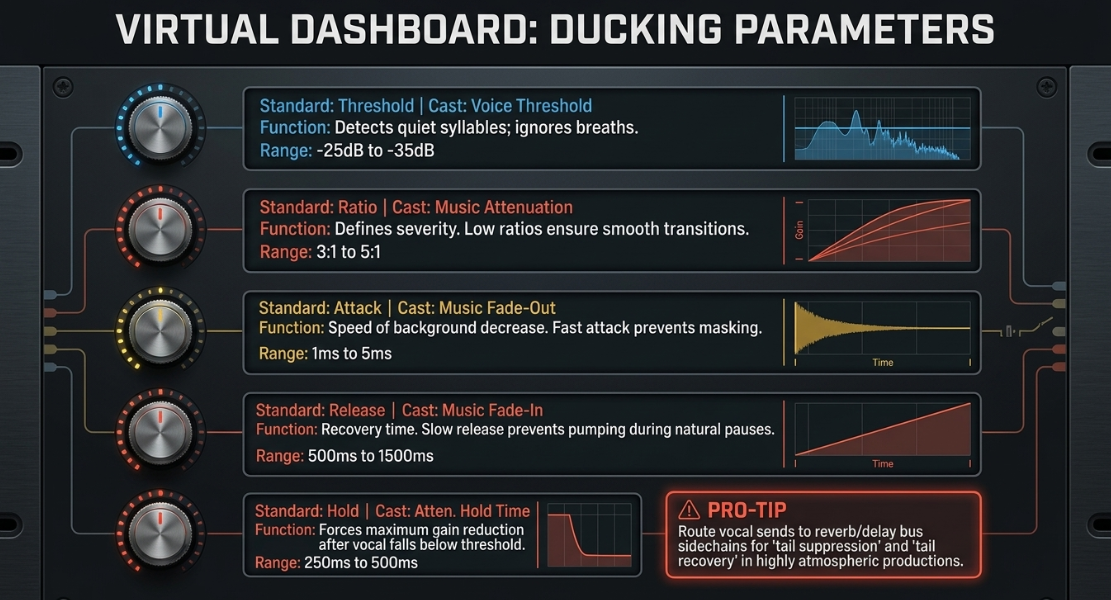
To prevent the background track from sounding unnatural or "pumping" (audibly fluctuating in volume during short pauses), the compressor's time constants must be carefully configured2.




This dynamic control is also highly effective when applied to spatial effects10. In highly atmospheric productions, routing a vocal send to the sidechain of a compressor placed on a reverb or delay bus prevents long, wet trails from washing out the lead speech10.
With this routing in place, the vocal's presence heavily ducks the effects tail, which then swells up during pauses in a process known as "tail suppression" and "tail recovery"10.
Comparison of Level Management Methodologies
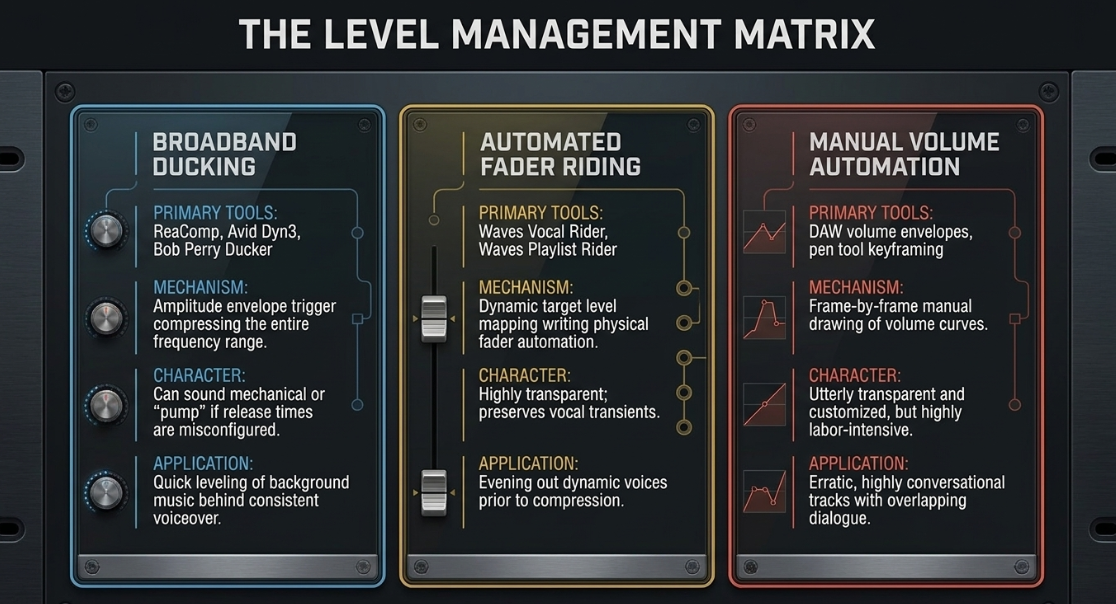
Post-production engineers must frequently choose between automated dynamic processing, automated fader riding, and manual volume automation to manage mix levels2. While traditional ducking is fast to set up, it applies a blanket volume reduction that can sound mechanical if the speaker's delivery is highly dynamic or conversational2.
To overcome this, tools like Waves Vocal Rider or Waves Playlist Rider adjust volume rather than dynamics, physically moving the channel fader to keep the signal within a target range4.
While manual volume automation is precise and avoids the risk of unnatural pumping, it is highly labor-intensive, making automated or hybrid approaches essential for tight production deadlines2.
Advanced Surgical Carving: Dynamic EQ and Spectral Ducking
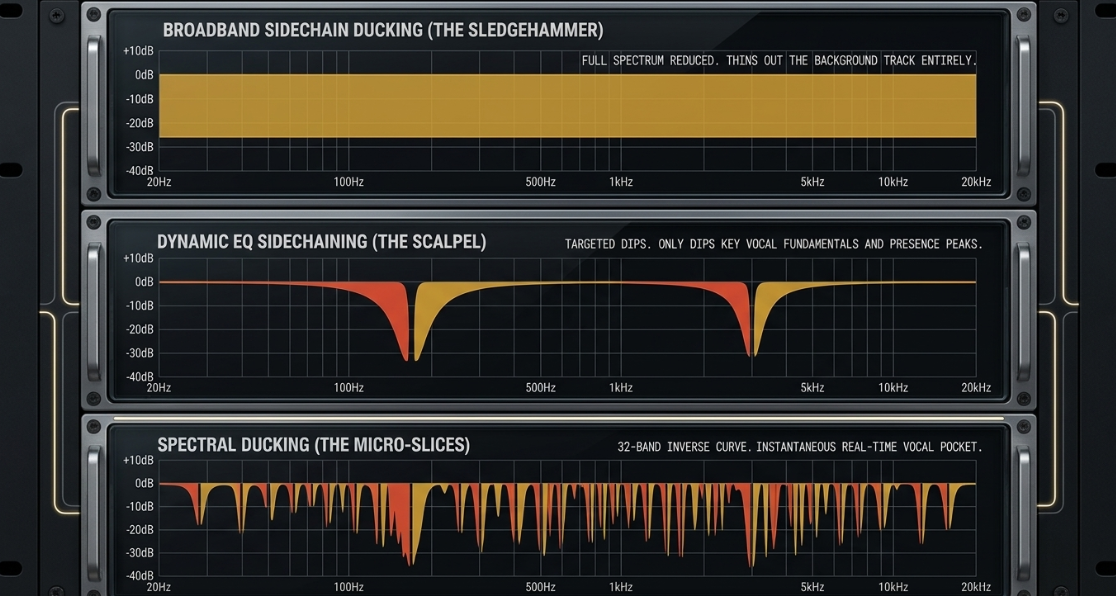
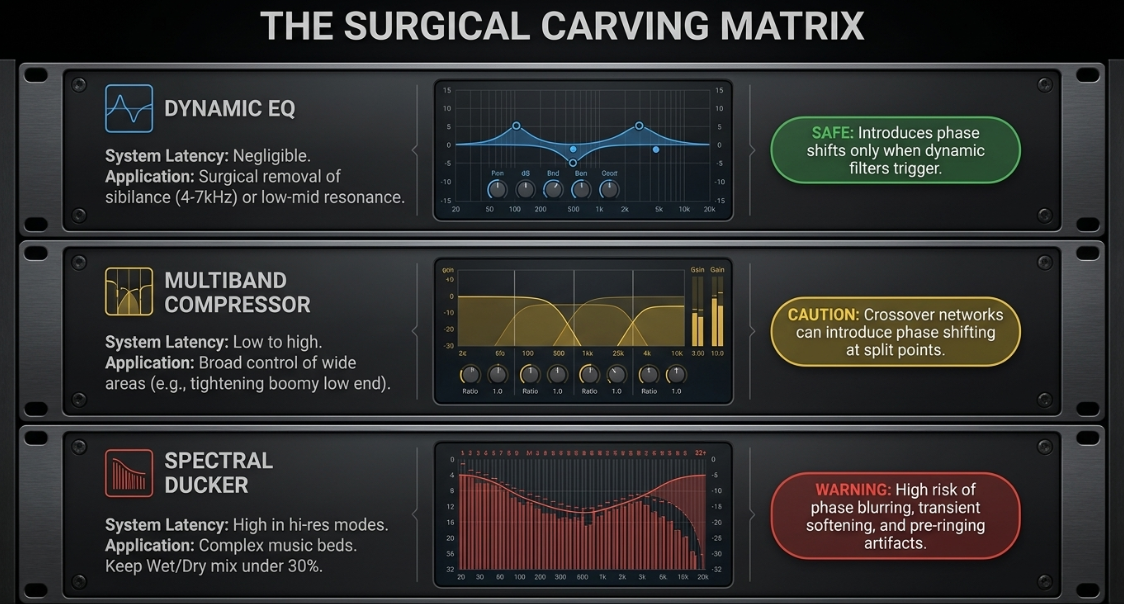
When multiple elements compete for the same space in a mix, traditional broadband ducking can thin out the background track by attenuating the entire frequency spectrum6. To resolve this, engineers use frequency-specific tools like dynamic EQ and spectral ducking to target only the clashing frequencies6.
Broadband Sidechain Ducking (Sledgehammer)
Frequency: 20Hz ──────────────────────────────────────────────── 20kHz
Attenuation: ▬▬▬▬▬▬▬▬▬▬▬▬▬▬▬▬▬▬▬▬▬▬▬▬▬▬▬▬▬▬▬▬▬▬▬▬▬▬▬▬▬▬▬▬▬▬▬▬▬▬▬▬ (Full Spectrum Reduced)
Dynamic EQ Sidechaining (Scalpel)
Frequency: 20Hz ─────────── [100Hz ── 600Hz] ─────────── [1.3kHz ── 3.5kHz] ─────────── 20kHz
Attenuation: ▬▬▬▬▬▬▬▬▬▬▬▬ ▬▬▬▬▬▬▬▬▬▬▬▬▬ (Targeted Dips)
Spectral Ducking (Micro-Slices)
Frequency: 20Hz ─── 50Hz ─── 100Hz ─── 500Hz ─── 1kHz ─── 3kHz ─── 8kHz ─── 15kHz ─── 20kHz
Attenuation: ▬▬ ▬▬▬▬ ▬▬▬▬▬ ▬▬ ▬▬▬▬ ▬▬ (32-Band Inverse Curve)
Dynamic EQ combines the surgical precision of parametric filters with the sidechain capabilities of a compressor, allowing cuts to occur only when the trigger signal is active6. To configure a dynamic EQ like the PreSonus Pro EQ3 or FabFilter Pro-Q 4, an engineer first analyzes the speaker's vocal spectrum using an analyzer with the hold parameter set to infinity4.
Once key frequency bands of speech energy are identified (such as low-mid fundamentals between 


Spectral ducking, pioneered by plugins like Wavesfactory TrackSpacer, divides the audio spectrum into numerous narrow bands (typically 32 or more)27.
The plugin analyzes the incoming sidechain trigger and applies an instantaneous, real-time inverse EQ curve to the carrier track, carving out a precise frequency pocket for the voice27.


While spectral duckers are highly effective, they can introduce digital artifacts, transient softening, and phase blurring if the attenuation is set too high14. Therefore, these tools should be used with moderate settings (typically under 
Technical Routing Workarounds for Frequency-Sensitive Sidechaining
In situations where a compressor's internal sidechain filter is deactivated when accepting an external sidechain input, a dedicated intermediate routing path can be constructed to achieve frequency-sensitive ducking2:
Intermediate Bus Allocation: Route the output of the source vocal track to a dedicated, intermediate mono auxiliary channel named "SC Filter Bus." Configure this track's output to an unused internal bus path2.
Surgical EQ Insertion: Insert a parametric equalizer plugin on the "SC Filter Bus." Apply a steep high-pass filter (



Presence Boosting: Create a broad boost (


Target Sidechain Mapping: Map the output bus of the "SC Filter Bus" to the external sidechain key input of the compressor inserted on the music bed track2.
This intermediate routing ensures that the compressor reacts precisely to the most intelligible frequencies of the spoken voice, preventing unnecessary gain reduction from low-frequency plosives or high-frequency sibilance1.
Managing Multi-Microphone Bleed: Automixing and AI Workflows
When recording multiple hosts in the same room, microphone bleed (crosstalk) can introduce phase cancellation, comb filtering, and room noise build-up36. Traditional noise gates often sound too abrupt, cutting off natural conversation and vocal tails38.
To manage multi-mic bleed in real time, hardware recorders and software platforms utilize automatic microphone mixing algorithms, primarily the Dan Dugan Speech System and Sound Devices' MixAssist40.
Real-Time Automixing Algorithms
The Dan Dugan Speech System operates on a continuous, proportional-gain principle, automatically distributing a total system gain of 
The attenuation 



where:

In contrast, Sound Devices' MixAssist acts as a highly sophisticated gate, utilizing five key logical processes to keep transitions smooth40.
It continuously calculates a Noise-Adaptive Threshold (NAT) to ignore steady-state background noise, and uses Maxbus comparison logic to ensure that only the loudest microphone gates open when a single voice is captured by multiple mics40.


Advanced Software Bleed Mitigation Workflows
For post-production editing, engineers can set up a gated-trigger sidechain network within a DAW to manage bleed and prevent false trigger behavior41:
┌──────────────────┐
│ Gated Trigger │
│ (Track 1B - │ (Gated trigger send only)
│ Dummy Track) ├──────────┐
└────────▲─────────┘ │
│ ▼
┌────────────────┐ ┌────────┴─────────┐ ┌─────────────┐
│ Host 1 Vocal │──►│ Track Split │ │ Host 2 Comp │
│ (Track 1A) │ │ │ │ (Track 2A) │◄─── [Bleed Attenuated]
└────────────────┘ └──────────────────┘ └─────────────┘
Dummy Track Creation: Duplicate the raw vocal tracks to create helper tracks (e.g., creating "Track 1B" from "Track 1A" and "Track 2B" from "Track 2A")41.
Aggressive Gating: Insert a noise gate on the helper tracks (1B and 2B), setting the threshold high enough to completely silence the low-level bleed from other hosts41.
Output Unlinking: Unlink the outputs of the helper tracks from the master stereo bus so they are completely silent in the mix41.
Cross-Sidechain Routing: Route the output of helper Track 1B to the sidechain input of a compressor on primary Track 2A, and route helper Track 2B to the sidechain of primary Track 1A41.
This ensures that the sidechain compressors are only triggered when a host is actively speaking, preventing ambient bleed from causing accidental gain reduction on other channels41.
AI-Assisted Automation and Spectral Separation Workflows
Modern post-production increasingly utilizes machine learning and artificial intelligence to handle repetitive leveling tasks, allowing engineers to focus on the creative aspects of the mix.
Adobe Sensei Auto-Ducking
The Auto-Ducking feature in Adobe Audition and Premiere Pro’s Essential Sound panel uses Adobe Sensei machine learning to automate background music ducking28. Instead of reacting strictly to raw amplitude spikes, the AI analyzes the audio signal to identify and categorize dialogue, music, sound effects, and ambience28.
Modulator and Carrier Tagging: The dialogue tracks are tagged as "Dialogue" and the music tracks as "Music" in the Essential Sound panel, enabling the ducking controls24.
Sensitivity and Reduction: The Sensitivity slider determines the detection threshold, while the Reduce By slider sets the volume drop depth28. High sensitivity settings maintain a lower background music level, whereas mid-range values let the music quickly swell during short pauses28.
Fade and Fade Position Control: The Fades slider controls the speed of the volume transitions28. The Fade Position slider allows the editor to position the fade curve fully outside, inside, or centered on the boundaries of the dialogue43.
Keyframe Rendering: Disabling the "Monitor Clip Changes" option converts the dynamic AI envelope into standard, editable automation keyframes, allowing manual fine-tuning28.
Multi-Channel Neural Networks
For complex multi-microphone restoration, neural networks provide surgical, session-level separation38.
Auphonic Mic Bleed Remover: This model analyzes the entire multitrack session as a single system38. Rather than processing tracks in isolation, the neural network learns the acoustic fingerprint of each microphone and removes only the bleeding cross-talk, keeping the direct vocal, music, and natural room ambience intact38.
Accentize dxRevive: Using local machine learning models, dxRevive re-synthesizes damaged speech44. It reconstructs missing frequency ranges, removes room reflections, and eliminates background bleed and Skype/Zoom codec artifacts while preserving the speaker's original vocal character44.
Waves Clarity Vx: Optimized with deep neural networks, this real-time plugin separates vocal signals from background noise and headphone bleed, maintaining performance dynamics with a simple interface46.
Conclusions and Technical Recommendations
Establishing a consistent, clear relationship between dialogue and background elements is critical for creating a professional, broadcast-ready mix3.
The choice of level management tools should be guided by the complexity of the project, session formatting, and the conversational pacing of the hosts2.
For standard speech-over-music beds: Standard broadband sidechain compression (such as ReaComp or Avid Dyn3) with a low ratio (



For highly dense music beds: Dynamic EQ or 32-band spectral ducking (such as Wavesfactory TrackSpacer) should be used to surgically carve out space in the music's mid-range (

For multi-microphone sessions in one room: Implementing real-time automatic mixers (like the Dan Dugan proportional-gain system or MixAssist logic) or using AI-driven bleed removal (such as Auphonic Mic Bleed Remover) prevents phase cancellation and reduces room noise build-up without the choppy artifacts of traditional noise gates38.
For rapid-turnaround editing: Tagging assets and using AI-assisted volume envelope generators (like Adobe Sensei Auto-Ducking) provides a solid initial mix pass, which can then be converted to manual keyframes for final adjustments28.
Works cited
Audio Engineering in a Professional Podcast Post-Production - Finchley Studios, https://www.finchley.co.uk/finchley-learning/visual-podcast/audio-engineering-in-a-professional-podcast-post-production
Duck Tales - Sound On Sound, https://www.soundonsound.com/techniques/duck-tales
Audio Mixing Techniques for Pro-Level Podcasts & Video - Flexwork Studios, https://flexworkstudios.com/audio-mixing-techniques/
10 Best Audio VST Plugins For Podcast & Voiceover, https://pluginerds.com/10-best-audio-plugins-podcast/
Better Ducking for Voiceovers & Podcasts - PreSonus, https://www.presonus.com/blogs/home/better-ducking-for-voiceovers-podcasts
The Ultimate Guide to Dynamic Equalization in Audio Production - ACE Studio, https://acestudio.ai/blog/dynamic-equalization-in-audio-production/
Ducker Manual - Bob Perry Audio, http://www.bobperry-audio.com/wp-content/uploads/Bob-Perry-Ducker-Manual.pdf
Ducker Settings for Track Ducking - Steinberg, https://download.steinberg.net/downloads_software/WaveLab_Cast_2/help/en/wavelab/topics/audio_montage/ducker_settings_r.html
What is Audio Ducking and How to Do It in Music Production - iZotope, https://www.izotope.com/community/blog/what-is-audio-ducking
Setting Up an Audio Compressor (Explained Simply) - Projet Home Studio, https://www.projethomestudio.fr/en/audio-compressor-settings/
Audio Compression: Adjusting the Compressor Parameters - MasteringBOX, https://www.masteringbox.com/fr/learn/audio-compressor
What Is Audio Ducking? How to Use It for Perfect Sound Control in 2025 - Pippit AI, https://www.pippit.ai/resource/audio-ducking
Trackspacer vs Sidechain Spectral Dynamics (Pro Q4)? : r/mixingmastering - Reddit, https://www.reddit.com/r/mixingmastering/comments/1n96asi/trackspacer_vs_sidechain_spectral_dynamics_pro_q4/
Newbie Question: How to Use a Compressor for Spoken Word? - Reddit, https://www.reddit.com/r/livesound/comments/16kbzap/newbie_question_how_to_use_a_compressor_for/
The Best Compressor Settings for Vocals (Exact Settings to Use) - Music Guy Mixing, https://www.musicguymixing.com/compressor-settings-for-vocals/
Best plugin for broadcast voice ducking : r/audioengineering - Reddit, https://www.reddit.com/r/audioengineering/comments/veqsqp/best_plugin_for_broadcast_voice_ducking/
Can someone please explain what compressor "lookahead" is, and how to use it properly?, https://www.reddit.com/r/edmproduction/comments/140jd7/can_someone_please_explain_what_compressor/
What is the importance of the look-ahead function when using a de-esser? - Reddit, https://www.reddit.com/r/audioengineering/comments/2h157q/what_is_the_importance_of_the_lookahead_function/
How to Time Delay Ducking - YouTube, https://www.youtube.com/shorts/d6EW_Usj8nE
How to Use Sidechain Compression in Pro Tools - Avid, https://www.avid.com/pro-tools/user-guide/sidechain-compression
HOW TO use side-chain compression for ducking -- Reaper - PG Music Forums, https://www.pgmusic.com/forums/ubbthreads.php?ubb=showflat&Number=544919
Good maximizer or mastering plugin for spoken word : r/audioengineering - Reddit, https://www.reddit.com/r/audioengineering/comments/17y2tsm/good_maximizer_or_mastering_plugin_for_spoken_word/
Auto-Ducking in Audition : r/AdobeAudition - Reddit, https://www.reddit.com/r/AdobeAudition/comments/h7jr05/autoducking_in_audition/
Help advice on ducking/ side chain : r/Reaper - Reddit, https://www.reddit.com/r/Reaper/comments/wpncqh/help_advice_on_ducking_side_chain/
What's the difference between compression sidechain and eq sidechain? - Reddit, https://www.reddit.com/r/audioengineering/comments/1hrd7zi/whats_the_difference_between_compression/
TrackSpacer Finally Has a Free Rival (Actually, Two of Them) - Bedroom Producers Blog, https://bedroomproducersblog.com/2026/03/04/free-trackspacer-alternatives/
Audition Deep Dive: Auto-Ducking music - the Adobe Blog, https://blog.adobe.com/en/publish/2017/11/02/audition-deep-dive-auto-ducking-music
Automatically duck audio in Premiere - Adobe Help Center, https://helpx.adobe.com/premiere/desktop/add-audio-effects/adjust-volume-and-levels/automatically-duck-audio.html
Need advice on shortening podcast audio workflow (ducking) - hardware or software?, https://community.adobe.com/questions-544/need-advice-on-shortening-podcast-audio-workflow-ducking-hardware-or-software-163109
TrackSpacer Plugin Review - Wavesfactory's Sidechain EQ - Tape Op, https://tapeop.com/reviews/gear/101/trackspacer-plug-in
Multiband, De-Esser, Dynamic EQ, and Sidechain | Beat Kitchen, https://beatkitchen.io/guides/mix-primer/20-multiband-deesser-sidechain/
Ducking Resonance & Strings/Pads with Trackspacer - PianoClack Forum, https://pianoclack.com/forum/d/2249-ducking-resonance-stringspads-with-trackspacer
Track spacer - Effects Forum - KVR Audio, https://www.kvraudio.com/forum/viewtopic.php?t=572062
Un guide sur le traitement audio et les effets pour le podcasting (FR) - RØDE, https://rode.com/fr-fr/about/news-info/a-guide-to-audio-processing-and-fx-for-podcasting
Dan Dugan Automixer - Waves Audio, https://www.waves.com/mixers-racks/dugan-automixer
MixAssist Plugin for MixPre-10 II : r/LocationSound - Reddit, https://www.reddit.com/r/LocationSound/comments/11xsn3r/mixassist_plugin_for_mixpre10_ii/
Multitrack Clarity Redefined: Introducing our new Mic Bleed Remover - Auphonic, https://auphonic.com/blog/2025/10/08/mic-bleed-remover/
Dugan Automatic Microphone Mixers, https://www.dandugan.com/products/
Automatic Mixing 101 - Sound Devices, https://www.sounddevices.com/automatic-mixing-101/
How I remove bleed from podcast recordings - Reddit, https://www.reddit.com/r/podcasting/comments/1pd3x78/how_i_remove_bleed_from_podcast_recordings/
Auphonic, https://auphonic.com/
DISCUSS: Auto ducking fade position slider - Adobe Community, https://community.adobe.com/announcements-732/discuss-auto-ducking-fade-position-slider-313193
Accentize dxRevive – Dialogue Restoration Plugin, https://www.accentize.com/product/dxrevive/
Accentize | Dialogue Restoration & Audio Cleanup Plugins, https://www.accentize.com/
Clarity Vx vs. Headphone Bleed | Videos - Waves Audio, https://www.waves.com/clarity-vx-vs-headphone-bleed














