
Electro-Acoustic Monitoring Paradigms
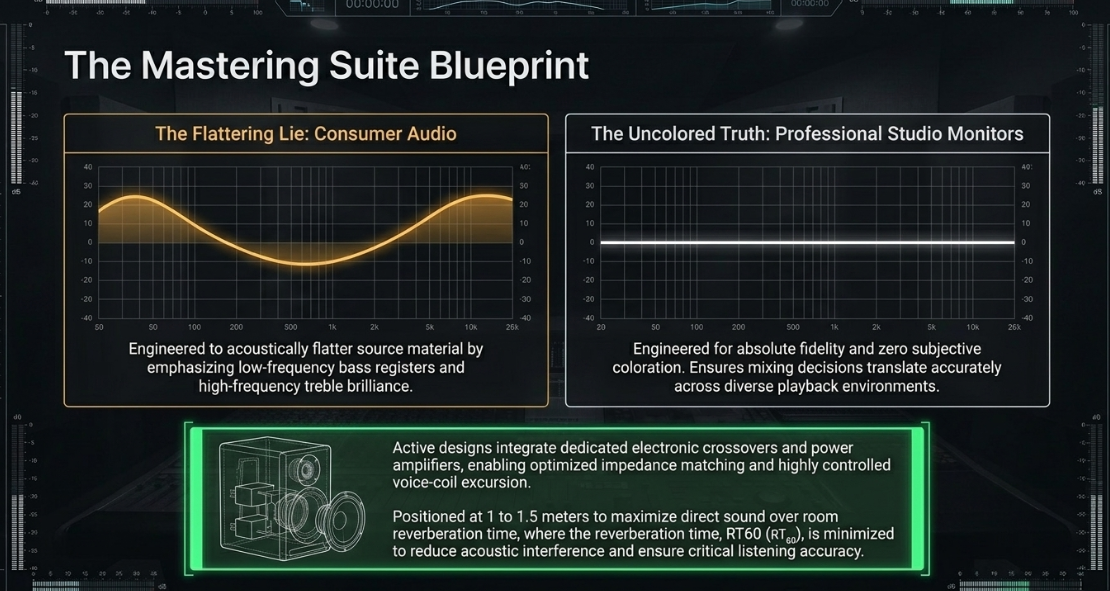
The primary requirement of any professional audio post-production environment is an electro-acoustic monitoring system capable of translating acoustic signals with absolute fidelity and zero subjective coloration1. Unlike consumer audio systems designed to acoustically flatter source material by applying predetermined frequency-response contours—typically emphasizing low-frequency bass registers and high-frequency treble brilliance—professional studio monitors are engineered to produce a flat, uncolored frequency response1. This design philosophy ensures that any mixing, equalization, or dynamic processing decisions made in the editing suite translate accurately across diverse consumer playback environments, including car stereos, home theaters, mobile devices, and headphone systems1.
At the physical core of a studio monitor is an electro-mechanical transducer system designed to convert electrical audio signals into physical air displacement1. When an alternating electrical current passes through a voice coil suspended within a static magnetic field, it generates electromagnetic forces that actuate the loudspeaker diaphragm1. The fidelity of this translation depends heavily on transient response—the speed at which the transducer can initiate and terminate acoustic motion in response to incoming electrical impulses—and the minimization of total harmonic distortion (THD) at critical monitoring levels1.
In modern post-production suites, active studio monitors are universally preferred over passive designs1. Active monitors integrate dedicated, bi-amplified or tri-amplified electronic crossovers and power amplifiers directly within the speaker cabinet1. This configuration enables optimized impedance matching between the amplifier output stage and individual transducer voice coils, resulting in improved damping factors, lower phase distortion, and highly controlled voice-coil excursion1.
Furthermore, monitoring environments are categorized by physical listening distance1:
Nearfield monitors: Positioned close to the operator—typically to meters—to maximize the ratio of direct sound to reflected room sound1. This is highly advantageous in compact editing suites, mobile broadcast vehicles, and home studios1.
Midfield and farfield monitors: Placed at greater physical distances to monitor acoustic energy across larger rooms, requiring extensive acoustic treatment to control boundary reflections and reverberation time ()1.
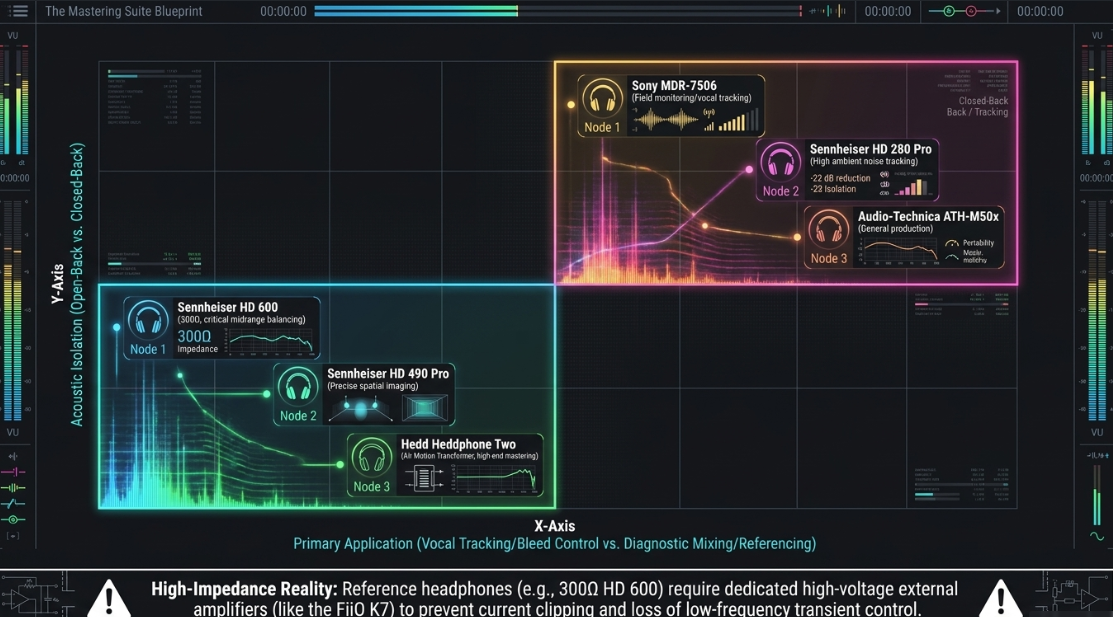
In professional podcast post-production, a critical tension exists between monitoring on studio monitors and monitoring on headphones1. While studio monitors provide the most natural spatial imaging and represent how sound propagates through a physical room, they do not operate in isolation; the listening room itself acts as an acoustic filter1. Standing waves, modal resonances, and early reflections can severely color the perceived frequency response, leading to misguided engineering decisions1.
Conversely, headphones bypass the acoustic profile of the physical room entirely, providing direct, unfiltered coupling to the auditory system8. This isolation is indispensable for tracking vocal talents, as closed-back circumaural headphones prevent physical acoustic leakage (bleed) from the cue mix back into sensitive microphones9.
For mixing and diagnostic post-production, open-back headphones are widely utilized9. Open-back designs feature perforated earcups that allow physical sound waves to escape, resulting in a significantly wider, more three-dimensional soundstage, a more natural frequency response, and reduced acoustic pressure on the tympanic membrane, which minimizes listener fatigue during extended post-production sessions9.
Signal Routing, Interface Topologies, and Hardware Infrastructure
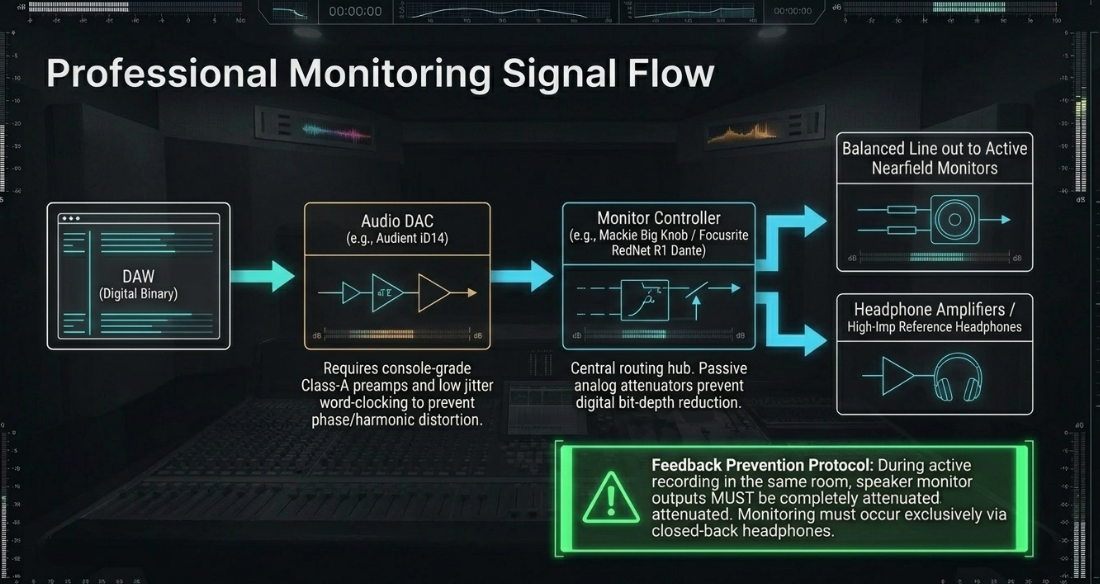
The professional post-production monitoring signal path begins with digital-to-analog conversion (DAC), converting the discrete binary values of the digital audio workstation (DAW) into a continuous, time-coherent analog voltage curve1. The technical quality of the interface's internal word-clocking circuitry, digital filtering, and preamplifiers is paramount; high jitter levels or subpar analog output stages can obscure low-level details, compress the stereo field, and introduce unwanted phase or harmonic distortion, masking errors that remain uncorrected in the final deliverable10. Console-grade preamps, such as the class-A designs found in the Audient iD4 and iD14, provide a highly transparent and honest translation of the analog source, preserving the fundamental transients of vocal tracks10.
To manage multiple monitors and headphone outputs, a monitor controller is integrated downstream from the DAC19. Monitor controllers act as central routing and level-calibration hubs19. They can range from passive analog attenuators—which prevent digital bit-depth reduction by controlling volume entirely in the analog domain—to active, digitally controlled analog matrices19. Passive controllers, such as the Mackie Big Knob Passive, are commonly placed at the core of small-scale setups to physically control active nearfield speaker levels without adding active circuit noise19. For multi-user environments, these systems are increasingly managed via Dante Audio-over-IP (AoIP) architectures21. Networked monitor controllers, such as the Focusrite RedNet R1, allow complex signal routing across Ethernet infrastructure, enabling real-time switching between stereo monitors, immersive surround arrays, and independent, ultra-low-latency headphone cue mixes equipped with integrated talkback21.
Integrated podcast control systems, such as the Tascam Mixcast 4, consolidate high-channel conversion and physical routing19. Operating as a 14-input, 2-output USB audio interface, the Mixcast 4 routes multitrack microphone signals post-fader directly to host software while sending independent, stereo cue mixes to up to four headphone outputs19. To prevent acoustic feedback loops when sensitive microphones are active in the same room, best practices dictate that the speaker monitor outputs (routed through the passive monitor controller to active nearfield monitors) must be turned down completely19. Monitoring during active recording must be conducted exclusively via closed-back headphones19.
Professional Post-Production Monitoring Signal Flow
+-------+ Digital +-------------+ Analog Line +------------+ Balanced Line +------------+
| DAW |----------->| Audio DAC |--------------->| Monitor |---------------->| Active |
+-------+ (USB/ | (Audient | (Level/Control | Controller | (Level matched) | Monitors |
Dante) | iD14 etc.) | via Ethernet/ | (Mackie | +------------+
+-------------+ Network) | Big Knob) |
| +------------+
| Balanced Line | Alternate Route
v v
+-------------+ +------------+
| Headphone | | Headphone |
| Amplifier | | Amplifier |
| (FiiO K7) | | (Dante |
+-------------+ | RedNetX2P)|
| +------------+
v |
+-------------+ v
| High-Imp. | +------------+
| Headphones | | Reference |
| (HD 600) | | Headphones |
+-------------+ +------------+
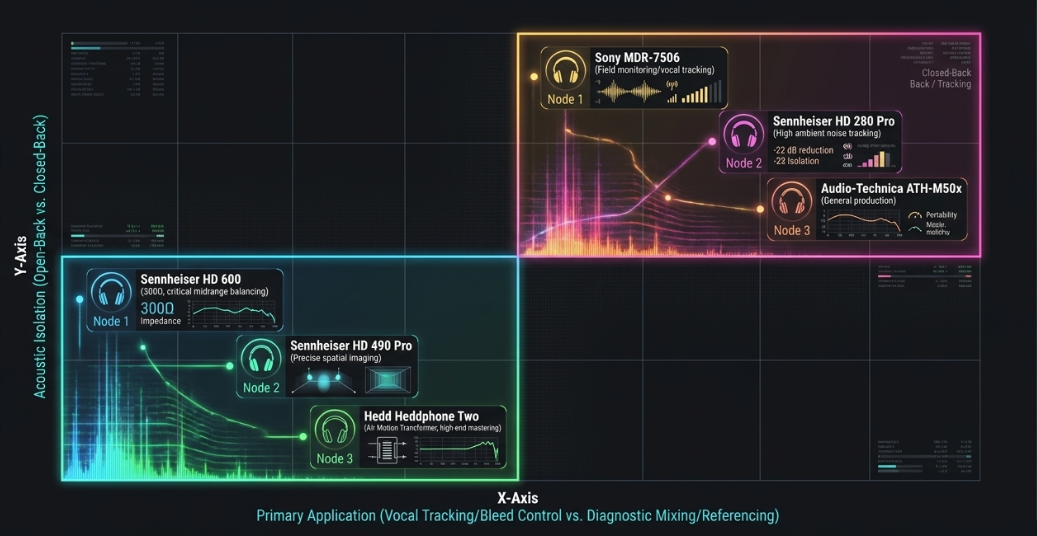
Headphone electrical impedance loading requires careful power matching in the analog driver stage9. High-impedance reference headphones, such as the system of the Sennheiser HD 600, require dedicated high-voltage headphone amplification9. Standard built-in headphone jacks on consumer laptops or budget audio interfaces are often limited by low-voltage power supplies, making them incapable of supplying the necessary voltage swing9. This mismatch results in current clipping, diminished dynamic range, and a severe loss of low-frequency transient control9. Connecting high-impedance headphones to a dedicated external amplifier, such as the FiiO K7, ensures the transducers operate within their linear region with maximum transient precision12.
Algorithmic Acoustic Room Correction and DSP-Based Calibration
To mitigate the acoustic anomalies introduced by physical monitoring environments, professional studios leverage digital signal processing (DSP) and acoustic room correction software7. These tools are not intended to replace physical acoustic treatment, such as broadband absorption and bass traps, but rather to perform high-resolution calibration of the electro-acoustic system to correct for residual modal issues and phase anomalies7.
Currently, there are two primary approaches to digital room correction7:
Universal Software-Based Correction: Systems such as Sonarworks SoundID Reference operate as a system-wide computer driver or a DAW insert plug-in7. Utilizing a calibrated omnidirectional measurement microphone, the system executes a series of multipoint frequency sweeps across the listening position7. It calculates a highly detailed compensation filter curve to flatten the monitor output and correct for physical asymmetry in the room7. However, because this calibration operates on the host computer, it introduces latent processing time (latency) and must be manually bypassed or loaded in every session7.
Hardware-Integrated DSP Calibration: Developed directly by speaker manufacturers, systems such as Genelec Loudspeaker Manager (GLM 5) and Neumann Monitor Alignment (MA 1) integrate calibration processing directly into the monitors' internal DSP chips22. Once calibrated via a proprietary measurement microphone, the computed correction curves are uploaded and permanently stored on the monitors' hardware20. This approach eliminates host-computer CPU overhead, guarantees zero additional latency, and remains active regardless of the audio source connected to the speakers7.
The primary advantage of hardware-integrated DSP calibration systems over software-only solutions is their ability to execute phase correction in addition to amplitude correction26. Standard acoustic measurements show that physical crossovers in multi-way speakers introduce native phase distortion at their crossover frequency zones26. The Neumann MA 1 system, utilizing algorithms co-developed with the Fraunhofer IIS, deploys linear-phase FIR filters to correct these crossover phase anomalies, keeping the phase response of the KH monitors within between and 26.
Furthermore, these proprietary hardware-based calibration algorithms possess precise target models of how the speakers should behave under ideal, anechoic conditions24. This internal reference allows the system to differentiate between the acoustic anomalies introduced by the room and the native frequency limits of the transducer, avoiding the destructive feedback loops that occur when a third-party equalizer attempts to boost a deep physical room-null, which would otherwise drive the speaker amplifier into premature clipping and thermal saturation24.
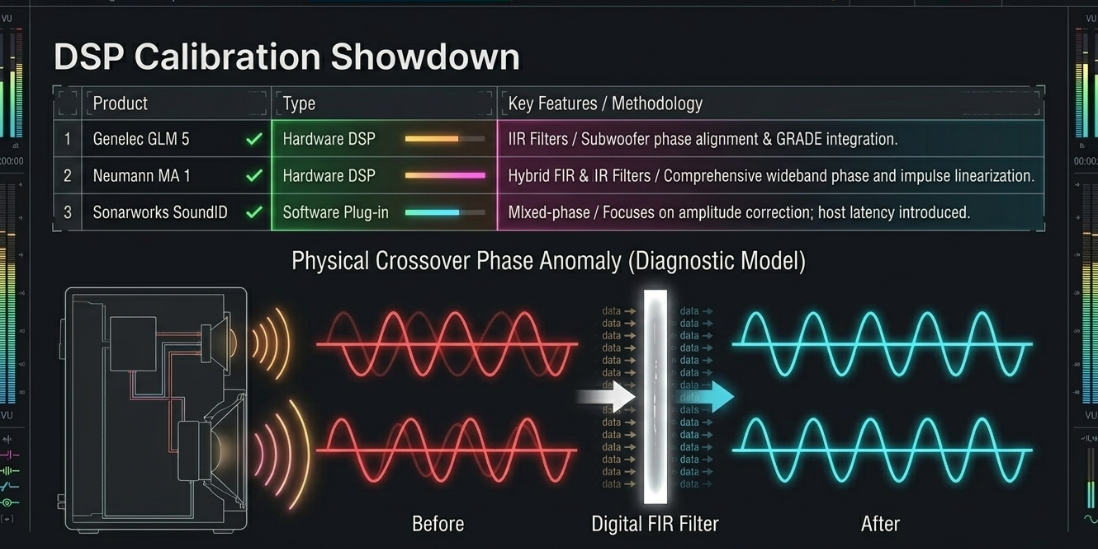
This is particularly evident in bass management systems24. In a stereo layout incorporating active subwoofers, Genelec's GLM AutoPhase matches the acoustic phase of the subwoofer to the corresponding nearfield monitor at the crossover frequency, preventing low-end phase cancellation28.
Third-party correction systems often struggle with this, as they measure the summed room response without knowing the independent crossover filters of the hardware24.
To calibrate Relative Loudness Unit scaling, EBU R128 and other standards calibrate the monitor volume such that:
[cite: 35]
This ensures that a calibrated signal of on the absolute scale translates exactly to on the relative scale at the mixing position35.
Psychoacoustics, Loudness Standards, and Target Compliance Metrics
To ensure a seamless, non-jarring listening experience, modern broadcast and podcast platforms mandate strict loudness normalization based on human psychoacoustical perception rather than electrical signal amplitude37. Traditional signal metering utilizes decibels relative to full scale (dBFS) or Root Mean Square (RMS) measurements38. While dBFS measures the exact electrical peak of a digital waveform, and RMS averages signal energy over time, neither accounts for the non-linear sensitivity of human hearing across different frequency spectra37.
To solve this, international standards organizations established the Loudness Unit Relative to Full Scale (LUFS), synonymous with Loudness K-weighted Relative to Full Scale (LKFS)35. The measurement algorithm, standardized in ITU-R BS.1770 and EBU R128, applies a dynamic "K-weighting" filter to the input signal36.
This psychoacoustic filter consists of two primary stages37:
A high-pass filter that rolls off frequencies below , mimicking the human ear's relative insensitivity to low-frequency sub-bass37.
A high-frequency shelving boost of to between and to account for acoustic resonance variations of the human head and ear canal, where the auditory system is highly sensitive to vocal presence and sibilance37.
ITU-R BS.1770 K-Weighting Filter Curve
Gain (dB)
+5 | .-------------------- (Shelving Boost: +4 dB)
| /
0 | - - - - - - - .--------------'
| /
-5 | /
| /
-10 |-----------' (High-Pass Roll-off)
+-------------------------------------------------------
10Hz 100Hz 1kHz 10kHz
Frequency (Hz)
The resulting weighted signal is integrated over specified time windows to yield three distinct metering parameters44:
Momentary Loudness (): Measures a sliding integration window, capturing rapid transient bursts and immediate volume swells37.
Short-term Loudness (): Measures a sliding -second integration window, representing the active, foreground loudness of dialogue sentences and phrases37.
Integrated Loudness (): Represents the cumulative average loudness over the entire duration of the audio program37.
To prevent quiet background noise or silent passages from artificially lowering the overall integrated calculation, the ITU-R BS.1770-4 standard implements a dual-gate threshold36:
An absolute gate set at to eliminate extreme low-level system noise36.
A relative gate set at below the initial ungated integrated loudness level, ensuring that only active, audible program material is factored into the final integrated average45.
To preserve audio quality during subsequent compression and lossy transcoding (such as conversion from WAV to Ogg Vorbis, AAC, or MP3), post-production engineers must monitor True Peak () levels37. While standard sample-peak meters only display the values of the discrete digital samples, True Peak meters utilize oversampling algorithms to reconstruct the continuous analog waveform37. This calculation exposes "inter-sample peaks"—transient values that occur between digital samples and can exceed during digital-to-analog conversion or lossy codec transcoding, resulting in digital clipping and audible distortion37.
Additionally, engineers monitor the Loudness Range (LRA), measured in Loudness Units (), which represents the statistical variation of loudness over the macro-structure of the program36. A tight LRA (typically to ) indicates highly controlled dialogue levels, whereas a wide LRA (above ) indicates a dynamic mix that may be hard to hear in noisy consumer listening environments, such as cars or public transit34.
Advanced Diagnostic Software, Spectral Restoration, and Dynamic Processing
Spectral Analysis and Forensics
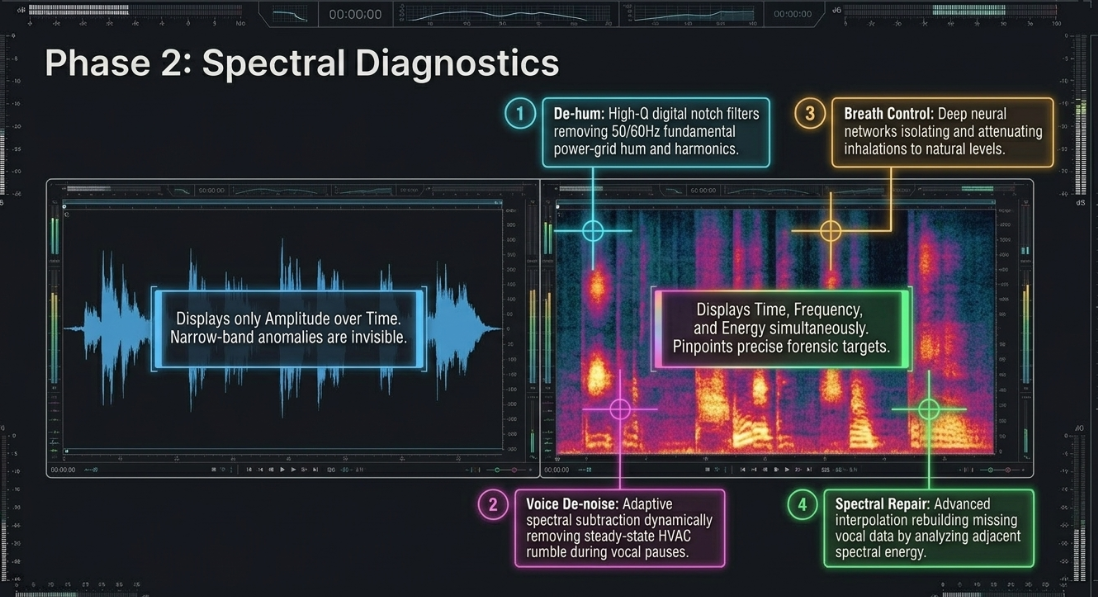
Modern post-production workflows rely heavily on spectral diagnostics to isolate and correct audio problems before final loudness normalization58. The standard tool for visual audio forensics is the standalone spectrogram, as implemented in iZotope RX58. Utilizing Fast Fourier Transform (FFT) algorithms, the spectrogram maps time on the horizontal x-axis, frequency on the vertical y-axis, and amplitude/energy via color intensity59. This time-frequency representation allows engineers to pinpoint narrow-band anomalies that are invisible on a standard waveform amplitude display59.
Surgical repair modules operate directly within this spectral domain58:
De-hum: Employs multiple, high- digital notch filters to remove fundamental power-grid hum (typically or ) and its associated harmonic overtones without affecting the surrounding vocal frequencies43.
Voice De-noise: Leverages adaptive spectral subtraction, continuously analyzing the noise floor during vocal pauses to dynamically remove broadband, steady-state background noise (such as HVAC rumble or computer fans) while preserving transient vocal clarity3.
Spectral Repair: Uses advanced interpolation algorithms, allowing the engineer to visually select transient noises (such as a chair squeak, a siren, or a phone ring) and rebuild the missing vocal data by analyzing the adjacent spectral energy58.
Breath Control: Utilizes deep neural networks trained on dialogue characteristics to automatically detect, isolate, and attenuate human breath sounds to a natural target level, bypassing the extremely tedious and time-consuming manual gain-drawing process58.
Real-Time and Offline Metering
To achieve strict loudness compliance, post-production engineers integrate visual metering suites on the master output bus of their DAW54. The Youlean Loudness Meter 2 and Nugen VisLM represent the industry standards for real-time monitoring30. These plugins display Momentary, Short-term, and Integrated LUFS values alongside a dynamic histogram graph that tracks the historical loudness profile of the session over time30.
The Youlean Loudness Meter is particularly praised for its high-precision LRA (Loudness Range) calculation over extended runtimes and its drag-and-drop offline analysis capability, allowing engineers to verify compliance of a rendered WAV master in seconds30.
For high-speed, batch broadcast environments, offline normalization tools like iZotope RX Loudness Control are utilized63. These automated processors execute a two-pass analysis of the rendered audio file63: the first pass calculates the integrated loudness and true peak level, and the second pass applies a calculated, non-destructive gain offset to meet the target50. If the file exceeds the maximum allowed True Peak, a transparent look-ahead peak limiter is applied50. These offline systems can also generate standardized CSV compliance reports to verify delivery compliance downstream63.
Dynamic Control and Gain Staging Workflows
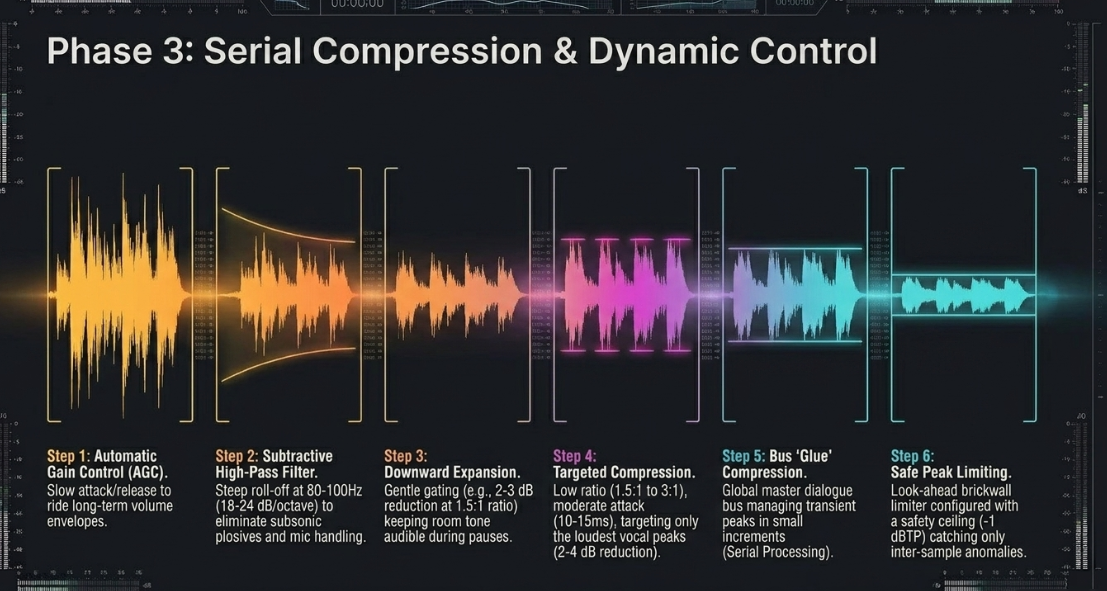
To optimize dialogue consistency and maintain sufficient headroom prior to final loudness normalization, post-production engineers design highly detailed gain-staging and dynamic processing chains34. In speech-centric production, a common error is driving a highly dynamic vocal track directly into a hard-knee limiter54. This brute-force peak containment results in aggressive transient chopping, distortion artifacts, and pumping background noise54.
Instead, a multi-stage dynamic alignment approach is implemented34:
Manual / Automated Pre-Gain Leveling: An Automatic Gain Control (AGC) or vocal leveler is placed at the start of the chain60. These processors utilize slow attack and release times to ride the long-term volume envelope of the dialogue, leveling out inconsistencies between different speakers or mic techniques before the signal hits subsequent processing stages60.
Subtractive High-Pass Filtering: A steep high-pass filter ( to ) is placed at approximately to 18. Since human speech contains no musical fundamentals below this frequency register, this filter eliminates unwanted low-frequency physical impacts, mic-handling noise, and plosive energy (-pops) without thinning the natural body of the voice18.
Downward Expansion (Gating): Rather than using a hard-muting gate that cuts off words and introduces distracting gaps, a gentle downward expander is deployed60. The threshold is set slightly above the room noise floor60. When the signal falls below this threshold, the expander applies a gentle, ratio-controlled attenuation (e.g., of reduction at a ratio)60. This process keeps the room tone audible during vocal pauses, preventing a jarring "vacuum" effect60.
Targeted Dynamic Range Compression: A low-ratio compressor ( to ) is used to tame speech transients and glue the dialogue together43. The threshold is adjusted so the compressor engages only on the loudest vocal peaks, applying a gentle to of gain reduction34. A moderate attack time ( to ) lets natural consonantal transients through, preserving speech intelligibility, while a program-dependent release time ( to ) smooths out word endings43.
Bus-Modeled Dynamic "Glue": On the master dialogue bus, a highly musical, low-ratio bus compressor is placed to manage transient peaks globally34. Managing these dynamics in small increments across multiple processing stages—known as serial compression—ensures that no single processor has to apply heavy, audible gain reduction, preserving a natural, transparent vocal character34.
Safe Dynamic Compliance Limiting: The final stage of the mastering chain utilizes a precision look-ahead brickwall limiter51. The limiter is configured with a safety ceiling—typically —to catch remaining inter-sample peaks48. By compressing and leveling the dynamic range earlier in the signal chain, the limiter only has to manage minimal transient peaks, ensuring clean, distortion-free delivery that is compliant with target-platform specifications34.
Pro Tools Spatial Panning and Sub-Mix Architecture
In advanced multi-mic environments, the DAW's internal panning laws require structured gain compensation35. Under standard digital panning rules, a mono track panned to the physical center of a stereo field is split equally across both output channels35. Due to acoustic summation, this center positioning can cause a localized build-up of acoustic energy35.
To prevent this, DAWs incorporate a configurable Pan Depth setting (typically , , or ), which attenuates the signal as it approaches the center pan coordinate35.
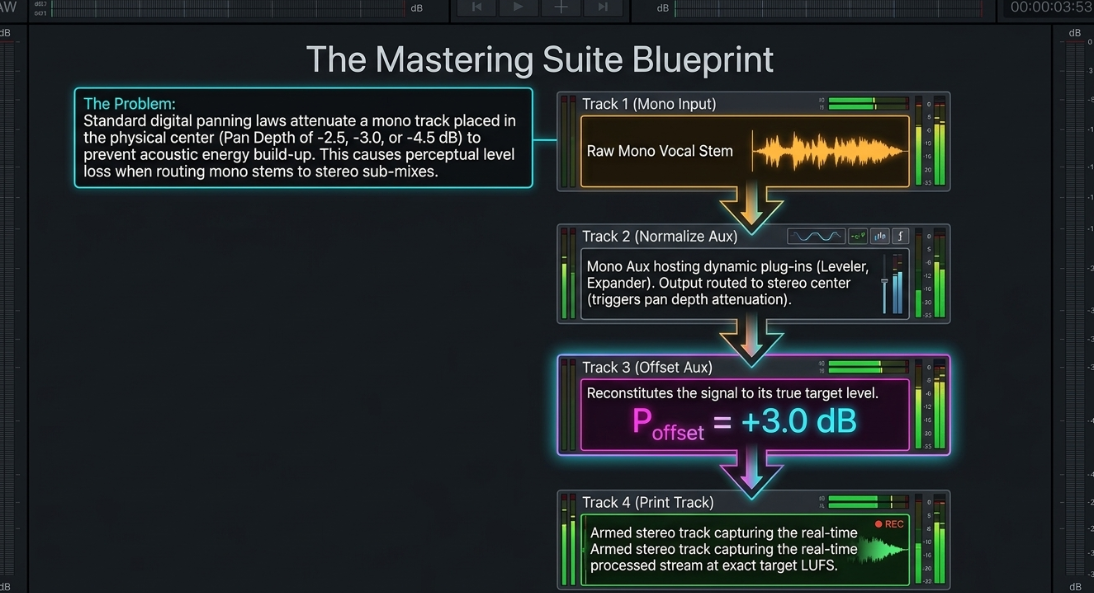
When routing mono vocal stems through sub-mix auxiliary tracks, this pan depth attenuation can lead to a perceptual loss of level35. A professional sub-mixing routing structure must compensate for this physical loss35:
Track 1 (Mono Vocal Input): The clean mono vocal stem is routed via a mono bus to an auxiliary track35.
Track 2 (Normalize Aux): A mono Auxiliary Input track (labeled "Normalize") hosts individual dynamic plug-ins (e.g., Waves MaxxVolume, integrating a Leveler, a Downward Expander, and a High-Level Compressor)35. If the compressor output level is targeted to mono, routing this signal directly to a stereo output bus panned center will apply standard pan depth attenuation35.
Track 3 (Offset Aux): The output of the "Normalize" track is routed via a bus to a stereo Auxiliary Input track labeled "Offset"35. To compensate for the center-pan attenuation, the fader is set to apply a specific gain offset:
[cite: 35]
This reconstitutes the signal to its true target level, achieving a balanced output of stereo on the master bus35.
Track 4 (Print Track): The output of the "Offset" auxiliary track is routed directly to a stereo Audio Track labeled "Print"35. When armed, this track records the real-time processed stream, outputting a master file that meets the strict target of and without driving the peak limiter into audible distortion35.
Conclusions and Actionable Recommendations
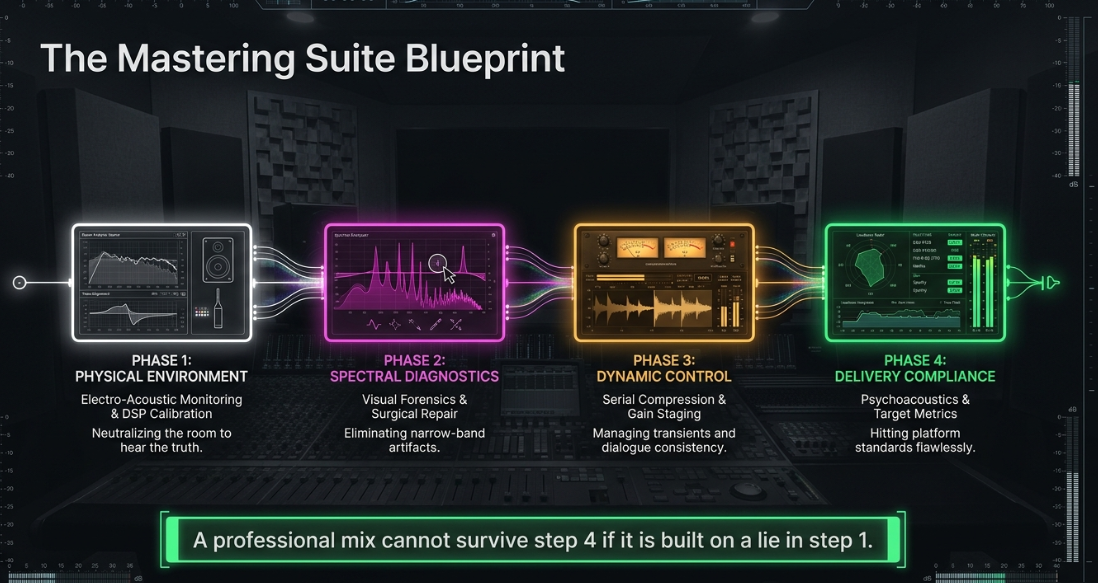
Phase 1: Physical and DSP Room Calibration
Broadband Room Treatment First: Acoustic treatment must be installed to manage primary reflections and low-frequency modal resonances before digital correction is applied7. Software correction curves cannot physically eliminate acoustic nulls; attempting to boost these frequencies digitally only compromises amplifier headroom7.
Deploy Hardware-Integrated DSP: If physical space or budget is constrained, prioritize smart active monitors with hardware-integrated DSP, such as the Genelec SAM or Neumann KH series7. Calibrate utilizing their dedicated measurement mic kits (GLM AutoCal 2 / MA 1 Alignment)20. This approach applies phase-linearization to crossover zones and stores the target filter curves directly in the monitors' hardware, eliminating DAW latency and computer CPU overhead7.
A/B Referencing with Open-Back Headphones: Use a high-quality pair of open-back headphones (such as the Sennheiser HD 600 or Beyerdynamic DT 990 Pro) driven by a dedicated, low-noise headphone amplifier to verify the spectral balance of the mix, bypassing the physical room acoustics completely9.
Phase 2: Dialogue Diagnostics and Spectral Restoration
Forensic Visual Analysis: Load rendered multitrack recordings into the iZotope RX standalone editor to locate and repair narrow-band noises58. Use Spectral De-noise to reduce broadband room rumble, Mouth De-click to target saliva clicks, and Breath Control to attenuate heavy inhalations to a natural level43.
Apply High-Pass Filtering Systematically: Place a clean parametric EQ with a high-pass filter at the start of every vocal chain, setting the cutoff frequency between and with a slope of to remove subsonic energy and plosives18.
Phase 3: Dynamic Compression and Headroom Optimization
Execute Serial Compression: Rather than applying aggressive limiting on the master output, apply subtle dynamic reduction across multiple stages34. Use a gentle leveler or pre-gain automation to balance long-term level variations, followed by a low-ratio compressor () on individual vocal tracks to smooth transients34.
Manage "Glue" Bus Compression: Route all processed dialogue channels to a master mix bus and apply a subtle bus compressor, targeting no more than to of highly transparent peak reduction34. This workflow ensures clean, controlled dynamic density and prevents heavy limiting artifacts later in the chain34.
Phase 4: Master Compliance Metering and Delivery Specs
Standardize Master Targets: Aim for a unified master target of integrated () with a strict maximum True Peak of 37. This target is natively compliant with Apple Podcasts and provides a safe, distortion-free target that easily translates across YouTube and Spotify, avoiding the clipping distortion that occurs during lossy Ogg Vorbis or AAC transcoding37.
Integrate Real-Time Metering Suites: Place a dedicated loudness meter (such as the Youlean Loudness Meter 2 or Nugen VisLM) on the master output bus, monitoring Momentary and Short-term metrics continuously to keep dialogue levels stable54. Ensure the final mix maintains a healthy Loudness Range (LRA) of to to guarantee high speech intelligibility across diverse, noisy consumer listening environments34.
Works cited
Studio Monitors Guide 2026 | Accurate Sound for Recording, Mixing & Production, https://thevocalcoachlondon.com/studio-monitors-guide/
Studio Headphones - Accurate Monitoring for Professional Audio - Hoang Bao Khoa, https://hoangbaokhoa.com/en/studio-headphones/studio-headphones.php
Podcasting with ADAM Audio - Solutions, https://www.adam-audio.com/en/podcasting/
Studio Monitoring - Studiocare, https://studiocare.com/collections/studio-monitoring
Neumann KH 120 Active Studio Monitor - What To Know & Where To Buy | Equipboard, https://equipboard.com/items/neumann-kh-120-active-studio-monitor
Best Studio Monitors to Buy in the UK (2026) – Mixing, Music Production & Home Studio, https://thevocalcoachlondon.com/studio-monitors/
Room Correction Software: Sonarworks vs IK ARC vs Genelec GLM - Audio Gear Hub, https://audiogearhub.com/room-correction-software-comparison/
The Best Studio Headphones For Mixing, Mastering, And Music Production, https://homestudiobasics.com/the-best-studio-headphones-for-mixing/
Best Studio Headphones for Mixing & Monitoring (2026) - TopMusicianGear, https://topmusiciangear.com/guides/best-headphones.html
How to Create A Home Studio On A Budget - Audient, https://audient.com/tutorial/budget-home-studio/
Best Studio Headphones 2025: Top Picks for Professional Recording - Wantek, https://www.iwantek.com/blogs/news/best-studio-headphones-2025-top-picks-for-professional-recording
Sennheiser HD 600 Headphones - What To Know & Where To Buy | Equipboard, https://equipboard.com/items/sennheiser-hd-600-headphones
Best studio headphones 2026: Top picks for music production - MusicRadar, https://www.musicradar.com/news/the-best-studio-headphones-top-headphones-for-music-production
Did I screw up by buying the HD600 for mixing and mastering music? - Reddit, https://www.reddit.com/r/audioengineering/comments/1s75js2/did_i_screw_up_by_buying_the_hd600_for_mixing_and/
Best Studio Headphones for Mixing – Backbeat Recording Studio | Voice-overs & Podcasts, https://www.biggerbetterbackbeat.com/best-studio-headphones-for-mixing/
What are the best headphones for film editors? | Jonny Elwyn, https://jonnyelwyn.co.uk/film-and-video-editing/what-are-the-best-headphones-for-film-editors/
Building A Home Studio (On A Budget) - Audient, https://audient.com/tutorial/building-a-home-studio-on-a-budget/
Setting up and Recording the Perfect Podcast - Audient, https://audient.com/tutorial/setting-recording-perfect-podcast/
Podcast Studio Overview - Evergreen Help Wiki, https://helpwiki.evergreen.edu/wiki/index.php/Podcast_Studio_Overview
Best Room Correction & Monitor Calibration Tools Within Your Budget - Vintage King, https://vintageking.com/blog/room-correction-monitor-calibration-budget/
G4F Puts Focusrite At The Heart Of Gaming Audio, https://focusrite.com/articles/g4f-puts-focusrite-at-the-heart-of-gaming-audio/
I'm too scared to upgrade my monitors. : r/mixingmastering - Reddit, https://www.reddit.com/r/mixingmastering/comments/1okfqao/im_too_scared_to_upgrade_my_monitors/
Studio Monitors - SOS FORUM, https://www.soundonsound.com/forum/viewtopic.php?t=63357
Room correction integrated speakers (GLM, ARC, MA1) VS DSP speakers and third-party software (DIRAC, Sonar works, REW) : r/audiophile - Reddit, https://www.reddit.com/r/audiophile/comments/1gd8gn5/room_correction_integrated_speakers_glm_arc_ma1/
Monitors With Built-In Room Calibration - Sound On Sound, https://www.soundonsound.com/reviews/monitors-built-in-room-calibration
Neumann KH150 - Sound On Sound, https://www.soundonsound.com/reviews/neumann-kh150
Studio monitors room correction: Genelec GLM v Sonarworks v MiniDSP v Apollo ? | Audio Science Review (ASR) Forum, https://www.audiosciencereview.com/forum/index.php?threads/studio-monitors-room-correction-genelec-glm-v-sonarworks-v-minidsp-v-apollo.65690/
GLM Software - Genelec.com, https://www.genelec.com/glm
Genelec Loudspeaker Manager - What To Know & Where To Buy | Equipboard, https://equipboard.com/items/genelec-loudspeaker-manager
Youlean Software Loudness Meter 2 - What To Know & Where To Buy | Equipboard, https://equipboard.com/items/youlean-loudness-meter-2
Genelec GLM Review (Room EQ & Setup) | Page 9 - Audio Science Review (ASR) Forum, https://www.audiosciencereview.com/forum/index.php?threads/genelec-glm-review-room-eq-setup.26397/page-9
Monitoring Correction Software - What are your experiences? : r/mixingmastering - Reddit, https://www.reddit.com/r/mixingmastering/comments/1i5ufrh/monitoring_correction_software_what_are_your/
New Neumann MA 1 - Automatic Monitor Alignment | Audio Science Review (ASR) Forum, https://www.audiosciencereview.com/forum/index.php?threads/new-neumann-ma-1-automatic-monitor-alignment.17902/
Podcast Production - produce New Media, https://producenewmedia.com/tag/podcast-production
Broadcast Post Production - produce New Media, https://producenewmedia.com/category/broadcast-post-production
Loudness metering – MiRA, https://doc.flux.audio/mira/Metering_Loudness.html
The Loudness Lookup - LUFS Standards for Every Platform - Dan Murtagh, https://danmurtagh.com/lufs-loudness-standards/
What are LUFS? Complete Guide for Music, Podcasts & Broadcast | NUGEN Audio, https://nugenaudio.com/what-are-lufs/
LUFS In Audio Explained: What You Need to Know - Production Music Live, https://www.productionmusiclive.com/blogs/news/what-is-lufs
The Ultimate Guide to LUFS (Loudness Units Full Scale) | BeatsToRapOn Blog, https://beatstorapon.com/blog/the-ultimate-guide-to-lufs-loudness-units-full-scale/
Track not as loud as others? - Spotify Support, https://support.spotify.com/us/artists/article/track-not-as-loud-as-others/
How To Start A Podcast: A Complete Step-By-Step Tutorial - Podcast Insights, https://www.podcastinsights.com/start-a-podcast/
Ultimate Guide to Podcast Production (Part 2) - iZotope, https://www.izotope.com/community/blog/podcast-production-guide-part2
SSL Meter Pro Plug-in - User Guide, https://support.solidstatelogic.com/hc/en-gb/articles/27215779947421-SSL-Meter-Pro-Plug-in-User-Guide
Streaming Loudness & LUFS: Spotify, Apple, YouTube (2026) - Peak-Studios, https://www.peak-studios.de/en/upload-streaming-dienste/
Loudness - produce New Media, https://producenewmedia.com/category/loudness
Youlean Loudness Meter - Free VST, AU and AAX plugin, https://youlean.co/youlean-loudness-meter/
Loudness normalization on Spotify, https://support.spotify.com/us/artists/article/loudness-normalization/
How To Sound The Best On Spotify - Blogs That Knock - DECAP, https://blogsthatknock.com/how-to-sound-the-best-on-spotify/
Quantifying Podcast Audio Dynamics - produce New Media, https://producenewmedia.com/quantifying-podcast-audio-dynamics
Podcast Loudness Standards 2026: Spotify, Apple, YouTube Requirements, https://sone.app/blog/podcast-loudness-standards-2026-spotify-apple-youtube
Why Your Podcast Sounds Amateur (5 Audio Specs Explained), https://www.podcaststudioglasgow.com/podcast-studio-glasgow-blog/the-5-audio-specs-that-separate-professional-from-amateur-podcasts
Spotify Loudness Target - APU Software, https://apu.software/spotify-loudness-target/
YouTube Music normalizes loudness - Peak-Studios, https://www.peak-studios.de/en/youtube-music-normalisiert-lautheit/
Audio ad specs & requirements - Spotify Advertising, https://ads.spotify.com/en-GB/ad-specs/audio-ad-specs/
Meeting Report: December 2022 – John Kean on Loudness for Streaming Audio, https://aesmelbourne.org.au/mtg-rpt-dec2022/
Industry-standard audio repair and post production with RX 12 Advanced - iZotope, https://www.izotope.com/products/rx-advanced
Top 10 Best Audio Analyzer Software: 2026 Comparison, https://zipdo.co/best/audio-analyzer-software/
Podcasting - produce New Media, https://producenewmedia.com/category/podcasting
Youlean Loudness Meter - SoundShockAudio, https://soundshockaudio.com/youlean-loudness-meter/
How to master for Spotify? - LUFS and more, https://audiomixingmastering.com/blog/how-to-master-for-spotify-lufs-and-more
iZotope RX Loudness Control Overview | Audio Loudness Plug-in - YouTube, https://www.youtube.com/watch?v=xY-rpP99VAs
iZotope RX Loudness Control Plugin Overview | Full Compass - YouTube, https://www.youtube.com/watch?v=z6pqvSCLu6k
produce New Media - Media Production and Loudness Compliance, https://producenewmedia.com/
How to setup reasonable compressor settings for radio and podcasts (compression, FFmpeg, use of compression, sound) - Quora, https://www.quora.com/How-do-you-setup-reasonable-compressor-settings-for-radio-and-podcasts-compression-FFmpeg-use-of-compression-sound
Logic Pro Surround Sound — Gareth Fry - Sound Design, http://www.garethfry.co.uk/using-logic-pro-for-surround-sound-work-and-ambisonics














