
The Technical Evolution of Spoken-Word Hardware
The discipline of professional spoken-word post-production relies on maintaining dialogue intelligibility, spectral balance, and dynamic consistency1. Unlike music mixing, where instruments compete across broad frequency bands, vocal post-production exposes microscopic recording flaws and room reflections, requiring transparent processing3. The role of the mixing console has evolved from a basic hardware summing bus to a highly networked center of signal control, hybrid integration, and digital workflow management4.
In modern setups, the choice of console architecture is closely tied to the production scale. For entry-level tracking and semi-professional suites, compact all-in-one production consoles—such as the RØDECaster Pro II, Alto TrueMix series, and Mackie ProFX series—serve as integrated USB audio interfaces, headphone distributors, and onboard recorders7. These consoles consolidate mic preamps, dynamic processors, and digital inputs into a single unit, providing a straightforward capture path7.
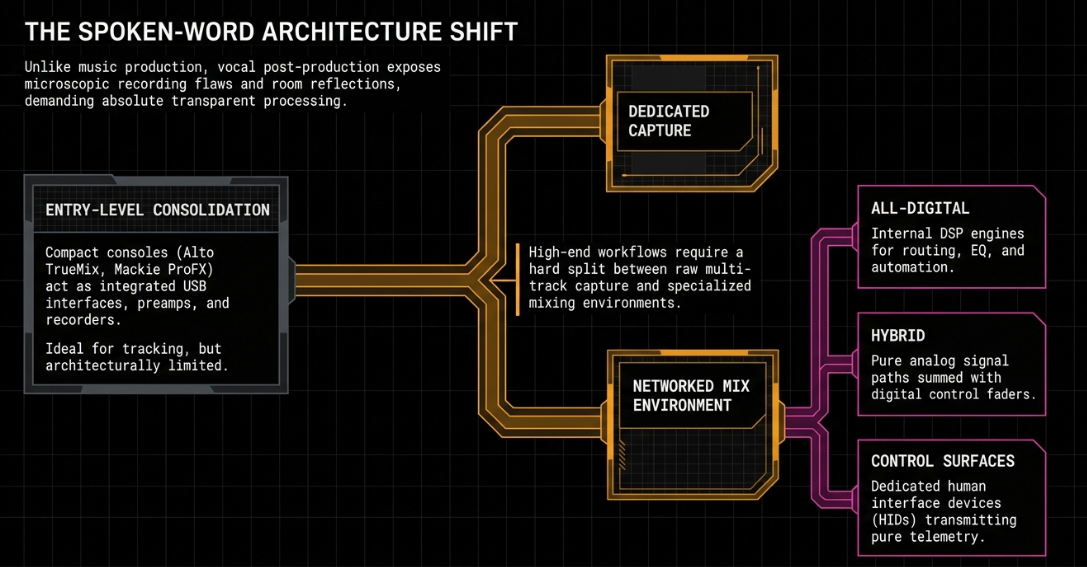
However, professional post-production workflows require a clear division between capture and mixing2. Professional studios route raw, multi-track speech to specialized editing systems where engineers can manipulate individual vocal tracks2. This division has reshaped the high-end market, leading to a distinction between three console formats: physical digital consoles, hybrid analog-digital consoles, and dedicated non-audio-carrying DAW control surfaces6.
These different formats allow studios to align their hardware with specific operational and acoustic requirements:
All-Digital Consoles: Run routing, EQ, compression, and automation entirely within internal DSP engines, managing signal conversion via high-quality onboard converters12.
Hybrid Consoles: Feature a pure analog signal path combined with digital control faders, allowing engineers to apply analog color and summing while writing automation to a DAW6.
DAW Control Surfaces: Function as human interface devices (HIDs) that send telemetry data to a computer, replacing the mouse and keyboard with a tactile interface12.
System Protocols and Interface Translation Architecture
The communication protocol used to connect a control surface or mixing console to a computer determines its operational speed, fader resolution, and visual feedback capabilities15. The industry relies on specialized translation protocols that bridge physical controls with DAW software engines14.
Historically, MIDI-based protocols like Human User Interface (HUI) and Mackie Control Universal (MCU) served as the default standards14. Because they transmit data over legacy MIDI structures, they are subject to 7-bit data limitations, resulting in 128 discrete fader steps15. This lower resolution can cause "zipper noise" during precise manual volume adjustments15. Additionally, HUI and MCU have limited data bandwidth, restricting visual feedback on physical scribble strips to short alphanumeric characters and preventing the transfer of complex graphical information like plugin curves or real-time waveforms15.
For high-end post-production, the Ethernet-based EUCON (Extended User Control) protocol, developed by Avid, provides a faster, higher-resolution alternative15. Operating over 100/1000 Base-T network connections, EUCON offers 32-bit fader resolution, allowing up to 1,024 discrete steps15. This network-driven bandwidth enables the system to transfer rich telemetry data, including high-resolution metering, scrolling waveforms, plug-in configurations, and routing states directly to physical console screens16.
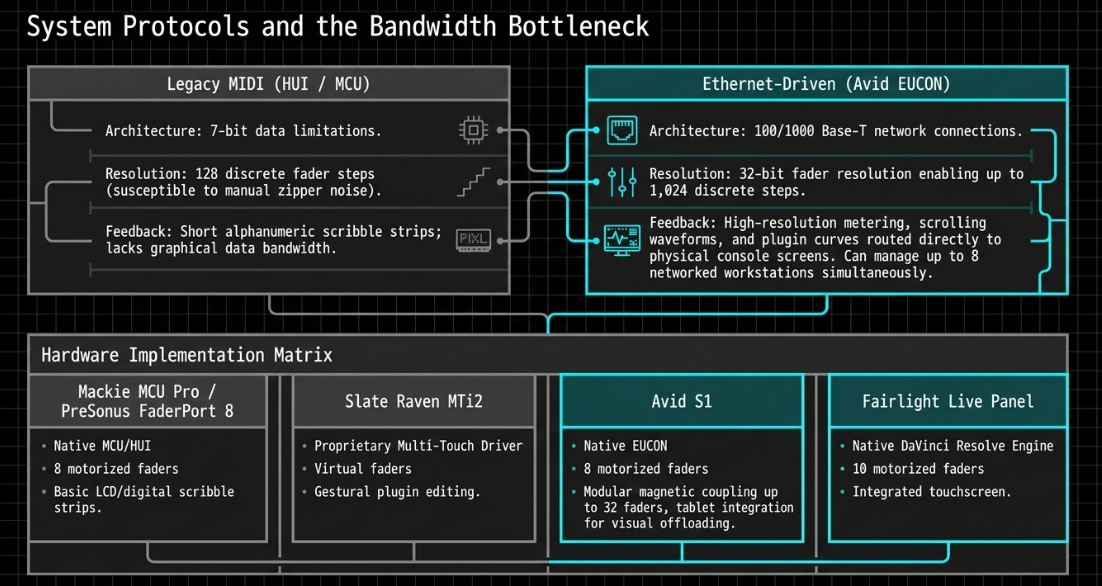
Furthermore, EUCON allows a single control surface to manage up to eight networked workstations simultaneously, enabling an engineer to jump between separate editing, recording, and video suites at the touch of a button18.
The following table compares prominent tactile and touchscreen control interfaces used in professional post-production suites:


The Avid S1 is an option for mid-sized post suites due to its modular expandability16. Up to four S1 units can be physically connected via magnetic fasteners, scaling the physical surface to 32 faders16.
By using the EuControl software layer to pair each S1 with an iPad or Android tablet, engineers can display high-resolution meters, routing indicators, and panning coordinates, which offloads processing tasks from the host computer's main monitors16.
Modular Elite Post-Production Control Surfaces
Avid S6 and S4 Architectural Framework
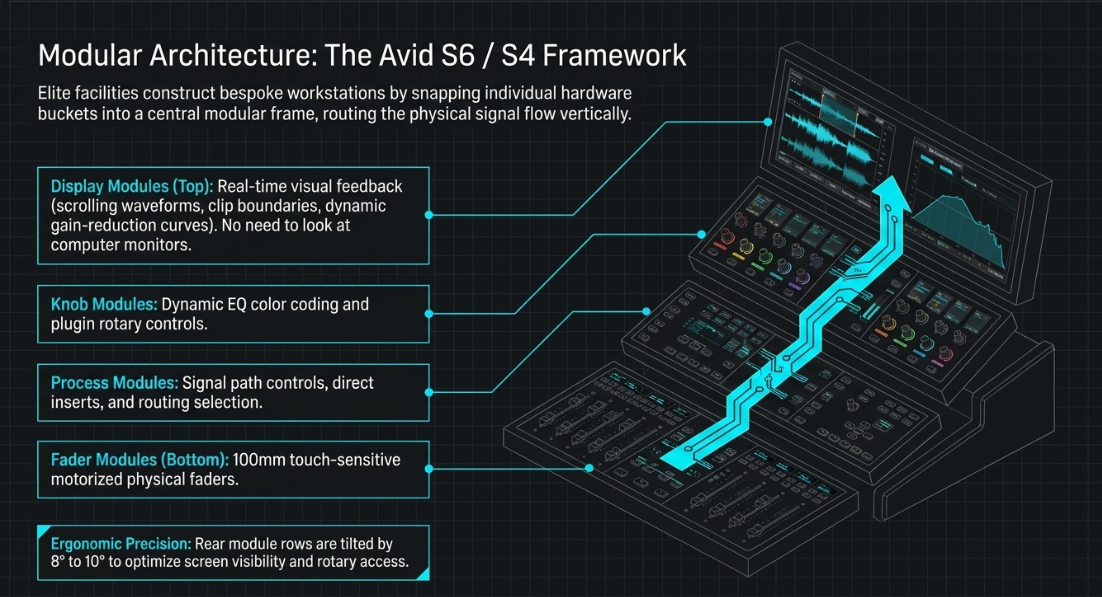
For major broadcast networks and film post-production stages, the modular Avid S6 and its smaller sibling, the Avid S4, serve as central control hubs18. Designed around a modular frame, these consoles allow facilities to customize their workspace by combining individual hardware buckets17.
┌─────────────────────────────────────────────────────────────┐
│ Display Modules │
│ (Scrolling Waveforms, Visual Meters, Routing Metadata) │
├─────────────────────────────────────────────────────────────┤
│ Knob Modules │
│ (Dynamic EQ Color Coding, Plugin Rotary Controls) │
├─────────────────────────────────────────────────────────────┤
│ Process Modules │
│ (Signal Path Controls, Direct Inserts, Routing Select) │
├─────────────────────────────────────────────────────────────┤
│ Fader Modules │
│ (100mm Touch-Sensitive Motorized Physical Fader) │
└─────────────────────────────────────────────────────────────┘
The physical layout organizes the channel strip vertically, routing signal flow from the physical fader at the bottom through the process and knob modules up to the visual displays18. Display modules provide immediate visual feedback, allowing engineers to view scrolling waveforms, clip boundaries, and dynamic gain-reduction curves without looking up at a projection screen or computer monitor18.
To enhance ergonomics, physical frames can be customized further21. For example, studios can tilt the rear module rows by 
The Post Module and Stem Workflows
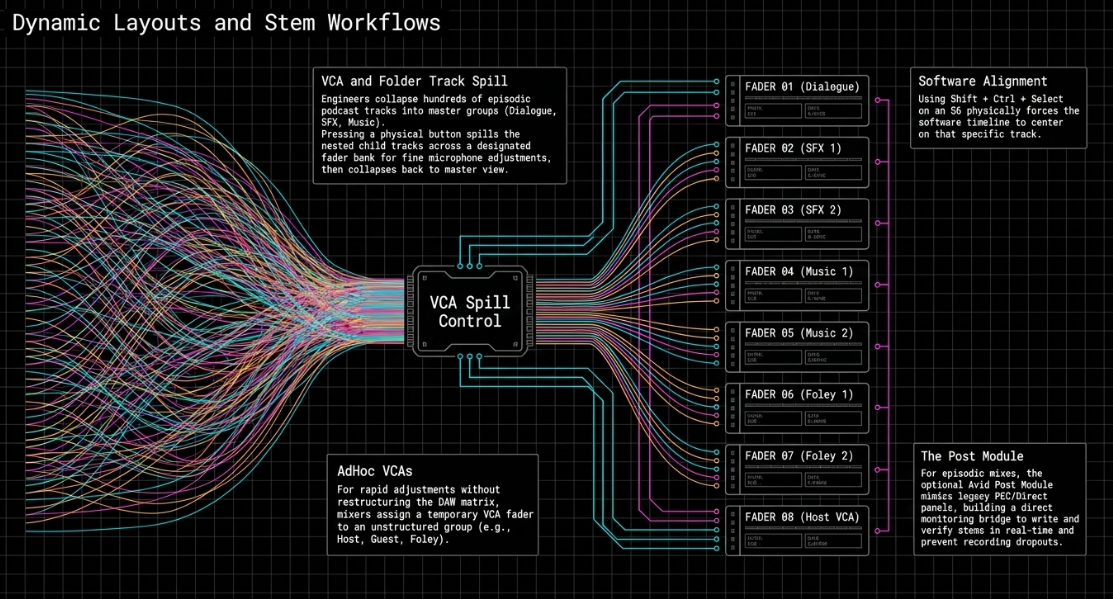
For complex episodic podcast mixes that involve multiple dialogue stems, music tracks, and sound effects, the optional Avid Post Module integrates traditional film dubbing workflows into the digital console20. Styled after legacy physical PEC/Direct panels, the Post Module provides dedicated toggle switches that allow engineers to write and monitor stems in real-time24.
By establishing a direct monitoring bridge between DAW inputs and recorded print tracks, the mixer can immediately compare pre-mix source signals with printed stems to verify signal consistency and prevent recording dropouts24.
Dynamic Layouts and Grouping Strategies
In sessions containing many dialogue, narration, and atmospheric tracks, S6 and S4 consoles use advanced folder and fader grouping configurations to keep key signals accessible18. Using VCA Spill and Folder Track Spill, a mixer can collapse hundreds of project tracks into a few master groups (e.g., Dialogue, SFX, Music, and Ambience)18.
Pressing a button "spills" the nested child tracks across a designated fader bank, allowing the engineer to make fine adjustments to individual microphones before collapsing the folder to return to the master view19.
For rapid, unstructured adjustments, mixers use "Select VCAs" and "AdHoc VCAs"19. Instead of restructuring the DAW's routing matrix, an engineer can select a group of tracks (e.g., Host, Guest, and Foley Return) and assign them to a temporary VCA fader on the console19.
This allows the engineer to ride levels across those tracks simultaneously19. The physical shortcut Shift + Ctrl + Select on an S6 strip automatically scrolls the DAW software to center on that specific track, keeping the software timeline aligned with the physical faders19.
Advanced Networked Broadcast Consoles and Case Studies
Solid State Logic System T and TriniTy
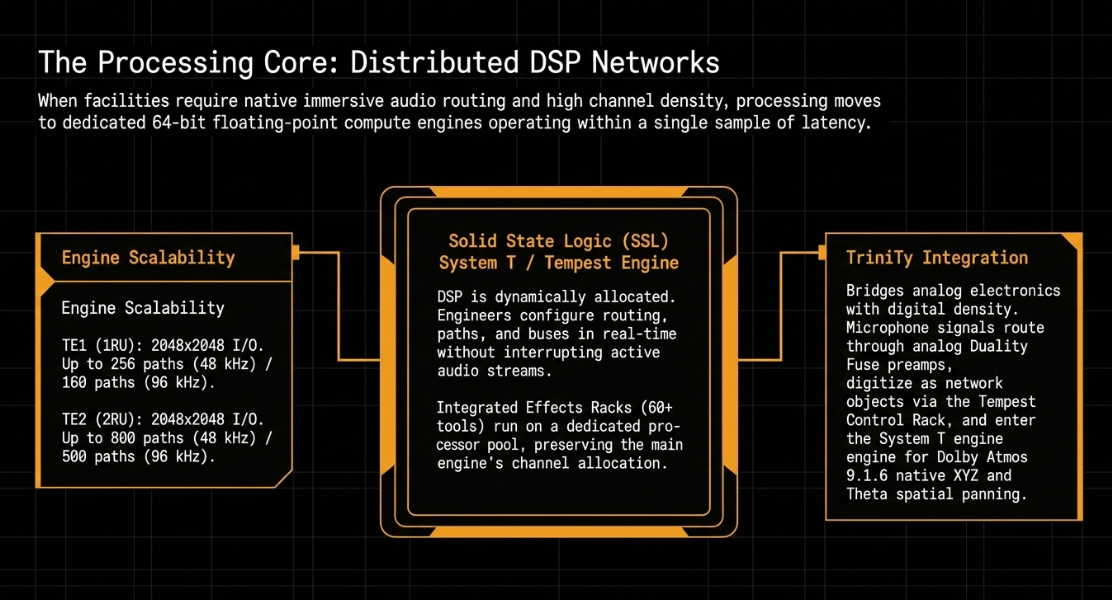
When a post-production environment requires high channel counts, native immersive audio routing, and low-latency digital signal processing, facilities implement Solid State Logic’s System T platform27. System T is built on a distributed network architecture powered by the Tempest Engine, a 64-bit floating-point processor capable of executing audio algorithms within a single sample30.
The Tempest Engine is available in two physical configurations, with DSP processing capability scalable via licensing packages:
System T's DSP allocation is highly flexible, allowing engineers to configure routing, channel paths, and auxiliary buses in real-time without interrupting active audio streams27. The system also includes an integrated Effects Rack containing over 60 studio tools—such as dynamic EQs, transient shapers, and the classic SSL bus compressor32. Because these internal effects run on a dedicated processor pool, they do not reduce the main engine's overall channel path allocation32.
For hybrid rooms that bridge analog console electronics with high-density digital routing, SSL developed the TriniTy integration package33. Installed in facilities like Confetti Institute of Creative Technologies, TriniTy pairs a digital Tempest Control Rack (TCR) with an analog SSL Duality Fuse console33.
The system routes microphone signals through analog preamps and outboard gear directly into converters, which digitize the audio as network objects33. These digital paths are then routed into System T’s immersive mixing engine, allowing the engineer to pan objects in Dolby Atmos 9.1.6 formats using native XYZ and rotational Theta panning controls33.
Case Studies in Premium Podcast Production
Several commercial facilities demonstrate the practical application of these integrated systems:
Spiritland (King's Cross, London): This facility uses a Studer OnAir 1500 console integrated with Focusrite RedNet preamps and an SSL System T S400 console27. This dual-console hybrid setup allows engineers to record clean talkback-isolated speech, ingest multi-point remote feeds, and mix large-scale productions27. The studio recently utilized this system to mix a high-profile, unscripted Netflix series in Dolby Atmos 7.1.427.
Pip Studios (London): Designed around complete file portability and collaborative access, Pip Studios features six Dolby Atmos-certified mixing rooms37. Each suite is equipped with a 24-fader Avid S6 console, an Avid MTRX audio interface, and a dedicated Dolby rendering unit running on a high-speed Dante Audio-over-IP network managed by Dante Domain Manager (DDM)37. This design ensures that projects can be moved securely between different mixing rooms without requiring manual signal patching37.
The Sound Company (London): Operating since 1993, this facility uses dedicated Studer Vista 6 and Studer On-Air 3000 consoles1. This architecture separates the tracking and pre-mixing stages38. Pre-recorded playback elements and digital inserts are mixed on a secondary Studer On-Air 3000 console, which feeds into a single fader on the main 40-fader Vista 6 console38. This multi-tier structure allows the lead mix engineer to focus on the balance of the presenter and guest microphones38.
Audio-over-IP (AoIP) Infrastructure and Low-Latency Ingestion
Dante vs. Ravenna Systems
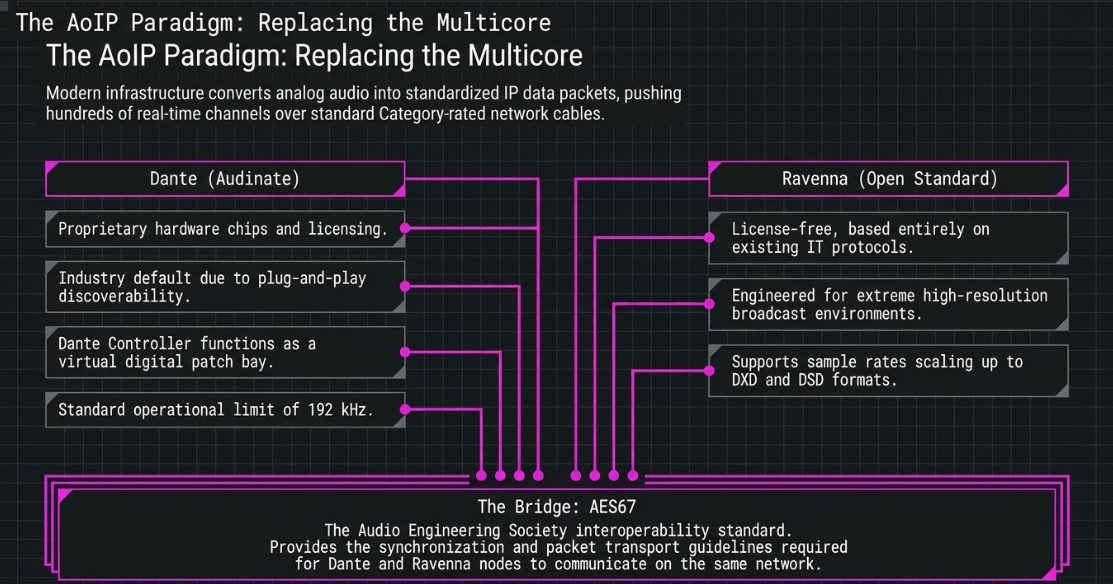
The shift from analog multicore cabling and point-to-point digital connections to Audio-over-IP (AoIP) has redesigned post-production infrastructure4. AoIP networks convert analog and digital audio into standardized IP data packets, allowing hundreds of real-time channels to travel over standard Category-rated network cables39.
Dante and Ravenna are the two dominant AoIP protocols used in modern post-production40. Dante is a proprietary system that requires hardware chips and licensing from Audinate43. It is widely used due to its plug-and-play discoverability and the Dante Controller software, which functions like a digital patch bay39.
Ravenna is an open, license-free standard based on existing IT protocols40. Ravenna is designed for high-resolution broadcast environments, supporting sample rates up to 

AES67 Synchronization Mechanics
To allow different AoIP protocols to communicate, the Audio Engineering Society developed the AES67 interoperability standard40. AES67 establishes a set of synchronization, packet transport, and session description guidelines that serve as a bridge between competing networks41.
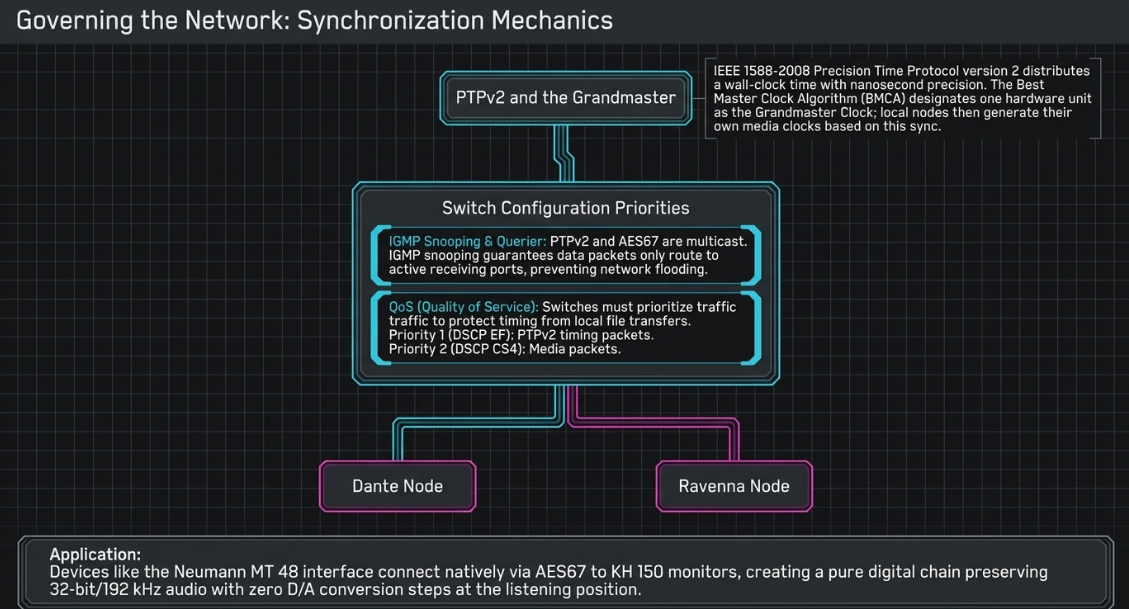
Synchronization under AES67 is governed by IEEE 1588-2008 Precision Time Protocol version 2 (PTPv2)45. PTPv2 distributes a common wall-clock time across all network nodes with nanosecond precision45.
The system uses the Best Master Clock Algorithm (BMCA) to designate a single hardware unit on the network as the Grandmaster Clock45. Once synchronized, each node generates its own local media clock45.
To maintain synchronization and prevent audio dropouts, network switches must be configured with specific settings:
┌──────────────────────┐
│ Grandmaster Clock │
│ (PTPv2 Master Sync) │
└──────────┬───────────┘
│
┌──────────▼───────────┐
│ Managed Network │
│ Switch │
│ • QoS Prioritization │
│ • IGMP Snooping │
└────┬────────────┬────┘
│ │
┌─────────────▼─────┐┌─────▼─────────────┐
│ Ravenna Node ││ Dante Node │
│ (Native PTPv2) ││ (AES67 Compatibility)│
└───────────────────┘└───────────────────┘
The network must utilize managed Ethernet switches with Internet Group Management Protocol (IGMP) Snooping and an active IGMP Querier45. Because PTPv2 and AES67 RTP audio packets are distributed via multicast transport, IGMP snooping ensures that data packets are only routed to active receiving ports, preventing network flooding45.
Quality of Service (QoS) priorities must also be established on the switch45. PTPv2 timing packets must receive the highest priority queue (DSCP EF), followed by media packets (DSCP CS4) and standard network data, protecting the timing sync from interruption by file transfers or local network traffic45.
In practice, high-end studios use these open standards to build all-digital monitoring paths44. The Neumann MT 48 audio interface, developed in collaboration with Merging Technologies, uses Ravenna and AES67 to connect directly to Neumann KH 150 AES67 studio monitors44.
This creates a fully digital signal chain that preserves up to 32-bit/
Low-Latency Remote Ingestion Workflows
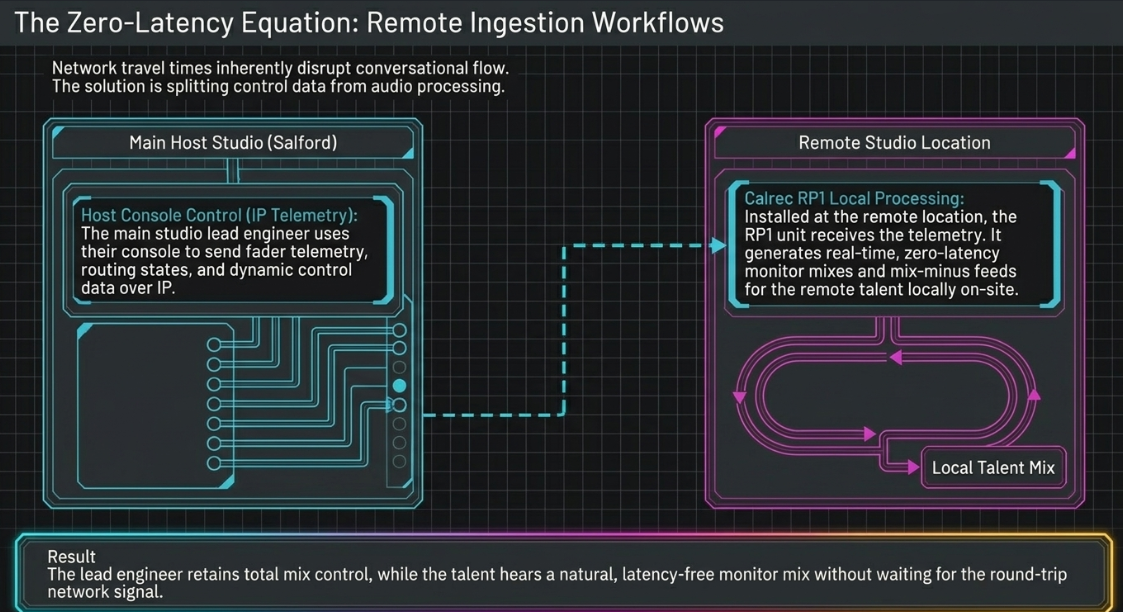
Integrating remote guests into live or recorded podcast sessions introduces latency challenges36. If a remote contributor hears their own voice delayed by network travel times, it disrupts the natural flow of conversation46.
To solve this, broadcast facilities use specialized hardware units like the Calrec RP1 remote production system46.
[Main Host Studio (Salford)] [Remote Studio Location]
│ │
├──► Transmission Sound Console ├──► Calrec RP1 Remote Unit
│ │ │ │
│ ▼ (Sends Fader Telemetry via IP) │ ▼ (Processes Local Audio Instantly)
│ [Main Output Mix] ◄────────────────────────────┴────[Local Monitors/Earpieces]
│ • Direct Mic Feeds
│ • Mix-Minus Feed
The RP1 is installed at the remote location to handle audio processing locally46. It generates real-time, zero-latency monitor mixes and mix-minus feeds for the remote presenters and guests directly on-site46.
At the same time, the RP1's fader levels can be controlled remotely via an IP network connection by the main console at the host facility46. This allows the lead engineer to control remote mic levels, dynamic processing, and routing states in real-time, while the talent hears a natural, latency-free monitor mix36.
Advanced Signal Control and Sound Design Workflows
The Logarithmic Principles of Gain Sharing
In multi-microphone roundtable environments, keeping multiple channels open simultaneously increases the ambient noise floor and introduces comb filtering from voice bleed48. To prevent this, engineers use real-time gain-sharing algorithms like the Dan Dugan Speech System48.
The algorithm functions by measuring the level of each individual channel and comparing it to the total sum of all levels on the bus50. The gain allocated to an individual channel (

where 

When translated into logarithmic decibel values, the gain adjustment for a given channel is represented as:

By maintaining this mathematical relationship, the total sum of all gains is kept at unity (


When a single host speaks, their microphone level dominates the summation, driving its gain to 
Dialogue Restoration, Spatialization, and Loudness Alignment
During the mixing stage, engineers use specialized tools to clean, balance, and prepare the dialogue for distribution2.
The workflow is organized into structured stages:
Dialogue Reconstruction & Matching: When remote interviews or insert recordings exhibit different acoustic characteristics, engineers use EQ matching tools like the Eventide Equivocate plugin52. By routing the reference studio track through a sidechain, the plugin analyzes the spectral profile and automatically shapes the remote track's EQ to match the frequency response of the original studio recording52.
Acoustic Environment Simulation: To place dry, over-dubbed, or voiceover recordings into a consistent physical space, engineers apply convolution reverb plugins like Avid Space52. These plugins use recorded impulse responses (IRs) to recreate the physical reflections of specific rooms52. Adjusting decay time, pre-delay, and wet/dry balances allows the dialogue to sit naturally within the virtual acoustic environment52.
Dynamic Range Management: After cleaning the tracks, engineers use gentle dynamic compression and manual volume rides on the console to smooth out level variations2. Grouping dialogue tracks into dedicated sub-mix buses allows the engineer to apply parallel compression, which adds density to the voices without over-compressing or flattening the individual speech dynamics2.
Spatialization & Object Panning: For immersive podcast formats, engineers map individual dialogue tracks as audio objects27. Using console-integrated 3D panners, dialogue can be positioned dynamically across spatial formats (such as 7.1.4 or 9.1.6 arrays), which helps separate overlapping voices and creates an expansive listening experience on spatial playback devices25.
Phase and Loudness Monitoring: The final mix is routed through specialized metering suites, such as DK Technologies MSD vector displays and Sifam Type 74 PPM meters, to verify phase coherence and monitor overall levels38. Engineers measure the integrated loudness and loudness range values to ensure the final master complies with international broadcast standards like EBU R1283.
Works cited
Radio & Podcast Production Studios London | The Sound Company, https://www.sound.co.uk/radio-podcast-studio-london/
Audio Mixing Techniques for Pro-Level Podcasts & Video, https://flexworkstudios.com/audio-mixing-techniques/
Audio Engineering in a Professional Podcast Post-Production - Finchley Studios, https://www.finchley.co.uk/finchley-learning/visual-podcast/audio-engineering-in-a-professional-podcast-post-production
Why AoIP is the Future of Broadcasting, Podcasting and Multicasting - Blog | Aristaproav, https://www.aristaproav.com/article_d.php?lang=en&tb=5&id=880
Production digital mixers: the Fairlight Live revolution by Blackmagic Design - Audio Effetti, https://audioeffetti.com/en/news/production-digital-mixers-the-fairlight-live-revolution-by-blackmagic-design-n223779
API Vision+ Console Review — Why Hybrid Mixing Studios Are Paying Attention, https://arefyevstudio.com/en/2026/05/10/api-vision-plus-hybrid-mixing-console/
Podcasting Equipment - Westend DJ, https://westenddj.co.uk/collections/podcasting
London Podcast Studio in Kings Cross - Voices Radio, https://www.voicesradio.co.uk/podcast
Hire Our Podcast Studio – Global Academy School and Sixth Form in London, https://globalacademy.com/hire-podcast-studio/
Audio Interface vs Mixer : r/podcasting - Reddit, https://www.reddit.com/r/podcasting/comments/gpmnud/audio_interface_vs_mixer/
Podcast Studio Hire | London | Equipment & Engineer included, https://podcaststudiohire.co.uk/
PAD Console Buyers Guide - Pro Audio Design, https://www.proaudiodesign.com/pages/pad-console-buyers-guide
DAW Control Surfaces For Audio Post Production - 4 Options For Your Studio, https://www.344audio.com/post/article-daw-control-surfaces-for-audio-post-production-4-options-for-your-studio
Our Expert Guide to DAW Controllers (Updated January 2026) - GuitarGuitar, https://www.guitarguitar.co.uk/news/141570/
Choosing a DAW Control Surface - Lm Pro | Professional Recording Equipment, https://www.lmpro.ca/post/choosing-a-daw-control-surface
Avid S1 – Thomann UK, https://www.thomann.co.uk/avid_s1.htm
Pro Tools | S6 Guide - Avid, https://resources.avid.com/SupportFiles/ProMixing/S6_Guide_3.7.pdf
Avid Consoles | Mediaspec, https://mediaspec.co.uk/product/275
AVid S6 workflow : r/AudioPost - Reddit, https://www.reddit.com/r/AudioPost/comments/1jhh1zs/avid_s6_workflow/
Avid S4 - Mixing Console for Music and Audio Post, https://www.avid.com/products/avid-s4
Perfect Audio Production - Avid - Qvest, https://avid.qvest.com/en/perfect-audio-production/
Avid S4 – Mixing Console for Music and Audio Post - Shop | Funky Junk, https://shop.funky-junk.com/shop/recording/mixers/consoles/avid-s4-mixing-console-for-music-and-audio-post/
How our students use the Avid S6 to master mixes - Abbey Road Institute, https://abbeyroadinstitute.co.uk/blog/how-our-students-use-the-avid-s6/
Avid S6 post module : r/AudioPost - Reddit, https://www.reddit.com/r/AudioPost/comments/br46tm/avid_s6_post_module/
Pro Tools/ Audio Post - Avid, https://www.avid.com/pro-tools/audio-post
Avid Coffee & Consoles: Avid S4 and S6 — Back to Basics - YouTube, https://www.youtube.com/watch?v=MrGtaFAHS5g
Entertainment | Solid State Logic, https://solidstatelogic.com/solutions/entertainment
Broadcast | Solid State Logic, https://solidstatelogic.com/broadcast
Audio Post Production - Solid State Logic, https://solidstatelogic.com/solutions/post-production
System T for Music - Solid State Logic, https://solidstatelogic.com/products/system-t-for-music
New Music Gear Monday: SSL System T Console - Bobby Owsinski's Music Production Blog, https://bobbyowsinskiblog.com/ssl-system-t-console/
System T Audio Production Platform - Technology for entertainment programming and events - Amazon S3, https://s3.eu-west-1.amazonaws.com/eu1.download.solidstatelogic.com/content/System%20T%20Entertainment%20production%20and%20events/SSL%20System%20T%20Entertainment%20Programming%20and%20Events.pdf
Confetti Institute of Creative Technologies Opens London Campus, Anchored on Solid State Logic's New Hybrid Production Solution: TriniTy, https://www.solid-state-logic.co.jp/latest-media/confetti-institute-of-creative-technologies-opens-london-campus-anchored-on-solid-state-logics-new-hybrid-production-solution-trinity/
SSL unveil System T consoles, https://www.soundonsound.com/news/ssl-unveil-system-t-consoles
Mansion Sound Unveils State of the Art Audio Studio for Music, Film & Television, Centered on Best-in-Class Solid State Logic Consoles, https://www.solid-state-logic.co.jp/media/mansion-sound-unveils-state-of-the-art-audio-studio-for-music-film-television-centered-on-best-in-class-solid-state-logic-consoles/
Podcast Studio London | Studio Hire, Recording & Production - Spiritland Productions, https://spiritlandproductions.com/studio/
Future proof your studio with AoIP | Sponsored - Broadcast, https://www.broadcastnow.co.uk/broadcast-network/future-proof-your-studio-with-aoip/5155790.article
Behind The Scenes At BBC Radio 3's In Tune, https://www.soundonsound.com/techniques/behind-scenes-bbc-radio-3s-tune
Dante AoIP Solutions - Broadcast Radio, https://www.broadcastradio.com/dante-aoip-solutions
What are Audio Networks? - RAVENNA Network, https://www.ravenna-network.com/partners/0
Audio Networking - Merging Technologies, https://www.merging.com/highlights/audio-networking
Dante & AES67 - What's the difference - Sennheiser, https://help.sennheiser.com/hc/en-us/articles/39094263480857-Dante-AES67-What-s-the-difference
Dante FAQs - Merging Public Document - Confluence, https://merging.atlassian.net/wiki/spaces/PUBLICDOC/pages/364576772/Merging+Dante+FAQ
Why Did Neumann Choose AES67/Ravenna Instead Of Dante For Network Audio?, https://hoangbaokhoa.com/en/why-did-neumann-choose-aes67ravenna-instead-of-dante-for-network-audio-b1661.php
AES67 practical guide Archives - RAVENNA Network, https://www.ravenna-network.com/category/aes67-practical-guide/
Remote Production at the BBC - Calrec Audio Ltd, https://calrec.com/blog/remote-production/
Leading the field - Calrec Audio Ltd, https://calrec.com/teabags/
News, Product Status and Events - Dan Dugan Sound Design, https://www.dandugan.com/news.html
Dan Dugan Automixer - Waves Audio, https://www.waves.com/mixers-racks/dugan-automixer
Automatic Mixing 101 - Sound Devices, https://www.sounddevices.com/automatic-mixing-101/
Audio Post Production Solutions | Avid, https://www.avid.com/solutions/audio-post-production
ADR in film: recording, editing, and mixing dialogue - Avid, https://www.avid.com/resource-center/adr-in-film
Audio Editing Automation: A Complete Guide for Producers - SoundBridge, https://www.soundbridge.io/audio-editing-automation-a-complete-guide-for-producers














