
Electroacoustic Fundamentals and Spoken Word Frequency Dynamics
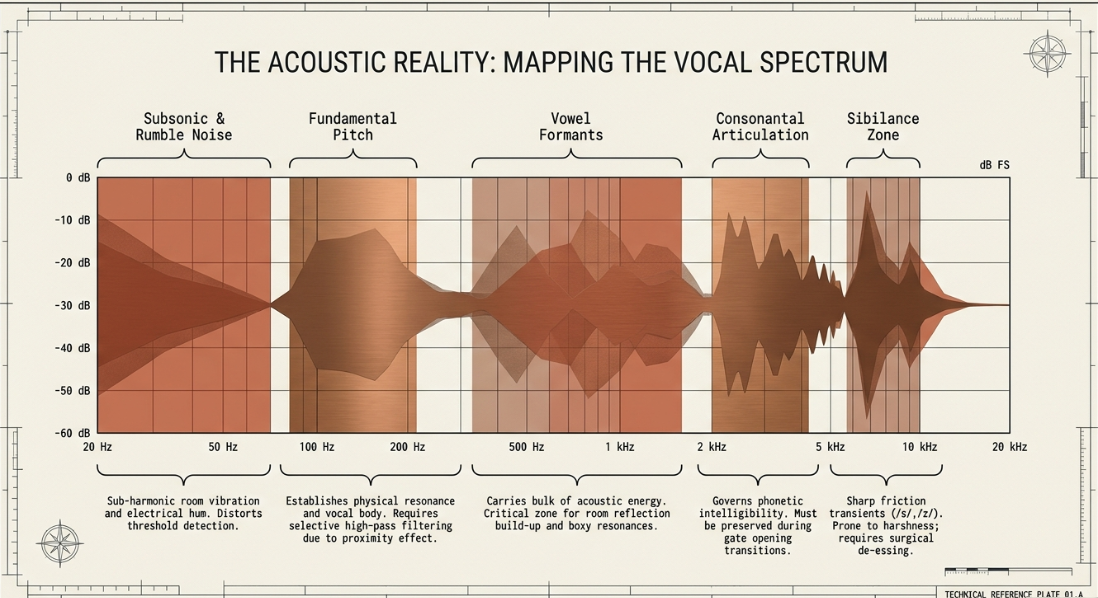
In professional podcast post-production, managing the dynamic range and establishing an optimal signal-to-noise ratio (SNR) is a primary technical challenge1. The human voice is a highly dynamic and acoustically complex source3. Human speech spans a broad frequency range, typically requiring distinct analytical segmentation for corrective and dynamic processing3. The fundamental pitch of spoken dialogue typically resides between and 3. This range provides the voice with its characteristic resonance and foundational acoustic mass, often referred to as "body"3. Acoustic energy shifts upward through the vowels, which primarily occupy the lower midrange from to 3. Spoken word intelligibility and consonantal articulation are governed by the upper-midrange frequencies from to 3. The extreme upper register, spanning to , is dominated by high-frequency sibilant transients—such as friction sounds like /s/, /z/, /t/, and /d/—which are critical for vocal crispness but highly susceptible to harshness3.
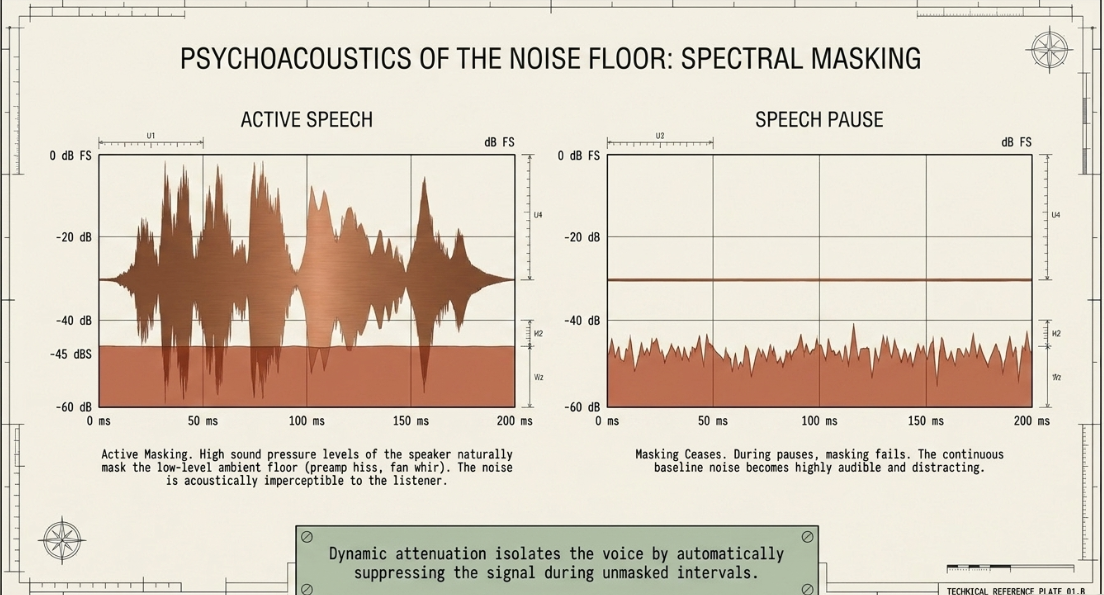
When vocal recordings occur in typical home studios or untreated environments, microphones inevitably capture background noise along with the dialogue1. This continuous baseline of noise—such as system preamplifier hiss, computer fan whir, air conditioning rumble, and room reflections—is termed the noise floor10. Historically, tape recording environments, such as cassette-based multi-tracking, exhibited high noise floors near 10. In contrast, modern digital audio workstations (DAWs) provide a much wider dynamic range, but still require precise management of ambient room noise1.
Managing this noise relies on the psychoacoustic phenomenon of spectral masking12. When a speaker is active, the high sound pressure level of the voice naturally masks the low-level noise floor, rendering it imperceptible to the listener12. However, during pauses between words or sentences, the masking effect ceases, and the continuous noise floor becomes highly audible and distracting, especially when monitored on headphones1. By automatically attenuating the signal during these silent intervals, gates and expanders isolate the speaker's voice and keep the overall noise floor under control11.
Mathematical Modeling and Operational Parameters of Dynamic Attenuation
To deploy noise gates and downward expanders effectively, a precise mathematical and physical understanding of their operational parameters is required12.
Signal Amplitude (dB)
│
├─────────────────────── Vocal Signal Peak
│ /\
│ / \
│ / \
-25 ┼────/──────\─────────── Open Threshold (T_open)
│ / \ /\
-31 ┼──/──────────\──/──\─── Close Threshold (T_close) [Hysteresis Gap = 6 dB]
│ / \/ \
-45 ┼/────────────────────\─ Steady-State Noise Floor
│
└───────────────────────► Time (t)
The threshold, measured in decibels relative to full scale (), defines the amplitude boundary below which the processor initiates gain reduction12. When the input signal's amplitude falls below the threshold, the gate closes13. When the signal rises above the threshold, the gate opens13. In professional speech editing, the threshold must be set precisely above the steady-state ambient noise floor but below the quietest conversational speech transients8.
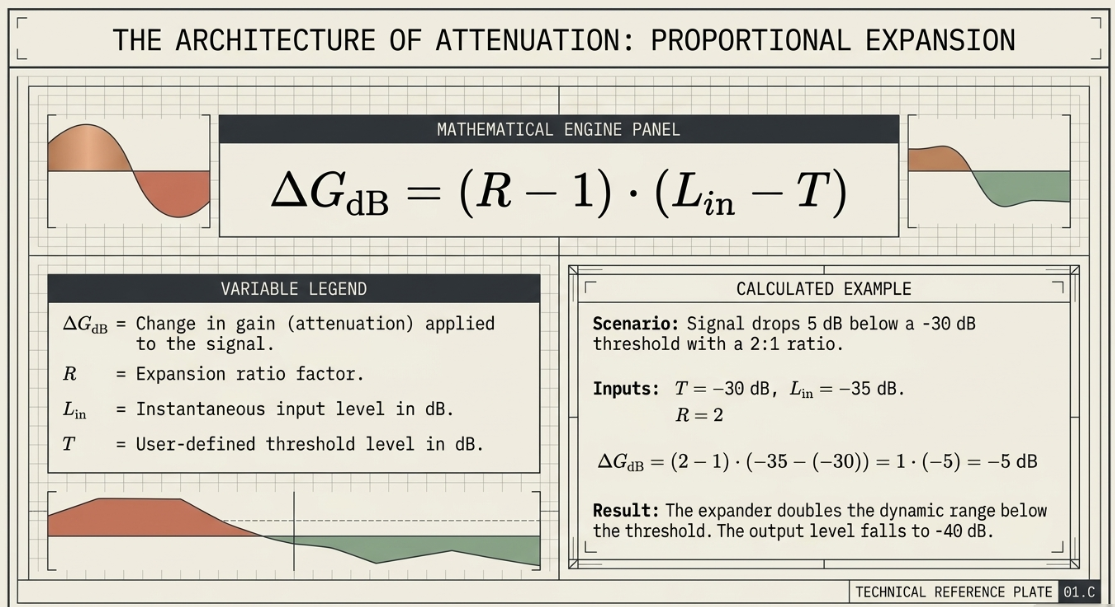
The ratio parameter determines the slope of gain reduction applied to signals falling below the threshold13. The mathematical model governing a downward expander’s gain attenuation can be expressed through the following formula:
Where:
is the change in gain (attenuation) applied to the signal in decibels.
is the expansion ratio factor (where an expansion ratio of means for every the input falls below the threshold, the output is attenuated by )20.
is the instantaneous input level in .
is the user-defined threshold level in .
For example, if the threshold () is set to , the input signal () drops to during a pause, and the expander is set to a ratio of (), the attenuation applied is:
The resulting output level is (), effectively doubling the dynamic range below the threshold20. If the ratio is set to (), the expander functions as a hard gate, applying absolute attenuation once the signal falls below the threshold7.
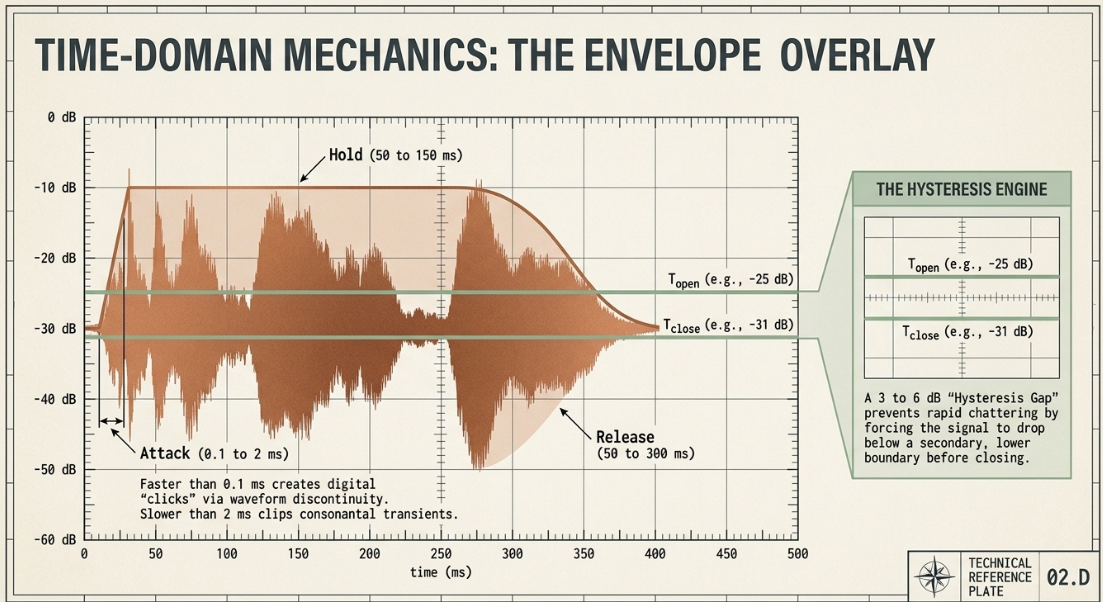
The attack parameter defines the time required for the gain-control element to transition from closed to open once the threshold is crossed12. If the attack time is set too fast (e.g., ), the instantaneous change in gain introduces a sharp transient discontinuity into the digital waveform, resulting in an audible "click" or "pop"16. Conversely, if the attack is set too slow (), the gate will not open quickly enough to capture the rapid, low-energy consonants at the start of a word, resulting in cut-off syllables and reduced speech intelligibility7.
To prevent unwanted "chattering"—where the gate rapidly opens and closes when the signal level hovers right at the threshold—hysteresis is used12. Hysteresis establishes an open threshold () and a separate, lower close threshold (), typically separated by a gap of to 24. Once the voice triggers the gate open at , the signal must fall below the lower boundary before the gate begins to close, stabilizing the gating action12.
Architectural Comparison: Traditional Hard Noise Gates versus Downward Expanders
The distinction between a hard noise gate and a downward expander centers on their dynamic transitions and their effect on the listener13.
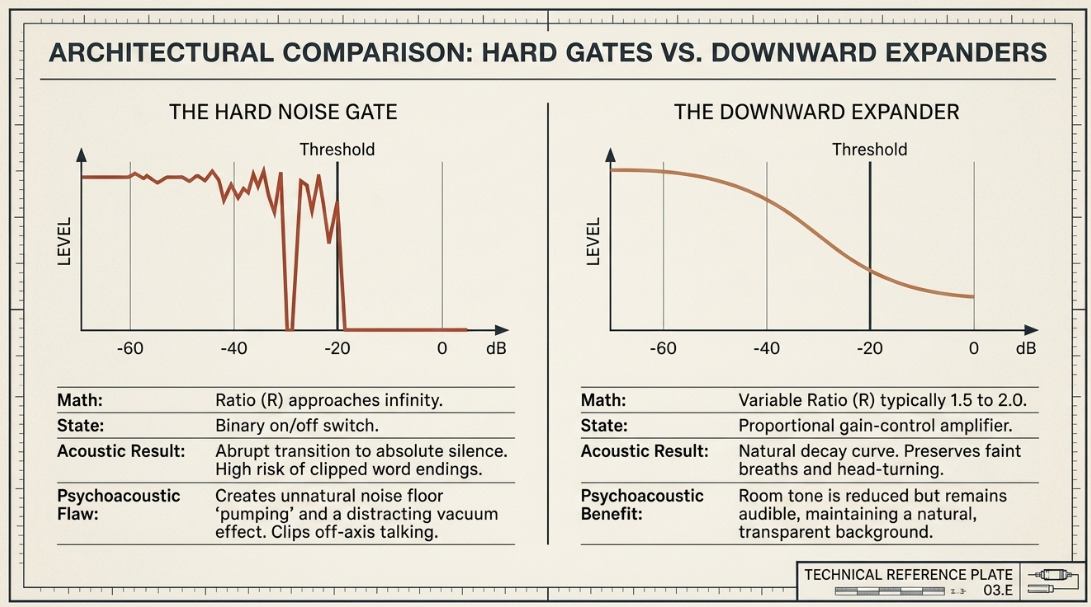
A hard noise gate operates strictly as a binary switch: it is either completely open, allowing the signal and its underlying noise floor to pass at unity gain, or it is closed, applying maximum attenuation to silence the signal22. This binary behavior is highly effective for percussive instruments with fast transients, but it is problematic for human speech13. Because dialogue naturally fluctuates in amplitude, a hard gate often cuts off quiet word endings, faint breaths, or soft consonants8.
Furthermore, hard gates can introduce a jarring contrast effect7. When the speaker talks, the listener hears the voice along with the background noise7. When the speaker pauses and the gate closes to absolute silence, the sudden drop in room tone is perceived by the brain as unnatural7. This "pumping" of the noise floor draws the listener's attention directly to the background noise7.
A downward expander, by contrast, operates as a continuous, variable amplifier13. By utilizing a gentle ratio (typically to ), the expander attenuates the signal below the threshold in proportion to how far it drops21. This gradual attenuation creates a smooth, natural transition into silence13. Rather than cutting off the room tone entirely, the expander simply reduces its volume, keeping it audible but less prominent13. This approach preserves natural breaths, faint vocal inflections, and head-turning movements without clipping speech transients22.
Signal Flow Integration and Pre-Processing Methodologies
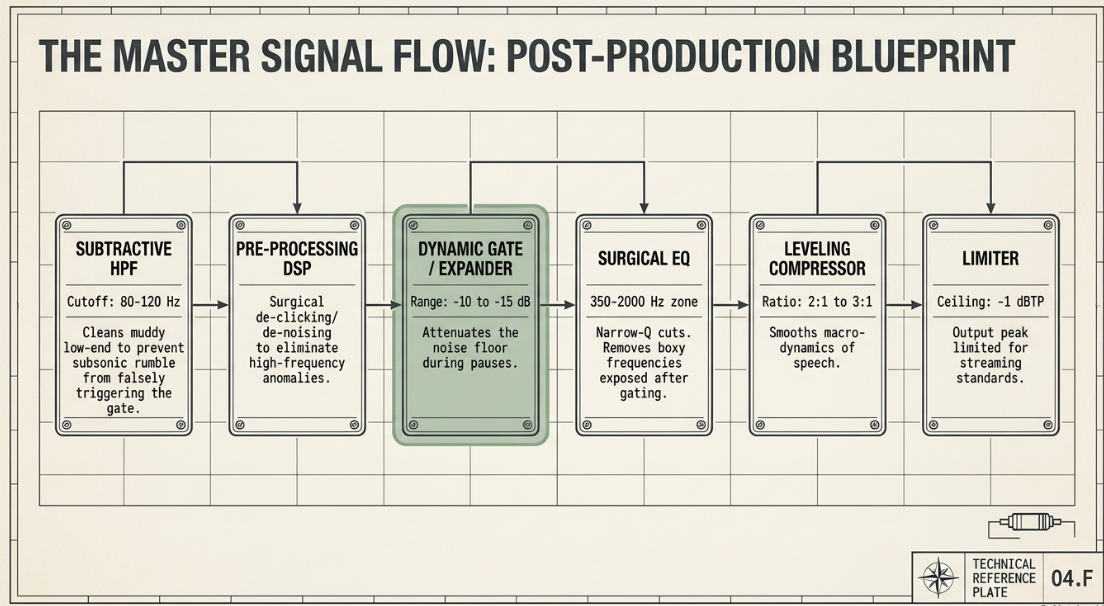
The sequence of processors in a vocal chain determines how clean and consistent the final mix will be4. Placing the gate or expander before the compressor is highly recommended4.
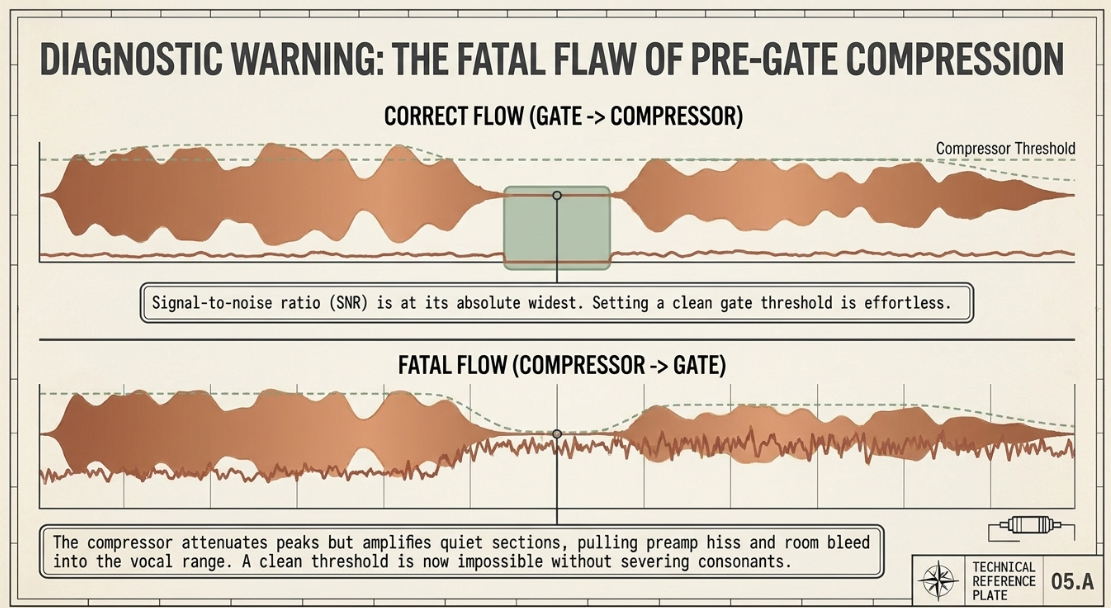
A compressor reduces dynamic range by attenuating signals that exceed its threshold, and then applying makeup gain to bring the overall signal level back up3. If compression occurs before gating, the compressor attenuates vocal peaks and amplifies the quiet sections, including the noise floor and breaths1. This significantly reduces the signal-to-noise ratio1. It brings the noise floor closer to the speech levels, making it extremely difficult to set a clean gate threshold1. The gate threshold would have to be set high, which increases the risk of clipping word endings or soft consonants1.
Placing the gate before the compressor ensures that the noise floor is attenuated while the signal-to-noise ratio is at its widest4. This makes setting the gate threshold much easier4. Once the gate attenuates the noise floor during pauses, the downstream compressor can react purely to the voice itself, rather than amplifying background noise1.
Additionally, a subtractive high-pass filter (HPF) should be placed before the gate4. Low-frequency noises, such as traffic rumble, table impacts, and electrical hum, carry significant acoustic energy below 4. If this subsonic energy enters the gate's detector, it can trigger the gate to open false-positively during silent passages4. Filtering out this low-end rumble ensures that only the target voice frequencies trigger the gate4.
[ Raw Dialogue Track ]
│
▼
┌───────────────────────────┐
│ 1. Subtractive HPF │ (Attenuates rumble below 80-120 Hz)
└───────────┬───────────────┘
│
▼
┌───────────────────────────┐
│ 2. Pre-Processing / DSP │ (Surgical de-clicking and mouth-noise attenuation) [cite: 34]
└───────────┬───────────────┘
│
▼
┌───────────────────────────┐
│ 3. Gate or Expander │ (Attenuates noise floor during speech pauses) [cite: 15, 32]
└───────────┬───────────────┘
│
▼
┌───────────────────────────┐
│ 4. Surgical EQ │ (Notches out narrow room resonances and boxiness)
└───────────┬───────────────┘
│
▼
┌───────────────────────────┐
│ 5. Leveling Compressor │ (Smooths out macro-dynamics of speech)
└───────────┬───────────────┘
│
▼
┌───────────────────────────┐
│ 6. Character / Limiter │ (Applies additive EQ and limits peaks to -1 dBTP)
└───────────────┬───────────┘
│
▼
[ Master Mix Output ]
Advanced Sidechaining, Key Filtering, and Multi-Microphone Automixing
Modern dynamic processors are split into two parallel signal paths: the audio signal path, which passes through the gain-reduction element (such as a VCA or digital multiplier), and the sidechain detection path, which analyzes the signal level to trigger the processor's action12.
The concept of sidechaining was first developed in the 1930s by cinema sound designer Douglas Shearer, who split a dialogue track to trigger a compressor specifically on harsh sibilant frequencies, creating the first de-esser38.
In modern post-production, sidechaining is widely used for dialogue ducking7. When a podcast includes background music, a compressor is inserted on the music track with its sidechain detection path keyed to the host's vocal track7. When the host speaks, the voice triggers the compressor, automatically ducking the background music7. During pauses, the compressor releases, allowing the music to swell back up cleanly7.
Another approach is the polarity inversion gating method: the background music track is duplicated and polarity-inverted on a separate channel7. A noise gate is inserted on the inverted track, keyed from the vocal track7. When the host speaks, the gate opens, allowing the inverted music signal through7. This inverted signal phase-cancels the original music track, ducking its volume without requiring a compressor7.
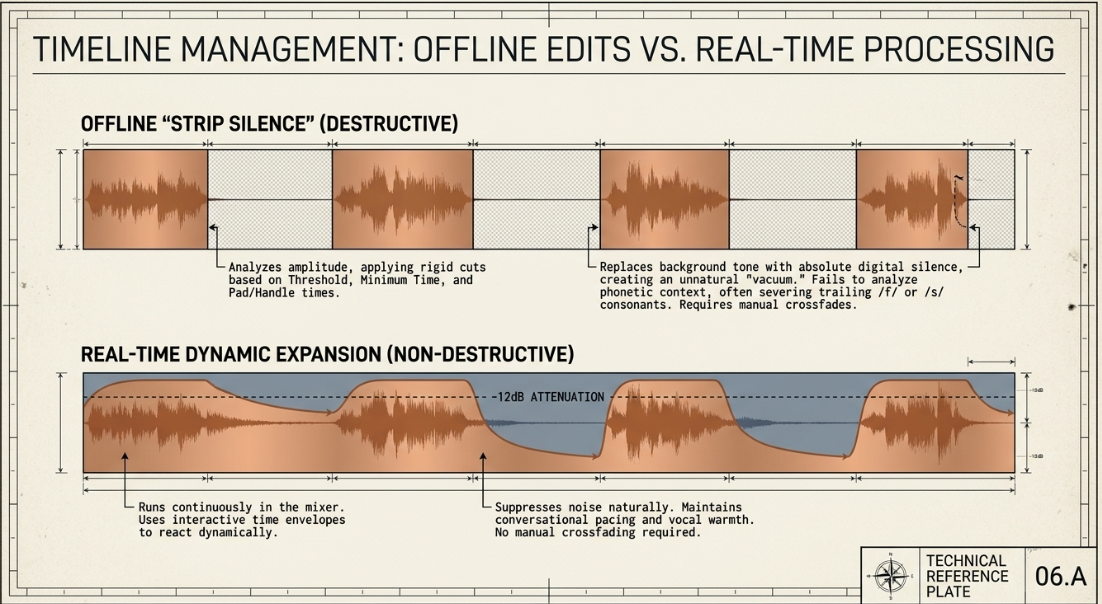
In multi-microphone podcasts (e.g., panel discussions with multiple people in the same room), bleed is a major issue30. When a host speaks, their voice is captured by their own microphone, but also leaks into adjacent microphones13. This bleed introduces phase differences because of the varying distances between the speaker and each microphone, resulting in comb filtering and a hollow, degraded sound when mixed2.
Using individual noise gates on each microphone can cause issues14. If one person speaks loudly or laughs, it can falsely trigger neighboring gates to open, creating sudden echoes and shifts in room tone14.
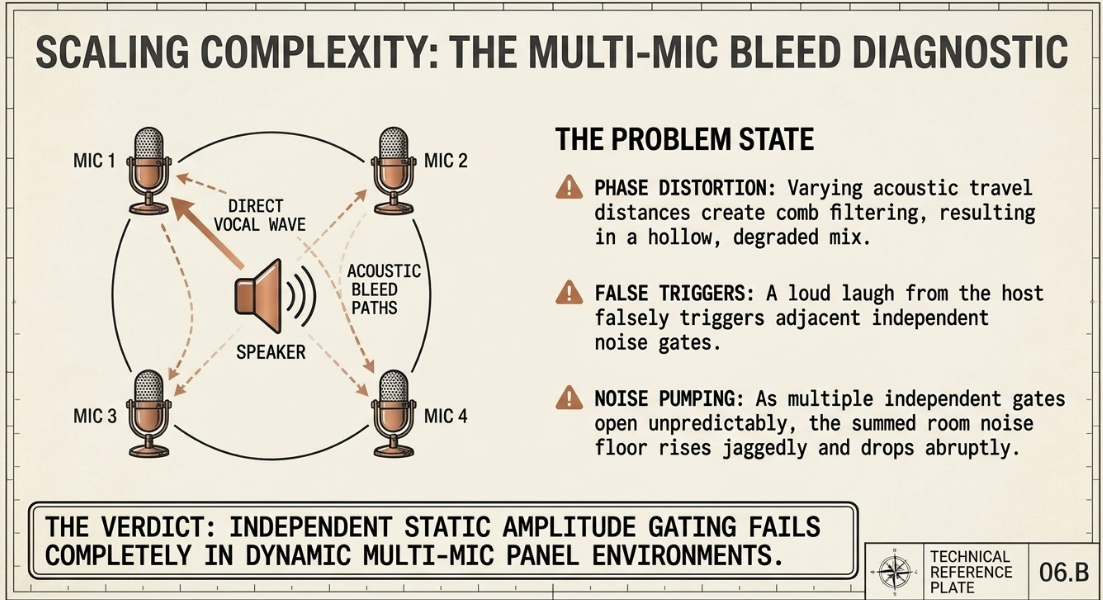
To resolve this, professional post-production utilizes the Dan Dugan Gain Sharing Algorithm14. The algorithm dynamically distributes a constant total gain among all active microphones14. The gain applied to any given channel is governed by the following equation:
Where:
is the gain coefficient applied to channel 43.
is the instantaneous signal level of channel 43.
is the total number of open microphones44.
represents the sum of the signal levels across all channels43.
Because the system gain is mathematically locked to unity (, or system gain), the overall noise floor remains perfectly consistent43. When one person speaks into Mic 1 (), approaches (), and the other inactive channels are heavily attenuated43. If multiple hosts speak simultaneously at equal volume, the system splits the gain (, or each) to maintain a constant overall level2. This eliminates comb filtering, prevents room tone pumping, and avoids clipping initial syllables, making it far superior to standard noise gating14.
Timeline Post-Production: Offline Automation versus Real-Time Processing
In modern digital audio workstations (DAWs), editors can manage noise using two primary workflows: non-real-time offline automation (such as "Strip Silence") and real-time dynamic gating45.
Raw Multi-track Dialogue Waveform:
Host 1: ───[Spoken Sentence]───[Mouth Noise/Cough]───[Spoken Sentence]───
Host 2: ───[Preamplifier Hiss]───[Adjacent Mic Bleed]───[Preamplifier Hiss]───
Offline Automation via "Strip Silence" (Destructive Cuts):
Host 1: ───[Spoken Region]──────[Deleted Empty Space]──────[Spoken Region]───
Host 2: ───[Deleted Empty Space]──[Deleted Empty Space]───[Deleted Empty Space]───
Real-Time Dynamic Expansion (Continuous Curve):
Host 1: ───[Spoken Region]──────[Noise Floor Attenuated -12dB]──────[Spoken Region]───
Host 2: ───[Noise Floor Attenuated -12dB]───────────────────────────────
Strip Silence is an offline editing tool that analyzes the waveform of an audio region and cuts out the sections that fall below a designated threshold46. The editor defines three primary parameters:
Threshold: The amplitude boundary below which the audio is categorized as silence46.
Minimum Time to accept as Silence: The duration threshold that prevents short pauses between words from being chopped into tiny, fragmented regions46.
Pre-roll and Post-roll (Handle Times): A user-defined buffer added to the start and end of the retained regions to ensure that word beginnings and endings are not clipped45.
The primary advantage of Strip Silence is that it physically removes the noise floor from the timeline, leaving absolute silence in empty regions15. This completely eliminates headphone bleed and background noise during long pauses15. Additionally, it divides the audio into clean, easily manageable regions, allowing editors to quickly identify and remove filler words, mouth clicks, or unwanted tangents46. In DAWs with shuffle-editing features, these silence regions can be collapsed to automatically tighten the conversational pacing47.
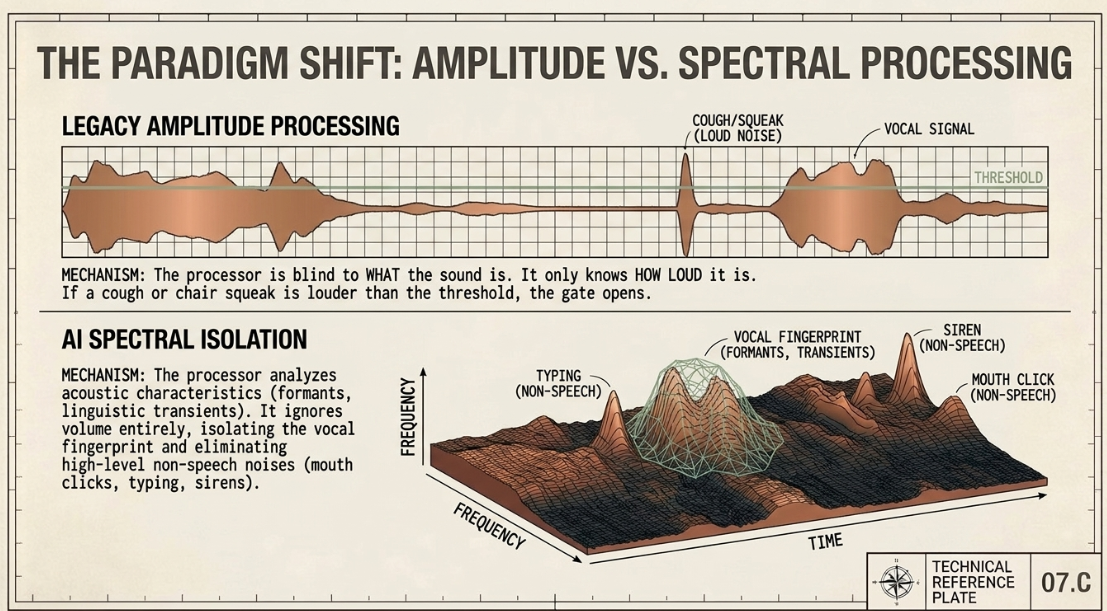
However, Strip Silence has distinct disadvantages46. It is a mathematically rigid tool that does not analyze the linguistic or phonetic context of speech46. It struggles to differentiate between a steady-state noise floor and quiet, low-energy vocal trails (such as the trailing /f/, /th/, or /s/ consonants of a word)41. Consequently, it can clip word endings and quiet breaths, resulting in choppy edits45.
Furthermore, replacing background room tone with absolute digital silence creates an unnatural "vacuum" effect that can be perceived by the brain as unnatural7. To smooth these transitions, editors must manually apply crossfades or place a continuous "room tone" track on a separate channel to bridge the gaps23.
Real-time Dynamic Gating and Expansion, by contrast, run continuously within the DAW's mixer routing10. Because they employ interactive time envelopes (attack, hold, and release), they react dynamically to the performance10. Using a downward expander with a moderate range setting suppresses the background noise floor naturally, rather than cutting it off abruptly13. This maintains conversational pacing and vocal warmth, eliminating the need for manual crossfading13.
Modern Technological Ecosystem: Tools, Hardware, and AI Vocal Separators
The dynamic processing landscape in professional podcasting is highly diverse, spanning classic hardware, dedicated software plugins, and modern AI-driven tools35.
Traditional hardware units, such as the DBX 286S and Behringer Composer MDX2600, are highly valued for their latency-free pre-processing30. These units allow engineers to apply clean, natural-sounding downward expansion directly to the voice during tracking30. This speeds up post-production by delivering clean, pre-attenuated audio directly to the DAW30. Similarly, modern audio interfaces, such as the Lewitt Connect 6, include built-in DSP noise gates and expanders, allowing for low-latency processing before the signal ever hits the computer13.
In the digital domain, advanced software plugins offer surgical control35. Industry-standard gates like the FabFilter Pro-G feature six specialized algorithms, dynamic visual feedback, and advanced sidechaining51. Dedicated vocal processors, such as iZotope’s Nectar Pro and Neutron Pro, offer real-time visualization of the hysteresis gap and support multiband gating17. This allows engineers to apply different gate settings to different frequency bands, such as isolating low-frequency rumble from high-frequency hiss17.
For budget-conscious studios, free plugins like Auburn Sounds Renegate provide excellent alternatives, featuring an automatic release option and a 43-band auditory model that matches human hearing curves48.
Traditional Hardware Digital Software Plugins AI Neural Networks
┌──────────────────────┐ ┌──────────────────────┐ ┌──────────────────────┐
│ • DBX 286S [86] ├───────►│ • FabFilter Pro-G ├───────►│ • Dan K Vocal Gate │
│ • Behringer Composer│ │ (Vocal Mode) [22] │ │ (LibriSpeech) [24]│
│ MDX2600 [86] │ │ • iZotope Nectar │ │ • Waves Clarity Vx │
│ • Connect 6 DSP [85]│ │ (Hysteresis) [36] │ │ Pro (Spectral) [19]│
└──────────────────────┘ └──────────────────────┘ └──────────────────────┘
Zero-Latency Tracking Surgical DAW Editing Spectral Dialogue Extraction
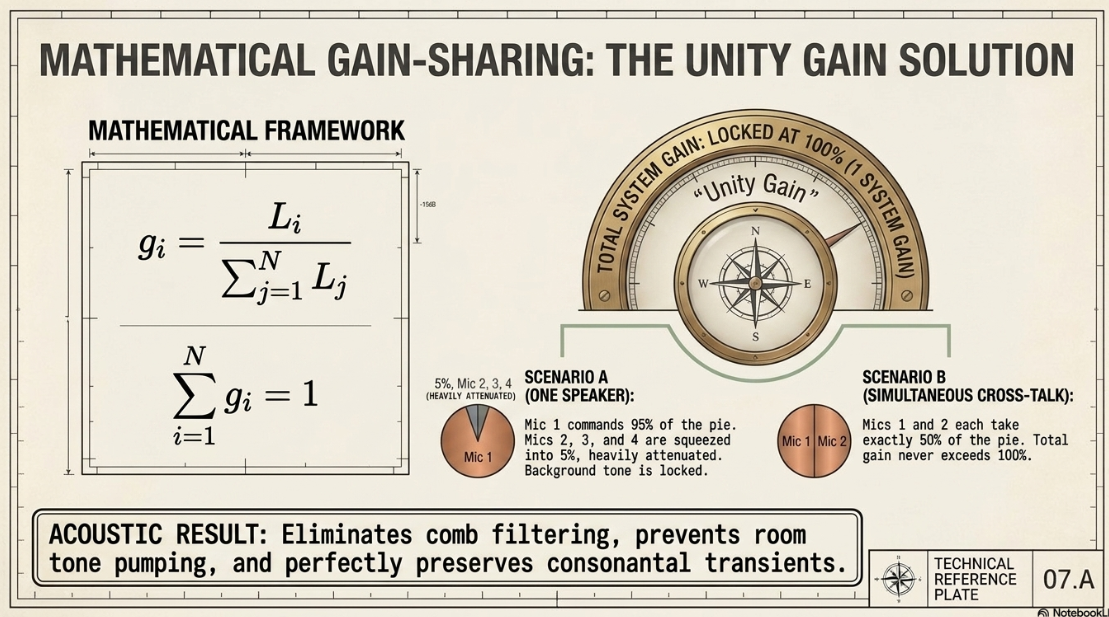
The emergence of artificial intelligence has introduced a new paradigm of spectral voice isolation that is rapidly replacing traditional amplitude-based gates49. Advanced tools like Waves Clarity Vx Pro and Dan K's Vocal Gate use deep neural networks to separate voice from noise with incredible precision6. Instead of simply attenuating the entire signal based on volume, these AI models analyze the spectral characteristics of human speech, isolating the voice and filtering out non-speech noises such as mouth clicks, coughing, or typing49.
For automated workflows, platforms like Resound, Adobe Podcast Enhance, and Cleanvoice AI consolidate these steps into one-click solutions50. These tools automatically remove background noise, room reflections, filler words, and long silences50. For live broadcasting or streaming, highly efficient, low-latency models like DeepFilterNet 3 and RNNoise provide real-time noise suppression with minimal system impact, ensuring clear and immediate vocal delivery52.
Engineering Recommendations for Dialogue Preservation
To achieve optimal clarity, transparency, and consistency in professional podcast post-production, several key engineering practices should be followed1:
Prioritize Downward Expansion for Dialogue Tracks: Avoid using hard noise gates on spoken word tracks13. Standard gates can sound choppy and unnatural by cutting off the natural decay of words13. A downward expander with a gentle ratio of to provides a much smoother, more natural-sounding transition22.
Optimize the Processing Sequence: Always place the high-pass filter first in the signal chain, followed by the gate or expander, and then the compressor4. Placing the expander before the compressor ensures that the noise floor is attenuated when the signal-to-noise ratio is at its widest4. This prevents the compressor from raising the noise floor and makes the gate threshold much easier to set consistently1.
Tear Down the Hard Mute: Instead of gating to absolute digital silence, use a moderate range setting (such as to )11. This retains a natural level of room tone when the gate is active, preventing the jarring "vacuum" effect that occurs when a track is completely silenced7.
Incorporate Lookahead and Hysteresis: Utilize a lookahead of to to preserve initial vocal consonants without transient clipping18. Pair this with a hysteresis setting of to to stabilize the gate and prevent chattering when voice levels fluctuate near the threshold24.
Utilize Automixing for Multi-Mic Environments: In multi-microphone, single-room recordings, avoid using individual gates on each track14. Use a gain-sharing automixer like the Dan Dugan design instead14. This maintains a constant summed system gain, effectively eliminating mic bleed and comb filtering while keeping the background noise floor perfectly consistent43.
Works cited
How to avoid the pitfalls of podcast editing in post-production - Mixdown Magazine, https://mixdownmag.com.au/features/how-to-avoid-the-pitfalls-of-editing-podcast-in-post-production/
Automatic Microphone Mixer White Paper - Yamaha, https://data.yamaha.com/files/download/other_assets/7/329527/Automixer_WhitePaper_en.pdf
A Guide to Audio Processing and FX For Podcasting (GB) - RØDE, https://rode.com/en-gb/about/news-info/a-guide-to-audio-processing-and-fx-for-podcasting
Vocal Chain Order: What Plugin Goes First? (2026) - VocalPresets.com, https://vocalpresets.com/blog/vocal-chain-order
How to Build the Perfect Vocal Chain with Plugins | Slate Digital, https://slatedigital.com/how-to-build-the-perfect-vocal-chain-with-plugins/
10 Best Audio VST Plugins For Podcast & Voiceover, https://pluginerds.com/10-best-audio-plugins-podcast/
Production Techniques Using Gates & Expanders, https://www.soundonsound.com/techniques/production-techniques-using-gates-expanders
How to Use a Gate: Perfect Dialog Settings in 5 Steps | Black Ghost Audio, https://www.blackghostaudio.com/blog/how-to-use-a-gate-perfect-dialog-settings-in-5-steps
Your audio journey – Part 42 – Noise gate / Downward expander - Mark Denholm, http://markdenholm.com/your-audio-journey-part-42-noise-gate-downward-expander/
A Podcaster's Guide To Noise Reduction | by Joe Nash - Medium, https://medium.com/@jowie/a-podcaster-s-guide-to-noise-reduction-e8cad9fc21f4
How Noise Gate Impacts Sound Clarity: Complete Guide - Krisp, https://krisp.ai/blog/noise-gate/
Advanced Gating Techniques: Part 1, https://www.soundonsound.com/techniques/advanced-gating-techniques-part-1
What is a noise gate? And what's an expander? - LEWITT Audio, https://www.lewitt-audio.com/blog/what-is-a-noise-gate-expander
Mic Bleed on a Podcast with 4 People : r/audioengineering - Reddit, https://www.reddit.com/r/audioengineering/comments/1qzg7cu/mic_bleed_on_a_podcast_with_4_people/
Techniques - Tea for Teaching Guide to Podcasting, https://johnkane.pressbooks.sunycreate.cloud/chapter/techniques/
How To Use Dynamics Processing: Getting Started with Compressors, Gate - PreSonus, https://www.presonus.com/blogs/technical/how-to-use-dynamics-processing-getting-started-with-compressors-gates-and-more
What Is a Noise Gate and How to Use It - iZotope, https://www.izotope.com/community/blog/noise-gates
Noise gate: Make your podcast sound clean - Smartsound Cloud, https://cloud.smartsound.com/blog/clean-podcast-with-noise-gate/
The Best Noise Gate Settings for Vocals - Music Guy Mixing, https://www.musicguymixing.com/noise-gate-settings-for-vocals/
Noise Gates: Essential Dynamics Control | TapeOp #33 | Tape Op Magazine, https://tapeop.com/interviews/33/noise-gates
Mixing with Expanders - Icon Collective, https://www.iconcollective.edu/mixing-with-expanders
Noise Gate vs Expander 101: Key Differences & Creative Tips - Unison Audio, https://unison.audio/noise-gate-vs-expander/
When you are mixing with a downward expansion - Sound Design Stack Exchange, https://sound.stackexchange.com/questions/6844/when-you-are-mixing-with-a-downward-expansion
Noise gate - Wikipedia, https://en.wikipedia.org/wiki/Noise_gate
Audio Gating: The Ten-Minute Guide - Behind The Mixer, https://www.behindthemixer.com/audio-gating-guide/
Noise Gate: 12 Tips for a Clean and Natural Tone - Mastering.com, https://mastering.com/noise-gate/
Can anybody explain what hysterisis is in Reagate? : r/Reaper - Reddit, https://www.reddit.com/r/Reaper/comments/2d727h/can_anybody_explain_what_hysterisis_is_in_reagate/
How does lookahaed work on gate? : r/audioengineering - Reddit, https://www.reddit.com/r/audioengineering/comments/1j2pf3l/how_does_lookahaed_work_on_gate/
Pops in audio when using gate sequencers : r/ableton - Reddit, https://www.reddit.com/r/ableton/comments/1hmekiq/pops_in_audio_when_using_gate_sequencers/
Expander vs Noise Gate for Podcasting - Geeky Nerdy Techy, https://geekynerdytechy.com/expander-vs-noise-gate/
Quick Guide to Using Expanders in Your Mixes | Kiive Audio | Learn, https://www.kiiveaudio.com/blogs/learn/using-expanders
What order do you apply your effects, e.g compression or normalisation? : r/VoiceActing, https://www.reddit.com/r/VoiceActing/comments/qqdzm7/what_order_do_you_apply_your_effects_eg/
Pre or Post Compression for Vocal EQ? Wrong Question! - PreSonus, https://www.presonus.com/blogs/home/pre-or-post-compression-for-vocal-eq-wrong-question
Podcast Audio Plugins – The Big List, https://podcastengineeringschool.com/podcast-audio-plugins/
Advice on Podcast Vocal Chain : r/audioengineering - Reddit, https://www.reddit.com/r/audioengineering/comments/1ctsiyd/advice_on_podcast_vocal_chain/
Podcast audio postproduction workflow - Gist - GitHub, https://gist.github.com/ykarikos/27a4b892fe95687429f0bdc749b33d00
Sidechain: The Complete Guide - Projet Home Studio, https://www.projethomestudio.fr/en/sidechain/
What is sidechain compression? And how to use it - iZotope, https://www.izotope.com/community/blog/what-is-sidechain-compression
Side-chain Techniques for Compression, EQ, Reverb, Distortion & Modulation - MasteringBOX, https://www.masteringbox.com/learn/what-is-sidechain-sidechaining-techniques
Gate on Spoken Events : r/livesound - Reddit, https://www.reddit.com/r/livesound/comments/1h72veb/gate_on_spoken_events/
Podcast Editing: Phasing issue in Multitrack : r/audioengineering - Reddit, https://www.reddit.com/r/audioengineering/comments/1izjxkf/podcast_editing_phasing_issue_in_multitrack/
Gain Sharing vs. Gating Automixer - Biamp Cornerstone, https://support.biamp.com/Tesira/Programming/Gain_Sharing_vs._Gating_Automixer
Automatic Mixing 101 - Sound Devices, https://www.sounddevices.com/automatic-mixing-101/
Strip Silence or Noise Gate Preference? : r/Logic_Studio - Reddit, https://www.reddit.com/r/Logic_Studio/comments/1ggn2de/strip_silence_or_noise_gate_preference/
More accurate stripping silences? - Logic Pro Help, https://www.logicprohelp.com/forums/topic/140568-more-accurate-stripping-silences/
Removing all silences in a podcast? : r/audioengineering - Reddit, https://www.reddit.com/r/audioengineering/comments/c01ef1/removing_all_silences_in_a_podcast/
8 of the Best Free Noise Gates and Expanders (VST/AU Plugins…) - Projet Home Studio, https://www.projethomestudio.fr/en/free-noise-gate-expander-plugins/
Vocal Gate is a new FREE AI noise gate plugin for podcasts, streams, and video editing, https://bedroomproducersblog.com/2026/04/02/vocal-gate-dan-k/
Best AI Tools to Remove Noise from Audio (2026) - RTF | Rethinking The Future, https://www.re-thinkingthefuture.com/technologies/best-ai-tools-to-remove-noise-from-audio-2026/
Free Noise Gate VST Plugins to Upgrade Your Audio Workflow - Filmora - Wondershare, https://filmora.wondershare.com/audio-editing-tips/noise-gate-plugin.html
Noise Reduction in Audio : Complete 2026 Guide to Best AI Tools and Techniques, https://noisereducerai.com/blogs/noise-reduction/
Best AI Noise Removal Tools for Podcasters in 2026: A Com... - BLACKBOX.AI, https://app.blackbox.ai/share/b9682a47-d036-42e7-a7cd-3872f21f3d0a
Ultimate Guide - The Best AI Audio Enhancer of 2026 - Noiz AI, https://noiz.ai/use-cases/en/the-best-ai-audio-enhancer
11 Best Noise Cancelling Apps & Software in 2026 (Tested) - Krisp, https://krisp.ai/blog/best-noise-cancelling-app/
https://rysupaudio.com/blogs/news/best-ai-vocal-plugins-2026
crackling while using the noise gate - Logic Pro Help, https://www.logicprohelp.com/forums/topic/31384-crackling-while-using-the-noise-gate/














