
The landscape of professional audio post-production for spoken-word and broadcast formats demands an intricate understanding of psychoacoustics, signal processing, and systems architecture. As podcasting transitions from simple stereophonic speech capture to complex, immersive audio design, the tools employed by audio engineers have evolved commensurately. This report provides an exhaustive technical analysis of the modern audio post-production toolkit, encompassing monitoring, metering, signal flow, dynamic range control, equalization, spatial processing, and delivery standardization.
Monitoring
How Did We Get Here?
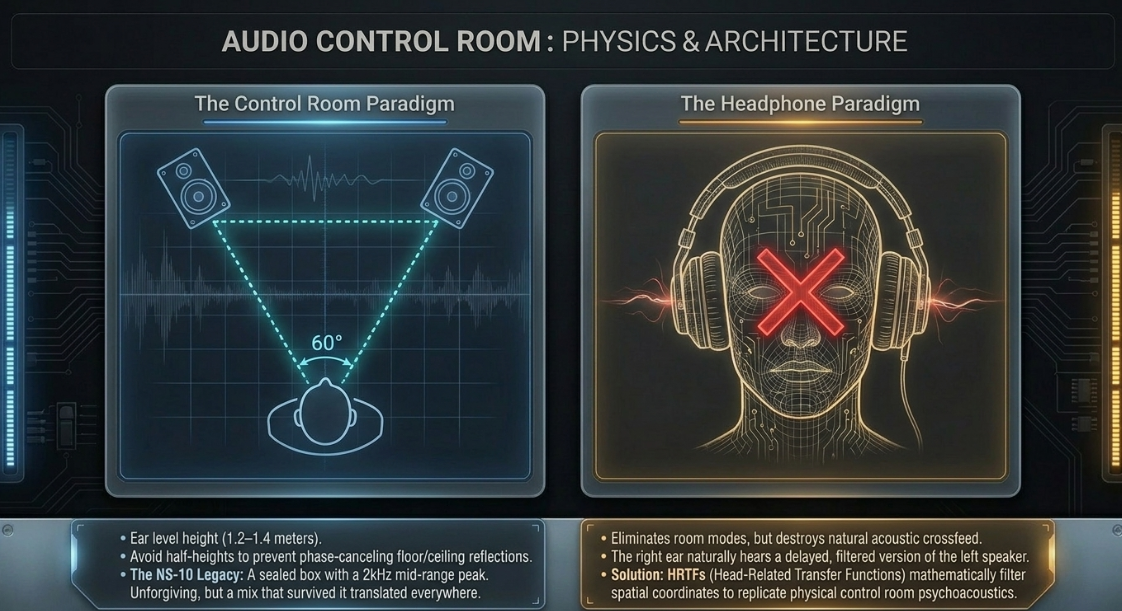
The history of studio monitoring represents a trajectory of continuous technological refinement aimed at revealing the true nature of a recorded signal.1 In the mid-twentieth century, large-format monitors such as the Altec 604 dominated control rooms, providing sheer acoustic power but frequently exhibiting uneven frequency responses that masked subtle anomalies.3 The paradigm shifted dramatically in the late 1970s with the introduction of the Yamaha NS-10.5 Originally designed as a domestic hi-fi bookshelf speaker, its rapid transient response—achieved via a sealed acoustic suspension enclosure and extremely lightweight paper cones—made it a highly analytical tool.5 The monitor featured a pronounced mid-range peak around 2 kHz, which engineers famously attempted to tame by hanging tissue paper over the tweeters.5 Despite its lack of low-end extension, engineers discovered that if a dense mix sounded balanced on the unforgiving NS-10, it translated flawlessly to a wide variety of consumer playback systems.5 This established the foundation for modern nearfield monitoring, prioritizing mid-range translation over flattering, hyped frequency curves.7
Choosing Monitors
Modern post-production relies heavily on nearfield monitors, which are optimized for close-range listening to minimize the influence of room acoustics.8 The physical configuration of the monitor plays a critical role in its acoustic output. Two-way designs feature a woofer for low/mid frequencies and a tweeter for the highs, utilizing a crossover network that typically splits the signal right in the middle of the critical vocal range.8 Three-way designs introduce a dedicated mid-range driver, which can provide greater detail across the spectrum and move the crossover points away from the fundamental frequencies of the human voice.8 For podcast production—where vocal clarity is paramount—a high-quality two-way nearfield monitor is often sufficient, whereas complex sound design and immersive scoring may necessitate larger midfield monitors or supplementary subwoofers.8
The Room Factor and Positioning Monitors
The interaction between a loudspeaker and the acoustic space fundamentally determines the accuracy of the frequency response reaching the engineer's ear.10 Optimal positioning dictates that the left and right monitors form an equilateral triangle with the listener, with each monitor angling inward at exactly 60 degrees toward the primary mix position.11
Room resonances, or standing waves, occur when sound pressure maxima align with the physical boundaries of the room, often causing severe low-frequency nulls or peaks.11 To mitigate boundary interference, monitors must be placed symmetrically with respect to the side walls to ensure identical acoustic reflections.11 Placement directly against a rear wall induces low-frequency boundary emphasis, which must be counteracted using built-in boundary equalization switches.12 Furthermore, monitors should be placed with their acoustic axis at ear level—typically between 1.2 and 1.4 meters from the floor—and positioned to avoid the exact half-height of the room to prevent symmetrical, phase-canceling ceiling and floor reflections.
Headphone Mixing
While loudspeakers interacting with a mathematically treated room represent the gold standard of monitoring, headphone mixing is ubiquitous in modern podcasting. Headphones entirely eliminate room modes and acoustic reflections, offering a direct, microscopic view of the audio signal.13 However, standard stereo headphones distort the perception of the stereo field because acoustic crossfeed—the natural phenomenon where the left ear hears a delayed, filtered portion of the right speaker, and vice versa—is completely absent.13 To compensate, engineers often cross-reference headphone mixes on external speakers, or utilize binaural simulation software that applies Head-Related Transfer Functions (HRTFs) to replicate the psychoacoustic spatial cues of a physical control room.14
Meters
Amplitude vs. Level
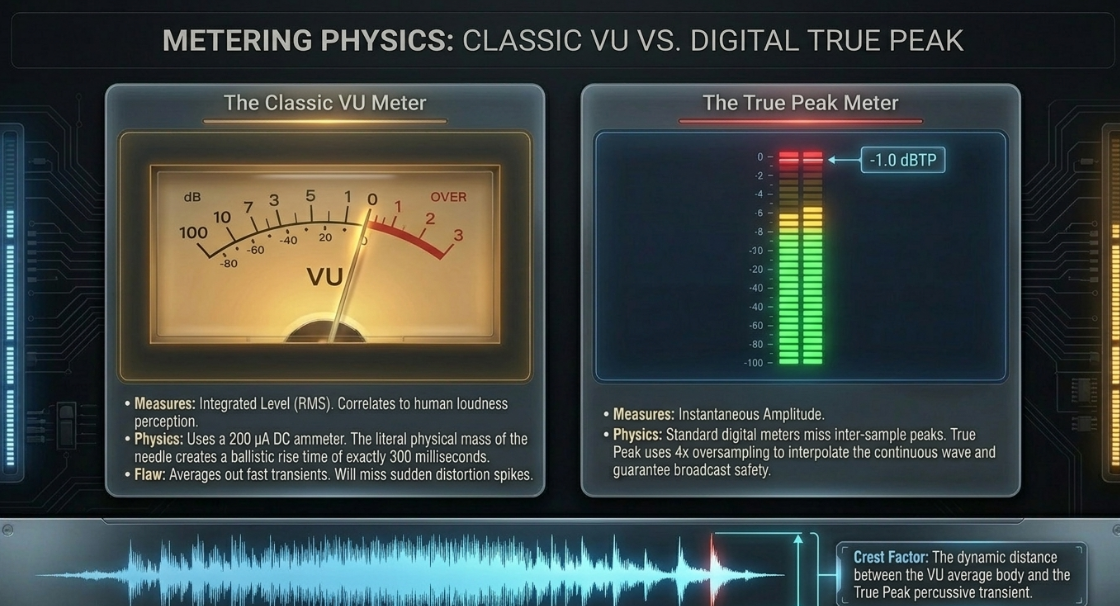
In audio engineering, it is critical to distinguish between amplitude and level. Amplitude refers to the instantaneous voltage of an electrical signal or the instantaneous sound pressure of an acoustic wave at any given microsecond.16 Level, conversely, is a macro-measurement of amplitude integrated over a specific time window, correlating much more closely with human loudness perception.17
Mechanical and Bar Meters
The original standard for audio metering is the Volume Unit (VU) meter, an electromechanical device proposed in a 1940 paper by CBS, NBC, and Bell Telephone Laboratories, and standardized in 1942.18 The classic VU meter utilizes a 200 
Peak Meters
To monitor the rapid transients that escape VU integration, engineers rely on Peak Programme Meters (PPM).20 A standard quasi-PPM features an integration time ranging from 1 to 10 milliseconds, which reflects the human ear's slightly delayed perception of overload distortion.16 In the digital domain, basic Sample Peak meters register absolute digital values up to 0 dBFS (Decibels Full Scale).21 However, standard sample peak meters are flawed; they can miss inter-sample peaks, which are analog waveforms that mathematically reconstruct higher than the highest recorded digital sample.16 Consequently, True Peak meters utilize oversampling algorithms (typically 4x) to mathematically interpolate the continuous waveform and display the actual analog peak limit, ensuring broadcast safety.
Average Meters
Average meters provide a continuous readout of the RMS value of the signal, representing the sustained energy or density of the audio rather than its sharpest transient spikes.17 Modern digital bar meters frequently display both RMS and peak values simultaneously, allowing the engineer to visually assess the crest factor—the dynamic distance between the average body of the spoken word and its highest percussive consonant.17
Phase Meters
Phase meters, typically displayed as correlation scopes or Lissajous figures, indicate the phase relationship between the left and right channels.22 The correlation meter scales from +1 (perfect mono correlation) to 0 (completely uncorrelated stereo) down to -1 (perfectly out of phase). Monitoring this meter ensures that a podcast featuring stereo sound design will not suffer from destructive interference and phase cancellation when folded down to mono playback on a smart speaker or smartphone.22
Mixing Consoles
Buses, Processors vs. Effects, and Signal Flow
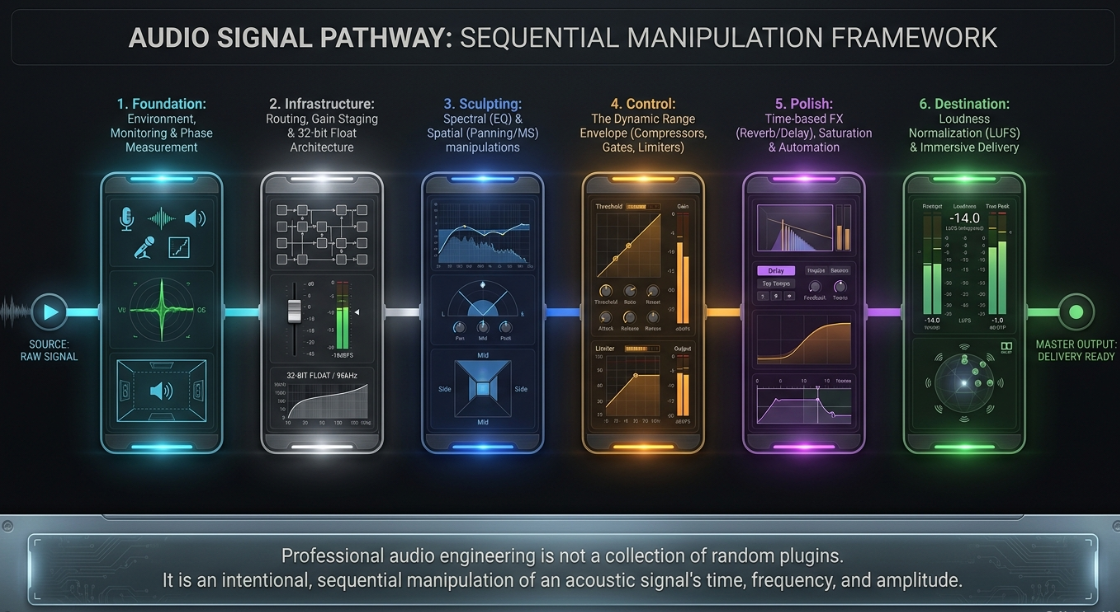
The mixing console serves as the central nervous system of any audio production environment.24 Signal flow describes the sequential path audio takes from the input source to the master output.26 A typical channel strip begins with the preamplifier, followed by phase polarity switches, high-pass filters, dynamic range processors, and equalization.27
Routing involves directing these signals to buses—internal pathways that sum multiple signals together.28 The distinction between processors and effects dictates this routing infrastructure. Inline processors (such as EQs and compressors) alter the entirety of the signal and are inserted directly into the channel path.24 Conversely, time-based effects (such as reverberation and delay) are typically placed on separate auxiliary buses.24 The channel strip uses an "Aux Send" to tap a parallel portion of the signal and route it to the effect bus, allowing multiple dialogue tracks to share a single, cohesive room reverb algorithm.24
Groups, In-Line Consoles, and The Monitor Section
In the analog era, as multitrack recording expanded, consoles evolved into two distinct architectural formats: split consoles and in-line consoles.28 Split consoles physically isolated the input channels (used for recording microphones to the tape machine) on one side of the desk, and the monitor channels (used for listening back to the tape) on the other.27 As track counts increased, this design became physically massive, cumbersome, and highly redundant.30
The solution was the in-line console, which integrated both the channel path (to the recorder) and the monitor path (from the recorder) into a single vertical channel strip.27 A "Flip" switch allowed the engineer to swap which path was controlled by the main fader and which by the secondary rotary fader, optimizing workflow during recording versus mixdown.27 Groups (or Subgroups) allowed multiple channels—such as an entire panel of podcast guests—to be summed together to a single stereo bus for collective dynamic processing and unified volume control before hitting the master output.
Correct Gain Structure
Gain structure is the systematic calibration of signal levels at every amplification stage—from microphone preamplifier to digital analog-to-digital converter, into plugin inputs, and finally to the master output—to maximize the signal-to-noise ratio while strictly avoiding clipping.36 Proper gain staging ensures that digital plugins, many of which are mathematically calibrated to respond optimally to an average input of -18 dBFS (mimicking the analog sweet spot of 0 VU), operate exactly as intended without introducing harsh digital distortion or collapsing the stereo image.18
The Digital Console and Console Emulation
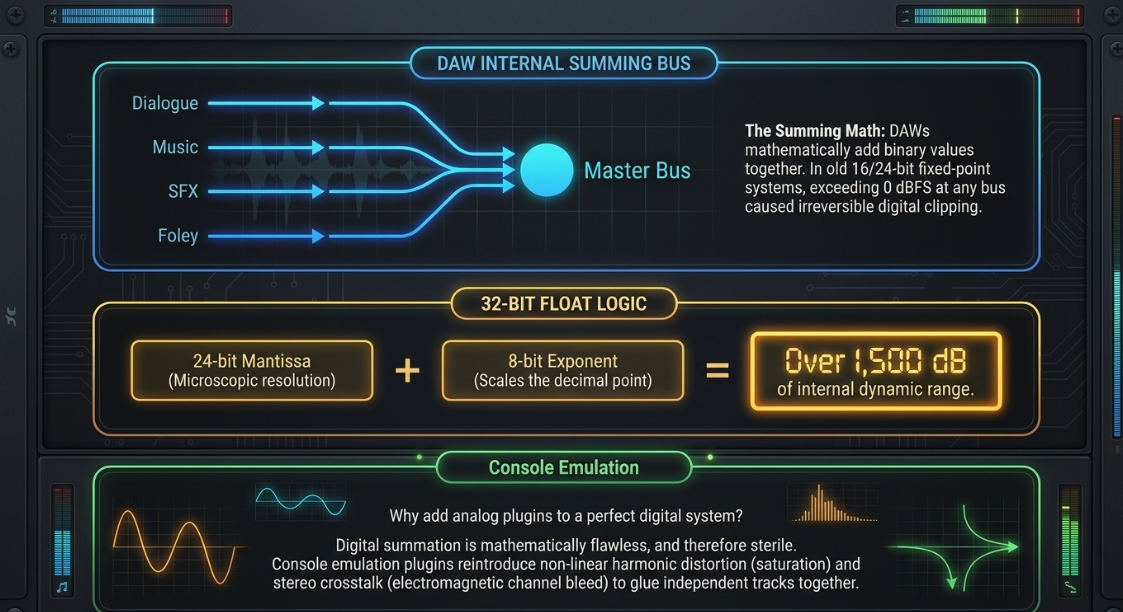
As digital audio workstations (DAWs) supplanted physical analog boards, the inherent sonic footprint of voltage running through copper wire, transformers, and summing op-amps was lost, resulting in mixes that many deemed "sterile".38 To reclaim this character, engineers utilize console emulation plugins that mathematically model the non-linear behaviors of vintage desks.39 These plugins reintroduce subtle harmonic distortion (saturation) and stereo crosstalk (the slight electromagnetic bleeding of the left channel into the right, and vice versa), which naturally glues independent dialogue and music tracks together to form a cohesive, three-dimensional mix.41 Modern high-end digital consoles, such as the SSL System T, combine these legendary processing algorithms with agile, object-based routing networks tailored specifically for immersive audio formats.44
Software Mixers
The software mixer replicates the traditional channel strip paradigm on a graphical interface.25 By the 2000s, software mixers became the epicenter of recording, allowing artists to produce professional tracks utilizing only an audio interface and a computer.38 Digital routing allows for infinitely complex, non-destructive matrices, enabling parallel processing where a track is duplicated or sent to an auxiliary bus to be heavily compressed, and then blended back beneath the original clean signal.45
Tracks, Mixer Strips, and Routing
Audio tracks house the raw waveform data, which is fed sequentially into the virtual mixer strips.27 Signal flow within the DAW must be meticulously managed; for example, routing a mono spoken word clip to a stereo auxiliary bus will alter the panning laws and perceived gain levels, requiring the engineer to monitor pre-fader metering to ensure structural integrity is maintained.45
The Internal Architecture
The mathematical architecture governing how a DAW software mixer sums multiple audio streams has been a topic of intense technical scrutiny.47 When a DAW adds two digital signals together at a bus, it performs a literal mathematical addition of their binary values.47 In older 16-bit or 24-bit fixed-point integer systems, exceeding 0 dBFS at any internal summing bus caused irreversible digital clipping.48
Modern DAWs employ 32-bit or 64-bit floating-point processing engines.47 A floating-point number utilizes a significand (mantissa) for precision and an exponent to scale the numerical range.49 A 32-bit float uses a 24-bit mantissa and an 8-bit exponent, providing over 1500 dB of internal dynamic range.51 This ensures that audio clipping cannot occur internally between plugins or on the mix bus; as long as the master output fader is attenuated below 0 dBFS before hitting the digital-to-analog converter (DAC), the audio remains pristine.49 A 64-bit double-precision architecture expands this to a 53-bit mantissa and an 11-bit exponent, reducing theoretical rounding errors and quantization noise during highly complex multi-track summations, though the audible difference compared to 32-bit float remains heavily debated among mix engineers.
Phase
What is Phase?
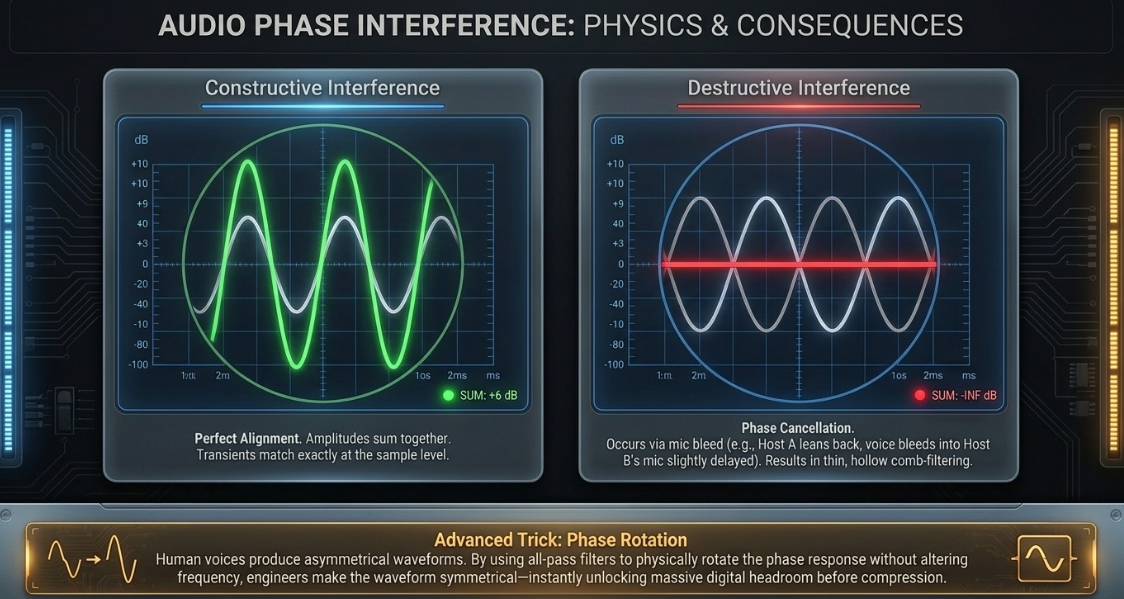
Audio phase defines the precise time-based relationship between two or more sound waves.23 When two identical acoustic signals arrive at a microphone simultaneously, their amplitudes sum together, causing constructive interference and a louder signal.23 Conversely, if they arrive perfectly out of sync (180 degrees apart), their amplitudes mathematically negate each other, resulting in total silence through destructive interference.23
Problems
In podcasting, phase issues routinely occur when multiple microphones capture the same sound source.23 For instance, when a host leans back, their voice bleeds into a co-host's microphone.55 Because the sound arrives at the co-host's microphone slightly later (due to the finite speed of sound traveling across the table), blending the two tracks yields a hollow, thin, "comb-filtered" anomaly that severely degrades vocal intelligibility and low-end warmth.23
Tricks
Addressing phase requires precise time alignment.56 At the waveform level, an engineer can manually zoom into the sample level and nudge the delayed track forward in time so the transient peaks perfectly match the primary track.22 Alternatively, micro-delay plugins can push the earlier track backward by specific millisecond increments.22 Advanced auto-alignment plugins analyze the frequency content and apply variable phase shifts to achieve maximum coherence automatically.55 Another highly advanced technique is "phase rotation." Human voices produce naturally asymmetrical waveforms; by applying all-pass filters to manually rotate the phase response without altering the frequency content, engineers can make the vocal waveform perfectly symmetrical, significantly increasing the available headroom for later limiting and compression.
Faders
Types, Scales, and Working with Faders
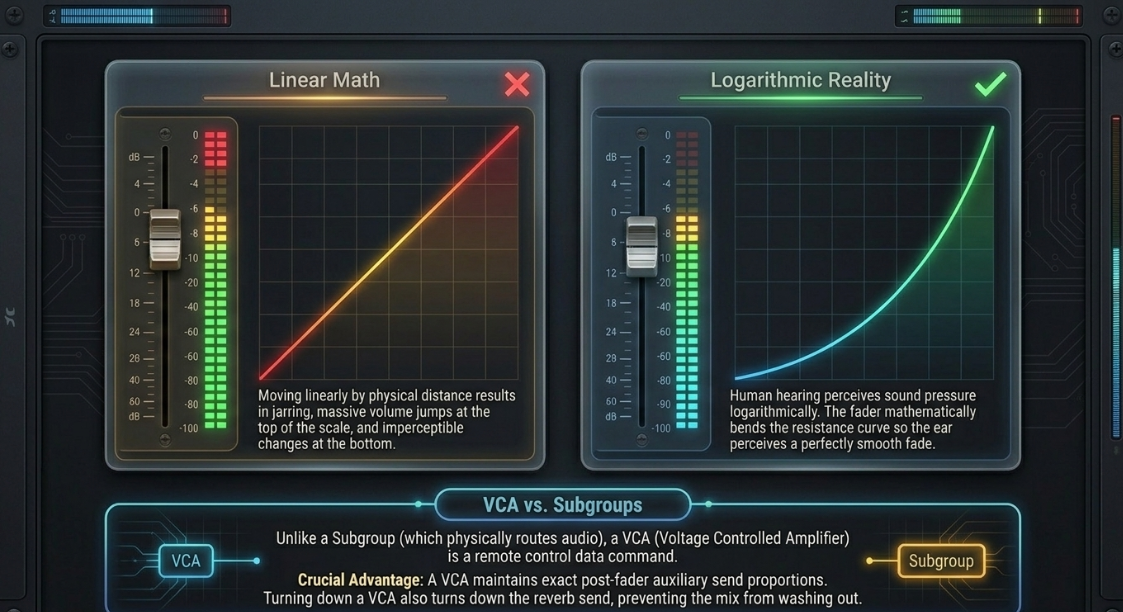
The physical or virtual fader is a variable resistor (potentiometer) used to control signal attenuation.61 In professional audio hardware and DAWs, faders follow a strict logarithmic scale rather than a linear one.62 Because human hearing perceives sound pressure logarithmically, moving a fader linearly by physical distance would result in massive, jarring volume jumps at the top of the scale and almost no audible change at the bottom.62 Thus, fader distances are calibrated logarithmically to create a mathematically exponential curve that the human ear perceives as a perfectly smooth, linear fade.61
Beyond standard channel faders and summing subgroups, large consoles utilize VCA (Voltage Controlled Amplifier) and DCA (Digitally Controlled Amplifier) faders.66 Unlike subgroups, VCAs and DCAs do not physically route audio through a summing bus; they merely act as remote control interfaces.29 Moving a VCA fader sends a control voltage (or digital data command) that proportionately scales the volume of all assigned channels simultaneously.66 The critical advantage of a VCA/DCA over a group bus is that it maintains the exact post-fader send proportions; reducing a VCA also reduces the amount of signal sent to auxiliary effects like reverb, preventing the mix from becoming washed out when the dry signal is turned down.67
Panning
How Stereo Works and Pan Controls
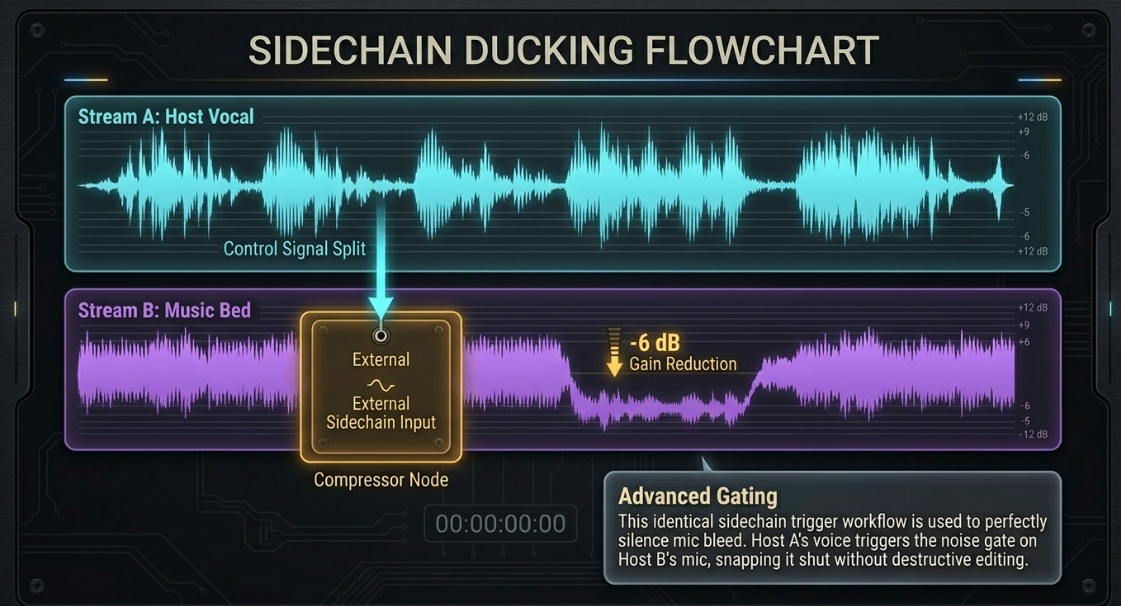
The stereo field relies on psychoacoustics to trick the human brain into perceiving spatial width and depth using only two localized sound sources.69 This illusion relies on Interaural Level Differences (ILD) and Interaural Time Differences (ITD).70 The Pan-Pot (Panoramic Potentiometer) primarily manipulates the ILD; by attenuating the signal in the left channel while boosting or maintaining it in the right, the phantom image shifts toward the right speaker, mimicking how a sound originating from the right would naturally strike the right ear louder than the left.69
Types of Track and Panning Techniques
Stereo separation is critical to preventing frequency masking and maintaining intelligibility.70 In podcast music beds, instruments with competing frequencies (e.g., two distinct synthesizers or guitars) are often panned hard-left and hard-right to create a wide stage.72 However, low-frequency elements—such as bass guitar, kick drums, and the sub-frequencies of a host's voice (below 100 Hz)—should strictly remain in the mono center.71 Low frequencies carry massive acoustic energy, and panning them shifts the physical workload unevenly across the playback system, causing the mix to lose punch, focus, and translation stability.71
Beyond Pan-Pots
Advanced spatialization goes far beyond left/right amplitude shifting. Mid-Side (MS) processing matrices decode a standard stereo signal into a "Mid" channel (the sum of the left and right, 

Binaural panning utilizes Head-Related Transfer Functions (HRTFs) to simulate how the physical geometry of the human head, torso, and outer ears mathematically filters sound arriving from different spatial coordinates.76 This allows engineers to pan audio completely around, above, or behind the listener in a standard pair of stereophonic headphones, unlocking true 3D audio without requiring a multi-speaker array.
Equalizers
Applications and The Frequency Spectrum
Equalization (EQ) is the manipulation of specific frequency bands to correct tonal imbalances, remove resonances, or carve out spectral real estate for competing elements.77 The human hearing spectrum spans 20 Hz to 20,000 Hz, partitioned into sub-bass (20–80 Hz), bass (80–250 Hz), mid-range (250 Hz–4 kHz), and high frequencies (4–20 kHz).79 Because every instrument and human voice contains a fundamental frequency and a complex series of harmonic overtones, overlapping frequencies often result in acoustic masking, producing a congested or "muddy" mix.80
Types and Controls
Parametric equalizers offer surgical control over three distinct parameters: frequency selection, gain (boost or cut in decibels), and Q-factor (the bandwidth or resonance of the filter).81 Additive EQ involves boosting frequencies to bring elements forward, though it actively alters the phase relationship of the signal and consumes valuable digital headroom.81 Subtractive EQ, utilizing narrow Q-factors to excise offending room resonances, is generally preferred for maintaining acoustic clarity.81
In Practice: Equalizing Various Instruments
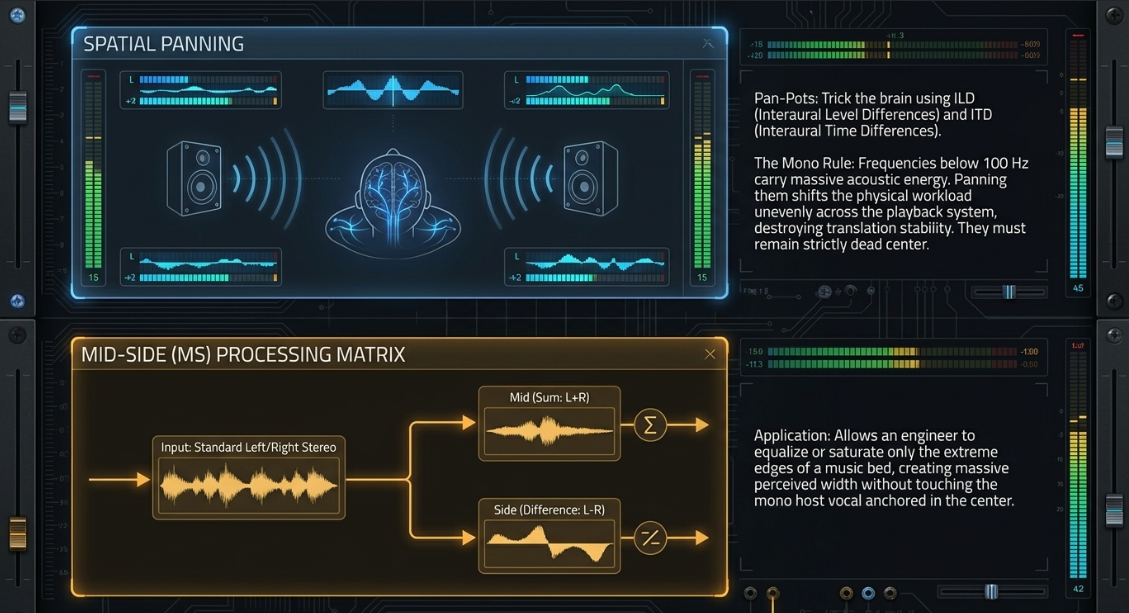
For podcast vocals, a highly established protocol dictates a high-pass filter at 70-80 Hz, cutting "mud" and boxiness around 100–300 Hz, and utilizing a wide boost for "clarity" and intelligibility between 2–6 kHz.37 If the microphone exhibits harshness on "S" and "T" consonants, a dynamic EQ or de-esser must attenuate the sibilance range (typically 5–15 kHz) based on an amplitude threshold.37
When mixing podcast music beds alongside voice, the instruments must be actively molded to yield space.84 Bass guitars generate body at 80–200 Hz and definition at 800 Hz, but often require cutting at 300–500 Hz to remove muddiness.84 Acoustic guitars possess body at 200–400 Hz but frequently clash with vocals around 1.5–2.5 kHz.84 By applying a subtle EQ dip in the instrumental bed exactly where the human voice relies on intelligibility (the 2–4 kHz range), the vocal sits clearly on top of the mix without needing excessive volume.
Dynamic Range Processors
Dynamic Range and Dynamics
Dynamic range defines the decibel disparity between the quietest noise floor and the loudest transient peak of an audio signal.87 Unprocessed human speech possesses a massive dynamic range; whispers may be barely perceptible, while sudden laughter can easily shatter digital headroom and cause clipping.87 Dynamics processors automatically govern this fluctuating range, ensuring consistent broadcast volume without requiring constant manual fader adjustments.87
Dynamic Range Processors in a Nutshell
Dynamic range tools generally fall into four distinct categories: compressors (which reduce the level of loud signals that exceed a threshold), limiters (which strictly prevent peaks from exceeding a brick-wall ceiling), expanders (which increase the dynamic range by lowering quiet signals or raising loud ones), and noise gates (which completely mute signals falling below a threshold).87
Compressors
The Course of History and The Sound of Compressors
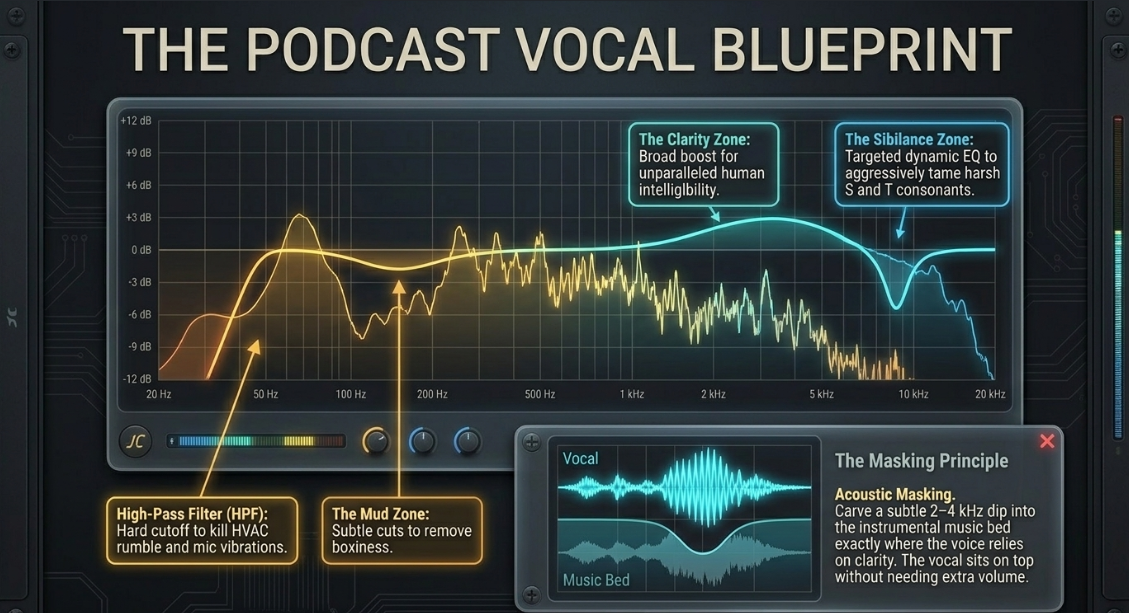
Compressors are not merely utilitarian level-controllers; historically, their internal circuit typologies have imparted highly sought-after harmonic coloration and movement to recordings.89
Principle of Operation and Core Controls
A compressor operates by continuously monitoring the incoming signal and applying gain reduction only when the amplitude exceeds a user-defined threshold.87 The ratio determines the mathematical severity of the attenuation; a 4:1 ratio means that for every 4 dB the signal exceeds the threshold, only 1 dB is allowed to pass out of the processor.
Additional Controls, Practice, and Applications
The attack time dictates how rapidly the compressor clamps down once the threshold is breached, while the release time governs how quickly it recovers to unity gain.88 A hard knee setting applies the full ratio instantly upon crossing the threshold (producing aggressive punch), whereas a soft knee gradually increases the ratio as the signal approaches the threshold, yielding a significantly more transparent, musical response.88 Because compression inherently reduces the peak volume of the audio, make-up gain is applied post-compression to elevate the new, denser RMS level back to optimal loudness.88
Tricks and More on Compressors
A classic, highly revered studio technique for vocals is serial compression. Instead of forcing one processor to work too hard—which causes unnatural, audible pumping artifacts—engineers chain a fast FET compressor (like an 1176) directly into a slow Optical compressor (like an LA-2A).94 The 1176 is set with a rapid attack to catch and transparently shave off erratic, spiky peaks, passing a highly controlled signal into the LA-2A, which then applies slow, gentle, musical leveling to the main body of the voice.94
Limiters
A limiter is essentially an extreme iteration of a compressor, characterized by a staggering ratio ranging from 10:1 up to infinity:1.87 It acts as an impermeable brick wall, ensuring that audio never surpasses a specific maximum ceiling (e.g., -1.0 dBTP), thus protecting digital delivery formats from hard clipping and ensuring compliance with strict broadcasting standards.87
Gates
Controls, Applications, Practice, and Tricks
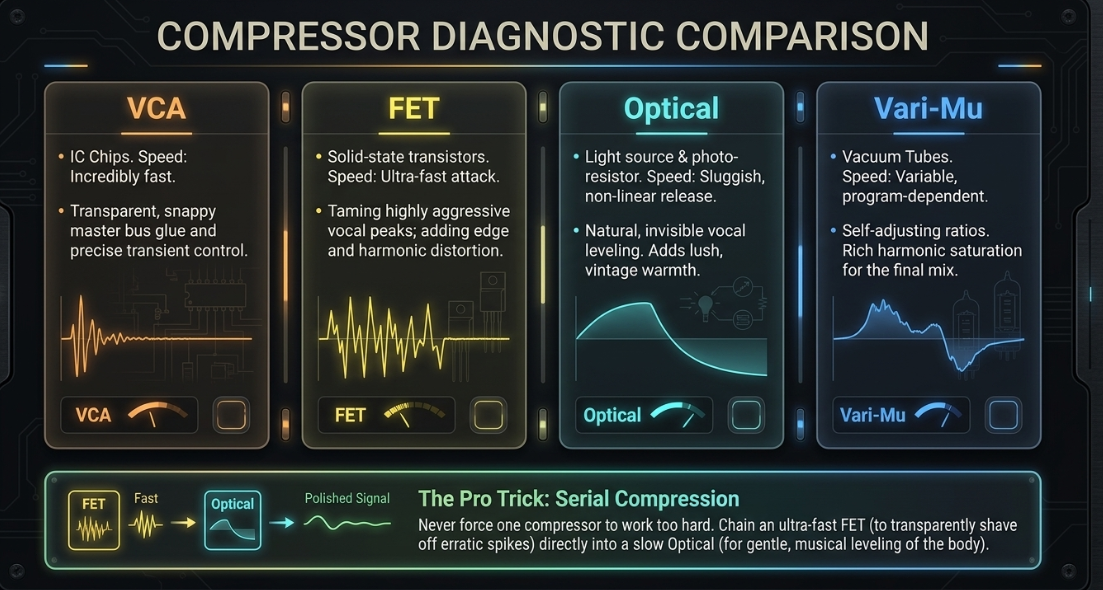
Noise gates are downward processors that attenuate or completely mute signals falling below a threshold.87 Gates utilize attack, hold, and release parameters to govern how the gate opens and closes without "chattering" abruptly on the tails of words.79 In podcast post-production, gates are indispensable tools for combating microphone bleed.79 If two hosts are recorded in the same acoustic space, Host A's voice inevitably spills into Host B's microphone, creating the aforementioned phase cancellation.55
An advanced engineering trick is utilizing a sidechained noise gate. A heavily compressed, isolated "dummy track" of Host A's voice is used solely to trigger the detection circuit of a gate placed on Host B's track.99 This ensures that Host B's microphone snaps strictly shut whenever Host A is speaking, effectively erasing the bleed without requiring hours of tedious destructive editing.
Expanders
Controls, In Practice, and Upward Expanders
Expanders act inversely to compressors by actively increasing the dynamic range of a signal.87 Downward expanders gently attenuate signals below the threshold (similar to a noise gate, but with a much gentler ratio, avoiding abrupt, unnatural cut-offs), making them ideal for naturally suppressing room noise, headphone bleed, or HVAC hum between spoken phrases without sounding artificially gated.88 Upward expanders actively amplify signals that exceed the threshold, restoring transient punch to audio that has been over-compressed.88
Duckers
Operation and Controls, Applications
Ducking is the process of using sidechain compression to automatically suppress the volume of one audio signal based strictly on the presence of another.79 In professional podcasting and broadcast, ducking is universally utilized to manage music beds and archival tape beneath the primary dialogue.79 The host's vocal track is routed to the external sidechain input of a compressor situated on the music bus. Whenever the host speaks, the compressor pushes the music volume down by a set amount (e.g., 6 dB); during pauses in speech, the release time allows the music to swell back up organically, eliminating the need for tedious manual fader riding.
Delays
Delay Basics, Types, Practice, and Applications
Delay captures an incoming audio signal and replays it after a user-specified time parameter, creating a distinct echo.104 Short delays (such as slapback echo ranging from 50 to 100 ms) applied to a voice can simulate vintage 1940s radio broadcasts or add a sense of tight acoustic space, while longer, tempo-synced delays are used for creative sound design, musical ambiance, and dramatic transitions within podcast storytelling.105
Other Modulation Tools
Vibrato, ADT, Chorus, Flanging, Phasing, Tremolo
Modulation effects operate by splitting the original signal, altering the pitch, timing, or phase of the duplicate using a Low-Frequency Oscillator (LFO), and blending the resulting modulated signal back with the dry track.109
Vibrato: Utilizes an LFO to modulate the pitch of the signal up and down.109
ADT (Artificial Double Tracking): Replicates the slight timing and pitch imperfections of a musician recording a performance twice, creating a thicker sound.109
Chorus: Introduces 15–35 ms of delayed signal slightly detuned by the LFO, generating lush width mimicking multiple voices or instruments playing simultaneously.109
Flanging: Utilizes extremely short delays (typically under 5 ms) fed back upon themselves, creating severe comb-filtering and a distinct, highly resonant "sweeping jet" sound.109
Phasing: Passes the signal through a series of all-pass filters to shift phase relationships without using time delay, creating swirling frequency notches.109
Tremolo: Rhythmic modulation of the signal's amplitude (volume) rather than its pitch.109
Reverbs
What is Reverb? Applications and Types
Reverberation is a highly dense, complex amalgamation of randomized, microscopic echoes that humans naturally perceive as acoustic space.114 In audio post-production, artificial reverb is applied to dry, close-miked studio vocals to situate them within a psychoacoustic environment—ranging from an intimate tiled bathroom to a sweeping, cavernous cathedral.114
Reverb Properties, Parameters, and Early Reflections (ERs)
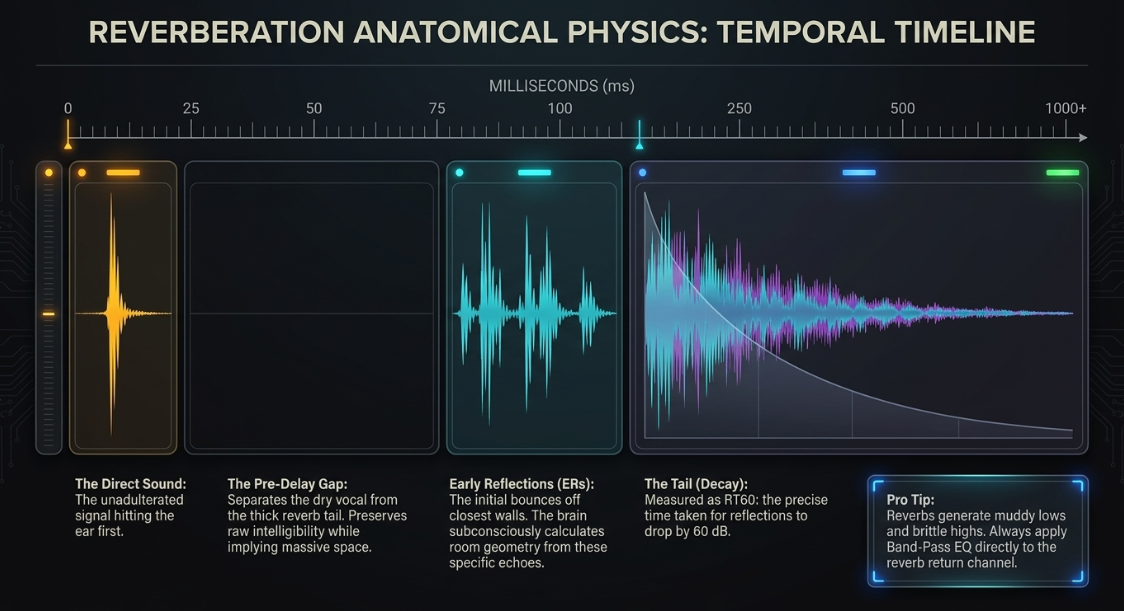
A reverberant field consists of three distinct temporal stages. The Direct Sound is the unadulterated signal reaching the listener or microphone first.116 Early Reflections (ERs) are the initial, distinct echoes resulting from the sound wave striking the closest physical boundaries (walls, ceilings, floors).108 The human brain subconsciously analyzes the timing and frequency response of these early reflections to calculate the physical geometry and dimensions of the simulated room.108
Pre-Delay governs the temporal gap (in milliseconds) between the direct sound and the onset of the ERs.114 Extending the pre-delay separates the dry vocal from the thick reverb tail, preserving critical articulation and intelligibility while still implying a massively large acoustic space.114 Decay Time dictates how long the diffuse reflections take to dissipate into silence, typically measured as RT60 (the precise time taken for the reverberation to drop by 60 dB).115
Reverbs and Stereo, Other Types, and Practice
Reverb generation types include algorithmic simulations (mathematically generating Halls, Rooms, and Plates) and convolution reverbs, which utilize mathematical impulse responses (IRs) recorded in actual physical locations to perfectly clone real-world acoustic spaces.108 A crucial engineering practice involves applying equalization directly to the reverb return channel. Muddy low frequencies and harsh, brittle highs generated by the reverb decay are filtered out using band-pass EQ, ensuring the spatial effect enhances the voice without overwhelming the clarity of the mix.
Distortion
Background, Basics, and Ways to Generate Distortion
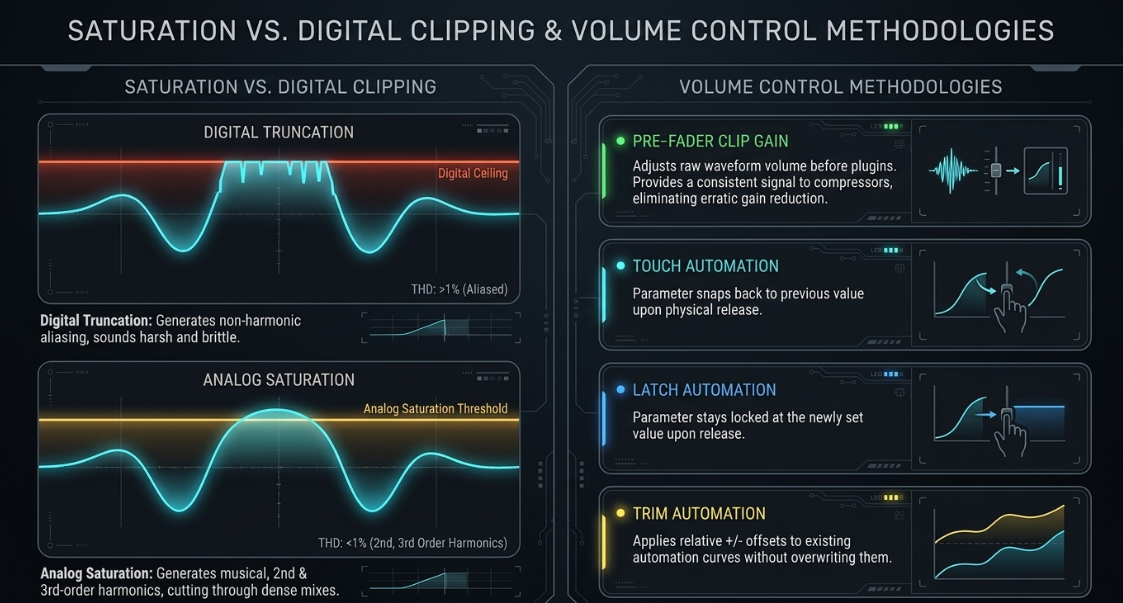
Distortion is defined as any deviation in the shape of an audio waveform from its original input, categorized primarily as harmonic distortion.118 When analog components (vacuum tubes, tape machines, transformers) are pushed beyond their linear operating capacity with high gain, they gracefully round off the peak of the waveform, generating second-order (even, musical, warm) and third-order (odd, edgy, aggressive) harmonics.118 This analog saturation adds immense density and character, allowing elements to cut through a dense mix.120
Conversely, digital clipping occurs when a signal mathematically exceeds 0 dBFS. Digital systems cannot naturally round the waveform; they simply truncate or chop the peak off completely flat.119 This generates highly unpleasant, non-harmonic aliasing distortion that irreparably damages acoustic fidelity, sounding harsh and brittle.120 To achieve the benefits of clipping without the negative artifacts, engineers use soft-clippers or limiters with zero-attack lookahead to gently round the transients.122
Drum Triggering
Methods of Drum Triggering
While traditionally associated with drum recording, drum triggering is heavily employed in advanced podcast sound design to enhance rhythm sections or fortify foley impacts.123 Using sophisticated threshold-detection software (e.g., Slate Trigger), an engineer can isolate the initial transient of an underperforming acoustic recording (such as a weak footstep or dull door slam) and use it to automatically trigger a pristine, high-fidelity studio sample in phase-accurate real-time.125
Alternatively, audio-to-MIDI algorithms analyze the recorded waveform, converting the exact dynamics and timing of the performance into precise MIDI data.130 This provides total flexibility to trigger entirely new virtual instruments, shape unique soundscapes, or create gated rhythmic glitches utilizing organic foley recordings as the rhythmic foundation.123
Other Tools
MS (Mid-Side) Processing
As previously outlined, MS processing encodes standard Left/Right stereo information into a mono center (Mid) and a stereo difference (Side) signal.74 Applying a high-shelf EQ boost or subtle saturation exclusively to the Side channel can drastically widen the perceived stereo image of a podcast's musical score or ambient soundscape without altering the tonality or phase coherence of the centered host vocal.
Pitch Shifters, Harmonizers, Exciters, and Enhancers
Pitch shifters and harmonizers (such as the legacy Eventide H910 or modern granular algorithms) manipulate the frequency of a signal entirely independent of its time domain.134 These tools can generate diatonic harmony voices, or execute radical, unnatural formant shifts for creative sound design, turning a standard voice actor into a synthesized entity.134 Exciters and harmonic enhancers synthesize brand new upper harmonics that did not exist in the original recording, restoring brilliance and presence to dull audio far more effectively than traditional equalization.135
Transient Designers
While compressors act on overall amplitude levels exceeding a threshold, transient designers use envelope-shaping algorithms to manipulate the attack and sustain phases of a sound directly, regardless of input volume.139 Increasing the attack immediately sharpens the percussive strike of a consonant syllable or drum hit, while reducing the sustain effectively tightens the tail of the audio, mitigating unwanted room ring or excessive microphone bleed without the chattering artifacts of a traditional noise gate.139
Automation
Automation Engines and The Automation Process
Mixing is an inherently dynamic, evolving process. Automation allows the DAW to record, memorize, and flawlessly play back parameter changes—such as precise fader movements, panning shifts, or dynamic EQ tweaks—over the exact timeline of the podcast.143
Automation Alternatives and Control Surfaces
Instead of relying strictly on post-fader track automation, engineers often utilize pre-fader Clip Gain.147 Clip gain adjusts the raw waveform volume directly on the timeline before it hits any plugins, ensuring that compressors and gates receive a remarkably consistent input level, completely eliminating erratic gain reduction behavior.148 Furthermore, auto-riding plugins (such as Waves Vocal Rider) analyze the source audio in real-time, matching dynamic fluctuations to an established target level and writing continuous gain automation without manual intervention, saving hours of labor.147
When tactile, hands-on interaction is required, engineers utilize hardware control surfaces.152 These devices communicate with the DAW via specific software protocols. Mackie Control Universal (MCU) and Human User Interface (HUI) are widespread legacy MIDI protocols offering basic fader and transport control over USB.152 Conversely, EUCON (Extended User Control) is a high-speed, Ethernet-based protocol offering significantly lower latency, superior 1024-step fader resolution, and incredibly deep DAW integration compared to traditional MIDI standard communication.
Delivery Standards and Loudness Normalization
In the final stage of post-production, audio must be strictly mastered to meet the stringent distribution standards of streaming platforms to prevent severe loudness penalties.157 Previous peak-based normalization resulted in the "loudness wars," where engineers limited audio to the extreme, severely degrading dynamic range.119 The contemporary broadcast standard relies on LUFS (Loudness Units Full Scale), a sophisticated algorithm that measures integrated loudness across the entire file utilizing K-weighting curves to accurately mirror human frequency perception.17
If a podcast is delivered significantly louder than a platform's target, the platform's normalization algorithm will apply a negative gain penalty, abruptly attenuating the entire file to ensure playback consistency for the user.97 If delivered too softly, positive gain is applied, simultaneously raising the noise floor and occasionally triggering aggressive digital limiters that can heavily distort the file.97
Furthermore, spatial audio is rapidly becoming the newly anticipated delivery frontier. Driven by immersive processing capabilities within DAWs, Dolby Atmos allows engineers to bypass traditional channel-based mixing (e.g., stereo or 5.1) in favor of object-based panning.13 In an Atmos workflow, audio elements are plotted in a three-dimensional coordinate system accompanied by spatial metadata.13 The Dolby Renderer calculates the optimal translation of these objects regardless of the listener's physical playback array, rendering fully immersive, binaural down-mixes for mobile podcast listeners relying entirely on standard headphones.13 As such, an Atmos deliverable must strictly adhere to speech-gated or level-gated loudness targets and distinct alignment guidelines, finalizing the transition of modern podcasts from flattened, stereophonic sound into deeply localized, three-dimensional auditory environments.
Works cited
A history of music streaming - Dynaudio, accessed May 7, 2026, https://dynaudio.com/magazine/2018/may/a-history-of-music-streaming
Audio Engineering in a Professional Podcast Post ... - Finchley Studios, accessed May 7, 2026, https://www.finchley.co.uk/finchley-learning/visual-podcast/audio-engineering-in-a-professional-podcast-post-production
Vintage Studio Monitors That Defined Sound, accessed May 7, 2026, https://www.tapetownstudio.com/post/vintage-studio-monitors-that-defined-sound
Return of the Yamaha NS10 Studio Monitors | The Audio Annex, accessed May 7, 2026, http://theaudioannex.com/forum/threads/return-of-the-yamaha-ns10-studio-monitors.12767/
Yamaha NS-10 - Wikipedia, accessed May 7, 2026, https://en.wikipedia.org/wiki/Yamaha_NS-10
A History of Yamaha Studio Reference Monitors, accessed May 7, 2026, https://hub.yamaha.com/proaudio/recording/a-history-of-yamaha-studio-reference-monitors/
The Yamaha NS10 Story, accessed May 7, 2026, https://www.soundonsound.com/reviews/yamaha-ns10-story
How to Get Great Performance from the Right Studio Monitors: A Complete Guide, accessed May 7, 2026, https://www.podcastvideos.com/articles/get-great-performance-right-studio-monitors/
How to Choose Studio Monitors: Sound Decisions - HEDD Audio, accessed May 7, 2026, https://hedd.audio/blogs/hedd/how-to-choose-studio-monitors-sound-decisions
The Essential Guide to Monitoring and Room Acoustics When Mastering In A Home Studio, accessed May 7, 2026, https://www.masteringthemix.com/blogs/learn/the-essential-guide-to-monitoring-and-room-acoustics-when-mastering-in-a-home-studio
How to place your monitors? - Genelec.com, accessed May 7, 2026, https://www.genelec.com/monitor-placement
How to position studio monitors in your room - ADAM Audio, accessed May 7, 2026, https://www.adam-audio.com/blog/how-to-position-studio-monitors-in-your-room/
Getting started with Dolby Atmos Podcasts and Audiobooks, accessed May 7, 2026, https://professionalsupport.dolby.com/s/article/Getting-started-with-Dolby-Atmos-Podcasts?language=en_US
Creating Podcasts in Dolby Atmos - Avid, accessed May 7, 2026, https://www.avid.com/resource-center/creating-podcasts-in-dolby-atmos
Dolby Atmos for Podcast and Audiobooks: Example Delivery Specification, accessed May 7, 2026, https://professionalsupport.dolby.com/s/article/Example-Dolby-Atmos-Podcast-Delivery-Specification
Learn More - AES - Audio Engineering Society, accessed May 7, 2026, https://aes.org/resources/audio-topics/loudness-project/learn-more/
A Massively Oversimplified Guide to Loudness - The Simplecast Blog, accessed May 7, 2026, https://blog.simplecast.com/a-massively-oversimplified-guide-to-loudness
VU meter - Wikipedia, accessed May 7, 2026, https://en.wikipedia.org/wiki/VU_meter
It Came From The VU Meter - Some Audio Metering History - Bobby Owsinski's Music Production Blog, accessed May 7, 2026, https://bobbyowsinskiblog.com/it-came-from-the-vu-meter-some-audio-metering-history/
Mysteries Of Metering - Sound On Sound, accessed May 7, 2026, https://www.soundonsound.com/techniques/mysteries-metering
Peak programme meter - Wikipedia, accessed May 7, 2026, https://en.wikipedia.org/wiki/Peak_programme_meter
Fixing phase issues - Sonarworks Blog, accessed May 7, 2026, https://www.sonarworks.com/blog/learn/fixing-phase-issues
Phase Alignment: Guide to Polarity, Time & Phase Correction - MasteringBOX, accessed May 7, 2026, https://www.masteringbox.com/learn/phase-alignment-polarity-time-correction
UNDERSTANDING, accessed May 7, 2026, https://www.yamaha.com/US/houseofworship/downloadables/Audio-System-How-to-Guides/understanding-basic-audio-updated.pdf
Planning Your First Home Studio, Part 4, accessed May 7, 2026, https://www.soundonsound.com/techniques/planning-your-first-home-studio-part-4
Mastering Signal Flow in Pro Tools (pt 1) - YouTube, accessed May 7, 2026, https://www.youtube.com/watch?v=5t7PMs3H4eM
Console signal flow clarification?a : r/audioengineering - Reddit, accessed May 7, 2026, https://www.reddit.com/r/audioengineering/comments/3uhuap/console_signal_flow_clarificationa/
The mixing console --- Split, Inline and Hybrids - Steemit, accessed May 7, 2026, https://steemit.com/sound/@jamesub/the-mixing-console-split-inline-and-hybrids
Identifying Signal Flow Differentiation Between VCA's, DCA's, and Subgroups, accessed May 7, 2026, https://www.behindthemixer.com/identifying-signal-flow-differenciation-between-vcas-dcas-and-subgroups/
Neotek Élite Operator Manual - Sytek Audio Systems, accessed May 7, 2026, https://sytek-audio-systems.com/products/consoles/elite2/literature/Manual-Elite.pdf
NEotek, accessed May 7, 2026, https://realgrey.com/Manual-Elite.pdf
An Introduction to the Mixing Console - Slideshare, accessed May 7, 2026, https://www.slideshare.net/slideshow/an-introduction-to-the-mixing-console/36235840
Multitrack Mixers (RM Mar 93) - mu:zines, accessed May 7, 2026, https://www.muzines.co.uk/articles/multitrack-mixers/3071
Owner's Manual - Bax Music, accessed May 7, 2026, https://www.bax-shop.nl/downloads/products/9000-0097-7246/audient_asp4816_manual_en.pdf
HOW Live! Webinar: Signal Flow of a Mixing Console - YouTube, accessed May 7, 2026, https://www.youtube.com/watch?v=Z7P-Lu5T_ng
Guide to gain staging in audio production - Avid, accessed May 7, 2026, https://www.avid.com/resource-center/gain-staging-guide
How to EQ a Podcast - YouTube, accessed May 7, 2026, https://www.youtube.com/watch?v=rFaXb1NCMM8
What is a DAW? In-depth Guide to Digital Audio Workstations - MasteringBOX, accessed May 7, 2026, https://www.masteringbox.com/learn/what-is-a-daw-in-depth-guide-to-digital-audio-workstations
A Guide to Sonimus Console Emulation Family - YouTube, accessed May 7, 2026, https://www.youtube.com/watch?v=k3Jr38rXmJ8
Most obvious, not subtle console emulation/analog plugins? : r/audioengineering - Reddit, accessed May 7, 2026, https://www.reddit.com/r/audioengineering/comments/t2skym/most_obvious_not_subtle_console_emulationanalog/
N-Console - Sonimus, accessed May 7, 2026, https://sonimus.com/products/nconsole
How To Use Console Emulation On Your MixBus (MixBus Processing) - YouTube, accessed May 7, 2026, https://www.youtube.com/watch?v=6OxtRASWEek
The Plugin That Changed My Mixes FOREVER - YouTube, accessed May 7, 2026, https://www.youtube.com/watch?v=nS4UhpKqbSY
System T for Music - Solid State Logic, accessed May 7, 2026, https://solidstatelogic.com/products/system-t-for-music
Audio Post Production - produce New Media, accessed May 7, 2026, https://producenewmedia.com/category/audio-post-production
Pro Tools 101: 4 - Signal Flow, inputs, outputs, sends, aux tracks, using a mix track, accessed May 7, 2026, https://www.youtube.com/watch?v=ZMCtUN53NmA
DAW Audio Quality Guide For DJs And Creators - DJ.Studio, accessed May 7, 2026, https://dj.studio/blog/daw-audio-quality-playbook-engines-summing
Summing: Is it really significantly different between DAWs? : r/edmproduction - Reddit, accessed May 7, 2026, https://www.reddit.com/r/edmproduction/comments/1eldmhy/summing_is_it_really_significantly_different/
Demystifying 32-Bit Float Audio: How It Works, and When It Doesn't | BOOM Library, accessed May 7, 2026, https://www.boomlibrary.com/blog/demystifying-32-bit-float-audio/
How is a 32-bit float file recorded? - Sound Devices, accessed May 7, 2026, https://www.sounddevices.com/how-is-a-32-bit-float-file-recorded/
Does 64-Bit Summing Sound Better? - MeterPlugs, accessed May 7, 2026, https://www.meterplugs.com/blog/2017/02/03/does-64-bit-summing-sound-better.html
What is "32 Bit Float" and Why Use It? - YouTube, accessed May 7, 2026, https://www.youtube.com/watch?v=YtBewuH15N0
what's the benefit of 64bit summing - Logic Pro Help, accessed May 7, 2026, https://www.logicprohelp.com/forums/topic/129373-whats-the-benefit-of-64bit-summing/
Every thing 64bit vs analog summation - SOS FORUM, accessed May 7, 2026, https://www.soundonsound.com/forum/viewtopic.php?t=35465
Podcast Editing: Phasing issue in Multitrack : r/audioengineering - Reddit, accessed May 7, 2026, https://www.reddit.com/r/audioengineering/comments/1izjxkf/podcast_editing_phasing_issue_in_multitrack/
Identify and Fix Phase Issues in the Mix - YouTube, accessed May 7, 2026, https://www.youtube.com/watch?v=kJ6Jgn4T8Zw
Phase Fixing Secrets - YouTube, accessed May 7, 2026, https://www.youtube.com/watch?v=NYzMrVilRtg
What is phase in audio? 5 ways to address phase issues - iZotope, accessed May 7, 2026, https://www.izotope.com/en/learn/5-ways-to-adjust-phase-after-recording
Automatic Phase Fixing in Mixing - Mastering The Mix, accessed May 7, 2026, https://www.masteringthemix.com/blogs/learn/automatic-phase-fixing-in-mixing
Phase interaction: how many of you correct for this in your projects? - Reddit, accessed May 7, 2026, https://www.reddit.com/r/audioengineering/comments/12b2soa/phase_interaction_how_many_of_you_correct_for/
DAW faders linear or logarithmic? - SOS FORUM, accessed May 7, 2026, https://www.soundonsound.com/forum/viewtopic.php?t=89459
Logarithmic Fades, Linearly Speaking - Doktor Ross Sewage, accessed May 7, 2026, https://www.doktorsewage.com/logarithmic-fades-linearly-speaking/
Linear and Logarithmic Frequency Scales - Rational Acoustics, accessed May 7, 2026, https://support.rationalacoustics.com/support/solutions/articles/150000214526-linear-and-logarithmic-frequency-scales
Can someone please explain why people say that because of the logarithmic scale lowering faders simultaneously within your DAW does not maintain the correct balance/ratio between all the levels in your song? : r/musicproduction - Reddit, accessed May 7, 2026, https://www.reddit.com/r/musicproduction/comments/1ecpj5y/can_someone_please_explain_why_people_say_that/
Linear and Logarithmic Scaling - Rational Acoustics, accessed May 7, 2026, https://support.rationalacoustics.com/support/solutions/articles/150000214511-linear-and-logarithmic-scaling
Difference between VCA and DCA : r/livesound, accessed May 7, 2026, https://www.reddit.com/r/livesound/comments/b6bl5q/difference_between_vca_and_dca/
ELI5: Why control multiple fader levels using a DCA/VCA, rather than a regular mix bus? : r/livesound - Reddit, accessed May 7, 2026, https://www.reddit.com/r/livesound/comments/1adm7va/eli5_why_control_multiple_fader_levels_using_a/
Audio Acronyms: DCA, VCA, Groups, and why the nuances matter - Rocktzar, accessed May 7, 2026, https://www.rocktzar.com/audio-acronyms-dca-vca-groups/
What is Panning in Music and How Does it Work? - Boris FX, accessed May 7, 2026, https://borisfx.com/blog/what-is-panning-in-music-and-how-does-it-work/
Ultimate guide to panning audio & instruments in a mix - Avid, accessed May 7, 2026, https://www.avid.com/resource-center/panning-audio-guide
How to effectively use panning in podcasts - Universal Music for Creators, accessed May 7, 2026, https://www.universalmusicforcreators.com/news/how-to-effectively-use-panning
What are some panning techniques beyond the obvious "pan as if you're standing in front of the band"? - Reddit, accessed May 7, 2026, https://www.reddit.com/r/audioengineering/comments/znl0o/what_are_some_panning_techniques_beyond_the/
EQ & Panning in Mixing | Are You Listening? Season 4, Episode 4 - YouTube, accessed May 7, 2026, https://www.youtube.com/watch?v=Ewr3H5Da2UE
165: What is Mid-Side EQ? Enhance Your Stereo Image with Ian Stewart - Apple Podcasts, accessed May 7, 2026, https://podcasts.apple.com/us/podcast/165-what-is-mid-side-eq-enhance-your-stereo-image-with/id1551795483?i=1000673950718&l=ar
Mix Essentials - Mid Side EQ VS Panning - YouTube, accessed May 7, 2026, https://www.youtube.com/watch?v=6_a9HmjUSVI
Binaural Panning Tutorial (What is Binaural Panning?) - YouTube, accessed May 7, 2026, https://www.youtube.com/watch?v=b6WasZqYA68
Principles of equalization: how to EQ your mix - iZotope, accessed May 7, 2026, https://www.izotope.com/en/learn/principles-of-equalization
Basics of EQ for Podcasting - YouTube, accessed May 7, 2026, https://www.youtube.com/shorts/BZqNYSZfazQ
A Guide to Audio Processing and FX For Podcasting (US) - RØDE, accessed May 7, 2026, https://rode.com/en-us/about/news-info/a-guide-to-audio-processing-and-fx-for-podcasting
Equalization Techniques | Teach Me Audio, accessed May 7, 2026, https://www.teachmeaudio.com/mixing/techniques/equalization-techniques
EQ in Music: 10 Audio Equalization Tips - Berklee Online, accessed May 7, 2026, https://online.berklee.edu/takenote/what-is-eq-in-music-10-audio-equalization-tips/
EQ Frequency Use Chart - buzz forums, accessed May 7, 2026, https://forums.jeskola.net/viewtopic.php?t=245
A Guide To Frequency Ranges and EQ - EQ Frequency Chart - Loopmasters, accessed May 7, 2026, https://www.loopmasters.com/articles/2310-A-Guide-To-Frequency-Ranges-and-EQ-EQ-Frequency-Chart
Equalizer Cheat Sheet: the Guide for Sculpting Your Sound - iZotope, accessed May 7, 2026, https://www.izotope.com/en/learn/eq-cheat-sheet
The Ultimate EQ Cheat Sheet for 30+ Instruments - Hyperbits, accessed May 7, 2026, https://hyperbits.com/eq-cheat-sheet/
Equalization - Frequency range characteristics - FabFilter Learn, accessed May 7, 2026, https://www.fabfilter.com/learn/equalization/frequency-range-characteristics
Overview of Dynamic Range and Dynamics Processing | AMP Music Lab, accessed May 7, 2026, https://www.ampmusiclab.com/blog/overview-of-dynamic-range-and-dynamics-processing/
Audio dynamics 101: compressors, limiters, expanders, and gates, accessed May 7, 2026, https://www.izotope.com/en/learn/audio-dynamics-101-compressors-limiters-expanders-and-gates
Exploring Types of Audio Compressor Circuits: VCA to VARI-MU - MasteringBOX, accessed May 7, 2026, https://www.masteringbox.com/learn/audio-compressors-vca-opto-fet-compression-circuit-types
Audio Compressor Types Explained: VCA, FET, Optical & Vari-mu - Simply Mixing, accessed May 7, 2026, https://www.simplymixing.com/blog/audio-compressor-types
Classic Compressors, accessed May 7, 2026, https://www.soundonsound.com/techniques/classic-compressors
Compression Explained: FET, VCA, Optical, Variable-Mu - Mastering.com, accessed May 7, 2026, https://mastering.com/compression-explained-fet-vca-optical-variable-mu/
Compression or Limiting? Expansion or Gates? Which should you use? Explore dynamic processing! - YouTube, accessed May 7, 2026, https://www.youtube.com/watch?v=hdQo1BSQPXM
UAD Spotlight: UA 1176 & Teletronix LA-2A, accessed May 7, 2026, https://www.uaudio.com/blogs/ua/uad-spotlight-ua-1176-la-2a
LA2A vs 1176: What's the difference? - YouTube, accessed May 7, 2026, https://www.youtube.com/watch?v=Z1eutuwovJ4
Favorite between 1176 vs LA2A : r/audioengineering - Reddit, accessed May 7, 2026, https://www.reddit.com/r/audioengineering/comments/1p62tv2/favorite_between_1176_vs_la2a/
Loudness normalization on Spotify, accessed May 7, 2026, https://support.spotify.com/us/artists/article/loudness-normalization/
What is a noise gate? And what's an expander? - LEWITT, accessed May 7, 2026, https://www.lewitt-audio.com/blog/what-is-a-noise-gate-expander
How I remove bleed from podcast recordings - Reddit, accessed May 7, 2026, https://www.reddit.com/r/podcasting/comments/1pd3x78/how_i_remove_bleed_from_podcast_recordings/
️ Expert-Level Podcast Editing & Noise Reduction: the Must-Have Waves C1 Gate Plugin, accessed May 7, 2026, https://www.youtube.com/watch?v=rENbIgxBoRQ
How to Prevent Mic Bleed in Your Podcast | 5 Tips and Software Solutions - YouTube, accessed May 7, 2026, https://www.youtube.com/watch?v=0ZJ408ZBa4A
I've been asked how to remove silence and stop mic bleed plenty recently so here are some time saving tips... : r/podcasting - Reddit, accessed May 7, 2026, https://www.reddit.com/r/podcasting/comments/dbbrmw/ive_been_asked_how_to_remove_silence_and_stop_mic/
Audio post production with Joe Gilder part two - The Podcasters' Studio, accessed May 7, 2026, https://thepodcastersstudio.com/tps-ep-059-part-two-audio-post-production-for-podcasters-with-joe-gilder/
Audio Effects: Guide to Sculpting Sound - Avid, accessed May 7, 2026, https://www.avid.com/resource-center/audio-effects-guide
EQing and Processing Reverbs | Podcast - YouTube, accessed May 7, 2026, https://www.youtube.com/watch?v=yOs3yFOeVss
Delay, Modulation, and More: An Introduction to Audio Effects - Pond5 Blog, accessed May 7, 2026, https://blog.pond5.com/13907-delay-modulation-and-more-an-introduction-to-audio-effects/
How much magic to put on a podcast? : r/audioengineering - Reddit, accessed May 7, 2026, https://www.reddit.com/r/audioengineering/comments/10rw2ym/how_much_magic_to_put_on_a_podcast/
Explain Like I'm Five: Early Reflections and how to use them in a mix. - Reddit, accessed May 7, 2026, https://www.reddit.com/r/audioengineering/comments/1alnyfd/explain_like_im_five_early_reflections_and_how_to/
Modulation and Creative Effects | Beat Kitchen, accessed May 7, 2026, https://beatkitchen.io/guides/mix-primer/26-modulation-and-creative-effects/
Modulation Effects Explained (Chorus, Phaser, Flanger, Tremolo, Vibrato, and more), accessed May 7, 2026, https://www.youtube.com/watch?v=0wYFzD1KlIU
Modulation Nation: Chorus, Phasing, and Flanging - Premier Guitar, accessed May 7, 2026, https://www.premierguitar.com/gear/modulation-nation-chorus-phasing-and-flanging
Modulation effects in Adobe Audition, accessed May 7, 2026, https://helpx.adobe.com/audition/using/modulation-effects.html
Adobe Audition How To: Modulation Effects - YouTube, accessed May 7, 2026, https://www.youtube.com/watch?v=ndh7l8sTFYc
What is Reverb? Types, Parameters, & Uses Explained - Avid, accessed May 7, 2026, https://www.avid.com/resource-center/what-is-reverb
Reverb and Its Parameters - PreSonus, accessed May 7, 2026, https://www.presonus.com/blogs/technical/reverb-and-its-parameters
Get More From Reverb: Early Reflections, Tail & Pre-delay Explained | Blog - Waves Audio, accessed May 7, 2026, https://www.waves.com/get-more-from-reverb
The Basics of Reverb - Universal Audio, accessed May 7, 2026, https://www.uaudio.com/blogs/ua/the-basics-of-reverb
Tape, Tubes, and Iron: Why Distortion Sounds Good and How to Use It in a Mix - Sweetwater, accessed May 7, 2026, https://www.sweetwater.com/insync/why-distortion-sounds-good-and-how-to-use-it-in-a-mix/
How Clipping Became Today's Sound - Pro Audio Files, accessed May 7, 2026, https://theproaudiofiles.com/clipping/
The Art of Distortion: How to Master this Sound Effect - Aulart, accessed May 7, 2026, https://www.aulart.com/blog/distortion-sound-effect/
Why Your Audio Sounds Broken? The Ultimate Guide to Fixing Digital Clipping - BOYA, accessed May 7, 2026, https://www.boyamic.com/blogs/the-ultimate-guide-to-fixing-digital-clipping
Way to create clipping sound, without actual clipping? : r/edmproduction - Reddit, accessed May 7, 2026, https://www.reddit.com/r/edmproduction/comments/2rs7r8/way_to_create_clipping_sound_without_actual/
How To Spice Up Your Tracks With Foley - YouTube, accessed May 7, 2026, https://www.youtube.com/watch?v=emrVCigG6EU
Foley and Sound Design Explained: Make Your Music More Unique, accessed May 7, 2026, https://www.ammusic.co.uk/post/foley-and-sound-design-explained-make-your-music-more-unique
Drum triggers. What they are, and how they work. - Making A Scene!, accessed May 7, 2026, https://www.makingascene.org/drum-triggers-work/
How To Replace & Reinforce Recorded Drums, accessed May 7, 2026, https://www.soundonsound.com/techniques/how-replace-reinforce-recorded-drums
Consider These Enhancement Techniques For A Better Drum Sound, accessed May 7, 2026, https://bobbyowsinskiblog.com/14-drum-enhancement-techniques/
Drum Sample Replacement/ Augmenting... Am I Missing Something? : r/audioengineering - Reddit, accessed May 7, 2026, https://www.reddit.com/r/audioengineering/comments/1f0xy4r/drum_sample_replacement_augmenting_am_i_missing/
Do you need drum replacement in your worship audio?, accessed May 7, 2026, https://claytonmixes.com/blog/do-you-need-drum-replacement/
Audio to MIDI Conversion in Pro Tools for Flawless Drum Samples - Nail The Mix, accessed May 7, 2026, https://www.nailthemix.com/audio-to-midi-conversion-in-pro-tools
Mixing Drums with Drum Replacement | Drum Tuner App - iDrumTune, accessed May 7, 2026, https://www.idrumtune.com/mixing-drums-with-drum-replacement/
Live drum midi triggers (for studio purposes)...who's used em and which ones do you like the best? - Reddit, accessed May 7, 2026, https://www.reddit.com/r/audioengineering/comments/3v0j57/live_drum_midi_triggers_for_studio_purposeswhos/
Drum Sample Replacement in REAPER | 4 easy ways to augment a drum mix with samples, accessed May 7, 2026, https://www.youtube.com/watch?v=5r7yn1zFTrE
Octavox | 8-voice pitch shift Harmonizer® Plug-in - Eventide Audio, accessed May 7, 2026, https://www.eventideaudio.com/plug-ins/octavox/
Harmonic Enhancers - Waves Audio, accessed May 7, 2026, https://www.waves.com/plugins/harmonic-enhancers
The Best Pitchshifter Plugins on Plugin Boutique, accessed May 7, 2026, https://www.pluginboutique.com/articles/2026-The-Best-Pitchshifter-Plugins-on-Plugin-Boutique
Pitch Shifting in Audio: 5 Top Plugins for Adjusting Pitch and Time | Baby Audio, accessed May 7, 2026, https://babyaud.io/blog/pitch-shifting
Audio enhancers (exciters) explained - YouTube, accessed May 7, 2026, https://www.youtube.com/watch?v=C7xcMbJFc8k
Using Transient Shapers for Punchy Drums - MasteringBOX, accessed May 7, 2026, https://www.masteringbox.com/learn/transient-shaper-techniques
Transient Designers in Music Production: The Secret to Punchy and Dynamic Mixes, accessed May 7, 2026, https://www.electronicproduction.co.uk/post/transient-designers-in-music-production-the-secret-to-punchy-and-dynamic-mixes
Transient Processing - Everything You Need To Know - YouTube, accessed May 7, 2026, https://www.youtube.com/watch?v=3QpZYSUljmw
Drum Design: Transient Matching - ModeAudio, accessed May 7, 2026, https://modeaudio.com/magazine/drum-design-transient-matching
Choose automation modes in Logic Pro for Mac - Apple Support, accessed May 7, 2026, https://support.apple.com/guide/logicpro/choose-automation-modes-lgcpb1a6ab26/mac
What is the purpose for all the different Automation options? : r/audioengineering - Reddit, accessed May 7, 2026, https://www.reddit.com/r/audioengineering/comments/16eqfqc/what_is_the_purpose_for_all_the_different/
Automation in Pro Tools | 4 Modes | Read Touch Latch Write - YouTube, accessed May 7, 2026, https://www.youtube.com/watch?v=yJ53UpOhX34
Read/Write/Touch/Latch/Trim/Preview Explained! (Rapid-fire Reaper Tutorials Ep22), accessed May 7, 2026, https://www.youtube.com/watch?v=Mida8Y3dChs
Best Automatic Clip Gain Option for Voice Over. : r/AudioPost - Reddit, accessed May 7, 2026, https://www.reddit.com/r/AudioPost/comments/1jwec46/best_automatic_clip_gain_option_for_voice_over/
Use Clip Gain (instead of automation) | 5-Minute Logic Expert (Pt 7) - YouTube, accessed May 7, 2026, https://www.youtube.com/watch?v=vUfn8dlwyQM
Vocal/bass leveling: manual clip‑gain vs plugins? : r/audioengineering - Reddit, accessed May 7, 2026, https://www.reddit.com/r/audioengineering/comments/1pb87pm/vocalbass_leveling_manual_clipgain_vs_plugins/
Finally! A FREE Plugin Alternative That Actually Rivals Waves Vocal Rider?! - YouTube, accessed May 7, 2026, https://www.youtube.com/watch?v=9YiU1ssB6Rg
Gain Riding in REAPER made easy WITHOUT additional plugins - YouTube, accessed May 7, 2026, https://www.youtube.com/watch?v=t6k8fqmm2NM
Choosing A DAW Control Surface - Long & McQuade, accessed May 7, 2026, https://www.long-mcquade.com/blog/1177/Choosing-a-DAW-Control-Surface.htm
Buyer's Guide: DAW Control Surfaces - Vintage King, accessed May 7, 2026, https://vintageking.com/blog/buyers-guide-control-surfaces/
Controller Protocols - Nuendo - Steinberg Forums, accessed May 7, 2026, https://forums.steinberg.net/t/controller-protocols/137404
Let's talk control surfaces... : r/audioengineering - Reddit, accessed May 7, 2026, https://www.reddit.com/r/audioengineering/comments/nt0dvi/lets_talk_control_surfaces/
Logic Pro - Control Surfaces Support, accessed May 7, 2026, https://help.apple.com/pdf/logicpromac-css/en_US/logic-pro-mac-control-surfaces-support-guide.pdf
What is LUFS?: The Global Standard for Modern Audio Loudness - PodcastVideos.com, accessed May 7, 2026, https://www.podcastvideos.com/articles/understanding-lufs-audio-loudness-standard/
Loudness (LUFS) | Podcasting Articles - Audio Audit, accessed May 7, 2026, https://audioaudit.io/articles/podcast/loudness-lufs
Podcast Loudness Standards 2026: Spotify, Apple, YouTube Requirements, accessed May 7, 2026, https://sone.app/blog/podcast-loudness-standards-2026-spotify-apple-youtube
Spotify Loudness 2025 – 14 LUFS Guide & AI Mastering Tips - BeatsToRapOn, accessed May 7, 2026, https://beatstorapon.com/blog/spotify-loudness-2025-14-lufs-guide-ai-mastering-tips/
Podcasting Levels: Tips and Standards for Publishing | B&H eXplora, accessed May 7, 2026, https://www.bhphotovideo.com/explora/pro-audio/tips-and-solutions/podcasting-levels-tips-and-standards-for-publishing
Finally figured out how to normalize my audio... : r/podcasting - Reddit, accessed May 7, 2026, https://www.reddit.com/r/podcasting/comments/1snjpxo/finally_figured_out_how_to_normalize_my_audio/
Delivering Dolby Atmos audio - Apple Music Provider Support, accessed May 7, 2026, https://itunespartner.apple.com/music/support/5216-delivering-dolby-atmos-audio
DOLBY ATMOS - will it be the new deliverable standard for all audio platforms? When will this happen and why? Has it already started happening or happened? : r/AudioPost - Reddit, accessed May 7, 2026, https://www.reddit.com/r/AudioPost/comments/m6inc4/dolby_atmos_will_it_be_the_new_deliverable/











