

The Modern Spoken-Word Audio Paradigm and Aesthetic Intent
The discipline of spoken-word audio engineering has evolved from a historical model of simple speech capture into a highly specialized, immersive post-production domain1. Dialogue in modern non-fiction and narrative programming is no longer treated as a rudimentary acoustic element; rather, it is processed with the same meticulous technical and artistic care as a lead vocal in a complex musical arrangement2. The post-production mix serves as the critical bridge that shapes raw, multi-track captures into a polished, cohesive, and intelligible sonic experience capable of flawless translation across a wide range of consumer listening environments2.
While musical mixing relies on a broad frequency distribution, complex arrangements of dozens of tracks, and artistic narratives driven by instrumentation, podcast post-production focuses primarily on speech intelligibility and dynamic consistency1. Because a podcast contains fewer masking elements than a dense musical arrangement, there is nowhere to hide tracking errors, background noises, or environmental resonances5. The minimalist nature of spoken-word audio exposes microscopic flaws, room reflections, and electronic interference, requiring precise corrective processing to prevent listener fatigue2.
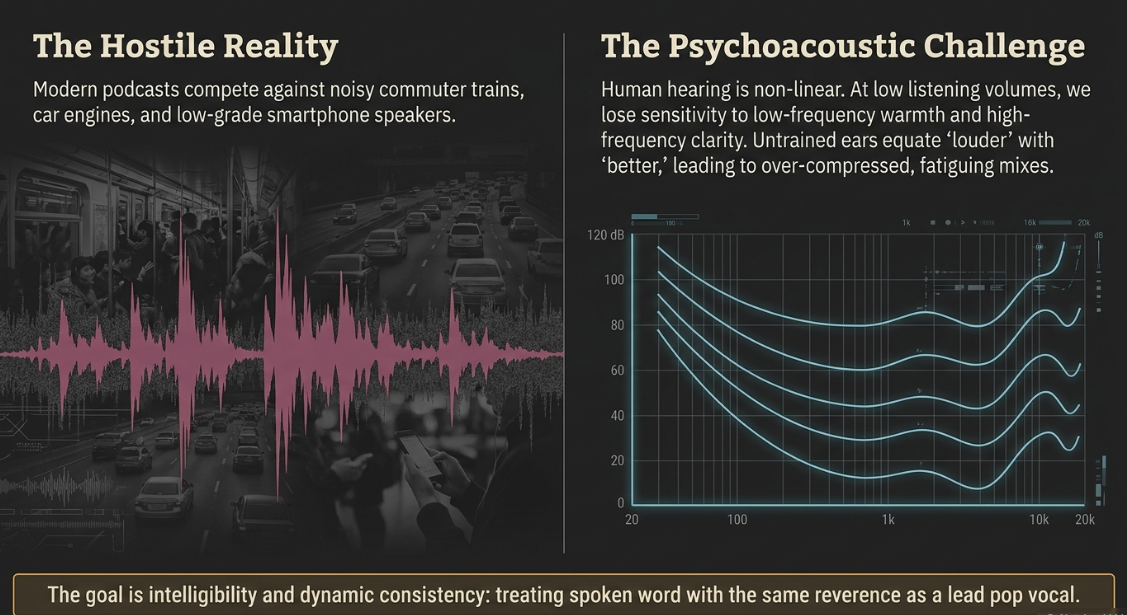
From a commercial perspective, post-production mixing operates as a brand strategy3. High-quality, consistent audio signals professionalism, credibility, and authority, whereas uneven, noisy, or poorly balanced tracks signal a rushed, disposable production that can alienate listeners3. The physical environments in which podcasts are consumed—such as noisy commuter trains, cars, offices, and low-grade smartphone speakers—further complicate the post-production workflow3. Engineers must sculpt the mix to survive these hostile acoustic conditions, ensuring that every word remains clear and understandable without forcing the listener to constantly adjust their playback volume3.
To achieve this, engineers rely on psychoacoustics, primarily governed by the Fletcher-Munson equal-loudness curves2. These curves mathematically illustrate how human hearing perceives different frequencies relative to absolute amplitude2. At lower listening volumes, the human ear is significantly less sensitive to low-frequency warmth and high-frequency clarity2. Consequently, an increase in volume naturally boosts the human perception of these frequency extremes, leading untrained ears to choose a louder mix as "superior," even when its dynamic range has been severely compromised by over-compression2. Professional mixing engineers must remain highly conscious of this auditory phenomenon, enforcing strict level-matching practices during plugin evaluation to ensure processing decisions are based on genuine tonal improvements rather than mere increases in volume2.
Modern listening habits have also driven spoken-word mixing beyond traditional stereo formats into immersive audio, utilizing Dolby Atmos and binaural rendering12. While stereo restricts sound placement to a horizontal left-right field, Dolby Atmos allows engineers to place sounds in a full three-dimensional space12. Binaural mixing simulates this 3D experience over standard headphones by mimicking how human ears perceive direction, space, distance, and timbre12. This spatial expansion opens up new creative possibilities for narrative storytelling, ambient sound design, and listener engagement2.
Spatial Architecture: The Four Domains of the Podcast Mix
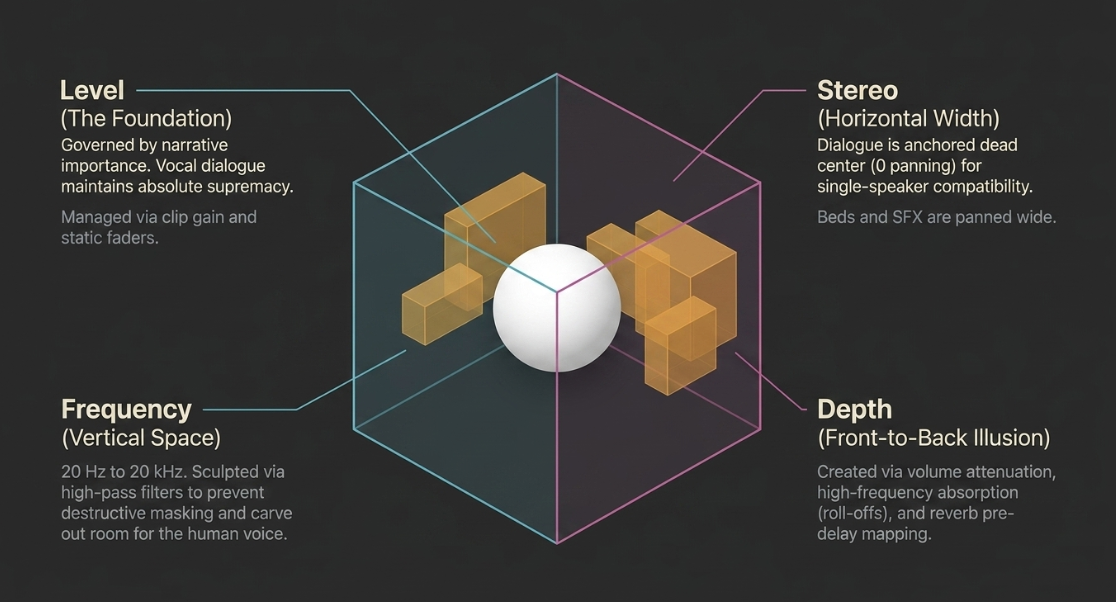
Constructing a professional spoken-word mix requires the systematic organization of audio elements into a strict hierarchy across four key architectural domains: level, frequency, stereo spatialization, and depth2.
The Level Domain
The level domain represents the absolute foundation of the mix hierarchy, controlled via clip gain manipulation, static faders, and automatic gain-riding processors2. In podcast post-production, the level domain is governed by the principle of narrative importance, meaning the vocal dialogue must maintain unyielding supremacy over all other elements2. Music beds, intro and outro themes, and ambient sound design must be dynamically regulated to support, rather than compete with, the central vocal delivery1.
The Frequency Domain
Spanning the range of human hearing from 
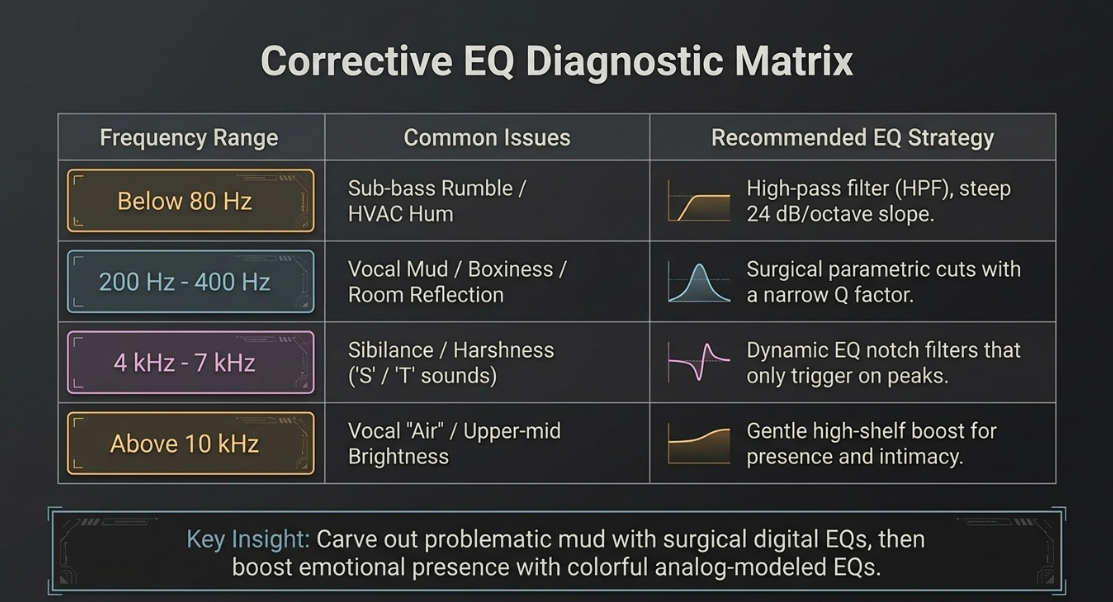
The primary corrective measure in this domain is high-pass filtering (typically utilizing a steep slope of $24\text{ dB/octave}$ set between $80\text{ Hz and }150\text{ Hz}$) on all voice tracks1. This eliminates sub-bass structural rumbles, traffic noises, and low-frequency HVAC hums without stripping the natural body of the speech11.
The Stereo Domain
Controlled by panning knobs across the horizontal axis, the stereo domain establishes the lateral soundstage of the production2. Standard conversational podcasts generally anchor dialogue strictly to the center channel (
In narrative, dramatic, or highly produced documentary podcasts, however, the stereo domain is exploited to create wide, realistic acoustic environments, panning secondary elements, sound effects, and musical stingers to specific points across the soundstage2.
The Depth Domain
The depth domain is an auditory illusion representing the front-to-back axis of the mix, establishing which elements sound intimate and close to the listener versus those that appear distant2. This spatial illusion is constructed by combining three primary parameters:
Level Attenuation: Naturally, quieter elements are perceived by the human ear as being further away.
Frequency Absorption: High-frequency roll-offs, such as a gentle high-shelf EQ cut, mimic the natural acoustic dampening of air over distances2.
Reverberation Tailoring: Configuring the pre-delay, decay time, and wet/dry mix of a reverb unit determines the virtual boundaries of the environment, placing sound beds behind the dry, dry-fronted vocal dialogue2.
Session Setup, Structure, and High-Yield Gain Staging
A professional mixing session begins with structured organization, mapping out a logical signal path to ensure efficiency and technical consistency3. Spoken-word post-production follows a rigid six-stage lifecycle: writing, arranging, tracking, editing, mixing, and mastering12. The transition between editing and mixing is marked by the consolidation of files and the establishment of a standardized session layout3.
To manage sessions effectively, raw tracks are organized into logical groups, separating dialogue, music beds, intro and outro segments, transition sound design, advertisements, and alternative takes1. Rather than stacking duplicate processors on individual tracks, engineers utilize shared processing, bussing similar tracks to group buses where collective EQ, compression, and limiting can be applied3. This approach preserves CPU resources and helps "glue" the elements of the mix together1.
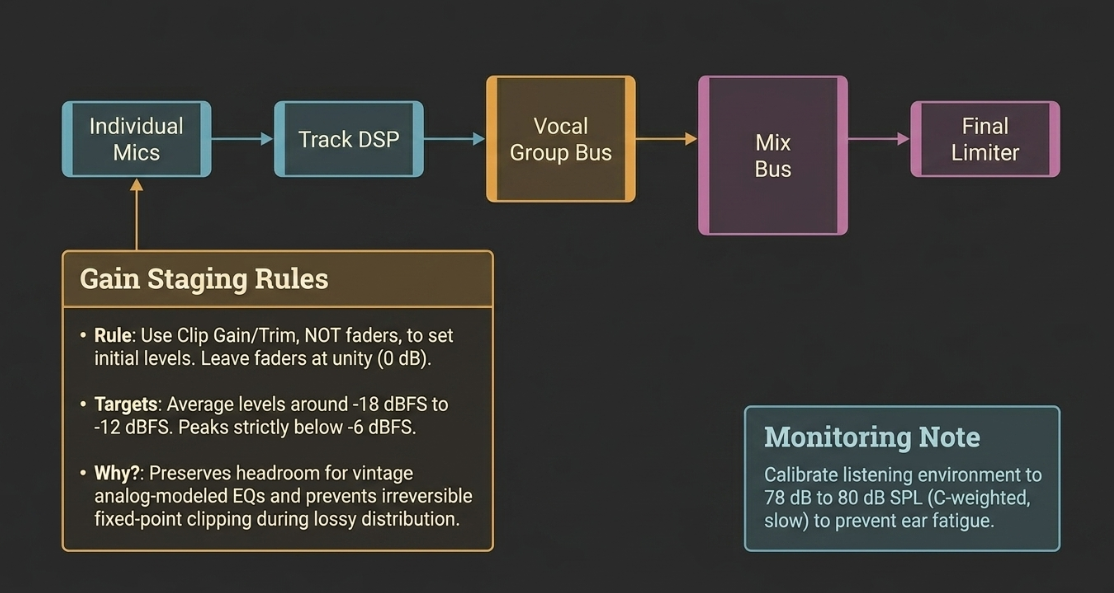
Individual Mics ──► Track-Level DSP ──► Vocal Group Bus ──► Mix Bus ──► Limiter/Master
- Clip Gain - Group EQ - Stereo - Final Peak
- Noise Gate - Buss Comp - Spatial Ceiling
Proper gain staging is the technical foundation of this routing architecture9. Gain staging involves managing signal levels at every point in the digital signal chain—from input converters, through plugins, to the master output bus—to maximize headroom and prevent digital clipping9. In the digital domain, clipping produces harsh, anharmonic distortion that degrades sound quality16. Proper gain structure ensures that every tool in the plugin chain operates within its optimal input range9.
During the setup phase, faders are placed at unity gain ($0\text{ dB}$), and the input levels of each track are adjusted using clip gain or trim controls at the top of the signal chain13. Faders are strictly reserved for balancing the mix and writing volume automation, not for managing gain staging13. Tracks are gain-staged so that their average levels sit around 

A critical factor in level management is the resolution of the audio files17. While modern DAWs operate using a 32-bit or 64-bit floating-point engine—which theoretically offers virtual immunity from internal clipping—physical audio interfaces and distribution platforms still rely on fixed-point formats (such as 24-bit or 16-bit)17. Exporting a file that clips the master output bus will permanently bake distortion into the final render once it is converted to a fixed-point format or a compressed lossy codec for distribution17.
To maintain an objective reference throughout this process, engineers calibrate their monitoring systems9. A common reference level is 


Furthermore, different DAWs exhibit unique master fader behaviors; for example, in Avid Pro Tools, adjusting the master fader scales the input driving into the master bus processors, whereas in Apple Logic Pro, master inserts can be pre- or post-fader depending on the routing configuration17. Managing these routing path details is vital to ensure that master bus compressors or limiters are not overdriven by static master fader adjustments17.
Audio Restoration, De-Bleeding, and Coherence Processing
Raw field recordings and multi-host podcast roundtables are often captured in compromised, untreated rooms, presenting a series of acoustic issues such as room reflections, background noise, and microphone crosstalk5. Addressing these issues early in the mixing chain is necessary before applying creative tonal enhancements2.
Untreated Room Tracking ──► [Prep Phase] ──► [Restoration Phase] ──► [AI Enhancement]
- Room reflections - Gate / Exp - Spectral Denoise - Dialogue Isolation
- Cross-talk / Bleed - Strip Silence - Click / Hum Removal - Timbre Recovery
AI-Driven Speech Restoration and Multi-Voice Separation
When multiple speakers are captured on a single microphone, or when remote recordings suffer from severe bandwidth limitations, standard corrective tools are often insufficient1. Modern workflows utilize artificial intelligence and neural network models to isolate and restore speech23. Dialogue isolation technologies (such as AudioShake or Accentize dxRevive) analyze highly noisy master files to separate overlapping voices into individual tracks23.
These neural networks reconstruct missing frequency bands typically lost in phone calls or low-bitrate VoIP codecs, suppress heavy reverberation, and eliminate lossy data-encoding artifacts23. Because this processing executes locally on the host CPU, it ensures fast, secure, and secure integration into professional workflows23.
Managing Microphone Bleed and Cross-Talk
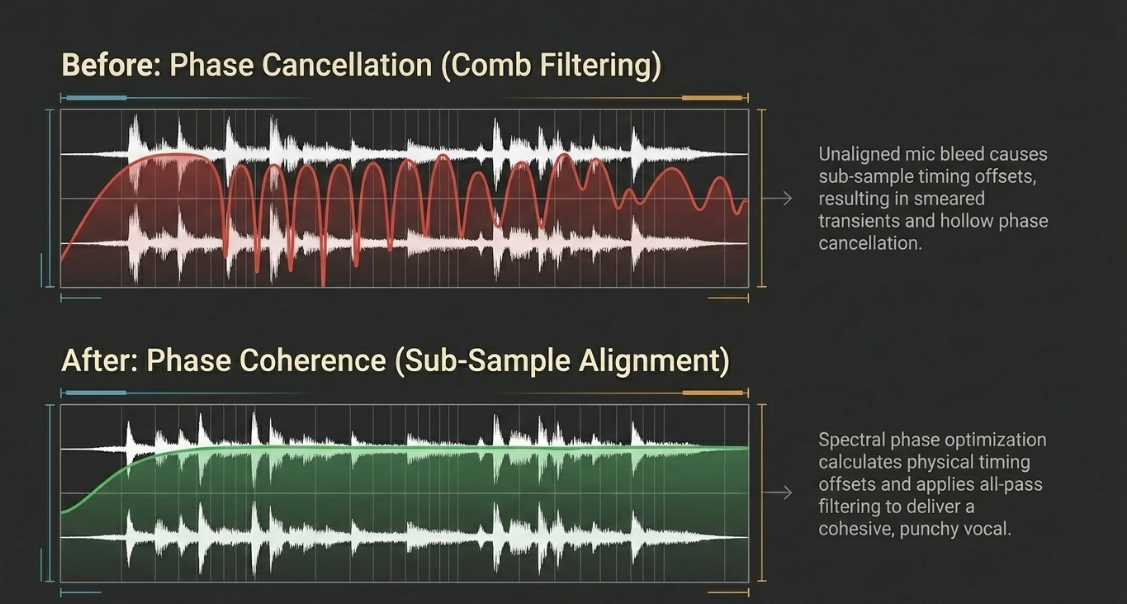
In-person roundtable podcasts utilizing multiple close-mic setups inevitably suffer from microphone bleed, where each host's voice spills into neighboring microphones22. This cross-talk creates a muddy, hollow mix and introduces phase cancellation when the tracks are combined22.
Traditional noise gates and basic expanders are ill-suited for speech bleed because they function as simple level-dependent switches, abruptly muting the channel and clipping off the speaker's natural room tone and breath decays, resulting in a highly unnatural, disjointed conversation22.
Modern workflows utilize session-aware multitrack processors (such as Auphonic's Mic Bleed Remover)22. These algorithms analyze all tracks in the session simultaneously to differentiate between primary speech on a channel and bleed coming from neighboring microphones22. By continuously matching and subtracting foreign signals while preserving the underlying room tone, these systems achieve pristine voice separation while keeping the conversational flow entirely natural22.
Integrating Automated Voice Enhancers
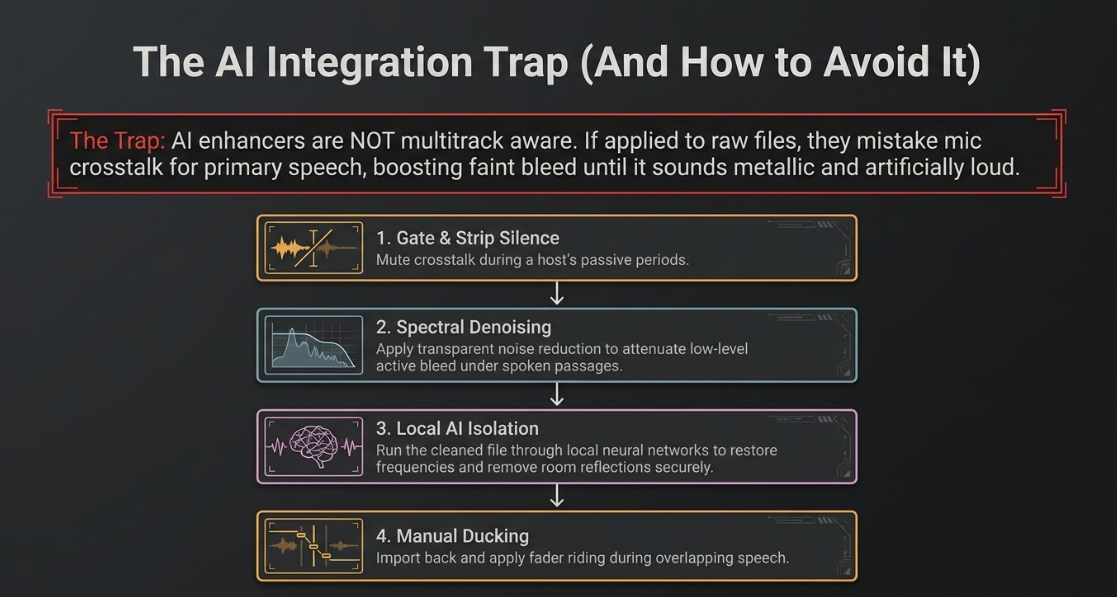
A common pitfall in modern post-production is the improper integration of automated voice enhancers, such as Adobe Enhance Speech, on multitrack sessions containing mic bleed28. These AI engines are not multitrack-aware; they analyze individual audio files in isolation and attempt to treat everything inside the file as primary speech worth boosting28. If a raw track contains audible crosstalk from a second speaker, the AI will mistake that faint background voice as primary speech, boosting and processing it until it sounds metallic, processed, and uncomfortably loud28.
To prevent this artificial amplification of background voices, engineers must follow a strict, multi-step preparatory workflow before applying AI enhancement28:
Gate and Strip Silence: Apply a noise gate or execute silence stripping to mute all cross-talk during the host's passive periods28.
Corrective Noise Reduction: Use a transparent spectral denoiser (such as RX Voice De-noise or Adobe Denoise) to further attenuate any faint, low-level bleed that remains active under spoken passages28.
AI Processing: Once the track is clean and contains only the primary speaker, export the file and run it through the AI enhancement engine28. This prevents the algorithm from processing foreign bleed28.
Manual Alignment and Ducking: Import the processed file back into the session, line up the tracks, and apply manual fader riding or sidechain ducking to maintain clean separation during active speaking overlaps28.
Time-Alignment and Phase Resolution
When multiple microphones capture the same sound source, or when USB microphones introduce independent clock drift, subtle timing offsets occur25. Because USB microphones contain internal analog-to-digital converters driven by their own crystal oscillators, their audio files will slowly drift out of sync over long recording sessions, leading to echo effects and comb filtering25.
To restore phase coherence, engineers employ sample-accurate alignment plugins like Sound Radix Auto-Align 2 or Auto-Align Post 229. These tools automatically group related tracks, calculate the physical timing offsets between microphones, and apply sub-sample delay compensation to bring them into alignment26.
In addition to static time-alignment, Auto-Align 2 utilizes spectral phase optimization, applying all-pass filtering to correct frequency-specific phase shifts caused by acoustic reflections or electronic preamp circuits26. This process restores low-frequency body, clears transient smears, and delivers a cohesive, unified vocal presentation29.
In sessions where actors or microphones move dynamically during recording, Auto-Align Post 2 calculates dynamic timing shifts (compensating for delays up to 
The Spoken-Word Editing and Corrective EQ Phase
Before diving into equalizers and compressors, the raw conversational tracks must be cleaned of structural and timing errors12. This editing phase is closely integrated with the early mixing stages, as both processes impact the clarity and pacing of the narrative5.
Managing Conversation Flow and Breathing
The primary objective of editing is to tighten the overall flow of dialogue14. This involves removing distracting speech disfluencies—such as "ums," "errs," and bad takes—while maintaining a natural conversational cadence14.
Engineers utilize specialized cut commands (such as Cubase's "Cut Time" macro) to instantly delete unwanted passages and shift the remaining audio to the left, maintaining a seamless transition across the edit boundaries14.
[Raw Breath Event] ──► [Cubase Breath Macro] ──► [Processed Event]
- Loud, distracting - Splits breath range - Reduced by ~6dB
- Abrupt start/stop - Applies linear fades - Fades blend smoothly
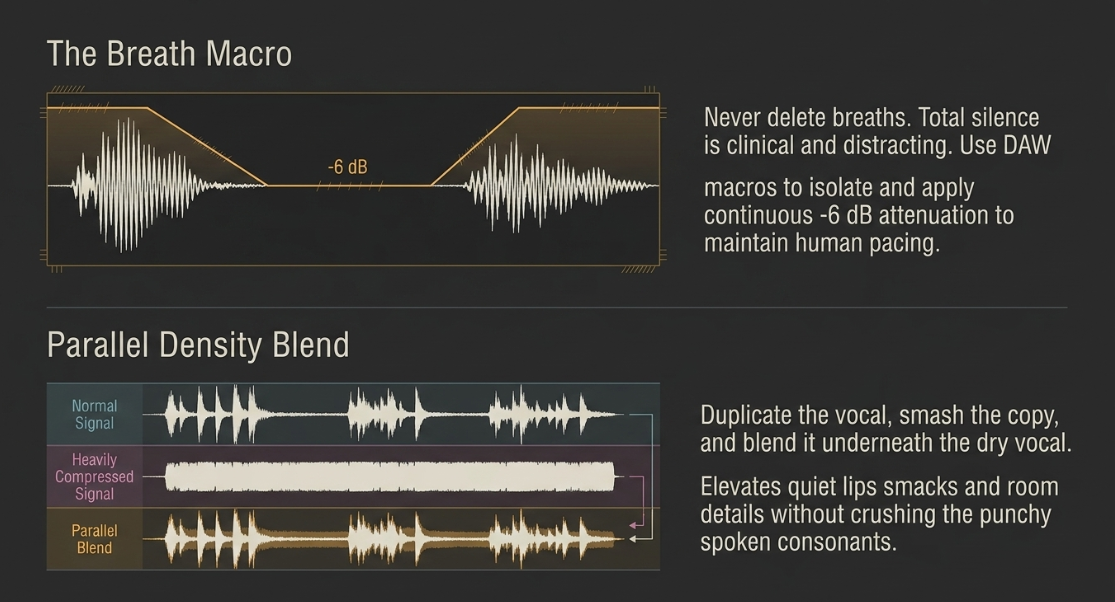
Managing breath sounds requires a highly disciplined approach14. Completely muting or deleting breaths creates an artificial, clinical silence that sounds unnatural and distracting to the listener7.
Instead, professional workflows reduce breath volume to a natural, unobtrusive level14. This can be automated using DAW macros (such as the Cubase Breath and Fade macro), which automatically isolate selected breath events, apply linear crossfades to prevent digital pops, and decrement the event volume handle by approximately 

Corrective Equalization Principles
Corrective equalization is the primary tool for shaping the tonal balance and ensuring vertical separation of voices in the mix4.
The primary corrective measure in this domain is high-pass filtering (typically utilizing a steep slope of $24\text{ dB/octave}$ set between $80\text{ Hz and }150\text{ Hz}$) on all voice tracks1. This eliminates sub-bass structural rumbles, traffic noises, and low-frequency HVAC hums without stripping the natural body of the speech11.
When two voices sound overly similar and clash in the mix, engineers apply minor corrective EQ adjustments to differentiate their tonal centers3. By gently boosting the fundamental frequencies of one voice while slightly carving out those same frequencies in the other, each speaker remains distinct and intelligible3.
This frequency carving prevents masking and maintains a clear vertical separation on the frequency spectrum2.






Advanced Dynamics Management: Spectral and Serial Processing
To achieve the dense, polished vocal presence characteristic of modern broadcast and narrative programming, post-production teams employ advanced dynamic processing37. This standard is not met by heavy limiting on the master bus, but by a combination of clip-gain leveling, volume automation, and multi-stage compression37.
Achieving Uniform Dialogue Levels
Modern broadcast audio often features a highly consistent, uniform dialogue waveform that remains smooth, intelligible, and free of processing artifacts37. Achieving this consistent level relies on meticulous clip gain staging and volume automation rather than aggressive compression37.
Engineers manually ride faders or utilize automated gain-riding utility plugins (such as WaveRider or Defaulter) to balance the signal before it ever hits a compressor37. This leveling ensures that downstream compressors are gently tickled by a highly consistent signal, preventing over-compression and minimizing the risk of bringing up unwanted background noise37.
To manage surgical dynamic issues, engineers also use dynamic spectral processors like Oeksound Soothe3 or SA-237. Unlike standard wideband compressors, these tools detect and attenuate harsh resonances across hundreds of narrow frequency bands32.
By dynamically controlling harshness and vocal sibilance, these tools ensure the vocal remains smooth and natural, even when the speaker gets loud or moves closer to the microphone32.
The Architecture of Serial Compression
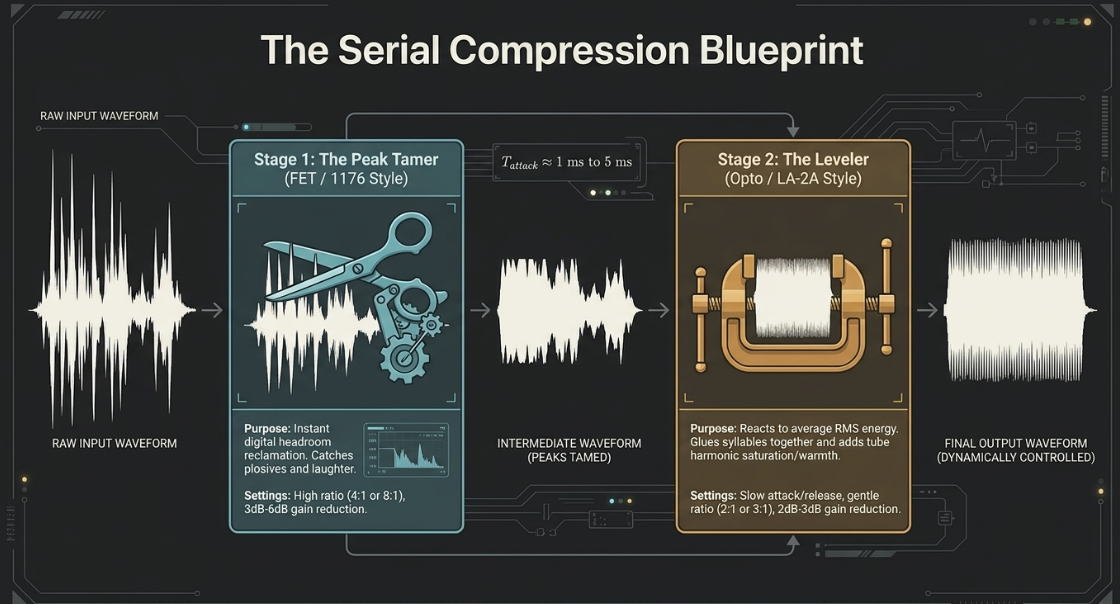
Relying on a single compressor to manage the entire dynamic range of a highly dynamic vocal track is a critical error38. To achieve significant gain reduction without audible artifacts, engineers employ serial compression—the practice of stacking multiple, specialized compressors in a sequential signal chain38.
Raw Input ──► [1st Compressor (FET)] ──► [2nd Compressor (Opto)] ──► Balanced Output
(Dynamic) - Fast Attack (1-3ms) - Slow Attack (Opto) (Consistent, Dense)
- High Ratio (4:1) - Low Ratio (2:1)
- Tames Peak Transients - Smooths Average Level
The Peak Taming Stage: The first insert in the serial chain is a fast-acting compressor, typically modeled after a Field Effect Transistor (FET) design like the classic 117638. This device is configured with a fast attack time (

The Leveling and Color Stage: The second insert is a slow-acting, program-dependent compressor, typically modeled after an optical (Opto) circuit like the LA-2A8. This device is configured with a slow attack and slow release envelope, operating at a gentle ratio of $2:1\text{ or }3:1$8. Rather than reacting to rapid peak transients (which have already been smoothed by the peak tamer), the Opto compressor reacts to the average root-mean-square (RMS) energy of the voice, gently riding the level of entire phrases38. It applies a continuous, transparent squeeze of $2\text{ dB to }3\text{ dB}$, bringing the quieter syllables up and "gluing" the speech together8. The tube and optical emulation also injects subtle harmonic saturation, adding weight, warmth, and analog authority to the vocal profile8.
Dynamic Envelope Integration and Saturation
Dynamic envelope integration requires matching compression settings to the specific vocal delivery of each speaker3.
Fast, bright voices and soft, breathy performances cannot be treated with the same dynamic settings3. A rapid, energetic voice requires faster attack and release times to control quick verbal transients, while a soft, intimate performance requires slower, gentler compression curves to maintain its natural, breathy quality3.
Normal Signal : ───█─────────█───────── (High peaks, low average energy)
Compressed : ───▀─────────▀───────── (Peaks reduced by threshold)
Parallel Blend : ───█▄▄▄▄▄▄▄▄▄█▄▄▄▄▄▄▄▄─ (High peaks preserved, body densified)
To add density and energy to the dialogue without squashing transients, engineers employ parallel compression3. This technique involves splitting the vocal signal, applying heavy compression to one path, and blending it back with the dry, uncompressed signal3.
This parallel blend raises the low-level details of the voice—such as subtle breaths, lip movements, and room tail details—while preserving the natural, punchy peaks of the spoken consonants3.
Additionally, the "always cut and never boost" EQ rule is a common myth in post-production33. While narrow parametric cuts are excellent for removing muddy resonances or boxy room tones, gentle boosts with colorful, analog-modeled EQs are highly effective for adding warmth, body, and upper-midrange presence to a vocal15.
The primary goal is to carve out problematic frequencies first, ensuring that subsequent compressors do not react to unwanted sub-bass energy or harsh sibilance, and then gently boost the frequencies that highlight the speaker's emotional delivery15.
Audio Synthesis: Sound Beds, Sidechaining, and Automation
Once individual vocal tracks have been restored, equalized, and compressed, they must be synthesized with supporting music beds, transition stingers, and sound effects to create a cohesive acoustic landscape1.
Music Beds and Transition Elements
Integrating music beds, sound effects, and transitions is vital for pacing and structuring the narrative1. Introduction and conclusion themes set the tone, while transition cues, or segment changes, guide the listener through different parts of the episode1.
To prevent music from clashing with the dialogue, engineers adjust volume levels and apply gentle fade-ins and fade-outs, ensuring the music blends naturally into the background1.
During the mixing phase, individual dialogue tracks are balanced to sit consistently between 
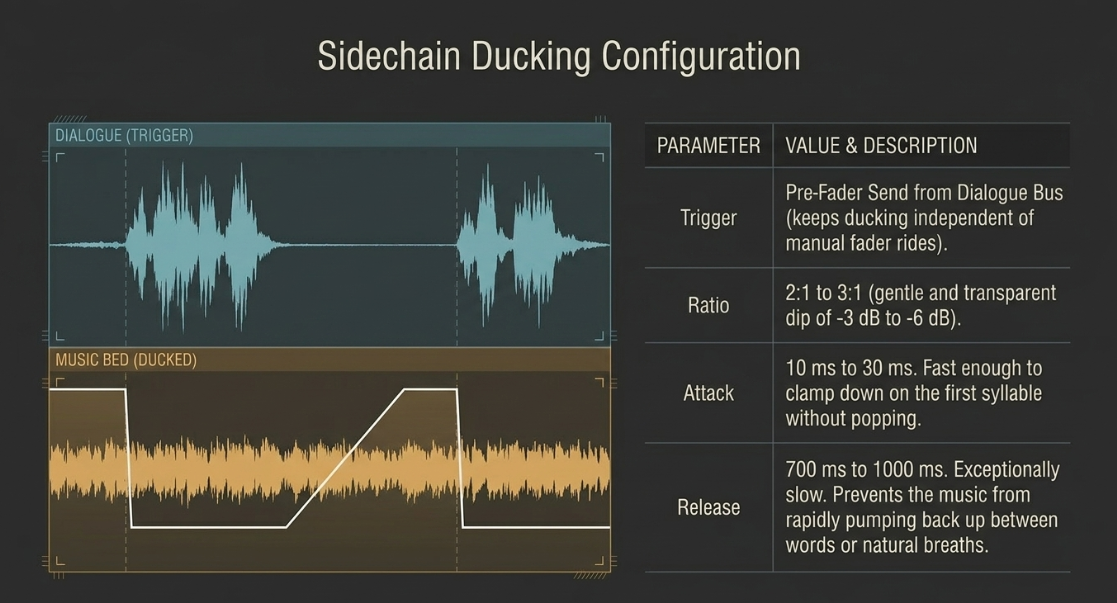
Sidechain ducking configuration
To maintain vocal supremacy when backing music beds or ambient soundscapes are present, engineers implement sidechain ducking3. Rather than manually drawing tedious volume automation envelopes, sidechain ducking uses the vocal track as an external key trigger to automatically compress the music bed whenever dialogue is active42.
To set up this dynamic link, a pre-fader, post-FX auxiliary send is routed from all vocal tracks to the sidechain (or key input) of a stereo compressor inserted on the music bed group bus42.



A fast attack time ($10\text{ ms to }30\text{ ms}$) ensures the compressor clamps down instantly on the music bed as soon as the speaker utters the first syllable42. Crucially, the release time is configured to be exceptionally long ($700\text{ ms to }1000\text{ ms}$)43. This slow recovery envelope prevents the music from rapidly pumping back up in volume during natural conversational pauses, breaths, or brief gaps between words, keeping the transition transparent to the listener43.
Creative Automation and Dynamic Spatialization
Beyond static leveling, engineers use automation to dynamically adjust parameters throughout the project47. Rather than keeping an equalizer or sidechain compressor locked to a single setting, automation allows these tools to adapt to changing narrative demands48.
For example, if a music bed features a prominent mid-range synth that clashes with a host's voice, engineers can automate a precise EQ cut to engage only during active dialogue, restoring the full music profile when the host stops speaking48.
This dynamic control can also be applied to spatial effects49.
By inserting a dynamic EQ on a vocal reverb bus and routing the dry vocal as a sidechain trigger, the mid-range presence of the reverb tail can be subtly ducked whenever the speaker is active49. This keeps the vocal intimate and close to the listener, while allowing the rich reverb tail to bloom and expand during conversational pauses, avoiding any loss of clarity2.
Professional Mastering, Loudness Compliance, and Delivery Architecture
Mastering represents the final stage of the post-production workflow, ensuring the completed stereo mix translates accurately across diverse consumer devices while strictly complying with the technical delivery requirements of digital distribution platforms4.
Decoding Loudness Metrics: LUFS and True Peak
To master audio effectively in a digital-first environment, engineers rely on standardized loudness metering that mirrors human acoustic perception50.
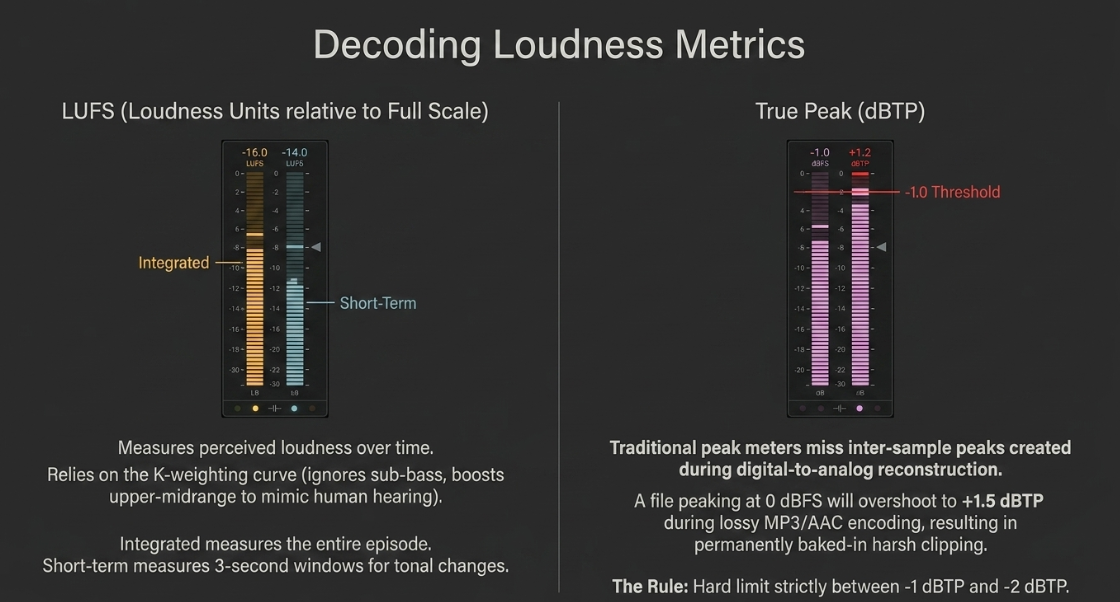
LUFS / LKFS (Loudness Units relative to Full Scale): These units are synonymous and represent the absolute industry standard for measuring perceived loudness50. Unlike traditional peak or RMS meters, the LUFS algorithm incorporates a specialized K-weighting filter curve35. This filter applies a steep high-pass cut below


Integrated Loudness (



Short-Term Loudness (

Momentary Loudness (


True Peak (dBTP): This parameter is critical for digital distribution36. Traditional peak meters only register the amplitude of physical digital samples; they miss inter-sample peaks that occur during the digital-to-analog reconstruction process in consumer playback systems36. A master that peaks at


The Core Paradigm of Volume Normalization
Historically, the lack of loudness standards sparked the "loudness wars," where music was mastered progressively hotter and more heavily limited to stand out on playlists21. Today, all major streaming platforms have ended this cycle by implementing automatic playback normalization20.
Platforms measure the integrated LUFS of the uploaded file and apply a linear volume offset to match their specific target loudness20. If an episode is mastered excessively hot (e.g., at 

Conversely, if a track is mastered too quiet (e.g., at 
The Gating Mechanism and the "Gating Trick"
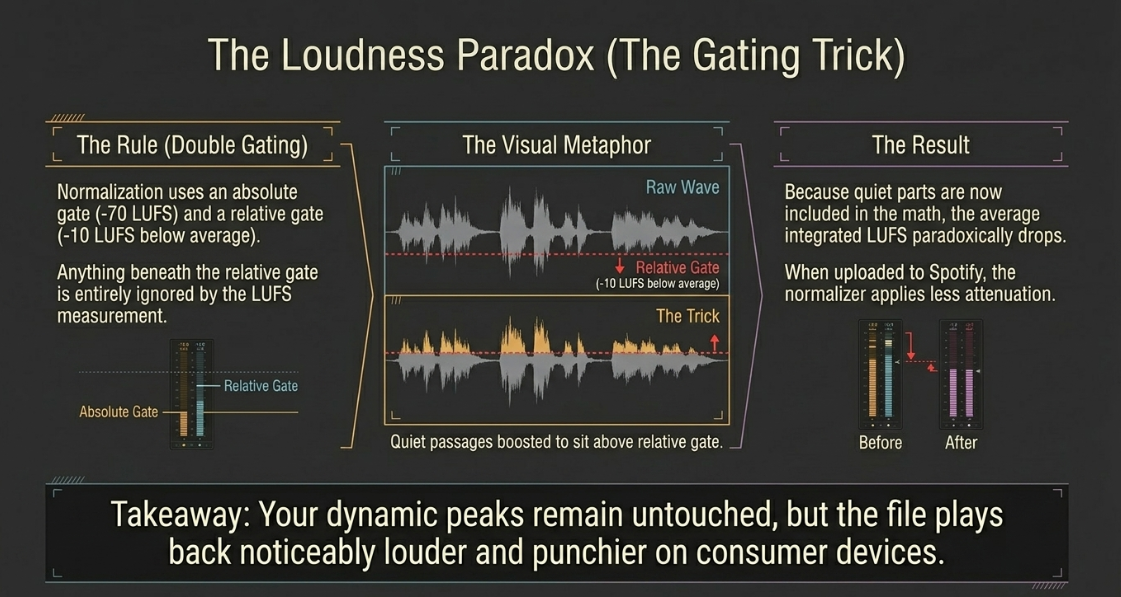
Loudness normalization utilizes double gating, as specified by the ITU-R BS.1770 standard20.
The first gate is an absolute threshold set at 
The second gate is a relative threshold set exactly 
Understanding this relative gate allows mastering engineers to employ a specific technical trick to make their program sound louder on normalized platforms35. By gently raising the volume of extremely quiet passages so they sit just above the relative gate threshold, these quieter segments are included in the overall integrated LUFS calculation35. This paradoxically drops the overall measured integrated LUFS (by narrowing the gap between loudest and quietest), meaning that when streaming normalizers apply their gain-reduction algorithm, they apply less attenuation, causing the master to play back louder on platforms compared to a standard master35.
Raw Waveform : ───█▄▄▄▄▄▄▄▄▄▄▄▄▄▄█─── (Quiet passages below relative gate)
"Gated Trick" : ───████████████████─── (Quiet passages boosted above relative gate)
Normalizer : Measures lower integrated LUFS -> Applies less attenuation -> Louder playback
The K-System and Broadcast Standards
In television and film post-production, engineers adhere to strict broadcast standards to maintain acoustic consistency across different programs53.
In the United States, the ATSC A/85 specification (enforced by the CALM Act) mandates a target of 
In Europe, the EBU R128 standard mandates a target of 


To manage dynamic range during mixing and mastering, engineers can also use the K-System, proposed by Bob Katz21. This system aligns the physical monitoring calibration with target headroom markings on the meter21:
K-12: Designed for highly compressed broadcast and radio, targeting a nominal level of

K-14: Optimized for standard music and modern narrative podcast mastering, leaving

K-20: Reserved for high-dynamic content, such as film scores and classical performances, leaving

Platform-Specific Delivery Requirements
The ultimate destination of the master file determines its target loudness and true peak configuration4.
The Audio Engineering Society recommends a standard target of $-16\text{ LUFS}$ with a True Peak limit of $-1\text{ dBTP}$ for stereo podcast delivery4.
Furthermore, mono files match stereo targets with a 






Managing Transcoding Overshoot and Lossy Codecs
A final, critical concern in the mastering phase is managing transcoding overshoot20. Streaming platforms do not distribute raw uncompressed WAV masters to end-users20. Instead, files are converted into lossy formats like Ogg Vorbis, AAC, or MP3 to conserve bandwidth20.
The lossy encoding process alters the physical waveform of the audio, introducing interpolation errors that can cause peak levels to spike or "overshoot" by 
To prevent these peak spikes from causing digital clipping during playback, engineers must build adequate true-peak headroom into the master20.
For standard stereo files mastered to $-16\text{ LUFS}$, a True Peak limit of $-1\text{ dBTP}$ is sufficient4. However, if the master is driven hot (e.g., at $-14\text{ LUFS}$ or louder), the encoder is more susceptible to overshoot distortion20. In these cases, engineers should set the final limiting ceiling to $-2\text{ dBTP}$ to protect the integrity of the stream across all consumer devices20.
Detailed Mixing and Mastering Workflow Implementation
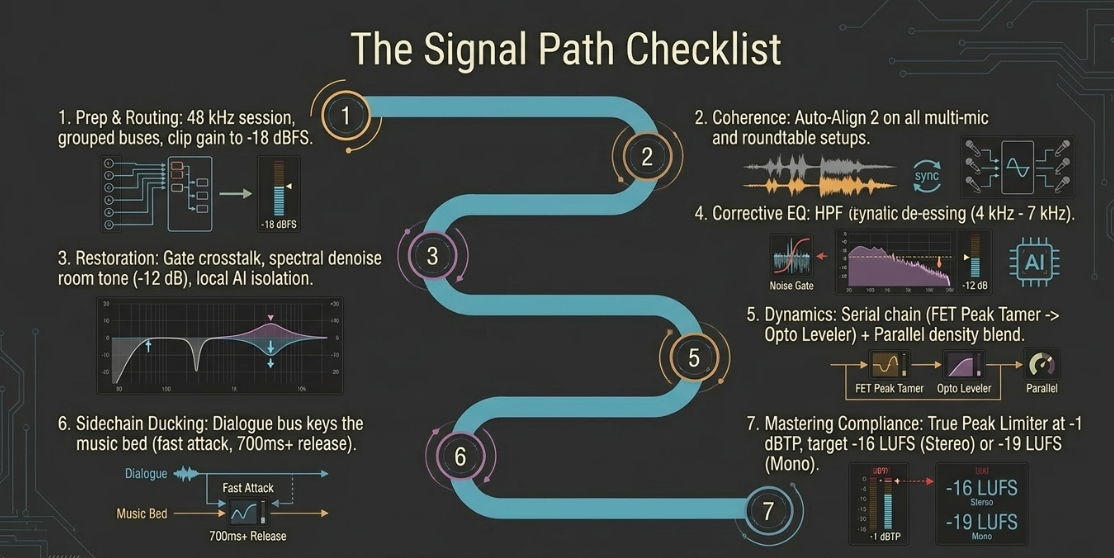
To integrate these post-production steps into a reliable, professional workflow, engineers should follow this systematic, multi-phase plan:
1. File Consolidation and Structural Preparation
Export raw tracks from the editing session, ensuring all multi-speaker files are separated onto individual channels1. Set the session sample rate to a standard $48\text{ kHz}$ to prevent interpolation artifacts54. Group tracks into logical buses: Dialogue, Music Beds, Transitions, Advertisements, and Alternate Takes1.
2. Time-Alignment and Phase Correction
On roundtable or multi-mic setups, instantiate an alignment utility like Auto-Align 2 on every track26. Define the primary host's channel as the reference track and initiate a sample-accurate alignment pass30.
For moving actors or cameras, select the dynamic mode to continuously adjust for phase shifts over time30.
3. Gain Staging and Monitoring Calibration
Set all DAW channel faders to unity gain ($0\text{ dB}$) and adjust the input clip gain or trim on each track so the loudest passages sit between $-18\text{ dBFS and }-12\text{ dBFS}$, keeping peaks below $-6\text{ dBFS}$9.
Calibrate your monitors to a comfortable listening level of $78\text{ dB to }80\text{ dB SPL}$ to prevent early ear fatigue9.
4. Audio Restoration and Noise Mitigation
Identify a clean noise profile of $0.5\text{ seconds}$ or more and apply spectral denoising to attenuate background room tones, HVAC hums, and computer fans by approximately $12\text{ dB}$60.
On each vocal track, insert a high-pass filter with a steep $24\text{ dB/octave}$ slope set between $80\text{ Hz and }150\text{ Hz}$ to eliminate low-frequency rumble1. Apply de-essing with a dynamic EQ notch filter to control sibilance in the $4\text{ kHz to }7\text{ kHz}$ range15.
5. Multi-Stage (Serial) Compression and Parallel Balancing
Apply a fast FET compressor with an attack time of $1\text{ ms to }5\text{ ms}$ and a high ratio ($4:1\text{ or }8:1$) to tame sudden peak transients by $3\text{ dB to }6\text{ dB}$38.
Follow with a slow optical compressor set to a gentle ratio ($2:1\text{ or }3:1$) to apply a transparent, average leveling squeeze of $2\text{ dB to }3\text{ dB}$ over long phrases8.
To add density without flat-lining transients, set up a parallel compression auxiliary track and blend a heavily compressed copy of the vocal back into the main mix3. Make all corrective EQ and compression adjustments while listening to the entire, un-soloed arrangement to prevent circular deadlocks2.
6. Dynamic Sidechain ducking of Sound Beds
Bus all music beds to a dedicated stereo aux channel and insert a compressor3. Route a pre-fader auxiliary send from the dialogue group to the sidechain input of the music compressor42.
Configure a fast attack ($10\text{ ms to }30\text{ ms}$), a very slow release ($700\text{ ms to }1000\text{ ms}$), and a gentle ratio ($2:1\text{ to }3:1$) to automatically duck the music bed by $-3\text{ dB to }-6\text{ dB}$ whenever speech occurs, keeping the bed clear of the dialogue42.
7. Mastering Compliance and Output Delivery
Sum the master bus to mono to check for phase cancellations2. Insert a calibrated ITU-R BS.1770 compliant loudness meter on the master stereo bus50.
Apply a transparent, look-ahead brick-wall limiter, setting the output ceiling to $-1\text{ dBTP}$ to protect the file from inter-sample peak clipping during transcoding4.
For a standard stereo podcast release, target a global integrated loudness of exactly $-16\text{ LUFS}$4. For mono-only delivery, target $-19\text{ LUFS}$ to compensate for acoustical summation4. Use the relative gate threshold to your advantage by gently lifting quiet passages to sit just above the relative gate, ensuring a louder, cleaner, and highly competitive release35.
Works cited
Podcast Mastering - Perfect tool to make your podcasts sound perfect - Major Mixing, https://majormixing.com/podcast-mastering/
Audio Engineering in a Professional Podcast Post-Production - Finchley Studios, https://www.finchley.co.uk/finchley-learning/visual-podcast/audio-engineering-in-a-professional-podcast-post-production
Audio Mixing Techniques for Pro-Level Podcasts & Video, https://flexworkstudios.com/audio-mixing-techniques/
Podcast Production 101: The Difference Between Mixing and Mastering - Tansy Aster Academy, https://tansyasteracademy.com/podcast-production-101-the-difference-between-mixing-and-mastering/
What is the biggest difference between editing Music versus a Podcast? : r/audioengineering - Reddit, https://www.reddit.com/r/audioengineering/comments/tgowot/what_is_the_biggest_difference_between_editing/
Post-Production | Ultraschall Documentation - GitHub Pages, https://ultraschall.github.io/ultraschall-manual/en/docs/postproduction/
When is my Voice Over or Podcast Audio Good Enough to Release?, https://www.bryanhurtaudio.com/blog/is-my-dialogue-voice-recording-good-enough-to-release
A guide to vocal compression for podcasters - Acast, https://www.acast.com/en-gb/blog/a-guide-to-vocal-compression-for-podcasters
Gain Staging: From Recording to Mix - The Complete Workflow - Sonarworks Blog, https://www.sonarworks.com/blog/learn/gain-staging-guide
What Is Gain Staging? The Mixing Habit That Fixes Most Problems - Adrian Milea, https://adrianmilea.com/what-is-gain-staging/
What is Gain Staging? Avoiding Distortion in Your Mix - TYX Studios, https://tyxstudios.com/blog/what-is-gain-staging
Mixing vs Mastering Audio Explained | ISM UK, https://www.ism.org/advice/mixing-vs-mastering/
A Beginner's Guide to Gain Staging - The Foundation of a Great Mix - MixMaster Pro, https://mixmasterpro.io/articles/gainstaging
Podcast Dialogue Editing In Cubase - Sound On Sound, https://www.soundonsound.com/techniques/podcast-dialogue-editing-cubase
Audio Compression and EQ for Podcasters | Enhance Your Sound — Listen2It Blog, https://www.getlisten2it.com/blog/audio-compression-and-eq-for-podcasters-enhance-your-sound
Gain Staging In Your DAW Software, https://www.soundonsound.com/techniques/gain-staging-your-daw-software
Gain staging: what it is and how to do it - iZotope, https://www.izotope.com/community/blog/gain-staging-what-it-is-and-how-to-do-it
Hindenburg PRO | Audio Editing Software for Broadcast Journalists, https://hindenburg.com/products/radio-podcast/
Hindenburg PRO Features | Spoken-Word Storytelling Tools, https://hindenburg.com/products/radio-podcast/features/
Loudness normalization on Spotify, https://support.spotify.com/us/artists/article/loudness-normalization/
LUFS and The Loudness War - Jimmy Ether, https://jimmyether.com/lufs-and-the-loudness-war/
Multitrack Clarity Redefined: Introducing our new Mic Bleed Remover - Auphonic, https://auphonic.com/blog/2025/10/08/mic-bleed-remover/
Accentize dxRevive – Dialogue Restoration Plugin, https://www.accentize.com/product/dxrevive/
Effortless Podcast Editing: Isolate Voices & Remove Background Noise - AudioShake, https://www.audioshake.ai/post/streamlining-podcast-production-solutions-to-common-audio-challenges
First timer. How on earth do people get avoid crosstalk?? : r/podcasting - Reddit, https://www.reddit.com/r/podcasting/comments/leth0w/first_timer_how_on_earth_do_people_get_avoid/
Sound Radix Auto-Align 2, https://www.soundonsound.com/reviews/sound-radix-auto-align-2
Multipressor in Logic Pro for iPad - Apple Support, https://support.apple.com/guide/logicpro-ipad/multipressor-overview-lpipf5e38926/ipados
Enhance Speech with mic spill from second speaker – best workflow? - Adobe Community, https://community.adobe.com/questions-514/enhance-speech-with-mic-spill-from-second-speaker-best-workflow-1498736
Auto-Align: The Automatic Phase Alignment Plug-in - Sound Radix, https://www.soundradix.com/products/auto-align/
Auto-Align Post 2 User Manual 2.2 - Sound Radix, https://assets.soundradix.com/downloads/Auto-Align%20Post%202.2.0%20User%20Manual.pdf
Pro Tools delivers Auto-Align & Post ARA support - Avid, https://www.avid.com/resource-center/sound-radix-ara
Why and When to Use Dynamic EQ in a Mix? - Boris FX, https://borisfx.com/blog/why-and-when-to-use-dynamic-eq-in-a-mix/
Multiband Compression vs Static EQ vs Dynamic EQ : r/audioengineering - Reddit, https://www.reddit.com/r/audioengineering/comments/gtxd1u/multiband_compression_vs_static_eq_vs_dynamic_eq/
How to Use Dynamic EQ in Your Mix - SoundGym, https://www.soundgym.co/blog/item?id=dynamic-eq
Mastering for Spotify, Apple Music & More – the Loudness of the Pros | HOFA-College, https://hofa-college.de/en/blog/mastering-for-spotify-apple-music-more-the-loudness-of-the-pros/
The Loudness Lookup - LUFS Standards for Every Platform - Dan Murtagh, https://danmurtagh.com/lufs-loudness-standards/
Sausaged dialogue on modern shows. How do they do it without it sounding overly limited?, https://www.reddit.com/r/AudioPost/comments/1b6jqwp/sausaged_dialogue_on_modern_shows_how_do_they_do/
How and Why to Use Serial Compression | Blog - Waves Audio, https://www.waves.com/how-and-why-to-use-serial-compression
Understanding serial compression: how to use it to control dynamic range - iZotope, https://www.izotope.com/community/blog/serial-compression
A Guide to podcast Compression and Loudness - Reddit, https://www.reddit.com/r/podcasting/comments/nlrlp5/a_guide_to_podcast_compression_and_loudness/
Audio dynamics 101: compressors, limiters, expanders, and gates - iZotope, https://www.izotope.com/community/blog/audio-dynamics-101-compressors-limiters-expanders-and-gates
Sidechain Compression: 5 Simple Tips for Tighter Mixes - EDMProd, https://www.edmprod.com/sidechain-compression/
Sound Quality Saturday: What Is Side-Chain Compression (Ducking) & How Do You Use It? : r/podcasting - Reddit, https://www.reddit.com/r/podcasting/comments/ntacv6/sound_quality_saturday_what_is_sidechain/
Sidechain Compression - 7 Tips for Better Mixes, https://mixedinkey.com/captain-plugins/wiki/sidechain-compression-7-tips-for-better-mixes/
Side chain compressor attack/release times? : r/audioengineering - Reddit, https://www.reddit.com/r/audioengineering/comments/3f1i0r/side_chain_compressor_attackrelease_times/
How to Sidechain, Part 5: Podcast Intro Music - YouTube, https://www.youtube.com/watch?v=pXfP7lp3Zxw
Recording & Mixing - Apple Podcasts, https://podcasts.apple.com/gb/podcast/recording-mixing/id1512947858
A Simple Rule for When to Use a Dynamic vs a Static EQ. | PerforModule, https://performodule.com/2019/05/24/when-to-use-a-dynamic-vs-a-static-eq/
Laboring to understand dynamic eq's. - SOS FORUM, https://www.soundonsound.com/forum/viewtopic.php?t=86309
Podcast Loudness Standards 2026: Spotify, Apple, YouTube Requirements, https://sone.app/blog/podcast-loudness-standards-2026-spotify-apple-youtube
Loudness Explained - StreamGuys, https://www.streamguys.com/loudness-explained/
Loudness Compliance Cheat Sheet, https://cdn.prod.website-files.com/64e8910adc5a63966a68acea/6a26c82b93653fc4bbdb9617_6a26c829e066fd5155c11ede_loudness-compliance-cheatsheet.pdf
Loudness metering – MiRA, https://doc.flux.audio/mira/Metering_Loudness.html
Streaming Loudness & LUFS: Spotify, Apple, YouTube (2026) - Peak-Studios, https://www.peak-studios.de/en/upload-streaming-dienste/
Mastering Audio for Soundcloud, Apple Music, Spotify, Amazon Music and Youtube, https://www.masteringthemix.com/blogs/learn/76296773-mastering-audio-for-soundcloud-itunes-spotify-and-youtube
Loudness Control Is Your Ally in Preventing Tune-Out - Radio World, https://www.radioworld.com/tech-and-gear/tech-tips/loudness-control-is-your-ally-in-preventing-tune-out
Bob Katz on AES TD1008: Current recommendation is to set loudness normalization at -16 LUFS to -20 LUFS for streaming services, but the industry is working towards standardizing to -24 LUFS as consumer products improve to align it with existing broadcast, radio and video production standards : r/musicproduction - Reddit, https://www.reddit.com/r/musicproduction/comments/1qg5ukr/bob_katz_on_aes_td1008_current_recommendation_is/
5 features I routinely use to edit podcast episodes in Reaper | by Courtney Carthy | Medium, https://medium.com/@courtneycarthy/5-features-i-routinely-use-to-edit-podcast-episodes-in-reaper-26054ab7ff5d
Sound Radix: Auto-Align Multi-Mic Phase-Alignment Plug-In - Tape Op, https://tapeop.com/reviews/gear/121/auto-align-multi-mic-phase-alignment-plug-in
How to Remove Background Noise from Dialogue Pt.5 - Bryan Hurt Audio, https://www.bryanhurtaudio.com/blog/remove-background-noise-voice-recordings-rx-5














