

Fader Geometry, Gain Staging Paradigms, and Psychoacoustics
Physical and virtual faders are non-linear, utilizing logarithmic scales to align with the non-linear, logarithmic nature of human auditory perception1. In professional audio consoles and digital audio workstations (DAWs), the physical travel of a fader is designed around a "sweet spot" at unity gain (), where the console neither boosts nor cuts the incoming signal2. At this unity position, physical fader travel corresponds to highly granular volume increments2. Approximately half of the physical track length of a standard fader is dedicated to controlling a narrow, high-resolution range of to 3. Below , the scale becomes compressed, meaning minor physical adjustments result in coarse, exponential level drops down to negative infinity ()3.
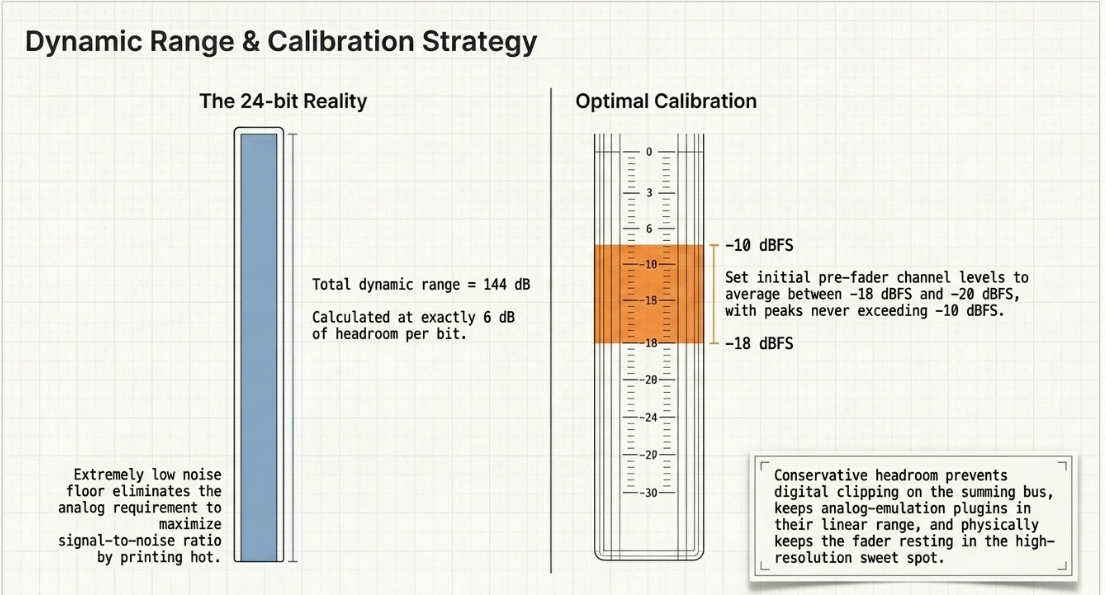
Setting correct initial levels is critical to maintaining fader consistency and accuracy across a project1. In the analog era, gain staging was primarily driven by the need to maximize the signal-to-noise ratio against a non-negotiable hardware noise floor1. In modern 24-bit digital recording, the noise floor is extremely low, providing a theoretical dynamic range of , calculated at of headroom per bit3. Modern digital gain staging focuses on maintaining conservative headrooms to prevent digital clipping on the summing bus and to ensure that analog-emulation plugins operate within their optimal, linear ranges1.
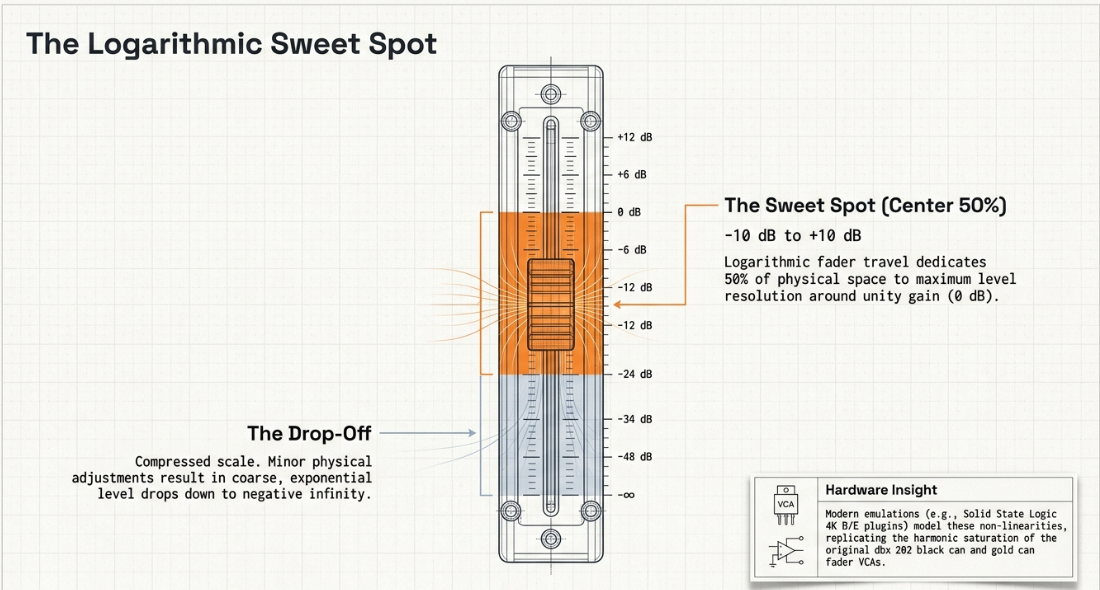
Setting initial pre-fader channel levels to average between and (with peaks never exceeding ) keeps channel faders in their high-resolution sweet spot near unity1. If a track is recorded too "hot," pulling the fader down to or lower compresses its resolution, limiting the ability to execute precise dynamic adjustments3.
To prevent endless volume adjustments, post-production engineers use the "reference element" technique1. This involves choosing a single key track, such as the host's dialogue, as a fixed level reference and balancing all other tracks around it1. Centering all channels during the initial rough mix stage also helps establish a clear perspective on relative levels before panning1.
Modern channel strip emulations, such as the Solid State Logic 4K B and 4K E plugins, model these non-linear fader characteristics6. These emulations replicate the subtle harmonic saturation of the original dbx 202 "black can" and "gold can" fader VCAs6. This allows engineers to drive virtual faders to introduce musical harmonics while using output trim controls to manage overall levels6.
Pre-Insert and Post-Insert Signal Topologies: Clip Gain versus Volume Automation
To manage spoken-word dynamics, post-production workflows must follow the linear signal path of the DAW channel:
This sequence defines the distinct roles of pre-insert gain manipulation (clip gain) and post-insert volume manipulation (volume automation)8. Clip gain is a non-destructive edit applied directly to raw audio waveforms before they enter any insert processing or channel plugins8.
In dialogue editing, clip gain is used for broad level corrections10. It allows editors to isolate and attenuate plosives, excessive sibilance, or loud breaths8. This pre-insert adjustment directly shapes the signal amplitude before it reaches threshold-dependent processors, such as compressors, expanders, or limiters8.
[Raw Dialogue Track]
│
▼
[Clip Gain Adjustment] <--- Attenuates breaths, plosives, and sibilance pre-insert
│
▼
[Channel Inserts] <--- EQ, Compressor, and De-esser react to a stable signal
│
▼
[Volume Automation] <--- Rides post-processed signal to sit dialogue in the mix
│
▼
[Master / Summing Bus]
Smoothing dynamic variations with clip gain first ensures that channel compressors operate more predictably and transparently8. This prevents over-compression on loud phrases and ensures adequate gain reduction on quieter passages8. Special software tools, like Noiseworks DynAssist, use Audio Random Access (ARA) integration to analyze and apply clip gain adjustments automatically across dialogue regions13.
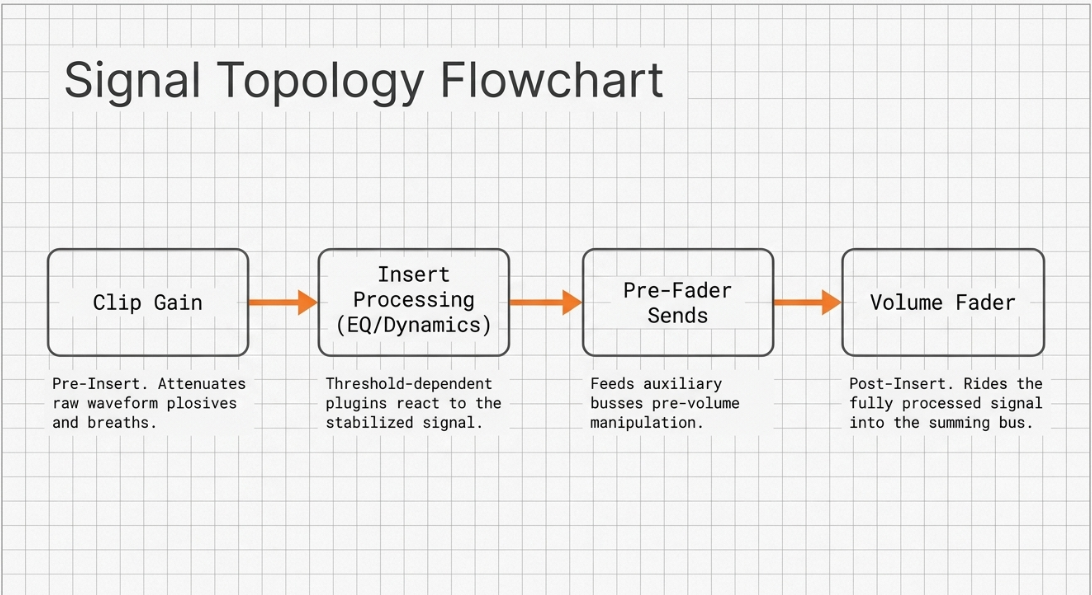
Volume automation occurs post-insert, adjusting the processed signal at the channel fader8. Post-insert automation is reserved for contextual mixing decisions, such as ducking dialogue under music beds or fading tracks9.
Because it operates post-processing, volume automation does not affect how channel inserts react to the signal8. To keep the main channel fader free for global level adjustments, engineers often place a utility gain plugin as the final insert in the chain and automate its output parameter instead14.
For highly dynamic dialogue, editors can also split a single recording across multiple tracks: one for standard speech, one for quiet passages, and another for louder peaks12. This "stacked tracks" approach maintains consistent channel fader levels while routing all tracks to a single Aux bus for combined post-processing14.
Advanced Automation Features and DAW-Specific Implementations
Modern DAWs offer specialized automation panels and tools designed to optimize spoken-word editing:
Pro Tools & Nuendo/Cubase
In Pro Tools, the "Strip Silence" feature allows editors to scan dialogue tracks and strip away low-level background noise between spoken phrases16. This process is highly efficient but can sound unnatural if the stripped regions are not filled with continuous background room tone17. Phase alignment tools, such as Auto-Align Post, can also be used to resolve phase alignment issues between multiple open microphones17.
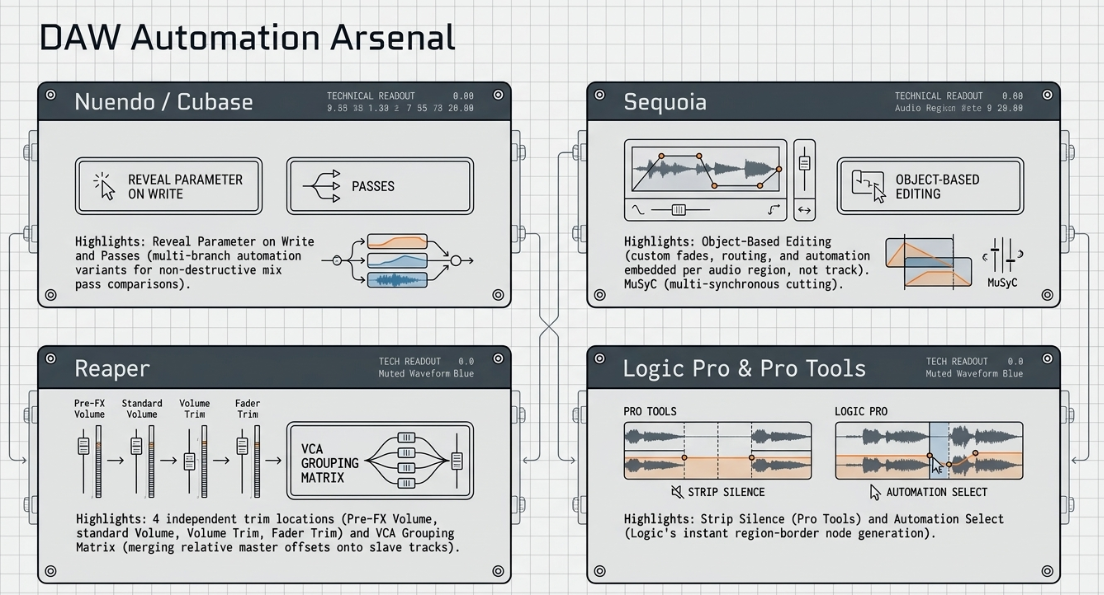
Nuendo and Cubase provide advanced automation controls through a dedicated Automation Panel18. Key features include:
Reveal Parameter on Write: Automatically creates new automation lanes on write-enabled tracks when a control is adjusted, eliminating the need to search through parameter lists19.
Loop Automation: Allows the editor to cycle a section of audio, adjust parameters during playback, and write the final value as a static setting across the entire loop range19.
Global Snapshot / Initial Parameter Events: Learns the current state of all parameters in stop mode and writes them as initial states across selected ranges19.
Passes: Creates multi-branch automation variants, allowing editors to compare different mix passes non-destructively19.
Fill Modes: Includes options like to punch, to start, to end, and loop to define how automation data is written after punching out of a pass18.
Sequoia
Sequoia uses an object-based editing paradigm20. Rather than applying automation and inserts across an entire track, editors can split audio regions into individual objects20. Each object can contain its own custom fades, effects, routing, and automation parameters20.
This allows for highly detailed, clip-level processing, such as applying specific restoration plugins or EQ to isolated words20. Sequoia also offers Source/Destination Editing, multi-synchronous cutting (MuSyC), and an Advanced Crossfade Editor that computes transitions in real time while keeping unused material visible for precise adjustments20.
Reaper
Reaper features four independent trim locations on a single track, providing extensive gain-staging flexibility22:
Pre-FX Volume: Adjusts the pre-insert level of raw clips entering the plugin chain22.
Volume: The standard track-level volume envelope22.
Volume Trim: An independent post-FX volume control22.
Fader Trim: An unautomatable offset applied to faders in Read mode22.
Reaper displays the standard Volume envelope in green and the Trim Volume envelope in purple23. These envelopes can be automated independently, merged, or swapped23.
To write relative automation, Reaper uses a VCA grouping matrix24. An editor can assign a target track as a VCA Slave controlled by a separate VCA Master track24. Engaging the VCA Master writes automation offsets as relative changes on the VCA Slave track24.
Triggering the action "Apply All VCAs From Selected Tracks To Grouped Tracks And Reset Volume/Pan/Mute" then merges the relative VCA Master data onto the VCA Slave track and resets the Master envelope to unity24. Reaper also features "Automation Items," which behave like media blocks and allow editors to copy, stretch, and pool automation curves across a session25.
[VCA Master Track] ─── Writes Relative Automation Offsets ───┐
▼
[VCA Slave Track] ─── Follows Master Offset + Keep Native Trim/Read ───► [Apply All VCAs] ──► Merged Volume Curve
Logic Pro
Logic Pro provides customizable track automation preferences, such as "Move automation with region," which can be set to Never, Always, or Ask26. The Automation Select tool allows editors to Option-click region headers to instantly generate two automation points at region borders, making it easy to create quick volume rides across specific words or sections26. Logic also features relative automation modes and relative fader trimming options15.
Hardware Control Surfaces, Communication Protocols, and Physical Integration
Physical control surfaces translate tactile hand movements into digital commands, providing precise control during automation passes27. The choice of communication protocol dictates the layout, precision, and latency of this integration27.
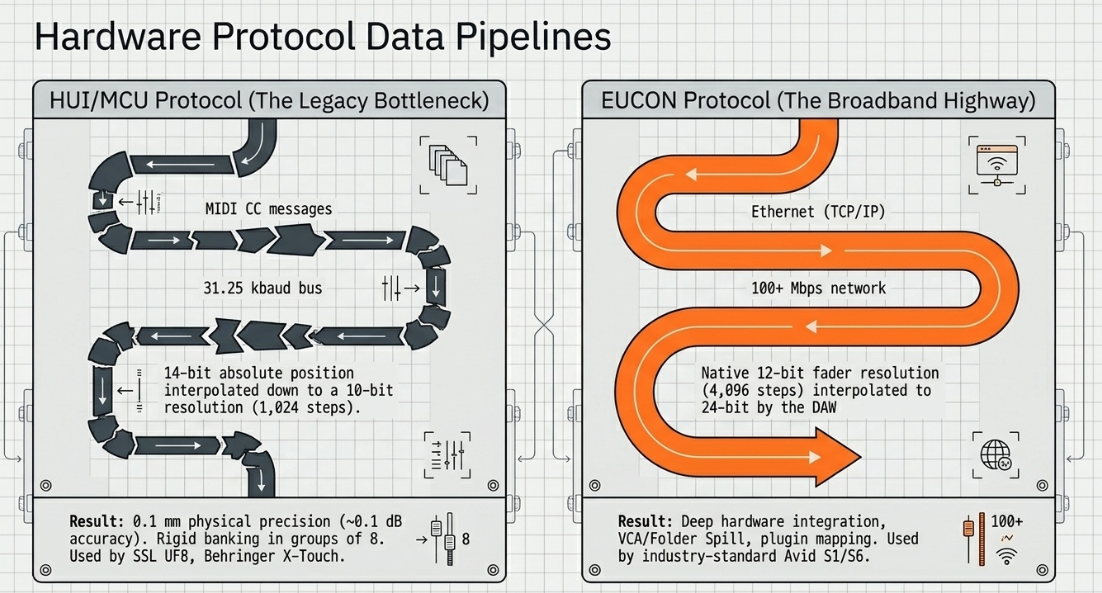
Legacy protocols like HUI and MCU communicate over standard MIDI connections, which can become a data bottleneck in larger sessions27. HUI operates over a master-slave model, utilizing MIDI Control Change (CC) messages to transmit 14-bit absolute fader positions () using teamed MSB (CC 00-07) and LSB (CC 20-27) messages30.
Touch-sensitivity is managed through simple note-on and note-off messages30. However, most HUI hardware interpolates this information down to a 10-bit resolution ()31. This results in an absolute positioning precision of approximately over a fader, or about of level accuracy34.
Additionally, HUI and MCU restrict track layout navigation to rigid banking in groups of eight, requiring editors to manually bank through channels during a mix35.
Avid’s Extended User Control (EUCON) protocol resolves these limitations by communicating over high-speed Ethernet (TCP/IP)27. This provides significantly higher bandwidth and lower latency27.
EUCON supports a native 12-bit fader and knob control resolution (), compared to the standard 10-bit resolution of HUI and MCU32. On playback, DAWs interpolate this data to a 24-bit resolution to ensure smooth, natural level changes33.
HUI/MCU MIDI Path:
[Physical Fader Move] ──► [MIDI CC (10-bit / 1024 Steps)] ──► [31.25 kbaud MIDI Bus] ──► [DAW Target Engine] [cite: 30, 31]
EUCON Ethernet Path:
[Physical Fader Move] ──► [Ethernet Packet (12-bit / 4096 Steps)] ──► [TCP/IP Net (100+ Mbps)] ──► [DAW Target Engine] [cite: 32, 33, 36]
EUCON also allows for deep hardware integration, such as "flipping" send levels or plugin parameters onto physical faders for more detailed control31. It supports VCA and Folder Track Spill, enabling editors to instantly expand grouped tracks across adjacent physical faders by double-tapping a VCA's Select button37.
Tactile Post-Production Options
A wide range of hardware control surfaces are available to support different post-production workflows:
Modular and Multi-Fader Surfaces:
Avid S1, S4, and S6: The industry standards for EUCON integration32. The S1 and S4 utilize standard ALPS faders with of resolution, while the S6 features premium, brushless motor faders32. S1 surfaces can be paired with tablets running the Avid Control app to display high-resolution S6-style metering and routing graphs37.
Solid State Logic UF8: An 8-fader HUI-based controller optimized for Pro Tools and other DAWs40. Combined with SSL 360° Link software, it allows editors to map third-party plugin parameters directly to physical channel encoders40.
Softube Console 1 Fader Mk III: Features 10 haptic-feedback motorized faders that integrate with Softube's console emulation software40.
PreSonus FaderPort 16 / FaderPort 8: Motorized surfaces that integrate natively with Studio One while supporting HUI and MCU protocols for wider DAW compatibility40.
Behringer X-Touch: A cost-effective MCU-based controller featuring nine motorized faders, rotary encoders, and physical scribble strips28.
Single-Fader Hardware Control Surfaces:
Solid State Logic UF1: Features a single motorized fader paired with two high-resolution display screens for metering, visual feedback, and plugin mapping41.
PreSonus FaderPort: A compact single-fader unit that provides physical transport controls, touch-sensitive fader automation, and quick channel navigation28.
Behringer X-Touch One: A single-fader unit featuring a motorized fader, physical scribble strip, and dedicated master volume controls28.
Steinberg CC121: A dedicated controller for Cubase users that features a motorized fader alongside a dedicated EQ section with 12 physical knobs28.
Nektar Panorama CS12: A single-fader channel strip controller that bypasses HUI/MCU banking limitations by automatically following the track selection in the DAW35.
Dedicated Podcasting Interfaces and Field Recorders:
RØDECaster Pro II / Duo: Integrated podcast consoles featuring Class-A "Revolution" preamps, onboard multitrack recording, and built-in Aphex processing43. SMART pads can also be configured to trigger automated mixer actions, such as timed fade-ins or fade-outs43.
Mackie DLZ Creator: Features an Auto Mix algorithm and three distinct user modes (Easy, Enhanced, Pro) to simplify physical routing and setup43.
TASCAM FR-AV4: A compact field recorder that supports float recording, gain-sharing Auto Mix, and synchronized multi-device recording via REC-LINK45.
Zoom PodTrak P8 / P4: Portable standalone podcast recorders with physical faders, mute switches, and sound pads43.
Spatial Engineering, Multi-Mic Acoustics, and Post-Production Processing Chains
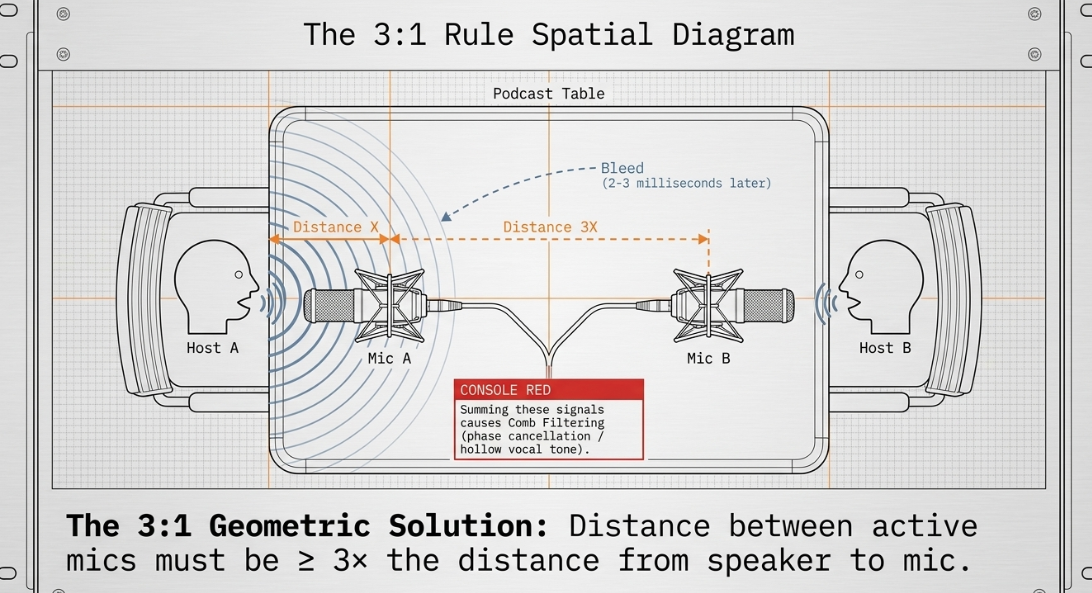
When recording multiple participants in a single space, executing simultaneous open microphonics introduces acoustic challenges, particularly crosstalk or "bleed"46. Bleed occurs when Guest A's voice is captured by their own microphone and also enters Guest B's adjacent microphone46.
Because Guest B's microphone is further away, the signal arrives with a minor delay (typically 2 to 3 milliseconds)46. When these channels are summed in the mix, this time arrival offset causes phase cancellation and "comb filtering," resulting in a thin, hollow vocal tone17.
To minimize phase cancellation and comb filtering, engineers use the 3:1 Rule of microphone placement46. This rule states that the distance between any two active microphones must be at least three times the distance from each speaker's mouth to their respective microphone46.
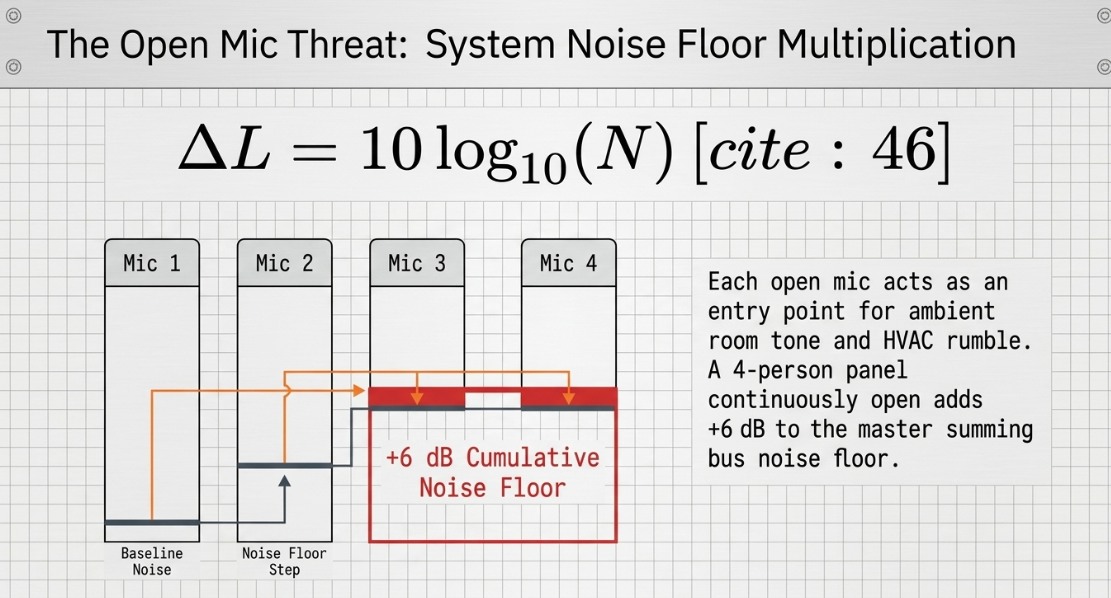
Additionally, open microphones act as a "noise floor multiplier"46. Each active microphone acts as an entry point for ambient room tone, ventilation rumble, or system self-noise46. Acoustically, doubling the number of open microphones adds a increase to the baseline noise floor of the master summing bus46:
where represents the number of active, unattenuated microphone channels46. For a four-person panel, the cumulative noise floor increases by if all channels remain continuously open46.
To manage these issues, engineers historically used downward expanders or noise gates to mute inactive channels17. However, static gates often introduce distracting "breathing" or "chattering" artifacts, where the background noise floor abruptly opens and closes as guests speak, disrupting the acoustic continuity of the show17.
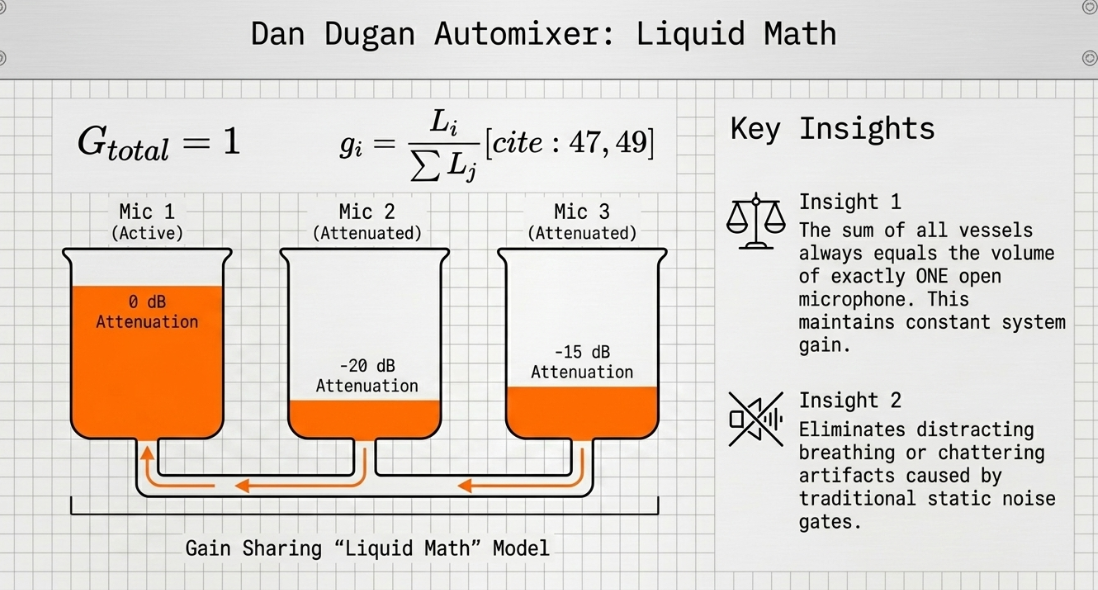
Modern podcast post-production addresses these challenges using the Dan Dugan gain-sharing automixer algorithm17. The Dugan algorithm maintains a constant system gain equivalent to a single open microphone (), dynamically sharing gain among all channels based on which microphone receives the dominant input signal47:
where is the gain applied to channel , is the pre-attenuation input level of channel , and the denominator is the sum of all input levels in the automix group47.
When one person speaks, their channel receives of the gain ( attenuation), while inactive channels are ducked proportionally47. When multiple participants speak at once, the gain is split dynamically47. This ensures that the summed system gain and noise floor remain constant, eliminating comb-filtering and gating artifacts47.
[Channel 1 Input (L1)] ──┐
├──► [Dugan Algorithm: g_i = L_i / Sum(L_j)] ──► Dynamic Gain Share
[Channel 2 Input (L2)] ──┘
The standard professional post-production channel strip combines restoration, correction, and leveling tools in a structured sequence44:
Restoration (iZotope RX): Uses specialized modules to clean up the raw audio, such as De-plosive for pops, De-click for mouth clicks, and Spectral De-noise to reduce steady background noise44.
Surgical EQ (FabFilter Pro-Q 3): Implements high-pass filtering (typically around ) to remove low-end rumble and dynamic EQ cuts (often between and ) to tame harshness44.
Compression (Leveling): Smooths out macro-dynamics using slow attack and release parameters, or stacked, series compressors8.
Tonal EQ (Additive): Enhances overall presence, warmth, and intelligibility44.
Limiting (Loudness Compliance): Controls peaks and ensures the mix meets broadcast loudness standards44.
To prevent physical lip-sync drift in visual podcasts, projects are recorded at a sample rate of rather than the music standard of 44. The video frame rates mathematically align with audio sampling, avoiding clock drift and the need for sample-rate conversion44.
Loudness Standardization, Platform Specifications, and Delivery Compliance
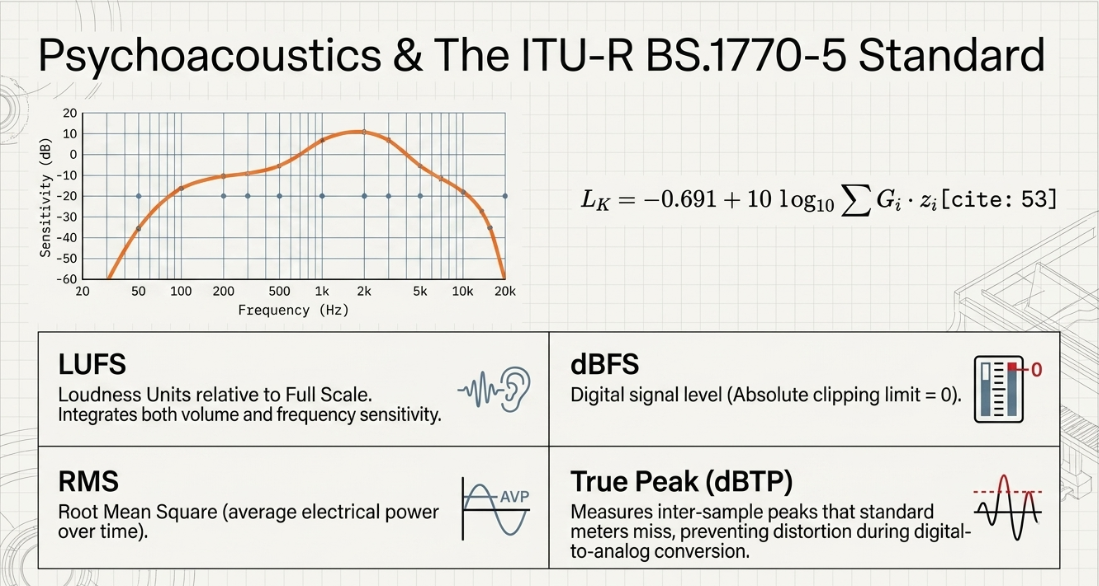
The final stage of professional podcast post-production requires mastering the program to strict loudness standards51. Human hearing is highly non-linear, with the ear being significantly more sensitive to mid-range frequencies—where human speech resides—than to deep sub-bass or extreme treble53. To mathematically model this biological reality, the international standard ITU-R BS.1770-5 utilizes a specialized filtering process known as "K-weighting" before calculating loudness levels53.
There are four primary measurements used in loudness monitoring51:
LUFS (Loudness Units relative to Full Scale): Measures perceived loudness by integrating both volume and frequency sensitivity51.
dBFS (Decibels relative to Full Scale): Measures the digital signal level with being the absolute clipping limit51.
RMS (Root Mean Square): Calculates the average electrical power of the audio over time51.
True Peak (dBTP): Measures inter-sample peaks51. Standard peak meters only measure sample peaks, but the reconstructed analog wave after digital-to-analog conversion can exceed these peaks, leading to digital distortion51. True Peak metering accounts for this inter-sample clipping51.
For television and radio broadcast delivery, audio must comply with EBU R128 in Europe (targeting integrated with a maximum True Peak) or ATSC A/85 in the United States (targeting with a maximum True Peak)51.
EBU R128 introduces a relative gate where levels below of the ungated integrated measurement are excluded from the calculation55. This prevents long passages of silence or quiet background noise from artificially lowering the overall integrated loudness measurement55.
For internet and mobile-focused podcast distribution, the standard target is integrated ( deviation) with a maximum True Peak51. This is louder than standard television broadcast54. This higher level compensates for mobile listening, which often occurs on headphones in noisier public spaces54.
Mastering to a quieter broadcast standard like can leave some mobile devices with insufficient gain to achieve comfortable listening levels56.
EBU R128 (Broadcast TV):
-23 LUFS Integrated ──► Max -1 dBTP ──► Relative Gate Excludes Signals < -10 LU [cite: 51, 54, 55]
Apple/Spotify (Podcasts):
-16 LUFS Integrated ──► Max -1 dBTP ──► Optimized for Mobile / Headphone Gain [cite: 51, 54, 56]
The integrated loudness target is calculated over the entire program duration using the formula:
where represents the channel weighting coefficient, and represents the mean-square value of the K-weighted signal in channel 53.
For lossless FLAC deliveries, Apple Podcasts enforces strict technical constraints:
Audio files must utilize a strict, fixed block-size encoding strategy to prevent variable data blocking issues53.
Bit depths must remain strictly between and bits per sample53.
Cover art or episode images embedded in the file metadata must be optimized to ensure the metadata block size remains within strict limits, preventing quality control rejections53.
Professional podcast production agencies, such as Fame, Audio Always, and Crowd Network, manage these strict compliance standards58. By balancing dynamic range, peak normalization, and proper K-weighting, they ensure their masters satisfy the distribution standards of commercial DSPs and major broadcast networks like the BBC44.
Conclusions
Achieving a professional podcast master requires a systematic approach that balances physical fader control, software automation, and acoustic management:
Systematic Leveling: Setting initial levels to average ensures faders remain in their highest-resolution sweet spot near unity (), maximizing level control accuracy1.
Pre-Insert Balancing: Using clip gain pre-insert to smooth dynamic variations allows downstream compressors and gates to operate more predictably and transparently8.
Acoustic and Gain Management: Applying the 3:1 rule of mic placement and utilizing gain-sharing automixers like the Dan Dugan algorithm mitigates crosstalk, comb-filtering, and cumulative noise floor build-up in multi-microphone setups46.
Strict Quality Control: Mastering to a precise integrated target with a ceiling guarantees compliance across major streaming and podcast distribution networks while preventing playback clipping51.
Works cited
When do you use faders to control balance/volume? : r/mixingmastering - Reddit, https://www.reddit.com/r/mixingmastering/comments/1rxioly/when_do_you_use_faders_to_control_balancevolume/
How to Set Gain Levels in Live Sound - Three Methods - Behind The Mixer, https://www.behindthemixer.com/how-set-gain-levels-live-sound-methods/
Audio Gain, Volume, & Gain Staging - Produce Like A Pro Academy, https://producelikeapro.com/blog/audio-gain-volume-gain-staging/
Gain Staging: 3 Things You Need to Know - Produce Like A Pro, https://producelikeapro.com/blog/gain-staging-3-things-need-know/
Gain staging: what it is and how to do it - iZotope, https://www.izotope.com/community/blog/gain-staging-what-it-is-and-how-to-do-it
SSL Channel Strip Guide - Solid State Logic, https://solidstatelogic.com/channel-strip-guide
Solid State Logic Launch The 4K E Plug-in: The Definitive Emulation of the 4000E Console Channel Strip, https://solidstatelogic.com/media/solid-state-logic-launch-the-4k-e-plug-in
The Day I Stopped Relying on Compression for Vocals - Recording Revolution, https://www.recordingrevolution.com/blog/the-day-i-stopped-relying-on-compression-for-vocals
Clip Gain vs. Gain Automation (Which one do you use more?) : r/audioengineering - Reddit, https://www.reddit.com/r/audioengineering/comments/1pnouuf/clip_gain_vs_gain_automation_which_one_do_you_use/
Volume or Clip Gain Automation? : r/AudioPost - Reddit, https://www.reddit.com/r/AudioPost/comments/1lwo7dx/volume_or_clip_gain_automation/
Volume automation vs clip gain + compression — what's the real workflow? : r/audioengineering - Reddit, https://www.reddit.com/r/audioengineering/comments/1mugch6/volume_automation_vs_clip_gain_compression_whats/
Vocal Automation and clip gain questions... - SOS FORUM, https://www.soundonsound.com/forum/viewtopic.php?t=57597
Vocal/bass leveling: manual clip‑gain vs plugins? : r/audioengineering - Reddit, https://www.reddit.com/r/audioengineering/comments/1pb87pm/vocalbass_leveling_manual_clipgain_vs_plugins/
Waves Vocal Rider vs Fader Riding - Logic Pro Help, https://www.logicprohelp.com/forums/topic/146689-waves-vocal-rider-vs-fader-riding/
Here's a tutorial on how and why you should automate Gain, not channel strip Volume : r/Logic_Studio - Reddit, https://www.reddit.com/r/Logic_Studio/comments/eua76n/heres_a_tutorial_on_how_and_why_you_should/
Audio Engineering in a Professional Podcast Post-Production, https://www.finchley.co.uk/finchley-learning/visual-podcast/audio-engineering-in-a-professional-podcast-post-production-concepts-and-practices-music-and-mixing
Podcast Editing: Phasing issue in Multitrack : r/audioengineering - Reddit, https://www.reddit.com/r/audioengineering/comments/1izjxkf/podcast_editing_phasing_issue_in_multitrack/
Automation Modes, https://www.soundonsound.com/techniques/automation-modes
Make the most of NUENDO as a sound design tool - an in-depth guide: | A Sound Effect, https://www.asoundeffect.com/nuendo-sound-design/
Sequoia: The Industry's Leading DAW for Mastering & Broadcast | Boris FX, https://borisfx.com/products/sequoia/
Boris FX SEQUOIA 2026 Full Version DAW License & Download - (Formerly Magix Sequoia DAW) - PRO AUDIO TOYS, https://www.proaudiotoys.com/products/sequoia-173-full-version-daw-license-download-borisfx
Automation: Trim Envelope and Fader Trim - Cockos Incorporated Forums, https://forum.cockos.com/showthread.php?t=242876
Envelopes: what's the difference between "trim volume" and pre-fx volume? : r/Reaper, https://www.reddit.com/r/Reaper/comments/1m7n22q/envelopes_whats_the_difference_between_trim/
Reaper: Getting In Trim - Sound On Sound, https://www.soundonsound.com/techniques/reaper-getting-trim
Should I use a volume envelope to control the sound level of the guitars, or should I move the sections that need to be quieter to a new track and control volume with the faders? : r/Reaper - Reddit, https://www.reddit.com/r/Reaper/comments/1js6gdq/should_i_use_a_volume_envelope_to_control_the/
Auto Complete, https://www.soundonsound.com/techniques/auto-complete
The perfect DAW controller - Skippy Studio, https://skippystudio.nl/2023/03/the-perfect-daw-controller/
Pro Audio: The Best Control Surfaces for Home Studios - OWC, https://www.owc.com/blog/pro-audio-the-best-control-surfaces-for-home-studios
Is it a huge step up to purchase a dedicated/well-implemented Eucon-driven DAW controller? - Cubase - Steinberg Forums, https://forums.steinberg.net/t/is-it-a-huge-step-up-to-purchase-a-dedicated-well-implemented-eucon-driven-daw-controller/696406
Human User Interface Protocol - Grokipedia, https://grokipedia.com/page/human_user_interface_protocol
EUCON and Cubase 11 - Steinberg Forums, https://forums.steinberg.net/t/eucon-and-cubase-11/694655
Compare Avid EUCON Control Surfaces, https://www.avid.com/pro-tools/control-surfaces/eucon-surfaces-comparison
Pro Tools Reference Guide, https://ciufo.org/classes/482_sp16/media/PT_automation.pdf
New SSL UF8 DAW Cotroller - Nuendo - Steinberg Forums, https://forums.steinberg.net/t/new-ssl-uf8-daw-cotroller/693497
Which DAW and Controller have the best integration? - SOS FORUM, https://www.soundonsound.com/forum/viewtopic.php?t=94527
Choosing a DAW Control Surface - Lm Pro | Professional Recording Equipment, https://www.lmpro.ca/post/choosing-a-daw-control-surface
Avid S1 EUCON-Enabled Desktop Control Surface S9900-74096-01 B&H, https://www.bhphotovideo.com/c/product/1514276-REG/avid_9900_74096_00_s1_control_surface.html
Page 2: Avid S1, https://www.soundonsound.com/reviews/avid-s1?page=2
Pro Tools: Avid S1 Controller Power Tips, https://www.soundonsound.com/techniques/pro-tools-avid-s1-controller-power-tips
Buy DAW Control Surfaces Online in UAE & GCC | Gigstore, https://www.gigstore.ae/studio-recordings/midi-control/control-surfaces.html
Single-fader Control Surfaces - Sound On Sound, https://www.soundonsound.com/reviews/single-fader-control-surfaces
8-Fader Control Surfaces, https://www.soundonsound.com/reviews/8-fader-control-surfaces
All-in-one Podcasting Devices - Sound On Sound, https://www.soundonsound.com/reviews/all-one-podcasting-devices
Acoustic Standards and Infrastructure in the UK Podcast Ecosystem: A Technical Analysis of Chart-Topping Productions and London Studio Facilities, https://www.finchley.co.uk/finchley-learning/visual-podcast/acoustic-standards-and-infrastructure-in-the-uk-podcast-ecosystem-a-technical-analysis-of-chart-topping-productions-and-london-studio-facilities
FR-AV4 | 32-Bit Float 4-ch Field Recorder with Mixer, Timecode Generator and HDMI Sync | TASCAM - United States, https://tascam.com/us/product/fr-av4
4 Person Podcast Studios in London: Best Spaces for Panel Shows, https://www.finchley.co.uk/finchley-learning/visual-podcast/4-person-podcast-studios-in-london-best-spaces-for-panel-shows
WTAUTOMIXER User Guide 2.01, https://www.wtautomixer.com/wp-content/uploads/2021/11/WTAUTOMIXER-User-Guide-2.01-.pdf
Dan Dugan Automixer - Waves Audio, https://www.waves.com/mixers-racks/dugan-automixer
Dugan Speech – Automixer for eMotion LV1 - Waves Audio, https://www.waves.com/mixers-racks/dugan-speech
atkAutomixer - atkAudio, https://www.atkaudio.com/products/atkautomixer
Broadcast Loudness Made Simple - NUGEN Audio, https://nugenaudio.com/broadcast-loudness-made-simple/
AI Podcast Production Agents Editing Audio Automatically - Fueler, https://fueler.io/blog/ai-podcast-production-agents-editing-audio-automatically
Understanding LUFS: Broadcasting Standards for BBC and Apple Podcasts, https://www.finchley.co.uk/finchley-learning/visual-podcast/understanding-lufs-broadcasting-standards-for-bbc-and-apple-podcasts
A Quasi-technical Analysis of the Top Podcasts about Podcasting - Richard Farrar, https://www.richardfarrar.com/a-quasi-technical-analysis-of-the-top-podcasts-about-podcasting/
Demystifying Loudness Standards | SoundGirls.org, https://soundgirls.org/demystifying-loudness-standards/
Worldwide Loudness Delivery Standards - RTW Audio, https://www.rtw.com/blog/rtw-knowledge-base-1/worldwide-loudness-delivery-standards-4
Why is everyone mastering so LOUD? - SOS FORUM, https://www.soundonsound.com/forum/viewtopic.php?t=83337
The 10 Best Manchester Podcast Agency Picks For 2026 - Fame.so, https://www.fame.so/post/best-manchester-podcast-agency
Radio 1 Creative Production: Radio Commercial Creation - Media.co., https://www.media.co.uk/blogs/blog/radio-1-creative-production-radio-commercial-creation
Acast achieves profitability target - Podnews, https://podnews.net/update/acast-profitability














