
The evolution of podcasting from a low-fidelity, amateur medium to a highly produced, professional broadcast format has elevated the importance of advanced audio engineering techniques1. Among the fundamental tools available to the post-production engineer, panning is a primary mechanism for sculpting a three-dimensional acoustic space, resolving frequency conflicts, and enhancing speech intelligibility3. When applied to spoken-word production, spatial positioning requires a careful balance of creative narrative choices and technical constraints, such as mono compatibility, headphone translation, and phase alignment3.
Historically, podcasting was dominated by monophonic dialogue configurations, but the proliferation of high-quality consumer headphones and the emergence of spatial audio platforms have transformed post-production standards9. Modern spoken-word production demands an understanding of how spatialization influences the listener's cognitive load and narrative immersion1.
Theoretical Foundations and Psychoacoustics of Spatialization
Stereo imaging in professional post-production relies on recreating a "phantom center" and simulating spatial coordinates between two or more transducers13. This spatial illusion leverages the human auditory system's natural ability to localize sounds in a three-dimensional space, a biological process known as spatial or binaural localization14.
Psychoacoustic Localization Cues
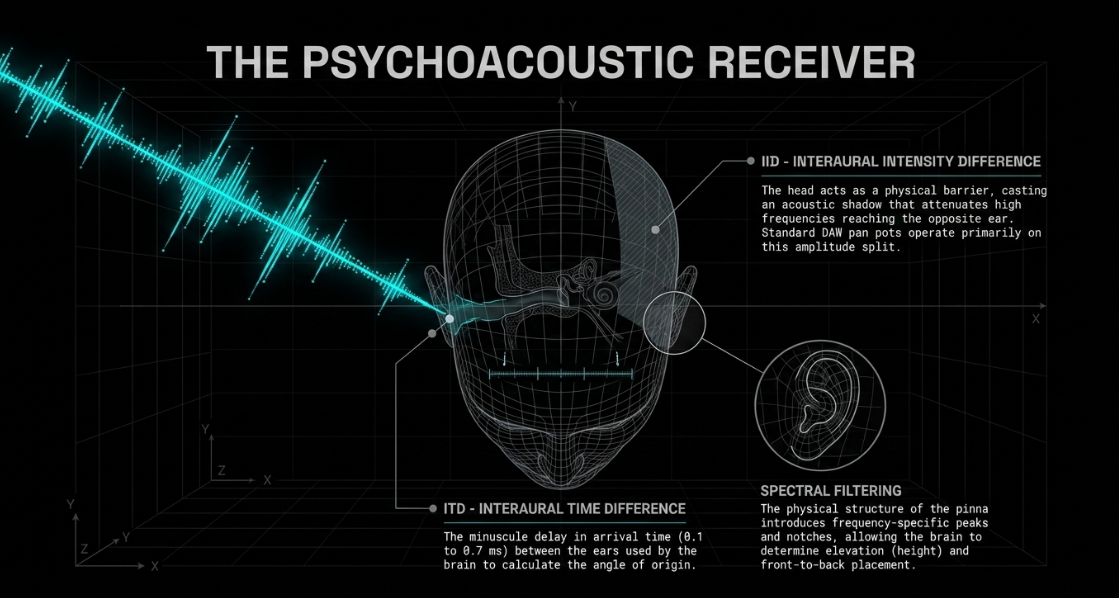
The human brain processes sound localization through three primary indicators:
Interaural Intensity Differences (IID): The relative difference in loudness or amplitude between the ears. A sound source to the left of the listener arrives with greater pressure at the left ear, while the head acts as an acoustic barrier (shadowing effect), attenuating the high frequencies reaching the right ear14.
Interaural Time Differences (ITD): The minuscule delay in arrival time between the ears. Because sound travels at a finite speed, a wavefront originating from the left side will strike the left ear roughly 0.1 to 0.7 milliseconds before it reaches the right ear9.
Spectral Filtering by the Pinnae: The physical structure of the outer ear (the pinna) and head-related acoustics filter incoming sound waves, introducing frequency-specific peaks and notches that allow the brain to determine elevation (height) and front-to-back placement5.
Traditional pan pots operate almost entirely on IID by modifying the amplitude split between the left and right channels of a stereo bus4.
True Panning versus Stereo Balance
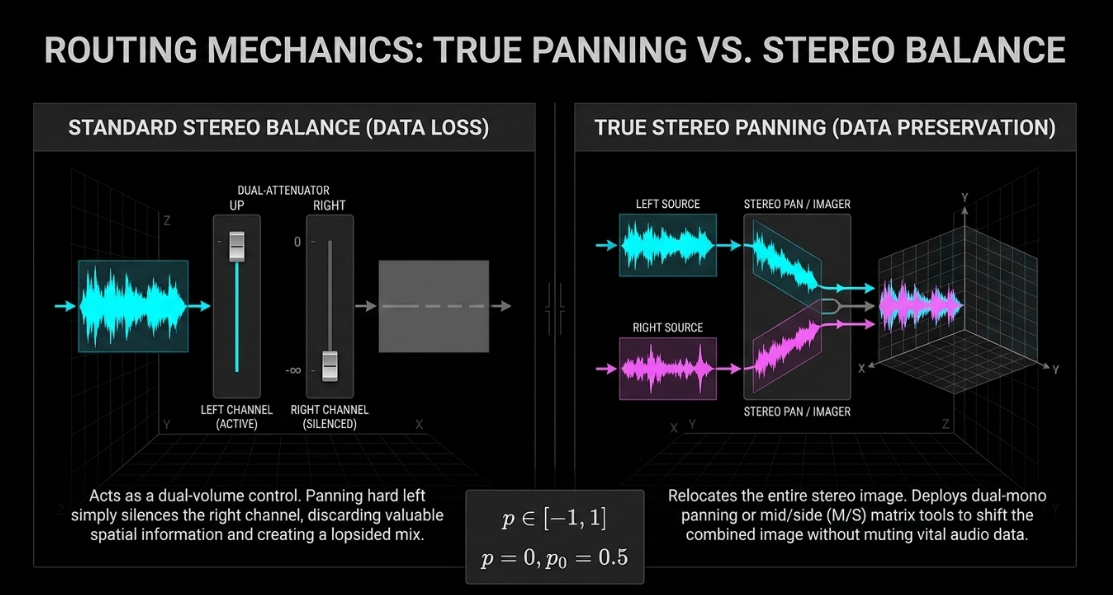
A critical point of confusion in modern Digital Audio Workstations (DAWs) is the distinction between a true pan pot and a stereo balance control4. True panning takes a monophonic signal and splits its output into two channels, allowing the engineer to position that single source anywhere across the stereo panorama4.
Conversely, standard balance controls operating on stereo tracks do not relocate the stereo image; rather, they act as a dual-attenuator, lowering the volume of one channel while keeping the other constant4. If a stereo ambient sound or double-tracked dialogue is processed with a simple balance control, panning hard left simply silences the right channel entirely, discarding valuable spatial information and creating a lopsided mix6. True stereo panning, dual-mono panning, or mid/side (M/S) matrix tools must be deployed to preserve both channels of a stereo signal while narrowing or shifting their combined image6.
Mathematical Physics of DAW Pan Laws
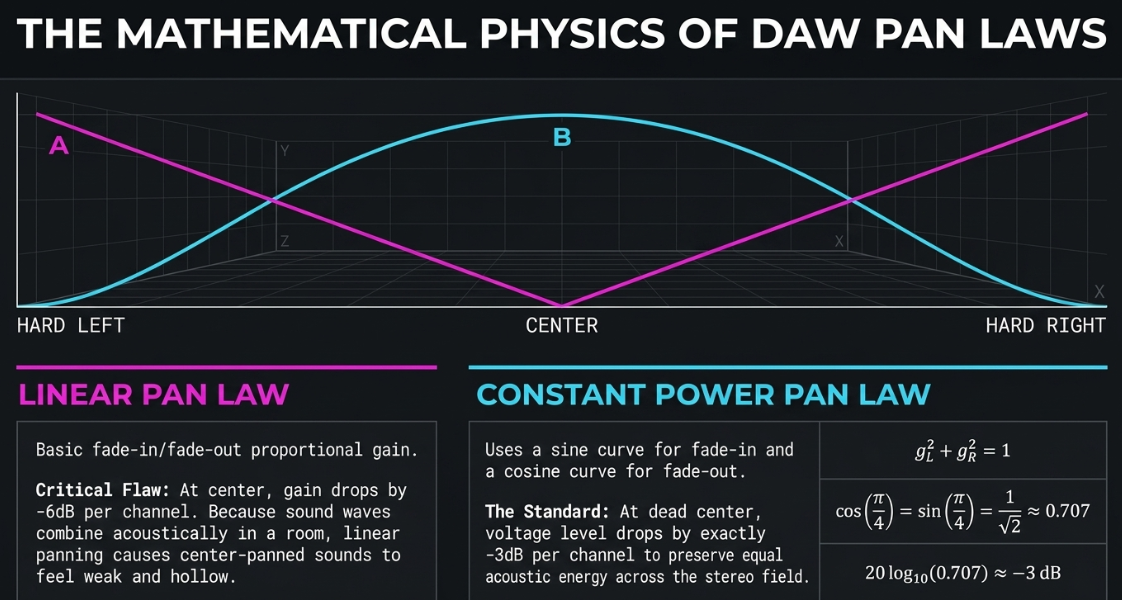
When a mono signal is panned across a stereo field, the sum of the levels in the left and right speakers can fluctuate, altering the perceived loudness3. To prevent a sound from becoming audibly louder or quieter as it sweeps from center to the sides, DAWs apply "pan laws" to compensate for the combined energy of the speakers13.
Linear Panning Law
The simplest panning curve is linear, where the gain factors for the left () and right () channels fade in and out proportionally19. If the pan position is represented by , where is hard left, is center, and is hard right, a normalized scale (ranging from to ) can be defined19. The linear gain coefficients are:
At the center position (), the gain for both channels is , which corresponds to a drop per channel relative to full scale19. Because sound waves from the left and right speakers combine acoustically in a room, a simple linear panning law causes center-panned sounds to feel weak and quiet compared to those panned to the far left or right, particularly in environments with high acoustic reflections19.
Constant Power Panning Law
To ensure a constant apparent loudness (perceived power) at any point along the panning arc, the sum of the squares of the left and right gain coefficients must always equal unity19:
To satisfy this trigonometric identity, the fade-in of the right channel matches a sine curve, while the fade-out of the left channel matches a cosine curve across the first quarter period 19:
When panned dead center (), both channels receive a gain factor of:
This corresponds to a voltage level of approximately relative to full scale on both channels, calculated via:
This center law preserves equal acoustic energy as the signal moves across the stereo field13.
Different listening environments require different compromises between acoustic summing (which favors a center) and electrical summing (mono summation, which favors a center)13.
DAW-Specific Architectures and Workflow Mechanics
Choosing and configuring a Digital Audio Workstation for podcast post-production depends on balancing workflow automation, customization, and session management23. Different DAWs process panning, routing, and voice optimization using distinct design philosophies18.
Comparative Analysis of Production Suites
Reaper
Reaper's architecture is highly regarded for its lightweight CPU footprint, stability, and deep customization23. However, its default pan law is configured to 18. In spoken-word post-production, a pan law can cause center-panned tracks to sound bloated, and panning elements to the side can easily introduce clipping unless manually compensated2.
To prevent this, engineers recommend adjusting the global pan law to or 18. Alternatively, activating Reaper's "Gain Compensation" setting maintains center-panned tracks at unity while dynamically boosting the gain of channels as they are panned off-center, allowing the mix to retain energy without clipping the master bus18. Reaper also supports custom actions, allowing editors to chain sequential commands—such as adjusting a clip's volume, shifting its pan position, and jumping the playhead back five seconds for immediate review—into a single keystroke23.
Hindenburg Pro
Hindenburg Pro strips away the music production clutter typical of generalist DAWs, offering a streamlined interface tailored specifically for speech, narration, and radio journalism24. A key feature is its automated level management24. Upon importing files, the software automatically analyzes the waveforms and applies loudness normalization to ensure consistent levels across different speakers and clips24.
Its "Voice Profiler" teaches the DAW to analyze a speaker's voice, automatically applying a learned EQ and compression curve to match a target broadcast profile26. Track panning is managed via a dedicated slider to the left of each track, allowing simple stereo placement without complex routing31. For multi-track editing, Hindenburg provides precise control over track dimensions, allowing users to vertically scale track heights using the shortcut keys Shift + Ctrl + Plus and Shift + Ctrl + Minus to navigate complex sessions easily36.
Adobe Audition and Pro Tools
Adobe Audition features a robust dual-interface system24. Its destructive "Waveform Editor" is used for surgical spectral repair, while its "Multitrack Editor" provides a non-destructive environment for mixing and automation24. Audition's built-in diagnostics make it a favorite for rapid restoration24.
Avid Pro Tools remains the industry standard for high-end post-production, offering advanced routing via tracks, buses, and master faders, alongside tight integration with tactile hardware control surfaces1.
Multi-Speaker Placement and Conversational Soundstaging
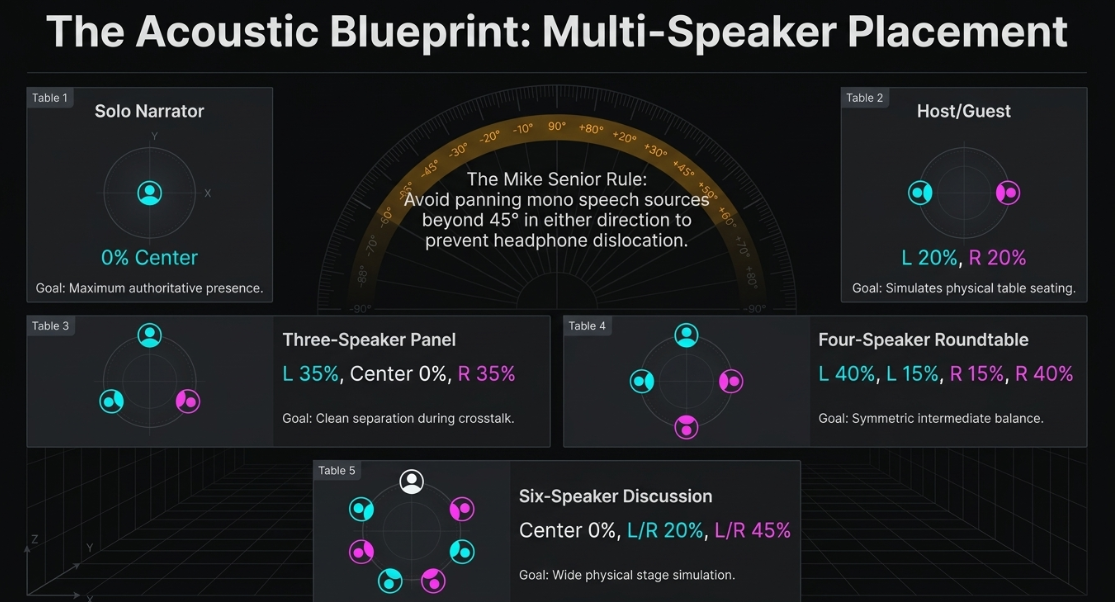
For podcasts featuring multiple speakers, such as panel discussions, roundtable talk shows, or interviews, stereo panning is an effective tool to enhance speech intelligibility and simulate physical presence1.
Reducing Frequency Masking
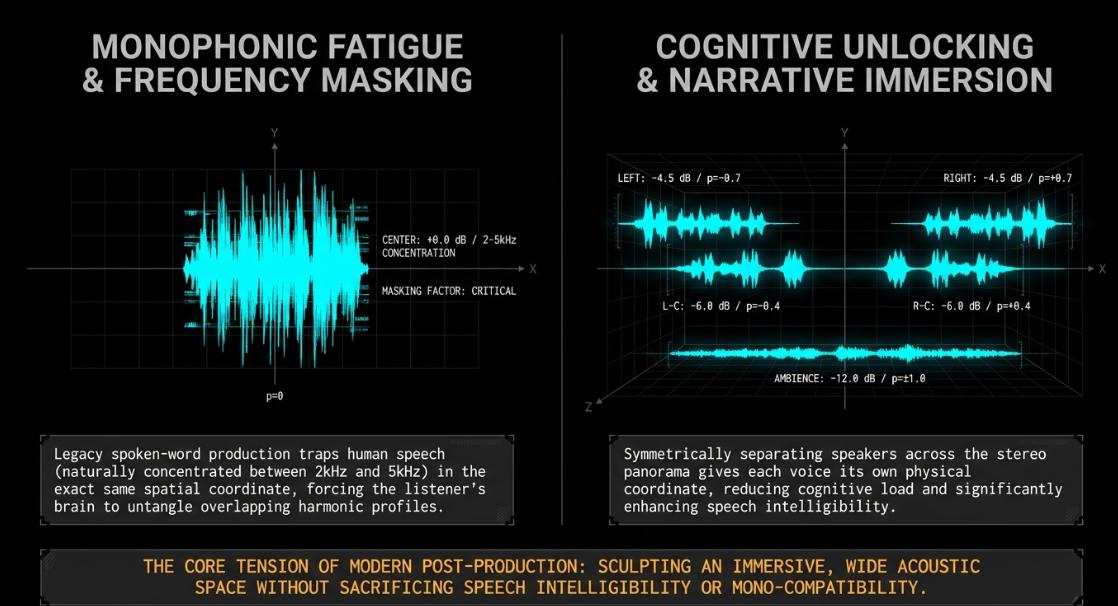
In a monophonic or unpanned mix, all voices sit at the dead center ()2. Because human speech naturally shares a narrow frequency range (typically concentrated between and ), placing multiple speakers in the exact same spatial coordinate creates severe frequency masking1. When two people speak simultaneously (crosstalk) or back-to-back, the listener's brain must work harder to untangle the overlapping harmonic profiles2. Symmetrically separating the speakers across the stereo panorama gives each voice its own physical coordinate, allowing the listener to easily segregate the signals1.
The Angle of Dispersal and Headphone Optimization
While music production often employs wide, hard-panned elements, spoken-word dialogue must be panned with restraint2. The vast majority of podcast consumption occurs on headphones or earbuds3. Because headphones isolate the left and right channels to each ear with zero physical acoustic crosstalk, extreme panning can sound disjointed and unnatural2. If a host is panned to the left and a guest is panned to the right, a headphone listener will experience a dislocated, fatiguing sensation where each voice seems trapped inside one ear2.
Sound on Sound contributor Mike Senior outlines a valuable rule of thumb: avoid panning mono speech sources beyond in either direction41. Limiting the panning range keeps the signal slightly blended in both ears, reducing the dislocated sensation while still providing distinct separation across the stereo field41. For standard conversational speech, keeping voices within a to -degree arc of the center establishes clear separation without destabilizing the phantom center12.
Conversational Panning Coordinates and Spatial Profiles
Advanced Psychoacoustic Spatialization and Widening
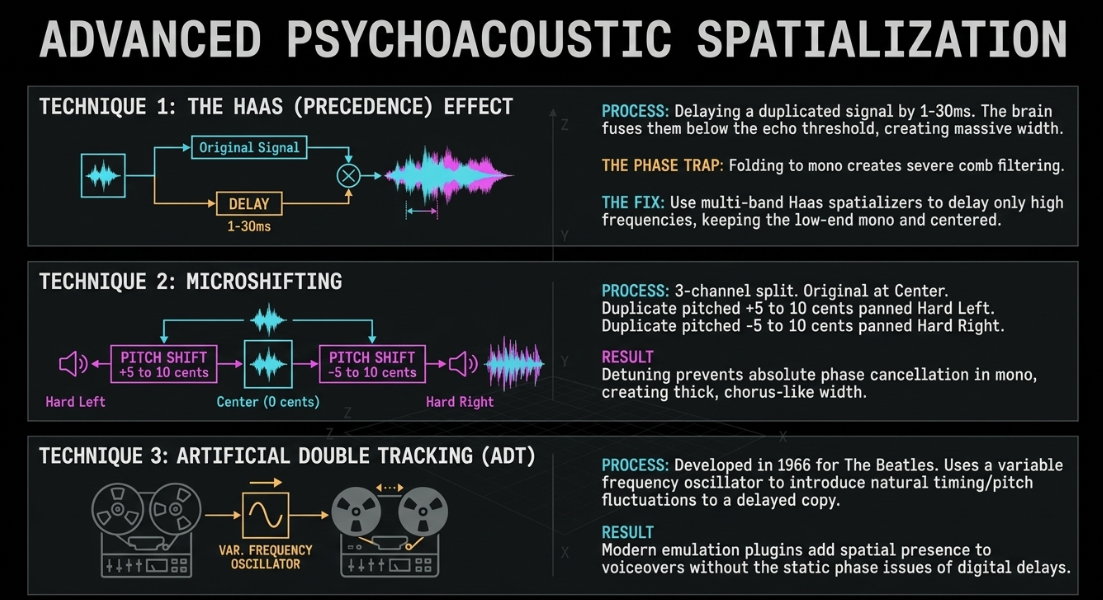
To build a sense of space without relying solely on simple level panning, engineers use advanced psychoacoustic techniques that manipulate timing and phase37.
The Haas Effect (Precedence Effect)
The Haas Effect occurs when two identical or highly similar sounds reach our ears with a tiny delay (typically between and milliseconds)42. If the delay is kept below the human brain's echo threshold (approximately ), the brain fuses the two sources into a single sound43. If the original mono track is panned hard left and a duplicated, delayed copy is panned hard right, the listener perceives a wide, three-dimensional soundscape without any distinct echo43.
The primary risk of the Haas Effect is phase cancellation44. When the stereo signal is folded down to mono, the time delay introduces comb filtering, which can significantly drop the volume or hollow out the frequency response of the track44. To prevent this, engineers recommend using multi-band Haas spatializers (such as Klevgrand Haaze 2)46. These utilities split the incoming signal into up to 16 independent frequency bands, applying Haas delays selectively to the directional high-frequency ranges while keeping the low end strictly centered and mono46.
Microshifting and Pitch Modulation
Another widening method is microshifting, which avoids the phase issues of simple time delays47. To apply microshifting to a voice or sound effect:
Duplicate the original mono track twice (creating three channels)47.
Keep the original track centered ()47.
Insert a pitch-shifting plugin on the second track, pitching it up by to cents, and panning it hard left ()47.
Insert a pitch-shifting plugin on the third track, pitching it down by to cents, and panning it hard right ()47.
This slight detuning prevents absolute phase cancellation when the tracks are summed to mono, providing a thick, chorus-like widening effect that is highly mono-compatible47.
Artificial Double Tracking (ADT)
Developed in 1966 by Abbey Road Studios engineer Ken Townsend for The Beatles, Artificial Double Tracking was created as a faster alternative to manually recording vocal takes twice48. The process works by routing the primary signal to a second tape machine48. By varying the speed of the second machine using a variable frequency oscillator, the system introduces natural fluctuations in timing and pitch to the delayed copy48.
When panned opposite to the original dry vocal, this creates a classic widening effect48. In modern post-production, ADT is achieved using dedicated emulation plugins (such as Waves Reel ADT or MeldaProduction MDoubleTracker) to thicken narrative voiceovers or add spatial presence to sound effects without the phase issues of static digital delays48.
Mono Compatibility, Phase Cancellation, and Comb Filtering
A primary constraint of panning in professional audio post-production is maintaining mono compatibility3. A significant percentage of listeners consume podcasts through monophonic playback systems, such as smart speakers, mobile phone speakers, single Bluetooth devices, or in noisy environments where only one channel is audible2.
The Mechanics of Phase Summation
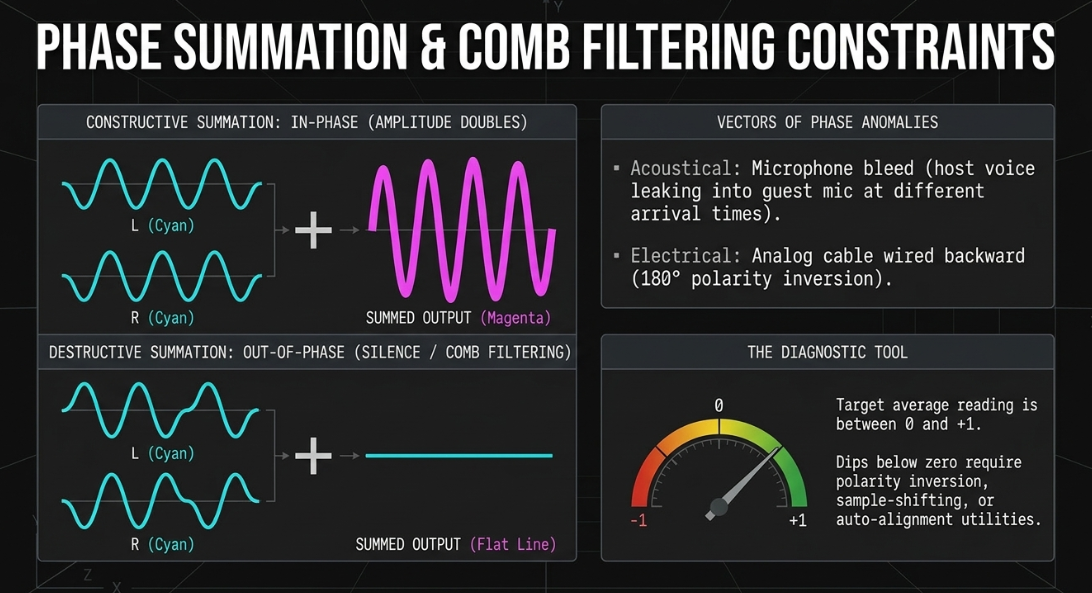
When a stereo mix is summed to mono (), the left and right waveforms are mathematically added together6. If the signals on both channels are perfectly in phase, their amplitudes sum constructively, resulting in a clean, robust mono signal8. However, if the signals contain differences in time, polarity, or phase, they will experience destructive interference upon summing7.
In-Phase Summation (Constructive):
Left Channel : /\/\/\/\
Right Channel : /\/\/\/\
Summed Mono : /\/\/\/\ (Amplitude Doubles)
Out-of-Phase Summation (Destructive):
Left Channel : /\/\/\/\
Right Channel : \/\/\/\/
Summed Mono : ---------------- (Silence / Complete Cancellation)
If two identical or highly similar signals are slightly offset in time (for instance, due to dual-microphone recording or time-based widening effects) and panned across the stereo field, summing them to mono creates "comb filtering"7. This acoustic phenomenon introduces a series of phase-selective peaks and notches across the frequency spectrum, making the summed signal sound hollow, thin, or phasey, as if the speaker is talking through a tube6.
Acoustic and Electrical Phase Anomaly Vectors
Phase problems typically originate from two primary sources:
Acoustical Phase Cancellation: This occurs when a single voice or sound source is captured by multiple microphones placed at different distances7. Because sound waves arrive at each capsule at slightly different times, summing these signals creates destructive interference7. A common example is a roundtable podcast where a host’s voice bleeds into a guest’s microphone1.
Electrical Phase Cancellation: This occurs if an analog cable or internal hardware connector is wired backward, completely inverting the polarity ( out of phase)49. When summed to mono, this will completely cancel out any identical audio content on the left and right channels49.
To diagnose and fix these issues, engineers use phase correlation meters6. A phase correlation meter displays a value from (out of phase) to (perfectly in phase)6. If a signal dips below zero, engineers can invert the polarity on one of the channels, slightly time-align the waveforms by a few samples, or use alignment utilities like MeldaProduction MAutoAlign to automatically sync the microphones8.
Intelligent Software, Stem Separation, and Spatial Plugins
Modern audio engineering increasingly relies on artificial intelligence and stem separation tools to fix spatial issues in post-production38.
AI-Driven Multi-Voice Separation and Stem Extraction
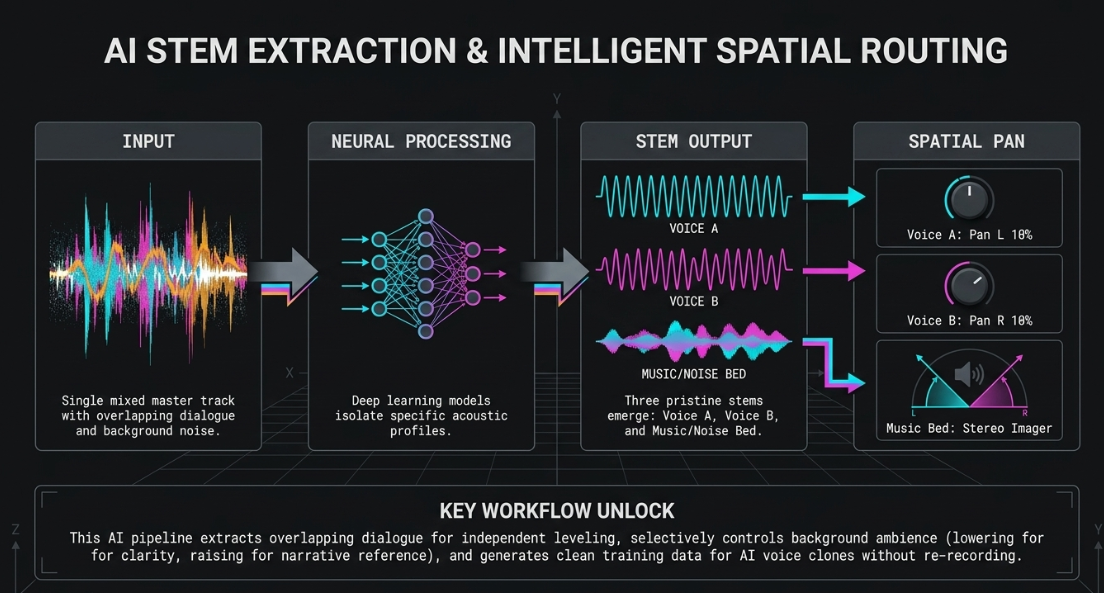
In many real-world scenarios, engineers are forced to work with single-track stereo or monophonic field recordings containing multiple overlapping voices, background noise, or crosstalk38. AI-driven sound separation platforms (such as AudioShake or Wondercraft) use deep learning models to isolate overlapping dialogue, background noise, and music beds from a single master recording25.
Single Mixed Master Track (Crosstalk/Overlaps)
│
▼ [AudioShake AI Processing]
┌─────────┼─────────┐
▼ ▼ ▼
Voice A Voice B Music Bed (Mono)
│ │ │
▼ ▼ ▼
[Pan 10% L] [Pan 10% R] [Stereo Imager]
└─────────┬─────────┘
▼
Balanced Stereo Mix
This stem extraction process enables several post-production workflows:
Overlapping Dialogue Separation: Extracts overlapping voices into independent stems, allowing the editor to clean up interruptions, adjust individual volume levels, and position each speaker in their own spatial coordinate across the stereo panorama38.
Background Noise Control: Separates background ambiance (such as sirens, wind, or crowd noise) from dialogue38. This allows the editor to lower the background noise to improve clarity, or raise it selectively if the speaker references a specific noise in the conversation38.
Clean Training Data for Voice Clones: Generates clean, isolated vocal stems, which can be used to train AI voice clones to record pickup lines or correct misspoken words without needing to schedule a re-recording session25.
Specialized Post-Production Plugins
Sound Radix Powair: An automatic loudness leveler and compressor that targets a specific LUFS level33. This utility saves significant time compared to manual clip gain adjustments, allowing engineers to maintain natural dynamics while ensuring vocal levels remain consistent throughout a scene33.
iZotope Dialogue Match: Uses machine learning to analyze the reverb, spectral profile, and ambient noise of a reference clip, automatically matching the acoustics of multiple dialogue recordings to make them sound as if they were recorded in the same room29.
iZotope RX: The industry standard for audio repair, featuring modules like De-Noise, De-Click, De-Plosive, and De-Reverb to clean up compromised recordings25.
Immersive Spatial Audio and Dolby Atmos Podcast Production
The adoption of spatial audio on platforms like Wondery+ has established Dolby Atmos as a premium format for narrative podcasting, audiobooks, and audio dramas40.
Beds versus Objects in Studio One 6.5 and Logic Pro
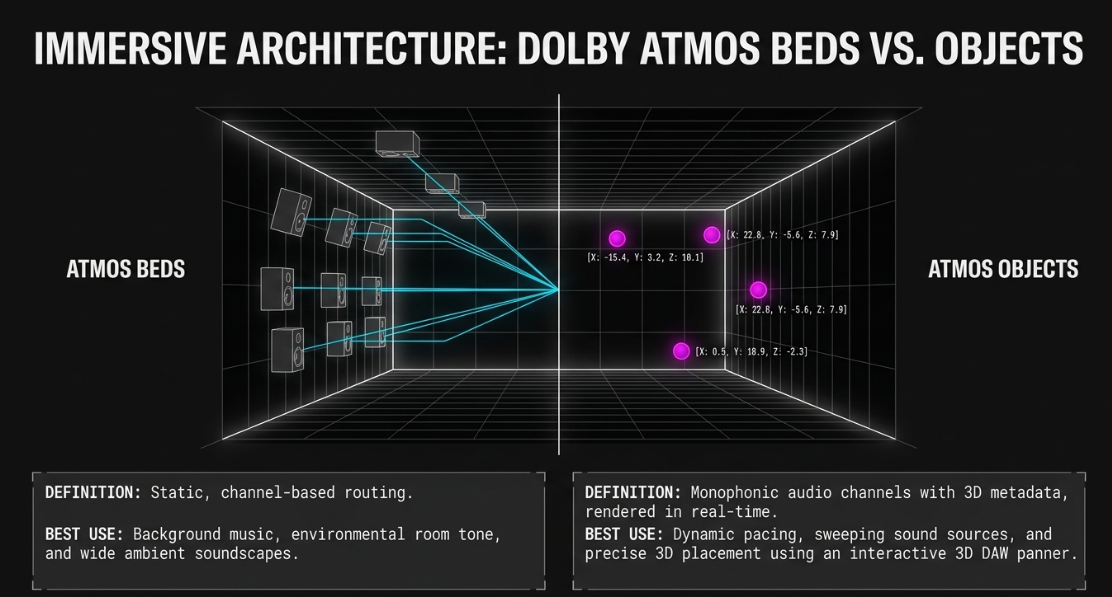
Dolby Atmos mixes are split into two spatial routing structures:
Atmos Beds: Static channel-based tracks routed to a traditional speaker layout (typically 7.1.2)54. Beds are ideal for background music, environmental room tone, and wide ambient soundscapes56.
Atmos Objects: Monophonic audio channels assigned with 3D coordinate metadata (X, Y, and Z planes)30. Objects bypass traditional channel routing, allowing the DAW to pan sounds in real-time to any position in a room—including above, behind, or next to the listener30.
Modern DAWs like PreSonus Studio One 6.5 and Apple Logic Pro feature native Dolby Atmos integration, allowing engineers to toggle tracks directly into Spatial Audio Objects30. The classic channel fader is replaced with an interactive 3D panner, enabling the engineer to automate sound sources as they sweep through the three-dimensional sound field56.
Binaural Metadata Settings and Distance Modeling
To deliver a spatial mix over headphones, the Dolby Atmos Renderer applies Head-Related Transfer Function (HRTF) algorithms to convert the multi-channel layout into a binaural stereo stream40. The engineer must configure binaural distance settings for each Bed channel and Object, which applies virtual acoustic distance models to control how far away the sound source feels55.
To ensure a clean, immersive mix on headphones, engineers should avoid placing objects in the absolute center of the room, as this nullifies binauralization and can cause unpredictable phase issues on physical speaker setups55. For dry, centered narration, it is best to position the object against the front wall and set the Binaural Render Mode to Off or Near55.
Distribution Frameworks and Deliverables
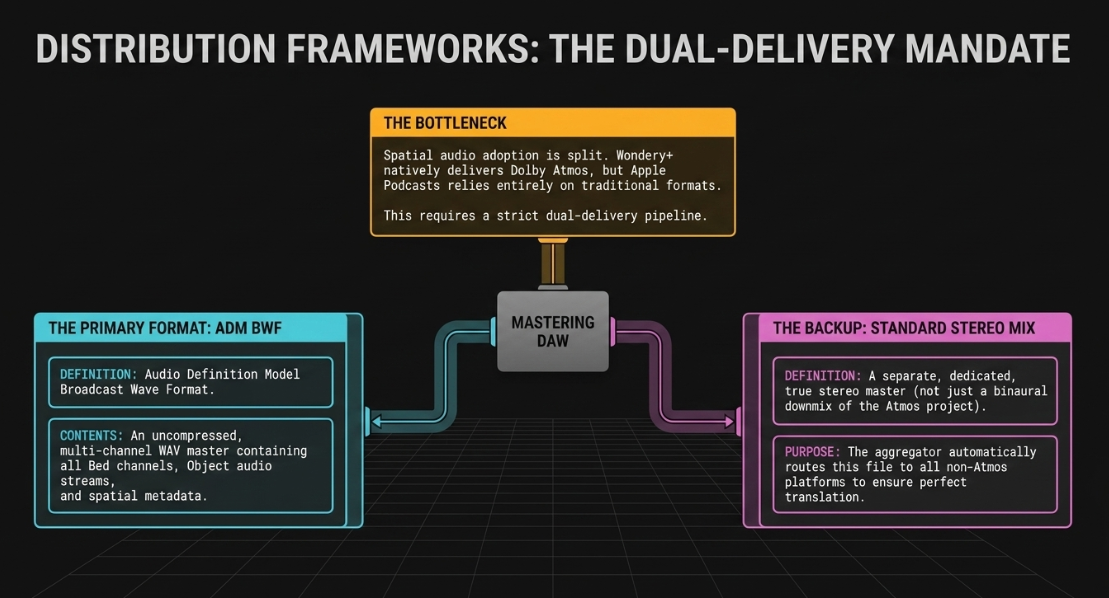
The distribution of spatial audio podcasts remains split across the industry53. Wondery (owned by Amazon) is the primary early adopter of Dolby Atmos podcasting, delivering spatial content to Wondery+ subscribers through its native iOS app53. On the other hand, Apple Podcasts does not natively support Dolby Atmos or spatial audio, despite Apple Music supporting the technology extensively53. This adoption gap requires engineers to deliver two master files to aggregators40:
ADM BWF (Audio Definition Model Broadcast Wave Format): An uncompressed, multi-channel WAV master that contains all Bed channels, Object audio streams, and spatial metadata40.
Standard Stereo Mix: A separate, dedicated stereo master used as a fallback40. The aggregator automatically delivers this stereo file to traditional non-Atmos platforms40. This backup must be a true stereo mix, not a simple binaural downmix of the spatial project40.
Headphone Monitoring Optimization
Because the vast majority of podcast listeners use headphones, post-production engineers must optimize their monitoring environments to ensure mixes translate accurately to different devices3.
Headphone Architectures
Open-Back Headphones: Often favored for mixing, open-back headphones (such as the Sennheiser HD 650) feature perforated ear cups that allow sound waves to pass through naturally, minimizing internal acoustic pressure60. This open design delivers a wide, natural stereo image and a flat frequency response, helping engineers make accurate panning and leveling decisions while reducing ear fatigue during long post-production sessions60. However, they leak sound and have limited sub-bass response60.
Closed-Back Headphones: Feature sealed earcups that isolate the listener from external noise, making them ideal for tracking or editing in noisy environments60. They provide a powerful bass response, but the trapped acoustic pressure can cause ear fatigue and distort the perception of the stereo image60.
Crossfeed Correction Algorithms
Because headphones isolate the left and right channels to each ear, they lack the natural crossfeed of physical speakers17. This can lead engineers to over-pan sources or underestimate center levels, resulting in a narrow or cluttered mix when played back on standard speaker systems17.
To bridge this gap, engineers use software-based crossfeed simulators (such as Goodhertz CanOpener Studio or Waves Nx) on the master monitoring path17. These plugins apply algorithms that simulate physical acoustic crossfeed, helping engineers make accurate panning and leveling decisions that translate well to speakers17. These correction plugins must be bypassed before printing the final stereo file60.
Strategic Recommendations for Post-Production Engineers
To ensure spatial positioning enhances a podcast rather than distracting the listener, post-production engineers should adhere to the following principles:
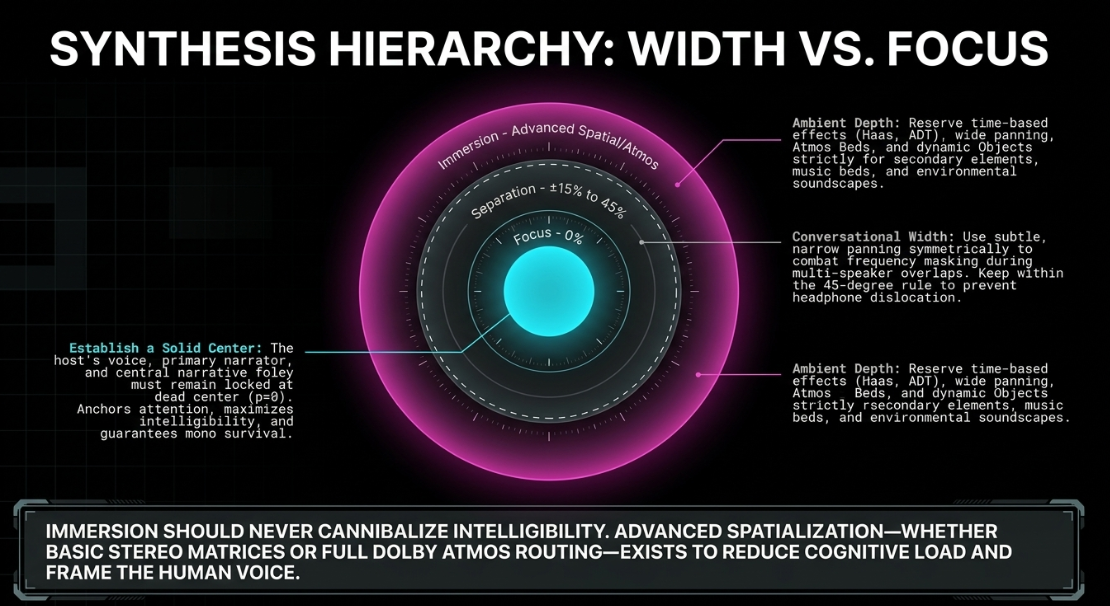
Establish a Solid Center: Before introducing wide spatial panning, ensure the core elements of the mix are grounded3. The host's voice, primary narrator, and central narrative sound effects must remain locked in the center () to anchor the listener's attention and maintain high intelligibility2. Only secondary elements, music beds, and environmental foley should occupy the wider parts of the stereo field3.
Apply Conversational Separation Sparingly: For multi-speaker roundtable or interview-style podcasts, use subtle, narrow panning coordinates (typically between and off-center) to give each voice its own physical space1. This degree of separation is sufficient to reduce frequency masking and improve intelligibility without causing distracting panning cues or ear fatigue for headphone listeners1.
Prioritize Mono Compatibility Throughout the Mix Cycle: Test the mono sum of the mix iteratively6. Monitor phase correlation levels regularly, keeping the average reading between and to avoid out-of-phase anomalies6. Avoid time-based widening techniques (like the Haas Effect or extreme microshifting) on primary dialogue tracks, reserving these processes for ambient soundscapes or static music beds6.
Use Specialized Panning Tools for Precision: Deploy advanced plugins like Goodhertz Panpot to separate directional control by frequency band16. Use Spectral Panning to position high frequencies while keeping low frequencies mono and centered16. For headphone mixing, employ a crossfeed simulation utility on the master monitoring path to ensure spatial decisions translate accurately to standard speaker setups17.
Design Spatial Layouts to Fit the Content Format: For traditional interview or conversational shows, a subtle, static stereo image is best2. For narrative fiction and audio dramas, use dynamic panning, binaural spatialization, or a full Dolby Atmos workflow to immerse the listener in a 3D environment12. Keep character dialogue panned in alignment with their physical foley (e.g., footsteps and clothing rustle)12.
Works cited
Audio Mixing Techniques for Pro-Level Podcasts & Video, https://flexworkstudios.com/audio-mixing-techniques/
Most comfortable Stereo Pan and some questions? : r/podcasts - Reddit, https://www.reddit.com/r/podcasts/comments/9d58va/most_comfortable_stereo_pan_and_some_questions/
How to effectively use panning in podcasts - Universal Music for Creators, https://www.universalmusicforcreators.com/news/how-to-effectively-use-panning
Panning in Music: Stereo & Surround Sound Tips Explained - AutoTune, https://www.antarestech.com/community/what-is-panning-in-music
Guide to Panning and Stereo Width - Mastering The Mix, https://www.masteringthemix.com/blogs/learn/guide-to-panning-and-stereo-width
Stereo Imaging 101: Panning vs Balance, Width, Phase & Mono Compatibility, https://musiccitysf.com/accelerator-blog/stereo-imaging-panning-vs-balance-width-phase-mono/
Fixing phase issues - Sonarworks Blog, https://www.sonarworks.com/blog/learn/fixing-phase-issues
Avoiding the Collapse: From Stereo to Mono (Compatibility) - Sonible, https://www.sonible.com/blog/stereo-to-mono/
Capturing the Sonic Landscape: A Guide to Binaural Field Recording, Methods and Techniques - Neil Spencer Bruce, https://www.spencerbruce.com/blog1/2023/8/15/capturing-the-sonic-landscape-a-guide-to-binaural-field-recording-methods-and-techniques
An Introduction To Binaural Recording - Sound On Sound, https://www.soundonsound.com/techniques/introduction-binaural-recording
Creating Podcasts in Dolby Atmos - Avid, https://www.avid.com/resource-center/creating-podcasts-in-dolby-atmos
Panning (audio movement) in audio dramas : r/audiodrama - Reddit, https://www.reddit.com/r/audiodrama/comments/1fsm5dt/panning_audio_movement_in_audio_dramas/
DAW v DAW - Part 6: Pan Laws and Pan Curves - Admiral Bumblebee, https://www.admiralbumblebee.com/music/2019/12/08/daw-v-daw-pan-curves
PANNING EXPLAINED - RJMEANEY AUDIO, https://www.rjmeaneyaudio.club/blog/panning-explained
Binaural recording techniques - DPA Microphones, https://www.dpamicrophones.com/mic-university/audio-production/binaural-recording-techniques/
Panpot by Goodhertz, https://goodhertz.com/panpot/manual/
CanOpener Studio by Goodhertz, https://goodhertz.com/canopener-studio/manual/
What Level Have You Set Your Pan Law? : r/Reaper - Reddit, https://www.reddit.com/r/Reaper/comments/1nmb60q/what_level_have_you_set_your_pan_law/
Pan Rules - RS-MET, http://rs-met.com/documents/tutorials/PanRules.pdf
Panning laws : Am I right ? - DSP and Plugin Development Forum - KVR Audio, https://www.kvraudio.com/forum/viewtopic.php?t=299032
Understanding Stereo and Surround Pan Laws in Pro Tools and Dolby Atmos, https://film-mixing.com/2015/08/22/understanding-stereo-and-surround-pan-laws-in-pro-tools-and-dolby-atmos/
Constant power panning using table lookup | Max Cookbook, https://music.arts.uci.edu/dobrian/maxcookbook/constant-power-panning-using-table-lookup
Switching DAWs: A Tale of Four Digital Audio Workspaces - Discover the Best Podcasts, https://discoverpods.com/switching-daws-digital-audio-workspaces/
12 Best Editing Software for Podcasts in 2025 (Reviewed) - Adtwin - AI Audio Advertising Platform, https://adtwin.ai/articles/best-editing-software-for-podcasts
12 Best Editing software for podcasts in 2025 (Pro & Free), https://contesimal.ai/blog/best-editing-software-for-podcasts/
Reaper Vs Hindenburg. For those who have experience in both, what are your pros & cons? : r/podcasting - Reddit, https://www.reddit.com/r/podcasting/comments/dnfdzg/reaper_vs_hindenburg_for_those_who_have/
Best Podcast Editing Software & Apps (Audio-Only) in 2025 - Podbean Blog, https://blog.podbean.com/best-podcast-editing-software-apps-in-2025/
Hindenburg vs. Reaper and others : r/podcasting - Reddit, https://www.reddit.com/r/podcasting/comments/197s4qr/hindenburg_vs_reaper_and_others/
Plugins for Audio Post-Production: What the Pros Are Using, https://theproaudiofiles.com/post-production-plugins/
Getting Started with Dolby Atmos Music, https://professionalsupport.dolby.com/s/article/Getting-Started-with-Dolby-Atmos-Music
Hindenburg Journalist Pro: Complete Review & Walkthrough [2020] - Buzzsprout, https://www.buzzsprout.com/blog/hindenburg-journalist-review-and-walkthrough
Audacity and other software : r/podcasting - Reddit, https://www.reddit.com/r/podcasting/comments/1s8oi59/audacity_and_other_software/
Helpful post-production tools and plugins for your audio drama projects - Reddit, https://www.reddit.com/r/audiodrama/comments/1od5ilv/helpful_postproduction_tools_and_plugins_for_your/
Create a Spatial Audio with Dolby Atmos project from a Dolby Atmos ADM BWF master file in Logic Pro for Mac - Apple Support, https://support.apple.com/en-sa/guide/logicpro/lgcp306bc556/mac
Perfect Your Audio with These Essential Post-Production Plugins - Voodoo Sound, https://www.voodoosound.com.au/post/perfect-your-audio-with-these-essential-post-production-plugins
Hindenburg Narrator Shortcuts, https://hindenburg.com/academy/shortcuts/shortcuts-narrator/
What is panning in music? How to create space, width, and balance in your mix, https://acestudio.ai/blog/what-is-panning-in-music/
Effortless Podcast Editing: Isolate Voices & Remove Background Noise - AudioShake, https://www.audioshake.ai/post/streamlining-podcast-production-solutions-to-common-audio-challenges
Crossfeed for headphones and earphones to better emulate natural stereo experience through speakers | Deezer Community, bringing music lovers together, https://en.deezercommunity.com/ideas/crossfeed-for-headphones-and-earphones-to-better-emulate-natural-stereo-experience-through-speakers-69201
Getting started with Dolby Atmos Podcasts and Audiobooks, https://professionalsupport.dolby.com/s/article/Getting-started-with-Dolby-Atmos-Podcasts?language=en_US
Q. Are there any panning rules for maintaining mono compatibility? - Sound On Sound, https://www.soundonsound.com/sound-advice/q-are-there-any-panning-rules-maintaining-mono-compatibility
Panning and Stereo Imaging Techniques | Sound Design Class... - Fiveable, https://fiveable.me/sound-design/unit-13/panning-stereo-imaging-techniques/study-guide/HsQaISsokxkqligW
Haas Effect: What It Is and How It's Used - Produce Like A Pro Academy, https://producelikeapro.com/blog/haas-effect/
The Haas Effect: How To Make Any Mix Sound Huge - EDMProd, https://www.edmprod.com/haas-effect/
The Haas Effect - Make Mono Audio Into Stereo, https://www.homebrewaudio.com/13828/the-haas-effect/
Widen your horizon — Pick of the Month - Klevgrand, https://klevgrand.com/pick-of-the-month/october-2023
Stereo Widening: 7 Simple Ways to Give Your Mix Width - Flypaper - Soundfly, https://flypaper.soundfly.com/produce/stereo-widening/
I cracked the code for professional sounding productions. Now I pass the knowledge onto you. (This is meant for producers who are already 90% of the way there and only need that last 10%) : r/edmproduction - Reddit, https://www.reddit.com/r/edmproduction/comments/1sfkurs/i_cracked_the_code_for_professional_sounding/
8 Tips for Fixing Phase Problems in your Mix | Blog - Waves Audio, https://www.waves.com/tips-for-fixing-phase-problems-in-your-mix
Podcast Editing Made Easy: Multi-Speaker Separation + Diarization - AudioShake, https://www.audioshake.ai/post/how-to-edit-podcasts-with-multiple-speakers--fast
15 Best Podcast Editing Software Options For Every Creator - Fame.so, https://www.fame.so/post/best-podcast-editing-software
Dolby Atmos Mixing & Mastering, https://www.spatialmastering.co.uk/services/dolby-atmos-mixing-mastering
Dolby Atmos coming to podcasts with Wondery as first supported platform - 9to5Mac, https://9to5mac.com/2022/05/11/dolby-atmos-coming-to-podcasts-with-wondery-as-first-supported-platform/
How to monitor a Dolby Atmos mix using the binaural playback settings for objects and beds, - Nuendo - Steinberg Forums, https://forums.steinberg.net/t/how-to-monitor-a-dolby-atmos-mix-using-the-binaural-playback-settings-for-objects-and-beds/681993
Dolby Atmos Audio Best Practices - UMG Content Guide, https://contentguide.universalmusic.com/dolby-atmos-audio-best-practices/
How to Mix in Dolby Atmos with Studio One Pro - PreSonus, https://www.presonus.com/blogs/home/how-to-mix-in-dolby-atmos-with-studio-one-pro
The essential guide to binaural simulation for Dolby Atmos - Audient, https://audient.com/tutorial/the-essential-guide-to-binaural-simulation-for-dolby-atmos/
Would anyone actually want more immersive/spatial audio in audio dramas? : r/audiodrama - Reddit, https://www.reddit.com/r/audiodrama/comments/1tmbv7j/would_anyone_actually_want_more_immersivespatial/
About Spatial Audio with Dolby Atmos in Apple Music, https://support.apple.com/en-gb/109354
Pros and Cons of Mixing with Headphones - Boris FX, https://borisfx.com/blog/mixing-with-headphones/
Is Mixing in Headphones Worth It? | Mr Mix & Master, https://mrmixandmaster.com/is-mixing-in-headphones-worth-it/
Headphone mixing versus room calibration/monitor mixing : r/audioengineering - Reddit, https://www.reddit.com/r/audioengineering/comments/1r8np0r/headphone_mixing_versus_room_calibrationmonitor/
Mixing With Headphones - Puremix, https://www.puremix.com/blog/mixing-with-headphones
Mixing: Monitoring On Headphones Vs. Studio Monitors - Fox Music Production, https://foxmusicproduction.com/monitoring-headphones-vs-studio-monitors/
6 Considerations for Mixing with Headphones vs Studio Monitors - iZotope, https://www.izotope.com/community/blog/6-considerations-for-mixing-with-headphones-or-studio-monitors
The Only feature I want to see added to SoundID Reference for Headphones - Sonarworks Support, https://support.sonarworks.com/hc/en-us/community/posts/26946581255954
crossfeed/room simulations for headphones? : r/AdvancedProduction - Reddit, https://www.reddit.com/r/AdvancedProduction/comments/tnpjlf/crossfeedroom_simulations_for_headphones/














