

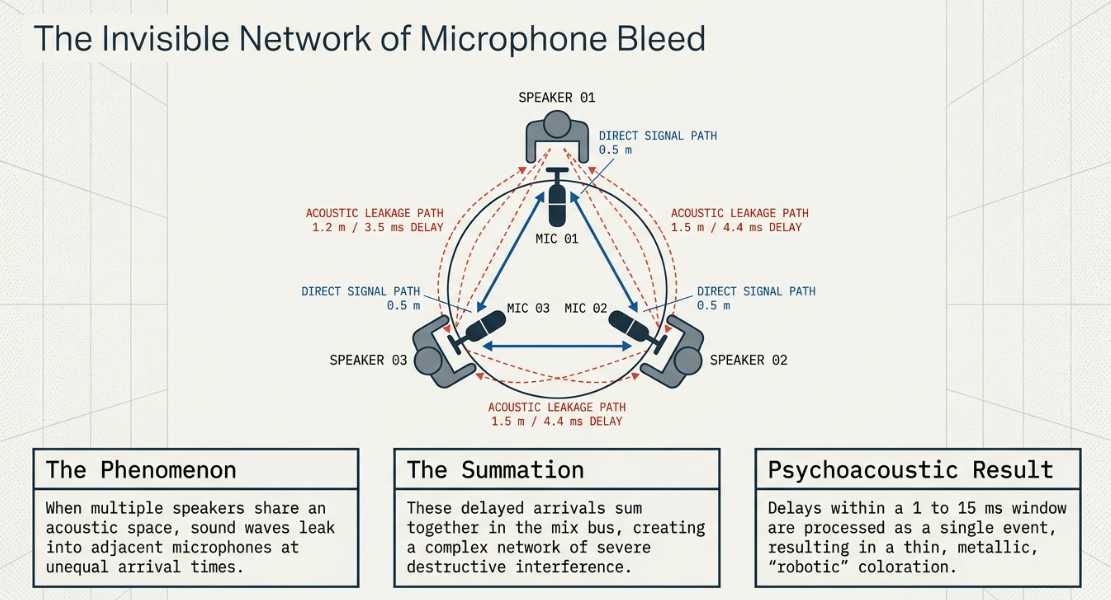
In professional spoken-word post-production, the management of phase relationships is a primary determinant of vocal clarity, presence, and overall mix authority1. While often associated with multi-microphone music tracking, phase interactions represent a critical technical challenge in multi-speaker podcast environments1. When multiple participants are recorded in the same acoustic space, sound waves from a single speaker inevitably leak into adjacent microphones at slightly different arrival times1. This acoustic phenomenon, known as microphone bleed or spill, creates a complex network of delays that, when summed, results in severe destructive interference and comb filtering1.
This report examines the physical, mathematical, and psychoacoustic dimensions of phase interactions in spoken-word environments. It details the mechanisms of comb filtering, explores physical and algorithmic solutions, evaluates industry-standard alignment tools, and provides a systematic post-production workflow designed to maximize structural headroom and preserve vocal integrity.
Theoretical Framework: Phase, Polarity, and Comb Filtering Mechanics
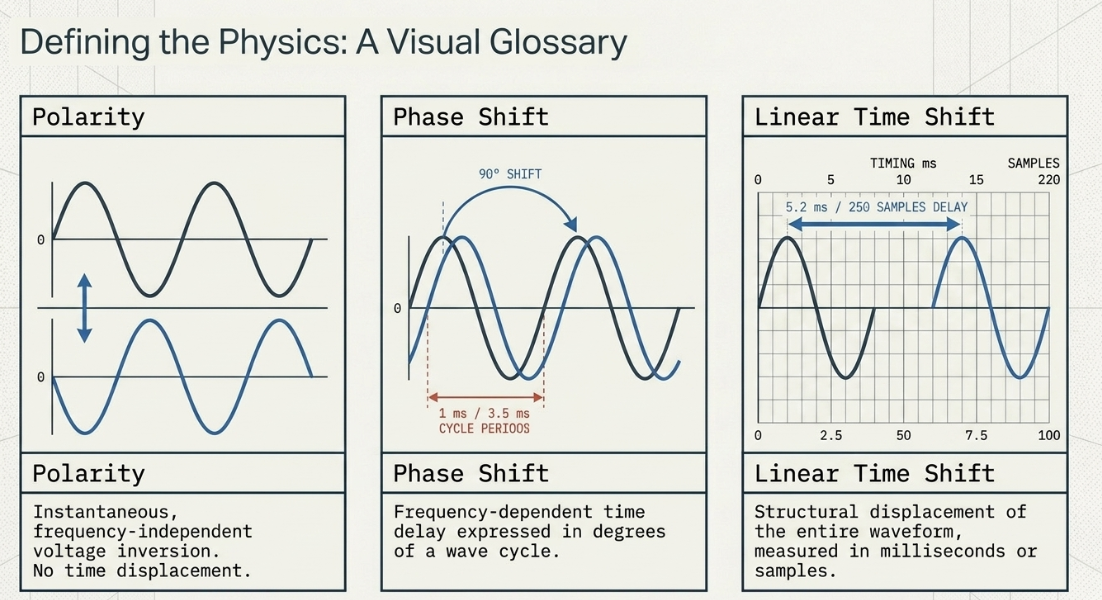
To diagnose and treat phase-related issues, a precise distinction must be maintained between the concepts of polarity, time delay, and phase shift5. Polarity refers to an instantaneous, frequency-independent inversion of a signal’s voltage or digital value5. A polarity flip represents a mirror inversion across the zero-amplitude center line, affecting all frequencies simultaneously and identically without introducing time-domain displacement5. This is commonly executed via a binary console switch or digital utility tool5.
Phase shift, conversely, represents a frequency-dependent time delay expressed in degrees of a wave cycle5. Because different frequencies have different wavelengths, a fixed delay in milliseconds corresponds to varying degrees of phase rotation across the spectrum5. Linear time shift is a linear displacement of a waveform in time, usually measured in milliseconds, samples, or meters of physical distance5. When a single voice is captured by two microphones situated at unequal distances, the resulting time delay translates into a shifting phase relationship across the vocal frequency range2. At certain frequencies, the waves arrive in phase, constructively summing to increase amplitude by up to 10. At other frequencies, the waves arrive out of phase, causing partial or complete destructive cancellation3.
The Mathematics of Comb Filtering
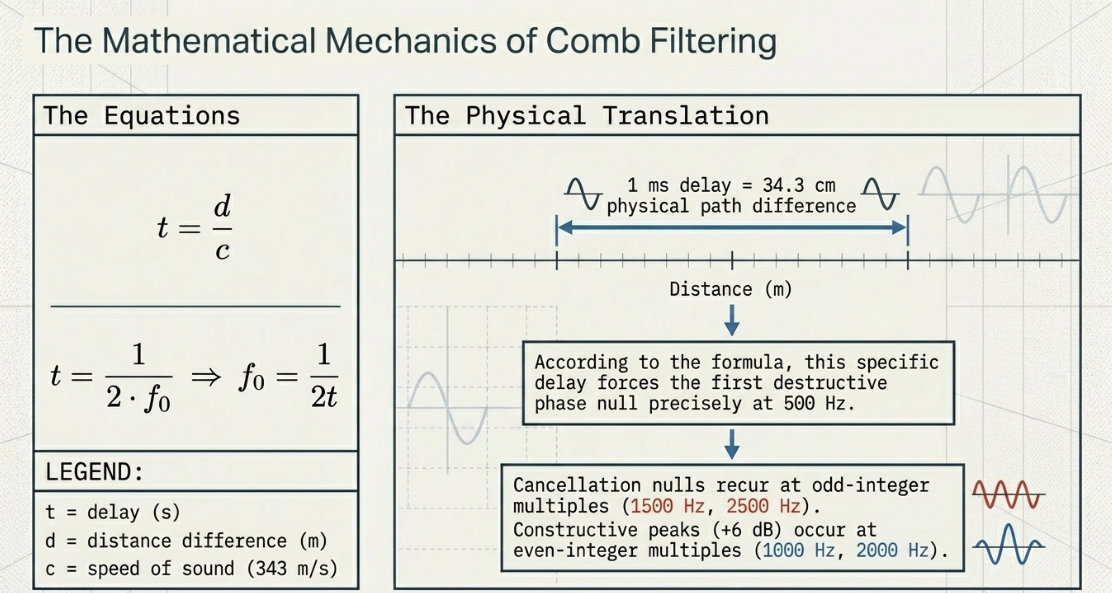
Comb filtering occurs when a signal is mixed with a slightly delayed replica of itself3. The relationship between the path distance difference of two microphones, the speed of sound, and the resulting time delay is defined by the following expression:
where is the delay in seconds, is the path distance difference in meters, and is the speed of sound in air (approximately at or )12.
When these two signals are summed, the constructive peaks and destructive nulls are mathematically predicted by the delay time11. The fundamental frequency to be combed out () is the one that is delayed by exactly half of its period, shifting its phase by 11:
Subsequent cancellation nulls recur at odd-integer multiples of the fundamental combed frequency, whereas constructive peaks recur at even-integer multiples11. These interactions are mathematically generalized in Table 1:
The Vocal Spectrum and Psychoacoustic Impact
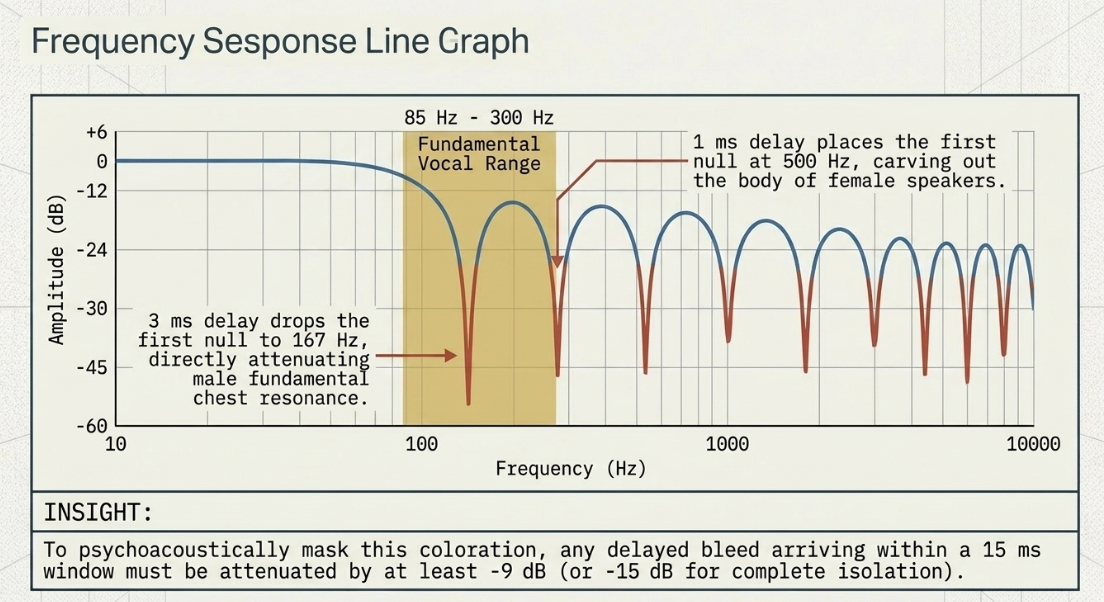
The fundamental frequency () of the human voice typically spans to 13. A male voice averages lower fundamental bounds, while female and child voices occupy the upper register13. When a to delay occurs between two open microphones, the destructive nulls fall directly within this fundamental frequency range and its immediate low-order harmonics3. For instance, a delay of places the first null at approximately 12, which carves out the fundamental frequency of many female speakers, stripping the voice of its body and warmth13. If the delay increases to , the first null drops to 11, directly attenuating the fundamental chest resonance of male speakers13.
The human brain processes delayed sounds arriving within short time windows ( to ) as a single, combined auditory event3. Because the auditory system cannot separate these arrivals in the time domain, the comb filter manifests as a severe coloration of the signal's timbre, described as a metallic, thin, or "robotic" quality1. If the delay exceeds to , the psychoacoustic threshold shifts, and the delayed arrival is perceived as a distinct, discrete echo3.
Furthermore, comb filtering is level-dependent3. Destructive nulls are deepest when the direct signal and the delayed bleed signal are mixed at identical levels3. Psychoacoustic studies show that to minimize the audible coloration of a comb filter, any delayed copy of a sound arriving within must be attenuated by at least relative to the source signal3. Within a window, the attenuation must be at least to achieve complete psychoacoustic isolation3.
Physical and Practical Mitigation of Microphone Bleed
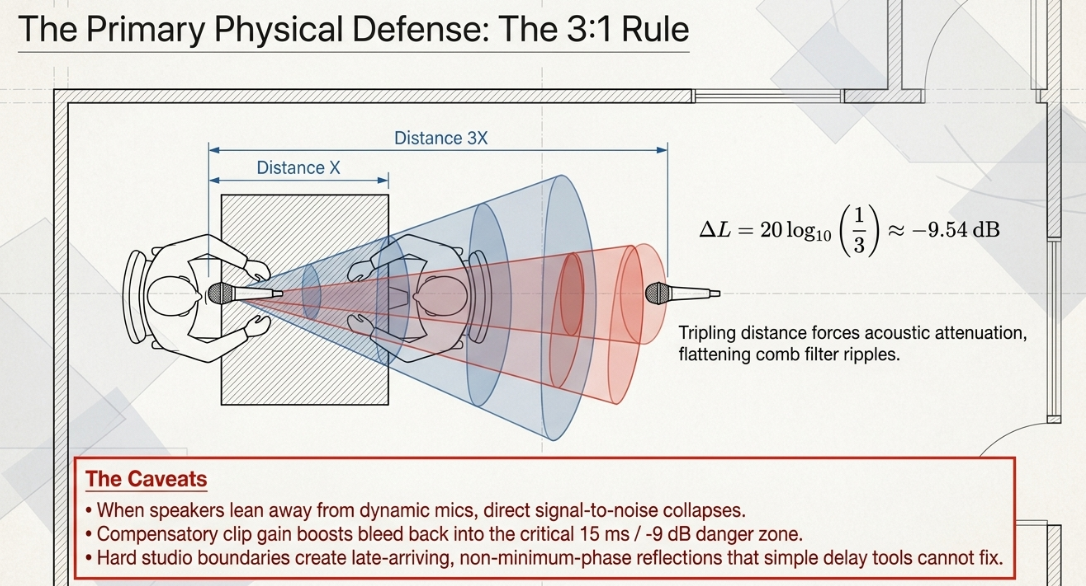
The primary physical defense against phase cancellation during the recording stage is physical acoustic isolation1. This is governed by the three-to-one () microphone spacing rule, which dictates that the distance between any two active microphones must be at least three times the distance from each microphone to its respective talker1. The mathematical basis of the rule lies in the inverse-square law of sound propagation3. By tripling the distance of the secondary microphone from the sound source, the bleed signal undergoes acoustic attenuation3. This attenuation is calculated as:
This ensures that the leaked signal is approximately quieter than the direct signal, flattening the resulting comb-filtering ripples and rendering the cancellation psychoacoustically negligible3. When microphones are placed in an equidistant lineup, this rule becomes more stringent, requiring a distance ratio of at least to maintain acceptable isolation3.
In small, untreated home studios or round-table corporate podcast setups, strict adherence to the rule is often impossible due to spatial limitations1. Several factors exacerbate bleed-induced phase issues in post-production. If a speaker leans back away from their directional dynamic microphone, the direct signal-to-noise ratio collapses15. To make a distant talker audible, the engineer must increase the preamp gain or digital clip gain on that channel16. This amplification boosts the level of the surrounding speakers' bleed into that track, shifting the relative level of the leakage into the critical window where comb filtering is most destructive3.
Furthermore, hard boundaries (e.g., glass walls, bare drywall, and wooden tabletops) reflect sound back into the off-axis, sensitive areas of directional capsules3. While direct bleed presents a predictable, minimum-phase delay path, reflected sound paths create late-arriving, diffuse energy3. This late energy creates non-minimum-phase cancellations that cannot be resolved through basic delay tools, causing a muddy, hollow room tone that resists simple equalization2.
Professional Phase Alignment Technologies: Algorithmic Paradigms
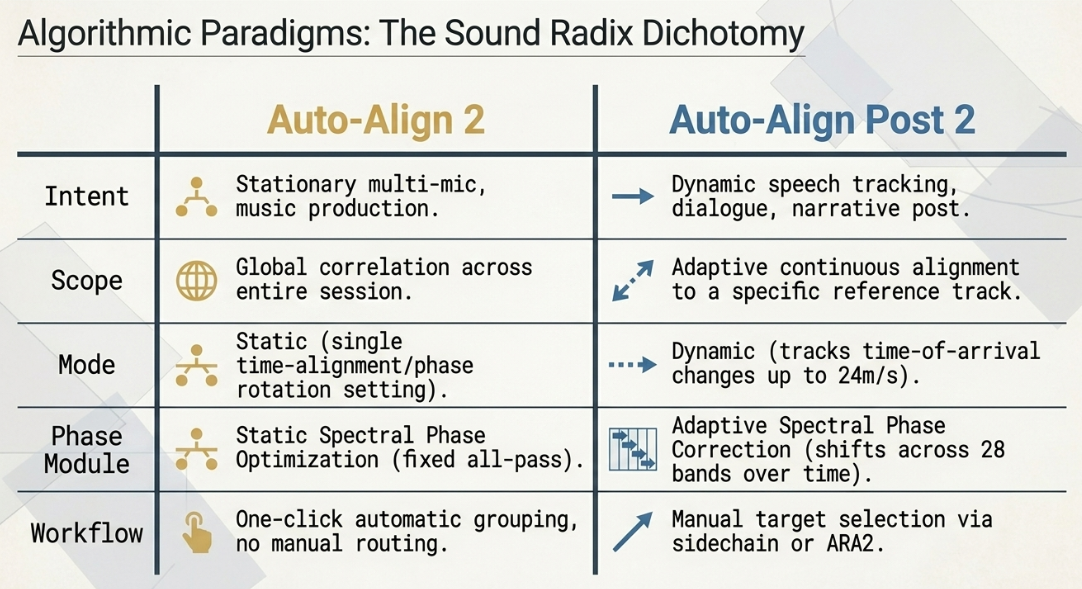
When physical isolation fails, software-based phase alignment in the Digital Audio Workstation (DAW) serves as the primary line of defense9. Sound Radix’s Auto-Align 2 (AA2) and Auto-Align Post 2 (AAP2) represent two distinct branches of phase correction technology7. While both address time and phase alignment, their underlying algorithms and target workflows are optimized for completely different production environments22. Table 2 contrasts these two advanced processing engines:
Advanced Software Architectures
Outside of the Sound Radix ecosystem, a diverse array of professional processors handles phase alignment through distinct mechanical principles9. These range from analog-modeled all-pass filters to sub-sample time shifters9. Table 3 details the technical specifications, plugin formats, and system requirements for these leading industry-standard tools:
To assist mixing engineers in selecting the correct alignment utility for specific podcast post-production scenarios, Table 4 analyzes the specific processing mechanisms, parameters, and display modules of these tools:
Waveform Asymmetry, Headroom Reclamation, and Mastering Dynamics
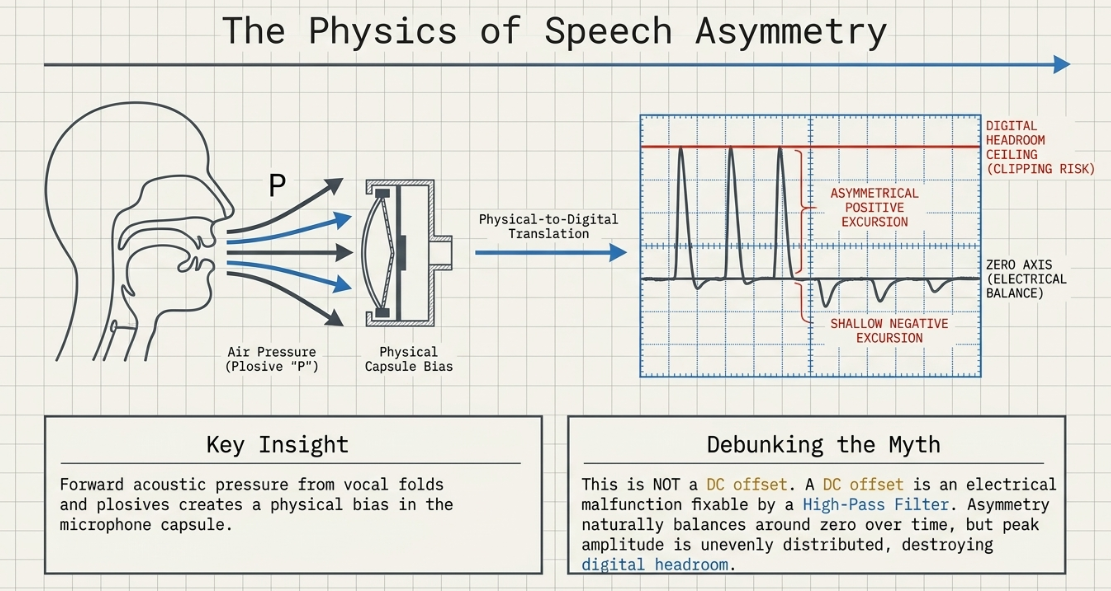
A common issue in spoken-word editing is waveform asymmetry, where a signal's positive peaks are significantly higher than its negative peaks (or vice versa), despite the signal being mechanically balanced around the zero axis8.
The Physics of Speech Asymmetry
Waveform asymmetry in speech is caused by a physical phenomenon where vocal fold mechanics and directional air velocity combine36. During the production of voiced speech and strong plosives, the forward column of air from the speaker’s mouth exerts directional acoustic pressure on the microphone capsule36. This positive acoustic pressure skews the capsule’s physical displacement36. This physical bias produces an electrical signal with higher peaks on one side of the zero axis, even though the overall electrical energy is perfectly centered35.
This asymmetry does not indicate a DC offset35. A DC offset is an electrical malfunction where a constant voltage shifts the entire waveform upward or downward from the zero axis, which can be easily resolved by a high-pass filter35. Asymmetrical waveforms remain balanced around the zero axis over time, but their peak amplitude is unevenly distributed35.
Headroom Reclamation via the iZotope RX Phase Module
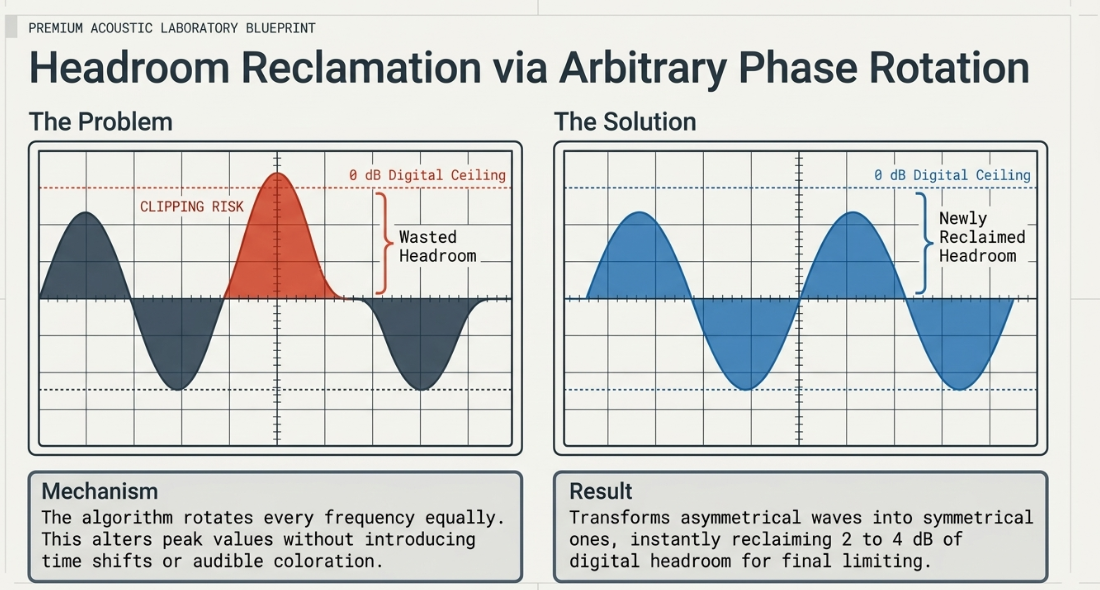
While waveform asymmetry is psychoacoustically transparent—the human ear cannot perceive phase-related amplitude asymmetry—it presents a major problem for digital headroom8. The unbalanced positive peaks will trigger digital clipping at long before the negative peaks utilize the remaining dynamic range8. This "false amplitude" limits how much the track's overall level can be increased during final limiting and compression35.
The iZotope RX Phase Module resolves this issue through linear-phase arbitrary phase rotation8. When a waveform's phase is rotated, every frequency is rotated equally8. This alters the amplitude characteristics and peak values of the signal without introducing any time shift or audible coloration8.
By rotating the phase (using the manual controls or the semi-automatic "Suggest" engine), the module distributes the peak samples more evenly on both sides of the zero axis8. Under the "Adaptive Phase Rotation" setting, the module continuously analyzes the speech selection in real time and applies time-variable phase rotation8. This process transforms the asymmetrical wave into a symmetrical one, immediately reclaiming to of digital headroom8.
However, engineers must use this tool with caution8. While highly effective on vocal and dialogue material, adaptive phase rotation can occasionally produce audible pitch artifacts on musical elements, or in rare cases, actually increase peak levels and reduce headroom8.
Strategic Order of Operations in Dialogue Post-Production
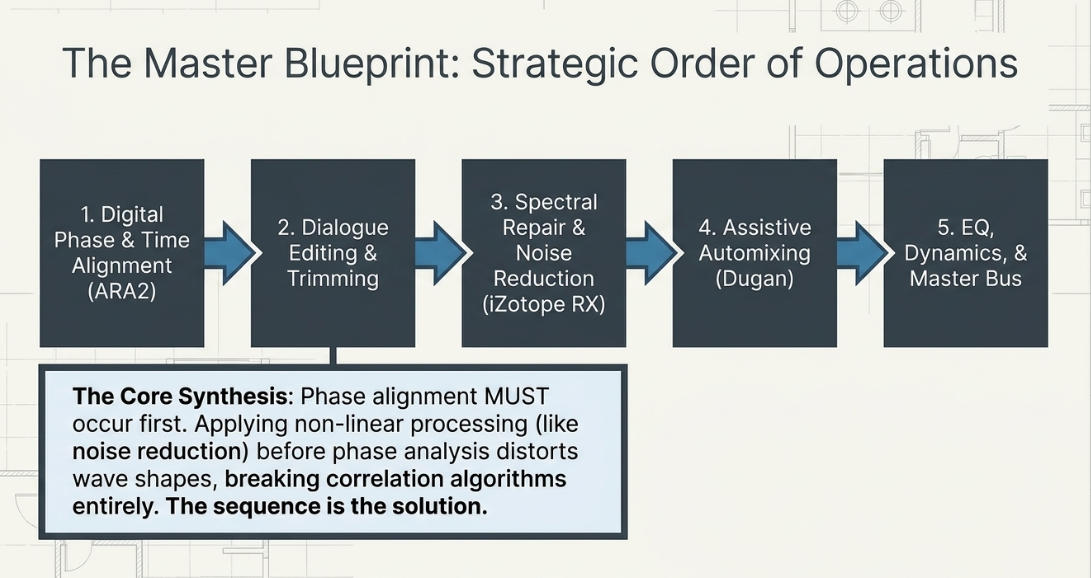
In multi-microphone dialogue mixing, the order of processing steps directly impacts the final audio quality24. Executing processes out of order can compromise noise reduction algorithms, trigger phase-modulated artifacts, or bake in irreversible distortion24.
[Phase Alignment (ARA2)]
|
v
[Dialogue Editing & Trimming]
|
v
[Spectral Repair & Noise Reduction]
|
v
[Assistive Automixing (Dugan)]
|
v
[Dynamics, EQ, and Bus Compression]
Phase 1: Digital Phase and Time Alignment
Phase alignment must always be the first step in the post-production chain, occurring immediately after session organization and ingestion24. Utilizing ARA2-compatible tools, the editor must align the phase of all active microphones to their respective timing references before applying any edits, trims, or dynamics26. Attempting to phase-align tracks after applying non-linear processing can distort the wave shapes, preventing the alignment algorithms from finding accurate correlation points24.
Under the Pro Tools ARA2 workflow, the editor selects all tracks to be aligned, holds Option/Alt + Shift, opens the Elastic Audio Properties menu of any selected track, and chooses "Auto-Align Post 2"29. Inside the plugin GUI, the editor selects the target clips and clicks the blinking "SET REF" button on the designated reference track (typically the closest, most stable microphone)29. Once the analysis is complete and the alignment is visually and aurally verified, the editor changes the Elastic Audio selection to "None" and selects "Commit" to render the alignment destructively to the timeline29. This process is non-destructive until committed, introducing zero latency into the active mixing session27.
For projects edited within DaVinci Resolve’s Fairlight page, the workflow is optimized around the Auto-Align Post 2 Fairlight integration24. In Static Mode, Fairlight users can safely align multi-microphone setups, such as a piano recorded with nine static microphones24. The editor aligns each track to the chosen reference24. Auto-Align Post 2 then mutes the processed source clip and automatically writes a new, phase-aligned track at the bottom of the timeline24.
Crucially, this phase alignment must occur before applying any Fairlight-native voice isolation, dialogue enhancement, or external spectral noise reduction24. If noise reduction is placed before the phase analysis, the non-linear phase distortion introduced by the noise reduction filters can prevent the alignment engine from accurately tracking vocal correlation24.
Phase 2: Dialogue Editing and Structural Trimming
Once the tracks are phase-aligned, the dialogue editor performs manual edits on the synchronized timeline21. The editor uses clip gain to balance relative speaker levels, and uses strip silence or manual edits to remove silent passages where room noise and bleed accumulate16. Short crossfades are placed on all edits, and a continuous bed of natural room tone is inserted behind the track to keep the noise floor seamless16.
Phase 3: Spectral Repair and Noise Reduction
With the phase relationships optimized, spectral editing tools (such as iZotope RX Dialogue Isolate or De-bleed) should be applied24. Running noise reduction on phase-coherent tracks ensures that the algorithms analyze clean, structured wave data24. Additionally, keeping the processing chain in this order prevents the phase shifts introduced by noise reduction from corrupting the primary phase-alignment analysis24.
Phase 4: Assistive Automixing
For round-table discussions with frequent cross-talk, incorporating an automated gain-sharing automixer (such as a Dugan Automixer or WTautomixer) is highly effective1. These processors use real-time gain-sharing algorithms to distribute a fixed pool of gain among active microphones16. The gain assigned to any given channel is proportional to that channel's level relative to the sum of all channels:
where is the gain assigned to microphone , is the total system target gain, and represents the input level of microphone 16.
When one participant speaks, the automixer dynamically attenuates inactive microphones by to in sub-second reaction times1. This real-time ducking lowers the volume of inactive channels, preventing ambient bleed from summing with active tracks1.
Using an automixer reduces comb-filtering artifacts while maintaining a stable, natural-sounding room tone1. This is far superior to standard gating or harsh expansion, which can cut off quiet syllables and introduce unnatural, distracting room modulation16.
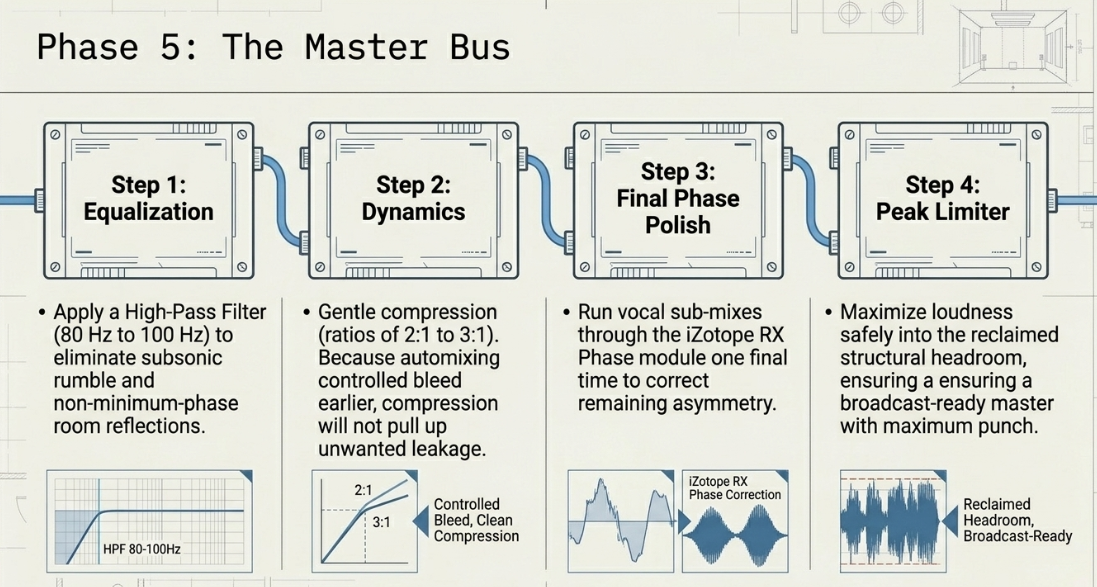
Phase 5: Equalization, Dynamics, and Bus Mastering
The final stage consists of shaping the tracks using equalizers, compressors, and peak limiters40. Apply a high-pass filter ( to ) to eliminate subsonic rumble and room reflections37. Apply gentle compression (e.g., ratios of to ) to control dynamic peaks20. Because the bleed has been controlled in previous steps, the compressor will not pull up unwanted leakage or background noise39.
Finally, run vocal sub-mixes through the iZotope RX Phase Module to correct remaining asymmetry and maximize headroom before the final peak limiter8. This strategic workflow ensures a broadcast-ready podcast master with maximum clarity, punch, and competitive loudness1.
Works cited
Managing Multi Microphone Phase Issues in Round Table Video Podcasts, https://www.podcastvideos.com/managing-multi-microphone-phase-issues-in-round-table-video-podcasts/
Working With Mic Bleed - Sound On Sound, https://www.soundonsound.com/techniques/working-mic-bleed
The basics about comb filtering (and how to avoid it) - DPA Microphones, https://www.dpamicrophones.com/mic-university/audio-production/the-basics-about-comb-filtering-and-how-to-avoid-it/
Comb Filtering Explained: What Does a Comb Filter Sound Like? - Audio University, https://audiouniversityonline.com/comb-filtering-explained/
What is phase in audio? 5 ways to address phase issues - iZotope, https://www.izotope.com/community/blog/5-ways-to-adjust-phase-after-recording
Phase Alignment: Guide to Polarity, Time & Phase Correction - MasteringBOX, https://www.masteringbox.com/learn/phase-alignment-polarity-time-correction
Pro Tools delivers Auto-Align & Post ARA support - Avid, https://www.avid.com/resource-center/sound-radix-ara
Phase - Help Documentation - iZotope, https://downloads.izotope.com/docs/rx6/49-phase/index.html
Phase Alignment Plugins: 7 VSTs To Get Your Tracks in Phase | LANDR Blog, https://blog.landr.com/phase-alignment/
What is comb filtering? What does it sound like? - Audio Masterclass, https://www.audiomasterclass.com/blog/what-is-comb-filtering-what-does-it-sound-like
Comb filters - Biamp Cornerstone, https://support.biamp.com/General/Audio/Comb_filters
4.3.5 The Mathematics of Delays, Comb Filtering, and Room Modes - Digital Sound & Music, https://digitalsoundandmusic.com/4-3-5-the-mathematics-of-delays-comb-filtering-and-room-modes/
3.10. Fundamental frequency (F0) - Introduction to Speech Processing, https://speechprocessingbook.aalto.fi/Representations/Fundamental_frequency_F0.html
Sound Radix Auto-Align Post 2 Review - Plugin Nerds, https://pluginerds.com/sound-radix-auto-align-2-review/
Advice on reducing mic bleed/spill for podcast with multiple people - Reddit, https://www.reddit.com/r/audioengineering/comments/ol5ywt/advice_on_reducing_mic_bleedspill_for_podcast/
Podcast Editing: Phasing issue in Multitrack : r/audioengineering - Reddit, https://www.reddit.com/r/audioengineering/comments/1izjxkf/podcast_editing_phasing_issue_in_multitrack/
Room Reflections & Reverb: Fix Podcast Audio Problems, https://thepodcastconsultant.com/blog/reverb-room-reflections
Correcting Room Interference Dips with Minimum Phase PEQ | Audio Science Review (ASR) Forum, https://www.audiosciencereview.com/forum/index.php?threads/correcting-room-interference-dips-with-minimum-phase-peq.68989/
Don't Align Your Subwoofer to a Room Reflection - Sound Design Live, https://www.sounddesignlive.com/dont-align-your-subwoofer-to-a-room-reflection/
Room Correction and echo/reflection - Audio Gear Talk - Roon Labs Community, https://community.roonlabs.com/t/room-correction-and-echo-reflection/234482
Sound Radix Auto-Align Post 2 at Gear4music, https://www.gear4music.com/Recording-and-Computers/Sound-Radix-Auto-Align-Post-2/4ZPY
Sound Radix Auto-Align 2, https://www.soundonsound.com/reviews/sound-radix-auto-align-2
Auto Align vs Auto Align Post - Radicals' Lounge, https://forum.soundradix.com/t/auto-align-vs-auto-align-post/1961
Auto Align Post 2 - some questions - Radicals' Lounge, https://forum.soundradix.com/t/auto-align-post-2-some-questions/2641
Auto-Align Post 2 User Manual 2.1 - Sound Radix, https://assets.soundradix.com/downloads/Auto-Align%20Post%202.1.1%20User%20Manual.pdf
Auto-Align: The Automatic Phase Alignment Plug-in - Sound Radix, https://www.soundradix.com/products/auto-align/
Sound Radix Auto-Align® Post 2 - mediabox.hk, https://www.mediabox.hk/products/10772
Best Auto-Phase alignment plugin : r/audioengineering - Reddit, https://www.reddit.com/r/audioengineering/comments/16enm97/best_autophase_alignment_plugin/
Sound Radix releases Auto-Align 2.2 and Auto-Align Post 2.2 with Pro Tools ARA Support, https://forum.soundradix.com/t/sound-radix-releases-auto-align-2-2-and-auto-align-post-2-2-with-pro-tools-ara-support/2222
11 Best Phase Alignment VST Plugins + FREE Plaugins, https://pluginerds.com/11-best-phase-alignment-plugin/
PhaseNudge - Airwindows, https://www.airwindows.com/phasenudge-vst/
Auto-Align Post 2: The Fast & Simple Way to Get Location Mics in Phase | Sound Radix, https://www.soundradix.com/products/auto-align-post/
InPhase - Phase Correction Plugin - Waves Audio, https://www.waves.com/plugins/inphase
Melda MAutoAlign vs Sound Radix Auto Align 2 - Effects Forum - KVR Audio, https://www.kvraudio.com/forum/viewtopic.php?t=626774
Is it common for a mastering engineer to not know about "phase repair"? - Reddit, https://www.reddit.com/r/audioengineering/comments/144hg5q/is_it_common_for_a_mastering_engineer_to_not_know/
Centering Asymmetrical Audio? - Adobe Community, https://community.adobe.com/questions-544/centering-asymmetrical-audio-156911
ASYMMETRIC Waveforms: What is your go to fix - Cubase - Steinberg Forums, https://forums.steinberg.net/t/asymmetric-waveforms-what-is-your-go-to-fix/850186
Voxengo PHA-979 - Phase Alignment Plugin VST, AU, AAX, https://www.voxengo.com/product/pha979/
I've been asked how to remove silence and stop mic bleed plenty recently so here are some time saving tips... : r/podcasting - Reddit, https://www.reddit.com/r/podcasting/comments/dbbrmw/ive_been_asked_how_to_remove_silence_and_stop_mic/
What is audio editing and why does it matter in modern music production? - ACE Studio, https://acestudio.ai/blog/what-is-audio-editing-and-why-does-it-matter-in-modern-music-production/
The Ultimate Guide To Audio Post & Sound Design Part 1, https://www.344audio.com/post/the-ultimate-guide-to-audio-post-production-sound-design
Audio Post Production Workflow: Complete Guide - Forte AI, https://www.forte-ai.com/blog/audio-post-production-workflow-from-picture-handoff-to-final-mix
How to trim audio quickly and cleanly in Premiere Pro and Resolve - Krotos Studio, https://krotos.studio/blog/audio-trimming
Industry-standard audio repair and post production with RX 12 Advanced - iZotope, https://www.izotope.com/products/rx-advanced
Dan Dugan Automixer - Waves Audio, https://www.waves.com/mixers-racks/dugan-automixer
Current state of automixing plugins? : r/podcasting - Reddit, https://www.reddit.com/r/podcasting/comments/1tn3uzg/current_state_of_automixing_plugins/
Audio Engineering in a Professional Podcast Post-Production - Finchley Studios, https://www.finchley.co.uk/finchley-learning/visual-podcast/audio-engineering-in-a-professional-podcast-post-production














