
1. Loudness Normalization Architectures and Psychoacoustic Standards
Implementing uniform loudness standards across digital distribution networks is essential to prevent extreme volume shifts between programs, protecting listeners from sudden acoustic changes and vocal fatigue1. Modern loudness engineering relies on psychoacoustic measurements rather than simple voltage or peak-amplitude metrics1. While Peak and Root Mean Square (RMS) meters track electrical signal strength over specific time windows, they fail to represent human hearing sensitivity across the frequency spectrum3.
The globally accepted standard for measuring subjective loudness is governed by the International Telecommunication Union Recommendation ITU-R BS.1770 (currently in its fifth revision) and European Broadcasting Union EBU R1286. These frameworks define Loudness Units relative to Full Scale (LUFS), also referred to as Loudness K-weighted relative to Full Scale (LKFS)1.
The K-Weighting Filter Curve and Dual-Gating
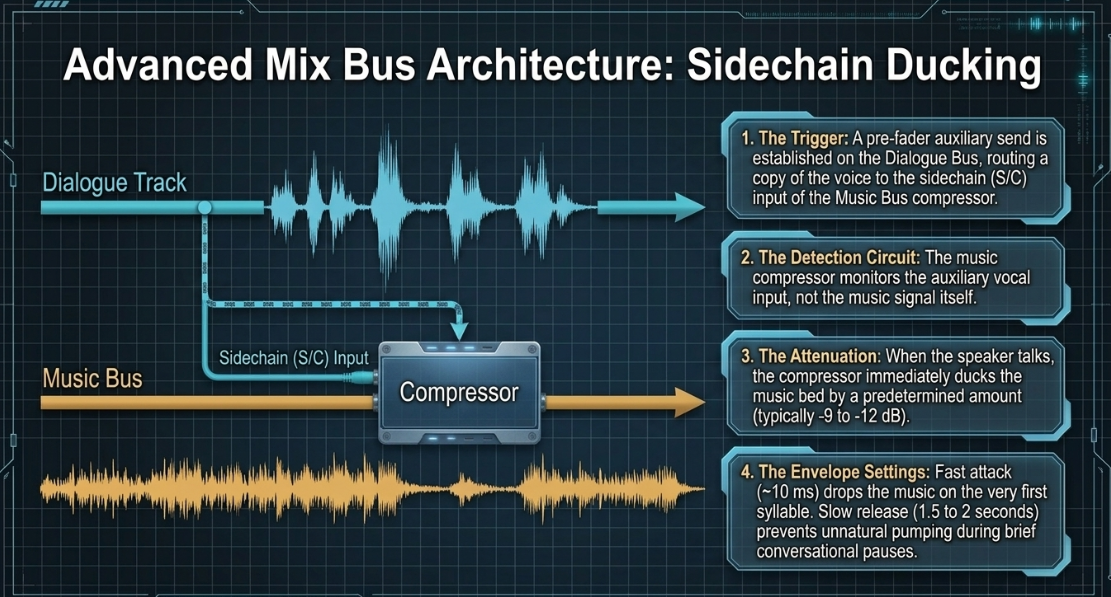
To approximate human perception, the ITU-R BS.1770 algorithm applies a two-stage K-weighting frequency filter to the input signal5. The first stage of pre-filtering accounts for the acoustic amplification of the human head, modeled as a rigid sphere, which boosts frequencies above 2 kHz by approximately 3 to 4 dB5. The second stage applies the Revised Low-frequency B-curve (RLB) weighting, which is a high-pass filter with a cutoff frequency around 38 Hz designed to roll off low-end rumble5. Low frequencies carry significant physical energy but contribute minimally to perceived loudness3.
Following K-weighting, the algorithm computes the mean-square power over a series of overlapping gating blocks10. To prevent silent passages, brief pauses, and background noise from skewing the long-term average, a dual-gating mechanism is utilized9. The absolute gate discards any 400 ms gating block, overlapping by 75%, that registers below 7. The relative gate then computes the average level of all blocks surviving the absolute gate and discards any block falling more than below that average7. The remaining blocks are integrated over the entire program duration to yield the final integrated loudness1. Alongside this, engineers track short-term loudness using a 3-second sliding window to monitor overall program level and momentary loudness with a 400 ms window to capture immediate acoustic bursts1.
Platform Normalization Behavior
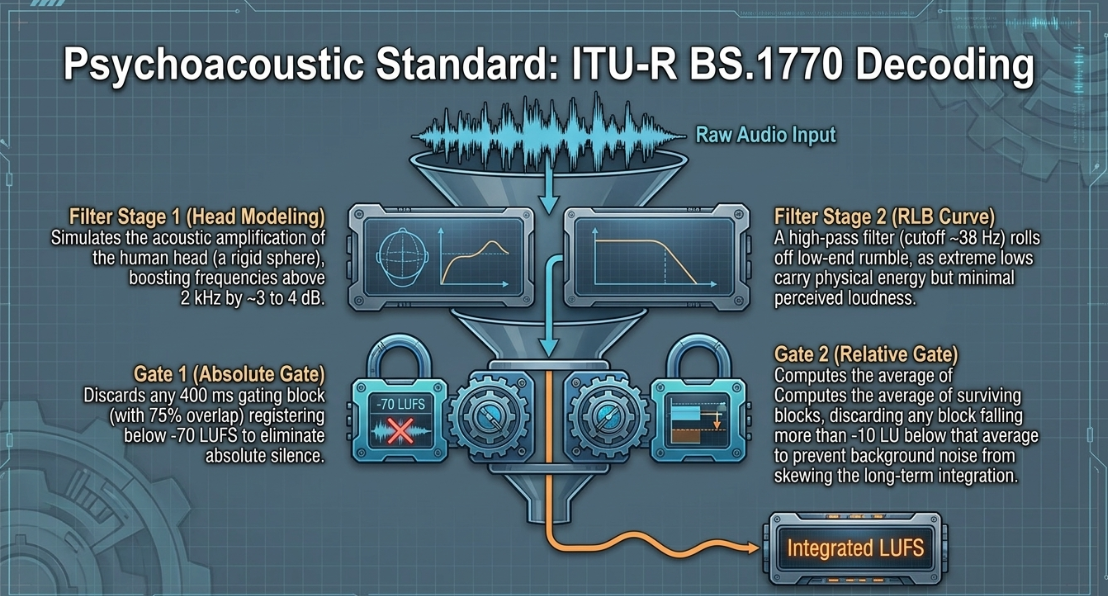
Each major streaming and podcast directory employs target loudness levels and True Peak (dBTP) ceilings to manage its playback stream1. When a file exceeds these thresholds, the host platform applies digital gain reduction (negative gain) to match its target1. If a file is too quiet, some platforms apply positive gain, which can elevate the noise floor and amplify background hiss if not properly managed during mixing1.
To optimize playback across Spotify, the platform adjusts tracks to according to the ITU-R BS.1770 standard16. Premium Spotify listeners can adjust playback normalization levels in the application settings to compensate for quiet or noisy listening environments16. These settings utilize three specific modes: Normal, which targets 16; Quiet, which targets a wider dynamic range at 5; and Loud, which targets 5. In Loud mode, Spotify applies a brick-wall limiter configured with a sample ceiling, a attack time, and a decay time to prevent digital clipping on highly dynamic programs16. Furthermore, if a master is delivered louder than , keeping the True Peak below is required to mitigate physical inter-sample clipping and transcoding distortion when encoding for lossy streaming formats8.
The Physics of Mono vs. Stereo Normalization
A critical variable in loudness mastering is the channel configuration6. Summing a mono channel through a stereo playback array creates what is psychoacoustically identified as a phantom center19. When the same monophonic signal is played back through two separate speakers, identical waveforms emerge from both transducers19. If the listener is positioned equidistant from both speakers, the sound waves constructively reconstruct in the air19. This coherent acoustic summation of identical signals from two spatial sources increases the perceived sound pressure level by approximately 19.
To maintain an identical perceived volume level between a mono program and a stereo program, the industry-standard target for monophonic podcasts is set to , while stereophonic podcasts are mastered to 2. If a mono file were mastered directly to , the dual-speaker playback would cause it to sound significantly louder than a native stereo file mastered to the same numerical value20. This difference is accounted for in mastering workflows by ensuring that the K-weighted summation across channels in the ITU-R BS.1770 algorithm properly reflects the physical reality of the delivery stream6.
2. Multi-Microphone Interference: Comb Filtering, Phase Cancellation, and Bleed Mitigation
Recording multiple speakers in the same physical space introduces acoustic bleed, where each talker's voice enters not only their own microphone but also spills into neighboring capsules with a slight delay21. This time-of-flight delay creates severe phase relationships that degrade the tonal quality of the combined mix22.
Acoustic Physics of Comb Filtering
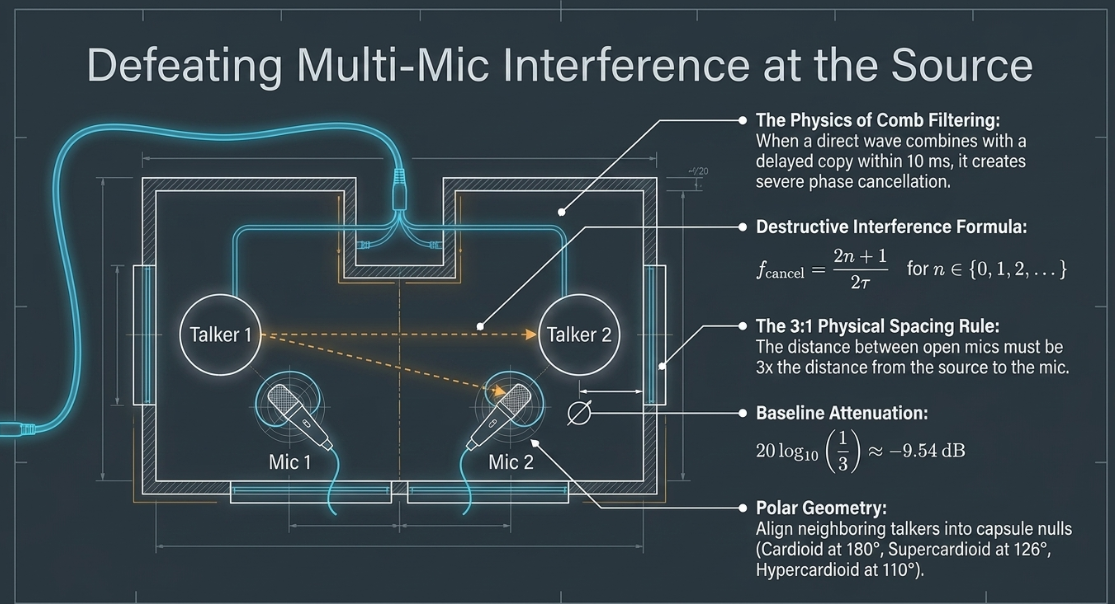
Comb filtering occurs when a direct sound wave combines with a delayed copy of itself21. The phase difference between the direct signal () and the delayed signal () results in destructive interference at specific frequencies22. Mathematically, when the delay time equals an odd multiple of half-periods of a frequency , the waves are out of phase, causing a complete cancellation of that frequency22:
Conversely, constructive interference occurs at integer multiples of the period, doubling the amplitude24:
This pattern of peaks and notches resembling the teeth of a physical comb destroys the natural balance of speech21. In human speech, comb filtering manifests as a thin, hollow, "swishy," or metallic tone reminiscent of speaking through a pipe22.
For comb filtering to become audibly problematic, the direct and delayed signals must be within of each other21. If the delayed bleed is attenuated by more than , the depth of the comb notches decreases, making the interference negligible21. Psychoacoustic studies show that any delayed sound arriving within a window must be attenuated by at least to prevent perceived comb filtering distortion21.
Physical Spacing and Directional Geometry
The primary physical defense against comb filtering is the 3:1 Rule21. This guideline states that the physical distance between any two open microphones must be at least three times the distance from each microphone to its respective sound source21. This spacing relies on the inverse-square law of acoustics, which dictates that sound pressure level drops by for every doubling of distance in a free field. Under the 3:1 spacing rule, the bleed signal traveling to the neighboring microphone is sufficiently attenuated:
When accounting for typical indoor boundaries and microphone polar patterns, this 3:1 ratio yields approximately a attenuation of the bleed, which is the baseline threshold required to make comb filtering musically and structurally negligible21. For circular or equidistant multi-speaker roundtable arrays, a 4.5:1 ratio should be maintained if the microphones are identical and operating at matching preamp gains21.
At normal room temperature ( or ), the speed of sound is approximately (), meaning a distance of 100 cm to the nearest microphone and 300 cm to the neighboring microphone results in a physical delay of approximately 21. This delay generates a series of notches across the midrange frequencies that must be controlled21.
Furthermore, directional microphone patterns must be aligned to maximize off-axis rejection25. Cardioid microphones feature a null point at off-axis, whereas supercardioid and hypercardioid capsules place nulls at approximately and respectively. By angling physical talkers and their microphones so that neighboring talkers sit directly in these polar nulls, bleed is suppressed at the acoustic stage25. Placing physical boundaries, such as absorbing acoustic panels or moving blankets, behind the talkers also suppresses high-frequency reflections off reflective surfaces21.
Phase vs. Polarity in Post-Production
When acoustic constraints prevent physical separation, post-production engineers must address phase issues in the Digital Audio Workstation (DAW)22. A critical distinction exists between polarity and phase19:
Polarity Inversion: A purely electrical or digital process that flips the entire waveform along the amplitude axis22. It is frequency-independent and instantaneous24. Flipping the polarity on a mixer strip can immediately restore low-end energy if two microphones are facing each other (e.g., opposite sides of a table), but it cannot correct for time-of-flight delays22.
Phase Realignment: A time-domain correction24. Because sound takes time to travel through the air, even a minor distance discrepancy introduces a physical delay21. Correcting this requires nudging one audio track forward or backward in time at the sample level to align the transient peaks of the bleed with the primary track24.
Gain Sharing Automixing and Deep Learning Separation
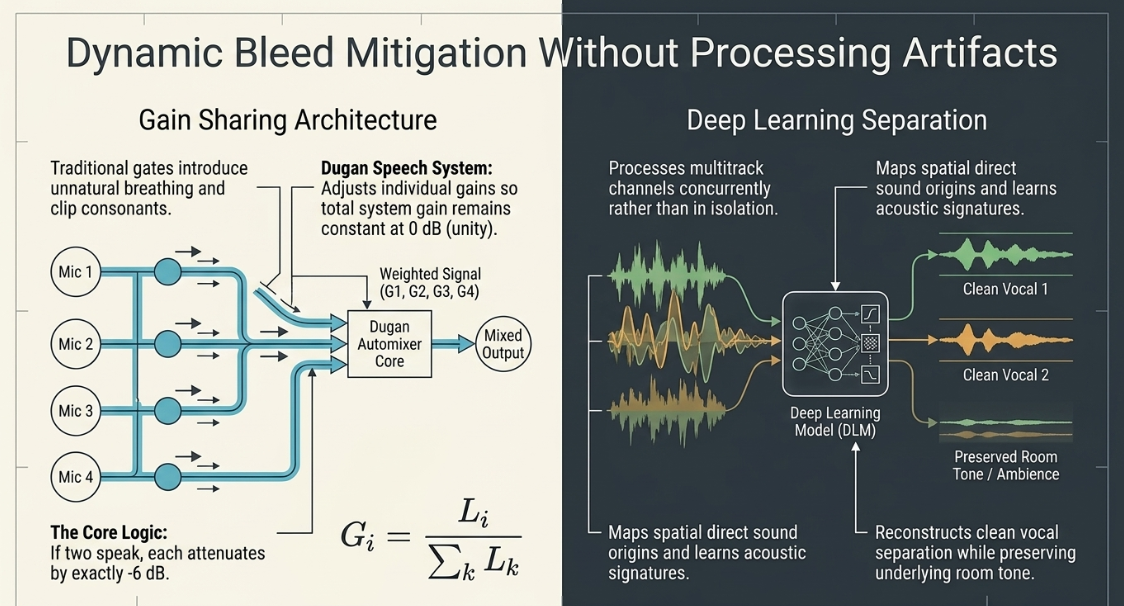
To manage multi-mic bleed dynamically without manual editing, automated systems are used22. Traditional noise gates mute or expand channels when the input falls below a fixed threshold23. In unscripted roundtable podcasts, gating introduces unnatural "breathing" artifacts23. As a gate opens and closes, the abrupt change in room tone (ambience) and the clipping of initial consonants make the editing cuts highly apparent23.
The Dugan Speech System provides an elegant mathematical solution to the multi-mic gain problem27. Instead of gating, it continuously adjusts the individual channel gains in real time so that the total gain of the system remains constant at ()28. The gain applied to channel is calculated by dividing its individual level by the sum of all channel levels 28:
If one person speaks, that channel receives of the system gain (), while the inactive microphones are attenuated to near-silence28. If two people speak simultaneously, each channel is attenuated by exactly (split ), preventing the overall acoustic volume and background noise floor from pumping or increasing feedback28.
Modern tools employ neural networks trained on multitrack datasets23. Rather than processing channels in isolation, these algorithms analyze all tracks concurrently23. The model learns the acoustic signature of each speaker, maps the spatial origin of the direct sound, and reconstructs clean vocal separation23. This approach preserves low-level dialogue and room tone while removing overlapping bleed23.
3. Remote Production Architecture: Latency, Synchronization, and Clock Drift
Remote recording has expanded global connectivity but introduced significant digital clocking and latency issues30. When two or more remote sites record local audio tracks that must be combined in post-production, engineers face issues with latency vectors and sample clock drift30.
Network Latency Vectors and Jitter Buffers
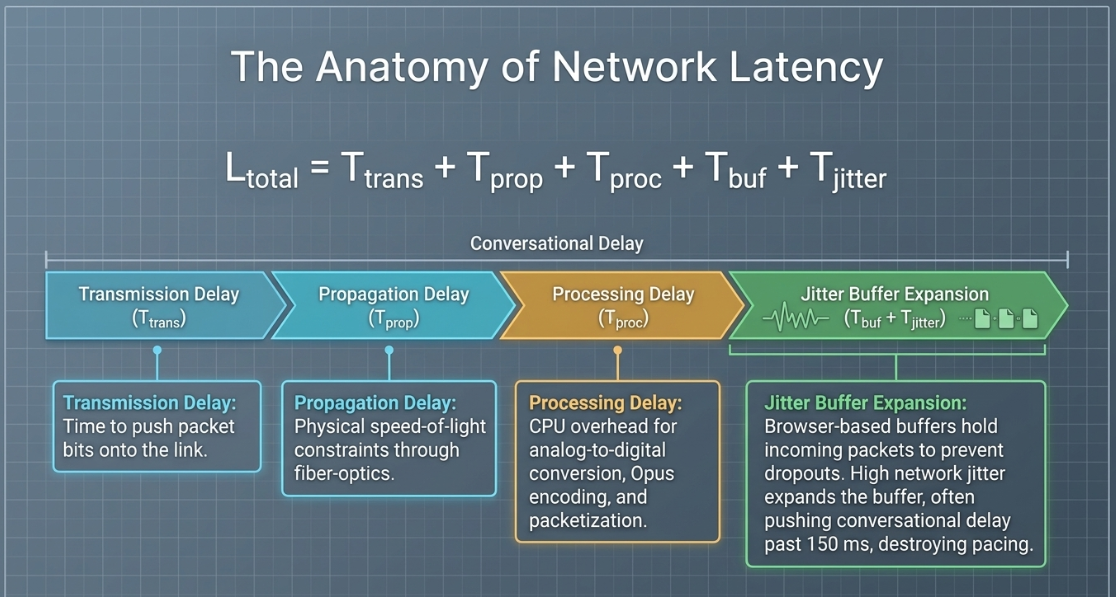
In a remote VoIP connection, the total end-to-end latency () is defined by the accumulation of several distinct delay vectors30:
The transmission delay () represents the time required to push packet bits onto the link30. Propagation delay () represents the physical constraint of the speed of light through fiber-optic cables over geographical distance30. Processing delay () is the CPU overhead required for analog-to-digital conversion, encoding (e.g., Opus codec), packetization, and decoding30.
Network packets traveling over packet-switched routes arrive with varying time intervals, known as jitter30. To prevent audio dropouts, browser-based systems utilize a jitter buffer ( and )30. The buffer holds incoming packets to ensure continuous playback30. If network jitter increases, the buffer expands, adding significant delay (often exceeding ), which disrupts conversational flow and pacing30.
The Physics of Local Clock Drift
To avoid the data compression and packet loss of real-time VoIP transmissions, professional workflows utilize Double-Ender recordings33. In a double-ender, each participant records their raw microphone input locally onto their own machine, and the uncompressed files are subsequently uploaded and aligned in the DAW33.
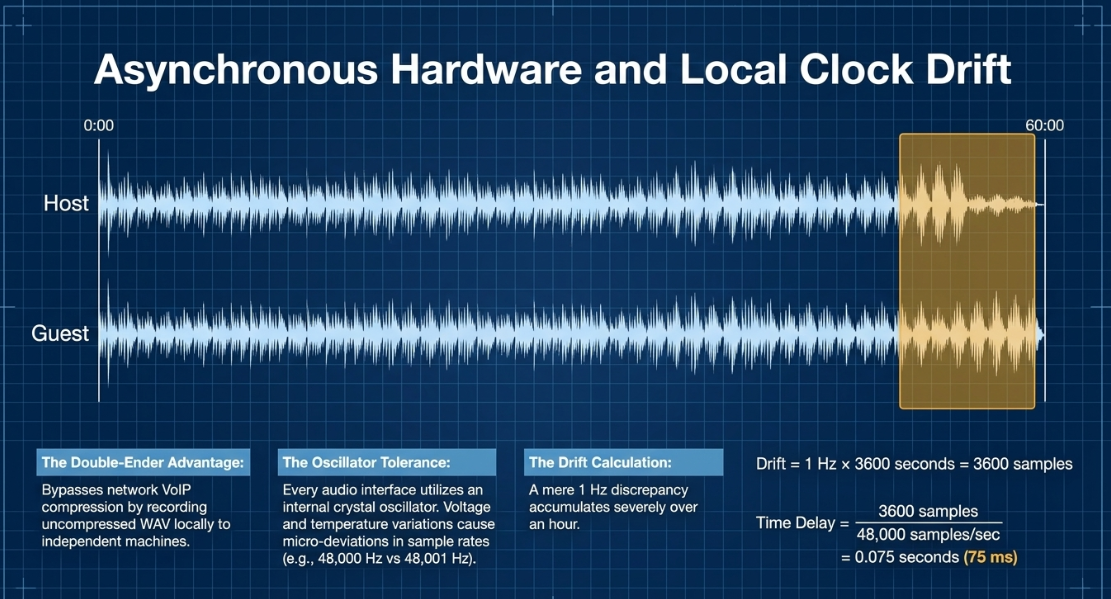
Despite capturing clean, uncompressed WAV files, double-enders are inherently susceptible to audio drift31. This phenomenon is caused by the asynchronous nature of independent hardware clocks32.
Every digital audio interface utilizes an internal crystal oscillator to dictate its clock rate30. These oscillators have tiny physical tolerances39. Even if both systems are set to sample at (), temperature variances, voltage fluctuations, and hardware manufacturing tolerances mean one clock might run at while the other runs at 38. This represents an error of only , yet over a one-hour recording, this discrepancy accumulates39:
A delay of is highly audible, causing conversational overlaps to drift, breaking comedic timing, and causing phase cancellation if both tracks capture the same ambient sounds26.
Platform Operational Anomalies
Several specific operational anomalies must be managed when utilizing browser-based remote recording services31:
Zencastr Timeline and Connection Failures: In some scenarios, browser-based systems experience connection "hiccups" that reset a guest's timeline to 0:00 while the host's timeline continues uninterrupted41. Furthermore, local buffer errors can cause the system to save audio from one recording segment into another, or cause random, persistent crackling41. This crackling often stems from sample-rate mismatches or when the browser accidentally accesses a participant's built-in earbud microphone instead of their dedicated USB interface42. To mitigate overlapping timeline issues, disabling echo cancellation is required when headphones are used40.
Riverside Echo Cancellation and Studio Processing: Real-time cross-talk distortion occurs when Riverside's built-in "echo cancellation" or "studio noise reduction" algorithms automatically re-engage mid-session40. This can occur when a user adjusts hardware settings, causing the browser to re-initialize and gate the active audio40. Operating system level "Audio Enhancements" (such as those in Windows) must also be disabled to prevent local DSP from altering the recorded signal prior to upload40.
SquadCast Local Capture: SquadCast isolates files from internet connection quality, reducing real-time buffer-related drift by executing uncompressed local recording through the browser sandbox, though hardware clock variations remain a factor over long sessions32.
Dynamic Video and Audio Alignment
In video-podcast workflows, frame rate mismatches can introduce severe audio-to-video drift37. Mobile phones and web browsers often record video using a Variable Frame Rate (VFR) to preserve system bandwidth37.
When VFR video is imported into a standard DAW or non-linear editor (NLE) operating at a Constant Frame Rate (CFR), the audio will drift out of sync37. Editors must use tools like MediaInfo to identify VFR files and transcode them to a standard CFR (such as 25 fps or 29.97 fps) using applications like HandBrake before editing37.
4. Surgical Vocal Processing and Spectral Restoration Signal Chains
Podcast audio is frequently recorded in non-treated environments, capturing room resonance, electrical hums, and physiological noises like mouth clicks, lip smacks, and plosives26. Addressing these issues requires a disciplined signal chain45.
Surgical Order of Operations
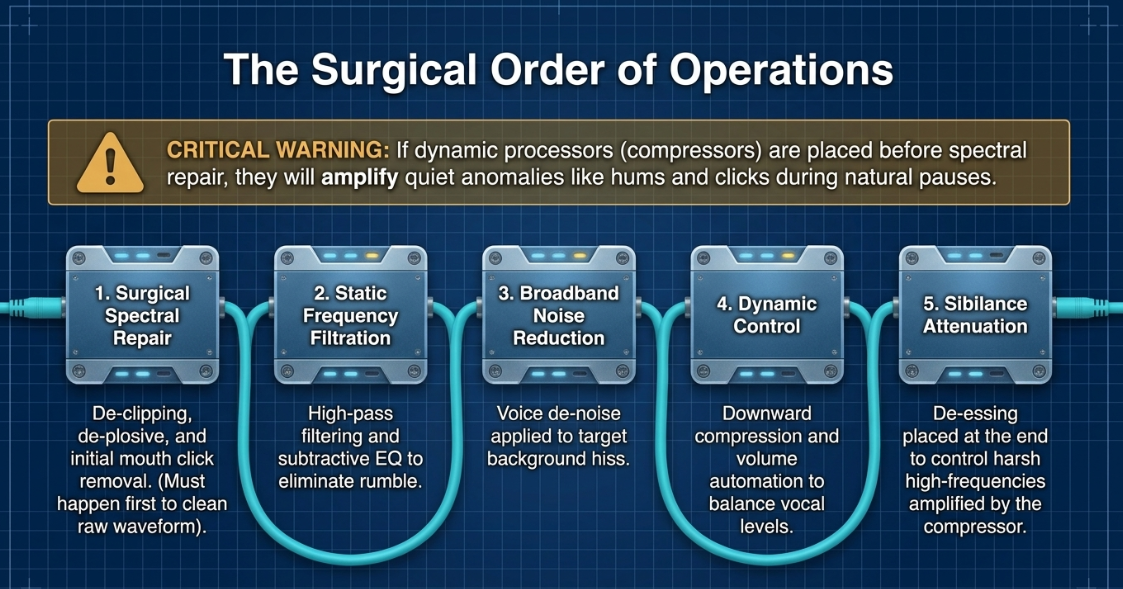
To prevent processing artifacts, audio restoration must proceed in a logical order47. Dynamic processors like compressors act as automatic volume knobs; if background hums, room reflections, or harsh mouth clicks are fed into a compressor first, the compressor will amplify these quiet anomalies during pauses1. The industry-accepted order of operations is structured as follows45:
Surgical Spectral Repair: De-clipping, de-plosive processing, and initial mouth click removal are executed first to clean the raw waveform48.
Static Frequency Filtration: High-pass filtering and subtractive parametric EQ are applied to eliminate low-end rumble and problematic resonances49.
Broadband Noise Reduction: Voice de-noise is applied to target background ambient hiss48.
Dynamic Control: Downwards compression and volume automation are applied to balance vocal levels47.
Sibilance Attenuation: De-essing is placed near the end of the chain to control harsh high-frequency transients amplified by the compressor45.
Spectral Interpolation of Mouth Noise
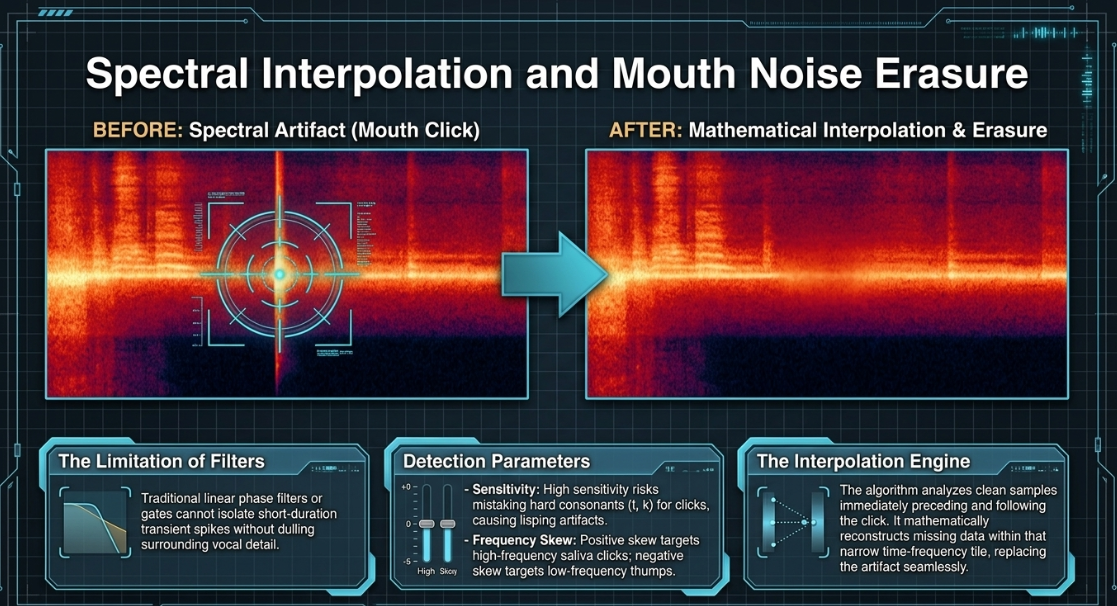
Mouth noises appear as short-duration, high-frequency, high-amplitude spikes on a spectrogram44. Traditional linear phase filters or gates cannot isolate these transient spikes without dulling the surrounding vocal detail23. Surgical restoration suites utilize spectral repair and mouth de-click modules that process the audio in the time-frequency domain44. The algorithm isolates the transient click by checking its frequency skew and sensitivity parameters44:
Sensitivity: Determines the detection threshold for transients44. High sensitivity settings risk identifying hard consonants (such as "t" and "k") as clicks, leading to softened speech and "lisping" artifacts44.
Frequency Skew: Focuses detection on specific frequency bands44. A positive skew targets high-frequency saliva clicks, while a neutral or negative skew targets lower-frequency thumps or vinyl clicks44.
Click Widening: Extends the repair window around the detected click to smoothly interpolate the decay tail of lip smacks44.
Once a click is identified, the algorithm uses spectral interpolation44. It analyzes the clean audio samples immediately preceding and following the click, then mathematically reconstructs the missing waveform data within that narrow time-frequency tile, replacing the click seamlessly24.
Dynamic Vocal Sculpting
After surgical restoration, the voice must be dynamically sculpted to ensure intelligibility and presence across different listening environments47.
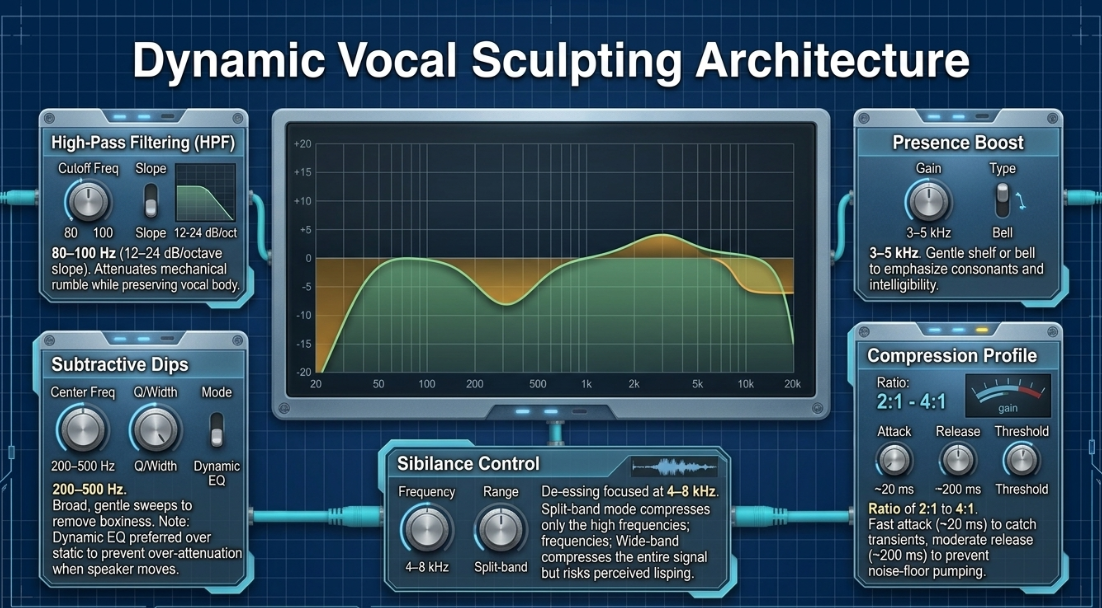
High-Pass Filtering (HPF): Set between with a slope of 49. This attenuates low-frequency mechanical noise (air conditioning, traffic rumble, mic handling) while preserving the natural body and fundamental pitch of the speaker's vocal register49.
Subtractive EQ sweeps: Broad, gentle dips are applied between to remove acoustic boxiness or room reflections50. For moving speech, engineers prefer Dynamic EQ over static parametric EQ50. Static EQ bands remain fixed, meaning they can over-attenuate frequencies when the speaker moves away from a resonance50. Dynamic EQ bands only compress the target frequency when it exceeds a set threshold, preserving vocal naturalness50.
Presence Boost: Apply a gentle shelf or bell boost centered around to emphasize vocal consonants, enhancing clarity and intelligibility49.
Downwards Compression: Set a ratio between for spoken word, which keeps the compression natural without sounding overly squashed49. Set a fast attack time (~20 ms) to catch sudden transients, combined with a moderate release time (~200 ms) to prevent "pumping" (audible changes in background noise floor as the compressor releases)49.
De-essing and Sibilance Control: Sibilance occurs when air passes over the teeth during "s," "sh," "ch," and "z" sounds, generating high-frequency energy concentrated between 45. In Split-Band mode, the de-esser splits the incoming signal, compressing only the narrow high-frequency band while leaving lower vocal frequencies untouched45. In Wide-Band mode, the de-esser compresses the entire vocal signal whenever sibilance is detected, which is effective for taming harsh, broad-spectrum sibilance on budget microphones but can introduce a perceived lisp if over-processed45.
5. DAW Ecosystems, Advanced Bussing, and Immersive Spatial Audio
Selecting the appropriate digital audio workstation (DAW) and structuring a logical post-production pipeline directly impacts editing efficiency and delivery quality43.
Comparative DAW Structural Analysis
Each platform caters to distinct operational needs and skill sets across the podcasting industry57.
RSS Feed Audio Specifications for Apple Podcasts Connect
For standard distribution, files delivered via RSS feeds must adhere to strict encoding standards to ensure compatibility across all mobile devices and streaming engines4:
Apple Podcasts Connect requires specific channel guidelines17. For lossless WAV or FLAC files, single-channel mono files are rejected; mono sources must be duplicated to a dual-channel configuration with identical left and right tracks17. For RSS distribution, Apple strongly recommends AAC over MP3, specifically utilizing the MP4 container format rather than ADTS, as MP4 allows for more efficient streaming and accurate, frame-precise timeline seeking17. Constant Bit Rate (CBR) encoding is required, as Variable Bit Rate (VBR) can cause non-linear timeline sync errors across various player devices4.
Advanced Mix Bus Architectures and Sidechain Ducking
To manage complex interactions between dialogue, background music, and sound design, professional mixes utilize a structured send-and-return bus matrix47. Instead of processing individual tracks in isolation, related elements are routed to dedicated sub-busses47.
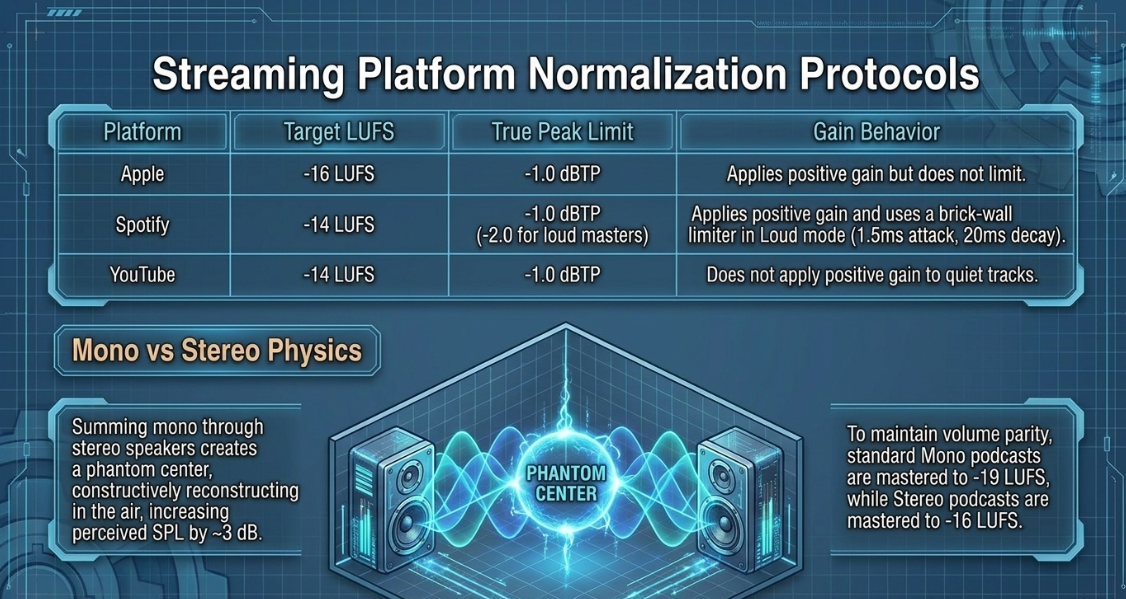
This architecture is essential for implementing sidechain compression (ducking)47. In narrative podcasts, background music must recede when a voiceover begins, then swell back to its natural volume during conversational gaps68. Manual volume automation of long sections is highly time-consuming69. Sidechain ducking automates this behavior dynamically68:
A pre-fader auxiliary send is established on the Dialogue Bus, routing a copy of the vocal signal to the auxiliary sidechain (S/C) input of a compressor placed on the Music Bus69.
The music compressor's detection circuit is configured to monitor this auxiliary input instead of the music signal itself69.
When the speaker talks, the vocal signal triggers the music compressor, which immediately attenuates (ducks) the music bed by a set amount (typically )54.
A fast compressor attack time (~10 ms) is used to ensure the music attenuates the moment the first syllable is spoken55.
This is combined with a slow release time () to prevent the music from pumping or swelling abruptly during brief pauses between words16.
Spatial Audio and Dolby Atmos
Spatial audio represents a major evolution in immersive podcast storytelling, shifting the field from a standard flat stereo stage to a multidimensional sound field70.
Unlike traditional channel-based panning (where sounds are assigned directly to the left or right channels), Dolby Atmos operates on an object-based platform72. Sounds are designated as audio "objects" and positioned in a virtual 3D space using coordinates () representing width, depth, and height73. This metadata allows the renderer to dynamically scale the audio placement to match the listener's hardware72.
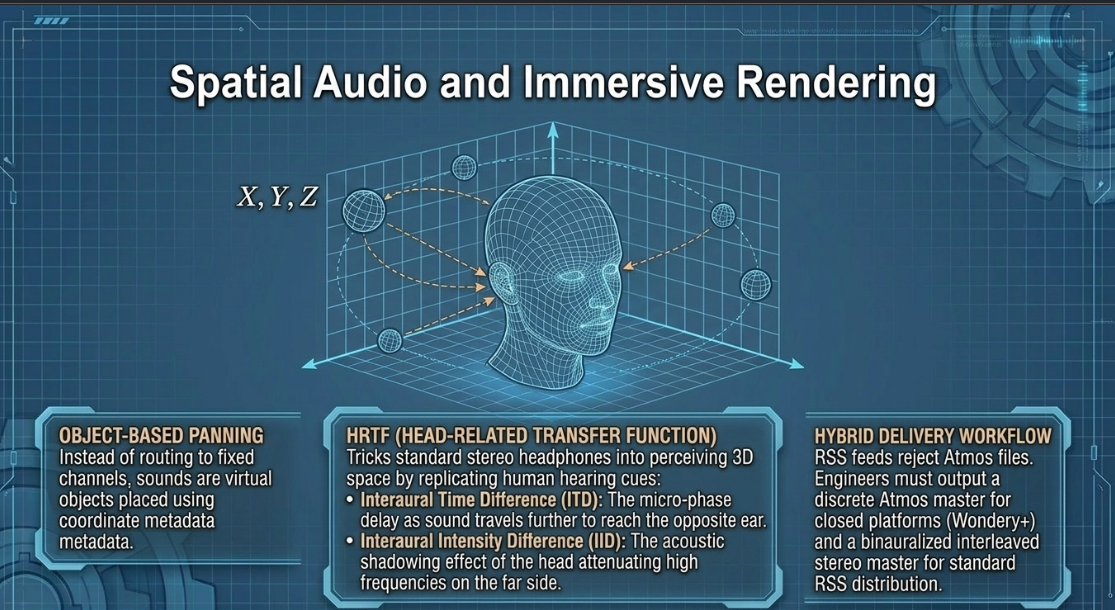
Because the vast majority of podcast consumption occurs over standard headphones, Dolby Atmos uses Head-Related Transfer Function (HRTF) binauralization algorithms to replicate 3D space71. Human hearing locates sounds in three dimensions by analyzing the differences in sound arrival time and volume between both ears71:
Interaural Time Difference (ITD): The phase delay resulting from sound waves traveling different path lengths to reach each ear71.
Interaural Intensity Difference (IID): The acoustic shadowing effect of the head, which attenuates high frequencies on the side opposite the sound source71.
HRTF algorithms filter monophonic audio signals to recreate these precise temporal, spectral, and level cues, allowing the listener to perceive sound sources moving behind, above, or whispering beside them over standard stereo headphones71.
At present, distribution channels present a clear bottleneck73. High-resolution multi-channel formats like Dolby Atmos are not supported by the standard RSS feeds utilized by traditional podcatchers like Spotify or Apple Podcasts17. Immersive Dolby Atmos delivery is currently restricted to dedicated, closed subscription networks (such as Wondery+ and Audible) that host Atmos files natively on compatible hardware72.
To resolve this distribution barrier, spatial audio engineers must maintain a hybrid, dual-delivery mastering workflow71:
Discrete Dolby Atmos Master: Authored using a multi-channel configuration (typically a 7.1.2 bed plus object beds) for direct integration into closed streaming apps like Wondery+71.
Binauralized Stereo Master: Formatted as a standard two-channel stereo interleaved file, with the 3D HRTF panning baked directly into the stereo audio71. This file is delivered via traditional RSS feeds to standard platforms, ensuring that all headphone users can experience the immersive 3D spatial field without requiring specialized hardware or application decoders71.
Works cited
Podcast Loudness Standards 2026: Spotify, Apple, YouTube Requirements, https://sone.app/blog/podcast-loudness-standards-2026-spotify-apple-youtube
Podcast Loudness Standard: Perfecting Your Sound in 2026 - Descript, https://www.descript.com/blog/article/podcast-loudness-standard-getting-the-right-volume
LUFS In Audio Explained: What You Need to Know - Production Music Live, https://www.productionmusiclive.com/blogs/news/what-is-lufs
Apple Podcast Audio Standards: Bit Rate, LUFS & Compliance Guide (2026), https://www.latenightim.com/apple-podcast-audio-standards/
The Loudness Lookup - LUFS Standards for Every Platform - Dan Murtagh, https://danmurtagh.com/lufs-loudness-standards/
LUFS Meter — Broadcast Loudness Measurement - Studio Six Digital, https://studiosixdigital.com/lufs-meter/
Several Things About Loudness | Audiokinetic, https://www.audiokinetic.com/fr/community/blog/about-loudness/
Mastering Loudness Targets for Streaming: Spotify, Tidal, Apple Music and More - Mat Leffler-Schulman, https://matlefflerschulman.com/mastering-articles/loudness-targets-and-mastering-for-streaming-platforms
Loudness metering – MiRA, https://doc.flux.audio/mira/Metering_Loudness.html
Recommendation ITU-R BS.1770-5 (11/2023) Algorithms to measure audio programme loudness and true-peak audio level, https://www.itu.int/dms_pubrec/itu-r/rec/bs/R-REC-BS.1770-5-202311-I!!PDF-E.pdf
Loudness Basics - AES - Audio Engineering Society, https://aes.org/resources/audio-topics/loudness-project/loudness-basics/
Loudness Units 101 - MeterPlugs, https://www.meterplugs.com/blog/2016/09/25/loudness-units-101.html
RECOMMENDATION ITU-R BS.1770-2 - Algorithms to measure audio programme loudness and true-peak audio level, https://www.itu.int/dms_pubrec/itu-r/rec/bs/R-REC-BS.1770-2-201103-S%21%21PDF-E.pdf
ITU-R BS.1770 Revisited, http://magnetic.beep.pl/Loudness/Lund_BS1770_revisited.pdf
Loudness normalization on Spotify, https://support.spotify.com/us/artists/article/loudness-normalization/
Audio requirements - Apple Podcasts for Creators, https://podcasters.apple.com/support/893-audio-requirements
2026 LUFS targets per platform — cheat sheet - Fora Soft, https://www.forasoft.com/learn/downloads/lufs-targets-per-platform-cheatsheet
Part 1: General Audio Terms - The Self-Recording Band, https://theselfrecordingband.com/general-audio-terms/
Export MP3 settings - Podcasting - Audacity Forum, https://forum.audacityteam.org/t/export-mp3-settings/63047
The basics about comb filtering (and how to avoid it) - DPA Microphones, https://www.dpamicrophones.com/mic-university/audio-production/the-basics-about-comb-filtering-and-how-to-avoid-it/
Managing Multi Microphone Phase Issues in Round Table Video Podcasts, https://www.podcastvideos.com/managing-multi-microphone-phase-issues-in-round-table-video-podcasts/
Multitrack Clarity Redefined: Introducing our new Mic Bleed Remover - Auphonic, https://auphonic.com/blog/2025/10/08/mic-bleed-remover/
Phase Alignment: Guide to Polarity, Time & Phase Correction - MasteringBOX, https://www.masteringbox.com/learn/phase-alignment-polarity-time-correction
Working With Mic Bleed - Sound On Sound, https://www.soundonsound.com/techniques/working-mic-bleed
Advice on reducing mic bleed/spill for podcast with multiple people - Reddit, https://www.reddit.com/r/audioengineering/comments/ol5ywt/advice_on_reducing_mic_bleedspill_for_podcast/
Dugan Automatic Microphone Mixers, https://www.dandugan.com/products/
DUGAN-MY16 - Overview - Interfaces - Products - Audio - Yamaha - Business - UK and Ireland, https://uk.yamaha.com/en/business/audio/products/interfaces/dugan-my16/
Don't understand Dan Dugan Automix Working principle : r/livesound - Reddit, https://www.reddit.com/r/livesound/comments/1go4lm3/dont_understand_dan_dugan_automix_working/
Remote Recording Platforms vs. In-Studio Sessions: A Technical Latency Analysis and London Studio Ecosystem Report - Finchley Studios, https://www.finchley.co.uk/finchley-learning/visual-podcast/remote-recording-platforms-vs-in-studio-sessions-a-technical-latency-analysis-and-london-studio-ecosystem-report
Double ender pod and I'm still having audio drift issues. Even with Riverside. Please help..losing my mind. : r/podcasting - Reddit, https://www.reddit.com/r/podcasting/comments/199i7fl/double_ender_pod_and_im_still_having_audio_drift/
What is Audio Drift?. & Why it's Terrible for Podcasts | by Zachariah Moreno | SquadCast, https://medium.com/squadcast-fm/what-is-audio-drift-1715dda7a89b
The Complete Guide to Recording Podcasts Remotely, https://blog.podcast.co/create/record-podcasts-remotely
How I Record Remote Podcasts (Best Tools & Settings for 2026) - Buzzsprout, https://www.buzzsprout.com/blog/record-podcast-remotely
Double-Ender Recording for Podcasting with Remote Guests - Riverside, https://riverside.com/blog/double-ender-recording
Remote podcasters/double ender podcasts - PLEASE HELP. Can't figure this issue out for the life of me! - Reddit, https://www.reddit.com/r/podcasting/comments/12p1zol/remote_podcastersdouble_ender_podcasts_please/
How to Fix Audio Sync Issues in Video Podcasts (2026 Guide), https://www.podcaststudioglasgow.com/podcast-studio-glasgow-blog/how-to-fix-audio-sync-issues-in-video-podcasts
PLEASE HELP how can i fix mismatched Audio? : r/podcasts - Reddit, https://www.reddit.com/r/podcasts/comments/6xa1kc/please_help_how_can_i_fix_mismatched_audio/
Audio Sync Drifts When Recording Podcast - Adobe Community, https://community.adobe.com/questions-544/audio-sync-drifts-when-recording-podcast-157795
Riverside recording gets very "meh" when two people talk at the same time.... - Reddit, https://www.reddit.com/r/podcasting/comments/1rkm5vw/riverside_recording_gets_very_meh_when_two_people/
ZenCastr - Issues with overlapping vocals when merged for editing : r/podcasting - Reddit, https://www.reddit.com/r/podcasting/comments/ezdk5d/zencastr_issues_with_overlapping_vocals_when/
I've ruined 2 interviews now because of Zencastr's audio drift / crackling issue. What are the alternatives? : r/podcasting - Reddit, https://www.reddit.com/r/podcasting/comments/8b5bds/ive_ruined_2_interviews_now_because_of_zencastrs/
Podcast Post-Production: Why It Matters More Than You Think, https://flexworkstudios.com/podcast-post-production/
5 Tips for Noise Removal with RX Elements - iZotope, https://www.izotope.com/community/blog/tips-for-noise-removal-rx-elements
De-Essing for Podcasting | Podigy, https://www.podigy.co/de-essing-for-podcasts
The Basics of De-Essing Vocals in Your Mix | AutoTune, https://www.antarestech.com/blog/the-basics-of-de-essing-vocals-in-your-mix
Audio Mixing Techniques for Pro-Level Podcasts & Video, https://flexworkstudios.com/audio-mixing-techniques/
How to Remove Mouth Noise in Voice Over or Podcast Audio p.3, https://www.bryanhurtaudio.com/blog/remove-mouth-noise-voice-over-podcast-rx-3
Audio Compression and EQ for Podcasters | Enhance Your Sound — Listen2It Blog, https://www.getlisten2it.com/blog/audio-compression-and-eq-for-podcasters-enhance-your-sound
How To EQ Vocals and De-Essing Techniques! - Cymatics, https://cymatics.fm/blogs/production/how-to-eq-vocals
I thought Izotope RX Mouth De-Click was working a little TOO well. But then I realized something... : r/audioengineering - Reddit, https://www.reddit.com/r/audioengineering/comments/o1lr7x/i_thought_izotope_rx_mouth_declick_was_working_a/
Industry-standard audio repair and post production with RX 12 Advanced - iZotope, https://www.izotope.com/products/rx-advanced
Understanding Audio Metering for Professional Mixing and Mastering in 2026, https://www.podcastvideos.com/audio-metering-guide-mixing-mastering-2026/
Advanced Podcast Editing Techniques for Professional Sound - Wavve.co, https://wavve.co/advanced-podcast-editing-techniques-for-professional-sound/
A Guide to Audio Processing and FX For Podcasting (GB) - RØDE, https://rode.com/en-gb/about/news-info/a-guide-to-audio-processing-and-fx-for-podcasting
Audio post-production: a complete guide to professional sound - LucidLink, https://www.lucidlink.com/blog/audio-post-production
Best Podcast Software in 2026 and How to Pick the Right One for Your Show - Designrr, https://designrr.io/best-podcast-software/
The Ultimate Guide to Podcast Editing Software, https://thepodcastconsultant.com/blog/podcast-editing-software
Comparing Top Podcast Recording and Editing Software: Audacity, Hindenburg, Reaper, Adobe Audition, Pro Tools, Descript | GoTranscript, https://gotranscript.com/public/comparing-top-podcast-recording-and-editing-software-audacity-hindenburg-reaper-adobe-audition-pro-tools-descript
The Best Digital Audio Workstations (DAWs) for 2026 - PCMag UK, https://uk.pcmag.com/recording/91889/the-best-audio-editing-software-for-2020
Hindenburg vs. Reaper and others : r/podcasting - Reddit, https://www.reddit.com/r/podcasting/comments/197s4qr/hindenburg_vs_reaper_and_others/
Best Podcast Editing Software 2026: From DAW to AI Editors - Cleanvoice AI, https://cleanvoice.ai/blog/podcast-editing-software-stack/
How To Use Izotope RX's Spectral De-noise to clean up noisy podcast recordings., https://www.youtube.com/watch?v=ycpZlvm0v6Y
How AI Can Help Your Podcast Production - The Podcast Studio Glasgow, https://www.podcaststudioglasgow.com/podcast-studio-glasgow-blog/how-ai-can-help-your-podcast-production
Master Your Podcast Production Workflow - Fame.so, https://www.fame.so/post/podcast-production-workflow
Descript – AI Video & Podcast Editor | Free, Online, https://www.descript.com/
Top 10 Best Ai Podcast Software – 2026 Buyer's Guide - Worldmetrics, https://worldmetrics.org/best/ai-podcast-software/
Sidechain Compression Duck Music w/Voice Over (Sidechaining) - YouTube, https://www.youtube.com/watch?v=A75rS9oXOeM
Sound Quality Saturday: What Is Side-Chain Compression (Ducking) & How Do You Use It? : r/podcasting - Reddit, https://www.reddit.com/r/podcasting/comments/ntacv6/sound_quality_saturday_what_is_sidechain/
Beyond Stereo: The Dolby Atmos Podcast, https://podcasts.apple.com/au/podcast/beyond-stereo-the-dolby-atmos-podcast/id1775926496
Dolby Atmos Podcast - immersive audio - Spatial Mastering, https://www.spatialmastering.co.uk/services/dolby-atmos-podcast
Wondery Podcasts in Dolby Atmos, https://www.dolby.com/experience/wondery/
Would anyone actually want more immersive/spatial audio in audio dramas? : r/audiodrama - Reddit, https://www.reddit.com/r/audiodrama/comments/1tmbv7j/would_anyone_actually_want_more_immersivespatial/
Immersive Audio Podcast, https://podcasts.apple.com/gb/podcast/immersive-audio-podcast/id1360242294
Spatial Audio Podcasts: The Ultimate Content Overview - VRTONUNG, https://www.vrtonung.de/en/spatial-audio-podcast-story-ultimate-content-overview/














