

Theoretical Signal Foundations and Wave Physics
The acoustic landscape of modern spoken-word audio post-production has evolved from simple level adjustments into a highly calibrated field of signal processing1. At the core of advanced dialogue enhancement and spatial design lies the manipulation of phase relationships2. When combining multiple correlated waveforms, the relative alignment of their peaks and troughs dictates whether the signals reinforce or destroy one another4.
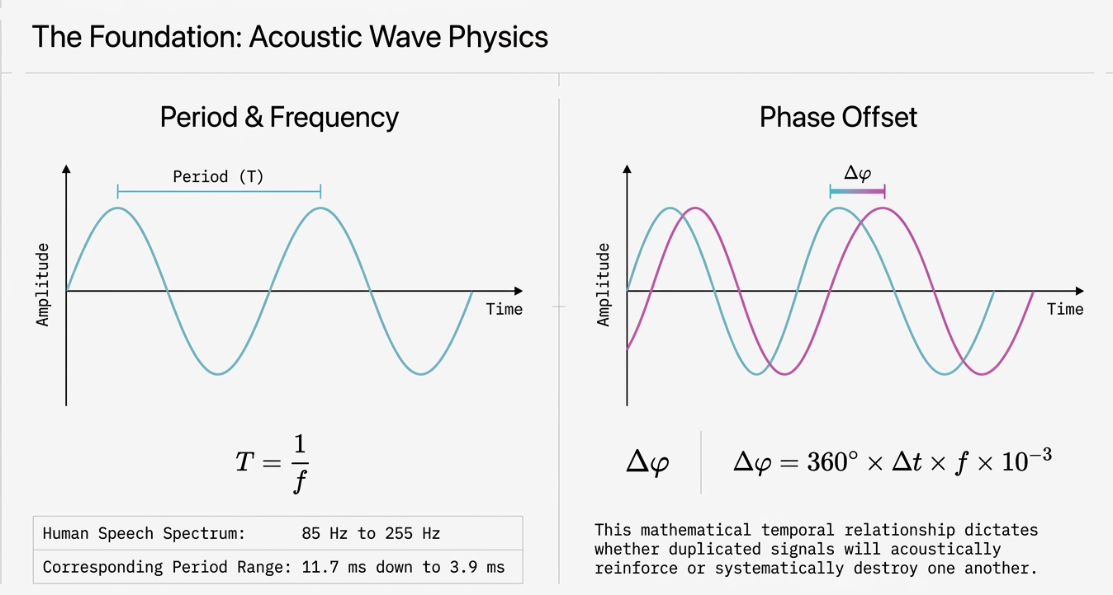
Mathematically, the period of a given frequency represents the time required to complete one full sinusoidal cycle:
For the human audible spectrum ( to ), this period ranges from down to 6. When a primary signal is combined with a time-delayed replica, the resulting phase offset (in degrees) is directly proportional to both the delay time (in milliseconds) and the frequency (in Hertz)6:
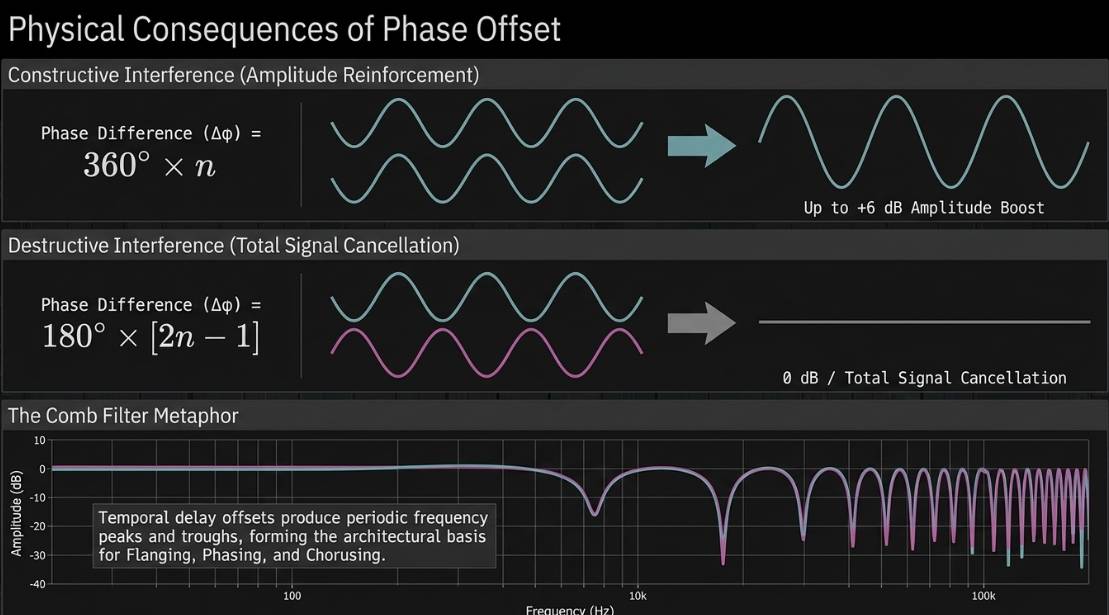
Constructive interference occurs when the phase difference is a multiple of a full cycle (), yielding an amplitude reinforcement of up to 5. Destructive interference occurs when the phase difference is exactly a half-cycle out-of-phase (), resulting in complete signal cancellation if the amplitudes are equal3.
This temporal offset produces a phenomenon known as comb filtering, characterized by a series of periodic peaks and troughs across the frequency spectrum resembling the teeth of a comb4. The spatial and tonal variations generated by comb filtering form the mathematical basis for modulation effects such as flanging, phasing, and chorusing2.
The history of modulation in audio post-production is rooted in physical and electromechanical innovations. The very first standalone effect unit, the DeArmond Tremolo Control of 1946, modulated signal amplitude using an LFO to fluctuate electrical conductivity8. Shortly thereafter, Leslie rotating speaker cabinets utilized physical rotation of a horn to generate acoustic Doppler modulation, shifting phase, pitch, and amplitude concurrently8.
In 1968, Fumio Mieda invented the Univibe, utilizing photoresistors and an LFO to simulate the shifting phase relationships of radio waves bouncing off the atmosphere8. This electromechanical heritage translates directly into modern digital signal processing (DSP) algorithms, where engineers manipulate phase, time, and amplitude to achieve targeted voice design9.
Comprehensive Parameter Typology of Modulation Tools
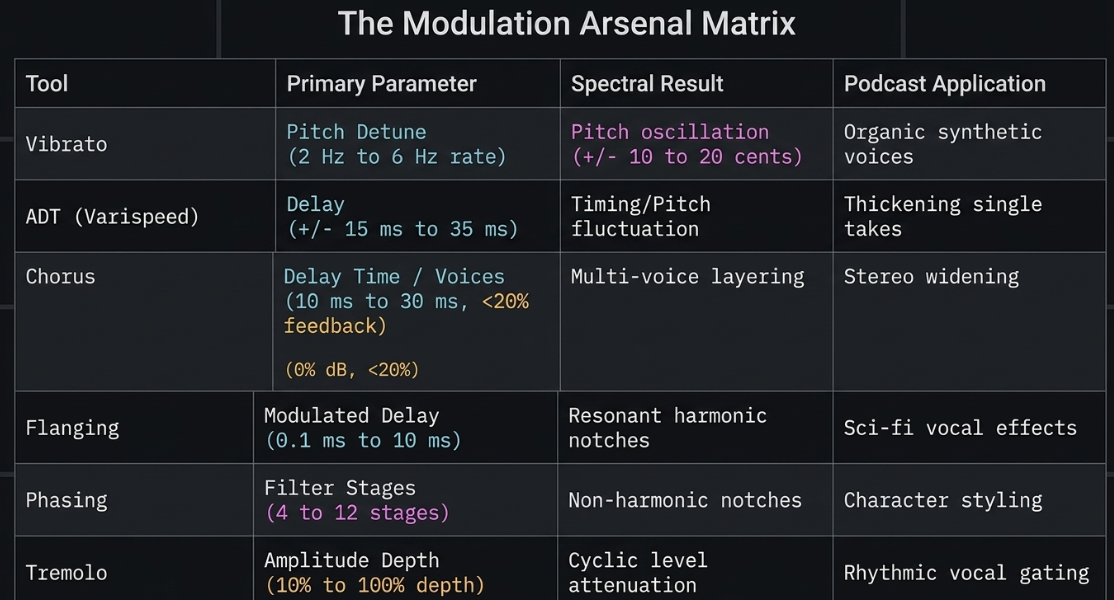
Modulation effects systematically alter one or more properties of a carrier waveform over time2. In professional dialogue processing, these tools are deployed to alter the timbre, spatial width, and perceived texture of speech9. A detailed breakdown of these tools, their specific parameter limits, and their acoustic behaviors is essential for precise post-production4.
Vibrato
Vibrato is a frequency-modulation effect that systematically alters the pitch of an audio signal over time using a Low-Frequency Oscillator (LFO)2. Unlike chorus or flanging, vibrato processes only a single signal path without mixing a dry reference signal back into the output2. The core parameters governing vibrato are rate (the frequency of the LFO, typically measured in Hertz) and depth (the range of the pitch variation, measured in cents or semitones)2.
In spoken-word post-production, vibrato is used to introduce subtle organic instability to static synthetic voices, preventing ear fatigue2. Natural vocal vibrato generally sits within a depth range of to of amplitude fluctuation if coupled with tremolo, and small pitch fluctuations around to 9. If modulated too quickly, vibrato creates an unnatural warbling or jittery artifact, whereas slow rates provide a gentle drift that can enhance dramatic delivery9.
Automatic Double Tracking (ADT)
Created in 1966 by Abbey Road Studios' technical director Ken Townsend to satisfy the aesthetic preferences of the Beatles, Automatic Double Tracking (ADT) simulates the sound of a performer recording the same performance twice15. Historically, ADT was achieved by routing a primary tape machine's recording head signal to a secondary tape machine17. By manually adjusting the speed of the second machine using a variable frequency oscillator (Varispeed), the engineer introduced shifting delay and pitch variations16.
In modern digital workstations, professional ADT emulations—such as Waves Reel ADT—model two separate virtual tape decks with discrete controls for saturation, wow and flutter, and pitch fluctuations16. A defining technical characteristic of authentic ADT is its ability to create both positive and negative delay times, meaning the artificial double can sometimes precede the source signal18.
For dialogue processing, ADT is configured with delay times starting at the upper threshold of chorusing ( to ) to avoid comb filtering and instead produce a distinct, thick double that mirrors human timing and pitch inaccuracies15.
Chorus
The chorus effect mimics the acoustic phenomenon that occurs when multiple vocalists sing the same note in unison but vary slightly in their exact pitch and timing2. This is achieved by splitting the input signal, sending one or more copies through short delay lines (typically to ), modulating those delay times with an LFO, and detuning the copies by a small percentage (usually to )4.
For mono podcast vocal tracks, applying a stereo chorus can introduce a sense of spaciousness9. The timing variances cause a shifting phase relationship, which expands the mono signal across the stereo field4. When configuring a chorus for dialogue, low feedback settings (under ) are required to maintain clarity; higher feedback percentages inject a ringing or metallic resonance that obscures speech intelligibility9.
Flanging
Flanging splits the input signal into two identical paths, delaying one path by a very short, modulated interval (typically to )2. The terminology originates from the physical action of pressing a finger against the outer flange of a tape reel to momentarily slow it down2.
Because the delay time is shorter than the human ear's integration threshold for discrete echoes, the combined signals produce an intense comb filtering effect2. The LFO modulation sweeps these notches up and down the frequency spectrum, creating a dramatic, metallic swooshing sound4.
In voice processing, flanging must be used with high-frequency high-pass filtering on the wet path; otherwise, the shifting low-mid notches can cause voices to sound hollow21.
Phasing
A phaser splits the input signal and passes one path through a series of all-pass filters2. Unlike delay-based processors, all-pass filters do not delay the entire signal uniformly4. Instead, they shift the phase of specific frequencies by varying degrees based on the circuit design or digital algorithm4. When the phase-shifted signal is combined with the dry signal, a limited and controllable number of frequency notches are created7.
The number of all-pass filters in series determines the "stages" of the phaser; a 4-stage phaser will create fewer notches than a 12-stage phaser7. Because the frequency notches in a phaser are spaced non-linearly and are determined by the filter design, the resulting sweep is smoother, more subtle, and less metallic than a flanger2.
For voiceovers, phasing can add movement and texture to a vocal track without the aggressive frequency cancellations associated with delay-based comb filtering2.
Tremolo
Tremolo is an amplitude-modulation effect that cyclically varies the volume of an audio signal using an LFO2. The effect is defined by two primary parameters: rate (the frequency of the volume sweeps) and depth (the amount of volume reduction applied at the trough of the LFO wave)10.
Historically, analog tremolo was achieved using opto-isolators (where an LFO modulates a light source directed at a light-dependent resistor) or bias modulation (where the LFO fluctuates the bias voltage of a tube or transistor)10.
In dialogue post-production, tremolo can be used for rhythmic gating or to create stylized vocal textures10. When applied to speech, the LFO shape is highly critical; a smooth sine or triangle wave yields a gentle, rolling wave, while a square wave creates a sharp, stuttered on/off effect10.
Tool-Specific Implementation in Professional DAWs
Practical application of these theories requires an understanding of specific stock and third-party tools within modern digital audio workstations (DAWs)1.
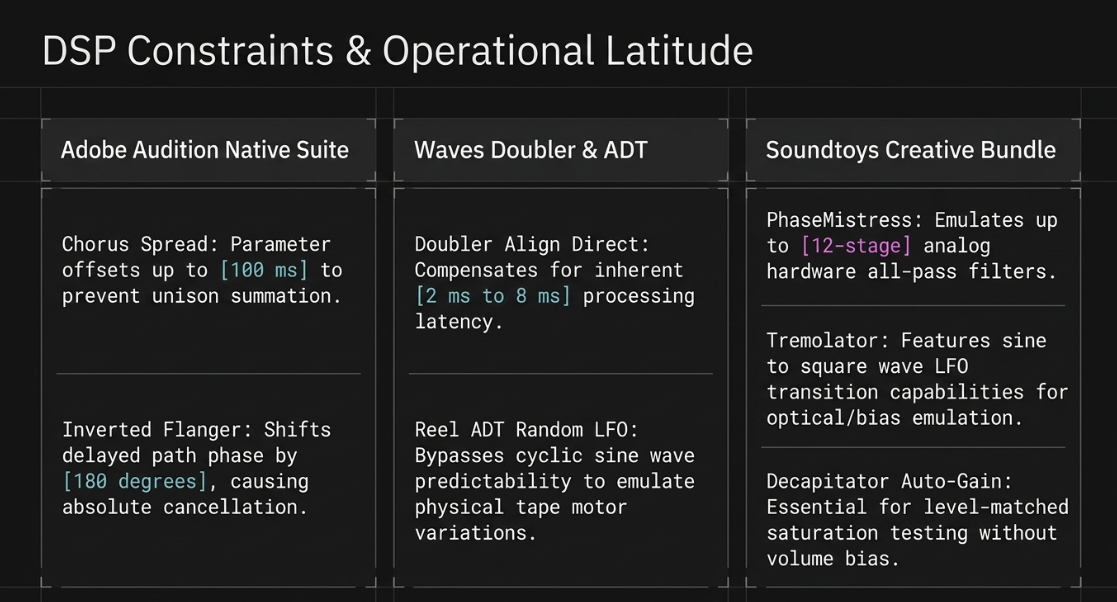
Adobe Audition Native Modulation Suite
Adobe Audition provides a robust stock suite of modulation processors optimized for dialogue and sound design9.
Chorus Effect: Utilizes a direct-simulation method where each simulated voice is processed independently, varying in timing, intonation, and vibrato9. The Voices control determines the density of the simulated crowd, with higher numbers increasing CPU overhead9. The Spread parameter introduces an additional offset of up to , separating voice onsets to prevent unison summation9. For mono voice files, engineers must convert the track to stereo before applying the effect to enable the Stereo Field parameters9. At , voices are placed evenly; higher settings push the processed paths to the hard outer limits25.
Flanger Effect: Features three operational modes: Mix, Delayed (which produces a wavering tape-recorder speed effect), and Inverted9. The Inverted mode shifts the phase of the delayed path by , causing absolute frequency cancellation when the delay cycles through 9. Key parameters include Transience (which sharpens transient attacks) and Stereo Phasing (delays left and right channels at separate phase values, e.g., for a circular effect)25.
Phaser Effect: Offers customizable Stages to control the number of active all-pass filters25. The Depth control determines how far the filters sweep below the upper frequency limit; a setting sweeps the notches all the way to 25.
Waves Doubler and Reel ADT Architecture
Waves plugins are industry standards for adding control and character to spoken-word recordings27.
Waves Doubler: Allows the generation of up to four virtual voices from a single source14. Each control strip features independent Gain, Pan, Delay, and Detune controls14. A critical parameter is Align Direct14. When enabled, this control delays the dry signal to match the plugin's inherent processing latency (which varies from in the range to in the range), allowing a relative delay of between dry and wet paths14. The Range setting should be locked to for lead vocals to minimize latency14.
Abbey Road Reel ADT: Replicates the physical behavior of Ken Townsend’s tape setup16. It features separate drive controls for both the source (SRC) and double (TRK) paths, allowing independent tape saturation16. The Varispeed LFO can be set to Random, which avoids the cyclic predictability of typical sine/triangle wave LFOs, mimicking human performance variation18.
Soundtoys Creative Modulation Bundle
The Soundtoys catalog is highly favored in creative post-production for its emphasis on analog character and deep parameter editing26.
PhaseMistress: Emulates classic analog hardware phase shifters, including the Mu-Tron Bi-Phase, Boss Super Phaser, MXR Phase 90, and Moogerfooger 12-Stage23. It combines high-resonance sweep controls with adjustable saturation parameters31.
Tremolator: Recreates the optical and bias-style amplitude modulation of classic guitar amplifiers and keyboards23. Under the hood, it features custom LFO editors and rhythmic gating patterns, making it highly versatile for creative dialogue design23.
Decapitator: While technically a saturation processor, it is frequently chained with modulation effects to add organic weight to voice tracks33. It models five classic hardware preamps (including the Ampex 350 tape preamp and EMI TG console) and features an Auto-Gain compensation switch to allow level-matched comparisons as saturation is pushed34.
Creative Voice Design and Advanced Dialogue Post-Production
The creative application of modulation tools in podcast post-production serves to shape narrative impact, construct imaginary acoustic spaces, and design unique vocal identities1. In narrative or dramatic podcasts, dialogue must maintain absolute supremacy while coexisting with sound design and music beds1.
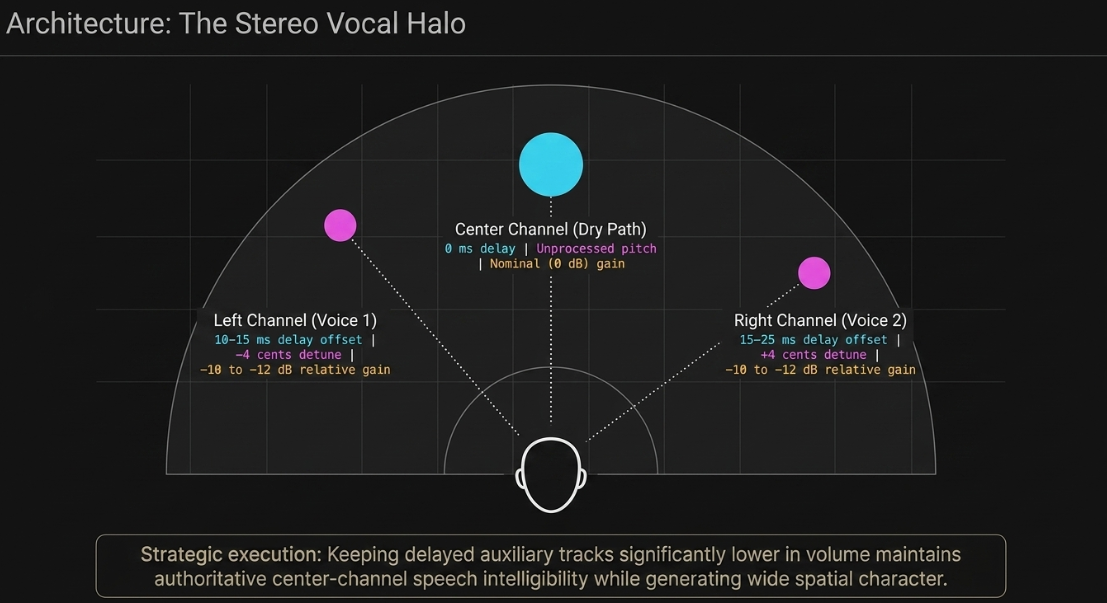
Vocal Thickening and Widening Strategies
A primary challenge in mixing a single, close-mic'ed voice is making it sound full and authoritative without cluttering the center channel41. A classic DIY widening technique involves routing the dry, mono dialogue track to a stereo auxiliary send configured with a multi-voice pitch shifter and delay14.
This configuration spreads the vocal image across the stereo field using micro-pitch differences and short delays, creating a supportive "halo" around the dry vocal43. By keeping the delayed tracks significantly lower in volume ( or lower), the lead voice remains anchored in the center of the mix while acquiring a polished, wide character44.
Special Character Design: Sci-Fi, Robots, and Aliens
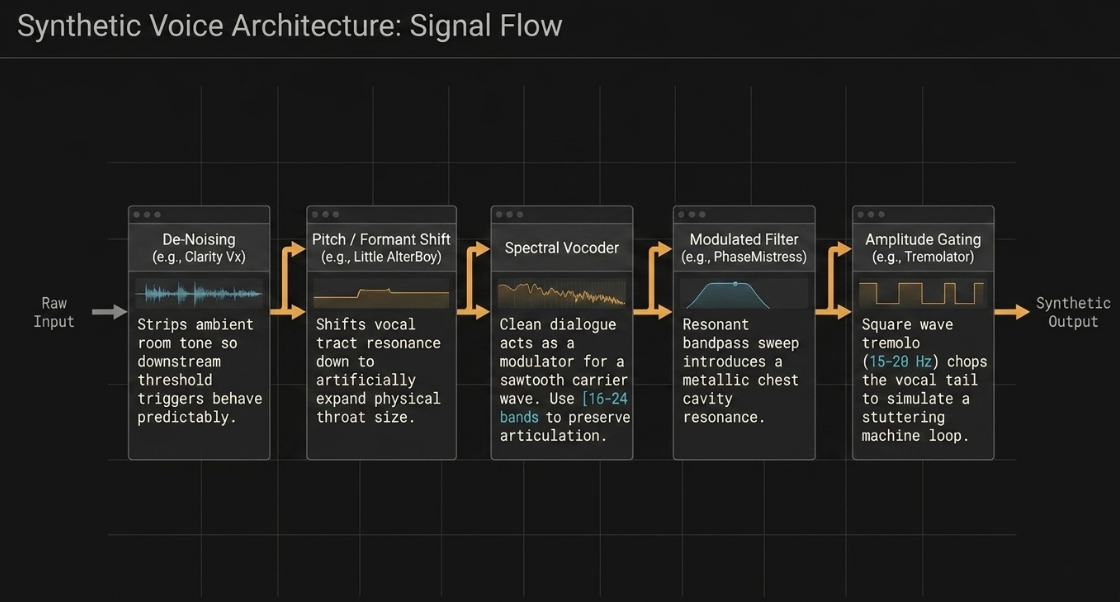
When designing voices for sci-fi or fantasy narrative podcasts, modulation effects are chained to strip away the human characteristics of the recording and introduce synthetic textures12.
Before applying modulation, the raw voice must be isolated from ambient room tone and sibilance27. AI-driven tools, such as Waves Clarity Vx and Clarity Vx DeReverb, are inserted at the front of the chain to remove environmental reflections and noise27. This is followed by automatic level riding (using Waves Vocal Rider or Playlist Rider) to establish a consistent signal, ensuring that subsequent threshold-dependent modulation and vocoding triggers behave predictably28.
Raw Speech Input
│
▼
┌──────────────┐
│ De-Noising │ (Clarity Vx / NS1) [cite: 27, 28, 47]
└──────┬───────┘
│
▼
┌──────────────┐
│ Pitch/Form │ (Little AlterBoy: Formant shifting alters vocal tract resonance)
│ Shifter │
└──────┬───────┘
│
▼
┌──────────────┐ Carrier Signal (Pulse / Sawtooth Wave)
│ Vocoder │ ◄─── Input
└──────┬───────┘
│
▼
┌──────────────┐
│ Modulated │ (PhaseMistress / FilterFreak: Dynamic resonant sweep) [cite: 32, 52]
│ Filter │
└──────┬───────┘
│
▼
┌──────────────┐ Modulated Volume (Sine/Triangle LFO)
│ Tremolator │ ◄─── 6 Hz to 12 Hz amplitude modulation [cite: 10, 53]
└──────┬───────┘
│
▼
Processed Character Voice
Formant Shifting: Little AlterBoy processes the isolated voice, adjusting the vocal tract formant resonance down to expand the physical throat size of the character12.
Spectral Vocoding: The clean dialogue acts as a modulator, controlling the frequency bands of a synthesized carrier signal (such as a harsh sawtooth or rich harmonic pulse wave)12. High-frequency articulation is preserved by utilizing to bands46.
Resonant Bandpass Sweeping: The vocoded output is routed through a modulated filter (such as Soundtoys FilterFreak), where resonant frequencies are driven to create a metallic chest cavity resonance52.
Amplitude Gating: Applying a rapid tremolo (using Soundtoys Tremolator) with a square or sharp triangle wave at a rate of to chops the vocal tail, simulating a stuttering machine processing loop32.
The "Voice of God" Production Chain
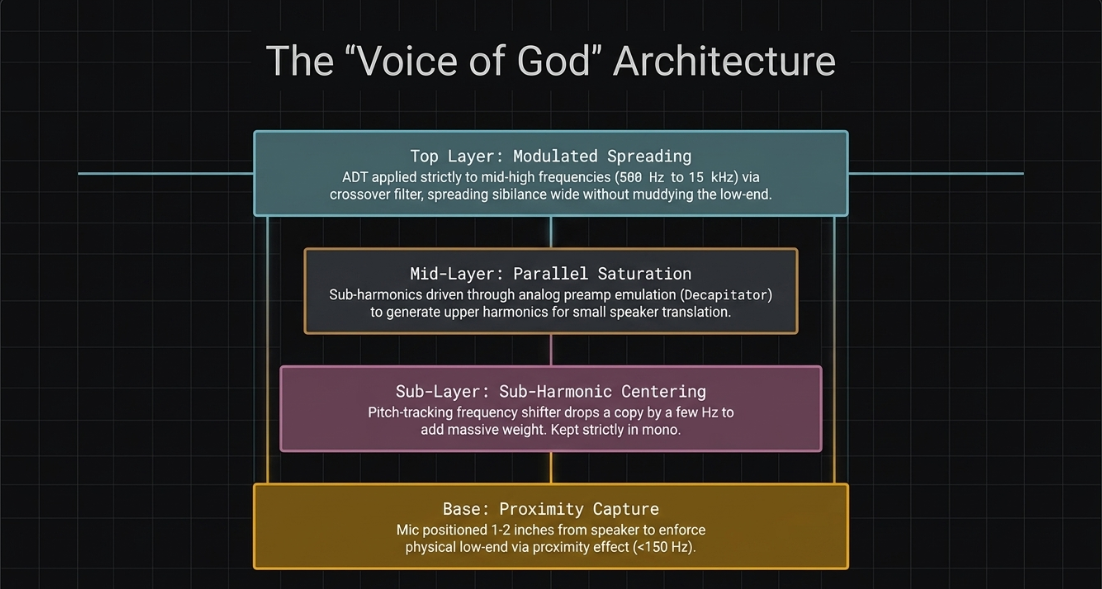
The "Voice of God" effect is a high-impact, commanding vocal style used for cinematic introductions, dramatic transitions, and authoritative narration54. It is designed by emphasizing extreme low-end weight while maintaining high-frequency clarity41.
Proximity Capture: A dynamic or ribbon microphone is positioned extremely close ( to ) to the speaker's mouth to maximize the physical proximity effect, naturally boosting frequencies below 41.
Frequency Shifting & Sub-Harmonic Synthesis: A parallel auxiliary track is established with a pitch-tracking frequency shifter57. Shifting a copy of the voice down by a few Hertz allows the new sub-harmonic components to align with the original vocal harmonics, adding a deep chest resonance without the mud of a standard pitch-shifter57.
Parallel Saturation: The parallel sub-harmonic track is driven through an analog preamp emulation (such as Soundtoys Decapitator set to Style "A" or "E") to generate rich mid-range harmonics, helping the low-end cut through on consumer devices34.
Modulated Spreading: An ADT or micro-shift effect is applied only to the mid-high frequencies ( to ) using a crossover or focus filter58. This keeps the sub-bass completely centered and mono-compatible while spreading the vocal sibilance and air across the far edges of the stereo field21.
The Mono-Compatibility Mandate in Modern Post-Production
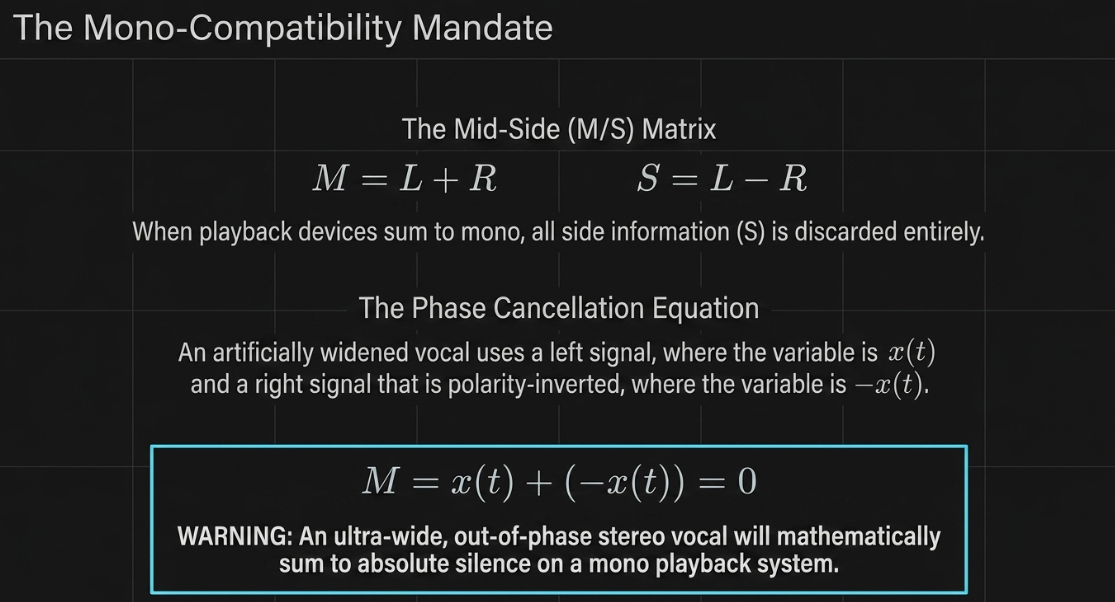
Despite the ubiquity of stereo consumer headphones, a significant portion of podcast consumption occurs on mono-summed or co-located speaker systems, including smart home assistants, mobile phone speakers, public address systems, and Bluetooth devices60. If a stereo mix is not mono-compatible, collapsing the left and right channels into a single mono sum can cause severe phase cancellation, leading to thin dialogue, missing music tracks, or complete vocal disappearance5.
The Mid-Side (M/S) Matrix and Summing Physics
Stereo audio can be mathematically represented via the Mid-Side (M/S) matrix, where the Mid () channel represents the sum of the left () and right () channels, and the Side () channel represents the difference between them:
When a playback system sums a stereo signal to mono, the side information () is canceled out60. If an engineer creates a wide stereo vocal by duplicating a mono track, panning the copies hard left and right, and inverting the polarity of one channel, the signal on the left is and the signal on the right is 3. In stereo, this creates an extremely wide soundstage3. However, the mono sum is:
The entire vocal track vanishes from the mono playback system3.
Real-World Summing Anomalies
Modern playback devices impose unique physical and digital constraints that post-production engineers must anticipate60.
Smartphones and Tablets: When a smartphone (such as an iPhone) is held vertically, the internal DSP typically sums the stereo audio to a single mono output62. When rotated horizontally, it switches to stereo playback, introducing phase shifts and acoustic summing based on speaker proximity62.
Bluetooth Speakers: Units such as the JBL Charge series are physically so small that the physical separation of the speakers is negligible62. The listener's ears perceive acoustic summing that approximates an electronic mono sum61.
FM Radio and Broadcast Streams: FM radio transmitters are stereo when signals are strong, but dynamically blend to mono in weak signal areas or in the presence of severe multipath interference62. If the podcast contains critical dialogue that relies on out-of-phase stereo widening, the listener will hear the voice drop below the music bed during weak reception60.
Common Compatibility Issues with Modulation Effects
Modulation effects inherently rely on changing phase relationships to generate width and motion60.
Chorus: Shifting delays between the left and right channels result in dynamic comb filtering when summed to mono60. Frequencies whose phase offsets approach are attenuated, causing the voice to sound hollow or boxy60.
Flangers and Phasers: Inverted-mode flangers split the signal and invert the polarity of the delayed channel to widen the image9. Upon mono summing, the delayed signals cancel the original signal at specific frequency points, causing deep, oscillating volume drops and a loss of vocal presence9.
Haas-Effect Delays: Delaying one channel by to to create stereo width causes severe static comb filtering in mono6. Key vocal frequencies (such as the presence band around ) can fall into destructive notches, destroying speech intelligibility6.
Diagnostics and Calibration
To prevent phase-summing issues, engineers use hardware or software diagnostic tools throughout the post-production pipeline60.
Fully In-Phase Uncorrelated Stereo Fully Out-of-Phase
[ +1 ] ───────────────────── [ 0 ] ───────────────────── [ -1 ]
▲ ▲ ▲
│ │ │
Center Vocal Anchored Wide Reverb/FX Stays Catastrophic Phase
Perfect Mono Sum Acceptable Mono Sum Summing Cancellation
Correlation Meter: Measures the phase relationship between the left and right channels on a scale from to 60. A reading of indicates identical mono signals60. A reading of indicates completely uncorrelated stereo60. Readings falling below toward indicate out-of-phase elements that will cancel out when summed60.
Goniometers and Vectorscopes: Provide a visual plot of the stereo field63. A vertical line represents a solid mono signal, while a horizontal spread indicates highly out-of-phase side information68.
Real-time Mono Auditioning: The most reliable test is the manual summing of the master bus to mono using a dedicated monitor controller or utility plugin3.
Systematic Calibration, Mastering, and Pre-Flight Checks
The final post-production phase requires a disciplined mastering workflow to guarantee that the processed files conform to the exact technical standards of digital distribution platforms41. Modern audio mastering relies on objective telemetry to validate subjective mixing decisions, correcting issues such as ear fatigue before export67.
Loudness Normalization Metrics
Standard digital meters measure peak levels, but these values do not translate to how the human ear perceives volume over time59. Mastering engineers utilize three distinct metrics to evaluate a mix71:
LUFS (Loudness Units Full Scale): Measures perceived loudness using the K-weighting curve, which mimics the frequency sensitivity of human hearing67.
Integrated LUFS: Represents the average loudness over the entire duration of the file67.
True Peak (dBTP): Measures the absolute highest voltage peak generated when reconstructing a digital signal to analog67. This metric catches inter-sample peaks that standard sample-peak meters miss, preventing clipping when digital files are decoded67.
Methodical Pre-Flight Calibration Check
This systematic checklist must be completed before finalizing any professional podcast bounce to ensure total translation59.
Mix Master Bus
│
▼
┌──────────────┐
│ Linear-Phase │ (High-pass at 20 Hz, gentle cuts at 300 Hz)
│ EQ │
└──────┬───────┘
│
▼
┌──────────────┐
│ Stereo Bus │ (1.5:1 ratio, 30 ms attack, 1-3 dB gain reduction)
│ Compressor │
└──────┬───────┘
│
▼
┌──────────────┐
│ Mono Summing │ ◄─── Diagnostic bypass: Verify low-end and vocal alignment
│ Evaluation │
└──────┬───────┘
│
▼
┌──────────────┐
│ True Peak │ (Ceiling set to -1.0 dBTP, adjust threshold to target LUFS)
│ Limiter │
└──────┬───────┘
│
▼
Final Bounce Export
Execution Protocol
Spectral Clean-up: Insert a high-pass filter on the master output, cutting steeply below to remove inaudible subsonic rumble67.
Sub-harmonic Centering: Sum the low-end frequencies below entirely to mono59. This stabilizes the bass response across split consumer systems and prevents phase drift59.
Dynamics Stabilization: Apply a stereo bus compressor with a very gentle ratio of , slow attack (), and program-dependent release ()67. Limit total gain reduction to to avoid dynamic over-compression59.
Intelligibility Verification: Sum the master bus to mono and verify that the dialogue level relative to the music bed does not shift by more than 59. Listen for any "phasiness" or frequency masking in the midrange sibilance band ( to )41.
Limiter Ceiling Calibration: Engage a brickwall limiter, locking the True Peak ceiling precisely to 59. Adjust the limiter's input gain until the integrated loudness meter reads over the longest spoken-word segment, confirming that the files are ready for public distribution41.
Works cited
Audio Engineering in a Professional Podcast Post-Production - Finchley Studios, https://www.finchley.co.uk/finchley-learning/visual-podcast/audio-engineering-in-a-professional-podcast-post-production
Modulation Effects: What's the Difference Between Flanger vs. Phaser, Chorus and Others?, https://blog.landr.com/modulation-effects-flanger-phaser-chorus/
7 Tips for Mono Compatibility in a Stereo Mix | Blog - Waves Audio, https://www.waves.com/tips-for-mono-compatibility-in-a-stereo-mix
Understanding Chorus, Flangers, and Phasers in Audio Production - iZotope, https://www.izotope.com/community/blog/understanding-chorus-flangers-and-phasers-in-audio-production
Phase cancellation explained: The hidden reason your audio loses power, https://acestudio.ai/blog/phase-cancellation-in-audio/
Phase and Comb Filtering | SoundGirls.org, https://soundgirls.org/phase-and-comb-filtering/
Q. What's the difference between phasing and flanging?, https://www.soundonsound.com/sound-advice/q-whats-difference-between-phasing-and-flanging
UNDERSTANDING MODULATION PEDALS - JHS Pedals, https://jhspedals.info/blogs/news/understanding-modulation-pedals
Modulation effects - Audition - Adobe Help Center, https://helpx.adobe.com/uk/audition/using/modulation-effects.html
Complete Guide The Tremolo Audio Modulation Effect - Fox Music Production, https://foxmusicproduction.com/tremolo-audio-modulation-effect/
Sound design 101: How to make sounds | Native Instruments Blog, https://blog.native-instruments.com/sound-design/
How To Use Audio Effects (Plugins), https://www.gameaudiolearning.com/knowledgebase/how-to-use-vst-plugins
Chorus, Flange, and Phase Pedals – What's the Darned Difference? - InSync - Sweetwater, https://www.sweetwater.com/insync/chorus-flange-and-phase-pedals-difference/
Doubler User Guide, https://assets.wavescdn.com/pdf/plugins/doubler-1.pdf
What is the difference between Chorus effects and Automatic Double Tracking? - KVR Audio, https://www.kvraudio.com/forum/viewtopic.php?t=498244
Abbey Road Reel ADT – Artificial Double Tracking Plugin - Waves Audio, https://www.waves.com/plugins/reel-adt
The Story Behind The Highly Inventive Abbey Road ADT, https://bobbyowsinskiblog.com/abbey-road-adt/
How To Double Track Your Vocals for Richer Mixes - Abbey Road Studios, https://www.abbeyroad.com/news/how-to-double-track-your-vocals-for-richer-mixes-2995
Waves Reel ADT - What To Know & Where To Buy - Equipboard, https://equipboard.com/items/waves-reel-adt
Flanger vs. Phaser: The Key Differences and How to Use Them - Mastering.com, https://mastering.com/flanger-vs-phaser/
W.A. Production offers the Vocal Splitter plugin for FREE for a limited time, https://bedroomproducersblog.com/2026/06/16/wa-production-vocal-splitter/
Phaser Vs. Flanger Vs. Comb Filter - Technical differences?? : r/AdvancedProduction, https://www.reddit.com/r/AdvancedProduction/comments/1as1bhx/phaser_vs_flanger_vs_comb_filter_technical/
Soundtoys 5 Review | Doctor Mix — London Recording Studio, https://doctormix.com/blog/soundtoys-5-review
Abbey Road Reel ADT Plugin Review - Beatles Double-Track - Tape Op, https://tapeop.com/reviews/gear/104/reel-adt-plug-in
Modulation effects - Audition - Adobe Help Center, https://helpx.adobe.com/audition/desktop/effects-reference/modulation-effects.html
FabFilter vs SoundToys: Which Plugins are Best?, https://pluginerds.com/fabfilter-vs-soundtoys-plugins/
What waves plugins is a must-have? : r/mixingmastering - Reddit, https://www.reddit.com/r/mixingmastering/comments/1ejss7y/what_waves_plugins_is_a_musthave/
How to Quickly Improve Sound in Podcasts, Live Streams & Videos - Waves Audio, https://www.waves.com/quickly-improve-sound-podcasts-streams-videos
Modulation Plugins - Waves Audio, https://www.waves.com/plugins/modulation
Plugins for Audio Post-Production: What the Pros Are Using, https://theproaudiofiles.com/post-production-plugins/
Transforming Drums with PhaseMistress - Soundtoys, https://www.soundtoys.com/transforming-drums-with-phasemistress/
Exploring the unique game audio for 'Enotria: The Last Song': How musical instruments shaped its dark fantasy sound design, https://www.asoundeffect.com/enotria-the-last-song-game-audio/
Johnny Marr Finds His Voice - Mixonline, https://www.mixonline.com/recording/johnny-marr-finds-his-voice-on-call-the-comet
The Best Soundtoys Plugins for Crushing Metal Mixes, https://www.nailthemix.com/best-soundtoys-plugins
10 Best Audio VST Plugins For Podcast & Voiceover, https://pluginerds.com/10-best-audio-plugins-podcast/
Sound Toys Decapitator & PanMan, https://www.soundonsound.com/reviews/sound-toys-decapitator-panman
Where to put a widener in vocal chain? : r/mixingmastering - Reddit, https://www.reddit.com/r/mixingmastering/comments/1e1l7f1/where_to_put_a_widener_in_vocal_chain/
Effects: All You Need To Know... And A Little Bit More, https://www.soundonsound.com/techniques/effects-all-you-need-know-and-little-bit-more
Sound design tips for Podcast: Sound Effects, Equipment, and Music - AAFT, https://aaft.com/blog/music/sound-design-tips-for-podcast/
Sound design for moving image: From Concept to Realization 9781474235143, 9781474235112 - DOKUMEN.PUB, https://dokumen.pub/sound-design-for-moving-image-from-concept-to-realization-9781474235143-9781474235112.html
Podcast Sound Design: Essential Elements, Effects & Music - daily.dev, https://daily.dev/blog/podcast-sound-design-essential-elements-effects-and-music/
Vocal widening - SOS FORUM, https://www.soundonsound.com/forum/viewtopic.php?t=20190
Spread Of Heaven - Sound On Sound, https://www.soundonsound.com/techniques/spread-heaven
Vocals stereo widening : r/audioengineering - Reddit, https://www.reddit.com/r/audioengineering/comments/5bt82e/vocals_stereo_widening/
How To: ADT on Vocals - YouTube, https://www.youtube.com/watch?v=G-aMVjXYKNQ
Audio Vocoder | Online Free Tool - Elysia Tools, https://elysiatools.com/en/tools/audio-vocoder
Ultimate Voice Over Vocal Chain with Waves Plugins (FREE Preset) - YouTube, https://www.youtube.com/watch?v=jH5nABTMUNA&vl=en
Plugins for Streaming & Podcasting - Waves Audio, https://www.waves.com/plugins/streaming-podcasting
Getting the best voiceover ("podcast host") sound - In the Studio - Waves Community Forum, https://forum.waves.com/t/getting-the-best-voiceover-podcast-host-sound/1315
Vocal Rider® Plugin - Waves Audio, https://www.waves.com/plugins/vocal-rider
Creative Vocal Processing - Soundtoys, https://www.soundtoys.com/creative-vocal-processing/
Returnal: How its glorious, dark electronic sound was made (and making the most of PS5's new 3D audio engine), https://www.asoundeffect.com/returnal-game-audio/
How To Design Stellar Spaceship Sound Effects - an Essential Sci-Fi Sound Design Guide, https://www.asoundeffect.com/stellar-spaceship-sound-effects/
Voice of God for Dramatic Audio & Powerful Intros - Zeus - AI Voice - Music Radio Creative, https://musicradiocreative.com/products/zeus-voice-of-god
Creating a Signature Sound for Any Recording - The Broadcast Bridge, https://www.thebroadcastbridge.com/content/entry/13417/creating-a-signature-sound-for-any-recording
Achieving Clarity in Premiere Pro Mixes | digitalfilms - WordPress.com, https://digitalfilms.wordpress.com/2025/04/13/achieving-clarity-in-premiere-pro-mixes/
What causes this "farty" midrange sound in voices? : r/audioengineering - Reddit, https://www.reddit.com/r/audioengineering/comments/9ihs5l/what_causes_this_farty_midrange_sound_in_voices/
MicroShift - Soundtoys, https://www.soundtoys.com/product/microshift/
Check My Mix for Streaming Readiness: The Professional Pre-Flight Guide (2026), https://mixmasterpro.io/articles/check-my-mix-for-streaming-readiness-the-professional-pre-flight-guide-2026
Mono Compatibility: Why Does It Still Matter? - gearnews.com, https://www.gearnews.com/mono-compatibility-studio/
Stereo Effects Should Always Be Mono-Compatible - Quilter Labs, https://www.quilterlabs.com/blogs/news/stereo-effects-should-always-be-mono-compatible
Mono Compatibility in 2024 : r/audioengineering - Reddit, https://www.reddit.com/r/audioengineering/comments/1ftyjhv/mono_compatibility_in_2024/
Mono compatibility in music production - Peak-Studios, https://www.peak-studios.de/en/monokompatibilitaet/
How to Use Phase Cancellation as a Mixing Tool | Black Ghost Audio, https://www.blackghostaudio.com/blog/how-to-use-phase-cancellation-as-a-mixing-tool
What is phase cancellation and how to avoid it? - Wisseloord Studios, https://wisseloord.org/academy/what-is-phase-cancellation-and-how-to-avoid-it
Making things mono compatible. - Production Techniques Forum - KVR Audio, https://www.kvraudio.com/forum/viewtopic.php?t=625489
Audio Mastering Tutorial: Get Expert Results in Any DAW - SoundBridge, https://www.soundbridge.io/audio-mastering-tutorial-get-expert-results-in-any-daw
Fixing phase issues - Sonarworks Blog, https://www.sonarworks.com/blog/learn/fixing-phase-issues
A Guide to Audio Processing and FX For Podcasting (GB) - RØDE, https://rode.com/en-gb/about/news-info/a-guide-to-audio-processing-and-fx-for-podcasting
Online Song Analyzer for Producers: The 2026 Guide to Professional Mix Feedback, https://mixmasterpro.io/articles/online-song-analyzer-for-producers-the-2026-guide-to-professional-mix-feedback
A Guide to Pro Audio Mastering Levels - CarMaster, https://www.carmaster.io/post/audio-mastering-levels














