
Acoustic Fundamentals and Psychophysics of Time-Based Processing
In professional spoken-word post-production, establishing a natural sense of spatial depth while maintaining absolute speech intelligibility is a primary acoustic challenge1. Human speech is highly complex, spanning a broad frequency spectrum from approximately to 4. While the fundamental pitch of the human voice lies in the lower frequencies, its core intelligibility—specifically the recognition of consonants—is concentrated within the higher mid-range presence band of to 1.
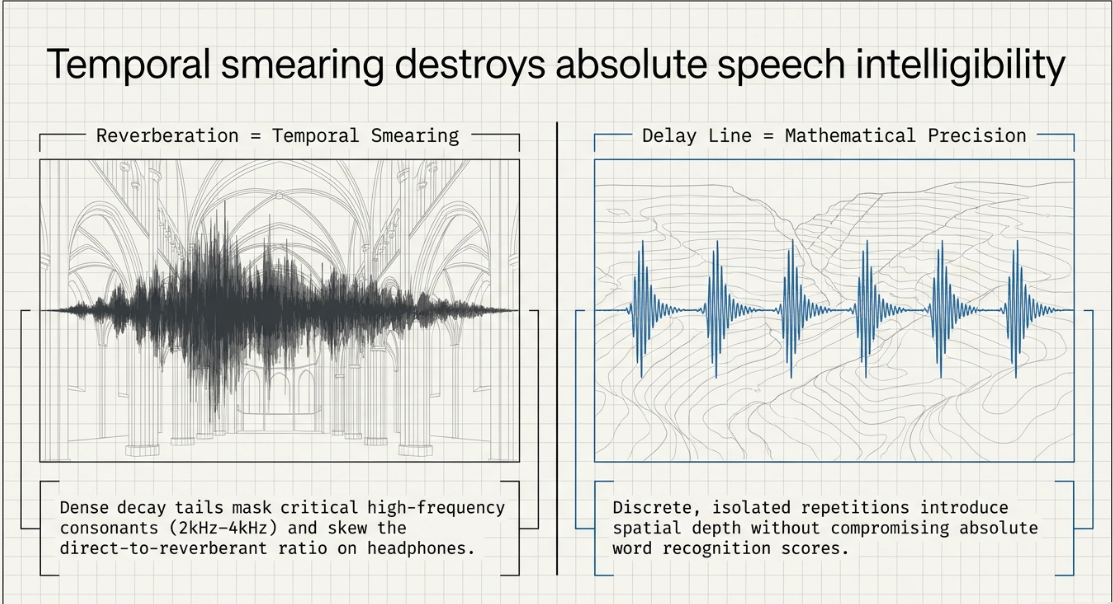
Traditional acoustic space simulation relies heavily on reverberation, which modeling engines generate by calculating thousands of dense, randomized reflections decaying over time1. However, in speech-first audio, continuous reverberation poses a severe risk of temporal smearing1. The dense decay tail of a reverb wash overlaps subsequent syllables, masking the delicate high-frequency transients of consonants and reducing word recognition scores1. This acoustic degradation is highly pronounced in headphone playback environments, where the direct-to-reverberant ratio is easily skewed7.
Delay line processing offers a mathematically precise alternative1. Unlike reverberation, delay capture systems record the input signal and repeat it at discrete, isolated intervals1. This structural difference can be conceptualized as the acoustic contrast between shouting inside a highly reflective cathedral, which creates a continuous, muddy wash of sound, versus shouting into an open canyon, which yields distinct, highly intelligible echo repetitions2. By utilizing discrete delay taps instead of randomized diffuse reflections, audio engineers can introduce spatial depth, thickness, and dimension to a dry vocal track without clouding the primary signal path or introducing transient smearing2.
Understanding this temporal behavior requires a detailed look at the psychoacoustics of sound localization10. The human brain localizes sound source positioning in the horizontal plane using three main mechanisms: Interaural Time Differences (ITD), Interaural Level Differences (ILD), and Head-Related Transfer Functions (HRTF)11. These psychoacoustic processes dictate how the brain interprets micro-delays11:
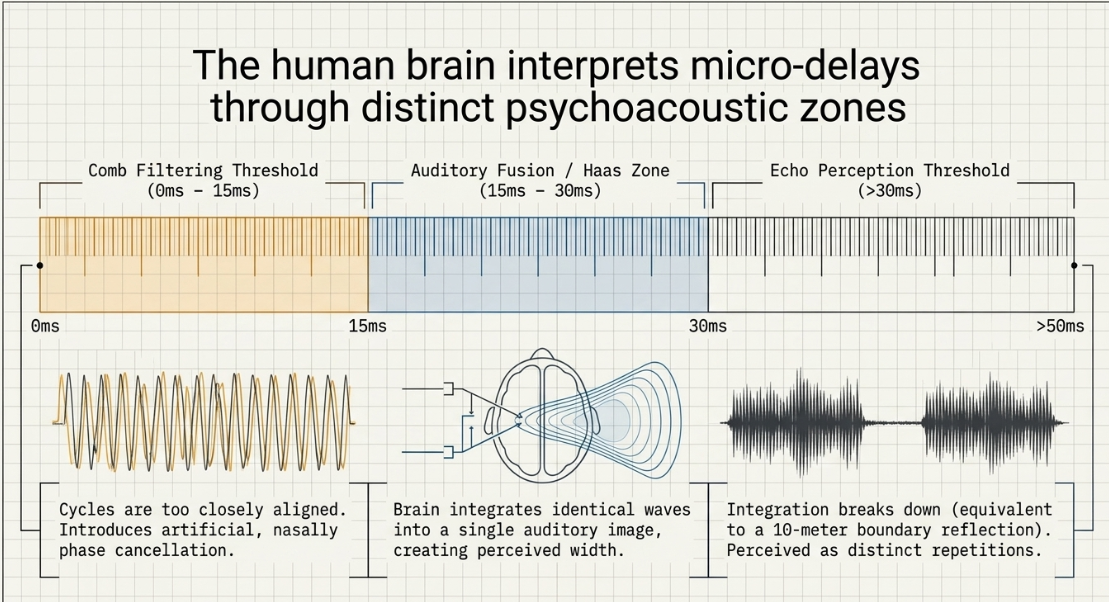
Auditory Fusion and the Precedence (Haas) Zone ( to ): When two identical acoustic waves arrive at the ears within a window of to , the brain integrates them into a single, fused auditory image11. The perceived location of the source is determined entirely by the channel that arrives first, while the second, delayed channel adds a psychoacoustic sensation of stereo width, thickness, and acoustic size11.
The Comb Filtering Threshold (): If the delay time between identical signals falls below , the wave cycles are too closely aligned to achieve spatial fusion12. Instead, they introduce phase cancellation, creating alternating peaks and notches across the frequency spectrum known as comb filtering12. This must be avoided in dialogue processing, as it introduces artificial, nasally tonal coloration12.
The Echo Perception Threshold (): When the time gap between the original signal and its repetition exceeds (equivalent to a reflective boundary distance of approximately ), the brain's integration mechanism breaks down6. The delayed signal is no longer fused with the source and is instead perceived as a distinct, separate echo6.
From a processing efficiency standpoint, algorithmic delay pipelines are highly optimized compared to convolution reverberation engines18. Convolution processors must constantly calculate real-time mathematical multiplications of massive impulse response audio samples, which can strain computer processors during large sessions containing multiple remote dialogue tracks, ambient soundscapes, sound effects, and music18. Algorithmic delays require very few computational resources, allowing engineers to maintain low-latency environments during complex post-production workflows19.
Advanced Typology of Delay Configurations for Podcast Dialogue
Slapback Delay Configurations
Slapback delay consists of a single, rapid echo with little to no feedback, simulating a close reflective boundary17. In spoken-word post-production, slapback is used to add body and presence to thin, dry voices, making them sound intimate and upfront in the mix3.
To set up a classic mono slapback delay on dialogue, the processing is kept independent of DAW tempo-synchronization24. The delay time is set manually between and 22. Feedback is configured strictly to , ensuring only a single, clean repeat without any ongoing decay tails17. The mix level is tucked subtly behind the dry signal, typically between and 22.
For a more complex stereo image, a dual-slapback configuration can be implemented by routing the dialogue to a parallel stereo bus with the left channel set to and the right channel set to , maintaining feedback and rolling off the high-frequency spectrum above to prevent sibilance issues25.
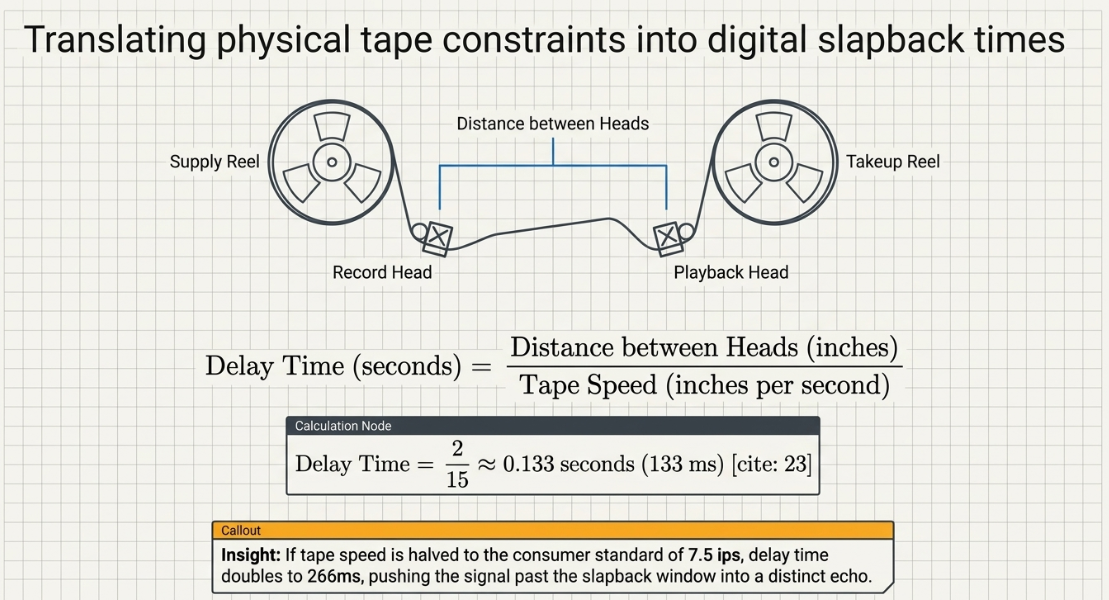
When replicating the vintage tone of analog tape-based slapback, the delay time is mathematically dictated by the physical distance between the recording head and the playback head, relative to the speed of the tape transport23. The formula used to calculate these timing offsets is:
For example, a vintage broadcast tape machine with a physical gap of between the record and playback heads running at a standard speed of generates a manual slapback delay of:
If the tape speed is halved to a consumer standard of , the delay time doubles to , pushing the repetition past the slapback window into a distinct echo23.
Haas Effect Micro-Delays
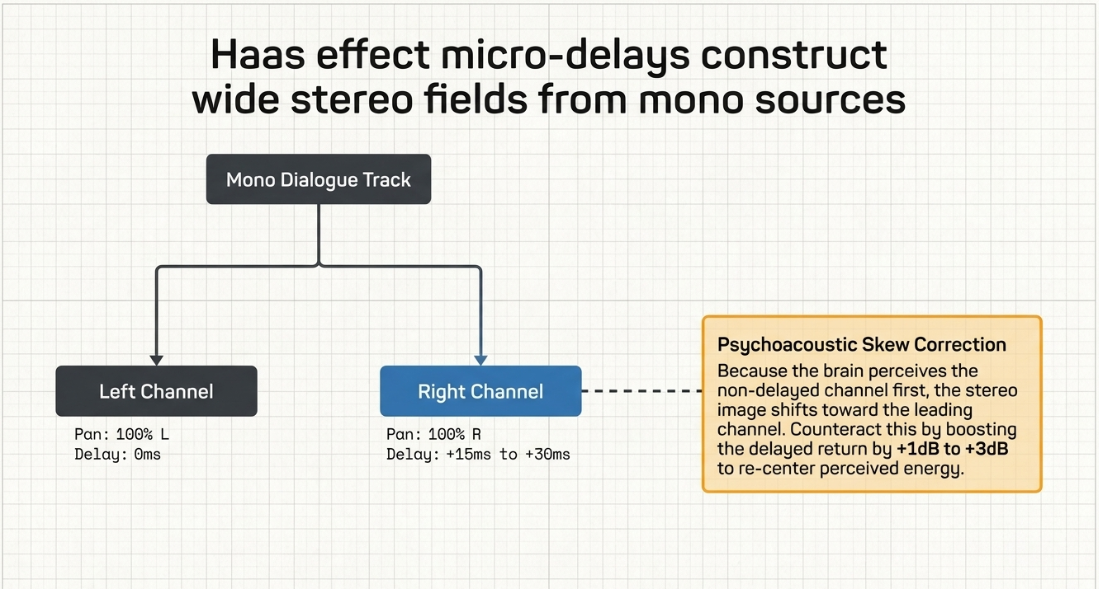
To convert a narrow, mono-recorded voice-over into a wide stereo field without relying on spatialization plugins, engineers can leverage Haas effect micro-delays12. The dry mono dialogue track is duplicated within the DAW12. The primary track is panned hard-left (), while the duplicate track is panned hard-right ()12. Using sample-delay or manual region nudging, the duplicated track is shifted forward in time12.
To stay within the psychoacoustic fusion zone, the shift must be kept between and 12. Delaying the duplicate channel by less than results in comb filtering, while exceeding splits the signal into a distracting left-to-right slapback echo12.
Additionally, Haas delays cause the treated sound to recede slightly in the depth perspective of the mix27. Because the human brain perceives the non-delayed channel first, the perceived stereo image will shift toward the leading channel11. To counteract this psychoacoustic skew and maintain a centered stereo image, the delayed channel's return fader must be panned slightly further off-center, or its relative gain boosted by to to balance the perceived energy11.
Tempo-Aligned Delays
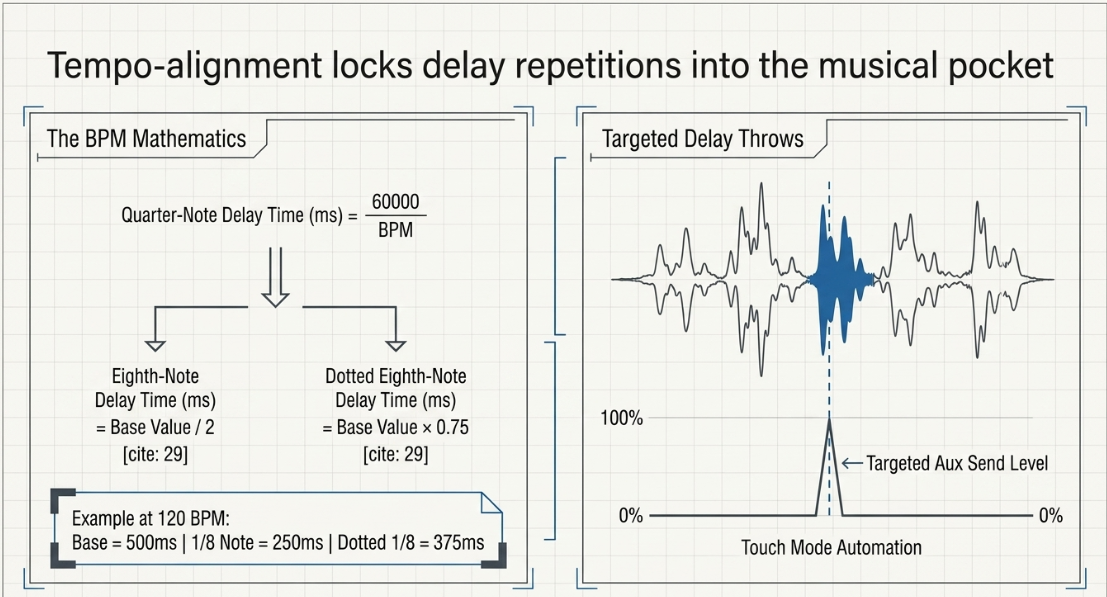
In heavily stylized narrative podcasts, transitions, and audio dramas, aligning delay repeats with the tempo of the background score prevents rhythmic clashes2. When the host DAW's tempo synchronization cannot be linked directly to a legacy or analog-modeled delay plugin, the precise delay times in milliseconds are calculated manually using the tempo equation10:
Once the base quarter-note value is calculated, subdivisions are derived to match the rhythmic pocket of the project29:
For instance, in a transition segment built over a musical cue at , the base quarter-note delay time is exactly 10. An eighth-note subdivision is , and a dotted eighth-note (or three-sixteenths) subdivision is 29.
Using these synced values, particularly the dotted eighth-note subdivision, adds a dynamic rhythmic movement that propels narrative pacing during transitions without cluttering the spoken-word content2.
Targeted Delay Throws
A delay throw is the precise application of a delay effect to a single word, syllable, or brief phrase, rather than letting the effect run continuously across a track26. This technique is used to highlight key concepts, emphasize dramatic statements, or create smooth transitions into ad breaks or new segments26.
To execute a delay throw, the primary dialogue channel is routed via an auxiliary send to a dedicated delay return track configured to wet26. The engineer automates the send level or mute status31. Under standard DAW workflows, the automation is written using Touch mode for active level adjustments, allowing the send fader to snap back to zero immediately after the target word is captured31. Alternatively, Latch mode is used to toggle the send mute state, opening the send strictly for the duration of the target phrase and muting it immediately after31.
In highly structured setups, the target audio can also be cut into a separate clip using DAW commands (such as Ctrl-Shift-S in Reaper) and the delay applied directly as an item-level or clip-level insert, keeping the main track's processing chain clean30.
Architectural Signal Routing and Post-Delay Processing Chains
Parallel vs. Serial Routing
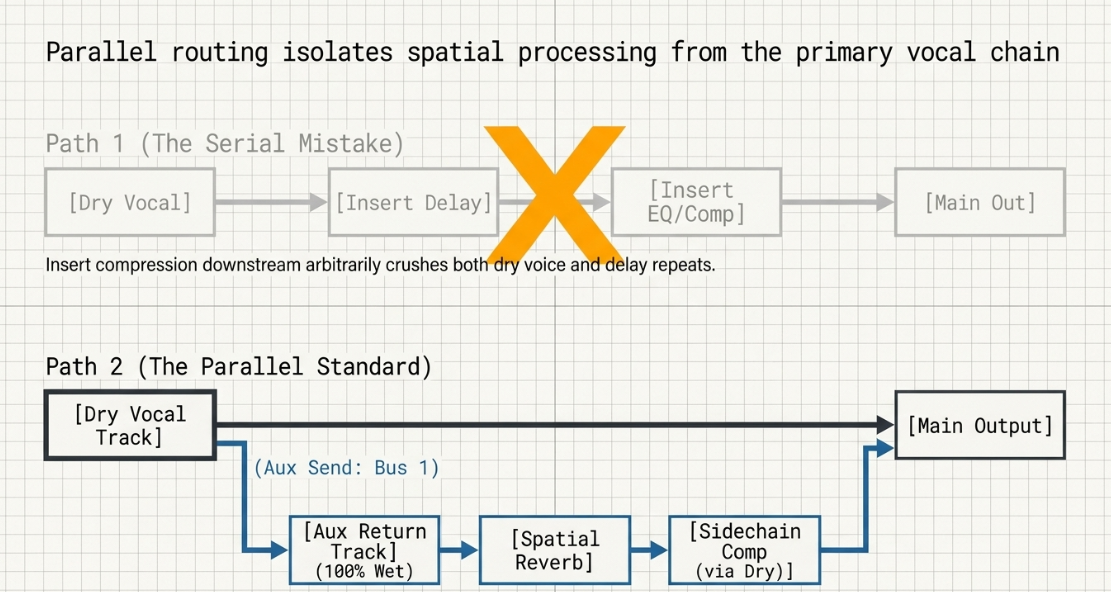
In professional dialogue mixing, delay effects should always be routed in parallel using auxiliary sends rather than as serial inserts on the primary vocal track22. Using a serial insert applies the delay directly to the dry vocal, making it impossible to process the delayed repeats separately from the original dry signal22. Furthermore, any insert compression or EQ applied downstream will affect both the dry voice and the delay repeats, which can compromise clarity22.
By routing the dialogue to an auxiliary send feeding a dedicated stereo auxiliary track, the dry vocal remains centered, present, and unaffected24. The auxiliary return channel—set to wet—can then be sculpted with specialized processing chains to sit neatly behind the dry dialogue24.
[Dry Dialogue Track] ───(Aux Send: Bus 1)───┐
│ │
[Main Output] ▼
[Aux Return Track]
(Key/Sidechain Input: Bus 1)
│
┌───────┴───────┐
│ 1. Delay │ (100% Wet)
│ 2. EQ (HP/LP)│
│ 3. Compressor│ (Ducks the Delay)
└───────┬───────┘
▼
[Main Output]
The Corrective Return Chain
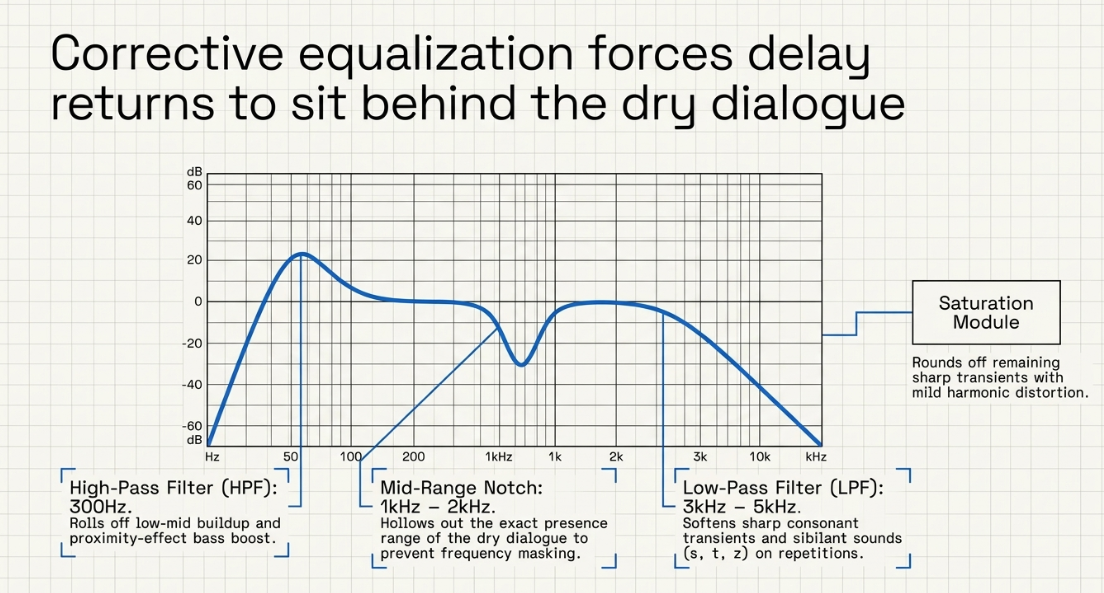
An unprocessed digital delay repeats all the frequencies of the source signal, including low-end mud and harsh high-frequency sibilance24. This causes the repeats to compete directly with the dry dialogue24. To prevent this, a corrective processing chain must be placed immediately after the delay plugin on the auxiliary return channel24:
High-Pass Filter (HPF): A high-pass filter is positioned first in the EQ chain to roll off low frequencies below to 22. This removes low-mid buildup and proximity-effect bass boost, keeping the low-frequency spectrum clear for the main mix22.
Low-Pass Filter (LPF): A low-pass filter is applied to roll off high frequencies above to 22. This softens sharp consonant transients and sibilant sounds ("s", "t", "z") on the repeats, preventing them from clashing with the active voice and reducing listener ear fatigue4.
Mid-Range Notch: A narrow parametric cut of to is carved out around 22. This is the presence range where the dry dialogue sits, ensuring the delayed signal does not compete for the same frequency pocket4.
Saturation: A subtle saturation or tape emulation plugin is placed after the EQ to introduce mild harmonic distortion24. This rounds off sharp transients, making the repeats sound warmer and helping them blend naturally into the background24.
The "Telephone EQ" Alternative: For highly stylized or distinct delays, combining steep high-pass and low-pass filters creates a bandpass or "telephone" EQ curve29. This restricts the delay's frequency footprint, keeping it separate from the dry dialogue and preserving space in the mix29.
Dynamic Ducking Architectures
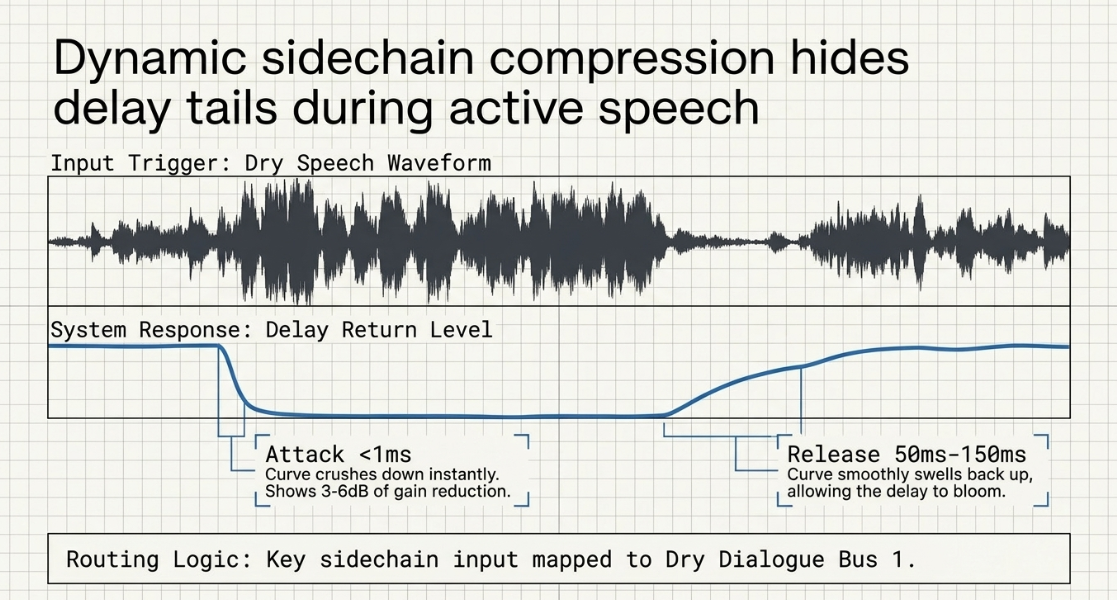
To keep the delay repeats from masking the dialogue, engineers use sidechain compression to duck the delay return while the host or guest is actively speaking24. This ensures the delay remains quiet during active speech and swells up only during pauses or at the ends of phrases31.
To set up this dynamic ducking routing in major DAWs:
In Pro Tools: Set up a stereo auxiliary return track and insert the delay plugin31. Create a send from the dry dialogue track routed to an internal bus (e.g., Bus 1)31. Insert a sidechain-capable compressor, such as the Avid Dyn3 Compressor/Limiter or Sonnox Oxford Dynamics, immediately after the delay on the return track31. Set the compressor's key input to Bus 1 and activate the external sidechain key button31.
In Cubase: Insert a delay, such as PingPongDelay, on the primary dialogue channel35. Open the plugin header, click Activate/Deactivate Side-Chaining, and map the sidechain routing to a duplicate control track to trigger the attenuation35. Adjusting the volume of the duplicate track allows the engineer to fine-tune how much the delay is silenced during quieter spoken passages35.
In Logic Pro & Ableton Live: Insert the stock compressor plugin after the delay on the parallel return bus32. Toggle the sidechain dropdown menu at the top of the compressor interface and select the dry dialogue track as the input trigger32.
To configure the compressor's parameters for a natural-sounding ducking effect:
Attack Time: Set very fast (under )4. This ensures the compressor clamps down on the delay signal the instant the speaker utters a new syllable24.
Release Time: Set to a medium, tempo-linked rate between and 22. This allows the delay tail to swell up naturally in the pauses between words without sounding lumpy or jarring24.
Ratio: Set between and for a smooth, transparent attenuation4.
Threshold: Adjusted downward until the compressor shows to of gain reduction during active speech, letting the delay bloom only when the speaker pauses22.
Technical Parameter Comparison
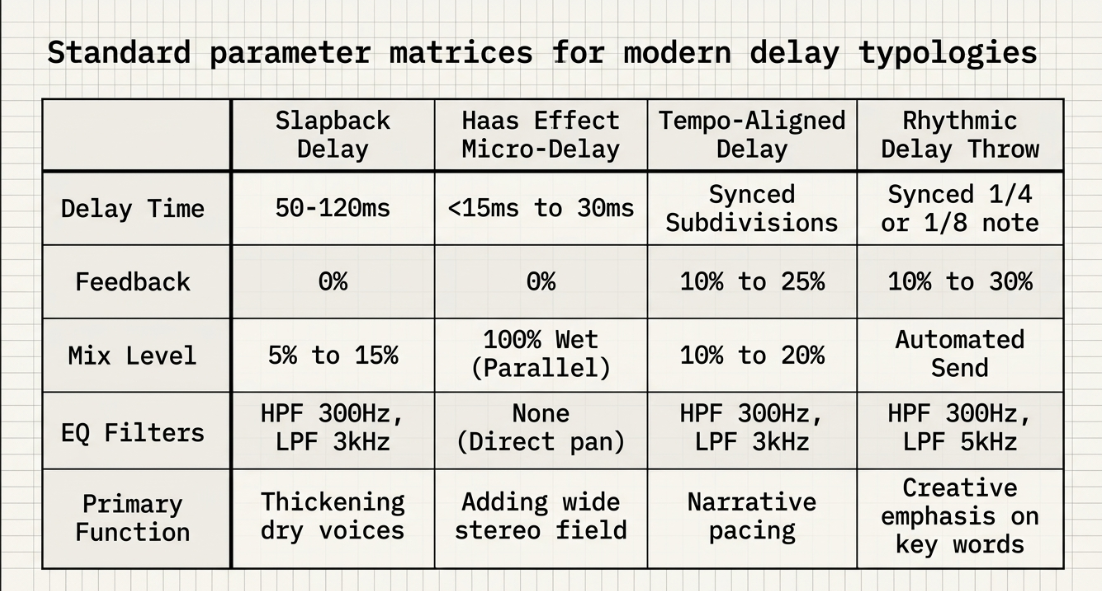
The following table provides standard parameter matrices for the four primary delay configurations utilized in professional podcast and spoken-word post-production.
Phase Coherence, Mono Compatibility, and Structural Analysis
The Physics of Comb Filtering and Phase Cancellation
While stereo widening techniques can make a podcast mix sound immersive on headphones, they can introduce phase anomalies7. A significant portion of podcast consumption occurs on mono-summed systems, such as smart speakers, mobile phone speakers, or public address systems12. When a stereo signal containing out-of-phase information is summed to mono, the opposing waveforms cancel each other out12. This results in a thin, hollow sound, or can cause critical dialogue elements to disappear from the mix entirely12.
To analyze these interactions, a phase correlation meter must be inserted on the master output bus16. This meter displays values on a scale from to 16:
(Far Right): Indicates perfect phase correlation, where the left and right channels are identical and completely mono-compatible16.
(Center): Represents the widest permissible stereo field, where the left and right channels contain independent, non-correlated information42.
(Far Left): Indicates identical signals with inverted polarity, resulting in complete phase cancellation and silence when summed to mono16.
For a broadcast-safe podcast mix, the correlation meter should remain consistently between and 16.
Summing Out-of-Phase Waveforms:
Left Channel (Positive Phase): ┌───┐ ┌───┐
│ │ │ │
──┴───┴───────┴───┴──
Right Channel (Inverted Phase):──┬───┬───────┬───┬──
│ │ │ │
└───┘ └───┘
▼
Summed Mono Output: ───────────────────── (Complete Silence)
Verification Testing and Quality Control Steps
To ensure a stereo dialogue mix translates cleanly to mono playback systems, engineers should perform two systematic quality control checks7:
The 100 Hz Sine Wave Polarity Test: Insert a utility signal generator on the dialogue bus and play a sine wave16. Flip the polarity of one channel on the master track16. If the tone disappears or drops significantly in volume, the stereo routing is phase-coherent16. If the tone becomes louder when polarity is flipped, there is an underlying phase inversion in the signal path that must be corrected16.
The Mono Sum Level Verification: Play the dialogue mix and monitor the master output levels, then engage the DAW's mono sum button12. Note any changes in the lead vocal: if the dialogue drops by or more, or if the tone becomes noticeably hollow or phasey, the stereo delay or widening effects are too wide and must be dialed back12.
The following table profiles industry-standard plugins used in modern podcast post-production, categorizing them by delay types and audio cleanup/metering tools.
Production Workflow Integration and Quality Control Standards
Session Organization and Management
Maintaining a clean, structured session is essential for keeping post-production workflows efficient and consistent across episodic releases52. Standard session templates should employ color-coding and clear, functional track naming conventions—such as using Host VO, Guest Remote, Sponsor VO, and SFX Delay Return instead of generic DAW defaults like Audio 150. Dialogue, music, and sound design tracks should be routed to their own sub-mix buses before hitting the master output52.
All raw assets, project sessions, and final exports should follow a strict 3-2-1 backup rule (three copies stored across two different media types, with one copy kept off-site) to prevent data loss20.
Recommended Folder Structure [cite: 20, 50]:
Podmania/
├── Series_03/
│ └── Episode_27/
│ ├── Media/
│ │ ├── Dialogue_Raw/
│ │ ├── Dialogue_Edited/
│ │ └── SFX/
│ ├── Music_Beds/
│ ├── Session_Files/
│ └── Deliverables_Exports/
Loudness Targets and Distribution Standards
To ensure a consistent listening experience across different playback platforms, engineers must mix to standard loudness targets measured in LUFS (Loudness Units Full Scale)20. For standard digital podcasts distributed on platforms like Spotify or Apple Podcasts, the target loudness is between and 20. For traditional broadcast networks like the BBC or NPR, dialogue tracks are mixed to a more conservative target of to preserve dynamic range and headroom55.
Spoken-Word Processing Sequence
To ensure a polished final mix, dialogue tracks should be processed in a logical sequence before any delay or spatial effects are introduced52:
[Raw Audio Import]
│
▼
[Audio Restoration] ───► (Spectral De-noise, Mouth De-click, De-bleed) [cite: 48, 49, 53, 55]
│
▼
[Dialogue Editing] ───► (Trim, sync, manual volume automation) [cite: 53, 54, 55]
│
▼
[Core Dynamics] ──────► (Subtractive EQ, Dynamic EQ, De-essing, Series Compression)
│
▼
[Spatial Routing] ────► (Parallel sends to sidechained delay busses)
Audio Restoration: Use specialized tools like iZotope RX 12 Dialogue Isolate, De-bleed, and Mouth De-click to remove background noise, mouth clicks, and headphone bleed48. For physical editing, Reaper's auto-silence tool can be used to non-destructively split silence with a pre- and post-roll fade padding of to keep edits from sounding choppy20.
Dialogue Editing: Trim out unnecessary filler words ("ums" and "uhs") and manually adjust breath levels8. Breaths should be turned down rather than deleted entirely to keep the dialogue sounding natural and conversational8.
Core Dynamics and Tone Shaping:
Apply a high-pass filter between and using an EQ like the FabFilter Pro-Q 3 to remove low-frequency rumble and proximity effect49.
Use dynamic EQ or a de-esser like the FabFilter Pro-DS to tame harsh sibilant frequencies in the to range22.
Apply series compression4. First, use a compressor with a fast attack and high ratio to catch loud, sudden volume spikes4. Follow this with a slower, low-ratio compressor ( to ) to smooth out the overall level and bring the vocal forward25.
Spatial Routing: Create parallel aux sends to route the processed dialogue to sidechained delay return tracks22.
Music Bed Ducking: To prevent the background music from competing with the host's voice, route a sidechain send from the dialogue bus to a multiband compressor, such as FabFilter Pro-MB, on the music track57. Set the compressor to duck only the competing to presence range when the host speaks57. This keeps the dialogue clear while allowing the music bed to remain full and energetic in the lower and higher frequencies52. Alternately, dynamic resonance suppressors like Soothe can be placed on the music bus and sidechained to the vocal to automatically carve out precise vocal frequencies in real time25.
By establishing structured routing, applying corrective filtering to delay returns, and using sidechain compression to duck spatial effects, engineers can create immersive, wide, and polished podcast mixes that translate cleanly to any playback system12.
Works cited
On-the-Spot Signal Processing for Outdoor Recording - Journalism University, https://journalism.university/audio-podcast/on-the-spot-signal-processing-outdoor-recording/
When should you use reverb vs. delay? - Wisseloord Studios, https://wisseloord.org/uncategorized/when-should-you-use-reverb-vs-delay
Vocal Reverb and Delay: The Secrets to a Perfect Mix - Mastering.com, https://mastering.com/vocal-reverb-and-vocal-delay/
7 Advanced Voice Over Sound Effects Tips for Pro Audio in 2026 | SFX Engine, https://sfxengine.com/blog/voice-over-sound-effects-tips
Reverb vs. delay: when to use each - iZotope, https://www.izotope.com/community/blog/when-to-use-reverb-and-delay
How to improve speech intelligibility when amplifying the voice - DPA Microphones, https://www.dpamicrophones.com/mic-university/audio-production/how-to-improve-speech-intelligibility-when-amplifying-the-voice/
How to pan spatial audio for realistic depth and faster mixes - Krotos Studio, https://krotos.studio/blog/spatial-audio
How to Record, Sound Edit, and Mix a Podcast | No Film School, https://nofilmschool.com/podcast-mixing
Live Sound Tips - Delay or Reverb? - Audio Issues, https://www.audio-issues.com/live-sound-tips/when-is-it-smarter-to-use-delay-or-reverb/
Using Delays in Place of Reverb to Create Space in Your Mix - Sage Audio, https://www.sageaudio.com/articles/using-delays-in-place-of-reverb-to-create-space-in-your-mix
Haas Effect in Audio Production (+ creative mixing tips) - WaveInformer, https://waveinformer.com/2024/01/31/haas-effect-in-audio-production/
How to convert a track from mono to stereo without plugins - Nail The Mix, https://www.nailthemix.com/how-to-convert-a-track-from-mono-to-stereo-without-plugins
What is Stereo Widening & How Do I Master it? 10+ Pro Tips - Unison Audio, https://unison.audio/stereo-widening/
Phase cancellation explained: The hidden reason your audio loses power, https://acestudio.ai/blog/phase-cancellation-in-audio/
SoundGym Community for Music Producers, https://www.soundgym.co/space/index?aff=gl
Stereo Test Checklist 2026: Is Your Mix Wide, Balanced, and Phase-Coherent?, https://mixmasterpro.io/articles/stereo-test-checklist-2026-is-your-mix-wide-balanced-and-phase-coherent
Slapback Delay - How to Use it In Your Mix, https://www.musicguymixing.com/slapback-delay/
How to Sound Design a Scene for Audio Fiction - Carter Wogahn, https://www.carterwogahn.com/how-sound-design-scene-audio-fiction/
Algorithmic reverb: how to create space and depth in audio productions - iZotope, https://www.izotope.com/community/blog/algorithmic-reverb
Podcast editing guide (2026): how to edit a podcast like a pro | LucidLink, https://www.lucidlink.com/blog/podcast-editing
Best Delay Plugins: Our Picks for Sound Design and Mixing - Output, https://output.com/blog/best-delay-plugins
Vocal Delay Guide: Slapback, Ping Pong, Dotted Eighths & More (2026), https://thevocalmarket.com/blogs/how-to/vocal-delay-guide-slapback-ping-pong-2026
Anyone know a good setting or preset for a good slapback delay setting on the TimeFactor?, https://www.eventideaudio.com/forums/topic/anyone-know-a-good-setting-or-preset-for-a-good-slapback-delay-setting-on-the-timefactor/
How to Use Delay On Vocals - Nail The Mix, https://www.nailthemix.com/how-to-use-delay-on-vocals
Making space for a vocal -- what are the pros doing? : r/mixingmastering - Reddit, https://www.reddit.com/r/mixingmastering/comments/1ao4yp3/making_space_for_a_vocal_what_are_the_pros_doing/
The Best Free Delay Plugins for Your Metal Mixes, https://www.nailthemix.com/free-delay-plugin
Mix Rescue: The Wrong'uns - Sound On Sound, https://www.soundonsound.com/techniques/mix-rescue-wronguns
Podcast Like A Pro! - Sound On Sound, https://www.soundonsound.com/techniques/podcast-like-a-pro
Creating & Using Custom Delay Effects - Sound On Sound, https://www.soundonsound.com/techniques/creating-using-custom-delay-effects
What Is A Delay Throw Effect? - Home Brew Audio, https://www.homebrewaudio.com/13249/what-is-a-delay-throw-effect/
Sidechain compression on vocal delays - Puremix, https://www.puremix.com/blog/sidechain-compression-on-vocal-delays
Sidechaining Vocal Effects to Get Clean, Mix-Ready Vocals - FaderPro Blog, https://blog.faderpro.com/techniques/sidechaining-vocals/
How to Use Sidechain Compression in Pro Tools - Avid, https://www.avid.com/pro-tools/user-guide/sidechain-compression
How to duck/sidechain compress your delays for cleaner vocals - YouTube, https://www.youtube.com/watch?v=UPrKbt6kdCs
Triggering a Delay Effect with Side-Chain Signals - Cubase Pro - 15.0 - Steinberg Help, https://www.steinberg.help/r/cubase-pro/15.0/en/cubase_nuendo/topics/audio_effects/audio_effects_sidechain_input_using_delay_t.html
sidechain delay - Echo Sound Works, https://www.echosoundworks.com/sidechaindelay
Sidechain Compression: Part 2 – Common and Uncommon Uses - Ableton, https://www.ableton.com/fr/blog/sidechain-compression-part-2-common-and-uncommon-uses/
Sidechain Delays are a Miracle : r/audioengineering - Reddit, https://www.reddit.com/r/audioengineering/comments/ccbwqy/sidechain_delays_are_a_miracle/
4 Famous Vocal Mixing Tricks Using Reverb and Delay | Blog - Waves Audio, https://www.waves.com/famous-vocal-mixing-tricks-using-reverb-and-delay
Automatic Mono Incompatibility Correction - Auphonic Blog, https://auphonic.com/blog/2021/05/04/automatic-mono-incompatibility-correction/
Q. Can Haas delays be mono-compatible? - Sound On Sound, https://www.soundonsound.com/sound-advice/q-can-haas-delays-be-mono-compatible
Mastering Assistant parameters Logic Pro for iPad - Apple Support (BH), https://support.apple.com/en-bh/guide/logicpro-ipad/lpip20442167/ipados
Correlation Meter in Logic Pro for Mac - Apple Support (AZ), https://support.apple.com/en-az/guide/logicpro/lgcef24f430f/mac
7 Best Creative Delay Plugins for Sound Design (2026) | ModWheel, https://modwheel.net/cinematic/best-creative-delays
Our Top 20 Best Delay Plugins for Music Production in 2026 - Hyperbits, https://hyperbits.com/blog/best-delay-plugins/
Comprehensive Overview of Delay Effect Plugins for Music Producers - Lucid Samples, https://www.lucidsamples.com/blog/comprehensive-overview-of-delay-effect-plugins-for-music-producers
Plugins for Post-Production & Sound Design - Waves Audio, https://www.waves.com/plugins/post-production
Industry-standard audio repair and post production with RX 12 Advanced - iZotope, https://www.izotope.com/products/rx-advanced
Plugins for Audio Post-Production: What the Pros Are Using, https://theproaudiofiles.com/post-production-plugins/
Building a Successful Post Sound Workflow - Steve Fanagan & Niall Brady share their essential tools and techniques, https://www.asoundeffect.com/successful-post-sound-workflow/
What are your tricks to get wide mixed/sounds but keep mono compatibility? - Reddit, https://www.reddit.com/r/edmproduction/comments/1h12zwj/what_are_your_tricks_to_get_wide_mixedsounds_but/
Audio Mixing Techniques for Pro-Level Podcasts & Video - Flexwork Studios, https://flexworkstudios.com/audio-mixing-techniques/
Audio Post-Production: Complete Guide, Techniques, and More - Boris FX, https://borisfx.com/blog/audio-post-production-complete-guide/
Audio post-production: a complete guide to professional sound - LucidLink, https://www.lucidlink.com/blog/audio-post-production
Mixing dialogue in audio storytelling | News - Sound Radix, https://www.soundradix.com/articles/mixing-dialogue-in-audio-storytelling/
What is your audio editing workflow, and how long does it take? : r/podcasts - Reddit, https://www.reddit.com/r/podcasts/comments/5atndk/what_is_your_audio_editing_workflow_and_how_long/
Five Considerations for Sound-Designing a Podcast | B&H eXplora, https://www.bhphotovideo.com/explora/pro-audio/tips-and-solutions/five-considerations-for-sound-designing-a-podcast














