

Narrative Architecture and Dynamic Real Estate in Spoken Word Mixing
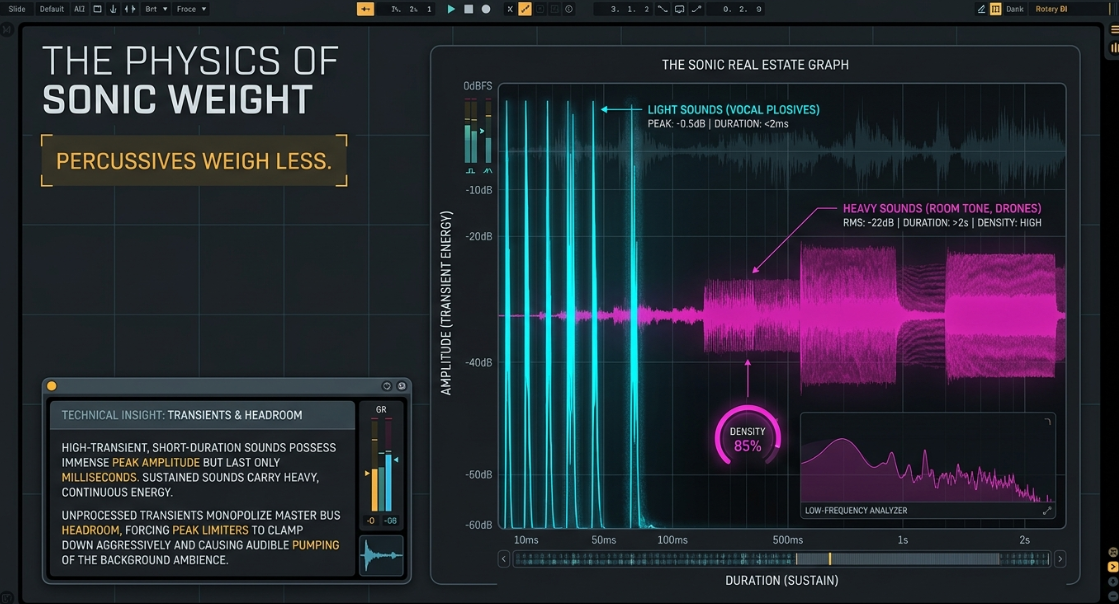
Within the architecture of a professional podcast mix, managing sonic weight and dynamic space is critical to maintaining listener engagement and vocal intelligibility1. Sonic weight is fundamentally determined by the duration and sustain of a sound rather than its instantaneous peak transient energy—an acoustic principle summarized by the axiom "percussives weigh less"1. High-transient, short-duration sounds, such as vocal plosives, desk thumps, or footsteps, possess immense peak amplitude but last only for milliseconds, leaving the temporal space between them largely empty1. Conversely, sustained sounds, such as continuous room tone, musical beds, or drawn-out vowel vocalizations, carry heavy, continuous energy that demands vast amounts of spectral real estate1.
If high-transient sounds are left unprocessed, they monopolize the master bus headroom, forcing peak limiters to clamp down aggressively and causing audible pumping of the background ambience1. To resolve this, professional post-production workflows rely on a sophisticated suite of modulation and transient-shaping tools3. Historically confined to music production, tools such as drum triggers, envelope followers, and transient designers are increasingly repurposed in spoken-word and narrative podcast post-production3. These tools enable precise, threshold-independent control over the initial attack and sustain of waveforms, allowing engineers to reconstruct Foley, manage sibilance, and automate vocal levels without the artifacts typical of heavy compression3.
A dense podcast arrangement containing multiple voices, sound effects, and music requires aggressive frequency sculpting and dynamic control to prevent masking1. Conversely, a sparse arrangement exposes microscopic recording flaws, demanding pristine noise reduction and highly transparent processing1. To maintain objective standards throughout this process, the utilization of reference tracks is an indispensable practice1. By importing professionally mastered commercial releases directly into the digital audio workstation (DAW) and performing rapid A/B testing, the engineer can bypass the acoustic anomalies of their specific mixing room and prevent their subjective perception from drifting1.
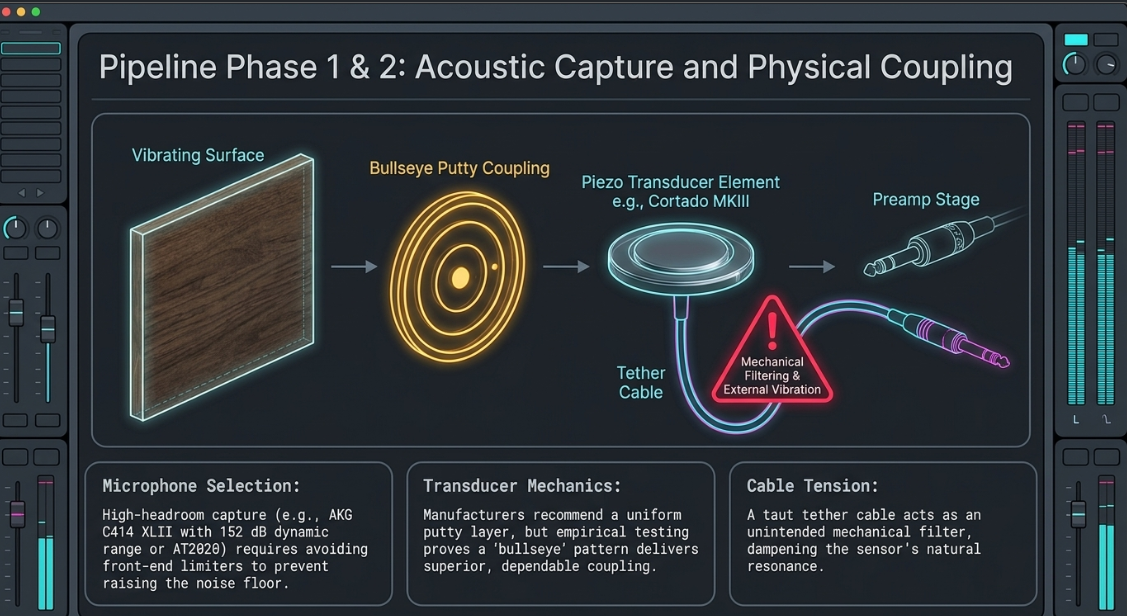
The quality of the acoustic environment, microphones, and preamps ultimately dictates the boundaries of post-production processing1. High-end capture setups frequently utilize microphones like the AKG C414 XLII, which boasts a 152 dB dynamic range and nine selectable polar patterns, making it highly valued for drum ambience or spatial room miking8. In vocal-centric applications, tools like the Audio-Technica AT2020, with its low-mass diaphragm and 144 dB SPL handling, or the multi-pattern AT2050 provide smooth, natural capture with minimal off-axis noise8. However, the physical constraints of recording environments often introduce variables that require digital intervention1. On a practical level, even the physical design of equipment can impact recording stability; for example, while nearly all live sound and PA gear is finished in matte black, operating such gear in direct sunlight can lead to rapid overheating, a thermal vulnerability also frequently observed in field-recording iPads11.
The Physics and History of Drum Triggering in Post-Production
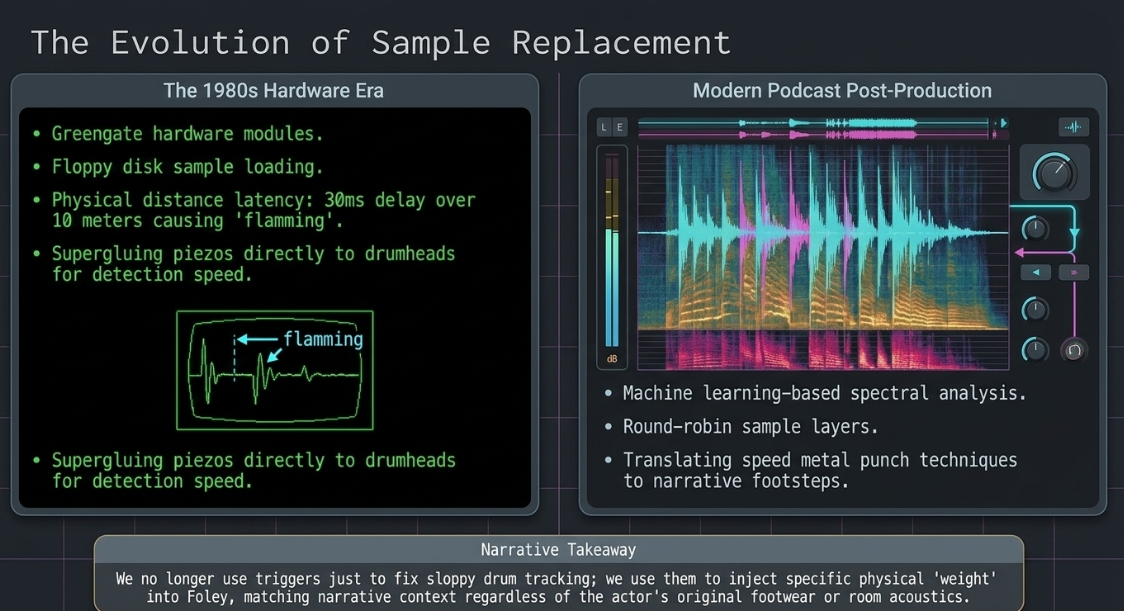
The history of drum triggering bridges the gap between early hardware limitations and modern, software-driven sample replacement5. During the 1980s, engineers sought to translate epic studio-created drum sounds to live stages, a quest that birthed early hardware triggering modules like the Greengate5. Working with these early systems was notoriously tedious; engineers often had to work on hands and knees, staring at blank green screens to type in specific keywords to load samples from low-capacity floppy disks5.
These early systems were plagued by latency and tracking errors5. In live performance, physical distance introduces severe acoustic delays12. Because sound travels at approximately one meter per three milliseconds, a drum kit positioned ten meters back from the front of a stage suffers a 30-millisecond delay relative to the PA system12. This delay is sufficient to destroy the integrity of a groove, resulting in audible "flamming" between the acoustic strike and the triggered sample12. To bypass this, drummers resorted to supergluing or silicone-gluing contact transducers directly to the drumheads to maximize signal level and speed up detection, sacrificing the acoustic tone of the physical drum for trigger reliability12.
In modern podcast post-production, these same triggering concepts are used to align, replace, and layer Foley elements—such as footsteps, body rustles, and door impacts—with sample-accurate precision3. Instead of manual, clip-by-clip editing, which is incredibly time-consuming, engineers use advanced transient-detection engines to translate raw, poorly recorded footsteps into MIDI data or direct sample triggers14.
In speed metal music production, triggers are utilized to inject pointed punch, clarity, and consistency into rapid kick drum patterns where natural dynamics would blur5. In narrative podcasting, this translation is applied to ensure that footsteps maintain a consistent, physical "weight" that matches the visual or narrative context, even if the original actor recorded in a highly reflective room using inappropriate footwear3. Modern virtual drum and sample-replacement engines have evolved from basic one-shot players into highly sophisticated platforms that incorporate extensive round-robin sample layers and multi-microphone room modeling to emulate natural acoustic interactions14.
Comparative Analysis of Professional Triggering and Sound Replacement Software
The table below provides a detailed technical comparison of the leading software tools utilized for transient-aligned triggering and sample replacement in professional audio post-production.
Contact Transducer Mechanics and Spatial Modeling
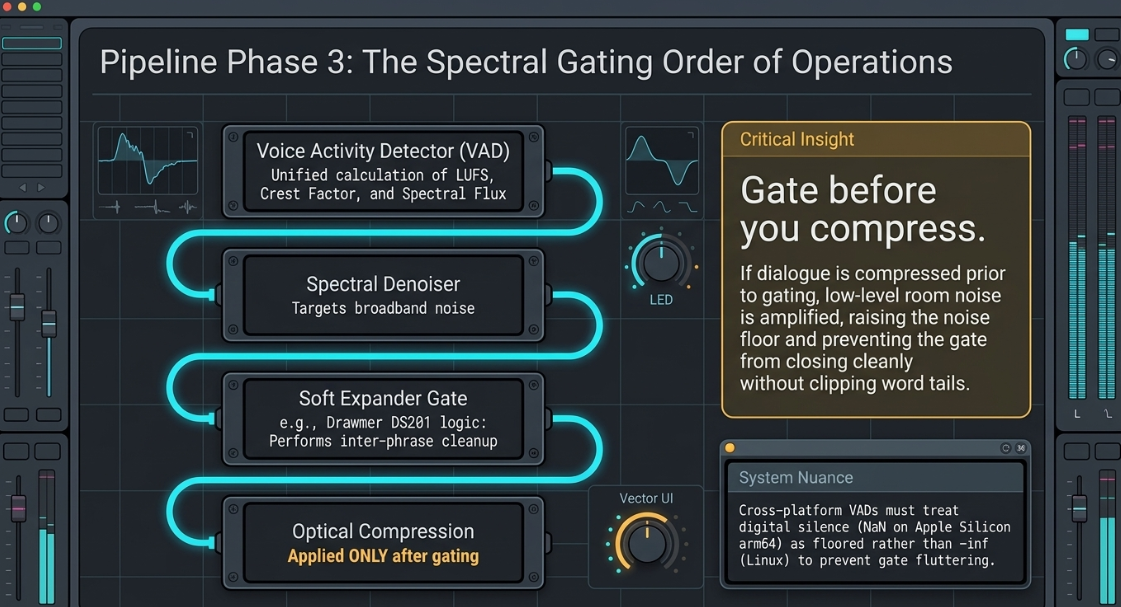
Foley recording frequently utilizes contact microphones, such as the Zeppelin Design Labs Cortado MKIII piezo transducer, to capture the direct, structural vibrations of physical objects10. When mounting these sensors to surfaces, the application technique determines the frequency response and overall reliability10. While manufacturers often recommend a uniform layer of sensor putty, empirical testing indicates that a "bullseye" pattern of putty delivers more dependable coupling and consistent transient response10.
This contact-miking method is an extension of close-miking10. For example, when placing an SM57 an inch away from a snare drum, the microphone only captures the narrow subset of frequencies emanating from that coaster-sized surface area10. Moving the microphone even slightly drastically alters the captured tone10.
With contact transducers, the physical connection must be managed carefully10:
[Vibrating Surface]
|
(Putty Coupling: "Bullseye" Pattern)
|
[Transducer Element] <--- (Tether Cable Vibrations / Mechanical Filtering)
|
[Preamp Stage]
The tether cable connecting the transducer to the preamp can act as a mechanical conduit for external vibrations, introducing unwanted hums, buzzes, or low-frequency rumble into the signal path if it comes into contact with vibrating surfaces10. Furthermore, if the cable is pulled taut, it can exert physical tension on the transducer, applying an unintended mechanical filter that dampens the sensor’s natural resonance and alters its surface coupling10.
Raw contact microphone recordings are highly isolated, lacking the spatial acoustic cues of the surrounding room3. This dry signal can sound artificial and fails to integrate naturally with dialog tracks3. In post-production, engineers resolve this by processing Foley tracks with convolution reverb, utilizing impulse responses (IRs) in engines like Altiverb or Steinberg Reverence3. Checking Foley regions through a reverb bus during the editing phase is essential3. A footstep track may sound excellent in isolation, but once processed through a spatial acoustic model, the perceived distance, shoe texture, and surface interactions can fall apart, requiring immediate adjustment of the source sample's frequency balance3.
Transient Shaping and Upward Expansion Mechanics
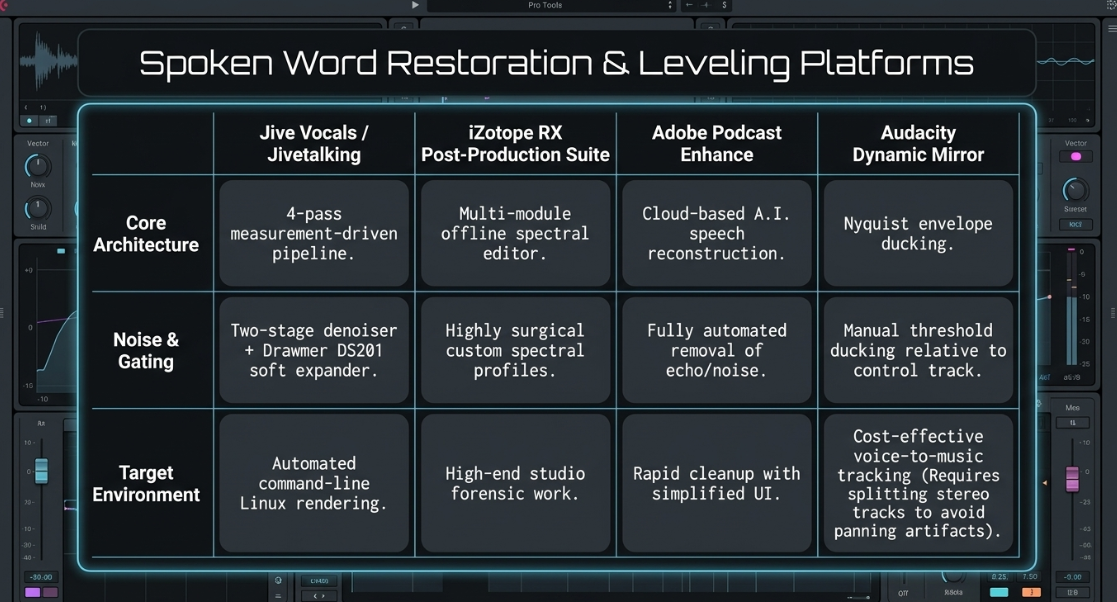
Transient shapers (or transient designers) are essential dynamics processors that operate independently of input thresholds, making them fundamentally different from standard compressors and expanders4. A standard compressor acts as a downward expander, reducing the gain of signals that cross a specified threshold1. Conversely, an upward expander reverses this relationship, boosting the gain of signals that exceed the threshold2. For example, while a compressor with a 2:1 ratio permits only 1 dB of output increase for every 2 dB of input above the threshold, an upward expander configured to a 1:2 ratio boosts the output by 2 dB for every 1 dB the input rises above the threshold2. This increases the overall dynamic range, effectively restoring natural transients to over-compressed material2.
A transient shaper, such as the original SPL Transient Designer hardware or its digital emulations, bypasses the threshold model entirely by utilizing dual envelope generators to analyze the rate of change in an incoming signal's waveform4. The first envelope generator tracks the exact attack transient of the original signal, while the second generator produces a smoothed, slower version of the transient7. The voltage difference between these two envelopes is used to generate a control voltage for a Voltage Controlled Amplifier (VCA), allowing the user to boost or attenuate the attack and sustain portions of a sound with simple, threshold-free controls7.
In podcast post-production, transient processors solve numerous acoustic problems across both dialogue and effects tracks3. On vocal tracks, dialing down the attack control can soften abrasive "t" and "k" consonants, mouth clicks, or dry saliva noises without impacting the core tonal characteristics of the speaker's voice27. On instrumental or background pads, transient reduction can smooth out arpeggiated or step-sequenced elements that would otherwise distract from the host's foreground dialogue27. When layering multiple sound effect loops, transient reduction on background layers prevents rhythmic "flamming" and phase cancellation, providing a cleaner, punchier focal point for the primary sound effects27.
In Foley editing, transient shapers are chained with multiband compressors to transform footsteps and surface interactions3. Many modern street shoes feature hard rubber or wooden soles that produce a sharp "clacking" sound when recorded on hard surfaces, preventing them from blending naturally into a mix3. By cutting the attack transients in the mid and high frequency ranges, an editor can soften the shoe's impact, making a large, heavy sneaker sound like a soft, light shoe3. Simultaneously, adding sharpness and sustain to the low-mid frequencies (

Mathematical Formulation and Parameter Integration of Envelope Followers
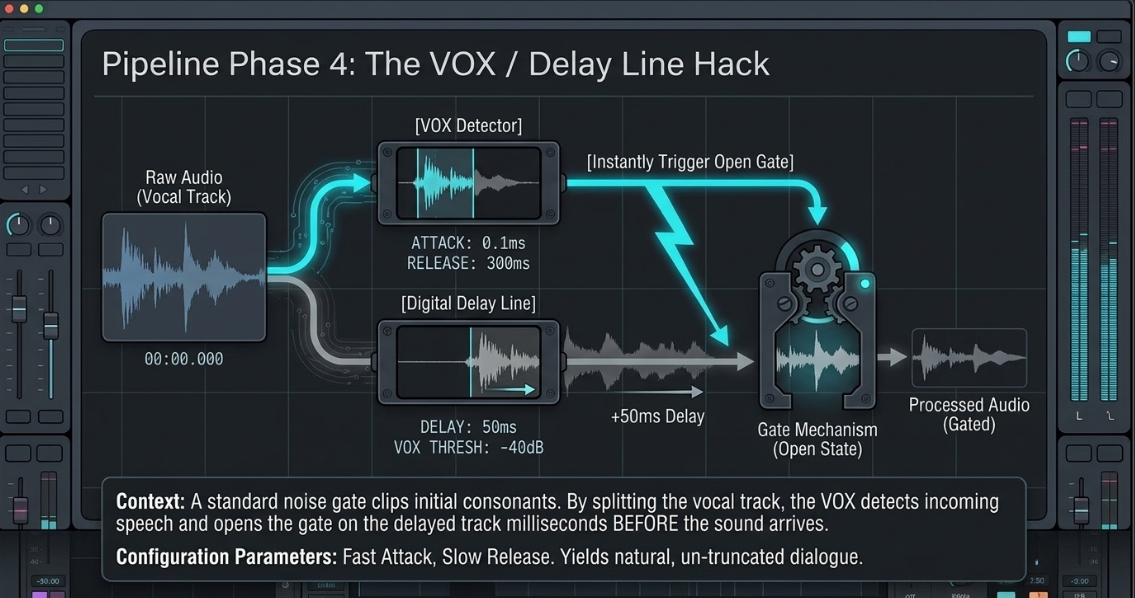
An envelope follower extracts the slow-moving amplitude envelope of a rapidly oscillating audio signal and converts it into a continuous control signal to modulate other parameters28.
This process can be mathematically modeled in the digital domain. Let the input audio signal be 



The smoothing coefficient 

In this formula, 


Modern envelope followers—such as the Input Level Modifier in Native Instruments Guitar Rig or the Max for Live Envelope Follower in Ableton Live—feature detailed graphical editors to customize the contour of this control signal29. These tools allow the user to plot nodes, adjust segment slopes (switching between logarithmic, linear, and exponential responses), and scale the output using minimum and maximum range sliders29.
Advanced modifiers offer specific functional modes:
Slide vs. Fixed Editing: In Slide mode, moving a node in the graph shifts all subsequent nodes, extending the total envelope duration33. In Fixed mode, moving a node preserves the positions of surrounding nodes, keeping the overall envelope duration constant33.
Loop and Tempo Sync: Loop mode plays the sustain phase of the envelope as a continuous loop for as long as the trigger remains active33. Sync mode synchronizes the envelope to the project metronome, displaying the time scale in musical intervals rather than absolute seconds33.
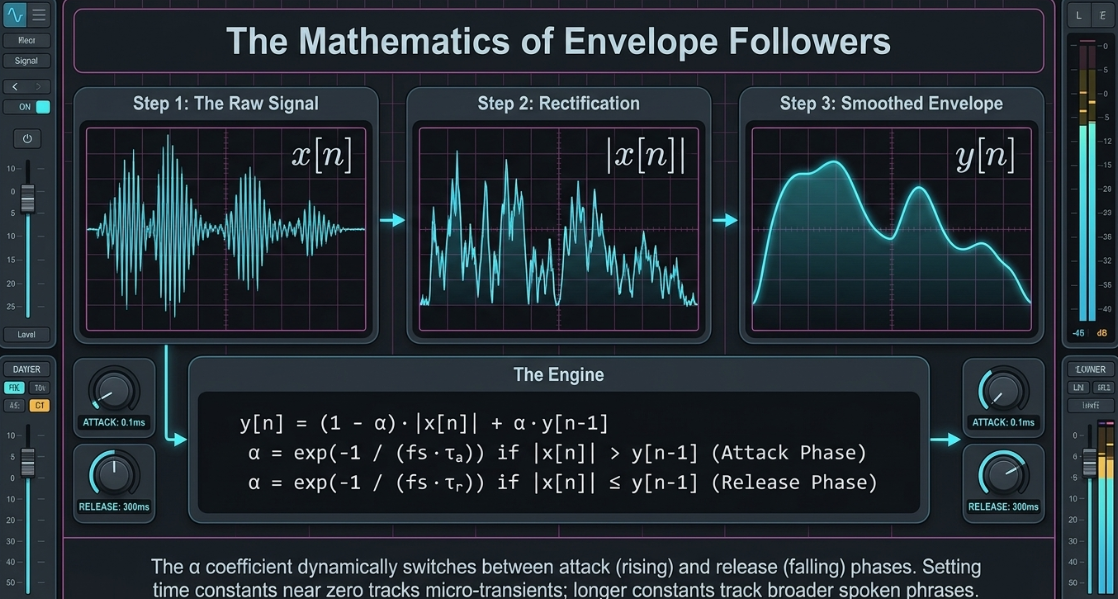
Audacity Dynamic Mirror: In Audacity, Steve Dalton’s Dynamic Mirror (dynamic-mirror.ny) plugin acts as an envelope follower that copies the amplitude curve of a control track and applies it as a gain curve to target tracks below it34. When applied to a single track in "mirror" mode, it causes dynamic range expansion35. When applied in "ducking" mode (inverting the envelope), it performs dynamic range compression35.
A critical technical challenge arises when using Dynamic Mirror on stereo tracks: the plugin calculates an average of the left and right channel envelopes to generate its control curve35. If applied globally, this stereo-averaging process can introduce severe, unnatural panning artifacts as the channels are forced to follow a single, centralized gain curve35. To prevent this, post-production engineers must split stereo tracks into discrete mono files, process each channel independently, and then pan them back to their original stereo positions35.
Real-Time Dialogue Level Riding, De-Essing, and Gate-VOX Pipelines
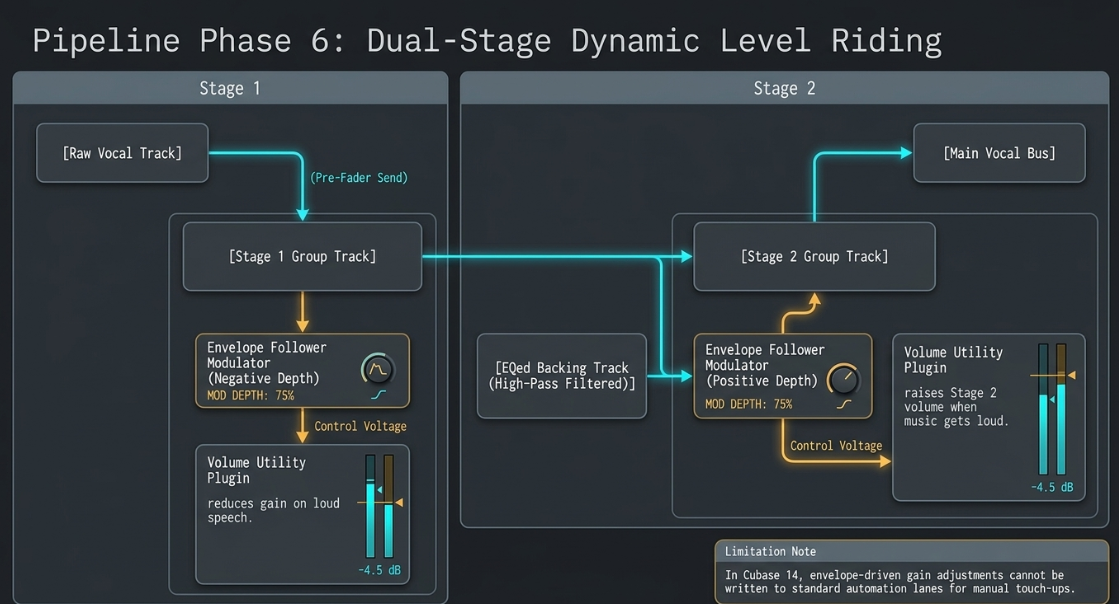
Maintaining dialogue clarity in a podcast mix requires constant level adjustments to ensure that vocals remain intelligible even as background music and sound effects fluctuate1. In Cubase 14, engineers can construct an automated, two-stage vocal riding pipeline using the integrated Envelope Follower Modulator and Volume utility plugin28.
[Raw Vocal Track] ---> (Pre-Fader Send) ---> [Group Track: Vocal Ride Stage 1]
|
(Envelope Follower: Negative Depth)
|
v
[Combined Vocal Bus] <--- [Vocal Ride Stage 2] <----+ (Volume Utility Gain Reduced)
^
(Envelope Follower: Positive Depth)
|
[EQed Backing Track Sidechain]
Stage 1: Dynamic Range Reduction: A pre-fader send from the main lead vocal is routed to a mono Group Track28. This track hosts the Envelope Follower Modulator and a Volume plugin28. The envelope follower analyzes the incoming vocal amplitude and modulates the gain control of the Volume plugin28. By configuring the modulation depth to a negative value (e.g., -50%), the plugin automatically turns down the gain as the speaker gets louder, stabilizing overall dynamics28.
Stage 2: Dynamic Mix Integration: The output of Stage 1 is routed to a second Group Track, "Vocal Ride Stage 2," which sends its signal to the main vocal bus28. This track's envelope follower receives a sidechain input from an "EQed Backing" track28. This sidechain feed represents the instrumental and music beds of the podcast, with a steep high-pass filter applied to remove low-frequency kick drums and sub-bass elements that would otherwise cause the vocal level to pump unnaturally28. The modulation depth in Stage 2 is set to a positive value28. As the backing track increases in volume, the positive modulation automatically raises the gain of the Volume plugin, ensuring the vocal is never masked by the music28.
A notable limitation of this DIY modulator setup in Cubase 14 is that the envelope-follower-driven gain adjustments cannot be written to standard DAW automation lanes, preventing the engineer from performing manual "touch-up" automation passes afterward28.
To manage sibilance, tools like the Hornet Sybilla use multi-band envelope followers to split the vocal signal into eight targeted frequency bands6. Because these envelope followers adapt to the changing dynamics of the speech in real time, they suppress harsh "s" sounds musically without introducing the pumping or lisping common in static, threshold-dependent de-essers6.
In automated dialogue cleanup, platforms like Jivetalking or Jive Vocals utilize a unified Voice Activity Detector (VAD) to analyze LUFS, crest factor, and spectral signatures to automatically configure noise gates and expanders36. This pipeline is structured to apply noise reduction before gating, and gating before compression37. Gating before compression is essential; if the vocal is compressed first, the low-level room noise is amplified, raising the noise floor and making it impossible for a gate to close cleanly without clipping the tails of words37.
Furthermore, during silent gaps, systems like FFmpeg's ebur128 loudness analyzer can report digital silence as Not-a-Number (NaN) values on macOS arm64 platforms while reporting it as negative infinity (-inf) on Linux36. To maintain platform-consistent gating, the VAD code is configured to treat NaN values as floored, preventing the gate from fluttering or failing to close on Apple Silicon hardware36.
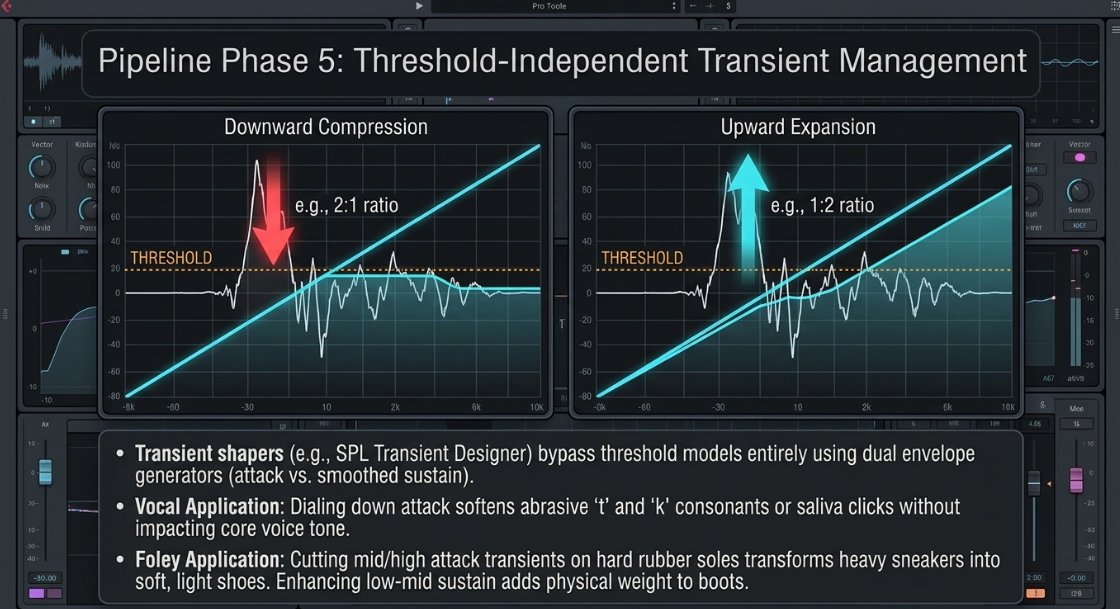
To eliminate the "choppy" gating of voiceovers, engineers combine a voice-activated switch (VOX) with an audio delay line38. A standard noise gate simply cuts off audio when the signal drops below a threshold, often clipping the initial consonants of words38. By splitting the raw vocal to both a VOX trigger and a short digital delay line, the VOX can detect the incoming speech and open the gate on the delayed track a few milliseconds before the sound actually occurs38. When configured with a fast attack and a slow release, the gate opens smoothly before the first syllable starts and closes gently after the phrase ends, delivering natural, un-truncated dialogue38.
Comparative Assessment of Spoken Word Restoration and Leveling Platforms
The table below contrasts the distinct operational philosophies and feature sets of professional spoken-word leveling and restoration systems.
Creative Spatial Intermodulation and Soundscape Synthesis
For cinematic and documentary-style podcasts, maintaining a continuous, evolving sonic background is essential for anchoring the listener's focus during long stretches of narration44. Static loops can quickly cause listener ear fatigue, while entirely random elements can distract from the dialogue27. Post-production sound designers resolve this by utilizing dynamic sound-layering processors that adapt to the host's speech46.
Envelope-Controlled Textural Synthesis
Tools like Devious Machines Texture function as hybrid dynamic samplers that track the absolute amplitude envelope of an incoming audio signal and use it to drive the playback of an extensive internal library or imported user samples47. By placing Texture on a dedicated FX return track and routing the host's voice as a sidechain trigger, sound designers can create organic, highly responsive environments48. For example, a soundscape can be configured where subtle vinyl crackle, tape hiss, or natural water-bubbling sounds swell and recede in perfect sync with the host's narration47. When the host speaks, the background textures naturally swell to add warmth and atmospheric depth; during pauses, the textures decay into silence, preventing the mix from becoming cluttered or muddy1.
To introduce organic variation and prevent the "machine-gun effect" in background soundscapes, platforms like Audiofier Organic Realm utilize per-layer pitch LFOs and step volume sequencing44. This adds continuous, non-repetitive micro-modulation to the synthesis engine44.
Dynamic Foley Layering for Sound Design
In creature voice design or narrative sound effect mapping, this reactive synthesis can be taken a step further46. The dynamic envelope of a vocal line can be mapped to control the volume of parallel sound effect tracks, such as rustling dry leaves, grinding gears, or moving gravel46. This ensures that the physical movement of the sound design is perfectly locked to the speaker's vocal delivery and mouth shapes46.
Furthermore, engineers can implement creative intermodulation distortion on vocals using sidechain routing and a dummy trigger track52.
[Vocal Track] ------------------------> [Saturator / Distortion Plugin]
^
| (Intermodulation Control)
[Dummy Track (Silent Low-Freq Kick)] -----------+
A vocal and a duplicate "dummy" kick track (which contains only low-frequency information and is routed to no output) are grouped and run together into a shared saturator or clipper plugin52. A steep high-pass filter is positioned directly after the saturator to cut out the low frequencies of the dummy kick, leaving only the vocal track52. Because both signals ran hard into the same saturation circuit, the vocal undergoes intense, grit-inducing intermodulation distortion only when the dummy kick strikes, physically modulating the vocal's texture based on the kick's rhythmic timing52.
Engineering Conclusions and Standardized Post-Production Workflows
To construct a reliable, high-performance post-production workflow for professional spoken-word and narrative podcasting, engineers must move away from static, threshold-dependent processing and adopt adaptive, transient-aware, and modulation-driven pipelines1. By integrating these tools, editors can achieve unmatched mix clarity, vocal presence, and realistic sound design1.
The following sequential post-production chain represents the industry standard for integrating these advanced methodologies:
Acoustic Capture and Transient Preservation: Utilize high-headroom, multi-pattern condenser microphones (e.g., AKG C414 XLII) to capture voices with extensive dynamic range8. Avoid front-end limiters and software gain-makeup processing during recording to prevent raising the noise floor38.
Acoustic Isolation and Phase Alignment: When recording Foley via contact transducers (e.g., Cortado MKIII), apply putty in a concentrated "bullseye" pattern to maximize transient transfer10. Secure the tether cable to prevent mechanical vibrations from reaching the sensor10.
Spectral Analysis and Noise Floor Gating: Run the raw audio through a unified Voice Activity Detector to establish precise noise profiles36. Apply spectral denoising before gating, and gating before compression37. Use a soft expander gate (e.g., Drawmer DS201) to perform gentle inter-phrase cleanup without truncating word endings37.
VOX and Delay-Line Integration: For voiceover tracks with prominent room reflections or background noise, route the signal through a parallel VOX sidechain and a physical audio delay line38. Configure the VOX with a fast attack and slow release to open the gate slightly before the speaker begins talking, eliminating truncated syllables38.
Multi-Band Sibilance and Transient Management: Suppress harsh sibilants and mouth clicks using multi-band de-essers driven by adaptive, independent envelope followers6. Apply threshold-independent transient shapers to soften footsteps, leather clothing, and abrasive "t" and "k" consonants without squashing the natural vocal dynamics3.
Dual-Stage Dynamic Level Riding: Automate vocal leveling using envelope followers mapped with negative modulation depth to a volume utility plugin to smooth out micro-dynamics28. Implement a second-stage envelope follower driven by a high-pass-filtered sidechain from the backing music track to dynamically boost the vocal during loud musical passages28.
Machine-Learning Sound Replacement and Foley Layering: Automate tedious Foley editing by deploying machine-learning triggering engines (e.g., UVI Drum Replacer, Slate Trigger 2)13. Isolate components spectrally and map triggers to multi-velocity, round-robin sample layers to emulate natural, physical movement13.
Interactive Textural Soundscapes: Construct immersive background soundscapes by routing dialogue pre-fader sends to sidechain filters on textural synthesizers48. Map the vocal envelope to control the volume, pitch, and filtering of organic backgrounds, ensuring that atmospheric noise and textures swell naturally when the host speaks and decay into silence during pauses46.
Works cited
Audio Engineering in a Professional Podcast Post-Production - Finchley Studios, https://www.finchley.co.uk/finchley-learning/visual-podcast/audio-engineering-in-a-professional-podcast-post-production
Transient Shapers, Clippers And Levelers: The Unsung Dynamics Processors, https://bobbyowsinskiblog.com/transient-shapers-clippers-and-levelers-the-unsung-dynamics-processors/
Processing Foley With Plug-Ins, https://foleyfirst.com/blog/processing-foley-with-plug-ins/
Top 10 Transient Shaper Plugins [2024 Guide] - Produce Like A Pro Academy, https://producelikeapro.com/blog/top-10-transient-shaper-plugins/
Live Drum Triggers: Why Not? | Bax Music Blog, https://www.bax-shop.co.uk/blog/drums/live-drum-triggers-why-not/
HoRNet Sybilla 1.4.0 update, https://www.hornetplugins.com/hornet-sybilla-1-4-0-update/
SPL: Transient Designer | Tape Op Magazine, https://old.tapeop.com/reviews/gear/21/transient-designer/
356-443 Pro Audio (Spring 2012) FINAL.indd, https://static.bhphotovideo.com/FrameWork/Product_Resources/monthlyPDF/summer2012/ProAudio.pdf
PRO AUDIO - 356 - Large Diaphragm Microphones - Manuals.plus, https://manuals.plus/m/62078fece95606ae4d91e083af12cb20f7cb615f7272572d1a8fd1ec87c5a7e6.pdf
Zeppelin Design Labs Cortado MkIII - Sound On Sound, https://www.soundonsound.com/reviews/zeppelin-design-labs-cortado-mkiii
Sound On Sound | PDF | Synthesizer - Scribd, https://www.scribd.com/document/781834912/Sound-On-Sound
Live Drum Triggering - Sound On Sound, https://www.soundonsound.com/techniques/live-drum-triggering
Drum Replacer - Intelligent Drum Triggering - UVI, https://www.uvi.net/drum-replacer
Best Drum Kit Software: 2026 Comparison - Gitnux, https://gitnux.org/best/drum-kit-software/
Waves Audio Launches InTrigger: Smarter Drum Replacement for Modern Production, https://www.musicconnection.com/waves-audio-launches-intrigger-smarter-drum-replacement-for-modern-production/
News: Waves Launches InTrigger Drum Replacer Plugin for Mac and Win., https://www.audiopluginguy.com/news-waves-launches-intrigger-drum-replacer-plugin-for-mac-and-win/
Behind The Groove - Sound On Sound, https://www.soundonsound.com/people/behind-groove
Roland Cloud Drum Studio - Acoustic One Virtual Drum Software | Tape Op Magazine, https://old.tapeop.com/reviews/gear/135/roland-cloud-drum-studio-acoustic-one-virtual-drum-software/
Steven Slate Audio Trigger 2 Platinum - Vintage King, https://vintageking.com/steven-slate-drums-trigger-platinum-2-0
Steven Slate Trigger 2 Platinum - PluginFox, https://pluginfox.com/products/steven-slate-trigger-2-platinum
InTrigger – Intelligent Drum Replacer Plugin - Waves Audio, https://www.waves.com/plugins/intrigger-drum-replacer
Triggering samples from acoustic drums : r/Logic_Studio - Reddit, https://www.reddit.com/r/Logic_Studio/comments/1jw9h8w/triggering_samples_from_acoustic_drums/
apTrigga3 multi layer - apulSoft Forum - KVR Audio, https://www.kvraudio.com/forum/viewtopic.php?t=587488
Wave Alchemy Triaz [Kontakt] - Page 28 - Samplers, Sampling & Sample Libraries Forum - KVR Audio, https://www.kvraudio.com/forum/viewtopic.php?t=575170&start=405
Help with Ableton and Aptrigga - Reddit, https://www.reddit.com/r/ableton/comments/787c56/help_with_ableton_and_aptrigga/
Top Transient Designers For Music Producers and Mixing Engineers - Audio Plugin Deals, https://audioplugin.deals/blog/top-transient-designers-music-producers-mixing-engineers/
Using Transient Processors - Sound On Sound, https://www.soundonsound.com/techniques/using-transient-processors
Cubase 14: Using Modulators For Automatic Vocal Level Riding, https://www.soundonsound.com/techniques/cubase-14-using-modulators-automatic-vocal-level-riding
Max for Live Devices — Ableton Reference Manual Version 12, https://www.ableton.com/en/live-manual/12/max-for-live-devices/
Envelope Follower - Cubase Pro - 15.0 - Steinberg Help, https://www.steinberg.help/r/cubase-pro/15.0/en/cubase_nuendo/topics/modulators/envelope_follower_r.html
EVOC 20 PS sidechain analyser in Logic Pro for iPad - Apple Support, https://support.apple.com/zh-hk/guide/logicpro-ipad/lpip1d7cdba5/ipados
Alchemy envelope follower in Logic Pro for Mac - Apple Support (OM), https://support.apple.com/en-om/guide/logicpro/lgsid3b6fd41/mac
Modifiers - Native Instruments, https://native-instruments.com/ni-tech-manuals/guitar-rig-manual/en/modifiers
Envelope Follower or Ducker? - Audio Processing - Audacity Forum, https://forum.audacityteam.org/t/envelope-follower-or-ducker/51607
Envelope follower / ducker - Nyquist - Audacity Forum, https://forum.audacityteam.org/t/envelope-follower-ducker/47090
jive-vocals/docs/Levelator-Comparison-And-Gap-Analysis.md at main - GitHub, https://github.com/linuxmatters/jive-vocals/blob/main/docs/Levelator-Comparison-And-Gap-Analysis.md
GitHub - linuxmatters/jivetalking: Raw microphone recordings into broadcast-ready audio in one command. No configuration, and no surprises, https://github.com/linuxmatters/jivetalking
What other settings can eliminate ambient sounds in a voice over without using a noise gate ... - Quora, https://www.quora.com/What-other-settings-can-eliminate-ambient-sounds-in-a-voice-over-without-using-a-noise-gate-the-noise-gate-is-making-the-final-product-sound-choppy
Voice Modulation Software: Best Picks (2026) - WifiTalents, https://wifitalents.com/best/voice-modulation-software/
Top 10 Best Voice Modulation Software | 2026 Expert Picks - Gitnux, https://gitnux.org/best/voice-modulation-software/
Izotope RX Post Production Suite - Full Download and License v8.6R1 - PRO AUDIO TOYS, https://www.proaudiotoys.com/products/izotope-rx-post-production-suite-full-download-and-license-v86r1
Top 10 Best Percussion Software (2026 Review), https://worldmetrics.org/best/percussion-software/
Adobe AI Audio Enhancer: Transform Your Audio with AI - DemoCreator - Wondershare, https://democreator.wondershare.com/ai-voice/adobe-ai-audio-enhancer.html
Micron – Organic Realm - Audiofier, https://www.audiofier.co.uk/micron-organic-realm/
Waldorf MicroWAVE XT - Ambient Chillout / Relaxing Meditation Music 【SYNTH DEMO】, https://www.youtube.com/watch?v=nO0tBHvHD0I
Creating Rock Creature Voice - Sound Design Stack Exchange, https://sound.stackexchange.com/questions/19596/creating-rock-creature-voice
Devious Machines Texture review - MusicRadar, https://www.musicradar.com/reviews/devious-machines-texture
Texture by Devious Machines: FX Plugin (VST, AU) | Splice, https://splice.com/plugins/39137105-texture-vst-au-by-devious-machines
Texture - Devious Machines, https://deviousmachines.com/product/texture/
Devious Machines Texture A Plugin That Can Give Any Audio Signal A New Timbre!, https://synthanatomy.com/2018/10/news-devious-machine-texture-plugin.html
Devious Machines launch Percussive Layers 2, https://www.soundonsound.com/news/devious-machines-launch-percussive-layers-2
Anyone have a good sidechain vocal distortion technique? : r/AdvancedProduction - Reddit, https://www.reddit.com/r/AdvancedProduction/comments/koks5r/anyone_have_a_good_sidechain_vocal_distortion/














