
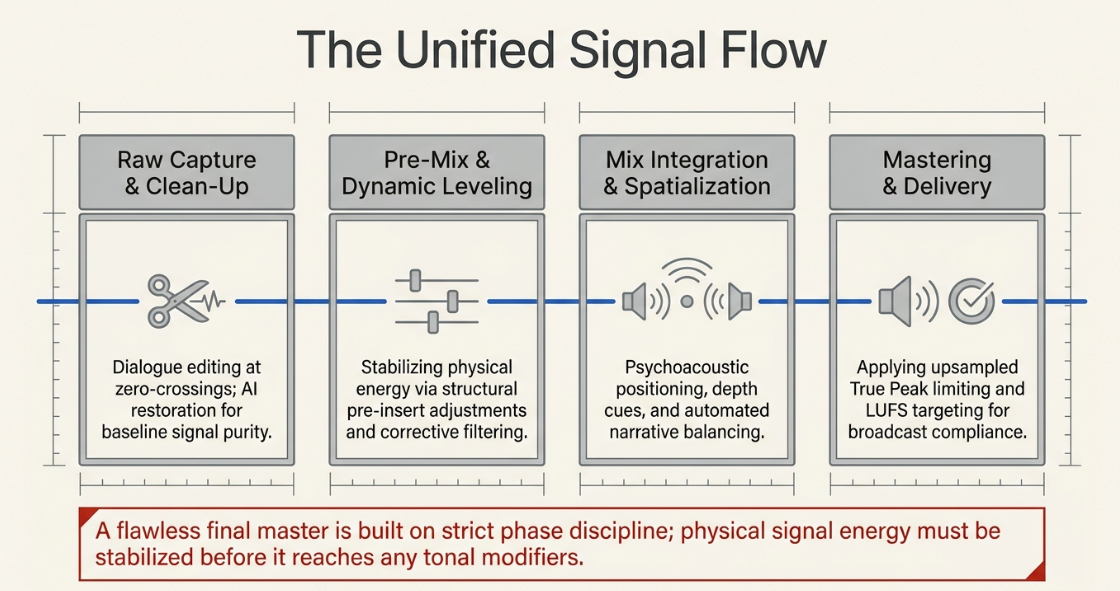
The Unified Signal Flow of Podcast Post-Production and Dialogue Management
In professional podcast post-production, establishing a flawless signal path represents the foundational baseline upon which all subsequent creative mixing and sound design are constructed1. This workflow begins with dialogue editing, a critical first stage serving three core purposes: re-arranging recorded material into a logical sequence, removing uninteresting, unwanted, or technically unacceptable noises, and reducing the total running time3. During this preliminary clean-up phase, editors meticulously trim tracks, apply crossfades, and perform edits strictly at zero-crossings—the exact point where the audio waveform crosses the zero-amplitude line—to prevent audible transient clicks and pops2. Dialogue editors often isolate breaths and mouth noises onto separate tracks to control their amplitudes independently, or run specialized digital restoration tools such as iZotope RX modules to neutralize background hums, room reflections, plosives, and sibilance2.
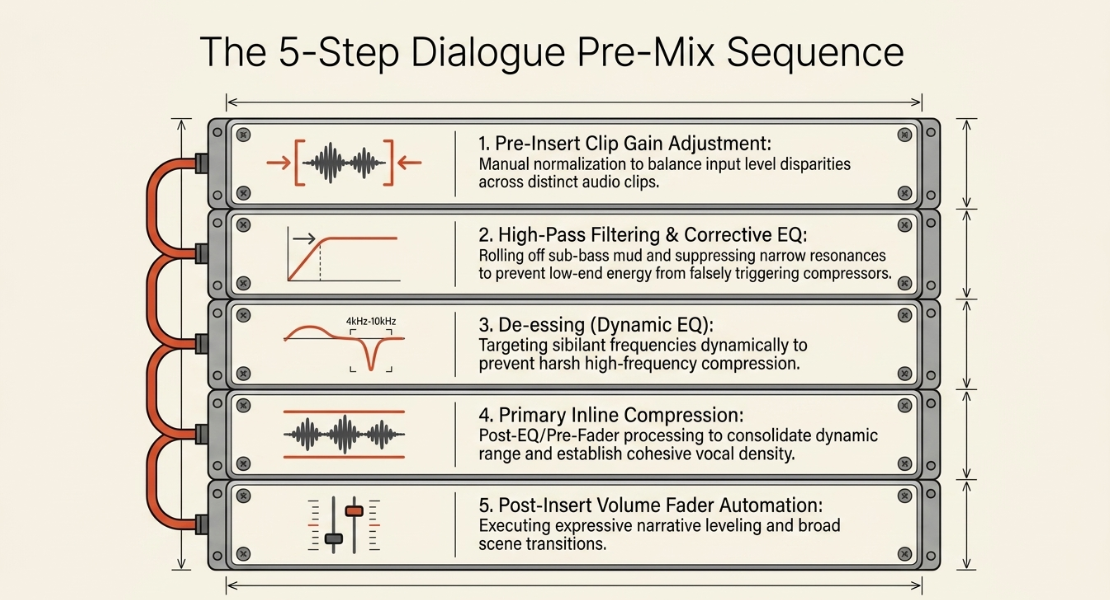
Once the raw files are cleaned, the post-production framework employs a highly structured multi-step pre-mix processing sequence to prepare the audio for the final master4. The integration of these steps ensures that the physical energy of the signal is stabilized before it reaches any tonal modifiers:
Direct Channel Input
│
├──► 1. Pre-Insert Clip Gain Adjustment (Manual Level Normalization)
│
├──► 2. High-Pass Filtering & Surgical Corrective EQ (Resonance Suppression)
│
├──► 3. De-essing & High-Precision Dynamic Leveling (Sibilance Control)
│
├──► 4. Primary Inline Compression (Dynamic Range Consolidation)
│
├──► 5. Post-Insert Volume Fader Automation (Expressive Narrative Leveling)
│
└──► Master Auxiliary Bus (Final Bus Processing & True Peak Limiting) [cite: 10, 11]
This sequence manages the dynamic relationship between pre-insert adjustments and post-insert automation7. Clip gain is applied pre-insert to directly scale the raw waveform voltage entering the channel strip4. Because this adjustment occurs before any insert plug-ins, modifying clip gain dictates how hard the signal drives into downstream compressors or dynamic equalizers4. Raising the clip gain of a quiet word forces it past the threshold of an insert compressor, increasing the overall gain reduction and changing the harmonic character of the voice7. Conversely, post-insert volume fader automation operates at the output of the channel strip4. Adjusting the fader moves the level of the fully processed signal, allowing the engineer to execute broad volume rides and scene fades without altering the behavior or threshold response of the dynamic processors upstream7.
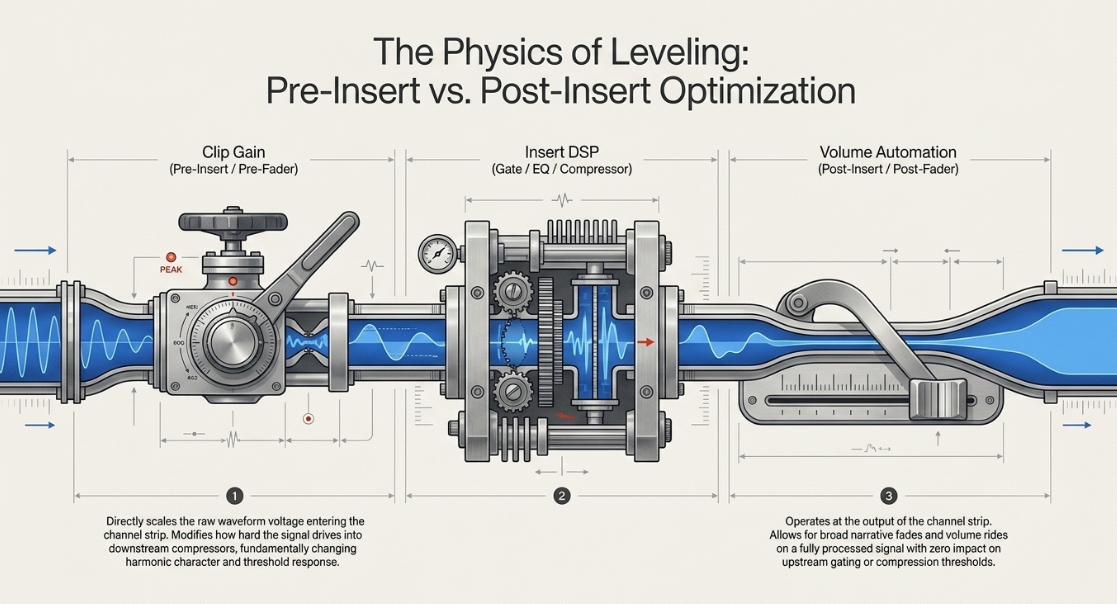
Pre-Insert vs. Post-Insert Signal Optimization Flow:
[Clip Gain Adjustment (Pre-Insert)] ──► [Insert DSP: Gate ──► EQ ──► Compressor] ──► [Fader Automation (Post-Insert)]
Modern post-production pipelines supplement this workflow with semantic audio analysis and text-based speech editors12. Software applications like Dialogger, Vampeyer, and BeatMap analyze semantic audio features to map speech transcriptions directly to the timeline3. This enables editors to perform structural cuts, rearrangements, and duration reductions directly within a text interface, automatically executing corresponding non-destructive edits on the underlying multi-track audio timeline3.


Interactive Digital Audio Workstation Automation Modes and Protocols
To execute dynamic level changes and parameter sweeps across a timeline, digital audio workstations (DAWs) rely on standardized automation write modes15. These modes dictate how existing automation data is read, overwritten, or updated in real-time16. In professional post-production environments, where efficiency and session safety are paramount, selecting the correct automation mode for each mixing phase prevents destructive overwriting and streamlines long-format sessions15.
The fundamental DAW automation modes function as follows:
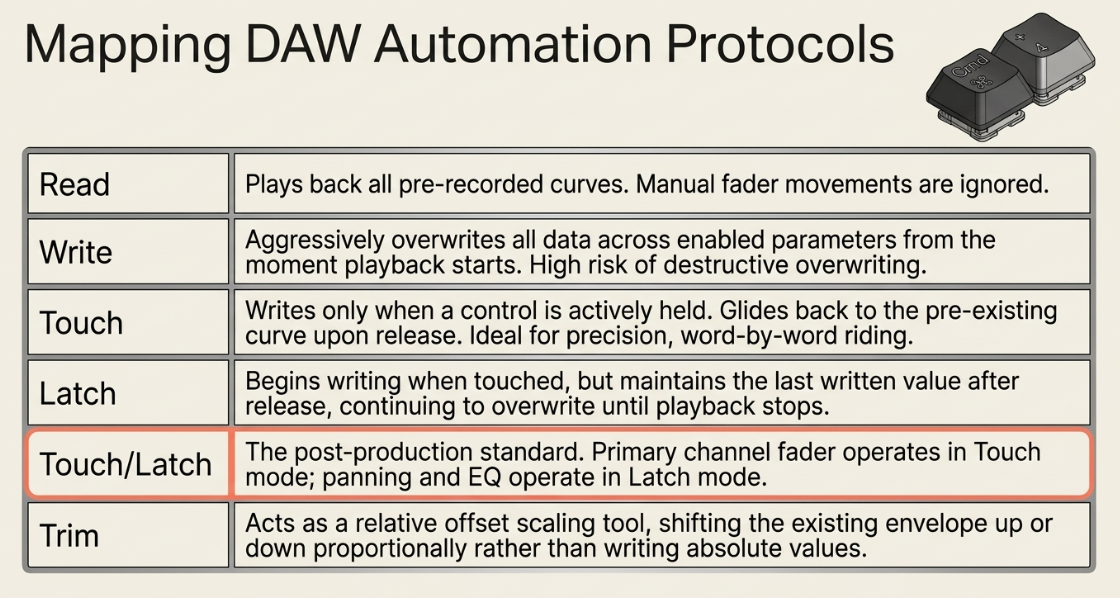
Read Mode: The default operational state where the DAW plays back all pre-recorded automation curves written to the faders, panning pots, or plug-in parameters15. Manual fader movements during playback are ignored, and no new data can be written15.
Write Mode: An aggressive mode that overwrites all existing automation data on the track across all write-enabled parameters from the moment playback begins15. It continues writing the current fader position even if no controls are touched, completely erasing pre-existing passes15.
Touch Mode: Writes automation data only when an enabled control is actively touched or clicked15. Upon release, the parameter smoothly glides back to follow the pre-existing automation curve on the track15. This is ideal for precision, word-by-word level riding14.
Latch Mode: Begins writing automation data only when a control is touched, but maintains the last written value after release, continuing to overwrite existing data at that "latched" level until playback stops15.
Touch/Latch Mode: A hybrid post-production standard where the primary channel fader operates in Touch mode while all other parameters, such as EQ filters, panning, and send levels, operate in Latch mode15.
Trim Mode: Acts as a relative offset scaling tool15. Instead of writing absolute values, the fader shifts the existing automation curve up or down proportionally15. In Pro Tools Ultimate, Trim can be combined with Touch or Latch to record relative offset adjustments in real-time15.
To manage these modes during complex mixes, engineers use hardware and software-based automation windows to globalize write-permissions15. In Pro Tools, the Automation Window (accessed via Command + 4 on the numeric keypad) features red write-enable buttons to toggle globally writeable parameters, including Volume, Pan, Mute, Send, and Plug-In data15.
For rapid setup of plug-in automation, the keyboard shortcut Control + Option + Command (Mac) or Ctrl + Alt + Start (Windows) is held while clicking a parameter on the plug-in interface to instantly enable or disable it for automation tracking21.
Pro Tools Automation Control Interface (Cmd + 4):
┌────────────────────────────────────────────────────────┐
│ [Suspend] │
│ Write Enabled: │
│ [VOLUME] (Red) [PAN] (Red) [MUTE] (Red) │
│ [SEND] (Red) [PLUG-IN] (Red) │
│ │
│ Modes: [Preview] [Punch Preview] [Capture] │
└────────────────────────────────────────────────────────┘
Advanced automation desks also leverage specific dynamic buffer tools16:
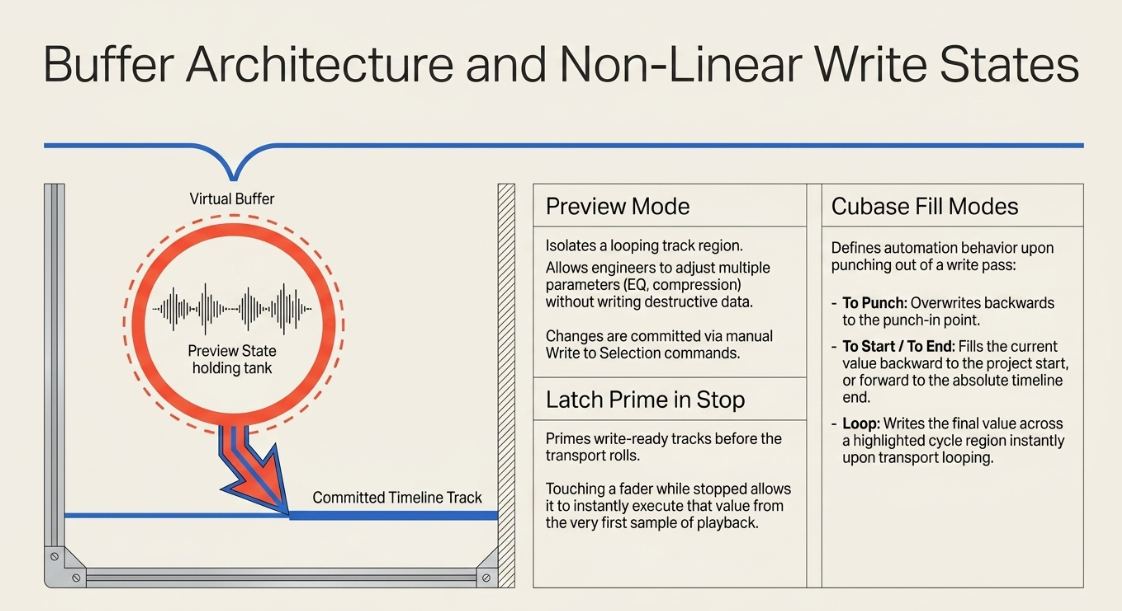
Preview Mode: Allows the mixing engineer to isolate a track, loop a section, and adjust multiple parameters (EQ, compression, sends) to find the perfect setting without writing any destructive data to the timeline19. Once satisfied, the engineer highlights the target timeline range and commits the change using a manual write command, such as "Write to Selection" or "Write to End"19.
Latch Prime in Stop: Enables write-ready tracks to enter an active preview state before the transport begins rolling16. Touching any fader while stopped "primes" it, allowing it to instantly write that value from the very first sample of playback16.
Cubase Fill Modes: Cubase integrates unique "Fill" automation behaviors within its central panel, defining what happens when an engineer punches out of an active writing pass22. The "To Punch" mode writes the current value back to the initial punch-in point22. "To Start" fills the current value back to the beginning of the project22. "To End" overwrites all subsequent automation with the final fader value to the very end of the timeline22. "Loop" writes the final fader value across the entire highlighted cycle region as soon as the playback head loops, providing a fast method to balance distinct podcast segments22.
This linear DAW automation workflow is supported by structural editing techniques such as Ripple Editing, which is natively integrated into platforms like Reaper and WaveLab Pro23. Proper ripple editing allows editors to adjust the timing of a multi-track dialogue session by clicking and dragging a single audio region; all subsequent regions, markers, and underlying automation envelopes slide in perfect sync across all tracks, preventing phase misalignment and automation drift23. While missing as a native click-and-drag option in Cubase and Nuendo, ripple editing is simulated in those platforms through keyboard macros like Option + Y (select all events to the right) and Option + T23.
Sidechain Compressing, Automated Leveling, and Spectral Frequency Ducking
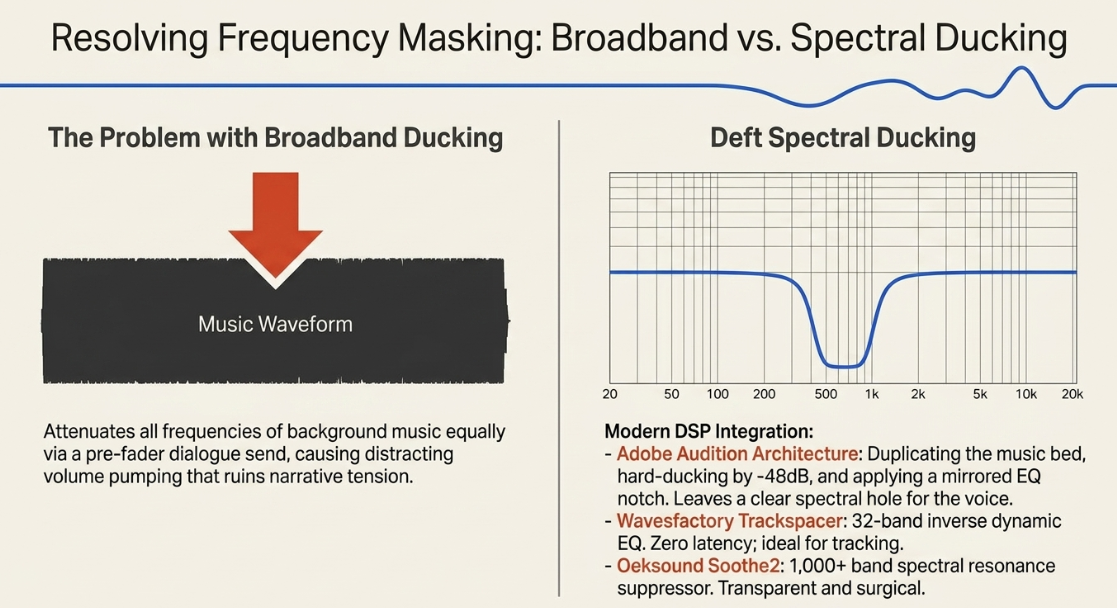
Managing the relationship between multiple speakers and dense background elements is critical in narrative podcasts and audio dramas, where dialogue must remain the primary focus8. Traditional amplitude-based sidechain compression, or audio ducking, relies on a broadband compressor inserted on the music or sound effects channel8. The sidechain detector path is fed by a pre-fader send from the dialogue track25. When a host speaks, the compressor attenuates the entire music track, raising it back to its original level during pauses8.
While simple to configure, broadband ducking compresses all frequencies of the background music equally, which can cause distracting volume pumping24. This is especially problematic in narrative formats where background elements must remain loud and clear without masking the speaker's voice28.
To resolve frequency masking more naturally, engineers use spectral-domain sidechaining and dynamic equalization24. In Adobe Audition, this can be achieved manually through a technique known as "Deft Ducking" (digitally enabled frequency tunneling)29. This workflow isolates the competing frequency ranges of background music while preserving the rest of its stereo image29:
Adobe Audition Deft Ducking (Frequency Tunneling) Architecture:
┌──► [Track 1: Dialogue / Voice Over] ──────┐
│ │
│ ▼ (Sidechain Trigger)
[Source Audio] ────┼──► [Track 2: Full Music Bed] ──────► [Auto-Ducking (-48 dB)]
│ │
│ ▼
└──► [Track 3: Duplicate Music Bed] ──► [Surgical Parametric EQ Notch]
│
▼
[Summed Master Output]
By applying a parametric EQ notch to the duplicate track (Track 3) that mirrors the vocal range, and hard-ducking the full music track (Track 2) by 
Modern post-production workflows often replace manual duplicate-track routing with dedicated spectral sidechain plug-ins27. These tools process frequency masking in real-time, using different internal architectures27:
Wavesfactory Trackspacer: Utilizes a 32-band frequency analysis system27. It applies a real-time, inverse dynamic EQ curve to the target track based on the sidechain input30. Trackspacer operates with low processing overhead and zero latency, making it ideal for real-time tracking, live streaming, or early mixing stages27.
Oeksound Soothe2: Functions as a dynamic spectral resonance suppressor, dividing the incoming audio into over 1,000 narrow frequency bands27. When sidechained to a dialogue track, Soothe2 dynamically suppresses only the precise, ringing resonances in the background music that conflict with the speaker’s voice27. This surgical approach is highly transparent but introduces substantial latency, making it best suited for the final mixdown or mastering stage27.
Spatial Panning, Stereo Imaging, and Psychoacoustic Localization
Spatialization is a powerful storytelling tool in narrative podcasts and audio dramas, transporting the listener into the physical environment of the scene5. However, positioning audio elements across a stereo field requires a deep understanding of psychoacoustics and system compatibility to ensure the mix translates consistently across different playback devices34.
Pan Law Math and Mono Summation
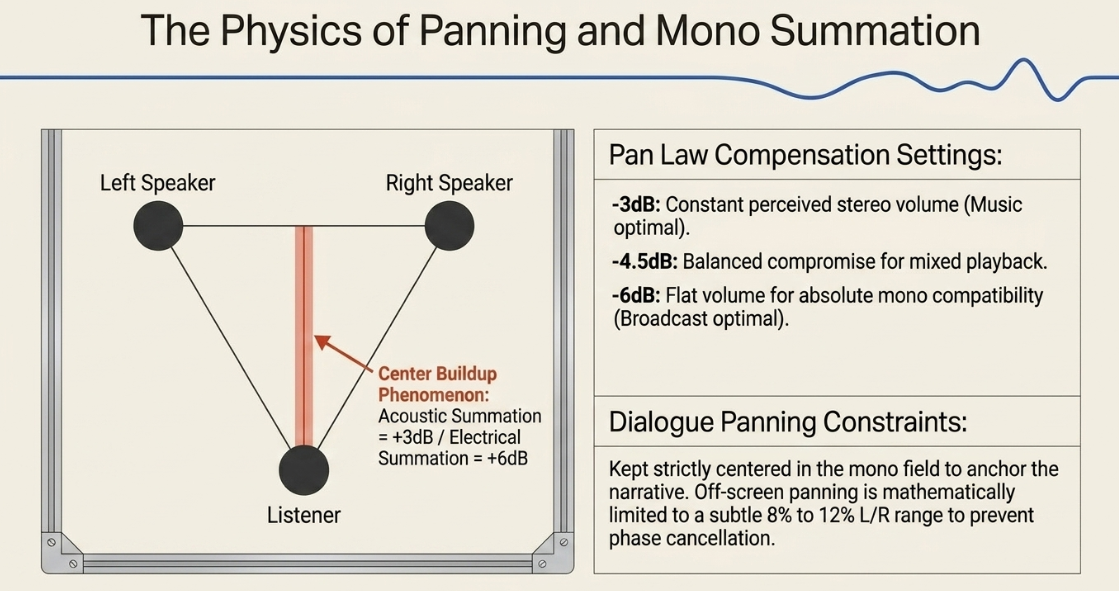
When a mono signal is panned directly to the center of a stereo mix, it is routed equally to both the left and right speakers36. In an acoustic space, the physical sound waves from both speakers combine, resulting in an acoustic summation that increases the perceived loudness in the center by 

To prevent this center volume spike, DAWs use Pan Laws to attenuate the signal as it moves toward the center37:


In professional post-production, dialogue is almost always kept centered in the mono field33. Standard practices suggest avoiding panning dialogue to match visual screen movements, as hard-panned speech can pull focus away from the center narrative thread, cause phase cancellation in mono systems, or introduce acoustic delays in larger spaces39. If off-screen action requires panning, engineers typically limit the shift to a subtle range of 

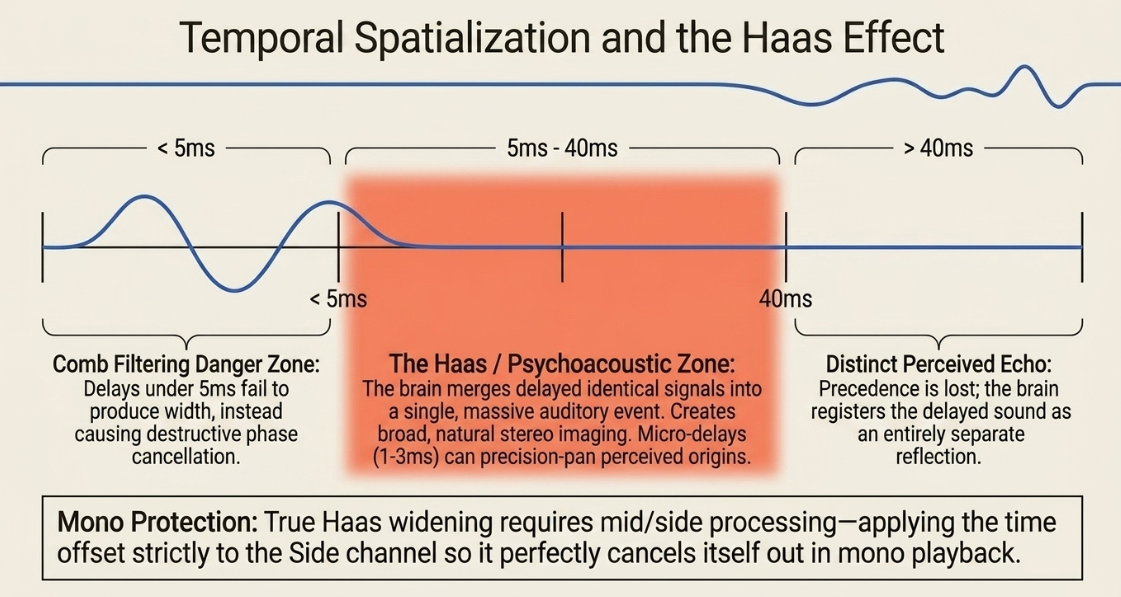
The Haas Effect and Temporal Spatialization
Named after Helmut Haas, the Haas Effect (or Precedence Effect) states that when two identical sounds are heard within a short time delay (typically between 


Haas Effect Temporal Continuum:
[0 ms] ------------ [5 ms] ---------------------------------- [40 ms] ------------> (Delay)
| | |
v v v
Phase Cancellation & Optimal Spatial Width Zone Distinct Perceived Echo
Comb Filtering [67] (Psychoacoustic Width) [67, 70] (Precedence Lost) [67, 68, 70]
Delays under 


To apply Haas effect panning to a mono source, engineers duplicate the track, pan the original and duplicate hard-left and hard-right, and insert a simple delay set to 


For precision panning, micro-delays between 


However, a major challenge of using the Haas effect is mono compatibility43. When a Haas-widened stereo signal is summed to mono, the time offset causes comb filtering45. To prevent this, engineers often use mid/side processing to apply the Haas delay strictly to the side channel, ensuring it cancels itself out completely in mono while preserving a wide stereo image42.
Distance Perception and Spatial Cues
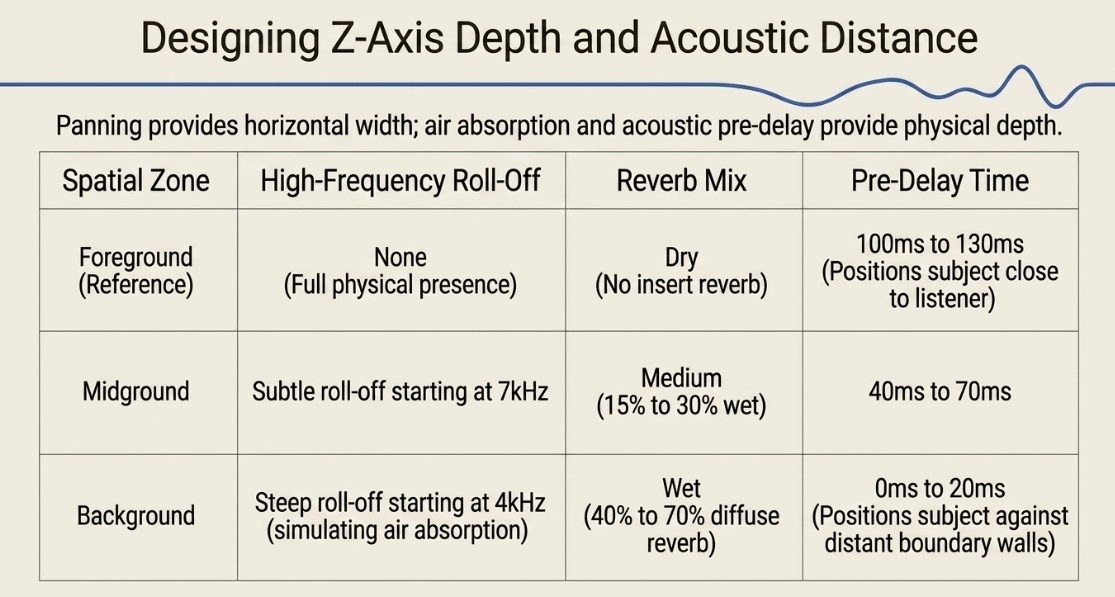
True spatial depth cannot be achieved through panning alone35. In the physical world, distance perception relies on a combination of specific acoustic cues35:
Direct-to-Reverberant Ratio: As a sound source moves further away from the listener, the amplitude of its direct path decreases, while the level of its reflected path (reverberation) remains relatively constant33. Elevating the direct-to-reverberant ratio pulls a sound forward, while lowering it pushes the sound back into the mix35.
High-Frequency Roll-off: Air absorption acts as a natural low-pass filter over distance35. Attenuating high frequencies with a gentle shelf EQ makes a sound appear distant, whereas crisp high-end frequencies pull it closer to the listener35.
Pre-Delay Modulation: Pre-delay is the time gap between the arrival of the direct sound and its first early reflection42. A long pre-delay makes a room feel large and positions the sound source close to the listener42. A short pre-delay pushes the sound source away, making it feel closer to the boundaries of the acoustic space35.
To apply these cues efficiently during a mix, engineers group tracks into dedicated Foreground, Midground, and Background buses early in the session35. Broad processing is applied to each bus rather than individual clips, reducing decision fatigue and ensuring a cohesive spatial perspective across the entire soundstage35.


Creative Modulation Systems for Sound Design and Dialogue Styling
In narrative podcasts and audio dramas, time-based modulation effects are used to style dialogue, transition between scenes, and build complex, immersive soundscapes49. These processors—including Chorus, Flangers, Phasers, Tremolos, and Auto-panners—rely on Low-Frequency Oscillators (LFOs) to modulate parameter values over time, introducing movement and texture48.
Anatomy of an LFO-Driven Time-Based Modulation Effect:
[Low-Frequency Oscillator (LFO)]
│ (Modulation Speed / Rate)
▼ (Modulation Depth / Range)
[Mono Signal Input] ──┬──► [Variable Delay Line / Phase Shifter Stage] ──► [Wet Signal] ─┐
│ ├─► [Master Output]
└───────────────────────► [Dry Signal Path] ────────────────────────┘
The physical behavior and sound design applications of these effects are defined by their delay times and processing methods48:
Chorus: Simulates the sound of multiple performers playing the same part slightly out of sync48. The processor creates copies of the original signal, modulates their delay times using a slow LFO (typically utilizing delay times between


Flanger: The flanger duplicates the signal and applies an extremely short, LFO-modulated delay of


Phaser: Unlike chorus and flanger, a phaser does not use physical delay lines48. Instead, it routes the audio through a series of all-pass filters (referred to as stages) to shift the phase of specific frequencies48. When combined with the dry signal, this phase shift creates non-harmonically spaced notches in the spectrum48. As the LFO sweeps these notches, it generates a smooth, liquid swirl48. Because it alters phase rather than time, the phaser is highly organic and less metallic than the flanger52. This is ideal for subtle atmospheric movement or stylized voice manipulation50.
To build complex soundscapes, engineers often avoid inserting modulation effects directly onto a channel47. Instead, they use parallel send routing47. A small amount of the track's signal is sent to an auxiliary channel loaded with multiple processors—such as a flanger followed by a dark plate reverb and a ping-pong delay—and resampled onto its own dedicated track47. This creates a separate sound design layer that can be automated and balanced underneath the clean dialogue, maintaining vocal clarity while adding depth and texture to the scene8.
Loudness Compliance, Peak Management, and Automated Processing Systems
Modern podcast distribution relies on strict integrated loudness and peak limit targets to ensure a consistent, comfortable listening experience across different platforms and consumer devices11. International standards utilize Loudness Units Full Scale (LUFS/LKFS) as their primary reference11.
This measurement is built on the ITU-R BS.1770-5 algorithm, which models human hearing using a high-shelving pre-filter (to account for acoustic diffraction around the human head) and a high-pass filter55. The filtered signal is measured over overlapping 
The mathematical representation of integrated loudness over a measurement interval 

where 


To prevent digital clipping on consumer devices, engineers also monitor True Peak levels11. Unlike traditional sample-peak meters, which only measure levels at the physical sampling points, true-peak estimation algorithms upsample the digital signal by 














Automated Leveling and Channel Strip Architecture
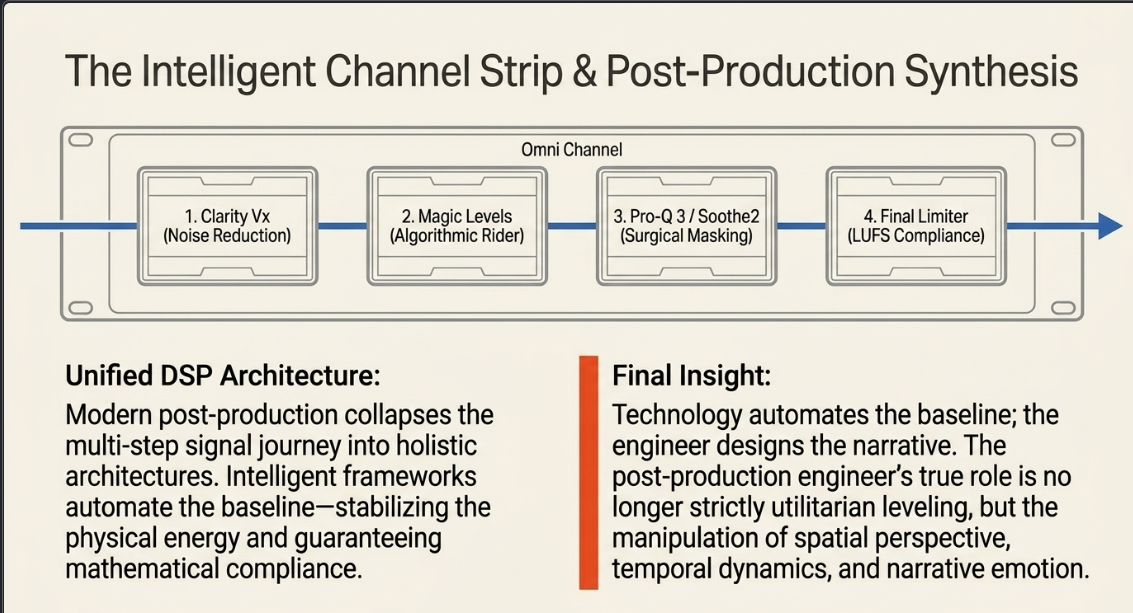
To consistently meet these loudness targets and streamline the post-production workflow, engineers rely on specialized automation plug-ins and intelligent channel strips6.
Waves Vocal Rider: This tool automatically rides the volume of dynamic voice tracks in real-time, bringing quiet parts up and loud parts down6. By stabilizing the voice before it hits the compressor, Vocal Rider reduces the amount of physical gain reduction required, resulting in a cleaner, more vibrant vocal performance6.
Hindenburg Pro: Includes automatic input leveling and features like the Voice Profiler Pro, which automatically calculates a tailored EQ curve for a speaker’s voice to ensure spectral consistency across episodes62. Its Magic Levels feature automates the placement of volume fader anchors, smoothing out dynamic peaks and level discrepancies between distinct hosts and callers63.
Waves Scheps Omni Channel: A comprehensive channel strip that packages corrective filters, dual de-essers, saturation, parametric EQ, and a final limiter into a single interface6. This allows editors to quickly establish clear, consistent dialogue levels and perform corrective clean-up in one place6.
Strategic Post-Production Architecture and Conclusions
For professional podcast post-production, the signal path and processing choices must follow a logical sequence to ensure maximum clarity and efficiency1. Based on the technical requirements of modern delivery platforms, the following structural workflow is recommended:
Integrated Professional Post-Production Signal Flow:
[Raw Capture Stage]
│
▼
[Dialogue Editing Stage] ──► Focuses on pre-insert Clip Gain corrections.
│
▼
[In-Line Dynamic Processing] ──► Uses sidechain-driven dynamic EQ to carve spectral room [cite: 9, 24, 29].
│
▼
[Mix Integration Stage] ──► Leverages Touch/Latch automation modes to balance elements.
│
▼
[Mastering Stage] ──► Applies upsampled True Peak limiting to hit the target LUFS [cite: 11, 57].
By structuring the post-production workflow into distinct editing, dynamic processing, mixing, and mastering phases, engineers can maintain maximum headroom and ensure a consistent, translatable listening experience on any device1.
Using clip gain to establish a balanced baseline, dynamic EQ to resolve frequency masking, and DAW automation modes to execute smooth, non-destructive transitions allows the mixer to craft a highly polished, professional final master7. This methodology preserves the natural dynamics and emotion of the performance while delivering a clean, loud, and broadcast-ready product8.
Works cited
Guide to gain staging in audio production - Avid, https://www.avid.com/resource-center/gain-staging-guide
Audio Post-Production: Complete Guide, Techniques, and More - Boris FX, https://borisfx.com/blog/audio-post-production-complete-guide/
Semantic Audio Tools for Radio Production - GitHub Pages, https://chrisbaume.github.io/thesis/
Vocal Automation and clip gain questions... - SOS FORUM, https://www.soundonsound.com/forum/viewtopic.php?t=57597
From Novice to Expert: Master Sound Design in Podcasting Like a Pro, https://robsummers.co.uk/from-novice-to-expert-master-sound-design-in-podcasting-like-a-pro/
Top 10 Audio Plugins for Podcast Production, https://podcastengineeringschool.com/top10/
Volume or Clip Gain Automation? : r/AudioPost - Reddit, https://www.reddit.com/r/AudioPost/comments/1lwo7dx/volume_or_clip_gain_automation/
Audio Drama Post-Production: Editing and Mixing for Perfection - Journalism University, https://journalism.university/audio-podcast/audio-drama-post-production-editing-mixing/
Beyond the Music: Mastering Your Podcast Audio with the Right Plugins (My Current Go-To Guide) - Lochlainn Harte, https://lochlainnharte.com/2025/03/23/beyond-the-music-mastering-your-podcast-audio-with-the-right-plugins-my-current-go-to-guide/
Technical Document AES TD1004.1.15-10 Recommendation for Loudness of Audio Streaming and Network File Playback, https://aes.org/wp-content/uploads/2024/01/AESTD1004_1_15_10.pdf
Semantic Audio Tools for Radio Production - Surrey Open Research repository, https://openresearch.surrey.ac.uk/view/delivery/44SUR_INST/12138812960002346/13140431650002346
The Ultimate Guide to Dynamic Equalization in Audio Production - ACE Studio, https://acestudio.ai/blog/dynamic-equalization-in-audio-production/
The Importance of Gain Staging and Automation | SoundGirls.org, https://soundgirls.org/the-importance-of-gain-staging-and-automation/
Automation Modes in Pro Tools: Tips & Tricks - ProMedia Training, https://www.protoolstraining.com/blog-help/pro-tools-blog/tips-and-tricks/463-automation-modes-in-pro-tools
Lunch and Learn: Pro Tools Automation 101 - Boom Box Post, https://www.boomboxpost.com/blog/lunch-and-learn-pro-tools-automation-101
Automation - Universal Audio Support, https://help.uaudio.com/hc/en-us/articles/360041469672-Automation
Choose automation modes in Logic Pro for Mac - Apple Support, https://support.apple.com/ar-kw/guide/logicpro/lgcpb1a6ab26/mac
Automating Plugin Settings : r/AudioPost - Reddit, https://www.reddit.com/r/AudioPost/comments/ztslqa/automating_plugin_settings/
DAW Automation: What It Is And How It Works | Bax Music Blog, https://www.bax-shop.co.uk/blog/studio-recording/daw-automation-what-it-is-and-how-it-works/
Video Tutorial | Plugin Automation In Pro Tools - ProMedia Training, https://www.protoolstraining.com/blog-help/pro-tools-blog/tips-and-tricks/430-video-tutorial-plugin-automation-in-pro-tools
Automation Modes, https://www.soundonsound.com/techniques/automation-modes
Cubase vs. Nuendo for Audio drama - Steinberg Forums, https://forums.steinberg.net/t/cubase-vs-nuendo-for-audio-drama/969082
Better Ducking for Voiceovers & Podcasts - PreSonus, https://www.presonus.com/blogs/home/better-ducking-for-voiceovers-podcasts
What is Audio Ducking and How to Do It in Music Production - iZotope, https://www.izotope.com/community/blog/what-is-audio-ducking
Sound Quality Saturday: What Is Side-Chain Compression (Ducking) & How Do You Use It? : r/podcasting - Reddit, https://www.reddit.com/r/podcasting/comments/ntacv6/sound_quality_saturday_what_is_sidechain/
Trackspacer - still the king or any alternatives? - Page 2 - Effects Forum - KVR Audio, https://www.kvraudio.com/forum/viewtopic.php?t=595399&start=15
Auto-Ducking is a TREMENDOUS time saver : r/podcasting - Reddit, https://www.reddit.com/r/podcasting/comments/p7gm6h/autoducking_is_a_tremendous_time_saver/
Tutorial: Better automated ducking for music behind voice overs - Adobe Community, https://community.adobe.com/questions-544/tutorial-better-automated-ducking-for-music-behind-voice-overs-158467
Ducking Resonance & Strings/Pads with Trackspacer - PianoClack Forum, https://pianoclack.com/forum/d/2249-ducking-resonance-stringspads-with-trackspacer
Using Soothe2 by oekound to Clean up Harsh Frequencies in Podcast Vocals - YouTube, https://www.youtube.com/watch?v=g4LuaFH8UEk
How useful is Soothe2, and is it a plugin that many people are using? : r/edmproduction, https://www.reddit.com/r/edmproduction/comments/18qij0p/how_useful_is_soothe2_and_is_it_a_plugin_that/
How panning audio can transform your tracks: Tips and tricks for better mixes - BandLab Blog, https://blog.bandlab.com/panning-music-guide-bandlab/
How to effectively use panning in podcasts - Universal Music for Creators, https://www.universalmusicforcreators.com/news/how-to-effectively-use-panning
How to pan spatial audio for realistic depth and faster mixes - Krotos Studio, https://krotos.studio/blog/spatial-audio
Panning in Music: Stereo & Surround Sound Tips Explained - AutoTune, https://www.antarestech.com/blog/what-is-panning-in-music
Pan Law for Video Editors | digitalfilms - WordPress.com, https://digitalfilms.wordpress.com/2026/03/08/pan-law-for-video-editors/
Q. What pan-law setting should I use? - Sound On Sound, https://www.soundonsound.com/sound-advice/q-what-pan-law-setting-should-use
When to pan dialog : r/AudioPost - Reddit, https://www.reddit.com/r/AudioPost/comments/b9tw2c/when_to_pan_dialog/
Best practice for panning dialogue in surround? (5.1) : r/AudioPost - Reddit, https://www.reddit.com/r/AudioPost/comments/18d3cp7/best_practice_for_panning_dialogue_in_surround_51/
What is the Haas effect and how to use it for width? - Wisseloord Studios, https://wisseloord.org/academy/what-is-the-haas-effect-and-how-to-use-it-for-width
What Is the Haas Effect and How to Use It - iZotope, https://www.izotope.com/community/blog/what-is-the-haas-effect
The Haas Effect: How To Make Any Mix Sound Huge - EDMProd, https://www.edmprod.com/haas-effect/
What is/How do I apply the Haas effect, make binaural beats...and other weird dsp stuff, https://idmforums.com/t/what-is-how-do-i-apply-the-haas-effect-make-binaural-beats-and-other-weird-dsp-stuff/2652
Haas Effect Panning - Scott Troyer, https://scotttroyer.com/2013/05/hass-effect-panning/
The Haas effect - Klevgrand, https://klevgrand.com/stories/the-haas-effect
5 Killer Sound Design Tricks to use in your DAW - Mixed In Key, https://mixedinkey.com/captain-plugins/wiki/5-killer-sound-design-tricks-to-use-in-your-daw/
Understanding Chorus, Flangers, and Phasers in Audio Production - iZotope, https://www.izotope.com/community/blog/understanding-chorus-flangers-and-phasers-in-audio-production
Audio effects in music production: ultimate guide - ACE Studio, https://acestudio.ai/blog/ultimate-guide-to-audio-effects/
Audio Reverb, Modulation, and Sound Design Effects Tools, https://elysiatools.com/en/hubs/audio-sound-design-effects
Sounding Out Science: the Sonaphor and Electronic Sound Design as a Learning Tool in Secondary Science - ResearchGate, https://www.researchgate.net/publication/362904880_Sounding_Out_Science_the_Sonaphor_and_Electronic_Sound_Design_as_a_Learning_Tool_in_Secondary_Science
Modulation Effects: Chorus, Flanger, and Phaser for Depth and Movement, https://virtualsynthesizers.com/articles/modulation-effects-chorus-flanger-and-phaser-for-depth-and-movement/
Sound Design Techniques & Tools Series: Part 4 - Classic Modulation FX, https://getthatprosound.com/sound-design-techniques-tools-series-10-key-ways-to-shape-stretch-and-transform-your-audio-and-the-best-plugins-for-the-task-part-4-classic-modulation-fx/
Audio Levels for Podcasts and Video (Any Editing System!) Easy Fix! - YouTube, https://www.youtube.com/watch?v=_vecHTGK7Yo
RECOMMENDATION ITU-R BS.1770-3* - Algorithms to measure audio programme loudness and true-peak audio level, https://www.itu.int/dms_pubrec/itu-r/rec/bs/R-REC-BS.1770-3-201208-S!!PDF-E.pdf
Recommendation ITU-R BS.1770-5 (11/2023) Algorithms to measure audio programme loudness and true-peak audio level, https://www.itu.int/dms_pubrec/itu-r/rec/bs/R-REC-BS.1770-5-202311-I!!PDF-E.pdf
Learn More: Peak Metering - Audio Engineering Society, https://aes.org/resources/audio-topics/loudness-project/learn-more/
8 Crucial Podcast Intro Music Tips to Elevate Your Show in 2026 | SFX Engine, https://sfxengine.com/blog/podcast-intro-music-tips
Worldwide Loudness Delivery Standards - RTW Audio, https://www.rtw.com/blog/rtw-knowledge-base-1/worldwide-loudness-delivery-standards-4
Loudness and True Peaks: How to Measure and When to Flag - Netflix | Partner Help Center, https://partnerhelp.netflixstudios.com/hc/en-us/articles/360050414014-Loudness-and-True-Peaks-How-to-Measure-and-When-to-Flag
Podcast Editing Tools Creators Use for Professional Audio - Fueler, https://fueler.io/blog/podcast-editing-tools-creators-use-for-professional-audio
Hindenburg Journalist Pro: Complete Review & Walkthrough [2020] - Buzzsprout, https://www.buzzsprout.com/blog/hindenburg-journalist-review-and-walkthrough
Use Magic Levels in Hindenburg Journalist Pro? : r/podcasting - Reddit, https://www.reddit.com/r/podcasting/comments/gvklz0/use_magic_levels_in_hindenburg_journalist_pro/
Magic levels in Hindenburg Journalist. Automix in a DAW : r/podcasting - Reddit, https://www.reddit.com/r/podcasting/comments/g4difb/magic_levels_in_hindenburg_journalist_automix_in/
What Are The Best DAW And Plugins For Editing Podcasts? - Tansy Aster Academy, https://tansyasteracademy.com/what-are-the-best-daw-and-plugins-for-editing-podcasts/














